Mary Clem: getting it right

by Paul Curzon, Queen Mary University of London

Mary Clem was a pioneer of dependable computing long before the first computers existed. She was a computer herself, but became more like a programmer.

A tick on a target of red concentric zeros
Image by Paul Curzon

Back before there were computers there were human computers: people who did the calculations that machines now do. Victorian inventor, Charles Babbage, worked as one. It was the inspiration for him to try to build a steam-powered computer. Often, however, it was women who worked as human computers especially in the first half of the 20th century. One was Mary Clem in the 1930s. She worked for Iowa State University’s statistical lab. Despite having no mathematical training and finding maths difficult at school, she found the work fascinating and rose to become the Chief Statistical Clerk. Along the way she devised a simple way to make sure her team didn’t make mistakes.

The start of stats

Big Data, the idea of processing lots of data to turn that data into useful information, is all the rage now, but its origins lie at the start of the 20th century, driven by human computers using early calculating machines. The 1920s marked the birth of statistics as a practical mathematical science. A key idea was that of calculating whether there were correlations between different data sets such as rainfall and crop growth, or holding agricultural fairs and improved farm output. Correlation is the the first step to working out what causes what. it allows scientists to make progress in working out how the world works, and that can then be turned into improved profits by business, or into positive change by governments. It became big business between the wars, with lots of work for statistical labs.

Calculations and cards

Originally, in and before the 19th century, human computers did all the calculations by hand. Then simple calculating machines were invented, so could be used by the human computers to do the basic calculations needed. In 1890 Herman Hollerith invented his Tabulator machine (his company later became computing powerhouse, IBM). The Tabulator machine was originally just a counting machine created for the US census, though later versions could do arithmetic too. The human computers started to use them in their work. The tabulator worked using punch cards, cards that held data in patterns of holes punched in to them. A card representing a person in the census might have a hole punched in one place if they were male, and in a different place if they were female. Then you could count the total number of any property of a person by counting the appropriate holes.

Mary was being more than a computer,
and becoming more like a programmer

Mary’s job ultimately didn’t just involve doing calculations but also involved preparing punch cards for input into the machines (so representing data as different holes on a card). She also had to develop the formulae needed for doing calculations about different tasks. Essentially she was creating simple algorithms for the human computers using the machines to follow, including preparing their input. Her work was therefore moving closer to that of a computer operator and then programmer’s job.

Zero check

She was also responsible for checking calculations to make sure mistakes were not being made in the calculations. If the calculations were wrong the results were worse than useless. Human computers could easily make mistakes in calculations, but even with machines doing calculations it was also possible for the formulae to be wrong or mistakes to be made preparing the punch cards. Today we call this kind of checking of the correctness of programs verification and validation. Since accuracy mattered, this part of he job also mattered. Even today professional programming teams spend far more time checking their code and testing it than writing it.

Mary took the role of checking for mistakes very seriously, and like any modern computational thinker, started to work out better ways of doing it that was more likely to catch mistakes. She was a pioneer in the area of dependable computing. What she came up with was what she called the Zero Check. She realised that the best way to check for mistakes was to do more calculations. For the calculations she was responsible for, she noticed that it was possible to devise an extra calculation, whereby if the other answers (the ones actually needed) have been correctly calculated then the answer to this new calculation is 0. This meant, instead of checking lots of individual calculations with different answers (which is slow and in itself error prone), she could just do this extra calculation. Then, if the answer was not zero she had found a mistake.

A trivial version of this general idea when you are doing a single calculation is to just do it a second time, but in a different way. Rather than checking manually if answers are the same, though, if you have a computer it can subtract the two answers. If there are no mistakes, the answer to this extra check calculation should be 0. All you have to do is to look for zero answers to the extra subtractions. If you are checking lots of answers then, spotting zeros amongst non-zeros is easier for a human than looking for two numbers being the same.

Defensive Programming

This idea of doing extra calculations to help detect errors is a part of defensive programming. Programmers add in extra checking code or “assertions” to their programs to check that values calculated at different points in the program meet expected properties automatically. If they don’t then the program itself can do something about it (issue a warning, or apply a recovery procedure, for example).

A similar idea is also used now to catch errors whenever data is sent over networks. An extra calculation is done on the 1s and 0s being sent and the answer is added on to the end of the message. When the data is received a similar calculation is performed with the answer indicating if the data has been corrupted in transmission. 

A pioneering human computer

Mary Clem was a pioneer as a human computer, realising there could be more to the job than just doing computations. She realised that what mattered was that those computations were correct. Charles Babbages answer to the problem was to try to build a computing machine. Mary’s was to think about how to validate the computation done (whether by a human or a machine).

More on …

Related Magazines …

EPSRC supports this blog through research grant EP/W033615/1. 

Reclaim your name

Canadian Passport
Image by tookapic from Pixabay

In June 2021 the Canadian government announced that Indigenous people would be allowed to use their ancestral family names on government-issued identity and travel documents. This meant that, for the first time, they could use the names that are part of their heritage and culture rather than the westernised names that are often used instead. Because of computers, it wasn’t quite as easy as that though …

Some Indigenous people take on a Western name to make things easier, to simplify things for official forms, to save having to spell the name, even to avoid teasing. If it is a real choice then perhaps that is fine, though surely we should be able to make it easy for people to use their actual names. For many it was certainly not a choice, their Indigenous names were taken from them. From the 19th century, hundreds of thousands of Indigenous children in Canada were sent to Western schools and made to take on Western names as part of an attempt to force them to “assimilate” into Western society. Some were even beaten if they did not use their new name. Because their family names had been “officially” changed, they and their descendants had to use these new names on official documents. Names matter. It is your identity, and in some cultures family names are also sacred. Being able to use them matters.

The change to allow ancestral names to be used was part of a reconciliation process to correct this injustice. After the announcement, Ta7talíya Nahanee, an indigenous woman from the Squamish community in Vancouver, was delighted to learn that she would be able to use her real name on her official documents, rather than ‘Michelle’ which she had previously used.

Unfortunately, she was frustrated to learn that travel documents could still only include the Latin alphabet (ABCDEFG etc) with French accents (À, Á, È, É etc). That excluded her name (pronounced Ta-taliya, the 7 is silent) as it contains a number and the letter í. Why? Because the computer said so!

Modern machine-readable passports have a specific area, called the Machine Readable Zone which can be read by a computer scanner at immigration. It has a very limited number of permitted characters. Names which don’t fit need to be “transliterated”, so Å would be written as AA, Ü as UE and the German letter ß (which looks like a B but sounds like a double S) is transliterated as SS. Names are completely rewritten to fit, so Müller becomes MUELLER, Gößmann becomes GOESSMANN, and Hämäläinen becomes HAEMAELAEINEN. If you’ve spent your life having your name adapted to fit someone else’s system this is another reminder of that.

While there are very sensible reasons for ensuring that a passport from one part of the world can be read by computers anywhere else, this choice of characters highlights that, in order to make things work, everyone else has been made to fall in line with the English-speaking population, another example of an unintentional bias. It isn’t, after all, remotely beyond our ability to design a system that meets the needs of everyone, it just needs the will. Designing computer systems isn’t just about machines. It’s about designing them for people.

Jo Brodie and Paul Curzon, Queen Mary University of London

More on …

Related Magazines …


EPSRC supports this blog through research grant EP/W033615/1. 

Subscribe to be notified whenever we publish a new post to the CS4FN blog.


Opinions, Opinions, Opinions

Multicoloured speech bubbles with a colourful cross-hairs target in the centre
Image by CS4FN

Social media is full of people’s opinions, whether about politics, movies, things they bought, celebrities or just something in the news. However, sometimes there is just too much of it. Sometimes, you just want an overview without having to read all the separate comments yourself. That is where programs that can summarise text come in. The idea is that they take lots of separate opinions about a topic and automatically give you a summary. It is not an easy problem, however, and while systems exist, researchers continue to look for better ways.

That is what Queen Mary PhD student Jiayu Song is working on with her supervisor, Professor Maria Liakata. Some sources of opinions are easier to work with than others. For example reviews, whether of movies, restaurants or gadgets, tend to be more structured so more alike in the way they are written. Social media posts on the other hand are unlikely to have any common structure. What is written is much more ‘noisy’ and that makes it harder to summarise different opinions. Jiayu is particularly interested in summarising these noisy social media posts, so has set herself the harder problem of the two. 

What does distance of meaning mean?

Think of posts to be summarised as points scattered on a piece of paper. Her work is based on the idea that there is a hypothetical point (so hypothetical social media post) that is in the middle of those other points (a kind of average point) and the task is to find that point so summary post. If they were points on paper then we could use geometry to find a central point that minimises the total distance to all of them. For written text we need first to decide what we actually mean by ‘distance’ as it is no longer something we can measure with a ruler! For text we want some idea of  distance in meaning – we want a post that is as close as possible to those it is summarising but by “close” here we mean close in meaning. What does distance of meaning mean? King and Queen for example might be the same distance apart as boy and girl in meaning whereas tree is further away in meaning.

King and Queen for example might be
the same distance apart as boy and girl in meaning

Jiayu’s approach is based on finding a middle point for posts using a novel (for this purpose) way of determining distance called the Wasserstein distance. It gives a way of calculating distances between distributions of probabilities. Imagine you collected the marks people scored in a test and plotted a graph of how many got each mark. That would give a distribution of marks (likely it would give a hump-like curve known as normal distribution.). This could be used to estimate the distribution of marks you would get from a different class. If we did that for lots of different classes each would actually have a slightly different distribution (so curve when plotted). A summary of the different distributions would be a curve as similar (so as “close”) as possible  to all of them so a better predictor of what new classes might score.

From distance to distribution

You could do a similar thing to find the distribution of words in a book, counting how often each word arises and then plotting a curve of how common the different words are. That distribution gives the probability of different words appearing so could be used to predict how likely a given word was in some new book. For summarising, though it’s not words that are of interest but the meanings of words or phrases, as we want to summarise the meaning whatever the words that were actually used.  If the same thing is expressed using different words, then it should count as the same thing. “The Queen of the UK died today.” and “Today, the British monarch passed away.” are both expressing the same meaning.  It is not the distance apart of individual word meanings we want though, but of distributions of those meanings. Jiayu’s method is therefore first based on extracting the meanings of the words and working out the distribution of those meanings in the posts. However, it turns out it is useful to create two separate representations, one of these distributions of meanings but also another representing the syntax, so the structure of the words actually used too, to help put together the actual final written summary.

Once that decoding stage has been done, creating new versions of the texts to be summarised as distributions, Jiayu’s system uses that special Wasserstein distance to calculate a new distribution of meanings that represents the central point of all those that are being summarised. Even given a way to calculate distances there are different versions of what is meant by “central” point and Jiayu uses a version that helps with the next stage. That involves, a neural network based system, like those used for machine learning systems more generally, is used  to convert the summary distributions back into readable text. That summary is the final output of the program.

Does it work?

She has run experiments to compare the summaries from her approach to existing systems. To do this she took three existing datasets of opinions, one from Twitter combining opinions about politics and covid, a second containing posts from Reddit about covid, and a final one of reviews posted on Amazon. A panel of three experts then individually rated the summaries from Jiayu’s system with those from two existing summarising systems. The experts were also given “gold standard” summaries written by humans to judge all the summaries against. They had to rate which system produced the best and worst summary for each of a long series of summaries produced from the datasets. The expert’s ratings suggested that Jiayu’s system preserved meaning better than the others, though did less well in other categories such as how fluent the output was. Jiayu also found that there was a difference when rating the more structured Amazon reviews compared to the other more noisy social media posts and in these two cases a different approach was needed to decode the summary generated back into actual text based on the extra syntax representation created.

Systems like Jiayu’s, once perfected, could have lots of uses: they could help journalists quickly get on top of opinions being posted of a breaking story, help politicians judge the mood of the people about their policies or just help the rest of us decide which movie to watch or whether we should buy some new gadget or not.

Perhaps you have an opinion of whether that would be useful or not?

Paul Curzon, Queen Mary University of London (based on a talk by Jiayu Song at QMUL, March 2023)

More on …

Related Magazines …


Subscribe to be notified whenever we publish a new post to the CS4FN blog.


This blog is funded by EPSRC on research agreement EP/W033615/1.

QMUL CS4FN EPSRC logos

Ingrid Daubechies: Wiggly lines help catching crime

A pulse signal on a spherical monitor surface
Image by Gerd Altmann from Pixabay 

Computer scientists rely on maths a lot. As mathematicians devise new mathematical theories and tools, computer scientists turn them into useful programs. Mathematicians who are interested in computing and how to make practical use of their maths are incredibly valuable. Ingrid Daubechies is like that. Her work has transformed the way we store images and much besides. She works on the maths behind digital signal processing – how best to manipulate things like music and images in computers. It boils down to wiggly lines.

Pixel pictures

The digital age is founded on the idea that you can represent signals: whether sound or images, radio waves, or electrical signals, as sequences of numbers. We digitise things by breaking them into lots of small pieces, then represent each piece with a number. As I look out my window, I see a bare winter tree, with a robin singing. If I take a picture with a digital camera, the camera divides the scene into small squares (or pixels) and records the colour for each square as a number. The real world I’m looking at isn’t broken into squares, of course. Reality is continuous and the switch to numbers means some of the detail of the real thing is lost. The more pieces you break it into the more detail you record, but when you blow up a digital image too much, eventually it goes blurry. Reality isn’t fuzzy like that. Zoom in on the real thing and you see ever more detail. The advantage of going digital is that, as numbers, the images can be much more quickly and easily stored, transmitted and manipulated by Photoshop-like programs. Digital signal processing is all about how you store and manipulate real-world things, those signals, with numbers.

Curvy components

There are different ways to split signals up when digitising them. One of the bedrocks of digital signal processing is called Fourier Analysis. It’s based on the idea that any signal can be built out of a set of basic building blocks added together. It’s a bit like the way you can mix any colour of paint from the three primary colours: red, blue and yellow. By mixing them in the right proportions you can get any colour. That means you can record colours by just remembering the amounts of each component. For signals, the building blocks are the pure frequencies in the signal. The line showing a heartbeat as seen on a hospital monitor, say, or a piece of music in a sound editing program, can be broken down into a set of smooth curves that go up and down with a given frequency, and which when added together give you the original line – the original signal. The negative parts of one wave can cancel out positive parts of another just as two ripples meeting on a pond combine to give a different pattern to the originals.

This means you can store signals by recording the collection and strength of frequencies needed to build them. For images the frequencies might be about how rapidly the colours change across the image. An image of say a hazy sunset, where the colours are all similar and change gradually, will then be made of low frequencies with rolling wave components. An image with lots of abrupt changes will need lots of high frequency, more spiky, waves to represent all those sudden changes.

Blurry bits

Now suppose you have taken a picture and it is all a bit blurry. In the set of frequencies that blurriness will be represented by the long rolling waves across the image: the low frequencies. By filtering out those low frequencies, making them less important and making the high frequency building blocks stronger, we can sharpen the image up.

more like keyhole surgery on a signal
than butchering the whole thing.

By filtering in different ways we can have different effects on the image. Some of the most important help compress images. If a digital camera divides the image into fewer pixels it saves memory by storing less data, but you end up with blocky looking pictures. If you instead throw away information by losing some of the frequencies of a Fourier version, the change may be barely noticeable. In fact, drawing on our understanding of how our brains process the world to choose what frequencies to drop we might not see a change in the image at all.

The power of Fourier Analysis is that it allows you to manipulate the whole image in a consistent way, editing a signal by editing its frequency building blocks. However, that power is also a disadvantage. Sometimes you want to have effects that are more local – doing something that’s more like keyhole surgery on a signal than butchering the whole thing.

Wiggly wavelets

That is where wavelets come in. They give a way of focussing on small areas of the signal. The building blocks used with wavelets are not the smooth, forever undulating curves of Fourier analysis, but specially designed functions, ie wiggly lines, that undulate just in a small area – a bit like a single heart beat signal. A ‘mother’ wavelet is combined with variations of it (child wavelets) to make the full set of building blocks: a wavelet family.

Wavelets were perhaps more a curiosity than of practical use to computer scientists, until Ingrid Daubechies came up with compact wavelets that needed only a fixed time to process. The result was a versatile and very practical tool that others have been able to use in all sorts of ways. For example, they give a way to compress images without losing information that matters. This has made a big difference with the FBI’s fingerprint archive, for example. A family of wavelets allows each fingerprint to be represented by just a few wavelets, so a few numbers, rather than the many numbers needed if pixels were stored. The size of the collection takes up 20 times less storage space as wavelets without corrupting the images. That also means it can be sent to others who need it more easily. It matters when each fingerprint would otherwise involve storing or sending 10 Megabytes of data.

People have come up with many more practical uses of Wavelets, from cleaning up old music to classifying stars and detecting earthquakes. Not bad for a wiggly line.

Paul Curzon, Queen Mary University of London

More on …

Related Magazines …


EPSRC supports this blog through research grant EP/W033615/1. 

Cognitive crash dummies

The world is heading for catastrophe. We’re hooked on power hungry devices: our mobile phones and iPods, our Playstations and laptops. Wherever you turn people are using gadgets, and those gadgets are guzzling energy – energy that we desperately need to save. We are all doomed, doomed…unless of course a hero rides in on a white charger to save us from ourselves.

Don’t worry, the cognitive crash dummies are coming!

Actually the saviours may be people like professor of human-computer interaction, Bonnie John, and her then grad student, Annie Lu Luo: people who design cognitive crash dummies. When working at Carnegie Mellon University it was their job to figure out ways for deciding how well gadgets are designed.

If you’re designing a bridge you don’t want to have to build it before finding out if it stays up in an earthquake. If you’re designing a car, you don’t want to find out it isn’t safe by having people die in crashes. Engineers use models – sometimes physical ones, sometimes mathematical ones – that show in advance what will happen. How big an earthquake can the bridge cope with? The mathematical model tells you. How slow must the car go to avoid killing the baby in the back? A crash test dummy will show you.

Even when safety isn’t the issue, engineers want models that can predict how well their designs perform. So what about designers of computer gadgets? Do they have any models to do predictions with? As it happens, they do. Their models are called ‘human behavioural models’, but think of them as ‘cognitive crash dummies’. They are mathematical models of the way people behave, and the idea is you can use them to predict how easy computer interfaces are to use.

There are lots of different kind of human behavioural model. One such ‘cognitive crash dummies’ is called ‘GOMS’. When designers want to predict which of a few suggested interfaces will be the quickest to use, they can use GOMS to do it.

Send in the GOMS

Suppose you are designing a new phone interface. There are loads of little decisions you’ll have to make that affect how easy the phone is to use. You can fit a certain number of buttons on the phone or touch screen, but what should you make the buttons do? How big should they be? Should you use gestures? You can use menus, but how many levels of menus should a user have to navigate before they actually get to the thing they are trying to do? More to the point, with the different variations you have thought up, how quickly will the person be able to do things like send a text message or reply to a missed call? These are questions GOMS answers.

To do a GOMS prediction you first think up a task you want to know about – sending a text message perhaps. You then write a list of all the steps that are needed to do it. Not just the button presses, but hand movements from one button to another, thinking time, time for the machine to react, and so on. In GOMS, your imaginary user already knows how to do the task, so you don’t have to worry about spending time fiddling around or making mistakes. That means that once you’ve listed all your separate actions GOMS can work out how long the task will take just by adding up the times for all the separate actions. Those basic times have been worked out from lots and lots of experiments on a wide range of devices. The have shown, on average, how long it takes to press a button and how long users are likely to think about it first.

GOMS in 60 seconds?

GOMS has been around since the 1980s, but wasn’t being used much by industrial designers. The problem is that it is very frustrating and time-consuming to work out all those steps for all the different tasks for a new gadget. Bonnie John’s team developed a tool called CogTool to help. You make a mock-up of your phone design in it, and tell it which buttons to press to do each task. CogTool then worked out where the other actions, like hand movements and thinking time, are needed and makes predictions.

Bonnie John came up with an easier way to figure out how much human time and effort a new design uses, but what about the device itself? How about predicting which interface design uses less energy? That is where Annie Lu Luo, came in. She had the great idea that you could take a GOMS list of actions and instead of linking actions to times you could work out how much energy the device uses for each action instead. By using GOMS together with a tool like CogTools, a designer can find out whether their design is the most energy efficient too.

So it turns out you don’t need a white knight to help your battery usage, just Annie Lu Luo and her version of GOMS. Mobile phone makers saw the benefit of course. That’s why Annie walked straight into a great job on finishing university.

Paul Curzon, Queen Mary University of London


More on …


Related Magazine …

Subscribe to be notified whenever we publish a new post to the CS4FN blog.


This blog is funded by EPSRC on research agreement EP/W033615/1.

QMUL CS4FN EPSRC logos

Lego computer science: What is computation? (simple cellular automata)

Continuing a series of blogs on what to do with all that lego scattered over the floor: learn some computer science…what is computation? Using binary.

We’ve been focussing on representing data so far but data on its own doesn’t do a lot. It is when you combine it with computation that things get exciting and suddenly you have something that can change the world. But what is computation? We will start to explore computation using something called cellular automata. They are just one simple way to do computation (of many).

We have seen that a data representation is just a way of storing information using symbols. It just gives meaning to otherwise arbitrary symbols. Those 1s and 0s, red blocks and blue blocks, Xs, Vs and Is could mean anything. Indeed at different times they mean different things: sometimes a particular group of 1s and 0s stand for a number, sometimes the colour of a pixel, sometimes a letter. So symbols become interesting when we give them meanings (and that is an important point to remember).

Computation is also about symbols, but about manipulating them using sets of rules. What do the rules do? Given one or more symbols they tell you to swap those symbols for new symbols. To do computation you just repeatedly apply a given set of rules, starting with some starting symbols and the symbols change and then change again and then change again …

Elementary Cellular Automata

Cellular automata are just a particular kind of rules that apply to grids of symbols (called cells). They were invented by one of the great original computer scientists, John von Neumann along with Stanislaw Ulam in the 1940s.

Elementary cellular automata, which we will look at here, are a simple version where you just have a row of cells (so a row of symbols). There are only two symbols allowed, usually 1 and 0. We will of course use lego blocks as our two symbols instead: a red brick for 1 and a blue brick for 0. A particular row of red and blue bricks is called the state. The rules change the colour of the bricks in the row and so change the state of the cellular automata. Here is an example state of such a ‘machine’ where the rows are 16 bricks (symbols) long (essentially the memory of the machine will be 16 bits long):

An initial state in lego bricks: a pattern of red and blue bricks.
An example cellular automaton state consisting of 16 symbols. Traditionally cellular automata have symbols 0 and 1. We use a red block to mean a 1 and a blue block to mean a 0. Image by CS4FN

Rules

One rule RED-B:LUE-BLUE -> RED
A rule that says if we have RED-BLUE-BLUE then change the middle cell to a RED block.
Image by CS4FN

Now if we are going to do computation, we need rules (essentially a program) to apply that changes the state. The rules of an elementary cellular automaton like this are applied to each lego brick, changing it to a new lego brick. To do so they take the brick on either side into account though. Each rule therefore looks at three bricks at a time and changes (or not) the middle brick.

We can write out the rules using lego bricks too – saying what to do for each pattern of three lego blocks. So we could have a rule that if we have a triple RED-BLUE-BLUE then we change the middle of that triple to RED so that the triple becomes RED-RED-BLUE instead. In lego we could represent this rule as shown right, where we show the new value for the middle cell that changes. (Notice we are now using lego bricks, so symbols, to represent rules: a rule is just data too!)

Now a vital thing about rules for computation is that you MUST give a rule for every possibility. Our above rule only tells us what to do for one of the eight possibilities of those triples of bricks that might occur in each position. We must give 8 different rules, so that whatever pattern we come across we have a rule that says what to do.

Here is one possible set of 8 rules we could use:

A set of rules
A set of rules to define how a cellular automaton will behave.
Image by CS4FN

Altogether, there are 256 different possible sets of rules like this.

Notice that we have ordered our rules using a binary pattern of the triples counting from 0 to 7 as a way to make sure we have covered every possible pattern exactly once and to make it easier to find the right rule. We could write then in any order of course. It would make no difference to what the rules do.

Doing Computation

Now to do computation we just apply the rules we have chosen to every position in an initial state – an initial pattern of red and blue blocks. We start at one end of the row and apply the set of rules in each position finding the one that matches the pattern at that position. Once we find the rule that matches that position, we note the new middle block accordingly, then move on to the next position. Once we get to the end of the row, we know what the whole new state for the automaton will be: we have done one step of computation. For the cell at either end of the row, assume its adjacent value off the end is 0 (so blue for us). At every position the rule applies to the original triple of bricks in the current state, not ones changed by rules applied to other positions: the rules are applied to every position at the same time.

The easiest way to do this with lego is to line up a row of red and blue lego blocks as the initial state and apply our rules as above to get a new pattern of red and blue lego blocks placed below it. That new pattern is the new state of the machine, Here is a step as applied to our random state we gave above.

Applying the rules to a random starting state
Image by CS4FN

Calculating Number Sequences

We seem to be just replacing patterns by new patterns. Are we doing anything useful? Of course we could give some simple meaning to these patterns. Interpret the pattern as a binary number and what is happening? We are generating a number sequence. To see this use the above rules on a shorter pattern, starting with a single red lego block at the left hand end, with the rest blue. This is the binary for the number 1 (00001). Apply the rules and we get the number 2 (00010). Apply the rules again and the pattern of lego turns into the binary for 5 (00101), then 8 (01000) and then 20 (10100) and so on…

The series of transformations through binary patterns from applying the rules.
Image by CS4FN

We have created a machine that does a calculation on a number to create a new number. Let it run and it calculates the whole number sequence. Different rules will compute different number sequences: some perhaps more interesting than others.

Images from numbers

If you think numbers are a bit boring, then instead just give a different meaning to the patterns – as giving the colour of pixels, with each new state giving the next row of an infinite lego pixel picture. Now our rules are generating art. Each rule set will compute a different image as will different starting states (again some images generated will be more interesting than others). Here is what our above rules generate if we start with a single red brick in the centre:

The top of a Sierpiński triangle as generated in lego bricks from out rules.
The image generated by our rule if we see it as rules to generate the next line of a lego art image.
Image by CS4FN
Sierpinski triangle image CC BY-SA 3.0 via Wikimedia

This is actually a fractal pattern called the Sierpiński triangle. It contains the same triangular pattern over and over again, and If you create a massive version of it on a large lego board you will see that each triangle has the same pattern within it. It is a beautiful recursive pattern.

Apply the rules and create a Lego pixel version yourself.

Explore the different rules

Stephen Wolfram has exhaustively explored all the elementary cellular automata, categorising them and describing their properties. However, that is no reason not to explore them yourself, whether with lego, on graph paper or by writing a program to apply the rules for you.

Of course you do not have to stick to only automata with 2 symbols. Add more symbols / colours of lego blocks (so you will need lots more rules in each set) and explore some more.

There is one cellular automaton, so one rule set (with only two symbols) that is very intriguing. It turns out that, rather than just generate a particular number sequences or pattern as the one above does, it can do absolutely any computation – it is a general purpose machine that can do anything that a modern computer can do…but that is another story.

More on …

  • Lego Computer Science
    • Part of a series featuring featuring pixel puzzles,
      compression algorithms, number representation,
      gray code, binary, logic and computation.

Subscribe to be notified whenever we publish a new post to the CS4FN blog.


This blog is funded by EPSRC on research agreement EP/W033615/1.

QMUL CS4FN EPSRC logos

This post was funded by UKRI, through grant EP/K040251/2 held by Professor Ursula Martin, and forms part of a broader project on the development and impact of computing.

More Encrypted Deckchairs

Summer is here so we have been looking for hidden messages in deckchairs as well as making encrypted origami deckchairs. But if you are a model maker, you may (like Ho) feel the need to make more realistic models to hide messages in...before moving on to real deckchairs.

A deckchair encrypting CS$FN in its stripes
 Photo and deckchair by Kok Ho Huen for CS4FN
A row of multicoloured deckchairs hiding a message in their stripes
 Photo and deckchair by Kok Ho Huen for CS4FN
A row of multicoloured deckchairs hiding a message in their stripes
 Photo and deckchair by Kok Ho Huen for CS4FN

So here is how to make deckchairs with stripy messages out of all those lolly sticks you will have by the end of the summer that actually fold. See the previous blog post for how the messages can be hidden.

Whilst using a code so that a message is unreadable is cryptography, hiding information like this so that no one knows there is a message to be read is called steganography

Serious model making is of course something that needs a steady hand, patience and a good eye…so useful practice for the basic skills for electronics too.

Kok Ho Huen and Paul Curzon, Queen Mary University of London


Templates and written instructions

More on …


Subscribe to be notified whenever we publish a new post to the CS4FN blog.


This blog is funded by EPSRC on research agreement EP/W033615/1.

QMUL CS4FN EPSRC logos

This article was funded by UKRI, through Professor Ursula Martin’s grant EP/K040251/2 and grant EP/W033615/1.

Lego computer science: binary

Continuing a series of blogs on what to do with all that lego scattered over the floor: learn some computer science…how do computers represent numbers? Using binary.

We’ve seen that numbers, in fact any data, can be represented in lots of different ways. We represent numbers using ten digits, but we could use more or less digits. Even if we restrict ourselves to just two digits then there are lots of ways to represent numbers using them. We previously saw Gray code, which is a way that makes it easy to count using electronics as it only involves changing one digit as we count from one number to the next. However, we use numbers for more than just counting. We want to do arithmetic with them too. Computers therefore use the two symbols in a different way to Gray Code.

With ten digits it turned out that using our place-value system is a really good choice for storing large numbers and doing arithmetic on them. It leads to fairly simple algorithms to do addition, subtraction and so on, even of big numbers. We learnt them in primary school.

We can use the same ideas, and so similar algorithms, when we only allow ourselves two digits. When we do we get the pattern of counting we call binary. We can make the pattern out of lego bricks using two different colours for the two digits, 1 and 0:

Binary in red and blue lego bricks
Numbers in binary where 0 is a blue brick and 1 is a red brick
Image by CS4FN
How lego binary turns into place values.
The red bricks (binary 1) in different columns represent different values (1, 2 or 4)
Image by CS4FN

Place-value patterns

The pattern at first seems fairly random, but it actually follows the same pattern as counting in decimal.

In decimal we label the columns: ones, tens, hundreds and so on. This is because we have 10 digits (0-9) so when we get up to nine we have run out of digits so to add one more go back to zero in the ones column and carry one into the tens column instead. A one in the tens column has the value of ten not just one. Likewise, a one in the hundreds column has the value of a hundred not ten (as when we get up to 99, in a similar way, we need to expand into a new column to add one more).

In binary, we only have two digits so have to carry sooner. We can count 0, 1, but have then run out of digits, so have to carry into the next column for 2. It therefore becomes 10 where now the second column is a TWOs column not a TENs column as in decimal. We can carry on counting: … 10, 11 (ie 2, 3) and again then need to carry into a new column for 4 as we have run out of digits again but now in both the ONEs and TWOs columns. So the binary number for 4 is 100, where the third column is the FOURs column and so a one there stands for 4. The next time we have to use a new column is at 8 (when our above sequence runs out) and then 16. Whereas in decimal the column headings are powers of ten: ONEs, TENs, HUNDREDs, THOUSANDs, …, in binary the column headings are powers of two: ONEs, TWOs, FOURs, EIGHTs, SIXTEENs, …

Just as there are fairly simple algorithms to do arithmetic with decimal, there are also similar simple algorithms to do arithmetic in binary. That makes binary a convenient representation for numbers.

I Ching Binary Lego

We can of course use anything as our symbol for 0 and for 1 and through history many different symbols have been used. One of the earliest known uses of binary was in an Ancient Chinese text called the I Ching. It was to predict the future a bit like horoscopes, but based on a series of symbols that turn out to be binary. They involve what are called hexagrams – symbols made of six rows. Imagine each row is a stick of green bamboo. It can either be broken into two so with a gap in the middle (a 0) or unbroken with no gap (a 1). When ordered using the binary code, you then get the sequence as follows:

The I Ching version of binary
Binary using the I Ching patterns. Imagine the green rows as stalks of bamboo. A broken stalk (so with a gap) is a 0, An unbroken stalk is a 1.
Image by CS4FN

Now each row stands for a digit: the bottom row is the ONEs, the next is TWOs, then the FOURs row and so on.

Using all six rows you can create 64 different symbols, so count from 0 to 63. Perhaps you can work out (and make in lego) the full I Ching binary pattern counting from 0 to 64.

Binary in Computers

Computers use binary to represent numbers but just using different symbols (not lego bricks or bamboo stalks). In a computer, a switch being on or a voltage being high stands for a 1 and a switch being off or a voltage being low stands for 0. Other than those different symbols for 1 and 0 being used, numbers are stored as binary using exactly the same pattern as with our red and blue bricks, and the I Ching pattern of yellow and green bricks.

All data in a computer is really just represented as electrical signals. However, you can think of a binary number stored in a computer as just a line of red and blue bricks. In fact, a computer memory is just like billions of red and blue lego bricks divided into sections for each separate number.

All other data, whether pictures, sounds or video can be stored as numbers, so once you have a way to represent numbers like this, everything else can be represented using them.

Paul Curzon, Queen Mary University of London

More on …

  • Lego Computer Science
    • Part of a series featuring featuring pixel puzzles,
      compression algorithms, number representation,
      gray code, binary, logic and computation.

Subscribe to be notified whenever we publish a new post to the CS4FN blog.


This blog is funded by EPSRC on research agreement EP/W033615/1.

QMUL CS4FN EPSRC logos

This post was funded by UKRI, through grant EP/K040251/2 held by Professor Ursula Martin, and forms part of a broader project on the development and impact of computing.

Encrypted Deckchairs

Lots of stripy deckchairs on a beach in the setting sun
Image by Dean Moriarty from Pixabay  

Summer is here so it is time to start looking for secret messages on the beach. All those stripy deckchairs and windbreaks seem a great place to hide messages.

How might a deckchair contain a message? Well, the Mars Perseverance Rover famously showed how. It encoded “DARE MIGHTY THINGS” along with the GPS coordinates of NASA’s Jet Propulsion Laboratory in its parachute that allowed it to land safely on the surface of Mars. The pattern in the parachute involves a series of rings of orange stripes. Within each ring are groups of 7 stripes. Each group encodes a binary version of a letter: so A is 1 or 0000001. In the pattern this becomes 6 yellow stripes and then an orange one. G, being the 7th letter of the alphabet is encoded as 0000111 or four yellow stripes followed by three orange. Each letter is encoded using the same pattern. In this way, with enough stripes you can spell out any message.

Back to deckchairs, you can code patterns in a similar way in the stripes of a deckchair. One deckchair could have fourteen stripes, say, with a choice from two colours for each stripe. Perhaps thin stripes of a different colour could separate them. That would be enough to encode a pair of characters per deckchair using the NASA code (your initials perhaps). Line up a long row of such deckchairs on the beach and you could spell out a whole message. An alternative would be to use Morse code, with two different coloured stripes for dots and dashes…or invent your own stripy code.

Alternatively, if you have dress making skills, make a stripy dress that really makes a statement.

Sadly, so far, all the deckchairs I’ve tried to decode appear to have only contained gobbledygook though perhaps I’ve just not tried the right code yet, or found the right deckchair. Or maybe, so far no one has actually coded a message in a deckchair. If you have an old deckchair and some sewing skills, perhaps you could be the first and re-skin it with a message.


Steganographic Origami

If making a deckchair is a bit much for you, more simply you could make an origami deckchair, as we (Ho) did and hide a message in your origami. These videos by Ho show how he did it (note his are luxury deckchairs): (template below)

Making an origami encoded deckchair, Step one.

Making an origami encoded deckchair, Step two.

Making an origami encoded deckchair, Step three.

Paul Curzon and Kok Ho Huen, Queen Mary University of London


Templates and written instructions

More on …

Subscribe to be notified whenever we publish a new post to the CS4FN blog.


This blog is funded by EPSRC on research agreement EP/W033615/1.

QMUL CS4FN EPSRC logos

This article was funded by UKRI, through Professor Ursula Martin’s grant EP/K040251/2 and grant EP/W033615/1.

Quipu: tie a knot in it

A string with lots of multicoloured strings attached to it, each with knots tied down them
Quipu in the Museo Machu Picchu, Casa Concha, Cusco
Image by Pi3.124 from Wikimedia CC-BY-SA-4.0

Quipu (the Quechua word for ‘knot’) are knotted, and sometimes differently coloured, strings, made from the hair fibres of llamas or alpacas. They were used by people, such as the Incas, living hundreds of years ago in Andean South America. They used the quipu to keep numeric trade or military records. An external memory or ‘database’ was formed of several of the strings tied together at one end. Each string stored numbers as different kinds of knots at different positions along the strings, with positions for ones, tens, hundreds, etc. It worked a bit like an abacus, but with much less danger of losing your work if you turn it upside down. The number ‘1’ was represented as a figure-of-eight knot in the ones position and ‘40’ could be indicated by four simple knots in the tens position. Not many quipu survive and even fewer have been decoded, but anthropologists have begun to find evidence that they might contain not just numbers but a written (well, a tactile) form too.

Some have been identified as playing a role a bit like our bar codes on objects we buy or postcodes for places. Rather than representing numbers, the Quipu seem to be using numbers as codes to represent objects or places.


Make your own Quipu

Make your own Quipu decoration or necklace that represents something by tying knots in coloured string or ribbons.

  1. It could keep track of important numbers for you, such as how much pocket money you have at the end of each week, making a new string (or ribbon) for each week, or
  2. Store some sequence of numbers in a sequence of quipu like the 3 times table or the square numbers or the Fibonacci numbers…, or
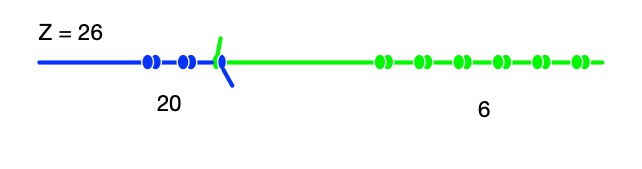
  3. Invent a code such as A=1, B=2, … and store a message on your Quipu by spelling it out in numbers and so knots.
A Quipu showing 26 or if using a simple number-letter code, Z
Image by CS4FN

To make your Quipu more colourful tie different coloured strings together end to end to make a single Quipu. One colour string then represents ones and the next tied to it represents tens for a single number and so letter (and so on). Use different colours for your next Quipu.

Jo Brodie, Queen Mary University of London

More on …

Related Magazines …


Subscribe to be notified whenever we publish a new post to the CS4FN blog.


This blog is funded by EPSRC on research agreement EP/W033615/1.

QMUL CS4FN EPSRC logos

This article was funded by UKRI, through Professor Ursula Martin’s grant EP/K040251/2 and grant EP/W033615/1.