Lego Computer Science: Turing Machines Part 2: the controller

by Paul Curzon, Queen Mary University of London

Image by CS4FN

Last time we started to build a working computer out of Lego: a Turing Machine. So far we have seen that we can make the memory of a Turing Machine (its Infinite Tape) in Lego. We can also create a movable Tape Head that marks the position where data can be read from and written to the tape (see image).

Controlling states

How does the machine decide where and when to move the Tape Head, though? It has a Controller. The key part of the controller is that it holds a Current State of the machine. Think of traffic lights for what we mean by the state of a machine. In the UK traditional traffic lights have a Red state, an Amber state, a Green state and a Red-Amber state. Each means a different thing (such as “Stop” and “Go”). The controller of the lights moves between these different internal states. With a traffic light, the current internal state is also shown to the world by the lights that light up! Machine states do not have to be visible to the outside world, however. In fact, they only are if the person who designs the interface makes them visible. For most machines, only some of their internal state is made visible. In our Turing Machine we will be able to see the states as they will be visible in the controller. However, the output of a Turing Machine is the state of the tape, so if we wanted the states to really be visible we would write a version on to the tape. You can then imagine the tape triggering external lights to come on or off, or change colour as a simple form of actual output. This is what Computer Scientists call memory-mapped peripherals – where to send data (output) to a peripheral device (a screen, a panel of lights, a printer, or whatever, you write to particular locations in memory, and that data is read from there by the peripheral device. That is going beyond the pure idea of a Turing Machine though, where the final state of the machine when it stops is its output.

Representing States

How do we represent states in Lego? Any finite set of things (symbols) could be used to represent the different states (including numbers or binary codes, for example). We will use different coloured 3×2 blocks. Each colour of block will stand for a different state that the machine is in. The controller will have a space that holds the brick representing the Current State. It will also have space for a set of places for the blocks representing the other allowable states of this Turing Machine. As the machine runs, the state will change as represented by swapping one of these state bricks for another.

Different Turing Machines can allow a different number of possible states the machine could be in, so this part of the controller might be bigger or smaller depending on the machine and what it needs to do its job. Again think of traffic lights, in some countries, and on pedestrian crossings there are only two states, a Red state (stop) and a Green state (go). Its controller only needs two states so we would only need two different coloured bricks.

A Turing Machine Controller with current state red, end state black and three other possible states (green, orange and blue). Image by CS4FN

Initial States

The current state will always start in some initial state when the machine first starts up. It is useful to record in the controller what state that is so that each time we restart the machine anew it can be reset. We will just put a block in the position next to the current state to indicate what the initial state should be. We won’t ever change it for a given machine.

End States

One of the states of a Turing Machine is always a special End State. We will always use a black brick to represent this. Whatever is used has to be specified at the outset, though. When not in use we will keep the end state brick next to the initial state brick. Once the machine finishes operations it will enter this End State, or put another way, if the black brick ever becomes the current state brick the machine will stop. From that point on the machine will do nothing. Some machines might never reach an end state, they just go on forever. Traffic lights just cycle round the states forever, for example, never reaching an end state. Other machines do end though. For example, a kettle controller stops the machine when the water has boiled. An addition Turing Machine might end when it has output the answer to an addition. To do another addition you would start it up again with new information on the tape indicating what it was to add.

We have now created the physical part of the Turing Machine. All we need now is a Program to tell it what to do! Programs come next in Part 3…


More on …

Related Magazines …

cs4fn issue 14 cover

Subscribe to be notified whenever we publish a new post to the CS4FN blog.


This blog is funded by EPSRC on research agreement EP/W033615/1.

QMUL CS4FN EPSRC logos

The Lego Computer Science posts were originally funded by UKRI, through grant EP/K040251/2 held by Professor Ursula Martin, and forms part of a broader project on the development and impact of computing.

Lego Computer Science: Turing Machines Part 1: the tape

by Paul Curzon, Queen Mary University of London

Image by CS4FN

It it possible to make a working computer out of lego and you do not even have to pay for an expensive robot Mindstorm kit…but only if you are willing to provide the power yourself.

A machine in theory

In fact, Alan Turing, grandfather of Computer Science worked out how to do it before the War and before any actual computer existed. His version also needed humans to power it. Now we call it a Turing Machine and it is a theoretical model of what is computable by any machine.

The Tape

To make a working Turing Machine you first need to build an infinitely long Tape that can hold Symbols, representing data values, along it at fixed intervals. That is easy (as long as you have a lego factory). You just need to create a long line of flat pieces, say 2 studs wide. Each 2×2 square on it is then a position on the Tape

An infinite tape out of Lego (relies on having a Lego factory at the right-hand end churning out new tape if and when it is needed...
An infinite tape out of Lego (relies on having a Lego factory at the right-hand end churning out new tape if and when it is needed… Image by CS4FN

Be lazy

Of course you can’t actually make it infinitely long, but you can make it longer every time you need some more of it (so no problem if you do have a lego factory to churn out extra bricks as needed!) This approach to dealing with infinite data structures where you just make it bigger only when needed is now called lazy programming by computer scientists and is an elegant way that functional programs deal with input that needs to represent an infinite amount of input…It is also the way some games (like Minecraft) represent worlds or even universes. Rather than create the whole universe at the start, things over the horizon, so out of sight, are only generated if a player ever goes there – just-in-time world generation! Perhaps our universe is like that too, with new galaxies only fleshed out as we develop the telescopes to see them!

Fill it with data

The Tape has a set of Data Symbols that can appear on it that act as the Data Values of the machine. Traditional computers have symbols 0 and 1 underpinning them, so we could use those as our symbols, but in a Turing Machine we can have any set of symbols we like: ten digits, letters, Egyptian hieroglyphs, or in fact any set of symbols we want to make up. In a lego Turing Machine we can just use different coloured blocks as our symbols. If our tape is made of grey pieces then we could use red and blue for the symbols that can appear on it. Every position on the tape will then either hold a red block or a blue block. We could also allow EMPTY to be a symbol too in which case some 2×2 slots could be empty to mean that.

A tape containing data where the allowed symbols are EMPTY, RED and BLUE
A tape containing data where the allowed symbols are EMPTY, RED and BLUE. Image by CS4FN

To start with

Any specific Turing Machine has an Initial Tape. This is the particular data that is on the tape at the start, before it is switched on. As the machine runs, the tape will change.

The tape with symbols on it takes the place of our computer’s memory. Just as a modern computer stores 1s and 0s in memory, our Lego Turing Machine stores its data as symbols on this tape. 

The Head

A difference is that modern computers have “random access memory” – you can access any point in memory quickly. Our tape will be accessed by a Tape Head that points to a position on the tape and allows you to read or change the data only at the point it is at. Make a triangular tape head out of lego so that it is clear which point on the tape it is pointing at. We have a design choice here. Either the Tape moves or the Head moves. As the tape could be very long so hard to move we will move the Head along beside it, so create a track for the Head to move along parallel to the tape. It will be able to move 2 studs at a time in either direction so that each time it moves it is pointing to a new position on the tape.

An infinite tape with Head (yellow) pointing at position 4 on the tape.
An infinite tape with Head (yellow) pointing at position 4 on the tape. Image by CS4FN

We have memory

We now have the first element in place of a computer, then: Memory. The next step will be to provide a way to control the tape head and how data is written to and read from the tape and so computation actually happen. (For that you need a controller which we cover in Part 2…).


More on …

Related Magazines …

cs4fn issue 14 cover

EPSRC supports this blog through research grant EP/W033615/1, The Lego Computer Science post was originally funded by UKRI, through grant EP/K040251/2 held by Professor Ursula Martin, and forms part of a broader project on the development and impact of computing.

Eggheads: helping us to visualise objects and classes

Ada the Egghead: a purple face with pinky purple hair
Ada the Egghead
Image by Daniel Gill for CS4FN

Past CS4FN articles have explored object-oriented programming through self-aware pizza and Strictly Come Dancing judges. But, if you’re one of those people who like to learn visually, it can be challenging to imagine what an object or class looks like. This article will hopefully help you to both think more about what makes this paradigm so useful as well as to give you a way to visualise objects.

To begin this adventure, I’d like to introduce Ada. Ada is an example of the newly discovered species egghead. Every egghead has very distinctive hair and eye colours. For example, Ada’s hair is a delightfully bright pink, and their eyes, a deep red. Despite their appearance, the egghead has a vicious roar intended to ward off predators, or indeed poachers.

Classes

As computer scientists, we might want to represent different eggheads in a program, but we don’t really want to store information about the eggheads with a written description or an image, because this would be harder than need-be for a computer to ‘understand’ (or rather to process as they don’t understand as such). Instead, we can store lots of individual features together, so that the computer can find out exactly what it needs from each egghead.

Egghead
Name
Hair
Eyes

Roar button
Egghead class. Image by Daniel Gill for CS4FN

One way to achieve this is by using a class. A class is a template which contains spaces for us to fill in details for the thing we want to represent. For the egghead, we might want to store data about their name, hair colour, and eye colour – then we can fill in the template for each of the eggheads we find. These individual features are often called attributes. In a program, these attributes would be represented with variables: a place where a value, a piece of data, is stored. We can visualise a class therefore as a box with gaps to fill in for the attributes like the one on the left.

From this image, you will see alongside the attributes, we also have an image of a button for roaring. As well as storing attributes, we also define behaviours. These are actions that we can perform on the thing being represented. We visualise any behaviour as such a button. For this example, we could imagine that pressing this button might provoke the egghead causing them to roar. In programming, a behaviour is represented by a procedure, some pre-defined code that when executed makes something happen. A button that causes something to happen is a simple way to visualise such procedures.

A key point to realise is that this class is simply a template – it isn’t storing any information, nor will the roar button work. We have no actual eggheads yet… That is where objects come in.

Objects

You may have noticed that I have been using the word thing to represent the actual thing (here eggheads) that we are representing with the class. This is to avoid using the word object, which has its own special meaning, in, you guessed it, object-oriented programming. If we want to actually use our class, we need to make an instance. That just means filling in the relevant details about the specific egghead we want to store. This instance is called an object.

Let’s imagine we want to store a representation of Ada in our program. We would take an instance of the Egghead class and fill in their details. The resulting object would represent Ada, whereas the class we started with represents all and any egghead that might ever exist. Below, you can see the objects for Ada and some of Ada’s friends; Alan and Edsger. We still visualise objects as boxes, just like classes, except now the gaps are all filled in.

Eggheads with values for the fields eg
Ada
Pink
Red
Objects representing Ada, Alan and Edsger. Image by Daniel Gill for CS4FN

We (or a computer) could even take the given features of Alan and Edsger and generate an image of what they might look like. We have everything we need here to create something that looks and behaves like an egghead. This method of storing data means that a program can take whatever information it might want directly from the object. Likewise, it can do the equivalent of pressing the roar button and make each individual egghead roar.

Hiding the Details

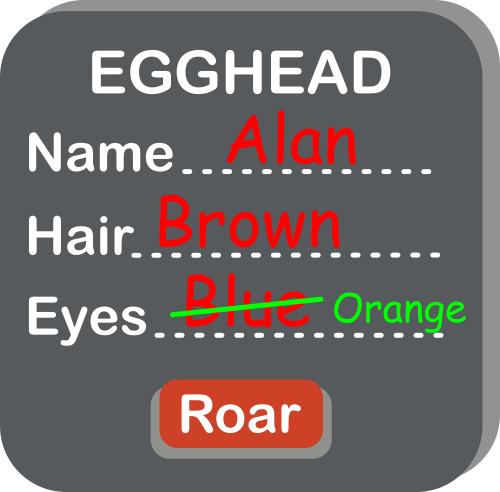
Egghead with blue changed to orange
Trying to change Alan’s eye colour. Image by Daniel Gill for CS4FN

One thing we should consider while making the class is the integrity of the data. In its current form, any other part of our program, or another program using our class, can directly edit the attributes stored. Another part of the program (perhaps representing a virtual world for a virtual egghead to live in) might accidentally change the eye colour attribute for Alan, for example. This wouldn’t change Alan’s actual eye colour (which couldn’t happen anyway!), so our data would then be wrong. We can’t have that!

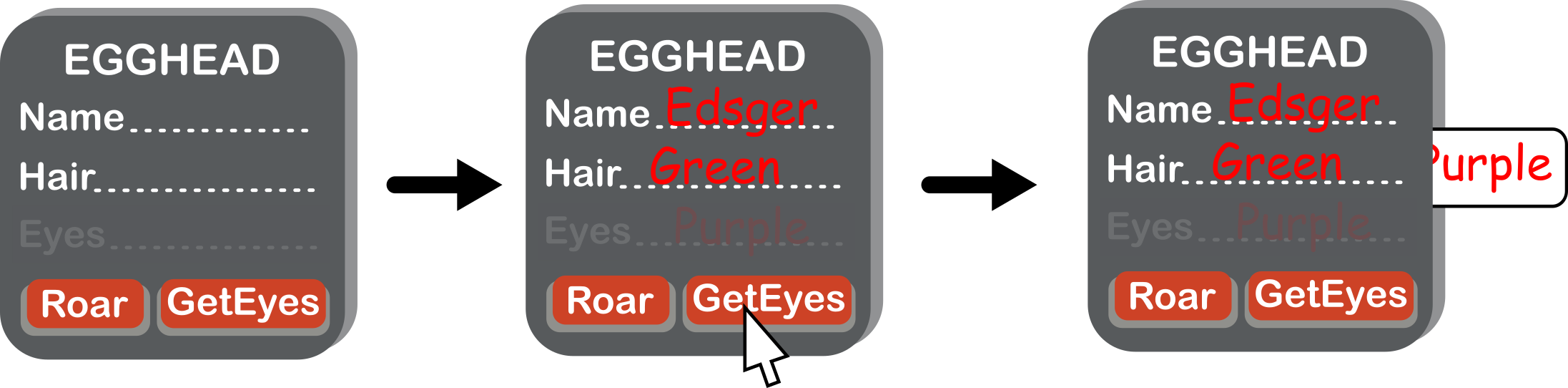
We can fix this by hiding the eye colour from the rest of the program, so it is stored within the object, but not accessible outside of it. But we still need a way for the program to read it: for this we use a button in our picture of the Egghead class. The existence of the eye colour attribute can then only be seen by other parts of the program by a procedure that gets the eye colour. No similar procedure is given for changing the eye colour, so there is no way to do it by mistake. Let’s build this new version of our class.

Sequence as values change
(a) Our new class, (b) An object representing Edsger, with eye colour hidden, (c) Pressing GetEyes gives us the eye colour. Image by Daniel Gill for CS4FN

This concept of hiding details is sometimes called encapsulation or information hiding, but computer scientists disagree about what these terms refer to exactly. Encapsulation is broader in its meanings, whereas information hiding is closer to what we are trying to do here. This video by ArjanCodes (see below) explains this distinction further.

We could change our class to include this concept for the name and hair colour, too. Whilst it is entirely possible for these attributes to change, it turns out that it is a good idea to hide them too: so hide name and use SetName and GetName buttons. That allows us to control the type of data we have going into that attribute (for example, checking the given name isn’t a number, which as all egghead names are made of letters would be a mistake).

Where next?

Now we have a class that represents all eggheads, we can store the details of any new egghead efficiently and safely. Hold on… some last-minute breaking news: scientists have found a new sub-species of egghead they are calling a rainbow egghead. All rainbow eggheads have rainbow hair, and a unique roar. Next time, we’ll use the concept of inheritance to give a more efficient way to write programs that store information about eggheads.

Daniel Gill, Queen Mary University of London

More on …

Watch…


Subscribe to be notified whenever we publish a new post to the CS4FN blog.


This blog is funded by EPSRC on research agreement EP/W033615/1.

QMUL CS4FN EPSRC logos

Collaborative community coding & curating

Equality, diversity and inclusion in the R Project

You might not think of a programming language like Python or Scratch as being an ‘ecosystem’ but each language has its own community of people who create and improve its code (compilers, library code,…), flush out the bugs, introduce new features, document any changes and write the ‘how to’ guides for new users. 

R is one such programming language. It’s named after its two co-inventors (Ross Ihaka and Robert Gentleman) and is used by around two million people around the world. People working in all sorts of jobs and industries (for example finance, academic research, government, data journalists) use R to analyse their data. The software has useful tools to help people see patterns in their data and to make sense of that information. 

It’s also open source which means that anyone can use it and help to improve it, a bit like Wikipedia where anyone can edit an article or write a new one. That’s generally a good thing because it means everyone can contribute but it can also bring problems. Imagine writing an essay about an event at your school and sharing it with your class. Then imagine your classmates adding paragraphs of their own about the event, or even about different events. Your essay could soon become rather messy and you’d need to re-order things, take bits out and make sure people hadn’t repeated something that someone had already said (but in a slightly different way). 

When changes are made to software people also want to keep a note not just of the ‘words’ added (the code) but also to make a note of who added what and when. Keeping good records, also known as documentation, helps keep things tidy and gives the community confidence that the software is being properly looked after.

Code and documentation can easily become a bit chaotic when created by different people in the community so there needs to be a core group of people keeping things in order. Fortunately there is – the ‘R Core Team’, but these days its membership doesn’t really reflect the community of R users around the world. R was first used in universities, particularly by more privileged statistics professors from European countries and North America (the Global North), and so R’s development tended to be more in line with their academic interests. R needs input and ideas from a more diverse group of active developers and decision-makers, in academia and beyond to ensure that the voices of minoritised groups are included. Also the voices of younger people, particularly as many of the current core group are approaching retirement age.

Dr Heather Turner from the University of Warwick is helping to increase the diversity of those who develop and maintain the R programming language and she’s been given funding by the EPSRC* to work on this. Her project is a nice example of someone who is bringing together two different areas in her work. She is mixing software development (tech skills) with community management (people skills) to support a range of colleagues who use R and might want to contribute to developing it in future, but perhaps don’t feel confident to do so yet

Development can involve things like fixing bugs, helping to improve the behaviour or efficiency of programs or translating error messages that currently appear on-screen in the English language into different languages. Heather and her colleagues are working with the R community to create a more welcoming environment for ‘newbies’ that encourages participation, particularly from people who are in the community but who are not currently represented or under-represented by the core group and she’s working collaboratively with other community organisations such as R-Ladies, LatinR and RainbowR. Another task she’s involved in is producing an easier-to-follow ‘How to develop R’ guide.

There are also people who work in universities but who aren’t academics (they don’t teach or do research but do other important jobs that help keep things running well) and some of them use R too and can contribute to its development. However their contributions have been less likely to get the proper recognition or career rewards compared with those made by academics, which is a little unfair. That’s largely because of the way the academic system is set up. 

Generally it’s academics who apply for funding to do new research, they do the research and then publish papers in academic journals on the research that they’ve done and these publications are evidence of their work. But the important work that supporting staff do in maintaining the software isn’t classified as new research so doesn’t generally make it into the journals, so their contribution can get left out. They also don’t necessarily get the same career support or mentoring for their development work. This can make people feel a bit sidelined or discouraged. 

To try and fix this and to make things fairer the Society of Research Software Engineering was created to champion a new type of job in computing – the Research Software Engineer (RSE). These are people whose job is to develop and maintain (engineer) the software that is used by academic researchers (sometimes in R, sometimes in other languages). The society wants to raise awareness of the role and to build a community around it. You can find out what’s needed to become an RSE below. 

Heather is in a great position to help here too, as she has a foot in each camp – she’s both an Academic and a Research Software Engineer. She’s helping to establish RSEs as an important role in universities while also expanding the diversity of people involved in developing R further, for its long-term sustainability.

Further reading


Related careers

QMUL

Below is an example of a Research Software Engineer role which was advertised at QMUL in April 2024 – you can read the original advert and see a copy of the job description / person specification information which is archived at the “Jobs in Computer Science” website. This advert was looking for an RSE to support a research project “at the intersection of Natural Language Processing (NLP) and multi-modal Machine Learning, with applications in mental health.”

QMUL also has a team of Research Software Engineers and you can read about what they’re working on and their career here (there are also RSEs attached to different projects across the university, as above).

Archived job adverts from elsewhere

Below are some examples of RSE jobs (these particular vacancies have now closed but you can read about what they were looking for and see if that sort of thing might interest you in the future). The links will take you to a page with the original job advert + any Job Description (JD – what the person would actually be doing) and might also include a Person Specification (PS – the type of person they’re looking for in terms of skills, qualifications and experience) – collectively these are often known as ‘job packs’.

Note that these documents are written for quite a technical audience – the people who’d apply for the jobs will have studied computer science for many years and will be familiar with how computing skills can be applied to different subjects.

1. The Science and Technology Facilities Council (STFC) wanted four Research Software Engineers (who’d be working either in Warrington or Oxford) on a chemistry-related project (‘computational chemistry’ – “a branch of chemistry that uses computer simulation to assist in solving chemical problems”) 

2. The University of Cambridge was looking for a Research Software Engineer to work in the area of climate science – “Computational modelling is at the core of climate science, where complex models of earth systems are a routine part of the scientific process, but this comes with challenges…”

3. University College London (UCL) wanted a Research Software Engineer to work in the area of neuroscience (studying how the brain works, in this case by analysing the data from scientists using advanced microscopy).


Subscribe to be notified whenever we publish a new post to the CS4FN blog.


This blog is funded by EPSRC on research agreement EP/W033615/1.

QMUL CS4FN EPSRC logos

CS4FN Advent 2023 – Day 1: Woolly jumpers, knitting and coding

Welcome to the first ‘window’ of the CS4FN Christmas Computing Advent Calendar. The picture on the ‘box’ was a woolly jumper with a message in binary, three letters on the jumper itself and another letter split across the arms. Can you work out what it says? (Answer at the end).

Come back tomorrow for the next instalment in our Advent series.

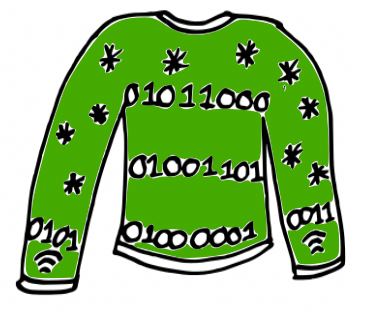
Cartoon of a green woolly Christmas jumper with some knitted stars and a message “knitted” in binary (zeroes and ones). Also the symbol for wifi on the cuffs. Image drawn and digitised by Jo Brodie.

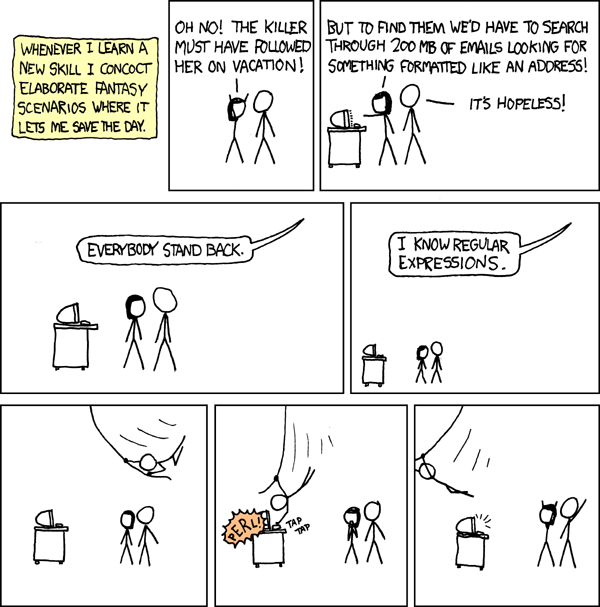
Wrap up warmly with our first festive CS4FN article, from Karen Shoop, which is all about the links between knitting patterns and computer code. Find out about regular expressions in her article: Knitters and Coders: separated at birth?

Click above to read Karen’s article

Image credit: Regular Expressions by xkcd

Further reading

Dickens Knitting in Code – this CS4FN article, by Paul Curzon, is about Charles Dickens’ book A Tale of Two Cities. One of the characters, Madame Defarge, takes coding to the next level by encoding hidden information into her knitting, something known as steganography (basically hiding information in plain sight). We have some more information on the history of steganography and how it is used in computing in this CS4FN article: Hiding in Elizabethan binary.

In Craft, Culture, and Code Shuchi Grover also considers the links between coding and knitting, writing that “few non-programming activities have such a close parallels to coding as knitting/crocheting” (see section 4 in particular, which talks about syntax, decomposition, subroutines, debugging and algorithms).

Something to print and colour in

This is a Christmas-themed thing you might enjoy eating, if you’ve any room left of course. Puzzle solution tomorrow. This was designed by Elaine Huen.

Solving the Christmas jumper code

The jumper’s binary reads

01011000

01001101

01000001

01010011

What four letters might be being spelled out here? Each binary number represents one letter and you can find out what each letter is by looking at this binary-to-letters translator. Have a go at working out the word using the translator (but the answer is at the end of this post).

Keep scrolling

Bit more

The Christmas jumper says… XMAS


Advert for our Advent calendar
Click the tree to visit our CS4FN Christmas Computing Advent Calendar

EPSRC supports this blog through research grant EP/W033615/1.

Why the Romans were pants at maths

Paul Curzon, Queen Mary University of London

The Romans were great at counting and addition but they were absolutely pants at multiplication. It wasn’t because they were stupid. It was because they hadn’t invented a good way to represent numbers, and that meant they needed really convoluted algorithms.

The Roman system is based on an earlier really simple way of writing numbers. You just put a line for each thing you’ve counted. Its probably the way shepherds kept count of sheep, drawing a line for each sheep. Those lines turned into the Roman letter I. To add 1 to a number you just add another I. You count: I, II, III, and so on and it makes counting easy.

This system is called unary – whereas binary involves counting with two symbols, 1 and 0, in unary you only have one symbol to count with. Addition in unary is easy too at least for small numbers. Take the first number and add on the end all the Is for the second and you’ve got the answer number. This is exactly the way we all start doing addition on our fingers.To add 2+3, hold up 2 fingers (II) then hold up another three fingers (III) and you have the answer (IIIII).

This is fine for small numbers but it gets a bit tedious as the numbers increase (and you run out of fingers!) Comparing numbers is easy in principle – do you have the same number of Is, but hard in practice for large numbers. We can’t keep all those Is in our head so a large number is hard to think about. To get round this the Romans invented new letters to stand for groups of Is. This is what we do when we tally numbers making a crossbar for every fifth number we count. It helps us keep track of larger numbers. The Romans invented a whole bunch of symbols to help: so for example in the Roman numeral system, V stands for 5 (IIIII), X stands for 10, L for 50, C for 100, D for 500 and M for 1000. They had invented a new way to represent numbers.

This makes it much easier to write and compare larger numbers. Now when counting and you get up to 5 you just replace all those Is with a V and then carry on adding Is: VI, VII, VIII, VIIII. Then you get to VIIIII (10) so replace it all with an X, starting again adding a new lot of Is: XI, XII, XIII, XIIII, XV, and so on. Counting large numbers is now a bit more involved – the algorithm involves more than just adding an I on the end, but it is much more convenient. The addition algorithm has now become more complicated, though it is still fairly simple too. Take any two numbers to add like VII and VIII and string them together: VIIVIII. Now group together the same letters: VVIIIII. Anywhere you have enough to replace symbols with the next character do so. VV can be replaced by X and IIIII can be replaced by V to give XV in the above. Keep making replacements until you can make no more. Put the symbols in order from largest to smallest symbol and you have your answer.

Now the Romans were obviously a bit lazy as bored with writing even four Is in a row they sometimes introduced a new set of abbreviations, so that IIII became IV and VIIII became IX. Putting a smaller symbol (like I) before a larger one (like X) instead of after meant subtract it to get the number. so IX means “one less than 10” or 9. Counting just got a tiny bit more complicated to get the advantage of writing fewer symbols. Addition now needs a more convoluted algorithm though. There are several ways to do it. The easiest is actually just to change the numbers to add to the simpler form (so IV goes back to IIII). You them do the addition that way, and convert back at the end. Addition just got that little bit harder, and all because of a change in representation.

Worse, doing any more complicated maths is even harder still using the Roman number representation. See if you can work out how to multiply Roman numbers. The Roman number system doesn’t help at all. The only really easy way is to just repeatedly add ( so III x VI is VI + VI + VI). That just isn’t practical for large numbers. Try it on XXIII x LXV1. There are other possible ways including one that is actually based on the binary multiplication algorithms computers use – multiplying and dividing repeatedly by 2. See if you can work out how to do it. Whatever way you do it, its clear that the number system the Romans chose made maths hard for them to do!

A good representation makes maths easy. A bad one makes it much harder to do

Luckily, Indian and Arabian scholars understood that the representation they used mattered. They invented, and spread, the Hindu-Arabic numbers and decimal system we use today. What is special about it is that rather than introducing new symbols for bigger and bigger numbers, the position of a symbol is used instead. As we go from nine to ten we go back to the start of our symbols, from 9 back to 0, but stick a 1 in a new 10s column to count how many 10s we have. Counting is still pretty easy but suddenly not only is the algorithm for addition straightforward but we can come up with fairly simple algorithms for multiplication and division too. They are the algorithms you learn at school – though as with any algorithm making sure you follow the steps exactly and don’t miss steps is hard for a human (unlike for a computer). That is why we tend to find learning maths hard at first and it gets easier the more we practice.

An abacus
Image by Hans from Pixabay

In fact Romans needing to do serious maths probably used a variation of an abacus representing numbers with stones. They would do a calculation on the abacus and then convert the answer back into the Roman number system. And guess what. The Roman Abacus uses columns to represent larger numbers in a very similar way to the Hindu-Arabic system. The Romans understood that representation matters too.

Sometimes things are hard to do just because we make them hard! The secret of coming up with good algorithms is often to come up with a good representation first. In programming too, if you come up with a good way to represent data, a good data structure, you can often then make it much easier to write an efficient program.


Subscribe to be notified whenever we publish a new post to the CS4FN blog.


This blog is funded by EPSRC on research agreement EP/W033615/1.

QMUL CS4FN EPSRC logos

A Godlike Heart

A short story by Rafael Pérez y Pérez of the Universidad Autónoma Metropolitana, México translated from the original Spanish by Paul Curzon, Queen Mary University of London

(From the archive)

Mexican deity Quetzalcoatl
Image by Alexa from Pixabay

Divinity, all the gods and all the forces that man fails to understand, are sources of inspiration, a supreme gift which can be introduced in the heart or movement of men to make them a yoltéotl, a “heart deified”. (Miguel León-Portilla, The Old Mexican, Mexico: FCE, 1995 page 180)

Part I

Allow me a moment, Your Excellency. Now that I’m older, it’s hard to remember. But don’t worry, I will tell the whole story so that your priests can record it.

It all started that afternoon, on the day of Huey Tozoztli, just before the celebration to the maize goddess Centéotl. On the horizon you could see large pools of blood – the result of the endless struggle of the gods maintaining order in the cosmos – which, when mixed with the clouds and rays of sunshine on the background blue of the universe, drenched the sky with reddish, orange and yellow. As usual, I spent most of my free time watching everything that went on in Tlatelolco market.

What most caught my attention amongst that huge convergence of smells, sounds and forms were grasshoppers; not only lovely to eat roasted on a tortilla, but also alive and full of dynamism, sometimes in the air and sometimes on the floor, sometimes in flight and sometimes sluggishly bound to the Earth – watching me. I was mesmerised for hours. I would line them up in rows of three insects, each row identified by a symbol and each grasshopper with its own number. I then watched the various patterns that arose when some reacted and tried to flee, “grasshoppers 1 and 3 in the first row jumped, while grasshopper 2 did not move.” Sometimes they were impossible to control!

That afternoon I came across Donají, the daughter of a famous Jaguar Knight. She wore a shawl across her shoulders so that you could barely see the long necklace of seashells hanging from her neck that, all tangled up, reached to just above her ankles. To see her made my heart begin to beat so, so fast! Although it was not the first time I had seen her, I had never had the opportunity to introduce myself. I stood beside her, but my mouth failed to produce a sound. No doubt she noticed my nervousness. I spent anxious moments just stuttering, until I said, ‘I’m Tizoc’. A grin spread across her face and she continued on her way without a word. She had ignored me! I felt humiliated. Who was Donají to treat me that way! I wanted to run and hide. Despite her arrogance, I felt a great attraction to her; I promised that one day I would show her who Tizoc really was and how wrong she was to treat me that way.

Part II

Several moons passed when one morning I woke up to hear a terrifying story: Donají had been kidnapped by a thug who was sentenced to death! A search was immediately organised, directed by her father, the great Jaguar Knight, which everyone joined. Eight units were formed. I was assigned to the group that went to Coyoacan. Once there, the warrior commanded us to spread out throughout the area in pairs to speed the search of the area. Because of my youth and inexperience I was appointed as an assistant to Sayil, a retired warrior of the Mexican army. We spent the first night by a stream. While looking for some dry branches to make a fire, I kept wondering how Donají would be feeling. After eating some fruit and roasted snake, I decided to distract myself and I started to enjoy my favourite pastime: watching the world! I was absorbed by a group of fireflies: while flying they would disappear without a trace only to then appear from nowhere. They formed groups of flying dancers in the darkness, following the rhythm of imaginary drums with lit torches plugged into their bodies. It seemed like a ceremony executed by priests in honour of some deity. I was completely immersed in my thoughts, admiring the ritual, when I discovered something surprising: fireflies and crickets share an essence! Grasshoppers jump or stand still on the ground; the flying fireflies were lit or unlit. In both cases, part of their behaviour can be described in terms of two states: jumping or landing; lit or unlit. It was what the priests called the divine essence! I was completely absorbed in my thoughts, when a voice interrupted me:

– ‘Tizoc, are you all right?’, asked Sayil.

– ‘I’m watching the fireflies: I want to see what they can communicate to me’, I replied.

– ‘Communicate?’

– ‘See how some fireflies are lit and others are off. Imagine that if two fireflies flying next to each other are on. We are receiving the message: ‘We are happy’. Now, imagine that we have three fireflies, one lit, then another lit but the third not lit. They are wanting to confess to us: “Walk to the lake and you will find a basket full of cocoa”. We both laughed. I continued: ‘We should call this “the behaviour of the two states.”‘

– ‘I once saw a fortune-teller use the same method’, commented Sayil yawning. I listened intently. ‘He had three figurines made of opossum bones representing Tlahuizcalpantecuhtli, the malevolent God of Venus, who fires darts both at people and at other objects, causing bad things to happen. People asked the fortune-teller questions like “Will the harvest be good this year?” Then he put the figurines in a jar and tossed them: he predicted the future based on how many landed on their back and how many fell on their front – or in terms of fireflies, how many were lit and how many unlit – together with the order in which they fell.’

Sayil’s words left me paralysed for a moment: the priests communicated with the deities through messages made of patterns represented as two states! I was excited and shouted:

– ‘I knew that the grasshoppers and fireflies were connected with the gods!’

Sayil didn’t really understand what I was saying, and he was too tired to ask. A few minutes later he fell asleep, though I only went to sleep late in to the night.

Very early the next morning we continued the search. In some thickets we found the necklace of seashells that I had seen Donají wearing in the market. After a while we came to a crossroads; Sayil, despite all his experience, was not sure which way to turn. So I suggested:

– ‘Let’s ask the gods which path is the right one’.

– ‘What do you mean?’

I pulled out a small leather pouch containing three round stones, which the night before I had painted on one side with green dye made from vegetable plants. I had left the other side its natural grey colour. I put them into a jar and threw them so they landed in a line and said:

– ‘If the green painted side is facing up, it is equivalent to a firefly turned on. If the grey side is exposed it is equivalent to an off’.

– ‘You want to play the soothsayer? We don’t know how to interpret the gods!’

– ‘But we can ask them to guide us’, I said.

– ‘How?’ The warrior asked impatiently.

– ‘Assign to each of the five directions of the universe, a pattern in the stones. Implore the gods for their advice and throw them. I am sure the pattern representing the direction that arises will give us the correct way to go. It is the same as it was when the soothsayer asked about the harvest.’ Sayil didn’t seem to understand my idea, so I continued saying: ‘the combination of stones grey-grey-grey represents the centre, that is, stay where we are. Grey-grey-green means walking towards where the nomadic people are, to the north. Grey-green-grey means walk towards the Zapotec lands in the South. Grey-green-green, means walk to where Tonatiuh, the Sun God emerges, and green-grey-grey means walk in the opposite direction.

I clearly remember that Sayil thought this seemed a silly idea. However, time was short and we didn’t have another way to decide which road to take. So, rather than do nothing he decided to go with my idea:

– ‘How will we know how many steps to go?’ He asked now even more impatiently.

– ‘Once we know the direction we go back to throwing stones. There are eight possible patterns.’

– ‘How do you know?’

– ‘Believe me. I spent a long time watching the grasshoppers jumping! Each pattern represents a number from zero to seven. Then, if we get the pattern 0 we move 20 steps; if pattern 1 appears move 40 steps; if 2 appears we move 80 steps, and so on.

– ‘Tizoc, I think you’ve lost your mind’, Sayil said desperately.

– ‘Trust me. So the first throw will be a statement that tells us where to walk. The second will tell us the number of steps forward. We continue doing this until the instruction appears as the green-green-green pattern, which will mean we have received all the directions.

I put the pebbles in a jar, prayed to the gods for help and threw:

– ‘Grey-green-grey. We have to move towards the land of the Zapotecs! Now, let’s see how many steps: green-green-green, it means …2,560 steps’. I went back to throwing the stones: ‘then we head towards where Tonatiuh rises and walk … 640 steps’.

– ‘Tizoc, are you going to spend all morning throwing stones while Donají is about to die? When are you going to finish this?’

– ‘When the gods tell me to.’

I threw the stones again and to Sayil’s surprise the green-green-green combination appeared: end of the message! We followed the instructions sent by our gods and even though I hadn’t been able to make Sayil believe, we did finally find the hideout of the kidnapper.

Donají was inside a small cave whose entrance was blocked; on seeing her my heart began to pound! Unfortunately, a surprise awaited us, we saw that the kidnapper had two accomplices: this complicated things greatly as we would need support for the rescue. We decided Sayil would go for help while I stayed to monitor the situation, so without wasting more time my partner set off.

Near dark I tried to get as close as possible to let Donají know that she would soon be rescued; I was sure she would be glad of my presence. Unfortunately, one of the thugs discovered me. I was immediately thrown into the cave:

– ‘What are you doing here?’ She asked, shocked to see me.

– ‘Donají! Don’t worry; help will be here soon’, I replied, stuttering again! She immediately realised that there was no else out there to rescue us. Her face contorted in anger and she shouted:

– ‘Why didn’t you go in search of my father instead of getting caught!’

She burst into a flood of tears, weeping and weeping for a long time until she finally fell asleep. I felt a failure. But I swore by the gods to get her out of there!

I tried to stay calm when the three thugs approached: first the leader, who was very young; then a burly one, who seemed a bit of an idiot; and finally a slave who, I suppose, had simply taken the opportunity to get away. The idiot and slave dragged me out of the cave and tied me by my wrists to a tree branch. The noise woke up Donají. I was very scared. The leader began to punch me in the stomach. He wanted to know how many people knew the hiding place. I will never give him the information he wants I told myself. He repeatedly punched me until he grew bored. Then he took a leg of venison, clutching the hoof tightly with both hands he crashed it into my nose! I thought I would die! Donají screamed desperately until finally they took me back to the cave.

From the twisted material of her shawl she made presses and bandages. She wiped my face carefully and all my wounds trying to stem the bleeding. She spent the whole night giving me water to drink and mopping my brow. I will never forget her courage and fortitude! Unfortunately, the next morning, things got worse:

– ‘Tizoc, we have to get up.’

– ‘Are we leaving? Where are we going?’

– ‘I overheard them say that we will go to a valley that is a half-day along the path to Totolhuacalco. The sky is cloudy, so surely it will rain later. If we start today, there is no way anyone will work out where we have gone.’

The situation was critical and I had to come up with something before we left …

Part III

The next day, we were already installed in the new hideout, watching our new surroundings when Donají asked:

– ‘What are your thinking about, Tizoc’?

– ‘The gods have sent me a vision’, I answered.

– ‘A vision? What do you mean?’

– ‘Listen: today, at dawn, Sayil arrived with reinforcements to our former hideout, but was surprised to find it abandoned. Now how could he find us? The rain had washed away all traces of our departure. How would he explain to the great Jaguar Knight that he had lost the trail of his daughter? Sayil and the others, now desperate, reviewed the surroundings and, entering the cave where we had stopped, discovered some strange signs.’

– ‘Do you mean the symbols you drew on the wall?’

– ‘That’s right! One of the soldiers said “It looks like a big fly”. Sayil immediately understood the meaning of the drawings and shouted “No, it’s a firefly!”‘

– ‘What are you talking about?’ Donají asked confused.

At that moment we heard loud cries and Sayil, along with a group of Mexica warriors, began the attack on the new hideout. The slave tried to flee, but was captured immediately; the idiot resisted, but the warriors took a stone and split his head in two; the leader tried to attack Donají, but Sayil grabbed him and strangled him. In just a few moments it had all ended for the trio! Donají wept with happiness. My plan had worked! I was ecstatic! I had finally shown to Donají my worth! It was an unforgettable day for me.

How did they find us? Let me explain, Your Excellency, just let me drink a little water … thank you. It all happened as follows. That day I had to devise a way to communicate to Sayil where we were being taken. I was well aware that our lives depended on it, but was paralysed. Unexpectedly, I heard what I thought was a message from the gods: grasshoppers singing! Two states! That was the solution! I estimated the number of steps required to travel half a day along the Totolhuacalco path and using the same code that Sayil and I had used to find Donají, I left the approximate position of our new location on the cave wall! The kidnappers never suspected that those drawings were instructions of how to find us. So Sayil was given the key to finding us! … Thank you, Your Excellency! I know it was ingenious. Thank you very much. Am I sorry? … What do you mean? “What happened to Donají?”… Your question opens old wounds. I think that you and your brothers would never understand what I mean when I say that, although I never saw her again, my heart was forever linked to hers. I’m tired. With your permission, I would like to go to sleep now.

Two states: divine essence! What can they teach us? What wonders can man create with them? Because while enduring the fifth sun, hearts will be deified. (Tizoc)

The End.

More on …

Related Magazines …


EPSRC supports this blog through research grant EP/W033615/1. 

Mary Clem: getting it right

by Paul Curzon, Queen Mary University of London

Mary Clem was a pioneer of dependable computing long before the first computers existed. She was a computer herself, but became more like a programmer.

A tick on a target of red concentric zeros
Image by Paul Curzon

Back before there were computers there were human computers: people who did the calculations that machines now do. Victorian inventor, Charles Babbage, worked as one. It was the inspiration for him to try to build a steam-powered computer. Often, however, it was women who worked as human computers especially in the first half of the 20th century. One was Mary Clem in the 1930s. She worked for Iowa State University’s statistical lab. Despite having no mathematical training and finding maths difficult at school, she found the work fascinating and rose to become the Chief Statistical Clerk. Along the way she devised a simple way to make sure her team didn’t make mistakes.

The start of stats

Big Data, the idea of processing lots of data to turn that data into useful information, is all the rage now, but its origins lie at the start of the 20th century, driven by human computers using early calculating machines. The 1920s marked the birth of statistics as a practical mathematical science. A key idea was that of calculating whether there were correlations between different data sets such as rainfall and crop growth, or holding agricultural fairs and improved farm output. Correlation is the the first step to working out what causes what. it allows scientists to make progress in working out how the world works, and that can then be turned into improved profits by business, or into positive change by governments. It became big business between the wars, with lots of work for statistical labs.

Calculations and cards

Originally, in and before the 19th century, human computers did all the calculations by hand. Then simple calculating machines were invented, so could be used by the human computers to do the basic calculations needed. In 1890 Herman Hollerith invented his Tabulator machine (his company later became computing powerhouse, IBM). The Tabulator machine was originally just a counting machine created for the US census, though later versions could do arithmetic too. The human computers started to use them in their work. The tabulator worked using punch cards, cards that held data in patterns of holes punched in to them. A card representing a person in the census might have a hole punched in one place if they were male, and in a different place if they were female. Then you could count the total number of any property of a person by counting the appropriate holes.

Mary was being more than a computer,
and becoming more like a programmer

Mary’s job ultimately didn’t just involve doing calculations but also involved preparing punch cards for input into the machines (so representing data as different holes on a card). She also had to develop the formulae needed for doing calculations about different tasks. Essentially she was creating simple algorithms for the human computers using the machines to follow, including preparing their input. Her work was therefore moving closer to that of a computer operator and then programmer’s job.

Zero check

She was also responsible for checking calculations to make sure mistakes were not being made in the calculations. If the calculations were wrong the results were worse than useless. Human computers could easily make mistakes in calculations, but even with machines doing calculations it was also possible for the formulae to be wrong or mistakes to be made preparing the punch cards. Today we call this kind of checking of the correctness of programs verification and validation. Since accuracy mattered, this part of he job also mattered. Even today professional programming teams spend far more time checking their code and testing it than writing it.

Mary took the role of checking for mistakes very seriously, and like any modern computational thinker, started to work out better ways of doing it that was more likely to catch mistakes. She was a pioneer in the area of dependable computing. What she came up with was what she called the Zero Check. She realised that the best way to check for mistakes was to do more calculations. For the calculations she was responsible for, she noticed that it was possible to devise an extra calculation, whereby if the other answers (the ones actually needed) have been correctly calculated then the answer to this new calculation is 0. This meant, instead of checking lots of individual calculations with different answers (which is slow and in itself error prone), she could just do this extra calculation. Then, if the answer was not zero she had found a mistake.

A trivial version of this general idea when you are doing a single calculation is to just do it a second time, but in a different way. Rather than checking manually if answers are the same, though, if you have a computer it can subtract the two answers. If there are no mistakes, the answer to this extra check calculation should be 0. All you have to do is to look for zero answers to the extra subtractions. If you are checking lots of answers then, spotting zeros amongst non-zeros is easier for a human than looking for two numbers being the same.

Defensive Programming

This idea of doing extra calculations to help detect errors is a part of defensive programming. Programmers add in extra checking code or “assertions” to their programs to check that values calculated at different points in the program meet expected properties automatically. If they don’t then the program itself can do something about it (issue a warning, or apply a recovery procedure, for example).

A similar idea is also used now to catch errors whenever data is sent over networks. An extra calculation is done on the 1s and 0s being sent and the answer is added on to the end of the message. When the data is received a similar calculation is performed with the answer indicating if the data has been corrupted in transmission. 

A pioneering human computer

Mary Clem was a pioneer as a human computer, realising there could be more to the job than just doing computations. She realised that what mattered was that those computations were correct. Charles Babbages answer to the problem was to try to build a computing machine. Mary’s was to think about how to validate the computation done (whether by a human or a machine).

More on …

Related Magazines …


EPSRC supports this blog through research grant EP/W033615/1. 

Reclaim your name

Canadian Passport
Image by tookapic from Pixabay

In June 2021 the Canadian government announced that Indigenous people would be allowed to use their ancestral family names on government-issued identity and travel documents. This meant that, for the first time, they could use the names that are part of their heritage and culture rather than the westernised names that are often used instead. Because of computers, it wasn’t quite as easy as that though …

Some Indigenous people take on a Western name to make things easier, to simplify things for official forms, to save having to spell the name, even to avoid teasing. If it is a real choice then perhaps that is fine, though surely we should be able to make it easy for people to use their actual names. For many it was certainly not a choice, their Indigenous names were taken from them. From the 19th century, hundreds of thousands of Indigenous children in Canada were sent to Western schools and made to take on Western names as part of an attempt to force them to “assimilate” into Western society. Some were even beaten if they did not use their new name. Because their family names had been “officially” changed, they and their descendants had to use these new names on official documents. Names matter. It is your identity, and in some cultures family names are also sacred. Being able to use them matters.

The change to allow ancestral names to be used was part of a reconciliation process to correct this injustice. After the announcement, Ta7talíya Nahanee, an indigenous woman from the Squamish community in Vancouver, was delighted to learn that she would be able to use her real name on her official documents, rather than ‘Michelle’ which she had previously used.

Unfortunately, she was frustrated to learn that travel documents could still only include the Latin alphabet (ABCDEFG etc) with French accents (À, Á, È, É etc). That excluded her name (pronounced Ta-taliya, the 7 is silent) as it contains a number and the letter í. Why? Because the computer said so!

Modern machine-readable passports have a specific area, called the Machine Readable Zone which can be read by a computer scanner at immigration. It has a very limited number of permitted characters. Names which don’t fit need to be “transliterated”, so Å would be written as AA, Ü as UE and the German letter ß (which looks like a B but sounds like a double S) is transliterated as SS. Names are completely rewritten to fit, so Müller becomes MUELLER, Gößmann becomes GOESSMANN, and Hämäläinen becomes HAEMAELAEINEN. If you’ve spent your life having your name adapted to fit someone else’s system this is another reminder of that.

While there are very sensible reasons for ensuring that a passport from one part of the world can be read by computers anywhere else, this choice of characters highlights that, in order to make things work, everyone else has been made to fall in line with the English-speaking population, another example of an unintentional bias. It isn’t, after all, remotely beyond our ability to design a system that meets the needs of everyone, it just needs the will. Designing computer systems isn’t just about machines. It’s about designing them for people.

Jo Brodie and Paul Curzon, Queen Mary University of London

More on …

Related Magazines …


EPSRC supports this blog through research grant EP/W033615/1. 

Subscribe to be notified whenever we publish a new post to the CS4FN blog.


Opinions, Opinions, Opinions

by Paul Curzon, Queen Mary University of London

Based on a talk by Jiayu Song at QMUL, March 2023

Multicoloured speech bubbles with a colourful cross-hairs target in the centre

Social media is full of people’s opinions, whether about politics, movies, things they bought, celebrities or just something in the news. However, sometimes there is just too much of it. Sometimes, you just want an overview without having to read all the separate comments yourself. That is where programs that can summarise text come in. The idea is that they take lots of separate opinions about a topic and automatically give you a summary. It is not an easy problem, however, and while systems exist, researchers continue to look for better ways.

That is what Queen Mary PhD student Jiayu Song is working on with her supervisor, Professor Maria Liakata. Some sources of opinions are easier to work with than others. For example reviews, whether of movies, restaurants or gadgets, tend to be more structured so more alike in the way they are written. Social media posts on the other hand are unlikely to have any common structure. What is written is much more ‘noisy’ and that makes it harder to summarise different opinions. Jiayu is particularly interested in summarising these noisy social media posts, so has set herself the harder problem of the two. 

What does distance of meaning mean?

Think of posts to be summarised as points scattered on a piece of paper. Her work is based on the idea that there is a hypothetical point (so hypothetical social media post) that is in the middle of those other points (a kind of average point) and the task is to find that point so summary post. If they were points on paper then we could use geometry to find a central point that minimises the total distance to all of them. For written text we need first to decide what we actually mean by ‘distance’ as it is no longer something we can measure with a ruler! For text we want some idea of  distance in meaning – we want a post that is as close as possible to those it is summarising but by “close” here we mean close in meaning. What does distance of meaning mean? King and Queen for example might be the same distance apart as boy and girl in meaning whereas tree is further away in meaning.

King and Queen for example might be
the same distance apart as boy and girl in meaning

Jiayu’s approach is based on finding a middle point for posts using a novel (for this purpose) way of determining distance called the Wasserstein distance. It gives a way of calculating distances between distributions of probabilities. Imagine you collected the marks people scored in a test and plotted a graph of how many got each mark. That would give a distribution of marks (likely it would give a hump-like curve known as normal distribution.). This could be used to estimate the distribution of marks you would get from a different class. If we did that for lots of different classes each would actually have a slightly different distribution (so curve when plotted). A summary of the different distributions would be a curve as similar (so as “close”) as possible  to all of them so a better predictor of what new classes might score.

From distance to distribution

You could do a similar thing to find the distribution of words in a book, counting how often each word arises and then plotting a curve of how common the different words are. That distribution gives the probability of different words appearing so could be used to predict how likely a given word was in some new book. For summarising, though it’s not words that are of interest but the meanings of words or phrases, as we want to summarise the meaning whatever the words that were actually used.  If the same thing is expressed using different words, then it should count as the same thing. “The Queen of the UK died today.” and “Today, the British monarch passed away.” are both expressing the same meaning.  It is not the distance apart of individual word meanings we want though, but of distributions of those meanings. Jiayu’s method is therefore first based on extracting the meanings of the words and working out the distribution of those meanings in the posts. However, it turns out it is useful to create two separate representations, one of these distributions of meanings but also another representing the syntax, so the structure of the words actually used too, to help put together the actual final written summary.

Once that decoding stage has been done, creating new versions of the texts to be summarised as distributions, Jiayu’s system uses that special Wasserstein distance to calculate a new distribution of meanings that represents the central point of all those that are being summarised. Even given a way to calculate distances there are different versions of what is meant by “central” point and Jiayu uses a version that helps with the next stage. That involves, a neural network based system, like those used for machine learning systems more generally, is used  to convert the summary distributions back into readable text. That summary is the final output of the program.

Does it work?

She has run experiments to compare the summaries from her approach to existing systems. To do this she took three existing datasets of opinions, one from Twitter combining opinions about politics and covid, a second containing posts from Reddit about covid, and a final one of reviews posted on Amazon. A panel of three experts then individually rated the summaries from Jiayu’s system with those from two existing summarising systems. The experts were also given “gold standard” summaries written by humans to judge all the summaries against. They had to rate which system produced the best and worst summary for each of a long series of summaries produced from the datasets. The expert’s ratings suggested that Jiayu’s system preserved meaning better than the others, though did less well in other categories such as how fluent the output was. Jiayu also found that there was a difference when rating the more structured Amazon reviews compared to the other more noisy social media posts and in these two cases a different approach was needed to decode the summary generated back into actual text based on the extra syntax representation created.

Systems like Jiayu’s, once perfected, could have lots of uses: they could help journalists quickly get on top of opinions being posted of a breaking story, help politicians judge the mood of the people about their policies or just help the rest of us decide which movie to watch or whether we should buy some new gadget or not.

Perhaps you have an opinion of whether that would be useful or not?

More on …

Related Magazines …


EPSRC supports this blog through research grant EP/W033615/1.