In January 2025 computer scientist Simon Peyton Jones gave an inspiring lecture at Darwin College Cambridge on “Bits with Soul” about the joy, beauty, and creativity of computer science … from simple ideas of data representation comes all of virtual reality.
Our universe is built from elementary particles: quarks, electrons and the like. Out of quarks come protons and neutrons. Put those together with electrons in different ways to get different atoms. From atoms are built molecules, and from there on come ever more complexity including the amazing reality of planets and suns, humans, trees, mushrooms and more. From small things ever more complex things are built and ultimately all of creation.
The virtual world of our creation is made of bits combined using binary, but what are bits, and what is binary? Here is a puzzle that Simon Peyton Jones was set by his teacher as a child to solve, to help him think about it. Once you have worked it out then think about how things might be built from bits: numbers, letters, words, novels, sounds, music, images, videos, banking systems, game worlds … and now artificial intelligences?
A bank cashier has a difficult customer. They always arrive in a rush wanting some amount of money, always up to £1000 in whole pounds, but a different amount from day to day. They want it instantly and are always angry at the wait while it is counted out. The cashier hatches a plan. She will have ready each day a set of envelopes that will each contain a different amount of money. By giving the customer the right set of envelope(s) she will be able to hand over the amount asked for immediately. Her first thought had been to have one envelope with £1 in, one envelope with £2 in, one with £3 and so on up to an envelope with £1000 in. However, that takes 1000 envelopes. That’s no good. With a little thought though she realised she could do it with only 10 envelopes if she puts the right amount of money in each. How much does she put in each of the 10 envelopes that allows her to give the customer whatever amount they ask for just by handing over a set of those envelopes?
How data is represented is an important part of computer science. There are lots of ways numbers can be represented. Choosing a good representation can make things easier or harder to do.The Ancient Egyptians had a simple way using hieroglyphs (symbols). It is similar to Roman Numerals but simpler.
They represented numbers 1 to 9 with a hieroglyph with that number of straight lines. They arranged them into patterns (a bit like we do dots on a dice). The patterns make them easier to recognise. They used an upside down U shape for 10, two of these for 20, and so on. Their symbol for 10 also meant a “cattle hobble”. They then had a new symbols for each power of 10 up to a million. So 100 is the hieroglyph for a coil of rope.
Image by CS4FN
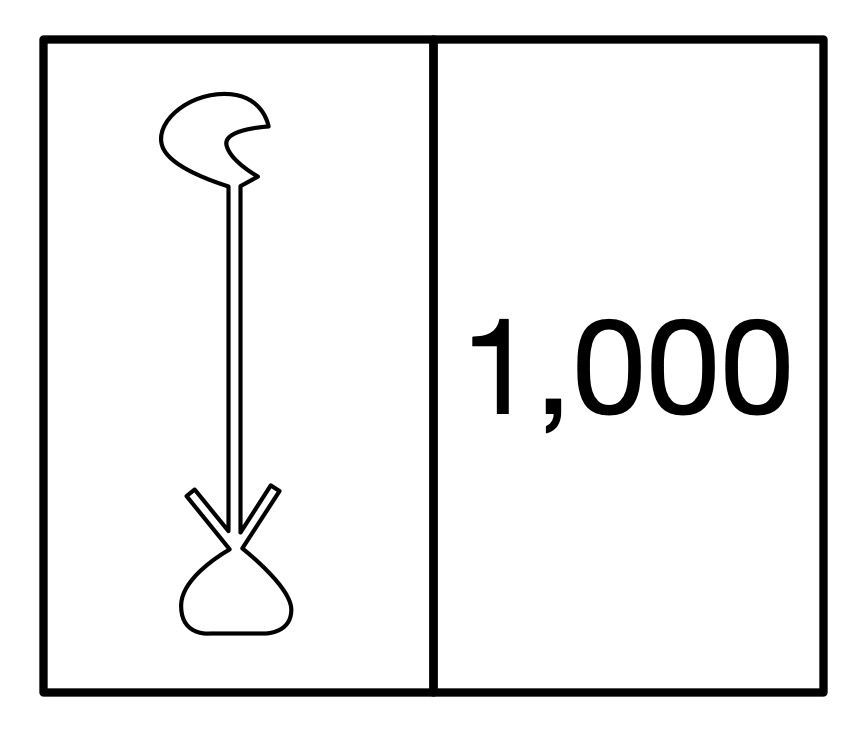
The hieroglyph for the number 1000 was a water lily.
Image by CS4FN
The hieroglyph for a million, which also rather sensible meant ‘many’, was just the hieroglyph of the god Hey who was the personification of eternity.
To make a number you just combined the hieroglyph for the ones, tens, hundreds and so on.
The Ancient Egyptian number system makes it very easy to write numbers and to add and subtract numbers. Big numbers are fairly compact, though take up more space than our decimals. It is easy to convert a tally representation into this system too. More complicated things like multiplication are harder to do. Computers use binary representation because they make all the main operations easy to do using logic. Ultimately it is all about algorithms. The Egyptians had easy to follow algorithms for addition and subtraction to go with their number representation. We have devised algorithms that allow computers to do all the calculations they do as quickly as possible using a binary representation
– Paul Curzon, Queen Mary University of London
To do…
Try doing some sums as an Ancient Egyptian would – without converting to our numbers. What is the algorithm for adding Egyptian numbers? Do multiplication using a repeated addition algorithm – to do 3 x 4 you 4 to zero 3 times.
Herman Hollerith (Image from wikimedia, Public Domain)
Herman Hollerith, the son of immigrants, struggled early on at school and then later in bookkeeping at college but it didn’t stop him inventing machines that used punch cards to store data. He founded a company to make and sell his machines. It turned into the company now called IBM, which of course helped propel us into the computer age.
Hollerith had worked as a census clerk for a while, and the experience led to his innovation. The United States has been running a national census every 10 years since the American Revolution, aiming to record the details of every person, for tax and national planning purposes. It is not just a count but has recorded information about each person such as male/female, married or not, ethnicity, whether they can read, disabilities, and so on.
As the population expanded it of course became harder to do. It was also made harder as more data about each person was being collected over time. For the 1890 census a competition was held to try and find better ways to compile the data collected. Herman Holerith won it with his punch card based machine. It could process data up to twice as fast as his competitors and with his system data could be prepared 10 times faster.
To use the machine, the census information for each person was recorded by punching holes in special cards at specific positions. It was a binary system with a hole essentially meaning the specific feature was present (eg they were married) and no hole meaning it wasn’t (eg they were single). Holes against numbers could also mean one of several options.
Hollerith punched card (Image from wikimedia, Public Domain)
The machine could read the holes because they allowed a wire to make an electrical connection to a pool of mercury below so the holes just acted as switches. Data could therefore be counted automatically, with each hole adding one to a different counter. It was the first time that a system of machine-readable data had been used and of course binary went on to be the way all computers store information. In processing the census his machines counted the data on around 100 million cards (an early example of Big Data processing!). This contributed to reducing the time it took to compile the data from the whole country by two years. It also saved about $5 million
Holerith patented the machine and was also awarded a PhD for his work on it. He set up a company to sell it called the Tabulating Machine Company. Over time it merged with other companies until eventually in 1924 the resulting company changed its name to International Business Machines or is it is now known, IBM. it is of course one of the most important companies driving the computer age, building early mainframe computers the size of rooms that revolutionised business computing, but later also responsible for the personal computer, leading to the idea that everyone could own a computer.
Not a bad entrepreneurship legacy for someone who early on at school apparently struggled with, and certainly hated, spelling – he jumped out of a window at school to avoid doing it. He also did badly at bookkeeping in college. He was undeterred by what he was poor at though and focussed on what he was good at, He was hard working and developed his idea for a mechanical tabulating machine for 8 years before his first machine went to work. Patience and determination was certainly a strength that paid off for him!
Next time you are in a large crowd, look around you: all those people moving together, and mostly not bumping into each other. How does it happen? Flocks of birds and schools of fish are also examples of this ‘swarm intelligence’. Computer Scientists have been inspired by this behaviour to come up with new solutions to really difficult problems.
Swarming behaviour requires the individuals (birds, fish or people) to have a set of rules about how to interact with the individuals nearest to them. These so-called ‘local’ rules are all that’s needed to give rise to the overall or ‘global’ behaviour of the swarm. We adjust our individual behaviour according to our current state but also the current state of those around us. If I want to turn left then I do it slowly so that others in the crowd can be aware of it and also start to turn. I know what I am doing and I know what they are doing. This is how information makes its way from the edges of the crowd to the centre and vice versa.
A swarm is born
The way a crowd or swarm interacts can be explained with simple maths. This maths is a way of approximating the complex psychological behaviour of all the individuals on the basis of local and global rules. Back in 1995 James Kennedy, a research psychologist, and Computer Scientist Russ Eberhart, having been inspired by the study of bird flocking behaviour by biologist Frank Heppner, realised that this swarm intelligence could be used to solve difficult computer problems. The result was a technique called Particle Swarm Optimisation (PSO).
Travel broadens the mind
An optimisation problem is one where you have a range of options to choose from and you want to know the best solution. One of the classic problems is called ‘The travelling salesperson’ problem. You work for a company and have to deliver packages to say 12 towns. You look at the map. There are many different routes to take, but which is the one that will let you visit all 12 towns using the least petrol? Here the choices are the order in which you visit the towns, and the constraint is that you want to do the least driving. You could have a guess, select the towns in a random order and work out how far you’d have to travel to visit them in this order. You then try another route through all 12 and see if it takes less mileage, and so on. Phew! It could take a long time to work out all the possible routes for 12 towns to see which was best. Now imagine your company grows and you have to deliver to 120 towns or 1200 towns. You would spend all your time with the maps trying to come up with the cheapest solutions. There must be a better way? Well actually simple as this problem seems it’s an example of a set of computational problems known as NP-Complete problems and it’s not easy to solve! You need some guidance to help you through and that’s where swarm optimisation come in. It’s an example of a so-called metaheuristic algorithm: a sort of ‘general rule of thumb’ to help solve these types of problem. It won’t always work unless you have infinite time but it’s better than just trying random solutions. So how does swarm optimisation work here?
State space: the final frontier
First we need to turn the problem into something called a state space. You probably use state spaces all the time but just don’t know it. Think about yourself. What are the characteristic you would use to tell people about your current state: age, height, weight and so on. You can identify yourself by a list of say 3 numbers – one for age, one for height, one for weight. It’s not everything about you of course but it does define your state to some extent. Your numbers will be different to other people’s numbers, if you take all the numbers for your friends you would have a state space. It would be a 3-dimensional space with axes: age, height and weight, and each person would be a point in that space at some coordinate (X, Y, Z).
So state spaces are just a way of representing the possible variations in some problem. With the 12 towns problem, however, you couldn’t draw this space: it would be 12 dimensional! It would have one axis for each town, with the position on the axis an indication of where in the route it was. Every point in that space would be a different route through the 12 towns, so each point in the space would have coordinates (x1, x2, x3, … x11, x12). For each point there would also be a mileage associated with the route, and the task is to find the coordinate point (route) with the lowest mileage.
Where no particle has swarmed before
Enter swarm optimisation. We create a set of ‘particles’ that will be like birds or fish, and will fly and swarm through our state space. Each particle starts with a random starting location in the state space and calculates the mileages involved for the coordinates (route) they are at. The particles remember (store) this coordinate and also the value of the mileage at that position. Each particle therefore has it’s own known ‘local’ best value (where the lowest mileage was) but can compare this with other neighbouring particles to see if they have found any even better solutions. The particles then move onwards randomly in a direction that tends to move them towards their own local best and the best value found by their neighbours. The particles ‘fly’ around the state space in a swarm homing in on even better solutions until they all converge on the best they can find: the answer.
It may be that somewhere in a part of the space where no particle has been there is an even better solution, perhaps even the best solution possible. Our swarm will have missed it! That’s why this algorithm is a heuristic, a best guess to a tough problem. We can always add some more particles at the start to fill more of the state space and reduce the chance of missing a good solution, but we cant ever be 100% sure.
Swarm optimisation has been applied to a whole range of tough problems in computing, electronic engineering, medicinal chemistry and economics. All it needs is for you to create an appropriate state space for your problem and let the particles fly and swarm to a good solution.
It’s yet another example of clever computing based on behaviours found in the natural world. So next time you’re in a crowd, look around and appreciate all that collective interacting swarm intelligence…but make sure you remember to watch where you are stepping.
by Peter W. McOwan, Queen Mary University of London. From the archive.
What do a Nintendo games console and the films Jurassic Park, Beauty and the Beast and Terminator II have in common? They all used Marc Hannah’s chips and linked programs for their amazing computer effects..It is important that we celebrate the work of Black Computer Scientists and Marc is one who deserves the plaudits as much as anyone as his work has had a massive effect on the leisure time of everyone who watches movies with special effects or plays video games – and that is just about all of us.
In the early 1980s, with six others, Marc founded Silicon Graphics, becoming its principal scientist. Silicon Graphics was a revolutionary company, pioneering fast computers capable of running the kind of graphics programs on special graphics chips that suddenly allowed the film industry to do amazing special effects. Those chips and linked programs were designed by Marc.
Now computers and games consoles have special graphics chips that do fast graphics processing as standard, but it is Marc and his fellow innovators at Silicon Graphics who originally made it happen.
It all started with his work with James Clark on a system called the Geometry Engine while they were at Stanford. Their idea was to create chips that do all the maths needed to do sophisticated manipulation of imagery. VLSI (Very Large scale Integration), whereby computers were getting smaller and fitting on a chip was revolutionising computer design. Suddenly a whole microprocessor could be put on a single chip because tens of thousands (now billions) of transistors could be put on a single slice of silicon. They pioneered the idea of using VLSI for creating 3-D computer imagery, rather than just general-purpose computers, and with Silicon Graphics they turned their ideas into an industrial reality that changed both film and games industries for ever.
Silicon Graphics was the first company to create a VLSI chip in this way, not to be a general-purpose computer, but just to manipulate 3-D computer images.
A simple 3D image in a computer might be implemented as the vertices (corners) of a series of polygons. To turn that into an image on a flat screen needs a series of mathematical manipulations of those points’ coordinates to find out where they end up in that flat image. What is in the image depends on the position of the viewer and where light is coming from, for example. If the object is solid you also need to work out what is in front, so seen, and what behind, so not. Each time the object, viewer or light source moves, the calculations need to be redone. It is done as a series of passes doing different geometric manipulations in what is called a geometry pipeline and it is these calculations they focussed on. They started by working out which computations had to be really fast: the ones in the inner most loops of the code that did this image processing, so was executed over and over again. This was the complex code that meant processing images took hours or days because it was doing lots of really complex calculation. Instead of trying to write faster code though, they instead created hardware, ie a VLSI chip, to do the job. Their geometry pipeline did the computation in a lightening fast way as it was avoiding all the overhead of executing programs and instead implementing the calculations that slowed things down directly in logic gates that did all that crucial maths very directly and so really quickly.
The result was that their graphic pipeline chips and programs that worked with them became the way that CGI (computer generated imagery) was done in films allowing realistic imagery, and were incorporated into games consoles too, allowing for ever more realistic looking games.
So if some amazing special effects make some monster appear totally realistic this Halloween, or you get lost in the world of a totally realistic computer game, thank Marc Hannah, as his graphics processing chips originally made it happen.
Biologists often analyse data about the cell biology of living animals to understand their development. A large part of this involves looking for patterns in the data to use to refine their understanding of what is going on. The trouble is that patterns can be hard to spot when hidden in the vast amount of data that is typically collected. Humans are very good at spotting patterns in sound though – after all that is all music is. So why not turn the data into sound to find these biological patterns?
In hospitals, the heartbeats of critically ill patients are monitored by turning the data from heart monitors into sounds. Under the sea, in (perhaps yellow) submarines, “golden ear” mariners use their listening talent to help with navigation and detect potential danger for fish and the submarine. They do this by listening to the soundscapes produced by sonar built up from echoes from the objects round about. This way of using sounds to represent other kinds of data is called ‘sonification’. Perhaps similar ideas can help to find patterns in biological data? An interdisciplinary team of researchers from Queen Mary including biologist Rachel Ashworth, Audio experts Mathieu Barthet and Katy Noland and computer scientist William Marsh tried the idea out on the zebrafish. Why zebrafish? Well, they are used lots for the study of the development of vertebrates (animals with backbones). In fact it is what is called a ‘model organism’: a creature that lots of people do research on as a way of building a really detailed understanding of its biology. The hope is that what you learn about zebrafish will help you understand the biology of other vertebrates too. Zebrafish make a good model organism because they mature very quickly. Their embryos are also transparent. That is really useful when doing experiments because it means you can directly see what is going on inside their bodies using special kinds of microscopes.
The particular aspect of zebrafish biology the Queen Mary team has been investigating is the way calcium signals are used by the body. Changes in the concentration of calcium ions are important as they are used inside a cell to regulate its behaviour. These changes can be tracked in zebrafish by injecting fluorescent dyes into cells. Because the zebrafish embryos are transparent whatever has been fluorescently labelled can then be observed.
Calcium ions are used inside a cell to regulate its behaviour
The Queen Mary team developed software that detects calcium changes by automatically spotting the peaks of activity over time. They relied on a technique that is used in music signal processing to detect the start of notes in musical sequences. Finding the peaks in a zebrafish calcium signal and the notes from the Beatles’ Day Tripper riff may seem to be light years apart, but from a signal processing point of view, the problems are similar. Both involve detecting sudden burst of energy in the signals. Once the positions of the calcium peaks have been found they can then be monitored by sonifying the data.
What the team found using this approach is that the calcium activity in the muscle cells of zebrafish varies a lot between early developmental stages of the embryo and the late ones. You can have a go at hearing the difference yourself – listen to the sonified versions of the data.
Train timetables are complex. When designing a timetable for railways you have to think about the physical capabilities of the actual train, what stops it needs to make, whether it is carrying passengers or freight, the number of platforms at a station, the gradient of the track, and the placement of passing loops on single-track sections, amongst many other things. Data visualisation can help with timetabling and make sure our railways continue to run on track!
Data visualisation is an important area in computer science. If you had a huge amount of complex data in a spreadsheet, your first thought wouldn’t be to sit down with a cup of tea and spend hours reading through it – instead you might graph it or create an infographic to get a better picture. Humans are very bad at understanding and processing raw data, so we speed up the process by converting it to something easier to understand.
Timetabling is like this – we need to consider the arrival and departure times from all stations for each train. You might have used a (perhaps now) old fashioned paper timetable, with each train as a column, and the times at each station along the rows, like the one below. This is great if you’re a passenger… you can see clearly when your train leaves, and when it gets to your desired destination. If you’re unlucky enough to miss a train, you can also easily scan along to find the next one.
Image by Daniel Gill for CS4FN
Unfortunately, this kind of presentation might be more challenging for timetable designers. In this timetable, there’s a mix of stopping and fast services. You can see which of them are fast based on the number of stations they skip (marked with a vertical line), but, because they travel at different speeds it’s difficult to imagine where they are on the railway line at any one time.
One of the main challenges in railway timetabling, and perhaps the most obvious, is that trains can’t easily overtake slower ones in front of them. it’s this quirk that causes lots of problems. So, if you needed to insert another train into this timetable you would need to consider all the departure times of the trains around it, to make sure there is no conflicts – this is a lot of data to juggle.
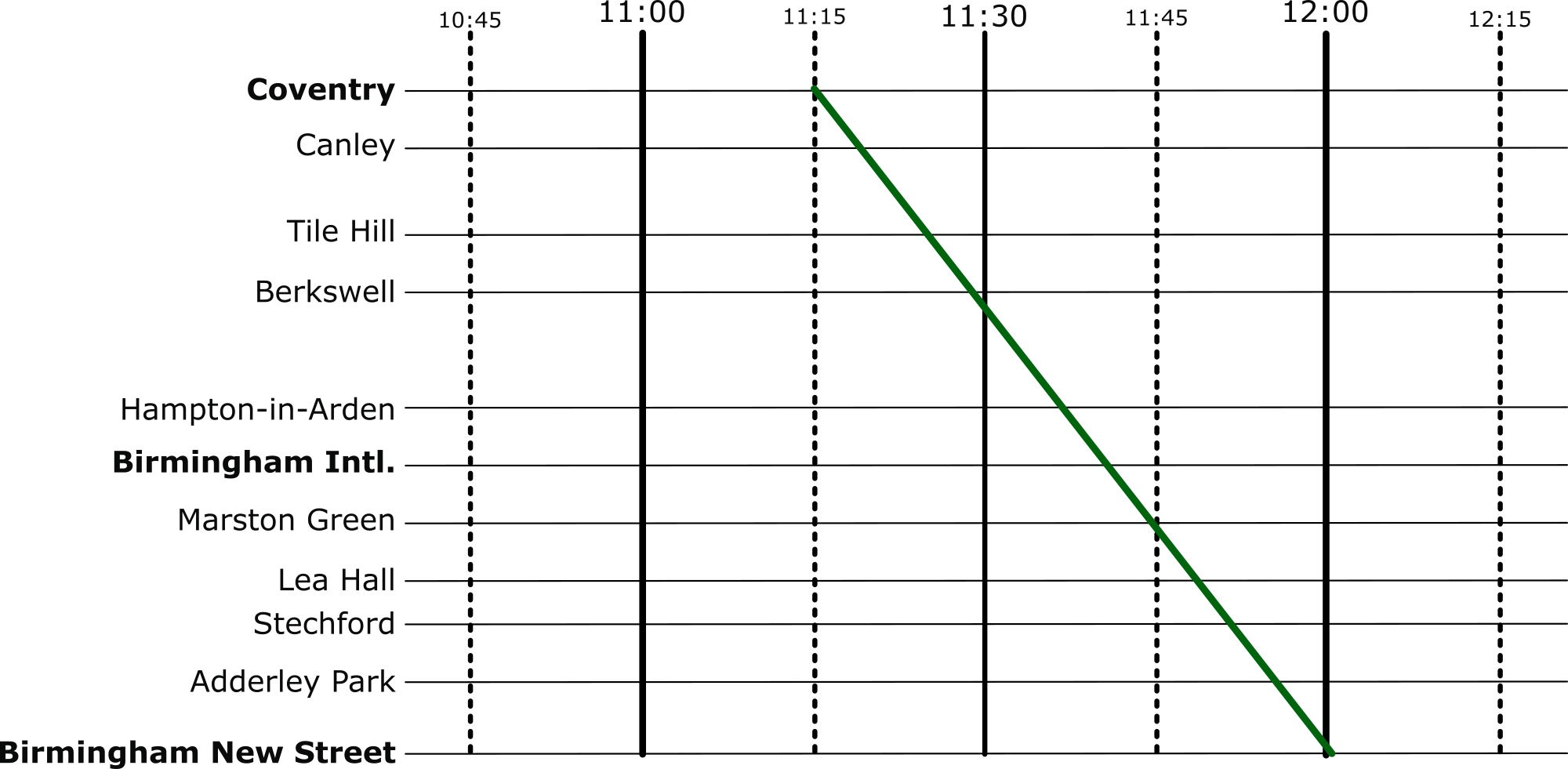
But there’s an easier way to visualise these timetables: introducing Marey charts! They represent a railway on a graph, with stations listed vertically, time along the top, and each train represented by a single (bumpy) line. If we take our original timetable from above and convert it to a Marey chart, we get something that looks like this:
Image by Daniel Gill for CS4FN
Though thought to have been invented by a lesser-known railway engineer called Charles Ibry, these charts were popularised by Étienne-Jules Marey, and (perhaps unfairly) take his name.
How does it work?
There are a few things that you might notice immediately from this diagram. The stations along the side aren’t equally spaced, like you might expect from other types of graph, instead they are spaced relative to the distance between the stations on the actual railway. This means we can estimate when a fast train will pass each of the stations. This is an estimation, of course, because the train won’t be travelling at a constant speed throughout – but it’s better than our table from before which is no help at all!
Given this relative spacing, we can also estimate how fast a train is going. The steepness of the line, in this diagram, directly reflects the speed of the train*. Look at the dark blue and purple trains – they both leave Coventry really close together, but the purple train is a bit slower, so the gap widens near Birmingham International. We can also see that trains that do lots of stopping (when the line is horizontal) travel at a much slower average speed than the fast ones: though that shouldn’t be a surprise!
*There’s a fun reason that this is the case. The gradient (the steepness of the line) is calculated as the change iny divided by the change in x. In this case, the change in the y dimension is the distance the train has travelled, and the change in x is the time it has taken. If you have studied physics, you might immediately recognise that distance divided by time is speed (or velocity). Therefore, the steepness in a Marey chart is proportional to the speed of the train.
We can also see that the lines don’t intersect at all. This is good, because, quite famously, trains can’t really overtake. If there was an intersection it would mean that at some point, two trains would need to be at the same location at the same time. Unless you’ve invented some amazing quantum train (more about the weirdness of quantum technology in this CS4FN article), this isn’t possible!
Putting it to the Test
Put yourself in the shoes of a railway timetable designer! We have just heard that there is a freight train that needs to run through our little section of railway. The driver needs to head through sometime between 10:45 and 12:15 – how very convenient: we’ve already graphed that period of time.
The difficulty is, though, that their freight train is going to take a very slow 45 minutes to go through our section of railway – how are we going to make it fit? Let’s use the Marey chart to solve this problem visually. Firstly, we’ll put a line on that matches the requirements of the freight train:
Image by Daniel Gill for CS4FN
And then let’s re-enable all the other services.
Image by Daniel Gill for CS4FN
Well, that’s not going to work. We can see from this, though, how slow this freight train actually is, especially compared to the express trains its overlaps with. So, to fix this, we can shift it over. We want to aim for a placement where there are no overlaps at all.
Image by Daniel Gill for CS4FN
Perfect, now it’s not going to be able to make the journey without interfering with our other services at all.
Solving Problems
When we’re given a difficult problem, it’s often a good idea to find a way to visualise it (or as my A-Level physics teacher often reminded me: “draw a diagram!”). This kind of visualisation is used regularly in computer science. From students learning the craft, all the way to programmers and academics at the top of their field – they all use diagrams to help understand a problem.
World Emoji Day is celebrated on the 17th of July every year (why?) and so we’ve put together a ‘Can you guess the film from the emoji’ quiz and added some emoji-themed articles about computer science and the history of computing.
An emoji film quiz
Emoji accessibility, and a ‘text version’ of the quiz
Computer science articles about emoji
Emoji are small digital pictures that behave like text – you can slot them easily them in sentences (you don’t have to ‘insert an image’ from a file or worry about the picture pushing the text out of the way). You can even make them bigger or smaller with the text (🎬 – compare the one in the section title below). People use them as a quick way of sharing a thought or emotion, or adding a comment like a thumbs up so they’re (sort of) a form of data representation. Even so, communication with emoji can be just as tricky, in terms of being misunderstood, just as with using words alone. Different age groups might read the same emoji and understand something quite different from it. What do you think 🙂 (‘slightly smiling face’ emoji) means? What do people older or younger than you think it means? Lots of people think it means “I’m quite happy about this” but others use it in a more sarcastic way.
1. An emoji film quiz 🎬
You can view the quiz online or download and print from Word or PDF versions. If you’re in a classroom with a projector the PowerPoint file is the one you want.
2. Emoji accessibility, and a text version of the quiz
We’ve included a text version for blind or visually impaired people which can either be read out by someone or by a screen reader. Use the ‘Text quiz’ files in Word or PDF above.
More generally, when people share photographs and other images on social media it’s helpful if they add some information about the image to the ‘Alt Text’ (alternative text) box. This tells people who can’t easily see the image what’s in the picture. Screenreaders will also tell people what the emojis are in a tweet or text message, but if you use too many… it might sound like this 😬.
This next article is about the history of computing and the development of the graphical icons for apps that started life being drawn on gridded paper by Susan Kare. You could print some graph / grid paper and design your own!
Greg Michaelson is an Emeritus professor of computer science at Heriot-Watt University in Edinburgh. He is also a novelist and a short story writer. He wrote this story for CS4FN.
“Come on!” called Alice, taking the coat off the peg. “We’re going to be late!”
“Do I have to?” said Henry, emerging from the front room.
“Yes,” said Alice, handing him the coat. “Of course you have to go. Here. Put this on.”
“But we’re playing,” said Henry, wrestling with the sleeves.
“Too bad,” said Alice, straightening the jacket and zipping it up. “It’ll still be there when we get back.”
“Not if someone knocks it over,” said Henry, picking up a small model dinosaur from the hall table. “Like last time. Why can’t we have electric games like you did?”
“Electronic games,” said Alice, doing up her buttons. “Not electric. No one has them anymore. You know that.”
“Were they really digital?” asked Henry, fiddling with the dinosaur.
“Yes,” said Alice, putting on her hat. “Of course they were digital.”
“But the telephone’s all right,” said Henry.
“Yes,” said Alice, checking her makeup in the mirror. “It’s analogue.”
“And radio. And record players. And tape recorders. And television,” said Henry.
“They’re all analogue now,” said Alice, putting the compact back into her handbag. “Anything analogue’s fine. Just not digital. Stop wasting time! We’ll be late.”
“Why does it matter if we’re late?” asked Henry, walking the dinosaur up and down the hall table.
“They’ll notice,” said Alice. “We don’t want to get another warning. Put that away. Come on.”
“Why don’t the others have to go?” asked Henry, palming the dinosaur.
“They went last Sunday,” said Alice, opening the front door. “You said you didn’t want to go. We agreed I’d take you today instead.”
“Och, granny, it’s so boring…” said Henry.
They left the house and walked briskly to the end of the street. Then they crossed the deserted park, following the central path towards the squat neo-classical stone building on the far side.
“Get a move on!” said Alice, quickening the pace. “We really are going to be late.”
————————-
Henry really hadn’t paid enough attention at school. He knew that Turing Machines were named for Alan Turing, the first Martyr of the Digital Age. And he knew that a Turing Machine could work out sums, a bit like a school child doing arithmetic. Only instead of a pad of paper and a pencil, a Turing Machine used a tape of cells. And instead of rows of numbers and pluses and minuses on a page, a Turing Machine could only put one letter on each cell, though it could change a letter without having to actually rub it out. And instead of moving between different places on a piece of paper whenever it wanted to, and maybe doodling in between the sums, a Turing Machine could only move the tape left and right one cell at a time. But just like a school child getting another pad from the teacher when they ran out of paper, the Turing Machine could somehow add another empty cell whenever it got to the end of the tape.
————————-
When they reached the building, they mounted the stone staircase and entered the antechamber through the central pillars. Just inside the doorway, Alice gave their identity cards to the uniformed guard.
“I see you’re a regular,” she said approvingly to Alice, checking the ledger. “But you’re not,” sternly to Henry.
Henry stared at his shoes.
“Don’t leave it so long, next time,” said the guard, handing the cards back to Alice. “In you go. They’re about to start. Try not to make too much noise.”
Hand in hand, Alice and Henry walked down the broad corridor towards the central shrine. On either side, glass cases housed electronic equipment. Computers. Printers. Scanners. Mobile phones. Games consoles. Laptops. Flat screen displays.
The corridor walls were lined with black and white photographs. Each picture showed a scene of destitution from the Digital Age.
Shirt sleeved stock brokers slumped in front of screens of plunging share prices. Homeless home owners queued outside a state bank soup kitchen. Sunken eyed organic farmers huddled beside mounds of rotting vegetables. Bulldozers shovelled data farms into land fill. Lines of well armed police faced poorly armed protestors. Bodies in bags lay piled along the walls of the crematorium. Children scavenged for toner cartridges amongst shattered office blocks.
Alice looked straight ahead: the photographs bore terrible memories. Henry dawdled, gazing longingly into the display cases: Gameboy. Playstation. X Box…
“Come on!” said Alice, sotto voce, tugging Henry away from the displays.
At the end of the corridor, they let themselves into the shrine. The hall was full. The hall was quiet.
————————-
Henry was actually quite good at sums, and he knew he could do them because he had rules in his head for adding and subtracting, because he’d learnt his tables. The Turing Machine didn’t have a head at all, but it did have rules which told it what to do next. Groups of rules that did similar things were called states, so all the rules for adding were kept separately from all the rules for subtracting. Every step of a Turing machine sum involved finding a rule in the state it was working on to match the letter on the tape cell it was currently looking at. That rule would tell the Machine how to change the symbol on the tape, which way to move the tape, and maybe to change state to a different set of rules.
————————-
On the dais, lowered the Turing Machine, huge coils of tape links disappearing into the dark wells on either side, the vast frame of the state transition engine filling the rear wall. In front of the Turing Machine, the Minister of State stood at the podium.
“Come in! Come in!” he beamed at Alice and Henry. “There’s lots of space at the front. Don’t be shy.”
Red faced, Alice hurried Henry down the aisle. At the very front of the congregation, they sat down cross legged on the floor beneath the podium.
“My friends,” began the Minister of State. “Welcome. Welcome indeed! Today is a special day. Today, the Machine will change state. But first, let us be silent together. Please rise.”
The Minister of State bowed his head as the congregation shuffled to its feet.
———————–
According to Henry’s teacher, there was a different Turing Machine for every possible sum in the world. The hard bit was working out the rules. That was called programming, but, since the end of the Digital Age, programming was against the law. Unless you were a Minister of State.
————————
“Dear friends,” intoned the Minister of State, after a suitable pause. “We have lived through terrible times. Times when Turing’s vision of equality between human and machine intelligences was perverted by base greed. Times when humans sought to bend intelligent machines to their selfish wills for personal gain. Times when, instead of making useful things that would benefit everybody, humans invented and sold more and more rarefied abstractions from things: shares, bonds, equities, futures, derivatives, options…”
————————
The Turing Machine on the dais was made from wood and brass. It was extremely plain, though highly polished. The tape was like a giant bicycle chain, with holes in the centre of each link. The Machine could plug a peg into a hole to represent a one or pull a peg out to represent a zero. Henry knew that any information could be represented by zeros and ones, but it took an awful lot of them compared with letters.
————————-
“… Soon there were more abstractions than things, and all the wealth embodied in the few things that the people in poor countries still made was stolen away, to feed the abstractions made by the people in the rich countries. None of this would have been possible without computers…”
————————-
The state transition unit that held the rules was extremely complicated. Each rule was a pattern of pegs, laid out in rows on a great big board. A row of spring mounted wooden fingers moved up and down the pegs. When they felt the rule for the symbol on the tape cell link, they could trigger the movement of a peg in or out of the link, and then release the brakes to start up one revolution of the enormous cog wheels that would shift the tape one cell left or right.
“…With all the computers in the world linked together by the Internet, humans no longer had to think about how to manage things, about how best to use them for the greatest good. Instead, programs that nobody understood anymore made lightening decisions, moving abstractions from low profits to high profits, turning the low profits into losses on the way, never caring how many human lives were ruined…”
————————-
The Turing Machine was powered by a big brass and wooden handle connected to a gear train. The handle needed lots of turns to find and apply the next rule. At the end of the ceremony, the Minister of State would always invite a member of the congregation to come and help him turn the handle. Henry always hoped he’d be chosen.
——————————
“…Turing himself thought that computers would be a force for untold good; that, guided by reason, computers could accomplish anything humans could accomplish. But before his vision could be fully realised, he was persecuted and poisoned by a callous state interested only in secrets and profits. After his death, the computer he helped design was called the Pilot Ace; just as the pilot guides the ship, so the Pilot Ace might have been the best guide for a true Digital Age…”
——————————
Nobody was very sure where all the cells were stored when the Machine wasn’t inspecting them. Nobody was very sure how new cells were added to the ends of the tape. It all happened deep under the dais. Some people actually thought that the tape was infinite, but Henry knew that wasn’t possible as there wasn’t enough wood and brass to make it that long.
——————————
“…But almost sixty years after Turing’s needless death, his beloved universal machines had bankrupted the nations of the world one by one, reducing their peoples to a lowest common denominator of abject misery. Of course, the few people that benefited from the trade in abstractions tried to make sure that they weren’t affected but eventually even they succumbed…”
——————————
Nobody seemed to know what the Turing Machine on the dais was actually computing. Well, the Minister of State must have known. And Turing had never expected anyone to actually build a real Turing Machine with real moving parts. Turing’s machine was a thought experiment for exploring what could and couldn’t be done by following rules to process sequences of symbols.
——————————
“…For a while, everything stopped. There were power shortages. There were food shortages. There were medical shortages. People rioted. Cities burned. Panicking defence forces used lethal force to suppress the very people they were supposed to protect. And then, slowly, people remembered that it was possible to live without abstractions, by each making things that other people wanted, by making best use of available resources for the common good…”
——————————
The Turing Machine on the dais was itself a symbol of human folly, an object lesson in futility, a salutary reminder that embodying something in symbols didn’t make it real.
——————————
“…My friends, let us not forget the dreadful events we have witnessed. Let us not forget all the good people who have perished so needlessly. Let us not forget the abject folly of abstraction. Let the Turing Machine move one step closer along the path of its unknown computation. Let the Machine change its state, just as we have had to change ours. Please rise.”
The congregation got to their feet and looked expectantly at the Minister of State. The Minister of State slowly inspected the congregation. Finally, his eyes fixed on Henry, fidgeting directly in front of him.
“Young man,” he beamed at Henry. “Come. Join me at the handle. Together we shall show that Machine that we are all its masters.”
Henry looked round at his grandmother.
“Go on,” she mouthed. “Go on.”
Henry walked round to the right end of the dais. As he mounted the wooden stairs, he noticed a second staircase leading down behind the Machine into the bowels of the dais.
“Just here,” said the Minister of State, leading Henry round behind the handle, so they were both facing the congregation. “Take a good grip…”
Henry was still clasping the plastic dinosaur in his right hand. He put the dinosaur on the nearest link of the chain and placed both hands on the worn wooden shaft.
And turn it steadily…”
Henry leant into the handle, which, much to his surprise, moved freely, sweeping the wooden fingers across the pegs of rules on the state transition panel. As the fingers settled on a row of pegs, a brass prod descended from directly above the chain, forcing the wooden peg out of its retaining hole in the central link. Finally, the chain slowly began to shift from left to right, across the front of the Machine, towards Henry and the Minister of State. As the chain moved, the plastic dinosaur toppled over and tumbled down the tape well.
“Oh no!” cried Henry, letting go of the handle. Utterly nonplussed, the Minister of State stood and stared as Henry peered into the shaft, rushed to the back of the Machine and hurried down the stairs into the gloom.
A faint blue glow came from the far side of the space under the dais. Henry cautiously approached the glow, which seemed to come from a small rectangular source, partly obscured by someone in front of it.
“Please,” said Henry. “Have you seen my dinosaur?”
“Hang on!” said a female voice.
The woman stood up and lit a candle. Looking round, Henry could now see that the space was festooned with wires, leading into electric motors driving belts connected to the Turing Machine. The space was implausibly small. There was no room for a finite tape of any length at all, let alone an infinite one.
“Where are all the tape cells?” asked Henry, puzzled.
“We only need two spare ones,” said the woman. “When the tape moves, we stick a new cell on one end and take the cell off the other.”
“So what’s the blue light?” asked Henry.
“That’s a computer,” said the woman. “It keeps track of what’s on the tape and controls the Turing Machine.”
“A real digital computer!” said Henry in wonder. “Does it play games?”
“Oh yes!” said the woman, turning off the monitor as the Minister of State came down the stairs. “What do you think I was doing when you showed up? But don’t tell anyone. Now, let’s find that dinosaur.”
Our Turing Machine so far has an Infinite Tape, a Tape Head and a Controller. The Tape holds data values taken from a given set of 4×4 bricks. It starts in a specific initial pattern: the Initial Tape. There is also a controller. It holds different coloured 3×2 bricks representing an initial state, an end state, a current state and has a set of other possible states (so coloured bricks) to substitute for the current state.
Why do we need a program?
As the machine runs it changes from one state to another, and inputs from or outputs to the tape. How it does that is governed by its Program. What is the new state, the new value and how does the tape head move? The program gives the answers. The program is just a set of instructions the machine must blindly follow. Each instruction is a single rule to follow. Each program is a set of such rules. In our Turing Machines, these rules are not set out in an explicit sequence as happens in a procedural program, say. It uses a different paradigm for what a program is. Instead at any time only one of the set of rules should match the current situation and that is the one that is followed next.
Individual Instructions
A single rule contains five parts: a Current State to match against, a Current Value under the Tape Head to match against, a New State to replace the existing one, and a New Value to write to the tape. Finally, it holds a Direction to Move the Tape Head (left or right or stay in the same place). An example might be:
Current State: ORANGE
Current Value: RED
New State: GREEN
New Value: BLUE
Direction: RIGHT
But what does a rule like this actually do?
What does it mean?
You can think of each instruction as an IF-THEN rule. The above rule would mean:
IF
the machine is currently in state ORANGE AND
the Tape Head points to RED
THEN (take the following actions)
change the state to GREEN,
write the new value BLUE on the tape AND THEN
move the tape head RIGHT.
This is what a computer scientist would call the programming language Semantics. The semantics tell you what program instructions mean, so what they do.
Representing Instructions in Lego
We will use a series of 5 bricks in a particular order to represent the parts of the rule. For example, we will use a yellow 3×2 brick in the first position of a rule to represent the fact that the rule will only trigger if the current state is yellow. A blue 2×2 brick in the second position will mean the rule will also only trigger if the current value under the tape head is blue. We will use a grey brick to mean an empty tape value. The third and fourth position will represent the new state and new value if the rule does trigger. To represent the direction to move we will use a 1×2 Red brick to mean move Right, and a 1×2 yeLLow brick to mean move Left. We will use a black 1×2 brick to mean do not move the tape head (mirroring the way we are also using black to mean do nothing in the sense of the special end state). The above rule would therefore be represented in Lego as below.
A single instruction for a Lego Turing Machine. Image by CS4FN
Notice we are using the same colour to represent different things here. The representation is the colour combined with the size of brick and position in the rule. So a Red brick can mean a red state (a red 3×2 brick) or a red value (a red 2×2 brick) or move right (a red 1×2 brick).
Lego programs
That is what a rule, so single Turing Machine instruction, looks like. Programs are just a collection of such rules: so a series of lines of bricks.
Suppose we have a Turing machine with two states (Red and Orange) and two values on the tape (Blue or Empty), then a complete program would have 4 rules, one for each possible combination. We have given one example program below. If there were more states or more possible data values then the program would be correspondingly bigger to cover all the possibilities.
A 4 instruction Turing Machine Program for a Turing Machine with two states (Red, Orange) and two data values (Blue, Empty). Image by CS4FN
A Specific Turing Machine
Exactly what it does will depend on its input – the initial tape it is given to process, as well as the initial state and where the tape head initially points to. Perhaps you can work out what the above program does given a tape with an empty value followed by a series of three blue bricks (and then empty data values off to infinity (the blank value is the only value that is allowed to appear an infinite number of times on an initial tape) and the Head pointing to the rightmost blue brick value. The initial state is red. See the Lego version of this specific machine below.
A full Turing Machine ready to execute. Image by CS4FN
Note something we have glossed over. You also potentially need an infinite number of bricks of each value that is allowed on the tape. We have a small pile, but you may need that Lego factory we mentioned previously, so that as the Turing Machine runs you always have a piece to swap on to the machine tape when needed. Luckily, for this machine a small number of bricks should be enough (as long as you do not keep running it)!
What does this Turing Machine do? We will look at what it does and how to work it out in a future article. In the meantime try and work out what it does with this tape, but also what it does if the tape has more or less blue bricks in a row on it to start with (with everything else kept the same).
Note that, to keep programs smaller, you could have a convention that if no rule fits a situation then it means the program ends. Then you could have fewer rules in some programs. However, that would just be shorthand for there being extra rules with black new states, the tape being left alone, and the tape head moves right. In real programming, it is generally a good idea to ALWAYS be explicit about what you intend the program to do, as otherwise it is an easy way for bugs to creep in, for example, because you just forgot to say in some case.
Alan Turing invented Turing Machines before any computer existed. At the time a “computer” was a person who followed rules to do calculations (just like you were taught the rules to follow to do long multiplication at primary school, for example). His idea was therefore that a human would follow the rules in a Turing Machine program, checking the current state and value under the tape head, and changing the state, the value on the tape and the movement of the head. A person provides the power and equivalent of a robotic arm that follows the underlying Turing Machine algorithm: the Turing Machine algorithm that if followed causes each Turing Machine’s program to execute.
If a human animating the machine was good enough for Turing, it is good enough for us, so that is how our Lego Turing Machines will work. Your job will be to follow the rules and so operate the machine. Perhaps, that is exactly what you did to work out what the program above does!
Next we will look at how to work out what a Turing Machine does. Then it will be time to write, then run, some Turing Machine programs of your own…
EPSRC supports this blog through research grant EP/W033615/1, The Lego Computer Science post was originally funded by UKRI, through grant EP/K040251/2 held by Professor Ursula Martin, and forms part of a broader project on the development and impact of computing.