After yesterday’s tinsel image inspiring a cable / broadband speeds themed post, today’s CS4FN Christmas Computing Advent Calendar picture of a candle has of course put me in mind of optical fibre, then that eminded me of optical illusions, so this is a light-hearted (sorry) look at those, shining a torch (or candle) into the CS4FN archives.
A blue candle with a yellow flame. Image drawn and digitised by Jo Brodie.
We’re now more than halfway through our advent calendar, having posted something every day for the last 15 days. Do we have enough material for the next 10 days? You betcha 🙂 CS4FN has been running for 16 20 years and we’ve produced 27 29 magazines for subscribing UK schools (they’re free, get your teacher to subscribe for next year’s magazine) and a whole load of other booklets and posters etc. We’ve been busy!
Read about the change in speeds in communications, from letters via pony express, to Morse via telegraph wires, then telephones via copper wires, and modern digital computing – and now at the speed of light via optical fibre.
Optical illusions tell us about how our brains work. They show that our brains follow rules that we cannot switch off.
Ouchi eye image adapted by the CS4FN team from the original by Hajime Ouchi.
Stare at the picture, moving your head a little as you do. The middle circle floats around as though it is not part of the rest of the eye. It isn’t moving of course. It was created by the Japanese artist Hajime Ouchi.
Your brain is doing some amazing tricks – turning the light hitting your eye into an understanding of the world around you. Knowing what is near and what is far, and whether there is movement, are things that all animals must do quickly (especially when a tiger is near rather than far!)
To work things out your brain makes some guesses. It has built in rules that spot patterns. One rule helps us guess if something is moving up and down. Another spots side to side movement.
The patterns in this picture trigger those rules, telling you there are two separate objects. The rules that allow your brain to make sense of the world quickly are telling you the wrong thing, and you cannot stop it happening!
Programs that allow computers to “see” like we do have to do more than record things like a camera. They need to make sense of what is there. They need to be able to tell objects apart. A driverless car needs to tell if that blotch of darkness is a pedestrian or just a shadow.
Machine learning is one way to do this. The computer learns rules about patterns in the data it records just as we do. If they do it well robots of the future may be fooled by the same optical illusions that we are.
Computer memory molecular style, memristors, maths puzzle answer and a “20 questions” activity
Remember remember the 24th of December – as that’s the day to hang out your Christmas stocking! We’re halfway through our CS4FN Christmas Computing Advent Calendar and that’s the picture for today’s door. I’ve made the somewhat stretched link between a stocking as a store for your presents and computer memory as a store for all your data.
A Christmas stocking. No presents though. Yet… Image drawn and digitised by Jo Brodie.
If your own memory needs a prod you can find a list of our previous posts at the end of this one.
What happens when computers need so much memory that they start to test the laws of physics? Charlie Tizzard investigates.
A new way to store data in individual molecules might put some life back into an old law of computing. Back in 1965, the founder of Intel, Gordon Moore, noticed that computer chips doubled their performance about every 18 months. Not only was he right in 1965, he kept on being right. Ten, twenty, even thirty years later, chip power still doubled every 18 months. This observation was so strong that it began to seem like a law of nature. It was named “Moore’s law” after Gordon Moore himself.
But some experts believe that Moore’s law is beginning to waver. As electronics continue to get smaller and smaller they are pushing the law to the limit. Electronics are now so small that even the laws of physics are even getting in the way. An esteemed physicist, Michio Kaku, said that “we already see a slowing down of Moore’s law. Computing power simply cannot maintain its rapid exponential rise using standard silicon technology.” What to do?
Unless we move away from silicon-based storage in computing, we will run into some serious issues in the near future. Fortunately, scientists and engineers are experimenting with alternative ways of storing data. One way is to use molecules whose atoms can be shifted around within them. Storing data is all about making physical changes to something. That means you can put information in molecules by representing it as different atomic states. Best of all, those states can be changed and read by the same technology we have today: changes to the amount of electricity the molecules conduct.
Our only problem is that this idea works great inside a lab setting, but it can be difficult in the real world. First of all, molecular storage needs to be mass produced, but so far it’s specialised equipment built only in labs. Not only that, but up until now the molecules had to be kept at almost absolute zero (that’s -273°C) in order to work. But now an international team of researchers at MIT led by Jagadeesh Moodera have pioneered a new technique that allows the molecules to be kept at roughly the freezing point of water. In physics that’s practically room temperature.
ven more importantly, the molecules, which previously had to be sandwiched between two electrical conductors, only require one conductor in the MIT setup. That will make mass manufacturing a lot simpler and cheaper for companies. “This is only the tip of tip of the iceberg” says Moodera, so don’t be surprised if you are using chemicals for storing your photos in the future!
A memristor – photo from Wikimedia Commons. A memristor computer memory device that is enabled by an atomically-thin layer of coal-derived carbon manufactured by NETL. This work is in the public domain (CC0), created by the United States Department of Energy.
Electronics! It’s all been done long ago, hasn’t it? Resistors, transistors, capacitors, and inductors: all invented. See. Done it, filled in the worksheet, nothing else to discover…but did you miss the birth of the memristor?
In 2008 a new member of the electronics family was born. It had been discussed in theory as the missing link. It was mathematically possible, but never actually built till electronic engineers at Hewlett Packard used nanotechnology to bring it into existence.
Memristors are resistors with memory. Doh! Clever name! It can work as a data store, being either off or on, but it can store this information without any power too. This ability to store binary data (1s and 0s) with no drain on a battery, combined with its tiny, nanotechnology size means that memristors can store more data than any normal hard drive, and can be accessed as quickly as RAM – the kind of memory computers currently use. That means that in the future computers may be able to store more, start faster and be eco friendly too.
Building brains? That would be amazing enough but it turns out that the memistor has another trick up its nano-sleeve. Rather than working in digital mode, saving on/off (1,0) data like normal computer components, it can also hold values in between! The values it holds change every time the memristor receives an electrical signal, which is exactly what happens in the neurones of our brain as we learn. In the future networks of memristors could mimic the way our brains work, storing the things they learned from their electronic experiences. That would open up the possibility of a compact, low power way to build artificial intelligences.
Not bad for a humble little addition to the family of electronic components. See what you can miss is you don’t pay attention!
2. Today’s activity – the 20 questions game
The game 20 Questions, as the name suggests, involves trying to guess which famous person someone is thinking about by asking a maximum of 20 questions, all of which can be answered by YES or NO. The trick – of course – is to use good questions.
You’d be there all day if you kept asking them “Is it this person?”, “Is it that person?”. Those types of questions don’t chip away at the enormity of ~8 billion or so possibilities. Better questions might include “Are they alive?”, “Are they European?”. A yes or no answer to those questions tells you much more and helps narrow things down.
The game is a great way to learn about information theory and how the best questions are ones that split the options in half (roughly!). Most of the 8 billion people on Earth aren’t that famous, let’s assume it’s around 1 million people (because the maths is handy if we do!). If each of your questions divides a population of famous people in half each time and we start with one million people, how many questions do you need to ask before you get down to one person?
Or, to put it another way 2 (dividing in half) to the power of 20 (the 20 questions) or 220 gives 1,048,576 people (or items).
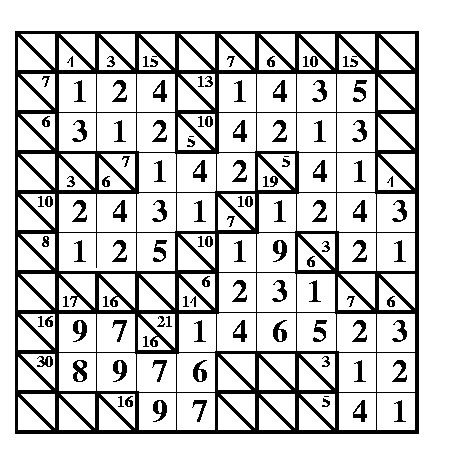
A correctly filled in answer for the kakuro puzzle. Image by Paul Curzon / CS4FN.
The creation of this post was funded by UKRI, through grant EP/K040251/2 held by Professor Ursula Martin, and forms part of a broader project on the development and impact of computing.
Tim Berners-Lee, Right to Repair, and a maths puzzle.
Welcome to Day 8 of our CS4FN Christmas Computing Advent Calendar. It features a computing-themed post every day in December until Christmas Day. The blog posts in the Advent Calendar are inspired by the picture on the ‘door’ – and today’s post is inspired by a picture of a Christmas present.
Presents are something you give freely to someone, but they’re also something you hide behind wrapping paper. This post is about a gift and also about trying to uncover something that’s been hidden. Read on to find out about Tim Berners-Lee’s gift to the world, and about the Restart Project who are working to stop the manufacturers of electronic devices from hiding how people can fix them. At the bottom of the post you’ll find the answer to yesterday’s puzzle and a new puzzle for today, also all of the previous posts in this series. If you’re enjoying the posts, please share them with your friends 🙂
A present in blue wrapping paper with a large green bow. Image drawn and digitised by Jo Brodie.
1. “This is for everyone” – Tim Berner’s Lee
Audiences don’t usually cheer for computer scientists at major sporting events but there’s one computer scientist who was given a special welcome at the London Olympics Opening Ceremony in 2012.
Tim Berners-Lee invented the World Wide Web in 1989 by coming up with the way for web pages to be connected through links (everything that’s blue and clickable on this page is a link). That led to the creation of web browsers which let us read web pages and find our way around them by clicking on those links. If you’ve ever wondered what “www” means at the start of a link it’s just short for World Wide Web. Try saying “www” and then “World Wide Web” – which takes longer to say?
Tim Berners-Lee didn’t make lots of money from his invention. Instead he made the World Wide Web freely available for everyone to use so that they could access the information on the web. Unless someone has printed this onto paper, you’re reading this on a web browser on the World Wide Web, so three cheers Tim Berners-Lee.
In 2004 the Queen knighted him (he’s now Sir Tim Berners-Lee) and in 2017 he was given a special award, named after Alan Turing, for “inventing the World Wide Web and the first web browser.”
Below is the tweet he sent out during the Olympics opening ceremony.
You might also like finding out about “open-source software” which is “computer software that is released under a license in which the copyright holder grants users the rights to use, study, change, and distribute the software and its source code to anyone and for any purpose.”
2. Do you have the right to repair your electronic devices?
A ‘black box’ is a phrase to describe something that has an input and an output but where ‘the bit in the middle’ is a complete mystery and hidden from view. An awful lot of modern devices are like this. In the past you might have been able to mend something technological (even if it was just changing the battery) but for devices like mobile phones it’s becoming almost impossible.
People need special tools just to open them as well as the skills to know how to open them without breaking some incredibly important tiny bit. Manufacturers aren’t always very keen for customers to fix things. The manufacturers can make more money from us if they have to sell us expensive parts and charge us for people to fix them. Some even put software in their devices that stops people from fixing them!
The cost of fixing devices can be very expensive and in some cases it can actually be cheaper to just buy a new device. Obviously it’s very wasteful too.
The Restart Project is full of volunteers who want to help everyone fix our electronic devices, and also fix our relationship with electronics (discouraging us from throwing away our old phone when a new one is on the market). The project began in London but they now run Repair Parties in several cities in the UK and around the world. At these parties people can bring their broken devices and rather than just ‘getting them fixed’ they can learn how to fix their devices themselves by learning and sharing new skills. This means they save money and save their devices from landfill.
Restart have also campaigned for people to have the Right to Repair their own devices. They want a change in manufacturing laws to make sure that devices are designed so that the people who buy and use them can easily repair them without having to spend too much money.
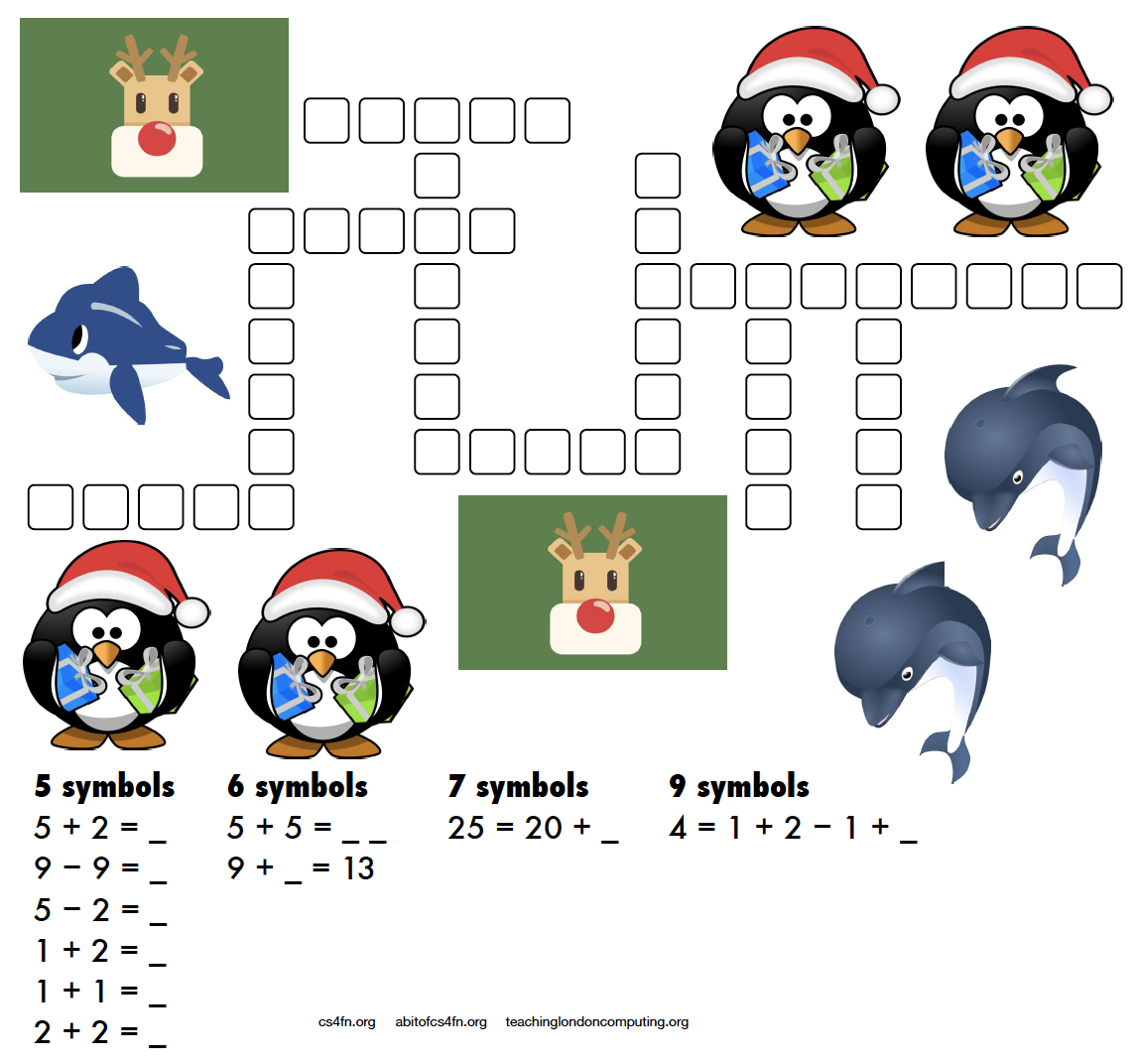
A more mathematical puzzle today. Rather than writing letters into the kriss-kross you need to write the equation and its answer.
For example 5 + 2 = as the clue gives you 5 + 2 = 7 as the answer which takes up 5 characters (note that the answer is not “seven” which also takes up 5 characters!). There are several places in the puzzle where a 5 character answer could go, but which one is the right one? Start with the clues that have only one space they can fit into (the ones with 7 symbols and 9 symbols) then see what can fit around them.
This puzzle was created by Daniel, who was aged 6 when he made this. For an explanation of the links to computer science and how these puzzles can be used in the classroom please see the Maths Kriss-Kross page on our site for teachers. Note that the page does include the answer sheet, but no cheating, we’ll post the answer tomorrow. Also, if you don’t have a printer you can use the editable PDF linked on that page.
4. Answer to yesterday’s puzzle
The creation of this post was funded by UKRI, through grant EP/K040251/2 held by Professor Ursula Martin, and forms part of a broader project on the development and impact of computing.
Welcome to Day 7 of our advent calendar. Yesterday’s post was about Printed Circuit Birds Boards, today’s theme is the Christmas robin redbreast which features on lots of Christmas cards and today is making a special appearance on our CS4FN Computing advent calendar.
A little robin redbreast. Image drawn and digitised by Jo Brodie.
In this longer post we’ll focus on the ways computer scientists are learning about our feathered friends and we’ll also make room for some of the bird-brained April Fools jokes in computing too.
We hope you enjoy it, and there’s also a puzzle at the end.
1. Computing Sounds Wild – bird is the word
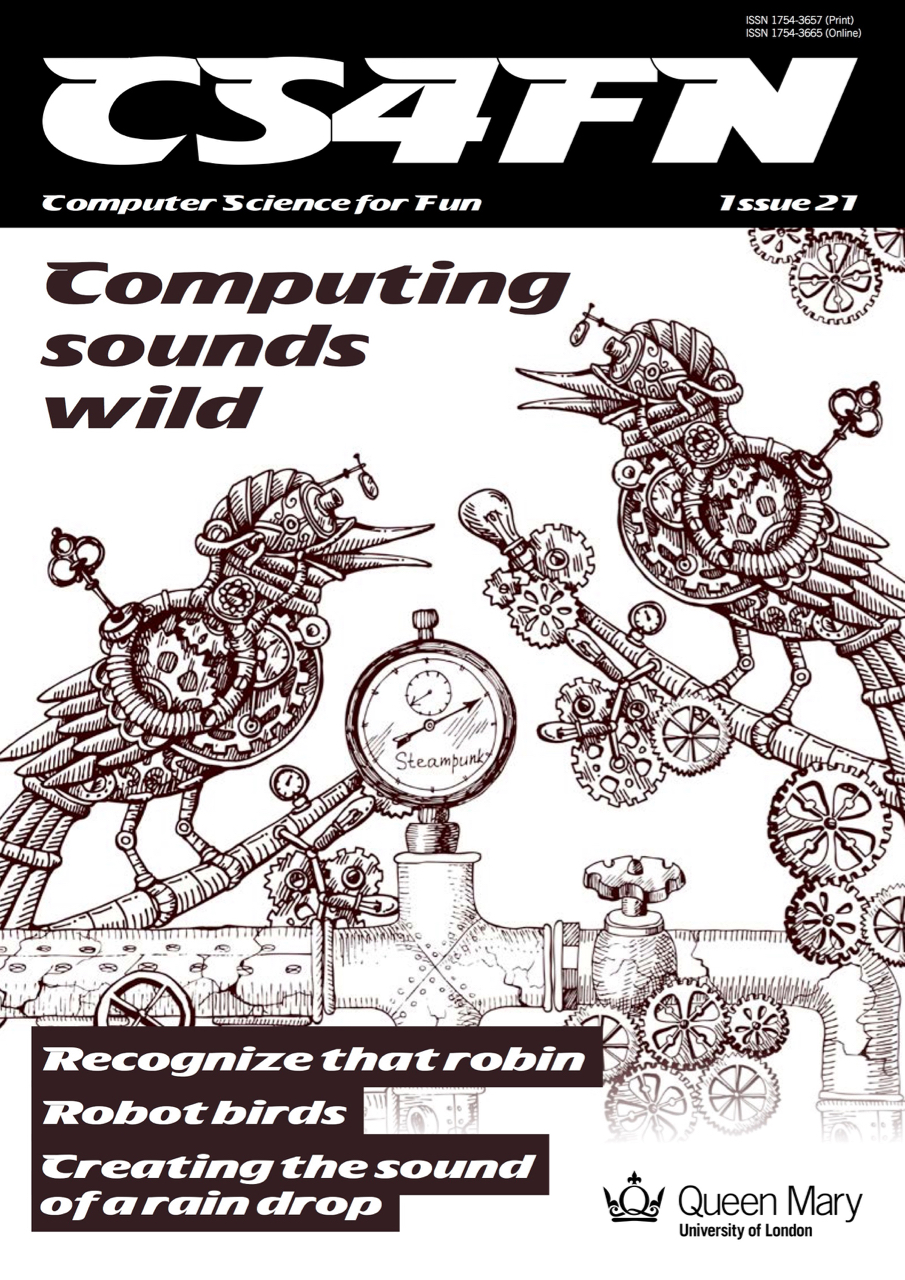
Our free CS4FN magazine, Computing Sounds Wild (you can download a copy here), features the word ”bird” 60 times so it’s definitely very bird-themed.
“An interest in nature and an interest in computers don’t obviously go well together. For a band of computer scientists interested in sound they very much do, though. In this issue we explore the work of scientists and engineers using computers to understand, identify and recreate wild sounds, especially those of birds. We see how sophisticated algorithms that allow machines to learn, can help recognize birds even when they can’t be seen, so helping conservation efforts. We see how computer models help biologists understand animal behaviour, and we look at how electronic and computer-generated sounds, having changed music, are now set to change the soundscapes of films. Making electronic sounds is also a great, fun way to become a computer scientist and learn to program.”
2. Singing bird – a human choir singing birdsong
by Jane Waite, QMUL This article was originally published on the CS4FN website and can also be found on page 15 in the magazine linked above.
“I’m in a choir”. “Really, what do you sing?” “I did a blackbird last week, but I think I’m going to be woodpecker today, I do like a robin though!”
This is no joke! Marcus Coates a British artist, got up very early, and working with a wildlife sound recordist, Geoff Sample, he used 14 microphones to record the dawn chorus over lots of chilly mornings. They slowed the sounds down and matched up each species of bird with different types of human voices. Next they created a film of 19 people making bird song, each person sang a different bird, in their own habitats, a car, a shed even a lady in the bath! The 19 tracks are played together to make the dawn chorus. See it on YouTube below.
Marcus didn’t stop there, he wrote a new bird song score. Yes, for people to sing a new top ten bird hit, but they have to do it very slowly. People sing ‘bird’ about 20 times slower than birds sing ‘bird’ ‘whooooooop’, ‘whooooooop’, ‘tweeeeet’. For a special performance, a choir learned the new song, a new dawn chorus, they sang the slowed down version live, which was recorded, speeded back up and played to the audience, I was there! It was amazing! A human performance, became a minute of tweeting joy. Close your eyes and ‘whoop’ you were in the woods, at the crack of dawn!
Computationally thinking a performance
Computational thinking is at the heart of the way computer scientists solve problems. Marcus Coates, doesn’t claim to be a computer scientist, he is an artist who looks for ways to see how people are like other animals. But we can get an idea of what computational thinking is all about by looking at how he created his sounds. Firstly, he and wildlife sound recordist, Geoff Sample, had to focus on the individual bird sounds in the original recordings, ignore detail they didn’t need, doing abstraction, listening for each bird, working out what aspects of bird sound was important. They looked for patterns isolating each voice, sometimes the bird’s performance was messy and they could not hear particular species clearly, so they were constantly checking for quality. For each bird, they listened and listened until they found just the right ‘slow it down’ speed. Different birds needed different speeds for people to be able to mimic and different kinds of human voices suited each bird type: attention to detail mattered enormously. They had to check the results carefully, evaluating, making sure each really did sound like the appropriate bird and all fitted together into the Dawn Chorus soundscape. They also had to create a bird language, another abstraction, a score as track notes, and that is just an algorithm for making sounds!
3. Sophisticated songbird singing – how do they do it?
by Dan Stowell, QMUL This article was originally published on the CS4FN website and can also be found on page 14 in the magazine linked above.
How do songbirds make such complex sounds? The answer is on a different branch of the tree of evolution… We humans have a set of vocal folds (or vocal cords) in our throats, and they vibrate when we speak to make the pitched sound. Air from your lungs passes over them and they chop up the column of air letting more or less through and so making sound waves. This vocal ‘equipment’ is similar in mammals like monkeys and dogs, our evolutionary neighbours. But songbirds are not so similar to us. They make sounds too, but they evolved this skill separately, and so their ‘equipment’ is different: they actually have two sets of vocal folds, one for each lung.
Sometimes if you hear an impressive, complex sound from a bird, it’s because the bird is actually using the two sides of their voice-box together to make what seems like a single extra-long or extra-fancy sound. Songbirds also have very strong muscles in their throat that help them change the sound extremely quickly. Biologists believe that these skills evolved so that the birds could tell potential mates and rivals how healthy and skillful they were.
So if you ever wondered why you can’t quite sing like a blackbird, now you have a good excuse!
4. Data transmitted on the wing
Computers are great ways of moving data from one place to another and the internet can let you download or share a file very quickly. Before I had the internet at home if I wanted to work on a file on my home computer I had to save a copy from my work computer onto a memory stick and plug it in to my laptop at home. Once I ‘got connected’ at home I was then able to email myself with an attachment and use my home broadband to pick up file. Now I don’t even need to do that. I can save a file on my work computer, it synchronises with the ‘cloud’ and when I get home I can pick up where I left off. When I was using the memory stick my rate of data transfer was entirely down to the speed of road traffic as I sat on the bus on the way to work. Fairly slow, but the data definitely arrived in one piece.
In 1990 a joke memo was published for April Fool’s Day which suggested the use of homing pigeons as a form of internet, in which the birds might carry small packets of data. The memo, called ‘IP over Avian Carriers’ (that is, a bird-based internet), was written in a mock-serious tone (you can read it here) but although it was written for fun the idea has actually been used in real life too. Photographers in remote areas with minimal internet signal have used homing pigeons to send their pictures back.
The beautiful (and quite possibly wi-fi ready, with those antennas) Victoria Crowned Pigeon. Not a carrier pigeon admittedly, but much more photogenic. Image by Foto-Rabe from Pixabay
A company in the US which offers adventure holidays including rafting used homing pigeons to return rolls of films (before digital film took over) back to the company’s base. The guides and their guests would take loads of photos while having fun rafting on the river and the birds would speed the photos back to the base, where they could be developed, so that when the adventurous guests arrived later their photos were ready for them.
On April Fool’s Day in 2002 Google ‘admitted’ to its users that the reason their web search results appeared so quickly and were so accurate was because, rather than using automated processes to grab the best result, Google was actually using a bank of pigeons to select the best results. Millions of pigeons viewing web pages and pecking picking the best one for you when you type in your search question. Pretty unlikely, right?
In a rather surprising non-April Fool twist some researchers decided to test out how well pigeons can distinguish different types of information in hospital photographs. They trained pigeons by getting them to view medical pictures of tissue samples taken from healthy people as well as pictures taken from people who were ill. The pigeons had to peck one of two coloured buttons and in doing so learned which pictures were of healthy tissue and which were diseased. If they pecked the correct button they got an extra food reward.
The researchers then tested the pigeons with a fresh set of pictures, to see if they could apply their learning to pictures they’d not seen before. Incredibly the pigeons were pretty good at separating the pictures into healthy and unhealthy, with an 80 per cent hit rate.
You can download this as a PDF to PRINT or as an editable PDF that you can fill in on a COMPUTER.
You might wonder “What do these kriss-kross puzzles have to do with computing?” Well, you need to use a bit of logical thinking to fill one in and come up with a strategy. If there’s only one word of a particular length then it has to go in that space and can’t fit anywhere else. You’re then using pattern matching to decide which other words can fit in the spaces around it and which match the letters where they overlap. Younger children might just enjoy counting the letters and writing them out, or practising phonics or spelling.
We’ll post the answer tomorrow.
7. Answer to yesterday’s puzzle
Image by Paul Curzon / CS4FN.
The creation of this post was funded by UKRI, through grant EP/K040251/2 held by Professor Ursula Martin, and forms part of a broader project on the development and impact of computing.
This post is behind the 5th ‘door’ of the CS4FN Christmas Computing Advent Calendar – we’re publishing a computing-themed (and sometimes festive-themed) post every day until Christmas Day. Today’s picture is a snowman, and what’s a snowman made of but frozen water?
Image drawn and digitised by Jo Brodie.
1. You can make a computer out of water!
1n 1936 Vladimir Lukyanov got creative with some pipes and pumps built a computer, called a water (or hydraulic) integrator, which could store water temporarily in some bits and pump water to other bits. The movement of water and where it ended up used the ‘simplicity of programming’ to show him the answer – a physical representation of some Very Hard Sums (sums, equations and calculations that are easier now thanks to much faster computers).
A simple and effective way of using water to show a mathematical relationship popped up on QI and the video below demonstrates Pythagoras’ Theorem rather nicely.
Video from the BBC via their YouTube channel.
In 1939 Lukyanov published an article about his analog hydraulic computer for the (‘Otdeleniye Technicheskikh Nauk’ or ‘Отделение технических наук’ in Russian which means Section for Technical Scientific Works although these days we’d probably say Department of Engineering Sciences) and in 1955 this was translated by the Massachusetts Institute of Technology (MIT) for the US army’s “Arctic Construction and Frost Effects Laboratory”. You can see a copy of his translated ‘Hydraulic Apparatus for Engineering Computations‘ at the Internet Archive.
In a rather pleasing coincidence for this blog post (that you might think was by design rather than just good fortune) this device was actually put to work by the US Army to study the freezing and thawing not of snowmen but of soil (ie, the ground). It’s particularly useful if you’re building and maintaining a military airfield (or even just roads) to know how well the concrete runway will survive changes in weather (and how well your aircraft’s wheels will survive after meeting it).
For a modern take on the ‘hydrodynamic calculating machine’ aka water computer see this video from science communicator Steve Mould in which he creates a computer that can do some simple additions.
Video by Steve Mould via his YouTube channel.
2. The puzzle of digital compression
Our snowman’s been sitting around for a while and his ice has probably become a bit compacted, so he might be taking up less space (or he might have melted). Compression is a technique computer scientists use to make big data files smaller.
Big files take a long time to transfer from one place to another. The more data the longer it takes, and the more memory is needed to store the information. Compressing the files saves space. Data on computers is stored as long sequences of characters – ultimately as binary 1s and 0s. The idea with compression is that we use an algorithm to change the way the information is represented so that fewer characters are needed to store exactly the same information.
That involves using special codes. Each common word or phrase is replaced by a shorter sequence of symbols. A long file can be made much shorter if it has lots of similar sequences, just as the message below has been shortened. A second algorithm can then be used to get the original back. We’ve turned the idea into a puzzle that involves pattern matching patterns from the code book. Can you work out what the original message was? (Answer tomorrow, and another snowman-themed puzzle coming soon).
The code: NG1 AMH5 IBEC2 84F6JKO 7JDLC93 (clue: Spooky apparitions are about to appear on Christmas Eve).
The code book (match the letter or number to the word it codes for).
3. Answer to yesterday’s puzzle
The creation of this post was funded by UKRI, through grant EP/K040251/2 held by Professor Ursula Martin, and forms part of a broader project on the development and impact of computing.
Welcome to the second ‘window’ of the CS4FN Christmas Computing Advent Calendar. The picture on the ‘box’ was a pair of mittens, so today’s focus is on pairs, and a little bit on gloves. Sadly no pear trees though.
A pair of cyan blue Christmas mittens with a black and white snowflake pattern on each. Image drawn and digitised by Jo Brodie.
1. i-pickpocket
In this article, by a pair (ho ho) of computer scientists (Jane Waite and Paul Curzon), you can find out how paired devices can be used to steal money from people, picking pockets at a distance.
Working with scientists musician Imogen Heap developed Mi.Mu gloves, a wearable musical instrument in glove form which lets the wearer map hand movements (gestures) to a particular musical effect (pairing a gesture to an action). The gloves contain sensors which can measure the speed and position of the hands and can send this information wirelessly to a controlling computer which can then trigger the sound effect that the musician previously mapped to that hand movement.
You can watch Imogen talk about and demo the gloves here and in the video below, which also looks at the ways in which the gloves might help disabled people to make music.
‘Pair programming’ involves having two people working together on one computer to write and edit code. One person is the ‘Driver’ who writes the code and explains what it’s going to do, the other person is the ‘Navigator’ who observes and makes suggestions and corrections. This is a way to bring two different perspectives on the same code, which is being edited, reviewed and debugged in real-time. Importantly, the two people in the mini-team switch roles regularly. Pair programming is widely used in industry and increasingly being used in the classroom – it can really help people who are learning about computers and how to program to talk through what they’re doing with someone else (you may have done this yourself in class). However, some people prefer to work by themselves and pair programming takes up two people’s time instead of one, but it can also produce better code with fewer bugs. It does need good communication between the two people working on the task though (and good communication is a very important skill in computer science!).
Here’s a short video from Code.org which shows how it’s done.
4. Digital Twins
A digital twin is a computer-based model that represents a real, physical thing (such as a jet engine or car component) and which behaves as closely as possible to the real thing. Taking information from the real-world version and applying it to the digital twin lets engineers and designers test things virtually, to see how the physical object would behave under different circumstances and to help spot (and fix) problems.
another pair of mitten-free hands to do the trick on
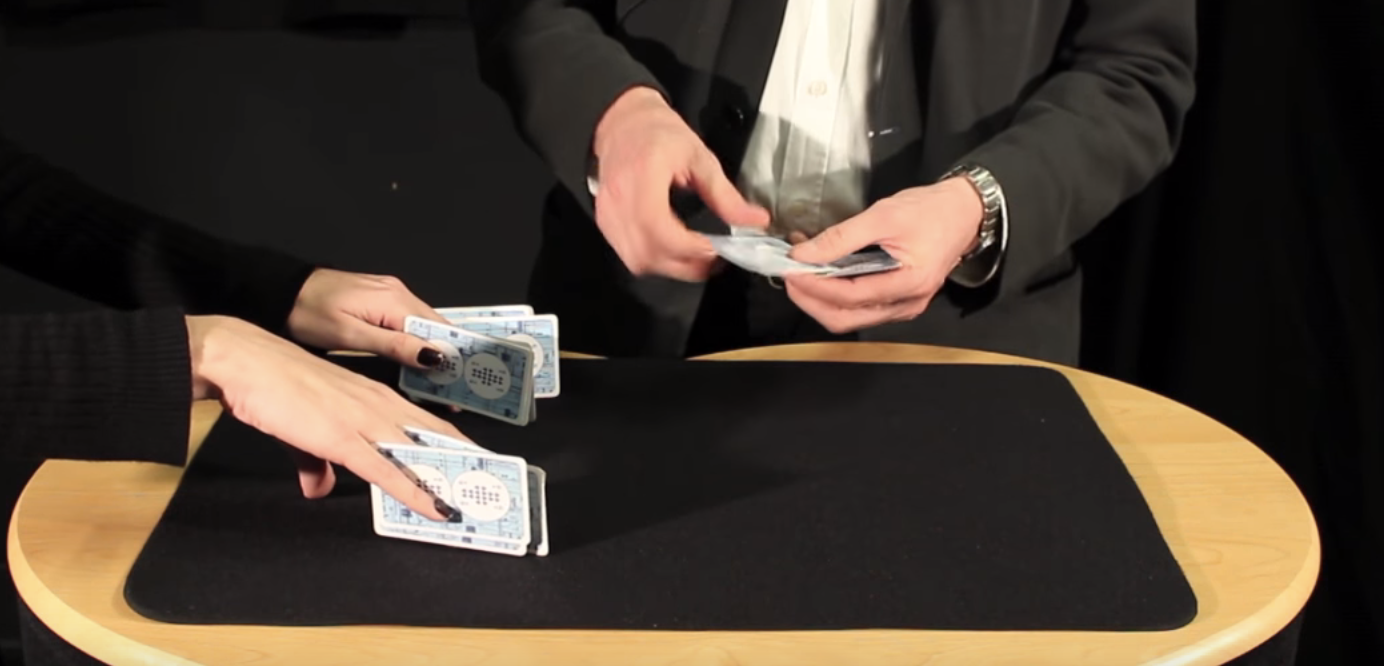
Find a pack of cards and take out 15 (doesn’t matter which ones, pick a card, any card, but 15 of them). Ask someone to put their hands on a table but with their fingers spread as if they’re playing a piano. You are going to do a magic trick that involves slotting pairs of cards between their fingers (10 fingers gives 8 spaces). As you do this you’ll ask them to say with you “two cards make a pair”. Take the first pair and slot them between the first space on their left hand (between their little finger and their ring finger) and both of you say “two cards make a pair”.
The magician puts pairs of cards between the assistant’s fingers. Image credit CS4FN / Teaching London Computing (from the Invisible Palming video linked below)
Repeat with another pair of cards between ring finger and middle finger (“two cards make a pair”) and twice again between middle and index, and between index and thumb – saying “two cards make a pair” each time you do. You’ve now got 8 cards in 4 pairs in their left hand.
Repeat the same process on their right hand saying “two cards make a pair” each time (but you only have 7 cards left so can only make 3 pairs). There’s one card left over which can go between their index finger and thumb.
The magician removes the cards and puts them into two piles. Image credit CS4FN / Teaching London Computing (from the Invisible Palming video linked below)
Then you’ll take back each pair of cards and lay them on the table, separating them into two different piles – each time saying “two cards make a pair”. Again you’ll have one left over. Ask the person to choose which pile it goes on. You, the magician, are going to magically move the card from the pile they’ve chosen to the other pile, but you’re going to do it invisibly by hiding the card in your palm (‘palming’). To find out how to do the trick, and how this can be used to think about the ways in which “self-working” magic tricks are like algorithms have a look at the full instructions and video below.
Today’s puzzle is in keeping with the post’s twins and pairs theme. It’s a symmetrical pixel puzzle so we’ve given you one half and you can use mirror symmetry to fill in the remaining side. This is an example of data compression – you only need half of the numbers to be able to complete all of it. Some squares have a number that tells you the colour to colour in that square. Look up the colours in the key. Other squares have no number. Work out what colour they are by symmetry.
So, for example the colour look up key tells you that 1 is Red and 2 is Orange, so if a row said 11111222 that means colour each of the five ‘1’ pixels in red and each of the three ‘2’ pixels orange. There are another 8 blank pixels to fill in at the end of the row and these need to mirror the first part of the row (22211111), so you’d need to colour the first three in orange and the remaining five in red. Click here to download the puzzle as a printable PDF. Solution tomorrow…
The creation of this post was funded by UKRI, through grant EP/K040251/2 held by Professor Ursula Martin, and forms part of a broader project on the development and impact of computing.
The truth table for NOT P. A yellow brick represents P. Blue means True and Red means false. Read along the rows to get the meaning of NOT P when P is true or false. Image by CS4FN
We have seen how to represent truth tables in lego. Truth tables are a way of giving precise meaning to logical operations like AND, OR and NOT. They are also give a way to do logical reasoning following a simple algorithm.
That’s Not Not True
You may have been pulled up in English and told you just said the opposite of what you meant, after saying something like “There ain’t no way I’m doing that”. This is a “double negative” as the “n’t” in “ain’t” is really “not” so followed by “no way” you are actually saying “not not way” or overall: “I am doing that”. Perhaps the most famous double negative is in the Rolling Stones song “(I can’t get no) satisfaction”. English is very flexible though and double negatives like this don’t cancel out but just become a different way of saying the negative version. In logic two negations do cancel out, though. Let’s take a purer version to work with: the statement “I am not not happy”. What does this mean? In logic the basic proposition here is “I am not happy”. The logical statement is “NOT (NOT (I am happy))”.
We can prove what this means using truth tables. We can do more than just prove what this single statement means. We can prove what all double negatives mean, more generally. We do this by replacing the proposition “I am happy” with a variable P. It now becomes NOT (NOT P) or in our lego version where we use a yellow brick to mean a proposition, P:
Image by CS4FN
This is just syntax, just a sequence of symbols. It doesn’t give us any meaning on its own. We can build truth tables in Lego for that. We start from the variables that are at the inside of the logical expression which here is just the variable P. We list in a table column the possible values it can take (true or false).
Image by CS4FN
This shows P (yellow) can be either be TRUE (blue) or FALSE (red). Now we build up the logical expression of interest a column at a time. NOT is applied to P, so we add a new column for NOT P and use the truth table for the operator, NOT, to tell us what lego brick to put in each row based on the lego brick already there. The NOT truth table is at the top of the page. It says if you have a blue brick in a row, place a red brick there. If you have a red brick, put a blue brick there. This gives us a new filled out column for (NOT P) which is just a copy of the NOT truth table (but bare with us that was just a simple case). We get:
Image by CS4FN
Moving outwards in the expression NOT (NOT P)), we now look at the operator applied to (NOT P). It is NOT again. We add a new column to our truth table and again use the NOT truth table to work out the new values, but this time applied to the column before (the NOT P column). The NOT truth table says put a blue brick for a red brick, and a red brick for a blue brick in the column it is being applied to (the NOT P column). This gives:
Image by CS4FN
The result is a truth table with coloured bricks identical to that of the original column for P. Switching back from lego bricks to what the columns mean, we have shown that the NOT(NOT P) column is the same as the P column, or in other words that NOT(NOT P) EQUALS P (whatever value P has).
We can actually go a step further though, because equivalence is just a logical operation with its own truth table. It gives true if the two operands have the same value and false otherwise (or in lego terms if the bricks are the same colour the answer is a blue brick and if they are different colours the answer is a red brick. The truth table looks like this:
Image by CS4FN
We can use this truth table to calculate whether two lego truth table columns are equal or not just by looking up the combinations in this EQUALS truth table. Continuing our example we can carrying building our truth table about NOT(NOT P)). To make things clearer first add a column corresponding to P again. That means we will be applying the EQUALS operator to the last two columns. As before, for each row, look up the corresponding pattern for those last two columns in the EQUALS truth table to get the answer for that row. In the first row we have two blue bricks so that becomes a blue brick according tot he EQUALS truth table. In the next row we have two red bricks. That also becomes a blue brick. This gives:
Image by CS4FN
The thing to notice here is that all the entries in the final answer column are blue lego pieces. Switching back from the lego world to the logic world, what does this mean? Blue is true so all rows in the answer are true. That means whatever value of the proposition P the answer to NOT (NOT P) EQUALS P is true. We have proved a theorem that this is always true. We have shown by building with lego that a double negation cancels itself out.
Logical expressions like this that are always true (whatever the values of the variables) are called tautologies. We can tell something is a tautology, so we have proved a theorem, just by the simple manual check that its truth table values are true (or in lego all blue).
The important thing to realise about this is all the reasoning can be done without knowing what the symbols mean, and certainly not worrying about English words, once you have the truth tables. You do it mechanically. You do not need to think about what, for example, red and blue mean until the end. At that point you return to the logical world to see what you have found out. All blue means it is always true! You can also at that point substitute back in actual words of interest into the statements proved. P means “I am happy”. We started by asking what “I am not not happy” means. We converted this to “NOT (NOT (I am happy))”. By swapping in “I am happy” for P in our theorem gives us that NOT (NOT “I am happy”) EQUALS “I am happy”, or that “I am not not happy.” just means the same as “I am happy”
We have been reasoning about English statements, but this kind of reasoning is the basis of all logical reasoning and essentially the basis of formal verification where the meaning of programs and hardware is checked to see if it meets a specification. It tells you what a test in a program like “if (! temperature != 0) …) means so does for example, or what a circuit with two NOT gates does.
And lego logic has even given us a way to prove things just by building with lego.
Subscribe to be notified whenever we publish a new post to the CS4FN blog.
This blog is funded by EPSRC on research agreement EP/W033615/1.
The Lego Computer Science post was originally funded by UKRI, through grant EP/K040251/2 held by Professor Ursula Martin, and forms part of a broader project on the development and impact of computing.
Truth tables are a simple way of reason about logic that were popularised by the 20th century philosopher Ludwig Wittgenstein. They provide a very clear way to explain what logical operators like AND, OR and NOT mean (or in computational terms, what they do). They also give a simple way to do pure logical reasoning and so see if arguments follow logically. These logical operators crop up in logic circuits and in programs where decisions are being made so are vital to creating correct circuits and writing correct programs. Let’s see what a truth table is by making some from Lego.
Logic in Lego
First we need to represent the basic building blocks of logic in lego. We’ve seen in previous articles how to represent numbers, binary and even images in lego. We have seen that we do computation on symbols and we can use lego blocks as symbols. Logic can therefore be represented in lego symbols too.
We will look at a simple kind of logic called propositional logic (there isn’t actually just one kind of logic but lots of different kinds with different rules). Propositional logic is the simplest kind. It deals with propositions which are just statements that are either true or false (but we may not know which). For example, “Snoopy is a logician.” is a proposition. So are “The world is flat.”, “Water contains oxygen.” and “temperature > 0” as we might find in a program. For the purposes of logic itself, it doesn’t matter what the words actually mean or even what they are. We will therefore represent all propositions by square lego blocks of different colours.
Here we want the symbols to stand for logical things rather than numbers. There are lots of numerical values: things like 1, 5 and 77. There are only two logical values: TRUE and FALSE, often written just as T and F. We will use a blue lego block for the logical value TRUE, and a red block for the value FALSE. They are just symbols though so we could use any blocks and any colours, just as we could use other words for true and false as other languages do. We chose blue for true just because it rhymes so is easy to remember, and red more randomly because it is a common lego primary colour.
True and False lego. A square 2×2 blue block represents True. A square 2×2 red block is false.
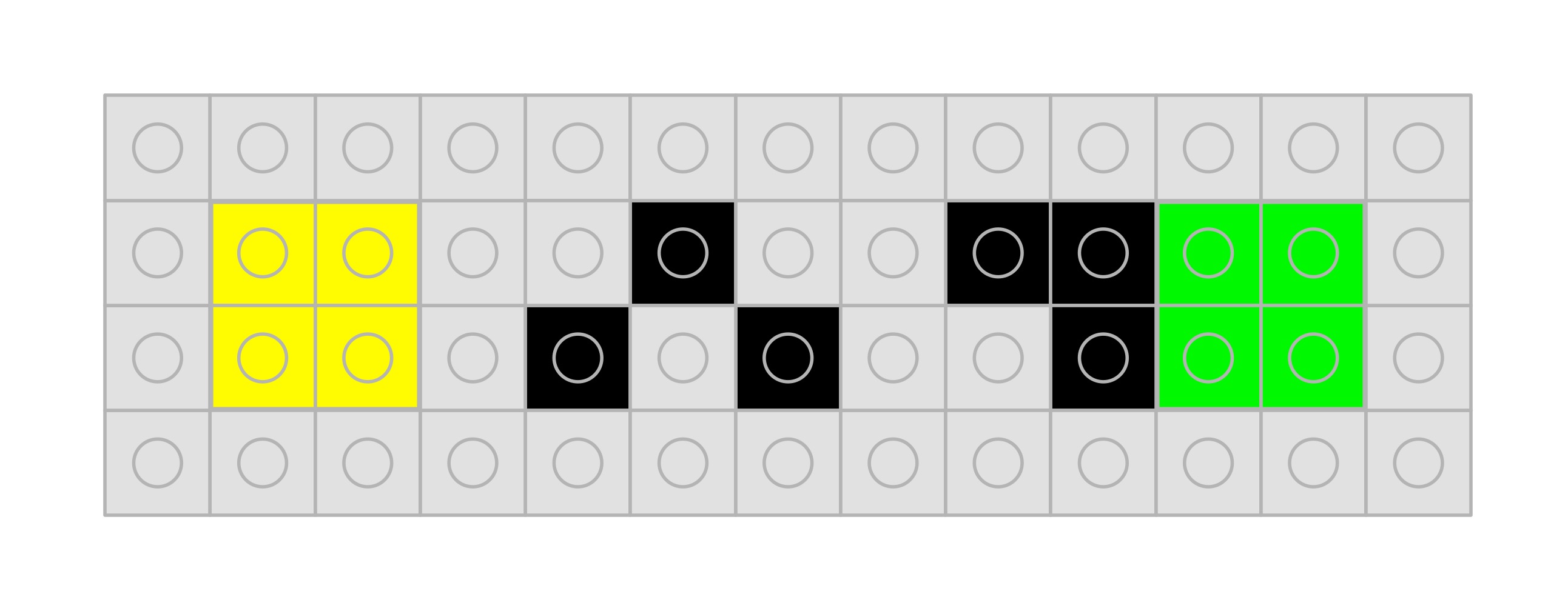
What about representing the actual sentences stating purported facts like “Messi is the best footballer ever”, or in a program “n == 1”? Statements like this are called propositions. As far as reasoning logically goes the precise words or even language they are in do not matter. This is something Wittgensteinrealised. When doing reasoning these basic propositions can be replaced by variables like P and Q and the logic won’t change. Rather than use letters we will just use different coloured lego blocks to stand for different propositions, emphasising that the words or even variable names do not matter. So we will use a yellow block for a variable P and a green block for a variable Q. Each of which could stand for absolutely any English proposition we like at any time (though if we want it to stand for a particular proposition then we should define which one clearly).
Propositional variables P and Q are represented by yellow and green blocks
Logical Symbols
What we are really interested in is not just true and false values but the logical operations on propositions. The core of these we use in everyday English: AND, OR and NOT, more technically known as conjunction, disjunction and negation in logic. There are several variations of the symbols used to represent these symbols just as there are for true and false. We will use the versions in lego as below.
The logical operators AND, OR and NOT as lego symbols
These lego symbols will allow us to write out logical expressions about propositions: like “The cat is thirsty AND NOT the cat is hungry” which we might write in English as “The cat is thirsty and not hungry”. If we use a yellow block to mean “The cat is thirsty” and a green block to mean “The cat is hungry” then in lego logic we can write it as follows:
The cat is thirsty AND NOT the cat is hungry P AND (NOT Q)
Of course the yellow and green brick are variables so by changing the propositions they represent it can stand for other things. It can also represent: ” The moon is blue AND NOT The moon is made of cheese.” where the yellow brick represents “The moon is blue” and the green brick represents “The moon is made of cheese”.
Think up some statements that involve AND, OR and NOT and then build representations of then in lego logic like the above.
The meaning of logical connectives
The above gives us symbols for the logical connectives, but so far they have no meaning: it is just syntax. Perhaps you think you know what the words mean. We use words like and, or and not in language rather imprecisely at times based on dictionary-style definitions. They essentially mean the same in English as in logic, but we need to define what they mean precisely. We do not want two different people to have two slightly different understandings of what they mean. This is where truth tables come in. A truth table tells us exactly, and without doubt, what the symbols for the operators mean. The give what is called by computer scientists a formal semantics to the logical connectives.
Let’s look at NOT first. A truth table is just a table that includes as rows all the combinations of true and false values of the variables in a logical expression together with an answer for those values. For example a truth table for the operator NOT, so telling us in all situations what (NOT a) means, is:
P
NOT P
TRUE
FALSE
FALSE
TRUE
A truth table for the NOT operator. Reading along the rows, IF P is TRUE THEN (NOT P) is FALSE; IF P is FALSE THEN (NOT P) is TRUE.
We can build this truth table in lego using our lego representation:
NOT only applies to one proposition, the one it negates, (it is a unary logical connective). That means we only need two rows in the table to cover the different possible values those propositions could stand for. AND (and OR) combine to two propositions (it is a binary logical connective). To cover all the possible combinations of the values of those propositions we need a table with four rows as there are four possibilities.
P
Q
P AND Q
TRUE
TRUE
TRUE
TRUE
FALSE
FALSE
FALSE
TRUE
FALSE
FALSE
FALSE
FALSE
A truth table for the logical AND operator.
We can build this in Lego as:
Reading along the rows this says that if both P and Q are blue (true) then the answer for P AND Q is true. Otherwise the answer is false (red). T
The following is the lego truth table for the logical OR operator
The columns for the two variables yellow/green (P/Q) are the same, setting out all the possibilities. Now the answer is true (blue) if either operand is true (blue) and false (red) when both are false (red).
We have now created lego truth tables that give the meaning of each of these three logical connectives. They aren’t the only logical operators – in fact there are 8 possible binary ones. Have a go at building lego truth tables for other binary logical connectives such as exclusive-or which is true if exactly one of the operands is true, and equivalence which is true if both operands are the same truth value.
Truth tables give precise meanings to logical operators and so to logic. That is useful, but even more usefully, they give a way to reason logically in a clear, price way. By following a simple algorithm to build new truth tables from existing ones, we can prove general facts, that are ultimately about propositions, in lego… as we will see next.
Subscribe to be notified whenever we publish a new post to the CS4FN blog.
This blog is funded by EPSRC on research agreement EP/W033615/1.
The Lego Computer Science post was originally funded by UKRI, through grant EP/K040251/2 held by Professor Ursula Martin, and forms part of a broader project on the development and impact of computing.
Continuing a series of blogs on what to do with all that lego scattered over the floor: learn some computer science…what is computation? Using binary.
We’ve been focussing on representing data so far but data on its own doesn’t do a lot. It is when you combine it with computation that things get exciting and suddenly you have something that can change the world. But what is computation? We will start to explore computation using something called cellular automata. They are just one simple way to do computation (of many).
We have seen that a data representation is just a way of storing information using symbols. It just gives meaning to otherwise arbitrary symbols. Those 1s and 0s, red blocks and blue blocks, Xs, Vs and Is could mean anything. Indeed at different times they mean different things: sometimes a particular group of 1s and 0s stand for a number, sometimes the colour of a pixel, sometimes a letter. So symbols become interesting when we give them meanings (and that is an important point to remember).
Computation is also about symbols, but about manipulating them using sets of rules. What do the rules do? Given one or more symbols they tell you to swap those symbols for new symbols. To do computation you just repeatedly apply a given set of rules, starting with some starting symbols and the symbols change and then change again and then change again …
Elementary Cellular Automata
Cellular automata are just a particular kind of rules that apply to grids of symbols (called cells). They were invented by one of the great original computer scientists, John von Neumann along with Stanislaw Ulam in the 1940s.
Elementary cellular automata, which we will look at here, are a simple version where you just have a row of cells (so a row of symbols). There are only two symbols allowed, usually 1 and 0. We will of course use lego blocks as our two symbols instead: a red brick for 1 and a blue brick for 0. A particular row of red and blue bricks is called the state. The rules change the colour of the bricks in the row and so change the state of the cellular automata. Here is an example state of such a ‘machine’ where the rows are 16 bricks (symbols) long (essentially the memory of the machine will be 16 bits long):
An example cellular automaton state consisting of 16 symbols. Traditionally cellular automata have symbols 0 and 1. We use a red block to mean a 1 and a blue block to mean a 0. Image by CS4FN
Rules
A rule that says if we have RED-BLUE-BLUE then change the middle cell to a RED block. Image by CS4FN
Now if we are going to do computation, we need rules (essentially a program) to apply that changes the state. The rules of an elementary cellular automaton like this are applied to each lego brick, changing it to a new lego brick. To do so they take the brick on either side into account though. Each rule therefore looks at three bricks at a time and changes (or not) the middle brick.
We can write out the rules using lego bricks too – saying what to do for each pattern of three lego blocks. So we could have a rule that if we have a triple RED-BLUE-BLUE then we change the middle of that triple to RED so that the triple becomes RED-RED-BLUE instead. In lego we could represent this rule as shown right, where we show the new value for the middle cell that changes. (Notice we are now using lego bricks, so symbols, to represent rules: a rule is just data too!)
Now a vital thing about rules for computation is that you MUST give a rule for every possibility. Our above rule only tells us what to do for one of the eight possibilities of those triples of bricks that might occur in each position. We must give 8 different rules, so that whatever pattern we come across we have a rule that says what to do.
Here is one possible set of 8 rules we could use:
A set of rules to define how a cellular automaton will behave. Image by CS4FN
Altogether, there are 256 different possible sets of rules like this.
Notice that we have ordered our rules using a binary pattern of the triples counting from 0 to 7 as a way to make sure we have covered every possible pattern exactly once and to make it easier to find the right rule. We could write then in any order of course. It would make no difference to what the rules do.
Doing Computation
Now to do computation we just apply the rules we have chosen to every position in an initial state – an initial pattern of red and blue blocks. We start at one end of the row and apply the set of rules in each position finding the one that matches the pattern at that position. Once we find the rule that matches that position, we note the new middle block accordingly, then move on to the next position. Once we get to the end of the row, we know what the whole new state for the automaton will be: we have done one step of computation. For the cell at either end of the row, assume its adjacent value off the end is 0 (so blue for us). At every position the rule applies to the original triple of bricks in the current state, not ones changed by rules applied to other positions: the rules are applied to every position at the same time.
The easiest way to do this with lego is to line up a row of red and blue lego blocks as the initial state and apply our rules as above to get a new pattern of red and blue lego blocks placed below it. That new pattern is the new state of the machine, Here is a step as applied to our random state we gave above.
Image by CS4FN
Calculating Number Sequences
We seem to be just replacing patterns by new patterns. Are we doing anything useful? Of course we could give some simple meaning to these patterns. Interpret the pattern as a binary number and what is happening? We are generating a number sequence. To see this use the above rules on a shorter pattern, starting with a single red lego block at the left hand end, with the rest blue. This is the binary for the number 1 (00001). Apply the rules and we get the number 2 (00010). Apply the rules again and the pattern of lego turns into the binary for 5 (00101), then 8 (01000) and then 20 (10100) and so on…
Image by CS4FN
We have created a machine that does a calculation on a number to create a new number. Let it run and it calculates the whole number sequence. Different rules will compute different number sequences: some perhaps more interesting than others.
Images from numbers
If you think numbers are a bit boring, then instead just give a different meaning to the patterns – as giving the colour of pixels, with each new state giving the next row of an infinite lego pixel picture. Now our rules are generating art. Each rule set will compute a different image as will different starting states (again some images generated will be more interesting than others). Here is what our above rules generate if we start with a single red brick in the centre:
The image generated by our rule if we see it as rules to generate the next line of a lego art image. Image by CS4FN
This is actually a fractal pattern called the Sierpiński triangle. It contains the same triangular pattern over and over again, and If you create a massive version of it on a large lego board you will see that each triangle has the same pattern within it. It is a beautiful recursive pattern.
Apply the rules and create a Lego pixel version yourself.
Explore the different rules
Stephen Wolfram has exhaustively explored all the elementary cellular automata, categorising them and describing their properties. However, that is no reason not to explore them yourself, whether with lego, on graph paper or by writing a program to apply the rules for you.
Of course you do not have to stick to only automata with 2 symbols. Add more symbols / colours of lego blocks (so you will need lots more rules in each set) and explore some more.
There is one cellular automaton, so one rule set (with only two symbols) that is very intriguing. It turns out that, rather than just generate a particular number sequences or pattern as the one above does, it can do absolutely any computation – it is a general purpose machine that can do anything that a modern computer can do…but that is another story.
Part of a series featuring featuring pixel puzzles, compression algorithms, number representation, gray code, binary, logic and computation.
Subscribe to be notified whenever we publish a new post to the CS4FN blog.
This blog is funded by EPSRC on research agreement EP/W033615/1.
This post was funded by UKRI, through grant EP/K040251/2 held by Professor Ursula Martin, and forms part of a broader project on the development and impact of computing.
Continuing a series of blogs on what to do with all that lego scattered over the floor: learn some computer science…how do computers represent numbers? Using binary.
We’ve seen that numbers, in fact any data, can be represented in lots of different ways. We represent numbers using ten digits, but we could use more or less digits. Even if we restrict ourselves to just two digits then there are lots of ways to represent numbers using them. We previously saw Gray code, which is a way that makes it easy to count using electronics as it only involves changing one digit as we count from one number to the next. However, we use numbers for more than just counting. We want to do arithmetic with them too. Computers therefore use the two symbols in a different way to Gray Code.
With ten digits it turned out that using our place-value system is a really good choice for storing large numbers and doing arithmetic on them. It leads to fairly simple algorithms to do addition, subtraction and so on, even of big numbers. We learnt them in primary school.
We can use the same ideas, and so similar algorithms, when we only allow ourselves two digits. When we do we get the pattern of counting we call binary. We can make the pattern out of lego bricks using two different colours for the two digits, 1 and 0:
Numbers in binary where 0 is a blue brick and 1 is a red brick Image by CS4FN
The red bricks (binary 1) in different columns represent different values (1, 2 or 4) Image by CS4FN
Place-value patterns
The pattern at first seems fairly random, but it actually follows the same pattern as counting in decimal.
In decimal we label the columns: ones, tens, hundreds and so on. This is because we have 10 digits (0-9) so when we get up to nine we have run out of digits so to add one more go back to zero in the ones column and carry one into the tens column instead. A one in the tens column has the value of ten not just one. Likewise, a one in the hundreds column has the value of a hundred not ten (as when we get up to 99, in a similar way, we need to expand into a new column to add one more).
In binary, we only have two digits so have to carry sooner. We can count 0, 1, but have then run out of digits, so have to carry into the next column for 2. It therefore becomes 10 where now the second column is a TWOs column not a TENs column as in decimal. We can carry on counting: … 10, 11 (ie 2, 3) and again then need to carry into a new column for 4 as we have run out of digits again but now in both the ONEs and TWOs columns. So the binary number for 4 is 100, where the third column is the FOURs column and so a one there stands for 4. The next time we have to use a new column is at 8 (when our above sequence runs out) and then 16. Whereas in decimal the column headings are powers of ten: ONEs, TENs, HUNDREDs, THOUSANDs, …, in binary the column headings are powers of two: ONEs, TWOs, FOURs, EIGHTs, SIXTEENs, …
Just as there are fairly simple algorithms to do arithmetic with decimal, there are also similar simple algorithms to do arithmetic in binary. That makes binary a convenient representation for numbers.
I Ching Binary Lego
We can of course use anything as our symbol for 0 and for 1 and through history many different symbols have been used. One of the earliest known uses of binary was in an Ancient Chinese text called the I Ching. It was to predict the future a bit like horoscopes, but based on a series of symbols that turn out to be binary. They involve what are called hexagrams – symbols made of six rows. Imagine each row is a stick of green bamboo. It can either be broken into two so with a gap in the middle (a 0) or unbroken with no gap (a 1). When ordered using the binary code, you then get the sequence as follows:
Binary using the I Ching patterns. Imagine the green rows as stalks of bamboo. A broken stalk (so with a gap) is a 0, An unbroken stalk is a 1. Image by CS4FN
Now each row stands for a digit: the bottom row is the ONEs, the next is TWOs, then the FOURs row and so on.
Using all six rows you can create 64 different symbols, so count from 0 to 63. Perhaps you can work out (and make in lego) the full I Ching binary pattern counting from 0 to 64.
Binary in Computers
Computers use binary to represent numbers but just using different symbols (not lego bricks or bamboo stalks). In a computer, a switch being on or a voltage being high stands for a 1 and a switch being off or a voltage being low stands for 0. Other than those different symbols for 1 and 0 being used, numbers are stored as binary using exactly the same pattern as with our red and blue bricks, and the I Ching pattern of yellow and green bricks.
All data in a computer is really just represented as electrical signals. However, you can think of a binary number stored in a computer as just a line of red and blue bricks. In fact, a computer memory is just like billions of red and blue lego bricks divided into sections for each separate number.
All other data, whether pictures, sounds or video can be stored as numbers, so once you have a way to represent numbers like this, everything else can be represented using them.
Part of a series featuring featuring pixel puzzles, compression algorithms, number representation, gray code, binary, logic and computation.
Subscribe to be notified whenever we publish a new post to the CS4FN blog.
This blog is funded by EPSRC on research agreement EP/W033615/1.
This post was funded by UKRI, through grant EP/K040251/2 held by Professor Ursula Martin, and forms part of a broader project on the development and impact of computing.


























 cs4fn
cs4fn 