Operational Transformation

Algorithms for writing together

by Paul Curzon, Queen Mary University of London

How do online word processing programs manage to allow two or more people to change the same document at the same time without getting in a complete muddle? One of the really key ideas that makes collaborative writing possible was developed by computer scientists, Clarence Ellis and Simon Gibbs. They called their idea ‘Operational transformation’.

Let’s look at a simple example to illustrate the problem. Suppose Alice and Bob share a document that starts:

"MEETING AT 10AM"

First of all one computer, called the ‘server’, holds the actual ‘master’ document. If the network goes down or computers crash then its that ‘master’ copy that is the real version everyone sees as the definitive version.

Both Alice and Bob’s computers can connect to that server and get copies to view on their own machines. They can both read the document without problem – they both see the same thing. But what happens if they both start to change it at once? That’s when things can get mixed up.

Let’s suppose Alice notices that the time in the document should be PM not AM. She puts her cursor at position 14 and replaces the letter there with P. As far as the copy she is looking at is concerned, that is where the faulty A is. Her computer sends a command to the server to change the master version accordingly, saying

CHANGE the character at POSITION 14 to P.

The new version at some point later will be sent to everyone viewing. However, suppose that at the same time as Alice was making her change, Bob notices that the meeting is at 1 not 10. He moves his cursor to position 13, so over the 0 in the version he is looking at, and deletes it. A command is sent to the server computer:

DELETE the character at POSITION 13.

Now if the server receives the instructions in that order then all is ok. The document ends up as both Bob and Alice intended. When they are sent the updated version it will have done both their changes correctly:

"MEETING AT 1PM"

However, as both Bob and Alice are editing at the same time, their commands could arrive at the server in either order. If the delete command arrives first then the document ends up in a muddle as first the 13th position is deleted giving.

"MEETING AT 1AM"

Then, when Alice’s command is processed the 14th character is changed to a P as it asks. Unfortunately, the 14th character is now the M because the deleted character has gone. We end up with

"MEETING AT 1AP"

Somehow the program has to avoid this happening. That is where the operational transformation algorithm comes in. It changes each instruction, as needed, to take other delete or insert instructions into account. Before the server follows them they are changed to ones so that they give the right result whatever order they came in.

So in the above example if the delete is done first, then any other instructions that arrive that apply to the same initial version of the document are changed to take account of the way the positions have changed due to the already applied deletion. We would get and so apply the new instructions:

STARTING FROM "MEETING AT 10AM"
DELETE the character at POSITION 13.
CHANGE the character at POSITION (14-1) to P.

Without Operational Transformation two people trying to write a document together would just be frustrating chaos. Online editing would have to be done the old way of taking it in turns, or one person making suggestions for the other to carry out. With the algorithm, thanks to Clarence Ellis and Simon Gibbs, people who are anywhere in the world can work on one document together. Group writing has changed forever.


This article was originally published on the CS4FN website.

More on …


EPSRC supports this blog through research grant EP/W033615/1.

The original version of this article was funded by the Institute of Coding.

Recognising (and addressing) bias in facial recognition tech #BlackHistoryMonth

By Jo Brodie and Paul Curzon, Queen Mary University of London

A unit containing four sockets, 2 USB and 2 for a microphone and speakers.
Happy, though surprised, sockets Photo taken by Jo Brodie in 2016 at Gladesmore School in London.

Some people have a neurological condition called face blindness (also known as ‘prosopagnosia’) which means that they are unable to recognise people, even those they know well – this can include their own face in the mirror! They only know who someone is once they start to speak but until then they can’t be sure who it is. They can certainly detect faces though, but they might struggle to classify them in terms of gender or ethnicity. In general though, most people actually have an exceptionally good ability to detect and recognise faces, so good in fact that we even detect faces when they’re not actually there – this is called pareidolia – perhaps you see a surprised face in this picture of USB sockets below.

How about computers? There is a lot of hype about face recognition technology as a simple solution to help police forces prevent crime, spot terrorists and catch criminals. What could be bad about being able to pick out wanted people automatically from CCTV images, so quickly catch them?

What if facial recognition technology isn’t as good at recognising faces as it has sometimes been claimed to be, though? If the technology is being used in the criminal justice system, and gets the identification wrong, this can cause serious problems for people (see Robert Williams’ story in “Facing up to the problems of recognising faces“).

“An audit of commercial facial-analysis tools
found that dark-skinned faces are misclassified
at a much higher rate than are faces from any
other group. Four years on, the study is shaping
research, regulation and commercial practices.”

The unseen Black faces of AI algorithms
(19 October 2022) Nature

In 2018 Joy Buolamwini and Timnit Gebru shared the results of research they’d done, testing three different commercial facial recognition systems. They found that these systems were much more likely to wrongly classify darker-skinned female faces compared to lighter- or darker-skinned male faces. In other words, the systems were not reliable. (Read more about their research in “The gender shades audit“).

“The findings raise questions about
how today’s neural networks, which …
(look for) patterns in huge data sets,
are trained and evaluated.”

Study finds gender and skin-type bias
in commercial artificial-intelligence systems
(11 February 2018) MIT News

Their work has shown that face recognition systems do have biases and so are not currently at all fit for purpose. There is some good news though. The three companies whose products they studied made changes to improve their facial recognition systems and several US cities have already banned the use of this tech in criminal investigations. More cities are calling for it too and in Europe, the EU are moving closer to banning the use of live face recognition technology in public places. Others, however, are still rolling it out. It is important not just to believe the hype about new technology and make sure we do understand their limitations and risks.

More on

Further reading

More technical articles

• Joy Buolamwini and Timnit Gebru (2018) Gender Shades: Intersectional Accuracy Disparities in Commercial Gender Classification, Proceedings of Machine Learning Research 81:1-15. [EXTERNAL]
The unseen Black faces of AI algorithms (19 October 2022) Nature News & Views [EXTERNAL]


See more in ‘Celebrating Diversity in Computing

We have free posters to download and some information about the different people who’ve helped make modern computing what it is today.

Screenshot showing the vibrant blue posters on the left and the muted sepia-toned posters on the right

Or click here: Celebrating diversity in computing


EPSRC supports this blog through research grant EP/W033615/1.

Writing together: Clarence ‘Skip’ Ellis

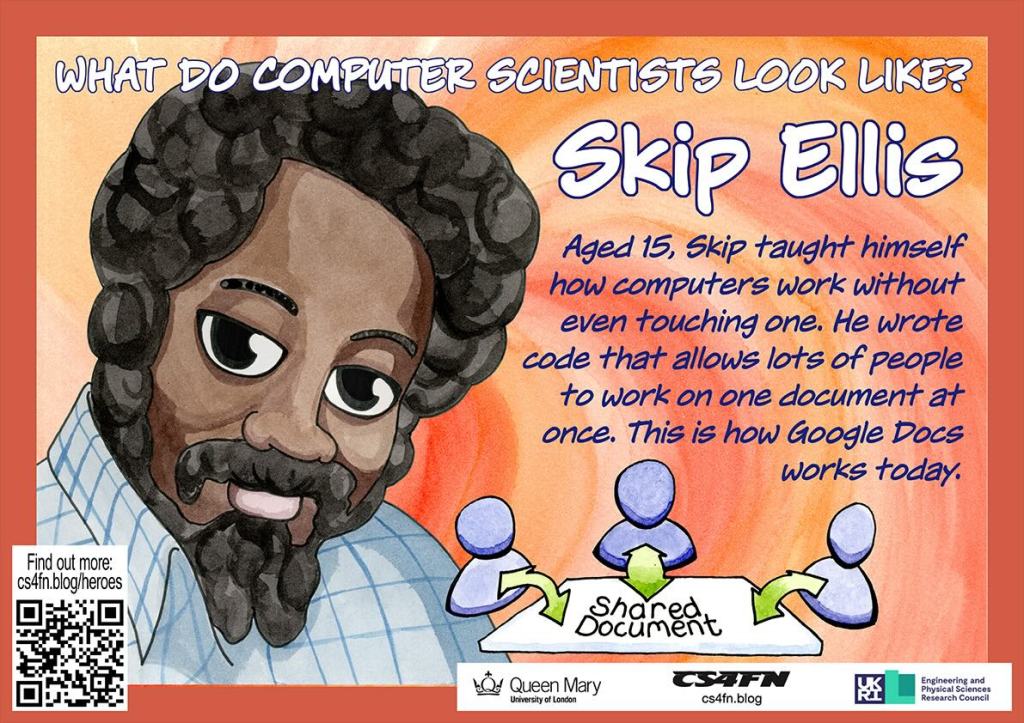
Poster of Skip Ellis showing people working on a shared document
Poster by Richard Butterworth for CS4FN

Back in 1956, Clarence Ellis started his career at the very bottom of the computer industry. He was given a job, at the age of 15, as a “computer operator” … because he was the only applicant. He was also told that under no circumstances should he touch the computer! Its lucky for all of us he got the job, though! He went on to develop ideas that have made computers easier for everyone to use. Working at a computer was once a lonely endeavour: one person, on one computer, doing one job. Clarence Ellis changed that. He pioneered ways for people to use computers together effectively.

The graveyard shift

The company Clarence first worked for had a new computer. Just like all computers back then, it was the size of a room. He worked the graveyard shift and his duties were more those of a nightwatchman than a computer operator. It could have been a dead-end job, but it gave him lots of spare time and, more importantly, access to all the computer’s manuals … so he read them … over and over again. He didn’t need to touch the computer to learn how to use it!

Saving the day

His studying paid dividends. Only a few months after he started, the company had a potential disaster on its hands. They ran out of punch cards. Back then punch cards were used to store both data. They used patterns of holes and non-holes as a way to store numbers as binary in a away a computer could read them. Without punchcards the computer could not work!

It had to though, because the payroll program had to run before the night was out. If it didn’t then no-one would be paid that month. Because he had studied the manuals in detail, and more so than anyone else, Clarence was the only person who could work out how to reuse old punch cards. The problem was that the computer used a system called ‘parity checking’ to spot mistakes. In its simplest form parity checking of a punch card involves adding an extra binary digit (an extra hole or no-hole) on the end of each number. This is done in a way that ensures that the number of holes is even. If there is an even number of holes already, the extra digit is left as a non-hole. If, on the other hand there is an odd number of holes, a hole is punched as the extra digit. That extra binary digit isn’t part of the number. It’s just there so the computer can check if the number has been corrupted. If a hole was accidentally or otherwise turned into a non-hole (or vice versa), then this would show up. It would mean there was now an odd number of holes. Special circuitry in the computer would spot this and spit out the card, rejecting it. Clarence knew how to switch that circuitry off. That meant they could change the numbers on the cards by adding new holes without them being rejected.

After that success he was allowed to become a real operator and was relied on to troubleshoot whenever there were problems. His career was up and running.

Clicking icons

He later worked at Xerox Parc, a massively influential research centre. He was part of the team that invented graphical user interfaces (GUIs). With GUIs Xerox Parc completely transformed the way we used computers. Instead of typing obscure and hard to remember commands, they introduced the now standard ideas, of windows, icons, dragging and dropping, using a mouse, and more. Clarence, himself, has been credited with inventing the idea of clicking on an icon to run a program.

Writing Together

As if that wasn’t enough of an impact, he went on to help make groupware a reality: software that supports people working together. His focus was on software that let people write a document together. With Simon Gibbs he developed a crucial algorithm called Operational Transformation. It allows people to edit the same document at the same time without it becoming hopelessly muddled. This is actually very challenging. You have to ensure that two (or more) people can change the text at exactly the same time, and even at the same place, without each ending up with a different version of the document.

The actual document sits on a server computer. It must make sure that its copy is always the same as the ones everyone is individually editing. When people type changes into their local copy, the master is sent messages informing it of the actions they performed. The trouble is the order that those messages arrive can change what happens. Clarence’s operational transformation algorithm solved this by changing the commands from each person into ones that work consistently whatever order they are applied. It is the transformed operation that is the one that is applied to the master. That master version is the version everyone then sees as their local copy. Ultimately everyone sees the same version. This algorithm is at the core of programs like Google Docs that have ensured collaborative editing of documents is now commonplace.

Clarence Ellis started his career with a lonely job. By the end of his career he had helped ensure that writing on a computer at least no longer needs to be a lonely affair.

– Paul Curzon, Queen Mary University of London


This article was originally published on the CS4FN website. One of the aims of our Diversity in Computing posters (see below) is to help a classroom of young people see the range of computer scientists which includes people who look like them and people who don’t look like them. You can download our posters free from the link below.

More on …

Magazines …

Front cover of CS4FN issue 29 - Diversity in Computing

See more in ‘Celebrating Diversity in Computing

We have free posters to download and some information about the different people who’ve helped make modern computing what it is today.

Screenshot showing the vibrant blue posters on the left and the muted sepia-toned posters on the right

Or click here: Celebrating diversity in computing


Subscribe to be notified whenever we publish a new post to the CS4FN blog.


This page is funded by EPSRC on research agreement EP/W033615/1.

QMUL CS4FN EPSRC logos

The original version of this article was funded by the Institute of Coding.

Mark Dean: An Inspiration

This article is an edited version of one of the 2006 winning essays from the Queen Mary University of London, Department of Computer Science, first year essay competition.

An icon of computer connected to peripherals
Image by OpenClipart-Vectors from Pixabay

May I ask you a question? When you think of the computer what names ring a bell? Bill Gates? Or for those more in touch with the history behind computers maybe Charles Babbage is a familiar name? May I ask you another question please? Do you know who Dr Mark Dean is? No, well you should. Do not worry yourself though, you are definitely not alone. I did not know of him either.

Allow me to enlighten you..

Mark Dean is in my opinion a very creative and inspirational black computer scientist. He is a vice-president at IBM and holds 3 of IBM’s first 9 patents on the personal computer. He has over 30 patents pending. He won the Black Engineer of the Year Presidents Award and was made an IBM fellow in 1995. An IBM fellow is IBM’s highest technical honor. Only 50 of IBM’s employee’s are fellows and Mark Dean was the first black one. Prior to joining IBM in 1980 he earned degrees in Electrical Engineering before going back to school to gain a PhD in the field from Stanford University. He was born in 1957 in Jefferson City, Tennessee and was one of the first black students to attend Jefferson City High School. He was an exceptional student and enjoyed athletics. Early manifestations of his desire to create were shown when he and his father built a tractor from scratch when he was just a boy.

Upon joining IBM Mark Dean and a partner led the team that developed the interior architecture (ISA systems bus) which allowed devices like the keyboard and printer to be connected to the motherboard making computers a part of our lives. It was that which earned him a spot in the National Inventors Hall of Fame. While at IBM he has been involved in numerous positions in computer system hardware architecture and design. He was responsible for IBM’s research laboratory in Austin, Texas where he focused on developing high performance microprocessors, software, systems and circuits. It is here where he made history by leading the team that built a gigahertz chip which did a billion calculations per second. In 2004, he was chosen as one of the 50 most important Blacks in Research Science.

I think that such a man should be well recognized in computer science, especially to black computer science students because from what I can see we are rare. We as a minority need an inspirational figure like Mark Dean. He inspires me, I wanted to share that with you. Before this small article it is very probable you had no knowledge of this man. So if there comes a time where you are asked about important names in the field of computers, I hope Dr Mark Dean springs to mind and rings a bell for you to hear loud and clear.

– Dean Miller, Queen Mary University of London

This article was originally published on the CS4FN website.

More on …

Magazines …

Front cover of CS4FN issue 29 - Diversity in Computing

One of the aims of our Diversity in Computing posters (see below) is to help a classroom of young people see the range of computer scientists which includes people who look like them and people who don’t look like them. You can download our posters free from the link below. Isabel Wagner has also created some free posters to download about inspiring computer scientists and Mark Dean is one of them.

See more in ‘Celebrating Diversity in Computing

We have free posters to download and some information about the different people who’ve helped make modern computing what it is today.

Screenshot showing the vibrant blue posters on the left and the muted sepia-toned posters on the right

Or click here: Celebrating diversity in computing


Subscribe to be notified whenever we publish a new post to the CS4FN blog.


This page is funded by EPSRC on research agreement EP/W033615/1.

QMUL CS4FN EPSRC logos