What is an algorithm? It is just a set of instructions that if followed precisely and in the given order, guarantees some result. The concept is important to computer scientists because all computers can do is follow instructions, but they do so perfectly. Computers do not understand what they are doing so can’t do anything but follow their instructions. That means whatever happens the instructions must always work. We can see what we mean by an algorithm by comparing it to the idea of a self-working trick from conjuring.
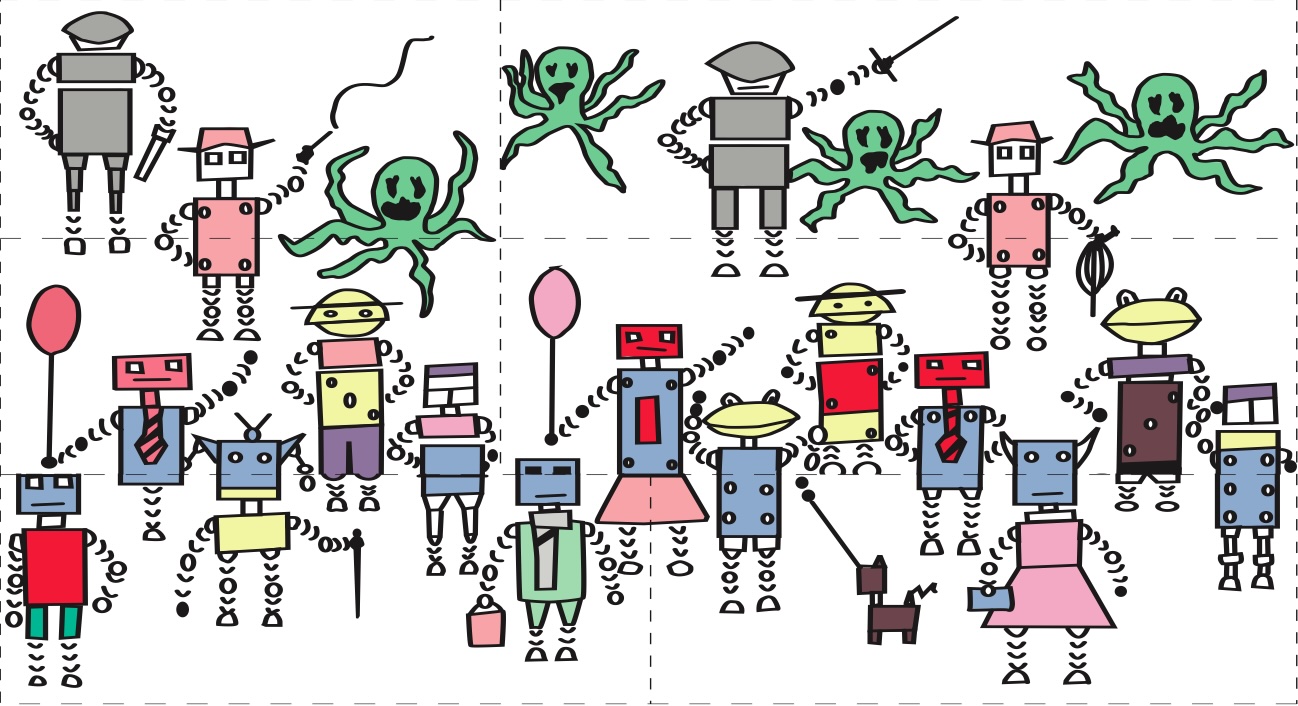
If you follow the steps of a self-working trick you will have the magic effect even if you have no idea how it works. Below is a a demonstration of a self-working magic jigsaw trick (you can download it from here https://conjuringwithcomputation.wordpress.com/resources/ print it, cut out the pieces and do it yourself, following the instructions below).
Image by CS4FN
The step of the trick are.
1) Count the robots (ignore the green monsters and the robot dog)….There are 17.
2) Swap the top two pieces on the left with those on the right lining the jigsaw back up
3) Count the robots ….There are 16. One has disappeared.
Magically a robot has disappeared! Which one disappears and where did it go? Was it swallowed by a green monster, did it teleport away?
How did that happen anyway?
Image by CS4FN
By following the steps you can make the trick work…even if you haven’t worked out how it works, a robot still disappears. You do not need to understand, you just need to be able to follow instructions. It is a self-working trick. Follow the steps of the trick exactly and the robot disappears. It is just an algorithm. Self-working tricks are just algorithms for doing magic. When you follow the steps of the trick you are acting like a computer, blindly following the instructions in its program!
Using clever computer vision techniques it’s now possible for your ingredients to tell you how they should be cooked in a kitchen. The system uses cameras and projectors to first recognise the ingredients on the chopping board, for example the size, shape and species of fish you are using. Then the system projects a cutting line on the fish to show you how to prepare it, and a speech bubble telling you how long it should be cooked for and suggesting ways it can be served. In the future these cooking support systems could take some of the strain from mealtimes. At least it will help to make us all better cooks, and perhaps with an added pinch of artificial intelligence we can all become more like Jamie Oliver.
Learn the recipe for Hummus and Tomato Pasta, and find out about program structure, commenting, variable storage and assignments. A bit of ‘back to school’ around the dinner table (or perhaps combine Computer Science classes with Food and Nutrition!).
Subscribe to be notified whenever we publish a new post to the CS4FN blog.
This blog is funded by EPSRC on research agreement EP/W033615/1.
Mid-September, as many young people are heading back to school after their summer holiday, is Asthma Week where NHS England suggests that teachers, employers and government workers #AskAboutAsthma. The goal is to raise awareness of the experiences of those with asthma, and to suggest techniques to put in place to help children and young people with asthma live their best lives.
One of the key bits of kit in the arsenal of people with asthma is an inhaler. When used, an inhaler can administer medication directly into the lungs and airways as the user breathes in. In the case of those with asthma, an inhaler can help to reduce inflammation in the airways which might prevent air from entering the lungs, especially during an asthma attack.
It’s only recently, however, that inhalers are getting the technology treatment. Smart inhalers can help to remind those with asthma to take their medication as prescribed (a common challenge for those with asthma) as well as tracking their use which can be shared with doctors, carers, or parents. Some smart inhalers can also identify if the correct inhaler technique is being used. Researchers have been able to achieve this by putting the audio of people using an inhaler through a neural network (a form of artificial intelligence), which can then classify between a good and bad technique.
As with any medical technology, these smart inhalers need to be tested with people with asthma to check that they are safe and healthy, and importantly to check that they are better than the existing solutions. One such study started in Leicester in July 2024, where smart inhalers (in this case, ones that clip onto existing inhalers) are being given to around 300 children in the city. The researchers will wait to see if these children have better outcomes than those who are using regular inhalers.
This sort of technology is a great example of what computer scientists call the “Internet of Things” (IoT). This refers to small computers which might be embedded within other devices which can interact over the internet… think smart lights in your home that connect to a home assistant, or fridges that can order food when you run out.
A lot of medical devices are being integrated into the internet like this… a smart watch can track the wearer’s heart rate continuously and store it in a database for later, for example. Will this help us to live happier, healthier lives though? Or could we end up finding concerning patterns where there are none?
Following a tough experience at his last workplace, Stephen decided he needed a change. He used this as a prompt to start thinking about alternatives:
“[When] things aren’t working out, you need to take a step back and work out what the problem is before it becomes really serious. I still hadn’t had a diagnosis by that point, so things probably would have gone very differently if I had, but I took a step back after that job. I was fed up of being stressed, trying to help people [who] have already got far too much money make more money, and then being told that I was being paid too much. That was kind of my experience from my last employer. And so, I decided that I wanted to get stressed for something worthwhile instead: my mum had been a teacher, so I’d always had it in mind as a possibility.”
Stephen did, of course, have some reservations financially.
“I’d always thought it was financially too much of a step down, which a lot of people in the computer science industry will find out. I did take pretty much a 50% pay cut to become a trainee teacher: in fact, worse than that. But it’s amazing when you want to do something, what differences that makes! And there’s plenty of people out there that will sacrifice a salary to start their own business, and all the power to them. But people don’t think [like this] when they’re thinking about becoming a teacher, for example, which I think is wrong. Yes, teachers should be better paid than they are, but they’re never going to be as well paid as programmers or team leaders or whatever in industry. You shouldn’t expect that to be the case, because we’re public servants at the end of the day, and we’re here for the job as much as we are for the money. We want our roof over our head, but we’re not looking to get mega rich. We’re there to make a difference.”
While considering this change of profession, Stephen reflected on his existing skills, and whether they fit the role of teaching. With support from his wife and a DWP (Department for Work and Pensions) work coach, he was reminded of his ability to “explain technical stuff to [people] in a language [they] could understand.”
Stephen had the opportunity to get his first experience of teaching as a classroom volunteer. Alongside a qualified teacher, he was able to lead a lesson – which he found particularly exciting:
“It was a bit like being on drugs. It was exhilarating. I sort of sat there thinking, you know, this is something I really want to do.”
It’s around this time that Stephen got his autism diagnosis. For autistic people who receive a diagnosis, there can be a lot of mixed emotions. For some, it can be a huge sense of relief – finally understanding who they are, and how that has affected their actions and behaviours throughout their life. And for others it can come as a shock [EXTERNAL]. For Stephen, this news meant reconsidering his choice of a career in teaching:
“I had to stop and think, because, when you get your diagnosis for the first time as an adult or as an older person anyway, it does make you stop and think about who you are. It does somewhat challenge your sense of self.”
“It kind of turns your world a bit on its head. So, it did knock me a fair bit. It did knock my sense of self. But then I began to sort of put pieces together and realise just what an impact it had on my working life up until that point. And then the question came across, can I still do the job? Am I going to be able to teach? Is it really an appropriate course of action to take? I didn’t get the answer straight away, but certainly over the months and the years, I came to the conclusion it was a bit like when I talk to students who say, ‘should I do computer science?’ And I say to them, ‘well, can you program?’ ‘Yes.’ ‘Yes, you do need to do computer science.’ It’s not just you can if you want to – it’s a ‘you should do CS.’ It’s the same thing if you’re on the spectrum, or you’re in another minority, a significant minority like that, where you’re able to engage with a teaching role: you should do.”
Stephen did go on to complete teacher training, and has now worked as an A-Level and GCSE teacher for 15 years. He still benefits from his time in work, however, as he is able to enlighten future computer science students about the workplace:
“Well, you know the experiences I’ve had as a person in industry, where else are the students going to be exposed to that second-hand? Hopefully they’ll be exposed to it first-hand, but, if I can give them a leg up, and an introduction to that, being forewarned and forearmed and all that, then that’s what should happen.
“I do spend a chunk of my teaching explaining what it’s like working in industry: explaining the difficulties of dealing with management; (1) when you think you know better, you might not know better – you don’t know yet; (2) if you do, keep your mouth shut until the problem occurs, then offer a positive and constructive solution. Hopefully they won’t say ‘why didn’t you say something sooner?’ If they do, just say, ‘Well, I wasn’t sure it was my place to, I’m only new.’”
Teaching is famously a very rewarding career path, and this is no different for Stephen. In our discussion, he outlined a few things that he enjoyed about teaching:
“It’s [a] situation where what you do, lives on. If I drop dead tomorrow, all that stuff that I learned about; how different procedure calls work or whatever, could potentially just disappear into the ether. But because I’ve shared it with all my students, they will hopefully make use of it, and it will carry on. And it’s a way of having a legacy, which I think we all want, to a certain extent.”
“Young people nowadays, particularly those of us on the spectrum, but it applies to all, the world does everything possible at the moment to destroy most young people’s self-esteem. Really, really knock people flat. Society is set up that way. Our social media is set up that way. Our traditional media is set up that way. It’s all about making people feel pretty useless, pretty rubbish in the hope, in some cases, of selling them something that will make them feel better, which never does, or in other cases, just make someone else feel good by making someone else feel small. It’s kind of the more the darker side of humanity coming out that teaching is an opportunity to counter that. If you can make a young person feel good about themselves; if you can help them conquer something that they’re not able to do; if you could help them realise that it doesn’t matter if they can’t, they’re still just as important and wonderful and valuable as a human being.”
“The extracurricular activities that I do: ‘Exploring the Christian faith’ here at college. And part of that is helping people [to] find a spiritual worth they didn’t realise they had. So, you get that opportunity as a teacher, which a bus driver doesn’t get, for example. Bus drivers are very useful – they do a wonderful job. But once they’ve dropped you off, that’s the end of the job. Sometimes we’re a bit like bus drivers as teachers. You go out the door with your grades, and that’s fine, but then some people keep coming back. I haven’t spotted the existential elastic yet, but it’s there somewhere. I’m sure I didn’t attach it. But that is another one of the things that motivates me to be a teacher.”
Stephen Parry now teaches at a sixth-form college near Sheffield. The author would like to thank Stephen for taking time out of his busy schedule to take part in this interview.
Autism is a condition with many associated challenges, but for some people it presents some benefits. This distinction is greatly apparent in the workplace, where autistic people often find it difficult to get along with others (and their boss), and to complete the work that has been set for them. It’s not all negatives though: many autistic people find the work in which they thrive, and given the right circumstances and support, an autistic person is able to succeed in such an environment.
We often rightly hear about the greats in computer science; Ada Lovelace, Alan Turing, Lynn Conway (who sadly passed away earlier this month) – but let us not forget the incredible teams of computer scientists working around the clock; maintaining the Internet, building the software we use every day, and teaching the next generation. For this two-part article, I have spoken with Stephen Parry, an autistic computer scientist, who, after working in industry for 20 years, now teaches the subject in a sixth-form college in Sheffield. His autistic traits have caused him challenges throughout his career, but this is not a unique experience – many autistic computer scientists also face the same challenges.
Stephen’s experience with programming started at the age of 14, after being introduced to computers at a curriculum enrichment course. He decided against taking a then “really rubbish” O-Level (now GCSEs) Computer Science course, and the existence of the accompanying A-Level “just didn’t come up on my radar”. He was, however, able to take home the college’s sole RML 380Z for the summer, a powerful computer for the time, with which, he was able to continue to practice programming.
When it came time to go to university, he opted first to study chemistry, a subject he had been studying at A-Level. Though after a short amount of time he realised that he wasn’t as interested in chemistry as he first thought – so he decided to switch to computer science. In our discussions, he praised the computer science course at the University of Sheffield:
“[I] really enjoyed [the course] and got on well with it. So, I kind of drifted into it as far as doing it seriously is concerned. But it’s been a hobby of mine since I was 14 years old, and once I was on the degree, I mean, the degree at Sheffield was a bit like a sweetie shop. It really was absolutely brilliant. We did all kinds of weird and wonderful stuff, all of it [was] really interesting and engaging, and the kind of stuff that you wouldn’t get by either playing around on your own or going out into [the] workplace. As I’ve always said, that’s what a university should be. It should expose you to the kind of stuff that you can’t get anywhere else, the stuff that employers haven’t realised they need yet.”
Of autistic people who go to university, research shows they are much more likely the general population to pick STEM subjects [EXTERNAL]. For lots of autistic people, the clear logical and fundamental understanding behind scientific subjects is a great motivator. Stephen describes how this is something that appeals to him.
“[What] I enjoy about computer science is how it teaches you how the computer actually works at a fundamental level. So, you’re not just playing with a black box anymore – it’s something you understand. And especially for someone on the [autism] spectrum, that’s a really important aspect of anything you do. You want to understand how things work. If you’re working with something, and you don’t understand how it works, usually it’s not very satisfying and kind of frustrating. Whereas, if you understand the principles going on inside of it then, when you know you’ve got it, it kind of unlocks it for you.”
While autistic traits often result in challenges for autistic people, there are some which can present a benefit to someone in computer science. A previous CS4FN article described how positive traits like ‘attention to detail’ and ‘resilience and determination’ link well to programming. Stephen agrees that these traits can help him to solve problems:
“If I get focused on a problem, the hyper focus kicks in, and I will just keep plugging away until it’s done, fixed or otherwise overcome. I know it’s both a benefit and hazard – it’s a double edged sword, but at the same time, you know you have to have that attention to detail and that, to put it another way, sheer bloody mindedness to be determined that you’re going to make it work, or you’re going to understand how it works, and that does come definitely from the [autism] spectrum.”
Although he enjoyed the content greatly, Stephen had a rocky degree, both in and out of lectures. However, some unexpected benefits arose from being at university; he both found faith and met his future wife. These became essential pillars of support, as he prepared to enter the workforce. This he did, working both as a programmer and in a variety of IT admin and technical support roles.
About 78% of autistic adults are currently out of work [EXTERNAL] (compared with 20% in the general population). This is, in part, reflective of the fact that some autistic people are unable to work because of their condition. But for many others, despite wanting to work, they cannot because they do not get the support they need (and are legally entitled to) within their workplace.
At this time, however, Stephen wasn’t aware of his condition, only receiving his diagnosis in his 40s. He described how this transition from university to work was very challenging.
“I moved into my first job, and I found it very, very difficult because I didn’t know that I’ve got this sort of difference – this different way my brain works that affects everything that you do. I didn’t know when I came across difficulties, it was difficult to understand why, at least to an extent, for me and for other people, it was deeply frustrating. I mean, speak to just about every manager I’ve ever had, and the same sort of pattern tends to come out. Most of them recognised that I was very difficult to manage because I found myself very difficult to manage. But time management is an issue with everything – trying to complete tasks to any kind of schedule, trying to plan anything. Oh, my days, when I hear the word SMART. [It’s an] acronym [meaning] specific, measurable, achievable, realistic and time specific. I hear that, and it just it makes me feel physically ill sometimes, because I cannot. I cannot SMART plan.”
However, during his time in work, he had some good luck. Despite the challenges associated with autism, some managers took advantage of the positive skills that he brings to the table:
“I found that a real challenge, interpersonally speaking, things like emotional regulation and stuff like that, which I struggle with, and I hate communicating on the phone and various other things, make me not the most promising employee. But the managers that I’ve had over the years that have valued me the most are the ones who recognised the other side of the coin, which is [that] over the years, I have absorbed so much knowledge about computer science and there are very [few] problems that you can come across that I don’t have some kind of insight into.”
This confidence in a range of areas in computer science is also a result of Stephen’s ability to link lots of areas and experiences together, a positive skill that some autistic people have:
“I found that with the mixture of different job roles I did, i.e. programming, support, network admin and database admin, my autism helped me form synergies between the different roles, allowing me to form links and crossover knowledge between the different areas. So, for example, as a support person with programming experience, I had insight into why the software I was helping the user with did not work as desired (e.g. the shortcuts or mistakes the programmer had likely made) and how maybe to persuade it to work. As a programmer with support experience, you had empathy with the user and what might give them a better UX, as well as how they might abuse the software. All this crossover, also set me up for being able to teach confidently on a huge range of aspects of CS.”
For autistic students who are planning on working in a computer science career, he has this to say:
“As an autistic person, and I would say this to anybody with [autism], you need to cultivate the part of you that really wants to get on well with people and wants to be able to care about people and understand people. Neurotypical people get that ability out of the box, and some of them take it for granted. I tend to find that the autistic people who actually find that they can understand people, that they work at it until they can, [are] often more conscientious as a result. And I think it’s important that if you’re an autistic person, to learn how to be positive about people and affirm people, and interact with them in positive ways, because it can make you a more caring and more valuable human being as a as a result.”
“Look for jobs where you can really be an asset, where your neurodiversity is the asset to what you’re trying to do, but at the same time, don’t be afraid to try to, and learn how to engage with people. Although it’s harder, it’s often more rewarding as a result.”
Undersea telecommunications cables let the world communicate and led to the world spanning Internet. It was all started by the Victorians. Continents were connected, but closer islands were too including the Scilly Isles.
Autumn 1869. There were great celebrations as the 31 mile long telecommunications cable was finally hauled up the shore and into the hut. The Scilly Isles now had a direct cable communication link to the mainland. But would it work? Several tests messages were sent and it was announced that all was fine. The journalists filed their story. The celebrations could begin.
Except it didn’t actually work! The cable wasn’t connected at all. The ship laying the cable had gone off course. Either that or someone’s maths had been shaky. The cable had actually run out 5 miles off the islands. Not wanting to spoil the party, the captain ordered the line to be cut. Then, unknown to the crowd watching, they just dragged the cut off end of the cable up the beach and pretended to do the tests. The Scilly Isles weren’t actually connected to Cornwall until the following year.
Paul Curzon, Queen Mary University of London (from the archive)
What was the first technology for recording music: CDs? Records? 78s, The phonograph? No. Trained songbirds came before all of them.
Composer, musician, engineer and visiting fellow at Goldsmiths University, Sarah Angliss, usually has a robot on stage performing live with her. These robots are not slick high tech cyber-beings, but junk modelled automata. One, named Hugo, sports a spooky ventriloquist dolls head! Sarah builds and programs her robots, herself.
She is also a sound historian, and worked on a Radio 4 documentary, ‘The Bird Fancyer’s Delight‘, uncovering how birds have been used to provide music across the ages. During the 1700’s people trained songbirds to sing human invented tunes in their homes. You could buy special manuals showing how to train your pet bird. By playing young birds a tune over and over again, and in the absence of other birds to put them right, they would adopt that song as their own. Playing the recorder was one way to train them, but special instruments were also invented to do the job automatically.
With the invention of the phonograph, home songbird popularity plummeted but it didn’t completely die out. Blackbirds, thrushes, canaries, budgies, bullfinches and other songbirds have continued to be schooled to learn songs that they would never sing in the wild.
Website whimsy 1 – the UK Government (surprisingly)!
If you’re reading this post today (Monday 26th August 2024) it’s a Bank Holiday in England & Wales and in Northern Ireland. The UK Government’s website has a page https://www.gov.uk/bank-holidays which lists all the upcoming dates for the next two years’ worth of bank holidays (so people can put them in the diaries). But… if you visit the page on a Bank Holiday then you’ll be met with some bunting, which isn’t there on the other days. If you’re reading this post tomorrow then you’ll have to wait until the next Bank Holidays, which are Christmas, Boxing Day then New Year’s Day. On those days the bunting changes to tinsel!
Website whimsy 2 – Wikipedia
Throughout history people have tried to make money and sometimes they do so rather dishonestly. Occasionally people claim that they have a qualification in a subject – in the hope that this will make people trust them, and give them money.
Normally it takes time and effort to get a genuine qualification (and for some qualifications it costs money too). A qualification that is suspiciously easy to get (just make a payment and then get a certificate) raises red flags and if someone thinks someone else’s qualification might be fraudulent there’s a fun way they can draw attention to this.
There’s a page on Wikipedia currently called “List of animals awarded human credentials” (but it used to have the even better name “List of animals with fraudulent diplomas” (and before that it was “List of cats with fraudulent diplomas” until people started adding more animals!)). It’s full of examples where people filled in an online form and paid a fee, using their pet’s name as the ‘person’ to be awarded. If someone claims a particular credential but someone else was able to get the same credential for their dog by paying $50 and filling in a form… well, don’t give them any money!
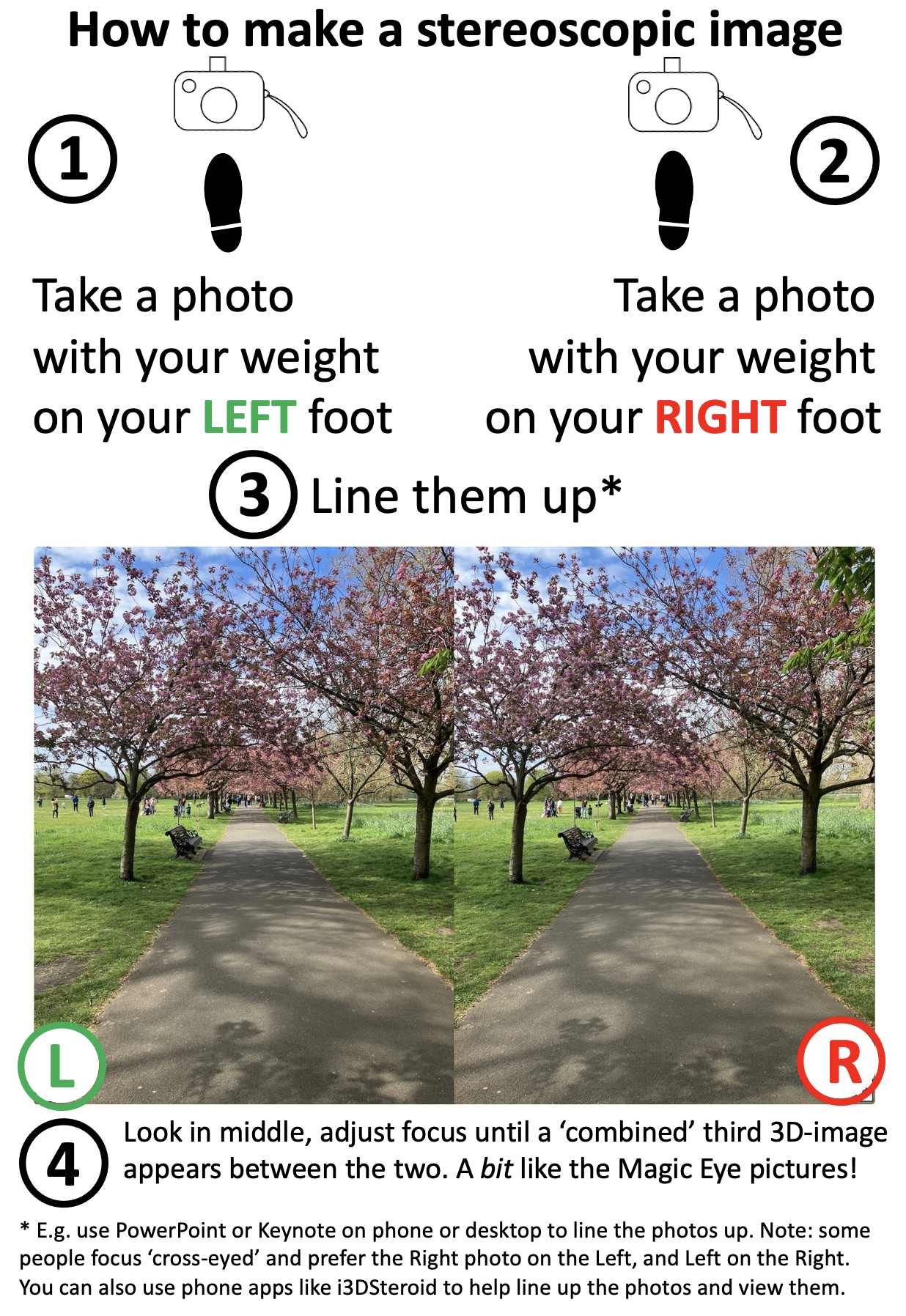
Try your hand at making 3D pictures with stereoscopy
Bank Holiday weather is famous for being inconveniently changeable but if the rain holds off and you’re out and about with a smartphone camera (or any camera) then you can quite easily create some 3D images with them (you can do this indoors too of course). We’ve put together some basic instructions (below) and some more detailed information, in case teachers might also like to try this in class some time. (If the weather is off-putting there are also some ready-to-use images in that link).
Basic instructions: take two photos a few inches apart, line them up, gaze between them and adjust your focus until a third image appears between them which combines the two images into one that has depth perception. This is just recreating what your eyes do naturally every day – combining what your left eye and your right eye see separately into one view of the world around you.
Photographs and icons created by Jo Brodie for CS4FN.
Subscribe to be notified whenever we publish a new post to the CS4FN blog.
This blog is funded by EPSRC on research agreement EP/W033615/1.
The nurse types in a dose of 100.1 mg [milligrams] of a powerful drug and presses start. It duly injects 1001 mg into the patient without telling the nurse that it didn’t do what it was told. You wouldn’t want to be that patient!
Designing a medical device is difficult. It’s not creating the physical machine that causes problems so much as writing the software that controls everything that that machine does. The software is complex and it has to be right. But what do we mean by “right”? The most obvious thing is that when a nurse sets it to do something, that is exactly what it does.
Getting it right is subtler than that though. It must also be easy to use and not mislead the nurse: the human-computer interface has to be right too. It is the software that allows you to interact with a gadget – what buttons you press to get things done and what feedback you are given. There are some basic principles to follow when designing interfaces. One is that the person using it should always be clearly told what it is doing.
Manufacturers need ways to check their devices meet these principles: to know that they got it right.
It’s not just the manufacturers, though. Regulators have the job of checking that machines that might harm people are ‘right’ before they allow them to be sold. That’s really difficult given the software could be millions of lines long. Worse they only have a short time to give an answer.
Million to one chances are guaranteed to happen.
Problems may only happen once in a million times a device is used. They are virtually impossible to find by having someone try possibilities to see what happens, the traditional way software is checked. Of course, if a million devices are bought, then a million to one chance will happen to someone, somewhere almost immediately!
Paolo Masci at Queen Mary University of London, has come up with a way to help and in doing so found a curious problem. He’s been working with the US regulator for medical devices – the FDA – and developed a way to use maths to find problems. It involves creating a mathematical description of what critical parts of the interface program do. Properties, like the user always knowing what is going on, can then be checked using maths. Paolo tried it out on the code for entering numbers of a real medical device and found some subtle problems. He showed that if you typed in certain numbers, the machine actually treated them as a number ten times bigger. Type in a dose of 100.1 and the machine really did set the dose to be 1001. It ignored the decimal point because on such a large dose it assumed small fractions are irrelevant. However another part of the code allows you to continue typing digits. Worse still the device ignores that decimal point silently. It doesn’t make any attempt to help a nurse notice the change. A busy nurse would need to be extremely vigilant to see the tiny decimal point was missing given the lack of warning.
A useful thing about Paolo’s approach is that it gives you the button presses that lead to the problem. With that you can check other devices very quickly. He found that medical devices from three other manufacturers had exactly the same problem. Different teams had all programmed in the same problem. None had thought that if their code ignored a decimal point, it ought to warn the nurse about it rather than create a number ten times bigger. It turns out that different programmers are likely to think the same way and so make the same mistakes (see ‘Double or Nothing‘).
Now the problem is known, nurses can be warned to be extra careful and the manufacturers can update the software. Better still they and the regulators now have an easy way to check their programmers haven’t made the same mistake in future devices. In future, whether vigilant or not, a nurse won’t be able to get it wrong.
Ariane 5 on the launch pad. Photo Credit: (NASA/Chris Gunn) Public Domain via Wikimedia Commons.
If you spent billions of dollars on a gadget you’d probably like it to last more than a minute before it blows up. That’s what happened to a European Space Agency rocket. How do you make sure the worst doesn’t happen to you? How do you make machines reliable?
A powerful way to improve reliability is to use redundancy: double things up. A plane with four engines can keep flying if one fails. Worried about a flat tyre? You carry a spare in the boot. These situations are about making physical parts reliable. Most machines are a combination of hardware and software though. What about software redundancy?
You can have spare copies of software too. Rather than a single version of a program you can have several copies running on different machines. If one program goes wrong another can take over. It would be nice if it was that simple, but software is different to hardware. Two identical programs will fail in the same way at the same time: they are both following the same instructions so if one goes wrong the other will too. That was vividly shown by the maiden flight of the Ariane 5 rocket. Less than 40 seconds from launch things went wrong. The problem was to do with a big number that needed 64 bits of storage space to hold it. The program’s instructions moved it to a storage place with only 16 bits. With not enough space, the number was mangled to fit. That led to calculations by its guidance system going wrong. The rocket veered off course and exploded. The program was duplicated, but both versions were the same so both agreed on the same wrong answers. Seven billion dollars went up in smoke.
Can you get round this? One solution is to get different teams to write programs to do the same thing. The separate teams may make mistakes but surely they won’t all get the same thing wrong! Run them on different machines and let them vote on what to do. Then as long as more than half agree on the right answer the system as a whole will do the right thing. That’s the theory anyway. Unfortunately in practice it doesn’t always work. Nancy Leveson, an expert in software safety from MIT, ran an experiment where different programmers were given programs to write. She found they wrote code that gave the same wrong answers. Even if it had used independently written redundant code it’s still possible Ariane 5 would have exploded.
Redundancy is a big help but it can’t guarantee software works correctly. When designing systems to be highly reliable you have to assume things will still go wrong. You must still have ways to check for problems and to deal with them so that a mistake (whether by human or machine) won’t turn into a disaster.












.jpg)
 cs4fn
cs4fn 