Marc Hannah and the graphics pipeline

Film and projectors
Image by Gerd Altmann from Pixabay

What do a Nintendo games console and the films Jurassic Park, Beauty and the Beast and Terminator II have in common? They all used Marc Hannah’s chips and linked programs for their amazing computer effects..It is important that we celebrate the work of Black Computer Scientists and Marc is one who deserves the plaudits as much as anyone as his work has had a massive effect on the leisure time of everyone who watches movies with special effects or plays video games – and that is just about all of us.

In the early 1980s, with six others, Marc founded Silicon Graphics, becoming its principal scientist. Silicon Graphics was a revolutionary company, pioneering fast computers capable of running the kind of graphics programs on special graphics chips that suddenly allowed the film industry to do amazing special effects. Those chips and linked programs were designed by Marc.

Now computers and games consoles have special graphics chips that do fast graphics processing as standard, but it is Marc and his fellow innovators at Silicon Graphics who originally made it happen.

It all started with his work with James Clark on a system called the Geometry Engine while they were at Stanford. Their idea was to create chips that do all the maths needed to do sophisticated manipulation of imagery. VLSI (Very Large scale Integration), whereby computers were getting smaller and fitting on a chip was revolutionising computer design. Suddenly a whole microprocessor could be put on a single chip because tens of thousands (now billions) of transistors could be put on a single slice of silicon. They pioneered the idea of using VLSI for creating 3-D computer imagery, rather than just general-purpose computers, and with Silicon Graphics they turned their ideas into an industrial reality that changed both film and games industries for ever.

Silicon Graphics was the first company to create a VLSI chip in this way, not to be a general-purpose computer, but just to manipulate 3-D computer images.

A simple 3D image in a computer might be implemented as the vertices (corners) of a series of polygons. To turn that into an image on a flat screen needs a series of mathematical manipulations of those points’ coordinates to find out where they end up in that flat image. What is in the image depends on the position of the viewer and where light is coming from, for example. If the object is solid you also need to work out what is in front, so seen, and what behind, so not. Each time the object, viewer or light source moves, the calculations need to be redone. It is done as a series of passes doing different geometric manipulations in what is called a geometry pipeline and it is these calculations they focussed on. They started by working out which computations had to be really fast: the ones in the inner most loops of the code that did this image processing, so was executed over and over again. This was the complex code that meant processing images took hours or days because it was doing lots of really complex calculation. Instead of trying to write faster code though, they instead created hardware, ie a VLSI chip, to do the job. Their geometry pipeline did the computation in a lightening fast way as it was avoiding all the overhead of executing programs and instead implementing the calculations that slowed things down directly in logic gates that did all that crucial maths very directly and so really quickly.

The result was that their graphic pipeline chips and programs that worked with them became the way that CGI (computer generated imagery) was done in films allowing realistic imagery, and were incorporated into games consoles too, allowing for ever more realistic looking games.

So if some amazing special effects make some monster appear totally realistic this Halloween, or you get lost in the world of a totally realistic computer game, thank Marc Hannah, as his graphics processing chips originally made it happen.

– Paul Curzon, Queen Mary University of London

More on …


Magazines …

Front cover of CS4FN issue 29 - Diversity in Computing

Subscribe to be notified whenever we publish a new post to the CS4FN blog.


This blog is funded by EPSRC on research agreement EP/W033615/1.

QMUL CS4FN EPSRC logos

Claude Shannon: Inventing for the fun of it

Image by Paul Curzon

Claude Shannon, inventor of the rocket powered Frisbee, gasoline powered pogo stick, a calculator that worked using roman numerals, and discoverer of the fundamental equation of juggling! Oh yeah, and founder of the most important theory underpinning all digital communication: information theory.

Claude Shannon is perhaps one of the most important engineers of the 20th century, but he did it for fun. Though his work changed the world, he was always playing with and designing things, simply because it amused him. Like his contemporary Richard Feynman, he did it for ‘the pleasure of finding things out.’

As a boy, Claude liked to build model planes and radio-controlled boats. He once built a telegraph system to a friend’s house half a mile away, though he got in trouble for using the barbed wires around a nearby pasture. He earned pocket money delivering telegrams and repairing radios.

He went to the University of Michigan, and then worked on his Masters at MIT. While there, he thought that the logic he learned in his maths classes could be applied to the electronic circuits he studied in engineering. This became his Masters thesis, published in 1938. It was described as ‘one of the most important Master’s theses ever written… helped to change digital circuit design from an art to a science.’

Claude Shannon is known for his serious research, but a lot of his work was whimsical. He invented a calculator called THROBAC (Thrifty Roman numerical BACkward looking computer), that performs all its operations in the Roman numeral system. His home was full of mechanical turtles that would wander around, turning at obstacles; a gasoline-powered pogostick and rocket-powered Frisbee; a machine that juggled three balls with two mechanical hands; a machine to solve the Rubik’s cube; and the ‘Ultimate Machine’, which was just a box that when turned on, would make an angry, annoyed sound, reach out a hand and turn itself off. As Claude once explained with a smile, ‘I’ve spent lots of time on totally useless things.’

A lot of the early psychology experiments used to involve getting a mouse to run through a maze to reach some food at the end. By performing these experiments over and over in different ways, they could figure out how a mouse learns. So Claude built a mouse-shaped robot called Theseus. Theseus could search a maze until he solved it, and then use this knowledge to find its way through the maze from any starting point.

Oh, and there’s one other paper of his that needs mentioning. No, not the one on the science of juggling, or even the one describing his ‘mind reading’ machine. In 1948 he published ‘A mathematical theory of communication.’ Quite simply, this changed the world, and changed how we think about information. It laid the groundwork for a lot of important theory used in developing modern cryptography, satellite navigation, mobile phone networks… and the internet.

– Paul Curzon, Queen Mary University of London.


More on …


Related Magazine …


Subscribe to be notified whenever we publish a new post to the CS4FN blog.


This blog is funded by EPSRC on research agreement EP/W033615/1.

QMUL CS4FN EPSRC logos

Scilly cable antics

Sunset over the Scilly Isles with a sailing boat in the foreground
Image by Mike Palmer from Pixabay (CROPPED)

Undersea telecommunications cables let the world communicate and led to the world spanning Internet. It was all started by the Victorians. Continents were connected, but closer islands were too including the Scilly Isles.

Autumn 1869. There were great celebrations as the 31 mile long telecommunications cable was finally hauled up the shore and into the hut. The Scilly Isles now had a direct cable communication link to the mainland. But would it work? Several tests messages were sent and it was announced that all was fine. The journalists filed their story. The celebrations could begin.

Except it didn’t actually work! The cable wasn’t connected at all. The ship laying the cable had gone off course. Either that or someone’s maths had been shaky. The cable had actually run out 5 miles off the islands. Not wanting to spoil the party, the captain ordered the line to be cut. Then, unknown to the crowd watching, they just dragged the cut off end of the cable up the beach and pretended to do the tests. The Scilly Isles weren’t actually connected to Cornwall until the following year.

Paul Curzon, Queen Mary University of London (from the archive)

More on …


Magazines …


Subscribe to be notified whenever we publish a new post to the CS4FN blog.


This blog is funded by EPSRC on research agreement EP/W033615/1.

QMUL CS4FN EPSRC logos

Double or nothing: an extra copy of your software, just in case

Ariane 5 on the launchpad
Ariane 5 on the launch pad. Photo Credit: (NASA/Chris Gunn) Public Domain via Wikimedia Commons.

If you spent billions of dollars on a gadget you’d probably like it to last more than a minute before it blows up. That’s what happened to a European Space Agency rocket. How do you make sure the worst doesn’t happen to you? How do you make machines reliable?

A powerful way to improve reliability is to use redundancy: double things up. A plane with four engines can keep flying if one fails. Worried about a flat tyre? You carry a spare in the boot. These situations are about making physical parts reliable. Most machines are a combination of hardware and software though. What about software redundancy?

You can have spare copies of software too. Rather than a single version of a program you can have several copies running on different machines. If one program goes wrong another can take over. It would be nice if it was that simple, but software is different to hardware. Two identical programs will fail in the same way at the same time: they are both following the same instructions so if one goes wrong the other will too. That was vividly shown by the maiden flight of the Ariane 5 rocket. Less than 40 seconds from launch things went wrong. The problem was to do with a big number that needed 64 bits of storage space to hold it. The program’s instructions moved it to a storage place with only 16 bits. With not enough space, the number was mangled to fit. That led to calculations by its guidance system going wrong. The rocket veered off course and exploded. The program was duplicated, but both versions were the same so both agreed on the same wrong answers. Seven billion dollars went up in smoke.

Can you get round this? One solution is to get different teams to write programs to do the same thing. The separate teams may make mistakes but surely they won’t all get the same thing wrong! Run them on different machines and let them vote on what to do. Then as long as more than half agree on the right answer the system as a whole will do the right thing. That’s the theory anyway. Unfortunately in practice it doesn’t always work. Nancy Leveson, an expert in software safety from MIT, ran an experiment where different programmers were given programs to write. She found they wrote code that gave the same wrong answers. Even if it had used independently written redundant code it’s still possible Ariane 5 would have exploded.

Redundancy is a big help but it can’t guarantee software works correctly. When designing systems to be highly reliable you have to assume things will still go wrong. You must still have ways to check for problems and to deal with them so that a mistake (whether by human or machine) won’t turn into a disaster.

Paul Curzon, Queen Mary University of London


Related Magazine …


More on …


Subscribe to be notified whenever we publish a new post to the CS4FN blog.


This blog is funded by EPSRC on research agreement EP/W033615/1.

QMUL CS4FN EPSRC logos

Navajo Code Talkers

Three Navajo Code talkers in WWII
Navajo Code Talkers, Image from National Archives at College Park, Public domain, via Wikimedia Commons

Bletchley Park, the British code cracking centre helped win World War II, but it is not just breaking codes and ciphers that wins wars, creating unbreakable ones to keep your own secrets safe matters too. Bletchley Park wasn’t the first or only time a secret cryptography team helped win battles or even wars. In World War I secret messages had been successfully sent using Choctaw, the language of a tribe of Native Americans, including to help organise a surprise attack. It worked with their messages left un-cracked. This led to an even more successful code-creating team in World War II based on Navajo. The Navajo “Code Talkers” as they were called, could encode, transmit and decode messages in minutes when it would take hours using conventional codes and ciphers.

In World War II, the US forces used a range of Native American languages to communicate, but a code based on a native Indian language, Navajo, was especially successful. The use of a Navajo-based code was the idea of Philip Johnston after the attack on Pearl Harbour. His parents were missionaries so he had grown up on a Navajo reservation, speaking the language fluently despite how difficult it was. Aged only 9, he acted as an interpreter for a group who went to Washington to try to improve Indian rights.

He suggested using Navajo as a secret language and enlisted in the marines to help bring the idea to fruition. He thought it would work as a secret code because there was no written version of Navajo. It was a purely a spoken language. That meant he was one of very few people who were not Navajo who could speak it. It was also a complex language unlike any other language. The US marines agreed to trial the idea. 

To prove it would work, Johnston had Navajo transmit messages in the way they would need to on the battlefield. They could do it close to 100 times faster than it would take using standard cipher machines. That clinched it. 

Many Navajo had enlisted after Pearl Harbour and a platoon soley of Navajo were recruited to the project, including a 15 year old, William Dean Yazzie. However, they didn’t just speak in Navajo to transmit messages. The original 29 Navajo recruited worked out the details of the code they would use. Once deployed to the Pacific a group of them also met to further improve the code. None of it was written down apart from in training manuals that did not leave the training site, so there was no chance the code book could be captured in battle. All those involved memorised it and practiced sending messages quickly and accurately. Messages were also always spoken, eg over radio and never written down, making it harder for the code to be cracked based on analysing intercepted messages.

Commonly needed words, like ‘difficult’ or ‘final’ had direct Navajo code words (NA-NE-KLAH and TAH-AH-KWO-DIH). However for critical words (countries, kinds of planes, kinds of ships, etc) they first swapped English words for other English words using one code. They then translated those words into Navajo. That meant even a Navajo speaker outside their trained group wouldn’t immediately understand a message. The code, for example, used birds names in place of kinds of planes. So the English code word for a bomber plane was Buzzard. But then the Navajo for Buzzard was actually used: (JAY-SHO). 

Another part of the code was to use Navajo words for letters of the alphabet, so A is for ant translated to WOL-LA-CHE in Navajo. However, to make this more secure two other words stood for A too (apple: BE-LA-SANA and axe: TSE-NILL). Each letter had three alternatives like this and any of the three could be used.

Finally the way that it was used meant a message would always just be a series of unconnected words making no sense even to a Navajo speaker.

The code talkers played a key part in many battles including the iconic battle of Iwo Jima, capturing the heavily defended Japanese controlled island of that name. The US Major responsible for communications said of the battle, “Were it not for the Navajos, the Marines would never have taken Iwo Jima.”

Not only did it make communications much faster than they would have been, unlike other US codes and ciphers, the code talker’s code was never cracked … all thanks to the Navajo team who devised it.

– Paul Curzon, Queen Mary University of London

More on …


Magazines …

Front cover of CS4FN issue 29 - Diversity in Computing

Subscribe to be notified whenever we publish a new post to the CS4FN blog.


This blog is funded through EPSRC grant EP/W033615/1.

QMUL CS4FN EPSRC logos

Joyce Weisbecker: a teenager the first indie games developer?

CS4FN Banner

by Paul Curzon, Queen Mary University of London

Video games were once considered to be only of interest to boys, and the early games industry was dominated by men. Despite that, a teenage girl, Joyce Weisbecker, was one of the pioneers of commercial game development.

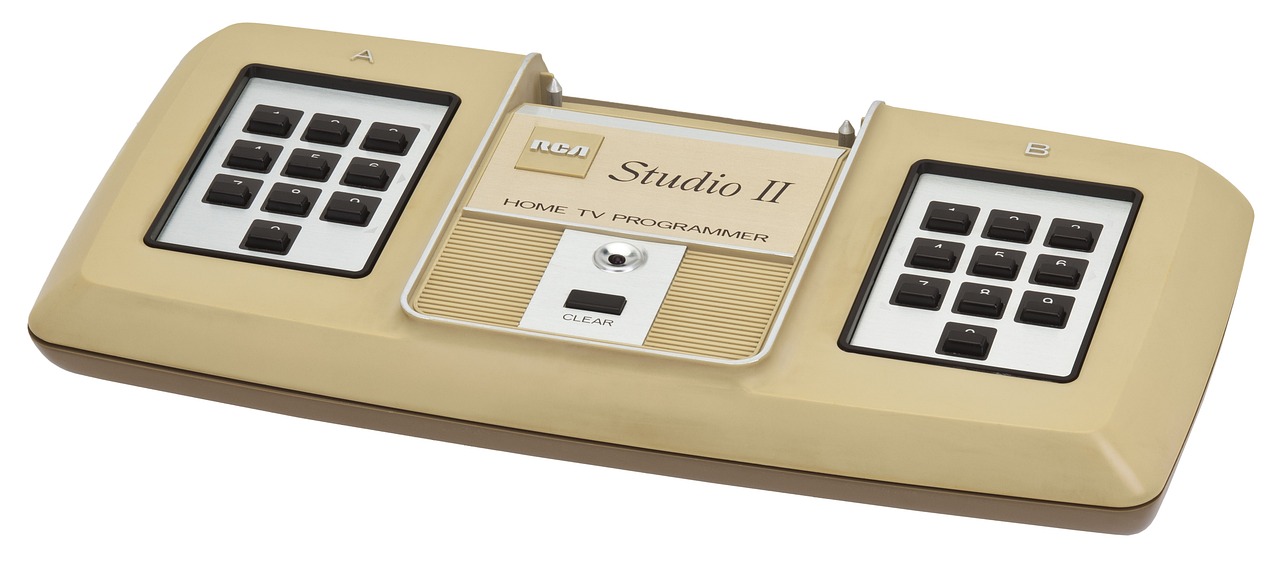
Originally, video games were seen as toys for boys. Gradually it was realised that there was a market for female game players too, if only suitably interesting games were developed, so the games companies eventually started to tailor games for them. That also meant, very late in the day, they started to employ women as games programmers. Now it is a totally normal thing to do. However, women were also there from the start, designing games. The first female commercial programmer (and possibly first independent developer) was Joyce Weisbecker. Working as an independent contractor she wrote her first games for sale in 1976 for the RCA Studio II games console that was released in January 1977.

RCA Studio II video games console
Image by WikimediaImages from Pixabay

Joyce was only a teenager when she started to learn to program computers and wrote her first games. She learnt on a computer that her engineer father designed and built at home called FRED (Flexible Recreational and Educational Device). He worked for RCA (originally the Radio Corporation of America), one of the major electronics, radio, TV and record companies of the 20th century. The company diversified their business into computers and Joyce’s father designed them for RCA (as well as at home for a hobby). He also invented a programming language called CHIP-8 that was used to program the RCA computers. This all meant Joyce was in a position to learn CHIP-8 and then to write programs for RCA computers including their new RCA Studio II games console before the machine was released, as a post-high school summer job.

The code for two games that she wrote in 1976, called Snake Race and Jackpot, were included in the manual for an RCA microcomputer called the COSMAC VIP, and she also wrote more programs for it the following year. These computers came in kit form for the buyer to build themselves. Her programs were example programs included for the owner to type in and then play once they had built the machine. Including them meant their new computer could do something immediately.

She also wrote the first game that she was paid for in that Summer of 1976. It was for the RCA Studio II games console, and it earned her $250 – well over $1000 in today’s money, so worth having for a teenager who would soon be going on to college. It was a quiz program, called TV School House I. It pitted two people against each other, answering questions on topics such as maths, history and geography, with two levels of difficulty. Questions were read from question booklets and whoever typed in the multiple choice answer number the fastest got the points for a question, with more points the faster they were. There is currently a craze for apps that augment physical games and this was a very early version of the genre.

Speedway screen from Wikimedia

She quickly followed it with racing and chase games, Speedway and Tag, though as screens were still very limited then, with only tiny screens, the graphics of all these games were very, very simple – eg racing rectangles around a blocky, rectangular racing track.

Unfortunately, the RCA games console itself was a commercial failure as it couldn’t compete with consoles like the Atari 2600, so RCA soon ended production. Joyce, meanwhile, retired from the games industry, still a teenager, ultimately becoming a radar signal processing engineer.

While games like Pong had come much earlier, the Atari 2600, which is credited with launching the first video game boom, was released in 1977, with Space Invaders, one of the most influential video games of all time, released in 1980. Joyce really was at the forefront of commercial games design. As a result her papers related to games programming, including letters and program listings, are now archived in the Strong National Museum of Play in New York.

More on …


Magazines …

Front cover of CS4FN issue 29 - Diversity in Computing

Subscribe to be notified whenever we publish a new post to the CS4FN blog.


This blog is funded through EPSRC grant EP/W033615/1.

Happy #WorldEmojiDay 2024 – here’s an emoji film quiz & some computer science history

Emoji! 💻 😁

World Emoji Day is celebrated on the 17th of July every year (why?) and so we’ve put together a ‘Can you guess the film from the emoji’ quiz and added some emoji-themed articles about computer science and the history of computing.

  1. An emoji film quiz
  2. Emoji accessibility, and a ‘text version’ of the quiz
  3. Computer science articles about emoji

Emoji are small digital pictures that behave like text – you can slot them easily them in sentences (you don’t have to ‘insert an image’ from a file or worry about the picture pushing the text out of the way). You can even make them bigger or smaller with the text (🎬 – compare the one in the section title below). People use them as a quick way of sharing a thought or emotion, or adding a comment like a thumbs up so they’re (sort of) a form of data representation. Even so, communication with emoji can be just as tricky, in terms of being misunderstood, just as with using words alone. Different age groups might read the same emoji and understand something quite different from it. What do you think 🙂 (‘slightly smiling face’ emoji) means? What do people older or younger than you think it means? Lots of people think it means “I’m quite happy about this” but others use it in a more sarcastic way.

1. An emoji film quiz 🎬

You can view the quiz online or download and print from Word or PDF versions. If you’re in a classroom with a projector the PowerPoint file is the one you want.

More Computational Thinking Puzzles

2. Emoji accessibility, and a text version of the quiz

We’ve included a text version for blind or visually impaired people which can either be read out by someone or by a screen reader. Use the ‘Text quiz’ files in Word or PDF above.

More generally, when people share photographs and other images on social media it’s helpful if they add some information about the image to the ‘Alt Text’ (alternative text) box. This tells people who can’t easily see the image what’s in the picture. Screenreaders will also tell people what the emojis are in a tweet or text message, but if you use too many… it might sound like this 😬.

3. Computer science articles about emoji

This next article is about the history of computing and the development of the graphical icons for apps that started life being drawn on gridded paper by Susan Kare. You could print some graph / grid paper and design your own!

A copy of this post can also be found as a permanent page at https://cs4fn.blog/emoji/


Subscribe to be notified whenever we publish a new post to the CS4FN blog.


This blog is funded by EPSRC on research agreement EP/W033615/1.

QMUL CS4FN EPSRC logos

NASA’s interstellar probe Voyager 1 went silent until computer scientists transmitted a fix that had to travel 15 billion miles!

by Jo Brodie, Queen Mary University of London

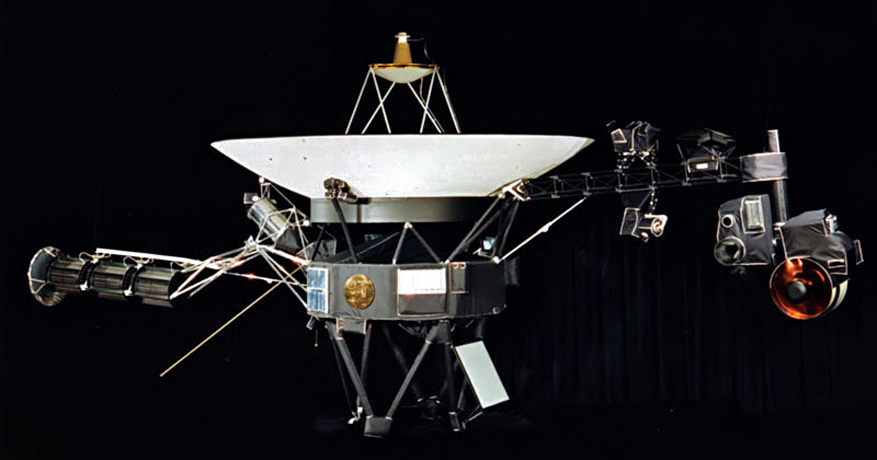
In 1977 NASA scientists at the Jet Propulsion Laboratory launched the interstellar probe Voyager 1 into space – and it just keeps going. It has now travelled 15 BILLION miles (24 billion kilometres), which is the furthest any human-made thing has ever travelled from Earth. It communicates with us here on Earth via radiowaves which can easily cross that massive distance between us. But even travelling at the speed* of light (all radiowaves travel at that speed) each radio transmission takes 22.5 hours, so if NASA scientists send a command they have to wait nearly two days for a response. (The Sun is ‘only’ 93 million miles away from Earth and its light takes about 8 minutes to reach us.)

FDS – The Flight Data System

The Voyager 1 probe has sensors to detect things like temperature or changes in magnetic fields, a camera to take pictures and a transmitter to send all this data back to the scientists on Earth. One of its three onboard computers (the Flight Data System, or FDS) takes that data, packages it up and transmits it as a stream of 1s and 0s to the waiting scientists back home who decode it. Voyager 1 is where it is because NASA wanted to send a probe out beyond the limits of our Solar System, into ‘interstellar space’ far away from the influence of our Sun to see what the environment is like there. It regularly sends back data updates which include information about its own health (how well its batteries are doing etc) along with the scientific data, packaged together into that radio transmission. NASA can also send up commands to its onboard computers too. Computers that were built in 1977!

The pale blue dot

‘The Pale Blue Dot’. In the thicker apricot-coloured band on the right you might be able to see
a tiny dot about halfway down. That’s the Earth! Full details of this famous 1990 photo here.

Although its camera is no longer working its most famous photograph is this one, the Pale Blue Dot, a snapshot of every single person alive on the 14th of February 1990. However as Voyager 1 was 6 billion miles from home by then when it looked back at the Earth to take that photograph you might have some difficulty in spotting anyone! But they’re somewhere in there, inside that single pixel (actually less than a pixel!) which is our home.

As Voyager 1 moved further and further away from our own planet, visiting Jupiter and Saturn before travelling to our outer Solar System and then beyond, the probe continued to send data and receive commands from Earth. 

The messages stopped making sense

All was going well, with the scientists and Voyager 1 ‘talking’ to one another, until November 2023 when the binary 1s and 0s it normally transmitted no longer had any meaningful pattern to them, it was gibberish. The scientists knew Voyager 1 was still ‘alive’ as it was able to send that signal but they didn’t know why its signal no longer made any sense. Given that the probe is nearly 50 years old and operating in a pretty harsh environment people wondered if that was the natural end of the project, but they were determined to try and re-establish normal contact with the probe if they could. 

Searching for a solution

They pored over almost-50 year old paper instruction manuals and blueprints to try and work out what was wrong and it seemed that the problem lay in the FDS. Any scientific data being collected was not being correctly stored in the ‘parcel’ that was transmitted back to Earth, and so was lost – Voyager 1 was sending empty boxes. At that distance it’s too far to send an engineer up to switch it off and on again so instead they sent a command to try and restart things. The next message from Voyager 1 was a different string of 1s and 0s. Not quite the normal data they were hoping for, but also not entirely gibberish. A NASA scientist decoded it and found that Voyager 1 had sent a readout of the FDS’ memory. That told them where the problem was and that a damaged chip meant that part of its memory couldn’t be properly accessed. They had to move the memory from the damaged chip.

That’s easier said than done. There’s not much available space as the computers can only store 68 kilobytes of data in total (absolutely tiny compared to today’s computers and devices). There wasn’t one single place where NASA scientists could move the memory as a single block, instead they had to break it up into pieces and store it in different places. In order to do that they had to rewrite some of the code so that each separated piece contained information about how to find the next piece. Imagine if a library didn’t keep a record of where each book was, it would make it very hard to find and read the sequel! 

Earlier this year NASA sent up a new command to Voyager 1, giving it instructions on how to move a portion of its memory from the damaged area to its new home(s) and waited to hear back. Two days later they got a response. It had worked! They were now receiving sensible data from the probe.  

Voyager team celebrates engineering data return, 20 April 2024 (NASA/JPL-Caltech). “Shown are Voyager team members Kareem Badaruddin, Joey Jefferson, Jeff Mellstrom, Nshan Kazaryan, Todd Barber, Dave Cummings, Jennifer Herman, Suzanne Dodd, Armen Arslanian, Lu Yang, Linda Spilker, Bruce Waggoner, Sun Matsumoto, and Jim Donaldson.”

For a while they it was just basic ‘engineering data’ (about the probe’s status) but they knew their method worked and didn’t harm the distant traveller. They also knew they’d need to do a bit more work to get Voyager 1 to move more memory around in order for the probe to start sending back useful scientific data, and…

Success!

… …in May, NASA announced that scientific data from two of Voyager 1’s instruments was finally being sent back to Earth and in June the probe was fully operational. You can follow Voyager 1’s updates on Twitter / X via @NASAVoyager.

Did you know?

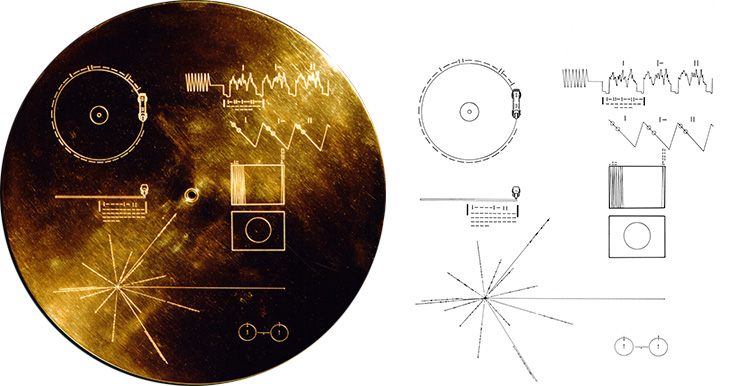
Both Voyager 1 and Voyager 2 carry with them a gold-plated record called ‘The Sounds of Earth‘ containing “sounds and images selected to portray the diversity of life and culture on Earth”. Hopefully any aliens encountering it will have a record player (but the Voyager craft do carry a spare needle!) Credit: NASA/JPL

References

Lots of articles helped in the writing of this one and you can download a PDF of them here. Featured image credit showing the Voyager spacecraft: NASA/JPL.

*radiowaves and light are part of the electromagnetic or ‘EM’ spectrum along with microwaves, gamma rays, X-rays, ultraviolet and infra red. All these waves travel at the same speed in a vacuum, the speed of light (300,000,000 metres per second, sometimes written as 3 x 10⁸ m/s or (m s-1)), but the waves differ by their frequency and wavelength.


Subscribe to be notified whenever we publish a new post to the CS4FN blog.


EPSRC supports this blog through research grant EP/W033615/1.

Collaborative community coding & curating

Equality, diversity and inclusion in the R Project

You might not think of a programming language like Python or Scratch as being an ‘ecosystem’ but each language has its own community of people who create and improve its code (compilers, library code,…), flush out the bugs, introduce new features, document any changes and write the ‘how to’ guides for new users. 

R is one such programming language. It’s named after its two co-inventors (Ross Ihaka and Robert Gentleman) and is used by around two million people around the world. People working in all sorts of jobs and industries (for example finance, academic research, government, data journalists) use R to analyse their data. The software has useful tools to help people see patterns in their data and to make sense of that information. 

It’s also open source which means that anyone can use it and help to improve it, a bit like Wikipedia where anyone can edit an article or write a new one. That’s generally a good thing because it means everyone can contribute but it can also bring problems. Imagine writing an essay about an event at your school and sharing it with your class. Then imagine your classmates adding paragraphs of their own about the event, or even about different events. Your essay could soon become rather messy and you’d need to re-order things, take bits out and make sure people hadn’t repeated something that someone had already said (but in a slightly different way). 

When changes are made to software people also want to keep a note not just of the ‘words’ added (the code) but also to make a note of who added what and when. Keeping good records, also known as documentation, helps keep things tidy and gives the community confidence that the software is being properly looked after.

Code and documentation can easily become a bit chaotic when created by different people in the community so there needs to be a core group of people keeping things in order. Fortunately there is – the ‘R Core Team’, but these days its membership doesn’t really reflect the community of R users around the world. R was first used in universities, particularly by more privileged statistics professors from European countries and North America (the Global North), and so R’s development tended to be more in line with their academic interests. R needs input and ideas from a more diverse group of active developers and decision-makers, in academia and beyond to ensure that the voices of minoritised groups are included. Also the voices of younger people, particularly as many of the current core group are approaching retirement age.

Dr Heather Turner from the University of Warwick is helping to increase the diversity of those who develop and maintain the R programming language and she’s been given funding by the EPSRC* to work on this. Her project is a nice example of someone who is bringing together two different areas in her work. She is mixing software development (tech skills) with community management (people skills) to support a range of colleagues who use R and might want to contribute to developing it in future, but perhaps don’t feel confident to do so yet

Development can involve things like fixing bugs, helping to improve the behaviour or efficiency of programs or translating error messages that currently appear on-screen in the English language into different languages. Heather and her colleagues are working with the R community to create a more welcoming environment for ‘newbies’ that encourages participation, particularly from people who are in the community but who are not currently represented or under-represented by the core group and she’s working collaboratively with other community organisations such as R-Ladies, LatinR and RainbowR. Another task she’s involved in is producing an easier-to-follow ‘How to develop R’ guide.

There are also people who work in universities but who aren’t academics (they don’t teach or do research but do other important jobs that help keep things running well) and some of them use R too and can contribute to its development. However their contributions have been less likely to get the proper recognition or career rewards compared with those made by academics, which is a little unfair. That’s largely because of the way the academic system is set up. 

Generally it’s academics who apply for funding to do new research, they do the research and then publish papers in academic journals on the research that they’ve done and these publications are evidence of their work. But the important work that supporting staff do in maintaining the software isn’t classified as new research so doesn’t generally make it into the journals, so their contribution can get left out. They also don’t necessarily get the same career support or mentoring for their development work. This can make people feel a bit sidelined or discouraged. 

To try and fix this and to make things fairer the Society of Research Software Engineering was created to champion a new type of job in computing – the Research Software Engineer (RSE). These are people whose job is to develop and maintain (engineer) the software that is used by academic researchers (sometimes in R, sometimes in other languages). The society wants to raise awareness of the role and to build a community around it. You can find out what’s needed to become an RSE below. 

Heather is in a great position to help here too, as she has a foot in each camp – she’s both an Academic and a Research Software Engineer. She’s helping to establish RSEs as an important role in universities while also expanding the diversity of people involved in developing R further, for its long-term sustainability.

Further reading


Related careers

QMUL

Below is an example of a Research Software Engineer role which was advertised at QMUL in April 2024 – you can read the original advert and see a copy of the job description / person specification information which is archived at the “Jobs in Computer Science” website. This advert was looking for an RSE to support a research project “at the intersection of Natural Language Processing (NLP) and multi-modal Machine Learning, with applications in mental health.”

QMUL also has a team of Research Software Engineers and you can read about what they’re working on and their career here (there are also RSEs attached to different projects across the university, as above).

Archived job adverts from elsewhere

Below are some examples of RSE jobs (these particular vacancies have now closed but you can read about what they were looking for and see if that sort of thing might interest you in the future). The links will take you to a page with the original job advert + any Job Description (JD – what the person would actually be doing) and might also include a Person Specification (PS – the type of person they’re looking for in terms of skills, qualifications and experience) – collectively these are often known as ‘job packs’.

Note that these documents are written for quite a technical audience – the people who’d apply for the jobs will have studied computer science for many years and will be familiar with how computing skills can be applied to different subjects.

1. The Science and Technology Facilities Council (STFC) wanted four Research Software Engineers (who’d be working either in Warrington or Oxford) on a chemistry-related project (‘computational chemistry’ – “a branch of chemistry that uses computer simulation to assist in solving chemical problems”) 

2. The University of Cambridge was looking for a Research Software Engineer to work in the area of climate science – “Computational modelling is at the core of climate science, where complex models of earth systems are a routine part of the scientific process, but this comes with challenges…”

3. University College London (UCL) wanted a Research Software Engineer to work in the area of neuroscience (studying how the brain works, in this case by analysing the data from scientists using advanced microscopy).


Subscribe to be notified whenever we publish a new post to the CS4FN blog.


This blog is funded by EPSRC on research agreement EP/W033615/1.

QMUL CS4FN EPSRC logos

CS4FN Advent 2023 – Day 21: stars and celestial navigation

Every day from the 1st to the 25th of December this blog is publishing a Christmas Computing post, as part of our CS4FN Christmas Computing Advent Calendar. On the front of the calendar for each day is a festive cartoon which suggests the post’s theme – today’s is a star, so today’s post is about finding your way: navigation.

Follow that star… Image drawn and digitised by Jo Brodie.

In modern cities looking up at the night sky is perhaps not as dramatic as it might have been in the past, or in a place with less light pollution. For centuries people have used stars and the patterns they form to help them find their way.

GPS Orbital Navigator Satellite (DRAGONSat), photograph by NASA. Image not in copyright and used for non-commercial purposes.

There are many ways our explorations of space have led to new technologies, though satellites have perhaps had the most obvious effect on our daily lives. Early uses were just for communication, allowing live news reports from the other side of the world, with networks that span the globe. More recently GPS – the Global Positioning System has led to new applications and now we generally just use our phones or satnav to point us in the right direction.

The very first computers

by Paul Curzon, QMUL.

Victorian engineer Charles Babbage designed, though never built the first mechanical computer. The first computers had actually existed for a long time before he had his idea, though. The British superiority at sea and ultimately the Empire was already dependent on them. They were used to calculate books of numbers that British sailors relied on to navigate the globe. The original meaning of the word computer was actually a person who did these calculations. The first computers were humans.

An American almanac from 1816. Image by Dave Esons from Pixabay

Babbage became interested in the idea of creating a mechanical computer in part because of computing work he did himself, calculating accurate versions of numbers needed for a special book: ‘The Nautical Almanac’. It was a book of astronomical tables, the result of an idea of Astronomer Royal, Nevil Maskelyne. It was the earliest way ships had to reliably work out their longitudinal (i.e., east-west) position at sea. Without them, to cross the Atlantic, you just set off and kept going until you hit land, just as Columbus did. The Nautical Almanac gave a way to work out how far west you were all the time.

Maskelyne’s idea was based on the fact that the angle from the moon’ to a person on the Earth and back to a star was the same at the same time wherever that person was looking from (as long as they could see both the star and moon at once). This angle was called the lunar distance.

The lunar distance could be used to work out where you were because as time passed its value changed but in a predictable way based on Newton’s Laws of motion applied to the planets. For a given place, Greenwich say, you could calculate what that lunar distance would be for different stars at any time in the future. This is essentially what the Almanac recorded.

Moon image by PollyDot from Pixabay

Now the time changes as you move East or West: Dawn gradually arrives later the further west you go, for example, as the Earth rotates the sun comes into view at different times round the planet). That is why we have different time zones. The time in the USA is hours behind that in Britain which itself is behind that in China. Now suppose you know your local time, which you can check regularly from the position of the sun or moon, and you know the lunar distance. You can look up in the Almanac the time in Greenwich that the lunar distance occurs and that gives you the current time in Greenwich. The greater the difference that time is to your local time, the further West (or East) you are. It is because Greenwich was used as the fixed point for working the lunar distances out, that we now use Greenwich Mean Time as UK time. The time in Greenwich was the one that mattered!

This was all wonderful. Sailors just had to take astronomical readings, do some fairly simple calculations and a look up in the Almanac to work out where they were. However, there was a big snag. it relied on all those numbers in the tables having been accurately calculated in advance. That took some serious computing power. Maskelyne therefore employed teams of human ‘computers’ across the country, paying them to do the calculations for him. These men and women were the first industrial computers.

Before pocket calculators were invented in the 1970s the easiest way to do calculations whether big multiplication, division, powers or square roots was to use logarithms (not to be confused with algorithm). The logarithm of a number is just the number of times you can divide it by 10 before you get to 1. Complicated calculations can be turned in to simple ones using logarithms. Therefore the equivalent of the pocket calculator was a book containing a table of logarithms. Log tables were the basis of all other calculations including maritime ones. Babbage himself became a human computer, doing calculations for the Nautical Almanac. He calculated the most accurate book of log tables then available for the British Admiralty.

The mechanical computer came about because Babbage was also interested in finding the most profitable ways to mechanise work in factories. He realised a machine could do more than weave cloth but might also do calculations. More to the point such a machine would be able to do them with a guaranteed accuracy, unlike people. He therefore spent his life designing and then trying to build such a machine. It was a revolutionary idea and while his design worked, the level of precision engineering needed was beyond what could be done. It was another hundred years before the first electronic computer was invented – again to replace human computers working in the national interest…but this time at Bletchley Park doing the calculations needed to crack the German military codes and so win the World War II.

The creation of this post was funded by UKRI, through grant EP/K040251/2 held by Professor Ursula Martin, and forms part of a broader project on the development and impact of computing.


Advert for our Advent calendar
Click the tree to visit our CS4FN Christmas Computing Advent Calendar

EPSRC supports this blog through research grant EP/W033615/1.