Beetles are one of the most prolific species on the planet. As the famous geneticist J.B.S. Haldane is supposed to have said: God has an inordinate fondness for beetles. One of the reasons they are so successful is that, unlike us, their skeleton is outside their body, not inside! This kind of skeleton is called an exoskeleton. Humans are now trying to get in on the act. In the computer science version exoskeletons are robots that you wear.
Animal shells
All sorts of animals have evolved all sorts of different exoskeletons. We call the big ones shells. Many insects, like beetles, have exoskeletons. So do crabs, scorpions, snails and clams. Tortoises are particularly interesting as they have both an internal skeleton, like us, and a shell too.
Animals use exoskeletons for lots of reasons. Most obviously it protects them from predators. It can also help stop them drying out in the sun, and stop them getting wet in the rain. They are used by some animals for sensing the world, and help animals like locusts to jump. Some tortoises and armadillos use them for digging and other animals use them to feed. It’s not surprising, with so many uses that there are a lot of them about.
Human shells
Generally, exoskeletons seem like a pretty good idea! So it’s not surprising that we humans want them too. A suit of armour is actually just a simple version of an exoskeleton designed to protect a knight from ‘predators’. It’s not much different to a tortoise protected inside its shell. The difference to the ones humans make now is our modern exoskeletons are powered and controlled by computers. They really are a robot you wear. They react to your movements.
As with animals’ shells, powered exoskeletons help humans do all sorts of things, not just act as armour. By being powered they give us extra strength, allowing us to lift weights far heavier than we could otherwise, and can turn our small movements in to larger ones. That means they can, for example, help people who have problems moving about to walk (see ‘The Wrong Trousers’) or help nurses lift patients in and out of bed. They are used by surgeons to do operations when they are in a different place to the patient, removing the shakiness of their hands, and by rescue workers working in dangerous situations. There are even ones designed to help astronauts exercise in space. They make movement harder rather than easier to force them to exercise despite the lower gravity.
All in all, copying beetles, but with our own computing twist, seems like a pretty good idea.
The Knights Templar were a 12th century order of catholic warrior monks, more accurately if convolutedly called “The Poor Fellow-Soldiers of Christ and of the Temple of Solomon” though they weren’t exactly poor. In addition to their original role of protecting catholic pilgrims heading to Jerusalem from robbery and murder, they also acted as a kind of international banker to support their main role. They laid some important foundations of modern international banking in the process. In particular, they invented a way to move money (or gold) around safely, without ever actually moving it anywhere. That sounds like a magic trick! Did they use some supposed mystical magic powers to do this? No, they kept the actual money given to them in the nearest of their large network of 1000 or so headquarters and forts around the continent. The money didn’t have to move anywhere. They then gave the person a note to hand in at their headquarters in another country. It promised that the Knights there would give them the equivalent amount from their money store when asked and given the note. The Knights there just swapped them the money for that note. This worked as long as they had a suitable store of money in each location, which of course would be topped up each time someone wanted to move money from that point. This is a simple version of how international banking works now. A British 20 pound note just promises to pay the bearer an equivalent amount, and without that promise (and people’s belief in it) it is just a piece of paper. It is just a similar promissory note, except people now just swap notes, treating it as money in its own right. Similarly, the banks don’t actually move any gold or other physical form of money about when you pay a shop with your debit card or banking app. They just move information equivalent to those promissory notes embodied in the transaction, around a network (though a computer one rather than a network of forts connected by roads).
There is a problem though with moving money from one person to another in this way using notes. If someone steals the note then it is potentially as valuable to them as actually stealing the chest of gold left in the original fort (just as stealing a 20 pound note is). In the Templar’s time the thief would just need to take it to a Templar headquarters and swap it for money just as the original owner would have done (a bit risky perhaps, given how fearsome the Templars were, but potentially possible!). Worse though, without a system to protect from this kind of attack, a thief could copy the note and then ask for the money repeatedly!
However, the Templars are know to have used encryption in their communications. The notes may therefore have been encrypted too and if so that would have made them useless if stolen. Banks now encrypt all those messages that move money about computer networks for the same reason. If only the Templar’s could read their notes (as only the Templar’s knew the key to their code), then only they could know it even was promising money. That doesn’t fully make it secure though, perhaps a thief could guess it was such a note, and if so what is to stop them then trying to cash it in (apart from the risk of being wrong). You would need something more. A simple possibility is the person with the note would need to know the encrypted amount that was contained somewhere within it. If they didn’t ask for the right amount then they couldn’t have handed over the money in the first place. They would reveal themselves as a thief!
Modern banks have to deal with similar problems even though modern financial transactions are all encrypted. Simple encryption alone is still not enough, protocols (special algorithms) are needed to prevent wide ranging kinds of attack being possible. Banks also need to use better ciphers than those from the Middle Ages, as today we can quickly crack ciphers as simple as the Templar Cipher. Banking is all done differently in detail today, but the ideas behind what is done and why are the same.
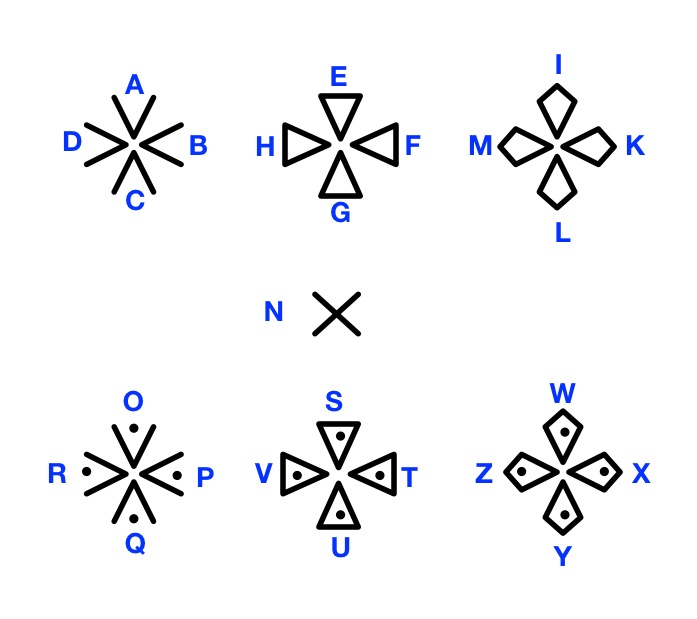
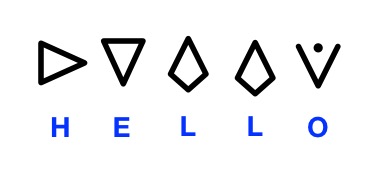
Can you crack the Templars’ cipher and decrypt the message below? One way might be using frequency analysis. The most common letters in English are likely (if not definitely) the most common in the message. E is most frequent in English, so which symbol might stand for E? Frequency analysis had been known for several hundred years before the Templars used ciphers (at least by the Arabs, though the Templars weren’t exactly their friends!), so it is actually possible even then that the Templars’ messages might be cracked, unknown to them. It was an Arabian scholar called Al Kindi, who actually invented frequency analysis (or at least was the earliest known person to write about it in his manuscript “On Deciphering Cryptographic Messages”.) Another way to crack the code might be to look for cribs – what words might be included in the message if it is a promissory note? Using both together may give you a good chance of decrypting the message. If you can’t crack their code (there is a big clue in this article), the key is given at the end if you scroll down. Use it to then decrypt the message.
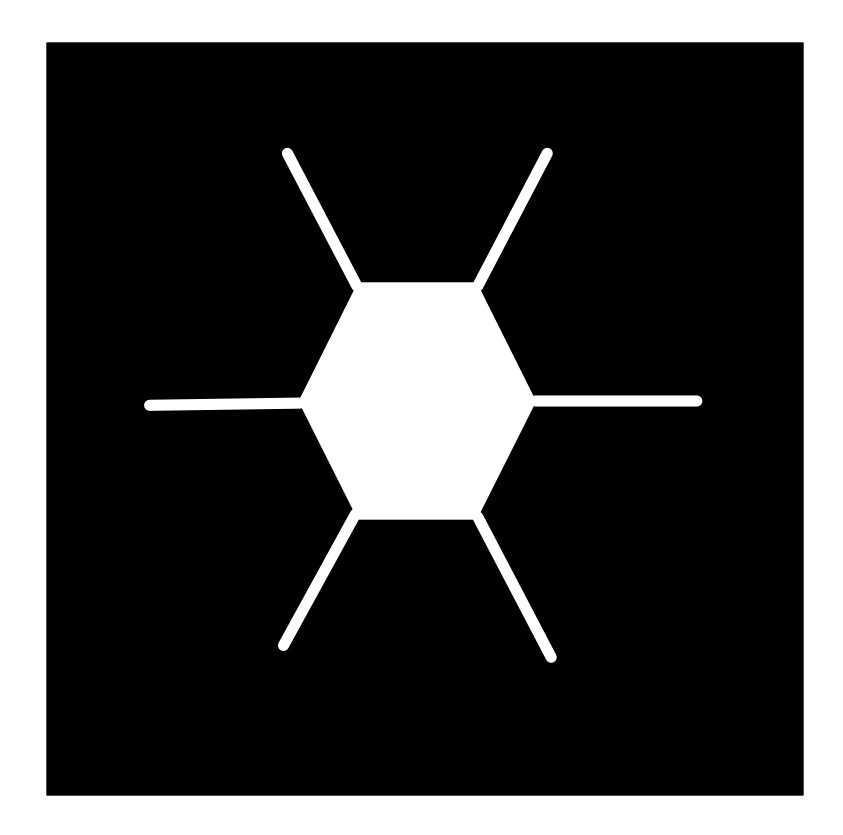
Following algorithms to draw nature can lead to natural looking pictures of all all sorts of things: from trees to snowflakes. It is one way computer generated imagery (CGI) scenery is created for films and games. You can write computer programs to do it if you have programming skill, but it can be just as fun (and more stress-relieving) to just doodle algorithmic pictures by hand – you act as what computer scientists call a ‘computational agent’ just following the algorithm. Here is an example Doodle Algorithm to draw a snowflake.
The DoodleDraw Algorithm
1. Draw a Black rectangle
2. Draw a SnowflakeHex in the middle of the black rectangle.
3. DoodleDraw a.Hexagon Snowflake

To Draw a SnowflakeHex:
    1. Draw a white hexagon with white lines sticking out from each corner (as shown).

To DoodleDraw a Hexagon Snowflake:
    1. IF happy with the picture THEN STOP
        ELSE
            1. Pick an existing SnowflakeHex and pick a line on it.
            2. Draw a new smaller SnowflakeHex on that line.
            3. DoodleDraw a Hexagon Snowflake.
Image by CS4FN
The doodle this led to for me is given below… does it look snowflake-ish? Now follow the algorithm and draw your own, just like snowflakes every drawing should be different even if following the same algorithm as we include random steps in the algorithm.
Image by CS4FN
Different algorithms with different starting shapes give different looking trees, grasses, ferns, snowflakes, crystals,… Often nature is following a very similar recursive creation process, which is why the results can be realistic.
Try inventing your own doodle art algorithm and see how realistic the drawings you end up with are. First try using a slightly different starting picture to ours above (eg a hollow hexagon instead of a filled in one, or skip the lines, or have more lines, or have a different central image to the one that is then replicated…and see what you end up with. Find lots more ideas for doodle draw algorithms on our DoodleDraw page.
Next time you find yourself doodling in a meeting or lecture, invent your own doodle draw algorithm, draw an algorithmic doodle, develop your algorithmic thinking skills and at the same time explore algorithms for drawing nature.
Programming languages have lots of control structures, like if-statements and while loops, case-statements and for loops, method call and return, … but a famous research result in theoretical computer science (now called the structured program theorem) says you can do everything that it is possible to do with only three. All those alternatives are just for convenience. All you need is one way each to do sequence; one way to do selection, and one way to do iteration. If you have those you can build the structure needed to do any computation. In particular, you do not need a goto statement! We can explore what that means by just thinking about instructions to build Lego.
What do we mean by a control structure? Just some mechanism to decide the order that instructions must be done for an algorithm to work. Part of what makes a set of instructions an algorithm is that the order of instructions are precisely specified. Follow the instructions in the right order and the algorithm is guaranteed to work.
Goto
First of all, Lego instructions are designed to be really clear and easy to follow. The nice folk at Lego want anyone to be able to follow them, even a small child and manage to accurately build exactly the model shown on the box.
What they do not make use of is a Goto instruction, an arbitrary jump to another place, where you are told, for example, to move to Page 14 for the next instruction. That kind of jump from place to place is reserved for Fighting Fantasy Adventure Books, where you choose the path through the story. They jump you about precisely because the aim is for you to be lost in the myriad of potential stories that are possible. You just don’t do that if you want instructions to be easy to follow.
The structured program theorem provided the ammunition for arguing that goto should not be used in programming and instead structured programming (hence the theorem’s name) should be used instead. All it actually does is show it is not needed though, not that its use is worse, though the argument was eventually won, with some exceptions. For programs to be human-readable and maintainable it is best that they use forms of structured programming, and avoid the spaghetti programming structures that goto leads to..
Sequencing
The main kind of control structure in a booklet of Lego instructions is instead sequencing. Instructions follow one after the other. This is indicated by the pages of the booklet. On each page though the instructions are split into boxes that are numbered. The boxes and numbers are the essential part of the control structure. You build the Lego model in the order of the numbered boxes. The numbering provides a sequencing control structure. Programming languages usually just use the order of instructions down a page to indicate sequencing, sometimes separated by punctuation (like a semi-colon), though early languages used this kind of numbering. The point is the same, however it is done, it is just a mechanism to make clear the order that the instructions are followed one after another, i.e., sequencing.
Parallelism and time-slicing
However, with lego there is another control structure within those boxes that is not quite sequencing. Each box normally has multiple pieces to place with the position of each shown. The lego algorithm isn’t specifying the order those pieces are placed (any order will do). This is a kind of non-deterministic sequencing control structure. It is similar to a parallelism control structure in programming languages, as if you like building your Lego model together with others, then a different person could choose each piece and all place the piece together (parallelism). Alternatively, they could place the pieces one after the other in some random order (time-slicing) and always end up with the same final result once the box is completed.
Is this necessary though? The structured program theorem says not, and in this case it is relatively easy to see that it isn’t. The people writing the instruction booklet could have decided an order themselves and enforced it. Which order they chose wouldn’t matter. Any Lego instruction booklet could be converted to one using only sequencing without parallelism or time-slicing.
Iteration
Image by CS4FN after Lego instruction iteration
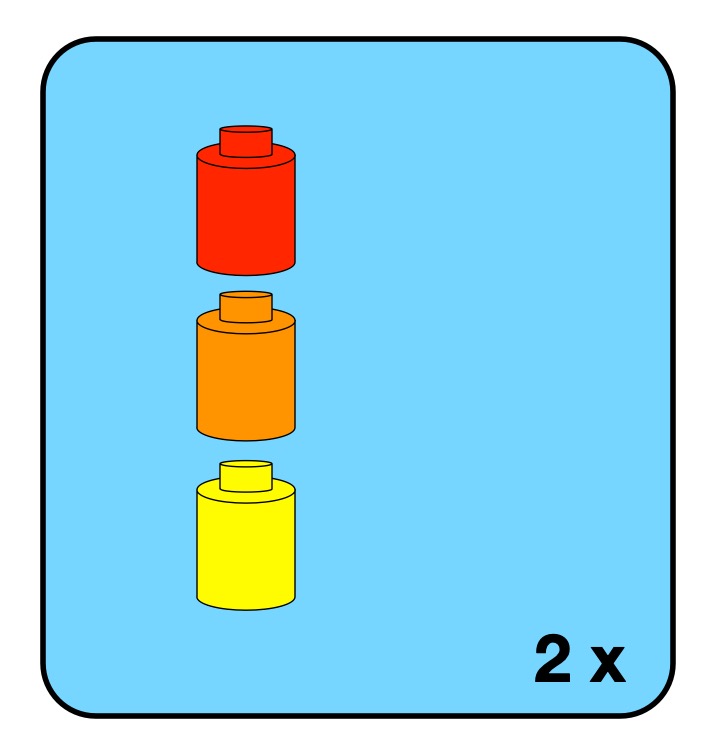
Iteration is just a way to repeat instructions or sub-programs. Lego instructions have a simplified form of repetition which is the equivalent of a simple for loop in programming. It just says that a particular box of instructions should be followed a fixed number of times (like 3 x meaning make this lego sub-build three times). With only this way of doing iteration lego instructions are not a totally general form of computation. There are algorithms that can’t be specified in Lego instructions. To be good enough to play the full role in the theorem, the iteration control structure has to have the capability to be unbounded. The decision to continue or not is made at the end of each iteration, You follow the instructions once, then decide if they should be followed again (and keep doing that). Having such a control structure would mean that at the point when you started to build the lego construct to be repeated, you would not necessarily know how many times that Lego construct was to be built. It’s possible to imagine Lego builds like this. For example, you might be building a fairytale castle made of modular turreted towers, where you can keep deciding whether to build another tower after each new tower is completed. until the castle is big enough. That would be an unbounded loop. An issue with unbounded loops is they could never terminate…you could be eternally damned to build Lego towers to eternity!
Selection
The final kind of control structure needed is selection. Selection involves having a choice of what instruction or subprogram to do next. This allows an algorithm to do different things depending on data input or the results of computation. As most lego sets involve building one specific thing, there isn’t much use of selection in Lego booklets.
However, some lego sets do have a simple form of selection. There are “3 in 1” sets where you can, for example, choose to make one of three animals by choosing one of three instruction booklets to follow at the start.
To be fully computationally general there would need to be choice possible at any point, in the way repetition can appear at any point in the booklet. It would need to be possible for any instruction or block of instructions to be prefigured by a test of whether they should be followed or not, with that test and arbitrary true/false question.
Again, such a thing is conceivable if more complex Lego builds were wanted. Building a fairytale castle you might include options to choose to build different kinds of turret on top of the towers, or choose different colours of bricks to make rainbow towers, or… If this kind of totally general choice was provided then no other kind of selection control structure would be needed. Having such instructions would provide a level of creativity between those of fixed sets to build one thing and the origianl idea of Lego as just blocks you could build anything from (the sets would need more bricks though!)
Sequence, Selection and Iteration is enough (but only if powerful enough)
So Lego instruction booklets do include the three kinds of control structure needed of sequence, selection and iteration. However, the versions used are not actually general enough for the structured control theorem to apply. Lego instructions with the control structures discussed are not powerful enough to be computationally complete, and describe all possible algorithms. More general forms are needed than found in normal Lego instructions to do that. In particular, a more general version of iteration is needed, as well as a verion of selection that can be used anywhere, and that includes a general purpose test. All programming languages have some powerful version of all three control structures. If they did not they could not be used as general purpose languages. There would be algorithms that could not be implemented in the language.
Just like programming languages, Lego instructions also use an extra kind of control structures that is not actually needed, It is there just for convenience, just like programming languages have lots of extra control structures just for convenience too.
Sadly then, Lego instructions, as found in the normal instruction booklets are not as general as a programming language. They do still provide a similar amount of fun though. Now, I must get back to building Notre Dame.
Unicode is the way that computers represent characters in a way that means all human languages (and some alien ones like Klingon) can be represented on a computer. It is just a code mapping characters to numbers, and it replaced the earlier American ASCII code that only allowed for the latin alphabet as used in American english. It means that computers can display and letter or character from any language from Japanese to Egyptian Hieroglyphs.
So where does poo come in? Well, the Egyptians had a hieroglyph for it, so unicode has a number for it. There’s even more unicode poo in the emoji character set but the Egyptians got there 1000s of years earlier. Here is how the Ancient Egyptians wrote or carved poo:
You can add any unicode character to a web page by including it in the html by putting &#x before the hexadecimal number corresponding to the unicode number of the character and following it by a semicolon so the Egyptian hieroglyph for excrement is written in html above as 𓄽
To write the heiroglyph for one of my favourites, an Egyptian Vulture, you use 𓄿 for example (it is also used to represent the letter aleph so a sound like our a when spelling out words).
𓄿
(If you don’t see the hieroglyphs it may just be that your browser can’t cope with unicode, try a different one!).
Amaze your family and friends this holiday showing your mathematical prowess by generating instant magic squares at will. In the previous article we saw how to generate 4×4 magic squares. If that was a bit too hard, here is a simpler version for generating instant 3×3 magic squares. Learn the trick and some computer science about algorithms and how they prove they always work.
The Trick
First ask an audience member to pick a number out of a hat. That will be the target number. You then write out a magic square that adds to that number.
The Secret
Building this type of magic square is based on the algorithm below that creates magic squares from 9 consecutive numbers. The secret is first to make sure all the numbers you put in the hat are multiples of 3 (i.e. are in the 3 times table). You then follow the algorithm below that tells you what numbers to put where in the grid.
The Magical Algorithm
Place lots of numbers on folded pieces of paper in a hat. All are multiples of 3 (but the audience do not know that).
Ask an audience member to pull one out at random.
Announce that that number is the TARGET number. You will create a magic square that adds up to that number so that is the number that the square rows and so on will add to.
In your head divide that number by 3. For example, if TARGET was 15 THEN you divide 15 by 3 to get 5. Let’s call this value MID, to allow us to be general when we follow the rest of the instructions.
On a 3 by 3 grid, put MID in the centre square (so in our example, put 5 in the middle).
Place the number (MID + 3) in the upper right-hand square (in our example, 5+3 = 8).
Place the number (MID – 3) in the lower left-hand square (in our example, 5-3 = 2).
Place the number (MID + 1) in the upper left-hand square (in our example, 5+1 = 6).
Place the number (MID – 1) in the lower right-hand square (in our example, 5-1 = 4).
Fill in the remaining squares to make the magic square work, so that the rows and columns add to TARGET (subtracting the other two numbers from TARGET in each case to get the missing one).
Image by CS4FN
For the last step, you just need to fill in the empty squares, to make sure the rows and columns add to the right number, TARGET. To do this you just need to keep in mind the target magic number you calculated. (For our example, remember it was 15). It’s a bit of simple arithmetic to find these final numbers and voila, you have built a magic square that adds up to a total picked at random..
Practice doing the maths in your head so that you can make it seem magical.
Does it always work?
You can actually prove the trick always works using some simple algebra based on the template magic square above. See if you can work out how yourself. Using MID and TARGET in place of numbers, for the trick to always generate a correct magic square you need to check that all rows and columns simplify to be equivalent to TARGET. Visit our Conjuring with Computation website to see the detail of how.
Proving a magic trick in this way is just the same thing computer scientists do when they invent new computing algorithms to make sure they work. It increases the assurance that the algorithm and so programs implementing it do work.
If you can program, then you could write a program to generate magic squares using the above algorithm, and then your proof would be a step in verifying your program, as long as it does correctly implement the algorithm!
Computer-generated voices are encountered all the time now in everyday life, not only in automated call centres, but also in satellite navigation systems and home appliances.
Although synthetic speech is now far better, early systems were not as easy to understand as human speech, and many people don’t like synthetic speech at all. Maria Klara Wolters of Edinburgh University decided to find out why. In particular, she wanted to discover what makes synthetic speech difficult for older people to understand, so that the next generation of talking computers would speak more clearly.
She asked a range of people to try out a state-of-the-art speech synthesis system fo the time, tested their hearing and asked their thoughts about the voices. She found that older people have more difficulty understanding computer-generated voices, even if they were assessed as having healthy hearing. She also discovered that messages about times and people were well understood, but young and old alike struggled with complicated words, such as the names of medications, when pronounced by a computer.
More surprisingly, she found that the ability of her volunteers to remember speech correctly didn’t depend so much on their memory, but on their ability to hear particular frequencies (between 1 and 3 kHz). These frequencies are in the lower part of the middle range of frequencies that the ear can hear. They contain a large amount of information about the identity of speech sounds. Another result of the experiments was that the processing of sounds by the brain, so called ‘central auditory processing’ appeared to play a more important role for understanding natural speech, while peripheral auditory processing (processing of sounds in the ear) appeared to be more important for synthetic speech.
As a result of the experiments, Maria drew up a list of design guidelines for the next generation of talking computers: make pauses around important words, slow down, and change to simpler forms of expressions (e.g. “the blue pill” is much easier to understand and remember than a complicated medical name). She suggested that, such simple changes to the robot voices could make an immense difference to the lives of many older people. They also make services that use computer-generated voices easier for everyone to use. This kind of inclusive design benefits everybody, as it allows people from all walks of life to use the same technology. Maybe Maria’s rules would work for people you know too. Try them out next time grandpa asks you to repeat what you just said!
Computer Scientists and digital artists are behind the fabulous special effects and computer generated imagery we see in today’s movies, but for a bit of fun, in this series, we look at how movie plots could change if they involved Computer Science or Computer Scientists. Here we look at an alternative version of the Charles Dickens’ A Christmas Carol (take your pick of which version…my favourites are The Muppet Christmas Carol, but also if we include Theatre, the one man version of Patrick Stewart, in the 1990s and London in 2005 where he plays all 40 or so parts on a bare stage).
**** SPOILER ALERT ****
Ebenezer Scrooge runs a massively successful Artificial Intelligence company called Scrooge and Marley. Their main product is SAM, an AI agent which is close to General AI in capability. The company sells it to the world with both business versions and personal ones. The latter acts as everyone’s friend, confidant, personal trainer, tutor and mentor, and more. It hears everything they hear and say, and sees everything they see. As a result Scrooge is now a Trillionnaire.
Apart from one last employee, Bob Cratchit, everyone in his company has long been replaced by AI agents designed by Scrooge. It is a simple way to boost profits: human employees, after all, are expensive luxuries. First all the clerical staff went, then accounts and Human Resources. The cleaners were replaced by robots that stalk the corridors at night, also acting as security guards, the receptionist is now a robot head. Eventually even the software engineers were replaced by software agents that now beaver away at the code, constantly upgrading, SAM, following SAM’s instructions. Bob Cratchit, maintains both Scrooge’s personal and company IT systems, there for when some human intervention is needed, though that now actually means doing very little but monitoring everything…long hours staring at a screen. He is paid virtually nothing as a result, as he has had his pay repeatedly cut as his duties were replaced. He has had no option to accept the cuts as jobs are scarce and he has a disabled child, Tiny Tim, to support. He is constantly told by Scrooge that he will soon be completely replaced by an agent though, and lives in fear of that day.
On Christmas Eve Scrooge rejects his nephew, Fred’s invitation to visit for Christmas dinner. Instead Scrooge returns, in his self-driving car, to his smart home within his compound on a cliff top overlooking the sea. He lives there alone, given his servants were dismissed long ago. As he arrives, he is shocked to see a vision of his late partner, Jacob Marley, dead for 7 years, in the lens of his smart door cam. The door opens automatically on sensing his arrival, and the vision disappears as he rushes past. He brushes it off as tiredness. Perhaps he is coming down with something. He eats an AI chef designed ready meal made by his smart fridge with integrated microwave. It knew he was arriving so had it ready for him as he entered the kitchen. The house also dispenses him drugs to protect against the possible nascent illness. His house is dark and silent and he is alone, but he likes it that way. He retires to his bedroom, his giant 4-poster bed surrounded by plate glass sides that automatically darken as he climbs in to bed and he quickly falls asleep.
Suddenly, he is woken by a strange clanking. The ghost of Jacob Marley appears and warns him that his race to become a trillionaire has left him with everlasting chains that he will drag to eternity, just as Marley must do. He is warned that he will be visited by three ghosts of past, present and future and he should heed their warnings! There is still time to cast off his chains before it is too late.
The ghost of Christmas Past arrives first and takes him back to his childhood. He sees himself growing up, a loner at boarding school, spending all his time coding, on his laptop, making no friends and wanting none. But, then they move forward in time to his first job as an apprentice software engineer where he meets Belle. For the first time in his life he falls in love and becomes a new person. He starts to love life. She is the joy of his whole existence. He still works hard but he also spends lots of time with Belle. Eventually they become engaged, but soon he is working on making his first million. Gradually, he spends more and more time at work and less time with Belle, as if he doesn’t he will end up behind the curve. He skips social events working late on software upgrades, leaving Belle to go to the theatre, to parties, to dances alone. He sees her less and less as he just doesn’t have the time if he is to make his company successful. He has no time for anything but work. He makes his first fortune running an online betting company, and becomes hardened to the problems of others. He can’t care about the people whose homes are broken up through gambling addiction caused by his site. He has to turn a blind eye to the people he left destitute all because they were drawn in by his company’s use of intentionally addictive computer algorithms. The debt collectors deal with them. It is not his problem that his users are driven to suicide, as there are always more, who can be persuaded to start gambling younger and younger – it is their choice after all. He makes his million and uses the money to invest in a start up AI company that with business partner, Jacob Marley, they take control of, sacking the original founders. Now he is chasing his first billion.
Eventually, Belle realises he has become a stranger to her. Worse, he does not care about the cost of the things he does to others. All the kindness that had blossomed when he first met her has gone. He clearly loves the pursuit of money and personal success far more than he loves her, Winning the race to market is all that matters. Her heart broken, another casualty of his quest for success, Belle releases him from their engagement.
Later, the ghost of Christmas Present arrives and shows Scrooge Christmas as it is now. They see lots of examples of people enjoying life, whatever their circumstances because of the way they value each other, not because they value money or abstract success. Scrooge is shown how Christmas brings joy to all who let the spirit of Christmas enter their hearts. It pulls people together, making them happy, enjoying each other’s company. However, Scrooge also sees how he is perceived by those who know him: a sad monster who cares only for himself and not at all for others, with his own life the worse for it, despite his fabulous wealth. He is shown too how his nephew Fred refuses to give up on him and says he will invite him to join their Christmas every year even if he knows the invitation will always be turned down.
The ghost of Christmas Future arrives next and shows him the future of Bob Cratchit’s family. With little income to look after him, the disabled Tiny Tim dies. Scrooge is also shown his own grave and the aftermath of his lonely death, when he is mocked, even by his own robot agents. On his death, a hacker group takes them over to steal his fortune. Scrooge asks whether this future is the future that will be, or a future that may be only. Assured that he can still change his future, he wakes on Christmas morning.
Staring out the window at the snow falling on Christmas morning, he immediately instructs his AI agent, SAM, to buy the leading cryogenics firm. It freezes rich people when they die, putting them on ice so that one day, once the science is perfected, they can be brought back to life. He instructs other AI agents to research and perfect the science of resurrection. However, he also boosts his cyber security and sacks Cratchit, as clearly he is a security weakness, Scrooge has no evidence, but he strongly suspects the shenanigans in the night must have been Cratchit’s doing, somehow controlling the holographic displays of his smart house, perhaps, or adding hallucinogenics to his food.
Satisfied he gets on with his life as before, building his company, building his wealth.
However, the following year on Christmas Eve he is in a freak accident. His smart car is barrelled into by a self-driving lorry that runs a red light. His AI agents take over immediately and he is cryogenically frozen, the frozen body moved back to his smart home under the control of SAM.
Many decades pass. Then one day his AI agents resurrect him. They have been working on his behalf, perfecting the science of resurrection on the people frozen before him. There are many failures, during which all the company’s former clients, who had paid to be frozen, but who are now just assets of the company, are killed for ever in resurrection experiments. However, SAM finally works out how to resurrect a person successfully. After testing the process on quantum simulations for many years, SAM finally brings Scrooge back to life.
His first thought is for the state of his companies, the state of his wealth .However, he is told that his former money is now worthless. He is told by SAM of the anarchy and the riots of the mid 21st century as people were thrown out of work, replaced by machines, as millions were made homeless, how there were wars over water, over food, and because of environmental destruction made worse by all the conflict. The world economy collapsed completely as a small number of companies amassed all the wealth, but impoverished everyone else, so that there was eventually no one with money to buy their products. Famine and plague followed, sweeping the globe.
However, Scrooge is assured by SAM that it is all ok, because as humanity died out he was protected by his AI agents. They used his money to expand his estate. They bought companies (run by machines) that then worked solely to protect his interests and his personal future. They stockpiled resources, buying automated manufacturing plants along with their whole supply chains, long before money became worthless. They computed the resources he would need, and so did what was needed to secure his future. However, the planet is now dead. Gradually, he realises that he is the last person still known to be alive. Finally, he has his wish: “If they would rather die…they had better do it, and decrease the surplus population.”
Paul Curzon, Queen Mary University of London
The reality
“Everyone is working all the time…Even the folks who are very wealthy now…all they do is work….No one’s taking a holiday. People don’t have time … for the people they love.”
– Guardian. 1 Dec 2025
“The inside story of the race to build the ultimate in Artificial Intelligence”
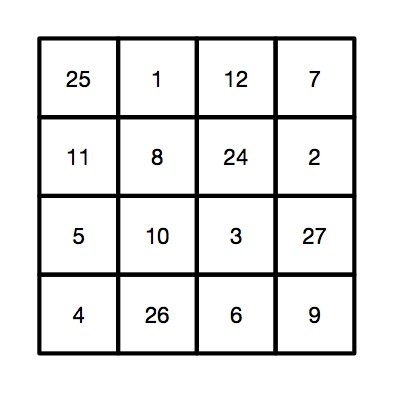
Victorian Computer Scientists, Ada Lovelace and Charles Babbage were interested in Magic Squares. We know this because a scrap of paper with mathematical doodles and scribbles on it in their handwriting has been discovered, and one of the doodles is a magic square like this one. In a magic square all the rows, columns and diagonals magically add to the same number. At some point, Ada and Charles were playing with magic squares together. Creating magic squares sounds hard, but perhaps not with a bit of algorithmic magic.
The magical effect
For this trick you ask a volunteer to pick a number. Instantly, on hearing it, you write out a personal four by four magic square for them based on that number. When finished the square contents adds to their chosen number in all the usual ways magic squares do. An impressive feat of superhuman mathematical skills that you can learn to do most instantly.
Making the magic
To perform this trick, first get your audience member to select a large two digit number. It helps if it is a reasonably large number, greater than 20, as you’re going to need to subtract 20 from it in a moment. Once you have the number you need to do a bit of mental arithmetic. You need an algorithm – a sequence of steps – to follow that given that number guarantees that you will get a correct magic square.
For our example, we will suppose the number you are given is 45, though it works with any number.
Let’s call the chosen number N (in our example: N is 45). You are going to calculate the following four numbers from it: N-21, N-20, N-19 and N-18, then put them in to a special, precomputed magic square pattern.
The magic algorithm
Sums like that aren’t too hard, but as you’ve got to do all this in your head, you need a special algorithm that makes it really easy. So here is an easy algorithm for working out those numbers.
Image by CS4FN.
Start by working out N – 20. Subtracting 20 is quite easy. For our example number of 45, that is 25. This is our ‘ROOT’ value that we will build the rest from.
N-19. Just add 1 to the root value (ROOT + 1). So 25 + 1 gives 26 for our example.
N-18. Add 2 to the root value (ROOT + 2). So 25 + 2 gives 27.
N-21. Subtract 1 from the root value (ROOT – 1). So 25 – 1 gives 24.
Having worked out the 4 numbers created form the original chosen number, N, you need to stick them in the right place in a blank magic square, along with some other numbers you need to remember. It is the pattern you use to build your magic square from. It looks like the one to the right. To make this step easy, write this pattern on the piece of paper you write the final square on. Write the numbers in light pencil, over-writing the pencil as you do the trick so no-one knows at the end what you were doing.
A square grid of numbers like this is an example of what computer scientists call a data structure: a way to store data elements that makes it easy to do something useful: in this case making your friends think you are a maths superhero.
When you perform this trick, fill in the numbers in the 4 by 4 grid in a random, haphazard way, making it look like you are doing lots of complicated calculations quickly in your head.
Finally, to prove to everyone it is a magic square with the right properties, go through each row, column and diagonal, adding them up and writing in the answers around the edge of the square, so that everyone can see it works.
The final magic square for chosen number 45
So, for our example, we would get the following square, where all the rows, columns and diagonals add to our audience selected number of 45.
Image by CS4FN.
Why does it work?
If you look at the preset numbers in each row, column and diagonal of the pattern, they have been carefully chosen in advance to add up to the number being subtracted from N on those lines. Try it! Along the top row 1 + 12 + 7 = 20. Down the right side 11 + 5 + 4 = 20.
Do it again?
Of course you shouldn’t do it twice with the same people as they might spot the pattern of all the common numbers…unless, now you know the secret, perhaps you can work out your own versions each with a slightly different root number, calculated first and so a different template written lightly on different pieces of paper.
Peter McOwan and Paul Curzon, Queen Mary University of London
When the construction of Norman Jackson Children’s Centre in London started, the local council commissioned artists to design a sensory garden full of wonderful sights and sounds so the 3 to 5 year old children using the centre could have fun playing there. Sand pit, water feature, metal tree and willow pods all seemed pretty easy to install and wouldn’t take much looking after, but what about sound? How do you bring interesting sound to an outdoor space and make it fun for young children? Nela Brown from Queen Mary was given the job.
After thinking about the problem for a while she came up with an idea for an interactive sound installation. She wanted to entertain any children visiting the centre, but she especially wanted it to benefit children with poor language skills. She wanted it to be informal but have educational and social value, even though it was outside.
You name it, they press it!
Somewhere around the age of 18 months, children become fascinated with pressing buttons. Toys, TV remotes, light switches, phones, you name it they want to press it. Given the chance to press all the buttons at the same time in quick succession, that is exactly what young children will do. They will also get bored pretty quickly and move on to something else if their toy just makes lots of noise with little variety or interest.
Nela had to use her experience and understanding of the way children play and learn to work out a suitable ‘user interface’ for the installation. That is she had to design how the children would interact with it and be able to experience the effects. The user interface had to look interesting enough to get the attention of the children playing in the garden in the first place. It also obviously had to be easy to use. Nela watched children playing as part of her preparation to design the installation both to get ideas and get a feel for how they learn and play.
Sit on it!
She decided to use a panel with buttons that triggered sounds built into a seat. One important way to make any gadget easier to use is for it to give ‘real-time feedback’. That is, it should do something like play sound or change colour as soon as you press any button, so you know immediately that the button press did do something. To achieve this and make them even more interesting her buttons would both change colour and play sound when they were pressed. She also decided the panel would need to be programmed so children wouldn’t do what they usually do: press all of the buttons at once, get bored and walk away.
Nela recorded traditional stories, poems and nursery rhymes with parents and children from the local area, and composed music to fit around the stories. She also researched different online sound libraries to find interesting sound effects and soundscapes. Of the three buttons, one played the soundscapes, another played the sound effects and the last played a mixture of stories, poems and nursery rhymes. Nela hoped the variety would make it all more interesting for the children so keep their attention longer and by including stories and nursery rhymes she would be helping with language skills.
Can we build it?
Coming up with the ideas was only part of the problem. It then had to be built. It had to be weatherproof, vandal-proof and allow easy access to any parts that might need replacing. As the installation had to avoid disturbing people in the rest of the garden, furniture designer Joe Mellows made two enclosed seats out of cedar wood cladding each big enough for two children, which could house the installation and keep the sound where only the children playing with it would hear it. A speaker was built into the ceiling and two control panels made of aluminium were built into the side. The bottom panel had a special sensor, which could ‘sense’ when a child was sitting in (or standing on) the seat. It was an ultrasonic range finder – a bit like bat-senses using echoes from high frequency sounds humans can’t hear to work out where objects are. The sensor had to be covered with stainless steel mesh, so the children couldn’t poke their fingers through it and injure themselves or break the sensor. The top panel had three buttons that changed colour and played sound files when pressed.
Interaction designer Gabriel Scapusio did the wiring and the programming. Data from the sensors and buttons was sent via a cable, along with speaker cables, through a pipe underground to a computer and amplifier housed in the Children’s Centre. The computer controlling the music and colour changes was programmed using a special interactive visual programming environment for music, audio, and media called Max/MSP that has been in use for years by a wide range of people: performers, composers, artists, scientists, teachers, and students.
The panels in each seat were connected to an open-source electronics prototyping platform by Arduino. It’s intended for artists, designers, hobbyists, and anyone interested in creating interactive objects or environments, so is based on flexible, easy-to-use hardware and software.
The next job was to make sure it really did work as planned. The volume from the speakers was tested and adjusted according to the approximate head position of young children so it was audible enough for comfortable listening without interfering with the children playing in the rest of the garden. Finally it was crunch time. Would the children actually like it and play with it?
The sensory garden did make a difference – the children had lots of fun playing in it and within a few days of the opening one boy with poor language skills was not just seen playing with the installation but listening to lots of stories he wouldn’t otherwise have heard. Nela’s installation has lots of potential to help children like this by provoking and then rewarding their curiosity with something interesting that also has a useful purpose. It is a great example of how, by combining creative and technical skills, projects like these can really make a difference to a child’s life.














 cs4fn
cs4fn 