Lego Computer Science: Turing Machines Part 2: the controller

by Paul Curzon, Queen Mary University of London

Image by CS4FN

Last time we started to build a working computer out of Lego: a Turing Machine. So far we have seen that we can make the memory of a Turing Machine (its Infinite Tape) in Lego. We can also create a movable Tape Head that marks the position where data can be read from and written to the tape (see image).

Controlling states

How does the machine decide where and when to move the Tape Head, though? It has a Controller. The key part of the controller is that it holds a Current State of the machine. Think of traffic lights for what we mean by the state of a machine. In the UK traditional traffic lights have a Red state, an Amber state, a Green state and a Red-Amber state. Each means a different thing (such as “Stop” and “Go”). The controller of the lights moves between these different internal states. With a traffic light, the current internal state is also shown to the world by the lights that light up! Machine states do not have to be visible to the outside world, however. In fact, they only are if the person who designs the interface makes them visible. For most machines, only some of their internal state is made visible. In our Turing Machine we will be able to see the states as they will be visible in the controller. However, the output of a Turing Machine is the state of the tape, so if we wanted the states to really be visible we would write a version on to the tape. You can then imagine the tape triggering external lights to come on or off, or change colour as a simple form of actual output. This is what Computer Scientists call memory-mapped peripherals – where to send data (output) to a peripheral device (a screen, a panel of lights, a printer, or whatever, you write to particular locations in memory, and that data is read from there by the peripheral device. That is going beyond the pure idea of a Turing Machine though, where the final state of the machine when it stops is its output.

Representing States

How do we represent states in Lego? Any finite set of things (symbols) could be used to represent the different states (including numbers or binary codes, for example). We will use different coloured 3×2 blocks. Each colour of block will stand for a different state that the machine is in. The controller will have a space that holds the brick representing the Current State. It will also have space for a set of places for the blocks representing the other allowable states of this Turing Machine. As the machine runs, the state will change as represented by swapping one of these state bricks for another.

Different Turing Machines can allow a different number of possible states the machine could be in, so this part of the controller might be bigger or smaller depending on the machine and what it needs to do its job. Again think of traffic lights, in some countries, and on pedestrian crossings there are only two states, a Red state (stop) and a Green state (go). Its controller only needs two states so we would only need two different coloured bricks.

A Turing Machine Controller with current state red, end state black and three other possible states (green, orange and blue). Image by CS4FN

Initial States

The current state will always start in some initial state when the machine first starts up. It is useful to record in the controller what state that is so that each time we restart the machine anew it can be reset. We will just put a block in the position next to the current state to indicate what the initial state should be. We won’t ever change it for a given machine.

End States

One of the states of a Turing Machine is always a special End State. We will always use a black brick to represent this. Whatever is used has to be specified at the outset, though. When not in use we will keep the end state brick next to the initial state brick. Once the machine finishes operations it will enter this End State, or put another way, if the black brick ever becomes the current state brick the machine will stop. From that point on the machine will do nothing. Some machines might never reach an end state, they just go on forever. Traffic lights just cycle round the states forever, for example, never reaching an end state. Other machines do end though. For example, a kettle controller stops the machine when the water has boiled. An addition Turing Machine might end when it has output the answer to an addition. To do another addition you would start it up again with new information on the tape indicating what it was to add.

We have now created the physical part of the Turing Machine. All we need now is a Program to tell it what to do! Programs come next in Part 3…


More on …

Related Magazines …

cs4fn issue 14 cover

Subscribe to be notified whenever we publish a new post to the CS4FN blog.


This blog is funded by EPSRC on research agreement EP/W033615/1.

QMUL CS4FN EPSRC logos

The Lego Computer Science posts were originally funded by UKRI, through grant EP/K040251/2 held by Professor Ursula Martin, and forms part of a broader project on the development and impact of computing.

Lego Computer Science: Turing Machines Part 1: the tape

by Paul Curzon, Queen Mary University of London

Image by CS4FN

It it possible to make a working computer out of lego and you do not even have to pay for an expensive robot Mindstorm kit…but only if you are willing to provide the power yourself.

A machine in theory

In fact, Alan Turing, grandfather of Computer Science worked out how to do it before the War and before any actual computer existed. His version also needed humans to power it. Now we call it a Turing Machine and it is a theoretical model of what is computable by any machine.

The Tape

To make a working Turing Machine you first need to build an infinitely long Tape that can hold Symbols, representing data values, along it at fixed intervals. That is easy (as long as you have a lego factory). You just need to create a long line of flat pieces, say 2 studs wide. Each 2×2 square on it is then a position on the Tape

An infinite tape out of Lego (relies on having a Lego factory at the right-hand end churning out new tape if and when it is needed...
An infinite tape out of Lego (relies on having a Lego factory at the right-hand end churning out new tape if and when it is needed… Image by CS4FN

Be lazy

Of course you can’t actually make it infinitely long, but you can make it longer every time you need some more of it (so no problem if you do have a lego factory to churn out extra bricks as needed!) This approach to dealing with infinite data structures where you just make it bigger only when needed is now called lazy programming by computer scientists and is an elegant way that functional programs deal with input that needs to represent an infinite amount of input…It is also the way some games (like Minecraft) represent worlds or even universes. Rather than create the whole universe at the start, things over the horizon, so out of sight, are only generated if a player ever goes there – just-in-time world generation! Perhaps our universe is like that too, with new galaxies only fleshed out as we develop the telescopes to see them!

Fill it with data

The Tape has a set of Data Symbols that can appear on it that act as the Data Values of the machine. Traditional computers have symbols 0 and 1 underpinning them, so we could use those as our symbols, but in a Turing Machine we can have any set of symbols we like: ten digits, letters, Egyptian hieroglyphs, or in fact any set of symbols we want to make up. In a lego Turing Machine we can just use different coloured blocks as our symbols. If our tape is made of grey pieces then we could use red and blue for the symbols that can appear on it. Every position on the tape will then either hold a red block or a blue block. We could also allow EMPTY to be a symbol too in which case some 2×2 slots could be empty to mean that.

A tape containing data where the allowed symbols are EMPTY, RED and BLUE
A tape containing data where the allowed symbols are EMPTY, RED and BLUE. Image by CS4FN

To start with

Any specific Turing Machine has an Initial Tape. This is the particular data that is on the tape at the start, before it is switched on. As the machine runs, the tape will change.

The tape with symbols on it takes the place of our computer’s memory. Just as a modern computer stores 1s and 0s in memory, our Lego Turing Machine stores its data as symbols on this tape. 

The Head

A difference is that modern computers have “random access memory” – you can access any point in memory quickly. Our tape will be accessed by a Tape Head that points to a position on the tape and allows you to read or change the data only at the point it is at. Make a triangular tape head out of lego so that it is clear which point on the tape it is pointing at. We have a design choice here. Either the Tape moves or the Head moves. As the tape could be very long so hard to move we will move the Head along beside it, so create a track for the Head to move along parallel to the tape. It will be able to move 2 studs at a time in either direction so that each time it moves it is pointing to a new position on the tape.

An infinite tape with Head (yellow) pointing at position 4 on the tape.
An infinite tape with Head (yellow) pointing at position 4 on the tape. Image by CS4FN

We have memory

We now have the first element in place of a computer, then: Memory. The next step will be to provide a way to control the tape head and how data is written to and read from the tape and so computation actually happen. (For that you need a controller which we cover in Part 2…).


More on …

Related Magazines …

cs4fn issue 14 cover

EPSRC supports this blog through research grant EP/W033615/1, The Lego Computer Science post was originally funded by UKRI, through grant EP/K040251/2 held by Professor Ursula Martin, and forms part of a broader project on the development and impact of computing.

Singing bird – a human choir, singing birdsong

Image by Dieter from Pixabay

“I’m in a choir”. “Really, what do you sing?” “I did a blackbird last week, but I think I’m going to be woodpecker today, I do like a robin though!”

This is no joke! Marcus Coates a British artist, got up very early, and working with a wildlife sound recordist, Geoff Sample, he used 14 microphones to record the dawn chorus over lots of chilly mornings. They slowed the sounds down and matched up each species of bird with different types of human voices. Next they created a film of 19 people making bird song, each person sang a different bird, in their own habitats, a car, a shed even a lady in the bath! The 19 tracks are played together to make the dawn chorus. See it on YouTube below.

Marcus didn’t stop there, he wrote a new bird song score. Yes, for people to sing a new top ten bird hit, but they have to do it very slowly. People sing ‘bird’ about 20 times slower than birds sing ‘bird’ ‘whooooooop’, ‘whooooooop’, ‘tweeeeet’. For a special performance, a choir learned the new song, a new dawn chorus, they sang the slowed down version live, which was recorded, speeded back up and played to the audience, I was there! It was amazing! A human performance, became a minute of tweeting joy. Close your eyes and ‘whoop’ you were in the woods, at the crack of dawn!

Computationally thinking a performance

Computational thinking is at the heart of the way computer scientists solve problems. Marcus Coates, doesn’t claim to be a computer scientist, he is an artist who looks for ways to see how people are like other animals. But we can get an idea of what computational thinking is all about by looking at how he created his sounds. Firstly, he and wildlife sound recordist, Geoff Sample, had to focus on the individual bird sounds in the original recordings, ignore detail they didn’t need, doing abstraction, listening for each bird, working out what aspects of bird sound was important. They looked for patterns isolating each voice, sometimes the bird’s performance was messy and they could not hear particular species clearly, so they were constantly checking for quality. For each bird, they listened and listened until they found just the right ‘slow it down’ speed. Different birds needed different speeds for people to be able to mimic and different kinds of human voices suited each bird type: attention to detail mattered enormously. They had to check the results carefully, evaluating, making sure each really did sound like the appropriate bird and all fitted together into the Dawn Chorus soundscape. They also had to create a bird language, another abstraction, a score as track notes, and that is just an algorithm for making sounds!

Fun to try

Use your computational thinking skills to create a notation for an animal’s voice, a pet perhaps? A dog, hamster or cat language, what different sounds do they make, and how can you note them down. What might the algorithm for that early morning “I want my breakfast” look like? Can you make those sounds and communicate with your pet? Or maybe stick to tweeting? (You can follow @cs4fn on Twitter too).

Enjoy the slowed-down performance of this pet starling which has added a variety of mimicked sounds to its song repertoire.

Jane Waite, Queen Mary University of London


Watch …


Related Magazine …


EPSRC supports this blog through research grant EP/W033615/1.

Eggheads: helping us to visualise objects and classes

Ada the Egghead: a purple face with pinky purple hair
Ada the Egghead
Image by Daniel Gill for CS4FN

Past CS4FN articles have explored object-oriented programming through self-aware pizza and Strictly Come Dancing judges. But, if you’re one of those people who like to learn visually, it can be challenging to imagine what an object or class looks like. This article will hopefully help you to both think more about what makes this paradigm so useful as well as to give you a way to visualise objects.

To begin this adventure, I’d like to introduce Ada. Ada is an example of the newly discovered species egghead. Every egghead has very distinctive hair and eye colours. For example, Ada’s hair is a delightfully bright pink, and their eyes, a deep red. Despite their appearance, the egghead has a vicious roar intended to ward off predators, or indeed poachers.

Classes

As computer scientists, we might want to represent different eggheads in a program, but we don’t really want to store information about the eggheads with a written description or an image, because this would be harder than need-be for a computer to ‘understand’ (or rather to process as they don’t understand as such). Instead, we can store lots of individual features together, so that the computer can find out exactly what it needs from each egghead.

Egghead
Name
Hair
Eyes

Roar button
Egghead class. Image by Daniel Gill for CS4FN

One way to achieve this is by using a class. A class is a template which contains spaces for us to fill in details for the thing we want to represent. For the egghead, we might want to store data about their name, hair colour, and eye colour – then we can fill in the template for each of the eggheads we find. These individual features are often called attributes. In a program, these attributes would be represented with variables: a place where a value, a piece of data, is stored. We can visualise a class therefore as a box with gaps to fill in for the attributes like the one on the left.

From this image, you will see alongside the attributes, we also have an image of a button for roaring. As well as storing attributes, we also define behaviours. These are actions that we can perform on the thing being represented. We visualise any behaviour as such a button. For this example, we could imagine that pressing this button might provoke the egghead causing them to roar. In programming, a behaviour is represented by a procedure, some pre-defined code that when executed makes something happen. A button that causes something to happen is a simple way to visualise such procedures.

A key point to realise is that this class is simply a template – it isn’t storing any information, nor will the roar button work. We have no actual eggheads yet… That is where objects come in.

Objects

You may have noticed that I have been using the word thing to represent the actual thing (here eggheads) that we are representing with the class. This is to avoid using the word object, which has its own special meaning, in, you guessed it, object-oriented programming. If we want to actually use our class, we need to make an instance. That just means filling in the relevant details about the specific egghead we want to store. This instance is called an object.

Let’s imagine we want to store a representation of Ada in our program. We would take an instance of the Egghead class and fill in their details. The resulting object would represent Ada, whereas the class we started with represents all and any egghead that might ever exist. Below, you can see the objects for Ada and some of Ada’s friends; Alan and Edsger. We still visualise objects as boxes, just like classes, except now the gaps are all filled in.

Eggheads with values for the fields eg
Ada
Pink
Red
Objects representing Ada, Alan and Edsger. Image by Daniel Gill for CS4FN

We (or a computer) could even take the given features of Alan and Edsger and generate an image of what they might look like. We have everything we need here to create something that looks and behaves like an egghead. This method of storing data means that a program can take whatever information it might want directly from the object. Likewise, it can do the equivalent of pressing the roar button and make each individual egghead roar.

Hiding the Details

Egghead with blue changed to orange
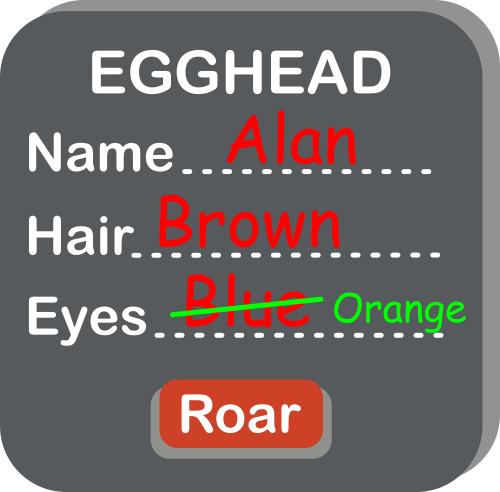
Trying to change Alan’s eye colour. Image by Daniel Gill for CS4FN

One thing we should consider while making the class is the integrity of the data. In its current form, any other part of our program, or another program using our class, can directly edit the attributes stored. Another part of the program (perhaps representing a virtual world for a virtual egghead to live in) might accidentally change the eye colour attribute for Alan, for example. This wouldn’t change Alan’s actual eye colour (which couldn’t happen anyway!), so our data would then be wrong. We can’t have that!

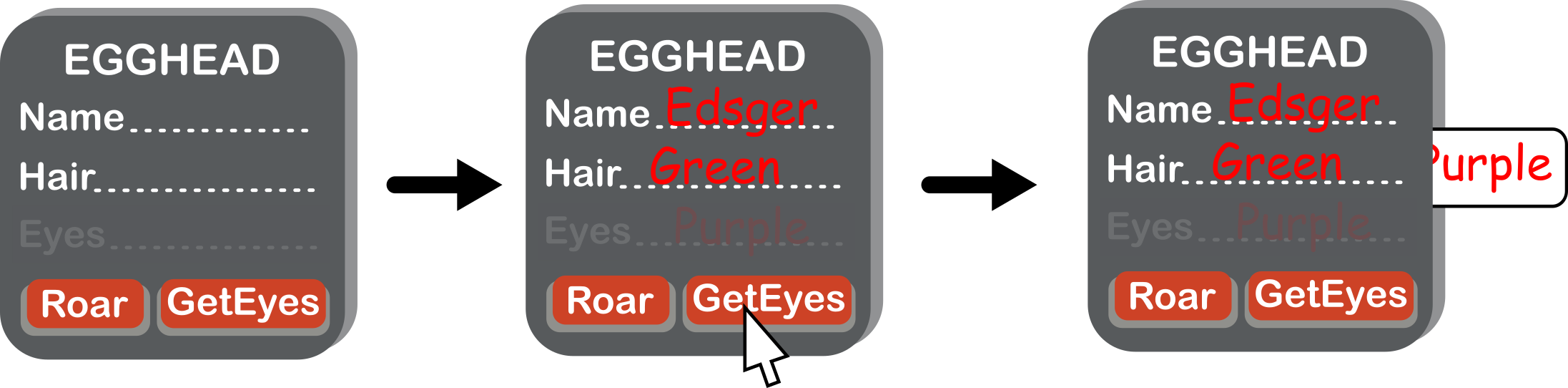
We can fix this by hiding the eye colour from the rest of the program, so it is stored within the object, but not accessible outside of it. But we still need a way for the program to read it: for this we use a button in our picture of the Egghead class. The existence of the eye colour attribute can then only be seen by other parts of the program by a procedure that gets the eye colour. No similar procedure is given for changing the eye colour, so there is no way to do it by mistake. Let’s build this new version of our class.

Sequence as values change
(a) Our new class, (b) An object representing Edsger, with eye colour hidden, (c) Pressing GetEyes gives us the eye colour. Image by Daniel Gill for CS4FN

This concept of hiding details is sometimes called encapsulation or information hiding, but computer scientists disagree about what these terms refer to exactly. Encapsulation is broader in its meanings, whereas information hiding is closer to what we are trying to do here. This video by ArjanCodes (see below) explains this distinction further.

We could change our class to include this concept for the name and hair colour, too. Whilst it is entirely possible for these attributes to change, it turns out that it is a good idea to hide them too: so hide name and use SetName and GetName buttons. That allows us to control the type of data we have going into that attribute (for example, checking the given name isn’t a number, which as all egghead names are made of letters would be a mistake).

Where next?

Now we have a class that represents all eggheads, we can store the details of any new egghead efficiently and safely. Hold on… some last-minute breaking news: scientists have found a new sub-species of egghead they are calling a rainbow egghead. All rainbow eggheads have rainbow hair, and a unique roar. Next time, we’ll use the concept of inheritance to give a more efficient way to write programs that store information about eggheads.

Daniel Gill, Queen Mary University of London

More on …

Watch…


Subscribe to be notified whenever we publish a new post to the CS4FN blog.


This blog is funded by EPSRC on research agreement EP/W033615/1.

QMUL CS4FN EPSRC logos

Ethics – What would you do?

Signs pointing RIGHT to right and WRONG to the left
Right / Wrong image by Tumisu from Pixabay

You often hear about unethical behaviours, be it in politicians or popstars, but getting to grips with ethics, which deals with issues about what behaviours are right and wrong, is an important part of computer science too. Find out about it and at the same time try our ethical puzzle below and learn something about your own ethics…

Is that legal?

Ethics are about the customs and beliefs that a society has about the way people should be treated. These beliefs can be different in different countries, sometimes even between different regions of the same country, which is why it’s always important to know something about the local area when going on holiday. You don’t want to upset the local folk. Ethics tend to form the basis of countries’ laws and regulations, combining general agreement with practicality. Sticking your tongue out may be rude and so unethical, but the police have better things to do than arrest every rude school kid. Similarly, slavery was once legal, but was it ever ethical? Laws and ethics also have other differences; individuals tend to judge unethical behaviour, and shun those who behave inappropriately, while countries judge illegal behaviour – using a legal system of courts, judges and juries to enforce laws with penalties.

Dilemmas, what to do?

Now imagine you have the opportunity to go treading on the ethical and legal toes of people across the world from the PC in your home. Suddenly the geographical barriers that once separated us vanish. The power of computer science, like any technology, can be used for good or evil. What is important is that those who use it understand the consequences of their actions, and choose to act legally and ethically. Understanding legal requirements, for example contracts, computer misuse and data protection are important parts of a computer scientist’s training, but can you learn to be ethical?

Computer scientists study ethics to help them prepare for situations where they have to make decisions. This is often done by considering ethical dilemmas. These are a bit like the computer science equivalent of soap opera plots. You have a difficult problem, a dilemma, and have to make a choice. You suddenly discover you have a unknown long lost sister living on the other side of the Square, do you make contact or not, (on TV this choice is normally followed by a drum roll as the episode ends).

Give it a go

Here is your chance to try an ethical dilemma for yourself. Read the alternatives and choose what you would do in this situation. Then click on the poll choice. Like all good ‘personality tests’ you find out something about yourself: in this case which type of ethical approach you have in the situation according to some famous philosophers. There are also some fascinating facts to impress your mates. We’ll share the answers tomorrow.

Your Dilemma and your ethical personality

You are working for a company who are about to launch a new computer game. The adverts have gone out, the newspapers and TV are ready for the launch … then the day before you are told that there is a bug, a mistake, in the software. It means players sometimes can’t kill the dragon at the end of the game. If you hit the problem the only solution is to start the final level again. It can be fixed they think but it will take about a week or so to track it down. The computer code is hard to fix as it’s been written by 10 different people and 5 of them have gone on a back-packing holiday so can’t be contacted.

Peter McOwan, Queen Mary University of London

What the answers mean about you at the end!


Related Magazine …


Subscribe to be notified whenever we publish a new post to the CS4FN blog.


This blog is funded by EPSRC on research agreement EP/W033615/1.

QMUL CS4FN EPSRC logos

The answers

If you picked Option 1

1) Go ahead and launch. After all, there are still plenty of parts to the game that do work and are fun, there will always be some errors, and for this game in particular thousands have been signing up for text alerts to tell them when it’s launched. It will make many thousands happy.

That means you follow an ethical approach called ‘Act utilitarianism’.

Act Happy

The main principle of this theory, put forward by philosopher John Stuart Mill, is to create the most happiness (another name for happiness here is utility thus utilitarianism). For each situation you behave (act) in a way that increases the happiness of the largest number of people, and this is how you decide what is wrong or right. You may take different actions in similar situations. So you choose to launch a flawed game if you know that you have pre-sales of a hundred thousand, but another time decide to not launch a different flawed game where there are only one thousand pre-sales, as you wont be making so many people unhappy. It’s about considering the utility for each action you take. There is no hard and fast rule.

If you picked Option 2

2) Cancel the launch until the game is fixed properly, no one should have to buy a game that doesn’t work 100 per cent.

That means you follow an ethical approach called ‘Duty Theory’

Do your Duty

Duty theories are based on the idea of there being universal principles, such as ‘you should never ever lie, whatever the circumstances’. This is also known as the dentological approach to ethics (philosophers like to bring in long words to make simple things sound complicated!). The German philosopher Emanuel Kant was one of the main players in this field. His ‘Categorical Imperative’ (like I said long words…) said “only act in a way that you would want everyone else to act” (…simple idea!). So if you don’t think there should ever be mistakes in software then don’t make any yourself. This can be quite tough!

If you picked Option 3

3) Go ahead and launch. After all it’s almost totally working and the customers are looking forward to it. There will always be some errors in programs: it’s part of the way complicated software is, and a delay to game releases leads to disappointment.

You would be following the approach called ‘Rule utilitarianism’.

Spread a little happiness

Say something nice to everyone you meet today…it will drive them crazy

The main principle of this flavour of utilitarianism theory, put forward by philosopher Jeremy Bentham, is to create the most happiness (happiness here is called utility thus utilitarianism). You follow general rules that increase the happiness of the largest number of people, and this is how you decide what’s wrong or right. So in our dilemma the rule could be ‘even if the game isn’t 100% correct, people are looking forward to it and we can’t disappoint them’. Here the rule increases happiness, and we apply it again in the future if the same situation occurs.

Collaborative community coding & curating

Equality, diversity and inclusion in the R Project

You might not think of a programming language like Python or Scratch as being an ‘ecosystem’ but each language has its own community of people who create and improve its code (compilers, library code,…), flush out the bugs, introduce new features, document any changes and write the ‘how to’ guides for new users. 

R is one such programming language. It’s named after its two co-inventors (Ross Ihaka and Robert Gentleman) and is used by around two million people around the world. People working in all sorts of jobs and industries (for example finance, academic research, government, data journalists) use R to analyse their data. The software has useful tools to help people see patterns in their data and to make sense of that information. 

It’s also open source which means that anyone can use it and help to improve it, a bit like Wikipedia where anyone can edit an article or write a new one. That’s generally a good thing because it means everyone can contribute but it can also bring problems. Imagine writing an essay about an event at your school and sharing it with your class. Then imagine your classmates adding paragraphs of their own about the event, or even about different events. Your essay could soon become rather messy and you’d need to re-order things, take bits out and make sure people hadn’t repeated something that someone had already said (but in a slightly different way). 

When changes are made to software people also want to keep a note not just of the ‘words’ added (the code) but also to make a note of who added what and when. Keeping good records, also known as documentation, helps keep things tidy and gives the community confidence that the software is being properly looked after.

Code and documentation can easily become a bit chaotic when created by different people in the community so there needs to be a core group of people keeping things in order. Fortunately there is – the ‘R Core Team’, but these days its membership doesn’t really reflect the community of R users around the world. R was first used in universities, particularly by more privileged statistics professors from European countries and North America (the Global North), and so R’s development tended to be more in line with their academic interests. R needs input and ideas from a more diverse group of active developers and decision-makers, in academia and beyond to ensure that the voices of minoritised groups are included. Also the voices of younger people, particularly as many of the current core group are approaching retirement age.

Dr Heather Turner from the University of Warwick is helping to increase the diversity of those who develop and maintain the R programming language and she’s been given funding by the EPSRC* to work on this. Her project is a nice example of someone who is bringing together two different areas in her work. She is mixing software development (tech skills) with community management (people skills) to support a range of colleagues who use R and might want to contribute to developing it in future, but perhaps don’t feel confident to do so yet

Development can involve things like fixing bugs, helping to improve the behaviour or efficiency of programs or translating error messages that currently appear on-screen in the English language into different languages. Heather and her colleagues are working with the R community to create a more welcoming environment for ‘newbies’ that encourages participation, particularly from people who are in the community but who are not currently represented or under-represented by the core group and she’s working collaboratively with other community organisations such as R-Ladies, LatinR and RainbowR. Another task she’s involved in is producing an easier-to-follow ‘How to develop R’ guide.

There are also people who work in universities but who aren’t academics (they don’t teach or do research but do other important jobs that help keep things running well) and some of them use R too and can contribute to its development. However their contributions have been less likely to get the proper recognition or career rewards compared with those made by academics, which is a little unfair. That’s largely because of the way the academic system is set up. 

Generally it’s academics who apply for funding to do new research, they do the research and then publish papers in academic journals on the research that they’ve done and these publications are evidence of their work. But the important work that supporting staff do in maintaining the software isn’t classified as new research so doesn’t generally make it into the journals, so their contribution can get left out. They also don’t necessarily get the same career support or mentoring for their development work. This can make people feel a bit sidelined or discouraged. 

To try and fix this and to make things fairer the Society of Research Software Engineering was created to champion a new type of job in computing – the Research Software Engineer (RSE). These are people whose job is to develop and maintain (engineer) the software that is used by academic researchers (sometimes in R, sometimes in other languages). The society wants to raise awareness of the role and to build a community around it. You can find out what’s needed to become an RSE below. 

Heather is in a great position to help here too, as she has a foot in each camp – she’s both an Academic and a Research Software Engineer. She’s helping to establish RSEs as an important role in universities while also expanding the diversity of people involved in developing R further, for its long-term sustainability.

Further reading


Related careers

QMUL

Below is an example of a Research Software Engineer role which was advertised at QMUL in April 2024 – you can read the original advert and see a copy of the job description / person specification information which is archived at the “Jobs in Computer Science” website. This advert was looking for an RSE to support a research project “at the intersection of Natural Language Processing (NLP) and multi-modal Machine Learning, with applications in mental health.”

QMUL also has a team of Research Software Engineers and you can read about what they’re working on and their career here (there are also RSEs attached to different projects across the university, as above).

Archived job adverts from elsewhere

Below are some examples of RSE jobs (these particular vacancies have now closed but you can read about what they were looking for and see if that sort of thing might interest you in the future). The links will take you to a page with the original job advert + any Job Description (JD – what the person would actually be doing) and might also include a Person Specification (PS – the type of person they’re looking for in terms of skills, qualifications and experience) – collectively these are often known as ‘job packs’.

Note that these documents are written for quite a technical audience – the people who’d apply for the jobs will have studied computer science for many years and will be familiar with how computing skills can be applied to different subjects.

1. The Science and Technology Facilities Council (STFC) wanted four Research Software Engineers (who’d be working either in Warrington or Oxford) on a chemistry-related project (‘computational chemistry’ – “a branch of chemistry that uses computer simulation to assist in solving chemical problems”) 

2. The University of Cambridge was looking for a Research Software Engineer to work in the area of climate science – “Computational modelling is at the core of climate science, where complex models of earth systems are a routine part of the scientific process, but this comes with challenges…”

3. University College London (UCL) wanted a Research Software Engineer to work in the area of neuroscience (studying how the brain works, in this case by analysing the data from scientists using advanced microscopy).


Subscribe to be notified whenever we publish a new post to the CS4FN blog.


This blog is funded by EPSRC on research agreement EP/W033615/1.

QMUL CS4FN EPSRC logos

CS4FN Advent Calendar – Day 25 bonus Christmas crackers: have you ever seen this cracker joke?

If you’re pulling a Christmas cracker today look out for this now famous but fairly puzzling ‘joke’ –

Q: What kind of cough medicine does Dracula take?
A: Con medicine

Apart from the fact that the joke is more suited to Hallowe’en (I wonder when someone will invent Hallowe’en crackers!) ‘con medicine’ doesn’t make any sense as an answer. Over the years lots of people found this joke in their cracker then posted a photograph on social media asking if anyone got the joke and could explain it.

From 2015

From 2016
Still baffling folk in 2018…

An explanation from Andrew Taylor seems to have solved the mystery. The answer is probably coffin medicine (though even then it’s still not a particularly great joke, in keeping with the traditions of Christmas cracker jokes). Where has the ‘ffi‘ gone though? Read Andrew’s 2018 blog post ‘Con Medicine‘ to find out how a typographical quirk in the way some fonts / typefaces display those letters probably resulted in a simple error in printing.

Perhaps the error has been fixed and no-one will find it in their crackers this year!


Advert for our Advent calendar
Click the tree to visit our CS4FN Christmas Computing Advent Calendar

EPSRC supports this blog through research grant EP/W033615/1.

CS4FN Advent 2023 – Day 25: Merry Christmas! Today’s post is about the ‘wood computer’

Today is the final post in our CS4FN Christmas Computing Advent Calendar – it’s been a lot of fun rummaging in the CS4FN back catalogue, and also finding out about some new things to write about.

Advert for our Advent calendar
Image drawn and digitised by Jo Brodie.

Each day we’ve published a blog post about computing with the theme suggested by the picture on the advent calendar’s ‘door’. Our first picture was a woolly jumper so the accompanying post was about the links between knitting and coding, the door with a picture of a ‘pair of mittens’ on led to a post about pair programming and gestural gloves, a patterned bauble to an article about printed circuit boards, and so on. It was fun coming up with ideas and links and we hope it was fun to read too.

We hope you enjoyed the series of posts (click on any of the Christmas trees in this post to see them all) and that you are already having a very Merry Christmas.

And on to today’s post which is inspired by the picture of a Christmas Tree, so it’ll be a fairly botanically-themed post. The suggestion for this post came from Prof Ursula Martin of Oxford University, who told us about the ‘wood computer’.

It’s a Christmas tree! Image drawn and digitised by Jo Brodie.

The Wood Computer

by Jo Brodie, QMUL.

Other than asking someone “do you know what tree this is?” as you’re out enjoying a nice walk and coming across an unfamiliar tree, the way of working out what that tree is would usually involve some sort of key, with a set of questions that help you distinguish between the different possibilities. You can see an example of the sorts of features you might want to consider in the Woodland Trust’s page on “How to identify trees“.

Depending on the time of year you might consider its leaves – do they have stalks or not, do they sit opposite from each other on a twig or are they diagonally placed etc. You can work your way through leaf colour, shape, number of lobes on the leaf and also answer questions about the bark and other features of your tree. Eventually you narrow things down to a handful of possibilities.

What happens if the tree is cut up into timber and your job is to check if you’re buying the right wood for your project. If you’re not a botanist the job is a little harder and you’d need to consider things like the pattern of the grain, the hardness, the colour and any scent from the tree’s oils.

Wooden bridge image by Peter H from Pixabay

Historically, one way of working out which piece of timber was in front of you was to use a ‘wood computer’ or wood identification kit. This was prepared (programmed!) from a series of index cards with various wood features printed on all the cards – there might be over 60 different features.

Every card had the same set of features on it and a hole punched next to every feature. You can see an example of a ‘blank’ card below, which has a row of regularly placed holes around the edge. This one happens to be being used as a library card rather than a wood computer (though if we consider what books are made of…).

Image of an edge-notched card (actually being used as a library card though), from Wikipedia. Edge-notched Card (without the edges notched) by Daniel MacKay, image has been released into the public domain (CC0).

I bet you can imagine inserting a thin knitting needle into any of those holes and lifting that card up – in fact that’s exactly how you’d use the wood computer. In the tweet below you can see several cards that made up the wood computer.

One card was for one tree or type of wood and the programmer would add notch the hole next to features that particularly defined that type. For example you’d notch ‘has apples’ for the apple tree card but leave it as an intact hole on the pear tree card.  If a particular type of timber had fine grained wood they’d add the notch to the hole next to “fine-grained”. The cards were known, not too surprisingly, as edge-notched cards.

You can see what one looks like here with some notches cut into it. You might have spotted how knitting needles can help you in telling different woods apart.

Holes and notches

Edge-notched card overlaid on black background, with two rows of holes. On the top a hole in the first row is notched, on the right hand side two holes are notched. Image from Wikipedia. Randlochkarte mit zwei Schlitzungen (handgemalt) [Perforated card with two slots (hand-painted)] by Peter Frankfurt, image has been released into the public domain (CC0).

Each card would end up with a slightly different pattern of notched holes, and you’d end up with lots of cards that are slightly different from each other.

Example ‘wood computer’. At the end of your search (to find out which tree your piece of wood came from) you are left with two cards for fine-grained wood. If your sample has a strong scent then it’s likely it’s the tree in the card on the right (though you could arrive at the same conclusion by using the differences in colour too). The card at the top is the blank un-notched card.

How it works

Your wood computer is basically a stack of cards, all lined up and that knitting needle. You pick a feature that your tree or piece of wood has and put your needle through that hole, and lift. All of the cards that don’t have that feature notched will have an un-notched hole and will continue to hang from your knitting needle. All of the cards that contain wood that do have that feature have now been sorted from your pile of cards and are sitting on the table.

You can repeat the process several times to whittle (sorry!) your cards down by choosing a different feature to sort them on.

The advantage of the cards is that they are incredibly low tech, requiring no electricity or phone signal and they’re very easy to use without needing specialist botanical knowledge.

You can see a diagram of one on page 8 of the 20 page PDF “Indian Standard: Key for identification of commercial timbers”, from 1974.

The word ‘card’ features over 30 times on this page and the word Christmas over 10 times but this post isn’t actually about Christmas cards! We hope you had plenty of those 🙂 Merry Christmas.

Teachers: we have a classroom sorting activity that uses the same principles as the wood computer. Download our Punched Card Searching PDF from our activity page.

The creation of this post was funded by UKRI, through grant EP/K040251/2 held by Professor Ursula Martin, and forms part of a broader project on the development and impact of computing.


Advert for our Advent calendar
Click the tree to visit our CS4FN Christmas Computing Advent Calendar

EPSRC supports this blog through research grant EP/W033615/1.

CS4FN Advent 2023 – Day 24: Santa’s Sleigh – track its progress through the skies

We are nearly coming to the end of our CS4FN Christmas Computing Advent Calendar with one more post to come tomorrow. If you’ve missed any you can catch up by scrolling to the end and click on the Christmas Tree in the panel for the complete list so far.

Today’s advent calendar window shows Father Christmas’ sleigh with a sack full of presents ready for delivery. Today’s theme is about the many different online ways that you can now ‘track’ his movements around the world. You may be able to see (cloud permitting) his sleigh ‘in person’ as it flies over. In reality it’s International Space Station (ISS) whizzing past – but other interpretations are available 🙂

Visit this page https://www.astroviewer.net/iss/en/observation.php and type in your city to see when and where you might spot the ISS. On Christmas Day 2025 the ISS will pass over the South of England from around 6.17am to 6.22am, reaching its highest point at around 6.19am, so you’ll have to get up early!

You can track Father Christmas as he dashes through the sky, delivering presents. Image drawn and digitised by Jo Brodie.

1. NORAD Santa tracker

https://www.noradsanta.org/en/ for games
https://www.noradsanta.org/en/map (you can also track him on NORAD’s apps too)

Vintage photo image by Alexa from Pixabay

In 1955, so the story goes, an American department store published a newspaper advert with a phone number for children to call so that they could speak to Father Christmas. Unfortunately a misprint meant that the wrong number was given and instead people found they were talking to the US military’s Air Defense Command (now called North America Air Defense Command or NORAD).

Realising the mistake, but also spotting a great public relations opportunity, the team capitalised on this and began to make an annual event of it.

NORAD uses radar and geosynchronous* satellites to monitor Father Christmas. The satellites are able to detect infrared (heat) radiation and apparently Rudolph’s red nose gives quite a strong signal. This data is then shared with everyone via their website, though they don’t know in advance what route he’ll take.

If you’re visiting the website hover over the different bits of the picture as there are linked activities and extra information too.

*geo = Earth, synchronous = matching / following (like when you sync devices), the satellite follows the Earth’s orbit and is always above the same spot, so effectively (from the Earth’s point of view) the satellite appears not to move (it is moving but it follows the Earth’s rotation).

2. FlightRadar24 Santa tracker

https://www.flightradar24.com/R3DN053/335a9682

FlightRadar24 is a great website for telling you the answer to “what was that aircraft that’s just flown by?” It tracks the flight of aircraft all over the globe in real time, using a signal transmitted by the aircraft’s beacon (called a transponder) which announces where it is. Father Christmas’ sleigh has its own transponder too which is transmitting its location to receivers around the world.

An aircraft, or Santa’s sleigh, gets information about where it is from a GPS satellite (very similar to using a maps app on a smartphone and it telling you where you are and whether you should go left or right) and it then transmits this location info, along with other data, through its transponder.

There are thousands of receivers here on Earth, many of them in people’s homes and gardens (you can even apply to host a receiver antenna, or build your own with a Raspberry Pi) and whenever Santa’s sleigh passes over one of these ‘ground stations’ its signal is picked up and collected by FlightRadar24. The receivers are in different places so they are receiving the same signal at slightly different times and this information can be used to work out (by triangulation) how fast the sleigh is moving and in what direction.

Apparently Santa has been “able to extend the reach of his transponder by using the reindeer antlers as additional antenna” so the tracking should be fairly accurate.

3. Google Santa tracker

https://santatracker.google.com/

Google’s Santa Tracker has lots of games to play while you wait for Santa and his sleigh to take flight, including Code Boogie where you can try and program some dancing elves. You move little blocks (a bit like Scratch) to copy the dance moves and, if you get it right, it will show you the underlying JavaScript code.

Dave Holmes, a developer who works at Google and who works on the Santa Tracker project says “Santa Tracker launched in 2004, and has been an important project at Google ever since. While there’s a small core team dedicated to Santa, up to 20 or so Googlers volunteer to help make it happen every year, and it’s become a true community effort. It’s also a way for our developers to try things and see what Google products can do … I like to say that everything I’ve learned at Google, I learned from Santa.”

Google has also added some ‘Easter eggs‘ to its search page – try typing in Christmas or where is Santa to https://www.google.com/. You can also colour in some images online at their Christmas-themed Art Coloring Book, from Google’s Arts and Culture.

Further reading

The Googlers who help track Santa each Christmas (22 December 2021) Google Blog

4. Early internet Santa-themed humour

Image by Jo Brodie for CS4FN.

Back in the early 1990s email was very new but right from the start people used it to send each other amusing things. One of them was a rather literal consideration of the physics of a sleigh that is laden with gifts and a traditionally overweight Santa, led by a team of reindeer moving at unlikely speeds (after all Father Christmas has to get around the entire world to deliver presents, in just one day). The author (unknown) began –

No known species of reindeer can fly. BUT there are 300,000 species of living organisms yet to be classified, and while most of these are insects and germs, this does not COMPLETELY rule out flying reindeer which only Santa has ever seen.”

But then goes on to point out that such a gift-delivery system would be working far beyond normal levels and would probably end in disaster, suggesting that –

In short, they will burst into flame almost instantaneously, exposing the reindeer behind them, and create deafening sonic booms in their wake. The entire reindeer team will be vaporized within 4.26 thousandths of a second. Santa, meanwhile, will be subjected to centrifugal forces 17,500.06 times greater than gravity. A 250-pound Santa (which seems ludicrously slim) would be pinned to the back of his sleigh by 4,315,015 pounds of force.”

Fortunately Father Christmas has his own magic, meaning that we don’t need to worry too much about him disobeying the laws of physics. But he and his reindeer really deserve those cookies, milk and carrots!

You can read the full post here: The Physics of Santa and His Reindeer Snopes.com

The creation of this post was funded by UKRI, through grant EP/K040251/2 held by Professor Ursula Martin, and forms part of a broader project on the development and impact of computing.


Advert for our Advent calendar
Click the tree to visit our CS4FN Christmas Computing Advent Calendar

EPSRC supports this blog through research grant EP/W033615/1.

CS4FN Advent 2023 – Day 23: Bonus material – see “Santa’s sleigh” flying overhead

This short post, part of our CS4FN Christmas Computing Advent Calendar, is to let you know that you may be able to watch Santa’s sleigh as it goes overhead on Christmas Day (or Christmas Eve). It doesn’t matter if you believe in Father Christmas or not, whether you’ll actually see his sleigh really only depends on how cloudy it is! In fact Santa’s sleigh follows the orbit of the International Space Station (ISS) remarkably closely…

Santa’s sleigh: Father Christmas will soon be tethering the sack of gifts to the sleigh with very strong straps (not shown) because he’ll be flying very fast and very high.  

In the unlikely event that any small children are awake unusually early on Christmas Day and it’s not cloudy then you might be able to catch a bright light passing overhead at around 05:54 in the morning as Father Christmas zips around the world delivering presents at incredible speeds.

The timings below are for London, UK but you can enter your own city and see if Father Christmas will be passing near you, and when.

DayDateTimeVisibleMax HeightAppearsDisappears
Sun24 Dec6:40 am6 min86°21° above W10° above E
Mon25 Dec5:54 am4 min88°82° above WSW10° above E

See ‘How to spot the station‘ and find out what ‘max height’ and ‘appears’ means in context. You can also use NASA’s Spot The Station app for phones.

Other ways to track Santa – NORAD, FlightRadar24 and Google’s Santa Tracker.


Advert for our Advent calendar
Click the tree to visit our CS4FN Christmas Computing Advent Calendar

EPSRC supports this blog through research grant EP/W033615/1.