One way to use logical thinking is to deduce new facts but then turn them into IF-THEN rules. They tell us an action to do IF something is true. For example: IF both cards are the same THEN shout SNAP! Once we have IF-THEN rules we can use them as the basis of a program. We can see how this works, and how it involves various computational thinking skills with a simple logical thinking puzzle.
An Egyptian Survey puzzle
Image by CS4FN
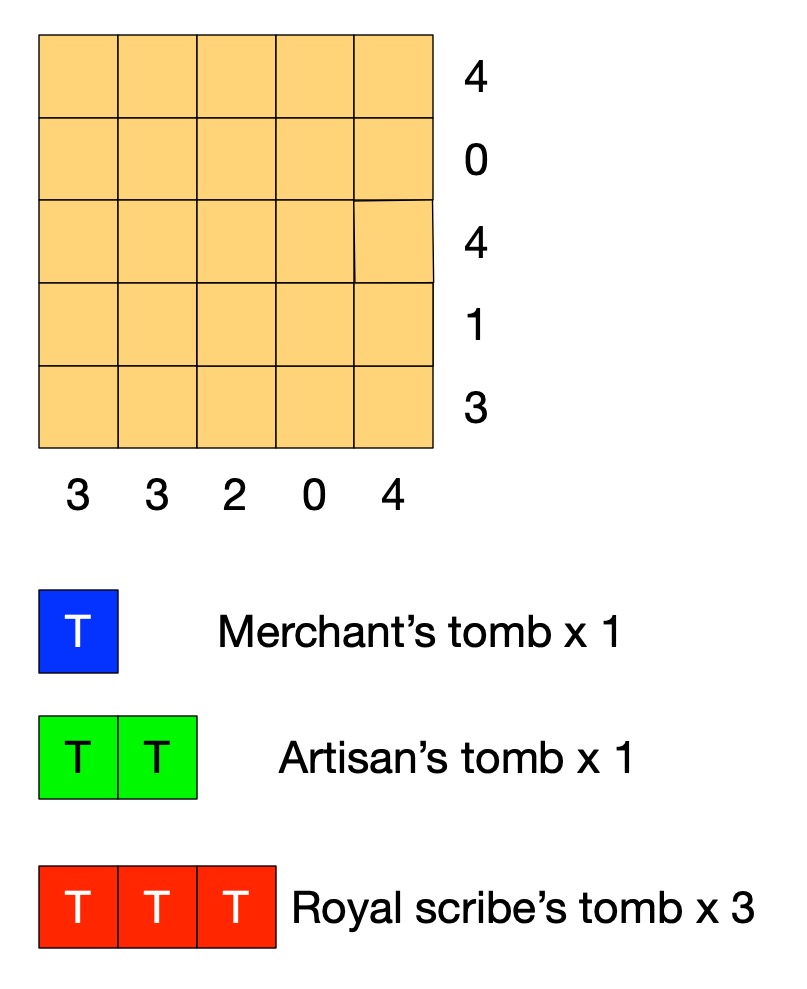
Old records show that this area of the desert contains the tombs of 3 scribes (a large tomb covering 3 squares), 1 artisan (medium, 2 squares) and 1 merchant (small, 1 square).
A survey has gathered information of where the tombs could be. Each number tells you how many squares are part of a tomb in that row or column.
Tombs are not adjacent (horizontally, vertically or diagonally).
Can you work out where all the tombs are without further digging?
Solving Egyptian Survey puzzles
The instructions of the puzzle give us some simple facts such as that the number at the end of the row tells us the number of squares in that row holding tombs. On its own that does not tell us how to solve the puzzle. However, thinking logically about it we can draw simple logical conclusions so deduce new facts. For example, it is fairly simple to deduce the fact:
the number for a row being 0 IMPLIES there are no tombs in that row.
If we know there are no tombs in a row then we can mark each square of the row as empty. If we use X to mean nothing is in that square, then we can turn that deduced fact into an action. It means that we can do the following when trying to solve the puzzle:
IF the number on a row is 0
THEN put an X in all the squares of that row.
With that rule we can start to solve the puzzle just by following the rule. Find a row numbered 0 and put Xs there. We can create a similar rule for columns. Applying both these rules to our puzzle we get:
Image by CS4FN
Can you work out more rules before reading on?
Rules, rules, rules
What happens if the number of a row is more than 0? Knowing the number alone doesn’t help us much. We need to combine it with other information. The top row of the puzzle has the number 4, for example, but one of the squares already has a cross in it. That means the remaining 4 squares all must have tombs, which we will mark T. We can turn that into a rule:
IF the number for a row is 4 AND there are 4 empty squares in that row and an X
THEN put a T in all the empty squares of that row.
We can make similar rules for each number 1 to 4. We can then create similar rules for columns. Applying them once each to our puzzle gives us:
Image by CS4FN
We could also make a more general version of this rule
IF the number for a row is <n> AND there are only <n> empty squares in that row
THEN put a T in all the empty squares of that row.
This is what computer scientists call generalisation: a part of computational thinking. Instead of having lots of rules (or lines of code) for lots of similar situations, we create one simple but general one that covers all the cases. We can of course apply rules more than once, so as you probably noticed we can apply our row rule once more. In effect our rules live inside a loop and we keep trying them in sequence for as long as we find a rule that makes a difference.
Image by CS4FN
Now one of the rows has the number 1, but we have already marked a tomb in a square of that row. That gives us another rule.
IF the number for a row is 1 AND there is already 1 tomb marked in that row
THEN put an X in all the empty squares of that row.
This gives us:
Image by CS4FN
Similar rules apply for other numbers so we could also make a general version of this rule too.
IF the number for a row is <n> AND there are already <n> tombs marked in that row
THEN put an X in all the empty squares of that row.
Now, applying a column version of the last general rule and we can mark an X in the last square for column with 2 tomb squares.
Image by CS4FN
We need one last rule for this puzzle:
IF the number for a row is <n> AND the number of spaces + the number of 0s is <n>
THEN put a T in all the empty squares of that row.
This is actually an even more general version of our second rule (it is the case where the number of Ts is 0, so could replace that rule with this new one.
Applying it finally solves the puzzle:
Image by CS4FN
If we put our rules together then they become the basis of an algorithm (so program) for solving the puzzles and in creating them from deduced facts we are doing algorithmic thinking. IF-THEN instructions along with sequencing and loops are the basis of all programs. Here we create a sequence of the rules to try in order and put them inside a loop so that we keep trying them until none apply or we have solved the puzzle. There is a style of programming where all a program is is a series of IF-THEN rules – with looping happening implicitly.
Algorithms are just rules to follow that guarantee a result (here solving the puzzle). It is only an algorithm if it guarantees to always work. To solve any (solvable) Egyptian Survey puzzle like this we would need yet more rules: we would need more more rules for it to be an algorithm for solving all puzzles. Making sure algorithms cover all possibilities is one of the harder parts of algorithmic thinking – bugs in programs are often there because the programmer didn’t manage to cover every possibility. In our case we could write a program based on our limited rules. We would just need to include an extra rule that quits (admitting defeat and saying that the program cannot solve the puzzle) if no rule applies.
Perhaps you can work out all the rules (so an algorithm) needed to solve any of these puzzles! All you need are the instructions for the game, some logical thinking to deduce new facts, some algorithmic thinking to turn them into rules, and an ability to generalise so you have a small number of rules … computational thinking skills in fact.
Before mobile games, game consoles and PC based games, video games first took off in arcades. Arcade games were very big earning 39 billion dollars at their peak in the 1980s. Games were loaded into bespoke coin-operated arcade machines. For a game to do well someone had to buy the machines, whether actual gaming arcades or bars, cafes, colleges, shopping malls, … Then someone had to play them. Originally boys played arcade games the most and so games were targeted at them. Most games had a focus on shooting things: games like asteroids and space invaders or had some link to sports based on the original arcade game Pong. Girls were largely ignored by the designers… But then came Pac-Man.
Pac-Man, created by a team led by Toru Iwatani, is a maze game where the player controls the Pac-Man character as it moves around a maze, eating dots while being chased by the ghosts: Blinky, Pinky, Inky, and Clyde. Special power pellets around the maze, when eaten, allow Pac-Man to chase the ghosts for a while instead of being chased.
Pac-Man ultimately made around $19 million dollars in today’s money making it the biggest money making video arcade game of all time. How did it do it? It was the first game that was played by more females than males. It showed that girls would enjoy playing games if only the right kind of games were developed. Suddenly, and rather ironically given its name, there was a reason for the manufacturers to take notice of girls, not just boys.
It revolutionised games in many ways, showing the potential of different kinds of features to give it this much broader appeal. Most obviously Pac-Man did this by turning the tide away from shoot-em up space games and sports games to action games where characters were the star of the game, and that was one of its inventor Toru Iwatani’s key aims. To play you control Pac-Man rather than just a gun, blaster, tennis racket or golf club. It paved the way for Donkey Kong, Super Mario, and the rest (so if you love Mario and all his friends, then thank Pac-Man). Ultimately, it forged the path for the whole idea of avatars in games too.
It was the first game to use power ups where, by collecting certain objects, the character gains extra powers for a short time. The ghosts were also characters controlled by simple AI – they didn’t just behave randomly or follow some fixed algorithm controlling their path, but reacted to what the player does, and each had their own personality in the way they behaved.
Because of its success, maze and character-based adventure games became popular among manufacturers, but more importantly designers became more adventurous and creative about what a video game could be. It was also the first big step towards the long road to women being fully accepted to work in the games industry. Not bad for a character based on a combination of a pizza and the Japanese symbol for “mouth”.
The Ancient Egyptians, Romans and Greeks used dice with various shapes and markings; some even believed they could be used to predict the future. Using just a few invisible dice, which you can easily make at home, you can amaze your friends with a transparent feat of magical prediction.
The presentation
You can’t really predict the future with dice, but you can do some clever magic tricks with them. For this trick first you need some invisible dice, they are easy to make, it’s all in the imagination. You take your empty hand and state to your friend that it contains two invisible dice. Of course it doesn’t, but that’s where the performance come in. You set up the story of ancient ways to predict the future. You can have lots of fun as you hand the ‘dice’ over and get your friend to do some test rolls to check the dice aren’t loaded. On the test rolls ask them what numbers the dice are showing (remember a dice can only show numbers 1 through 6), this gets them used to things. Then on the final throw, tell them to decide what numbers are showing, but not to tell you! You are going to play a game where you use these numbers to create a large ‘mystical’ number.
To start, they choose one of the dice and move it closer to them, remembering the number on this die. You may want to have them whisper the numbers to another friend in case they forget, as that sort of ruins the trick ending!
Next you take two more ‘invisible dice’ from your pocket; these will be your dice. You roll them a bit, giving random answers and then finally say that they have come up as a 5 and a 5. Push one of the 5s next to the dice your friend selected, and tell them to secretly add these numbers together, i.e. their number plus 5. Then push your second 5 over and suggest, to make it even harder, to multiply their current number by 5+5 (i.e. 10 – that’s a nice easy multiplication to do) and remember that new number. Then finally turn attention to your friend’s remaining unused die, and get them to add that last number to give a grand total. Ask them now to tell you that grand total. Almost instantly you can predict exactly the unspoken numbers on each of their two invisible dice. If they ask how it you did it, say it was easy – they left the dice in plain sight on the table. You just needed to look at them.
The computing behind
This trick works by hiding some simple algebra in the presentation. You have no idea what two numbers your friend has chosen, but let’s call the number on the die they select A and the other number B. If we call the running total X then as the trick progresses the following happens: to begin with X=0, but then we add 5 to their secret number A, so X= A+5. We then get the volunteer to multiply this total by 5+5 (i.e. 10) so now X=10*(A+5). Then we finally add the second secret number B to give X=10(A+5)+B. If we expand this out, X= 10A+50+B. We know that A and B will be in the range 1-6 so this means that when your friend announces the grand total all you need to do is subtract 50 from that number. The number left (10*A+B) means that the value in the 10s column is the number A and the units column is B, and we can announce these out loud. For example if A=2 and B=4, we have the grand total as 10(2+5)+4 = 74, and 74 – 50= is 24, so A is 2, and B is 4.
In what are called procedural computer languages this idea of having a running total that changes as we go through well-defined steps in a computer program is a key element. The running total X is called a variable, to start in the trick, as in a program, we need to initialise this variable, that is we need to know what it is right at the start, in this case X=0. At each stage of the trick (program) we do something to change the ‘state’ of this variable X, ie there are rules to decide what it changes to and when, like adding 5 to the first secret number changes X from 0 to X=(A+5). A here isn’t a variable because your friend knows exactly what it is, A is 2 in the example above, and it won’t change at any time during the trick so it’s called a constant (even if we as the magician don’t know what that constant is). When the final value of the variable X is announced, we can use the algebra of the trick to recover the two constants A and B.
Other ways to do the trick
Of course there are other ways you could perform the trick using different ways to combine the numbers, as long as you end up with A being multiplied by 10 and B just being added. But you want to hide that fact as much as possible. For example you could use three ‘invisible dice’ yourself showing 5, 2 and 5 and go for 5*(A*2+5) + B if you feel confident your friend can quickly multiply by 5. Then you just need to subtract 25 from their grand total (10A+25+B), and you have their numbers. The secret here is to play with the presentation to get one that suits you and your audience, while not putting too much of a mental strain on you or your friend to have to do difficult maths in their head as they calculate the state changes of that ever-growing variable X.
It’s 1989, a year with lots of milestones in Computer Science. In March, Tim Berners-Lee puts down in writing the idea of an “information management system”, later to become the world wide web. In July, Nintendo releases the Game Boy in North America selling 118 million units worldwide over its 14-year production.
Come autumn, a 24-year-old arrives in Ithaca, US, home of Cornell University. He would be able to feel the cool September air as it blows off Cayuga Lake, smell the aromas from Ithaca’s 190 species of trees, and listen to a range of genres in the city’s live music scene. However,, he couldn’t take in the natural beauty of the city in its entirety as he started his PhD … because he was blind. That did not stop him going on to have a gigantic impact on the lives of blind and partially sighted people worldwide.
T. V. Raman was born in Pune, India, in 1965. He had been partially sighted from birth, but at the age of 14 he became blind due to a disease called glaucoma. Throughout his life, however, he has not let this stop him.
While he was partially sighted, he was able to read and write – but as his sight worsened, and with the help of his brother, mentors, and aides, he was still able to continue learning from textbooks, and solve problems which were read to him. At the height of its popularity, in the early 1980s, he also learned how to solve a specially customised Rubik’s cube, and could do so in about 30 seconds.
Raman soon developed an interest in mathematics, and around 1983 started studying for a Maths degree at the University of Pune. On finishing in 1987, he studied for a Masters degree at the Indian Institute of Technology Bombay, this time in Computer Science and Maths. It was with the help of student volunteers he was able to learn from textbooks and assistance with programming was provided by an able volunteer.
Today people with no vision often use a screen reader to hear what is on a screen. It not everyone is lucky enough to have so much help as Raman and screen readers play the part of all those human volunteers who helped him. Raman himself played a big part in their development.
Modern screen readers allow you to navigate the screen part-by-part, with important information and content read to you. Many of these systems are built into operating systems, such as the Narrator in Windows (which uses a huge number of keyboard shortcuts), and Google TalkBack for Android devices (where rubbing the screen, vibration, and audio hints are used). These simpler screen readers might already be installed on your system – if so have a go with them!
While Raman was learning programming, such screen readers were still in their infancy. It was only in the 1980s that a team at IBM developed a screen reader for the command-line interface of the IBM DOS (which Raman would later use), and it would be many years before screen readers were available for the much more challenging graphical user interfaces we’re so accustomed to today.
It was at Cornell University where Raman settled on his career-long research interest: accessibility. He originally intended to do an Applied Mathematics PhD, but then discovered the need for ways to use speech technology to read complicated documents, especially those with embedded mathematics. For his dissertation, he therefore developed the Audio System for Technical Readings (ASTER) to solve the problem.
What he realised was that when looking at information visually our eyes are active taking in information from different places but the display is passive. With an audio interface this is reversed with the ear passive and the display actively choosing the order of information presented. This makes it impossible to get a high level view first and then dive into particular detail. This is a big problem when ‘reading’ maths by listening to it. His system solved the problem using audio formatting which allows the listener to browse the structure of information first.
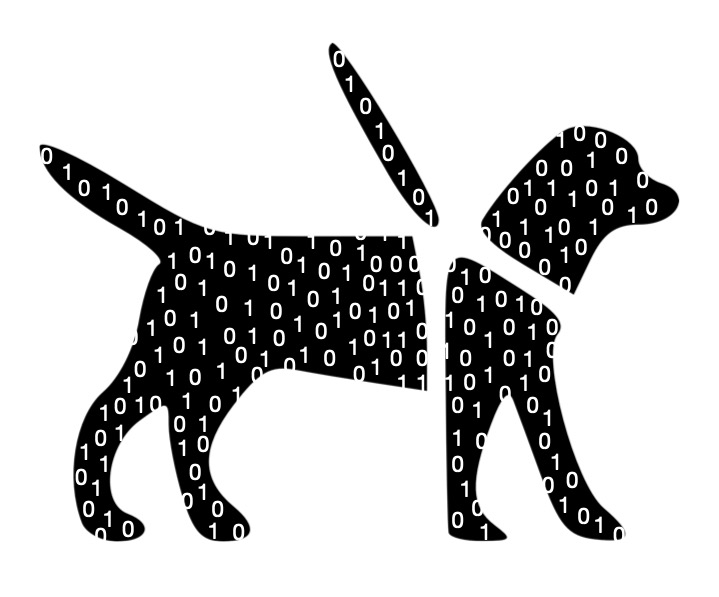
He named this program after his first guide dog, Aster, which he obtained, alongside a talking computer, in early 1990. Both supported him throughout his PhD. For this work, he received the ACM Doctoral Dissertation Award, a prestigious yearly worldwide celebrating the best PhD dissertation in computer science and related fields.
Following on from this work, he developed a program called Emacspeak, an audio desktop, which, unlike a screen reader, takes existing programs and makes them work with audio outputs. It makes use of Emacs, a family of text editors (think notepad, but with lots more features), as well as a programming language called Lisp. Raman has continued to develop Emacspeak ever since and the program is often bundled within Linux operating system installations. Like ASTER, versions of this program are dedicated to his guide dogs.
Following his PhD, Raman worked briefly with Adobe Systems and IBM, but, since 2005, has worked with Google on auditory user interfaces, accessibility, and usability. In 2014, alongside Google colleagues, he published a paper on a new application called JustSpeak, a system for navigating the Android operating system with voice commands. He has also gone back to his roots, integrating mathematical speech into the ChromeVox, the screen reader built into Chromebook devices.
Despite growing up in a time of limited access to computers for blind and visually impaired people, Raman was able, with the help of his brother and student volunteers, to learn how to program, solve a Rubik’s cube, and solve complex maths problems. With early screen readers he was also able to build tools for fellow blind and visually impaired people, and then benefit himself from his own tools to achieve even more.
Guide dogs can transform the lives of blind and partially sighted people by allowing them to do things in the physical world that they otherwise could not do. T. V. Raman’s tools provide a similar transformation in the digital world, changing lives for the better.
by Daniel Gill and Paul Curzon, Queen Mary University of London
What should you be thinking about when designing for a specific group with specific needs, such as autistic people? Queen Mary students were set this task and on the whole did well. The lessons though are useful when designing any technology, whether apps or gadgets.
A futuristic but complicated interface with lots of features: feature bloat? Image by Tung Lam from Pixabay
The Interactive Systems Design module at QMUL includes a term-long realistic team interaction design project with the teaching team acting as clients. The topic changes each year but is always open-ended and aimed at helping some specific group of people. The idea is to give experience designing for a clear user group not just for anyone. A key requirement is always that the design, above all, must be very easy to use, without help. It should be intuitively obvious how to use it. At the end of the module, each team pitches their design in a short presentation as well as a client report.
This year the aim was to create something to support autistic people. What their design does, and how, was left to the teams to decide from their early research and prototyping. They had to identify a need themselves. As a consequence, the teams came up with a wide range of applications and tools to support autistic people in very different ways.
How do you come up with an idea for a design? It should be based on research. The teams had to follow a specific (if simplified) process. The first step was to find out as much as they could about the user group and other stakeholders being designed for: here autistic people and, if appropriate, their carers. The key thing is to identify their unmet goals and needs. There are lots of ways to do this: from book research (charities, for example, often provide good background information) and informally talking to people from the stakeholder group, to more rigorous methods of formal interviews, focus groups and even ethnography (where you embed yourself in a community).
Many of the QMUL teams came up with designs that clearly supported autistic people, but some projects were only quite loosely linked with autism. While the needs of autistic people were considered in the concept and design, they did not fully focus on supporting autistic people. More feedback directly from autistic people, both at the start and throughout the process, would have likely made the applications much more suitable. (That of course is quite hard in this kind of student role-playing scenario, though some groups were able to do so.) That though is key idea the module is aiming to teach – how important it is to involve users and their concerns closely throughout the design process, both in coming up with designs and evaluating them. Old fashioned waterfall models from software engineering, where designs are only tested with users at the end, are just not good enough.
From the research, the teams were then required to create design personas. These are detailed, realistic but fictional people with names, families, and lives. The more realistic the character the better (computer scientists need to be good at fiction too!) Personas are intended to represent the people being designed for in a concrete and tangible way throughout the design process. They help to ensure the designers do design for real people not some abstract tangible person that shape shifts to the needs of their ideas. Doing the latter can lead to concepts being pushed forward just because the designer is excited by their ideas rather than because they are actually useful. Throughout the design the team refer back to them – does this idea work for Mo and the things he is trying to do?
An important part of good persona design lies around stereotypes. The QMUL groups avoided stereotypes of autistic people. One group went further, though: they included the positive traits that their autistic persona had, not just negative ones. They didn’t see their users in a simplistic way. Thinking about positive attributes is really, really important if designing for neurodivergent people, but also for those with physical disabilities too, to help make them a realistic person. That group’s persona was therefore outstanding. Alan Cooper, who came up with the idea of design personas, argued that stereotypes (such as a nurse persona being female) were good in that they could give people a quick and solid idea of the person. However, this is a very debatable view. It seems to go against the whole idea of personas. Most likely you miss the richness of real people and end up designing for a fictional person that doesn’t represent that group of people at all. The aim of personas is to help the designers see the world from the perspective of their users, so here of autistic people. A stereotype can only diminish that.
Another core lesson of the module is the importance of avoiding feature bloat. Lots of software and gadgets are far harder to use than need be because they are packed with features: features that are hardly ever, possibly never, used. What could have been simple to use apps, focusing on some key tasks, instead are turned into ‘do everything’ apps. A really good video call app instead becomes a file store, a messaging place, chat rooms, a phone booth, a calendar, a movie player, and more. Suddenly it’s much harder to make video calls. Because there are so many features and so many modes all needing their own controls the important things the design was supposed to help you do become hard to do (think of a TV remote control – the more features the more buttons until important ones are lost). That undermines the aim that good design should make key tasks intuitively easy. The difficulty when designing such systems is balancing the desire to put as many helpful features as possible into a single application, and the complexity that this adds. That can be bad for neurotypical people, who may find it hard to use. For neurodivergent people it can be much worse – they can find themselves overwhelmed. When presented with such a system, if they can use it at all, they might have to develop their own strategies to overcome the information overload caused. For example, they might need to learn the interface bit-by-bit. For something being designed specifically for neurodiverse people, that should never happen. Some of the applications of the QMUL teams were too complicated like this. This seems to be one of the hardest things for designers to learn, as adding ideas, adding features seems to be a good thing, it is certainly vitally important not to make this mistake if designing for autistic people.
Perhaps one of the most important points that arose from the designs was that many of the applications presented were designed to help autistic people change to fit into the world. While this would certainly be beneficial, it is important to realise that such systems are only necessary because the world is generally not welcoming for autistic people. It is much better if technology is designed to change the world instead.
How can you tell if someone looks trustworthy? Could it have anything to do with their facial expression? Some new research suggests that people are less likely to trust someone if their smile looks fake. Of course, that seems like common sense – you’d never think to yourself ‘wow, what a phoney’ and then decide to trust someone anyway. But we’re talking about very subtle clues here. The kind of thing that might only produce a bit of a gut feeling, or you might never be conscious of at all.
To do this experiment, researchers at Cardiff University told volunteers to pick someone to play a trust game with. The scientists told the volunteers to make their choice based on a short video of each person smiling – but they didn’t know the scientists could control certain aspects of each smile, and could make some smiles look more genuine than others.
What makes a good environment for child AI learning development? Possibly the same as for human child learning development: Minecraft.
Lego is one of the best games to play for impactful learning development for children. The word Lego is based on the words Play and Well in Danish. In the virtual world, Minecraft has of course taken up the mantle. A large part of why they are wonderful games is because they are open-ended and flexible. There are infinite possibilities over what you can build and do. They therefore help encourage not just focussing on something limited to learn as many other games do, but support open-ended creativity and so educational development. Given how positive it can be for children, it shouldn’t be surprising that Minecraft is now being used to help AIs develop too.
Games have long been used to train and test Artificial Intelligence programs. Early programs were developed to play and ultimately beat humans at specific games like Checkers, Chess and then later Go. That mastered they started to learn to play individual arcade games as a way to extend their abilities. A key part of our intelligence is flexibility though, we can learn new games. Aiming to copy this, the AIs were trained to follow suit and so became more flexible, and showed they could learn to play multiple arcade games well.
This is still missing a vital part of our flexibility though. The thing about all these games is that the whole game experience is designed to be part of the game and so the task the player has to complete. Everything is there for a reason. It is all an integral part of the game. There are no pieces at all in a chess game that are just there to look nice and will never, ever play a part in winning or losing. Likewise all the rules matter. When problem solving in real life, though, most of the world, whether objects, the way things behave or whatever, is not there explicitly to help you solve the problem. It is not even there just to be a designed distractor. The real world also doesn’t have just a few distractors, it has lots and lots. Looking round my living room, for example, there are thousands of objects, but only one will help me turn on the tv.
AIs that are trained on games may, therefore, just become good at working in such unreal environments. They may need to be told what matters and what to ignore to solve problems. Real problems are much more messy, so put them in the real world, or even a more realistic virtual world, to problem solve and they may turn out to be not very clever at all. Tests of their skills that are based on such tasks may not really test them at all.
Researchers at the University of Witwatersrand in South Africa decided to tackle this issue, but using yet another game: Minecraft. Because Minecraft is an open-ended virtual world, tackling challenges created in it will involve working in a world that is much more than just about the problem itself. The Witwatersrand team’s resulting MinePlanner system is a collection of 45 challenges, some easy, some harder. They include gathering tasks (like finding and gathering wood) and building tasks (like building a log cabin), as well as tasks that include combinations of these things. Each comes in three versions. In the easy version nothing is irrelevant. The medium version contains a variety of extraneous things that are not at all useful to the task. The hard version is in a full Minecraft world where there are thousands of objects that might be used.
To tackle these challenges an AI (or human) needs to solve not just the complex problem set, but also work out for themselves what in the Minecraft world is relevant to the task they are trying to perform and what isn’t. What matters and what doesn’t?
The team hope that by setting such tests they will help encourage researchers to develop more flexible intelligences, taking us closer to having real artificial intelligence. The problems are proposed as a benchmark for others to test their AIs against. The Witwatersrand team have already put existing state-of-the-art AI planning systems to the test. They weren’t actually that great at solving the problems and even the best could not complete the harder tasks.
So it is back to school for the AIs but hopefully now they will get a much better, flexible and fun education playing games like Minecraft. Let’s just hope the robots get to play with Lego too, so they don’t get left behind educationally.
One of the ways that computers could be more like humans – and maybe pass the Turing test – is by responding to emotion. But how could a computer learn to read human emotions out of words? Matthew Purver of Queen Mary University of London tells us how.
Have you ever thought about why you add emoticons to your text messages – symbols like 🙂 and :-@? Why do we do this with some messages but not with others? And why do we use different words, symbols and abbreviations in texts, Twitter messages, Facebook status updates and formal writing?
In face-to-face conversation, we get a lot of information from the way someone sounds, their facial expressions, and their gestures. In particular, this is the way we convey much of our emotional information – how happy or annoyed we’re feeling about what we’re saying. But when we’re sending a written message, these audio-visual cues are lost – so we have to think of other ways to convey the same information. The ways we choose to do this depend on the space we have available, and on what we think other people will understand. If we’re writing a book or an article, with lots of space and time available, we can use extra words to fully describe our point of view. But if we’re writing an SMS message when we’re short of time and the phone keypad takes time to use, or if we’re writing on Twitter and only have 140 characters of space, then we need to think of other conventions. Humans are very good at this – we can invent and understand new symbols, words or abbreviations quite easily. If you hadn’t seen the 😀 symbol before, you can probably guess what it means – especially if you know something about the person texting you, and what you’re talking about.
But computers are terrible at this. They’re generally bad at guessing new things, and they’re bad at understanding the way we naturally express ourselves. So if computers need to understand what people are writing to each other in short messages like on Twitter or Facebook, we have a problem. But this is something researchers would really like to do: for example, researchers in France, Germany and Ireland have all found that Twitter opinions can help predict election results, sometimes better than standard exit polls – and if we could accurately understand whether people are feeling happy or angry about a candidate when they tweet about them, we’d have a powerful tool for understanding popular opinion. Similarly we could automatically find out whether people liked a new product when it was launched; and some research even suggests you could even predict the stock market. But how do we teach computers to understand emotional content, and learn to adapt to the new ways we express it?
One answer might be in a class of techniques called semi-supervised learning. By taking some example messages in which the authors have made the emotional content very clear (using emoticons, or specific conventions like Twitter’s #fail or abbreviations like LOL), we can give ourselves a foundation to build on. A computer can learn the words and phrases that seem to be associated with these clear emotions, so it understands this limited set of messages. Then, by allowing it to find new data with the same words and phrases, it can learn new examples for itself. Eventually, it can learn new symbols or phrases if it sees them together with emotional patterns it already knows enough times to be confident, and then we’re on our way towards an emotionally aware computer. However, we’re still a fair way off getting it right all the time, every time.
What makes a good programmer? Is it knowledge, skills or is it the type of person you are? It is actually all three though it’s important to realise that all three can be improved. No one is born a computer scientist. You may not have the knowledge, the skills or be the right kind of person now, but you can improve them all.
To be a good programmer, you need to develop specialist knowledge such as knowing what the available language constructs are, knowing what those constructs do, knowing when to use them over others, and so on. You also need to develop particular technical skills like an ability to decompose problems into sub-problems, to formulate solutions in a particular restricted notation (the programming language), to generalise solutions, and so on. However, you also need to become the right kind of person to do well as a programmer.
Thinking about what kind of person makes a good programmer, to help my students work on them and so become better programers, I made a list of the attributes I associate with good student programmers. My list includes: attention to detail, an ability to think clearly and logically, being creative, having good spatial visualising skills, being a hard worker, being resilient to things going wrong so determined, being organised, being able to meet deadlines, enjoying problem solving, being good at pattern matching, thinking analytically and being open to learning new and different ways of doing things.
More recently, when taking part in a workshop about neurodiversity I was struck by a similar list we were given. Part of the idea behind ‘neurodiversity’ is that everyone is different and everyone has strengths and weaknesses. If you think of ‘disability’ you tend to think of apparent weaknesses. Those ‘weaknesses’ are often there because the world we have created has turned them into weaknesses. For example, being in a wheelchair makes it hard to travel because we have built a world full of steps, kerbs and cobbles, doors that are hard to manipulate, high counters and so on. If we were to remove all those obstacles, a wheelchair would not have to reduce your ability to get around. Thinking about neurodiversity, the suggestion is to think about the strengths that come with it too, not just the difficulties you might encounter because of the way we’ve made the world.
The list of strengths of neurodiverse people given at the workshop were: attention to detail, focussed interest, problem-solving, creative, visualising, pattern recognition. Looking further you find both those positives reinforced and new positives. For example, one support website gives the positives of being an autistic person as: attention to detail, deep focus, observation skills, ability to absorb and retain facts, visual skills, expertise, a methodological approach, taking novel approaches, creativity, tenacity and resilience, accepting of difference and integrity. Thinking logically is also often picked out as a trait that neurodiverse people are often good at. The similarity of these lists to my list of what kind of person my students should aim to turn themselves into is very clear. Autistic people can start with a very solid basis to build on. If my list is right, then their personal positives may help neurodiverse people to quickly become good programmers.
Here are a few of those positives others have picked out that neurodiverse people may have and how they relate to programming:
Attention to detail: This is important in programming because a program is all about detail, both in the syntax (not missing brackets or semicolons) but more importantly not missing situations that could occur so cases the program must cover. A program must deal with every possibility that might arise, not just some. The way it deals with them also matters in the detail. Poor programs might just announce a mistake was made and shut down. A good program will explain the mistake and give the user a way to correct it for example. Detail like that matters. Attention to detail is also important in debugging as bugs are just details gone wrong.
Resilience and determination: Programming is like being on an emotional roller coaster. Getting a program right is full of highs and lows. You think it is working and then the last test you run shows a deep flaw. Back to the drawing board. As a novice learning it is even worse. The learning curve is steep as programming is a complex skill. That means there are lots of lows and seemingly insurmountable highs. At the start it can seem impossible to get a program to even compile never mind run. You have to keep going. You have to be determined. You have to be resilient to take all the knocks.
Focussed interest. Writing a program takes time and you have to focus. Stop and come back later and it will be so much harder to continue and to avoid making mistakes. Decomposition is a way to break the overall task into smaller subtasks, so methods to code, and that helps, once you have the skill. However, even then being able to maintain your focus to finish each method, so each subtask, makes the programming job much easier.
Pattern recognition: Human expertise in anything ultimately comes down to pattern matching new situations against old. It is the way our brains work. Expert chess players pattern match situations to tell them what to do, and so do firefighters in a burning building. So do expert programmers. Initially programming is about learning the meaning of programming constructs and how to use them, problem solving every step of the way. That is why the learning curve is so steep. As you gain experience though it becomes more about pattern matching: realising what a particular program needs at this point and how it is similar to something you have seen before then matching it to one of many standard template solutions. Then you just whip out the template and adapt it to fit. Spot something is essentially a search task and you whip out a search algorithm to solve it. Need to process a 2 dimensional array – you just need the rectangular for loop solution. Once you can do that kind of pattern matching, programming becomes much, much simpler.
Creativity and doing things in novel ways: Writing a program is an act of creation, so just like arts and crafts involves creativity. Just writing a program is one kind of creativity, coming up with an idea for a program or spotting a need no one else has noticed so you can write a program that fills that need requires great creativity of a slightly different kind. So does coming up with a novel solution once you have a novel problem. Developing new algorithms is all about thinking up a novel way of solving a problem and that of course takes creativity. Designing interfaces that are aesthetically pleasing but make a task easier to do takes creativity. If you can think about a problem in a different way to everyone else, then likely you will come up with different solutions no one else thought of.
Problem solving and analytical minds: Programming is problem solving on steroids. Being able to think analytically is an important part of problem solving and is especially powerful if combined with creativity (see above). You need to be able to analyse a problem, come up with creative solutions and be able to analyse what is the best way of solving it from those creative solutions. Being analytical helps with solid testing too.
Visual thinking: research suggests those with good visual, spatial thinking skills make good programmers. The reasons are not clear, but good programs are all about clear structure, so it may be that the ability to easily see the structure of programs and manipulate them in your head is part of it. That is part of the idea of block-based programming languages like Scratch and why they are used as a way into programming for young children. The structure of the program is made visual. Some paradigms of programming are also naturally more visual. In particular object-oriented programming sees programs as objects that send messages to each other and that is something that can naturally be visualised. As programs become bigger that ability to still visualise the separate parts and how they work as a whole is a big advantage.
A methodological approach: Novice programmers just tinker and hack programs together. Expert programmers design them. Many people never seem to get beyond the hacking stage, struggling with the idea of following a method to design first, yet it is vital if you are to engineer serious programs that work. That doesn’t mean that programming is just following methods, tinkering can be part of the problem solving and coming up with creative ideas, but it should be used within rigorous methodology not instead of it. More time is also spent by good programming teams testing programs as writing them, and that takes rigorous methods to do well too. Software engineering is all about following rigorous methods precisely because it is the only way to develop real programs that work and are fit for purpose. Vast amounts of software written is never used because it is useless. Rigorous methods give a way to avoid many of the problems.
Logical thinking: Being able to think clearly and logically is core to programming. It combines some of the things above like attention to detail, and thinking clearly and methodologically. Writing programs is essentially the practice of applied logic as logic underpins the semantics (ie meaning) of programming languages and so programs. You have to think logically when writing programs, when testing them and when debugging them. Computers are machines built from logic and you need to think in part like a computer to get it to do what you want. A key part of good programming is doing code walkthroughs – as a team stepping through what a program does line by line. That requires clear logical thinking to think in teh steps the computer performs.
I could go on, but will leave it there. The positives that neurodiverse people might have are very strongly positives for becoming a good programmer. That is why some of the best students I’ve had the privilege to teach have been neurodiverse students.
Different people, neurodiverse or otherwise, will start with different positives, different weaknesses. People start in different places for different reasons, some ahead, some behind. I liked doing puzzles as a child, so spent my childhood devouring logic and algorithmic puzzles. That meant when I first tried to learn to program, I found it fairly easy. I had built important skills and knowledge and had become a good logical thinker and problem solver just for fun. I learnt to program for fun. That meant it was if I’d started way beyond the starting line in the race to become a programmer. Many neurodiverse people do the same, if for different reasons.
Other skills I’ve needed as a computer scientist I have had to work hard on and develop strategies to overcome. I am a shy introvert. However, I need to both network and give presentations as a computer scientist (and ultimately now I give weekly lectures to hundreds at a time as an academic computer scientist). For that I had to practice, learn theory about good presentation and perhaps most importantly, given how paralysing my shyness was, devise a strategy to overcome that natural weakness. I did find a strategy – I developed an act. I have a fake extrovert persona that I act out. I act being that other person in these situations where I can’t otherwise cope, so it is not me you see giving presentations and lectures but my fake persona. Weaknesses can be overcome, even if they mean you start far behind the starting line. Of course, some weaknesses and ways we’ve built the world mean we may not be able to overcome the problems, and not everyone wants to be a computer scientist anyway so has the desire to. What matters is finding the future that matches your positives and interests, and where you can overcome the weaknesses where you set your mind to it.
Programming is not about born talent though (nothing is). We all have strengths and weaknesses and we can all become better by practicing and finding strategies that work for us, building upon our strengths and working on our weaknesses, especially when we have the help of a great teacher (or have help to change the way the world works so the weaknesses vanish).
My list above gives some of the key personal characteristics you need to work on improving (however good at them you are or are not right now) If you do want to be a good programmer. Anyone can become better at programming than they are if they have that desire. What matters is that you want to learn, are willing to put the practice in, can develop strategies to overcome your initial weaknesses, and you don’t give up. Neurodiverse people often have a head start on those personal attributes for becoming good at new things too.
Bugs are everywhere, but why not learn from the mistakes of others. Here are some common bugs with examples of how they led to it all going terribly wrong.
The bugs of others show how solid testing, code walkthroughs, formal reasoning and other methods for preventing bugs really matter. In the examples below the consequences were massive, but none of these bugs should have made it to final systems, whatever the consequences.
Here then is my personal countdown of the top 10 bugs to learn from.
BUG 10: Divide by Zero
USS Yorktown, Public Domain via wikimedia
The USS Yorktown was used as a testbed for a new generation of “smart” ship. On 21 September 1997, its propulsion system failed leaving it “dead in the water” for 3 hours. It tried to divide by zero after a crew member input a 0 where no 0 should have been, crashing every computer on the ship’s network.
Moral: Input validation matters a lot and there are some checks you should know should be done as standard.
Keep adding to an integer variable and you run out of bits. Suddenly you have a small number not the bigger one expected. This was one bug in the Therac-25 radiation therapy machine that killed patients. The Boeing 787 Dreamliner had the same problem. Fly for more than 248 days and it would switch off.
Moral: Always have checks for overflow and underflow, and if it might matter then you need something better than a fixed but-length number.
AT&T lost $60 million the day the phones died (all of them). It was a result of changing a few lines of working code. Things happened too fast for the program. The telephone switches reset but were told they needed to reset again before they’d finished, … and so on.
Moral: even small code changes need thorough testing…and timing matters but needs extra special care.
BUG 6.99999989: Wrong numbers in a lookup table
Konstantin Lanzet – CPU Collection Konstantin Lanzet CC BY-SA 3.0
Intel’s Pentium chip turned out not to be able to divide properly. It was due to a wrong entry in a lookup table. Intel set aside $475 million to cover replacing the flawed processors. Some chips were turned in to key rings.
Moral: Data needs to be thoroughly checked not just instructions.
BUG 6: Wrong units
Mars Climate Orbiter. Public Domain via wikimedia.
The Mars Climate Orbiter spent 10 months getting to Mars …where it promptly disintegrated. It passed too close to the planet’s atmosphere. The programmers assumed numbers were in pound-force seconds when they were actually in newton-seconds.
Moral: Clear documentation (including comments) really does matter.
BUG 5: Non-terminating loop
Spinning pizza of death. Image Public Domain via wikimedia
The spinning pizza of death is common. Your computer claims to be working hard, and puts up a progress symbol like a spinning wheel…forever. There are lots of ways that this happens. The simple version is that the program has entered a loop in a way that means the test to continue is never false. This took on a greater spin in the Fujitsu-UK Post Office Horizon system where bugs triggered the biggest ever miscarriage of justice. Hundreds of post masters were accused of stealing money because Horizon said they had. One of many bugs was that mid-transaction, the Horizon terminal could freeze. However, while in this infinite loop hitting any key duplicated the transaction, subtracting money again for every key press, not just the once for the stamp being bought.
Moral: Clear loop structure matters – where loops only exit via of one clear (and reasoned correct) condition.
The first Ariane 5 rocket exploded at a cost of $500 million 40 seconds after lift-off. Despite $7 billion spent on the rocket, the program stored a 64 bit floating point number in to a variable that could only hold a 16 bit integer.
Moral: Strong type systems are there to help not hinder. Use languages without them at your peril.
BUG 3: Memory Leak
Memory leaks (forgetting to free up space when done with) are responsible for many computer problems. The Firefox browser had one. It was infamous because Firefox (implausibly) claimed their program had no memory leaks.
Moral: If your language doesn’t use a garbage collector then you need to be extra careful about memory management.
BUG 2: Null pointer errors
Photograph by Rama, Wikimedia Commons, Cc-by-sa-2.0-fr
Tony Hoare who invented the null pointer (a pointer that points nowhere) called it his “billion-dollar” mistake because programmers struggle to cope with it. Null pointer bugs crash computers, give hackers ways in and generally cause chaos.
Moral: Avoid null pointers and do not rely on just remembering to check for them.
The Morris Worm, an early Internet worm, came close to shutting down the Internet. It used a buffer overflow bug in network software to move from computer to computer shutting them down. Data was stored in a buffer but store too much and it would just be placed in the next avaialbale location in memory so could overwrite the program with new code.
Moral: Array-like data structures need extra care. Always triple check bounds are correct and that the code ensures overflows cannot happen
Arrays in many languages start from position 0. This means the last position is one less than the length of the array. Get it wrong… as every novice (and expert) programmer does at some point … and you run off the end. Oddly (in Europe), we have no problem in a lift pressing 1 to go to the second floor up. In other situations, count from 0 and you do one too many things. Did I say 10 bugs…OOPS!
Moral: Think hard about every loop counter in your program.
The number 1 moral from all of this is that thorough testing matters a lot. Just trying a program a few times is not enough. In fact thorough testing is not enough either. You also need code walkthroughs, clear logical thinking about your code, formal reasoning tools where they exist, strong type systems, good commenting, and more. Most of all programmers need to understand their code will NOT be correct and they must put lots of effort into finding bugs if crucial ones are not to be missed. knowing the kinds of mistakes everyone makes, and being extra vigilant about them, is a good start.
And that is the end of my top 10 bugs…until the next arrogant, over-confident programmer causes the next catastrophe.












_2002.jpg)


 cs4fn
cs4fn 