Computers don’t speak English, or Urdu or Cantonese for that matter. They have their own special languages that human programmers have to learn if they want to create new applications. Even those programming languages aren’t the language computers really speak. They only understand 1s and 0s. The programmers have to employ translators to convert what they say into Computerese (actually binary): just as if I wanted to speak with someone from Poland, I’d need a Polish translator. Computer translators aren’t called translators though. They are called ‘compilers’, and just as it might be a Pole who translated for me into Polish, compilers are special programs that can take text written in a programming language and convert it into binary.
The development of good compilers has been one of the most important advancements from the early years of computing and Fran Allen, one of the star researchers of computer giant, IBM, was awarded the ‘Turing Prize’ for her contribution. It is the Computer Science equivalent of a Nobel Prize. Not bad given she only joined IBM to clear her student debts from University.
Fran was a pioneer with her groundbreaking work on ‘optimizing compilers’. Translating human languages isn’t just about taking a word at a time and substituting each for the word in the new language. You get gibberish that way. The same goes for computer languages.
Things written in programming languages are not just any old text. They are instructions. You actually translate chunks of instructions together in one go. You also add a lot of detail to the program in the translation, filling in every little step.
Suppose a Japanese tourist used an interpreter to ask me for directions of how to get to Sheffield from Leeds. I might explain it as:
“Follow the M1 South from Junction 43 to Junction 33”.
If the Japanese translator explained it as a compiler would they might actually say (in Japanese):
“Take the M1 South from Junction 43 as far as Junction 42, then follow the M1 South from Junction 42 as far as Junction 41, then follow … from Junction 34 as far as Junction 33”.
Computers actually need all the minute detail to follow the instructions.
The most important thing about computer instructions (i.e., programs) is usually how fast following them leads to the job getting done. Imagine I was on the Information desk at Heathrow airport and the tourist wanted to get to Sheffield. I’ve never done that journey. I do know how to get from Heathrow to Leeds as I’ve done it a lot. I’ve also gone from Leeds to Sheffield a lot, so I know that journey too. So the easiest way for me to give instructions for getting from London to Sheffield, without much thought and be sure it gets the tourist there might be to say:
Go from Heathrow to Leeds:
Take the M4 West to Junction 4B
Take the M25 clockwise to Junction 21
Take the M1 North to Leeds at Junction 43
Then go from Leeds to Sheffield:
Take the M1 South to Sheffield at Junction 33
That is easy to write and made up of instructions I’ve written before perhaps. Programmers reuse instructions like this a lot – it both saves their time and reduces the chances of introducing mistakes into the instructions. That isn’t the optimum way to do the journey of course. You pass the turn off for Sheffield on the way up. An optimizing compiler is an intelligent compiler. It looks for inefficiency and actually converts it into a shorter and faster set of instructions. The Japanese translator, if acting like an optimizing compiler, would actually remove the redundant instructions from the ones I gave and simplify it (before converting it to all the junction by junction detailed steps) to:
Take the M4 West to Junction 4B
Take the M25 clockwise to Junction 21
Take the M1 North to Sheffield Junction 33
Much faster! Much more intelligent! Happier tourists!
Next time you take the speed of your computer for granted, remember it is not just that fast because the hardware is quick, but because, thanks to people like Fran Allen, the compilers don’t just do what the programmers tell them to do. They are far smarter than that.
Paul Curzon, Queen Mary University of London (Updated from the archive)
Object-oriented programming is a popular kind of programming. To understand what it is all about it can help to think about cooking a meal (Hitchhiker’s Guide to the Galaxy style) where the meal cooks itself.
People talk about programs being like recipes to follow. This can help because both programs and recipes are sets of instructions. If you follow the instructions precisely in the right order, it should lead to the intended result (without you needing any thought of how to do it yourself).
That is only one way of thinking about what a program is, though. The recipe metaphor corresponds to a style of programming called procedural programming. Another completely different way of thinking about programs (a different paradigm) is object-oriented programming. So what is that about if not recipes?
In object-oriented programming, programmers think of a program, not as a series of recipes (so not sets instructions to be followed that do distinct tasks) but as a series of objects that send messages to each other to get things done. Different objects also have different behaviours – different actions they can perform. What do we mean by that? That is where The Hitchhiker’s Guide to the Galaxy may help.
In the book “The Restaurant at the End of the Universe”, by Douglas Adam, part of the Hitchhiker’s Guide to the Galaxy series, genetically modified animals are bred to delight in being your meal. They take great personal pride in being perfectly fattened and might suggest their leg as being particularly tasty, for example.
We can take this idea a little further. Imagine a genetically engineered future in which animals and vegetables are bred to have such intelligence (if you can call it that) and are able to cook themselves. Each duck can roast itself to death or alternatively fry itself perfectly. Now, when a request comes in for duck and mushroom pizza, messages go to the mushrooms, the ducks, etc and they get to work preparing themselves as requested by the pizza base, who on creation and addition of the toppings, promptly bakes itself in a hot oven as requested. This is roughly how an object-oriented programmer sees a program. It is just a collection of objects come to life. Each different kind of object is programmed with instructions about all the operations that it can perform on itself (its behaviours). If such an operation is required, a request goes to the object itself to do it.
Compare these genetically modified beings to a program, which could be to control a factory making food, say. In the procedural programming version we write a program (or recipe) for duck and mushroom pizza, that set out the sequence of instructions to follow. The computer, acting as a chef, works down the instructions in turn. The programmer splits the instructions into separate sets to do different tasks: for making pizza dough, adding all the toppings, and so on. Specific instructions say when the computer chef should start following new instructions and return to previous tasks to continue with old ones.
Now, following the genetically-modified food idea instead, the program is thought of as separate objects, one for the pizza base, one for the duck one for each mushroom, so the programmer has to think in terms of what objects exist and what their properties and behaviours are. She writes instructions (the program) to give each group of objects their specific behaviours (so a duck has instructions for how to roast itself, instructions for how to tear itself into pieces, for how to add its pieces on to the pizza base; a mushroom has instructions for how to wash itself, slice itself, and so on). Parts of those behaviours the programmer programs are instructions to send messages to other objects to get things done: the pizza base object, tells the mushroom objects and duck object to get their act together and prepare themselves and jump on top, for example.
This is a completely different way to think of a program based on a completely different way of decomposing it. Instead of breaking the task into subtasks of things to do, you break it into objects, separate entities that send messages to each other to get things done. Which is best depends on what the program does, but for many kinds of tasks the object-oriented approach is a much more natural way to think about the problem and so write the program.
So ducks that cook themselves may never happen in the real universe (I hope), but they could exist in the programs of future kitchens run by computers if the programmers use object-oriented programming.
Paul Curzon, Queen Mary University of London
This article was based on a section from Computing Without Computers, a free book by Paul to help struggling students understand programming concepts.
In the 2003 film The Matrix Reloaded, Neo, Morpheus, Trinity and crew continue their battle with the machines that have enslaved the human race in the virtual reality of the Matrix. To find the Oracle, who can explain what’s going on (which, given the twisty plot in the Matrix films, is always a good idea), Trinity needs to break into a power station and switch off some power nodes so the others can enter the secret floor. The computer terminal displays that she is disabling 27 power nodes, numbers 21 to 48. Unfortunately, that’s actually 28 nodes, not 27! A computer that can’t count and shows the wrong message!
Sadly, there are far too many programs with mistakes in them. These mistakes are known as bugs because back in 1945 Grace Hopper, one of the female pioneers of computer science, found an error caused by a moth trapped between the points at Relay 70, Panel F, of the Mark II Aiken Relay Calculator being tested at Harvard University. She removed the moth, and attached it to her test logbook, writing ‘First actual case of bug being found’, and so popularised the term ‘debugging’ for testing and fixing a computer program.
Grace Hopper is famous for more than just the word ‘bug’ though. She was one of the most influential of the early computer pioneers, responsible for perhaps the most significant idea in helping programmers to write large, bug-free programs.
As a Lieutenant in the US Navy reserves, having volunteered after Pearl Harbor, Grace was one of three of the first programmers of Harvard’s IBM Mark I computer. It was the first fully automatic programmed computer.
She didn’t just program those early computers though, she came up with innovations in the way computers were programmed. The programs for those early computers all had to be made up of so-called ‘machine instructions’. These are the simplest operations the computer can do: such as to add two numbers, move data from a place in memory to a register (a place where arithmetic can be done in a subsequent operation), jump to a different instruction in the program, and so on.
Programming in such basic instructions is a bit like giving someone directions to the station but having to tell them exactly where to put their foot for every step. Grace’s idea was that you could write programs in a language closer to human language where each instruction in this high-level language stood for lots of the machine instructions – equivalent to giving the major turns in those directions rather than every step.
The ultimate result was COBOL: the first widely used high-level programming language. At a stroke her ideas made programming much easier to do and much less error-prone. Big programs were now a possibility.
For this idea of high-level languages to work though you needed a way to convert a program written in a high-level language like COBOL into those machine instructions that a computer can actually do. It can’t fill in the gaps on its own! Grace had the answer – the ‘compiler’. It is just another computer program, but one that does a specialist task: the conversion. Grace wrote the first ever compiler, for a language called A-O, as well as the first COBOL compiler. The business computing revolution was up and running.
High-level languages like COBOL have allowed far larger programs to be written than is possible in machine-code, and so ultimately the expansion of computers into every part of our lives. Of course even high-level programs can still contain mistakes, so programmers still need to spend most of their time testing and debugging. As the Oracle would no doubt say, “Check for moths, Trinity, check for moths”.
Peter W McOwan and Paul Curzon, Queen Mary University of London (from the archive)
The first recorded music by a computer program was the result of a flamboyant flourish added on the end of a program that played draughts in the early 1950s. It played God Save the King.
The first computers were developed towards the end of the second world war to do the number crunching needed to break the German codes. After the War several groups set about manufacturing computers around the world: including three in the UK. This was still a time when computers filled whole rooms and it was widely believed that a whole country would only need a few. The uses envisioned tended to be to do lots of number crunching.
A small group of people could see that they could be much more fun than that, with one being school teacher Christopher Strachey. When he was introduced to the Pilot ACE computer on a visit to the National Physical Laboratories, in his spare time he set about writing a program that could play against humans at draughts. Unfortunately, the computer didn’t have enough memory for his program.
He knew Alan Turing, one of those war time pioneers, when they were both at university before the War. He luckily heard that Turing, now working at the University of Manchester, was working on the new Feranti Mark I computer which would have more memory, so wrote to him to see if he could get to play with it. Turing invited him to visit and on the second visit, having had a chance to write a version of the program for the new machine, he was given the chance to try to get his draughts program to work on the Mark I. He was left to get on with it that evening.
He astonished everyone the next morning by having the program working and ready to demonstrate. He had worked through the night to debug it. Not only that, as it finished running, to everyone’s surprise, the computer played the National Anthem, God Save the King. As Frank Cooper, one of those there at the time said: “We were all agog to know how this had been done.” Strachey’s reputation as one of the first wizard programmers was sealed.
The reason it was possible to play sounds on the computer at all, was nothing to do with music. A special command called ‘Hoot’ had been included in the set of instructions programmers could use (called the ‘order’ code at the time) when programming the Mark I computer. The computer was connected to a loud speaker and Hoot was used to signal things like the end of the program – alerting the operators. Apparently it hadn’t occurred to anyone there but Strachey that it was everything you needed to create the first computer music.
He also programmed it to play Baa Baa Black Sheep and went on to write a more general program that would allow any tune to be played. When a BBC Live Broadcast Unit visited the University in 1951 to see the computer for Children’s Hour the Mark I gave the first ever broadcast performance of computer music, playing Strachey’s music: the UK National Anthem, Baa Baa Black Sheep and also In the Mood.
While this was the first recorded computer music it is likely that Strachey was beaten to creating the first actual programmed computer music by a team in Australia who had similar ideas and did a similar thing probably slightly earlier. They used the equivalent hoot on the CSIRAC computer developed there by Trevor Pearcey and programmed by Geoff Hill. Both teams were years ahead of anyone else and it was a long time before anyone took the idea of computer music seriously.
Strachey went on to be a leading figure in the design of programming languages, responsible for many of the key advances that have led to programmers being able to write the vast and complex programs of today.
The recording made of the performance has recently been rediscovered and restored so you can now listen to the performance yourself (see below).
Paul Curzon, Queen Mary University of London (updated from the archive)
One of the greatest characters in Douglas Adams’ Hitchhiker’s Guide to the Galaxy, science fiction radio series, books and film was Marvin the Paranoid Android. Marvin wasn’t actually paranoid though. Rather, he was very, very depressed. This was because as he often noted he had ‘a brain the size of a planet’ but was constantly given trivial and uninteresting jobs to do. Marvin was fiction. One of the first real computer programs to be able to converse with humans, PARRY, did aim to behave in a paranoid way, however.
PARRY was in part inspired by the earlier ELIZA program. Both were early attempts to write what we would now call chatbots: programs that could have conversations with humans. This area of Natural Language Processing is now a major research area. Modern chatbot programs rely on machine learning to learn rules from real conversations that tell them what to say in different situations. Early programs relied on hand written rules by the programmer. ELIZA, written by Joseph Weizenbaum, was the most successful early program to do this and fooled people into thinking they were conversing with a human. One set of rules, called DOCTOR, that ELIZA could use, allowed it to behave like a therapist of the kind popular at the time who just echoed back things their patient said. Weizenbaum’s aim was not actually to fool people, as such, but to show how trivial human-computer conversation was, and that with a relatively simple approach where the program looked for trigger words and used them to choose pre-programmed responses could lead to realistic appearing conversation.
PARRY was more serious in its aim. It was written by, Kenneth Colby, in the early 1970s. He was a psychiatrist at Stanford. He was trying to simulate the behaviour of person suffering from paranoid schizophrenia. It involves symptoms including the person believing that others have hostile intentions towards them. Innocent things other people say are seen as being hostile even when there was no such intention.
PARRY was based on a simple model of how those with the condition were thought to behave. Writing programs that simulate something being studied is one of the ways computer science has added to the way we do science. If you fully understand a phenomena, and have embodied that understanding in a model that describes it, then you should be able to write a program that simulates that phenomena. Once you have written a program then you can test it against reality to see if it does behave the same way. If there are differences then this suggests the model and so your understanding is not yet fully accurate. The model needs improving to deal with the differences. PARRY was an attempt to do this in the area of psychiatry. Schizophrenia is not in itself well-defined: there is no objective test to diagnose it. Psychiatrists come to a conclusion about it just by observing patients, based on their experience. Could a program display convincing behaviours?
It was tested by doing a variation of the Turing Test: Alan Turing’s suggestion of a way to tell if a program could be considered intelligent or not. He suggested having humans and programs chat to a panel of judges via a computer interface. If the judges cannot accurately tell them apart then he suggested you should accept the programs as intelligent. With PARRY rather than testing whether the program was intelligent, the aim was to find out if it could be distinguished from real people with the condition. A series of psychiatrists were therefore allowed to chat with a series of runs of the program as well as with actual people diagnosed with paranoid schizophrenia. All conversations were through a computer. The psychiatrists were not told in advance which were which. Other psychiatrists were later allowed to read the transcripts of those conversations. All were asked to pick out the people and the programs. The result was they could only correctly tell which was a human and which was PARRY about half the time. As that was about as good as tossing a coin to decide it suggests the model of behaviour was convincing.
As ELIZA was simulating a mental health doctor and PARRY a patient someone had the idea of letting them talk to each other. ELIZA (as the DOCTOR) was given the chance to chat with PARRY several times. You can read one of the conversations between them here. Do they seem believably human? Personally, I think PARRY comes across more convincingly human-like, paranoid or not!
Paul Curzon, Queen Mary University of London
Activity for you to do…
If you can program, why not have a go at writing your own chatbot. If you can’t writing a simple chatbot is quite a good project to use to learn as long as you start simple with fixed conversations. As you make it more complex, it can, like ELIZA and PARRY, be based on looking for keywords in the things the other person types, together with template responses as well as some fixed starter questions, also used to change the subject. It is easier if you stick to a single area of interest (make it football mad, for example): “What’s your favourite team?” … “Liverpool” … “I like Liverpool because of Klopp, but I support Arsenal.” …”What do you think of Arsenal?” …
Alternatively, perhaps you could write a chatbot to bring Marvin to life, depressed about everything he is asked to do, if that is not too depressingly simple, should you have a brain the size of a planet.
How does Santa do it? How does he visit all those children, all those chimneys, in just one night? My theory is he combines a special Scandinavian super-power with some computational wizardry.
There are about 2 billion children in the world and Santa visits them all. Clearly he has magic (flying reindeer remember) to help him do it but what kind of magic (beyond the reindeer)? And is it all about magic? Some have suggested he stops time, or moves through other dimensions, others that he just travels at an amazingly fast speed (Speedy Gonzales or The Flash style). Perhaps though he uses computer science too (though by that I don’t mean computer technology, just the power of computation).
The problem can be thought of as a computational one. The task is to visit, let’s say a billion homes (assuming an average of 2 children per household), as fast as possible. The standard solution assumes Santa visits them one at a time in order. This is what is called a linear algorithm and linear algorithms are slow. If there are n pieces of data to process (here, chimneys to descend) then we write this as having efficiency O(n). This way of writing about efficiency is called Big-O notation. O(n) just means as n increases the amount of work increases proportionately. Double the number of children and you double the workload for Santa. Currently the population doubles every 60 or 70 years or so, so clearly Santa needs to think in this way or he will eventually fail keep up, whatever magic he uses.
Perhaps, Santa uses teams of Elves as in the film Arthur Christmas, so that at each location he can deliver say presents to 1000 homes at once (though then it is the 1000 Elf helpers doing the delivering not Santa which goes against all current wisdom that Santa does it himself). It would speed things up apparently enormously to 1000 times faster. However, in computational terms that barely makes a difference. It is still a linear order of efficiency: it is still O(n) as the work still goes up proportionately with n. Double the population and Santa is in trouble still as his one night workload doubles too. O(2n) and O(1000n) both simplify to mean exactly the same as O(n). Computationally it makes little difference, and if their algorithms are to solve big problems computer scientists have to think in terms of dealing with data doubling, doubling and doubling again, just like Santa has had to over the centuries.
Divide and Conquer problem solving
When a computer scientist has a problem like this to solve, one of the first tools to reach for is called Divide and Conquer problem solving. It is a way of inventing lightening fast algorithms, that barely increase in work needed as the size of the problem doubles. The secret is to find a way to convert the problem into one that is half the size of the original, but (and this is key) that is otherwise exactly the same problem. If it is the same problem (just smaller) then that means you can solve those resulting smaller problems in the same way. You keep splitting the problem until the problems are so small they are trivial. That turns out to be a massively fast way to get a job done. It does not have to be computers doing the divide and conquer: I’ve used the approach for sorting piles of hundreds and hundreds of exam scripts into sorted order quickly, for example.
My theory is that divide and conquer is what Santa does, though it requires a particular superhero power too to work in his context, but then he is magical, so why not. How do I think it works? I think Santa is capable of duplicating himself. There is a precedent for this in the superhero world. Norse god Loki is able to copy himself to get out of scrapes, and since Santa is from the same part of the world it seems likely he could have a similar power.
If he copied himself twice then one of him could do the Northern Hemisphere and the other the Southern hemisphere. The problem has been split into an identical problem (delivering presents to lots of children) but that is half the size for each Santa (each has only half the world so half as many children to cover). That would allow him to cover the world twice as fast. However that is really no different to getting a couple of Elves to do the work. It is still O(n) in terms of the efficiency the work is done. As the population doubles he quickly ends up back in the same situation as before: too much work for each Santa. Likewise if he made a fixed number of 1000 copies of himself it would be similar to having 1000 Elves doing the deliveries. The work still increases proportional to the number of deliveries. Double the population and you still double the time it takes.
Double Santa and double again (and keep doubling)
So Santa needs to do better than that if he is to keep up with the population explosion. But divide and conquer doesn’t say halve the problem once, it says solve the new problem in the same way. So each new Santa has to copy themselves too! As they are identical copies to the original surely they can do that as easily as the first one could. Those new Santas have to do the same, and so on. They all split again and again until each has a simple problem to solve that they can just do. That might be having a single village to cover, or perhaps a single house. At that point the copying can stop and the job of delivering presents actually done. Each drops down a chimney and leaves the presents. (Now you can see how he manages to eat all those mince pies too!)
An important thing to remember is that that is not the end of it. The world is now full of Santas. Before the night is over and the job done, each Santa has to merge back with the one they split from, recursively all the way back to the original Santa. Otherwise come Christmas Day we wouldn’t be able to move for Santas. Better leave 30 minutes for that at the end!
Does this make a big difference? Well, yes (as long as all the copying can be done quickly and there is an organised way to split up the world). It makes a massive difference. The key is in thinking about how often the Santas double in number, so how often the problem is halved in size.
We start with 1 Santa who duplicates to 2, but now both can duplicate to 4, then to 8, 16, and after only 5 splittings there are already 32 Santas, then 64, 128, 256, 512 Santas, and after only 10 splittings we have over a 1000 Santas (1024 to be precise). As we saw that isn’t enough so they keep splitting. Following the same pattern, after 20 splittings we have over a million Santas to do the job. After only 30 rounds of splittings we have a billion Santas, so each can deal with a single family: a trivial problem for each.
So if a Santa can duplicate himself (along with the sleigh and reindeer) in a minute or so (Loki does it in a fraction of a second so probably this is a massive over-estimate and Santa can too), we have enough Santas to do the job in about half an hour, leaving each plenty of time to do the delivery to their destination. The splitting can also be done on the way so each Santa travels only as far as needed. Importantly this splitting process is NOT linear. It is O(log2 n) rather than O(n) and log2 n is massively smaller than n for large n. It means if we double the population of households to visit due to population explosion, the number of rounds of splitting does not need to double, the Santas just have to do one more round of splitting to cover it. The calculation log2 n (the logarithm to base 2 of n) is just a mathematicians way of saying how many times you can halve the number n before you get to 1 (or equivalently how many times you double from 1 before you get up to n). 1024 can be halved 10 times so (log2 1024) is 10. A billion can be halved about 30 times so (log2 1 billion) is about 30. Instead of a billion pieces of work we do only 30 for the splitting. Double the chimneys to 2 billion and you need only one more for a total of 31 splittings.
In computer terms divide and conquer algorithms involve methods (ie functions / procedures) calling themselves multiple times. Each call of the method, works on eg half the problem. So a method to sort data might first divide the data in half. One half is passed to one new call (copy) of the same method to sort in the same way, the other half is passed to the other call (copy). They do the same calling more copies to work on half of their part of the data, until eventually each has only one piece of data to sort (which is trivial). Work then has to be done merging the sorted halves back into sorted wholes. A billion pieces of data are sorted in only 30 rounds of recursive splitting. Double to 2 billion pieces of data and you need just 1 more round of splitting to get the sorting done.
Living in a simulation
If this mechanism for Santa to do deliveries all still seems improbable then consider that for all we know the reality of our universe may actually be a simulation (Matrix-like) in some other-dimensional computer. If so we are each just software in that simulation, each of us a method executing to make decisions about what we do in our virtual world. If that is the nature of reality, then Santa is also just a (special yuletide) software routine, and his duplicating feat is just a method calling itself recursively (as with the sort algorithm). Then the whole Christmas delivery done this way is just a simple divide and conquer algorithm running in a computer…
Given the other ways suggested for Santa to do his Christmas miracle seem even more improbable, that suggests to me that the existence of Santa provides strong evidence that we are all just software in a simulation. Not that that would make our reality, or Christmas, any less special.
Freddie Figgers. Image by Freddie Figgers, CC BY 4.0 , via Wikimedia Commons
As a baby, born in the US in 1989, Freddie Figgers was abandoned by his biological parents but he was brought up with love and kindness by two much older adoptive parents who kindled his early enthusiasm for fixing things and inspired his work in smart health. He now runs the first Black-owned telecommunications company in the US.
When Freddie was 9 his father bought him an old (broken) computer from a charity shop to play around with. He’d previously enjoyed tinkering with his father’s collection of radios and alarm clocks and when he opened up the computer could see which of its components and soldering links were broken. He spotted that he could replace these with the same kinds of components from one of his dad’s old radios and, after several attempts, soon his computer was working again – Freddie was hooked, and he started to learn how to code.
When he was 12 he attended an after-school club and set to work fixing the school’s broken computers. His skill impressed the club’s leader, who also happened to be the local Mayor, and soon Freddie was being paid several dollars an hour to repair even more computers for the Mayor’s office (in the city of Quincy, Florida) and her staff. A few years later Quincy needed a new system to ensure that everyone’s water pressure was correct. A company offered to create software to monitor the water pressure gauges and said it would cost 600,000 dollars. Freddie, now 15 and still working with the Mayor, offered to create a low-cost program of his own and he saved the city thousands in doing so.
He was soon offered other contracts and used the money coming in to set up his own computing business. He heard about an insurance company in another US city whose offices had been badly damaged by a tornado and lost all of their customers’ records. That gave him the idea to set up a cloud computing service (which means that the data are stored in different places and if one is damaged the data can easily be recovered from the others).
His father, now quite elderly, had dementia and regularly wandered off and got lost. Freddie found an ingenious way to help him by rigging up one of his dad’s shoes with a GPS detector and two-way communication connected to his computer – he could talk to his dad through the shoe! If his dad was missing Freddie could talk to him, find out where he was and go and get him. Freddie later sold his shoe tracker for over 2 million dollars.
Living in a rural area he knew that mobile phone coverage and access to the internet was not as good as in larger cities. Big telecommunications companies are not keen to invest their money and equipment in areas with much smaller populations so instead Freddie decided to set up his own. It took him quite a few applications to the FCC (the US’ Federal Communications Commission who regulate internet and phone providers) but eventually, at 21, he was both the youngest and the first Black person in the US to own a telecoms company.
Most telecoms companies just provide a network service but his company also creates affordable smart phones which have ‘multi-user profiles’ (meaning that phones can be shared by several people in a family, each with their own profile). The death of his mother’s uncle, from a diabetic coma, also inspired him to create a networked blood glucose (sugar) meter that can link up wirelessly to any mobile phone. This not only lets someone share their blood glucose measurements with their healthcare team, but also with close family members who can help keep them safe while their glucose levels are too high.
Freddie has created many tools to help people in different ways through his work in health and communications – he’s even helping the next generation too. He’s also created a ‘Hidden Figgers’ scholarship to encourage young people in the US to take up tech careers, so perhaps we’ll see a few more fantastic folk like Freddie Figgers in the future.
Jo Brodie and Paul Curzon, Queen Mary University of London
a European movement to make it easier for people to repair their devices, or even just change the battery in a smartphone themselves. See also the London-based Restart Project which is arguing for the same in the UK.
See also
A ‘shoe tech’ device for people who have no sense of that direction – read about it in ‘Follow that Shoe’ on the last page of the wearable technology issue of CS4FN (‘Technology Worn Out (And About)’, issue 25).
Subscribe to be notified whenever we publish a new post to the CS4FN blog.
This blog is funded by EPSRC on research agreement EP/W033615/1.
So far almost all computer languages have been written in English, but that doesn’t need to be the case. Computers don’t care. Computer scientist Ramsey Nasser developed the first programming language that uses Arabic script. His computer language is called قلب. In English, it’s pronounced “Qalb”, after the Arabic word for heart. As long as a computer understands what to do with the instructions it’s given, they can be in any form, from numbers to letters to images.
The escape character is a rather small and humble thing, often ignored, easily misunderstood but vital in programming languages. It is used simply to say symbols that follow should be treated differently. The n in \n is no longer just an n but a newline character, for example. It is the escape character \ that makes the change. The escape character has a long history dating back to at least Ancient Egypt and probably earlier.
The Ancient Egyptians famously used a language of pictures to write:hieroglyphs. How to read the language was lost for thousands of years, and it proved to be fiendishly difficult to decipher. The key to doing this turned out to be the Rosetta Stone, discovered when Napoleon invaded Egypt. It contained the same text in three different languages: the Hieroglyphic script, Greek and also an Egyptian script called Demotic.
A whole series of scholars ultimately contributed, but the final decipherment was done by Jean-François Champollion. Part of the difficulty in decipherment, even with a Greek translation of the Rosetta Stone text available, was because it wasn’t, as commonly thought, just a language where symbolic pictures represented words (a picture of the sun, meaning sun, for example). Instead, it combined several different systems of writing but using the same symbols. Those symbols could be read in different ways. The first way was as alphabetic letters that stood for consonants (like b, d and p in our alphabet). Words could be spelled out in this alphabet. The second was phonetically where symbols could stand for groups of such sounds. Finally, the picture could stand not for a sound but for a meaning. A picture of a duck could mean a particular sound or it could mean a duck!
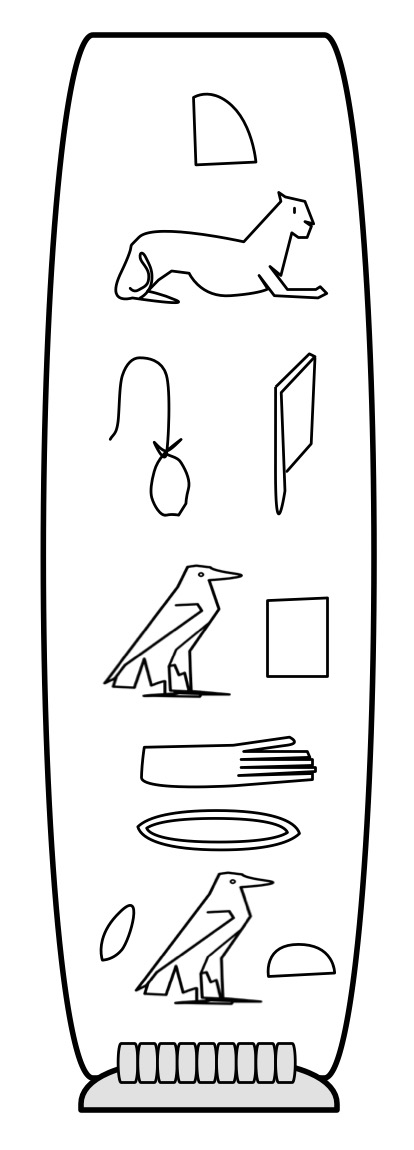
A cartouche for Cleopatra. Image by CS4FN
Part of the reason it took so long to decipher the language was that it was assumed that all the symbols were pictures of the things they represented. It was only when eventually scholars started to treat some as though they represented sounds that progress was made. Even more progress was made when it was realised the same symbol meant different things and might be read in a different way, even in the same phrase.
However, if the same symbol meant different things in different places of a passage, how on earth could even Egyptian readers tell? How might you indicate a particular group of characters had a special meaning?
One way the Egyptians used specifically for names is called a cartouche: they enclosed the sequence of symbols that represented a name in an oval-like box, like the one shown for Cleopatra. This was one of the first keys to unlocking the language as the name of pharaoh Ptolemy appeared several times in the Greek of the Rosetta Stone. Once someone had the idea that the cartouches might be names, the symbols used to spell out Ptolemy a letter at a time could be guessed at.
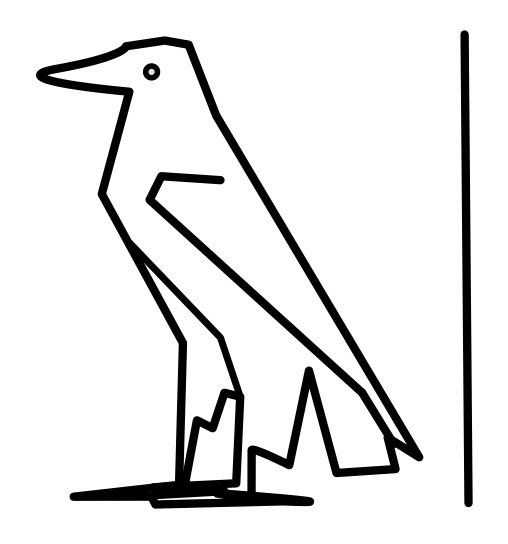
Putting things in boxes works for a pictorial language, but it isn’t so convenient as a more general way of indicating different uses of particular symbols or sequences of them. The Ancient Egyptians therefore had a much simpler way too. The normal reading of a symbol was as a sound. A symbol that was to be treated as a picture of the word it represented was followed by a line (so despite all the assumptions of the translators and the general perception of them, a hieroglyph as picture is treated as the exception not the norm!)
The Egyptian hieroglyph for aleph, Image by CS4FN
For example, the hieroglyph that is a picture of the Egyptian eagle stands for a single consonant sound, aleph. We would pronounce it ‘ah’ and it can be seen in the cartouche for Cleopatra that sounds out her name. However, add the line after the picture of the eagle (as shown) and it just means what it looks like: the Egyptian eagle.
The Egyptian hieroglyph for the Egyptian Eagle. Image by CS4FN
Cartouches actually included the line at the end too indicating in itself their special meaning, as can be seen on the Cleopatra cartouche above
The Egyptian line hieroglyph is what we would now call an escape character: its purpose is to say that the symbol it is paired with is not treated normally, but in a special way.
Computer Scientists use escape characters in a variety of ways in programming languages as well as in scripting languages like HTML. Different languages use a different symbol as the escape character, though \ is popular (and very reminiscent of the Egyptian line!). One place escapes are used is to represent special characters in strings (sequences of characters like words or sentences) so they can be manipulated or printed. If I want my program to print a word like “not” then I must pass an appropriate string to the print command. I just put the three characters in quotation marks to show I mean the characters n then o then t. Simple.
However, the string “\no\t” does not similarly mean five characters \, n, o, \ and t. It still represents three characters, but this time \n, o and \t. \ is an escape character saying that the n and the t symbols that follow it are not really representing the n or t characters but instead stand for a newline (\n : which jumps to the next line) and a tab character (\t : which adds some space). “\no\t” therefore means newline o tab.
This begs the question what if you actually want to print a \ character! If you try to use it as it is, it just turns what comes after it into something else and disappears. The solution is simple. You escape it by preceding it with a \. \\ means a single \ character! So “n\\t” means n followed by an actual \ character followed by a t. The normal meaning of \ is to escape what follows. Its special meaning when it is escaped is just to be a normal character! Other characters’s meanings are inverted like this too, where the more natural meaning is the one you only get with an escape character. For example what if you want a program to print a quotation so use quotation marks. But quotation marks are used to show you are starting and ending a String. They already have another meaning. So if you want a string consisting of the five characters “, n, o, t and ” you might try to write “”not”” but that doesn’t work as the initial “” already makes a string, just one with no characters in it. The string has ended before you got to the n. Escape characters to the rescue. You need ” to mean something other than its “normal” meeting of starting or ending a string so just escape it inside the string and write “\”not\””.
Once you get used to it, escaping characters is actually very simple, but is easy to find confusing when first learning to program. It is not surprising those trying to decipher hieroglyphs struggled so much as escapes were only one of the problems they had to contend with.
Elite computer programmers are often called wizards, and one of the first wizards was Christopher Strachey, who went on to be a pioneer of the development of programming languages. The first program he wrote was an Artificial Intelligence program to play draughts: more complicated (and fun) than the programs others were writing at the time. He was not only renowned as a programmer, but also as being amazingly good at debugging – getting them actually to work. On a visit to Alan Turing in Manchester he was given the chance to get his programs working on the Ferranti Mark I computer there. He did so very quickly working through the night to get them working, and even making one play God Save the King on the hooter. He immediately gained a reputation as being a “perfect” programmer. So what was his secret?
No-one writes complex code right first time, and programming teams spend more time testing programs than writing them in the first place to try and find all the bugs – possibly obscure situations where the program doesn’t do what the person wanted. A big part of the skill of programming is to be able to think logically and so be able to work through what the program actually does do, not just what it should do.
So what was Strachey’s secret that made him so good at debugging? When someone came to him with code that didn’t work, but they couldn’t work out why, he would start by asking them to explain how the program worked to him. As they talked, he would sit back, close his eyes and think about something completely different: a Beethoven symphony perhaps. Was this some secret way to tap his own creativity? Well no. What would happen is as the person explained the program to him they would invariable stop at some point and say something like: “Oh. Wait a minute…” and realise their mistake. By getting them to explain he was making them work through in detail how the program worked. Strachey’s reputation would be enhanced yet again.
There is a lesson here for anyone wishing to be a good programmer. Spending time explaining your program is also a good way to find problems. It is also an important part of learning to program, and ultimately becoming a wizard.

















 cs4fn
cs4fn 