The first Internet concert

Severe Tire Damage
Severe Tire Damage. Image by Strubin, CC BY-SA 4.0 via Wikimedia Commons

Which band was the first to stream a concert live over the Internet? The Rolling Stones decided, in 1994, it should be them. After all, they were one of the greatest, most innovative rock bands of all time. A concert from their tour of that year, in Dallas, was therefore broadcast live. Mick Jagger addressed the world not just the 50,000 packed into the stadium welcoming the world with “I wanna say a special welcome to everyone that’s, climbed into the Internet tonight and, uh, has got into the MBone. And I hope it doesn’t all collapse.” Unknown to them, when planning this publicity coup, another band had got there first: a band of Computer Scientists from Xerox PARC, DEC and Apple, the research centres responsible for many innovations including many of the ideas around graphical user interfaces, networks and multimedia internet had played live on the Internet the year before!

The band which actually went down in history was called Severe Tire Damage. Its members were Russ Haines and Mark Manasse (from DEC), Steven Rubin (a Computer Aided design expert from Apple) and Mark Weiser (famous for the ideas behind calm computing, from Xerox PARC). They were playing a concert at Xerox PARC on  June 24, 1993. At the time researchers there were working on a system called MBone which provided a way to do multimedia over the Internet for the first time. Now we take that for granted (just about everyone with a computer or phone doing Zoom and Teams calls, for example) but then the Internet was only set up for exchanging text and images from one person to another. MBone, short for multicast backbone, allowed packets of data of any kind (so including video data) from one source to be sent to multiple Internet addresses rather than just to one address. Sites that joined the MBone could send and receive multimedia data, including video, live to all the others in one broadcast. This meant for the first time, video calls between multiple people over the Internet were possible. They needed to test the system, of course, so set up a camera in front of Severe Tire Damage and live-streamed their performance to other researchers on the nascent MBone round the world (research can be fun at the same time as being serious!). Possibly there was only a single Australian researcher watching at the time, but it is the principle that counts!

On hearing about the publicity around the Rolling Stones concert, and understanding the technology of course, they decided it was time for one more live internet gig to secure their place in history. Immediately, before the Rolling Stones started their gig, Severe Tire Damage broadcast their own live concert over the MBone to all those (including journalists) waiting for the main act to arrive online. In effect they had set themselves up as an Internet un-billed opening act for the Stones even though they were nowhere near Dallas. Of course that is partly the point, you no longer had to all be on one place to be part of the same concert. So, the Rolling Stones, sadly for them, weren’t even the first to play live over the Internet on that particular day, never mind ever!

– Paul Curzon, Queen Mary University of London

More on …

Subscribe to be notified whenever we publish a new post to the CS4FN blog.


This page is funded by EPSRC on research agreement EP/W033615/1.

QMUL CS4FN EPSRC logos

The CS4FN Easter Egg Hunt

Image by Susanne from Pixabay

Easter eggs can be chocolate but they are also hidden treasures to be found in games, websites, other software (and now even Lego sets). Especially for Easter we have hidden an Easter Egg in one of our diversity linked pages. Can you find it? Enjoy the hunt! (But if you do find it don’t give it away and spoil the fun for others. Just be quietly pleased at how clever you are!)

The term Easter Egg was coined after Warren Robinett hid the message “Created by Warren Robinett” in the Atari game, Adventure, that he created. He did it as part of a plan he hatched to protest against the Atari policy of the time of not crediting the developers of their games – supposedly so their best people wouldn’t get poached by rivals!! The real purpose of the game was to find a hidden chalice, but the hidden message could be found if the player’s avatar (a square block) stopped over one specific pixel (“the gray dot”) in one specific place in the game.

It was only found (by a player) after Warren had left the company (he hadn’t let on to the management what he had done even when he resigned). Originally the company scrambled to try to re-release the game without the message, but given how expensive that would have been to do, instead they turned it into a feature to whip up more excitement around their games and started to hide similar surprises in other games from then on, calling them Easter Eggs.

The Easter Egg was born.

Start your hunt for our Easter Egg here at our diversity portal.

As an aside, the wonderful book, Ready Player One by Ernest Cline is based on a plot around finding Easter Eggs. It is a must read for anyone interested in 1980s technology, easter eggs and what a metaverse might one day be actually like to live in. All computer scientists should read it (and only then watch the film which is good, but not as good.)


Subscribe to be notified whenever we publish a new post to the CS4FN blog.


This page is funded by EPSRC on research agreement EP/W033615/1.

QMUL CS4FN EPSRC logos

Hint – we think you will never see it without some help.

The logic of Queens

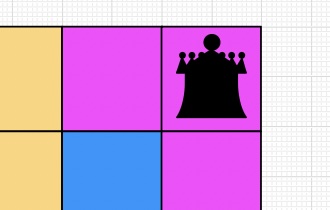
A corner of a Queens Puzzle
A corner of a Queens Puzzle: Image by Paul Curzon

Queens is a fairly simple kind of logic puzzle found for example on LinkedIn as a way to draw you back to the site. Doing daily logic puzzles is good both for mental health and to build logical thinking skills. As with programming, solving logic puzzles is mostly about pattern matching (also a useful skill to practice daily) rather than logic per se. The logic mainly comes in working out the patterns.

Let’s explore this with Queens. The puzzle has simple rules. The board is divided into coloured territories and you must place a Queen in each territory. However, no two Queens can be in the same row or column. Also no two Queens can be adjacent, horizontally, vertically or diagonally.

If we were just to use pure logic on these puzzles we would perhaps return to the rules themselves constantly to try and deduce where Queens go. That is perhaps how novices try to solve puzzles (and possibly get frustrated and give up). Instead, those who are good at puzzles create higher level rules that are derived from the basic rules. Then they apply (ie pattern match against) the new rules whenever the situation applies. As an aside this is exactly how I worked when using machine-assisted proof to prove that programs and hardware correctly met their specification, doing research into better ways to ensure the critical devices we create are correct.

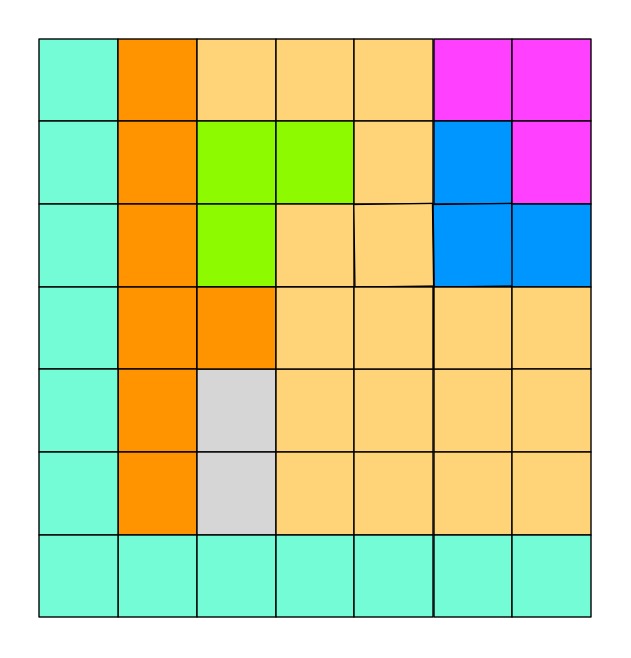
Let’s look at an example from Queens. Here is a puzzle to work on. Can you place the 8 Queens?

An initial Queens puzzle - an 8x8 grid with 8 territories marked out
mage by Paul Curzon
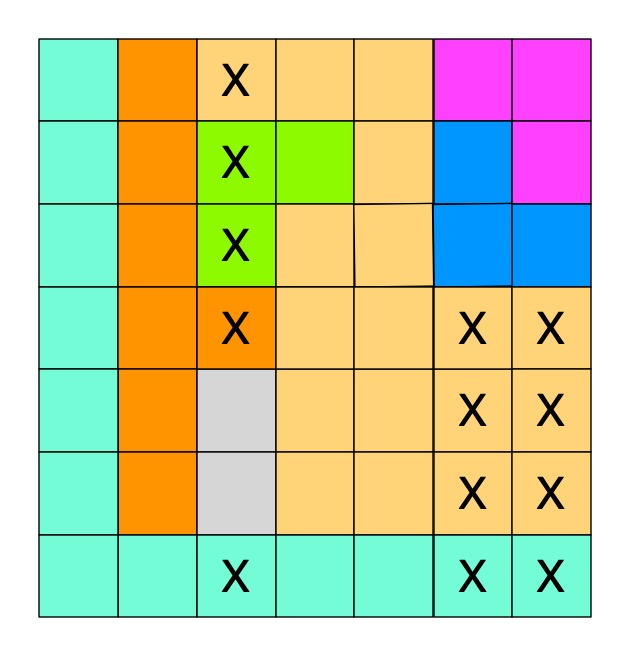
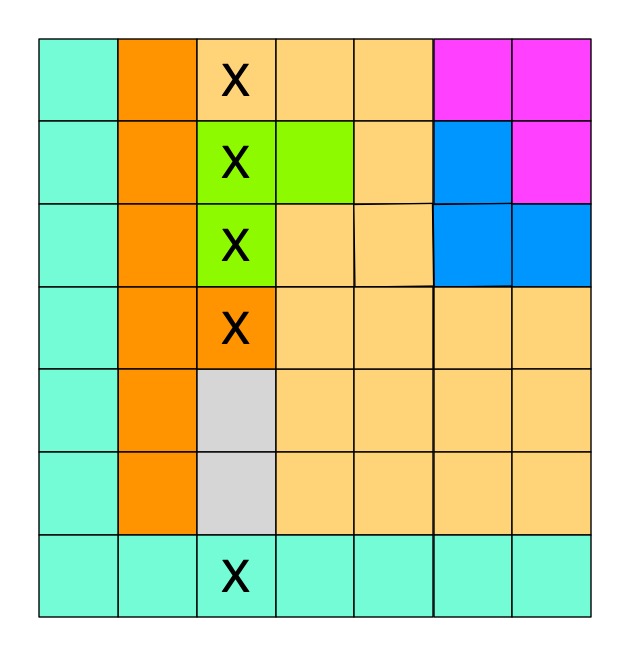
The same puzzle with squares in one column ruled out as places for a Queen
mage by Paul Curzon

Where to start? Well notice the grey territory near the bottom. It is a territory that lives totally in one column. If we go to the rules of Queens we know that there must be a Queen in this territory. That means that Queen must be in that column. We also know that only one Queen can be in a column. That means none of the other territories in that column can possibly hold a Queen there. We can cross them all out as shown.

In effect we have created a new derived inference rule.

IF a territory only has squares available in one column 

THEN cross out all squares of other territories in that column

By similar logic we can create a similar rule for rows.

Now we can just pattern match against the situation described in that rule. If ever you see a territory contained completely in a row or column, you can cross out everything else in that row/column.

In our case in doing that it creates new situations that match the rule. You may also be able to work out other rules. One obvious new rule is the following:

IF a territory only has one free space left and no Queens 

THEN put a Queen in that free space
The same puzzle with squares in two more columns ruled out as places for two more Queens
mage by Paul Curzon

We can derive more complicated rules too. For example, we can generalise our first rule to two columns. Can you find a pair of territories that reside in the same two columns only? There is such a pair in the top right corner of our puzzle. If there is such a situation then as both must have a Queen, between them they must be the territories that provide the Queens for both those two columns. That means we can cross out all the squares from other territories in those two columns. We get the rule:

IF two territories only have squares available in two columns

THEN cross out all squares of other territories in both columns

Becoming good at Queens puzzles is all about creating more of these rules that quickly allow you to make progress in all situations. As you apply rules, new rules become applicable until the puzzle is solved.

Can you both apply these rules and if need be derive some more to pattern match your way to solving this puzzle?

It turns out that programming is a lot like this too. For a novice, writing code is a battle with the details of the semantics (the underlying logical meaning) of the language finding a construct that does what is needed. The more expert you become the more you see patterns where you have a rule you can apply to provide the code solution: IF I need to do this repeatedly counting from 1 to some number THEN I use a for loop like this… IF I have to process a 2 dimensional matrix of possibilities THEN I need a pair of nested for loops that traverse it by rows and columns… IF I need to do input validation THEN I need this particular structure involving a while loop… and so on.

Perhaps more surprisingly, research into expert behaviour suggests that is what all expert behaviour boils down to. Expert intuition is all about subconscious pattern matching for situations seen before turned into subconscious rules whether expert fire fighters or expert chess players. Now machine learning AIs are becoming experts at things we are good at. Not suprisingly, what machine learning algorithms are good at is spotting patterns to drive their behaviour.

– Paul Curzon, Queen Mary University of London

More on …

Magazines …

Front cover of CS4FN issue 29 - Diversity in Computing

EPSRC supports this blog through research grant EP/W033615/1,

Photogrammetry for fun, preservation and research – digitally stitching together 2D photographs to visualise the 3D world.

Composite image of one green glass bottle made from three photographs. Image by Jo Brodie

Imagine you’re the costume designer for a major new film about a historical event that happened 400 years ago. You’d need to dress the actors so that they look like they’ve come from that time (no digital watches!) and might want to take inspiration from some historical clothing that’s being preserved in a museum. If you live near the museum, and can get permission to see (or even handle) the material that makes it a bit easier but perhaps the ideal item is in another country or too fragile for handling.

This is where 3D imaging can help. Photographs are nice but don’t let you get a sense of what an object is like when viewed from different angles, and they don’t really give a sense of texture. Video can be helpful, but you don’t get to control the view. One way around that is to take lots of photographs, from different angles, then ‘stitch’ them together to form a three dimensional (3D) image that can be moved around on a computer screen – an example of this is photogrammetry.

In the (2D) example above I’ve manually combined three overlapping close-up photos of a green glass bottle, to show what the full size bottle actually looks like. Photogrammetry is a more advanced version (but does more or less the same thing) which uses computer software to line up the points that overlap and can produce a more faithful 3D representation of the object.

In the media below you can see a looping gif of the glass bottle being rotated first in one direction and then the other. This video is the result of a 3D ‘scan’ made from only 29 photographs using the free software app Polycam. With more photographs you could end up with a more impressive result. You can interact with the original scan here – you can zoom in and turn the bottle to view it from any angle you choose.

A looping gif of the 3D Polycam file being rotated one way then the other. Image by Jo Brodie

You might walk around your object and take many tens of images from slightly different viewpoints with your camera. Once your photogrammetry software has lined the images up on a computer you can share the result and then someone else would be able to walk around the same object – but virtually!

Photogrammetry is being used by hobbyists (it’s fun!) but is also being used in lots of different ways by researchers. One example is the field of ‘restoration ecology’ in particular monitoring damage to coral reefs over time, but also monitoring to see if particular reef recovery strategies are successful. Reef researchers can use several cameras at once to take lots of overlapping photographs from which they can then create three dimensional maps of the area. A new project recently funded by NERC* called “Photogrammetry as a tool to improve reef restoration” will investigate the technique further.

Photogrammetry is also being used to preserve our understanding of delicate historic items such as Stuart embroideries at The Holburne Museum in Bath. These beautiful craft pieces were made in the 1600s using another type of 3D technique. ‘Stumpwork’ or ‘raised embroidery’ used threads and other materials to create pieces with a layered three dimensional effect. Here’s an example of someone playing a lute to a peacock and a deer.

Satin worked with silk, chenille threads, purl, shells, wood, beads, mica, bird feathers, bone or coral; detached buttonhole variations, long-and-short, satin, couching, and knot stitches; wood frame, mirror glass, plush”, 1600s. Photo CC0 from Metropolitan Museum of Art uploaded by Pharos on Wikimedia.

A project funded by the AHRC* (“An investigation of 3D technologies applied to historic textiles for improved understanding, conservation and engagement“) is investigating a variety of 3D tools, including photogrammetry, to recreate digital copies of the Stuart embroideries so that people can experience a version of them without the glass cases that the real ones are safely stored in.

Using photogrammetry (and other 3D techniques) means that many more people can enjoy, interact with and learn about all sorts of things, without having to travel or damage delicate fabrics, or corals.

*NERC (Natural Environment Research Council) and AHRC (Arts and Humanities Research Council) are two organisations that fund academic research in universities. They are part of UKRI (UK Research & Innovation), the wider umbrella group that includes several research funding bodies.

Other uses of photogrammetry

Examples of cultural heritage and ecology are highlighted in the post but also interactive games (particularly virtual reality), engineering and crime scene forensics and the film industry use photogrammetry, an example is Mad Max: Fury Road which used the technique to create a number of its visual effects. Hobbyists also create 3D versions (called ‘3D assets’) of all sorts of objects and sell these to games designers to include in their games for players to interact with.

Careers

This was an example job advert (since closed) for a photogrammetry role in virtual reality.

Further reading

Other CS4FN posts about the use of 3D imaging

“The team behind the idea scanned several works of art using very accurate laser scanners that build up a 3D picture of the thing being scanned. From this they created a 3D model of the work. This then allowed a person wearing to feel as though they were touching the actual sculpture feeling all the detail.”

See also our collection of Computer Science & Research posts.


Subscribe to be notified whenever we publish a new post to the CS4FN blog.


This page is funded by EPSRC on research agreement EP/W033615/1.

QMUL CS4FN EPSRC logos

Joyce Weisbecker: a teenager the first indie games developer?

CS4FN Banner

by Paul Curzon, Queen Mary University of London

Video games were once considered to be only of interest to boys, and the early games industry was dominated by men. Despite that, a teenage girl, Joyce Weisbecker, was one of the pioneers of commercial game development.

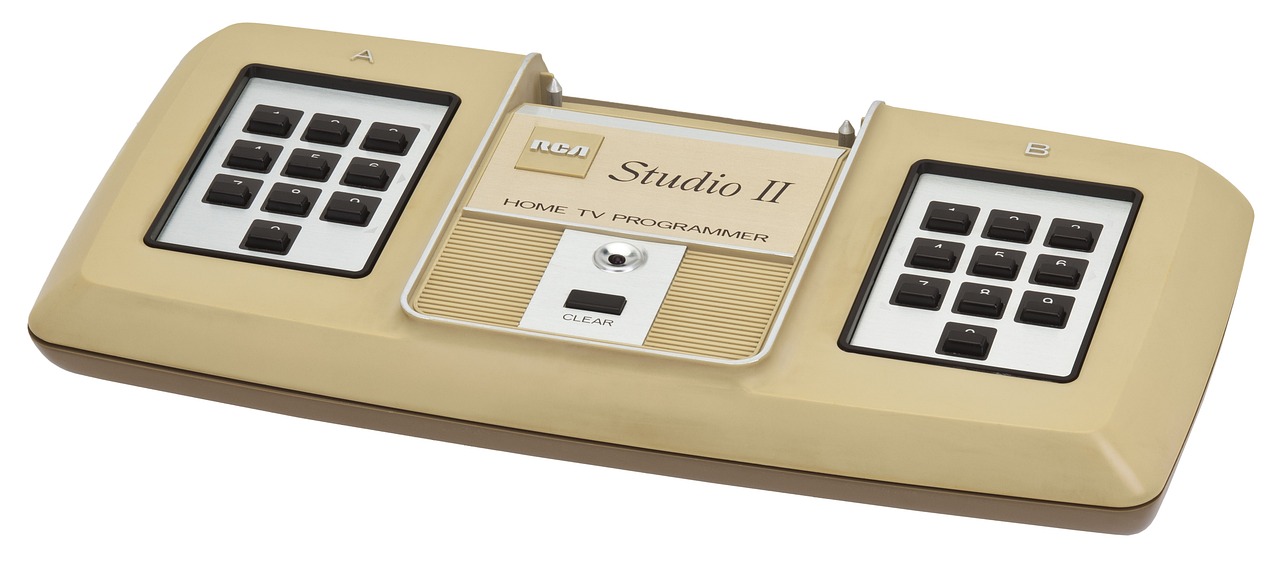
Originally, video games were seen as toys for boys. Gradually it was realised that there was a market for female game players too, if only suitably interesting games were developed, so the games companies eventually started to tailor games for them. That also meant, very late in the day, they started to employ women as games programmers. Now it is a totally normal thing to do. However, women were also there from the start, designing games. The first female commercial programmer (and possibly first independent developer) was Joyce Weisbecker. Working as an independent contractor she wrote her first games for sale in 1976 for the RCA Studio II games console that was released in January 1977.

RCA Studio II video games console
Image by WikimediaImages from Pixabay

Joyce was only a teenager when she started to learn to program computers and wrote her first games. She learnt on a computer that her engineer father designed and built at home called FRED (Flexible Recreational and Educational Device). He worked for RCA (originally the Radio Corporation of America), one of the major electronics, radio, TV and record companies of the 20th century. The company diversified their business into computers and Joyce’s father designed them for RCA (as well as at home for a hobby). He also invented a programming language called CHIP-8 that was used to program the RCA computers. This all meant Joyce was in a position to learn CHIP-8 and then to write programs for RCA computers including their new RCA Studio II games console before the machine was released, as a post-high school summer job.

The code for two games that she wrote in 1976, called Snake Race and Jackpot, were included in the manual for an RCA microcomputer called the COSMAC VIP, and she also wrote more programs for it the following year. These computers came in kit form for the buyer to build themselves. Her programs were example programs included for the owner to type in and then play once they had built the machine. Including them meant their new computer could do something immediately.

She also wrote the first game that she was paid for in that Summer of 1976. It was for the RCA Studio II games console, and it earned her $250 – well over $1000 in today’s money, so worth having for a teenager who would soon be going on to college. It was a quiz program, called TV School House I. It pitted two people against each other, answering questions on topics such as maths, history and geography, with two levels of difficulty. Questions were read from question booklets and whoever typed in the multiple choice answer number the fastest got the points for a question, with more points the faster they were. There is currently a craze for apps that augment physical games and this was a very early version of the genre.

Speedway screen from Wikimedia

She quickly followed it with racing and chase games, Speedway and Tag, though as screens were still very limited then, with only tiny screens, the graphics of all these games were very, very simple – eg racing rectangles around a blocky, rectangular racing track.

Unfortunately, the RCA games console itself was a commercial failure as it couldn’t compete with consoles like the Atari 2600, so RCA soon ended production. Joyce, meanwhile, retired from the games industry, still a teenager, ultimately becoming a radar signal processing engineer.

While games like Pong had come much earlier, the Atari 2600, which is credited with launching the first video game boom, was released in 1977, with Space Invaders, one of the most influential video games of all time, released in 1980. Joyce really was at the forefront of commercial games design. As a result her papers related to games programming, including letters and program listings, are now archived in the Strong National Museum of Play in New York.

More on …


Magazines …

Front cover of CS4FN issue 29 - Diversity in Computing

Subscribe to be notified whenever we publish a new post to the CS4FN blog.


This blog is funded through EPSRC grant EP/W033615/1.

Coordinate conundrum puzzles and vector graphics

by Paul Curzon, Queen Mary University of London

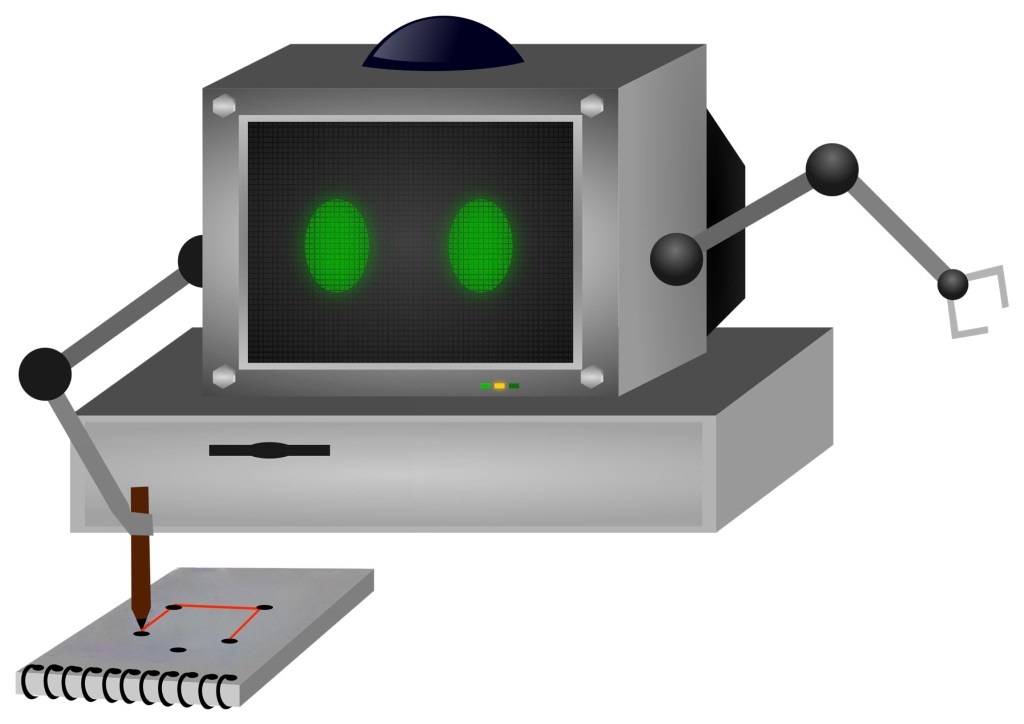
A computer with arms doing a coordinate conundrum on a pad of paper

Image by Samson Vlad from Pixabay modified by CS4FN

One way computers store images is as a set of points (as coordinates) that make up lines and shapes. This is the basis for the kind of computer graphics called Vector Graphics. You can explore the idea by doing coordinate conundrum puzzles. A coordinate conundrum is just a Vector Graphics Image to be drawn on paper.They are join-the-dot puzzles based on the idea. Can you recreate the original drawing?

Recreate a drawing from coordinates

Points on a grid can be represented by pairs of numbers called coordinates. The first, x coordinate, says how far to go along horizontally. The second, y coordinate, says how far to go up, vertically. The numbers along the axes (along the bottom and up the side) of the grid give the distance in that direction. Draw the point at the place you end up at! So for example the coordinate (4,5) means go right from the origin 4 and up 5 and plot the point there.

Grid showing point (4,5) as 4 right and 5 up.
Image by CS4FN

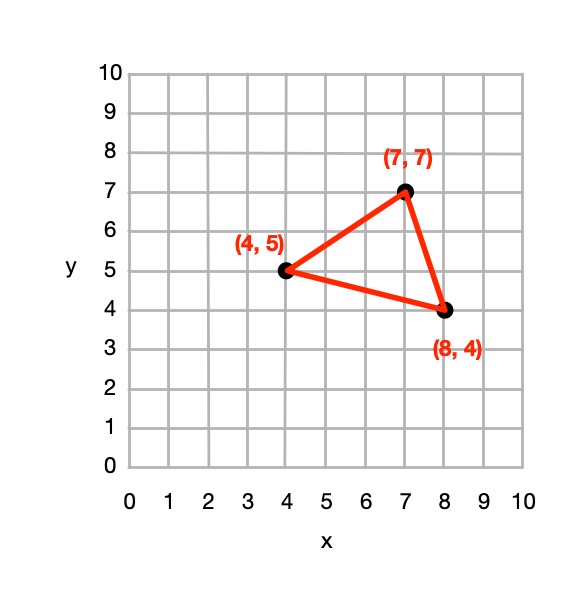
You can join any two coordinates with lines. If a series of lines join back to the original one then it make a shape (a polygon), which can be coloured in. For example, if we plot the points (4,5), (7,7 and (8,4) drawing lines between them and back to (4,5) we make a triangle.

A triangle marked out in coordinates
Image by CS4FN

From 4 points we could define a square, rectangle or more general quadrilateral shape and so on.

So from a set of instructions telling you where to plot points, you can create a picture out of all the shapes and lines that make up the picture, giving colours for the lines or shapes.

This (and so these puzzles) is the basis of how programs in the language SVG (Scalable Vector Graphics) work to store a drawing as the instructions needed to recreate it. Drawing programs often store illustrations that the artists using them draw as an SVG program.

How to solve them

Each picture is made of shapes, each given by a colour and a list of the coordinates of its vertices (corners). For each shape: 

1. Plot the list of (x,y) coordinates on the grid as dots. 

2. Join the dots (which start and end at the same place) to make the shape. 

3. Colour the shape you have made with the colour at the start of the list. 

So, for example, if the first instruction starts: red (5,24) … that means plot the point 5 along and 24 up. It starts a new shape, coloured red, that ends at the same point.

If the series of points do not join back to the start then they represent coloured lines rather than a coloured shape,

Example: Semaphore flag

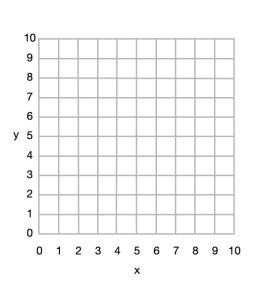
A blank 10x10 grid
Image by CS4FN

Here is a simple example to draw a red and yellow semaphore flag, given the shapes:

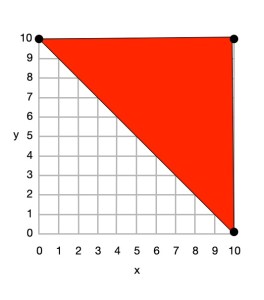
  • red (0,10) (10,10) (10,0) and back to (0,10)
  • yellow (0,10) (10,0) (0,0) and back to (0,10)

From this we can draw the picture.

Top right triangle now coloured red with (0,10), (10,10) and (10,0) plotted, joined by lines and the shape coloured.
Image by CS4FN

First we plot the points given for the red shape (a triangle), join the dots and colour it in.

  • red (0,10) (10,10) (10,0) and back to (0,10)
Bottom rightt triangle now coloured yellow with (0,10), (10,0) and (0,0) plotted, joined by lines and the shape coloured.
Image by CS4FN

Then we plot the points given for the yellow shape (another triangle), join the dots and colour it in.

  • yellow (0,10) (10,0) (0,0) and back to (0,10)

Do some puzzles yourself

Try the coordinate conundrum puzzles on our puzzle page either by printing off the puzzle sheet or drawing on squared paper. Then read on to find out a little more the advantages of vector graphics.

From straight lines to curves

In these puzzles we have only used straight lines between points, but we could also include commands to create circles and curved lines between points based on the mathematical equation for the curve. SVG, the vector graphic programming language, has instructions for a variety of more complex kinds of lines and shapes like that.

Advantages and disadvantages of Vector Graphics

Recording images in this way as points, lines and shapes has several advantages over storing images as pixels:

  • we generally need far less space to store the image as we do not need to store a colour for thousands or even millions of pixels;
  • the images are mathematically accurate – a line is represented as a perfect straight line not a pixelated (staircase-like) line;
  • the images are scalable, meaning you can increase the size of an image, zooming in just by multiplying all the numbers involved by a scale factor (which is just a number giving the magnification you want). The resulting image is still mathematically perfect with straight lines still straight lines, for example, just bigger. For example, suppose we want to make a semaphore flag twice the size of our original. We just multiply all points by 2, for example giving red (0,20) (20,20) (20,0) and back to (0,20); yellow (0,20) (20,0) (0,0) and back to (0,20) and it gives an identical picture, just bigger. (Try plotting it and see!)

Disadvantages are:

  • Vector graphics are not a good way to represent photographs – digital cameras record the light at lots of points corresponding to pixels so naturally are stored as pixels (numbers that give the colour in that small square of the image). Trying to convert a photo to a vector image would be hard (needing algorithms to recognise shapes, for example). It would be a less natural and less accurate way of doing so.
  • With computer memory cheap, the advantages of using less storage are less important than they once were.

SVG: a graphics programming language

The programming language SVG records drawings in this way as instructions to draw shapes and lines based on points. It has some difference to our instructions though. For example the y-axis coordinates start at the top and work down. The principles are the same though, it is only the detail that differs.

More on …

Magazines …


Subscribe to be notified whenever we publish a new post to the CS4FN blog.

EPSRC supports this blog through research grant EP/W033615/1,

From Egyptian Survey puzzles to computational thinking

One way to use logical thinking is to deduce new facts but then turn them into IF-THEN rules. They tell us an action to do IF something is true. For example:  IF both cards are the same THEN shout SNAP! Once we have IF-THEN rules we can use them as the basis of a program. We can see how this works, and how it involves various computational thinking skills with a simple logical thinking puzzle.

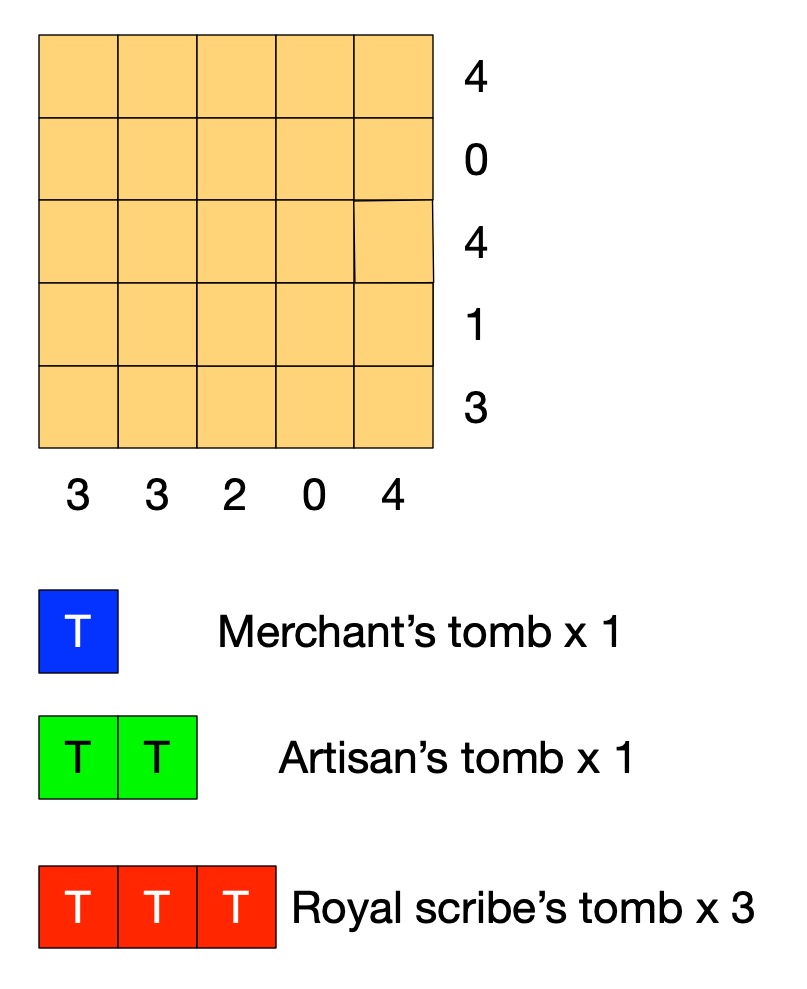
An Egyptian Survey puzzle 

Image by CS4FN

Old records show that this area of the desert contains the tombs of 3 scribes (a large tomb covering 3 squares), 1 artisan (medium, 2 squares) and 1 merchant (small, 1 square).

A survey has gathered information of where the tombs could be. Each number tells you how many squares are part of a tomb in that row or column. 

Tombs are not adjacent (horizontally, vertically or diagonally).

Can you work out where all the tombs are without further digging?

Solving Egyptian Survey puzzles

The instructions of the puzzle give us some simple facts such as that the number at the end of the row tells us the number of squares in that row holding tombs.  On its own that does not tell us how to solve the puzzle. However, thinking logically about it we can draw simple logical conclusions so deduce new facts. For example, it is fairly simple to deduce the fact:

the number for a row being 0 IMPLIES there are no tombs in that row.

If we know there are no tombs in a row then we can mark each square of the row as empty. If we use X to mean nothing is in that square, then we can turn that deduced fact into an action. It means that we can do the following when trying to solve the puzzle:

IF the number on a row is 0 
THEN put an X in all the squares of that row.

With that rule we can start to solve the puzzle just by following the rule. Find a row numbered 0 and put Xs there. We can create a similar rule for columns. Applying both these rules to our puzzle we get:

Image by CS4FN

Can you work out more rules before reading on?

Rules, rules, rules

What happens if the number of a row is more than 0? Knowing the number alone doesn’t help us much. We need to combine it with other information. The top row of the puzzle has the number 4, for example, but one of the squares already has a cross in it. That means the remaining 4 squares all must have tombs, which we will mark T. We can turn that into a rule:

IF the number for a row is 4 AND there are 4 empty squares in that row and an X
THEN put a T in all the empty squares of that row.

We can make similar rules for each number 1 to 4. We can then create similar rules for columns. Applying them once each to our puzzle gives us:

Image by CS4FN

We could also make a more general version of this rule 

IF the number for a row is <n> AND there are only <n> empty squares in that row 
THEN put a T in all the empty squares of that row.

This is what computer scientists call generalisation: a part of computational thinking. Instead of having lots of rules (or lines of code) for lots of similar situations, we create one simple but general one that covers all the cases. We can of course apply rules more than once, so as you probably noticed we can apply our row rule once more. In effect our rules live inside a loop and we keep trying them in sequence for as long as we find a rule that makes a difference.

Image by CS4FN

Now one of the rows has the number 1, but we have already marked a tomb in a square of that row. That gives us another rule.

IF the number for a row is 1 AND there is already 1 tomb marked in that row
THEN put an X in all the empty squares of that row.

This gives us:

Image by CS4FN

Similar rules apply for other numbers so we could also make a general version of this rule too.

IF the number for a row is <n> AND there are already <n> tombs marked in that row
THEN put an X in all the empty squares of that row.

Now, applying a column version of the last general rule and we can mark an X in the last square for column with 2 tomb squares.

Image by CS4FN

We need one last rule for this puzzle:

IF the number for a row is <n> AND the number of spaces + the number of 0s is <n>
THEN put a T in all the empty squares of that row.

This is actually an even more general version of our second rule (it is the case where the number of Ts is 0, so could replace that rule with this new one.

 Applying it finally solves the puzzle:

Image by CS4FN

If we put our rules together then they become the basis of an algorithm (so program) for solving the puzzles and in creating them from deduced facts we are doing algorithmic thinking. IF-THEN instructions along with sequencing and loops are the basis of all programs. Here we create a sequence of the rules to try in order and put them inside a loop so that we keep trying them until none apply or we have solved the puzzle. There is a style of programming where all a program is is a series of IF-THEN rules – with looping happening implicitly.

Algorithms are just rules to follow that guarantee a result (here solving the puzzle). It is only an algorithm if it guarantees to always work. To solve any (solvable) Egyptian Survey puzzle like this we would need yet more rules: we would need more more rules for it to be an algorithm for solving all puzzles. Making sure algorithms cover all possibilities is one of the harder parts of algorithmic thinking – bugs in programs are often there because the programmer didn’t manage to cover every possibility. In our case we could write a program based on our limited rules. We would just need to include an extra rule that quits (admitting defeat and saying that the program cannot solve the puzzle) if no rule applies.

Perhaps you can work out all the rules (so an algorithm) needed to solve any of these puzzles! All you need are the instructions for the game, some logical thinking to deduce new facts, some algorithmic thinking to turn them into rules, and an ability to generalise so you have a small number of rules … computational thinking skills in fact.

– Paul Curzon, Queen Mary University of London

More on …

Magazines …


Subscribe to be notified whenever we publish a new post to the CS4FN blog.

EPSRC supports this blog through research grant EP/W033615/1,

Manufacturing Magic

by Howard Williams, Queen Mary University of London

(From the archive)

A cartoon of an egyptian god
Image from PIXABAY

Can computers lend a creative hand to the production of new magic tricks? That’s a question our team, led by Peter McOwan at Queen Mary, wrestled with.

The idea that computers can help with creative endeavours like music and drawing is nothing new – turn the radio on and the song you are listening to will have been produced with the help of a computer somewhere along the way, whether it’s a synthesiser sound, or the editing of the arrangement, and some music is created purely inside software. Researchers have been toiling away for years, trying to build computer systems that actually write the music too! Some of the compositions produced in this way are surprisingly good! Inspired by this work, we decided to explore whether computers could create magic.

The project to build creative software to help produce new magic tricks started with a magical jigsaw that could be rearranged in certain ways to make objects on its surface disappear. Pretty cool, but what part did the computer play? A jigsaw is made up of different pieces, each with four sides – the number of different ways all these pieces can be put together is very large; for a human to sit down and try out all the different configurations would take many hours (perhaps thousands, if not millions!). Whizzing through lots of different combinations is something a computer is very good at. When there are simply too many different combinations for even a computer to try out exhaustively, programmers have to take a different approach.

Evolve a jigsaw

A genetic algorithm is a program that mimics the biological process of natural selection. We used one to intelligently search through all the interesting combinations that the jigsaw might be made up from. A population of jigsaws is created, and is then ‘evolved’ via a process that evaluates how good each combination is in each generation, gradually weeding out the combinations that wouldn’t make good jigsaws. At the end of the process you hope to be left with a winner; a jigsaw that matches all the criteria that you are hoping for. In this particular case, we hoped to find a jigsaw that could be built in two different ways, but each with a different number of the same object in the picture, so that you could appear to make an object disappear and reappear again as you made and remade it. The idea is based on a very old trick popularised by Sam Lloyd, but our aim was to create a new version that a human couldn’t, realistically, have come up with, without a lot of free time on their hands!

To understand what role the computer played, we need to explore the Genetic Algorithm mechanism it used to find the best combinations. How did the computer know which combinations were good or bad? This is something creative humans are great at – generating ideas, and discarding the ones they don’t like in favour of ones they do. This creative process gradually leads to new works of art, be they music, painting, or magic tricks. We tackled this problem by first running some experiments with real people to find out what kind of things would make the jigsaw seem more ‘magical’ to a spectator. We also did experiments to find out what would influence a magician performing the trick. This information was then fed into the algorithm that searched for good jigsaw combinations, giving the computer a mechanism for evaluating the jigsaws, similar to the ones a human might use when trying to design a similar trick.

More tricks

We went on to use these computational techniques to create other new tricks, including a card trick, a mind reading trick on a mobile phone, and a trick that relies on images and words to predict a spectator’s thought processes. You can find out more including downloading the jigsaw at www.Qmagicworld.wordpress.com

Is it creative, though?

There is a lot of debate about whether this kind of ‘artificial intelligence’ software, is really creative in the way humans are, or in fact creative in any way at all. After all, how would the computer know what to look out for if the researchers hadn’t configured the algorithms in specific ways? Does a computer even understand the outputs that it creates? The fact is that these systems do produce novel things though – new music, new magic tricks – and sometimes in surprising and pleasing ways, previously not thought of.

Are they creative (and even intelligent)? Or are they just automatons bound by the imaginations of their creators? What do you think?

Related Magazines and a new book…


EPSRC supports this blog through research grant EP/W033615/1. 

Understanding Parties

CS4FN Banner

by Paul Curzon, Queen Mary University of London

(First appeared in Issue 23 of the CS4FN magazine “The women are (still) here”)

The stereotype of a computer scientist is someone who doesn’t understand people. For many, how people behave is exactly what they are experts in. Kavin Narasimhan is one. When a student at QMUL she studied how people move and form groups at parties, creating realistic computer models of what is going on.

We humans are very good at subtle behaviour, and do much of it without even realising it. One example is the way we stand when we form small groups to talk. We naturally adjust our positions and the way we face each other so we can see and hear clearly, while not making others feel uncomfortable by getting too close. The positions we take as we stand to talk are fairly universal. If we understand what is going on we can create computational models that behave the same way. Most previous models simulated the way we adjust positions as others arrive or leave by assuming everyone tries to both face, and keep the same distance from, the midpoint of the group. However, there is no evidence that that is what we actually do. There are several alternatives. Rather than pointing ourselves at some invisible centre point, we could be subconsciously maximising our view of the people around. We could be adjusting our positions and the direction we face based on the position only of the people next to us, or instead based on the positions of everyone in the group.

Kavin videoed real parties where lots of people formed small groups to find out more of the precise detail of how we position and reposition ourselves. This gave her a bird’s eye view of the positions people actually took. She also created simulations with virtual 2D characters that move around, forming groups then moving on to join other groups. This allowed her to try out different rules of how the characters behaved, and compare them to the real party situations.

She found that her alternate rules were more realistic than rules based on facing a central point. For example, the latter generates regular shapes like triangular and square formations, but the positions real humans take are less regular. They are better modelled by assuming people focus on getting the best view of others. The simulations showed that this was also a more accurate way to predict the sizes of groups that formed, how long they formed for, and how they were spread across the room. Kavin’s rules therefore appear to give a realistic way to describe how we form groups.

Being able to create models like this has all sorts of applications. It is useful for controlling the precise movement of avatars, whether in virtual worlds or teleconferencing. They can be used to control how computer-generated (CGI) characters in films behave, without needing to copy the movements from actors first. It can make the characters in computer games more realistic as they react to whatever movements the real people, and each other, make. In the future we are likely to interact more and more with robots in everyday life, and it will be important that they follow appropriate rules too, so as not to seem alien.

So you shouldn’t assume computer scientists don’t understand people. Many understand them far better than the average person. That is how they are able to create avatars, robots and CGI characters that behave exactly like real people. Virtual parties are set to be that little bit more realistic.

More on …

Related Magazines …


EPSRC supports this blog through research grant EP/W033615/1.