Mary Clem: getting it right

by Paul Curzon, Queen Mary University of London

Mary Clem was a pioneer of dependable computing long before the first computers existed. She was a computer herself, but became more like a programmer.

A tick on a target of red concentric zeros
Image by Paul Curzon

Back before there were computers there were human computers: people who did the calculations that machines now do. Victorian inventor, Charles Babbage, worked as one. It was the inspiration for him to try to build a steam-powered computer. Often, however, it was women who worked as human computers especially in the first half of the 20th century. One was Mary Clem in the 1930s. She worked for Iowa State University’s statistical lab. Despite having no mathematical training and finding maths difficult at school, she found the work fascinating and rose to become the Chief Statistical Clerk. Along the way she devised a simple way to make sure her team didn’t make mistakes.

The start of stats

Big Data, the idea of processing lots of data to turn that data into useful information, is all the rage now, but its origins lie at the start of the 20th century, driven by human computers using early calculating machines. The 1920s marked the birth of statistics as a practical mathematical science. A key idea was that of calculating whether there were correlations between different data sets such as rainfall and crop growth, or holding agricultural fairs and improved farm output. Correlation is the the first step to working out what causes what. it allows scientists to make progress in working out how the world works, and that can then be turned into improved profits by business, or into positive change by governments. It became big business between the wars, with lots of work for statistical labs.

Calculations and cards

Originally, in and before the 19th century, human computers did all the calculations by hand. Then simple calculating machines were invented, so could be used by the human computers to do the basic calculations needed. In 1890 Herman Hollerith invented his Tabulator machine (his company later became computing powerhouse, IBM). The Tabulator machine was originally just a counting machine created for the US census, though later versions could do arithmetic too. The human computers started to use them in their work. The tabulator worked using punch cards, cards that held data in patterns of holes punched in to them. A card representing a person in the census might have a hole punched in one place if they were male, and in a different place if they were female. Then you could count the total number of any property of a person by counting the appropriate holes.

Mary was being more than a computer,
and becoming more like a programmer

Mary’s job ultimately didn’t just involve doing calculations but also involved preparing punch cards for input into the machines (so representing data as different holes on a card). She also had to develop the formulae needed for doing calculations about different tasks. Essentially she was creating simple algorithms for the human computers using the machines to follow, including preparing their input. Her work was therefore moving closer to that of a computer operator and then programmer’s job.

Zero check

She was also responsible for checking calculations to make sure mistakes were not being made in the calculations. If the calculations were wrong the results were worse than useless. Human computers could easily make mistakes in calculations, but even with machines doing calculations it was also possible for the formulae to be wrong or mistakes to be made preparing the punch cards. Today we call this kind of checking of the correctness of programs verification and validation. Since accuracy mattered, this part of he job also mattered. Even today professional programming teams spend far more time checking their code and testing it than writing it.

Mary took the role of checking for mistakes very seriously, and like any modern computational thinker, started to work out better ways of doing it that was more likely to catch mistakes. She was a pioneer in the area of dependable computing. What she came up with was what she called the Zero Check. She realised that the best way to check for mistakes was to do more calculations. For the calculations she was responsible for, she noticed that it was possible to devise an extra calculation, whereby if the other answers (the ones actually needed) have been correctly calculated then the answer to this new calculation is 0. This meant, instead of checking lots of individual calculations with different answers (which is slow and in itself error prone), she could just do this extra calculation. Then, if the answer was not zero she had found a mistake.

A trivial version of this general idea when you are doing a single calculation is to just do it a second time, but in a different way. Rather than checking manually if answers are the same, though, if you have a computer it can subtract the two answers. If there are no mistakes, the answer to this extra check calculation should be 0. All you have to do is to look for zero answers to the extra subtractions. If you are checking lots of answers then, spotting zeros amongst non-zeros is easier for a human than looking for two numbers being the same.

Defensive Programming

This idea of doing extra calculations to help detect errors is a part of defensive programming. Programmers add in extra checking code or “assertions” to their programs to check that values calculated at different points in the program meet expected properties automatically. If they don’t then the program itself can do something about it (issue a warning, or apply a recovery procedure, for example).

A similar idea is also used now to catch errors whenever data is sent over networks. An extra calculation is done on the 1s and 0s being sent and the answer is added on to the end of the message. When the data is received a similar calculation is performed with the answer indicating if the data has been corrupted in transmission. 

A pioneering human computer

Mary Clem was a pioneer as a human computer, realising there could be more to the job than just doing computations. She realised that what mattered was that those computations were correct. Charles Babbages answer to the problem was to try to build a computing machine. Mary’s was to think about how to validate the computation done (whether by a human or a machine).

More on …

Related Magazines …

EPSRC supports this blog through research grant EP/W033615/1. 

Black in Data

Lightbulb in a black circle surrounded by circles of colour representing data

Image based on combining bid data and lightbulb images by Gerd Altmann from Pixabay

Careers do not have to be decided on from day one. You can end up in a good place in a roundabout way. That is what happened to Sadiqah Musa, and now she is helping make the paths easier for others to follow.

Sadiqah went to university at QMUL expecting to become an environmental scientist. Her first job was as a geophysicist analysing seismic data. It was a job she thought she loved and would do forever. Unfortunately, she wasn’t happy, not least about the lack of job security. It was all about data though which was a part she did still enjoy, and the computer science job of Data Analyst was now a sought-after role. She retrained and started on a whole new exciting career. She currently works at the Guardian Newspapers where she met Devina Nembhard … who was the first Black woman she had ever worked with throughout her career.

Together they decided that was just wrong, but also set out to change it. They created “Black in Data” to support people of colour in the industry, mentoring them, training them in the computer science skills they might be short of: like programming and databases; helping them thrive. More than that they also confront industry to try and take down the barriers that block diversity in the first place.

Paul Curzon, Queen Mary University of London

More on …

Related Magazines …


EPSRC supports this blog through research grant EP/W033615/1. 
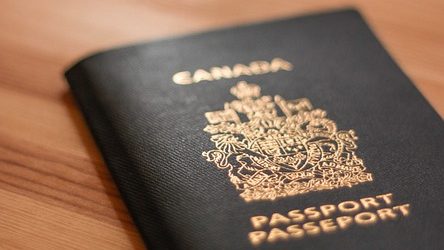
Reclaim your name

Canadian Passport
Image by tookapic from Pixabay

In June 2021 the Canadian government announced that Indigenous people would be allowed to use their ancestral family names on government-issued identity and travel documents. This meant that, for the first time, they could use the names that are part of their heritage and culture rather than the westernised names that are often used instead. Because of computers, it wasn’t quite as easy as that though …

Some Indigenous people take on a Western name to make things easier, to simplify things for official forms, to save having to spell the name, even to avoid teasing. If it is a real choice then perhaps that is fine, though surely we should be able to make it easy for people to use their actual names. For many it was certainly not a choice, their Indigenous names were taken from them. From the 19th century, hundreds of thousands of Indigenous children in Canada were sent to Western schools and made to take on Western names as part of an attempt to force them to “assimilate” into Western society. Some were even beaten if they did not use their new name. Because their family names had been “officially” changed, they and their descendants had to use these new names on official documents. Names matter. It is your identity, and in some cultures family names are also sacred. Being able to use them matters.

The change to allow ancestral names to be used was part of a reconciliation process to correct this injustice. After the announcement, Ta7talíya Nahanee, an indigenous woman from the Squamish community in Vancouver, was delighted to learn that she would be able to use her real name on her official documents, rather than ‘Michelle’ which she had previously used.

Unfortunately, she was frustrated to learn that travel documents could still only include the Latin alphabet (ABCDEFG etc) with French accents (À, Á, È, É etc). That excluded her name (pronounced Ta-taliya, the 7 is silent) as it contains a number and the letter í. Why? Because the computer said so!

Modern machine-readable passports have a specific area, called the Machine Readable Zone which can be read by a computer scanner at immigration. It has a very limited number of permitted characters. Names which don’t fit need to be “transliterated”, so Å would be written as AA, Ü as UE and the German letter ß (which looks like a B but sounds like a double S) is transliterated as SS. Names are completely rewritten to fit, so Müller becomes MUELLER, Gößmann becomes GOESSMANN, and Hämäläinen becomes HAEMAELAEINEN. If you’ve spent your life having your name adapted to fit someone else’s system this is another reminder of that.

While there are very sensible reasons for ensuring that a passport from one part of the world can be read by computers anywhere else, this choice of characters highlights that, in order to make things work, everyone else has been made to fall in line with the English-speaking population, another example of an unintentional bias. It isn’t, after all, remotely beyond our ability to design a system that meets the needs of everyone, it just needs the will. Designing computer systems isn’t just about machines. It’s about designing them for people.

Jo Brodie and Paul Curzon, Queen Mary University of London

More on …

Related Magazines …


EPSRC supports this blog through research grant EP/W033615/1. 

Subscribe to be notified whenever we publish a new post to the CS4FN blog.


Al-Jazari: the father of robotics

Al Jazari's hand washing automaton
Image by user:Grenavitar, Public domain, via Wikimedia Commons

Science fiction films are full of humanoid robots acting as servants, workers, friends or colleagues. The first were created during the Islamic Golden Age, a thousand years ago. 

Robots and automata have been the subject of science fiction for over a century, but their history in myth goes back millennia, but so does the actual building of lifelike animated machines. The Ancient Greeks and Egyptians built Automata, animal or human-like contraptions that seemed to come to life. The early automata were illusions that did not have a practical use, though, aside from entertainment or just to amaze people. 

It was the great inventor of mechanical gadgets Ismail Al-Jazari from the Islamic Golden Age of science, engineering and art in the 12th century, who first built robot-like machines with actual purposes. Powered by water, his automata acted as servants doing specific tasks. One machine was a humanoid automaton that acted as a servant during the ritual purification of hand washing before saying prayers. It poured water into a basin from a jug and then handed over a towel, mirror and comb. It used a toilet style flushing mechanism to deliver the water from a tank. Other inventions included a waitress automaton that served drinks and robotic musicians that played instruments from a boat. It may even have been programmable. 

We know about Al-Jazari’s machines because he not only created mechanical gadgets and automata, he also wrote a book about them: The Book of Knowledge of Ingenious Mechanical Devices. It’s possible that it inspired Leonardo Da Vinci who, in addition to being a famous painter of the Italian Renaissance, was a prolific inventor of machines. 

Such “robots” were not everyday machines. The hand washing automata was made for the King. Al-Jazari’s book, however, didn’t just describe the machines, it explained how to build them: possibly the first text book to cover Automata. If you weren’t a King, then perhaps you could, at least, have a go at making your own servants. 

Paul Curzon, Queen Mary University of London

More on …

Related Magazines …


EPSRC supports this blog through research grant EP/W033615/1. 

Mark Dean: A PC Success

An outline of a head showing the brain and spinal column on a digital background of binary and circuitry

Image by Gerd Altmann from Pixabay (cropped)

We have moved on to smartphones, tablets and smartwatches, but for 30 years the desktop computer ruled, and originally not just any desktop computer, the IBM PC. A key person behind its success was African American computer scientist, Mark Dean.

IBM is synonymous with computers. It became the computing industry powerhouse as a result of building large, room-sized computers for businesses. The original model of how computers would be used followed IBM’s president, Thomas J Watson’s, supposed quote that “there is a world market for about five computers.” They produced gigantic computers that could be dialled into by those needed computing time. That prediction was very quickly shown to be wrong, though, as computer sales boomed.

Becoming more personal

Mark Dean was the first African American
to receive IBM’s highest honour.

By the end of the 1970s the computing world was starting to change. Small, but powerful, mini-computers had taken off and some companies were pushing the idea of computers for the desktop. IBM was at risk of being badly left behind… until they suddenly roared back into the lead with the IBM personal computer and almost overnight became the world leaders once more, revolutionising the way computers were seen, sold and used. Their predictions were still a little off with initial sales of the IBM PC 8 times more than they expected! Within a few years they were selling many hundreds of thousands a year and making billions of dollars. Soon every office desk had one and PC had become an everyday word used to mean computer.

Get on the bus

So who was behind this remarkable success? One of the design team who created the IBM PC was Mark Dean. As a consequence of his work on the PC, he became the first African American to be made an IBM fellow (IBM’s highest honour). One of his important contributions was in leading the development of the PC’s bus. Despite the name, a computer bus is more like a road than a vehicle, so its other name of data highway is perhaps better. It is the way the computer chip communicates with the outside world. A computer on its own is not really that useful to have on your desktop. It needs a screen, keyboard and so on. A computer bus is a bit like your nervous system used to send messages from your brain around your body. Just as your brain interacts with the world receiving messages from your senses, and allowing you to take action by sending messages to your muscles, all using your nervous system, a computer chip sends signals to its peripherals using the bus. Those peripherals include things like mouse, keyboard, printers, monitors, modems, external memory devices and more; the equivalents of its way of sensing the world and interacting with it. The bus is in essence just a set of connectors into the chip so wires out with different allocated uses and a set of rules about how they are used. All peripherals then follow the same set of rules to communicate to the computer. It means you can easily swap peripherals in and out (unlike your body!) Later versions of the PC bus, that Mark designed, ultimately became an industry standard for desktop computers.

Mark can fairly be called a key member of that PC development team, given he was responsible for a third of the patents behind the PC. He didn’t stop there though. He has continued to be awarded patents, most recently related to artificial neural networks inspired by neuroscience. He has moved on from making computer equivalents of the nervous system to computer equivalents of the brain itself.

Paul Curzon, Queen Mary University of London

More on …

Related Magazines …


EPSRC supports this blog through research grant EP/W033615/1. 

In space no one can hear you …

Red arrows aircraft flying close to the ground.
Image by Bruno Albino from Pixabay 
Image by SnottyBoggins from Pixabay (cropped)

Johanna Lucht could do maths before she learned language. Why? Because she was born deaf and there was little support for deaf people where she lived. Despite, or perhaps because of, that she became a computer scientist and works for NASA. 

Being deaf can be very, very disabling if you don’t get the right help. As a child, Johanna had no one to help her to communicate apart from her mother. She tried to teach Johanna sign language from a book. Throughout most of her primary school years she couldn’t have any real conversations with anyone, never mind learn. She got the lifeline she needed, when the school finally took on an interpreter, Keith Wann, to help her. She quickly learned American Sign Language working with him. Learning your first language is crucial to learning other things and suddenly she was able to learn in school like other children. She caught up remarkably quickly, showing that an intelligent girl had been locked in that silent, shy child. More than anything though, from Keith, she learned never to give up. 

Her early ability in maths, now her favourite subject, came to the fore as she excelled at science and technology. By this point her family had moved from Germany where she grew up to Alaska where there was much more support, an active deaf community for her to join and lots more opportunities that she started to take. She signed up for a special summer school on computing specifically for deaf people at the University of Washington, learning the programming skills that became the foundation for her future career at NASA. At only 17 she even returned to help teach the course. From there, she signed up to do Computer Science at university and applied for an internship at NASA. To her shock and delight she was given a place. 

Hitting the ground running 

A big problem for pilots especially of fighter aircraft is that of “controlled flight into terrain”: a technical sounding phrase that just means flying the plane into the ground for no good reason other than how difficult flying a fighter aircraft as low as possible in hazardous terrain is. The solution is a ground collision avoidance system: basically the pilots need a computer to warn them when hazardous terrain is coming up and when they are too close for comfort, and so should take evasive action. Johanna helped work on the interface design, so the part that pilots see and interact with. To be of any use in such high-pressure situations this communication has to be slick and very clear. 

She impressed those she was working with so much that she was offered a full time job and so became an engineer at NASA Armstrong working with a team designing, testing and integrating new research technology into experimental aircraft. She had to run tests with other technicians, the first problem being how to communicate effectively with the rest of the team. She succeeded twice as fast as her bosses expected, taking only a couple of days before the team were all working well together. Her experience from the challenges she had faced as a child were now providing her with the skills to do brilliantly in a job where teamwork and communication skills are vital. 

Mission control 

Eventually, she gained a place in Mission Control. There, slick comms are vital too. The engineers have to monitor the flight including all the communication as it happens, and be able to react to any developing situation. Johanna worked with an interpreter who listened directly to all the flight communications, signing it all for her to see on a second monitor. Working with interpreters in a situation like this is in itself a difficult task and Johanna had to make sure not only that they could communicate effectively but that the interpreter knew all the technical language that might come up in the flight. Johanna had plenty of experience dealing with issues like that though, and they worked together well, with the result that in April 2017 Johanna became the first deaf person to work in NASA mission control on a live mission … where of course she did not just survive the job, she excelled. 

As Johanna has pointed out it is not deafness itself that disables people, but the world deaf people live in that does. When in a world that wasn’t set up for deaf people, she struggled, but as soon as she started to get the basic help she needed that all changed. Change the environment to one that does not put up obstacles and deaf people can excel like anyone else. In space no one can hear anyone scream or for that matter speak. We don’t let it stop our space missions though. We just invent appropriate technology and make the problems go away. 

– Paul Curzon, Queen Mary University of London

More on …

Read more about Johanna Lucht:

Related Magazines …

Subscribe to be notified whenever we publish a new post to the CS4FN blog.


This blog is funded by EPSRC on research agreement EP/W033615/1.

QMUL CS4FN EPSRC logos

Fran Allen: Smart Translation

Computers don’t speak English, or Urdu or Cantonese for that matter. They have their own special languages that human programmers have to learn if they want to create new applications. Even those programming languages aren’t the language computers really speak. They only understand 1s and 0s. The programmers have to employ translators to convert what they say into Computerese (actually binary): just as if I wanted to speak with someone from Poland, I’d need a Polish translator. Computer translators aren’t called translators though. They are called ‘compilers’, and just as it might be a Pole who translated for me into Polish, compilers are special programs that can take text written in a programming language and convert it into binary.

The development of good compilers has been one of the most important advancements from the early years of computing and Fran Allen, one of the star researchers of computer giant, IBM, was awarded the ‘Turing Prize’ for her contribution. It is the Computer Science equivalent of a Nobel Prize. Not bad given she only joined IBM to clear her student debts from University.

Fran was a pioneer with her groundbreaking work on ‘optimizing compilers’. Translating human languages isn’t just about taking a word at a time and substituting each for the word in the new language. You get gibberish that way. The same goes for computer languages.

Things written in programming languages are not just any old text. They are instructions. You actually translate chunks of instructions together in one go. You also add a lot of detail to the program in the translation, filling in every little step.

Suppose a Japanese tourist used an interpreter to ask me for directions of how to get to Sheffield from Leeds. I might explain it as:

“Follow the M1 South from Junction 43 to Junction 33”.

If the Japanese translator explained it as a compiler would they might actually say (in Japanese):

“Take the M1 South from Junction 43 as far as Junction 42, then follow the M1 South from Junction 42 as far as Junction 41, then follow … from Junction 34 as far as Junction 33”.

Computers actually need all the minute detail to follow the instructions.

The most important thing about computer instructions (i.e., programs) is usually how fast following them leads to the job getting done. Imagine I was on the Information desk at Heathrow airport and the tourist wanted to get to Sheffield. I’ve never done that journey. I do know how to get from Heathrow to Leeds as I’ve done it a lot. I’ve also gone from Leeds to Sheffield a lot, so I know that journey too. So the easiest way for me to give instructions for getting from London to Sheffield, without much thought and be sure it gets the tourist there might be to say:

Go from Heathrow to Leeds:

  1. Take the M4 West to Junction 4B
  2. Take the M25 clockwise to Junction 21
  3. Take the M1 North to Leeds at Junction 43

Then go from Leeds to Sheffield:

  1. Take the M1 South to Sheffield at Junction 33

That is easy to write and made up of instructions I’ve written before perhaps. Programmers reuse instructions like this a lot – it both saves their time and reduces the chances of introducing mistakes into the instructions. That isn’t the optimum way to do the journey of course. You pass the turn off for Sheffield on the way up. An optimizing compiler is an intelligent compiler. It looks for inefficiency and actually converts it into a shorter and faster set of instructions. The Japanese translator, if acting like an optimizing compiler, would actually remove the redundant instructions from the ones I gave and simplify it (before converting it to all the junction by junction detailed steps) to:

  1. Take the M4 West to Junction 4B
  2. Take the M25 clockwise to Junction 21
  3. Take the M1 North to Sheffield Junction 33

Much faster! Much more intelligent! Happier tourists!

Next time you take the speed of your computer for granted, remember it is not just that fast because the hardware is quick, but because, thanks to people like Fran Allen, the compilers don’t just do what the programmers tell them to do. They are far smarter than that.

Paul Curzon, Queen Mary University of London (Updated from the archive)

More on …

Related Magazines …


EPSRC supports this blog through research grant EP/W033615/1. 

A gendered timeline of technology

(Updated from previous versions, July 2025)

Women have played a gigantic role in the history of computing. Their ideas form the backbone to modern technology, though that has not always been obvious. Here is a gendered timeline of technology innovation to offset that.

825 Muslim scholar Al-Khwarizmi kicks it all off with a book on algorithms – recipes on how to do computation pulling together work of Indian mathematicians. Of course back then it’s people who do all the computation, as electronic computers won’t exist for another millennium.

1587 Mary, Queen of Scots loses her head because the English Queen, Elizabeth I, has a crack team of spies that are better at computer science than Mary’s are. They’ve read the Arab mathematician Al-Kindi’s book on the science of cryptography so they can read all Mary’s messages. More

1650 Maria Cunitz publishes Urania Propitia an updated book of astronomical tables based on the ones by Johannes Kepler. She gives an improved algorithm over his for calculating the positions of the planets in the sky. That and her care as a human computer make it the most accurate to date. More.

1757 Nicole-Reine Lepaute works as a human computer as part of a team of three calculating the date Halley’s comet will return to greater accuracy (a month) than Halley had (his prediction was over a year).

1784 Mary Edwards is paid as a human computer helping compile The Nautical Almanac, a book of data used to help sailors work out their position (longitude) at sea. She had been doing the work in her husband’s name for about 10 years prior to this.

1787 Caroline Herschel becomes the first woman to be paid to be an astronomer (by King George III) as a result of finding new comets and nebulae. She goes on to spend 2 years creating the most comprehensive catalogue of stars ever created to that point. This involves acting as a human computer doing vast amounts of computation calculating positions.

1818 Mary Shelley writes the first science fiction novel on artificial life, Frankenstein. More

1827 Mary Web publishes the first ever Egyptian Mummy novel. Set in the future, in it she predicts a future with robot surgeons, AI lawyers and a version of the Internet. More

1842 Ada Lovelace and Charles Babbage work on the analytical engine. Lovelace shows that the machine could be programmed to calculate a series of numbers called Bernoulli numbers, if Babbage can just get the machine built. He can’t. It’s still Babbage who gets most of the credit for the next hundred-plus years. Ada predicts that one day computers will compose music, A century or so later she is proved right. More

1854 George Boole publishes his work on a logical system that remains obscure until the 1930s, when Claude Shannon discovers that Boolean logic can be electrically applied to create digital circuits.

1856 Statistician (and nurse) Florence Nightingale returns from the Crimean War and launches the subject of data visualisation to convince politicians that soldiers are dying in hospital because of poor sanitation. More

1912 Thomas Edison claims “woman is now centuries, ages, even epochs behind man”, the year after Marie Curie wins the second of her two Nobel prizes.

1927 Metropolis, a silent science fiction film, is released. Male scientists kidnap a woman and create a robotic version of her to trick people and destroy the world. The robotic Maria dances nude to ‘mesmerise’ the workers. The underlying assumptions are bleak: women with power should be replaced with docile robots, bodies are more important than brains, and working class men are at the whim of beautiful gyrating women. Could the future be more offensive?

1931 Mary Clem starts work as a human computer at Iowa State College. She invents the zero check as a way of checking for errors in algorithms human computers (the only kind at the time) are following.

1941 Hedy Lamarr, better know as a blockbuster Hollywood actress co-invents frequency hopping: communicating by constantly jumping from one frequency to another. This idea underlies much of today’s mobile technology. More

1943 Thomas Watson, the CEO of IBM, announces that he thinks: “there is a world market for maybe 5 computers”. It’s hard to believe just how wrong he was!

1945 Grace Murray Hopper and her associates are hard at work on an early computer called Mark I when a moth causes the circuit to malfunction. Hopper (later made an admiral) refers to this as ‘debugging’ the circuit. She tapes the bug to her logbook. After this, computer malfunctions are referred to as ‘bugs’. Her achievements didn’t stop there: she develops the first compiler and one of the pioneering programming languages. More

1946 The Electronic Numerical Integrator and Computer is the world’s first general purpose electronic computer. The main six programmers, all highly skilled mathematicians, were women. They were seen to be more capable programmers because it was considered too repetitive for men and as a result it was labelled ‘sub-professional’ work. Once more men realised that it was interesting and fun, programming was re- classed as ‘professional’, the salaries became higher, and men become dominant in the field.

1949 A Popular Mechanics magazine article predicts that the computers of the future might weigh “as little as” 1.5 tonnes each. That’s over 10,000 iPhones!

1958 Daphne Oram, a pioneer of electronic music, co-founds the BBC Radiophonic Workshop, responsible for the soundscapes behind hundreds of tv and radio programmes. She suggests the idea of spatial sound where sounds are in specific places. More

1966 Paper published on ELIZA, the first chatbot that in its psychotherapist role, people treat as human. It starts an unfortunately long line of female chatbots. It is named after a character from the play Pygmalion about a working class woman taught to speak in a posh voice. The Greek myth of Pygmalion is about a male sculptor falling in love with a statue he made. Hmm… Joseph Weizenbaum agrees the choice was wrong as it stereotyped women.

1967 The original series of TV show Star Trek includes an episode where mad ruler Harry Mudd runs a planet full of identical female androids who are ‘fully functional’ at physical pleasure to tend to his whims. But that’s not the end of the pleasure bots in this timeline…

1969 Margaret Hamilton is in charge fo the team developing the in-flight software for the Apollo missions including the Apollo 11 Moon Landing. More.

1969 DIna St Johnston founds the UKs first independent software house. It is a massive success writing software for lots of big organisations including the BBC and British Rail. More.

1972 Karen Spärck Jones publishes a paper describing a new way to pick out the most important documents when doing searches. Twenty years later, once the web is up and running, the idea comes of age. It’s now used by most search engines to rank their results.

1972 Ira Levin’s book ‘The Stepford Wives’ is published. A group of suburban husbands kill their successful wives and create look-alike robots to serve as docile housewives. It’s made into a film in 1975. Sounds like those men were feeling a bit threatened.

1979 The US Department of Defence introduces a new programming language called Ada after Ada Lovelace.

1982 The film Blade Runner is released. Both men and women are robots but oddly there are no male robots modelled as ‘basic pleasure units’. Can’t you guys think of anything else?

1984 Technology anthropologist Lucy Suchman draws on social sciences research to overturn the current computer science thinking on how best to design interactive gadgets that are easy to use. She goes on to win the Benjamin Franklin Medal, one of the oldest and most prestigious science awards in the world.

1985 In the film Weird Science, two teenage supergeeks hack into the government’s mainframe and instead of using their knowledge and skills to do something really cool…they create the perfect woman. Yawn. Not again.

1985 Sophie Wilson designs the instruction set for the first ARM RISC chip creating a chip that is both faster and uses less energy than traditional designs: just what you need for mobile gadgets. This chip family go on to power 95% of all smartphones. More

1988 Ingrid Daubechies comes up with a practical way to use ‘wavelets’, mathematical tools that when drawn are wave-like. This opens up new powerful ways to store images in far less memory, make images sharper,
and much, much more. More

1995 Angelina Jolie stars as the hacker Acid Burn in the film Hackers, proving once and for all that women can play the part of the technologically competent in films.

1995 Ming Lin co-invents algorithms for tracking moving objects and detecting collisions based on the idea of bounding them with boxes. They are used widely in games and computer-aided design software.

2004 A new version of The Stepford Wives is released starring Nicole Kidman. It flops at the box office and is panned by reviewers. Finally! Let’s hope they don’t attempt to remake this movie again.

2005 The president of Harvard University, Lawrence Summers, says that women have less “innate” or “natural” ability than men in science. This ridiculous remark causes uproar and Summers leaves his position in the wake of a no-confidence vote from Harvard faculty.

2006 Fran Allen is the first woman to win the Turing Award, which is considered the Nobel Prize of computer science, for work dating back to the 1950s. Allen says that she hopes that her award gives more “opportunities for women in science, computing and engineering”. More

2006 Torchwood’s technical expert Toshiko Sato (Torchwood is the organisation protecting the Earth from alien invasion in the BBC’s cult TV series) is not only a woman but also a quiet, highly intelligent computer genius. Fiction catches up with reality at last.

2006 Jeannette Wing promotes the idea of computational thinking as the key problem solving skill set of computer scientists. It is now taught in schools across the world.

2008 Barbara Liskov wins the Turing Award for her work in the design of programming languages and object-oriented programming. This happens 40 years after she becomes the first woman in the US to be awarded a PhD in computer science. More

2009 Wendy Hall is made a Dame Commander of the Order of the British Empire for her pioneering work on hypermedia and web science. More

2011  Kimberly Bryant, an electrical engineer and computer scientist founds Black Girls Code to encourage and support more African-American girls to learn to code. Thousands of girls have been trained. More

2012 Shafi Goldwasser wins the Turing Award. She co-invented zero knowledge proofs: a way to show that a claim being made is true without giving away any more information. This is important in cryptography to ensure people are honest without giving up privacy. More

2015 Sameena Shah’s AI driven fake news detection and verification system goes live giving Reuters an advantage of several years over competitors. More

2016 Hidden Figures, the film about Katherine Johnson, Dorothy Vaughan, and Mary Jackson, the female African-American mathematicians and programmers who worked for NASA supporting the space programme released. More

2018 Gladys West is inducted into the US Air Force Hall of Fame for her central role in the development of satellite remote sensing and GPS. Her work directly helps us all. More

2025 Ursula Martin is made a Dame Commander of the Order of the British Empire for services to Computer Science. She was the first female Professor of Computer Science in the UK focussing on theoretical Computer Science, Formal Methods and later maths as a social enterprise. She was the first true expert to examine the papers of Ada Lovelace. More.

It is of course important to remember that men occasionally helped too! The best computer science and innovation arise when the best people of whatever gender, culture, sexuality, ethnicity and background, disabled or otherwise, work together.

Paul Curzon, Queen Mary University of London

More on …

Related Magazines …


EPSRC supports this blog through research grant EP/W033615/1. 
Sameena Shah: News you can trust

Having reliable news always matters to us: whether when disasters strike, of knowing for sure what our politicians really said, or just knowing what our favourite celebrity is really up to. Nowadays social networks like Twitter and Facebook are a place to find breaking news, though telling fact from fake-news is getting ever harder. How do you know where to look, and when you find something how do you know that juicy story isn’t just made up?

One way to be sure of stories is from trusted news-providers, like the BBC, but how do they make sure their stories are real. A lot of fake news is created by Artificial Intelligence bots and Artificial Intelligence is part of the solution to beat them.

Sameena Shah realised this early on. An expert in Artificial Intelligence, she led a research team at news provider Thomson Reuters. They provide trusted information for news organisations worldwide. To help ensure we all have fast, reliable news, Sameena’s team created an Artificial Intelligence program to automatically discover news from the mass of social networking information that is constantly being generated. It combines programs that process and understand language to work out the meaning of people’s posts – ‘natural language processing’ – with machine learning programs that look for patterns in all the data to work out what is really news and most importantly what is fake. She both thought up the idea for the system and led the development team. As it was able to automatically detect fake news, when news organisations were struggling with how much was being generated, it gave Thomson Reuters a head-start of several years over other trusted news companies.

Sameena’s ideas and work putting them in to practice has helped make sure we all know what’s really happening.

Paul Curzon, Queen Mary University of London (updated from the archive)

More on …

Related Magazines …


EPSRC supports this blog through research grant EP/W033615/1. 

Stretching your keyboard – getting more out of QWERTY

by Jo Brodie, Queen Mary University of London

A QWERTY keyboard after smartphone keyboards starting with keys q w e r t y on the top row
A smartphone’s on-screen keyboard layout, called QWERTY after the first six letters on the top line. Image by CS4FN after smartphone QWERTY keyboards.

If you’ve ever sent a text on a phone or written an essay on a computer you’ve most likely come across the ‘QWERTY’ keyboard layout. It looks like this on a smartphone.

This layout has been around in one form or another since the 1870s and was first used in old mechanical typewriters where pressing a letter on the keyboard caused a hinged metal arm with that same letter embossed at the end to swing into place, thwacking a ribbon coated with ink, to make an impression on the paper. It was quite loud!

The QWERTY keyboard isn’t just used by English speakers but can easily be used by anyone whose language is based on the same A,B,C Latin alphabet (so French, Spanish, German etc). All the letters that an English-speaker needs are right there in front of them on the keyboard and with QWERTY… WYSIWYG (What You See Is What You Get).  There’s a one-to-one mapping of key to letter: if you tap the A key you get a letter A appearing on screen, click the M key and an M appears. (To get a lowercase letter you just tap the key but to make it uppercase you need to tap two keys; the up arrow (‘shift’) key plus the letter).

A French or Spanish speaking person could also buy an adapted keyboard that includes letters like É and Ñ, or they can just use a combination of keys to make those letters appear on screen (see Key Combinations below). But what about writers of other languages which don’t use the Latin alphabet? The QWERTY keyboard, by itself, isn’t much use for them so it potentially excludes a huge number of people from using it.

In the English language the letter A never alters its shape depending on which letter goes before or comes after it. (There are 39 lower case letter ‘a’s and 3 upper case ‘A’s in this paragraph and, apart from the difference in case, they all look exactly the same.) That’s not the case for other languages such as Arabic or Hindi where letters can change shape depending on the adjacent letters. With some languages the letters might even change vertical position, instead of being all on the same line as in English.

Early attempts to make writing in other languages easier assumed that non-English alphabets could be adapted to fit into the dominant QWERTY keyboard, with letters that are used less frequently being ignored and other letters being simplified to suit. That isn’t very satisfactory and speakers of other languages were concerned that their own language might become simplified or standardised to fit in with Western technology, a form of ‘digital colonialism’.

But in the 1940s other solutions emerged. The design for one Chinese typewriter avoided QWERTY’s ‘one key equals one letter’ (which couldn’t work for languages like Chinese or Japanese which use thousands of characters – impossible to fit onto one keyboard, see picture at the end!).

Rather than using the keys to print one letter, the user typed a key to begin the process of finding a character. A range of options would be displayed and the user would select another key from among them, with the options narrowing until they arrived at the character they wanted. Luckily this early ‘retrieval system’ of typing actually only took a few keystrokes to bring up the right character, otherwise it would have taken ages.

This is a way of using a keyboard to type words rather than letters, saving time by only displaying possible options. It’s also an early example of ‘autocomplete’ now used on many devices to speed things up by displaying the most likely word for the user to tap, which saves them typing it.

For example in English the letter Q is generally* always followed by the letter U to produce words like QUAIL, QUICK or QUOTE. There are only a handful of letters that can follow QU – the letter Z wouldn’t be any use but most of the vowels would be. You might be shown A, E, I or O and if you selected A then you’ve further restricted what the word could be (QUACK, QUARTZ, QUARTET etc).

In fact one modern typing system, designed for typists with physical disabilities, also uses this concept of ‘retrieval’, relying on a combination of letter frequency (how often a letter is used in the English language) and probabilistic predictions (about how likely a particular letter is to come next in an English word). Dasher is a computer program that lets someone write text without using a keyboard, instead a mouse, joystick, touchscreen or a gaze-tracker (a device that tracks the person’s eye position) can be used.

Letters are presented on-screen in alphabetic order from top to bottom on the right hand side (lowercase first, then upper case) and punctuation marks. The user ‘drives’ through the word by first pushing the cursor towards the first letter, then the next possible set of letters appear to choose from, and so on until each word is completed. You can see it in action in this video on the Dasher Interface.

Key combinations

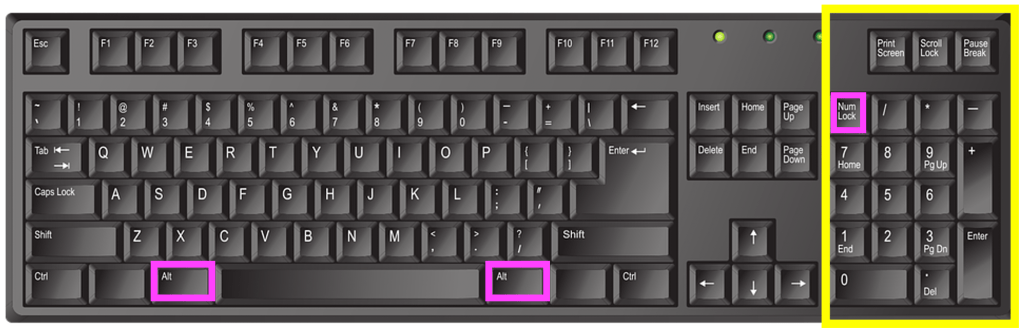
The use of software to expand the usefulness of QWERTY keyboards is now commonplace with programs pre-installed onto devices which run in the background. These IMEs or Input Method Editors can convert a set of keystrokes into a character that’s not available on the keyboard itself. For example, while I can type SHIFT+8 to display the asterisk (*) symbol that sits on the 8 key there’s no degree symbol (as in 30°C) on my keyboard. On a Windows computer I can create it using the numeric keypad on the right of some keyboards, holding down the ALT key while typing the sequence 0176. While I’m typing the numbers nothing appears but once I complete the sequence and release the ALT key the ° appears on the screen.

English language keyboard image by john forcier from Pixabay, showing the numeric keypad highlighted in yellow with the two Alt keys and the 'num lock' key highlighted in pink. Num lock ('numeric lock') needs to be switched on for the keypad to work, then use the Alt key plus a combination of letters on the numeric keypad to produce a range of additional 'alt code' characters.
English language keyboard image by john forcier from Pixabay highlighted by CS4FN, showing the numeric keypad highlighted in yellow with the two Alt keys and the ‘num lock’ key highlighted in pink. Num lock (‘numeric lock’) needs to be switched on for the keypad to work, then use the Alt key plus a combination of letters on the numeric keypad to produce a range of additional ‘alt code‘ characters.

When Japanese speakers type they use the main ‘ABC’ letters on the keyboard, but the principle is the same – a combination of keys produces a sequence of letters that the IME converts to the correct character. Or perhaps they could use Google Japan’s April Fool solution from 2010, which surrounded the user in half a dozen massive keyboards with hundreds of keys a little like sitting on a massive drum kit!

*QWERTY is a ‘word’ which starts with a Q that’s not followed by a U of course…

Watch …

More on …

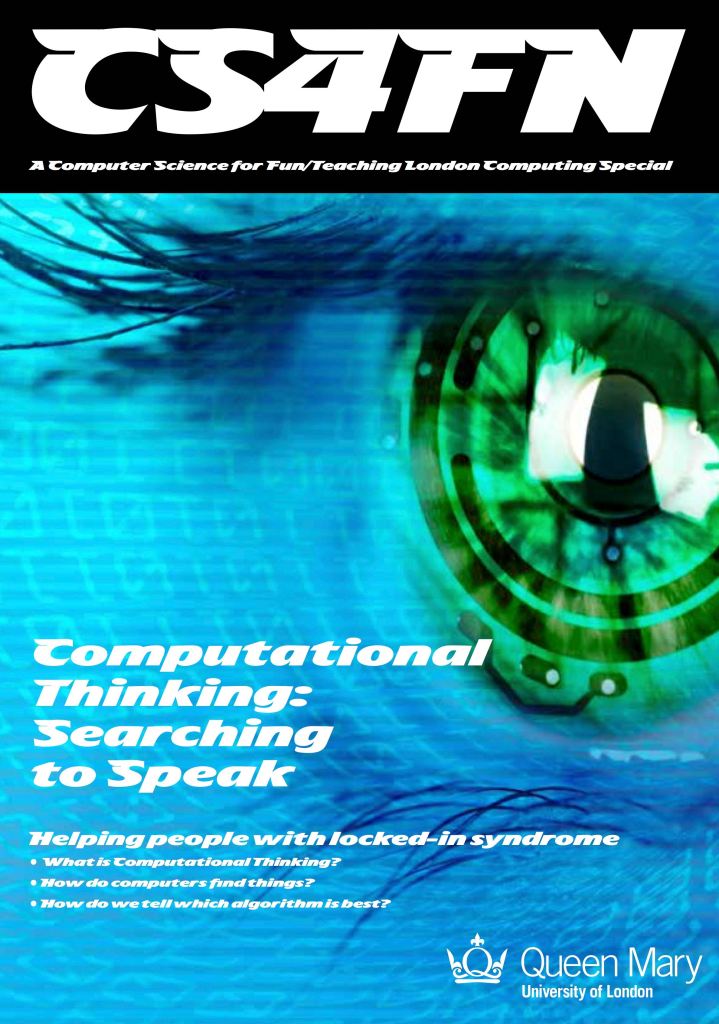
The ‘retrieval system’ of typing mentioned above, which lets the user get to the word or characters more quickly, is similar to the general problem solving strategy called ‘Divide and Conquer’. You can read more about that and other search algorithms in our free booklet ‘Searching to Speak‘ (PDF) which explores how the design of an algorithm could allow someone with locked-in syndrome to communicate. Locked-in syndrome is a condition resulting from a stroke where a person is totally paralysed. They can see, hear and think but cannot speak. How could a person with Locked-in syndrome write a book? How might they do it if they knew some computational thinking?


EPSRC supports this blog through research grant EP/W033615/1.