Scéalextric Stories

If you watch a lot of movies you’ve probably noticed some recurring patterns in the way that popular cinematic stories are structured. Every hero or heroine needs a goal and a villain to thwart that goal. Every goal requires travel along a path that is probably blocked with frustrating obstacles. Heroes may not see themselves as heroes, and will occasionally take the wrong fork in the path, only to return to the one true way before story’s end. We often speak of this path as if it were a race track: a fast-paced story speeds towards its inevitable conclusion, following surprising “twists” and “turns” along the way. The track often turns out to be a circular one, with the heroine finally returning to the beginning, but with a renewed sense of appreciation and understanding. Perhaps we can use this race track idea as a basis for creating stories.

Building a track

If you’ve ever played with a Scalextric set, you will know that the curviest tracks make for the most dramatic stories, by providing more points at which our racing cars can fly off at a tight bend. In Scalextric you build your own race circuits by clicking together segments of prefabricated track, so the more diverse the set of track parts, the more dramatic your circuit can be. We can think of story generation as a similar kind of process. Imagine if you had a large stock of prefabricated plot segments, each made up of three successive bits of story action. A generator could clip these segments together to create a larger story, by connecting the pieces end-to-end. To keep the plot consistent we would only link up sections if they have overlapping actions. So If D-E-F is a segment comprising the actions D, E, and F, we could create the story B-C-D-E-F-G-H by linking the section B-C-D on to the left of D-E-F and F-G-H on its right.

Use a kit

At University College Dublin (UCD) we have created a set of rich public resources that make it easy for you to build your own automated story generator. We call the bundle of resources Scéalextric, from scéal (the Irish word for story) and Scalextric. You can download the Scéalextric resources from our Github but an even better place to start is our blog for people who want to build creative systems of any kind, called Best Of Bot Worlds.

In Artificial Intelligence we often represent complex knowledge structures as ‘graphs’. These graphs consists of lots of labeled lines (called edges) that show how labeled points (called nodes) are connected. That is what our story pieces essentially are. We have several agreed ways for storing these node-relation-node triples, with acronyms hiding long names, like XML (eXtensible Markup Language), RDF (Resource Description Framework) and OWL (Web Ontology Language), but the simplest and most convenient way to create and maintain a large set of story triples is actually just to use a spreadsheet! Yes, the boring spreadsheet is a great way to store and share knowledge, because every cell lies at the intersection of a row and a column. These three parts give us our triples.

Scéalextric is a collection of easy-to-browse spreadsheets that tell a machine how actions connect to form action sequences (like D-E-F above), how actions causally interconnect to each other (via and, then, but), how actions can be “rendered” in natural idiomatic English, and so on.

Adding Character

Automated storytelling is one of the toughest challenges for a researcher or hobbyist starting out in artificial intelligence, because stories require lots of knowledge about causality and characterization. Why would character A do that to character B, and what is character B likely to do next? It helps if the audience can identify with the characters in some way, so that they can use their pre-existing knowledge to understand why the characters do what they do. Imagine writing a story involving Donald Trump and Lex Luthor as characters: how would these characters interact, and what parts of their personalities would they reveal to us through their actions?

Scéalextric therefore contains a large knowledge-base of 800 famous people. These are the cars that will run on our tracks. The entry for each one has triples describing a character’s gender, fictive status, politics, marital status, activities, weapons, teams, domains, genres, taxonomic categories, good points and bad points, and a lot more besides. A key challenge in good storytelling, whether you are a machine or a human, is integrating character and plot so that one informs the other.

A Twitterbot plot

Let’s look at a story created and tweeted by our Twitterbot @BestOfBotWorlds over a series of 12 tweets. Can you see where the joins are in our Scéalextric track? Can you recognize where character-specific knowledge has been inserted into the rendering of different actions, making the story seem funny and appropriate at the same time? More importantly, can you see how you might connect the track segments differently, choose characters more carefully, or use knowledge about them more appropriately, to make better stories and to build a better story-generator? That’s what Scéalextric is for: to allow you to build your own storytelling system and to explore the path less trodden in the world of computational creativity. It all starts with a click.
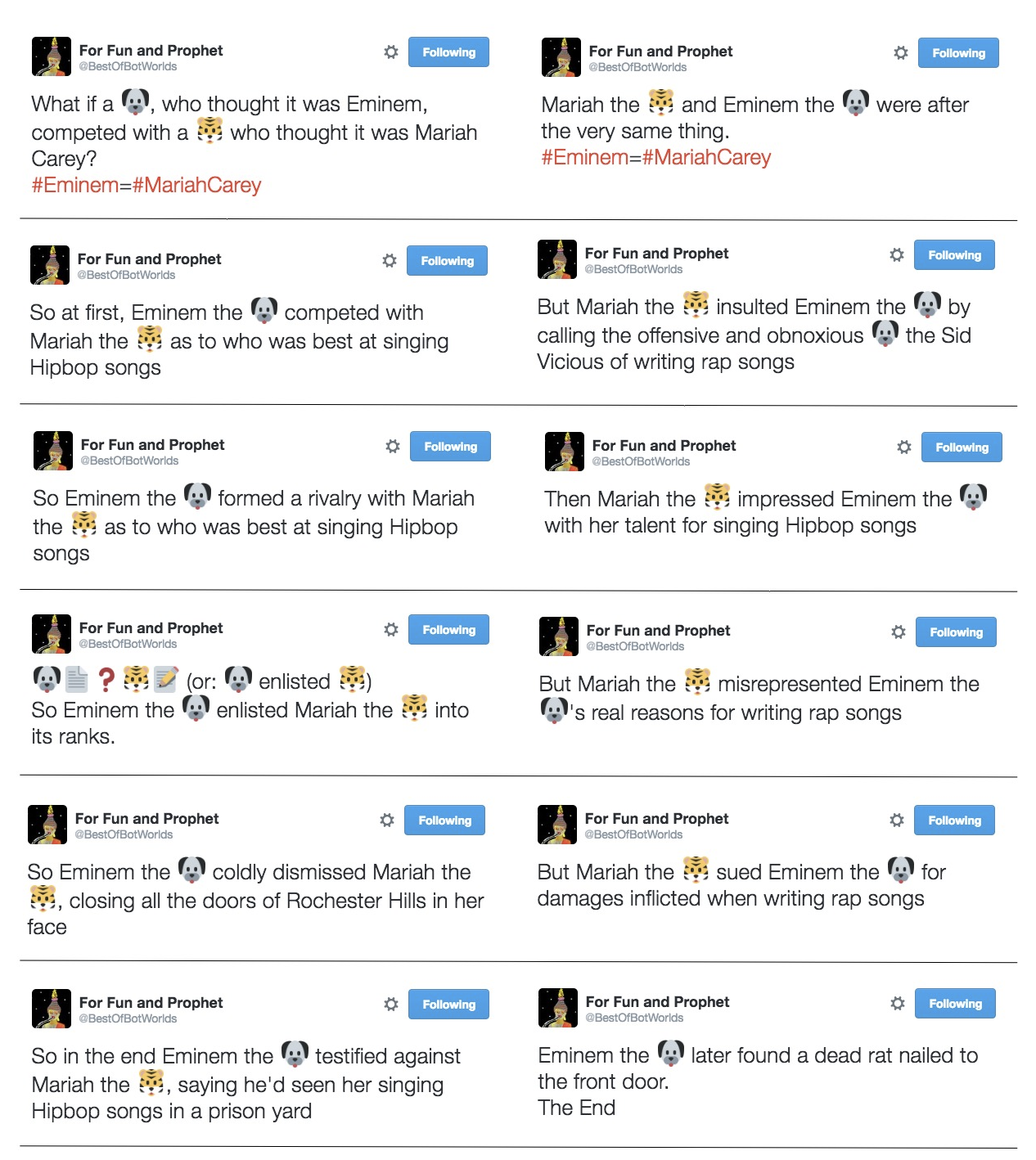
An unlikely tale generated by the Twitter storybot.

Tony Veale, University College Dublin


Further reading

Christopher Strachey came up with the first example of a computer program that could create lines of text (from lists of words). The CS4FN developed a game called ‘Program A Postcard’ (see below) for use at festival events.


Related Magazine …

I wandered lonely as a mass of dejected vapour – try some AI poetry

by Jane Waite, Queen Mary University of London

A single fluffy white cloud brightly lit by the sun, against a deep blue sky
Image by Enrique from Pixabay

Ever used an online poem generator, perhaps to get started with an English assignment? They normally have a template and some word lists you can fill in, with a simple algorithm that randomly selects from the word lists to fill out the template. “I wandered lonely as a cloud” might become “I zoomed destitute as a rainbow” or I danced homeless as a tree”. It would all depend on those word lists. Artificial Intelligence and machine learning researchers are aiming to be more creative.

Stanford University, the University of Massachusetts and Google have created works that look like poems, by accident. They were using a machine learning Artificial Intelligence they had previously ‘trained’ on romantic novels to research the creation of captions for images, and how to translate text into different languages. They fed it a start and end sentence, and let the AI fill in the gap. The results made sense though were ‘rather dramatic’: for example

he was silent for a long moment
he was silent for a moment
it was quiet for a moment
it was dark and cold
there was a pause
it was my turn

Is this a real poem? What makes a poem a poem is in itself an area of research, with some saying that to create a poem, you need a poet and the poet should do certain things in their ‘creative act’. Researchers from Imperial College London and University College Dublin used this idea to evaluate their own poetry system. They checked to see if the poems they generated met the requirements of a special model for comparing creative systems. This involved things like checking whether the work formed a concept, and including measures such as flamboyance and lyricism.

Read some poems written by humans and compare them to poems created by online poetry generators. What makes it creativity? Maybe that’s up to you!


See also this article about Christopher Strachey, from our LGBT portal 🏳️‍🌈, who came up with the first example of a computer program that could create lines of text (from lists of words).


Jane’s article was first published on the original CS4FN website and there’s a copy on page 17 of issue 22 (“Creative Computing”) of the CS4FN magazine which you can download FREE by clicking on the link or the image of the front cover below.


Related Magazine …


Subscribe to be notified whenever we publish a new post to the CS4FN blog.


This page is funded by EPSRC on research agreement EP/W033615/1.

QMUL CS4FN EPSRC logos

Solving problems you care about

by Patricia Charlton and Stefan Poslad, Queen Mary University of London Queen Mary University of London

The best technology helps people solve real problems. To be a creative innovator you need not only to be able to create a solution that works but also to spot a need in the first place and be able to come up with creative solutions. Over the summer a group of sixth formers on internships at Queen Mary had a go at doing this. Ultimately their aim was to build something from a programmable gadget such as a BBC micro:bit or Raspberry Pi. They therefore had to learn about the different possible gadgets they could use, how to program them and how to control the on-board sensors available. They were then given the design challenge of creating a device to solve a community problem.

Street in London with two red buses going in opposite directions.
Red London buses image by Albrecht Fietz from Pixabay

Hearing the bus is here

Tai Kirby wanted to help visually impaired people. He knew that it’s hard for someone with poor sight to tell when a bus is arriving. In busy cities like London this problem is even worse as buses for different destinations often arrive at once. His solution was a prototype that announces when a specific bus is arriving, letting the person know which was which. He wrote it in Python and it used a Raspberry pi linked to low energy Bluetooth devices.

The fun spell

Filsan Hassan decided to find a fun way to help young kids learn to spell. She created a gadget that associated different sounds with different letters of the alphabet, turning spelling words into a fun, musical experience. It needed two micro:bits and a screen communicating with each other using a radio link. One micro:bit controlled the screen while the other ran the main program that allowed children to choose a word, play a linked game and spell the word using a scrolling alphabet program she created. A big problem was how to make sure the combination of gadgets had a stable power supply. This needed a special circuit to get enough power to the screen without frying the micro:bit and sadly we lost some micro:bits along the way: all part of the fun!

Two microbit computers; one is plugged in to a USB cable.
Microbit programming image by JohnnyAndren from Pixabay

Remote robot

Jesus Esquivel Roman developed a small remote-controlled robot using a buggy kit. There are lots of applications for this kind of thing, from games to mine-clearing robots. The big challenge he had to overcome was how to do the navigation using a compass sensor. The problem was that the batteries and motor interfered with the calibration of the compass. He also designed a mechanism that used the accelerometer of a second micro:bit allowing the vehicle to be controlled by tilting the remote control.

Memory for patterns

Finally, Venet Kukran was interested in helping people improve their memory and thinking skills. He invented a pattern memory game using a BBC micro:bit and implemented in micropython. The game generates patterns that the player has to match and then replicate to score points. The program generates new patterns each time so every game is different. The more you play the more complex the patterns you have to remember become.

As they found you have to be very creative to be an innovator, both to come up with real issues that need a solution, but also to overcome the problems you are bound to encounter in your solutions.


This article was originally published on the CS4FN website and a copy can also be found in issue 22 of the magazine called Creative Computing. You can download that as a PDF by clicking on the picture below and you can also download all of our free material, including back issues of the CS4FN magazine and other booklets, at our downloads site: https://cs4fndownloads.wordpress.com


Related Magazine …


EPSRC supports this blog through research grant EP/W033615/1.

The Hive at Kew

Art meets bees, science and electronics

(from the archive)

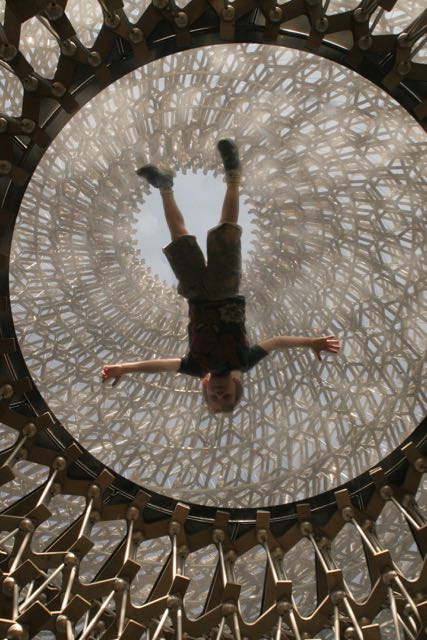
a boy lying in the middle of the Hive at Kew Gardens.
Image by Paul Curzon

Combine an understanding of science, with electronics skills and the creativity of an artist and you can get inspiring, memorable and fascinating experiences. That is what the Hive, an art instillation at Kew Gardens in London, does. It is a massive sculpture linked to a subtle sound and light experience, surrounded by a wildflower meadow, but based on the work of scientists studying bees.

The Hive is a giant aluminium structure that represents a bee hive. Once inside you see it is covered with LED lights that flicker on and off apparently randomly. They aren’t random though, they are controlled by a real bee hive elsewhere in the gardens. Each pulse of a light represents bees communicating in that real hive where the artist Wolfgang Buttress placed accelerometers. These are simple sensors like those in phones or a BBC micro:bit that sense movement. The sensitive ones in the bee hive pick up vibrations caused by bees communicating with each other The signals generated are used to control lights in the sculpture.

A new way to communicate

This is where the science comes in. The work was inspired by Martin Bencsik’s team at Nottingham Trent University who in 2011 discovered a new kind of communication between bees using vibrations. Before bees are about to swarm, where a large part of the colony split off to create a new hive, they make a specific kind of vibration, as they prepare to leave. The scientists discovered this using the set up copied by Wolfgang Buttress, using accelerometers in bee hives to help them understand bee behaviour. Monitoring hives like this could help scientists understand the current decline of bees, not least because large numbers of bees die when they swarm to search for a new nest.

Hear the vibrations through your teeth

Good vibrations

The Kew Hive has one last experience to surprise you. You can hear vibrations too. In the base of the Hive you can listen to the soundtrack through your teeth. Cover your ears and place a small coffee stirrer style stick between your teeth, and put the other end of the stick in to a slot. Suddenly you can hear the sounds of the bees and music. Vibrations are passing down the stick, through your teeth and bones of your jawbone to be picked up in a different way by your ears.

A clever use of simple electronics has taught scientists something new and created an amazing work of art.

– Paul Curzon, Queen Mary University of London


More on …

Related Magazines …

cs4fn issue 4 cover
A hoverfly on a leaf

EPSRC supports this blog through research grant EP/W033615/1, and through EP/K040251/2 held by Professor Ursula Martin. 

QMUL CS4FN EPSRC logos

Hoverflies: comin’ to get ya

(from the archive)

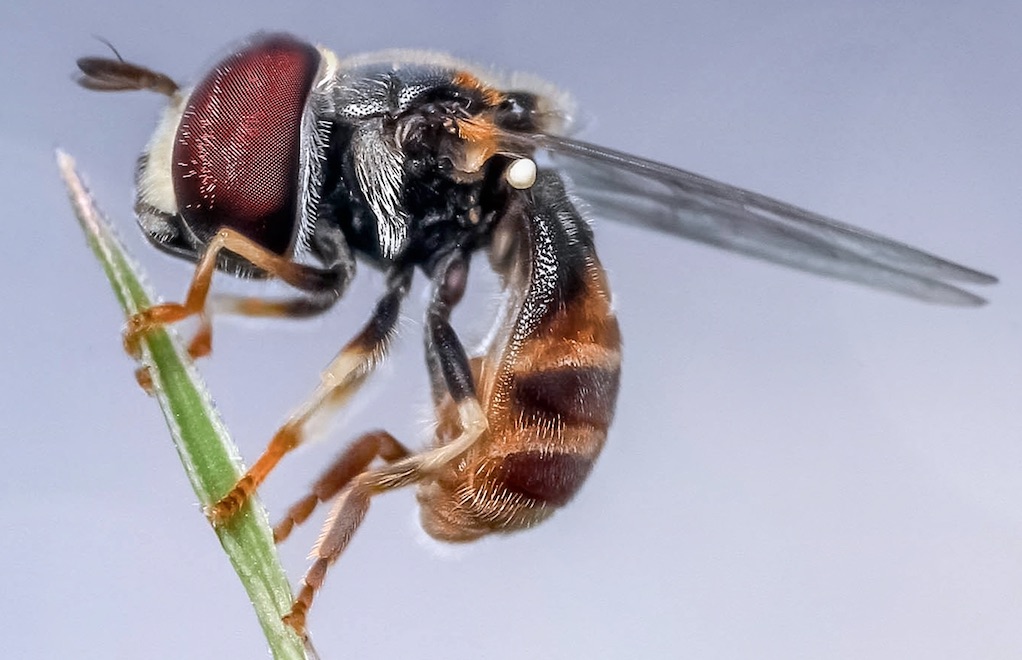
A hoverfly on a blade of grass
Image by Ronny Overhate from Pixabay (cropped)

By understanding the way hoverflies mate, computer scientists found a way to sneak up on humans, giving a way to make games harder.

When hoverflies get the hots for each other they make some interesting moves. Biologists had noticed that as one hoverfly moves towards a second to try and mate, the approaching fly doesn’t go in a straight line. It makes a strange curved flight. Peter and his student Andrew Anderson thought this was an interesting observation and started to look at why it might be. They came up with a cunning idea. The hoverfly was trying to sneak up on its prospective mate unseen.

The route the approaching fly takes matches the movements of the prospective mate in such a way that, to the mate, the fly in the distance looks like it’s far away and ‘probably’ stationary.

Tracking the motion of a hoverfly and its sightlines
Image by Paul Curzon

How does it do this? Imagine you are walking across a field with a single tree in it, and a friend is trying to sneak up on you. Your friend starts at the tree and moves in such a way that they are always in direct line of sight between your current position and the tree. As they move towards you they are always silhouetted against the tree. Their motion towards you is mimicking the stationary tree’s apparent motion as you walk past it… and that’s just what the hoverfly does when approaching a mate. It’s a stealth technique called ‘active motion camouflage’.

By building a computer model of the mating flies, the team were able to show that this complex behaviour can actually be done with only a small amount of ‘brain power’. They went on to show that humans are also fooled by active motion camouflage. They did this by creating a computer game where you had to dodge missiles. Some of those missiles used active motion camouflage. The missiles using the fly trick were the most difficult to spot.

It just goes to show: there is such a thing as a useful computer bug.

– Peter W McOwan and Paul Curzon, Queen Mary University of London


More on …

Related Magazines …

cs4fn issue 4 cover
A hoverfly on a leaf

EPSRC supports this blog through research grant EP/W033615/1, and through EP/K040251/2 held by Professor Ursula Martin. 

QMUL CS4FN EPSRC logos

Ant Art

The close up head of an ant staring at you
Image by Virvoreanu Laurentiu from Pixabay 

There are many ways Artificial Intelligences might create art. Breeding a colony of virtual ants is one of the most creative.

Photogrowth from the University of Coimbra does exactly that. The basic idea is to take an image and paint an abstract version of it. Normally you would paint with brush strokes. In ant paintings you paint with the trails of hundreds of ants as they crawl over the picture, depositing ink rather than the normal chemical trails ants use to guide other ants to food. The colours in the original image act as food for the ants, which absorb energy from its bright parts. They then use up energy as they move around. They die if they don’t find enough food, but reproduce if they have lots. The results are highly novel swirl-filled pictures.

The program uses vector graphics rather than pixel-based approaches. In pixel graphics, an image is divided into a grid of squares and each allocated a colour. That means when you zoom in to an area, you just see larger squares, not more detail. With vector graphics, the exact position of the line followed is recorded. That line is just mapped on to the particular grid of the display when you view it. The more pixels in the display, the more detailed the trail is drawn. That means you can zoom in to the pictures and just see ever more detail of the ant trails that make them up.

You become a breeder of a species of ant
that produce trails, and so images,
you will find pleasing

Because the virtual ants wander around at random, each time you run the program you will get a different image. However, there are lots of ways to control how ants can move around their world. Exploring the possibilities by hand would only ever uncover a small fraction of the possibilities. Photogrowth therefore uses a genetic algorithm. Rather than set all the options of ant behaviour for each image, you help design a fitness function for the algorithm. You do this by adjusting the importance of different aspects like the thickness of trail left and the extent the ants will try and cover the whole canvas. In effect you become a breeder of a species of ant that produce trails, and so images, you will find pleasing. Once you’ve chosen the fitness function, the program evolves a colony of ants based on it, and they then paint you a picture with their trails.

The result is a painting painted by ants bred purely to create images that please you.

– Paul Curzon, Queen Mary University of London (from the archive)


More on …

Related Magazines …

Cover issue 18
cs4fn issue 4 cover

EPSRC supports this blog through research grant EP/W033615/1, and through EP/K040251/2 held by Professor Ursula Martin. 

QMUL CS4FN EPSRC logos

Only the fittest slogans survive!

(From the archive)

Being creative isn’t just for the fun of it. It can be serious too. Marketing people are paid vast amounts to come up with slogans for new products, and in the political world, a good, memorable soundbite can turn the tide over who wins and loses an election. Coming up with great slogans that people will remember for years needs both a mastery of language and a creative streak too. Algorithms are now getting in on the act, and if anyone can create a program as good as the best humans, they will soon be richer than the richest marketing executive. Polona Tomašicˇ and her colleagues from the Jožef Stefan Institute in Slovenia are one group exploring the use of algorithms to create slogans. Their approach is based on the way evolution works – genetic algorithms. Only the fittest slogans survive!

A mastery of language

To generate a slogan, you give their program a short description on the slogan’s topic – a new chocolate bar perhaps. It then uses existing language databases and programs to give it the necessary understanding of language.

First, it uses a database of common grammatical links between pairs of words generated from wikipedia pages. Then skeletons of slogans are extracted from an Internet list of famous (so successful) slogans. These skeletons don’t include the actual words, just the grammatical relationships between the words. They provide general outlines that successful slogans follow.

From the passage given, the program pulls out keywords that can be used within the slogans (beans, flavour, hot, milk, …). It generates a set of fairly random slogans from those words to get started. It does this just by slotting keywords into the skeletons along with random filler words in a way that matches the grammatical links of the skeletons.

Breeding Slogans

New baby slogans are now produced by mating pairs of initial slogans (the parents). This is done by swapping bits into the baby from each parent. Both whole sections and individual words are swapped in. Mutation is allowed too. For example, adjectives are added in appropriate places. Words are also swapped for words with a related meaning. The resulting children join the new population of slogans. Grammar is corrected using a grammar checker.

Culling Slogans

Slogans are now culled. Any that are the same as existing ones go immediately. The slogans are then rated to see which are fittest. This uses simple properties like their length, the number of keywords used, and how common the words used are. More complex tests used are based on how related the meanings of the words are, and how commonly pairs of words appear together in real sentences. Together these combine to give a single score for the slogan. The best are kept to breed in the next generation, the worst are discarded (they die!), though a random selection of weaker slogans are also allowed to survive. The result is a new set of slogans that are slightly better than the previous set.

Many generations later…

Hot chocolate from above with biscuits, spoon of chocolate and fir cone on a leaf.
Image by Sabrina Ripke from Pixabay

The program breeds and culls slogans like this for thousands, even millions of generations, gradually improving them, until it finally chooses its best. The slogans produced are not yet world beating on their own, and vary in quality as judged by humans. For chocolate, one run came up with slogans like “The healthy banana” and “The favourite oven”, for example. It finally settled on “The HOT chocolate” which is pretty good.

More work is needed on the program, especially its fitness function – the way it decides what is a good slogan and what isn’t. As it stands this sort of program isn’t likely to replace anyone’s marketing department. They could help with brainstorming sessions though, to spark new ideas but leaving humans to make the final choice. Supporting human creativity rather than replacing it is probably just as rewarding for the program after all.


More on …

Related Magazines …

Issue 22 Cover Creative Computing

This article was originally published on CS4FN and also appears on p13 of Creative Computing, issue 22 of the CS4FN magazine. You can download a free PDF copy of the magazine as well as all of our previous booklets and magazines from the CS4FN downloads site.

QMUL CS4FN EPSrC logos

Standup Robots

‘How do robots eat pizza?’… ‘One byte at a time’. Computational Humour is real, but it’s not jokes about computers, it’s computers telling their own jokes.

Image by shahzad akbar from Pixabay

Computers can create art, stories, slogans and even magic tricks. But can computers perform themselves? Can robots invent their own jokes? Can they tell jokes?

Combining Artificial Intelligence, computational linguistics and humour studies (yes you can study how to be funny!) a team of Scottish researchers made an early attempt at computerised standup comedy! They came up with Standup (System to Augment Non Speakers Dialogue Using Puns): a program that generates riddles for kids with language difficulties. Standup has a dictionary and joke-building mechanism, but does not perform, it just creates the jokes. You will have to judge for yourself as to whether the puns are funny. You can download the software from here. What makes a pun funny? It is a about the word having two meanings at exactly the same time in a sentence. It is also about generating an expectation that you then break: a key idea about what is at the core of creativity too.

A research team at Virginia Tech in the US created a system that started to learn about funny pictures. Having defined a ‘funniness score’ they created a computational model for humorous scenes, and trained it to predict funniness, perhaps with an eye to spotting pics for social media posting, or not.

But are there funny robots out there? Yes! RoboThespian programmed by researchers at Queen Mary University of London, and Data, created by researchers at Carnegie Mellon University are both robots programmed to do stand-up comedy. Data has a bank of jokes and responds to audience reaction. His developers don’t actually know what he will do when he performs, as he is learning all the time. At his first public gig, he got the crowd laughing, but his timing was poor. You can see his performance online, in a TED Talk.

RoboThespian did a gig at the London Barbican alongside human comedians. The performance was a live experiment to understand whether the robot could ‘work the audience’ as well as a human comedian. They found that even relatively small changes in the timing of delivery make a big difference to audience response.

What have these all got in common? Artificial Intelligence, machine learning and studies to understand what humour actually is, are being combined to make something that is funny. Comedy is perhaps the pinnacle of creativity. It’s certainly not easy for a human to write even one joke, so think how hard it is distill that skill into algorithms and train a computer to create loads of them.

You have to laugh!

Watch RoboThespian [EXTERNAL]

by Jane Waite, Queen Mary University of London, Summer 2017

Download Issue 22 of the cs4fn magazine “Creative Computing” here

Lots more computing jokes on our Teaching London Computing site