Ethics – What would you do?

Signs pointing RIGHT to right and WRONG to the left
Right / Wrong image by Tumisu from Pixabay

You often hear about unethical behaviours, be it in politicians or popstars, but getting to grips with ethics, which deals with issues about what behaviours are right and wrong, is an important part of computer science too. Find out about it and at the same time try our ethical puzzle below and learn something about your own ethics…

Is that legal?

Ethics are about the customs and beliefs that a society has about the way people should be treated. These beliefs can be different in different countries, sometimes even between different regions of the same country, which is why it’s always important to know something about the local area when going on holiday. You don’t want to upset the local folk. Ethics tend to form the basis of countries’ laws and regulations, combining general agreement with practicality. Sticking your tongue out may be rude and so unethical, but the police have better things to do than arrest every rude school kid. Similarly, slavery was once legal, but was it ever ethical? Laws and ethics also have other differences; individuals tend to judge unethical behaviour, and shun those who behave inappropriately, while countries judge illegal behaviour – using a legal system of courts, judges and juries to enforce laws with penalties.

Dilemmas, what to do?

Now imagine you have the opportunity to go treading on the ethical and legal toes of people across the world from the PC in your home. Suddenly the geographical barriers that once separated us vanish. The power of computer science, like any technology, can be used for good or evil. What is important is that those who use it understand the consequences of their actions, and choose to act legally and ethically. Understanding legal requirements, for example contracts, computer misuse and data protection are important parts of a computer scientist’s training, but can you learn to be ethical?

Computer scientists study ethics to help them prepare for situations where they have to make decisions. This is often done by considering ethical dilemmas. These are a bit like the computer science equivalent of soap opera plots. You have a difficult problem, a dilemma, and have to make a choice. You suddenly discover you have a unknown long lost sister living on the other side of the Square, do you make contact or not, (on TV this choice is normally followed by a drum roll as the episode ends).

Give it a go

Here is your chance to try an ethical dilemma for yourself. Read the alternatives and choose what you would do in this situation. Then click on the poll choice. Like all good ‘personality tests’ you find out something about yourself: in this case which type of ethical approach you have in the situation according to some famous philosophers. There are also some fascinating facts to impress your mates. We’ll share the answers tomorrow.

Your Dilemma and your ethical personality

You are working for a company who are about to launch a new computer game. The adverts have gone out, the newspapers and TV are ready for the launch … then the day before you are told that there is a bug, a mistake, in the software. It means players sometimes can’t kill the dragon at the end of the game. If you hit the problem the only solution is to start the final level again. It can be fixed they think but it will take about a week or so to track it down. The computer code is hard to fix as it’s been written by 10 different people and 5 of them have gone on a back-packing holiday so can’t be contacted.

Peter McOwan, Queen Mary University of London

What the answers mean about you at the end!


Related Magazine …


Subscribe to be notified whenever we publish a new post to the CS4FN blog.


This blog is funded by EPSRC on research agreement EP/W033615/1.

QMUL CS4FN EPSRC logos

The answers

If you picked Option 1

1) Go ahead and launch. After all, there are still plenty of parts to the game that do work and are fun, there will always be some errors, and for this game in particular thousands have been signing up for text alerts to tell them when it’s launched. It will make many thousands happy.

That means you follow an ethical approach called ‘Act utilitarianism’.

Act Happy

The main principle of this theory, put forward by philosopher John Stuart Mill, is to create the most happiness (another name for happiness here is utility thus utilitarianism). For each situation you behave (act) in a way that increases the happiness of the largest number of people, and this is how you decide what is wrong or right. You may take different actions in similar situations. So you choose to launch a flawed game if you know that you have pre-sales of a hundred thousand, but another time decide to not launch a different flawed game where there are only one thousand pre-sales, as you wont be making so many people unhappy. It’s about considering the utility for each action you take. There is no hard and fast rule.

If you picked Option 2

2) Cancel the launch until the game is fixed properly, no one should have to buy a game that doesn’t work 100 per cent.

That means you follow an ethical approach called ‘Duty Theory’

Do your Duty

Duty theories are based on the idea of there being universal principles, such as ‘you should never ever lie, whatever the circumstances’. This is also known as the dentological approach to ethics (philosophers like to bring in long words to make simple things sound complicated!). The German philosopher Emanuel Kant was one of the main players in this field. His ‘Categorical Imperative’ (like I said long words…) said “only act in a way that you would want everyone else to act” (…simple idea!). So if you don’t think there should ever be mistakes in software then don’t make any yourself. This can be quite tough!

If you picked Option 3

3) Go ahead and launch. After all it’s almost totally working and the customers are looking forward to it. There will always be some errors in programs: it’s part of the way complicated software is, and a delay to game releases leads to disappointment.

You would be following the approach called ‘Rule utilitarianism’.

Spread a little happiness

Say something nice to everyone you meet today…it will drive them crazy

The main principle of this flavour of utilitarianism theory, put forward by philosopher Jeremy Bentham, is to create the most happiness (happiness here is called utility thus utilitarianism). You follow general rules that increase the happiness of the largest number of people, and this is how you decide what’s wrong or right. So in our dilemma the rule could be ‘even if the game isn’t 100% correct, people are looking forward to it and we can’t disappoint them’. Here the rule increases happiness, and we apply it again in the future if the same situation occurs.

Collaborative community coding & curating

Equality, diversity and inclusion in the R Project

You might not think of a programming language like Python or Scratch as being an ‘ecosystem’ but each language has its own community of people who create and improve its code (compilers, library code,…), flush out the bugs, introduce new features, document any changes and write the ‘how to’ guides for new users. 

R is one such programming language. It’s named after its two co-inventors (Ross Ihaka and Robert Gentleman) and is used by around two million people around the world. People working in all sorts of jobs and industries (for example finance, academic research, government, data journalists) use R to analyse their data. The software has useful tools to help people see patterns in their data and to make sense of that information. 

It’s also open source which means that anyone can use it and help to improve it, a bit like Wikipedia where anyone can edit an article or write a new one. That’s generally a good thing because it means everyone can contribute but it can also bring problems. Imagine writing an essay about an event at your school and sharing it with your class. Then imagine your classmates adding paragraphs of their own about the event, or even about different events. Your essay could soon become rather messy and you’d need to re-order things, take bits out and make sure people hadn’t repeated something that someone had already said (but in a slightly different way). 

When changes are made to software people also want to keep a note not just of the ‘words’ added (the code) but also to make a note of who added what and when. Keeping good records, also known as documentation, helps keep things tidy and gives the community confidence that the software is being properly looked after.

Code and documentation can easily become a bit chaotic when created by different people in the community so there needs to be a core group of people keeping things in order. Fortunately there is – the ‘R Core Team’, but these days its membership doesn’t really reflect the community of R users around the world. R was first used in universities, particularly by more privileged statistics professors from European countries and North America (the Global North), and so R’s development tended to be more in line with their academic interests. R needs input and ideas from a more diverse group of active developers and decision-makers, in academia and beyond to ensure that the voices of minoritised groups are included. Also the voices of younger people, particularly as many of the current core group are approaching retirement age.

Dr Heather Turner from the University of Warwick is helping to increase the diversity of those who develop and maintain the R programming language and she’s been given funding by the EPSRC* to work on this. Her project is a nice example of someone who is bringing together two different areas in her work. She is mixing software development (tech skills) with community management (people skills) to support a range of colleagues who use R and might want to contribute to developing it in future, but perhaps don’t feel confident to do so yet

Development can involve things like fixing bugs, helping to improve the behaviour or efficiency of programs or translating error messages that currently appear on-screen in the English language into different languages. Heather and her colleagues are working with the R community to create a more welcoming environment for ‘newbies’ that encourages participation, particularly from people who are in the community but who are not currently represented or under-represented by the core group and she’s working collaboratively with other community organisations such as R-Ladies, LatinR and RainbowR. Another task she’s involved in is producing an easier-to-follow ‘How to develop R’ guide.

There are also people who work in universities but who aren’t academics (they don’t teach or do research but do other important jobs that help keep things running well) and some of them use R too and can contribute to its development. However their contributions have been less likely to get the proper recognition or career rewards compared with those made by academics, which is a little unfair. That’s largely because of the way the academic system is set up. 

Generally it’s academics who apply for funding to do new research, they do the research and then publish papers in academic journals on the research that they’ve done and these publications are evidence of their work. But the important work that supporting staff do in maintaining the software isn’t classified as new research so doesn’t generally make it into the journals, so their contribution can get left out. They also don’t necessarily get the same career support or mentoring for their development work. This can make people feel a bit sidelined or discouraged. 

To try and fix this and to make things fairer the Society of Research Software Engineering was created to champion a new type of job in computing – the Research Software Engineer (RSE). These are people whose job is to develop and maintain (engineer) the software that is used by academic researchers (sometimes in R, sometimes in other languages). The society wants to raise awareness of the role and to build a community around it. You can find out what’s needed to become an RSE below. 

Heather is in a great position to help here too, as she has a foot in each camp – she’s both an Academic and a Research Software Engineer. She’s helping to establish RSEs as an important role in universities while also expanding the diversity of people involved in developing R further, for its long-term sustainability.

Further reading


Related careers

QMUL

Below is an example of a Research Software Engineer role which was advertised at QMUL in April 2024 – you can read the original advert and see a copy of the job description / person specification information which is archived at the “Jobs in Computer Science” website. This advert was looking for an RSE to support a research project “at the intersection of Natural Language Processing (NLP) and multi-modal Machine Learning, with applications in mental health.”

QMUL also has a team of Research Software Engineers and you can read about what they’re working on and their career here (there are also RSEs attached to different projects across the university, as above).

Archived job adverts from elsewhere

Below are some examples of RSE jobs (these particular vacancies have now closed but you can read about what they were looking for and see if that sort of thing might interest you in the future). The links will take you to a page with the original job advert + any Job Description (JD – what the person would actually be doing) and might also include a Person Specification (PS – the type of person they’re looking for in terms of skills, qualifications and experience) – collectively these are often known as ‘job packs’.

Note that these documents are written for quite a technical audience – the people who’d apply for the jobs will have studied computer science for many years and will be familiar with how computing skills can be applied to different subjects.

1. The Science and Technology Facilities Council (STFC) wanted four Research Software Engineers (who’d be working either in Warrington or Oxford) on a chemistry-related project (‘computational chemistry’ – “a branch of chemistry that uses computer simulation to assist in solving chemical problems”) 

2. The University of Cambridge was looking for a Research Software Engineer to work in the area of climate science – “Computational modelling is at the core of climate science, where complex models of earth systems are a routine part of the scientific process, but this comes with challenges…”

3. University College London (UCL) wanted a Research Software Engineer to work in the area of neuroscience (studying how the brain works, in this case by analysing the data from scientists using advanced microscopy).


Subscribe to be notified whenever we publish a new post to the CS4FN blog.


This blog is funded by EPSRC on research agreement EP/W033615/1.

QMUL CS4FN EPSRC logos

“A mob for the Earth”

Online communities and flashmobs supporting the environment and businesses too

One Saturday afternoon one spring in San Francisco, a queue of people stretched down the pavement from a neighbourhood market. There was no shortage of other food shops nearby, so why were hundreds of people waiting to buy everything from crisps to cat litter at this one place? Because that shop had pledged to donate more than a fifth of that day’s profits to improving its environmental footprint.

Pillow fights and parties

The organisation behind the busy shopping day is called Carrotmob. The tactics they used to summon so many people to the tiny market in San Francisco had already been working all over the world for less serious stuff. From a huge pillow fight in New York’s Times Square to a mass disco at Victoria Station in London where people danced along to their MP3 players, the concept of the flashmob can seem to create a party out of thin air. From a simple idea, word can spread over social networking sites, email and word of mouth until a few people have turned into a huge crowd.

Start the bidding

Carrotmob’s founder, Brent Schulkin, wanted to try and entice businesses into going green using a language he thought they’d understand: cash. In return for getting loads of new customers to buy things, the owners had to give back some of their windfall profit to the Earth. To test his idea he went round to food shops in his neighbourhood. He said he could bring lots of extra customers to the shop on a particular day, and asked each of them how much of that day’s profit they’d be willing to spend on making their businesses more environmentally friendly. K&D Market won the bidding war by promising to spend 22% of the profits putting in greener lighting and making their fridges more energy-efficient. Now that K&D had agreed to the deal, Brent had to bring in the punters. He needed a flashmob.

Flashmobs work because it’s now so easy to stay in touch with large numbers of people. If we find out about a cool event we can share it with all our friends just by making one post on sites like Facebook or Twitter. We can make plans to do something as a group just by sending a few texts. When lots of people spread word around like this, suddenly a small idea like Carrotmob, armed with only a website and a few videos, can drop an hour-long queue on the doorstep of a market in San Francisco.

Success!

It’s not easy to enjoy yourself when you’re waiting for an hour to buy a packet of instant noodles, but that’s another advantage of the flashmob: the party atmosphere, the feeling that you’re part of something big. The results were big: the impromptu shoppers brought in more than $9000 – four times what the shop ordinarily rings up on a Saturday afternoon. Lots of the purchases went to a food bank, so even more people shared in the benefits. In the end the shop did well, the Earth did well, and the Carrotmobbers got a party. Plus the good feeling you get from helping the environment probably stays with you longer than the good feeling from getting hit in the face with a pillow.

Paul Curzon, Queen Mary University of London


Related Magazine …


EPSRC supports this blog through research grant EP/W033615/1.

Happy World Emoji Day – 📅 17 July 2023 – how people use emoji to communicate and what it tells us about them 😀

“Emoji didn’t become so essential because they stand in for words – but because they finally made writing a lot more like talking.”

Gretchen McCulloch (see Further reading below)
Emoji samples © Emojipedia 2025.

The emoji for ‘calendar‘ shows the 17th July 📅 (click the ‘calendar’ link to find out why) and, since 2014, Emojipedia (an excellent resource for all things emoji, including their history) has celebrated World Emoji Day on that date.

Before we had emoji (the word emoji can be both singular as well as plural, but 'emojis' is fine too) people added text-based 'pictures' to their texts and emails to add flavour to their online conversations, such as 
:-) or :)  - for a smiling face 
:-( or :( - for a sad one.

These text-based pictures are known as ’emoticons’ (icons that add emotion) because it isn’t always possible to know just from the words alone what the writer means. They weren’t just used to clarify meaning though, people started to pepper their prose with other playful pictures, such as :p where the ‘p’ is someone blowing a raspberry / sticking their tongue out* and created other icons such as this rose to send to someone on Valentine’s Day @-‘-,->—-, or this polevaulting amoeba ./

Here are the newly released emoji for 2023.

People use emoji in very different ways depending on their age, gender, ethnicity, personal writing style. In our “The Emoji Crystal Ball” article we look at how people can tell a lot about us from the types of emoji we use and the way we use them.

The Emoji Crystal Ball

Fairground fortune tellers claim to be able to tell a lot about you by staring into a crystal ball. They could tell far more about you (that wasn’t made up) by staring at your public social media profile. Even your use of emojis alone gives away something of who you are. Walid Magdy’s research team … Continue reading

Unicode Poo

The Egyptians had a hieroglyph for it, so unicode has a number for it. There’s even more unicode poo in the emoji character set but the Egyptians got there 1000s of years earlier. Here is how the Ancient Egyptians wrote or carved poo … Continue reading

Further reading


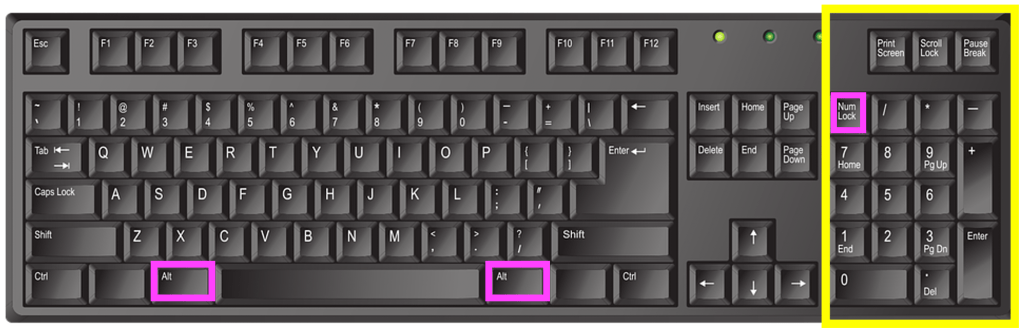
*For an even better raspberry-blowing emoticon try one of the letters (called ‘thorn’) from the Runic alphabet. If you have a Windows computer with a numeric keypad on the right hand side press the Num Lock key at the top to lock the number keypad (so that the keys are now numbers and not up and down arrows etc). Hold down the Alt key (there’s usually one on either side of the spacebar) and while holding it down type 0254 on the numeric keypad and let go. This should now appear wherever your cursor is: þ. Or for the lower case letter it’s Alt+0222 = Þ – for when you just want to blow a small raspberry :Þ

For Mac users press control+command+spacebar to bring up the Character Viewer and just type thorn in the search bar and lots will appear. Double-click to select the one you want, it will automatically paste into wherever your cursor is.


EPSRC supports this blog through research grant EP/W033615/1.

Solving problems you care about

by Patricia Charlton and Stefan Poslad, Queen Mary University of London Queen Mary University of London

The best technology helps people solve real problems. To be a creative innovator you need not only to be able to create a solution that works but also to spot a need in the first place and be able to come up with creative solutions. Over the summer a group of sixth formers on internships at Queen Mary had a go at doing this. Ultimately their aim was to build something from a programmable gadget such as a BBC micro:bit or Raspberry Pi. They therefore had to learn about the different possible gadgets they could use, how to program them and how to control the on-board sensors available. They were then given the design challenge of creating a device to solve a community problem.

Hearing the bus is here

Tai Kirby wanted to help visually impaired people. He knew that it’s hard for someone with poor sight to tell when a bus is arriving. In busy cities like London this problem is even worse as buses for different destinations often arrive at once. His solution was a prototype that announces when a specific bus is arriving, letting the person know which was which. He wrote it in Python and it used a Raspberry pi linked to low energy Bluetooth devices.

The fun spell

Filsan Hassan decided to find a fun way to help young kids learn to spell. She created a gadget that associated different sounds with different letters of the alphabet, turning spelling words into a fun, musical experience. It needed two micro:bits and a screen communicating with each other using a radio link. One micro:bit controlled the screen while the other ran the main program that allowed children to choose a word, play a linked game and spell the word using a scrolling alphabet program she created. A big problem was how to make sure the combination of gadgets had a stable power supply. This needed a special circuit to get enough power to the screen without frying the micro:bit and sadly we lost some micro:bits along the way: all part of the fun!

Remote robot

Jesus Esquivel Roman developed a small remote-controlled robot using a buggy kit. There are lots of applications for this kind of thing, from games to mine-clearing robots. The big challenge he had to overcome was how to do the navigation using a compass sensor. The problem was that the batteries and motor interfered with the calibration of the compass. He also designed a mechanism that used the accelerometer of a second micro:bit allowing the vehicle to be controlled by tilting the remote control.

Memory for patterns

Finally, Venet Kukran was interested in helping people improve their memory and thinking skills. He invented a pattern memory game using a BBC micro:bit and implemented in micropython. The game generates patterns that the player has to match and then replicate to score points. The program generates new patterns each time so every game is different. The more you play the more complex the patterns you have to remember become.

As they found you have to be very creative to be an innovator, both to come up with real issues that need a solution, but also to overcome the problems you are bound to encounter in your solutions


Related Magazine …


EPSRC supports this blog through research grant EP/W033615/1.

Stretching your keyboard – getting more out of QWERTY

by Jo Brodie, Queen Mary University of London

A QWERTY keyboard after smartphone keyboards starting with keys q w e r t y on the top row
A smartphone’s on-screen keyboard layout, called QWERTY after the first six letters on the top line. Image by CS4FN after smartphone QWERTY keyboards.

If you’ve ever sent a text on a phone or written an essay on a computer you’ve most likely come across the ‘QWERTY’ keyboard layout. It looks like this on a smartphone.

This layout has been around in one form or another since the 1870s and was first used in old mechanical typewriters where pressing a letter on the keyboard caused a hinged metal arm with that same letter embossed at the end to swing into place, thwacking a ribbon coated with ink, to make an impression on the paper. It was quite loud!

The QWERTY keyboard isn’t just used by English speakers but can easily be used by anyone whose language is based on the same A,B,C Latin alphabet (so French, Spanish, German etc). All the letters that an English-speaker needs are right there in front of them on the keyboard and with QWERTY… WYSIWYG (What You See Is What You Get).  There’s a one-to-one mapping of key to letter: if you tap the A key you get a letter A appearing on screen, click the M key and an M appears. (To get a lowercase letter you just tap the key but to make it uppercase you need to tap two keys; the up arrow (‘shift’) key plus the letter).

A French or Spanish speaking person could also buy an adapted keyboard that includes letters like É and Ñ, or they can just use a combination of keys to make those letters appear on screen (see Key Combinations below). But what about writers of other languages which don’t use the Latin alphabet? The QWERTY keyboard, by itself, isn’t much use for them so it potentially excludes a huge number of people from using it.

In the English language the letter A never alters its shape depending on which letter goes before or comes after it. (There are 39 lower case letter ‘a’s and 3 upper case ‘A’s in this paragraph and, apart from the difference in case, they all look exactly the same.) That’s not the case for other languages such as Arabic or Hindi where letters can change shape depending on the adjacent letters. With some languages the letters might even change vertical position, instead of being all on the same line as in English.

Early attempts to make writing in other languages easier assumed that non-English alphabets could be adapted to fit into the dominant QWERTY keyboard, with letters that are used less frequently being ignored and other letters being simplified to suit. That isn’t very satisfactory and speakers of other languages were concerned that their own language might become simplified or standardised to fit in with Western technology, a form of ‘digital colonialism’.

But in the 1940s other solutions emerged. The design for one Chinese typewriter avoided QWERTY’s ‘one key equals one letter’ (which couldn’t work for languages like Chinese or Japanese which use thousands of characters – impossible to fit onto one keyboard, see picture at the end!).

Rather than using the keys to print one letter, the user typed a key to begin the process of finding a character. A range of options would be displayed and the user would select another key from among them, with the options narrowing until they arrived at the character they wanted. Luckily this early ‘retrieval system’ of typing actually only took a few keystrokes to bring up the right character, otherwise it would have taken ages.

This is a way of using a keyboard to type words rather than letters, saving time by only displaying possible options. It’s also an early example of ‘autocomplete’ now used on many devices to speed things up by displaying the most likely word for the user to tap, which saves them typing it.

For example in English the letter Q is generally* always followed by the letter U to produce words like QUAIL, QUICK or QUOTE. There are only a handful of letters that can follow QU – the letter Z wouldn’t be any use but most of the vowels would be. You might be shown A, E, I or O and if you selected A then you’ve further restricted what the word could be (QUACK, QUARTZ, QUARTET etc).

In fact one modern typing system, designed for typists with physical disabilities, also uses this concept of ‘retrieval’, relying on a combination of letter frequency (how often a letter is used in the English language) and probabilistic predictions (about how likely a particular letter is to come next in an English word). Dasher is a computer program that lets someone write text without using a keyboard, instead a mouse, joystick, touchscreen or a gaze-tracker (a device that tracks the person’s eye position) can be used.

Letters are presented on-screen in alphabetic order from top to bottom on the right hand side (lowercase first, then upper case) and punctuation marks. The user ‘drives’ through the word by first pushing the cursor towards the first letter, then the next possible set of letters appear to choose from, and so on until each word is completed. You can see it in action in this video on the Dasher Interface.

Key combinations

The use of software to expand the usefulness of QWERTY keyboards is now commonplace with programs pre-installed onto devices which run in the background. These IMEs or Input Method Editors can convert a set of keystrokes into a character that’s not available on the keyboard itself. For example, while I can type SHIFT+8 to display the asterisk (*) symbol that sits on the 8 key there’s no degree symbol (as in 30°C) on my keyboard. On a Windows computer I can create it using the numeric keypad on the right of some keyboards, holding down the ALT key while typing the sequence 0176. While I’m typing the numbers nothing appears but once I complete the sequence and release the ALT key the ° appears on the screen.

English language keyboard image by john forcier from Pixabay, showing the numeric keypad highlighted in yellow with the two Alt keys and the 'num lock' key highlighted in pink. Num lock ('numeric lock') needs to be switched on for the keypad to work, then use the Alt key plus a combination of letters on the numeric keypad to produce a range of additional 'alt code' characters.
English language keyboard image by john forcier from Pixabay highlighted by CS4FN, showing the numeric keypad highlighted in yellow with the two Alt keys and the ‘num lock’ key highlighted in pink. Num lock (‘numeric lock’) needs to be switched on for the keypad to work, then use the Alt key plus a combination of letters on the numeric keypad to produce a range of additional ‘alt code‘ characters.

When Japanese speakers type they use the main ‘ABC’ letters on the keyboard, but the principle is the same – a combination of keys produces a sequence of letters that the IME converts to the correct character. Or perhaps they could use Google Japan’s April Fool solution from 2010, which surrounded the user in half a dozen massive keyboards with hundreds of keys a little like sitting on a massive drum kit!

*QWERTY is a ‘word’ which starts with a Q that’s not followed by a U of course…

Watch …

More on …

The ‘retrieval system’ of typing mentioned above, which lets the user get to the word or characters more quickly, is similar to the general problem solving strategy called ‘Divide and Conquer’. You can read more about that and other search algorithms in our free booklet ‘Searching to Speak‘ (PDF) which explores how the design of an algorithm could allow someone with locked-in syndrome to communicate. Locked-in syndrome is a condition resulting from a stroke where a person is totally paralysed. They can see, hear and think but cannot speak. How could a person with Locked-in syndrome write a book? How might they do it if they knew some computational thinking?


EPSRC supports this blog through research grant EP/W033615/1.

Is ChatGPT’s “CS4FN” article good enough?

(Or how to write for CS4FN)

A robot emerging from a laptop screen
ChatGPT image AI generated by Alexandra_Koch from Pixabay

Follow the news and it is clear that the chatbots are about to take over journalism, novel writing, script writing, writing research papers, … just about all kinds of writing. So how about writing for the CS4FN magazine. Are they good enough yet? Are we about to lose our jobs? Jo asked ChatGPT to write a CS4FN article to find out. Read its efforts before reading on…

As editor I not only wrote but also vet articles and tweak them when necessary to fit the magazine style. So I’ve looked at ChatGPT’s offering as I would one coming from a person …

ChatGPT’s essay writing has been compared to that of a good but not brilliant student. Writing CS4FN articles is a task we have set students in the past: in part to give them experience over how you must write in different styles for different purposes. Different audience? Different writing. Only a small number come close to what I am after. They generally have one or more issues. A common problem when students write for CS4FN is sadly a lack of good grammar and punctuation throughout beyond just typos (basic but vital English skills seem to be severely lacking these days even with spell checking and grammar checking tools to help). Other common problems include a lack of structure, no hook at the start, over-formal writing so the wrong style, no real fun element at all and/or being devoid of stories about people, an obsession with a few subjects (like machine learning!) rather than finding something new to write about. They are also then often vanilla articles about that topic, just churning out looked-up facts rather than finding some new, interesting angle.

How did the chatbot do? It seems to have made most of the same mistakes. At least, chatGPT’s spelling and grammar are basically good so that is a start: it is a good primary school student then! Beyond that it has behaved like the weaker students do… and missed the point. It has actually just written a pretty bog standard factual article explaining the topic it chose, and of course given a free choice, it chose … Machine Learning! Fine, if it had a novel twist, but there are no interesting angles added to the topic to bring it alive. Nor did it describe the contributions of a person. In fact, no people are mentioned at all. It is also using a pretty formal style of writing (“In conclusion…”). Just like humans (especially academics) it also used too much jargon and didn’t even explain all the jargon it did use (even after being prompted to write for a younger audience). If I was editing I’d get rid of the formality and unexplained jargon for starters. Just like the students who can actually write but don’t yet get the subtleties, it hasn’t got the fact that it should have adapted its style, even when prompted.

It knows about structure and can construct an essay with a start, a middle and end as it has put in an introduction and a conclusion. What it hasn’t done though is add any kind of “grab”. There is nothing at the start to really capture the attention. There is no strange link, no intriguing question, no surprising statement, no interesting person…nothing to really grab you (though Jo saved it by adding to the start, the grab that she had asked an AI to write it). It hasn’t added any twist at the end, or included anything surprising. In fact, there is no fun element at all. Our articles can be serious rather than fun but then the grab has to be about the seriousness: linked to bad effects for society, for example.

ChatGPT has also written a very abstract essay. There is little in the way of context or concrete examples. It says, for example, “rules … couldn’t handle complex situations”. Give me an example of a complex situation so I know what you are talking about! There are no similes or metaphors to help explain. It throws in some application areas for context like game-playing and healthcare but doesn’t at all explain them (it doesn’t say what kind of breakthrough has been made to game playing, for example). In fact, it doesn’t seem to be writing in a “semantic wave” style that makes for good explanations at all. That is where you explain something by linking an abstract technical thing you are explaining, to some everyday context or concrete example, unpacking then repacking the concepts. Explaining machine learning? Then illustrate your points with an example such as how machine learning might use movies to predict your voting habits perhaps…and explain how the example does illustrate the abstract concepts such as pointing out the patterns it might spot.

There are several different kinds of CS4FN article. Overall, CS4FN is about public engagement with research. That gives us ways in to explain core computer science though (like what machine learning is). We try to make sure the reader learns something core, if by stealth, in the middle of longer articles. We also write about people and especially diversity, sometimes about careers or popular culture, or about the history of computation. So, context is central to our articles. Sometimes we write about general topics but always with some interesting link, or game or puzzle or … something. For a really, really good article that I instantly love, I am looking for some real creativity – something very different, whether that is an intriguing link, a new topic, or just a not very well known and surprising fact. ChatGPT did not do any of that at all.

Was ChatGPT’s article good enough? No. At best I might use some of what it wrote in the middle of some other article but in that case I would be doing all the work to make it a CS4FN article.

ChatGPT hasn’t written a CS4FN article
in any sense other than in writing about computing.

Was it trained on material from CS4FN to allow it to pick up what CS4FN was? We originally assumed so – our material has been freely accessible on the web for 20 years and the web is supposedly the chatbots’ training ground. If so I would have expected it to do much better at getting the style right (though if it has used our material it should have credited us!). I’m left thinking that actually when it is asked to write articles or essays without more guidance it understands, it just always writes about machine learning! (Just like I always used to write science fiction stories for every story my English teacher set, to his exasperation!) We assumed, because it wrote about a computing topic, that it did understand, but perhaps, it is all a chimera. Perhaps it didn’t actually understand the brief even to the level of knowing it was being asked to write about computing and just hit lucky. Who knows? It is a black box. We could investigate more, but this is a simple example of why we need Artificial Intelligences that can justify their decisions!

Of course we could work harder to train it up as I would a human member of our team. With more of the right prompting we could perhaps get it there. Also given time the chatbots will get far better, anyway. Even without that they clearly can now do good basic factual writing so, yes, lots of writing jobs are undoubtedly now at risk (and that includes a wide range of jobs, like lawyers, teachers, and even programmers and the like too) if we as a society decide to let them. We may find the world turns much more vanilla as a result though with writing turning much more bland and boring without the human spark and without us noticing till it is lost (just like modern supermarket tomatoes so often taste bland having lost the intense taste they once had!) … unless the chatbots gain some real creativity.

The basic problem of new technology is it reaps changes irrespective of the human cost (when we allow it to, but we so often do, giddy with the new toys). That is fine if as a society we have strong ways to support those affected. That might involve major support for retraining and education into new jobs created. Alternatively, if fewer jobs are created than destroyed, which is the way we may be going, where jobs become ever scarcer, then we need strong social support systems and no stigma to not having a job. However, currently that is not looking likely and instead changes of recent times have just increased, not reduced inequality, with small numbers getting very, very rich but many others getting far poorer as the jobs left pay less and less.

Perhaps it’s not malevolent Artificial Intelligences of science fiction taking over that is the real threat to humanity. Corporations act like living entities these days, working to ensure their own survival whatever the cost, and we largely let them. Perhaps it is the tech companies and their brand of alien self-serving corporation as ‘intelligent life’ acting as societal disrupters that we need to worry about. Things happen (like technology releases) because the corporation wants them to but at the moment that isn’t always the same as what is best for people long term. We could be heading for a wonderful utopian world where people do not need to work and instead spend their time doing fulfilling things. It increasingly looks like instead we have a very dystopian future to look forward to – if we let the Artificial Intelligences do too many things, taking over jobs, just because they can so that corporations can do things more cheaply, so make more fabulous wealth for the few.

Am I about to lose my job writing articles for CS4FN? I don’t think so. Why do I write CS4FN? I love writing this kind of stuff. It is my hobby as much as anything. So I do it for my own personal pleasure as well as for the good I hope it does whether inspiring and educating people, or just throwing up things to think about. Even if the chatBots were good enough, I wouldn’t stop writing. It is great to have a hobby that may also be useful to others. And why would I stop doing something I do for fun, just because a machine could do it for me? But that is just lucky for me. Others who do it for a living won’t be so lucky.

We really have to stop and think about what we want as humans. Why do we do creative things? Why do we work? Why do we do anything? Replacing us with machines is all well and good, but only if the future for all people is actually better as a result, not just a few.


EPSRC supports this blog through research grant EP/W033615/1.

Chatbot or Cheatbot?

by Paul Curzon, Queen Mary University of London

The chatbots have suddenly got everyone talking, though about them as much as with them. Why? Because one, chatGPT has (amongst other things) reached the level of being able to fool us into thinking that it is a pretty good student.

It’s not exactly what Alan Turing was thinking about when he broached his idea of a test for intelligence for machines: if we cannot tell them apart from a human then we must accept they are intelligent. His test involved having a conversation with them over an extended period before making the decision, and that is subtly different to asking questions.

ChatGPT may be pretty close to passing an actual Turing Test but it probably still isn’t there yet. Ask the right questions and it behaves differently to a human. For example, ask it to prove that the square root of 2 is irrational and it can do it easily, and looks amazingly smart, – there are lots of versions of the proof out there that it has absorbed. It isn’t actually good at maths though. Ask it to simply count or add things and it can get it wrong. Essentially, it is just good at determining the right information from the vast store of information it has been trained on and then presenting it in a human-like way. It is arguably the way it can present it “in its own words” that makes it seem especially impressive.

Will we accept that it is “intelligent”? Once it was said that if a machine could beat humans at chess it would be intelligent. When one beat the best human, we just said “it’s not really intelligent – it can only play chess””. Perhaps chatGPT is just good at answering questions (amongst other things) but we won’t accept that as “intelligent” even if it is how we judge humans. What it can do is impressive and a step forward, though. Also, it is worth noting other AIs are better at some of the things it is weak at – logical thinking, counting, doing arithmetic, and so on. It likely won’t be long before the different AIs’ mistakes and weaknesses are ironed out and we have ones that can do it all.

Rather than asking whether it is intelligent, what has got everyone talking though (in universities and schools at least) is that chatGPT has shown that it can answer all sorts of questions we traditionally use for tests well enough to pass exams. The issue is that students can now use it instead of their own brains. The cry is out that we must abandon setting humans essays, we should no longer ask them to explain things, nor for that matter write (small) programs. These are all things chatGPT can now do well enough to pass such tests for any student unable to do them themselves. Others say we should be preparing students for the future so its ok, from now on, we just only test what human and chatGPT can do together.

It certainly means assessment needs to be rethought to some extent, and of course this is just the start: the chatbots are only going to get better, so we had better do the thinking fast. The situation is very like the advent of calculators, though. Yes, we need everyone to learn to use calculators. But calculators didn’t mean we had to stop learning how to do maths ourselves. Essay writing, explaining, writing simple programs, analytical skills, etc, just like arithmetic, are all about core skill development, building the skills to then build on. The fact that a chatbot can do it too doesn’t mean we should stop learning and practicing those skills (and assessing them as an inducement to learn as well as a check on whether the learning has been successful). So the question should not be about what we should stop doing, but more about how we make sure students do carry on learning. A big, bad thing about cheating (aside from unfairness) is that the person who decides to cheat loses the opportunity to learn. Chatbots should not stop humans learning either.

The biggest gain we can give a student is to teach them how to learn, so now we have to work out how to make sure they continue to learn in this new world, rather than just hand over all their learning tasks to the chatbot to do. As many people have pointed out, there are not just bad ways to use a chatbot, there are also ways we can use chatbots as teaching tools. Used well by an autonomous learner they can act as a personal tutor, explaining things they realise they don’t understand immediately, so becoming a basis for that student doing very effective deliberate learning, fixing understanding before moving on.

Of course, a bigger problem, if a chatbot can do things at least as well as we can then why would a company employ a person rather than just hire an AI? The AIs can now a lot of jobs we assumed were ours to do. It could be yet another way of technology focussing vast wealth on the few and taking from the many. Unless our intent is a distopian science fiction future where most humans have no role and no point, (see for example, CS Forester’s classic, The Machine Stops) then we still in any case ought to learn skills. If we are to keep ahead of the AIs and use them as a tool not be replaced by them, we need the basic skills to build on to gain the more advanced ones needed for the future. Learning skills is also, of course, a powerful way for humans (if not yet chatbots) to gain self-fulfilment and so happiness.

Right now, an issue is that the current generation of chatbots are still very capable of being wrong. chatGPT is like an over confident student. It will answer anything you ask, but it gives wrong answers just as confidently as right ones. Tell it it is wrong and it will give you a new answer just as confidently and possibly just as wrong. If people are to use it in place of thinking for themselves then, in the short term at least, they still need the skill it doesn’t have of judging when it is right or wrong.

So what should we do about assessment. Formal exams come back to the fore so that conditions are controlled. They make it clear you have to be able to do it yourself. Open book online tests that become popular in the pandemic, are unlikely to be fair assessments any more, but arguably they never were. Chatbots or not they were always too easy to cheat in. They may well be good still for learning. Perhaps in future if the chatbots are so clever then we could turn the Turing test around: we just ask an artificial intelligence to decide whether particular humans (our students) are “intelligent” or not…

Alternatively, if we don’t like the solutions being suggesting about the problems these new chatbots are raising, there is now another way forward. If they are so clever, we could just ask a chatbot to tell us what we should do about chatbots…

.

More on …

Related Magazines …

Issue 16 cover clean up your language

This blog is funded through EPSRC grant EP/W033615/1.

Subscribe to be notified whenever we publish a new post to the CS4FN blog.


Swat a way to drive

Flies are small, fast and rather cunning. Try to swat one and you will see just how efficient their brain is, even though it has so few brain cells that each one of them can be counted and given a number. A fly’s brain is a wonderful proof that, if you know what you’re doing, you can efficiently perform clever calculations with a minimum of hardware. The average household fly’s ability to detect movement in the surrounding environment, whether it’s a fly swat or your hand, is due to some cunning wiring in their brain.

Speedy calculations

Movement is measured by detecting something changing position over time. The ratio distance/time gives us the speed, and flies have built in speed detectors. In the fly’s eye, a wonderful piece of optical engineering in itself with hundreds of lenses forming the mosaic of the compound eye, each lens looks at a different part of the surrounding world, and so each registers if something is at a particular position in space.

All the lenses are also linked by a series of nerve cells. These nerve cells each have a different delay. That means a signal takes longer to pass along one nerve than another. When a lens spots an object in its part of the world, say position A, this causes a signal to fire into the nerve cells, and these signals spread out with different delays to the other lenses’ positions.

The separation between the different areas that the lenses view (distance) and the delays in the connecting nerve cells (time) are such that a whole range of possible speeds are coded in the nerve cells. The fly’s brain just has to match the speed of the passing object with one of the speeds that are encoded in the nerve cells. When the object moves from A to B, the fly knows the correct speed if the first delayed signal from position A arrives at the same time as the new signal at position B. The arrival of the two signals is correlated. That means they are linked by a well-defined relation, in this case the speed they are representing.

Do locusts like Star Wars?

Understanding the way that insects see gives us clever new ways to build things, and can also lead to some bizarre experiments. Researchers in Newcastle showed locusts edited highlights from the original movie Star Wars. Why you might ask? Do locusts enjoy a good Science Fiction movie? It turns out that the researchers were looking to see if locusts could detect collisions. There are plenty of those in the battles between X-wing fighters and Tie fighters. They also wanted to know if this collision detecting ability could be turned into a design for a computer chip. The work, part-funded by car-maker Volvo, used such a strange way to examine locust’s vision that it won an Ig Nobel award in 2005. Ig Noble awards are presented each year for weird and wonderful scientific experiments, and have the motto ‘Research that makes people laugh then think’. You can find out more at http://improbable.com

Car crash: who is to blame?

So what happens if we start to use these insect ‘eye’ detectors in cars, building

We now have smart cars with the artificial intelligence (AI) taking over from the driver completely or just to avoid hitting other things. An interesting question arises. When an accident does happen, who is to blame? Is it the car driver: are they in charge of the vehicle? Is it the AI to blame? Who is responsible for that: the AI itself (if one day we give machines human-like rights), the car manufacturer? Is it the computer scientists who wrote the program? If we do build cars with fly or locust like intelligence, which avoid accidents like flies avoid swatting or can spot possible collisions like locusts, is it the insect whose brain was copied that is to blame!?!What will insurance companies decide? What about the courts?

As computer science makes new things possible, society quickly needs to decide how to deal with them. Unlike the smart cars, these decisions aren’t something we can avoid.

by Peter W McOwan, Queen Mary University of London (updated from the archive)


More on …

Related Magazines …

cs4fn issue 4 cover
A hoverfly on a leaf

EPSRC supports this blog through research grant EP/W033615/1.