Scilly cable antics

Sunset over the Scilly Isles with a sailing boat in the foreground
Image by Mike Palmer from Pixabay (CROPPED)

Undersea telecommunications cables let the world communicate and led to the world spanning Internet. It was all started by the Victorians. Continents were connected, but closer islands were too including the Scilly Isles.

Autumn 1869. There were great celebrations as the 31 mile long telecommunications cable was finally hauled up the shore and into the hut. The Scilly Isles now had a direct cable communication link to the mainland. But would it work? Several tests messages were sent and it was announced that all was fine. The journalists filed their story. The celebrations could begin.

Except it didn’t actually work! The cable wasn’t connected at all. The ship laying the cable had gone off course. Either that or someone’s maths had been shaky. The cable had actually run out 5 miles off the islands. Not wanting to spoil the party, the captain ordered the line to be cut. Then, unknown to the crowd watching, they just dragged the cut off end of the cable up the beach and pretended to do the tests. The Scilly Isles weren’t actually connected to Cornwall until the following year.

Paul Curzon, Queen Mary University of London (from the archive)

More on …


Magazines …


Subscribe to be notified whenever we publish a new post to the CS4FN blog.


This blog is funded by EPSRC on research agreement EP/W033615/1.

QMUL CS4FN EPSRC logos

Navajo Code Talkers

Three Navajo Code talkers in WWII
Navajo Code Talkers, Image from National Archives at College Park, Public domain, via Wikimedia Commons

Bletchley Park, the British code cracking centre helped win World War II, but it is not just breaking codes and ciphers that wins wars, creating unbreakable ones to keep your own secrets safe matters too. Bletchley Park wasn’t the first or only time a secret cryptography team helped win battles or even wars. In World War I secret messages had been successfully sent using Choctaw, the language of a tribe of Native Americans, including to help organise a surprise attack. It worked with their messages left un-cracked. This led to an even more successful code-creating team in World War II based on Navajo. The Navajo “Code Talkers” as they were called, could encode, transmit and decode messages in minutes when it would take hours using conventional codes and ciphers.

In World War II, the US forces used a range of Native American languages to communicate, but a code based on a native Indian language, Navajo, was especially successful. The use of a Navajo-based code was the idea of Philip Johnston after the attack on Pearl Harbour. His parents were missionaries so he had grown up on a Navajo reservation, speaking the language fluently despite how difficult it was. Aged only 9, he acted as an interpreter for a group who went to Washington to try to improve Indian rights.

He suggested using Navajo as a secret language and enlisted in the marines to help bring the idea to fruition. He thought it would work as a secret code because there was no written version of Navajo. It was a purely a spoken language. That meant he was one of very few people who were not Navajo who could speak it. It was also a complex language unlike any other language. The US marines agreed to trial the idea. 

To prove it would work, Johnston had Navajo transmit messages in the way they would need to on the battlefield. They could do it close to 100 times faster than it would take using standard cipher machines. That clinched it. 

Many Navajo had enlisted after Pearl Harbour and a platoon soley of Navajo were recruited to the project, including a 15 year old, William Dean Yazzie. However, they didn’t just speak in Navajo to transmit messages. The original 29 Navajo recruited worked out the details of the code they would use. Once deployed to the Pacific a group of them also met to further improve the code. None of it was written down apart from in training manuals that did not leave the training site, so there was no chance the code book could be captured in battle. All those involved memorised it and practiced sending messages quickly and accurately. Messages were also always spoken, eg over radio and never written down, making it harder for the code to be cracked based on analysing intercepted messages.

Commonly needed words, like ‘difficult’ or ‘final’ had direct Navajo code words (NA-NE-KLAH and TAH-AH-KWO-DIH). However for critical words (countries, kinds of planes, kinds of ships, etc) they first swapped English words for other English words using one code. They then translated those words into Navajo. That meant even a Navajo speaker outside their trained group wouldn’t immediately understand a message. The code, for example, used birds names in place of kinds of planes. So the English code word for a bomber plane was Buzzard. But then the Navajo for Buzzard was actually used: (JAY-SHO). 

Another part of the code was to use Navajo words for letters of the alphabet, so A is for ant translated to WOL-LA-CHE in Navajo. However, to make this more secure two other words stood for A too (apple: BE-LA-SANA and axe: TSE-NILL). Each letter had three alternatives like this and any of the three could be used.

Finally the way that it was used meant a message would always just be a series of unconnected words making no sense even to a Navajo speaker.

The code talkers played a key part in many battles including the iconic battle of Iwo Jima, capturing the heavily defended Japanese controlled island of that name. The US Major responsible for communications said of the battle, “Were it not for the Navajos, the Marines would never have taken Iwo Jima.”

Not only did it make communications much faster than they would have been, unlike other US codes and ciphers, the code talker’s code was never cracked … all thanks to the Navajo team who devised it.

– Paul Curzon, Queen Mary University of London

More on …


Magazines …

Front cover of CS4FN issue 29 - Diversity in Computing

Subscribe to be notified whenever we publish a new post to the CS4FN blog.


This blog is funded through EPSRC grant EP/W033615/1.

QMUL CS4FN EPSRC logos

Joyce Weisbecker: a teenager the first indie games developer?

CS4FN Banner

by Paul Curzon, Queen Mary University of London

Video games were once considered to be only of interest to boys, and the early games industry was dominated by men. Despite that, a teenage girl, Joyce Weisbecker, was one of the pioneers of commercial game development.

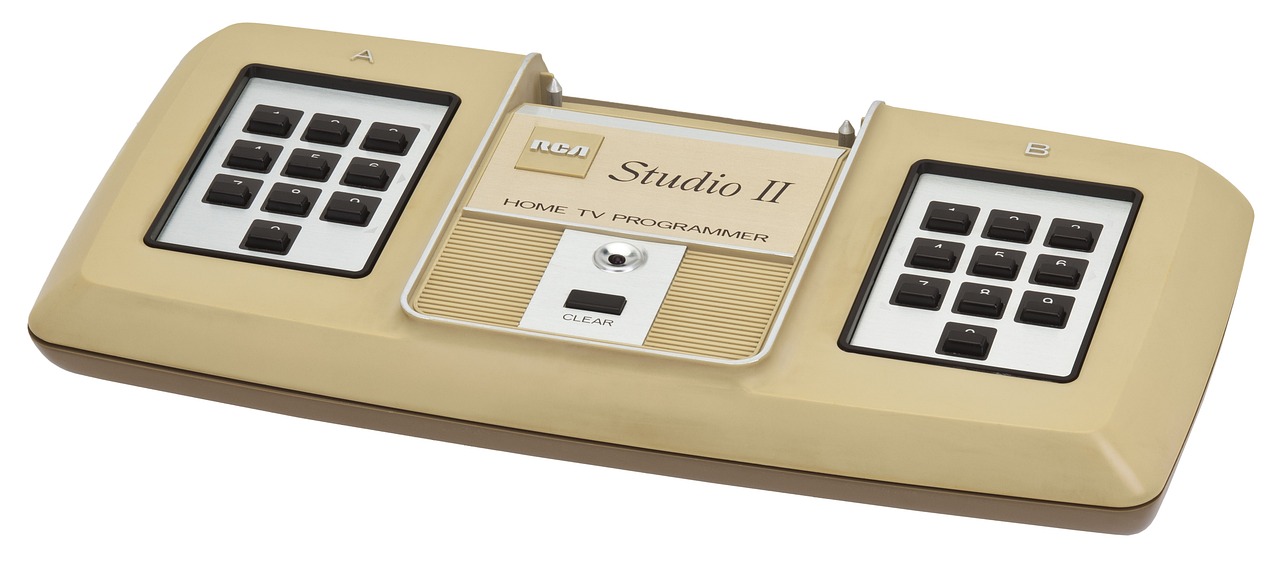
Originally, video games were seen as toys for boys. Gradually it was realised that there was a market for female game players too, if only suitably interesting games were developed, so the games companies eventually started to tailor games for them. That also meant, very late in the day, they started to employ women as games programmers. Now it is a totally normal thing to do. However, women were also there from the start, designing games. The first female commercial programmer (and possibly first independent developer) was Joyce Weisbecker. Working as an independent contractor she wrote her first games for sale in 1976 for the RCA Studio II games console that was released in January 1977.

RCA Studio II video games console
Image by WikimediaImages from Pixabay

Joyce was only a teenager when she started to learn to program computers and wrote her first games. She learnt on a computer that her engineer father designed and built at home called FRED (Flexible Recreational and Educational Device). He worked for RCA (originally the Radio Corporation of America), one of the major electronics, radio, TV and record companies of the 20th century. The company diversified their business into computers and Joyce’s father designed them for RCA (as well as at home for a hobby). He also invented a programming language called CHIP-8 that was used to program the RCA computers. This all meant Joyce was in a position to learn CHIP-8 and then to write programs for RCA computers including their new RCA Studio II games console before the machine was released, as a post-high school summer job.

The code for two games that she wrote in 1976, called Snake Race and Jackpot, were included in the manual for an RCA microcomputer called the COSMAC VIP, and she also wrote more programs for it the following year. These computers came in kit form for the buyer to build themselves. Her programs were example programs included for the owner to type in and then play once they had built the machine. Including them meant their new computer could do something immediately.

She also wrote the first game that she was paid for in that Summer of 1976. It was for the RCA Studio II games console, and it earned her $250 – well over $1000 in today’s money, so worth having for a teenager who would soon be going on to college. It was a quiz program, called TV School House I. It pitted two people against each other, answering questions on topics such as maths, history and geography, with two levels of difficulty. Questions were read from question booklets and whoever typed in the multiple choice answer number the fastest got the points for a question, with more points the faster they were. There is currently a craze for apps that augment physical games and this was a very early version of the genre.

Speedway screen from Wikimedia

She quickly followed it with racing and chase games, Speedway and Tag, though as screens were still very limited then, with only tiny screens, the graphics of all these games were very, very simple – eg racing rectangles around a blocky, rectangular racing track.

Unfortunately, the RCA games console itself was a commercial failure as it couldn’t compete with consoles like the Atari 2600, so RCA soon ended production. Joyce, meanwhile, retired from the games industry, still a teenager, ultimately becoming a radar signal processing engineer.

While games like Pong had come much earlier, the Atari 2600, which is credited with launching the first video game boom, was released in 1977, with Space Invaders, one of the most influential video games of all time, released in 1980. Joyce really was at the forefront of commercial games design. As a result her papers related to games programming, including letters and program listings, are now archived in the Strong National Museum of Play in New York.

More on …


Magazines …

Front cover of CS4FN issue 29 - Diversity in Computing

Subscribe to be notified whenever we publish a new post to the CS4FN blog.


This blog is funded through EPSRC grant EP/W033615/1.

Art Touch and Talk Tour Tech

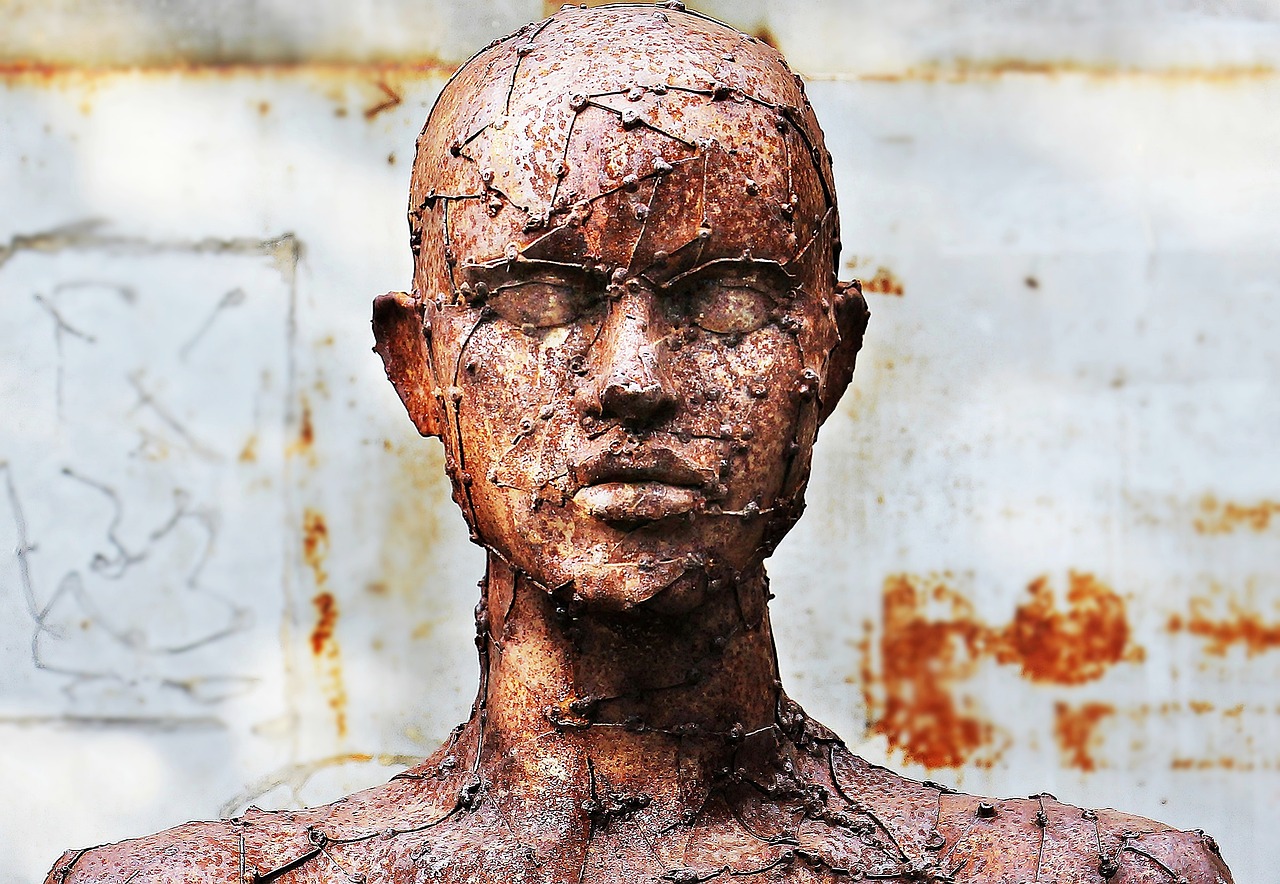
A sculpture of a head and shouldrers, heavily textured with a network of lines and points
Image by NoName_13 from Pixabay

What could a blind or partially-sighted person get from a visit to an art gallery? Quite a lot if the art gallery puts their mind to it. Even more if they make use of technology. So much so, we may all want the enhanced experience.

The best art galleries provide special tours for blind and partially-sighted people. One kind involves a guide or curator explaining paintings and other works of art in depth. It is not exactly like a normal guided tour that might focus on the history or importance of a painting. The best will give both an overview of the history and importance whilst also giving a detailed description of the whole picture as well as the detail, emphasising how each part was painted. They might, for example, describe the brush strokes and technique as well as what is depicted. They help the viewer create a really detailed mental model of the painting.

One visually-impaired guide who now gives such tours at galleries such as Tate Britain, Lisa Squirrel, has argued that these tours give a much deeper and richer understanding of the art than a normal tour and certainly more than someone just looking at the pictures and reading the text as they wander around. Lisa studied Art History at university and before visiting a gallery herself reads lots and lots about the works and artists she will visit. She found that guided tours by sighted experts using guided hand movements in front of a painting helped her build really good internal models of the works in her mind. Combined with her extensive knowledge from reading, she wasn’t building just a picture of the image depicted but of the way it was painted too. She gained a deep understanding of the works she explored including what was special about them.

The other kind of tour art galleries provide is a touching tour. It involves blind and partially-sighted visitors being allowed to touch selected works of art as part of a guided tour where a curator also explains the art. Blind art lover, Georgina Kleege, has suggested that touch tours give a much richer experience than a normal tour, and should also be put on for all for this reason. It is again about more than just feeling the shape and so “working out its form that”seeing” what a sighted person would take in at a glance. It is about gaining a whole different sensory experience of the work: its texture, for example, not a lesser version just of what it looks like.

How might technology help? Well, the company, NeuroDigital Technologies, has developed a haptic glove system for the purpose. Haptic gloves are gloves that contain vibration pads that stimulate the skin of the person in different, very fine ways so as to fool the wearer’s brain into thinking it is touching things of different shapes and textures. Their system has over a thousand different vibration patterns to simulate different feelings of touching surfaces. They also contain sensors that determine the precise position of the gloves in space as the person moves their hands around.

The team behind the idea scanned several works of art using very accurate laser scanners that build up a 3D picture of the thing being scanned. From this they created a 3D model of the work. This then allowed a person wearing to feel as though they were touching the actual sculpture feeling all the detail. More than that the team could augment the experience to give enhanced feelings in places in shadow, for example, or to emphasise different parts of the work.

A similar system could be applied to historical artifacts too: allowing people to “feel” not just see the Rosetta Stone, for example. Perhaps it could also be applied to paintings to allow a person to feel the brush strokes in a way that could just not otherwise be done. This would give an enhanced version of the experience Lisa felt was so useful of having her hand guided in front of a painting and the brush strokes and areas being described. Different colours might also be coded with different vibration patterns in this way allowing a series of different enhanced touch tours of a painting, first exploring its colours, then its brush strokes, and so on.

What about talking tours? Can technology help there? AIs can already describe pictures, but early versions at least were trained on the descriptions people have given to images on the Internet: “a black cat sitting on top of the TV looking cute”, The Mona Lisa: a young woman staring at you”. That in itself wouldn’t cut it. Neither would training the AI on the normal brief descriptions on the gallery walls next to works of art. However, art books and websites are full of detail and more recent AIs can give very detailed descriptions of art works if asked. These descriptions include what the picture looks like overall, the components, colours, brushstrokes and composition, symbolism, historical context and more (at least for famous paintings). With specific training from curators and art historians the AIs will only get better. What is still missing for a blind person though from the kind of experience Lisa has when experiencing painting with a guide, is the link to the actual picture in space – having the guide move her hand in front of the painting as the parts are described. However, all that is needed to fill that gap is to combine a chat-based AI with a haptic glove system (and provide a way to link descriptions to spatial locations on the image). Then, the descriptions can be linked to positions of a hand moving in space in front of a virtual version of the picture. Combine that with the kind of system already invented to help blind people navigate, where vibrations on a walking stick indicate directions and times to turn, and the gloves can then not only give haptic sensations of the picture in front of the picture or sculpture, but also guide the person’s movement over it.

Whether you have such an experience in a gallery, in front of the work of art, or in your own front room, blind and partially sighted people could soon be getting much better experiences of art than sighted people. At which point, as Georgina Kleege, suggested for normal touch tours, everyone else will likely want the full “blind” experience too.

Paul Curzon, Queen Mary University of London

More on …


Magazines …

Front cover of CS4FN issue 29 - Diversity in Computing

Subscribe to be notified whenever we publish a new post to the CS4FN blog.


This blog is funded through EPSRC grant EP/W033615/1.

Accessible Technology in the Voting Booth

CS4FN Banner

by Daniel Gill, Queen Mary University of London

Voting at an election: people deposting their voting slip
Image AI generated by Vilius Kukanauskas from Pixabay

On Thursday 4th July 2024, millions of adults around the UK went to their local polling station to vote for their representative in the House of Commons. However, for the 18% of adults who have a disability, this can be considerably more challenging. While the right of voters to vote independently and secretly is so important, many blind and partially sighted people cannot do so without assistance. Thankfully this is changing, and this election was hailed as the most accessible yet. So how does technology enable blind and partially sighted people to vote independently?

 There are two main challenges when it comes to voting for blind and partially sighted people. The names of candidates are listed down the left-hand side, so firstly, a voter needs to find the row of the person who they want to vote for. They then, secondly, need to put a cross in the box to the right. The image below gives an example of what the ballot paper looks like:

A mock up of a "CS4FN" voting slip with candidates
HOPPER, Grace
TURING, Alan Mathison
BENIOFF, Paul Anthony
Lovelace, Ada

To solve the first problem, we can turn to audio. An audio device can be used to play a recording of the candidates as the appear on the ballot paper. Some charities also provide a phone number to call before the election, with a person who can read this list out. This is great, of course, but it does rely on the voter remembering the position of the person that they want to vote for. A blind or partially sighted voted is also allowed to use a text reader device, or perhaps a smart phone with a special app, to read out what is on the ballot paper in the booth.

Lots of blind and partially impaired people are able to read braille: a way of representing English words using bumps on the paper (read more about braille in this CS4FN article). One might think that this would solve all the problems, but, in fact, there is a requirement that all the ballot papers for each constituency have a standard design to ensure they can be counted efficiently and without error.

The solution to the second problem is far more practical: the excitingly named tactile voting device. This is a simple plastic device which is placed on top of the ballot paper. Each of the boxes on the ballot paper (as shown to the right of the image above), has a flap above it with its position number embossed on it. When the voter finds the number of the person they want to vote for, they simply turn over the flap, and are guided by a perfectly aligned square guide to where the box is. The voter can then use that guide to draw the cross in the box.

This whole process is considerably more complicated than it is for those without disabilities – and you might be thinking, “there must be an easier way!” Introducing the McGonagle Reader (MGR)! This device combines both solutions into one device that can be used in the voting booth. Like the tactile voting device, it has flaps which cover each of the boxes for drawing the cross. But, next to those, buttons, which, when pressed, read out the information of the candidate for that row. This can save lots of time, removing the need to remember the position of each candidate – a voter can simply go down the page and find who they want to vote for and turn over the correct flap.

When people have the right to vote, it is especially important to ensure that they have the ability to use that right. This means that no matter the cost or the logistics, everyone should have access to the tools they need to vote for their representative. Progress is now being made but a lot more work still needs to be done.

To help ensure this happens in future, the RNIB want to know the experiences of those who voted or didn’t vote in the UK 2024 general election – see the survey linked from the RNIB page here.

More on …


Magazines …

Front cover of CS4FN issue 29 - Diversity in Computing

Subscribe to be notified whenever we publish a new post to the CS4FN blog.


This blog is funded through EPSRC grant EP/W033615/1.

The basics of Quantum Computing: Qubits

CS4FN Banner

by Paul Curzon, Queen Mary University of London

An eye looking at two blue spheres
Image by Gerd Altmann from Pixabay

Reality is weird, very weird. The first thing you have to do to understand the reality of reality is to drop your common sense. Only then can you start to understand it especially when it comes to the quantum world of the very small. Our brains evolved to naturally make sense of human scale things, rather than the very large or very small. Accept the weirdness, though, and there are lots of opportunities, especially for computer scientists. That is why it is now an exciting area of research with theoretical physicists, engineers and computer scientists working together to make progress.

Not common sense

Imagine you are a person trying to understand the world a thousand years ago. Clearly the world MUST be flat. It looks flat and suggesting you are standing on a sphere is just ridiculous. People living on the other side would obviously fall off if it was a sphere! Except the world is a sphere and people in Australia (or Europe if you are Australian) don’t fall off. Common sense doesn’t work (until you understand how gravity works). That’s why science is so powerful. Common Sense also doesn’t work for understanding the reality of the very small. This branch of physics, quantum physics, is very important for computer scientists not only because the building blocks of our computers are becoming ever smaller, but because when you get so small that the laws of quantum physics matter, computers can work in new, exciting ways, ways that are far better than our current computers.

Bits and qubits

Let’s start with binary, the fundamental way we represent information in a computer. The basic building block of information is the bit. A bit is something that can have one of two states. It can be a 1 or a 0. That means a bit can store some information. These two states of 1 and 0 might be physically represented in lots of ways, such as a high voltage stored versus a low voltage stored, or a pulse of light versus no pulse of light, or someone’s hand up versus their hand down. If you have two bits then you can store one of 4 pieces of information in them because of the possible combinations (00, 01, 10 and 11), with three bits and you can store 8 different things. Those collections of bits can then stand for different numbers (that is all binary is), and by building big circuits from simple basic circuits that do simple manipulations on bits (i.e., logic gates) we can do ever more complex calculations with them and ultimately everything our current computers are capable of.

The spin of an electron

A pedestrian light showing green/walk
Image by Hans from Pixabay

Bits can be represented by anything that has 2 states. So suppose you want to represent your bits using something really small like electrons. Electrons have a property called spin. You can imaging them as spinning balls of charge (though they are not exactly spinning like a spinning ball … electrons aren’t balls and they aren’t actually rotating in the normal sense – remember reality is weird so these analogies are just there to help give an idea, but it is never as simple as that). Now, electrons can “spin” in exactly one of two ways called spin up and spin down. There are only two possible kinds of spin because in the quantum world things come in discrete amounts, not continuous ones. They jump from one state to another, like a pedestrian (walk/don’t walk) traffic light going from red to green instantly) rather than gradually changing between them (such as the way a car gradually speeds up to the speed limit). An electron is either spin up or spin down, like the pedestrian lights, never something in between.

Now, it is possible to set the spin of an electron and to measure whether it has spin that is spin up or spin down, so an electron can, in principle, be used to store a binary bit given it has two states (spin up for 1 and spin down for 0, say). However, this is where weirdness really comes in. It turns out that it is possible for an electron to be both spin up and spin down at once as long as the spin is not measured, due to the way the quantum world works. A quantum pedestrian light doing a similar thing would have only one light that could be red or green. However, it would be both red and green at the same time UNTIL someone looked at it to see which state it was in (so measured the state). At that point they would become, and the person would only see, one colour or the other. This is called quantum superposition. To understand this it is better to think about reality being about probabilities not certainties. Imagine that the electron is like a tossed coin that is still in the air. It has a probability of being Heads and of being Tails. Only when it lands (so is measured) is it actually one or the other. An electron is combining both possibilities until the spin is measured.

The quantum tortoise and the hare

You may have the quaint idea that reality is made of sub-atomic particles (like electrons or protons) that are solid little bits of matter that are very ball like and exist in one place at any given time. Actually they aren’t like that at all. It is better to think of particles as just having probabilities of being at one place or another – they are kind of smeared across space, everywhere at once, like a ripple pattern across a pond, just with different probabilities of actually being in any place when their position is measured. When you do measure their position you find they definitely are in one place or another, appearing to be a particle again, not a wave.

It may help to think of this in terms of watching slow moving tortoises and fast moving hares passing you as they race. The position of a slow moving tortoise you see wander by is easy to call: it has a very high probability to be in a particular place. The position of a fast moving hare that whizzes past is much harder to call: it has a far lower probability to be in a given place at any time. However, without looking you can’t tell. You just know the probabilities. Of course with particles it isn’t exactly like that just as an electron’s spin isn’t exactly like a ball spinning. It is only when a particle’s position is actually checked (i.e. measured) that it is definitely at a known place and that smeared probability collapses to certainty. A quantum tortoise and hare racing past would be in all possible positions round the race track just with different probabilities. Suppose you only checked (so measured their position) at the finish line. It is only because of that measurement that the probabilities of where they were through the race turn into specific measured so known positions with a quantum hare or a quantum tortoise having actually won.

This weirdness is linked to the fact that the fundamental components that reality is made up of are both particles in given places (think of an electron or a proton) and waves passing through space (think of light or ripples in a pond) at the same time. So light behaves like a particle and like a wave. Similarly, an electron does too. 

Electron spin as Qubits

Other properties of sub-atomic particles act in the same way as a particle’s position being smeared across lots of possibilities at once. This includes the spin of an electron. Until it is measured, an electron is superposed in both a spin up and spin down state at the same time (spinning both ways at once!): there is just a probability that the electron is in each state, it isn’t actually definitely in either. That means as long as you do not measure its spin, the electron as a device storing a piece of information is storing both 1 and 0 at the same time, each with a given probability. As such it behaves differently to an actual bit which must be either 1 or 0. We therefore call such an electron-based storage a qubit rather than a bit. 

In theory, we can do computations on qubits manipulating and combining them in simple ways using the quantum equivalent of logic gates. Once we have created quantum logic gates to do simple manipulations, we can combine those gates into bigger and bigger circuits that do more complicated quantum calculations. As long as the states of the qubits are not measured all the states through the circuit are superposed in both states with particular probabilities. Unlike a normal circuit which does one series of computations based on its inputs, these quantum circuits are in effect doing all possible computations of that circuit at once. It is only when we measure the answer at the output, say, that the qubits in the circuit are fixed at either 1 or 0 and an actual result is delivered. This is like the tortoise and hare being everywhere (whatever racing strategy they followed) with some probability until we measure the result at the finish line (the output of the race). Because all states existed at once, lots of computation exists simultaneously, this means that such a circuit can, in theory, and with the right algorithms, deliver answers far, far faster than a conventional circuit could possibly do, given the latter can only do one computation at a time,

From theory to practice

That is the theory, and it is gradually being realised in practice. Qubits can be created and their values changed. Various quantum logic gates have also now been invented and so small quantum computers do now exist. Quantum algorithms to do certain tasks quickly have been invented. Since the original ideas were mooted, progress has been relatively slow, but now that the ideas have been shown to work in practice, more and more is being achieved, making it an exciting time to be doing quantum computing research.

More on …

  • Quantum Computing (to come)

Subscribe to be notified whenever we publish a new post to the CS4FN blog.


This blog is funded through EPSRC grant EP/W033615/1.

Gutta-Percha: how a tree launched a global telecom revolution

CS4FN Banner

by Paul Curzon, Queen Mary University of London

(from the archive)

Rubber tree being tapped
Image  from Pixabay

Obscure plants and animals can turn out to be surprisingly useful. The current mass extinction of animal and plant species needs to be stopped for lots of reasons but an obvious one is that we risk losing forever materials that could transform our lives. Gutta-percha is a good example from the 19th century. It provided a new material with uses ranging from electronic engineering to bioengineering. It even transformed the game of golf. Perhaps its greatest claim to fame though is that it kick-started the worldwide telecoms boom of the 19th century that ultimately led to the creation of global networks including the Internet.

Gutta-percha trees are native to South East Asia and Australia. Their sap is similar to rubber. It’s actually a natural polymer: a kind of material made of gigantic molecules built up of smaller structures that are repeated over and over again. Plastics, amber, silk, rubber and wool are all made of polymers. Though very similar to it, unlike rubber, Gutta-percha is biologically inert – it doesn’t react with biological materials – and that was the key to its usefulness. It was discovered by Western explorers in the middle of the 17th century, though local Malay people already knew about it and used it.

Chomping wires

So how did it play a part in creating the first global telecom network? Back in the 19th century, the telegraph was revolutionising the way people communicated. It meant messages could be sent across the country in minutes. The trouble was when the messages got to the coast they ground to a halt. Messages could only travel across an ocean as fast as a boat could take them. They could whiz from one end of America to the other in minutes but would then take several weeks to make it to Europe. The solution was to lay down undersea telegraph cables. However, to carry electricity an undersea cable needs to be protected and no one had succeeded in doing that. Rubber had been tried as an insulating layer for the cables but marine animals and plants just attacked it, and once the cable was open to the sea it became useless for sending signals. Gutta-percha on the other hand is a great insulator too but it doesn’t degrade in sea-water.

As it was the only known material that worked, soon all marine cable used Gutta-percha and as a result the British businessmen who controlled its supply became very rich. Soon telegraph cables were being laid everywhere – the original global telecoms network. To start with the network carried telegraph signals then was upgraded to voice and now is based on fibre-optics – the backbone of the Internet.

Rotting teeth

Gutta-percha has also been used by dentists – just as marine animals don’t attack it, it doesn’t degrade inside the human body either. That together with it being easy to shape makes it perfect for dental work. For example, it is used in root canal operations. The pulp and other tissue deep inside a rotting tooth are removed by the dentist leaving an empty chamber. Gutta-percha turns out to be an ideal material to fill the space, though medical engineers and materials scientists are trying to develop synthetic materials like Gutta-percha, but that have even better properties for use in medicine and dentistry.

Dimpled balls

That just leaves golf! Early golf balls were filled with feathers. In 1848 Robert Adams Paterson came up with the idea of making them out of Gutta-percha since it was much easier to make than the laborious process of sewing balls of feathers. It was quickly realised, if by accident, that after they had been used a few times they would fly further. It turned out this was due to the dimples that were made in the balls each time they were hit. The dimples improved the aerodynamics of the ball. That’s why modern golf balls are intentionally covered in dimples.

So gutta-percha has revolutionised global communications, changed the game of golf and even helped people with rotting teeth. Not bad for a tree.

More on …


Subscribe to be notified whenever we publish a new post to the CS4FN blog.


This blog is funded through EPSRC grant EP/W033615/1.

Even the dolphins use pocket switched networks!

(from the archive)

Dolphin leaping in waves off Panama City
Image by Heather Williams from Pixabay

Email, texting, Instant Messaging, Instant response…one of the things about modern telecoms is that they fuel our desire to “talk” to people anytime, anywhere, instantly. The old kind of mail is dismissed as “snail mail”. A slow network is a frustrating network. So why would anyone be remotely interested in doing research into slow networks? Surprisingly, slow networks deserve study. Professor Jon Crowcroft of the University of Cambridge and his team were early researchers of this area, and this kind of network could be the network of the future. The idea is already being used by the dolphins (not so surprising I suppose given according to Douglas Adams’ “The HitchHiker’s Guide to the Galaxy” they are the second most intelligent species on Earth…after the mice).

From node to node

Traditional networks rely on having lots of fixed network “nodes” with lots of fast links between them. These network nodes are just the computers that pass on the messages from one to the other until the messages reach their destinations. If one computer in the network fails, it doesn’t matter too much because there are enough connections for the messages to be sent a different way.

There are some situations where it is impractical to set up a network like this though: in outer space for example. The distances are so far that messages will take a long time – even light can only go so fast! Places like the Arctic Circle are another problem: vast areas with few people. Similarly, it’s a problem under the sea. Signals don’t carry very well through water so messages, if they arrive at all, can be muddled. After major disasters like Hurricane Katrina or a Tsunami there are also likely to be problems.

It is because of situations like these that computer scientists started thinking about “DNTs”. The acronym can mean several similar things: Delay Tolerant Networks (like in space the network needs to cope with everything being slow), Disruption Tolerant Networks (like in the deep sea where the links may come and go) or Disaster tolerant networks (like a Tsunami where lots of the network goes down at once). To design networks that work well in these situations you need to think in a different way. When you also take into account that computers have gone mobile – they no longer just sit on desks but are in our pockets or handbags, this leads to the idea of a “ferrying network” or as Jon Crowcroft calls them: “Pocket Switched Network”. The idea is to use the moving pocket computers to make up a completely new kind of network, where some of the time messages move around because the computers carrying them are moving themselves, not because the message itself is moving. As they move around they pass near other computers and can exchange messages, carrying a message on for someone else until it is near another computer it can jump to.

From Skidoo to you

A skiddo with driver standing next to it
Image by raul olave from Pixabay

How might such networks be useful in reality? Well one was set up for the reindeer farmers in the Arctic Circle. They roam vast icy wastelands on skidoos, following their reindeer. They are very isolated. There are no cell phone masts or internet nodes and for long periods they do not meet other people at all. The area is also too large to set up a traditional network cheaply. How could they communicate with others?

They set up a form of pocket switched network. Each carried a laptop on their skidoo. A series of computers were also set up sitting in tarns spread around the icy landscape. When the reindeer farmers using the network want a service, like delivering a message, the laptop stores the request until they pass within range of one of the other computers perhaps on someone else’s skidoo. The computer then automatically passes the message on. The new laptop takes the message with it and might later pass a tarn, where the message hops again then waits till someone else passes by heading in the right direction. Eventually it makes a hop to a computer that passes within range of a network point connected to the Internet. It may take a while but the mail eventually gets through – and much faster than waiting for the farmer to be back in net contact directly.

Chatting with Dolphins

Even the dolphins got in on the act. US scientists wanted to monitor coastal water quality. They hit on the idea of strapping sensors onto dolphins that measure the quality wherever they go. Only problem is dolphins spend a lot of time in deep ocean where the results can’t easily be sent back. The solution? Give them a normal (well dolphin adapted) cell phone. Their phone stores the results until it is in range of their service provider off the coast. By putting a receiver in the bays the dolphins return to most frequently, they can call home to pass on the data whenever there.

The researchers encountered an unexpected problem though. The dolphin’s memory cards kept inexplicably filling up. Eventually they realised this was because the dolphins kept taking trips across the Atlantic where they came in range of the European cell networks. The European telecom companies, being a friendly bunch, sent lots of text messages welcoming these newly appeared phones to their network. The memory cards were being clogged up with “Hellos”!

The Cambridge team investigated how similar networks might best be set up and used for people on the move, even in busy urban environments. To this end they designed a pocket switched network called Haggle. Using networks like Haggle, it is possible to have peer-to-peer style networks that side-step the commercial networks. If enough people join in then messages can just hop from phone to phone, using bluetooth links say, as they passed near each other. They might eventually get to the destination without using any long distance carriers at all.

The more the merrier

With a normal network, as more people join the network it clogs up as they all try to use the same links to send messages at the same time. Some fundamental theoretical results have shown that with a pocket switched network, the capacity of the network can actually go up as more people join – because of the way the movement of the people constantly make new links.

Pocket switched networks are a bit like gases – the nodes of the network are like gas molecules constantly moving around. A traditional network is like a solid – all the molecules, and so nodes, are stationary. As more people join a gaseous network it becomes more like a liquid, with nodes still moving but bumping into other nodes more often. The Cambridge team explored the benefits of networks that can automatically adapt in this way to fit the circumstances: making phase transitions just like water boiling or freezing.

One of the important things to understand to design such a network is how people pass others during a typical day. Are all people the same when it comes to how many people they meet in a day? Or are there some people that are much more valuable as carriers of messages. If so those are the people the messages need to get to to get to the destination the fastest!

To get some hard data Jon and his students handed out phones. In one study a student handed out adapted phones at random on a Hong Kong street, asking that they be returned a fixed time later. The phones recorded how often they “met” each other before being returned. In another similar experiment the phones were given out to a large number of Cambridge students to track their interactions. This and other research shows that to make a pocket switched network work well, there are some special people you need to get the messages to! Some people meet the same people over and over, and very few others. They are “cliquey” people. Other more “special” people regularly cross between cliques – the ideal people to take messages across groups. Social Anthropology results suggest there are also some unusual people who rather than just networking with a few people, have thousands of contacts. Again those people would become important message carriers.

So the dolphins may have been the “early adopters” of pocket switched networks but humans may follow. If we were to fully adopt them it could completely change the way the telecom industry works…and if we (or the dolphins) ever do decide to head en-mass for the far reaches of the solar system, pocket switched networks like Haggle will really come into their own.

– Paul Curzon, QMUL, based on a talk given by Jon Crowcroft at Queen Mary in Jan 2007.

More on …


Subscribe to be notified whenever we publish a new post to the CS4FN blog.


This blog is funded through EPSRC grant EP/W033615/1.
Coordinate conundrum puzzles and vector graphics

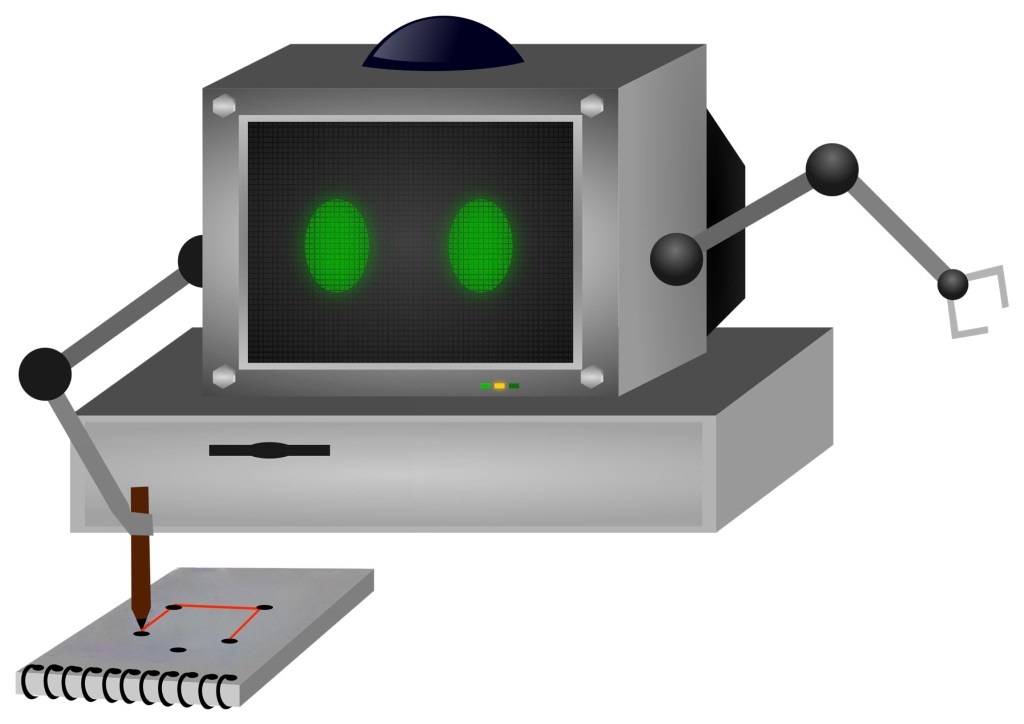
A computer with arms doing a coordinate conundrum on a pad of paper

Image by Samson Vlad from Pixabay modified by CS4FN

One way computers store images is as a set of points (as coordinates) that make up lines and shapes. This is the basis for the kind of computer graphics called Vector Graphics. You can explore the idea by doing coordinate conundrum puzzles. A coordinate conundrum is just a Vector Graphics Image to be drawn on paper.They are join-the-dot puzzles based on the idea. Can you recreate the original drawing?

Recreate a drawing from coordinates

Points on a grid can be represented by pairs of numbers called coordinates. The first, x coordinate, says how far to go along horizontally. The second, y coordinate, says how far to go up, vertically. The numbers along the axes (along the bottom and up the side) of the grid give the distance in that direction. Draw the point at the place you end up at! So for example the coordinate (4,5) means go right from the origin 4 and up 5 and plot the point there.

Grid showing point (4,5) as 4 right and 5 up.
Image by CS4FN

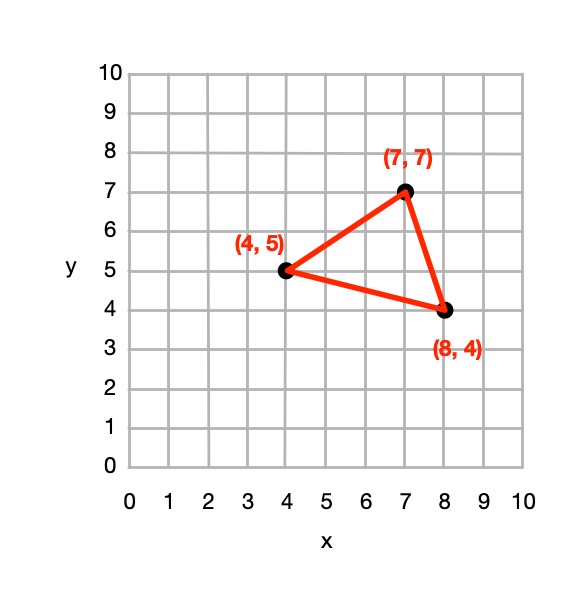
You can join any two coordinates with lines. If a series of lines join back to the original one then it make a shape (a polygon), which can be coloured in. For example, if we plot the points (4,5), (7,7 and (8,4) drawing lines between them and back to (4,5) we make a triangle.

A triangle marked out in coordinates
Image by CS4FN

From 4 points we could define a square, rectangle or more general quadrilateral shape and so on.

So from a set of instructions telling you where to plot points, you can create a picture out of all the shapes and lines that make up the picture, giving colours for the lines or shapes.

This (and so these puzzles) is the basis of how programs in the language SVG (Scalable Vector Graphics) work to store a drawing as the instructions needed to recreate it. Drawing programs often store illustrations that the artists using them draw as an SVG program.

How to solve them

Each picture is made of shapes, each given by a colour and a list of the coordinates of its vertices (corners). For each shape: 

1. Plot the list of (x,y) coordinates on the grid as dots. 

2. Join the dots (which start and end at the same place) to make the shape. 

3. Colour the shape you have made with the colour at the start of the list. 

So, for example, if the first instruction starts: red (5,24) … that means plot the point 5 along and 24 up. It starts a new shape, coloured red, that ends at the same point.

If the series of points do not join back to the start then they represent coloured lines rather than a coloured shape,

Example: Semaphore flag

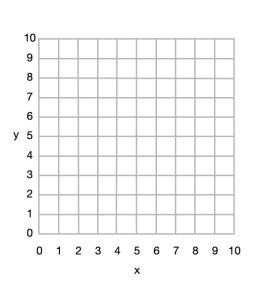
Blank 10x10 grid
Image by CS4FN

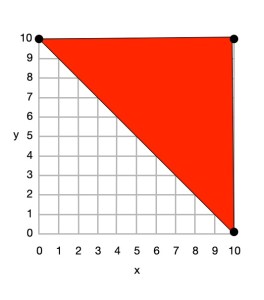
Here is a simple example to draw a red and yellow semaphore flag, given the shapes:

  • red (0,10) (10,10) (10,0) and back to (0,10)
  • yellow (0,10) (10,0) (0,0) and back to (0,10)

From this we can draw the picture.

Top right triangle now coloured red with (0,10), (10,10) and (10,0) plotted, joined by lines and the shape coloured.
Image by CS4FN

First we plot the points given for the red shape (a triangle), join the dots and colour it in.

  • red (0,10) (10,10) (10,0) and back to (0,10)
Bottom rightt triangle now coloured yellow with (0,10), (10,0) and (0,0) plotted, joined by lines and the shape coloured.
Image by CS4FN

Then we plot the points given for the yellow shape (another triangle), join the dots and colour it in.

  • yellow (0,10) (10,0) (0,0) and back to (0,10)

Do some puzzles yourself

Try the coordinate conundrum puzzles on our puzzle page either by printing off the puzzle sheet or drawing on squared paper. Then read on to find out a little more the advantages of vector graphics.

From straight lines to curves

In these puzzles we have only used straight lines between points, but we could also include commands to create circles and curved lines between points based on the mathematical equation for the curve. SVG, the vector graphic programming language, has instructions for a variety of more complex kinds of lines and shapes like that.

Advantages and disadvantages of Vector Graphics

Recording images in this way as points, lines and shapes has several advantages over storing images as pixels:

  • we generally need far less space to store the image as we do not need to store a colour for thousands or even millions of pixels;
  • the images are mathematically accurate – a line is represented as a perfect straight line not a pixelated (staircase-like) line;
  • the images are scalable, meaning you can increase the size of an image, zooming in just by multiplying all the numbers involved by a scale factor (which is just a number giving the magnification you want). The resulting image is still mathematically perfect with straight lines still straight lines, for example, just bigger. For example, suppose we want to make a semaphore flag twice the size of our original. We just multiply all points by 2, for example giving red (0,20) (20,20) (20,0) and back to (0,20); yellow (0,20) (20,0) (0,0) and back to (0,20) and it gives an identical picture, just bigger. (Try plotting it and see!)

Disadvantages are:

  • Vector graphics are not a good way to represent photographs – digital cameras record the light at lots of points corresponding to pixels so naturally are stored as pixels (numbers that give the colour in that small square of the image). Trying to convert a photo to a vector image would be hard (needing algorithms to recognise shapes, for example). It would be a less natural and less accurate way of doing so.
  • With computer memory cheap, the advantages of using less storage are less important than they once were.

SVG: a graphics programming language

The programming language SVG records drawings in this way as instructions to draw shapes and lines based on points. It has some difference to our instructions though. For example the y-axis coordinates start at the top and work down. The principles are the same though, it is only the detail that differs.

Paul Curzon, Queen Mary University of London

More on …

Magazines …


Subscribe to be notified whenever we publish a new post to the CS4FN blog.


This blog is funded by EPSRC on research agreement EP/W033615/1.

QMUL CS4FN EPSRC logos

Mary Ann Horton and the invention of email attachments

Mary Ann Horton was transitioning to female at the time that she made one of her biggest contributions to our lives with a simple computer science idea with a big impact: a program that allowed binary email attachments.

Now we take the idea of sending each other multimedia files – images, video, sound clips, programs, etc for granted, whether by email or social networks, Back in the 1970s, before even the web had been invented, people were able to communicate by email, but it was all text. Email programs worked on the basis that people were just sending words, or more specifically streams of characters, to each other. An email message was just a long sequence of characters sent over the Internet. Everything in computers is coded as binary: 1s and 0s, but text has a special representation. Each character has its own code of 1s and 0s, that can also be thought of as a binary number, but that can be displayed as the character by programs that process it. Today, computers use a universally accepted code called Unicode, but originally most adopted a standard code called ASCII. All these codes are just allocations of patterns of 1s and 0s to each character. In ASCII, ‘a’ is represented by 1100001 or the number 97, whereas A is 1000001 or number 65, for example. These are only 7 bits long and as computers store data in bytes of 8 bits at a time this means that not all patterns of binary (so representable numbers) correspond to one of the displayable characters that email messages were expected to contain by the programs that processed them.

That is fine if all you have done is used programs like text editors, that output characters so you are guaranteed to be sending printable characters. The problem was other kinds of data whether images or runnable programs, are not stored as sequences of characters. They are more general binary files, meaning the data is long sequences of byte-sized patterns of 1s and 0s and what those 1s and 0s meant depended on the kind of data and representation used. If email programs were given such data to send, pass on or receive, they would reject or more likely mangle it as not corresponding to characters they could display. The files didn’t even have to be non-character formats, as at the time some computer systems used a completely different code for characters. This meant text emails could also be mangled just because they passed through a computer using a different format of character.

Mary Ann realised that this was all too restrictive for what people would be needing computers to do. Email needed to be more flexible. However, she saw that there was a really easy solution. She wrote a program, called uuencode that could take any binary file and convert it to one that was slightly longer but contained only characters. A second program she wrote, called uudecode converted these files of characters back to the original binary file to be saved by the receiving email program exactly it was originally on the source program.

All the uuencode program did was take 3 bytes (24 bits) of the binary file at a time, split them into groups of 6 bits so effectively representing a number from 0 to 63, add 32 to this number so the numbers are now in the range 32 to 95 and those are the numbers so binary patterns of the printable characters that the email programs expected. Each three bytes were now 4 printable characters. These could be added to the text of an email, though with a special start and end sequence included to identify it as something to decode. uudecode just did this conversion backwards, turning each group of 4 characters back into the orginal three bytes of binary.

Email attachments had been born, and ever since communication programs, whether email, chat or social media, have allowed binary files, so multimedia, to be shared in similar ways. By seeing a coming problem, inventing a simple way to solve it and then writing the programs, Mary Ann Horton had made computers far more flexible and useful.

Paul Curzon, Queen Mary University of London

More on …

Related Magazines …

cs4fn issue 14 cover

Subscribe to be notified whenever we publish a new post to the CS4FN blog.


This blog is funded by EPSRC on research agreement EP/W033615/1.

QMUL CS4FN EPSRC logos