How are you two doing together? You and your data, we mean. It’d be nice to have an update. Do you understand one another in that special OMG-we’ve-talked-all-night-and-now-the-sun’s-up kind of way? Is it more like you just kind of hang out together without really bothering to think about each other? Or maybe you’re just a bit baffled by the whole data scene. If your heart doesn’t beat with fervent love for the wild binary information all around you, that’s OK. In fact that’s pretty normal. It just so happens, though, that there’s a guy who wants to improve your data relationships. He’s called Andy Broomfield and he graduated as a designer from the Royal College of Art.
Andy’s worried that as we rely more and more on gadgets like mobiles and satnavs, a lot of us stop thinking about where the data comes from. “Increasingly we’re becoming dependent on the data,” says Andy. “We are just blindly fed it.” He tells the story of some councils that had to put up ‘Ignore Your Satnav’ signs after lorry drivers followed electronic directions down narrow lanes rather than believe their own eyes. He reckons that hapless users wouldn’t get quite so “data-lost” if we had a way to really connect with the pure information out there, being broadcast from satellites every second of the day. So he designed some gadgets of his own to help get our data relationships back on the rails.
Time to yourself
Ignore Sat Nav image by Dan Pope on Flickr, used under a CC BY-NC-SA 2.0 licence.
The first device lets you keep a personal time zone, and was inspired by a group of data-lovers who are sweet on measuring time. Time zones divide the globe into long tall ribbons based on longitude. Since GPS satellites can give each of us extremely accurate longitude readings all the time (the cs4fn offices are apparently at .042 degrees west), why not go even further and cut the ribbons up even more? That’s what Andy’s Longitude Time Piece does, to the point where you can uncover what Andy calls “your own local time zone”, right down to the second. Then you’d know that wherever you go, your timing would always be perfect.
Flooded with facts
Andy’s second invention is another GPS-flavoured one. Even though a lot of us can get lost really easily (even with maps and satellites to help), others love getting down and dirty with geographic data. This gadget’s good for both groups. People with a great sense of data direction can use the Geo Flood Browser to get info on the nearest river, wherever they are.
They can also share the love with others who get a bit data-lost, by leaving electronic tags around to let them know if the area gets flooded a lot. Then people nearby can use the tags using their own gadget to find out whether they ought to be stocking up on boats and snorkels before the next flood hits.
Spot a satellite
Finally Andy’s designed a gadget for your data relationships in space. Satellite spotters are kind of like backyard astronomers, except they love catching glimpses of the satellites that orbit the Earth. With Andy’s device anyone can tune into a satellite that’s above them and listen to it. You can either hear a voice tell you about the satellite, or you can actually listen into the bleeps of information coming from the satellite itself. That way, Andy says, you get “a connection to the pure data, the data that we’re dependent upon in the world.” It’s strange to think that this data is around us all the time – it’s just our phones and TVs that normally listen in, rather than us. If information is the lifeblood of our high-tech lives, the Satellite Scanner lets you listen to its heart.
Each of Andy’s devices uses information from the satellites whizzing, Cupid-like, around the Earth. The unusual thing is what they do with it – they’re not about being really useful so much as they are about actually experiencing the data that’s out there in the real world. That’s how he’s aiming to improve our data relationships. It’s like the way you can know someone for ages, but never see what they’re really about until you look from a different angle. Except this time it’s with satellites. Weird, eh? But good. A little like love.
Imagine being able to pick up an ordinary banana and use it as a phone. That’s part of the vision of ‘invoked computing’, which is being developed by Japanese researchers. A lot of the computers in our lives are camouflaged – smartphones are more like computers than phones, after all – but invoked computing would mean that computers would be everywhere and nowhere at the same time.
The idea is that in the future, computer systems could monitor an entire environment, watching your movements. Whenever you wanted to interact with a computer, you would just need to make a gesture. For example, if you picked up a banana and held one end to your ear and the other to your mouth, the computer would guess that you wanted to use the phone. It would then use a fancy speaker system to direct the sound, so you would even hear the phone call as though it were coming from the banana.
Sometimes you might find yourself needing a bit more computing power, though, right? Not to worry. You can make yourself a laptop if you just find an old pizza box. Lift the lid and the system will project the video and sound straight on to the box.
At the moment the banana phone and pizza box laptop are the only ways that you can use invoked computing in the researchers’ system, but they hope to expand it so that you can use other objects. Then, rather than having to learn how to use your computers, your computers will have to learn how you would like to use them. And when you are finished using your phone, you could eat it.
Computer Science isn’t just about using language, sometimes it’s about losing it. Sometimes people want to send messages so no one even knows they exist and a great place to lose language is inside a conversation.
Cryptography is the science of making messages unreadable. Spymasters have used it for a thousand years or more. Now it’s a part of everyday life. It’s used by the banks every time you use a cash point and by online shops when you buy something over the Internet. It’s used by businesses that don’t want their industrial secrets revealed and by celebrities who want to be sure that tabloid hackers can’t read their texts.
Cryptography stops messages being read, but sometimes just knowing that people are having a conversation can reveal more than they want even if you don’t know what was said. Knowing a football star is exchanging hundreds of texts with his team mate’s girlfriend suggests something is going on, for example. Similarly, CIA chief David Petraeus whose downfall made international news, might have kept his secret and his job if the emails from his lover had been hidden. David Bowie kept his 2013 comeback single ‘Where are we now?’ a surprise until the moment it was released. It might not have made him the front page news it did if a music journalist had just tracked who had been talking to who amongst the musicians involved in the months before.
That’s where steganography comes in – the science of hiding messages so no one even knows they exist. Invisible ink is one form of steganography used, for example, by the French resistance in World War II. More bizarre forms have been used over the years though – an Ancient Greek slave had a message tattooed on his shaven head warning of Persian invasion plans. Once his hair had grown back he delivered it with no one on the way the wiser.
Digital communication opens up new ways to hide messages. Computers store information using a code of 0s and 1s: bits. Steganography is then about finding places to hide those bits. A team of Polish researchers led by Wojciech Mazurczyk have now found a way to hide them in a video app (Skype) conversation.
Skype was one of the early popular video call applications, eventually replaced by Microsoft Teams. When you use Skype to make a phone call, the program converts the sounds you make to a long series of bits. They are sent over the Internet and converted back to sound at the other end. At the same time more sounds as bits stream back from the person you are talking to. Data transmitted over the Internet isn’t sent all in one go, though. It’s broken into packets: a bit like taking your conversation and tweeting it one line at a time.
Why? Imagine you run a crack team of commandos who have to reach a target in enemy territory to blow it up – a stately home where all the enemy’s Generals are having a party perhaps. If all the commandos travel together in one army truck and something goes wrong along the way probably no one will make it – a disaster. If on the other hand they each travel separately, rendezvousing once there, the mission is much more likely to be successful. If a few are killed on the way it doesn’t matter as the rest can still complete the mission.
The same applies to a video call. Each packet contains a little bit of the full conversation and each makes its own way to the destination across the Internet. On arriving there, they reform into the full message. To allow this to happen, each packet includes some extra data that says, for example, what conversation it is part of, how big it is and also where it fits in the sequence. If some don’t make it then the rest of the conversation can still be put back together without them. As long as too much isn’t missing, no one will notice.
Skype does something special with its packets. The size of the packets changes depending on how much data needs to be transmitted. If the person is talking, each packet carries a lot of information. If the person is listening then what is being transmitted is mainly silence. Skype then sends shorter packets. The Polish team realised they could exploit this for steganography. Their program, SkyDe, intercepts Skype packets looking for short ones. Any found are replaced with packets holding the data from the covert message. At the destination another copy of SkyDe intercepts them and extracts the hidden message and passes it on to the intended recipient. As far as Skype is concerned some packets just never arrive.
There are several properties that matter for a good steganographic technique. One is its bandwidth: how much data can be sent using the method. Because Skype calls contain a lot of silence SkyDe has a high bandwidth: there are lots of opportunities to hide messages. A second important property is obviously undetectability. The Polish team’s experiments have shown that SkyDe messages are very hard to detect. As only packets that contain silence are used and so lost, the people having the conversation won’t notice and the Skype receiver itself can’t easily tell because what is happening is no different to a typical unreliable network. Packets go missing all the time. Because both the Skype data and the hidden messages are encrypted, someone observing the packets travelling over the network won’t see a difference – they are all just random patterns of bits. Skype calls are now common so there are also lots of natural opportunities for sending messages this way – no one is going to get suspicious that lots of calls are suddenly being made.
All in all SkyDe provides an elegant new form of steganography. Invisible ink is so last century (and tattooing messages on your head so very last millennium). Now the sound of silence is all you need to have a hidden conversation.
So far almost all computer languages have been written in English, but that doesn’t need to be the case. Computers don’t care. Computer scientist Ramsey Nasser developed the first programming language that uses Arabic script. His computer language is called قلب. In English, it’s pronounced “Qalb”, after the Arabic word for heart. As long as a computer understands what to do with the instructions it’s given, they can be in any form, from numbers to letters to images.
The escape character is a rather small and humble thing, often ignored, easily misunderstood but vital in programming languages. It is used simply to say symbols that follow should be treated differently. The n in \n is no longer just an n but a newline character, for example. It is the escape character \ that makes the change. The escape character has a long history dating back to at least Ancient Egypt and probably earlier.
The Ancient Egyptians famously used a language of pictures to write:hieroglyphs. How to read the language was lost for thousands of years, and it proved to be fiendishly difficult to decipher. The key to doing this turned out to be the Rosetta Stone, discovered when Napoleon invaded Egypt. It contained the same text in three different languages: the Hieroglyphic script, Greek and also an Egyptian script called Demotic.
A whole series of scholars ultimately contributed, but the final decipherment was done by Jean-François Champollion. Part of the difficulty in decipherment, even with a Greek translation of the Rosetta Stone text available, was because it wasn’t, as commonly thought, just a language where symbolic pictures represented words (a picture of the sun, meaning sun, for example). Instead, it combined several different systems of writing but using the same symbols. Those symbols could be read in different ways. The first way was as alphabetic letters that stood for consonants (like b, d and p in our alphabet). Words could be spelled out in this alphabet. The second was phonetically where symbols could stand for groups of such sounds. Finally, the picture could stand not for a sound but for a meaning. A picture of a duck could mean a particular sound or it could mean a duck!
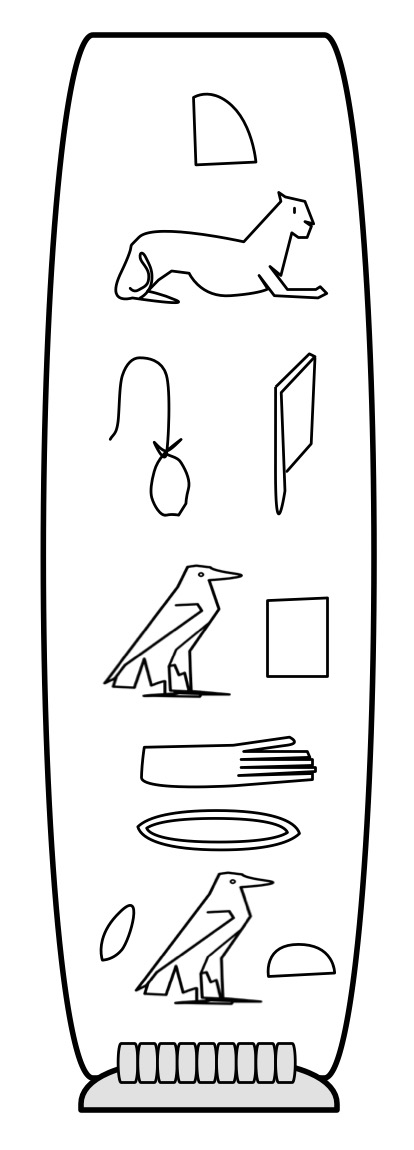
A cartouche for Cleopatra. Image by CS4FN
Part of the reason it took so long to decipher the language was that it was assumed that all the symbols were pictures of the things they represented. It was only when eventually scholars started to treat some as though they represented sounds that progress was made. Even more progress was made when it was realised the same symbol meant different things and might be read in a different way, even in the same phrase.
However, if the same symbol meant different things in different places of a passage, how on earth could even Egyptian readers tell? How might you indicate a particular group of characters had a special meaning?
One way the Egyptians used specifically for names is called a cartouche: they enclosed the sequence of symbols that represented a name in an oval-like box, like the one shown for Cleopatra. This was one of the first keys to unlocking the language as the name of pharaoh Ptolemy appeared several times in the Greek of the Rosetta Stone. Once someone had the idea that the cartouches might be names, the symbols used to spell out Ptolemy a letter at a time could be guessed at.
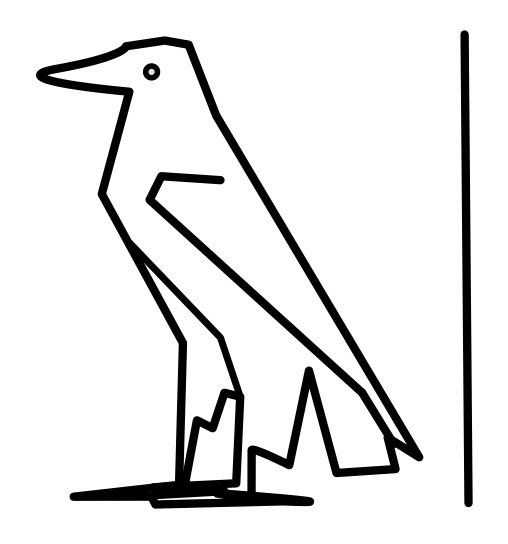
Putting things in boxes works for a pictorial language, but it isn’t so convenient as a more general way of indicating different uses of particular symbols or sequences of them. The Ancient Egyptians therefore had a much simpler way too. The normal reading of a symbol was as a sound. A symbol that was to be treated as a picture of the word it represented was followed by a line (so despite all the assumptions of the translators and the general perception of them, a hieroglyph as picture is treated as the exception not the norm!)
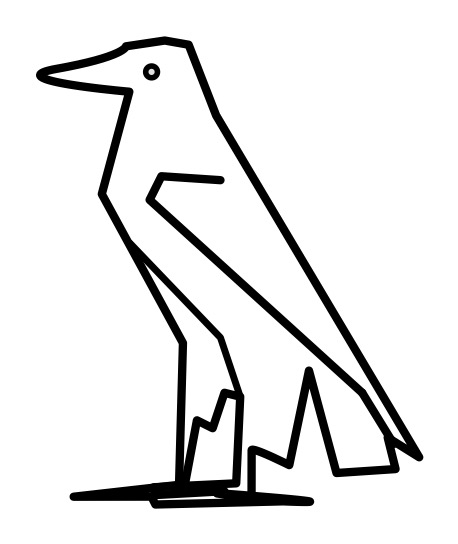
The Egyptian hieroglyph for aleph, Image by CS4FN
For example, the hieroglyph that is a picture of the Egyptian eagle stands for a single consonant sound, aleph. We would pronounce it ‘ah’ and it can be seen in the cartouche for Cleopatra that sounds out her name. However, add the line after the picture of the eagle (as shown) and it just means what it looks like: the Egyptian eagle.
The Egyptian hieroglyph for the Egyptian Eagle. Image by CS4FN
Cartouches actually included the line at the end too indicating in itself their special meaning, as can be seen on the Cleopatra cartouche above
The Egyptian line hieroglyph is what we would now call an escape character: its purpose is to say that the symbol it is paired with is not treated normally, but in a special way.
Computer Scientists use escape characters in a variety of ways in programming languages as well as in scripting languages like HTML. Different languages use a different symbol as the escape character, though \ is popular (and very reminiscent of the Egyptian line!). One place escapes are used is to represent special characters in strings (sequences of characters like words or sentences) so they can be manipulated or printed. If I want my program to print a word like “not” then I must pass an appropriate string to the print command. I just put the three characters in quotation marks to show I mean the characters n then o then t. Simple.
However, the string “\no\t” does not similarly mean five characters \, n, o, \ and t. It still represents three characters, but this time \n, o and \t. \ is an escape character saying that the n and the t symbols that follow it are not really representing the n or t characters but instead stand for a newline (\n : which jumps to the next line) and a tab character (\t : which adds some space). “\no\t” therefore means newline o tab.
This begs the question what if you actually want to print a \ character! If you try to use it as it is, it just turns what comes after it into something else and disappears. The solution is simple. You escape it by preceding it with a \. \\ means a single \ character! So “n\\t” means n followed by an actual \ character followed by a t. The normal meaning of \ is to escape what follows. Its special meaning when it is escaped is just to be a normal character! Other characters’s meanings are inverted like this too, where the more natural meaning is the one you only get with an escape character. For example what if you want a program to print a quotation so use quotation marks. But quotation marks are used to show you are starting and ending a String. They already have another meaning. So if you want a string consisting of the five characters “, n, o, t and ” you might try to write “”not”” but that doesn’t work as the initial “” already makes a string, just one with no characters in it. The string has ended before you got to the n. Escape characters to the rescue. You need ” to mean something other than its “normal” meeting of starting or ending a string so just escape it inside the string and write “\”not\””.
Once you get used to it, escaping characters is actually very simple, but is easy to find confusing when first learning to program. It is not surprising those trying to decipher hieroglyphs struggled so much as escapes were only one of the problems they had to contend with.
Strictly Come Dancing, has been popular for a long time. It’s not just the celebs, the pros, or the dancing that make it must see TV – it’s having the right mix of personalities in the judges too. Craig Revel Horwood has made a career of being rude, if always fair. By contrast, Darcey Bussell was always far more supportive. Bruno Tonioli is supportive but always excited. Len Goodman was similarly supportive but calm. Shirley Ballas aims for supportive but strict while Motsi Mabuse was always supportive and enthusiastic. It’s often the tension between the judges that makes good TV (remember those looks that Darcy always gave Craig, never mind when they started actually arguing). However, if you believe Dr Who, the future of judges will be robots like AnneDroid in the space-age version of The Weakest Link…let’s look at the Bot future. How might you go about designing computer judges, and how might objects help?
Write the code
We need to write a program. We will use a pseudocode (a mix of code and English) here rather than any particular programming language to make things easier to follow.
The first thing to realise is we don’t want to have to program each judge separately. That would mean describing the rules for every new judge from scratch each time they swap. We want to do as little as possible to describe each new one. Judges have a lot in common so we want to pull out those common patterns and code them up just once.
What makes a judge?
First let’s describe a basic judge. We will create a plan, a bit like an architect’s plan of a building. Programmers call these a ‘class’. The thing to realise about classes is that a class for a Judge is NOT the code of any actual working judge just the code of how to create one: a blueprint. This blueprint can be used to build as many individual judges as you need.
What’s the X-factor that makes a judge a judge? First we need to decide on some basic properties or attributes of judges. We can make a list of them, and what the possibilities for each are. The things common to all judges is they have names, personalities and they make judgements on people. Let’s simply say a judge’s personality can be either supportive or rude, and their judgements are just marks out of 10 for whoever they last watched.
We have just created some new ‘types’ in programming terminology. A type is just a grouping of values. The type CharacterTrait has two values possible (SUPPORTIVE or RUDE), whereas the type Judgement has 10 possible values. We also used one common, existing type: String. Strings are just sequences of letters, numbers or symbols, so we are saying something of type Name is any such sequence. (This allows both for futuristic judges and for hip hop and rapper judges- perhaps one day, in retirement C3P0 will become a judge, but also for the likes of 50 Cent one day to become one.)
Let’s start to describe Judges as people with a name, personality and capable of thinking of a mark.
DESCRIPTION OF A Judge:
    Name name
    CharacterTrait personality
    Judgement mark
This says that each judge will be described by three variables, one called name, one called personality and one called mark. This kind of variable is called an instance variable – because each judge we create from this blueprint will have their own copy, or instance, of the instance variables that describes that judge. So we might originally have created a Len judge and so on, but many series later find we need Mostsi one and then an Anton one. Each new judge needs their own copies of the variables that describe them.
All we are saying here in the class (the blueprint) is whenever we create a Judge it will have a name, a personal character (it will be either RUDE or SUPPORTIVE) and a potential mark.
For any given judge we will always refer tco their name using variable name and their character trait using variable personality. Each new judge will also have a current judgement, which we will refer to as mark: a number between 1 and 10. Notice we use the types we created, Name, Character and Judgment to specify the possible values each of these variables can hold.
Best behaviour
We are now able to say in our judge blueprint, our class, whether a judge is rude or supportive, but we haven’t actually said what that means. We need to set out the actual behaviours associated with being rude and supportive. We will do this here in a fairly simple way, just to illustrate. Let’s assume that the personality shows in the things they say when they give their judgement. A rude judge will say “It was a disaster” unless they are awarding a mark above 8/10. For high marks they will grudgingly say “You were ok I suppose”. We translate this into commands of how to give a judgment.
IF (personality IS RUDE) AND (mark <= 8) THEN SAY “It was a disaster” IF (personality IS RUDE) AND (mark > 8)
THEN SAY “You were ok I suppose”
It would be easy for us to give them lots more things to choose to say in a similar way, it’s just more rules. We can do a similar thing for a supportive judge. They will say “You were stunning” if they award more than 5 out of 10 and otherwise say “You tried really hard”.
TO GiveJudgement:
    IF (personality IS RUDE) AND (mark <= 8)
    THEN SAY “It was a disaster”

    IF (personality IS RUDE) AND (mark > 8)
    THEN SAY “You were ok I suppose”

    IF (personality IS SUPPORTIVE) AND (mark > 5)
    THEN SAY “You were stunning”

    IF (personality IS SUPPORTIVE) AND (mark <= 5)
    THEN SAY “You tried hard”
A ten from Len
The other thing that judges do is actually come up with their judgement, their mark. For real judges it would be based on rules about what they saw – a lack of pointed toes pulls it down, lots of wiggle at the right times pushes it up… We will assume, to keep it simple here, that they actually just think of a random number – essentially throw a 10 sided dice under the desk with numbers 1-10 on!
TO MakeJudgement:
    mark = RANDOM (1 TO 10)
Finally, judges can reveal their mark.
TO RevealMark:
    SAY mark
Notice this doesn’t mean they say the word “mark”. mark is a variable so this means say whatever is currently stored in that judge’s mark.
Putting that all together to make our full judge class we get:
DESCRIPTION OF A Judge:
    Name name
    CharacterTrait personality
    Judgement mark

    TO GiveJudgement:
        IF (personality IS RUDE) AND (mark <= 8)
        THEN SAY “It was a disaster”

        IF (personality IS RUDE) AND (mark > 8)
        THEN SAY “You were ok I suppose

        IF (personality IS SUPPORTIVE) AND (mark > 5)
        THEN SAY “You were stunning”

        IF (personality IS SUPPORTIVE) AND (mark <= 5)
        THEN SAY “You tried hard”

    TO MakeJudgement:
        mark = RANDOM (1 TO 10)

    TO RevealMark
        SAY mark
What is a class?
So what is a class? A class says how to build an object. It defines properties or attributes (like name, personality and current mark) but it also defines behaviours: it can speak, it can make a judgement and it can reveal the current mark. These behaviours are defined by methods – mini-programs that specify how any Judge should behave. Our class says that each Judge will have its own set of the methods that use that Judge’s own instance variables to store its properties and decide what to do.
So a class is a blueprint that tells us how to make particular things: objects. It defines their instance variables – what the state of each judge consists of and some rules to apply in particular situations. We have so far made a class definition for making Judges. It is important to realise that we haven’t made any actual objects (no actual judge) so far though – defining a class does not in itself give you any actual objects – no actual Judges (no Bruno, no Motsi, …) exist to judge anything yet. We need to write specific commands to create them as we will see.
We can store away our blueprint and just pull it out to make use of it when we need to create some actual judges (eg once a year in the summer when this year’s judges are announced).
Kind words for our contestants?
Suppose Strictly is starting up (as it is as I write, but let’s suppose all the judges will be androids this year) so we want to create some judges, starting with a rude judge, called Craig Devil Droidwood. We can use our class as the blueprint to do so. We need to say what its personality is (Judges just think of a mark when they actually see an act so we don’t have to give a mark now.)
CraigDevilDroidwood IS A NEW Judge
                    WITH name “Craig Devil Droidwood”
                    AND personality RUDE
This creates a new judge called Craig Devil Droidwood and makes it Rude. We have instantiated the class to give a Judge object. We store this object in a variable called CraigDevilDroidwood.
For a supportive judge that we decide to call Len Goodroid we would just say (instantiating the class in a different way):
LenGoodroid IS A NEW Judge
            WITH name “Len Goodroid”
            AND personality SUPPORTIVE
Another supportive judge DarC3PO BussL would be created with
DarC3POBussL IS A NEW Judge
             WITH name “DarC3PO BussL”
             AND personality SUPPORTIVE
Whereas in the class we are describing a blueprint to use to create a Judge, here we are actually using that blueprint and making different Judges from it. So this way we can quickly and easily make new judge clones without copying out all the description again. These commands executed at the start of our program (and TV programme) actually create the objects. They create instances of class Judge, which just means they create actual virtual judges with their own name and personality. They also each have their own copy of the rules for the behaviour of judges.
Execute them
Once actual judges are created, they can execute commands to start the judging. First the program tells them to make judgements using their judgement method. We execute the MakeJudgement method associated with each separate judge object in turn. Each has the same instructions but those instructions work on the particular judges instance variables, so do different things.
EXECUTE MakeJudgement OF CraigDevilDroidwood
EXECUTE MakeJudgement OF DarC3POBussL
EXECUTE MakeJudgement OF LenGoodroid
Then the program has commands telling them to say what they think,
EXECUTE GiveJudgement OF CraigDevilDroidwood
EXECUTE GiveJudgement OF DarC3POBussL
EXECUTE GiveJudgement OF LenGoodroid
and finally give their mark.
EXECUTE RevealMark OF CraigDevilDroidwood
EXECUTE RevealMark OF DarC3POBussL
EXECUTE RevealMark OF LenGoodroid
In our actual program this would sit in a loop so our program might be something like:
CraigDevilDroidwood IS A NEW Judge
                    WITH name “Craig Devil Droidwood”
                    AND personality RUDE
DarC3POBussL        IS A NEW Judge
                    WITH name “DarC3PO BussL”
                    AND personality SUPPORTIVE
LenGoodroid         IS A NEW Judge
                    WITH name “Len Goodroid”
                    AND personality SUPPORTIVE

FOR EACH contestant DO THE FOLLOWING
    EXECUTE MakeJudgement OF CraigDevilDroidwood
    EXECUTE MakeJudgement OF DarC3POBussL
    EXECUTE MakeJudgement OF LenGoodroid

    EXECUTE GiveJudgement OF CraigDevilDroidwood
    EXECUTE GiveJudgement OF DarC3POBussL
    EXECUTE GiveJudgement OF LenGoodroid

    EXECUTE RevealMark OF CraigDevilDroidwood
    EXECUTE RevealMark OF DarC3POBussL
    EXECUTE RevealMark OF LenGoodroid
So we can now create judges to our heart’s content, fixing their personalities and putting the words in their mouths based on our single description of what a Judge is. Of course our behaviours so far are simple. We really want to add more kinds of personality like strict judges (Shirley) and excited ones (Bruno). Ideally we want to be able to do different combinations making perhaps excited rude judges as well as excited supportive ones. This really just takes more rules.
A classless society?
Computer Scientists are lazy beings – if they can find a way to do something that involves less work, they do it, allowing them to stay in bed longer. The idea we have been using to save work here is just that of describing classes of things and their properties and behaviour. Scientists have been doing a similar thing for a long time:
Birds have feathers (a property) and lay eggs (a behaviour).
Spiders have eight legs (a property) and make silk (a behaviour)
We can say something is a particular instance of a class of thing and that tells us a lot about it without having to spell it all out each time, even for fictional things: eg Hedwig is a bird (so feathers and eggs). Charlotte is a spider (so legs and silk). The class is capturing the common patterns behind the things we are describing. The difference when Computer Scientists write them is because they are programs they can then come alive!
All change
We have specified what it means to be a robotic judge and we’ve only had to specify the basics of Judgeness once to do it. That means that if we decide to change anything in the basic judge (like giving them a better way to come up with a mark than doing it randomly or having them choose things to say from a big database of supportive or rude comments) changing it in the plan will apply to all the judges of whatever kind. That is one of the most powerful reasons for programming in this way.
We could create robot performers in a similar way (after all don’t all the winners seem to merge into one in the long run?). We would then also have to write some instructions about how to work out who won – does the audience have a vote? How many get knocked out each week? … and so on.
Of course we’ve not written a full program, even for judges, just sketched a program in pseudocode. The next step is to convert this into a program in an object-oriented programming language like Python or Java. Is that hard? Why not give it a try and judge for yourself?
Paul Curzonand Peter W. McOwan, Queen Mary University of London
The first rule of humans when around robots is apparently that they should not do anything too unexpected near a robot…
A 7-year old child playing chess in a chess tournament has had his finger broken by a chess-playing robot which grabbed it as the boy made his move. The child was blamed by one of the organisers, who claimed that it happened because the boy “broke the safety rules”! The organisers also apparently claimed that the robot itself was perfectly safe!
What seems to have happened is, after the robot played its move, the boy played his own move very quickly before the robot had finished. Somehow this triggered the wrong lines of code in the robot’s program: instructions that were intended for some other situation. In the actual situation of the boy’s hand being over the board at the wrong time it led the robot to grab his finger and not let go.
Spoiler Alert
The situation immediately brings to mind the classic science fiction story “Moxon’s Master” by Ambrose Bierce published way back in 1899. It is the story of a chess playing automaton (ie robot) and what happens when it is check-mated when playing a game with its creator Moxon. It flies into a dangerous rage. However, there the problems are apparently because the robot has developed emotions and so emotional reactions. In both situations however a robot intended simply to play chess is capable of harming a human as a result.
The three laws of robotics
Isaac Asimov is famous for his laws of robotics: fundamental unbreakable rules built in to the ‘brain’ of all robots in his fictional world precisely to stop this sort of situation. The rules he formulated were:
A robot may not injure a human being or, through inaction, allow a human being to come to harm.
A robot must obey the orders given to it by human beings except where such orders would conflict with the First Law.
A robot must protect its own existence as long as such protection does not conflict with the First or Second Law.
Clearly, had they been in place, the chess robot would not have harmed the boy, and Moxon’s automaton would not have been able to do anything too bad as a result of its temper either.
Asimov devised his rules as a result of a discussion with the Science Fiction magazine editor John W. Campbell, Jr. He then spent much of his Science Fiction career writing robot stories around how humans could end up being hurt despite the apparently clear rules. That aside their key idea was that, to ensure robots were safe around people, they would need built-in logic that could not be circumvented to stop them hurting them. They needed a fail-safe system monitoring their actions that would take over when breaches were possible. Clearly this chess-playing robot was not “perfectly safe” and not even fail-safe as if it was the boy would not have been harmed whatever he did. The robot did not have anything at all akin to a working, unbreakable First Law programmed into it.
Dangerous Machines
Asimov’s robots were intelligent and able to think for themselves in a more general sense than any that currently exist. The First Law essentially prevented them from deciding to harm a human not just do so by accident. However, perhaps the day will soon come when they can start to think for themselves, so perhaps a first law will soon be important. In any case, machines can harm humans without being able to think. That humans need to be wary around robots is obvious from the fact that there have been numerous injuries and even fatalities in factories using industrial robots in the decades since they were introduced. They are dangerous machines. Fortunately, the carnage inflicted on children is at least not quite that of the industrial accidents in the Industrial Revolution. It is still a problem though. People do have to take care and follow safety rules around them!
Rather than humans having to obey safety laws, we perhaps ought to be taking Asimov’s Laws more seriously for all robots, therefore. Why can’t those laws just be built in? It is certainly an interesting research problem to think about. The idea of a fail-safe is standard in engineering, so its not that general idea that is the problem. The problem is that, rather than intelligence being needed for robots to harm us, intelligence is needed to avoid them doing so.
Implementing the First Law
Let’s imagine building in the first law to chess playing robots and in particular the one that hurt the boy. For starters the chess playing robot would have needed to have recognised that the boy WAS a human so should not be harmed. It would also need to be able to recognise that his finger was a part of him and that gripping its finger would harm him. It would also need to know that it was gripping his finger (not a piece) at the time. It would then need a way to stop before it was too late, and do no harm in the stopping. It clearly needs to understand a lot about the world to be able to avoid hurting people in general.
Some of this is almost within our grasp. Computers can certainly do a fairly good job of recognising humans now through image recognition code. They can even recognise individuals, so actually that first fundamental part of knowing what is and isn’t a human is more or less possible now, just not perfectly yet. Recognising objects in general is perhaps harder. The chess robot presumably has code for recognising pieces already though a finger perhaps even looks like a piece at least to a robot. To generally, avoid causing harm in any situation it needs to be able to recognise what lots of objects are not just chess pieces. It also needs to differentiate them from what is part of a human not just what is a human. Object recognition like this is possible at least in well-defined situations. It is much harder to manage it in general, even if the precise objects have never been encountered before. Even harder though is probably recognising all the ways that would constitute doing harm to the human identified in front of it including with any of those objects that are around.
Staying in control
The code to do all this would also have to be in some sense at a higher level of control than that making the robot take actions as it has to overrule them ALWAYS. For the chess robot, there was presumably a bug that allowed it to grip a human’s finger as no programmer will have intended that, so it isn’t about monitoring the code itself. The fail-safe code has to be monitoring what is actually happening in the world and be in a position to take over. It also can’t just make the robot freeze as that may be enough to do the damage of a broken finger if already in the robot’s grip (and that may have been part of the problem for the boy’s finger). It also can’t just move its arm back suddenly as what if another child (a toddler perhaps) has just crawled up behind it! It has to monitor the effects of its own commands too! A simple version of such a monitor is probably straightforward though. The robot’s computer architecture just needs to be designed accordingly. One way robots are designed is for new modules to build on top of existing ones giving new more complex behaviour as a result, which possibly fits what is needed here. Having additional computers acting as monitors to take over when others go wrong is also not really that difficult (bugs in their own code aside) and a standard idea for mission-critical systems.
So it is probably all the complexity of the world with unexpected things happening in it that is the problem that makes a general version of the First Law hard at the moment… If Asimov’s laws in all their generalness are currently a little beyond us, perhaps we should just think about the problem in another more limited way (at least for now)…
Can a chess playing robot be safe?
In the chess game situation, if anything is moving in front of the robot then it perhaps should just be keeping well out of the way. To do so just needs monitoring code that can detect movement in a small fixed area. It doesn’t need to understand anything about the world apart from movement versus non-movement. That is easily in the realms of what computers can do – even some simple toy robots can detect movement. The monitoring code would still need to be able to override the rest of the code of course, bugs included.
Why also could the robot grip a finger with enough pressure to break it, anyway. Perhaps it just needed more accurate sensors in its fingers to avoid doing harm, together with a sensor that just let go if it felt too much resistance back. After all chess pieces don’t resist much!
And one last idea, if a little bit more futuristic. A big research area at the moment is soft robotics: robots that are soft and squidgy not hard and solid, precisely so they can do less harm. Perhaps if the chess robot’s robotic claw-like fingers had instead been totally soft and squishy it would not have harmed him even if it did grab his finger.
Had the robot designers tried hard enough they surely could have come up with solutions to make it safer, even if they didn’t have good enough debugging skills to prevent the actual bug that caused the problem. It needs safety to be a very high priority from the outset though: and certainly safety that isn’t just pushed onto humans to be responsible for as the organisers did.
We shouldn’t be blaming children for not obeying safety rules when they are given what is essentially a hard, industrial robot to play with. Doing so just lets the robot makers off the hook from even trying to make their robots safer, when they clearly could do more. When disasters happen don’t blame the people, improve the system. On the other hand perhaps we should be thinking far more about doing the research that will allow us one day to actually implement Asimov’s Laws in all robots and so have a safety culture in robotics built-in. Then perhaps people would not have to be quite so wary around robots and certainly not have to follow safety rules themselves. That surely is the robot’s job.