Finding work experience, or a job in computer science

How to find a job. The letter O of the word How is replaced with the circular part of a cartoon magnifying glass and the letter O of the word Job is replaced with a cog or gearwheel.
Image by M. H. from Pixabay

We’re occasionally asked by school pupils, their parents and teachers about where young people can find out about work experience in something to do with computer science. We’ve put together some general information which we hope is helpful, and there’s also information further down the page that might be useful for people who’ve finished a computing degree and are wondering “What’s next?”.

Work experience for school students

(This section was originally published on our website for teachers – Teaching London Computing).

Supermarkets – not in the store but in the office, learning about inventory software used to manage stock for in-store shopping as well as online shopping (e.g. Ocado etc).

Shops – more generally pretty much every shop has an online presence and may want to display items for sale (perhaps also using software to handle payment).

Websites – someone who’s a blacksmith might not use a computer in their work directly, but the chances are they’d want to advertise their metal-flattening skills to a wider audience which is only really possible with a web presence.

Websites involve technical aspects (not necessarily Python types of things but certainly HTML and CSS / JavaScript) but also making websites accessible for users with visual impairments, e.g. labelling elements helpfully and remembering to add ALT TEXT for users of screenreaders. Technical skills are important but thinking about the end-user is super-important too, and often a skill that people pick up ‘on the job’ rather than being trained about (though that is changing).

Usability – making websites or physical products (e.g. home appliances, cameras, phones, printers, microwaves) easier to use by finding out how easily users can interact with them and considering options for improvement. For computing systems this involves HCI (human-computer interaction) and UX (user experience – e.g. how frustrating is a website?).

Transport – here in London we have buses with a GPS transponder that emits a signal which is picked up by sensors, co-ordinated and translated into real-time information about the whereabouts of various buses on the system. Third-party apps can also use some of this data to provide a service for people who want to know the quickest route to a particular place.

Council services – it’s possible to pay parking fines, council tax and other things online, also utility company bills. The programs involved here need to keep people’s private data secure as well.

Banks – are heavy users of ‘fintech’ (financial technology) and security systems, though that might preclude them taking on people in a work experience setting. Similarly GP surgeries have dedicated IT systems (such as EMIS) for handling confidential patient information and appointments. Even if they can’t take on tech work experience students they may have other work experience opportunities.

Places that offer (or have previously offered) work experience

  • ARM: Manchester, Sheffield, Cambridge
  • BT: Virtual work experience

Other resources

Indeed.com website
How to find work experience (Year 12 student guide)

TechDevJobs website
Our ‘jobs in computing’ resource (homepage) should give you an idea of the different sectors which employ all sorts of computer scientists to do all sorts of different things (see the list of jobs organised by sector). There are about 70 80 jobs there so far; it doesn’t cover everything though (that’s almost an impossible task!).

There are obvious computing-related jobs such as a software company looking for a software developer but there’s also a job for a lawyer-researcher (someone who is able to practise as a lawyer if necessary but is going to be doing research) into Cloud Computing. For example there are all sorts of regulatory aspects to computing, some currently under consideration by the UK Government on data leaks, privacy, appropriateness of use and how securely information is stored, and what penalties there are for misuse.

Possibly a local law firm is doing some work in this area and might be open to offering work experience.

Other resources for recent graduates

The TechDev Jobs website (listed above in Other resources) is a great place to start. The jobs ‘advertised’ are usually closed but the collection lists several organisations that are currently employing people in the field of computer science (in the widest sense) and we are adding more all the time. Finding out about jobs is also about finding out about different sectors, some of which you might not have heard of yet – but they are all potential sources of jobs for people with computing skills.

Recent graduates or soon-to-graduate students may be able to help newer students get to grips with things in the Year 1 modules. Sometimes it’s not the computer science and programming that they or the lecturers need assistance with but really practical stuff like logging on and finding the relevant resources.

Education / schools: the UK Government has a ‘Get into Teaching’ website with a page on Becoming a computing teacher. You can also find teacher vacancies at the TES website, here’s what jobs are currently available for secondary teachers but you can filter by type of role and location.

The Find A Job website from DWP (https://findajob.dwp.gov.uk/search) can be filtered by location and keyword too. Put in a keyword and see what pops up, then filter by salary etc.

Further study: if you’re interested in continuing your studies you might consider a Masters degree (MSc) in computer science and see the panel below for information on studying for a PhD, for which you are usually paid.

The Prospects website has a page called What can I do with a computer science degree?, which should give you an idea of options and help you widen your search.

The Entry Level Games site isn’t a jobs board but if you’re interested in games design then it gives you a really helpful overview of some of the typical roles, what’s needed to do those roles and information from people who’ve done those jobs.

If you are interested in creating assistive technology or making computing more inclusive you might be interested in the work of the Global Disability Innovation Hub.

Networking is also a good idea to build up contacts and hear about different roles, some people find LinkedIn useful as an online version of networking and as a great place to hear about newly-opened vacancies. You can also take part in local hackathons, or volunteer at code clubs etc. This sort of thing is useful for your CV too.

There are probably organisations near you and it’s fairly likely that they’ll be using computers in one way or another, and you might be useful to them. Open up Google Maps and navigate to where you’re living, then zoom in and see what organisations are nearby. Make a note of them and if they have a vacancies page save that link in a document so that you can visit it every so often and see if a relevant new job has been added. Or contact them speculatively with your CV.

If you have a Gmail account you can set up Google Alerts. Whenever a new web page (e.g. a new job vacancy is published) that satisfies your search criteria you’ll get a daily email with a summary of what’s been added and the link to find out more. This is a way of bringing the job adverts to you!

Further reading

There are several posts and examples in this page about career paths in computing
Get paid to do research in computer science.

Subscribe to be notified whenever we publish a new post to the CS4FN blog.


This page is funded by EPSRC on research agreement EP/W033615/1.

QMUL CS4FN EPSRC logos

NASA’s interstellar probe Voyager 1 went silent until computer scientists transmitted a fix that had to travel 15 billion miles!

by Jo Brodie, Queen Mary University of London

In 1977 NASA scientists at the Jet Propulsion Laboratory launched the interstellar probe Voyager 1 into space – and it just keeps going. It has now travelled 15 BILLION miles (24 billion kilometres), which is the furthest any human-made thing has ever travelled from Earth. It communicates with us here on Earth via radiowaves which can easily cross that massive distance between us. But even travelling at the speed* of light (all radiowaves travel at that speed) each radio transmission takes 22.5 hours, so if NASA scientists send a command they have to wait nearly two days for a response. (The Sun is ‘only’ 93 million miles away from Earth and its light takes about 8 minutes to reach us.)

FDS – The Flight Data System

The Voyager 1 probe has sensors to detect things like temperature or changes in magnetic fields, a camera to take pictures and a transmitter to send all this data back to the scientists on Earth. One of its three onboard computers (the Flight Data System, or FDS) takes that data, packages it up and transmits it as a stream of 1s and 0s to the waiting scientists back home who decode it. Voyager 1 is where it is because NASA wanted to send a probe out beyond the limits of our Solar System, into ‘interstellar space’ far away from the influence of our Sun to see what the environment is like there. It regularly sends back data updates which include information about its own health (how well its batteries are doing etc) along with the scientific data, packaged together into that radio transmission. NASA can also send up commands to its onboard computers too. Computers that were built in 1977!

The pale blue dot

‘The Pale Blue Dot’. In the thicker apricot-coloured band on the right you might be able to see
a tiny dot about halfway down. That’s the Earth! Full details of this famous 1990 photo here.

Although its camera is no longer working its most famous photograph is this one, the Pale Blue Dot, a snapshot of every single person alive on the 14th of February 1990. However as Voyager 1 was 6 billion miles from home by then when it looked back at the Earth to take that photograph you might have some difficulty in spotting anyone! But they’re somewhere in there, inside that single pixel (actually less than a pixel!) which is our home.

As Voyager 1 moved further and further away from our own planet, visiting Jupiter and Saturn before travelling to our outer Solar System and then beyond, the probe continued to send data and receive commands from Earth. 

The messages stopped making sense

All was going well, with the scientists and Voyager 1 ‘talking’ to one another, until November 2023 when the binary 1s and 0s it normally transmitted no longer had any meaningful pattern to them, it was gibberish. The scientists knew Voyager 1 was still ‘alive’ as it was able to send that signal but they didn’t know why its signal no longer made any sense. Given that the probe is nearly 50 years old and operating in a pretty harsh environment people wondered if that was the natural end of the project, but they were determined to try and re-establish normal contact with the probe if they could. 

Searching for a solution

They pored over almost-50 year old paper instruction manuals and blueprints to try and work out what was wrong and it seemed that the problem lay in the FDS. Any scientific data being collected was not being correctly stored in the ‘parcel’ that was transmitted back to Earth, and so was lost – Voyager 1 was sending empty boxes. At that distance it’s too far to send an engineer up to switch it off and on again so instead they sent a command to try and restart things. The next message from Voyager 1 was a different string of 1s and 0s. Not quite the normal data they were hoping for, but also not entirely gibberish. A NASA scientist decoded it and found that Voyager 1 had sent a readout of the FDS’ memory. That told them where the problem was and that a damaged chip meant that part of its memory couldn’t be properly accessed. They had to move the memory from the damaged chip.

That’s easier said than done. There’s not much available space as the computers can only store 68 kilobytes of data in total (absolutely tiny compared to today’s computers and devices). There wasn’t one single place where NASA scientists could move the memory as a single block, instead they had to break it up into pieces and store it in different places. In order to do that they had to rewrite some of the code so that each separated piece contained information about how to find the next piece. Imagine if a library didn’t keep a record of where each book was, it would make it very hard to find and read the sequel! 

Earlier this year NASA sent up a new command to Voyager 1, giving it instructions on how to move a portion of its memory from the damaged area to its new home(s) and waited to hear back. Two days later they got a response. It had worked! They were now receiving sensible data from the probe.  

Voyager team celebrates engineering data return, 20 April 2024 (NASA/JPL-Caltech). “Shown are Voyager team members Kareem Badaruddin, Joey Jefferson, Jeff Mellstrom, Nshan Kazaryan, Todd Barber, Dave Cummings, Jennifer Herman, Suzanne Dodd, Armen Arslanian, Lu Yang, Linda Spilker, Bruce Waggoner, Sun Matsumoto, and Jim Donaldson.”

For a while they it was just basic ‘engineering data’ (about the probe’s status) but they knew their method worked and didn’t harm the distant traveller. They also knew they’d need to do a bit more work to get Voyager 1 to move more memory around in order for the probe to start sending back useful scientific data, and…

Success!

… …in May, NASA announced that scientific data from two of Voyager 1’s instruments was finally being sent back to Earth and in June the probe was fully operational. You can follow Voyager 1’s updates on Twitter / X via @NASAVoyager.

Did you know?

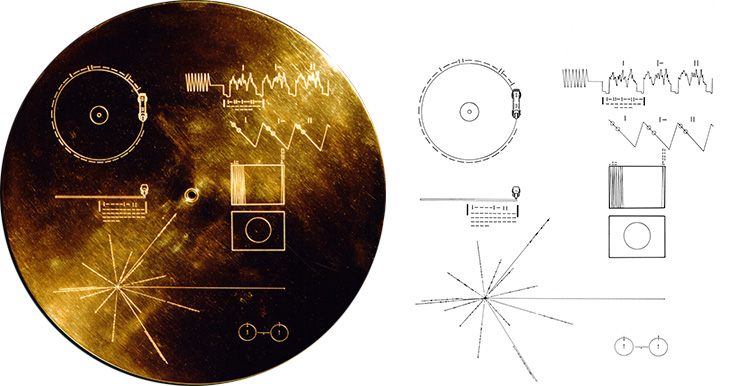
Both Voyager 1 and Voyager 2 carry with them a gold-plated record called ‘The Sounds of Earth‘ containing “sounds and images selected to portray the diversity of life and culture on Earth”. Hopefully any aliens encountering it will have a record player (but the Voyager craft do carry a spare needle!) Credit: NASA/JPL

References

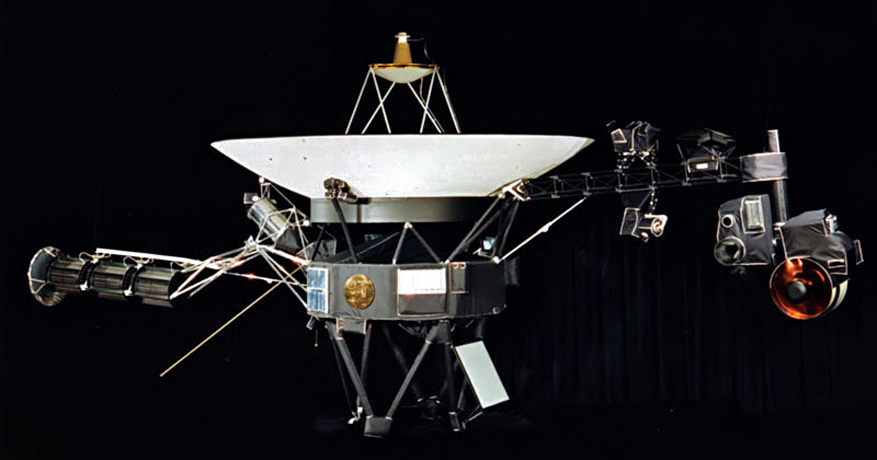
Lots of articles helped in the writing of this one and you can download a PDF of them here. Featured image credit showing the Voyager spacecraft: NASA/JPL.

*radiowaves and light are part of the electromagnetic or ‘EM’ spectrum along with microwaves, gamma rays, X-rays, ultraviolet and infra red. All these waves travel at the same speed in a vacuum, the speed of light (300,000,000 metres per second, sometimes written as 3 x 10⁸ m/s or (m s-1)), but the waves differ by their frequency and wavelength.


Subscribe to be notified whenever we publish a new post to the CS4FN blog.


EPSRC supports this blog through research grant EP/W033615/1.

Happy Hallowe’en

Free spooky puzzles and activities

Image by OpenClipart-Vectors from Pixabay

Visit our sister site, Teaching London Computing’s, Halloween puzzle area to access our free colouring-in puzzles and activities linked to Halloween.

It includes computational thinking-linked puzzles for Halloween to download and print:

  • “Maggot” logic puzzles: Place 10 Maggots, one in each of the 10 separately coloured areas of the pumpkin picture so that …
  • Colour by number Pixel Puzzles: Colour each square (pixel) according to its number. See our pixel puzzle page for lots more pixel puzzles.
  • Halloween Kriss-Kross: Given a list of words of different lengths, you must fit them all in to the grid
  • Make a Halloween “Useless Machine” coffin. Switch it on and the occupant reaches out of the coffin and switches it off again.
  • Program a pumpkin: Create a programmable paper face light up pumpkin

More on …


Subscribe to be notified whenever we publish a new post to the CS4FN blog.


This page is funded by EPSRC on research agreement EP/W033615/1.
QMUL CS4FN EPSRC logos

Return of the killer robot? Evil scientist?! Helpless woman?!?

(You can be the one to tell Angelina Jolie!)

Damsel tied to a tree being rescued by a hunky knight
Painting by Frank Bernard Dicksee, Public domain, via Wikimedia Commons

Lots of people think that Computer Science and IT are strictly for men only. That’s really bizarre given that right from the start women like Grace Hopper and Ada Lovelace played pivotal roles in the development of computers, and women are still at the leading edge today. To be a successful modern IT Pro you have to be a good team player, not to mention good at dealing with clients, which are skills women are generally good at.

‘Geeky male computer scientist’ is of course just a stereotype, like ‘helpless female in need of rescue by male hunk’, ‘scientist as mad eccentric in white coat’, or ‘evil robot wanting to take over the world’.

Where do false stereotypes come from? Films play a part in the way their (usually male, non-scientist) directors decide to represent characters.

Students on a ‘Gender in Computer Science’ course at Siena College in the US watched lots of films with Computer Science plots from as far back as 1928 to see how the way women, computers and computer scientists are portrayed has changed over time. Here are their views on some of those films.

Do you agree – when you are done read what the real IT Pros think of their jobs…and remember stereotypes are fiction, careers are what you make of them and real robots are (usually) nice!

1928: Metropolis

In a city of the future the ruling class live lavishly while the workers live poorly in the underworld. An evil scientist substitutes a robot for a female worker activist. It purposely starts a riot as an excuse so reprisals can be taken. All hell breaks loose until the male hero comes to the rescue…

X Computers: Evil

X Women as IT Pros: Helpless

X Computer Scientists: Evil

“Women are more or less portrayed as helpless … The computer scientist … as evil”

1956: Forbidden Planet

An all-male crew travel to Altair-4 to discover the fate of the colony there. They discover all that is left is scientist Dr Morbius, his beautiful daughter Altaira and a servant robot called Robby, programmed to be unable to harm humans. But what have Morbius’ machines and experiments to do with the colony’s fate?

✓ Computers: Helpful & Harmless

X Women as IT Pros: love interest

X Computer Scientists: Evil

“Altaira plays a typical woman’s role…helpless…unintelligent …Barbie-like”

1971: THX 1138

In an Orwellian future, an android controlled police state where everyone is made to take drugs that suppress emotion. LUH 3417 and THX 1138 stop taking their drugs, fall in love and try to escape…

X Computers: Evil Police

X Women as IT Pros: Few

X Computer Scientists: Heartless

“The computer scientists are depicted as boring, heartless and easily confused”

1982: Blade Runner

In the industrial wastelands of a future Los Angeles, large companies have all the power. Robotic ‘Replicants’ are almost indistinguishable from humans but have incredible strength and no emotions. Deckard (Harrison Ford) must find and destroy a group of Replicants that have developed emotions and so threaten humanity as they rebel against being ‘slaves’.

X Computers: Evil

X Women as IT Pros: None

X Computer Scientists: Caused the problem

“A woman plays the minor role of a replicant…but is portrayed as a topless dancer”

1986: Short Circuit

A comedy adventure about a robot that comes ‘alive’ after a power surge in a lightening storm. The robot, called ‘Number 5’ built for use by the US military and tries to escape its creators as it doesn’t want to ‘die’. It is helped by Stephanie Speck (Ally Sheedy) who realises, that like the animals she loves, it is sentient and helps it escape from the scientists of company Nova that built it.

✓ Computers: Nice

X Women as IT Pros: None

X Computer Scientists: Thick-headed

“The male computer scientists are often thick-headed… introverted…no life skills…There were no female computer scientists”

1995: Hackers

A group of genius teenage hackers become the target of the FBI after they unknowingly tap into a high-tech embezzling scheme that could cause a horrific environmental disaster. Dade Murphy and Kate Libby (Angelina Jolie) square off in a battle of the sexes and computer skills.

X Computers: Used illegally

✓ Women as IT Pros: Elite…but illegal

X Computer Scientists: Criminals

“Angelina plays a hard hitting, elite hacker who is better than everyone in her group except Dane who is her equal”

So it wasn’t great. Robots were killers, scientists evil. Computer scientist’s were introverted and thickheaded. Women were either sexbots or helpless love interest to be rescued by the hunky male star. 1995’s film Hackers was about as good as it got. At last a woman had expert computing skills. It’s hardly surprising some girls were led to believe computing isn’t for them with a century-long “conspiracy” aiming to convince them their role in life is to be helpless.

As our area on women in computing shows the truth is far more interesting. Women have always played a big part in the development of modern technology. So have things improved in films in the 21st century? There are more films with strong action-heroine stars now, though until very recently few films passed the Bechdel test: do two women ever talk together about anything other than a man? So can we at least find any 21st century films with realistic main character roles for women as computer experts? Here goes…

1999-2003: Matrix Trilogy

Hero Neo discovers reality isn’t what it seems. It is all a virtual reality. Trinity is there to be his romantic interest – she’s been told by the Oracle that she will fall in love with the “One” (that’s him). It’s not looking good. In film 2 Neo has to save her. Oh dear. At least she is supposed to be a super-hacker famous for cracking an uncrackable database. Oh well.

X Computers: Enslaving humanity

✓ Women as IT Pros: Elite…but illegal (there to be saved)

Computer Scientists: The resistance

2009: The Girl With the Dragon Tattoo

This is the story of super-hacker Lisbeth Salander. Both emotionally and sexually abused as a child she looks after herself, and that includes teaching herself to be an expert with computers. She uses her immense skills to get what she wants. She is cool and clever and absolutely not willing to let the men treat her as a victim. Wonderful.

X Computers: used for hacking

✓ Women as IT Pros: Elite…but illegal look after themselves)

X Computer Scientists: hackers

2014: Captain America: The Winter Soldier

This film is all about a male hunk, so it’s not looking good, but then early on we see Agent Natasha Romanoff, (also known as superheroine the Black Widow). She is the brains to Captain America’s brawn and from the start she is clearly the expert with computers. While Captain America beats people up, her mission is to collect data. And she even gets her own film series…eventually!

X Computers: used for hacking

✓ Women as IT Pros: Elite…superheroes

X Computer Scientists: hackers

2015: Star Wars: Episode VII – the Force Awakens

Rey is a scavenger with engineering skills. She is very smart, and can look after herself without expecting men to save her. She’s not a hacker! Instead, she creates and mends things. She repurposes parts she finds on wrecked spaceships to sell to survive. She learnt her engineering skills tinkering in old ships and fixes the Millennium Falcon’s electro-mechanical problems. She is even the main character of the whole film!

Computers: make the universe work

✓ Women as IT Pros: Elite, scavenges and fixes things

Computer Scientists: at least some build and fix things

There are plenty of moronic films, made by men who can’t portray women in remotely realistic ways, but at least things are a bit better than they were last century. The women are already here in the real world. They are slowly getting there in the movies. Let’s just hope the trend speeds up, and we have more female leads who create things, like the real female computer scientists.

by Paul Curzon, Queen Mary University of London

More on …


This blog is funded through EPSRC grant EP/W033615/1.

Cyber Security at the Movies: Guardians of the Galaxy (Fail Secure security)

[Spoiler Alert]

If you are so power hungry you can’t stand the idea of any opposition; if you want to make a grab for total power, so decide to crush everyone in your way, then you might want to think about the security of your power supply first. Luckily, all would-be dictators who crush everyone who gets in their way as they march towards total domination of the galaxy, tend to be very naive about cyber-security.

Take Ronan the Accuser in the original Guardian of the Galaxy film. He’s a villain with a religious streak, whose belief that strength is virtue and weakness is sin leads to his totally corrupted morality. To cut to the guts of the story he manages to get the “Infinity Stone” that gives unimaginable power to its owner. With it he can destroy anyone who gets in his way so sets out to do so.

Luckily for the Galaxy, good-guy Peter Quill, or Star-Lord as he wants to be known, and his fellow Guardians have a plan. More to the point they have Gamora. She is an assassin originally sent to kill Quill, but who changes sides early on. She is an insider who knows how Ronan’s security system works, and it has a flaw: its big, heavy security doors into his control room.


Security Lesson 1. It should still be secure even when the other side know everything about how it works. If your security relies on no one knowing, its almost certainly bad security!


Once inside his ship, to get to Ronan the Guardians will need to get through those big heavy security doors. Now once upon a time big, heavy doors were locked and barred with big, heavy bolts. Even in Roman times you needed a battering ram to get in to a besieged city if they had shut the doors before you got there. Nowadays, how ever big and heavy the door, you may just need some cyber skills to get in if the person designing it didn’t think it through.

Electromagnetic locks are used all over the place and they give some big advantages, such as the fact that they mean you can program who is and isn’t allowed entry. Want to keep someone out – you can just cancel their keycard in the system. They are held locked by electromagnets: magnets that are switched on and off using an electric current. That means computers can control them. As the designer of an electromagnetic lock you have a choice, though. You can make them either “fail safe” or “fail secure”. With a fail safe lock, when the power goes, the doors automatically unlock. With fail secure, instead they lock. Its just a matter of whether the magnet is holding the door open or closed. Which you choose when designing the lock depends on your priorities.

Fail safe is a good idea, for example, if you want people to be able to escape in an emergency. If a fire cuts the electricity you want everyone to still be able to get out, not be locked in with no chance of escape. Fail secure on the other hand is good if you don’t want thieves to be able to get in just by cutting the power. The magnets hold the bolts open, so when the power goes, the spring shut.


Security Lesson 2. If you want the important things to stay secure, you need a fail secure system.


This is Ronan’s problem. Zamora knows that if you cut the power supply then the doors preventing attackers getting to him just open! He needed a fail secure door, but instead had a fail safe one installed. On such small things are galaxies won and lost! All Zamora has to do is cut the power and they can get to him. This of course leads to the next flaw in his security system. It wouldn’t have mattered if the power supply was on the secure side of that door, but it wasn’t. Ronan locks himself in and Zamora can cut the power from the outside … Dhurr!

There is one last thing that could have saved Ronan. It needed an uninterruptible power supply.


Security Lesson 3. If your system is reliant on the power supply, whether a door, your data, your control system or your life-support system, then it should keep going even if the power is switched off.


After all, what if the space ships cleaners (you never see them but they must be there somewhere!) unplug the door lock by mistake just because they need somewhere to plug in the hoover.

The solution is simple: use an “uninterruptible power supply”. They are just very fast electricity storage systems that immediately and automatically take over if the main power cuts out. The biggest on Earth keeps the power going for a whole city in Alaska (you do not want to lose the power running your heating mid-winter if you live in Alaska!). Had Ronan’s doors had a similar system, the doors wouldn’t have just opened as the power would not have been cut off.It’s always the small details that matter in cyber security (and in successfully destroying your enemies and so ruling the universe). As with all computational thinking, you have to think about everything in advance. If you don’t look after your power supply, then you may well lose all your power over the galaxy too (and your life)!

by Paul Curzon, Queen Mary University of London

More on …