Operational Transformation

Algorithms for writing together

by Paul Curzon, Queen Mary University of London

How do online word processing programs manage to allow two or more people to change the same document at the same time without getting in a complete muddle? One of the really key ideas that makes collaborative writing possible was developed by computer scientists, Clarence Ellis and Simon Gibbs. They called their idea ‘Operational transformation’.

Let’s look at a simple example to illustrate the problem. Suppose Alice and Bob share a document that starts:

"MEETING AT 10AM"

First of all one computer, called the ‘server’, holds the actual ‘master’ document. If the network goes down or computers crash then its that ‘master’ copy that is the real version everyone sees as the definitive version.

Both Alice and Bob’s computers can connect to that server and get copies to view on their own machines. They can both read the document without problem – they both see the same thing. But what happens if they both start to change it at once? That’s when things can get mixed up.

Let’s suppose Alice notices that the time in the document should be PM not AM. She puts her cursor at position 14 and replaces the letter there with P. As far as the copy she is looking at is concerned, that is where the faulty A is. Her computer sends a command to the server to change the master version accordingly, saying

CHANGE the character at POSITION 14 to P.

The new version at some point later will be sent to everyone viewing. However, suppose that at the same time as Alice was making her change, Bob notices that the meeting is at 1 not 10. He moves his cursor to position 13, so over the 0 in the version he is looking at, and deletes it. A command is sent to the server computer:

DELETE the character at POSITION 13.

Now if the server receives the instructions in that order then all is ok. The document ends up as both Bob and Alice intended. When they are sent the updated version it will have done both their changes correctly:

"MEETING AT 1PM"

However, as both Bob and Alice are editing at the same time, their commands could arrive at the server in either order. If the delete command arrives first then the document ends up in a muddle as first the 13th position is deleted giving.

"MEETING AT 1AM"

Then, when Alice’s command is processed the 14th character is changed to a P as it asks. Unfortunately, the 14th character is now the M because the deleted character has gone. We end up with

"MEETING AT 1AP"

Somehow the program has to avoid this happening. That is where the operational transformation algorithm comes in. It changes each instruction, as needed, to take other delete or insert instructions into account. Before the server follows them they are changed to ones so that they give the right result whatever order they came in.

So in the above example if the delete is done first, then any other instructions that arrive that apply to the same initial version of the document are changed to take account of the way the positions have changed due to the already applied deletion. We would get and so apply the new instructions:

STARTING FROM "MEETING AT 10AM"
DELETE the character at POSITION 13.
CHANGE the character at POSITION (14-1) to P.

Without Operational Transformation two people trying to write a document together would just be frustrating chaos. Online editing would have to be done the old way of taking it in turns, or one person making suggestions for the other to carry out. With the algorithm, thanks to Clarence Ellis and Simon Gibbs, people who are anywhere in the world can work on one document together. Group writing has changed forever.


This article was originally published on the CS4FN website.

More on …


EPSRC supports this blog through research grant EP/W033615/1.

The original version of this article was funded by the Institute of Coding.
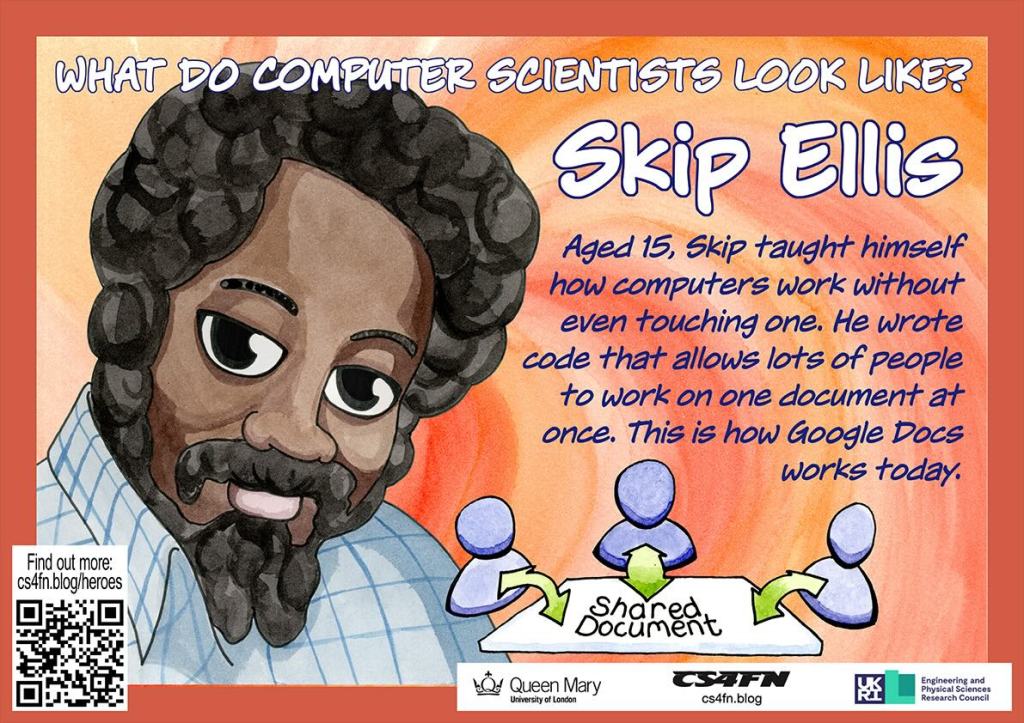
Writing together: Clarence ‘Skip’ Ellis

Poster of Skip Ellis showing people working on a shared document
Poster by Richard Butterworth for CS4FN

Back in 1956, Clarence Ellis started his career at the very bottom of the computer industry. He was given a job, at the age of 15, as a “computer operator” … because he was the only applicant. He was also told that under no circumstances should he touch the computer! Its lucky for all of us he got the job, though! He went on to develop ideas that have made computers easier for everyone to use. Working at a computer was once a lonely endeavour: one person, on one computer, doing one job. Clarence Ellis changed that. He pioneered ways for people to use computers together effectively.

The graveyard shift

The company Clarence first worked for had a new computer. Just like all computers back then, it was the size of a room. He worked the graveyard shift and his duties were more those of a nightwatchman than a computer operator. It could have been a dead-end job, but it gave him lots of spare time and, more importantly, access to all the computer’s manuals … so he read them … over and over again. He didn’t need to touch the computer to learn how to use it!

Saving the day

His studying paid dividends. Only a few months after he started, the company had a potential disaster on its hands. They ran out of punch cards. Back then punch cards were used to store both data. They used patterns of holes and non-holes as a way to store numbers as binary in a away a computer could read them. Without punchcards the computer could not work!

It had to though, because the payroll program had to run before the night was out. If it didn’t then no-one would be paid that month. Because he had studied the manuals in detail, and more so than anyone else, Clarence was the only person who could work out how to reuse old punch cards. The problem was that the computer used a system called ‘parity checking’ to spot mistakes. In its simplest form parity checking of a punch card involves adding an extra binary digit (an extra hole or no-hole) on the end of each number. This is done in a way that ensures that the number of holes is even. If there is an even number of holes already, the extra digit is left as a non-hole. If, on the other hand there is an odd number of holes, a hole is punched as the extra digit. That extra binary digit isn’t part of the number. It’s just there so the computer can check if the number has been corrupted. If a hole was accidentally or otherwise turned into a non-hole (or vice versa), then this would show up. It would mean there was now an odd number of holes. Special circuitry in the computer would spot this and spit out the card, rejecting it. Clarence knew how to switch that circuitry off. That meant they could change the numbers on the cards by adding new holes without them being rejected.

After that success he was allowed to become a real operator and was relied on to troubleshoot whenever there were problems. His career was up and running.

Clicking icons

He later worked at Xerox Parc, a massively influential research centre. He was part of the team that invented graphical user interfaces (GUIs). With GUIs Xerox Parc completely transformed the way we used computers. Instead of typing obscure and hard to remember commands, they introduced the now standard ideas, of windows, icons, dragging and dropping, using a mouse, and more. Clarence, himself, has been credited with inventing the idea of clicking on an icon to run a program.

Writing Together

As if that wasn’t enough of an impact, he went on to help make groupware a reality: software that supports people working together. His focus was on software that let people write a document together. With Simon Gibbs he developed a crucial algorithm called Operational Transformation. It allows people to edit the same document at the same time without it becoming hopelessly muddled. This is actually very challenging. You have to ensure that two (or more) people can change the text at exactly the same time, and even at the same place, without each ending up with a different version of the document.

The actual document sits on a server computer. It must make sure that its copy is always the same as the ones everyone is individually editing. When people type changes into their local copy, the master is sent messages informing it of the actions they performed. The trouble is the order that those messages arrive can change what happens. Clarence’s operational transformation algorithm solved this by changing the commands from each person into ones that work consistently whatever order they are applied. It is the transformed operation that is the one that is applied to the master. That master version is the version everyone then sees as their local copy. Ultimately everyone sees the same version. This algorithm is at the core of programs like Google Docs that have ensured collaborative editing of documents is now commonplace.

Clarence Ellis started his career with a lonely job. By the end of his career he had helped ensure that writing on a computer at least no longer needs to be a lonely affair.

– Paul Curzon, Queen Mary University of London


This article was originally published on the CS4FN website. One of the aims of our Diversity in Computing posters (see below) is to help a classroom of young people see the range of computer scientists which includes people who look like them and people who don’t look like them. You can download our posters free from the link below.

More on …

Magazines …

Front cover of CS4FN issue 29 - Diversity in Computing

See more in ‘Celebrating Diversity in Computing

We have free posters to download and some information about the different people who’ve helped make modern computing what it is today.

Screenshot showing the vibrant blue posters on the left and the muted sepia-toned posters on the right

Or click here: Celebrating diversity in computing


Subscribe to be notified whenever we publish a new post to the CS4FN blog.


This page is funded by EPSRC on research agreement EP/W033615/1.

QMUL CS4FN EPSRC logos

The original version of this article was funded by the Institute of Coding.
