Letters from the Victorian Smog: Braille: binary, bits & bytes

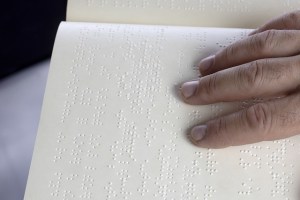
We take for granted that computers use binary: to represent numbers, letters, or more complicated things like music and pictures…any kind of information. That was something Ada Lovelace realised very early on. Binary wasn’t invented for computers though. Its first modern use as a way to represent letters was actually invented in the first half of the 19th century. It is still used today: Braille.

Braille is named after its inventor, Louis Braille. He was born 6 years before Ada though they probably never met as he lived in France. He was blinded as a child in an accident and invented the first version of Braille when he was only 15 in 1824 as a way for blind people to read. What he came up with was a representation for letters that a blind person could read by touch.

Choosing a representation for the job is one of the most important parts of computational thinking. It really just means deciding how information is going to be recorded. Binary gives ways of representing any kind of information that is easy for computers to process. The idea is just that you create codes to represent things made up of only two different characters: 1 and 0. For example, you might decide that the binary for the letter ‘p’ was: 01110000. For the letter ‘c’ on the other hand you might use the code, 01100011. The capital letters, ‘P’ and ‘C’ would have completely different codes again. This is a good representation for computers to use as the 1’s and 0’s can themselves be represented by high and low voltages in electrical circuits, or switches being on or off.

He was inspired by an earlier ‘Night Writing’ system developed by Charles Barbier to allow French soldiers in the 1800s to read military messages without using a lamp (which gave away their position, putting them at risk).

The first representation Louis Braille chose wasn’t great though. It had dots, dashes and blanks – a three symbol code rather than the two of binary. It was hard to tell the difference between the dots and dashes by touch, so in 1837 he changed the representation – switching to a code of dots and blanks.

He had invented the first modern
form of writing based on binary.

Braille works in the same way as modern binary representations for letters. It uses collections of raised dots (1s) and no dots (0s) to represent them. Each gives a bit of information in computer science terms. To make the bits easier to touch they’re grouped into pairs. To represent all the letters of the alphabet (and more) you just need 3 pairs as that gives 64 distinct patterns. Modern Braille actually has an extra row of dots giving 256 dot/no dot combinations in the 8 positions so that many other special characters can be represented. Representing characters using 8 bits in this way is exactly the equivalent of the computer byte.

Modern computers use a standardised code, called Unicode. It gives an agreed code for referring to the characters in pretty well every language ever invented including Klingon! There is also a Unicode representation for Braille using a different code to Braille itself. It is used to allow letters to be displayed as Braille on computers! Because all computers using Unicode agree on the representations of all the different alphabets, characters and symbols they use, they can more easily work together. Agreeing the code means that it is easy to move data from one program to another.

The 1830s were an exciting time to be a computer scientist! This was around the time Charles Babbage met Ada Lovelace and they started to work together on the analytical engine. The ideas that formed the foundation of computer science must have been in the air, or at least in the Victorian smog.

Paul Curzon and Jo Brodie, Queen Mary University of London


More on…

Magazines

Subscribe to be notified whenever we publish a new post to the CS4FN blog.


This blog is funded by EPSRC on research agreement EP/W033615/1.

QMUL CS4FN EPSRC logos

Only the fittest slogans survive!

Being creative isn’t just for the fun of it. It can be serious too. Marketing people are paid vast amounts to come up with slogans for new products, and in the political world, a good, memorable soundbite can turn the tide over who wins and loses an election. Coming up with great slogans that people will remember for years needs both a mastery of language and a creative streak too. Algorithms are now getting in on the act, and if anyone can create a program as good as the best humans, they will soon be richer than the richest marketing executive. Polona Tomašicˇ and her colleagues from the Jožef Stefan Institute in Slovenia are one group exploring the use of algorithms to create slogans. Their approach is based on the way evolution works – genetic algorithms. Only the fittest slogans survive!

A mastery of language

To generate a slogan, you give their program a short description on the slogan’s topic – a new chocolate bar perhaps. It then uses existing language databases and programs to give it the necessary understanding of language.

First, it uses a database of common grammatical links between pairs of words generated from wikipedia pages. Then skeletons of slogans are extracted from an Internet list of famous (so successful) slogans. These skeletons don’t include the actual words, just the grammatical relationships between the words. They provide general outlines that successful slogans follow.

From the passage given, the program pulls out keywords that can be used within the slogans (beans, flavour, hot, milk, …). It generates a set of fairly random slogans from those words to get started. It does this just by slotting keywords into the skeletons along with random filler words in a way that matches the grammatical links of the skeletons.

Breeding Slogans

New baby slogans are now produced by mating pairs of initial slogans (the parents). This is done by swapping bits into the baby from each parent. Both whole sections and individual words are swapped in. Mutation is allowed too. For example, adjectives are added in appropriate places. Words are also swapped for words with a related meaning. The resulting children join the new population of slogans. Grammar is corrected using a grammar checker.

Culling Slogans

Slogans are now culled. Any that are the same as existing ones go immediately. The slogans are then rated to see which are fittest. This uses simple properties like their length, the number of keywords used, and how common the words used are. More complex tests used are based on how related the meanings of the words are, and how commonly pairs of words appear together in real sentences. Together these combine to give a single score for the slogan. The best are kept to breed in the next generation, the worst are discarded (they die!), though a random selection of weaker slogans are also allowed to survive. The result is a new set of slogans that are slightly better than the previous set.

Many generations later…

The program breeds and culls slogans like this for thousands, even millions of generations, gradually improving them, until it finally chooses its best. The slogans produced are not yet world beating on their own, and vary in quality as judged by humans. For chocolate, one run came up with slogans like “The healthy banana” and “The favourite oven”, for example. It finally settled on “The HOT chocolate” which is pretty good.

More work is needed on the program, especially its fitness function – the way it decides what is a good slogan and what isn’t. As it stands this sort of program isn’t likely to replace anyone’s marketing department. They could help with brainstorming sessions though, to spark new ideas but leaving humans to make the final choice. Supporting human creativity rather than replacing it is probably just as rewarding for the program after all.

(From the archive)


More on …

Related Magazines …

Issue 22 Cover Creative Computing

Subscribe to be notified whenever we publish a new post to the CS4FN blog.


This blog is funded by EPSRC on research agreement EP/W033615/1.
QMUL CS4FN EPSRC logos

What are birds actually saying?

Birds make so much noise, and it’s very complex. Is it just babble, or are they saying complicated things to each other? If so, could we work out what they are saying, what it means? Could we learn their language and speak to the birds?

We know that bird communication is not as complicated as the words and sentences in human speech. So far, no one has been able to find grammatical patterns like those we find in human language. There apparently aren’t rules for birds like the ones we have about verbs and nouns. Birds don’t have to learn grammar! Exactly how complex bird languages are is still hotly debated, though.

Sometimes they’re passing on information about predators, or food, or sometimes just advertising their own fitness – showing off to get a mate (a bit like karaoke nights). Scientists have proved that such specific kinds of information are in the sounds birds make by observing bird behaviour. By playing recordings of birds and seeing how other birds react, they can see what information was communicated by a particular sound. If you play a ‘predator near’ call, for example, then other birds flee, but they stay put if you play other calls. They get the message.

Birds are definitely passing on
specific information when they sing.

It turns out some birds have even learnt the languages of other animals and use it both to help those other animals and to support a life of crime. Many animals listen for the alarm calls of the animals around them, and so flee when others see a problem. Birds called Drongos, for example, act as lookouts for Meerkats, giving warning calls when they see Meerkat predators, allowing them to return to the safety of their burrows. However, the Drongos also sound false alarms every so often. They do it when they see a Meerkat with some juicy morsel. As the Meerkats run, the Drongo swoops in to steal the abandoned food.

Unfortunately for the Drongo, Meerkats are quite clever and get wise to the con. Eventually, they start to ignore the Drongo and only listen for their own Meerkat sentry’s call. The Drongo has another trick though. They are really good at mimicking sounds they hear, just like parrots. They have learnt to speak Meerkat just like the scientists do in experiments. So when the Meerkats stop reacting, the Drongos just switch tactics and start making perfect Meerkat language alarm calls instead. Once again the food is theirs.

Drongos give false alarms so they can steal food.

While most of us can’t reproduce bird sounds ourselves, and so talk directly to animals, we can certainly write programs to do it. In Star Wars, C3PO is a master of languages, speaking millions. Real robots of the near future will be able to mimic the sounds of whatever animals they wish and communicate with them in at least the simple ways that animals of different species listen and talk to each other. Perhaps something like this might be used to help protect endangered species from their predators, for example, watching for hawks and issuing timely warnings. We just have to hope they don’t turn to the Dark Side, like the Drongos, and use these skills to support a life of crime.

Dan Stowell and Paul Curzon, Queen Mary University of London

Watch …

Magazine

  • Issue 21: Computing Sounds Wild
    • Computing Sounds Wild explores the work of scientists and engineers who are using computers to understand, identify and recreate wild sounds, especially those of birds. We see how sophisticated algorithms that allow machines to learn, can help recognize birds even when they can’t be seen, so helping conservation efforts. We see how computer models help biologists understand animal behaviour, and we look at how electronic and computer generated sounds, having changed music, are now set to change the soundscapes of films. Making electronic sounds is also a great, fun way to become a computer scientist and learn to program.
The front cover of issue 21 of CS4FN called Computing Sounds Wild

Subscribe to be notified whenever we publish a new post to the CS4FN blog.


This blog is funded by EPSRC on research agreement EP/W033615/1.

QMUL CS4FN EPSRC logos

Stopping sounds getting left behind: the Bela computer

Clock submerged under blue ripples of sound
Clock Waves Image by Gerd Altmann from Pixabay

Computer-based musical instruments are so flexible and becoming more popular. They have had one disadvantage though. The sound could drag behind the musician in a way that made some digital instruments seem unplayable. Thanks to a new computer called Bela, that problem may now be a thing of the past.

If you pluck a guitar string or thwack a drum the sound you hear is instantaneous. Well, nearly. There’s a tiny delay. The sound still has to leave the instrument and travel to your ear. The vibration of the string or drum skin pushes the air back and forth, and vibrating air is all a sound is. Your ear receives the sound as soon as that vibrating air gets to you. Then your brain has to recognise it as a sound (and tell you what kind of sound it is, which direction it came from, which instrument produced it and so on!). The time it takes for sound and then your brain to do all that is measured in tens of milliseconds – thousandths of a second. It is called ‘latency‘, not because the delay makes it ‘late’ (though it does!), but from the Latin word latens which means hidden or concealed, because the time between the signal being created and being received, it is hidden from us.

Digital instruments take slightly longer than physical instruments, however, because electronic circuitry and computer processing is involved. It’s not just the sound going through air to ear but a digital signal whizzing through a circuit, or being processed by a computer, first to generate the sound which then goes through air to ear.

Your ear (actually your brain) will detect two sounds as being separate if there’s a gap of around 30 milliseconds between them. Drop that gap down to around 10 milliseconds between the sounds and you’ll hear them as a single sound. If that circuit-whizzing adds 10-20 milliseconds then you’re going to notice that the instrument is lagging behind you, making it feel unplayable. Reducing a digital instrument’s latency is therefore a very important part of improving the experience for the musician.

In 2014 Andrew McPherson and colleagues at Queen Mary University of London aimed to solve this problem. They developed Bela, a tiny computer, similar in size to a Raspberry Pi or Arduino, that can be used in a variety of digital instruments but which is special because it has an ultra-low latency of only around 2 milliseconds – super fast.

How does it do it? A computer can seem to run slowly if it is trying to do lots of things at the same time (e.g. lots of apps running or too many windows open at once). That is when the experience for the user can be a bit glitchy. Bela works by prioritising the audio signal above ALL other activities to ensure that, no matter what else the computer is doing, the gap between input (pressing a key) and output (hearing a sound) is barely noticeable. The small size of Bela also makes it completely portable and so easy to use in musical performances without needing the performer to be tethered to a large computer.

There is definitely a demand for such a computer amongst musicians. Andrew and the team wanted to make Bela available, so began fundraising through Kickstarter to create more kits. Their fundraiser reached £5,000 within four hours and within a month they’d raised £54,000, so production could begin and they launched a company, Augmented Instruments Ltd, to sell the Bela hardware kits.

Bela allows musicians to stop worrying about the sounds getting left behind. Instead, they can just get on with playing and creating amazing sounds.

Jo Brodie and Paul Curzon, Queen Mary University of London

Watch…


Subscribe to be notified whenever we publish a new post to the CS4FN blog.


This blog is funded by EPSRC on research agreement EP/W033615/1.

QMUL CS4FN EPSRC logos

Ada Lovelace: Visionary

It is 1843, Queen Victoria is on the British throne. The industrial revolution has transformed the country. Steam, cogs and iron rule. The first computers won’t be successfully built for a hundred years. Through the noise and grime one woman sees the future. A digital future that is only just being realised.

Ada Lovelace is often said to be the first programmer. She wrote programs for a designed, but yet to be built, computer called the Analytical Engine. She was something much more important than a programmer, though. She was the first truly visionary person to see the real potential of computers. She saw they would one day be creative.

Charles Babbage had come up with the idea of the Analytical Engine – how to make a machine that could do calculations so we wouldn’t need to do it by hand. It would be another century before his ideas could be realised and the first computer was actually built. As he tried to get the money and build the computer, he needed someone to help write the programs to control it – the instructions that would tell it how to do calculations. That’s where Ada came in. They worked together to try and realise their joint dream, jointly working out how to program.

Ada also wrote “The Analytical Engine has no pretensions to originate anything.” So how does that fit with her belief that computers could be creative? Read on and see if you can unscramble the paradox.

Ada was a mathematician with a creative flair and while Charles had come up with the innovative idea of the Analytical Engine itself, he didn’t see beyond his original idea of the computer as a calculator, she saw that they could do much more than that.

The key innovation behind her idea was that the numbers could stand for more than just quantities in calculations. They could represent anything – music for example. Today when we talk of things being digital – digital music, digital cameras, digital television, all we really mean is that a song, a picture, a film can all be stored as long strings of numbers. All we need is to agree a code of what the numbers mean – a note, a colour, a line. Once that is decided we can write computer programs to manipulate them, to store them, to transmit them over networks. Out of that idea comes the whole of our digital world.

Ada saw even further though. She combined maths with a creative flair and so she realised that not only could they store and play music they could also potentially create it – they could be composers. She foresaw the whole idea of machines being creative. She wasn’t just the first programmer, she was the first truly creative programmer.

Paul Curzon, Queen Mary University of London

More on …

Magazines

Subscribe to be notified whenever we publish a new post to the CS4FN blog.


This blog is funded by EPSRC on research agreement EP/W033615/1.

QMUL CS4FN EPSRC logos


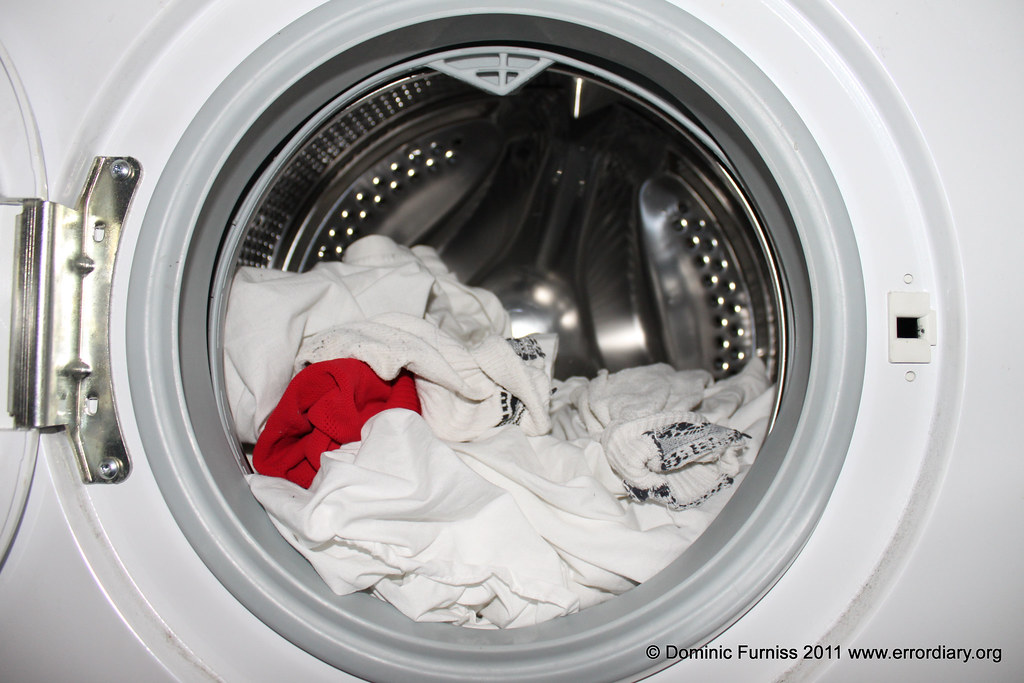
The red sock of doom – trying to catch mistakes before they happen

Washing machine mistake
Washing machine with red sock in white washing. Image by Dominic Furniss from Errordiary and Flikr, provided for this article CC BY-NC-SA 2.0

A red sock in with your white clothes wash – guess what happened next? What can you do to prevent it from happening again? Why should a computer scientist care? It turns out that red socks have something to teach us about medical gadgets.

How can we stop red socks from ever turning our clothes pink again? We need a strategy. Here are some possibilities.

  • Don’t wear red socks.
  • Take a ‘how to wash your clothes’ course.
  • Never make mistakes.
  • Get used to pink clothes.

Let’s look at them in turn – will they work?

Don’t wear red socks: That might help but it’s not much use if you like red socks or if you need them to match your outfit. And how would it help when you wear purple, blue or green socks? Perhaps your clothes will just turn green instead.

Take a ‘how to wash your clothes’ course: Training might help: you’d certainly learn that a red sock and white clothes shouldn’t be mixed, you probably did know that anyway, though. It won’t stop you making a similar mistake again.

Never make misteaks: Just never leave a red sock in your white wash. If only! Unfortunately everyone makes mistakes – that’s why we have erasers on pencils and a delete key on computers – this idea just won’t work.

Get used to pink clothes: Maybe, but it’s not ideal. It might not be so great turning up to school in a pink shirt if everyone else is wearing a white one.

What if the problem’s more serious?

We can probably live with pink clothes, but what happens if a similar mistake is made at a hospital? Not socks, but medicines. We know everyone makes mistakes so how do we stop those mistakes from harming patients? Special machines are used in hospitals to pump medicine directly into a patient’s arm, for example, and a nurse needs to tell it how much medicine to give – if the dose is wrong the patient won’t get better, and might even get worse.

What have we learned from our red sock strategies? We can’t stop giving patients medicine and we don’t want to get used to mistakes so our first and fourth strategies won’t work. We can give nurses more training but everyone makes mistakes even when trained, so the third suggestion isn’t good enough either and it doesn’t stop someone else making the same mistake.

We need to stop thinking of mistakes as a problem that people make and instead as a problem that systems thinking can solve. That way we can find solutions that work for everyone. One possibility is to check whether changes to the device might make mistakes less likely in the first place.

Errors? Or arrows?

Most medical machines are controlled with a panel with numbered keys (a number keypad) like on mobile phones, or up and down arrows (an arrow keypad) like you sometimes get on alarm clocks. CHI+MED researchers have been asking questions like: which way is best for entering numbers quickly, but also which is best for entering numbers accurately? They’ve been running experiments where people use different keypads, are timed and their mistakes are recorded. The researchers also track where people are looking while they use the keypads. Another approach has been to create mathematical descriptions of the different keypads and then mathematically explore how bad different errors might be.

It turns out that if you can see the numbers on a keypad in front of you it’s very easy to type them in quickly, though not always correctly! You need to check the display to see if you have actually put in the right ones. Worse, mistakes that are made are often massive – ten times too much or more. The arrow keypads are a little slower to use but because people are already looking at the display (to see what numbers are appearing) they can help nurses be more accurate, not only are fewer mistakes made but those that are made tend to be smaller.

Smart machines help users

A medical device that actively helps users avoid mistakes helps everyone using it (and the patients it’s being used on!). Changing the interface to reduce errors isn’t the only solution though. Modern machines have ‘intelligent drug libraries’ that contain information about the medicines and what sort of doses are likely and safe. Someone might still mistakenly tell the machine to give too high a dose but now it can catch the error and ask the nurse to double-check. That’s like having a washing machine that can spot a brightly coloured sock in a white wash and that refuses to switch on till it has been removed.

Building machines with a better ability to catch errors (remember, we all make mistakes) and helping users to recover from them easily is much more reliable than trying to get rid of all possible errors by training people. It’s not about avoiding red socks, or errors, but about putting better systems in place to make sure that we find them before we press that big ‘Start’ button.

More on …

Magazines …

You can find a copy of this article on pages 4 and 5 in issue 17 (Machines Making Medicine Safer) of CS4FN 17. This article was originally published on CHI+MED

Subscribe to be notified whenever we publish a new post to the CS4FN blog.


This blog is funded by EPSRC on research agreement EP/W033615/1.
QMUL CS4FN EPSRC logos

Playing Tantrix: P=NP?

You can find computer science everywhere – even in popular Solitaire games and puzzles. Most people have played games like Tetris, Battleships, Mastermind, Tantrix and Minesweeper at some point. In fact, all these games have a link to one of the deepest, fundamental problems remaining in Computer Science. They are all linked to a famous equation that is to do with the ultimate limitations of computers.

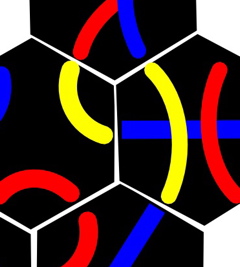
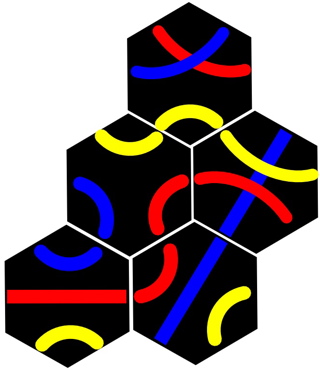
A 5 tile Tantrix puzzle to solve
Image by CS4FN

The sciences have many iconic equations that represent something fundamental about the world. The most famous is of course Einstein’s E=mc², which even non-scientists have heard of. The most famous equation in computer science is ‘P=NP’. The only trouble is no one has yet proved whether it is true or not! There is even a million dollar prize up for grabs for anyone who does, not to mention great fame!

P=NP boils down to the difference between checking if someone’s answer to a puzzle is correct, as against having to come up with the answer in the first place.

You are so NP!

Computer Scientists call problems where it is easy to check answers ‘NP problems’. Ones where it’s also easy to come up with solutions are ‘P problems’. So P=NP, if it were true, would just mean that all problems that are easy to check are also easy to solve.

Let’s take Tantrix rotation puzzles to see what it is all about. Tantrix is a popular domino-type game using coloured hexagonal pieces like the ones in the image. The idea of a Tantrix rotation puzzle is that you place some tiles randomly on the table in a connected pattern. You are then not allowed to move the position of any piece. All you can do is rotate them on the spot. The problem is to rotate the pieces so that all the coloured lines match where tiles meet – red to red lines, blue to blue lines and so on.

Have a go at the Tantrix rotation puzzle above before you read on.

Easy to check?

A solution is at the end if you want to check it. In fact you can quickly check any claimed rotation puzzle ‘solution’. All you do (the checking ‘algorithm’) is look at each tile in turn and check each of its edges does match the edge of the tile it touches, if any. If you find a tile edge that doesn’t match then the ‘solution’ isn’t a solution after all. How long would that take to check? With say a 10 piece puzzle there are 10 pieces to check each with 6 edges so in total that is 10×6 = 60 things to check. That wouldn’t take too long. Even with 100 pieces it would be only 600 things to check – 10 minutes if you could check an edge a second. So Tantrix rotation puzzles are NP puzzles – they can be checked quickly.

But can you solve it?

The question is: “Are rotation puzzles P puzzles too?” Can they always be solved quickly if you or a computer were clever enough? You may have found that puzzle easy to solve. It is much harder to come up with a quick way that is guaranteed to solve any rotation puzzle I give you. One way would be to methodically work through every combination of tile rotations to see if it worked. That would take a long time though.

There are 6 positions for the first piece (ways to rotate it), but for each of those 6 positions the second piece could be in 6 positions too … and so on for each other piece. Altogether for a 10-tile puzzle there are 6x6x6x6x6x6x6x6x6x6 (i.e., over 60 million) positions to check looking for a solution (and we might have to check them all). If you could check one position a second, it would take you around 700 days non-stop (no eating or sleeping). That is just for a 10-tile puzzle…now for a 100-tile puzzle – I’ll leave you to work out how long that would take.

It is not what computer scientists call “quick”.

How clever do you have to be?

If P=NP is true it would mean there is a quick way of solving all Tantrix rotation puzzles out there, if only someone were clever enough to think of it. If P=NP is not true then it might just not be possible however clever you are. Trouble is no-one knows if it’s true or not…

Tantrix: Solve one, solve them all

Image by CS4FN

We’ve seen how Tantrix rotation puzzles can show what we mean by the question “Is P=NP?” It turns out Tantrix rotation puzzles are also something called ‘NP-complete’. That means it is one of a special kind of problem.

NP-complete problems are the really hard ones. Some are also really important to be able to solve quickly. For example, suppose you are a taxi driver and wanted your SatNav to be able to quickly work out the fastest circular route that went via a whole series of places you wanted to visit (in any order), getting you back home. Simple as it sounds, it is an NP-complete problem. It can’t be done quickly even by a fast computer. The best that can be done is to come up with a good answer not a perfect one – using what’s known as a ‘heuristic’. There are lots of ways of coming up with such good answers – using Swarm Intelligence is one way, for example. The point is none can guarantee the best answer every time.

NP-completeness is important because if you could come up with a quick algorithm for solving one NP-complete problem, computer scientists know how to convert such an algorithm into one that solves all the other NP problems…P would equal NP…Trouble is no one has so far done it…

Paul Curzon, Queen Mary University of London, 2007

More on

Magazines …


Our Books …


Subscribe to be notified whenever we publish a new post to the CS4FN blog.


This blog is funded by EPSRC on grant EP/W033615/1.

Solution

Here’s an answer to the Tantrix Rotation puzzle we set. Of course you already knew that as you had worked it out yourself and once you’d found it it was easy for you to see it was an answer.

Image by CS4FN

Emoticons and Emotions

African woman smiling
Image by Tri Le from Pixabay (cropped by CS4FN)

Emoticons are a simple and easily understandable way to express emotions in writing using letters and punctuation without any special pictures, but why might Japanese emoticons be better than western ones? And can we really trust expressions to tell us about emotions anyway?

The trouble with early online message board messages, email and text messages was that it was always more difficult to express subtleties, including intended emotions, than if talking to someone face to face. Jokes were often assumed to be serious and flame wars were the result. So when in 1982 Carnegie Mellon Professor Scott Fahlman suggested the use of the smiley : – ) to indicate a joke in message board messages, a step forward in global peace was probably made. He also suggested that since posts more often than not seemed to be intended as jokes then a sad face : – ( would be more useful to explicitly indicate anything that wasn’t a joke.

He wasn’t actually the first to use punctuation characters to indicate emotions though. The earliest apparently recorded use is in a poem in 1648 by Robert Herrick, an English poet in his poem “To Fortune”.

Tumble me down, and I will sit
Upon my ruins, (smiling yet:)

Whether this was intentional or not is disputed, as punctuation wasn’t consistently used then. Perhaps the poet intended it, perhaps it was just a coincidental printing error, or perhaps it was a joke inserted by the printers. Either way it is certainly an appropriate use (why not write your own emoticon poem!)

You might think that everyone uses the same emoticons you are familiar with but different cultures use them in different ways. Westerners follow Fahlman’s suggestion putting them on their side. In Japan by contrast they sit the right way up and crucially the emotion is all in the eyes not the mouth which is represented by an underscore. In this style, happiness can be given by (^_^) and T or ; as an indication of crying, can be used for sadness: (T_T) or (;_;). In South Korea, the Korean alphabet is used so a different character set of letter are available (though their symbols are the right way up as with the Japanese version).

Automatically understanding people’s emotions is an important area of research, called sentiment analysis, whether analysing text, faces or other aspects that can be captured. It is amongst other things important for marketeers and advertisers to work out whether people like their products or what issues matter most to people in elections, so it is big business. Anyone who truly cracks it will be rich.

So in reality is the western version or the Eastern version more accurate: are emotions better detected in the shape of the mouth or the eyes? With a smile at least, it turns out that the eyes really give away whether someone is happy or not, not the mouth. When people put on a fake smile their mouth does curve just as with a natural smile. The difference between fake and genuine smiles that really shows if the person is happy is in the eyes. A genuine smile is called a Duchenne smile after Duchenne de Boulogne who in 1862 showed that when people find something actually funny the smile affects the muscles in their eyes. It causes a tell-tale crow’s foot pattern in the skin at the sides of the eyes. Some people can fake a Duchenne too though, so even that is not totally reliable.

As emoticons hint, because emotions are indicated in the eyes as much as in the mouth, sentiment analysis of emotions based on faces needs to focus on the whole face, not just the mouth. However, all may not be what it seems as other research shows that most of the time people do not actually smile at all when genuinely happy. Just like emoticons facial expressions are just a way we tell other people what we want them to think our emotions are, not necessarily our actual emotions. Expressions are not a window into our souls, but a pragmatic way to communicate important information. They probably evolved for the same reason emoticons were invented, to avoid pointless fights. Researchers trying to create software that works out what we really feel, may have their work cut out if their life’s work is to make them genuinely happy.

     ( O . O )
         0

Paul Curzon, Queen Mary University of London, Summer 2021

More on …

Subscribe to be notified whenever we publish a new post to the CS4FN blog.


This blog is funded by EPSRC on research agreement EP/W033615/1.
QMUL CS4FN EPSRC logos

Knitters and Coders: separated at birth?

People often say that computers are all around us, but you could still escape your phone and iPod and go out to the park, far away from the nearest circuit board if you wanted to. It’s a lot more difficult to get away from the clutches of computation itself though. For one thing, you’d have to leave your clothes at home. Queen Mary Electronic Engineer Karen Shoop tells us about the code hidden in knitting, and what might happen when computers learn to read it.

If you’re wearing something knitted look closely at it (if it’s a sunny day then put this article away till it gets colder). Notice how the two sides don’t look the same: some parts look like a raised ‘v’ and others like a wave pattern. These are made by the two knitting stitches: knit and purl. With knit you stick the needle through and then behind the knitting; with purl you stick the needle in the other direction, starting behind the knitting and then pointing at the knitter. Expert knitters know that there’s more to knitting than just these two stitches, but we’ll stick to knit and purl. As these stitches are combined, the wool is transformed from a series of waves or ‘v’s into a range of patterns: stretchy stripes (ribs), raised speckles (moss), knots and ropes (cable). It all depends on the number of purls and knits, how they are placed next to each other and how often things are repeated.

Knitters get very proficient at reading knitting patterns, which are just varying combinations of k (knits) and p (purls). So the simplest pattern of all, knitting a square, would look something like:

’30k (30 knit stitches), finish the line, then repeat this 20 times’.

A rib would look like: ‘5k, 5p, then repeat this [a certain number of times], then repeat the line [another number of times]’

To a computer scientist or electronic engineer all this looks rather like computer code or, to be precise, like the way of describing a pattern as a computer program.

How your jumper is like coding

So look again at your knitted hat/jumper/cardi and follow the pattern, seeing how it changes horizontally and vertically. Just as knitters give instructions for this in their knitting pattern, coders do the same when writing computer programs. Specifically programmers use things called regular expressions. They are just a standard way to describe patterns. For example a regular expression might be used to describe what an email address should look like (specifying rules such as that it has one ‘@’ character in the middle of other characters, no full-stops/periods immediately before the @ and so on), what a phone number looks like (digits/numbers, no letters, possibly brackets or hyphens) and now what a knitting pattern looks like (lots of ks and ps). Regular expressions use a special notation to precisely describe what must be included, what might possibly be included, what cannot be, and how many times things should be repeated. If you were going to teach a computer how to read knitting patterns, a regular expression would be just what you need.

Knitting a regular expression

Let’s look at how to write a knitting pattern as a regular expression. Let’s take moss or seed stitch as our example. It repeats a “knit one purl one” pattern for one line. The next line then repeats a “purl one knit one” pattern, so that every knit stitch has a purl beneath it and vice versa. These two lines are repeated for as long as is necessary. How might we write that both concisely and precisely so there is no room for doubt?

In knitting notation (assuming an even number of stitches) it looks like: Row 1: *k1, p1; rep from * Rows 2: *p1, k1; rep from * or Row 1: (K1, P1) rep to end Row 2: (P1, K1) rep to end Repeat these 2 rows for length desired.

All this is fine … if it’s being read by a human, but to write experimental knitting software the knitting notation we have to use a notation a computer can easily follow: regular expressions fit the bill. Computers do not understand the words we used in our explanation above: words like ‘row’, ‘repeat’, ‘rep’, ‘to’, ‘from’, ‘end’, ‘length’ and ‘desired’, for example. We could either write a program that makes sense of what it all means for the computer, or we could just write knitting patterns for computers in a language they can already do something with: regular expressions. If we wanted to convert from human knitting patterns to regular expressions we would then write a program called a compiler (see Smart translation) that just did the translation.

In a regular expression to give a series of actions we just name them. So kp is the regular expression for one knit stitch followed immediately by one purl. The knitting pattern would then say repeat or rep. In a regular expression we group actions that need to be repeated inside curved brackets, resulting in (kp). To say how many times we need to repeat, curly brackets are used, so kp repeated 10 times looks like this: (kp){10}.

Since the word ‘row’ is not a standard coding word we then use a special character, written, \n, to indicate that a new line (=row) has to start. The full regular expression for the row is then (kp){10}\n. Since the first line was made of kps the following line must be pks, or (pk){10}\n

These two lines have to be repeated a certain number of times themselves, say 20, so they are in turn wrapped up in yet more brackets, producing: ((kp){10}\n(pk){10}\n){20}.

If we want to provide a more general pattern, not fixing the number of kps in a row or the number of rows, the 10 and 20 can be replaced with what are called variables – x and y. They can each stand for any number, so the final regular expression is:

((kp){x}\n(pk){x}\n){y}

How would you describe a rib as a regular expression (remember, that’s the pattern that looks like stretchy stripes)? The regular expression would be ((kp){x}\n){y}.

Regular expressions end up saying exactly the same thing as the standard knitting patterns, but more precisely so that they cannot be misunderstood. Describing knitting patterns in computer code is only the start, though. We can use this to write code that makes new patterns, to find established ones or to alter patterns, like you’d need to do if you were using thicker wool, for example. An undergraduate student at Queen Mary, Hailun Li, who likes knitting, used her knowledge to write an experimental knitting application that lets users enter their own combination of ps and ks and find out what their pattern looks like. She took her hobby and saw how it related to computing.

Look at your woolly jumper again…it’s full of computation!

Karen Shoop, Queen Mary University of London, Summer 2014

Subscribe to be notified whenever we publish a new post to the CS4FN blog.


This blog is funded by EPSRC on research agreement EP/W033615/1.

QMUL CS4FN EPSRC logos