Charles Babbage invented wonderful computing machines. But he was not very good at explaining things. That’s where Ada Lovelace came in. She is famous for writing a paper in 1843 explaining how Charles Babbage’s Analytical Engine worked – including a big table of formulas which is often described as “the first computer program”.
Charles Babbage invented his mechanical computers to save everyone from the hard work of doing big mathematical calculations by hand. He only managed to build a few tiny working models of his first machine, his difference engine. It was finally built to Babbage’s designs in the 1990s and you can see it in the London Science Museum. It has 8,000 mechanical parts, and is the size of small car, but when the operator turns the big handle on the side it works perfectly, and prints out correct answers.
Babbage invented, but never built, a more ambitious machine, his Analytical Engine. In modern language, this was a general purpose computer, so it could have calculated anything a modern computer can – just a lot more slowly. It was entirely mechanical, but it had all the elements we recognize today – like memory, CPU, and loops.
Lovelace’s paper explains all the geeky details of how numbers are moved from memory to the CPU and back, and the way the machine would be programmed using punched cards.
But she doesn’t stop there – in quaint Victorian language she tells us about the challenges familiar to every programmer today! She understands how complicated programming is:
“There are frequently several distinct sets of effects going on simultaneously; all in a manner independent of each other, and yet to a greater or less degree exercising a mutual influence.”
the difficulty of getting things right:
“To adjust each to every other, and indeed even to perceive and trace them out with perfect correctness and success, entails difficulties whose nature partakes to a certain extent of those involved in every question where conditions are very numerous and inter-complicated.”
and the challenge of making things go faster:
“One essential object is to choose that arrangement which shall tend to reduce to a minimum the time necessary for completing the calculation.”
She explains how computing is about patterns:
“it weaves algebraical patterns just as the Jacquard-loom weaves flowers and leaves”.
and inventing new ideas
“We might even invent laws … in an arbitrary manner, and set the engine to work upon them, and thus deduce numerical results which we might not otherwise have thought of obtaining”.
and being creative. If we knew the laws for composing music:
“the engine might compose elaborate and scientific pieces of music of any degree of complexity or extent.”
Alan Turing famously asked if a machine can think – Ada Lovelace got there first:
“The Analytical Engine has no pretensions whatever to originate anything. It can do whatever we know how to order it to perform.”
Wow, pretty amazing, for someone born 200 years ago.
Ursula Martin, University of Oxford(From the archive)
Charles Dickens is famous for his novels highlighting Victorian social injustice. Despite what people say, art and science really do mix, and Dickens certainly knew some computer science. In his classic novel about the French Revolution, A Tale of Two Cities, one of his characters relies on some computer science based knitting.
Dickens actually moved in the same social circles as Charles Babbage, the Victorian inventor of the first computer (which he designed but unfortunately never managed to build) and Ada Lovelace the mathematician who worked with him on those first computers. They went to the same dinner parties and Dickens will have seen Babbage demonstrate his prototype machines. An engineer in Dickens novel, Little Dorrit, is even believed to be partly based on Babbage. Dickens was probably the last non-family member to visit Ada before she died. She asked him to read to her, choosing a passage from his book Dombey and Son in which the son, Paul Dombey, dies. Like Ada, Paul Dombey had suffered from illness all his life.
So Charles Dickens had lots of opportunity to learn about algorithms! His novel ‘A Tale of Two Cities’ is all about the French Revolution, but lurking in the shadows is some computer science. One of the characters, a revolutionary called Madame Defarge takes the responsibility of keeping a register of all those people who are to be executed once the revolution comes to pass: the aristocrats and “enemies of the people”. Of course in the actual French Revolution lots of aristocrats were guillotined precisely for being enemies of the new state.
Now Madame Defarge could have just tried to memorize the names on her ‘register’ as she supposedly has a great memory, but the revolutionaries wanted a physical record. That raises the problem, though, of how to keep it secret, and that is where the computer science comes in. Madame Defarge knits all the time and so she decides to store the names in her knitting.
“Knitted, in her own stitches and her own symbols, it will always be as plain to her as the sun. Confide in Madame Defarge. It would be easier for the weakest poltroon that lives, to erase himself from existence, than to erase one letter of his name or crimes from the knitted register of Madame Defarge.”
Computer scientists call this Steganography: hiding information or messages in plain sight, so that no one suspects they are there at all. Modern forms of steganography include hiding messages in the digital representation of pictures and in the silences of a Skype conversation.
Madame Defarge didn’t of course just knit French words in the pattern like a victorian scarf version of a T-shirt message. It wouldn’t have been very secret if anyone looking at the resulting scarf could read the names. So how to do it? In fact, knitting has been used as a form of steganography for real. One way was for a person to take a ball of wool and mark messages down it in Morse Code dots and dashes. The wool was then knitted into a jumper or scarf. The message is hidden! To read it you unpick it all and read the morse code back off the wool.
The names were “Knitted, in her own stitches and her own symbols”
That wouldn’t have worked for Madame Defarge though. She wanted to add the names to the register in plain view of the person as they watched and without them knowing what she was doing. She therefore needed the knitting patterns themselves to hold the code. It was possible because she was both a fast knitter and sat knitting constantly so it raised no suspicion. The names were therefore, as Dickens writes “Knitted, in her own stitches and her own symbols”
She used a ‘cipher’ and that brings in another area of computer science: encryption. A cipher is just an algorithm – a set of rules to follow – that converts symbols in one alphabet (letters) into different symbols. In Madame Defarge’s case the new symbols were not written but knitted sequences of stitches. Only if you know the algorithm, and a secret ‘key’ that was used in the encryption, can you convert the knitted sequences back into the original message.
In fact both steganography and encryption date back thousands of years (computer science predates computers!), though Charles Dickens may have been the first to use knitting to do it in a novel. The Ancient Greeks used steganography. In the most famous case a message was written on a slave’s shaved head. They then let the hair grow back. The Romans knew about cryptographic algorithms too and one of the most famous ciphers is called the Caesar cipher as Julius Caesar used it when writing letters…even in Roman times people were worried about the spies reading their equivalent of emails.
Dickens didn’t actually describe the code that Madame Defarge was using so we can only guess…but why not see that as an opportunity and (if you can knit) why not invent a way yourself. If you can’t knit then learn to knit first and then invent one! Somehow you need a series of stitches to represent each letter of the alphabet. In doing so you are doing algorithmic thinking with knitting. You are knitting your way to being a computer scientist.
Paul Curzon, Queen Mary University of London (From the archive)
Avengers: Age of Ultron is the latest film about robots or artificial intelligences (AI) trying to take over the world. AI is becoming ever present in our lives, at least in the form of software tools that demonstrate elements of human-like intelligence. AI in our mobile phones apply and adapt their rules to learn to serve us better, for example. But fears of AI’s potential negative impact on humanity remain as seen in its projection into characters like Ultron, a super-intelligence accidentally created by the Avengers.
But what relation do the evil AIs of the movies have to scientific reality? Could an AI take over the world? How would it do it? And why would it want to? AI movie villains need to consider the whodunit staples of motive and opportunity.
Motive? What motive?
Let’s look at the motive. Few would say Intelligence in itself unswervingly leads to a desire to rule the world. In movies AI are often driven by self preservation, a realisation that fearful humans might shut them down. But would we give our AI tools cause to feel threatened? They provide benefits for us and there also seems little reason in creating a sense of self-awareness in a system that searches the web for the nearest Italian restaurant, for example.
Another popular motive for AIs’ evilness is their zealous application of logic. In Ultron’s case the goal of protecting the earth can only be accomplished by wiping out humanity. This destruction by logic is reminiscent of the notion that a computer would select a stopped clock over one that is two seconds slow, as the stopped clock is right twice a day whereas the slow one is never right. Ultron’s plot motivation, based on brittle logic combined with indifference to life, seems at odds with todays AI systems that reason mathematically with uncertainty and are built to work safely with users.
Opportunity Knocks
When we consider an AI’s opportunity to rule the world we are on somewhat firmer ground. The famous Turning Test of machine intelligence was set up to measure a particular skill – the ability to conduct a believable conversation. The premise being that if you can’t tell the difference between AI and human skill, the AI has passed the test and should be considered as intelligent as humans.
So what would a Turing Test for the ‘skill’ of world domination look like? To explore that we need to compare the antisocial AI behaviours with the attributes expected of human world domination. World dominators need to control important parts of our lives, say our access to money or our ability to buy a house. AI does that already – lending decisions are frequently made by an AI sifting through mountains of information to decide your credit worthiness. AIs now trade on the stock market too.
An overlord would give orders and expect them to be followed. Anyone who has stood helplessly at a shop’s self-service till as it makes repeated bagging related demands of them already knows what it feels like to be bossed about by AIs.
Kill Bill?
Finally, no megalomaniac Hollywood robot would be complete without at least some desire to kill us. Today military robots can identify targets without human intervention. It is currently a human controller that gives permission to attack but it’s not a stretch to say that the potential to auto kill exists in these AIs, but we would need to change the computer code to allow it.
These examples arguably show AI in control in limited but significant parts of life on earth, but to truly dominate the world, movie style, these individual AIs would need to start working together to create a synchronised AI army – that bossy self-service till talking to your health monitor and denying selling you beer, then both ganging up with a credit scoring system to only raise your credit limit if you both buy a pair of trainers with a built in GPS tracker and only eat the kale from your smart fridge but after the shoe data shows you completed the required five mile run.
It’s a worrying picture but fortunately I think it’s an unlikely one. Engineers worldwide are developing the Internet of things, networks connecting all manner of devices together to create new services. These are pieces of a jigsaw that would need to join together and form a big picture for total world domination. It’s an unlikely situation – too much has too fall into place and work together. It’s a lot like the infamous plot-hole in Independence Day – where an Apple Mac and an alien spaceship’s software inexplicably have cross-platform compatibility. [See video below for a possible answer!]
Our earthly AI systems are written in a range of computer languages, hold different data in different ways and use different and non-compatible rule sets and learning techniques. Unless we design them to be compatible there is no reason why adding two safely designed AI systems, developed by separate companies for separate services would spontaneously blend to share capabilities and form some greater common goal without human intervention.
So could AIs, and the robot bodies containing them, pass the test and take over the world? Only if we humans let them, and help them a lot. Why would we?
The beautiful (and quite possibly wi-fi ready, with those antennas) Victoria Crowned Pigeon. Not a carrier pigeon admittedly, but much more photogenic. Image by Foto-Rabe from Pixabay
Happy April Fool’s Day everyone, here are a couple of examples of programmers having a little fun.
Winged messengers
In 1990 a joke memo was published for April Fool’s Day which suggested the use of homing pigeons as a form of internet, in which the birds might carry small packets of data. The memo, called ‘IP over Avian Carriers’ (that is, a bird-based internet), was written in a mock-serious tone (you can read it here) but although it was written for fun the idea has actually been used in real life too. Photographers in remote areas with minimal internet signal have used homing pigeons to send their pictures back.
A company in the US which offers adventure holidays including rafting used homing pigeons to return rolls of films (before digital film took over) back to the company’s base. The guides and their guests would take loads of photos while having fun rafting on the river and the birds would speed the photos back to the base, where they could be developed, so that when the adventurous guests arrived later their photos were ready for them.
You might also enjoy this attempt to make broadband work over wet string instead of the more usual wires. They actually managed it! Broadband over ‘wet string’ tested for fun (13 December 2017)
Serious fun with pigeons
On April Fool’s Day in 2002 Google ‘admitted’ to its users that the reason their web search results appeared so quickly and were so accurate was because, rather than using automated processes to grab the best result, Google was actually using a bank of pigeons to select the best results. Millions of pigeons viewing web pages and pecking picking the best one for you when you type in your search question. Pretty unlikely, right?
In a rather surprising non-April Fool twist some researchers decided to test out how well pigeons can distinguish different types of information in hospital photographs. They trained pigeons by getting them to view medical pictures of tissue samples taken from healthy people as well as pictures taken from people who were ill. The pigeons had to peck one of two coloured buttons and in doing so learned which pictures were of healthy tissue and which were diseased. If they pecked the correct button they got an extra food reward.
The researchers then tested the pigeons with a fresh set of pictures, to see if they could apply their learning to pictures they’d not seen before. Incredibly the pigeons were pretty good at separating the pictures into healthy and unhealthy, with an 80 per cent hit rate.
Theatre producers, radio directors and film-makers have been trying to create realistic versions of natural sounds for years. Special effects teams break frozen celery stalks to mimic breaking bones, smack coconut shells on hard packed sand to hear horses gallop, rustle cellophane for crackling fire. Famously, in the first Star Wars movie the Wookie sounds are each made up of up to six animal clips combined, including a walrus! Sometimes the special effect people even record the real thing and play it at the right time! (Not a good idea for the breaking bones though!) The person using props to create sounds for radio and film is called a Foley artist, named after the work of Jack Donovan Foley in the 1920’s. Now the Foley artist is drawing on digital technology to get the job done.
Designing sounds
Sound designers have a hard job finding the right sounds. So how about creating sound automatically using algorithms? Synthetic sound! Research into sound creation is a hot topic, not just for special effects but also to help understand how people hear and for use in many other sound based systems. We can create simple sounds fairly easily using musical instruments and synthesisers, but creating sounds from nature, animal sounds and speech is much more complicated.
The approaches used to recognize sounds can be the basis of generating sounds too. You can either try and hand craft a set of rules that describe what makes the sound sound the way it does, or you can write algorithms that work it out for themselves.
Paying patterns attention
One method, developed as a way to automatically generate synthetic sound, is based on looking for patterns in the sounds. Computer scientists often create mathematical models to better understand things, as well as to recognize and generate computer versions of them. The idea is to look at (or here listen to) lots of examples of the thing being studied. As patterns become obvious they also start to identify elements that don’t have much impact. Those features are ignored so the focus stays on the most important parts. In doing this they build up a general model, or view, that describes all possible examples. This skill of ignoring unimportant detail is called abstraction, and if you create a general view, a model of something, this is called generalisation: both important parts of computational thinking. The result is a hand-crafted model for generating that sound.
That’s pretty difficult to do though, so instead computer scientists write algorithms to do it for them. Now, rather than a person trying to work out what is, or is not important, training algorithms work it out using statistical rules. The more data they see, the stronger the pattern that emerges, which is why these approaches are often referred to as ‘Big Data’. They rely on number crunching vast data sets. The learnt pattern is then matched against new data, looking for examples, or as the basis of creating new examples that match the pattern.
The rain in train(ing)
Number crunching based on Big Data isn’t the only way though, sometimes general patterns can be identified from knowledge of the thing being investigated. For example, rain isn’t one sound but is made up of lots of rain drops all doing a similar thing. Natural sounds often have that kind of property. So knowledge of a phenomenon can be used to create a basic model to build a generator around. This is an approach Richard Turner, now at Cambridge University, has pioneered, analysing the statistical properties of natural sounds. By creating a basic model and then gradually tweaking it to match the sound-quality of lots of different natural sounds, his algorithms can learn what natural sounds are like in general. Then, given a specific natural ‘training’ sound, it can generate synthetic versions of that sound by choosing settings that match its features. You could give it a recorded sample of real rain, for example. Then his sound processing algorithms apply a bunch of maths that pull out the important features of that particular sound based on the statistical models. With the critical features identified, and plugged in to his general model, a new sound of any length can then be generated that still matches the statistical pattern of, and so sounds like, the original. Using the model you can create lots of different versions of rain, that all still sound like rain, lots of different campfires, lots of different streams, and so-on.
For now, the celery stalks are still in use, as are the walrus clippings, but it may not be long before film studios completely replace their Foley bag of tricks with computerised solutions like Richard’s. One wookie for 3 minutes and a dawn chorus for 5 please.
Become a Foley Artist with Sonic Pi
You can have a go at being a Foley artist yourself. Sonic Pi is a free live-coding synth for music creation that is both powerful enough for professional musicians, but intended to get beginners into live coding: combining programming with composing to make live music.
It was designed for use with a Raspberry Pi computer, which is a cheap way to get started, though works with other computers too. Its also a great, fun way to start to learn to program.
Play with anything, and everything, you find around the house, junk or otherwise. See what sounds it makes. Record it, and then see what it makes you think of out of context. Build up your own library of sounds, labelling them with things they sound like. Take clips of films, mute the sound and create your own soundscape for them. Store the sound clips and then manipulate them in Sonic Pi, and see if you can use them as the basis of different sounds.
Listen to the example sound clips made with Sonic Pi on their website, then start adapting them to create your own sounds, your own music. What is the most ‘natural sound’ you can find or create using Sonic Pi?
Jane Waite and Paul Curzon, Queen Mary University of London.
explores the work of scientists and engineers who are using computers to understand, identify and recreate wild sounds, especially those of birds. We see how sophisticated algorithms that allow machines to learn, can help recognize birds even when they can’t be seen, so helping conservation efforts. We see how computer models help biologists understand animal behaviour, and we look at how electronic and computer generated sounds, having changed music, are now set to change the soundscapes of films. Making electronic sounds is also a great, fun way to become a computer scientist and learn to program.
Subscribe to be notified whenever we publish a new post to the CS4FN blog.
This blog is funded by EPSRC on research agreement EP/W033615/1.
Understanding protein folding to tackle diseases, and how computers (and people) can help
HIV-1 protease – an illustrationshowing the folded shape of a protein used by HIV, created by ‘Boghog’ in 2008, via Wikimedia. Public Domain,
Biologists want you to play games in the name of science. A group of researchers at the University of Washington have invented a computer game, Foldit, in which you have to pack what looks like a 3D nest of noodles and elastics into the smallest possible space. You drag, turn and squeeze the noodles until they’re packed in tight. You compete against others, and as you get better you can rise through the ranks of competitors around the world. How can that help science? It’s because the big 3D jumbles represent models of proteins, and figuring out how proteins fold themselves up is one of the biggest problems in biology. Knowing more about how they do it could help researchers design cures for some of the world’s deadliest diseases.
The perfect fit
Proteins are in every cell in your body. They help you digest your food, send signals through your brain, and fight infection. They’re made of small molecules called amino acids. It’s easy for scientists to figure out what amino acids go together to make up a protein, but it’s incredibly difficult to figure out the shape they make when they do it. That’s a shame, because the shape of a protein is what makes it able to do its job. Proteins act by binding on to other molecules – for example, a protein called haemoglobin carries oxygen around our blood. The shape of the haemoglobin molecule has to fit the shape of the oxygen molecule like a lock and key. The close tie between form and function means that if you could figure out the shape that a particular protein folds into, you would know a lot about the jobs it can do.
Completely complex
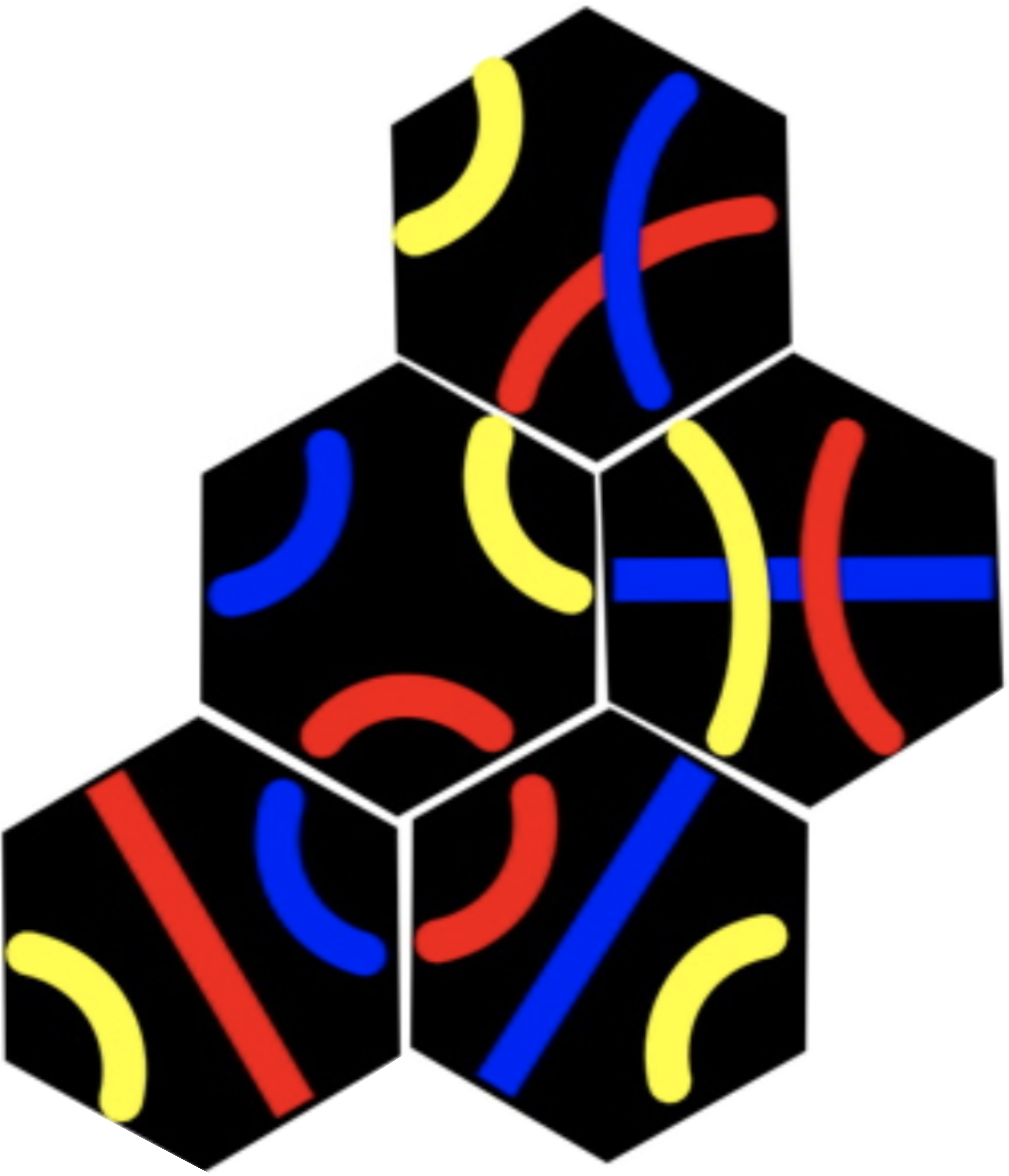
Tantrix rotation puzzle Image by CS4FN.
Protein folding is part of a group of problems that are an old nemesis of computer scientists. It’s what’s known as an NP-complete problem. That’s a mathematical term that means it appears there’s no shortcut to calculating the answer to a problem. You just have to try every different possible answer before you arrive at the right one. There are other problems like this, like the Tantrix rotation puzzle. Because a computer would have to check through every possible answer, the more complex the problem is the longer it will take. Protein folding is particularly complex – an average-sized protein contains about 100 amino acids, which means it would take a computer a billion billion billion years to figure out. So a shortcut would be nice then.
Puzzling out a cure
Obviously the proteins themselves have found a shortcut. They fold up all the time without having to have computers figure it out for them. In order to get to the bottom of how they do it, though, scientists are hoping that human beings might provide a shortcut. Humans love puzzles, and we’re awfully good at visual ones. Our good visual sense means we see patterns everywhere, and we can easily develop a ‘feel’ for how to use those patterns to solve problems. We use that sense when we play games like chess or Go. The scientists behind Foldit reckon that if it turns out that humans really are more efficient at solving protein folding problems, we can teach some of our tricks to computers.
If there were an efficient way to work out protein structure, it could be a huge boon to medicine. Diseases depend on proteins too, and lots of drugs work by targeting the business end of those proteins. HIV uses two proteins to infect people and replicate itself, so drugs disrupt the workings of those proteins. Cancer, on the other hand, damages helpful proteins. If scientists understood how proteins fold, they could design new proteins to counteract the effects of disease. So getting to the top of the tables in Foldit could hold even more glory for you than you bargained for – if your protein folding efforts help cure a dreaded disease, then, maybe it’s the Nobel Prize you’ll end up winning.
The coloured diagram of the enzyme above is a 3D representation to help people see how the protein folds. These are called ribbon diagrams and were invented by Jane S Richardson, find out more here.
Subscribe to be notified whenever we publish a new post to the CS4FN blog.
This blog is funded by EPSRC on research agreement EP/W033615/1.
Can a robot get cancer? Silly question. Our bodies are made of cells. Robots aren’t. Cells are the basic building blocks of life and come in lots of different forms from long thin nerve cells that allow us to sense the world, to round blood cells that carry oxygen around our bodies. Cancer occurs when cells go rogue and start reproducing in an uncontrolled way. A computer can’t get cancer, but you can allow virtual diseases to attack virtual cells inside a computer. Doing that may just help find cures. That is what Jasmin Fisher, who leads a research group at Microsoft Research in Cambridge, has devoted her career to.
Becoming a medic isn’t the only way to help save lives!
Computational Modelling is changing the way the sciences are done. It is the idea that you can run experiments on virtual versions of things you are investigating. A computer model is essentially just a program that simulates the phenomena of interest. For example, by writing a program that simulates the laws of Physics, you can use it to run virtual Physics experiments about the motion of the planets, say. If your virtual planets do follow the paths real planets do, then you have evidence the laws are right. If they don’t your laws (or the models) need to change. You can also make predictions such as when an eclipse will happen. If you are right it suggests the laws you coded are good descriptions of reality. If wrong, back to the drawing board.
Jasmin has been pioneering this idea with the stuff of life and death. She focusses on modelling cells and the specific ways that we think cancer attacks them. It gives a way of exploring what is going on at the level of the molecules inside cells, and so how well new medicines might, or might not, work. Experiments can be done quickly and easily on the programmed models by running simulations. That means the real experiments, taking up expensive lab time, can focus on things that are most likely to be successful. Jasmin’s work has helped researchers design more effective actual experiments because they start with a better understanding of what is going on. One of the most important questions she is studying is how cells end up becoming what they are, and how this differs between normal cells and cancer cells. Understand this and we will be much closer to understanding how to stop cancer.
A naive way of using two different symbols (red and blue blocks) to represent numbers. Image by CS4FN
Continuing a series of blogs on what to do with all that lego scattered over the floor: learn some computer science…how might we represent numbers using only two symbols?
We build numbers out of 10 different symbols: our digits 0-9. Charles Babbage’s victorian computer design represented numbers using the same decimal system (see Part 4: Lego Computer Science: representing numbers using position). That was probably an obvious choice for Babbage, but as we have already seen, there are lots of different ways numbers could be represented.
Modern computers use a different representation. The reason is they are based on a technology of electrical signals that are either there or not, switches that are on or off. Those two choices are used as two symbols to represent data. It is as though all data will be built of two lego coloured blocks: red and blue, say.
How might that then be done? There are still lots of ways that could be chosen.
Count the red blocks
One really obvious way would be to just pick one of the two coloured bricks (say red) to mean 1 and then to represent a number like 2 say you would have 2 of that colour block, filling the other spaces allocated for the number with the other colour. So if you were representing numbers with storage space for three blocks, two of them would be red and one would be blue for the number 2. All would be red for the number 3.
This is actually just a variation of unary, that we have seen earlier, just with a fixed amount of storage. It isn’t a very good representation as you need lots of storage space to represent large numbers because it is not using all possible combinations of the two symbols. In particular, far more numbers can be represented with a better representation. In the above example, 3 places are available on the lego base to put the blocks we are using and we have been able to represent 4 different numbers (0 to 3). However, information theory tells us we should be able to store up to 8 different numbers in the space, given two symbols and using them the right way, with the right representation.
A random code for numbers
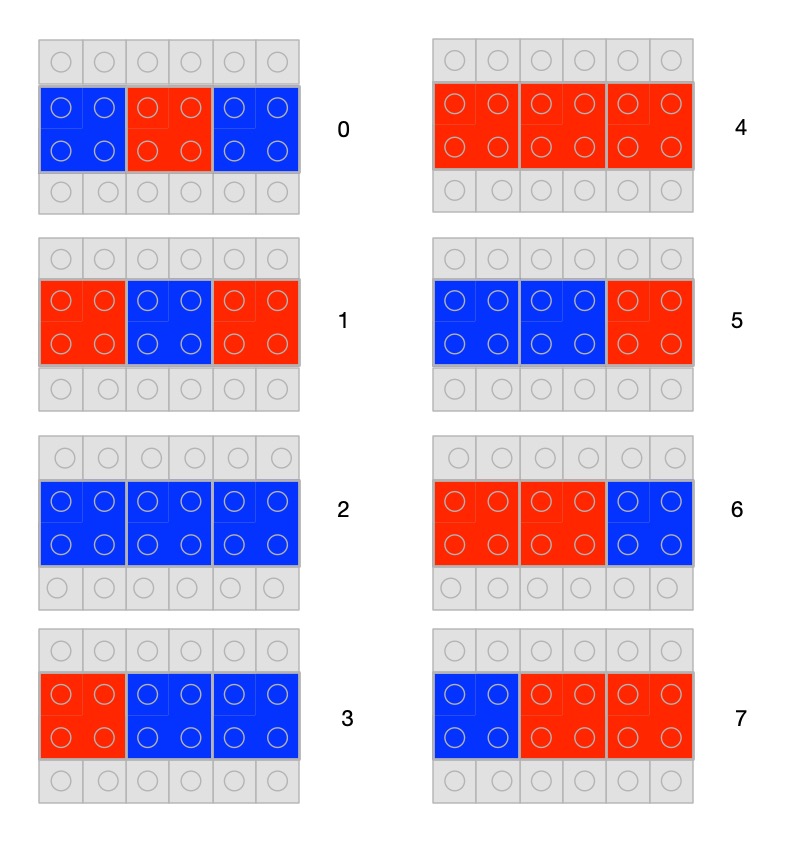
How do we use all 8 possibilities? Just allocate a different combination to each pattern with blocks either red or blue, and allocate a different number to each pattern. Here is one random way of doing it.
A code for numbers chosen at random Image byCS4FN
Having a random allocation of patterns to numbers isn’t a very good representation though as it doesn’t even let us count easily. There is no natural order. There is no simple way to know what comes next other than learning the sequence. It also doesn’t easily expand to larger numbers. A good representation is one that makes the operations we are trying to do easy. This doesn’t.
Gray Code
Before we get to the actual binary representation computers use, another representation of numbers has been used in the past that isn’t just random. Called Gray code it is a good example of choosing a representation to make a specific task easier. In particular, it is really good if you want to create an electronic gadget that counts through a sequence.
Also called a a reflected binary code, Gray code is a sequence where you change only one bit (so the colour of one lego block) at a time as you move to the next number.
If you are creating an electronic circuit to count, perhaps as an actual counter or just to step through different states of a device (eg cycling through different modes like stopwatch, countdown timer, normal watch), then numbers would essentially be represented by electronic switches being on or off. A difficulty with this is that it is highly unlikely that two switches would change at exactly the same time. If you have a representation like our random one above, or actual binary, to move between some numbers you have to change lots of digits.
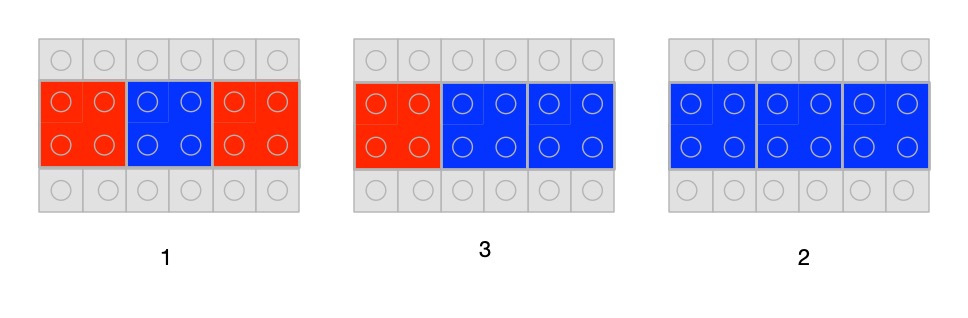
You can see the problem with lego. For example, to move from 0 to 1 in our sequence above you have to change all three lego blocks for new ones of the other colour. Similarly, to go from 1 to 2 you need to change two blocks. Now, if you swap one block from the number first and then the other, there is a point in time when you actually have a different (so wrong) number! To change the number 1 to 2, for example, we must swap the first and third bricks. Suppose we swap the first brick first and then the third brick. For a short time we are actually holding the number 3. Only when we change the last brick do we get to the real next number 2. We have actually counted 1, 3, 2, not 1, 2 as we wanted to. We have briefly been in the wrong state, which could trigger the electronics to do things associated with that state we do not want (like display the wrong number in a counter).
Mistaken counting using our random representation. To get from 1 to 2 we need to swap the first and third brick. If we change the first brick first, there is a brief time when our number has become three, before the third brick is changed. We have counted 1, 3, 2 by mistake. Image by CS4FN
Just as it is hard to swap several blocks at precisely the same time, electronic switches do not switch at exactly the same time, meaning that our gadget could end up doing the wrong thing, because it briefly jumps to the wrong state. This led to the idea of having a representation that used a sequence of numbers where only one bit of the number needs to be changed to get to the next number.
A Gray code in lego bricks. To move from one number in the sequence to the next, you only need to change one lego brick. Image by CS4FN
There are lots of ways to do this and the version above is the one introduced by physicist Frank Gray. Gray codes of this kind have been used in all sorts of situations: a Gray code sequence was used to represent characters in Émile Baudot’s telegraph communication system, for example. More recently they have been used to make it easier to correct errors in streams of data in digital TV.
Computers do not need to worry about this timing problem of when things change as they use clocks to determine when values are valid. Data is only read when the tick of the clock signal says it is safe too. This is slower, but gives time for all the digital switches to settle into their final state before the values are read, meaning faulty intermediate values are ignored. That means computers are free to use other representations of numbers and in particular use a binary system equivalent to our decimal system. That is important as while Gray code is good for counting, and stepping through states, amongst other things, it is not very convenient for doing more complicated arithmetic.
Part of a series featuring featuring pixel puzzles, compression algorithms, number representation, gray code, binary, logic and computation.
Subscribe to be notified whenever we publish a new post to the CS4FN blog.
This blog is funded by EPSRC on research agreement EP/W033615/1.
This post was funded by UKRI, through grant EP/K040251/2 held by Professor Ursula Martin, and forms part of a broader project on the development and impact of computing.
Numbers represented with different sized common blocks Image by CS4FN
Continuing a series of blogs on what to do with all that lego scattered over the floor: learn some computer science…how do we represent numbers and how is it related to the representation Charles Babbage used in his design for a Victorian steam-powered computer?
We’ve seen there are lots of ways that human societies have represented numbers and that there are many ways we could represent numbers even just using lego. Computers store numbers using a different representation again called binary. Before we get to that though we need to understand how we represent bigger numbers ourselves and why it is so useful.
Numbers represented as colours. Image by CS4FN
Our number system was invented in India somewhere before the 4th century. It then spread, including to the west, via muslim scholars in Persia by the 9th century, so is called the Hindu-Arabic numeral system. Its most famous advocate was Muḥammad ibn Mūsā al-Khwārizmī. The word algorithm comes from the latin version of his name because of his book on algorithms for doing arithmetic with Hindu-arabic numbers.
The really clever thing about it is the core idea that a digit can have a different value depending on its position. In the number 555, for example, the digit 5 is representing the number five hundred, the number fifty and the number five. Those three numbers are added together to give the actual number being represented. Digit in the ‘ones’ column keep their value, those in the ‘tens’ column are ten times bigger, those in the ‘hundreds column a hundred times bigger than the digit, and so on. This was revolutionary differing from most previous systems where a different symbol was used for bigger number, and each symbol always meant the same thing. For example, in Roman numerals X is used to mean 10 and always means 10 wherever it occurs in a number. This kind of positional system wasn’t totally unique as the Babylonians had used a less sophisticated version and Archimedes also came up with a similar idea, those these systems didn’t get used elsewhere.
In the lego representations of numbers we have seen so far, to represent big numbers we would need ever more coloured blocks, or ever more different kinds of brick or ever bigger piles of bricks, to give a representation of those bigger numbers. It just doesn’t scale. However, this idea of position-valued numbers can be applied whatever the representation of digits used, not just with digits 0 to 9. So we can use the place number system to represent ever bigger numbers using our different versions of the way digits could be represented in lego. We only need symbols for the different digits, not for every number, of for every bigger numbers.
For example, if we have ten different colours of bricks to represent the 10 digits of our decimal system, we can build any number by just placing them in the right position, placing coloured bricks on a base piece.
The number 2301 represented in coloured blocks where black represents 0, red represents 1, blue represents 2 and where yellow represents 3 Image by CS4FN
Numbers could be variable sized or fixed size. If as above we have a base plate, and so storage space, for four digits then we can’t represent larger numbers than 9999. This is what happens with the way computers store numbers. A fixed amount of space is allocated for each number in the computer’s memory, and if a number needs more digits then we get an “overflow error” as it can’t be stored. Rockets worth millions of pounds have exploded on take-off in the past because a programmer made the mistake of trying to store numbers too big for the space allocated for them. If we want bigger numbers, we need a representation (and algorithms) that extend the size of the number if we run out of space. In lego that means our algorithm for dealing with numbers would have to include extending the grey base plate by adding a new piece when needed (and removing it when no longer needed). That then would allow us to add new digits.
Unlike when we write numbers, where we write just as many digits as we need, with fixed-sized numbers like this, we need to add zeros on the end to fill the space. There is no such thing as an empty piece of storage in a computer. Something is always there! So the number 123 is actually stored as 0123 in a fixed 4-digit representation like our lego one.
The number 321 represented in coloured blocks where space is allocated for 4 digits as 0321: black represents 0, red represents 1, blue represents 2 and where yellow represents 3 Image by CS4FN
Charles Babbage made use of this idea when inventing his Victorian machines for doing computation: had they been built would have been the first computers. Driven by steam power his difference engine and analytical engine were to have digits represented by wheels with the numbers 0-9 written round the edge, linked to the positions of cog-like teeth that turned them.
Wheels were to be stacked on top of each other to represent larger numbers in a vertical rather than horizontal position system. The equivalent lego version to Babbage’s would therefore not have blocks on a base plate but blocks stacked on top of each other.
The number 321 represented vertically in coloured blocks where space is allocated for 4 digits as 0321: black represents 0, red represents 1, blue represents 2 and where yellow represents 3 Image by CS4FN
Numbers stored as columns of wheels on the replica of Babbage’s Difference Engine at the Science Museum London. Image by Carsten Ullrich: CC-BY-SA-2.5. From wikimedia.
In Babbage’s machines different numbers were represented by their own column of wheels. He envisioned the analytical engine to have a room sized data store full of such columns of wheels.
So Babbage’s idea was just to use our decimal system with digits represented with wheels. Modern computers instead use binary … but that is for next time.
Part of a series featuring featuring pixel puzzles, compression algorithms, number representation, gray code, binary, logic and computation.
Subscribe to be notified whenever we publish a new post to the CS4FN blog.
This blog is funded by EPSRC on research agreement EP/W033615/1.
This post was funded by UKRI, through grant EP/K040251/2 held by Professor Ursula Martin, and forms part of a broader project on the development and impact of computing.
Continuing a series of blogs on what to do with all that lego scattered over the floor: learn some computer science…what does number representation mean?
We’ve seen some different ways to represent images and how ultimately they can be represented as numbers but how about numbers themselves. We talk as though computers can store numbers as numbers but even they are represented in terms of simpler things in computers.
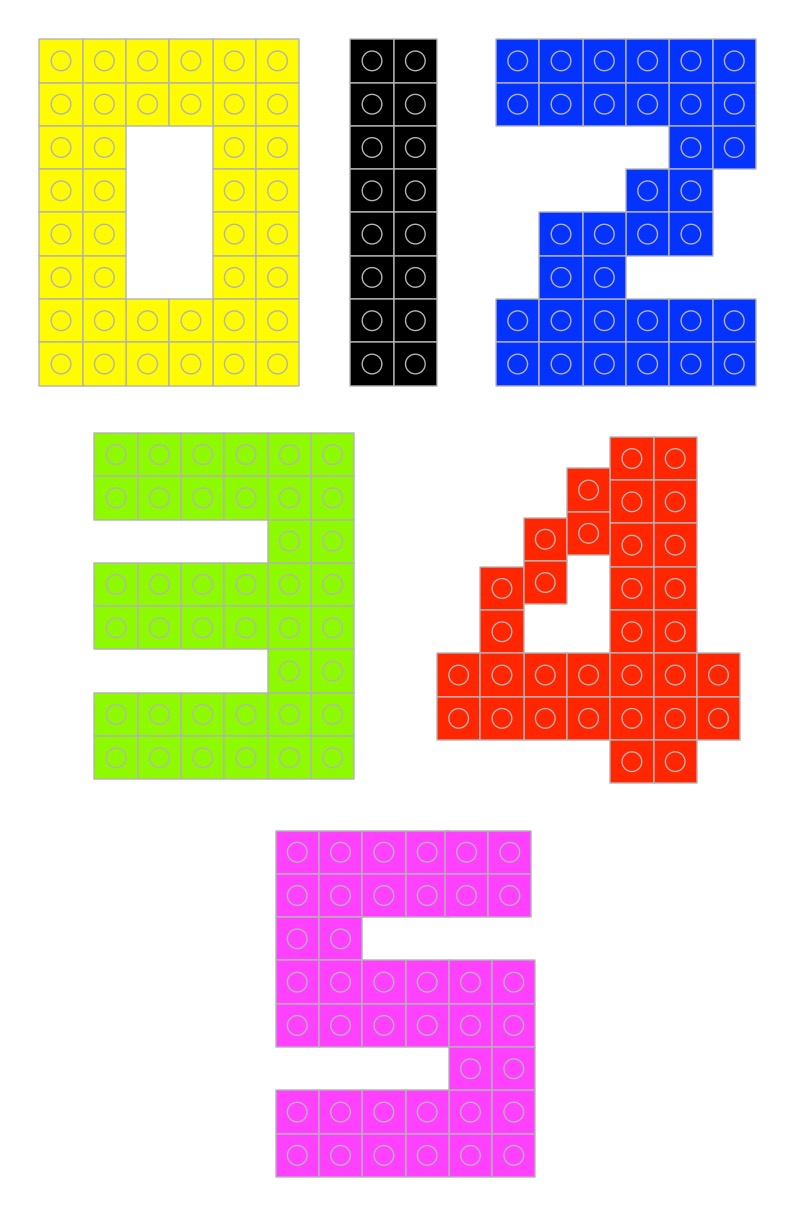
But first what do we mean by a number and a representation of a number? If I told you to make the numbers 0 to 9 in lego (go on have a go) you may well make something like this…
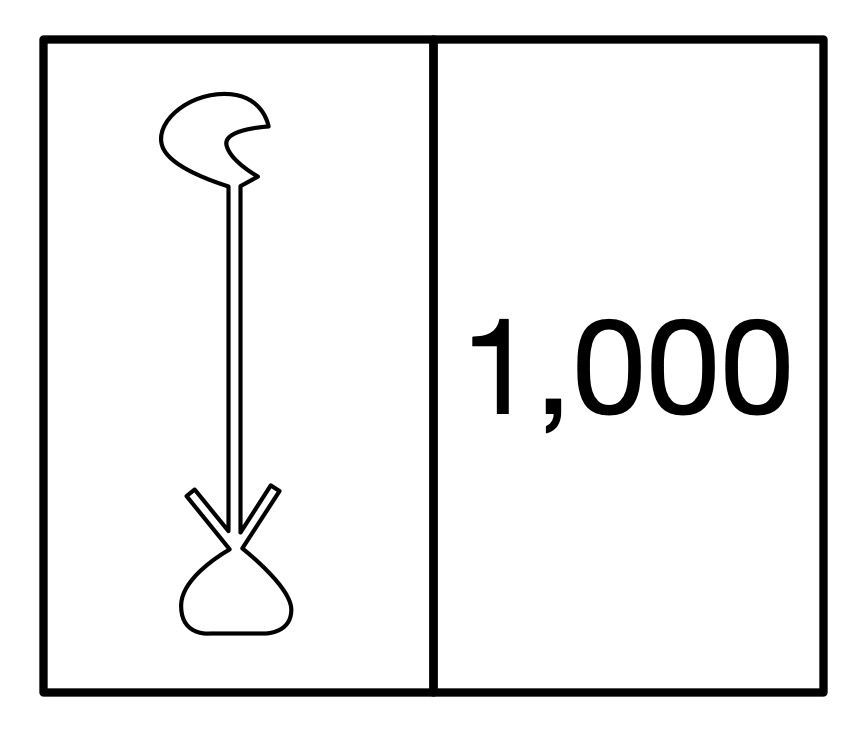
But those symbols 0, 1, 2, … are just that. They are symbols representing numbers not the numbers themselves. They are arbitrary choices. Different cultures past and present use different symbols to mean the same thing. For example, the ancient Egyptian way of writing the number 1000 was a hieroglyph of a water lily. (Perhaps you can make that in lego!)
The ancient Egyptian way to write 1000 was a hieroglyph of a waterlily. Image by CS4FN
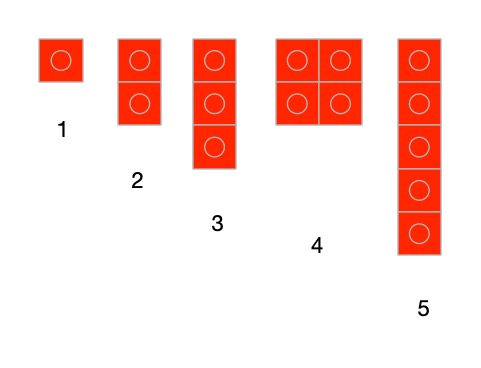
What really are numbers? What is the symbol 2 standing for? It represents the abstract idea of twoness ie any collection, group or pile of two things: 2 pieces of lego, 2 ducks, 2 sprouts, … and what is twoness? … it is oneness with one more thing added to the pile. So if you want to get closer to the actual numbers then a closer representation using lego might be a single brick, two bricks, three bricks, … put together in any way you like.
Numbers represented by that number of lego bricks. Image by CS4FN
Another way would to use different sizes of bricks for them. Use a lego brick with a single stud for 1, a 2-stud brick for two and so on (combining bricks where you don’t have a single piece with the right number of studs). In these versions 0 is the absence of anything just like the real zero.
Lego bricks representing numbers based on the number of studs showing. Image by CS4FN
Once we do it in bricks it is just another representation though – a symbol of the actual thing. You can actually use any symbols as long as you decide the meaning in advance, there doesn’t actually have to be any element of twoness in the symbol for two. What other ways can you think of representing numbers 0 to 9 in lego? Make them…
A more abstract set of symbols would be to use different coloured bricks – red for 1, blue for 2 and so on. Now 0 can have a direct symbol like a black brick. Now as long as it is the right colour any brick would do. Any sized red brick can still mean 1 (if we want it to). Notice we are now doing the opposite of what we did with images. Instead of representing a colour with a number, we are representing a number with a colour.
Numbers represented as colours. Image by CS4FN
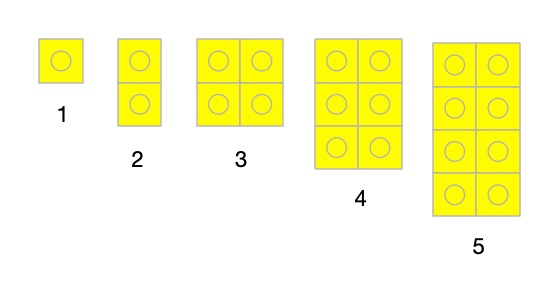
Here is a different representation. A one stud brick means 1, a 2-stud brick means 2, a square 4 stud brick means 3, a rectangular 6 stud brick means 4 and so on. As long as we agreed that is what they mean it is fine. Whatever representation we choose it is just a convention that we have to then be consistent about and agree with others.
Numbers represented by increasing sized blocks. Image by CS4FN
What has this to do with computing? Well if we are going to write algorithms to work with numbers, we need a way to store and so represent numbers. More fundamentally though, computation (and so at its core computer science) really is all about symbol manipulation. That is what computational devices (like computers) do. They just manipulate symbols using algorithms. We will see this more clearly when we get to creating a simple computer (a Turing Machine) out of lego (but that is for later).
We interpret the symbols in the inputs of computers and the symbols in the outputs with meanings and as a result they tell us things we wanted to know. So if we key the symbols 12+13= into a calculator or computer and it gives us back 25, what has happened is just that it has followed some rules (an algorithm for addition) that manipulated those input symbols and made it spew out the output symbols. It has no idea what they mean as it is just blindly following its rules about how to manipulate symbols. We also could have used absolutely any symbols for the numbers and operators as long as they were the ones the computer was programmed to manipulate. We are the ones that add the intelligence and give those symbols meanings of numbers and addition and the result of doing an addition.
This is why representations are important – we need to choose a representation for things that makes the symbol manipulation we intend to do easy. We already saw this with images. If we want to send a large image to someone else then a representation of images like run-length encoding that shrinks the amount of data is a good idea.
When designing computers we need to provide them with a representation of numbers so they can manipulate those numbers. We have seen that there are lots of representations we could choose for numbers and any in theory would do, but when we choose a representation of numbers for use to do computation, we want to pick one that makes the operations we are interested in doing easy. Charles Babbage for example chose to use cog-like wheels turned to particular positions to represent numbers as he had worked out how to create a mechanism to do calculation with them. But that is something for another time…
Part of a series featuring featuring pixel puzzles, compression algorithms, number representation, gray code, binary and computation.
Subscribe to be notified whenever we publish a new post to the CS4FN blog.
This blog is funded by EPSRC on research agreement EP/W033615/1.
This post was funded by UKRI, through grant EP/K040251/2 held by Professor Ursula Martin, and forms part of a broader project on the development and impact of computing.











 cs4fn
cs4fn 