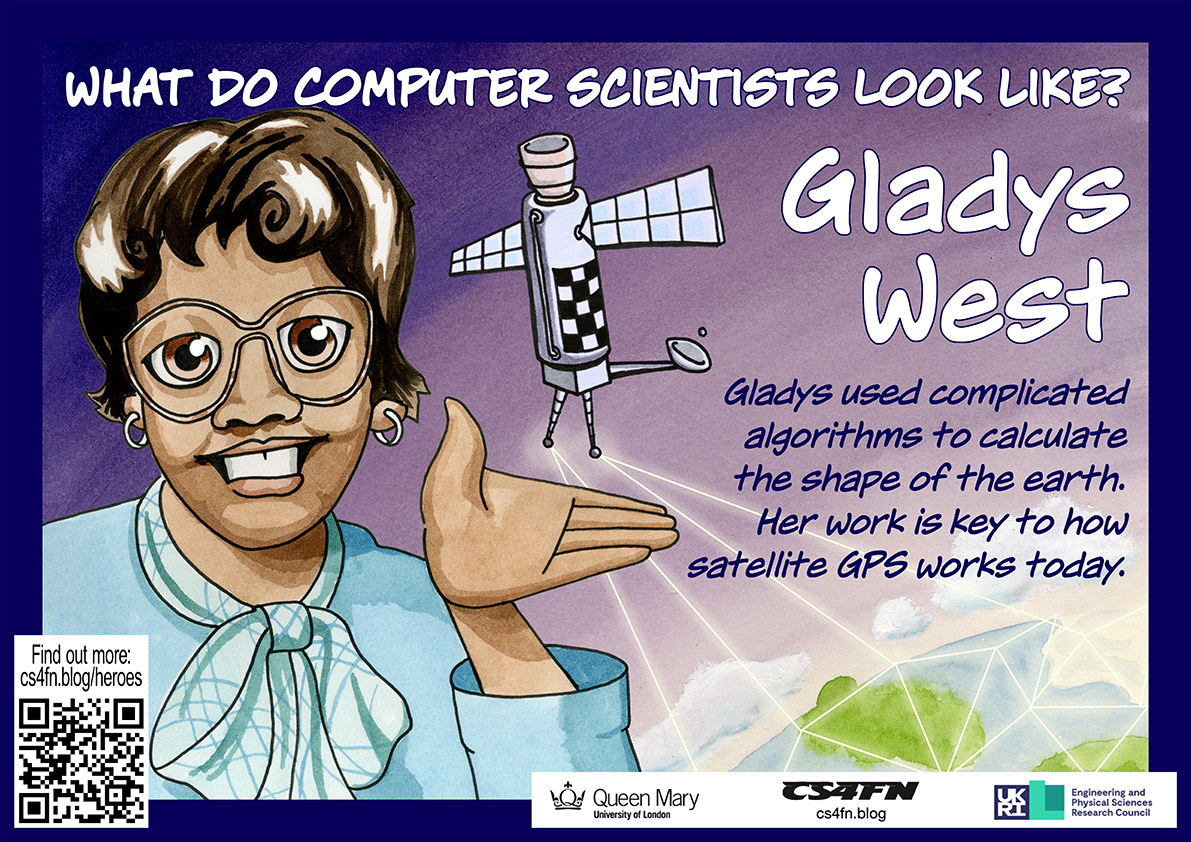
Satellites are critical to much modern technology, and especially GPS. It allows our smartphones, laptops and cars to work out their exact position on the surface of the earth. This is central to all mobile technology, wearable or not, that relies on knowing where you are, from plotting a route your nearest Indian restaurant to telling you where a person you might want to meet is. Many, many people were involved in creating GPS, but it was only in Black History Month of 2017 when the critical part Gladys West played became widely known.
Work hard, go far
As a child Gladys worked with her family in the fields of their farm in rural Virginia. That wasn’t the life she wanted, so she worked hard through school, leaving as the top student. She won a scholarship to university, and then landed a job as a mathematician at a US navy base.
There she solved the maths problems behind the positioning of satellites. She worked closely with the programmers to write the code to do calculations based on her maths. Nine times out of ten the results that came back weren’t exactly right so much of her time was spent working out what was going wrong with the programs, as it was vital the results were very accurate.
Seasat and Geosat
Her work on the Seasat satellite won her a commendation. It was a revolutionary satellite designed to remotely monitor the oceans. It collected data about things like temperature, wind speed and wind direction at the sea’s surface, the heights of waves, as well as sensing data about sea ice. This kind of remote sensing has since had a massive impact on our understanding of climate change. Gladys specifically worked on the satellite’s altimeter. It was a radar-based sensor that allowed Seasat to measure its precise distance from the surface of the ocean below. She continued this work on later remote sensing satellites too, including Geosat, a later earth observation satellite.
Gladys West and Sam Smith look over data from the Global Positioning System, which Gladys helped develop. Image: U.S. Navy, Public domain, via Wikimedia Commons US Navy, 1985,
GPS
Knowing the positions of satellites is the foundation for GPS. The way GPS works is that our mobile receivers pick up a timed signal from several different satellites. Calculating where we are can only be done if you first know very precisely where those satellites were when they sent the signal. That is what Gladys’ work provided.
GPS Watches
You can now buy, for example, buy GPS watches, allowing you to wear a watch that watches where you are. They can also be used by people with dementia, who have bad memory problems, allowing their carers to find them if they go out on their own but are then confused about where they are. They also allow parents to know where their kids are all the time. Do you think that’s a good use?
Since so much technology now relies on knowing exactly where we are, Gladys’ work has had a massive impact on all our lives.
To be a good computer scientist you have to enjoy problem solving. That is what it’s all about: working out the best way to do things. You also have to be able to think in a logical way: be a bit of a Vulcan. But what does that mean? It just means being able to think precisely, extracting all the knowledge possible from a situation just by pure reasoning. It’s about being able to say what is definitely the case given what is already known…and it’s fun to do. That’s why there is a Suduko craze going on as I write. Suduko are just pure logical thinking puzzles. Personally I like Kakuro better. They are similar to Soduko, but with a crossword format.
What is a Kakuro?
A Kakuro is a crossword-like grid, but where each square has to be filled in with a digit from 1-9 not a letter. Each horizontal or vertical block of digits must add up to the number given to the left or above, respectively. All the digits in each such block must be different. That part is similar to Soduko, though unlike Soduko, numbers can be repeated on a line as long as they are in different blocks. Also, unlike Soduko, you aren’t given any starting numbers, just a blank grid.
Where does logic come into it? Take the following fragment:
Part of a Kakuro Puzzle. Image by PC
There is a horizontal block of two cells that must add up to 16. Ways that could be done using digits 1-9 are 9+7, 8+8 or 7+9. But it can’t be 8+8 as that needs two 8s in a block which is not allowed so we are left with just two possibilities: 9+7 or 7+9. Now look at the vertical blocks. One of them consists of two cells that add up to 17. That can only be 9+8 or 8+9. That doesn’t seem to have got us very far as we still don’t know any numbers for sure. But now think about the top corner. We know from across that it is definiteley 9 or 7 and from down that it is definitely 9 or 8. That means it must be 9 as that is the only way to satisfy both restrictions.
A Kakuro for you to try
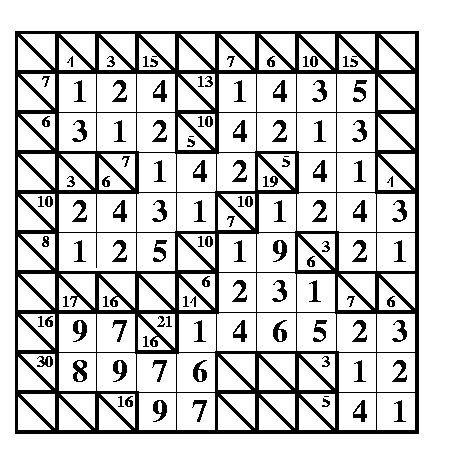
A Kakuro puzzle for you to try. Image by PC
Here is a full Kakuro to try. There is also a printer friendly pdf version. Check your answer at the very end of this post when you are done.
Being able to think logically is important because computer programming is about coming up with precise solutions that even a dumb computer can follow. To do that you have to make sure all the possibilities have been covered. Reasoning very much like in a Kakuro is needed to convince yourself and others that a program does do what it is supposed to.
A gentoo penguin slumps belly-first on a nest at Damoy, on the Antarctic Peninsula. Nearby some lichen grows across a rock, and schools of krill float through the Southern Ocean. Every one of these organisms is a part of life in the Antarctic, and scientitsts study each of them. But what happens to one species affects all the others too. To help make sure that they all survive, scientists have to understand how penguins, plants, krill and everything else in the Antarctic interact with one another. They need to figure out the rules of the ecosystem.
Working together
When you’re trying to understand a system that includes everything from plants to penguins, things get a bit complicated. Fortunately, ecology has a new tool to help, called complexity theory. Anje-Margriet Neutel is a Biosphere Complexity Analyst for the British Antarctic Survey. It’s her job to take a big puzzle like the Antarctic ecosystem, and work out where each plant and animal fits in. She explains that ‘complexity is sort of a new brand of science’. Lots of science is about isolating something – say, a particular chemical – from its surroundings so you can learn about it, but when you isolate all the parts of a system you miss how they work together. What complexity tries to do is build a model that can show all the important interactions in an ecosystem at the same time.
Energy hunt
So for a system as big as a continent full of species, where do you start? Anje’s got a sensible answer: you start with what you can measure. Energy’s a good candidate. After all, every organism needs energy to stay alive, and staying alive is pretty much the first thing any plant or animal needs to do. So if you can track energy and watch it move through the ecosystem, you’ll learn a lot about how things work. You’ll find out what comes into the system, what goes out and what gets recycled.
Playing with models
Once you’ve got an idea of how everything fits together you’ve got what scientists call a model. The really clever thing you can do with models is start to mess around with them. As an example Anje says, ‘What would happen if you took one group of organisms and put in twice as much of them?’ If you had a system with, say, twice as many penguins, the krill would have to be worried because more penguins are going to want to eat them. If they all run out what happens to the penguins? Or the seals that like eating krill too? It gets complicated pretty quickly, and those complicated reactions are just what scientists want to predict.
The language of nature
Figuring out how an ecosystem works is all about rules and structure. Ecosystems are huge complicated things, but they’re not random – whether they work or not depends on having the right organisms doing jobs in the right places, and on having the right connections between all the different parts. It’s like a computer program that way. Weirdly, it’s also a bit like language. In fact, Anje’s background is in studying linguistics, not ecology. Think of an ecosystem like a sentence – there are thousands of words in the English language but in order to make a sentence you have to put them together in the right way. If you don’t have the right grammar your sentence just won’t make sense, and if an ecosystem doesn’t have the right structure it’ll collapse. Anje says that’s what she wants to discover in the ecosystems she studies. ‘I’m interested in the grammar of it, in the grammar of nature.’
Surviving Antarctica
Since models can help you predict how an ecosystem reacts to strange conditions, Anje’s work could help Antarctica survive climate change. ‘The first thing is to understand how the models work, how the models behave, and then translate that back to the biology that it’s based on,’ she explains. ‘Then say OK, this means we expect there may be vulnerable areas or vulnerable climate regions where you can expect something to happen if you take the model seriously.’ If scientists like Anje can figure out how Antarctica’s ecosystems are set up to work, they’ll get clues about which areas of the continent are most at risk and what they can do to protect them.
Surviving on a continent where the temperature hardly ever gets above freezing is tough, and climate change is probably going to make it even tougher. If we can figure out how Antarctic ecosystems work, though, we’ll know what the essential elements for survival are, and we’ll have clues about how to make things better. Extracting the secret grammar of survival isn’t going to be a simple job, but that’s no surprise to the people working on it. After all, they’re not called complexity scientists for nothing.
How are you two doing together? You and your data, we mean. It’d be nice to have an update. Do you understand one another in that special OMG-we’ve-talked-all-night-and-now-the-sun’s-up kind of way? Is it more like you just kind of hang out together without really bothering to think about each other? Or maybe you’re just a bit baffled by the whole data scene. If your heart doesn’t beat with fervent love for the wild binary information all around you, that’s OK. In fact that’s pretty normal. It just so happens, though, that there’s a guy who wants to improve your data relationships. He’s called Andy Broomfield and he graduated as a designer from the Royal College of Art.
Andy’s worried that as we rely more and more on gadgets like mobiles and satnavs, a lot of us stop thinking about where the data comes from. “Increasingly we’re becoming dependent on the data,” says Andy. “We are just blindly fed it.” He tells the story of some councils that had to put up ‘Ignore Your Satnav’ signs after lorry drivers followed electronic directions down narrow lanes rather than believe their own eyes. He reckons that hapless users wouldn’t get quite so “data-lost” if we had a way to really connect with the pure information out there, being broadcast from satellites every second of the day. So he designed some gadgets of his own to help get our data relationships back on the rails.
Time to yourself
Ignore Sat Nav image by Dan Pope on Flickr, used under a CC BY-NC-SA 2.0 licence.
The first device lets you keep a personal time zone, and was inspired by a group of data-lovers who are sweet on measuring time. Time zones divide the globe into long tall ribbons based on longitude. Since GPS satellites can give each of us extremely accurate longitude readings all the time (the cs4fn offices are apparently at .042 degrees west), why not go even further and cut the ribbons up even more? That’s what Andy’s Longitude Time Piece does, to the point where you can uncover what Andy calls “your own local time zone”, right down to the second. Then you’d know that wherever you go, your timing would always be perfect.
Flooded with facts
Andy’s second invention is another GPS-flavoured one. Even though a lot of us can get lost really easily (even with maps and satellites to help), others love getting down and dirty with geographic data. This gadget’s good for both groups. People with a great sense of data direction can use the Geo Flood Browser to get info on the nearest river, wherever they are.
They can also share the love with others who get a bit data-lost, by leaving electronic tags around to let them know if the area gets flooded a lot. Then people nearby can use the tags using their own gadget to find out whether they ought to be stocking up on boats and snorkels before the next flood hits.
Spot a satellite
Finally Andy’s designed a gadget for your data relationships in space. Satellite spotters are kind of like backyard astronomers, except they love catching glimpses of the satellites that orbit the Earth. With Andy’s device anyone can tune into a satellite that’s above them and listen to it. You can either hear a voice tell you about the satellite, or you can actually listen into the bleeps of information coming from the satellite itself. That way, Andy says, you get “a connection to the pure data, the data that we’re dependent upon in the world.” It’s strange to think that this data is around us all the time – it’s just our phones and TVs that normally listen in, rather than us. If information is the lifeblood of our high-tech lives, the Satellite Scanner lets you listen to its heart.
Each of Andy’s devices uses information from the satellites whizzing, Cupid-like, around the Earth. The unusual thing is what they do with it – they’re not about being really useful so much as they are about actually experiencing the data that’s out there in the real world. That’s how he’s aiming to improve our data relationships. It’s like the way you can know someone for ages, but never see what they’re really about until you look from a different angle. Except this time it’s with satellites. Weird, eh? But good. A little like love.
Imagine being able to pick up an ordinary banana and use it as a phone. That’s part of the vision of ‘invoked computing’, which is being developed by Japanese researchers. A lot of the computers in our lives are camouflaged – smartphones are more like computers than phones, after all – but invoked computing would mean that computers would be everywhere and nowhere at the same time.
The idea is that in the future, computer systems could monitor an entire environment, watching your movements. Whenever you wanted to interact with a computer, you would just need to make a gesture. For example, if you picked up a banana and held one end to your ear and the other to your mouth, the computer would guess that you wanted to use the phone. It would then use a fancy speaker system to direct the sound, so you would even hear the phone call as though it were coming from the banana.
Sometimes you might find yourself needing a bit more computing power, though, right? Not to worry. You can make yourself a laptop if you just find an old pizza box. Lift the lid and the system will project the video and sound straight on to the box.
At the moment the banana phone and pizza box laptop are the only ways that you can use invoked computing in the researchers’ system, but they hope to expand it so that you can use other objects. Then, rather than having to learn how to use your computers, your computers will have to learn how you would like to use them. And when you are finished using your phone, you could eat it.
Computer Science isn’t just about using language, sometimes it’s about losing it. Sometimes people want to send messages so no one even knows they exist and a great place to lose language is inside a conversation.
Cryptography is the science of making messages unreadable. Spymasters have used it for a thousand years or more. Now it’s a part of everyday life. It’s used by the banks every time you use a cash point and by online shops when you buy something over the Internet. It’s used by businesses that don’t want their industrial secrets revealed and by celebrities who want to be sure that tabloid hackers can’t read their texts.
Cryptography stops messages being read, but sometimes just knowing that people are having a conversation can reveal more than they want even if you don’t know what was said. Knowing a football star is exchanging hundreds of texts with his team mate’s girlfriend suggests something is going on, for example. Similarly, CIA chief David Petraeus whose downfall made international news, might have kept his secret and his job if the emails from his lover had been hidden. David Bowie kept his 2013 comeback single ‘Where are we now?’ a surprise until the moment it was released. It might not have made him the front page news it did if a music journalist had just tracked who had been talking to who amongst the musicians involved in the months before.
That’s where steganography comes in – the science of hiding messages so no one even knows they exist. Invisible ink is one form of steganography used, for example, by the French resistance in World War II. More bizarre forms have been used over the years though – an Ancient Greek slave had a message tattooed on his shaven head warning of Persian invasion plans. Once his hair had grown back he delivered it with no one on the way the wiser.
Digital communication opens up new ways to hide messages. Computers store information using a code of 0s and 1s: bits. Steganography is then about finding places to hide those bits. A team of Polish researchers led by Wojciech Mazurczyk have now found a way to hide them in a video app (Skype) conversation.
Skype was one of the early popular video call applications, eventually replaced by Microsoft Teams. When you use Skype to make a phone call, the program converts the sounds you make to a long series of bits. They are sent over the Internet and converted back to sound at the other end. At the same time more sounds as bits stream back from the person you are talking to. Data transmitted over the Internet isn’t sent all in one go, though. It’s broken into packets: a bit like taking your conversation and tweeting it one line at a time.
Why? Imagine you run a crack team of commandos who have to reach a target in enemy territory to blow it up – a stately home where all the enemy’s Generals are having a party perhaps. If all the commandos travel together in one army truck and something goes wrong along the way probably no one will make it – a disaster. If on the other hand they each travel separately, rendezvousing once there, the mission is much more likely to be successful. If a few are killed on the way it doesn’t matter as the rest can still complete the mission.
The same applies to a video call. Each packet contains a little bit of the full conversation and each makes its own way to the destination across the Internet. On arriving there, they reform into the full message. To allow this to happen, each packet includes some extra data that says, for example, what conversation it is part of, how big it is and also where it fits in the sequence. If some don’t make it then the rest of the conversation can still be put back together without them. As long as too much isn’t missing, no one will notice.
Skype does something special with its packets. The size of the packets changes depending on how much data needs to be transmitted. If the person is talking, each packet carries a lot of information. If the person is listening then what is being transmitted is mainly silence. Skype then sends shorter packets. The Polish team realised they could exploit this for steganography. Their program, SkyDe, intercepts Skype packets looking for short ones. Any found are replaced with packets holding the data from the covert message. At the destination another copy of SkyDe intercepts them and extracts the hidden message and passes it on to the intended recipient. As far as Skype is concerned some packets just never arrive.
There are several properties that matter for a good steganographic technique. One is its bandwidth: how much data can be sent using the method. Because Skype calls contain a lot of silence SkyDe has a high bandwidth: there are lots of opportunities to hide messages. A second important property is obviously undetectability. The Polish team’s experiments have shown that SkyDe messages are very hard to detect. As only packets that contain silence are used and so lost, the people having the conversation won’t notice and the Skype receiver itself can’t easily tell because what is happening is no different to a typical unreliable network. Packets go missing all the time. Because both the Skype data and the hidden messages are encrypted, someone observing the packets travelling over the network won’t see a difference – they are all just random patterns of bits. Skype calls are now common so there are also lots of natural opportunities for sending messages this way – no one is going to get suspicious that lots of calls are suddenly being made.
All in all SkyDe provides an elegant new form of steganography. Invisible ink is so last century (and tattooing messages on your head so very last millennium). Now the sound of silence is all you need to have a hidden conversation.
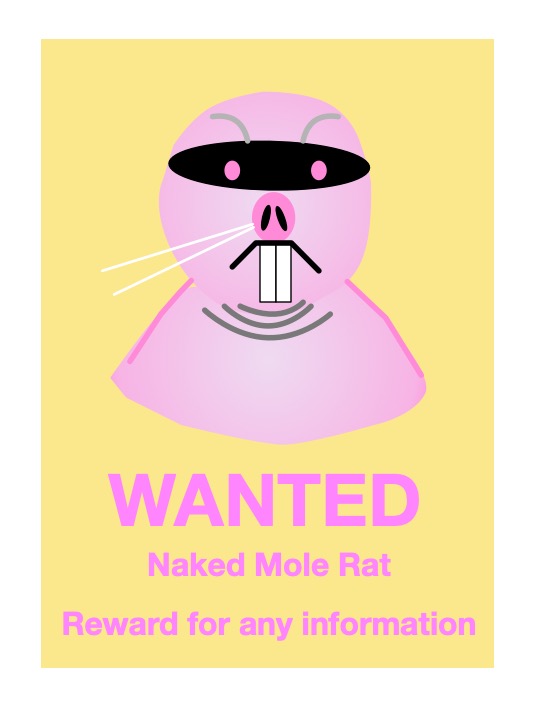
Where does a naked mole-rat wear its computing gadgetry? Under its skin….
Naked mole-rats are fascinating creatures. They are highly social, living in colonies. They spend their lives permanently underground in burrows, and that’s why they have no fur just whiskers. They don’t need it. Living underground means they are difficult to study. Normally researchers simply watch animals to study their behaviour, but that’s not possible for naked mole-rats.
Tag ’em
To allow them to be observed, one colony of 28 animals, called Colony Omega, went digital. They all have an implant under their skin. These tags are just smaller versions of ones used by vets to tag pets. Sensors around their burrow detect when the tags are close. This means the naked mole-rats can be watched in real-time as they move around the burrow. It’s allowing the biologists to study patterns in their behaviour such as how different animals take on different roles in the colony.
Interactive rat art
Julie Freeman, an artist and computer scientist at QMUL, used the same data in a different way. She leads a team creating interactive art based on the naked mole-rat data. ‘A Selfless Society‘, for example, is an abstract animation that changes as a result of the live data from the colony. The sculpture ‘This is Nature Now‘ also represents the live data from the colony but using soft robotic techniques (see page 13 of the magazine linked below). It moves based on the movements of the naked mole-rats. We often experience nature through technology, watching it on screens rather than in real-life. ‘This is Nature Now’ explores how physical, non-living objects can convey a sense of life.
Private portraits
Colony Omega also has its own gallery of portrait photos, taken by Lorna Ellen Faulkes. The eyes of the naked mole-rats are blocked out (to protect their identity!) The idea is to make people think about data privacy. Technology raises big issues over our own privacy. We now give away vasts amount of personal information without realising. What about the data privacy of animals?
This may seem silly, but is a very real problem. Tourists posting images of endangered animals and plants on social media from safaris has caused problems. It has led poachers to the animals and plants photographed, putting them in serious danger. The problem arises because modern digital cameras log the place a photo is taken, and this ‘metadata’ is included with the photograph posted for anyone to see who knows where to look.
So far almost all computer languages have been written in English, but that doesn’t need to be the case. Computers don’t care. Computer scientist Ramsey Nasser developed the first programming language that uses Arabic script. His computer language is called قلب. In English, it’s pronounced “Qalb”, after the Arabic word for heart. As long as a computer understands what to do with the instructions it’s given, they can be in any form, from numbers to letters to images.
The escape character is a rather small and humble thing, often ignored, easily misunderstood but vital in programming languages. It is used simply to say symbols that follow should be treated differently. The n in \n is no longer just an n but a newline character, for example. It is the escape character \ that makes the change. The escape character has a long history dating back to at least Ancient Egypt and probably earlier.
The Ancient Egyptians famously used a language of pictures to write:hieroglyphs. How to read the language was lost for thousands of years, and it proved to be fiendishly difficult to decipher. The key to doing this turned out to be the Rosetta Stone, discovered when Napoleon invaded Egypt. It contained the same text in three different languages: the Hieroglyphic script, Greek and also an Egyptian script called Demotic.
A whole series of scholars ultimately contributed, but the final decipherment was done by Jean-François Champollion. Part of the difficulty in decipherment, even with a Greek translation of the Rosetta Stone text available, was because it wasn’t, as commonly thought, just a language where symbolic pictures represented words (a picture of the sun, meaning sun, for example). Instead, it combined several different systems of writing but using the same symbols. Those symbols could be read in different ways. The first way was as alphabetic letters that stood for consonants (like b, d and p in our alphabet). Words could be spelled out in this alphabet. The second was phonetically where symbols could stand for groups of such sounds. Finally, the picture could stand not for a sound but for a meaning. A picture of a duck could mean a particular sound or it could mean a duck!
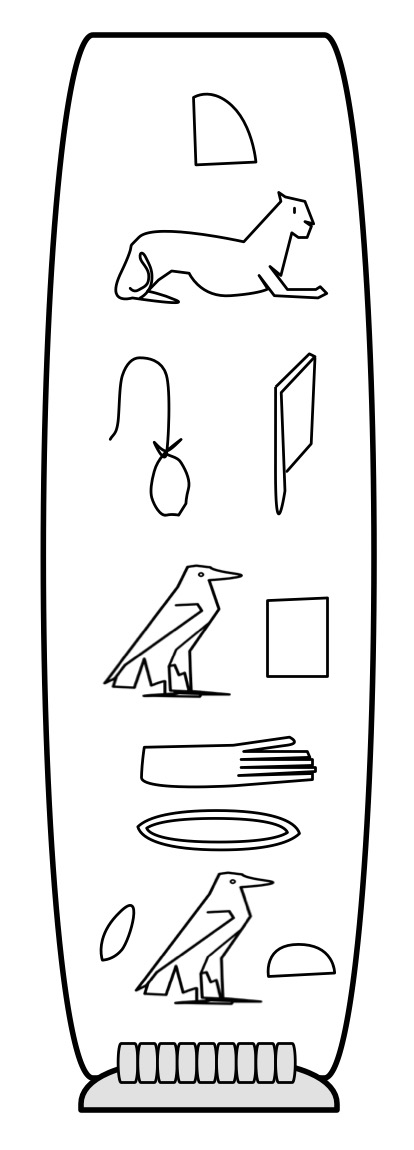
A cartouche for Cleopatra. Image by CS4FN
Part of the reason it took so long to decipher the language was that it was assumed that all the symbols were pictures of the things they represented. It was only when eventually scholars started to treat some as though they represented sounds that progress was made. Even more progress was made when it was realised the same symbol meant different things and might be read in a different way, even in the same phrase.
However, if the same symbol meant different things in different places of a passage, how on earth could even Egyptian readers tell? How might you indicate a particular group of characters had a special meaning?
One way the Egyptians used specifically for names is called a cartouche: they enclosed the sequence of symbols that represented a name in an oval-like box, like the one shown for Cleopatra. This was one of the first keys to unlocking the language as the name of pharaoh Ptolemy appeared several times in the Greek of the Rosetta Stone. Once someone had the idea that the cartouches might be names, the symbols used to spell out Ptolemy a letter at a time could be guessed at.
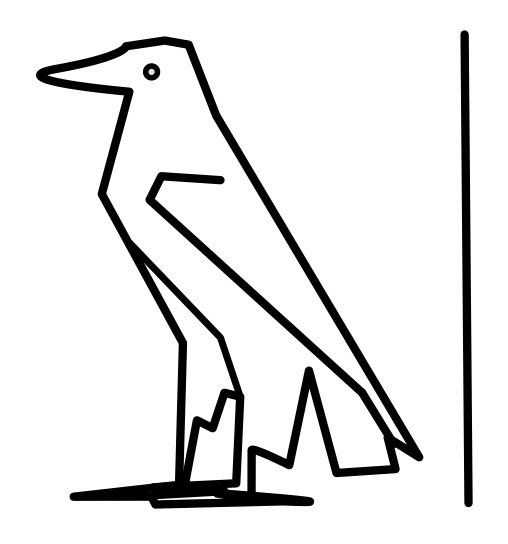
Putting things in boxes works for a pictorial language, but it isn’t so convenient as a more general way of indicating different uses of particular symbols or sequences of them. The Ancient Egyptians therefore had a much simpler way too. The normal reading of a symbol was as a sound. A symbol that was to be treated as a picture of the word it represented was followed by a line (so despite all the assumptions of the translators and the general perception of them, a hieroglyph as picture is treated as the exception not the norm!)
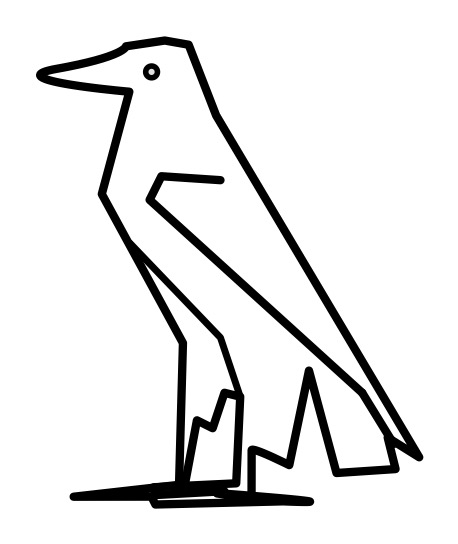
The Egyptian hieroglyph for aleph, Image by CS4FN
For example, the hieroglyph that is a picture of the Egyptian eagle stands for a single consonant sound, aleph. We would pronounce it ‘ah’ and it can be seen in the cartouche for Cleopatra that sounds out her name. However, add the line after the picture of the eagle (as shown) and it just means what it looks like: the Egyptian eagle.
The Egyptian hieroglyph for the Egyptian Eagle. Image by CS4FN
Cartouches actually included the line at the end too indicating in itself their special meaning, as can be seen on the Cleopatra cartouche above
The Egyptian line hieroglyph is what we would now call an escape character: its purpose is to say that the symbol it is paired with is not treated normally, but in a special way.
Computer Scientists use escape characters in a variety of ways in programming languages as well as in scripting languages like HTML. Different languages use a different symbol as the escape character, though \ is popular (and very reminiscent of the Egyptian line!). One place escapes are used is to represent special characters in strings (sequences of characters like words or sentences) so they can be manipulated or printed. If I want my program to print a word like “not” then I must pass an appropriate string to the print command. I just put the three characters in quotation marks to show I mean the characters n then o then t. Simple.
However, the string “\no\t” does not similarly mean five characters \, n, o, \ and t. It still represents three characters, but this time \n, o and \t. \ is an escape character saying that the n and the t symbols that follow it are not really representing the n or t characters but instead stand for a newline (\n : which jumps to the next line) and a tab character (\t : which adds some space). “\no\t” therefore means newline o tab.
This begs the question what if you actually want to print a \ character! If you try to use it as it is, it just turns what comes after it into something else and disappears. The solution is simple. You escape it by preceding it with a \. \\ means a single \ character! So “n\\t” means n followed by an actual \ character followed by a t. The normal meaning of \ is to escape what follows. Its special meaning when it is escaped is just to be a normal character! Other characters’s meanings are inverted like this too, where the more natural meaning is the one you only get with an escape character. For example what if you want a program to print a quotation so use quotation marks. But quotation marks are used to show you are starting and ending a String. They already have another meaning. So if you want a string consisting of the five characters “, n, o, t and ” you might try to write “”not”” but that doesn’t work as the initial “” already makes a string, just one with no characters in it. The string has ended before you got to the n. Escape characters to the rescue. You need ” to mean something other than its “normal” meeting of starting or ending a string so just escape it inside the string and write “\”not\””.
Once you get used to it, escaping characters is actually very simple, but is easy to find confusing when first learning to program. It is not surprising those trying to decipher hieroglyphs struggled so much as escapes were only one of the problems they had to contend with.
We saw in the previous article that a Turing machine can be used to do any computation, as long as you get its program right. Let’s create a program to do something simple to see how to do it. Our program will subtract two numbers.
The first thing we need to do is to choose a code for what the patterns of chocolates mean. To encode the two numbers we want to subtract we will use sequences of dark chocolates separated by milk chocolates, one sequence for each number. The more dark chocolates before the next milk chocolate the higher the number will be. For example if we started with the pattern laid out as below then it would mean we wanted to compute 4 – 3. Why? Because there is a group of four dark chocolates and then after some milk chocolates a group of three more.
M M M D D D D M M D D D M M M M …
(M = Milk chocolate, D = Dark chocolate)
Here is a program that does the subtraction if you follow it when the pattern is laid out like that. It works for any two numbers where the first is the bigger. The answer is given by the final pattern. Try it yourself! Begin with a red lolly and follow the table below. Start at the M on the very left of the pattern above.
Table by CS4FN
From the above starting pattern our subtraction program would leave a new pattern:
M M M D M M M M M M M M M M M …
There is now just a single sequence of dark chocolates with only one chocolate in it. The answer is 1!
Try lining up some chocolates and following the instructions yourself to see how it works.