CS4FN Advent 2023 – Day 4: Ice skate: detecting neutrinos at the South Pole, figure-skating motion capture, Frozen and a puzzle

This post is part of the CS4FN Christmas Computing Advent Calendar and we are publishing a small post every day, about computer science, until Christmas Day. This is the fourth post and the picture on today’s door was an ice skate, so today’s theme is Very Cold.
A bright red ice skate. Image drawn and digitised by Jo Brodie.

1. IceCube

The South Pole is home to the IceCube Neutrino Observatory. It’s made of thousands of light (optical) sensors which are stretch down deep into the ice, to almost 3,000 metres (3 kilometres) below the surface – this protects the sensors from background radiation so that they can focus on detecting neutrinos, which are teeny tiny particles.

Building the IceCube Observatory – photo from Wikipedia. Ice Cube drilling setup at drill camp, December 2009. This file is licensed under the Creative Commons Attribution-Share Alike 3.0 Unported license.

Neutrinos can be created by nuclear reactions (lots are produced by our Sun) and radioactive decay. They can whizz through matter harmlessly without notice (as the name suggests, they are pretty neutral), but if a neutrino happens to interact with a water molecule in the ice then they can produce a charged particle which can produce enough radiation of its own for its signal to be picked up by the sensors. The IceCube observatory has even detected neutrinos that may have arrived from outside of our solar system.

These light signals are converted to digital form and the data stored safely on a computer hard drive, then later collected by ship (!) and are taken away for further analysis. (Although there is satellite internet connection on Antarctica the broadband speeds are about 20 times slower than we’d have in our own homes!).

2. Computer science can help skaters leap to new heights

Researchers at the University of Delaware use motion capture to map a figure skater’s movements to a virtual version in a computer (remember the digital twins mentioned on Day Two of the advent calendar). When a skater is struggling with a particular jump the scientists can use mathematical models to run that jump as a computer simulation and see how fast the skater should be spinning, or the best position for their arms. They can then share that information with the skater to help them make the leap successfully (and land safely again afterwards!).

Video from the University of Delaware via their YouTube channel.

3. Frozen defrosted

by Peter McOwan, Queen Mary University of London

The hit musical movie Frozen is a mix of hit show tunes, 3D graphics effects, a moral message and loads of topics from computer science. The lead character Princess Elsa creates artificial life in the form of snowman, Olaf, the comedy sidekick, uses nanotechnology based ice dress making, employs 3D printing to build an ice palace by simply stamping her foot and singing and must be complimented for the outstanding mathematical feat of including the word ‘fractal’ in a hit song. In the USA the success of the movie has been used to get girls interested in coding by creating new ice skating routines for the film’s princesses, and devising their own frozen fractals…and let it go, let it go, … you all know the rest.

4. Today’s puzzle

This is a kriss-kross puzzle and you solve it by fitting the words into the grid. Answer tomorrow. You need to pay attention to the letter length as that tells you which word can fit where. There is only one four-letter, six-letter and eight-letter word so these can fit only in the grid where there are four, six or eight spaces, so put them in first. There are two three-letter words and two three-letter spaces – the words could be fitted into either space, but only one of them is correct (where the letters of other words will match up). Strategy! Logical thinking! (Also Maths [counting] and English [spelling]).


EPSRC supports this blog through research grant EP/W033615/1.
CS4FN Advent 2023 – Day 3: snowflakes – make your own six-sided HexaHexaFlexagon with our templates

The picture for today’s door of the CS4FN Christmas Computing Advent Calendar is a snowflake and, inspired by its six-sides, this post is celebrating the similarly six-sided (and six-faced) HexaHexaFlexagon.

A snowflake in a blue circle. Image drawn and digitised by Jo Brodie.

A hexahexaflexagon is a strip of paper cleverly folded to hide and then reveal six hexagonal faces within it. You pinch and flex them to reveal another face, as shown in the video below. It’s effectively a Möbius strip.

Looping gif created by Jo Brodie.

The name references a hexagonal shape which is flexed to show a new face (‘flexagon’) and the hexa-hexa bit just means each face has six sides and there are six faces.

An unfolded hexahexaflexagon design. Image(s) by Jo Brodie.

Flexagons were discovered in the late 1930s by a British maths student (Arthur Stone) who’d arrived at Princeton University with a binder / folder from home and discovered that American paper was too large to fit in. He cut off the excess strips and ‘doodled’ with them by folding them into different shapes, then involving his classmates in developing them.

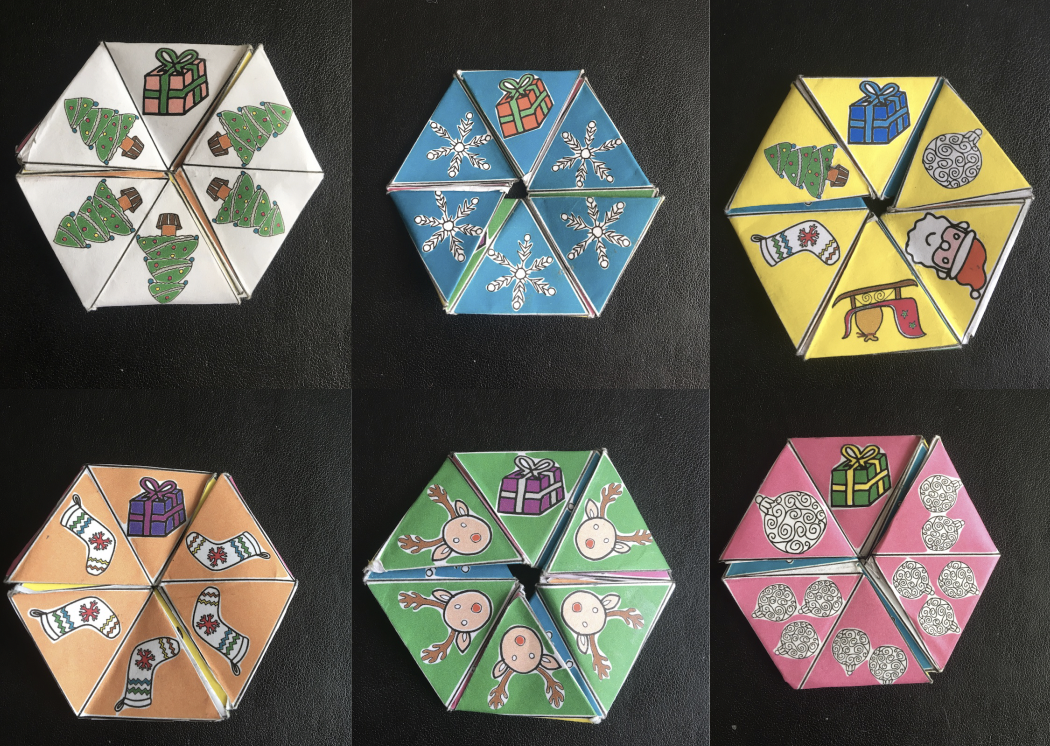
There are lots of ways to make them but we’ve created some templates to help. You can print our HexaHexaFlexagons or make and decorate your own from scratch. Ours depict Father Christmas looking for the six presents he’s lost among the different faces but there’s a blank template if you’d like to design your own.

Of course there’s some computer science and maths behind these too – we have a free PDF booklet which you can download, called Computational Thinking: HexaHexaFlexagon Automata.

Print or make your own HexaHexaFlexagon

Click here to download the patterns for printing. There are black and white ones for you to colour in yourself as well as an already-coloured one. There are also blank templates for you to make your own.

The six faces of our ready-to-print hexahexaflexagon. Image(s) by Jo Brodie.
Click to get our printable patterns.
More information about the free booklet all about HexaHexaFlexagons

Vi Hart has a series of short fun videos about hexaflexagons.

Answers to yesterday’s puzzle

Did you spot our snowman?

View the solution sheet here (PDF).


Advert for our Advent calendar
Click the tree to visit our CS4FN Christmas Computing Advent Calendar

EPSRC supports this blog through research grant EP/W033615/1.

CS4FN Advent 2023 – Day 2: Pairs: mittens, gloves, pair programming, magic tricks

Welcome to the second ‘window’ of the CS4FN Christmas Computing Advent Calendar. The picture on the ‘box’ was a pair of mittens, so today’s focus is on pairs, and a little bit on gloves. Sadly no pear trees though.

A pair of cyan blue Christmas mittens with a black and white snowflake pattern on each. Image drawn and digitised by Jo Brodie.

1. i-pickpocket

In this article, by a pair (ho ho) of computer scientists (Jane Waite and Paul Curzon), you can find out how paired devices can be used to steal money from people, picking pockets at a distance.

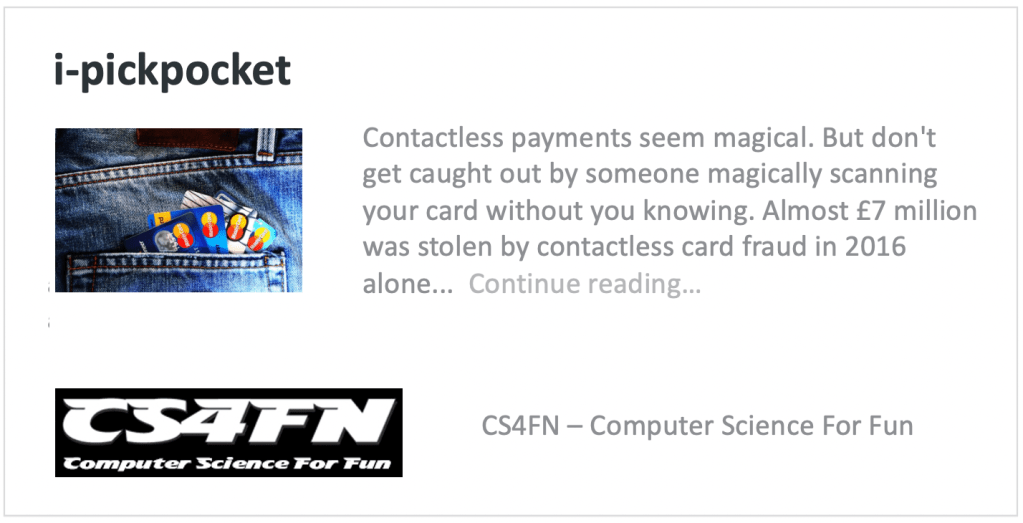
A web card for the i-pickpocket article on the CS4FN website.
Click to read the article

2. Gestural gloves

Working with scientists musician Imogen Heap developed Mi.Mu gloves, a wearable musical instrument in glove form which lets the wearer map hand movements (gestures) to a particular musical effect (pairing a gesture to an action). The gloves contain sensors which can measure the speed and position of the hands and can send this information wirelessly to a controlling computer which can then trigger the sound effect that the musician previously mapped to that hand movement.

You can watch Imogen talk about and demo the gloves here and in the video below, which also looks at the ways in which the gloves might help disabled people to make music.

Further reading

The glove that controls your cords… (a CS4FN article by Jane Waite)

3. Pair programming

‘Pair programming’ involves having two people working together on one computer to write and edit code. One person is the ‘Driver’ who writes the code and explains what it’s going to do, the other person is the ‘Navigator’ who observes and makes suggestions and corrections. This is a way to bring two different perspectives on the same code, which is being edited, reviewed and debugged in real-time. Importantly, the two people in the mini-team switch roles regularly. Pair programming is widely used in industry and increasingly being used in the classroom – it can really help people who are learning about computers and how to program to talk through what they’re doing with someone else (you may have done this yourself in class). However, some people prefer to work by themselves and pair programming takes up two people’s time instead of one, but it can also produce better code with fewer bugs. It does need good communication between the two people working on the task though (and good communication is a very important skill in computer science!).

Here’s a short video from Code.org which shows how it’s done.

4. Digital Twins

A digital twin is a computer-based model that represents a real, physical thing (such as a jet engine or car component) and which behaves as closely as possible to the real thing. Taking information from the real-world version and applying it to the digital twin lets engineers and designers test things virtually, to see how the physical object would behave under different circumstances and to help spot (and fix) problems.

5. A magic trick: two cards make a pair

You will need

  • some playing cards
  • your hands (no mittens)
  • another pair of mitten-free hands to do the trick on

Find a pack of cards and take out 15 (doesn’t matter which ones, pick a card, any card, but 15 of them). Ask someone to put their hands on a table but with their fingers spread as if they’re playing a piano. You are going to do a magic trick that involves slotting pairs of cards between their fingers (10 fingers gives 8 spaces). As you do this you’ll ask them to say with you “two cards make a pair”. Take the first pair and slot them between the first space on their left hand (between their little finger and their ring finger) and both of you say “two cards make a pair”.

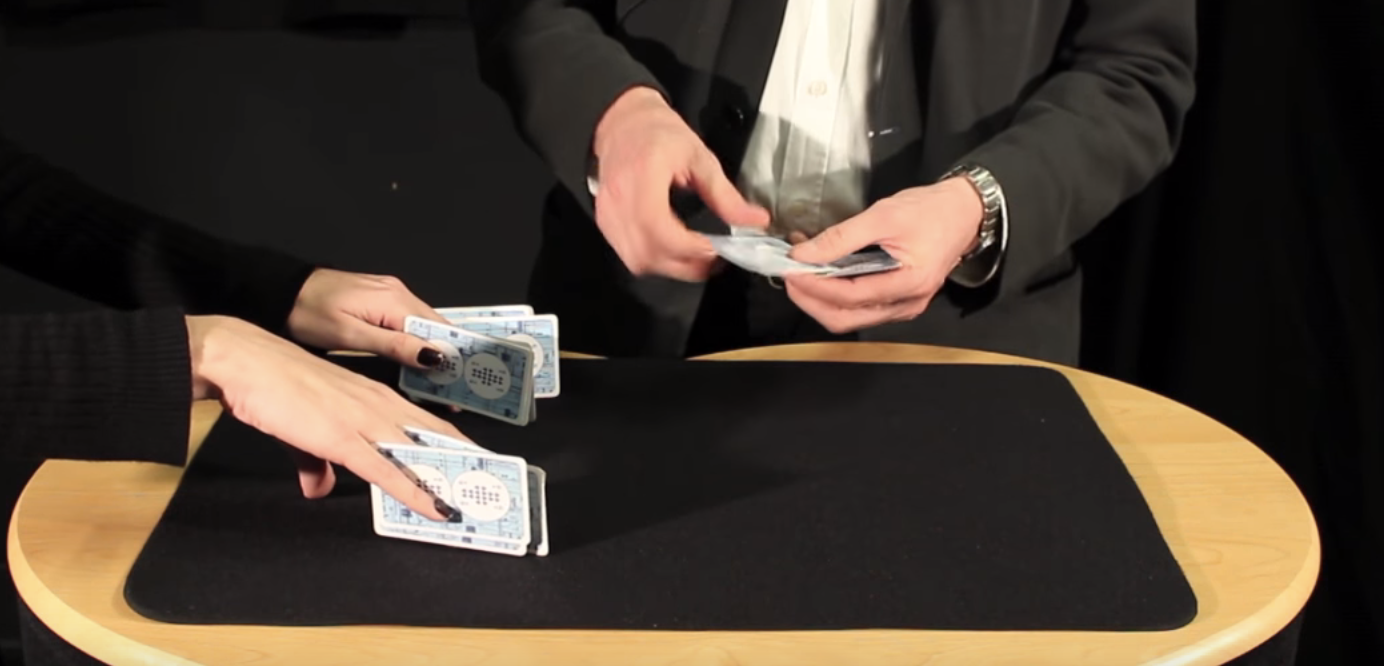
The magician puts pairs of cards between the assistant’s fingers. Image credit CS4FN / Teaching London Computing (from the Invisible Palming video linked below)

Repeat with another pair of cards between ring finger and middle finger (“two cards make a pair”) and twice again between middle and index, and between index and thumb – saying “two cards make a pair” each time you do. You’ve now got 8 cards in 4 pairs in their left hand.

Repeat the same process on their right hand saying “two cards make a pair” each time (but you only have 7 cards left so can only make 3 pairs). There’s one card left over which can go between their index finger and thumb.

The magician removes the cards and puts them into two piles. Image credit CS4FN / Teaching London Computing (from the Invisible Palming video linked below)

Then you’ll take back each pair of cards and lay them on the table, separating them into two different piles – each time saying “two cards make a pair”. Again you’ll have one left over. Ask the person to choose which pile it goes on. You, the magician, are going to magically move the card from the pile they’ve chosen to the other pile, but you’re going to do it invisibly by hiding the card in your palm (‘palming’). To find out how to do the trick, and how this can be used to think about the ways in which “self-working” magic tricks are like algorithms have a look at the full instructions and video below.

6. Something to print and colour in

Did you work out yesterday’s colour-in puzzle from Elaine Huen? Here’s the answer.

Christmas colour-in puzzle

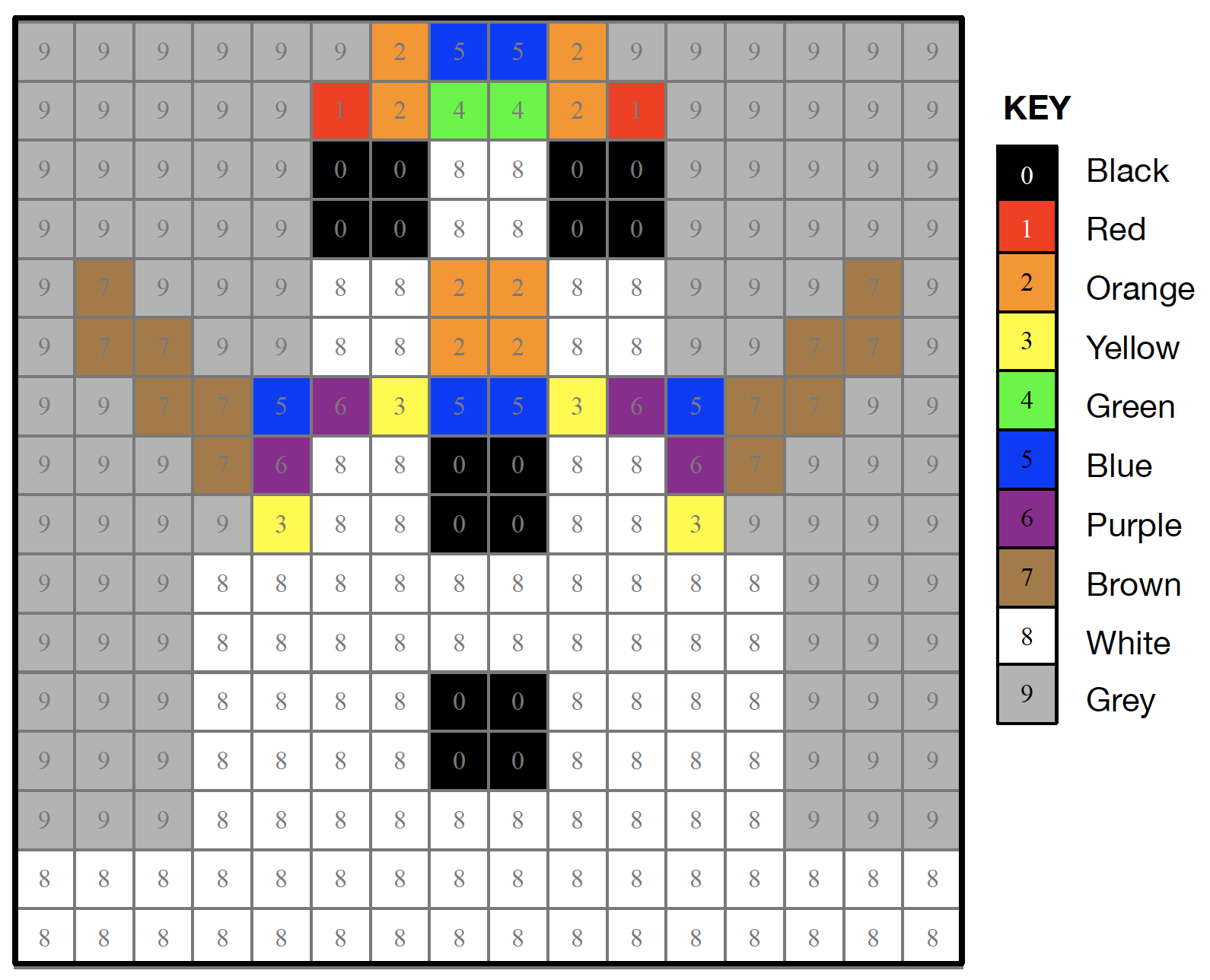
Today’s puzzle is in keeping with the post’s twins and pairs theme. It’s a symmetrical pixel puzzle so we’ve given you one half and you can use mirror symmetry to fill in the remaining side. This is an example of data compression – you only need half of the numbers to be able to complete all of it. Some squares have a number that tells you the colour to colour in that square. Look up the colours in the key. Other squares have no number. Work out what colour they are by symmetry.

So, for example the colour look up key tells you that 1 is Red and 2 is Orange, so if a row said 11111222 that means colour each of the five ‘1’ pixels in red and each of the three ‘2’ pixels orange. There are another 8 blank pixels to fill in at the end of the row and these need to mirror the first part of the row (22211111), so you’d need to colour the first three in orange and the remaining five in red. Click here to download the puzzle as a printable PDF. Solution tomorrow…


The creation of this post was funded by UKRI, through grant EP/K040251/2 held by Professor Ursula Martin, and forms part of a broader project on the development and impact of computing.


Advert for our Advent calendar
Click the tree to visit our CS4FN Christmas Computing Advent Calendar

EPSRC supports this blog through research grant EP/W033615/1.

CS4FN Advent 2023 – Day 1: Woolly jumpers, knitting and coding

Welcome to the first ‘window’ of the CS4FN Christmas Computing Advent Calendar. The picture on the ‘box’ was a woolly jumper with a message in binary, three letters on the jumper itself and another letter split across the arms. Can you work out what it says? (Answer at the end).

Come back tomorrow for the next instalment in our Advent series.

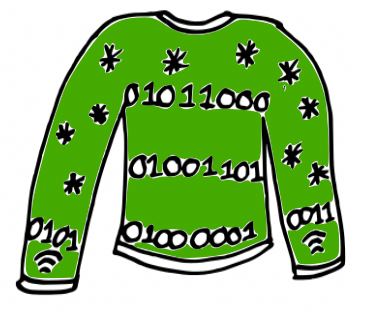
Cartoon of a green woolly Christmas jumper with some knitted stars and a message “knitted” in binary (zeroes and ones). Also the symbol for wifi on the cuffs. Image drawn and digitised by Jo Brodie.

Wrap up warmly with our first festive CS4FN article, from Karen Shoop, which is all about the links between knitting patterns and computer code. Find out about regular expressions in her article: Knitters and Coders: separated at birth?

Click above to read Karen’s article

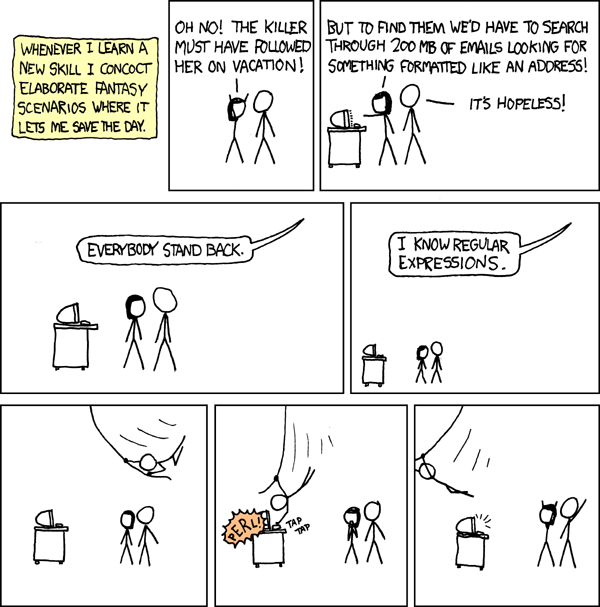
Image credit: Regular Expressions by xkcd

Further reading

Dickens Knitting in Code – this CS4FN article, by Paul Curzon, is about Charles Dickens’ book A Tale of Two Cities. One of the characters, Madame Defarge, takes coding to the next level by encoding hidden information into her knitting, something known as steganography (basically hiding information in plain sight). We have some more information on the history of steganography and how it is used in computing in this CS4FN article: Hiding in Elizabethan binary.

In Craft, Culture, and Code Shuchi Grover also considers the links between coding and knitting, writing that “few non-programming activities have such a close parallels to coding as knitting/crocheting” (see section 4 in particular, which talks about syntax, decomposition, subroutines, debugging and algorithms).

Something to print and colour in

This is a Christmas-themed thing you might enjoy eating, if you’ve any room left of course. Puzzle solution tomorrow. This was designed by Elaine Huen.

Solving the Christmas jumper code

The jumper’s binary reads

01011000

01001101

01000001

01010011

What four letters might be being spelled out here? Each binary number represents one letter and you can find out what each letter is by looking at this binary-to-letters translator. Have a go at working out the word using the translator (but the answer is at the end of this post).

Keep scrolling

Bit more

The Christmas jumper says… XMAS


Advert for our Advent calendar
Click the tree to visit our CS4FN Christmas Computing Advent Calendar

EPSRC supports this blog through research grant EP/W033615/1.
Cartoons, comics and computer games – Ada Lovelace’s graphic novel

by Jane Waite, Queen Mary University of London

In 2009 for Ada Lovelace day, a comic strip about Ada and Babbage was created, not quite 100% historically accurate but certainly in the spirit of Lovelace’s love of science and mathematics. Her thrilling adventures in Victorian London have now become a graphic novel.

Image by Andrew Martin from Pixabay

In her own time, Ada was captured as a demure and beautiful young woman in portraits and sketches that were shared in books about her father. Ada would have sat for hours to have her portrait drawn, but she would have known about quick draw cartoons. Newspapers and magazines such as Punch contained satirical cartoons of the day. They were very influential in the 1840’s. Faraday was drawn in Punch, but Babbage and Lovelace didn’t make it then. But now they are crime busting mathematical superheros in their very own alternate history of computing comic book.

Books, films, even a musical have been created about Ada Lovelace, but as we write the circle has not quite been closed. There are no computer games about Ada. But maybe you could change that.


Further reading

The Thrilling Adventures of Lovelace and Babbage: The (Mostly) True Story of the First Computer by Sydney Padua.


This article was first published on the original CS4FN website and a copy can be found on page 17 of issue 20 of the CS4FN magazine, which celebrates the work of Ada Lovelace. You can also read some of our other posts about Ada Lovelace and she features as one of our Women in Computing poster set.


Related Magazine …


EPSRC supports this blog through research grant EP/W033615/1.
Blade: the emotional computer.

Zabir talking to Blade who is reacting
Image taken from video by Zabir for QMUL

Communicating with computers is clunky to say the least – we even have to go to IT classes to learn how to talk to them. It would be so much easier if they went to school to learn how to talk to us. If computers are to communicate more naturally with us we need to understand more about how humans interact with each other.

The most obvious ways that we communicate is through speech – we talk, we listen – but actually our communication is far more subtle than that. People pick up lots of information about our emotions and what we really mean from the expressions and the tone of our voice – not from what we actually say. Zabir, a student at Queen Mary was interested in this so decided to experiment with these ideas for his final year project. He used a kit called Lego Mindstorm that makes it really easy to build simple robots. The clever stuff comes in because, once built, Mindstorm creations can be programmed with behaviour. The result was Blade.

In the video above you can see Blade the robot respond. Video by Zabir for QMUL

Blade, named after the Wesley Snipes film, was a robotic face capable of expressing emotion and responding to the tone of the user’s voice. Shout at Blade and he would look sad. Talk softly and, even though he could not understand a word of what you said he would start to appear happy again. Why? Because your tone says what you really mean whatever the words – that’s why parents talk gobbledegook softly to babies to calm them.

Blade was programmed using a neural network, a computer science model of the way the brain works, so he had a brain similar to ours in some simple ways. Blade learnt how to express emotions very much like children learn – by tuning the connections (his neurons) based on his experience. Zabir spent a lot of time shouting and talking softly to Blade, teaching him what the tone of his voice meant and so how to react. Blade’s behaviour wasn’t directly programmed, it was the ability to learn that was programmed.

Eventually we had to take Blade apart which was surprisingly sad. He really did seem to be more than a bunch of lego bricks. Something about his very human like expressions pulled on our emotions: the same trick that cartoonists pull with the big eyes of characters they want us to love.

Zabir went on to work in the city for Merchant Bank, JP Morgan

– Paul Curzon, Queen Mary University of London


⬇️ This article has also been published in two CS4FN magazines – first published on p13 in Issue 4, Computer Science and BioLife, and then again on page 18 in Issue 26 (Peter McOwan: Serious Fun), our magazine celebrating the life and research of Peter McOwan (who co-founded CS4FN with Paul Curzon and researched facial recognition). There’s also a copy on the original CS4FN website. You can download free PDF copies of both magazines below, and any of our other magazines and booklets from our CS4FN Downloads site.

This video below Why faces are special from Queen Mary University of London asks the question “How does our brain recognise faces? Could robots do the same thing?”.

Peter McOwan’s research into face recognition informed the production of this short film. Designed to be accessible to a wide audience, the film was selected as one of the finalist 55 from 1450 films submitted to the festival CERN CineGlobe film festival 2012.

Related activities

We have some fun paper-based activities you can do at home or in the classroom.

  1. The Emotion Machine Activity
  2. Create-A-Face Activity
  3. Program A Pumpkin

See more details for each activity below.

1. The Emotion Machine Activity

From our Teaching London Computing website. Find out about programs and sequences and how how high-level language is translated into low-level machine instructions.

2. Create-A-Face Activity

Fom our Teaching London Computing website. Get people in your class (or at home if you have a big family) to make a giant robotic face that responds to commands.

3. Program A Pumpkin

Especially for Hallowe’en, a slightly spookier, pumpkin-ier version of The Emotion Machine above.


Related Magazine …


Related Magazine …


EPSRC supports this blog through research grant EP/W033615/1.

Exploring mazes, inventing algorithms (part I) 

by Paul Curzon, Queen Mary University of London

A maze with mouse searching for cheese.
Image by CS4FN

Computer science research in part involves inventing new algorithms or improving new ones. But what does that mean. Let’s explore some mazes to explore algorithms.

What does computer science research involve? It is very varied: from interviewing people to find out what the real problems that need solving in their lives or jobs are; to running experiments to find out what works and what doesn’t; to writing programs to solve problems.

Improving algorithms

A core part of much research is coming up with new and better algorithms that solve particular problems. The kind of algorithm could be anything from a new more secure cryptographic protocol, or a better way to rank the results of a search engine, to a new more effective machine learning algorithm that is less likely to make things up, or perhaps can better explain how it came to its conclusions.

What does it mean to come up with a better algorithm though? Once a problem is solved, isn’t it solved? Let’s explore a simple problem to see. Let’s explore mazes. Solve the simple maze puzzle above before you go on. Find a route that gets the mouse to the cheese.

Wandering around mazes, finding algorithms

If you’ve ever been in a hedge maze in the garden of some stately home, or a corn field maze, the chances are you just dived in and wandered rather aimlessly. Perhaps you tried to remember which way you went at each junction, to avoid going down the same dead-ends more than once. How about solving the paper version of a maze puzzle like the one above? Now perhaps you looked ahead to spot dead-ends to avoid tracing wrong paths with your pencil.

Probably what you are doing is at least a little random. You could, in theory at least, end up going back over the same paths, never taking the right one and and never getting to the middle. Could we come up with an algorithm that guarantees to solve mazes? To be an algorithm it would need to guarantee you ended up finding a path to the centre of the maze if you followed the steps of the algorithm precisely. It should also work for any maze, or at least all mazes of a particular kind. Ideally, the algorithm gives you a path that can then be followed by anyone without them having to run the algorithm themselves. They can just follow the path generated by the algorithm for that maze.

Wall-following

In fact lots of maze algorithms have been invented. Perhaps the one most people have heard of, if they know of any maze algorithm, is called Wall-following. It is very simple to do, You just pick a wall at the entrance either to the left or right and then follow it, If in a garden maze, keep your hand on the hedge as you walk round. If doing a paper puzzle, draw the path sticking to the chosen wall. Try it on the following simple maze.

A simple maze with mouse and cheese.
Image by CS4FN

Simply connected

The wall-following algorithm will guarantee to get you to the centre of the maze, and back out again too, but only as long as the maze is what is called simply connected. That just means the maze is constructed from a single hedge (or one unbroken drawn line) not a series of unconnected hedges. If you look at both examples above you will see I created them by just drawing a single wiggly line.

If a maze is simply connected then it cannot have looping paths, so no going round in circles for ever. It will also only have one entrance/exit. That shows the first aspect of inventing algorithms that is important. They often only work for some situations, not all. You must be sure you know what situations they do and don’t work.

Often the earliest algorithms invented to solve a problem are like wall-following: they only work for simple situations. Other people then come along and find new algorithms that can cover more problems (here more mazes). Can you tweak the wall-following maze algorithm to work even if there are multiple exits from the maze, for example? As it stands our algorithm could just take you from the entrance straight out of another exit without exploring much of the maze at all! See the end for one simple way to tweak the algorithm. What if there are paths that take you round in circles? Can you come up with an algorithm to deal with that?

Some times the improvements invented just involve tweaking an existing algorithm as with dealing with multiple exits in a maze. Some times a whole new algorithm is needed.

Faster, higher, stronger?

Even for a simple constrained version of the problem, like simply connected mazes, people can invent better algorithms. What does better mean for a maze? Well one way you might have a better algorithm is if it is faster in coming up with a solution. Another is that the solution it comes up with is faster. For a maze that means a shorter (ideally the shortest) path to the centre. Wall following may get you in to the centre (and out again) but you probably will have discovered a very long path that takes you in and out of lots of dead-ends needlessly. You do find a path to the centre, but it may be a very long path. Can you come up with an algorithm that finds shorter paths?

We will explore an algorithm that does next.

More to come…

Some solutions

The result of wall following on our simple maze

A route for the mouse to follow that takes it to the cheese.
Image by CS4FN

One way to deal with multiple exits

To deal with a maze that has multiple exits, so multiple breaks in the outer wall, tweak the wall-following algorithm as follows. First mark the exit you use to enter the maze, so you know when you return to it. If you come to any other exit then pretend there is a gate there and keep following the wall as though it were unbroken and there were no exit.

More on …

Magazines …

Subscribe to be notified whenever we publish a new post to the CS4FN blog.


This blog is funded by EPSRC on research agreement EP/W033615/1.

QMUL CS4FN EPSRC logos

Why the Romans were pants at maths

Paul Curzon, Queen Mary University of London

The Romans were great at counting and addition but they were absolutely pants at multiplication. It wasn’t because they were stupid. It was because they hadn’t invented a good way to represent numbers, and that meant they needed really convoluted algorithms.

The Roman system is based on an earlier really simple way of writing numbers. You just put a line for each thing you’ve counted. Its probably the way shepherds kept count of sheep, drawing a line for each sheep. Those lines turned into the Roman letter I. To add 1 to a number you just add another I. You count: I, II, III, and so on and it makes counting easy.

This system is called unary – whereas binary involves counting with two symbols, 1 and 0, in unary you only have one symbol to count with. Addition in unary is easy too at least for small numbers. Take the first number and add on the end all the Is for the second and you’ve got the answer number. This is exactly the way we all start doing addition on our fingers.To add 2+3, hold up 2 fingers (II) then hold up another three fingers (III) and you have the answer (IIIII).

This is fine for small numbers but it gets a bit tedious as the numbers increase (and you run out of fingers!) Comparing numbers is easy in principle – do you have the same number of Is, but hard in practice for large numbers. We can’t keep all those Is in our head so a large number is hard to think about. To get round this the Romans invented new letters to stand for groups of Is. This is what we do when we tally numbers making a crossbar for every fifth number we count. It helps us keep track of larger numbers. The Romans invented a whole bunch of symbols to help: so for example in the Roman numeral system, V stands for 5 (IIIII), X stands for 10, L for 50, C for 100, D for 500 and M for 1000. They had invented a new way to represent numbers.

This makes it much easier to write and compare larger numbers. Now when counting and you get up to 5 you just replace all those Is with a V and then carry on adding Is: VI, VII, VIII, VIIII. Then you get to VIIIII (10) so replace it all with an X, starting again adding a new lot of Is: XI, XII, XIII, XIIII, XV, and so on. Counting large numbers is now a bit more involved – the algorithm involves more than just adding an I on the end, but it is much more convenient. The addition algorithm has now become more complicated, though it is still fairly simple too. Take any two numbers to add like VII and VIII and string them together: VIIVIII. Now group together the same letters: VVIIIII. Anywhere you have enough to replace symbols with the next character do so. VV can be replaced by X and IIIII can be replaced by V to give XV in the above. Keep making replacements until you can make no more. Put the symbols in order from largest to smallest symbol and you have your answer.

Now the Romans were obviously a bit lazy as bored with writing even four Is in a row they sometimes introduced a new set of abbreviations, so that IIII became IV and VIIII became IX. Putting a smaller symbol (like I) before a larger one (like X) instead of after meant subtract it to get the number. so IX means “one less than 10” or 9. Counting just got a tiny bit more complicated to get the advantage of writing fewer symbols. Addition now needs a more convoluted algorithm though. There are several ways to do it. The easiest is actually just to change the numbers to add to the simpler form (so IV goes back to IIII). You them do the addition that way, and convert back at the end. Addition just got that little bit harder, and all because of a change in representation.

Worse, doing any more complicated maths is even harder still using the Roman number representation. See if you can work out how to multiply Roman numbers. The Roman number system doesn’t help at all. The only really easy way is to just repeatedly add ( so III x VI is VI + VI + VI). That just isn’t practical for large numbers. Try it on XXIII x LXV1. There are other possible ways including one that is actually based on the binary multiplication algorithms computers use – multiplying and dividing repeatedly by 2. See if you can work out how to do it. Whatever way you do it, its clear that the number system the Romans chose made maths hard for them to do!

A good representation makes maths easy. A bad one makes it much harder to do

Luckily, Indian and Arabian scholars understood that the representation they used mattered. They invented, and spread, the Hindu-Arabic numbers and decimal system we use today. What is special about it is that rather than introducing new symbols for bigger and bigger numbers, the position of a symbol is used instead. As we go from nine to ten we go back to the start of our symbols, from 9 back to 0, but stick a 1 in a new 10s column to count how many 10s we have. Counting is still pretty easy but suddenly not only is the algorithm for addition straightforward but we can come up with fairly simple algorithms for multiplication and division too. They are the algorithms you learn at school – though as with any algorithm making sure you follow the steps exactly and don’t miss steps is hard for a human (unlike for a computer). That is why we tend to find learning maths hard at first and it gets easier the more we practice.

An abacus
Image by Hans from Pixabay

In fact Romans needing to do serious maths probably used a variation of an abacus representing numbers with stones. They would do a calculation on the abacus and then convert the answer back into the Roman number system. And guess what. The Roman Abacus uses columns to represent larger numbers in a very similar way to the Hindu-Arabic system. The Romans understood that representation matters too.

Sometimes things are hard to do just because we make them hard! The secret of coming up with good algorithms is often to come up with a good representation first. In programming too, if you come up with a good way to represent data, a good data structure, you can often then make it much easier to write an efficient program.


Subscribe to be notified whenever we publish a new post to the CS4FN blog.


This blog is funded by EPSRC on research agreement EP/W033615/1.

QMUL CS4FN EPSRC logos

Beheading Hero’s mechanical horse

Pegasus image by Dorota Kudyba from Pixabay

An early ‘magical’ (nearly headless) automaton from Ancient Greece

Stories of Ancient Greece abound with myths but also of amazing inventions. Some of the earliest automatons, mechanical precursors of robots, were created by the Ancient Greeks. Intended to delight and astound or be religious idols, they brought statues of animals and people to life. One story holds that Hero of Alexandria invented a magical, mechanical horse that not only moved and drank water, but was also impossible to behead. It just carried on drinking as you sliced a sword clean through its neck. The head remained solidly attached to body. Myth or Mystery? How could it be done?

The Ancient Greeks were clever. With many inventions we think of as modern, the Greeks got there first. They even invented the first known computer. Hero of Alexandria was one of the cleverest, an engineer and prolific inventor. Despite living in the first century, he invented the first known steam engine (long before the famous ones from the start of the industrial revolution), the first vending machine, a musical instrument that was the first wind-powered machine, and even the pantograph, a parallelogram structure used to make exact copies of drawings, enlarged or reduced. Did Hero invent a magical mechanical horse? He did, and you really could slice cleanly through its robotic neck with a sword, leaving the head in place.

Magic, myth and mystery

Queen Mary’s Peter McOwan was fascinated by magic and especially Hero’s horse as a child, and was keen to build one. When TEMI, a European project was funded he had his chance. TEMI aimed to bring more showmanship, magic and mystery to schools to increase motivation. By making lessons more like detective work, solving mysteries, they can be lots more fun. The project needed lots of mysteries, just like Hero’s horse, and artist Tim Sargent was commissioned to recreate the horse.

If you’re ever in Athens, you can see a version of Hero’s horse, as well as many other Greek inventions at Kotsanas Museum of Ancient Greek Technology.

How does it work?

The challenge was to create a version that used only Ancient Greek technology – no electricity or electromagnets, only mechanical means like gears, bearings, levers, cogs and the like. It was actually done with a clever rotating wheel. As the sword slices through a gap in the neck, it always connects head and body together first in front, then behind the blade. Can you work out how it was done? See a video of the mechanism in action below, with Peter introducing it.

Paul Curzon, Queen Mary University of London

Watch …


Related Magazine …


ssue 26 of the CS4FN magazine which is a memorial issue for *Peter McOwan, who died in June 2019. Peter, along with Paul Curzon, was one of the co-founders of CS4FN.

Subscribe to be notified whenever we publish a new post to the CS4FN blog.


This blog is funded by EPSRC on research agreement EP/W033615/1.

QMUL CS4FN EPSRC logos

How far can you hear? Modelling distant birdsong.


by Dan Stowell, Queen Mary University of London

Blackbird singing at sunrise to an orange sky
Sunrise blackbird image by No-longer-here from Pixabay

How do we know how many birds there are out there: in the countryside, and in the city? Usually, it’s because people have been sent out to count the birds – by sight but especially by sound. Often you can hear a bird singing even when it’s hidden from sight so listening can be a much more effective way of counting.

In the UK, volunteers have been out counting birds for decades, co-ordinated by organisations such as the British Trust for Ornithology (BTO). But pretty quickly they came up against a problem: you can’t always detect every bird around you, even if you’re an expert at it. Birds get harder to detect the further away they are. To come up with good numbers, the BTO estimates what fraction of the birds you are likely to miss, according to how far away you are, and uses that to improve the estimate from the volunteer surveys.

But, Alison Johnston and others at the BTO noticed that it’s even more complicated than that: you can hear some types of bird very clearly over a long distance, while other birds make a sound that disappears into the background easily. If a pigeon is cooing in the forest, maybe you can’t hear it beyond a few metres. Whereas the twit-twoo of an owl might carry much further. So they measured how likely it is that one of their volunteers will hear each species, at different distances.

They created mathematical models that took into account these factors. Implemented in programs the models can then adjust the reports coming in from the volunteers doing the counting. This is how volunteers and computers are combined in ‘citizen science’ work which gathers observations from people all around the country. Sightings and numbers are collected, but the raw numbers themselves don’t give you the correct picture – they need to be adjusted using mathematical models that help fill in the gaps.


You can perfect your own recognition of British birdsong with the audio clips here.


Related Magazine …


Subscribe to be notified whenever we publish a new post to the CS4FN blog.


This blog is funded by EPSRC on research agreement EP/W033615/1.

QMUL CS4FN EPSRC logos