Language-mangling rude word filters

A large green plastic barrel with thick walls in a garden, against an outdoor wall and next to a wooden fence with foliage growing on it. This is used to store rainwater and has a capacity of about 200 litres.
“Rainwater tank, about 200 litres” by Jeuwre, available under a CC-BY-SA 4.0 licence, via Wikimedia.

What we have here on the right is a water butt also known as a rainwater tank. These are large containers which collect rainwater so are an environmentally friendly way for people to save water so that they can water the plants in their garden during a dryer season. A very clever idea and totally inoffensive.

Context is everything

However… the word ‘butt’ can also refer to your bottom. Well not your bottom of course, I wouldn’t be so rude as to make any comment about your own bottom, I mean bottoms in general.

In the United States a less polite word for bottom is ‘ass’ (which also means ‘donkey’ in the UK) but there are times when saying or writing the word ‘ass’ wouldn’t be so polite and for those situations you might use another word, like butt.

Well that’s probably just making it worse

In an effort to make online communications politer people have tried a variety of tactics. Sometimes a word is on a banned list so if you were to type it into your message it wouldn’t send and you have to come up with a different way of saying it. Or your system could use regular expressions (‘regex’) to find all instances of a word or phrase in published text and replace it with something deemed more appropriate and less offensive.

If you were to replace all instances of ‘ass’ with ‘butt’ in a piece of text you’d increase the politeness of your communication, but you wouldn’t necessarily increase its readability. It’s a clbuttic mistake, produce by a software filter that’s a little too broad in its reach. In that last sentence you can see what happens when I replace the ‘ass’ in classic with ‘butt’ – absolute gibberish.

Of course, people noticed

If you had to write, politely, about clothing you might prefer to put ‘trousers’ rather than ‘pants’ (in the US meaning, rather than underwear) but you might be a bit irritated if your other article on housing referenced ‘occutrousers’ rather than ‘occupants’…

My favourite (real-world) example of this silliness was when a newspaper article referenced the fact that a historical American president had been ‘buttbuttinated’ instead of ‘assassinated’.

Although that really happened and a few other pages on the internet were filled with nonsense words* people did notice pretty quickly (I mean you would, wouldn’t you?!) and rapidly solved it by tweaking their filters to make sure that unwanted words that are found within a word were left alone, and perhaps they did a bit of proofreading to double-check too.

[*mostly it’s now articles like this drawing attention to the problem!]

I’ve made this mistake too

I wish I’d done a bit of proofreading when I did what I thought was a clever ‘find and replace’. A couple of thousand schools and home educators in the UK receive free copies of our printed CS4FN magazine (if your school would like to sign up…) and I keep all the addresses stored in a password-protected spreadsheet with different columns for the name, lines of the address, post code etc.

One day I had the brilliant idea of tidying up the ‘Country’ column in my database so that if someone had typed ‘UK’ it would now say ‘United Kingdom’.

Unfortunately I did this as a ‘global’ (across the entire spreadsheet) find and replace instead of specifying more clearly what should be changed. I didn’t realise until a few magazines came back as undeliverable because the address made absolutely no sense. If your teacher’s name was Luke or your school name or address had a ‘Duke’ in it I had now managed to turn these into “LUnited Kingdome” or “DUnited Kingdome”.

Oops!

The makers of Trivial Pursuit apparently globally replaced all occurrences of “km” to “kilometres” leading to, for example, a question about film star Hugh Jackilometresan.

Oops! again.

– Jo Brodie, Queen Mary University of London


Share this post


Part of a series of ‘whimsical fun in computing’ to celebrate April Fool’s (all month long!).
Find out about some of the rather surprising things computer scientists have got up to when they're in a playful mood.

Subscribe to be notified whenever we publish a new post to the CS4FN blog.


This blog is funded by EPSRC on research agreement EP/W033615/1.

QMUL CS4FN EPSRC logos

Google’s “PigeonRank” and arty-pigeon intelligence

pigeon
Pigeon, possibly pondering people’s photographs.
Image by Davgood Kirshot from Pixabay

On April Fool’s Day in 2002 Google ‘admitted’ to its users that the reason their web search results appeared so quickly and were so accurate was because, rather than using automated processes to grab the best result, Google was actually using a bank of pigeons to select the best results. Millions of pigeons viewing web pages and pecking picking the best one for you when you type in your search question. Pretty unlikely, right?

In a rather surprising non-April Fool twist some researchers decided to test out how well pigeons can distinguish different types of information in hospital photographs.

Letting the pigeons learn from training data
They trained pigeons by getting them to view medical pictures of tissue samples taken from healthy people as well as pictures taken from people who were ill. The pigeons had to peck one of two coloured buttons and in doing so learned which pictures were of healthy tissue and which were diseased. If they pecked the correct button they got an extra food reward.

Seeing if their new knowledge is ‘generalisable’ (can be applied to unfamiliar images)
The researchers then tested the pigeons with a fresh set of pictures, to see if they could apply their learning to pictures they’d not seen before. Incredibly the pigeons were pretty good at separating the pictures into healthy and unhealthy, with an 80 per cent hit rate. Doctors and pathologists* probably don’t have to worry too much about pigeons stealing their jobs though as the pigeons weren’t very good at the more complex cases. However this is still useful information. Researchers think that they might be able to learn something, about how humans learn to distinguish images, by understanding the ways in which pigeons’ brains and memory works (or don’t work). There are some similarities between pigeons’ and people’s visual systems (the ways our eyes and brains help us understand an image).

[*pathology means the study of diseases. A pathologist is a medical doctor or clinical scientist who might examine tissue samples (or images of tissue samples) to help doctors diagnose and treat diseases.]

How well can you categorise?

This is similar to a way that some artificial intelligences work. A type of machine learning called supervised learning gives an artificial intelligence system a batch of photographs labelled ‘A’, e.g. cats, and a different batch of photographs labelled ‘B’, e.g. dogs. The system makes lots of measurements of all the pictures within the two categories and can use this information to decide if a new picture is ‘CAT’ or ‘DOG’ and also how confident it is in saying which one.

Can pigeons tell art apart?

Pigeons were also given a button to peck and shown artworks by Picasso or Monet. At first they’d peck the button randomly but soon learned that they’d get a treat if they pecked at the same time they were shown a Picasso. When a Monet appeared they got no treat. After a while they learned to peck when they saw the Picasso artworks and not peck when shown a Monet. But what happened if they were shown a Monet or Picasso painting that they hadn’t seen before? Amazingly they were pretty good, pecking for rewards when the new art was by Picasso and ignoring the button when it was a new Monet. Art critics can breathe a sigh of relief though. If the paintings were turned upside down the pigeons were back to square one and couldn’t tell them apart.

Like pigeons, even humans can get this wrong sometimes. In 2022 an art curator realised that a painting by Piet Mondrian had been displayed upside down for 75 years… I wonder if the pigeons would have spotted that.

– Jo Brodie, Queen Mary University of London

Share this post


Part of a series of ‘whimsical fun in computing’ to celebrate April Fool’s (all month long!).

Find out about some of the rather surprising things computer scientists have got up to when they're in a playful mood.

Subscribe to be notified whenever we publish a new post to the CS4FN blog.


This blog is funded by EPSRC on research agreement EP/W033615/1.

QMUL CS4FN EPSRC logos

I’m (not) a little teapot

A large sculpture of the Utah teapot, given a dark and light grey chequered pattern.
‘Smithfield Utah’ teapot created by Alan Butler, 2021, photographed by John Flanagan and made available under a CC 4.0 licence, via Wikipedia’s page on the Utah teapot.

My friends and I had just left the cinema after seeing Jurassic Park (in 1993, so a long time ago!) when one of the group pointed out that it was a shame the film didn’t have any dinosaurs in. We all argued that it was full of dinosaurs… until the penny dropped. Of course, obviously, the film couldn’t have contained any real dinosaurs, it was all done with animatronics* and (the relatively new at that time) CGI or computer-generated imagery.

The artist Rene Magritte had the same idea with his famous painting called ‘The treachery of images‘ but mostly known as ‘This is not a pipe’ (or ‘Ceci n’est pas une pipe’ in French). His creation represents a pipe but as Magritte said – “could you stuff my pipe? No, it’s just a representation, is it not? So if I had written on my picture “This is a pipe”, I’d have been lying!”

How do you represent something on a computer screen (that’s not actually real) but make it look real?

[*animatronics = models of creatures (puppets) with hidden motors and electronic controls that allow the creatures to move or be moved]

Let’s talk teapots

Computers now assist film and television show makers to add incredible scenes into their productions, that audiences usually can’t tell apart from what’s actually ‘real’ (recorded directly by the camera from live scenes). All these amazing graphics are created by numbers and algorithms inside a computer that encode the instructions for what the computer should display, describing the precise geometry of the item to create. A mathematical formula takes data points and creates what’s known as a series of ‘Bezier curves‘ from them, forming a fluid 3D shape on-screen.

In the 1970s Martin Newell, a computer graphics researcher studying at the University of Utah, was working on algorithms that could display 3D shapes on a screen. He’d already used these to render in 3D the five simple geometric shapes known as the Platonic solids** and he wanted to test his algorithms further with a slightly more complex (but not too much!) familiar object. Over a cup of tea his wife Sandra Newell suggested using their teapot – an easily recognisable object with curved surfaces, a hole formed by the handle and, depending on where you put the light, parts of it can be lit or in shadow.

Martin created on graph paper a representation of the co-ordinates of his teapot (you can see the original here). He then entered those co-ordinates into the computer and a 3D virtual teapot appeared on his screen. Importantly he shared his ‘Utah teapot’ co-ordinates with other researchers so that they could also use the information to test and refine their computer graphic systems.

[**the teapot is also jokingly referred to as the sixth Platonic solid and given the name ‘teapotahedron’]

Bet you’ve seen the Utah teapot before

Over time the teapot became a bit of an in-joke among computer graphic artists and versions of it have appeared in films and TV shows you might have seen. In a Hallowe’en episode of The Simpsons***, Homer Simpson (usually just a 2D drawing) is shown as a 3D character with a small Utah teapot in the background. In Toy Story Buzz Lightyear and Woody pour a cup of tea from a Utah teapot and a teapot template is included in many graphics software packages (sometimes to the surprise of graphic designers who might not know its history!)

[***”The Simpsons Halloween Special VI”, Series 7 Episode 6]

Here’s one I made earlier

Image by Jo Brodie

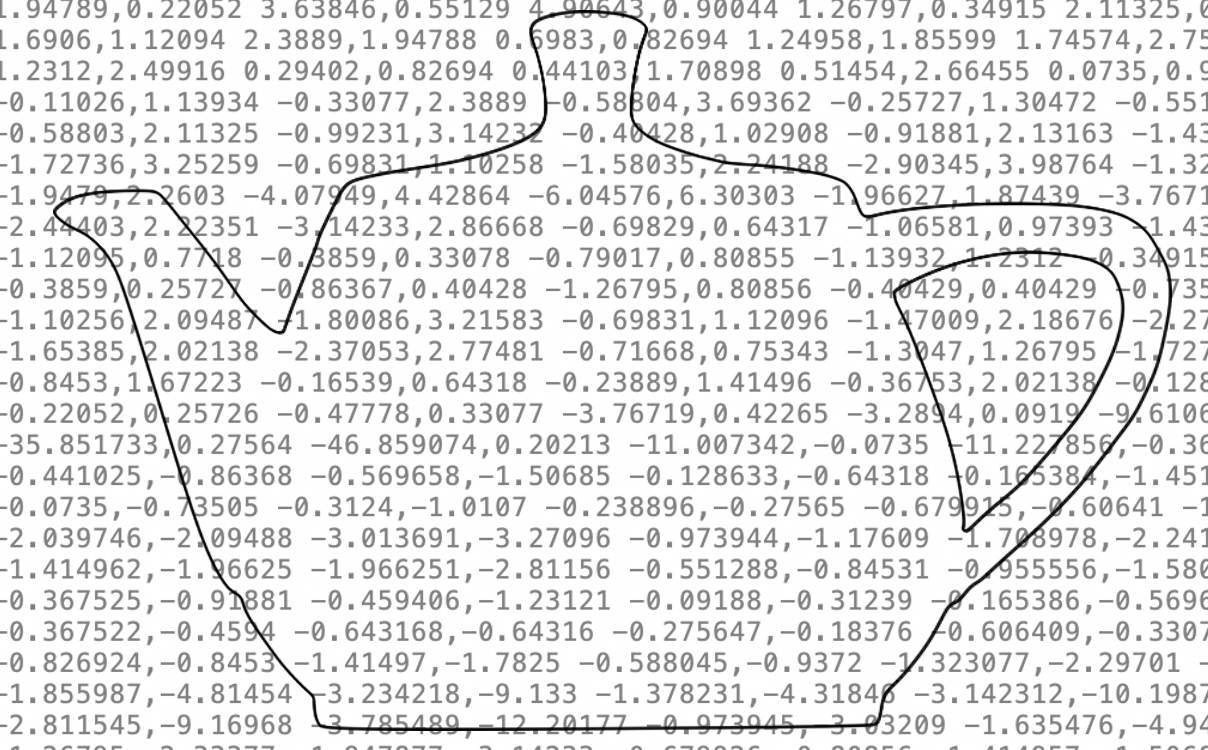
On the left is a tracing I made, of this photograph of a Utah teapot, using Inkscape’s pen tool (which lets me draw Bezier curves). Behind it in grey text is the ‘under the bonnet’ information about the co-ordinates. Those tell my computer screen about the position of the teapot on the page but will also let me resize (scale) the teapot to any size while always keeping the precise shape the same.

Create your own teapot, or other graphics

Why not have a go yourself, Inkscape is free to download (and there are lots of instructional videos on YouTube to show you how to use it). Find out more about Vector Graphics with our Coordinate conundrum puzzles and Vector dot-to-dot puzzles.

Do make yourself a nice cup of tea first though!

Jo Brodie, Queen Mary University of London

More on …

Watch …


Part of a series of ‘whimsical fun in computing’ to celebrate April Fool’s (all month long!).

Find out about some of the rather surprising things computer scientists have got up to when they're in a playful mood.

Subscribe to be notified whenever we publish a new post to the CS4FN blog.


This blog is funded by EPSRC on research agreement EP/W033615/1.

QMUL CS4FN EPSRC logos

Broadband, by carrier pigeon

The beautiful (and quite possibly wi-fi ready, with those antennas) Victoria Crowned Pigeon. Not a carrier pigeon admittedly, but much more photogenic.
Image by Foto-Rabe from Pixabay

There’s a joke, about a Victorian football newspaper reporter, who takes a homing pigeon with him to the match so that he can swiftly return the score to his editor in order to make the evening paper. Both teams score a goal early on in the match but nothing much has happened for the last half hour and things are dragging on. With minutes to go and an eye on the pub the reporter writes “one all” on a slip of paper, scrolls it up and attaches it to the leg of his pigeon, releasing it to fly back to the office. And then, suddenly, with seconds to go before the whistle’s final blow one side scores another goal. Our reporter is seen calling pitifully after the bird “two one… TWO one!!” but alas the bird’s message is beyond editing.

Carrier pigeons have been used since ancient times to send messages and during World War 2 messages delivered by pigeons saved human lives (some of the pigeons were even awarded medals!). The speed of data transmission is a combination of how fast they can fly home and how quickly the human reading the message can get it to its final destination.

The internet, but made of pigeons

The IETF (Internet Engineering Task Force) regularly publishes documents on various internet standards and protocols (the way computers communicate with each other to send and receive information). These are called ‘Requests for Comments’, or RFC, and are an invitation for experts to comment on and contribute to the document. The IETF also publishes an annual joke RFC for April Fools’ Day and in 1990 it published one called “A Standard for the Transmission of IP (Internet Protocol) Datagrams on Avian* Carriers (RFC 1149)”. The document (you can read it here) considers the pros and cons of carrier pigeons for data transmission, noting that “bandwidth is limited to the leg length”. [*avian means ‘of or relating to birds’]

I bet you won’t be remotely surprised to learn that some people have tried to implement it!

Eleven years later a group in Norway attempted to send a packet of data via a carrier pigeon noting the amount of data transmitted and the time taken to send it. Despite the pigeon being distracted by other homing pigeons also in flight, and then deciding to rest on a roof for a bit instead of returning promptly to the home point, the experiment was a success (sort of) and the pigeon returned 64 bytes in around 6,000 seconds (6 million milliseconds!), about an hour and 40 minutes.

Not great in terms of broadband speeds but not bad as a proof of principle.

A few years later, in 2009, an employee at an IT company in South Africa complained that internet speeds were too slo-o-o-w and joked that it would be quicker to send the data by carrier pigeon. So a bet was made to see if a pigeon could beat the broadband upload speeds of the time and the company gamely, and perhaps somewhat bravely, tested this out. Unfortunately it turned out to be true and the pigeon promptly ‘pinged’ the packet of data by flying 60 miles in just over an hour while the computer-based version got a bit stuck and had sent less than 5% of the data. Oops.

Holiday snaps delivered and developed before you get back

A company in the US which offers adventure holidays including rafting used homing pigeons to return rolls of films (before digital film took over) back to the company’s base. Instead of attaching the film to the birds’ legs the pigeons wore customised backpacks. The guides and their guests would take loads of photos while having fun rafting on the river and the birds would speed the photos back to the base, where they could be developed, so that when the adventurous guests arrived later their photos were ready for them.

Watch out for data loss though, just make sure you’re not standing beneath one in case they drop any ‘packets’ on you… Happy April Fools’ Day (though everything in this post is actually true!).

– Jo Brodie, Queen Mary University of London


Share this post


Part of a series of ‘whimsical fun in computing’ to celebrate April Fool’s (all month long!).

Find out about some of the rather surprising things computer scientists have got up to when they're in a playful mood.

Subscribe to be notified whenever we publish a new post to the CS4FN blog.


This blog is funded by EPSRC on research agreement EP/W033615/1.
QMUL CS4FN EPSRC logos

Music-making mates for Mortimer

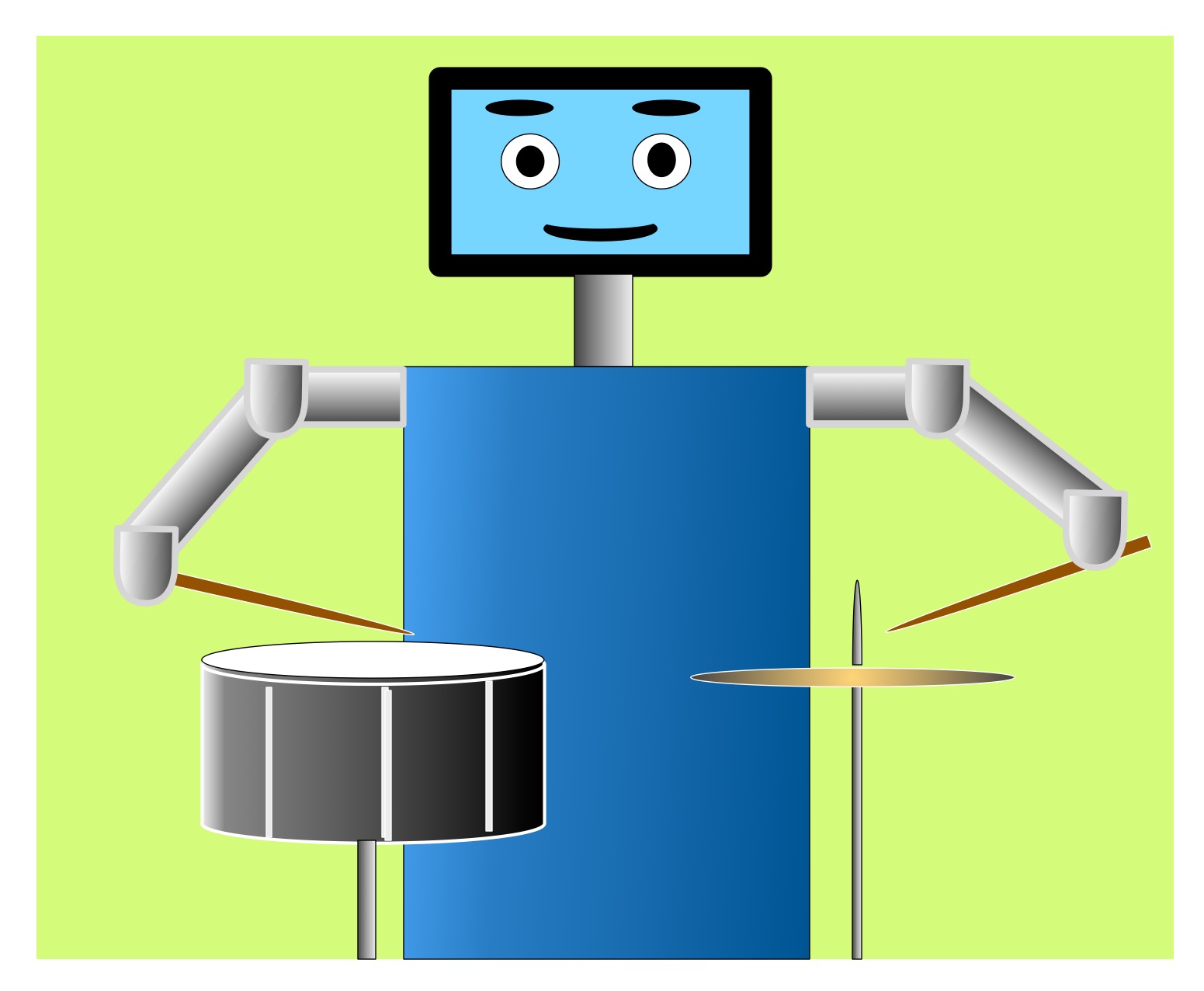
Drumming Robot after Mortimer
Image by CS4FN

Robots are cool. Fact. But can they keep you interested for more than a short time? Over months? Years even? Louis McCallum of Queen Mary University of London tells us about his research using Mortimer a drumming robot.

Roboticists (thats what we’re called) have found it hard to keep humans engaged with robots once the novelty wears off. They’re either too simple and boring, or promise too much and disappoint. So, at Queen Mary University of London we’ve built a robot called Mortimer that can not only play the drums, but also listen to humans play the piano and jam along. He can talk (a bit) and smile too. We hope people will build long term relationships with him through the power of music.

Robots have been part of our lives for a long time, but we rarely see them. They’ve been building our cars and assembling circuit boards in factories, not dealing with humans directly. Designing robots to have social interactions is a completely different challenge that involves engineering and artificial intelligence, but also psychology and cognitive science. Should a robot be polite? How long and accurate should a robot’s memory be? What type of voice should it have and how near should it get to you?

It turns out that making a robot interact like a human is tricky, even the slightest errors make people feel weird. Just getting a robot to speak naturally and understand what we’re saying is far from easy. And if we could, would we get bored of them asking the same questions every day? Would we believe their concern if they asked how we were feeling?

Would we believe their concern
if they asked how we were feeling?

Music is emotionally engaging but in a way that doesn’t seem fake or forced. It also changes constantly as we learn new skills and try new ideas. Although there have been many examples of family bands, duetting couples, and band members who were definitely not friends, we think there are lots of similarities between our relationships with people we play music with and ‘voluntary non-kin social relationships’ (as robotocists call them – ‘friendships’ to most people!). In fact, we have found that people get the same confidence boosting reassurance and guidance from friends as they do from people they play music with.

So, even if we are engaged with a machine, is it enough? People might spend lots of time playing with a guitar or drum machine but is this a social relationship? We tested whether people would treat Mortimer differently if it was presented as a robot you could socially interact with or simply as a clever music machine. We found people played for longer uninterrupted and stopped the robot whilst it was playing less often if they thought you could socially interact with it. They also spent more time looking at the robot when not playing and less time looking at the piano when playing. We think this shows they were not only engaged with playing music together but also treating him in a social manner, rather than just as a machine. In fact, just because he had a face, people talked to Mortimer even though they’d been told he couldn’t hear or understand them!

So, if you want to start a relationship with a creative robot, perhaps you should learn to play an instrument!

– Louis McCallum, Queen Mary University of London (from the archive)

Watch …

Watch the video Louis made with the Royal Institution about Mortimer

More on …

Magazines …

Front cover of CS4FN issue 29 - Diversity in Computing

Subscribe to be notified whenever we publish a new post to the CS4FN blog.


This page and talk are funded by EPSRC on research agreement EP/W033615/1.

QMUL CS4FN EPSrC logos

Philippa Gardner bringing law and order to a wild west

Verified Trustworthy Software

Image by CS4FN

The computing world is a wild west, with bugs in software the norm, and malicious people and hostile countries making use of them to attack people, companies and other nations. We can do better. Just as in the original wild west, advances have happened faster than law and order can keep up. Rather than catch cyber criminals we need to remove the possibility. In software the complexity of our computers and the programs they run has increased faster than ways have been developed and put in place to ensure they can be trusted. It is important that we can answer precisely questions such as “What does this code do?” and “Does it actually do what is intended?”, but can also assure ourselves of what code definitely does NOT do: it doesn’t include trapdoors for criminals to subvert, for example. Philippa Gardner has dedicated her working life to rectifying this by providing ways to verify software, so mathematically prove such trust-based properties hold of it.

Programs are incredibly complicated. Traditionally, software has been checked using testing. You run it on lots of input scenarios and check it does the right thing in those cases. If it does you assume it works in all the cases you didn’t have time to check. That is not good enough if you want code to really be trustworthy. It is impossible to check all possibilities, so testing alone is just not good enough. The only way to do it properly is to also use engineering methods based on mathematics. This is the case, not just for application programs, but also for the software systems they run within, and that includes programming languages themselves. If you can’t trust the programming language then you can’t trust any programs written in that language. Building on decades of work by both her own team and others, Philippa has helped provide tools and techniques that mean complex industrial software and the programming languages they are written in can now be verified mathematically to be correct. Helping secure the web is one area she is making a massive contribution via the W3C WebAssembly (Wasm) initiative. She is helping ensure that programs of the future that run over the web are trustworthy. 

Programs written in programming languages are compiled (translated) into low level code (ie binary 1s and 0s) that can actually be run on a computer. Each kind of computer has its own binary instructions. Rather than write a compiler for every different machine, compilers often now use common intermediary languages. The idea is you have what is called a virtual machine – an imaginary one that does not really exist in hardware. You compile your code to run on the imaginary machine. A compiler is written for each language to compile it into the common low level language for that virtual machine. Then a separate, much simpler, translator can be written to convert that code into code for a particular real machine. That two step process is much easier than writing compilers for all combinations of languages and machines. It is also a good approach to make programs more trustworthy, as you can separately verify the separate, simpler parts. If programs compile to the virtual machine, then to be sure they cannot do harm (like overwrite areas of memory they shouldn’t be able to write to) you also only have to be sure that programs running on the virtual machine programs cannot , in general, do such harm.

The aim of Wasm is to make this all a reality for web programming, where visiting a web page may run a program you can’t trust. Wasm is a language with linked virtual machine that programming language compilers can be compiled into that itself will be trustworthy even when run over the web. It is based on a published formal specification of how the programming language and the virtual machine should behave.

As Philippa has pointed out, while some companies have good processes for ensuring their software is good enough, these are often kept secret.  But given we all rely on such software we need much better assurances. Processes and tools need to be inspectable by anyone. That has been one of the areas she has focussed on. Working on Wasm is a way she has been doing that. Much of her work over 30 years or so has been around the development and use of logics that can be used to mathematically verify that concurrent programs are correct. Bringing that experience to Wasm has allowed her to work on the formal specification conducting proofs of properties of Wasm that show it is trustworthy in various way, correcting definitions in the specification when problems are found. Her approach is now being adopted as the way to do such checking.

Her work with Wasm continues but she has already made massive steps to helping ensure that the programs we use are safe and can be trusted. As a result, she was recently awarded the BCS Lovelace medal for her efforts.

More on …

Magazines …

Front cover of CS4FN issue 29 - Diversity in Computing

Subscribe to be notified whenever we publish a new post to the CS4FN blog.


This blog and post is funded by EPSRC on research agreement EP/W033615/1.
QMUL CS4FN EPSRC logos

Soft squidgy robots

A smiling octopus
Image by OpenClipart-Vectors from Pixabay

Think of a robot and you probably think of something hard, metal, solid. Bang into one and it would hurt! But researchers are inventing soft robots, ones that are either completely squidgy or have squidgy skins.

Researchers often copy animals for new ideas for robots and lots of animals are soft. Some have no bones in them at all nor even hard shells to keep them safe: think slugs and octopuses. And the first soft robot that was “fully autonomous”, meaning it could move completely on its own, was called Octopod. Shaped like an Octopus, its body was made of silicone gel. It swam through the water by blowing gas into hollow tubes in its arms like a balloon, to straighten them, before letting the gas out again. 

Soft, squidgy animals are very successful in nature. They can squeeze into tiny spaces for safety or to chase prey, for example. Soft squidgy machines may be useful for similar reasons. There are plenty of good reasons for making robots soft, including

  • they are less dangerous around people, 
  • they can squeeze into small spaces,
  • they can be made of material that biodegrades so better for the planet, and
  • they can be better at gently gripping fragile things.

Soft robots might be good around people for example in caring roles. Squeezing into small spaces could be very useful in disaster areas, looking for people who are trapped. Tiny ones might move around inside an ill person’s body to find out what is wrong or help make them better.

Soft robotics is an important current research area with lots of potential. The future of robotics may well be squidgy.

Paul Curzon, Queen Mary University of London

More on …

Magazines …

Front cover of CS4FN issue 29 - Diversity in Computing

Subscribe to be notified whenever we publish a new post to the CS4FN blog.


This page and talk are funded by EPSRC on research agreement EP/W033615/1.

QMUL CS4FN EPSrC logos

An Wang’s magnetic memory

A golden metal torus
Image by Hans Etholen from Pixabay

An Wang was one of the great pioneers of the early days of computing. Just as the invention of the transistor led to massive advances in circuit design and ultimately computer chips, Wang’s invention of magnetic core memory provided the parallel advance needed in memory technology.

Born in Shanghai, An went to university at Harvard in the US, studying for a PhD in electrical engineering. On completing his PhD he applied for a research job there and was set the task of designing a new, better form of memory to be used with computers. It was generally believed that the way forward was to use magnetism to store bits, but no one had worked out a way to do it. It was possible to store data by for example magnetising rings of metal. This could be done by running wires through the rings. Passing the current in one direction set a 1, and in the other a 0 based on the direction of the magnetic field created.

If all you needed was to write data it could be done. However, computers, needed to be able to repeatedly read memory too, accessing and using the data stored, possibly many times. And the trouble was, all the ways that had been thought up to use magnets were such that as soon as you tried to read the information stored in the memory, that data was destroyed in the process of reading it. You could only read stored data once and then it was gone!

An was stumped by the problem just like everyone else, then while walking and pondering the problem, he suddenly had a solution. Thinking laterally, he realised it did not matter if the data was destroyed at all. You had just read it so knew what it was when you destroyed it. You could therefore write it straight back again, immediately. No harm done!

Magnetic-core memory was born and dominated all computer memory for the next two decades, helping drive the computer revolution into the 1970s. An took out a patent for his idea. It was drafted to be very wide, covering any kind of magnetic memory. That meant even though others improved on his design, it meant he owned the idea of all magnetic based memory that followed as it all used his basic idea.

On leaving Harvard he set up his own computer company, Wang Laboratories. It was initially a struggle to make it a success. However, he sold the core-memory patent to IBM and used the money to give his company the boost that it needed to become a success. As a result he became a billionaire, the 5th richest person in the US at one point.

Paul Curzon, Queen Mary University of London

More on …

Magazines …

Front cover of CS4FN issue 29 - Diversity in Computing

Subscribe to be notified whenever we publish a new post to the CS4FN blog.


This page and talk are funded by EPSRC on research agreement EP/W033615/1.

QMUL CS4FN EPSrC logos

Aaron and the art of art

Aaron is a successful American painter. Aaron’s delicate and colourful compositions on canvas sell well in the American art market, and have been exhibited worldwide, in London’s Tate Modern gallery and the San Francisco Museum of Modern Art for example. Oh and by the way, Aaron is a robot!

Yes, Aaron is a robot, controlled by artificial intelligence, and part of a lifelong experiment undertaken by the late Harold Cohen to create a creative machine. Aaron never paints the same picture twice; it doesn’t simply recall pictures from some big database. Instead Aaron has been programmed to work autonomously. That is, once it starts there is no further human intervention, Aaron just draws and paints following the rules for art that it has been taught.

Perfecting the art of painting

Aaron’s computer program has grown and developed over the years, and like other famous painters, has passed though a number of artistic periods. Back in the early 1970s all Aaron could do was draw simple shapes, albeit shapes that looked hand drawn – not the sorts of precise geometric shapes that normal computer graphics produced. No, Aaron was going to be a creative artist. In the late 1970s Aaron learned something about artistic perspective, namely that objects in the foreground are larger than objects in a picture’s background. In the late 80s Aaron could start to draw human figures, knowing how the various shapes of the human body were joined together, and then learning how to change these shapes as a body moved in three dimensions. Now Aaron knows how to add colour to its drawings, to get those clever compositions of shades just spot on and to produce bold, unique pictures, painted with brush on canvas by its robotic arm.

It’s what you know that counts

When creating a new painting Aaron draws on two types of knowledge. First Aaron knows about things in the real world: the shapes that make up the human body, or a simple tree. This so called declarative (declared) knowledge is encoded in rules in Aaron’s programming. It’s a little like human memory: you know something about how the different shapes in the world work. This information is stored somewhere in your brain. The second type of knowledge Aaron uses is called procedural knowledge. Procedural knowledge allows you to move (process) from a start to an end through a chain of connected steps. Aaron, for example, knows how to proceed through painting areas of a scene to get the colour balance correct and in particular, getting the tone or brightness of the colour right. That is often more artistically important than the actual colours themselves. Inside Aaron’s computer program these two types of knowledge, declarative and procedural, are continuously interacting with each other in complex ways. Perhaps this blending of the two types of knowledge is the root of artistic creativity?

Creating Creativity

Though a successful artist, and capable of producing pleasing and creative pictures, Aaron’s computer program still has many limitations. Though the pictures look impressive, that’s not enough. To really understand creativity we need to examine the process by which they have been made. We have an ‘artist’ that we can take to pieces and examine in detail. Studying what Aaron can do, given we know exactly what’s been programmed into it, allows us to examine human creativity. What about it is different from the way humans paint, for example? What would we need to add to Aaron to make its process of painting more similar to human creativity?

Not quite human

Unlike a human artist Aaron cannot go back and correct what it does. Studies of great artist’s paintings often show that under the top layer of paint there are many other parts of the picture that have been painted out, or initial sketches that have been redrawn as the artist progresses through the work, perfecting it as they go. Aaron always starts in the foreground of the picture and moves toward painting the background later, whereas human artists can chop and change which part of a picture to work on to get it just right. Perhaps in the future, with human help Aaron or robots like him will develop new human-like painting skills and produce even better paintings. Until then the art world will need to content itself with Aaron’s early period work.

the CS4FN team (updated from the archive)

Some of Aaron’s (and Harold COhen’s) work is on display at the Tate modern until June 2025 as part of the Electric Dreams exhibition.

More on …

Magazines …

Front cover of CS4FN issue 29 - Diversity in Computing

Subscribe to be notified whenever we publish a new post to the CS4FN blog.


This page and talk are funded by EPSRC on research agreement EP/W033615/1.

QMUL CS4FN EPSrC logos

Sue Sentance: Teaching the world to program

A figure sprinting: silhouette binary
Image by Gerd Altmann from Pixabay (edited)

How do you learn to program? How do you best teach programming. When the English school curriculum changed, requiring even primary school students to learn programming, suddenly this became an important question for school teachers who had previously not had to even think about it. Teaching is about much more than knowing the subject, or even knowing how to teach. It also needs knowledge and skill in how to teach each specific subject. Many teachers had to learn these new skills often with no background at all. Luckily, Sue Sentance came to the rescue with PRIMM, a simple framework for how to teach programming suitable for schools. She was awarded the BCS Lovelace prize for the work.

If you were a novice wanting to develop maker skills, whether building electronics, making lego, doing origami or knitting, you might start by following instructions created by someone else for a creation of theirs. Many assumed that was a sensible way to teach programming too, but it isn’t. This approach, sometimes called “copy code” where a teacher provides a program, and students type it in, is a very poor way to learn to program. But if you can’t do the obvious, what do you do?

Sue came up with PRIMM as a way to help teachers. It stands for Predict, Run, Investigate, Modify and Make, giving a series of steps a programming lesson should follow.

The teacher still provides programs, but instead of typing the code in line by line the students first read it and try to predict what it does. This follows the way people learn to write – they first read (lots!)

Having made a prediction, the students run the program. (They don’t type it in at all, as there is little point in doing that, but are given the file ready to run), They now act like a scientist and see if their prediction is correct. Perhaps they predict the program prints 

Hello World

all on one line. By running the program they find out if they were right or not. If they were then it confirms their understanding. If it doesn’t then this suggests there was something more to understand. If the program instead printed

Hello
World

over two lines, then there is something to work out about what makes a program move to another line. The class discuss the results and compare their predictions with the results. Can they explain why it behaved the way it did?

Next they investigate the program in more depth. The teacher can set a variety of exercises to do this. One very powerful way is stepping through program fragments line by line (doing what in industry is called a code walkthrough and is also called dry running or tracing the code). 

Based on the deeper understanding gained by this they then attempt to modify the original program to do something very slightly different – for example, to print 

Hello, Paul. 
How are you?

This is more exprementation to check and expand their understanding. By making deliberate changes with specific results in mind, they can now purposefully make sure they really do understand a programming construct. As before, if the program does something different to expected then the reason can be explored and that is used to correct what they thought.

If they have fully understood the code then this should by now be fairly easy.

Finally they make a program of their own. Based on the understanding gained they create a new specific  program that uses the new constructs (like how to print a message, get input or make decisions) that they now understand. This program should solve a different problem. For example if they just played with a program containing an if statement, they might now write a simple quiz program, or simulates a vending machine where items cost different amounts. .

Part of the reason that PRIMM has been successful is that it is not only a good way to learnt to program but it gives a clear structure to lessons that can be repeated with each construct to be covered and so makes a natural framework for planning lessons around.

Sue originally developed PRIMM with local schools she was working with in mind, but it works so well, solving a specific problem teachers had everywhere, that it is now used worldwide in countries introducing programming in schools.

Women do not figure greatly in the early history of science and maths just because societal restrictions, prejudices and stereotypes meant few were given the chance. Those who were like Maria Cunitz, showed their contributions could be amazing. It just took the right education, opportunities, and a lot of dedication. That applies to modern computer science too, and as the modern computer scientist, Karen Spärck Jones, responsible for the algorithm behind search engines said: “Computing is too important to be left to men.”

– Paul Curzon, Queen Mary University of London

More on …

Magazines …

Front cover of CS4FN issue 29 - Diversity in Computing

Subscribe to be notified whenever we publish a new post to the CS4FN blog.


This page and talk are funded by EPSRC on research agreement EP/W033615/1.

QMUL CS4FN EPSRC logos