Stretching your keyboard – getting more out of QWERTY

by Jo Brodie, Queen Mary University of London

A QWERTY keyboard after smartphone keyboards starting with keys q w e r t y on the top row
A smartphone’s on-screen keyboard layout, called QWERTY after the first six letters on the top line. Image by CS4FN after smartphone QUERTY keyboards.

If you’ve ever sent a text on a phone or written an essay on a computer you’ve most likely come across the ‘QWERTY’ keyboard layout. It looks like this on a smartphone.

This layout has been around in one form or another since the 1870s and was first used in old mechanical typewriters where pressing a letter on the keyboard caused a hinged metal arm with that same letter embossed at the end to swing into place, thwacking a ribbon coated with ink, to make an impression on the paper. It was quite loud!

The QWERTY keyboard isn’t just used by English speakers but can easily be used by anyone whose language is based on the same A,B,C Latin alphabet (so French, Spanish, German etc). All the letters that an English-speaker needs are right there in front of them on the keyboard and with QWERTY… WYSIWYG (What You See Is What You Get).  There’s a one-to-one mapping of key to letter: if you tap the A key you get a letter A appearing on screen, click the M key and an M appears. (To get a lowercase letter you just tap the key but to make it uppercase you need to tap two keys; the up arrow (‘shift’) key plus the letter).

A French or Spanish speaking person could also buy an adapted keyboard that includes letters like É and Ñ, or they can just use a combination of keys to make those letters appear on screen (see Key Combinations below). But what about writers of other languages which don’t use the Latin alphabet? The QWERTY keyboard, by itself, isn’t much use for them so it potentially excludes a huge number of people from using it.

In the English language the letter A never alters its shape depending on which letter goes before or comes after it. (There are 39 lower case letter ‘a’s and 3 upper case ‘A’s in this paragraph and, apart from the difference in case, they all look exactly the same.) That’s not the case for other languages such as Arabic or Hindi where letters can change shape depending on the adjacent letters. With some languages the letters might even change vertical position, instead of being all on the same line as in English.

Early attempts to make writing in other languages easier assumed that non-English alphabets could be adapted to fit into the dominant QWERTY keyboard, with letters that are used less frequently being ignored and other letters being simplified to suit. That isn’t very satisfactory and speakers of other languages were concerned that their own language might become simplified or standardised to fit in with Western technology, a form of ‘digital colonialism’.

But in the 1940s other solutions emerged. The design for one Chinese typewriter avoided QWERTY’s ‘one key equals one letter’ (which couldn’t work for languages like Chinese or Japanese which use thousands of characters – impossible to fit onto one keyboard, see picture at the end!).

Rather than using the keys to print one letter, the user typed a key to begin the process of finding a character. A range of options would be displayed and the user would select another key from among them, with the options narrowing until they arrived at the character they wanted. Luckily this early ‘retrieval system’ of typing actually only took a few keystrokes to bring up the right character, otherwise it would have taken ages.

This is a way of using a keyboard to type words rather than letters, saving time by only displaying possible options. It’s also an early example of ‘autocomplete’ now used on many devices to speed things up by displaying the most likely word for the user to tap, which saves them typing it.

For example in English the letter Q is generally* always followed by the letter U to produce words like QUAIL, QUICK or QUOTE. There are only a handful of letters that can follow QU – the letter Z wouldn’t be any use but most of the vowels would be. You might be shown A, E, I or O and if you selected A then you’ve further restricted what the word could be (QUACK, QUARTZ, QUARTET etc).

In fact one modern typing system, designed for typists with physical disabilities, also uses this concept of ‘retrieval’, relying on a combination of letter frequency (how often a letter is used in the English language) and probabilistic predictions (about how likely a particular letter is to come next in an English word). Dasher is a computer program that lets someone write text without using a keyboard, instead a mouse, joystick, touchscreen or a gaze-tracker (a device that tracks the person’s eye position) can be used.

Letters are presented on-screen in alphabetic order from top to bottom on the right hand side (lowercase first, then upper case) and punctuation marks. The user ‘drives’ through the word by first pushing the cursor towards the first letter, then the next possible set of letters appear to choose from, and so on until each word is completed. You can see it in action in this video below.

The Dasher software interface

Key combinations

The use of software to expand the usefulness of QWERTY keyboards is now commonplace with programs pre-installed onto devices which run in the background. These IMEs or Input Method Editors can convert a set of keystrokes into a character that’s not available on the keyboard itself. For example, while I can type SHIFT+8 to display the asterisk (*) symbol that sits on the 8 key there’s no degree symbol (as in 30°C) on my keyboard. On a Windows computer I can create it using the numeric keypad on the right of some keyboards, holding down the ALT key while typing the sequence 0176. While I’m typing the numbers nothing appears but once I complete the sequence and release the ALT key the ° appears on the screen.
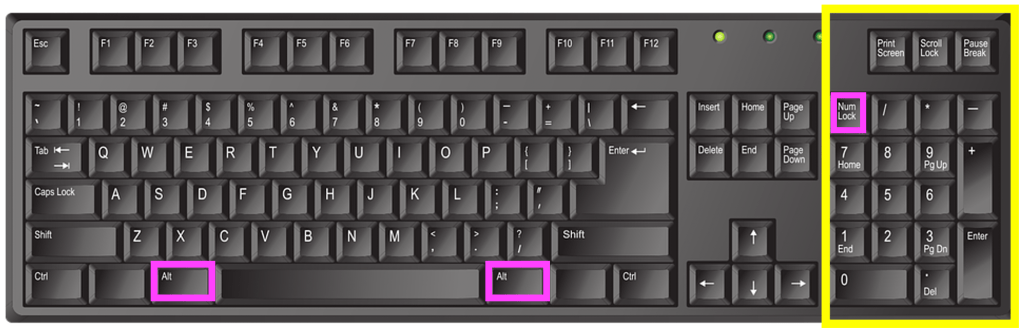
English language keyboard image by john forcier from Pixabay, showing the numeric keypad highlighted in yellow with the two Alt keys and the ‘num lock’ key highlighted in pink. Num lock (‘numeric lock’) needs to be switched on for the keypad to work, then use the Alt key plus a combination of letters on the numeric keypad to produce a range of additional ‘alt code‘ characters.

When Japanese speakers type they use the main ‘ABC’ letters on the keyboard, but the principle is the same – a combination of keys produces a sequence of letters that the IME converts to the correct character. Or perhaps they could use Google Japan’s April Fool solution from 2010, which surrounded the user in half a dozen massive keyboards with hundreds of keys a little like sitting on a massive drum kit!

*QWERTY is a ‘word’ which starts with a Q that’s not followed by a U of course…

References

Further reading

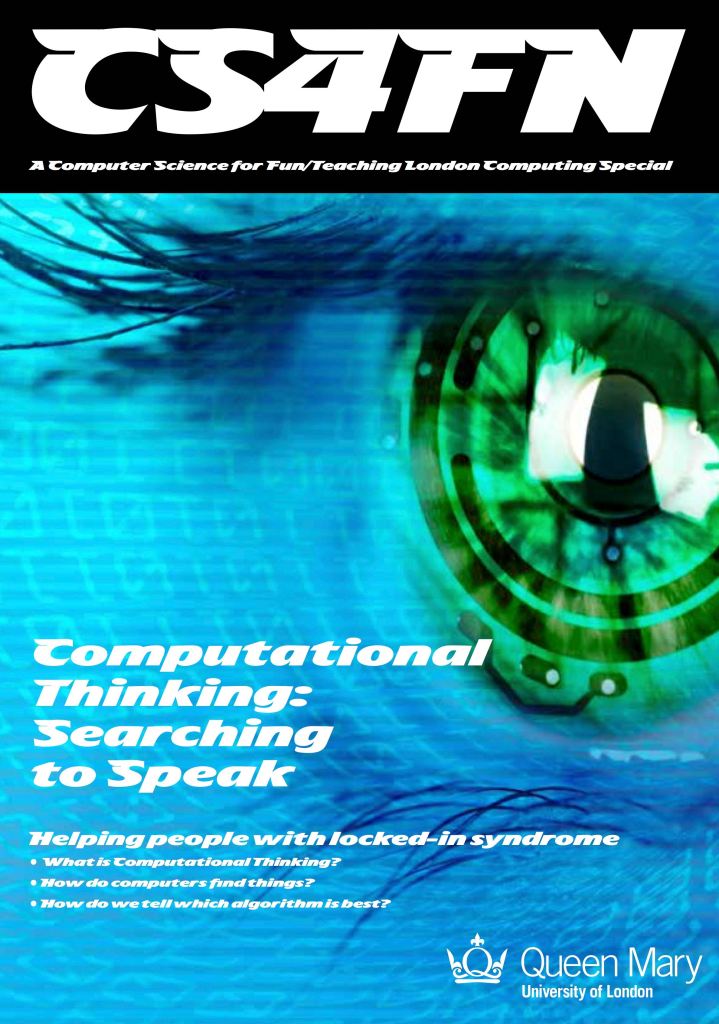
The ‘retrieval system’ of typing mentioned above, which lets the user get to the word or characters more quickly, is similar to the general problem solving strategy called ‘Divide and Conquer’. You can read more about that and other search algorithms in our free booklet ‘Searching to Speak‘ (PDF) which explores how the design of an algorithm could allow someone with locked-in syndrome to communicate. Locked-in syndrome is a condition resulting from a stroke where a person is totally paralysed. They can see, hear and think but cannot speak. How could a person with Locked-in syndrome write a book? How might they do it if they knew some computational thinking?


EPSRC supports this blog through research grant EP/W033615/1.
Gary Starkweather: the laser printer and colour management

Gary Starkweather, born 9 January 1938, invented and developed the first laser printer. In the late 1960s he was an engineer, with a background in optics, working in the US for the Xerox company (famous for their photocopiers) and came up with the idea of using a laser beam to transfer the image to the photocopier (so that it could make lots of copies), speeding up the process of printing documents. There is a video of Gary talking about the ‘Eureka moment’ of his invention here. Laser printers are now found in offices worldwide – you may even have one at home.

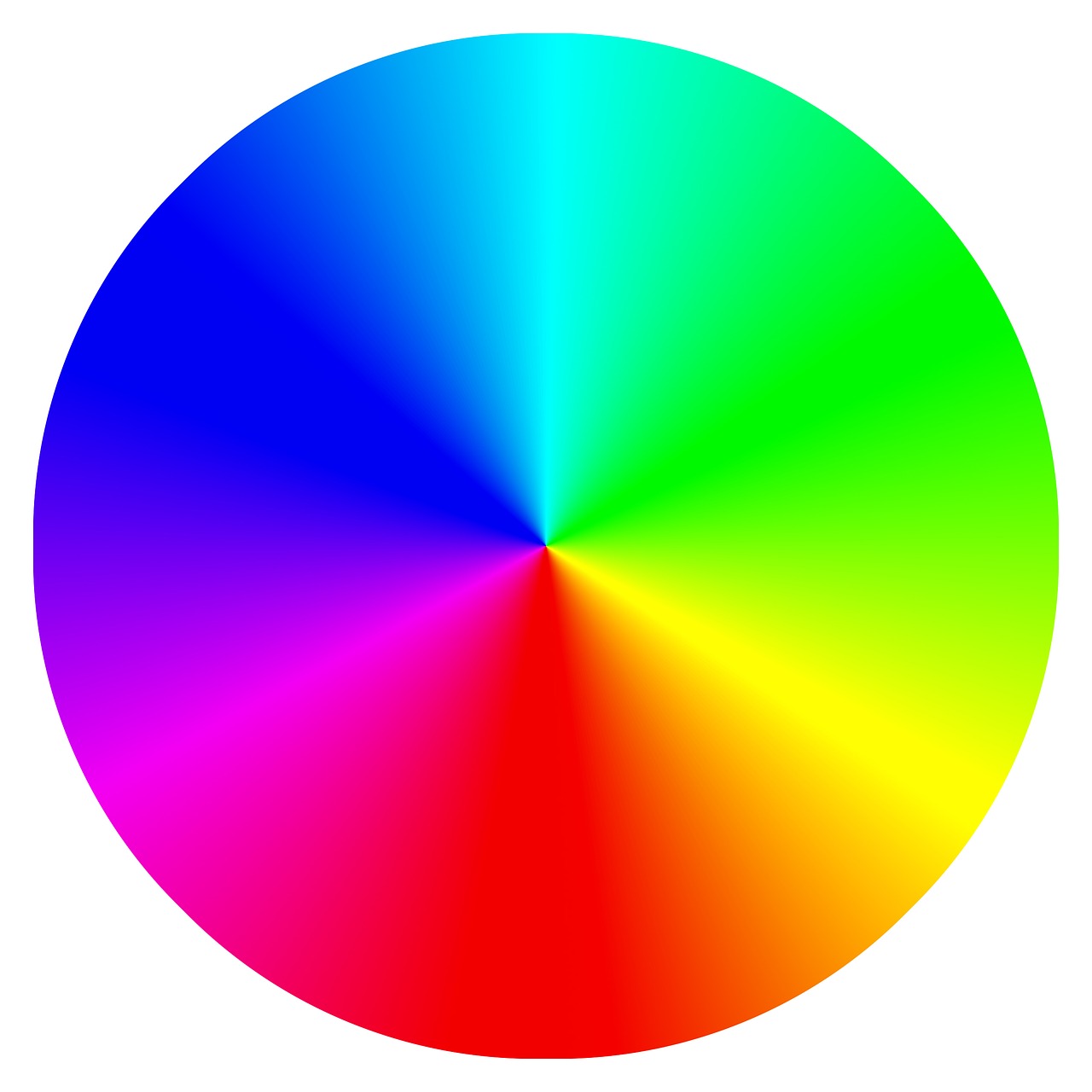
He also invented colour management which is a way of ensuring that a shade of blue colour on your computer’s or phone’s screen looks the same on a TV screen or when printed out. Different devices have different display colours so ‘red’ on one device might not be the same as ‘red’ on another. Colour management is something that happens in devices behind the scenes and which translates the colour instruction from one device to produce the closest match on another. There is an International Color Consortium (ICC) which helps different device manufacturers ensure that colour is “seamless between devices and documents”.

Starkweather received an Academy Award (an Oscar) for Technical Achievement in 1994, for the work he’d done in colour film scanning. That involves taking a strip of film and converting it digitally so it can be edited on a computer.

As a nice coincidence, on the same day as his birth, in 2007, the first Apple iPhone was announced (though not available until June that year)… and all iPhones use colour management!

– Jo Brodie, Queen Mary University of London

Subscribe to be notified whenever we publish a new post to the CS4FN blog.


This page is funded by EPSRC on research agreement EP/W033615/1.

QMUL CS4FN EPSRC logos

Kakuro, Logic and Computer Science

Kakuro Fragment
Part of a Kakuro puzzle. Image by PC

To be a good computer scientist you have to enjoy problem solving. That is what it’s all about: working out the best way to do things. You also have to be able to think in a logical way: be a bit of a Vulcan. But what does that mean? It just means being able to think precisely, extracting all the knowledge possible from a situation just by pure reasoning. It’s about being able to say what is definitely the case given what is already known…and it’s fun to do. That’s why there is a Suduko craze going on as I write. Suduko are just pure logical thinking puzzles. Personally I like Kakuro better. They are similar to Soduko, but with a crossword format.

What is a Kakuro?

A Kakuro is a crossword-like grid, but where each square has to be filled in with a digit from 1-9 not a letter. Each horizontal or vertical block of digits must add up to the number given to the left or above, respectively. All the digits in each such block must be different. That part is similar to Soduko, though unlike Soduko, numbers can be repeated on a line as long as they are in different blocks. Also, unlike Soduko, you aren’t given any starting numbers, just a blank grid.

Where does logic come into it? Take the following fragment:

Kakuro Start - part of a Kakuro puzzle
Part of a Kakuro Puzzle. Image by PC

There is a horizontal block of two cells that must add up to 16. Ways that could be done using digits 1-9 are 9+7, 8+8 or 7+9. But it can’t be 8+8 as that needs two 8s in a block which is not allowed so we are left with just two possibilities: 9+7 or 7+9. Now look at the vertical blocks. One of them consists of two cells that add up to 17. That can only be 9+8 or 8+9. That doesn’t seem to have got us very far as we still don’t know any numbers for sure. But now think about the top corner. We know from across that it is definiteley 9 or 7 and from down that it is definitely 9 or 8. That means it must be 9 as that is the only way to satisfy both restrictions.

A Kakuro for you to try

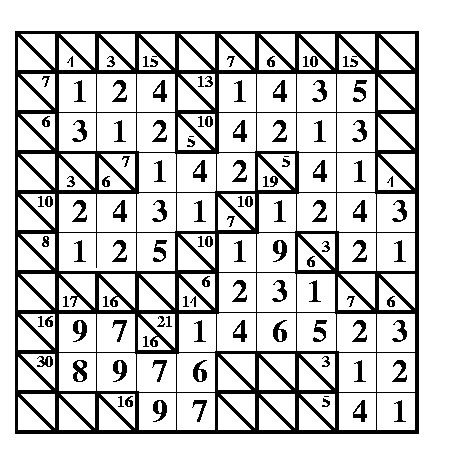
A Kakuro puzzle for you to try. Image by PC

Here is a full Kakuro to try. There is also a printer friendly pdf version. Check your answer at the very end of this post when you are done.

Being able to think logically is important because computer programming is about coming up with precise solutions that even a dumb computer can follow. To do that you have to make sure all the possibilities have been covered. Reasoning very much like in a Kakuro is needed to convince yourself and others that a program does do what it is supposed to.

– Paul Curzon, Queen Mary University of London


More on …


Related Magazine …

This article was included on Day 11 (The proof of the pudding… mathematical proof) of the CS4FN Advent Calendar in December 2021. Before that it was originally published on CS4FN and can also be found on page 16 of CS4FN Issue 3, which you can download as a PDF below. All of our free material can be downloaded here: https://cs4fndownloads.wordpress.com/

Subscribe to be notified whenever we publish a new post to the CS4FN blog.


This page is funded by EPSRC on research agreement EP/W033615/1.

QMUL CS4FN EPSRC logos

The answer to the kakuro above

Answer for the kakuro
A correctly filled in answer for the kakuro puzzle: Image by PC

Chocolate Turing Machines (edible computing)

Could you make the most powerful computer ever created…out of chocolates? It’s actually quite easy. You just have to have enough chocolates (and some lollies). It is one of computer science’s most important achievements.

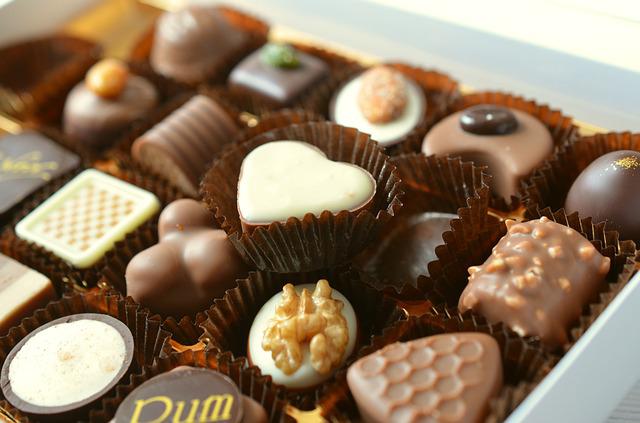
Imagine you are in a sweet factory. Think big – think Charlie and the Chocolate Factory. A long table stretches off into the distance as far as you can see. On the table is a long line of chocolates. Some are milk chocolate, some dark chocolate. You stand in front of the table looking at the very last chocolate (and drooling). You can eat the chocolates in this factory, but only if you follow the rules of the day. (There are always rules!)

The chocolate eating rules of the day tell you when you can move up and down the table and when you can eat the chocolate in front of you. Whenever you eat a chocolate you have to replace it with another from a bag that is refilled as needed (presumably by Oompa-Loompas).

You also hold a single lolly. Its colour tells you what to do (as dictated by the rules of the day, of course). For example, the rules might say holding an orange one means you move left, whereas a red one means you move right. Sometimes the rules will also tell you to swap the lolly for a new one.

The rules of the day have to have a particular form. They first require you to note what lolly you are holding. You then check the chocolate on the table in front of you, eat it and replace it with a new one. You pick up a lolly of the colour you are told. You finally move left, move right or finish completely. A typical rule might be:

If you hold an orange lolly and a dark chocolate is on the table in front of you, then eat the chocolate and replace it with a milk one. Swap the lolly for a pink one. Finally, move one place to the left.

A shorthand for this might be: if ORANGE, DARK then MILK, PINK, LEFT.

You wouldn’t just have one instruction like this to follow but a whole collection with one for each situation you could possibly be in. With three colours of lollies, for example, there are six possible situations to account for: three for each of the two types of chocolate.

As you follow the rules you gradually change the pattern of chocolates on the table. The trick to making this useful is to make up a code that gives different patterns of chocolates different meanings. For example, a series of five dark chocolates surrounded by milk ones might represent the number 5.

See Chocoholic Subtraction for a set of rules that subtracts numbers for you as a result of shovelling chocolates into your face.

Our chocolate machine is actually a computer as powerful as any that could possibly exist. The only catch is that you must have an infinitely long table!

By powerful we don’t mean fast, but just that it can compute anything that any other computer could. By setting out the table with different patterns at the start, it turns out you can compute anything that it is possible to compute, just by eating chocolates and following the rules. The rules themselves are the machine’s program.

This is one of the most famous results in computer science. We’ve described a chocoholic’s version of what is known as a Turing machine because Alan Turing came up with the idea. The computer is the combination of the table, chocolates and lollies. The rules of the day are its program, the table of chocolates is its memory, and the lollies are what is known as its ‘control state’. When you eat chocolate following the rules, you are executing the program.

Sadly Turing’s version didn’t use chocolates – his genius only went so far! His machine had 1s and 0s on a tape instead of chocolates on a table. He also had symbols instead of lollies. The idea is the same though. The most amazing thing was that Alan Turing worked out that this machine was as powerful as computers could be before any actual computer existed. It was a mathematical thought experiment.

So, next time you are scoffing chocolates at random, remember that you could have been doing some useful computation at the same time as making yourself sick.

– Paul Curzon, Queen Mary University of London

More on …

Related Magazine …

This article was originally published on the CS4FN website and a copy can also be found on page 10-11 of Issue 14 of CS4FN, “Alan Turing – the genius who gave us the future”, which can be downloaded as a PDF, along with all our other free material, here: https://cs4fndownloads.wordpress.com/

Subscribe to be notified whenever we publish a new post to the CS4FN blog.


This page is funded by EPSRC on research agreement EP/W033615/1.

QMUL CS4FN EPSRC logos

The cure that just folds away

Understanding protein folding to tackle diseases, and how computers (and people) can help

HIV-1 proteasean illustration showing the folded shape of a protein used by HIV, created by ‘Boghog’ in 2008, via Wikipedia.

Biologists want you to play games in the name of science. A group of researchers at the University of Washington have invented a computer game, Foldit, in which you have to pack what looks like a 3D nest of noodles and elastics into the smallest possible space. You drag, turn and squeeze the noodles until they’re packed in tight. You compete against others, and as you get better you can rise through the ranks of competitors around the world. How can that help science? It’s because the big 3D jumbles represent models of proteins, and figuring out how proteins fold themselves up is one of the biggest problems in biology. Knowing more about how they do it could help researchers design cures for some of the world’s deadliest diseases.

The perfect fit

Proteins are in every cell in your body. They help you digest your food, send signals through your brain, and fight infection. They’re made of small molecules called amino acids. It’s easy for scientists to figure out what amino acids go together to make up a protein, but it’s incredibly difficult to figure out the shape they make when they do it. That’s a shame, because the shape of a protein is what makes it able to do its job. Proteins act by binding on to other molecules – for example, a protein called haemoglobin carries oxygen around our blood. The shape of the haemoglobin molecule has to fit the shape of the oxygen molecule like a lock and key. The close tie between form and function means that if you could figure out the shape that a particular protein folds into, you would know a lot about the jobs it can do.

Completely complex

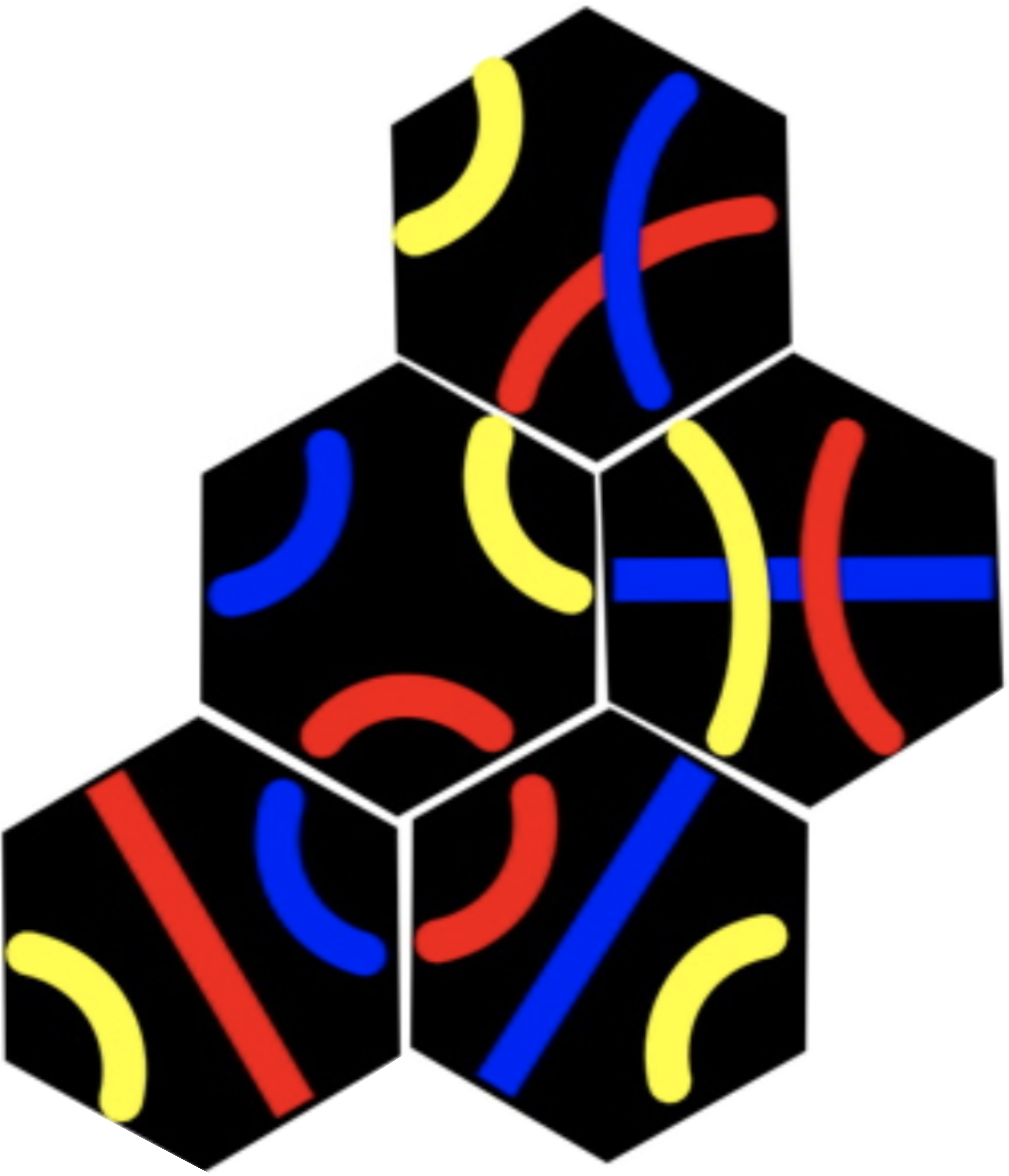
Tantrix rotation puzzle Image by CS4FN.

Protein folding is part of a group of problems that are an old nemesis of computer scientists. It’s what’s known as an NP-complete problem. That’s a mathematical term that means it appears there’s no shortcut to calculating the answer to a problem. You just have to try every different possible answer before you arrive at the right one. There are other problems like this, like the Tantrix rotation puzzle. Because a computer would have to check through every possible answer, the more complex the problem is the longer it will take. Protein folding is particularly complex – an average-sized protein contains about 100 amino acids, which means it would take a computer a billion billion billion years to figure out. So a shortcut would be nice then.

Puzzling out a cure

Obviously the proteins themselves have found a shortcut. They fold up all the time without having to have computers figure it out for them. In order to get to the bottom of how they do it, though, scientists are hoping that human beings might provide a shortcut. Humans love puzzles, and we’re awfully good at visual ones. Our good visual sense means we see patterns everywhere, and we can easily develop a ‘feel’ for how to use those patterns to solve problems. We use that sense when we play games like chess or Go. The scientists behind Foldit reckon that if it turns out that humans really are more efficient at solving protein folding problems, we can teach some of our tricks to computers.

If there were an efficient way to work out protein structure, it could be a huge boon to medicine. Diseases depend on proteins too, and lots of drugs work by targeting the business end of those proteins. HIV uses two proteins to infect people and replicate itself, so drugs disrupt the workings of those proteins. Cancer, on the other hand, damages helpful proteins. If scientists understood how proteins fold, they could design new proteins to counteract the effects of disease. So getting to the top of the tables in Foldit could hold even more glory for you than you bargained for – if your protein folding efforts help cure a dreaded disease, hey, maybe it’s the Nobel Prize you’ll end up winning.

– Paul Curzon, Queen Mary University of London.
This article was originally published on CS4FN.

Play the game yourself

Further reading

The coloured diagram of the enzyme above is a 3D representation to help people see how the protein folds. These are called ribbon diagrams and were invented by Jane S Richardson, find out more here.

QMUL CS4FN EPSRC logos

Lego computer science: representing numbers

CS4FN Banner

Continuing a series of blogs on what to do with all that lego scattered over the floor: learn some computer science…what does number representation mean?

We’ve seen some different ways to represent images and how ultimately they can be represented as numbers but how about numbers themselves. We talk as though computers can store numbers as numbers but even they are represented in terms of simpler things in computers.

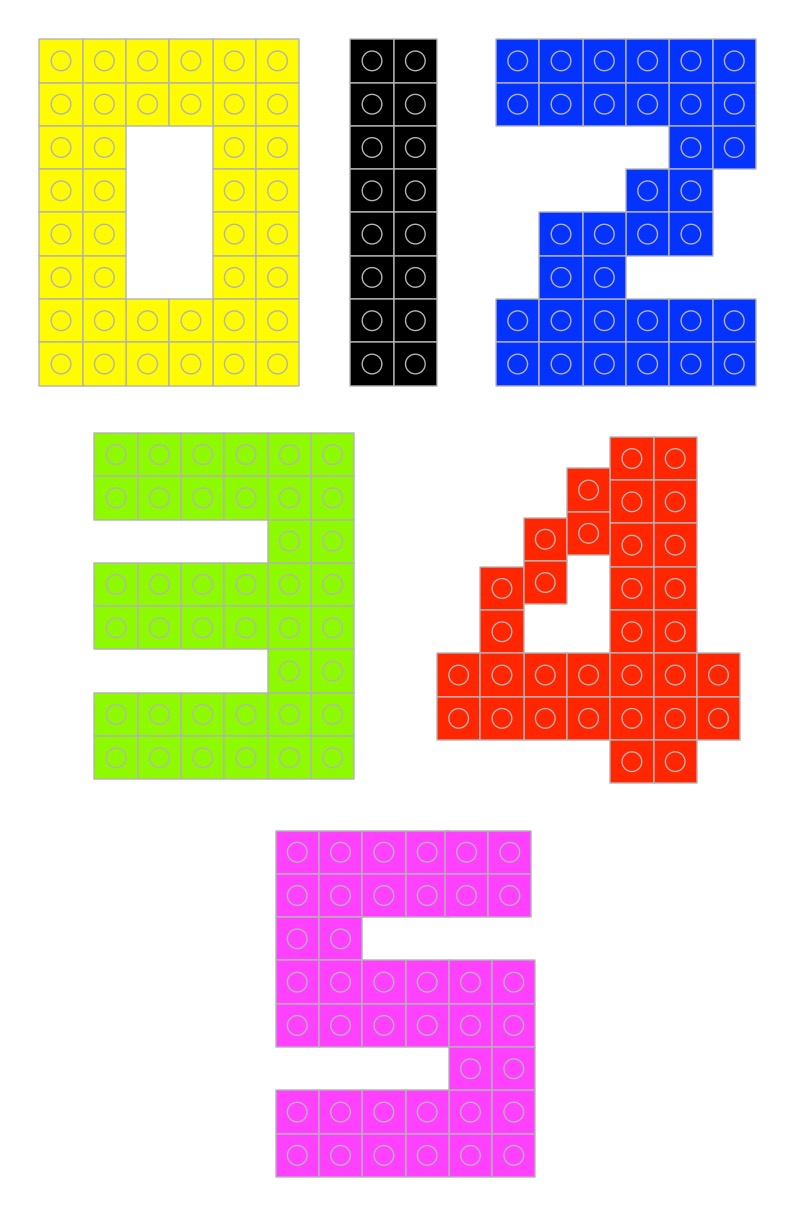
Digits 0-9 in lego
Photo by Paul Curzon

But first what do we mean by a number and a representation of a number? If I told you to make the numbers 0 to 9 in lego (go on have a go) you may well make something like this…

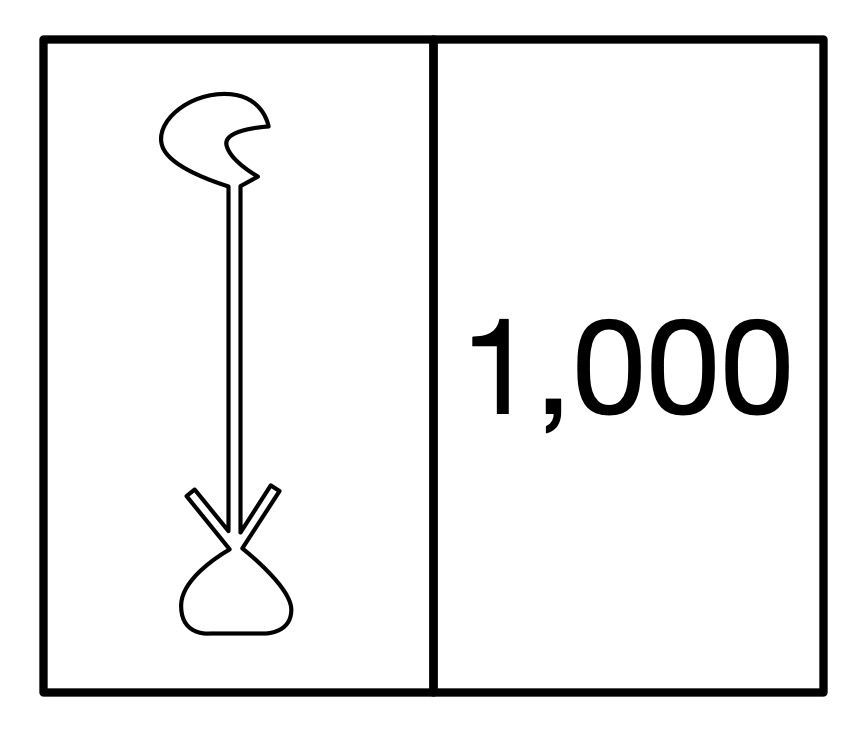
But those symbols 0, 1, 2, … are just that. They are symbols representing numbers not the numbers themselves. They are arbitrary choices. Different cultures past and present use different symbols to mean the same thing. For example, the ancient Egyptian way of writing the number 1000 was a hieroglyph of a water lily. (Perhaps you can make that in lego!)

The ancient Egyptian way to write 1000: a hieroglyph of a waterlily with 1000 next to it
The ancient Egyptian way to write 1000 was a hieroglyph of a waterlily.
Image by Paul Curzon

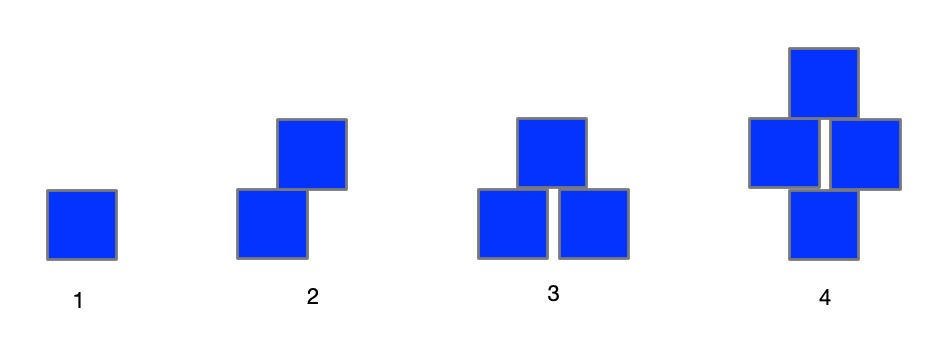
What really are numbers? What is the symbol 2 standing for? It represents the abstract idea of twoness ie any collection, group or pile of two things: 2 pieces of lego, 2 ducks, 2 sprouts, … and what is twoness? … it is oneness with one more thing added to the pile. So if you want to get closer to the actual numbers then a closer representation using lego might be a single brick, two bricks, three bricks, … put together in any way you like.

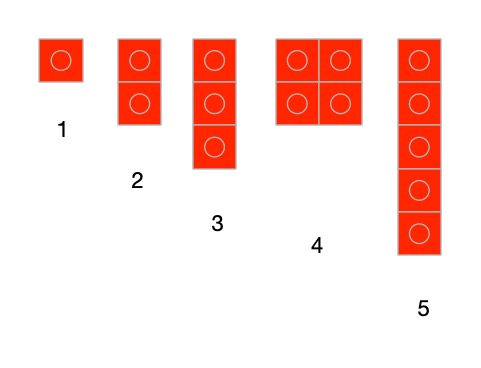
Numbers represented by that number of lego bricks. one, two three and four bricks,
Numbers represented by that number of lego bricks.
Image by Paul Curzon

Another way would to use different sizes of bricks for them. Use a lego brick with a single stud for 1, a 2-stud brick for two and so on (combining bricks where you don’t have a single piece with the right number of studs). In these versions 0 is the absence of anything just like the real zero.

Lego bricks representing numbers based on the number of studs showing.
Image by Paul Curzon

Once we do it in bricks it is just another representation though – a symbol of the actual thing. You can actually use any symbols as long as you decide the meaning in advance, there doesn’t actually have to be any element of twoness in the symbol for two. What other ways can you think of representing numbers 0 to 9 in lego? Make them…

A more abstract set of symbols would be to use different coloured bricks – red for 1, blue for 2 and so on. Now 0 can have a direct symbol like a black brick. Now as long as it is the right colour any brick would do. Any sized red brick can still mean 1 (if we want it to). Notice we are now doing the opposite of what we did with images. Instead of representing a colour with a number, we are representing a number with a colour.

Numbers represented as colours.
Image by Paul Curzon

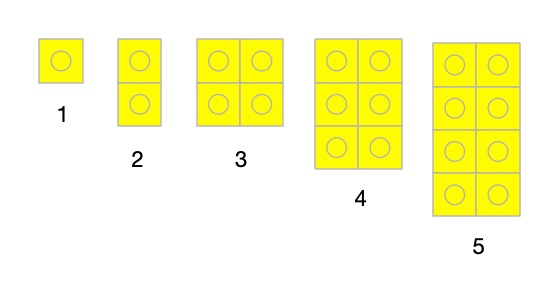
Here is a different representation. A one stud brick means 1, a 2-stud brick means 2, a square 4 stud brick means 3, a rectangular 6 stud brick means 4 and so on. As long as we agreed that is what they mean it is fine. Whatever representation we choose it is just a convention that we have to then be consistent about and agree with others.

Numbers represented by increasing sized blocks.
Image by Paul Curzon

What has this to do with computing? Well if we are going to write algorithms to work with numbers, we need a way to store and so represent numbers. More fundamentally though, computation (and so at its core computer science) really is all about symbol manipulation. That is what computational devices (like computers) do. They just manipulate symbols using algorithms. We will see this more clearly when we get to creating a simple computer (a Turing Machine) out of lego (but that is for later).

We interpret the symbols in the inputs of computers and the symbols in the outputs with meanings and as a result they tell us things we wanted to know. So if we key the symbols 12+13= into a calculator or computer and it gives us back 25, what has happened is just that it has followed some rules (an algorithm for addition) that manipulated those input symbols and made it spew out the output symbols. It has no idea what they mean as it is just blindly following its rules about how to manipulate symbols. We also could have used absolutely any symbols for the numbers and operators as long as they were the ones the computer was programmed to manipulate. We are the ones that add the intelligence and give those symbols meanings of numbers and addition and the result of doing an addition.

This is why representations are important – we need to choose a representation for things that makes the symbol manipulation we intend to do easy. We already saw this with images. If we want to send a large image to someone else then a representation of images like run-length encoding that shrinks the amount of data is a good idea.

When designing computers we need to provide them with a representation of numbers so they can manipulate those numbers. We have seen that there are lots of representations we could choose for numbers and any in theory would do, but when we choose a representation of numbers for use to do computation, we want to pick one that makes the operations we are interested in doing easy. Charles Babbage for example chose to use cog-like wheels turned to particular positions to represent numbers as he had worked out how to create a mechanism to do calculation with them. But that is something for another time…

More on …


This post was funded by UKRI, through grant EP/K040251/2 held by Professor Ursula Martin, and forms part of a broader project on the development and impact of computing.


Lego Computer Science

Part of a series featuring featuring pixel puzzles,
compression algorithms, number representation,
gray code, binary and computation.

Why would you accept inefficiency?

In May 2017, British Airways IT system had a meltdown. Someone mistakenly disconnected the power for a short time. The fleet was grounded and tens of thousands of passengers were left stranded for days. One suggestion was it was due to “cost cutting”. Willie Walsh, the Head of BAs parent group came out fighting, defending the idea of doing things cheaply: “You talk about it as cost-cutting, I talk about it as efficiency … The idea that you would accept inefficiency – I just don’t get it.”

Three British Airways planes flying close together
Image by Angela from Pixabay

The fact that many business leaders don’t get it may be exactly the problem. Doing things more cheaply than the competition is an idea that is at the core of capitalism. It is often taken as a given. But, is it really always true?

The best and only the best

Computer Scientists actually use the word “efficiency” in a subtly different way. When they talk about a program or algorithm being efficient, they do not mean that it was cheap. They mean it did exactly the same job, but faster or with less memory. This is one of the really creative areas of computer science. Can you come up with an algorithm that does exactly the same thing but in fewer steps?

The business version of efficiency would be fine if it had the same underlying principle. Do it cheaper, yes, but only if it really does do exactly the same thing in all circumstances. To company bosses, however, the trade-off can be seen as cut costs at all costs. ‘Waste’ is anything you think no one will notice. You accept the 1 in a million chance of it not working at all – just as with the BA meltdown, taking the hit (or rather your passengers do) because you think you will make more money overall as a result.

Even with algorithms we do accept inefficiency though. Engineering is often about trade-offs. Sometimes, you will accept inefficiency in the use of memory because it gives a way to get a faster algorithm. Sometimes you accept a slower algorithm because it is just easier to be certain your code really does do the right thing. Sometimes slow is good enough. Sometimes it is the bigger picture that matters. The fastest algorithms for searching for information require sorted data. That is why a dictionary is in alphabetical order. Finding the word you want is quick – you don’t have to check every word in turn to find the one you want. However, if you were only ever going to look for a single thing in a data source, you wouldn’t sort it first. You would use an inefficient search algorithm, because overall that would be faster than sorting and then searching once. Efficiency can be subtle.

Inefficiently safe

There are actually even more powerful reasons for demanding inefficiency. In the area of safety-critical systems, computer scientists build in redundancy on purpose. When the consequences of the computer not working is that lives are lost, we definitely want inefficiency, as long as it is well-engineered inefficiency. Dependability and safety matter more.

An algorithm is a mathematical object. If it works, it always works. However, programs operate in the real world where things can go wrong. Hardware fails, clocks drift, criminals hack, technicians do silly things by accident (like unplug the power). Systems that matter have to be resilient. They have to cope with the unexpected, with the never before seen. One way that is achieved is by designing in inefficiency. For example, if your single computer goes down, you are stuffed. If instead two computers run the same program in parallel, then if one goes down the other can take over. Ahh, but how do you know which is wrong when they disagree? Be even more ‘inefficient’ and have three computers ‘wastefully’ doing the same thing. Then, if one goes rogue, the three vote on who is at fault … cut them out and carry on.

Computer Scientists have developed many ingenious ways to build in guarantees of safety even when the world around conspires against us. To a cost cutter these extras may seem like inefficiency but the inefficiency is there, apparently unused most of the time, waiting to step in and avert disaster, waiting to save lives. Personally, I would accept inefficiency. I hope, for the sake of saved lives, society would too.

by Paul Curzon, Queen Mary University of London

More on …

Magazines …

Front cover of CS4FN issue 29 - Diversity in Computing

Our Books …


Subscribe to be notified whenever we publish a new post to the CS4FN blog.


This page and talk are funded by EPSRC on research agreement EP/W033615/1.