The music in a toy commercial isn’t just background noise. It tells you who the advert is for, and a machine learning model can hear it (even when you barely notice the difference). Luca Marinellitells us more.
Next time you’re watching TV, try muting the adverts and then turning the sound back on. You’ll probably notice something odd. The music in adverts for dolls and playsets sounds completely different from the music in adverts for action figures and toy cars. One sounds smooth and tuneful. The other sounds loud and chaotic. But here’s the question: is that just your imagination, or is the difference real and measurable? For my PhD research at Queen Mary University of London I decided to find out using machine learning.
I collected over 600 toy commercials from a UK retailer’s YouTube channel, split into three groups: ads aimed at girls, ads aimed at boys, and ads aimed at mixed audiences. Then I fed the soundtracks into a computer program and had it extract dozens of measurements from each one. Not “does this sound nice?” (computers can’t answer that) but more precise numerical values like “how rough does the sound spectrum look”, “how regular is the beat” or “how clearly does this audio sit in a musical key”. Think of it as turning every piece of music into a long list of numbers that each describe a property of it.
Then I trained a type of machine learning model called a classifier, to look at those numbers and predict: is this intended as a girls’ ad, a boys’ ad, or a mixed one? The classifier got it right a remarkable 91% of the time when comparing girls-only and boys-only ads. That’s not luck. That’s a genuine, detectable pattern hidden in the sound. But which measurements were actually doing the work? This is where the research gets interesting, and where a technique called SHAP (Shapley Additive exPlanations) comes in. SHAP is a way of asking a machine learning model to explain its own decisions. Instead of just getting a yes/no answer, you can ask: “which features pushed you towards saying this was a girls’ ad, and which ones pushed you the other way?” It’s a bit like asking a judge not just for a verdict, but for their full reasoning.
What SHAP revealed was striking. Ads targeting girls consistently had higher harmonicity, meaning the sounds fit together into clear, pleasant musical patterns, and more rhythmic regularity, meaning the beat was steady and predictable. Their audio spectrum (a kind of fingerprint of all the frequencies present) was also broader and smoother. Boys’ ads, by contrast, scored higher on spectral roughness (sounds that are abrasive) and spectral entropy (a measure of how chaotic or unpredictable the sound is). They were also simply louder. In plain terms: girls’ ads sound harmonious and organised. Boys’ ads sound noisy, aggressive, and jagged. And a machine learning model can tell the difference with 91% accuracy just from the audio alone, without seeing a single frame of video. These patterns almost certainly aren’t accidental. Marketers are making deliberate choices about music to signal who a product is “for”. The sound itself carries a hidden message.
We showed how AI can be used to hold up a mirror to human behaviour. When we use explainable AI we can spot patterns in the world that are so familiar we’ve stopped noticing them. The music in a toy advert might seem trivial, but if an algorithm can reliably predict the intended audience just from the soundtrack, that tells us something important: gender stereotypes aren’t just visible, they’re audible too.
Amaze your family and friends this holiday showing your mathematical prowess by generating instant magic squares at will. In the previous article we saw how to generate 4×4 magic squares. If that was a bit too hard, here is a simpler version for generating instant 3×3 magic squares. Learn the trick and some computer science about algorithms and how they prove they always work.
The Trick
First ask an audience member to pick a number out of a hat. That will be the target number. You then write out a magic square that adds to that number.
The Secret
Building this type of magic square is based on the algorithm below that creates magic squares from 9 consecutive numbers. The secret is first to make sure all the numbers you put in the hat are multiples of 3 (i.e. are in the 3 times table). You then follow the algorithm below that tells you what numbers to put where in the grid.
The Magical Algorithm
Place lots of numbers on folded pieces of paper in a hat. All are multiples of 3 (but the audience do not know that).
Ask an audience member to pull one out at random.
Announce that that number is the TARGET number. You will create a magic square that adds up to that number so that is the number that the square rows and so on will add to.
In your head divide that number by 3. For example, if TARGET was 15 THEN you divide 15 by 3 to get 5. Let’s call this value MID, to allow us to be general when we follow the rest of the instructions.
On a 3 by 3 grid, put MID in the centre square (so in our example, put 5 in the middle).
Place the number (MID + 3) in the upper right-hand square (in our example, 5+3 = 8).
Place the number (MID – 3) in the lower left-hand square (in our example, 5-3 = 2).
Place the number (MID + 1) in the upper left-hand square (in our example, 5+1 = 6).
Place the number (MID – 1) in the lower right-hand square (in our example, 5-1 = 4).
Fill in the remaining squares to make the magic square work, so that the rows and columns add to TARGET (subtracting the other two numbers from TARGET in each case to get the missing one).
Image by CS4FN
For the last step, you just need to fill in the empty squares, to make sure the rows and columns add to the right number, TARGET. To do this you just need to keep in mind the target magic number you calculated. (For our example, remember it was 15). It’s a bit of simple arithmetic to find these final numbers and voila, you have built a magic square that adds up to a total picked at random..
Practice doing the maths in your head so that you can make it seem magical.
Does it always work?
You can actually prove the trick always works using some simple algebra based on the template magic square above. See if you can work out how yourself. Using MID and TARGET in place of numbers, for the trick to always generate a correct magic square you need to check that all rows and columns simplify to be equivalent to TARGET. Visit our Conjuring with Computation website to see the detail of how.
Proving a magic trick in this way is just the same thing computer scientists do when they invent new computing algorithms to make sure they work. It increases the assurance that the algorithm and so programs implementing it do work.
If you can program, then you could write a program to generate magic squares using the above algorithm, and then your proof would be a step in verifying your program, as long as it does correctly implement the algorithm!
“Get rhythm when you get the blues” – as Country legend Johnny Cash’s lyrics suggest, rhythm cheers people up. We can all hear, feel and see it. We can clap, tap or beatbox. It comes naturally, but how? We don’t really know. You can help find out by playing a game based on some music that involves nothing but clapping. If you were one of the best back in 2015, you could have been invited to play live with a London orchestra.
We can all play a rhythm both using our bodies and instruments, though maybe for most of us with only a single cowbell, rather than a full drum kit. By performing simple rhythms with other people we can make really complex sounds, both playing music and playing traditional clapping games. Rhythm matters. It plays a part in social gatherings and performance in cultures and traditions across the world. It even defines different types of music from jazz to classical, from folk to pop and rock.
Lots of people with a great sense of rhythm, whether musicians or children playing complex clapping games in the playground, have never actually studied how to do it though. So how do we learn rhythm? Our team based at Queen Mary, joined up with the London Sinfonietta chamber orchestra and app developers Touch Press, to find out, using music called Clapping Music.
Clapping Music is a 4-minute piece by the minimalist composer Steve Reich. The whole thing is based on one rhythmic pattern that two people clap together. One person claps the pattern without changing it – known as the static pattern. The other changes the pattern, shifting the rhythm by one beat every twelve repetitions. The result is an ever-changing cycle of surprisingly complicated rhythms. In spite of it’s apparent simplicity, it’s really challenging to play and has inspired all sorts of people from rock legend David Bowie to the virtuoso, deaf percussionist Dame Evelyn Glennie. You can learn to play Clapping Music and help us to understand how we learn rhythm at the same time.
Our team created a free game for the iPhone and iPad also called Clapping Music. You play for real against the static pattern. To get the best score you must keep tapping accurately as the pattern changes, but stay in step with the static rhythm. It’s harder than it sounds!
We analysed the anonymous gameplay data, together with basic information about the people playing like their age and musical experience. By looking at how people progress though the game we explored how people of different ages and experience develop rhythmic skills.
It has led to some interesting computer science to design the algorithms that measure how accurate a person’s tapping is. It sounds easy but actually is quite challenging. For example, we don’t want to penalise someone playing the right pattern slightly delayed more than another person playing completely the wrong pattern. It has also thrown up questions about game design. How do we set and change how difficult the game is? Players, however skillful, must feel challenged to improve, but it must not be so difficult that they can’t do it.
You don’t need to be a musician to play, in fact we would love as many people as possible to download it and get tapping and clapping! High scorers were invited to take part in live performance events on stage with members of the London Sinfonietta back in 2015. Get the app, get tapping, get rhythm (and have some fun – you won’t get the blues)!
– by Marcus Pearce and Samantha Duffy, Queen Mary University of London
Updated from the archive
This post was originally published in our CS4FN magazine (issue 19) in 2015, so the tense has been updated to reflect that it’s now 2025.
There are many myths and stories about how different animals gained their distinctive patterns. In 1901, Rudyard Kipling wrote a “Just So Story” about how the leopard got its spots, for example. The myths are older than that though, such as a story told by the San people of Namibia (and others) of how the zebra got its stripes – during a fight with a baboon as a result of staggering through the baboon’s fire. These are just stories. It was a legendary computer scientist and mathematician, who was also interested in biology and chemistry, who worked out the actual way it happens.
Alan Turing is one of the most important figures in Computer Science having made monumental contributions to the subject, including what is now called the Turing Machine (giving a model of what a computer might be before they existed) and the Turing Test (kick-starting the field of Artificial Intelligence). Towards the end of his life, in the 1950s, he also made a major contribution to Biology. He came up with a mechanism that he believed could explain the stripy and spotty patterns of animals. He has largely been proved right. As a result those patterns are now called Turing Patterns. It is now the inspiration for a whole area of mathematical biology.
How animals come to have different patterns has long been a mystery. All sorts of animals from fish to butterflies have them though. How do different zebra cells “know” they ultimately need to develop into either black ones or white ones, in a consistent way so that stripes (not spots or no pattern at all) result, whereas leopard cells “know” they must grow into a creature with spots. They both start from similar groups of uniform cells without stripes or spots. How do some that end up in one place “know” to turn black and others ending up in another place “know” to turn white in such a consistent way?
There must be some physical process going on that makes it happen so that as cells multiply, the right ones grow or release pigments in the right places to give the right pattern for that animal. If there was no such process, animals would either have uniform colours or totally random patterns.
Mathematicians have always been interested in patterns. It is what maths is actually all about. And Alan Turing was a mathematician. However, he was a mathematician interested in computation, and he realised the stripy, spotty problem could be thought of as a computational kind of problem. Now we use computers to simulate all sorts or real phenomena, from the weather to how the universe formed, and in doing so we are thinking in the same kind of way. In doing this, we are turning a real, physical process into a virtual, computational one underpinned by maths. If the simulation gets it right then this gives evidence that our understanding of the process is accurate. This way of thinking has given us a whole new way to do science, as well as of thinking more generally (so a new kind of philosophy) and it starts with Alan Turing.
Back to stripes and spots. Turing realised it might all be explained by Chemistry and the processes that resulted from it. Thinking computationally he saw that you would get different patterns from the way chemicals react as they spread out (diffuse). He then worked out the mathematical equations that described those processes and suggested how computers could be used to explore the ideas.
Diffusion is just a way by which chemicals spread out. Imagine dropping some black ink onto some blotting paper. It starts as a drop in the middle, but gradually the black spreads out in an increasing circle until there is not enough to spread further. The expanding circle stops. Now, suppose that instead of just ink we have a chemical (let’s call it BLACK, after its colour), that as it spreads it also creates more of itself. Now, BLACK will gradually uniformly spread out everywhere. So far, so expected. You would not expect spots or stripes to appear!
Next, however, let’s consider what Turing thought about. What happens if that chemical BLACK produces another chemical WHITE as well as more BLACK? Now, starting with a drop of BLACK, as it spreads out, it creates both more BLACK to spread further, but also WHITE chemicals as well. Gradually they both spread. If the chemicals don’t interact then you would end up with BLACK and WHITE mixed everywhere in a uniform way leading to a uniform greyness. Again no spots or stripes. Having patterns appear still seems to be a mystery.
However, suppose instead that the presence of the WHITE chemical actually stops BLACK creating more of itself in that region. Anywhere WHITE becomes concentrated gets to stays WHITE. If WHITE spreads (ie diffuses) faster than BLACK then it spreads to places first that become WHITE with BLACK suppressed there. However, no new BLACK leads to no more new WHITE to spread further. Where there is already BLACK, however, it continue to create more BLACK leading to areas that become solid BLACK. Over time they spread around and beyond the white areas that stopped spreading and also create new WHITE that again spreads faster. The result is a pattern. What kind of pattern depends on the speed of the chemical reactions and how quickly each chemical diffuses, but where those are the same because it is the same chemicals the same kind of pattern will result: zebras will end up with stripes and leopards with spots.
This is now called a Turing pattern and the process is called a reaction-diffusion system. It gives a way that patterns can emerge from uniformity. It doesn’t just apply to chemicals spreading but to cells multiplying and creating different proteins. Detailed studies have shown it is the mechanism in play in a variety of animals that leads to their patterns. It also, as Alan Turing suggested, provides a basis to explain the way the different shapes of animals develop despite starting from identical cells. This is called morphogenesis. Reaction-diffusion systems have also been suggested as the mechanism behind how other things occur in the natural world, such as how fingerprints develop. Despite being ignored for decades, Turing’s theory now provides a foundation for the idea of mathematical biology. It has spawned a whole new discipline within biology, showing how maths and computation can support our understanding of the natural world. Not something that the writers of all those myths and stories ever managed.
In January 2025 computer scientist Simon Peyton Jones gave an inspiring lecture at Darwin College Cambridge on “Bits with Soul” about the joy, beauty, and creativity of computer science … from simple ideas of data representation comes all of virtual reality.
Our universe is built from elementary particles: quarks, electrons and the like. Out of quarks come protons and neutrons. Put those together with electrons in different ways to get different atoms. From atoms are built molecules, and from there on come ever more complexity including the amazing reality of planets and suns, humans, trees, mushrooms and more. From small things ever more complex things are built and ultimately all of creation.
The virtual world of our creation is made of bits combined using binary, but what are bits, and what is binary? Here is a puzzle that Simon Peyton Jones was set by his teacher as a child to solve, to help him think about it. Once you have worked it out then think about how things might be built from bits: numbers, letters, words, novels, sounds, music, images, videos, banking systems, game worlds … and now artificial intelligences?
A bank cashier has a difficult customer. They always arrive in a rush wanting some amount of money, always up to £1000 in whole pounds, but a different amount from day to day. They want it instantly and are always angry at the wait while it is counted out. The cashier hatches a plan. She will have ready each day a set of envelopes that will each contain a different amount of money. By giving the customer the right set of envelope(s) she will be able to hand over the amount asked for immediately. Her first thought had been to have one envelope with £1 in, one envelope with £2 in, one with £3 and so on up to an envelope with £1000 in. However, that takes 1000 envelopes. That’s no good. With a little thought though she realised she could do it with only 10 envelopes if she puts the right amount of money in each. How much does she put in each of the 10 envelopes that allows her to give the customer whatever amount they ask for just by handing over a set of those envelopes?
There are a whole range of plants that have been called superfoods for their amazing claimed health benefits because of the nutrients they contain. But plants can have other super powers too. For example, some are better at absorbing Carbon Dioxide to help with climate change, others provide medicines, or can strip our pollutants out of the air or soil. But one, Aloe Vera, is a super-plant in a new way. It can now store electricity that could be used to power portable devices – by plugging them into the plant.
Capacitors are one of the basic electronic components, like resistors and transistors, that electronic circuits are built from. They act a bit like a tiny battery, building up charge on a pair of surfaces with an insulator between so that charge cannot move directly from one to the other. Electrons build up on one plate, storing energy. When the capacitor is discharged that energy is released. They have a variety of uses including evening out power supplies. A supercapacitor is just a capacitor that can store a lot more energy so is a little like a tiny rechargeable battery, though releases the energy faster and can be charged and discharged many more times.
Various teams around the world have explored the use of aloe vera in supercapacitors. A team of researchers, led by Yang Zhao from Beijing Institute of Technology, has succeeded in creating a supercapacitor made completely from materials extracted from the plant (apart from one gold wire). The parts were made by heating a part of the leaf of the plant, and by freezing its juice. The advantage of this is that the supercapacitor is biodegradable unlike traditional ones made from oil-based synthetic materials. It also makes them biocompatible in that they can be inserted into aloe vera and similar plants without doing them harm and potentially make use of electricity generated by the plant. Her team has inserted these tiny capacitors inside other plants including cacti and aloe vera plants to show this idea works in principle.
So plants can be superheroes and aloe vera more than most: it looks nice on your window cill, you can make soap from it, it supposedly has medicinal value, it is being used in research to remove pollutants from the air and soon it could provide you with electricity too. So next time you are lost in a cactus filled wilderness make sure you have aloe vera capacitors with you so you can charge your gadgets while waiting to be rescued.
A group of friends: 2 women (Alice and Babs) and 2 men (Zach and Yabu) like to go out on dates to cool restaurants in pairs. There are four combinations they date in (Alice-Zach, Alice-Yabu, Babs-Zach and Babs-Yabu).
The favourite restaurant of one of the men and one of the women is a place called Quonk. However if those two eat together they always try new restaurants as do the other pair if together. Therefore when exactly one and only one of the particular man and woman in question is on a date they eat at Quonk.
When disasters involving technology occur, human error is often given as the reason, but even experts make mistakes using poor technology. Rather than blame the person, human error should be seen as a design failure. Bad design can make mistakes more likely and good design can often eliminate them. Optical illusions and magic tricks show how we can design things that cause everyone to make the same systematic mistake, and we need to use the same understanding of the brain when designing software and hardware. This is especially important if the gadgets are medical devices where mistakes can have terrible consequences. The best computer scientists and programmers don’t just understand technology, they understand people too, and especially our brain’s fallibilities. If they don’t, then mistakes using their software and gadgets are more likely. If people make mistakes, don’t blame the person, fix the design and save lives.
Illusions
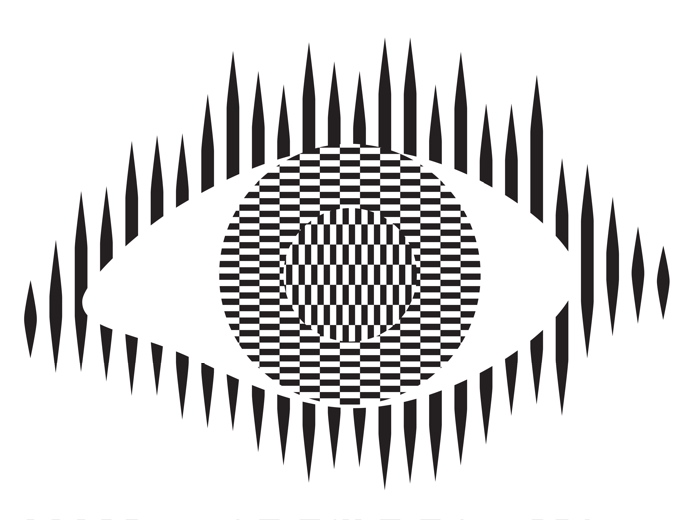
Optical illusions and magic tricks give a mirror on the limits of our brains. Even when you know an optical illusion is an illusion you cannot stop seeing the effect. For example, this image of an eye is completely flat and stationary: nothing is moving. And yet if you move your head very slightly from side to side the centre pops out and seems to be moving separately to the rest of the eye.
Illusions occur because our brains have limited resources and take short cuts in processing the vast amount of information that our senses deliver. These short cuts allow us to understand what we see faster and do so with less resources. Illusions happen when the short cuts are applied in a way where they do not apply.
What this means is that we do not see the world as it really is but see a simplified version constructed by our subconscious brain and provided to our conscious brain. It is very much like in the film, the Matrix, except it is our own brains providing the fake version of the world we experience rather than alien computers.
Attention
The way we focus our attention is one example of this. You may think that you see the world as it is, but you only directly see the things you focus on, your brain fills out the rest rather than constantly feeding the actual information to you constantly. It does this based on what it last saw there but also on the basis of just completing patterns. The following illusion shows this in action. There are 12 black dots and as you move your attention from one to the next you can see and count them all. However, you cannot see them all at once. The ones in your peripheral vision disappear as you look away as the powerful pattern of grey lines takes over. You are not seeing everything that is there to be seen!
Our brains also have very limited working memory and limited attention. Magicians also exploit this to design “magical systems” where a whole audience make the same mistake at the same time. Design the magic well so that these limitations are triggered and people miss things that are there to be seen, forget things they knew a few moments before, and so on. For example, by distracting their attention they make them miss something that was there to be seen.
What does this mean to computer scientists?
When we design the way we interact with a computer system, whether software and hardware, it is also possible to trigger the same limitations a magician or optical illusion does. A good interaction designer therefore does the opposite to a magician and, for example: draws a user’s attention to things that must not be missed at a critical time; they ensure they do not forget things that are important, they help them keep track of the state of the system, they give good feedback so they know what has happened.
Most software is poorly designed leading to people making mistakes, not all the time, but some of the time. The best designs will help people avoid making mistakes and also help them spot and fix mistakes as soon as they do make them.
Examples of poor medical device design
The following are examples of the interfaces of actual medical devices found in a day of exploration by one researcher (Paolo Masci) at a single very good hospital (in the US).
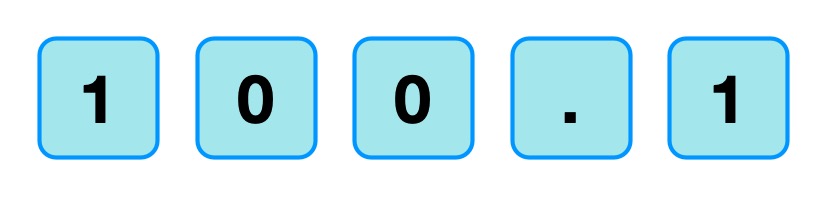
When the nurse or doctor types the following key sequence as a drug dose rate:
Image by CS4FN
one infusion pump, without any explicit warning, other than the number being displayed, registered the number entered as 1001.
Probably, the programmer had been told that when doses are as large as 100, then fractional doses are so relatively small that they make no difference. A user typing in such fractional amounts, is likely making an error as such a dose is unlikely to be prescribed. The typing of the decimal point is therefore just ignored as a mistake by the infusion pump. Separately, (perhaps coded by a different programmer in the team, or at a different time) until the ENTER key is pressed the code treats the number as incomplete. Any further digits typed are therefore just accepted as part of the number.
A different design by a different manufacturer also treats the key sequence as 1001 (though in the case shown 1001 is rejected as it exceeds the maximum allowable rate, caused by the same issue of the device silently ignoring a decimal point).
This suggests two different coding teams indipendently coded in the same design flaw that led to the same user error.
What is wrong with that?
Devices should never silently ignore and/or correct input if bad mistakes are to be avoided. Here, that original design flaw, could lead to a dose 10x too big being infused into a patient and that could kill. It relies on the person typing the number noticing that the decimal point has been ignored (with no help from the device). Decimal points are small and easily missed of course. Also, their attention cannot be guaranteed to be on the machine and, in fact, with a digit keypad for entering numbers that attnetion is likely to be on the keys. Alarms or other distractions elsewhere could easily mean they do not notice the missing decimal point (which is a tiny thing to see).
An everyday example of the same kind of problem, showing how easily mistakes are missed is in auto-completion / auto-correction of spelling mistakes in texts and word processors. Goofs where an auto-corrected word are missed are very common. Anything that common needs to be designed away in a safety critical system.
Design Rules
One of the ways that such problems can be avoided is by programmers following interaction design rules. The machine (and the programmer writing the code) does not know what a user is trying to input when they make a mistake. One design rule is therefore that a program should therefore NEVER correct any user error silently. Here perhaps the mistake was pressing 0 twice rather than pressing the decimal point. In the case of user errors, the program should raise awareness of the error, and not allow further input until the error is corrected. The program should explicitly draw the person’s attention to the problem (eg changing colour, flashing, beeping, etc). This involves using the same understanding of cognitive psychology as a magician, to control their attention. Whereas a magician would be taking their attention away from the thing that matters, the programmer draws theur attention to it.
It should make clear in an easily understandable error message what the problem is (eg here “Doses over 99 should not include decimal fractions. Please delete the decimal point.”) It should then leave the user to make the correction (eg deleting the decimal point) not do it itself.
By following a design rule such as this programmers can avoid user errors, which are bound to happen, from causing a big problem.
Avoiding errors
Sometimes the way we design software interfaces and their interaction design we can do even better than this, though. We are letting people make mistakes and then telling them to help them pick up the pieces afterward. Sometimes we can do better than this and with better design help them avoid making the mistake in the first place or spot the mistake themselves as soon as they make it.
Doing this is again about controlling user attention as a magician does. An interaction designer needs to do this again in the opposite wayto the magician though, directing the users attention to the place it needs to be to see what is really happening as they take actions rather than away from it.
To use a digit keypad, the users attention has to be on their fingers so they can see where to put their fingers to press a given digit. They look at the keypad, not the screen. The design of the digit keypad draws their attention to the wrong place. However, there are lots of ways to enter numbers and the digit keypad is only one. One other way is to use cursor keys (left, right, up and down) and have a cursor on the screen move to the position where a digit will be changed. Now, once the person’s finger is on say the up arrow, attention naturally moves to the screen as that button is just pressed repeatedly until the correct digit is reached. The user is watching what is happening, watching the program’s output, rather than their input, so is now less likely to make a mistake. If they do overshoot, their attention is in the right place to see it and immediately correct it. Experiments showed that this design did lead to fewer large errors though is slower. With numbers though accuracy is more likely to matter than absolute speed, especially in medical situations.
There are still subtleties to the design though – should a digit roll over from 9 back to 0, for example? If it does should the next digit increase by 1 automatically? Probably not, as these are the things that lead to other errors (out by a factor of 10). Instead going up from 9 should lead to a warning.
Learn from magicians
Magicians are expert at making people make mistakes without them even realising they have. The delight in magic comes from being so easily fooled so that the impossible seems to have happened. When writing software we need to using the same understanding of our cognitive resources and how to manipulate them to prevent our users making mistakes. There are many ways to do this, but we should certainly never write software that silently corrects user errors. We should control the users attention from the outset using similar techniques to a magician so that their attention is in the right place to avoid problems. Ideally a number entry system such as using cursor keys to enter the number rather than a digit keypad should be used as then the attention of the user is more likely to be on the number entered in the first place.
Responsible for the design of not just the interface but how a device or software is used. Applying creativity and applying existing design rules to come up with solutions. Has a deep understanding both of technical issues and of the limitations of human cognition (how our brains work).
Usability consultant
Give advice on making software and gadgets generally easier to use, evaluate designs for features that will make them hard to use or increase the likelihood of errors, finding problems at an early stage.
User experience (UX) consultant
Give advice on ensuring users of software have a good positive experience and that using it is not for example, frustrating.
Medical device developer
Develop software or hardware for medical devices used in hospitals or increasingly in the home by patients. Could be improvements to existing devices or completely novel devices based on medical or biomedical breakthroughs, or on computer science breakthroughs, such as in artificial intelligence.
Research and Development Scientist
Do experiments to learn more about the way our brains work, and/or apply it to give computers and robots a way to see the world like we do. Use it to develop and improve products for a spin-off company.
This short post, part of our CS4FN Christmas Computing Advent Calendar, is to let you know that you may be able to watch Santa’s sleigh as it goes overhead on Christmas Day (or Christmas Eve). It doesn’t matter if you believe in Father Christmas or not, whether you’ll actually see his sleigh really only depends on how cloudy it is! In fact Santa’s sleigh follows the orbit of the International Space Station (ISS) remarkably closely…
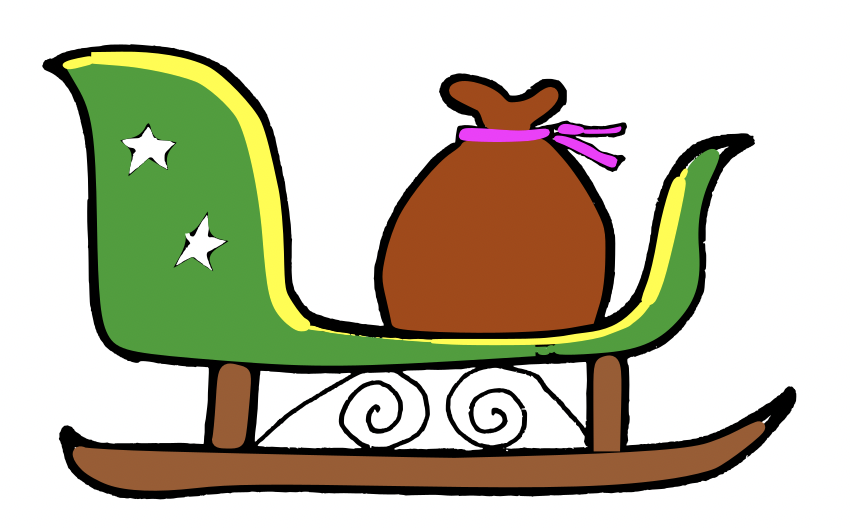
Santa’s sleigh: Father Christmas will soon be tethering the sack of gifts to the sleigh with very strong straps (not shown) because he’ll be flying very fast and very high.
In the unlikely event that any small children are awake unusually early on Christmas Day and it’s not cloudy then you might be able to catch a bright light passing overhead at around 05:54 in the morning as Father Christmas zips around the world delivering presents at incredible speeds.
The timings below are for London, UK but you can enter your own city and see if Father Christmas will be passing near you, and when.
Day
Date
Time
Visible
Max Height
Appears
Disappears
Sun
24 Dec
6:40 am
6 min
86°
21° above W
10° above E
Mon
25 Dec
5:54 am
4 min
88°
82° above WSW
10° above E
See ‘How to spot the station‘ and find out what ‘max height’ and ‘appears’ means in context. You can also use NASA’s Spot The Station app for phones.
In this series of posts we’re both celebrating the breadth of computing research but also the history of our own CS4FN project which has been inspiring young people about computing and supporting teachers in teaching the topic, in part by distributing free magazines to subscribing UK schools since 2005 (ask your teacher to subscribe for next year’s magazine).
Today’s advent calendar picture is of a candy cane which made me think both of walking aids and of support sticks that alert others that the person using it is blind or visually impaired.
Above: A white candy cane with green and red stripes. Image drawn and digitised by Jo Brodie.
We’ve worked with several people over the years to write about their research into making life easier for people with a variety of disabilities. Issue 19 of our magazine (“Touch it, feel it, hear it!”) focused on the DePiC project (‘Design Patterns for Inclusive Collaboration’) which included work on helping visually impaired sound engineers to use recording studio equipment, and you can read one of the articles (see ‘2. The Haptic Wave’) from that magazine below.
Another of our CS4FN magazines (issue 27, called “Smart Health: decisions, decisions, decisions“) was about Bayesian mathematics and its use in computing, but one of those uses might be an app with the potential to help people with arthritis get medical support when they most need it (rather than having to wait until their next appointment) – download the magazine by clicking on its title and scroll to page 16 & 17 (p9 of the 11 page PDF). Our writing also supports the (obvious) case, that disabled people must be involved at the design and decision-making stages.
1. Design for All (and by All!)
by Paul Curzon, QMUL.
Making things work for everyone
Designing for the disabled – that must be a niche market mustn’t it? Actually no. One in five people have a disability of some kind! More surprising still, the disabled have been the inspiration behind some of the biggest companies in the world. Some of the ideas out there might eventually give us all super powers.
Just because people have disabilities doesn’t mean they can’t be the designers, the innovators themselves of course. Some of the most innovative people out there were once labelled ‘disabled’. Just because you are different doesn’t mean you aren’t able!
Where do innovators get their ideas from? Often they come from people driven to support people currently disadvantaged in society. The resulting technologies then not only help those with disabilities but become the everyday objects we all rely on. A classic example is the idea of reducing the kerbs on pavements to make it possible for people in wheelchairs to get around. Turns out of course that they also help people with pushchairs, bikes, roller-blades and more. That’s not just a one-off example, some of the most famous inventors and biggest companies in the world have their roots in ‘design for all’.
Designing for more extreme situations pushes designers into thinking creatively, thinking out of the box. That’s when totally new solutions turn up. Designing for everyone is just a good idea!
The blind musician Joey Stuckey in his recent music video commandeers then drives off in a car, and yes he is blind. How can a blind person drive a car, and what has that got to do with him trying to filch a sound machine? So maybe taking the car was just a stunt, but he really did try and run off with a novel sound machine!
As well as fronting his band Joey is an audio engineer. Unlike driving a car, which is all about seeing things around you – signs, cars pedestrians – being an audio engineer seems a natural job for someone who is blind. Its about recording, mixing and editing music, speech and sound effects. What matters most is that the person has a good ear. Having the right skills could easily lead to a job in the music industry, in TV and films, or even in the games industry. It’s also an important job. Getting the sound right is critical to the experience of a film or game. You don’t want to be struggling to hear mumbling actors, or the sound effects to drown out a key piece of information in a game.
Mixing desks
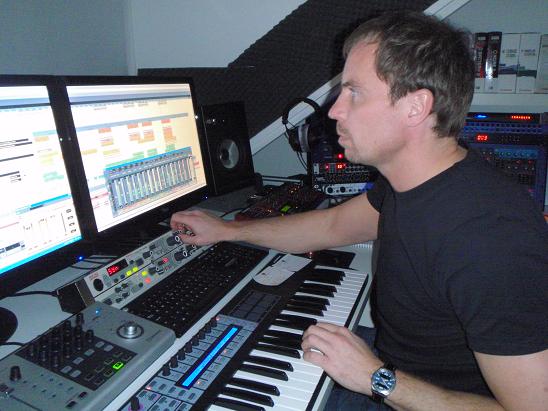
Once upon a time Audio engineers used massive physical mixing desks. That was largely ok for a blind person as they could remember the positions of the controls as well as feel the buttons. As the digital age has marched on, mixing desks have been replaced by Digital Audio Workstations. They are computer programs and the trouble is that despite being about sound, they are based on vision.
When we learn about sound we are shown pictures of wavy lines: sound waves. Later, we might use an oscilloscope or music editing software, and see how, if we make a louder sound, the curves get taller on the screen: the amplitude. We get to hear the sound and see the sound wave at the same time. That’s this multimodal idea again, two ways of sensing the same thing.
Once upon a time Audio engineers used massive physical mixing desks. That was largely ok for a blind person as they could remember the positions of the controls as well as feel the buttons. As the digital age has marched on, mixing desks have been replaced by Digital Audio Workstations. They are computer programs and the trouble is that despite being about sound, they are based on vision.
When we learn about sound we are shown pictures of wavy lines: sound waves. Later, we might use an oscilloscope or music editing software, and see how, if we make a louder sound, the curves get taller on the screen: the amplitude. We get to hear the sound and see the sound wave at the same time. That’s this multimodal idea again, two ways of sensing the same thing.
But hang on, sound isn’t really a load of wavy lines curling out of our mouths, and shooting away from guitar strings. Sound is energy and atoms pushing up against each other. But we think of sound as a sound wave to help us understand it. That’s what a computer scientist calls abstraction: representing things in a simpler way. Sound waves are an abstraction, a simplified representation, of sound itself.
The representation of sound as sound waves, as a waveform, helps us work with sound, and with Digital Audio Workstations it is now essential for audio engineers. The engineer works with lines, colors, blinks and particularly sound waves on a screen as they listen to the sound. They can see the peaks and troughs of the waves, helping them find the quiet, loud and distinctive moments of a piece of music, at a glance, for example. That’s great as it makes the job much easier…but only if you are fully sighted. It makes things impossible for someone with a visual impairment. You can’t see the sound waves on the editing screen. Touching a screen tells you nothing. Even though it’s ultimately about sounds, doing your job has been made as hard as driving a car. This is rather sad given computers have the potential to make many kinds of work much more accessible to all.
Feel the sound
The DePIC research team, a group of people from Goldsmiths, Queen Mary University of London and Bath Universities with a mission to solve problems that involve the senses, decided to fix it. They’ve created the first ever plug-in software for professional Digital Audio Workstations that makes peak level meters completely accessible. It uses ‘sonification’: it turns those visual signals in to sound! decided to fix the problems. They brought together Computer Scientists, Design experts, and Cognitive Scientists and most importantly of all audio engineers who have visual impairments. Working together over two years in workshops sharing their experiences and ideas, developing, testing and improving prototypes to figure out how a visually impaired engineer might ‘see’ soundwaves. They created the HapticWave, a device that enables a user to feel rather than see a sound wave.
The HapticWave
The HapticWave combines novel hardware and software to provide a new interface to the traditional Digital Audio Workstation. The hardware includes a long wooden box with a plastic slider. As you move the slider right and left you move forward and backwards through the music. On the slider there is a small brass button, called a fader. Tiny embossed stripes on the side of the slider let you know where the fader is relative to the middle and ends of the slider. It moves up and down in sync with the height of the sound wave. So in a quiet moment the fader returns to the centre of the slider. When the music is loud, the fader zooms to the top of the handle. As you slide forwards and backwards through the music the little button shoots up and down, up and down tracing the waveform. You feel its volume changing. Music with heavy banging beats has your brass button zooming up and down, so mind your fingers!
So back to the title of the article! Joey trialled the HapticWave at a research workshop and rather wanted to take one home, he loved it so much he jokingly tried distracting the researchers to get one. But he didn’t get away with it – maybe his getaway car just wasn’t fast enough!
Find out more about disabled computer scientists, and how computer science and human interaction design can help people with disabilities.
This one-minute video illustrates an interesting audio illusion, demonstrating that our brains are ‘always using prior information to make sense of new information coming in’.
The McGurk Effect
You can read more about the McGurk effect on page 7 of issue 5 of the CS4FN magazine, called ‘The Perception Deception‘.

















 cs4fn
cs4fn 