Hear and … their magic square

A magic three by three square with the numbers 2, 9 and 4 in the top row, 7, 5 and 3 in the middle row and 6, 1 and 8 in the bottom row. Each row, column and the two diagnonals add up to 15.
Image by CS4FN

Victorian Computer Scientists, Ada Lovelace and Charles Babbage were interested in Magic Squares. We know this because a scrap of paper with mathematical doodles and scribbles on it in their handwriting has been discovered, and one of the doodles is a magic square like this one. In a magic square all the rows, columns and diagonals magically add to the same number. At some point, Ada and Charles were playing with magic squares together. Creating magic squares sounds hard, but perhaps not with a bit of algorithmic magic.

The magical effect

For this trick you ask a volunteer to pick a number. Instantly, on hearing it, you write out a personal four by four magic square for them based on that number. When finished the square contents adds to their chosen number in all the usual ways magic squares do. An impressive feat of superhuman mathematical skills that you can learn to do most instantly.

Making the magic

To perform this trick, first get your audience member to select a large two digit number. It helps if it is a reasonably large number, greater than 20, as you’re going to need to subtract 20 from it in a moment. Once you have the number you need to do a bit of mental arithmetic. You need an algorithm – a sequence of steps – to follow that given that number guarantees that you will get a correct magic square.

For our example, we will suppose the number you are given is 45, though it works with any number.

Let’s call the chosen number N (in our example: N is 45). You are going to calculate the following four numbers from it: N-21, N-20, N-19 and N-18, then put them in to a special, precomputed magic square pattern.

The magic algorithm

Sums like that aren’t too hard, but as you’ve got to do all this in your head, you need a special algorithm that makes it really easy. So here is an easy algorithm for working out those numbers.

This four by four magic square contains the calculations needed to install the numbers in the correct positions so that the magic square will work with any large two digit number
Image by CS4FN.
  1. Start by working out N – 20. Subtracting 20 is quite easy. For our example number of 45, that is 25. This is our ‘ROOT’ value that we will build the rest from.
  2. N-19. Just add 1 to the root value (ROOT + 1). So 25 + 1 gives 26 for our example.
  3. N-18. Add 2 to the root value (ROOT + 2). So 25 + 2 gives 27.
  4. N-21. Subtract 1 from the root value (ROOT – 1). So 25 – 1 gives 24.
  5. Having worked out the 4 numbers created form the original chosen number, N, you need to stick them in the right place in a blank magic square, along with some other numbers you need to remember. It is the pattern you use to build your magic square from. It looks like the one to the right. To make this step easy, write this pattern on the piece of paper you write the final square on. Write the numbers in light pencil, over-writing the pencil as you do the trick so no-one knows at the end what you were doing.

A square grid of numbers like this is an example of what computer scientists call a data structure: a way to store data elements that makes it easy to do something useful: in this case making your friends think you are a maths superhero.

When you perform this trick, fill in the numbers in the 4 by 4 grid in a random, haphazard way, making it look like you are doing lots of complicated calculations quickly in your head.

Finally, to prove to everyone it is a magic square with the right properties, go through each row, column and diagonal, adding them up and writing in the answers around the edge of the square, so that everyone can see it works.

The final magic square for chosen number 45

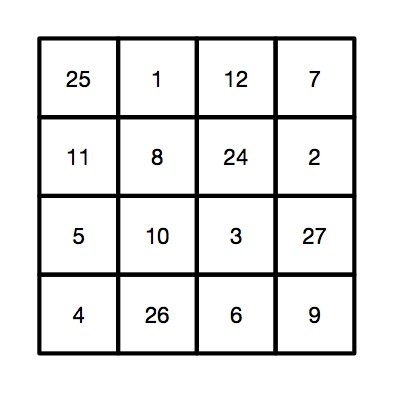
So, for our example, we would get the following square, where all the rows, columns and diagonals add to our audience selected number of 45.

This four by four magic square is the result of taking the chosen number 45 and performing the sequence of calculations (the algorithm) using it as 'N'.
Image by CS4FN.

Why does it work?

If you look at the preset numbers in each row, column and diagonal of the pattern, they have been carefully chosen in advance to add up to the number being subtracted from N on those lines. Try it! Along the top row 1 + 12 + 7 = 20. Down the right side 11 + 5 + 4 = 20.

Do it again?

Of course you shouldn’t do it twice with the same people as they might spot the pattern of all the common numbers…unless, now you know the secret, perhaps you can work out your own versions each with a slightly different root number, calculated first and so a different template written lightly on different pieces of paper.

Peter McOwan and Paul Curzon, Queen Mary University of London


Related Magazine …


Download our free magic booklets


The illusion of good software design

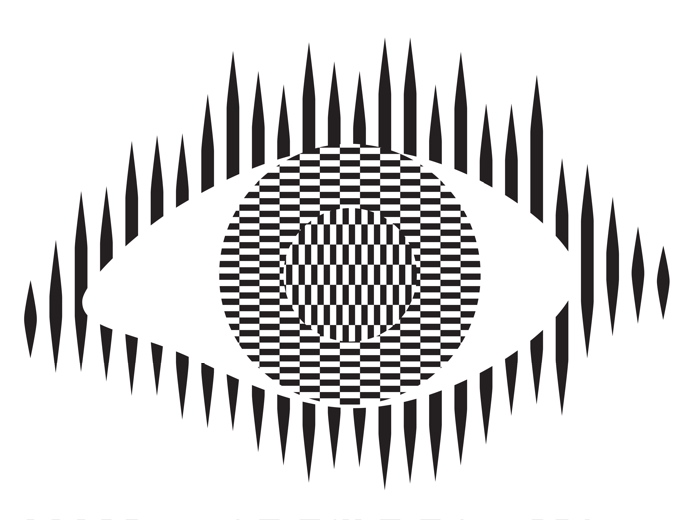
Ouchi eye based on an illusion by Ouchi
Image by CS4FN based on an illusion by Ouchi

When disasters involving technology occur, human error is often given as the reason, but even experts make mistakes using poor technology. Rather than blame the person, human error should be seen as a design failure. Bad design can make mistakes more likely and good design can often eliminate them. Optical illusions and magic tricks show how we can design things that cause everyone to make the same systematic mistake, and we need to use the same understanding of the brain when designing software and hardware. This is especially important if the gadgets are medical devices where mistakes can have terrible consequences. The best computer scientists and programmers don’t just understand technology, they understand people too, and especially our brain’s fallibilities. If they don’t, then mistakes using their software and gadgets are more likely. If people make mistakes, don’t blame the person, fix the design and save lives.

Illusions

Optical illusions and magic tricks give a mirror on the limits of our brains. Even when you know an optical illusion is an illusion you cannot stop seeing the effect. For example, this image of an eye is completely flat and stationary: nothing is moving. And yet if you move your head very slightly from side to side the centre pops out and seems to be moving separately to the rest of the eye.

Illusions occur because our brains have limited resources and take short cuts in processing the vast amount of information that our senses deliver. These short cuts allow us to understand what we see faster and do so with less resources. Illusions happen when the short cuts are applied in a way where they do not apply.

What this means is that we do not see the world as it really is but see a simplified version constructed by our subconscious brain and provided to our conscious brain. It is very much like in the film, the Matrix, except it is our own brains providing the fake version of the world we experience rather than alien computers.

Attention

The way we focus our attention is one example of this. You may think that you see the world as it is, but you only directly see the things you focus on, your brain fills out the rest rather than constantly feeding the actual information to you constantly. It does this based on what it last saw there but also on the basis of just completing patterns. The following illusion shows this in action. There are 12 black dots and as you move your attention from one to the next you can see and count them all. However, you cannot see them all at once. The ones in your peripheral vision disappear as you look away as the powerful pattern of grey lines takes over. You are not seeing everything that is there to be seen!

Find more on the links to magic in our book

Conjuring with Computation” .

Our brains also have very limited working memory and limited attention. Magicians also exploit this to design “magical systems” where a whole audience make the same mistake at the same time. Design the magic well so that these limitations are triggered and people miss things that are there to be seen, forget things they knew a few moments before, and so on. For example, by distracting their attention they make them miss something that was there to be seen.

What does this mean to computer scientists?

When we design the way we interact with a computer system, whether software and hardware, it is also possible to trigger the same limitations a magician or optical illusion does. A good interaction designer therefore does the opposite to a magician and, for example: draws a user’s attention to things that must not be missed at a critical time; they ensure they do not forget things that are important, they help them keep track of the state of the system, they give good feedback so they know what has happened.

Most software is poorly designed leading to people making mistakes, not all the time, but some of the time. The best designs will help people avoid making mistakes and also help them spot and fix mistakes as soon as they do make them.

Examples of poor medical device design

The following are examples of the interfaces of actual medical devices found in a day of exploration by one researcher (Paolo Masci) at a single very good hospital (in the US).

When the nurse or doctor types the following key sequence as a drug dose rate:

this infusion pump, without any explicit warning, other than the number being displayed, registered the number entered as 1001.

Probably, the programmer had been told that when doses are as large as 100, then fractional doses are so relatively small that they make no difference. A user typing in such fractional amounts, is likely making an error as such a dose is unlikely to be prescribed. The typing of the decimal point is therefore just ignored as a mistake by the infusion pump. Separately, (perhaps coded by a different programmer in the team, or at a different time) until the ENTER key is pressed the code treats the number as incomplete. Any further digits typed are therefore just accepted as part of the number.

This different design by a different manufacturer also treats the key sequence as 1001 (though in the case shown 1001 is rejected as it exceeds the maximum allowable rate, caused by the same issue of the device silently ignoring a decimal point).

This suggests two different coding teams indipendently coded in the same design flaw that led to the same user error.

What is wrong with that?

Devices should never silently ignore and/or correct input if bad mistakes are to be avoided. Here, that original design flaw, could lead to a dose 10x too big being infused into a patient and that could kill. It relies on the person typing the number noticing that the decimal point has been ignored (with no help from the device). Decimal points are small and easily missed of course. Also, their attention cannot be guaranteed to be on the machine and, in fact, with a digit keypad for entering numbers that attnetion is likely to be on the keys. Alarms or other distractions elsewhere could easily mean they do not notice the missing decimal point (which is a tiny thing to see).

An everyday example of the same kind of problem, showing how easily mistakes are missed is in auto-completion / auto-correction of spelling mistakes in texts and word processors. Goofs where an auto-corrected word are missed are very common. Anything that common needs to be designed away in a safety critical system.

Design Rules

One of the ways that such problems can be avoided is by programmers following interaction design rules. The machine (and the programmer writing the code) does not know what a user is trying to input when they make a mistake. One design rule is therefore that a program should therefore NEVER correct any user error silently. Here perhaps the mistake was pressing 0 twice rather than pressing the decimal point. In the case of user errors, the program should raise awareness of the error, and not allow further input until the error is corrected. The program should explicitly draw the person’s attention to the problem (eg changing colour, flashing, beeping, etc). This involves using the same understanding of cognitive psychology as a magician, to control their attention. Whereas a magician would be taking their attention away from the thing that matters, the programmer draws theur attention to it.

It should make clear in an easily understandable error message what the problem is (eg here “Doses over 99 should not include decimal fractions. Please delete the decimal point.”) It should then leave the user to make the correction (eg deleting the decimal point) not do it itself.

By following a design rule such as this programmers can avoid user errors, which are bound to happen, from causing a big problem.

Avoiding errors

Sometimes the way we design software interfaces and their interaction design we can do even better than this, though. We are letting people make mistakes and then telling them to help them pick up the pieces afterward. Sometimes we can do better than this and with better design help them avoid making the mistake in the first place or spot the mistake themselves as soon as they make it.

Doing this is again about controlling user attention as a magician does. An interaction designer needs to do this again in the opposite wayto the magician though, directing the users attention to the place it needs to be to see what is really happening as they take actions rather than away from it.

To use a digit keypad, the users attention has to be on their fingers so they can see where to put their fingers to press a given digit. They look at the keypad, not the screen. The design of the digit keypad draws their attention to the wrong place. However, there are lots of ways to enter numbers and the digit keypad is only one. One other way is to use cursor keys (left, right, up and down) and have a cursor on the screen move to the position where a digit will be changed. Now, once the person’s finger is on say the up arrow, attention naturally moves to the screen as that button is just pressed repeatedly until the correct digit is reached. The user is watching what is happening, watching the program’s output, rather than their input, so is now less likely to make a mistake. If they do overshoot, their attention is in the right place to see it and immediately correct it. Experiments showed that this design did lead to fewer large errors though is slower. With numbers though accuracy is more likely to matter than absolute speed, especially in medical situations.

There are still subtleties to the design though – should a digit roll over from 9 back to 0, for example? If it does should the next digit increase by 1 automatically? Probably not, as these are the things that lead to other errors (out by a factor of 10). Instead going up from 9 should lead to a warning.

Learn from magicians

Magicians are expert at making people make mistakes without them even realising they have. The delight in magic comes from being so easily fooled so that the impossible seems to have happened. When writing software we need to using the same understanding of our cognitive resources and how to manipulate them to prevent our users making mistakes. There are many ways to do this, but we should certainly never write software that silently corrects user errors. We should control the users attention from the outset using similar techniques to a magician so that their attention is in the right place to avoid problems. Ideally a number entry system such as using cursor keys to enter the number rather than a digit keypad should be used as then the attention of the user is more likely to be on the number entered in the first place.

– Paul Curzon, Queen Mary University of London

More on …

Related Careers

Careers related to this article include:

  • Interaction designer
    • Responsible for the design of not just the interface but how a device or software is used. Applying creativity and applying existing design rules to come up with solutions. Has a deep understanding both of technical issues and of the limitations of human cognition (how our brains work).
  • Usability consultant
    • Give advice on making software and gadgets generally easier to use, evaluate designs for features that will make them hard to use or increase the likelihood of errors, finding problems at an early stage.
  • User experience (UX) consultant
    • Give advice on ensuring users of software have a good positive experience and that using it is not for example, frustrating.
  • Medical device developer
    • Develop software or hardware for medical devices used in hospitals or increasingly in the home by patients. Could be improvements to existing devices or completely novel devices based on medical or biomedical breakthroughs, or on computer science breakthroughs, such as in artificial intelligence.
  • Research and Development Scientist
    • Do experiments to learn more about the way our brains work, and/or apply it to give computers and robots a way to see the world like we do. Use it to develop and improve products for a spin-off company.

Magazines …

Our Books …


Subscribe to be notified whenever we publish a new post to the CS4FN blog.


This page is funded by EPSRC on research agreement EP/W033615/1.

QMUL CS4FN EPSRC logos

The invisible dice mystery – a magic trick underpinned by computing and maths

By Paul Curzon, Queen Mary University of London

The Ancient Egyptians, Romans and Greeks used dice with various shapes and markings; some even believed they could be used to predict the future. Using just a few invisible dice, which you can easily make at home, you can amaze your friends with a transparent feat of magical prediction.

The presentation

You can’t really predict the future with dice, but you can do some clever magic tricks with them. For this trick first you need some invisible dice, they are easy to make, it’s all in the imagination. You take your empty hand and state to your friend that it contains two invisible dice. Of course it doesn’t, but that’s where the performance come in. You set up the story of ancient ways to predict the future. You can have lots of fun as you hand the ‘dice’ over and get your friend to do some test rolls to check the dice aren’t loaded. On the test rolls ask them what numbers the dice are showing (remember a dice can only show numbers 1 through 6), this gets them used to things. Then on the final throw, tell them to decide what numbers are showing, but not to tell you! You are going to play a game where you use these numbers to create a large ‘mystical’ number.

Red dice image by Deniz Avsar from Pixabay

To start, they choose one of the dice and move it closer to them, remembering the number on this die. You may want to have them whisper the numbers to another friend in case they forget, as that sort of ruins the trick ending!

Next you take two more ‘invisible dice’ from your pocket; these will be your dice. You roll them a bit, giving random answers and then finally say that they have come up as a 5 and a 5. Push one of the 5s next to the dice your friend selected, and tell them to secretly add these numbers together, i.e. their number plus 5. Then push your second 5 over and suggest, to make it even harder, to multiply their current number by 5+5 (i.e. 10 – that’s a nice easy multiplication to do) and remember that new number. Then finally turn attention to your friend’s remaining unused die, and get them to add that last number to give a grand total. Ask them now to tell you that grand total. Almost instantly you can predict exactly the unspoken numbers on each of their two invisible dice. If they ask how it you did it, say it was easy – they left the dice in plain sight on the table. You just needed to look at them.

The computing behind

This trick works by hiding some simple algebra in the presentation. You have no idea what two numbers your friend has chosen, but let’s call the number on the die they select A and the other number B. If we call the running total X then as the trick progresses the following happens: to begin with X=0, but then we add 5 to their secret number A, so X= A+5. We then get the volunteer to multiply this total by 5+5 (i.e. 10) so now X=10*(A+5). Then we finally add the second secret number B to give X=10(A+5)+B. If we expand this out, X= 10A+50+B. We know that A and B will be in the range 1-6 so this means that when your friend announces the grand total all you need to do is subtract 50 from that number. The number left (10*A+B) means that the value in the 10s column is the number A and the units column is B, and we can announce these out loud. For example if A=2 and B=4, we have the grand total as 10(2+5)+4 = 74, and 74 – 50= is 24, so A is 2, and B is 4.

In what are called procedural computer languages this idea of having a running total that changes as we go through well-defined steps in a computer program is a key element. The running total X is called a variable, to start in the trick, as in a program, we need to initialise this variable, that is we need to know what it is right at the start, in this case X=0. At each stage of the trick (program) we do something to change the ‘state’ of this variable X, ie there are rules to decide what it changes to and when, like adding 5 to the first secret number changes X from 0 to X=(A+5). A here isn’t a variable because your friend knows exactly what it is, A is 2 in the example above, and it won’t change at any time during the trick so it’s called a constant (even if we as the magician don’t know what that constant is). When the final value of the variable X is announced, we can use the algebra of the trick to recover the two constants A and B.

Other ways to do the trick

Of course there are other ways you could perform the trick using different ways to combine the numbers, as long as you end up with A being multiplied by 10 and B just being added. But you want to hide that fact as much as possible. For example you could use three ‘invisible dice’ yourself showing 5, 2 and 5 and go for 5*(A*2+5) + B if you feel confident your friend can quickly multiply by 5. Then you just need to subtract 25 from their grand total (10A+25+B), and you have their numbers. The secret here is to play with the presentation to get one that suits you and your audience, while not putting too much of a mental strain on you or your friend to have to do difficult maths in their head as they calculate the state changes of that ever-growing variable X.


This article was first published on the original CS4FN website and there’s a copy on page 7 of Issue 15 of the CS4FN magazine, Does your computer understand you? You can download a copy of the magazine as a free PDF by clicking on the image / link below, and you can download all of our free material (magazines, booklets) from our downloads site. See in particular our Magic section (which is not invisible!).


Related Magazine …


EPSRC supports this blog through research grant EP/W033615/1.