Have you ever followed a recipe perfectly, only to find the cake tastes… well, a bit weird? You followed every rule, measured every ingredient, and checked every step. The recipe said you did it right. But your taste buds, and your grandma’s disappointed sigh, told you something was definitely wrong. In the world of computer science, we have this problem all the time. We call it the difference between verification and validation.
Verification is like checking the recipe. Did you follow the rules exactly as written? A computer program called a “verifier” can look at the code a programmer wrote and check it against the “recipe” (the formal specification). If the code matches the recipe, it gets a big green checkmark. It’s officially “correct.”
But validation is like the taste test. Does the final cake actually taste good? Does it make people happy? This is about asking: did we make the right thing?
The Case of the Annoying Vending Machine
Imagine a new high-tech vending machine. Its specification (its recipe) says: “If a user inserts money and the selected item is out of stock, return the money.”
A programmer builds the machine. A verifier checks it. You put in a pound, press “B2” for salt and vinegar crisps, and it’s out of stock. The machine correctly spits your pound coin back out onto the floor.
Is the machine correct? According to the recipe, yes! Verification passed. Is it the right machine? No! It’s incredibly annoying!
Your expectation as a human was probably completely different. You expected it to say, “Sorry, B2 is out of stock. Please choose something else.” You expected it to hold onto your money and let you make another choice. Cheese and Onion Crisps are just as good. The machine followed the rules, but it completely misunderstood what you, the user, actually wanted. It was correct, but wrong.
This is the frustrating gap where most “bad” software lives. It follows its own strange rules perfectly but seems to have no common sense about what people actually expect.
Teaching the Genie to Read Minds (Almost!)
So how do we fix this? Our research introduces an idea called Semantic Expectation Logic (SEL). It sounds complicated, but the core idea is simple: what if we could teach the computer to understand not just its own recipe, but also the collection of fuzzy, unwritten expectations that people have in their heads?
Think of it like upgrading from a rule-following genie to a mind-reading one.
A rule-following genie gives you exactly what you wish for. If you wish to “be on a flight”, it might put you on the wing of a 747. Technically correct, but not what you expected!
SEL is our attempt to build a “mind-reading” genie for software. We do it in three steps:
Write Down the Rules of the World: We tell the computer about fundamental truths. For the vending machine, a rule might be “Money can only be returned after a transaction is finished or explicitly cancelled by the user.”
Ask People What They Expect: Instead of guessing, we show people what the machine does in different situations. “The machine just spat your coin on the floor. Is that what you expected?” We collect all these “yes” and “no” answers, along with why. We call this “mining expectations”.
Check for Gaps: Our SEL tool then looks at what the machine actually does and compares it to both the “Rules of the World” and the “Mined Expectations”.
It might find:
A Bug: The machine sets itself on fire. (It violates a Rule of the World: “Vending machines should not set themselves on fire.”)
A Validation Failure (The “Aha!” Moment): The machine follows its own rules perfectly but violates a strong expectation. Our tool would flag this: “Warning! 98% of people expected the machine to ask for another choice, but it just returned the money. This is a Surprise!”
We even created a “Surprise Factor” metric that gives a score from 0% to 100% for how surprising a piece of software is. A low score means the software behaves as people expect. A high score means you’ve built a technically “correct” but incredibly annoying vending machine.
By making expectations a central part of the testing process, we can start building software that isn’t just correct according to its own bizarre logic, but is also correct in a way that actually makes sense to the people using it. We can build the cake that not only follows the recipe but also tastes great.
Whenever humans have complicated, repetitive jobs to do, designers set to work making computer systems that do those jobs automatically. Autopilot systems in airplanes are a good example. Flying a commercial airliner is incredibly complex, so a computer system helps the pilots by doing a lot of the boring, repetitive stuff automatically. But in any automated system, there has to be a balance between human and computer so that the human still has ultimate control. It’s a strange characteristic of human-computer interaction: the better an automated program, the more its users rely on it, and the more dangerous it can be.
The problem is that the unpredictable always happens. Automated systems run into situations the designers haven’t anticipated, and humans are still much better at dealing with the unexpected. If humans can’t take back control from the system, accidents can happen. For example, some airplanes used to have autopilots that took control of a landing until the wheels touched the ground. But then, one rainy night, a runway in Warsaw was so wet that the plane began skidding along the runway when it touched down. The skid was so severe that the sensors never registered the touchdown of the plane, and so the pilots couldn’t control the brakes. The airplane only stopped when it had overshot the runway. The designers had relied so much on the automation that the humans couldn’t fix the problem.
Many designers now think it’s better to give some control back to the operators of any automated system. Instead of doing everything, the computer helps the user by giving them feedback. For example, if a smart car detects that it’s too close to the car ahead of it, the accelerator becomes more difficult to press. The human brain is still much better than any computer system at coming up with solutions to unexpected situations. Computers are much better off letting our brains do the tricky thinking.
Buzz Aldrin standing on the moon. Image by Neil Armstrong, NASA via Wikimedia Commons – Public Domain
You have no doubt heard of Neil Armstrong, first human on the moon. But have you heard of Margaret Hamilton? She was the lead engineer, responsible for the Apollo mission software that got him there, and ultimately for ensuring the lunar module didn’t crash land due to a last minute emergency.
Being a great software engineer means you have to think of everything. You are writing software that will run in the future encountering all the messiness of the real world (or real solar system in the case of a moon landing). If you haven’t written the code to be able to deal with everything then one day the thing you didn’t think about will bite back. That is why so much software is buggy or causes problems in real use. Margaret Hamilton was an expert not just in programming and software engineering generally, but also in building practically dependable systems with humans in the loop. A key interaction design principle is that of error detection and recovery – does your software help the human operators realise when a mistake has been made and quickly deal with it? This, it turned out, mattered a lot in safely landing Neil Armstrong and Buzz Aldrin on the moon.
As the Lunar module was in its final descent dropping from orbit to the moon with only minutes to landing, multiple alarms were triggered. An emergency was in progress at the worst possible time. What it boiled down to was that the system could only handle seven programs running at once but Buzz Aldrin had just set an eighth running. Suddenly, the guidance system started replacing the normal screens by priority alarm displays, in effect shouting “EMERGENCY! EMERGENCY”! These were coded into the system, but were supposed never to be shown, as the situations triggering them were supposed to never happen. The astronauts suddenly had to deal with situations that they should not have had to deal with and they were minutes away from crashing into the surface of the moon.
Margaret Hamilton was in charge of the team writing the Apollo in-flight software, and the person responsible for the emergency displays. She was covering all bases, even those that were supposedly not going to happen, by adding them. She did more than that though. Long before the moon landing happened she had thought through the consequences of if these “never events” did ever happen. Her team had therefore also included code in the Apollo software to prioritise what the computer was doing. In the situation that happened, it worked out what was actually needed to land the lunar module and prioritised that, shutting down the other software that was no longer vital. That meant that despite the problems, as long as the astronauts did the right things and carried on with the landing, everything would ultimately be fine.
Margaret Hamilton Image by Daphne Weld Nichols, CC BY-SA 3.0 via Wikimedia Commons
There was still a potential problem though, When an emergency like this happened, the displays appeared immediately so that the astronauts could understand the problem as soon as possible. However, behind the scenes the software itself that was also dealing with them, by switching between programs, shutting down the ones not needed. Such switchovers took time In the 1960s Apollo computers as computers were much slower than today. It was only a matter of seconds but the highly trained human astronauts could easily process the warning information and start to deal with it faster than that. The problem was that, if they pressed buttons, doing their part of the job continuing with the landing, before the switchover completed they would be sending commands to the original code, not the code that was still starting up to deal with the warning. That could be disastrous and is the kind of problem that can easily evade testing and only be discovered when code is running live, if the programmers do not deeply understand how their code works and spend time worrying about it.
Margaret Hamilton had thought all this through though. She had understood what could happen, and not only written the code, but also come up with a simple human instruction to deal with the human pilot and software being out of synch. Because she thought about it in advance, the astronauts knew about the issue and solution and so followed her instructions. What it boiled down to was “If a priority display appears, count to 5 before you do anything about it.” That was all it took for the computer to get back in synch and so for Buzz Aldrin and Neil Armstrong to recover the situation, land safely on the moon and make history.
Without Margaret Hamilton’s code and deep understanding of it, we would most likely now be commemorating the 20th July as the day the first humans died on the moon, rather than being the day humans first walked on the moon.
The 2025 tennis championships are the first time Wimbledon has completely replaced their human line judges with an AI vision and decision system, Hawk-Eye. After only a week it caused controversy, with the system being updated, after it failed to call a glaringly out ball in a Centre Court match between Brit Sonay Kartal and Anastasia Pavlyuchenkova. Apparently it had been switched off by mistake mid-game. This raises issues inherent in all computer technology replacing humans: that they can go wrong, the need for humans-in-the-loop, the possibility of human error in their use, and what you do when they do go wrong.
Perhaps because it is a vision system rather than generative AI there has been little talk of whether Hawk-Eye is 100% accurate or not. Vision systems do not hallucinate in the way generative AI does, but they are still not infallible. The opportunity for players to appeal has been removed, however: in the original way Hawk-Eye was used humans made the call and players could ask for Hawk-Eye to check. Now, Hawk-Eye makes a decision and basically that is it. A picture is shown on screen of a circle relative to the line, generated by Hawk-Eye to ‘prove’ the ball was in or out as claimed. It is then taken as gospel. Of course, it is just reflecting Hawk-Eye’s decision – what it “saw” – not reality and not any sort of actual separate evidence. It is just a visual version of the call shouted. However, it is taken as though it is absolute proof with no argument possible. If it is aiming to be really, really dependable then Hawk-Eye will have multiple independent systems sensing in different ways and voting on the result – as that is one of the ways computer scientists have invented to program dependability. However, whether it is 100% accurate isn’t really the issue. What matters is whether it is more accurate, making fewer mistakes, than human line judges do. Undoubtedly it is, so is therefore an improvement and some uncaught mistakes are not actually the point.
However, the mistake in this problem call was different. The operators of the system had switched it off mistakenly mid-match due to “human error”. That raises two questions. First, why was it designed to that a human could accidentally turn it off mid-match – don’t blame that person as it should not have been possible in the first place. Fix the system so it can’t happen again. That is what within a day the Lawn Tennis Association claim to have done (whether resiliently remains to be seen).
However, the mistake begs another question. Wimbledon had not handed the match over to the machines completely. A human umpire was still in charge. There was a human in the loop. They, however, had no idea the system was switched off we were told until the call for a ball very obviously out was not made. If that is so, why not? Hawk-Eye supposedly made two calls of “Stop”. Was that its way of saying “I am not working so stop the match”? If it was such an actual message to the umpire it is not a very clear way to make it, and guarantees to be disruptive. It sounds a lot like a 404 error message, added by a programmer for a situation that they do not expect to occur!
A basic requirement of a good interactive system is that the system state is visible – that it is not even switched on should have been totally obvious in the controls the umpire had well before the bad call. That needs to be fixed too, just in case there is still a way Hawk-Eye can still be switched off. It begs the question of how often has the system been accidentally switched off, or powered down temporally for other reasons, with no one knowing, because there was no glaringly bad call to miss at the time.
Another issue is the umpire supposedly did follow the proper procedure which was not to just call the point (as might have happened in the past given he apparently knew “the ball was out!”) but instead had the point replayed. That was unsurprisingly considered unfair by the player who lost a point they should have won. Why couldn’t the umpire make a decision on the point? Perhaps, because humans are no longer trusted at all as they were before. As suggested by Pavlyuchenkova there is no reason why there cannot be a video review process in place so that the umpire can make a proper decision. That would be a way to add back in a proper appeal process.
Also, as was pointed out, what happens if the system fully goes down, does Wimbledon now have to just stop until Hawk-Eye is fixed: “AI stopped play”. We have lots of situations over many decades as well as recently of complex computer systems crashing. Hawk-Eye is a complex system so problems are likely possible. Programmers make mistakes (and especially when doing quick fixes to fix other problems as was apparently just done). If you replace people by computers, you need a reliable and appropriate backup that can kick into place immediately from the outset. A standard design principle is that programs should help avoid humans making mistakes, help them quickly detect them when they do and help them recover.
A tennis match is not actually high stakes by human standards. No one dies because of mistakes (though a LOT of money is at stake), but the issues are very similar in a wide range of systems where people can die – from control of medical devices, military applications, space, aircraft and nuclear power plant control…all of which computers are replacing humans. We need good solutions, and they need to be in place before something goes wrong not after. An issue as systems are more and more automated is that the human left in the loop to avoid disaster has more and more trouble tracking what the machine is doing as they do less and less, so making it harder to step in and correct problems in a timely way (as was likely the case with the Wimbledon umpire). The humans need to not just be a little bit in the loop but centrally so. How you do that for different situations is not easy to work out but as tennis has shown it can’t just be ignored. There are better solutions than Wimbledon are using but to even consider them you have to first accept that computers do make mistakes so know there is a problem to be solved.
In the 2025 RHS Chelsea Flower Show there was one garden that was about technology as well as plants: The Avanade Intelligent Garden exploring how AI might be used to support plants. Each of the trees contained probes that sensed and recorded data about them which could then be monitored through an App. This takes pioneering research from over two decades ago a step further, incorporating AI into the picture and making it mainstream. Back then a team led by Yvonne Rogers built an ambient wood aiming to add excitement to a walk in the woods...
Mark Weiser had a dream of ‘Calm Computing’ and while computing sometimes seems ever more frustrating to use, the ideas led to lots of exciting research that saw at least some computers disappearing into the background. His vision was driven by a desire to remove the frustration of using computers but also the realization that the most profound technologies are the ones that you just don’t notice. He wanted technology to actively remove frustrations from everyday life, not just the ones caused by computers. He wrote of wanting to “make using a computer as refreshing as taking a walk in the woods.”
Not calm, but engaging and exciting!
No one argues that computers should be frustrating to use, but Yvonne Rogers, then of the Open University, had a different idea of what the new vision could be. Not calm. Anything but calm in fact (apart from frustrating of course). Not calm, but engaging and exciting!
Her vision of Weiser’s tranquil woods was not relaxing but provocative and playful. To prove the point her team turned some real woods in Sussex into an ‘Ambient Wood’. The ambient wood was an enhanced wood. When you entered it you took probes with you, that you could point and poke with. They allowed you to take readings of different kinds in easy ways. Time hopping ‘Periscopes’ placed around the woods allowed you to see those patches of woodland at other times of the year. There was also a special woodland den where you could then see the bigger picture of the woods as all your readings were pulled together using computer visualisations.
Not only was the Ambient Wood technology visible and in your face but it made the invisible side of the wood visible in a way that provoked questions about the wildlife. You noticed more. You saw more. You thought more. A walk in the woods was no longer a passive experience but an active, playful one. Woods became the exciting places of childhood stories again but now with even more things to explore.
The idea behind the Ambient Wood, and similar ideas like Bristol’s Savannah project, where playing fields are turned into African Savannah, was to revisit the original idea of computers but in a new context. Computers started as tools, and tools don’t disappear, they extend our abilities. Tools originally extended our physical abilities – a hammer allows us to hit things harder, a pulley to lift heavier things. They make us more effective and allow us to do things a mere human couldn’t do alone. Computer technology can do a similar thing but for the human intellect…if we design them well.
“The most important thing the participants gained was a sense of wonderment at finding out all sorts of things and making connections through discovering aspects of the physical woodland (e.g., squirrel’s droppings, blackberries, thistles)”
– Yvonne Rogers
The Weiser dream was that technology invisibly watches the world and removes the obstacles in the way before you even notice them. It’s a little like the way servants to the aristocracy were expected to always have everything just right but at the same time were not to be noticed by those they served. The way this is achieved is to have technology constantly monitoring, understanding what is going on and how it might affect us and then calmly fixing things. The problem at the time was that it needs really ‘smart’ technology – a high level of Artificial Intelligence to achieve and that proved more difficult than anyone imagined (though perhaps we are now much closer than we were). Our behaviour and desires, however, are full of subtlety and much harder to read than was imagined. Even a super-intellect would probably keep getting it wrong.
There are also ethical problems. If we do ever achieve the dream of total calm we might not like it. It is very easy to be gung ho with technology and not realize the consequences. Calm computing needs monitors – the computer measuring everything it can so it has as much information as possible to make decisions from (see Big Sister is Watching You).
A classic example of how this can lead to people rejecting technology intended to help is in a project to make a ‘smart’ residential home for the elderly. The idea was that by wiring up the house to track the residents and monitor them the nurses would be able to provide much better care, and relatives be able to see how things were going. The place was filled with monitors. For example, sensors in the beds measured resident’s weight while they slept. Each night the occupants weight could invisibly be taken and the nurses alerted of worrying weight loss over time. The smart beds could also detect tossing and turning so someone having bad nights could be helped. A smart house could use similar technology to help you or I have a good nights sleep and help us diet.
The problem was the beds could tell other things too: things that the occupants preferred to keep to themselves. Nocturnal visitors also showed up in the records. That’s the problem if technology looks after us every second of the day, the records may give away to others far more than we are happy with.
Yvonne’s vision was different. It was not that the computers try to second-guess everything but instead extend our abilities. It is quite easy for new technology to lead to our being poorer intellectually than we were. Calculators are a good example. Yes, we can do more complex sums quickly now, but at the same time without a calculator many people can’t do the sums at all. Our abilities have both improved and been damaged at the same time. Generative AI seems to be currently heading the same way, What the probes do, instead, is extend our abilities not reduce them: allowing us to see the woods in a new way, but to use the information however we wish. The probes encourage imagination.
The alternative to the smart house (or calculator) that pampers allowing your brain to stay in neutral, or the residential home that monitors you for the sake of the nurses and your relatives, is one where the sensors are working for you. Where you are the one the bed reports to helping you to then make decisions about your health, or where the monitors you wear are (only) part of a game that you play because its fun.
What next? Yvonne suggested the same ideas could be used to help learning and exploration in other ways, understanding our bodies: “I’d like to see kids discover new ways of probing their bodies to find out what makes them tick.”
So if Yvonne’s vision is ultimately the way things turn out, you won’t be heading for a soporific future while the computer deals with real life for you. Instead it will be a future where the computers are sparking your imagination, challenging you to think, filling you with delight…and where the woods come alive again just as they do in the storybooks (and in the intelligent garden).
– Paul Curzon, Queen Mary University of London
(adapted from the archive)
Subscribe to be notified whenever we publish a new post to the CS4FN blog.
This blog is funded by EPSRC on research agreement EP/W033615/1.
Chatbots are now everywhere. You seemingly can’t touch a computer without one offering its opinion, or trying to help. This explosion is a result of the advent of what are called Large Language Models: sophisticated programs that in part copy the way human brains work. Chatbots have been around far longer than the current boom, though. The earliest successful one, called ELIZA, was, built in the 1960s by Joseph Weizenbaum, who with his Jewish family had fled Nazi Germany in the 1930s. Despite its simplicity ELIZA was very effective at fooling people into treating it as if it were a human.
Weizenbaum was interested in human-computer interaction, and whether it could be done in a more human-like way than just by typing rigid commands as was done at the time. In doing so he set the ball rolling for a whole new metaphor for interacting with computers, distinct from typing commands or pointing and clicking on a desktop. It raised the possibility that one day we could control computers by having conversations with them, a possibility that is now a reality.
His program, ELIZA, was named after the character in the play Pygmalion and musical My Fair Lady. That Eliza was a working class women who was taught to speak with a posh accent gradually improving her speech, and part of the idea of ELIZA was that it could gradually improve based on its interactions. At core though it was doing something very simple. It just looked for known words in the things the human typed and then output a sentence triggered by that keyword, such as a transformation of the original sentence. For example, if the person typed “I’m really unhappy”, it might respond “Why are you unhappy?”.
In this way it was just doing a more sophisticated version of the earliest “creative” writing program – Christopher Strachey’s Love Letter writing program. Strachey’s program wrote love letters by randomly picking keywords and putting them into a set of randomly chosen templates to construct a series of sentences.
The keywords that ELIZA looked for were built into its script written by the programmer and each allocated a score. It found all the keywords in the person’s sentence but used the one allocated the highest score. Words like “I” had a high score so were likely to be picked if present. A sentence starting “I am …” can be transformed into a response “Why are you …?” as in the example above. to make this seem realistic, the program needed to have a variety of different templates to provide enough variety of responses, though. To create the response, ELIZA broke down the sentence typed into component parts, picked out the useful parts of it and then built up a new response. In the above example, it would have pulled out the adjective, “happy” to use in its output with the template part “Why are you …”, for example.
If no keyword was found, so ELIZA had no rule to apply, it could fall back on a memory mechanism where it stored details of the past statements typed by the person. This allowed it to go back to an earlier thing the person had said and use that instead. It just moved on to the next highest scoring keyword from the previous sentence and built a response based on that.
ELIZA came with different “characters” that could be loaded in to it with different keywords and templates of how to respond. The reason ELIZA gained so much fame was due to its DOCTOR script. It was written to behave like a psychotherapist. In particular, it was based on the ideas of psychologist Carl Rogers who developed “person-centred therapy”, where a therapist, for example, echos back things that the person says, always asking open-ended questions (never yes/no ones) to get the patient talking. (Good job interviewers do a similar thing!) The advantage of it “pretending” to be a psychotherapist like this is that it did not need to be based on a knowledge bank of facts to seem realistic. Compare that with say a chatbot that aims to have conversations about Liverpool Football Club. To be engaging it would need to know a lot about the club (or if not appear evasive). If the person asked it “Who do you think the greatest Liverpool manager was?” then it would need to know the names of some former Liverpool managers! But then you might want to talk about strikers or specific games or … A chatbot aiming to have conversations about any topic the person comes up with convincingly needs facts about everything! That is what modern chatbots do have: provided by them sucking up and organising information from the web, for example. As a psychotherapist, DOCTOR never had to come up with answers, and echoing back the things the person said, or asking open-ended questions, was entirely natural in this context and even made ti seem as though it cared about what the people were saying.
Because Eliza did come across as being empathic in this way, the early people it was trialled on were very happy to talk to it in an uninhibited way. Weizenbaum’s secretary even asked him to leave while she chatted with it, as she was telling it things she would not have told him. That was despite the fact, or perhaps partly because, she knew she was talking to a machine. Others were convinced they were talking to a person just via a computer terminal. As a result it was suggested at the time that it might actually be used as a psychotherapist to help people with mental illness!
Weizenbaum was clear though that ELIZA was not an intelligent program, and it certainly didn’t care about anyone, even if it appeared to be. It certainly would not have passed the Turing Test, set previously by Alan Turing that if a computer was truly intelligent people talking to it would be indistinguishable from a person in its answers. Switch to any knowledge-based topic and the ELIZA DOCTOR script would flounder!
ELIZA was also the first in a less positive trend, to make chatbots female because this is seen as something that makes men more comfortable. Weizenbaum chose a female character specifically because he thought it would be more believable as a supportive, emotional female. The Greek myth Pygmalion from which the play’s name derives is about a male sculptor falling in love with a female sculpture he had carved, that then comes to life. Again this fits a trend of automaton and robots in films and reality being modelled after women simply to provide for the whims of men. Weizenbaum agreed he had made a mistake, saying that his decision to name ELIZA after a woman was wrong because it reinforces a stereotype of women. The fact that so many chatbots have then copied this mistake is unfortunate.
Because of his experiences with ELIZA he went on to become a critic of Artificial Intelligence (AI). Well before any program really could have been called intelligent (the time to do it!), he started to think about the ethics of AI use, as well as of the use of computers more generally (intelligent or not). He was particularly concerned about them taking over human tasks around decision making. He particularly worried that human values would be lost if decision making was turned into computation, beliefs perhaps partly shaped by his experiences escaping Germany where the act of genocide was turned into a brutally efficient bureaucratic machine, with human values completely lost. Ultimately, he argued that computers would be bad for society. They were created out of war and would be used by the military as a a tool for war. In this, given, for example, the way many AI programs have been shown to have built in biases, never mind the weaponisation of social media, spreading disinformation and intolerance in recent times, he was perhaps prescient.
by Paul Curzon, Queen Mary University of London
Fun to do
If you can program why not have a go at writing an ELIZA-like program yourself….or perhaps a program that runs a job interview for a particular job based on the person specification for it.
Designing software that is inclusive for global markets is easy. All you have to do is get an AI to translate everything in the interface into multiple languages…or perhaps to do it properly it is harder than that! Not everyone thinks like you do.
Suppose you are the successful designer of a satellite navigation system. You’ve made lots of money selling it in the UK and the US and are now ready to take on the world. You want to be inclusive. It should be natural and easy to use by all. You therefore aim to produce versions for every known language. It should be easy shouldn’t it. The basic system is fine. It can use satellite signals to work out where it is. You already have maps of everywhere based on Google Earth that you have been selling to the English Speakers. It can work out routes and gives perfectly good directions just as the user needs them – like “Turn Left 200 meters ahead”. It is already based on Unicode, the International standard for storing characters so can cope with characters from all languages. All you need to do now is get a team of translators to come up with the equivalent of the small number of phrases used by the device (which, of course will also involve switching units from eg meters to yards and the like, but that is easy for a computer) and add a language selection mechanism. You have thought of everything. Simple…
Not so simple, actually. You may need more than just translators, and you may need more than just to change the words. As linguists have discovered, for example, a third of known languages have no concept of left and right. Since language helps determine the way we think, that also suggests the people who speak those languages don’t use the concepts. “Turn right” is meaningless. It has no equivalent.
So how do such people give directions or otherwise describe positions. Well it turns out many use a method that for a long time some linguists suggested would never occur. Experiments have also shown that not only do they talk that way, but they also may think that way.
Take Tzeltal. It is spoken very widely in Mexico. A dialect of it that is spoken by about 15 000 people in the Indian community of Tenejapa has been studied closely by Stephen Levinson and Penelope Brown. It is a large area roughly covering one slope of a mountainous region. The language has no general notion of left or right. Unlike in European languages where we refer to directions based on the way we are facing (known as a relative frame of reference), in Tzeltal directions use what is known as an absolute frame of reference. It is as though they have a compass in their heads and do the equivalent of referring to North, South, East and West all the time. Rather than “The cup is to the left of the teapot”, they might say the equivalent of “The cup is North of the teapot”. How did this system arise? Well they don’t actually refer to North and South directly, but more like uphill and downhill, even when away from the mountain side: they subconsciously keep track of where uphill would be. So they are saying something more like “The cup is on the uphill side of the teapot”.
In Tenejapa they think diferently about direction too
Experiments have suggested they think differently too – Show Europeans a series of objects ordered so “pointing” to their left on a table, turn them through 180 degrees and ask them to order the same objects on the table in front of them, and they will generally put them “pointing” to their left. In experiments with native Tzeltal speakers and they tended to put them “pointing” to their right (Still pointing uphill or whatever). Similar things apply when they make gestures. Its not just the words they use that are different, it is the way they internally represent the world that differs.
So back to the drawing board with the navigation system. If you really want it to be completely natural for all, then for each language you need more than just translators. You need linguists who understand the way people think and speak about directions in each language. Then you will have to do more than just change the words the system outputs, but recode the navigation system to work the way they think. A natural system for the Tzeltal would need to keep track of the Tenejapan uphill and give directions relative to that.
It isn’t just directions of course, there are many ways that our language and cultures lead to us thinking and acting differently. Design metaphors are also used a lot in interactive systems but they only work if they fit their users’ culture. For example, things are often ordered left to right as that as the way we read…except who is we there? Not everyone reads left to right!
Writing software for International markets isn’t as easy as it seems. You have to have good knowledge not just of local languages but also differences in culture and deep differences in the way different people see the world… If you want to be an International success then you will be better at it if you work in a way that shows you understand and respect those from elsewhere.
by Paul Curzon, Queen Mary University of London, adapted from the archive
Successful interactive systems design is often based on detecting a need that really good solutions do not yet exist for, then coming up with a realistic solution others haven’t thought of. The real key is then having the technical and design skill and perseverance to actually build it, as well as the perseverance to go through lots of rounds of prototyping to get it right. Even then it is still a long haul needing different people and business skills to end up with a successful product. Kamal Ali showed how its done with the development of My Salah Mat, an interactive prayer mat to help young children learn to pray.
He realised there was a need watching his 4-year old struggling to get his feet and hands, forehead and nose in the right place to pray: correctly bowing low to God in the direction of Mecca. Instead he kept lying on his tummy. Kamal’s first thought was to try and buy something that would help.
He searched for something suitable: perhaps a mat with the positions marked on in some child friendly way, and was surprised when he could find nothing. Thinking it was a good idea anyway, and with a background in product design, he set about creating a Photoshop prototype himself. One of the advantages of prototyping is that it encourages “design-by-doing” and just in doing that he had new ideas – children need help with the words of prayers too, so why not write them on the mat in child friendly ways. From there realising it could be interactive with buttons to press so it could read out instructions was the next step. After all young children may struggle with reading themselves: it is important to really know your users and what will and will not work for them!
As he was already running a company, he knew how to get a physical prototype made so after working on the idea with a friend he created the first one. From there there were lots more rounds of prototyping to get the look and feel right for young kids, for example, and to ensure it would fill their need really, really well.
He also focussed on the one clear group: of young children and designed for their need. Once that design was successful the company then developed a very different design based on the same idea for adult / reverts. That is an important interaction design lesson. Different groups of potential users may need different designs and trying to design one product for everyone may not end up working for anyone. Find a specific group and design really well for them!
In the process of creating the design Kamal started to wonder why he was doing it. He realised it was not to make money – he was really thinking of it as a social venture. It was not about profit but all about doing social good: as he has said:
” I finally realised that my motivation was to create a high quality product that could help children learn how to pray Salah. Most importantly, children would want to pray and interact with the different aspects of Salah. This was my true motivation and the most important thing to me.”
Great interactive system product design takes inspiration, skill and a lot of perseverance, but the real key is to be able to identify a real unfulfilled need, and come up with realistic solutions that both fill the need and people want. That is not just about having an idea, it is about doing rounds and rounds of prototyping and trial and error with people who will be the users to get the design right. If you do get it right and you can do all sorts of good.
When disasters involving technology occur, human error is often given as the reason, but even experts make mistakes using poor technology. Rather than blame the person, human error should be seen as a design failure. Bad design can make mistakes more likely and good design can often eliminate them. Optical illusions and magic tricks show how we can design things that cause everyone to make the same systematic mistake, and we need to use the same understanding of the brain when designing software and hardware. This is especially important if the gadgets are medical devices where mistakes can have terrible consequences. The best computer scientists and programmers don’t just understand technology, they understand people too, and especially our brain’s fallibilities. If they don’t, then mistakes using their software and gadgets are more likely. If people make mistakes, don’t blame the person, fix the design and save lives.
Illusions
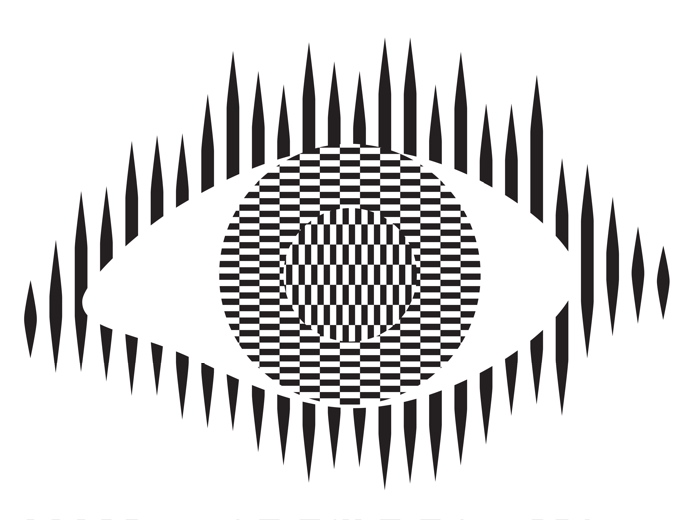
Optical illusions and magic tricks give a mirror on the limits of our brains. Even when you know an optical illusion is an illusion you cannot stop seeing the effect. For example, this image of an eye is completely flat and stationary: nothing is moving. And yet if you move your head very slightly from side to side the centre pops out and seems to be moving separately to the rest of the eye.
Illusions occur because our brains have limited resources and take short cuts in processing the vast amount of information that our senses deliver. These short cuts allow us to understand what we see faster and do so with less resources. Illusions happen when the short cuts are applied in a way where they do not apply.
What this means is that we do not see the world as it really is but see a simplified version constructed by our subconscious brain and provided to our conscious brain. It is very much like in the film, the Matrix, except it is our own brains providing the fake version of the world we experience rather than alien computers.
Attention
The way we focus our attention is one example of this. You may think that you see the world as it is, but you only directly see the things you focus on, your brain fills out the rest rather than constantly feeding the actual information to you constantly. It does this based on what it last saw there but also on the basis of just completing patterns. The following illusion shows this in action. There are 12 black dots and as you move your attention from one to the next you can see and count them all. However, you cannot see them all at once. The ones in your peripheral vision disappear as you look away as the powerful pattern of grey lines takes over. You are not seeing everything that is there to be seen!
Our brains also have very limited working memory and limited attention. Magicians also exploit this to design “magical systems” where a whole audience make the same mistake at the same time. Design the magic well so that these limitations are triggered and people miss things that are there to be seen, forget things they knew a few moments before, and so on. For example, by distracting their attention they make them miss something that was there to be seen.
What does this mean to computer scientists?
When we design the way we interact with a computer system, whether software and hardware, it is also possible to trigger the same limitations a magician or optical illusion does. A good interaction designer therefore does the opposite to a magician and, for example: draws a user’s attention to things that must not be missed at a critical time; they ensure they do not forget things that are important, they help them keep track of the state of the system, they give good feedback so they know what has happened.
Most software is poorly designed leading to people making mistakes, not all the time, but some of the time. The best designs will help people avoid making mistakes and also help them spot and fix mistakes as soon as they do make them.
Examples of poor medical device design
The following are examples of the interfaces of actual medical devices found in a day of exploration by one researcher (Paolo Masci) at a single very good hospital (in the US).
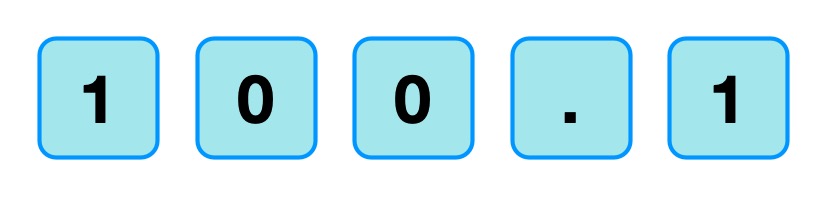
When the nurse or doctor types the following key sequence as a drug dose rate:
Image by CS4FN
one infusion pump, without any explicit warning, other than the number being displayed, registered the number entered as 1001.
Probably, the programmer had been told that when doses are as large as 100, then fractional doses are so relatively small that they make no difference. A user typing in such fractional amounts, is likely making an error as such a dose is unlikely to be prescribed. The typing of the decimal point is therefore just ignored as a mistake by the infusion pump. Separately, (perhaps coded by a different programmer in the team, or at a different time) until the ENTER key is pressed the code treats the number as incomplete. Any further digits typed are therefore just accepted as part of the number.
A different design by a different manufacturer also treats the key sequence as 1001 (though in the case shown 1001 is rejected as it exceeds the maximum allowable rate, caused by the same issue of the device silently ignoring a decimal point).
This suggests two different coding teams indipendently coded in the same design flaw that led to the same user error.
What is wrong with that?
Devices should never silently ignore and/or correct input if bad mistakes are to be avoided. Here, that original design flaw, could lead to a dose 10x too big being infused into a patient and that could kill. It relies on the person typing the number noticing that the decimal point has been ignored (with no help from the device). Decimal points are small and easily missed of course. Also, their attention cannot be guaranteed to be on the machine and, in fact, with a digit keypad for entering numbers that attnetion is likely to be on the keys. Alarms or other distractions elsewhere could easily mean they do not notice the missing decimal point (which is a tiny thing to see).
An everyday example of the same kind of problem, showing how easily mistakes are missed is in auto-completion / auto-correction of spelling mistakes in texts and word processors. Goofs where an auto-corrected word are missed are very common. Anything that common needs to be designed away in a safety critical system.
Design Rules
One of the ways that such problems can be avoided is by programmers following interaction design rules. The machine (and the programmer writing the code) does not know what a user is trying to input when they make a mistake. One design rule is therefore that a program should therefore NEVER correct any user error silently. Here perhaps the mistake was pressing 0 twice rather than pressing the decimal point. In the case of user errors, the program should raise awareness of the error, and not allow further input until the error is corrected. The program should explicitly draw the person’s attention to the problem (eg changing colour, flashing, beeping, etc). This involves using the same understanding of cognitive psychology as a magician, to control their attention. Whereas a magician would be taking their attention away from the thing that matters, the programmer draws theur attention to it.
It should make clear in an easily understandable error message what the problem is (eg here “Doses over 99 should not include decimal fractions. Please delete the decimal point.”) It should then leave the user to make the correction (eg deleting the decimal point) not do it itself.
By following a design rule such as this programmers can avoid user errors, which are bound to happen, from causing a big problem.
Avoiding errors
Sometimes the way we design software interfaces and their interaction design we can do even better than this, though. We are letting people make mistakes and then telling them to help them pick up the pieces afterward. Sometimes we can do better than this and with better design help them avoid making the mistake in the first place or spot the mistake themselves as soon as they make it.
Doing this is again about controlling user attention as a magician does. An interaction designer needs to do this again in the opposite wayto the magician though, directing the users attention to the place it needs to be to see what is really happening as they take actions rather than away from it.
To use a digit keypad, the users attention has to be on their fingers so they can see where to put their fingers to press a given digit. They look at the keypad, not the screen. The design of the digit keypad draws their attention to the wrong place. However, there are lots of ways to enter numbers and the digit keypad is only one. One other way is to use cursor keys (left, right, up and down) and have a cursor on the screen move to the position where a digit will be changed. Now, once the person’s finger is on say the up arrow, attention naturally moves to the screen as that button is just pressed repeatedly until the correct digit is reached. The user is watching what is happening, watching the program’s output, rather than their input, so is now less likely to make a mistake. If they do overshoot, their attention is in the right place to see it and immediately correct it. Experiments showed that this design did lead to fewer large errors though is slower. With numbers though accuracy is more likely to matter than absolute speed, especially in medical situations.
There are still subtleties to the design though – should a digit roll over from 9 back to 0, for example? If it does should the next digit increase by 1 automatically? Probably not, as these are the things that lead to other errors (out by a factor of 10). Instead going up from 9 should lead to a warning.
Learn from magicians
Magicians are expert at making people make mistakes without them even realising they have. The delight in magic comes from being so easily fooled so that the impossible seems to have happened. When writing software we need to using the same understanding of our cognitive resources and how to manipulate them to prevent our users making mistakes. There are many ways to do this, but we should certainly never write software that silently corrects user errors. We should control the users attention from the outset using similar techniques to a magician so that their attention is in the right place to avoid problems. Ideally a number entry system such as using cursor keys to enter the number rather than a digit keypad should be used as then the attention of the user is more likely to be on the number entered in the first place.
Responsible for the design of not just the interface but how a device or software is used. Applying creativity and applying existing design rules to come up with solutions. Has a deep understanding both of technical issues and of the limitations of human cognition (how our brains work).
Usability consultant
Give advice on making software and gadgets generally easier to use, evaluate designs for features that will make them hard to use or increase the likelihood of errors, finding problems at an early stage.
User experience (UX) consultant
Give advice on ensuring users of software have a good positive experience and that using it is not for example, frustrating.
Medical device developer
Develop software or hardware for medical devices used in hospitals or increasingly in the home by patients. Could be improvements to existing devices or completely novel devices based on medical or biomedical breakthroughs, or on computer science breakthroughs, such as in artificial intelligence.
Research and Development Scientist
Do experiments to learn more about the way our brains work, and/or apply it to give computers and robots a way to see the world like we do. Use it to develop and improve products for a spin-off company.
Women have made vital contributions to computer science ever since Ada Lovelace debugged the first algorithm for an actual computer (written by Charles Babbage) almost 200 years ago (more on CS4FN’s Women Portal). Despite this, women make up only a fraction (25%) of the STEM workforce: only about a fifth of senior tech roles and only a fifth of computer science students are women. The problem starts early: research by the National Centre for Computing Education suggests that female student’s intension to study computing drops off between the ages of 8 and 13. Ilenia Maietta, a computer science student at Queen Mary, talks about her experiences of studying in a male-dominated field and how she is helping to build a network for other women in tech.
Ilenia’s love for science hasn’t wavered since childhood and she is now studying for a master’s degree in computer science – but back in sixth form, the decision was between computer science and chemistry:
“I have always loved science, and growing up my dream was to become a scientist in a lab. However, in year 12, I dreaded doing the practical experiments and all the preparation and calculations needed in chemistry. At the same time, I was working on my computer science programming project, and I was enjoying it a lot more. I thought about myself 10 years in the future and asked myself ‘Where do I see myself enjoying my work more? In a lab, handling chemicals, or in an office, programming?’ I fortunately have a cousin who is a biologist, and her partner is a software engineer. I asked them about their day-to-day work, their teams, the projects they worked on, and I realised I would not enjoy working in a science lab. At the same time I realised I could definitely see myself as a computer scientist, so maybe child me knew she wanted to be scientist, just a different kind.”
The low numbers of female students in computer science classrooms can have the knock-on effect of making girls feel like they don’t belong. These faulty stereotypes that women don’t belong in computer science, together with the behaviour of male peers, continue to have an impact on Ilenia’s education:
“Ever since I moved to the UK, I have been studying STEM subjects. My school was a STEM school and it was male-dominated. At GCSEs, I was the only girl in my computer science class, and at A-levels only one of two. Most of the time it does not affect me whatsoever, but there were times it was (and is) incredibly frustrating because I am not taken seriously or treated differently because I am a woman, especially when I am equally knowledgeable or skilled. It is also equally annoying when guys start explaining to me something I know well, when they clearly do not (i.e. mansplaining): on a few occasions I have had men explain to me – badly and incorrectly – what my degree was to me, how to write code or explain tech concepts they clearly knew nothing about. 80% of the time it makes no difference, but that 20% of the time feels heavy.”
Many students choose computer science because of the huge variety of topics that you can go on to study. This was the case for Ilenia, especially being able to apply her new-found knowledge to lots of different projects:
“Definitely getting to explore different languages and trying new projects: building a variety of them, all different from each other has been fun. I really enjoyed learning about web development, especially last semester when I got to explore React.js: I then used it to make my own portfolio website! Also the variety of topics: I am learning about so many aspects of technology that I didn’t know about, and I think that is the fun part.”
“I worked on [the portfolio website] after I learnt about React.js and Next.js, and it was the very first time I built a big project by myself, not because I was assigned it. It is not yet complete, but I’m loving it. I also loved working on my EPQ [A-Level research project] when I was in school: I was researching how AI can be used in digital forensics, and I enjoyed writing up my research.”
Like many university students, Ilenia has had her fair share of challenges. She discussed the biggest of them all: imposter syndrome, as well as how she overcame it.
“I know [imposter syndrome is] very common at university, where we wonder if we fit in, if we can do our degree well. When I am struggling with a topic, but I am seeing others around me appear to understand it much faster, or I hear about these amazing projects other people are working on, I sometimes feel out of place, questioning if I can actually make it in tech. But at the end of the day, I know we all have different strengths and interests, so because I am not building games in my spare time, or I take longer to figure out something does not mean I am less worthy of being where I am: I got to where I am right now by working hard and achieving my goals, and anything I accomplish is an improvement from the previous step.”
Alongside her degree, Ilenia also supports a small organisation called Byte Queens, which aims to connect girls and women in technology with community support.
“I am one of the awardees for the Amazon Future Engineer Award by the Royal Academy of Engineering and Amazon, and one of my friends, Aurelia Brzezowska, in the programme started a community for girls and women in technology to help and support each other, called Byte Queens. She has a great vision for Byte Queens, and I asked her if there was anything I could do to help, because I love seeing girls going into technology. If I can do anything to remove any barriers for them, I will do it immediately. I am now the content manager, so I manage all the content that Byte Queens releases as I have experience in working with social media. Our aim is to create a network of girls and women who love tech and want to go into it, and support each other to grow, to get opportunities, to upskill. At the Academy of Engineering we have something similar provided for us, but we wanted this for every girl in tech. We are going to have mentoring programs with women who have a career in tech, help with applications, CVs, etc. Once we have grown enough we will run events, hackathons and workshops. It would be amazing if any girl or woman studying computer science or a technology related degree could join our community and share their experiences with other women!”
For women and girls looking to excel in computer science, Ilenia has this advice:
“I would say don’t doubt yourself: you got to where you are because you worked for it, and you deserve it. Do the best you can in that moment (our best doesn’t always look the same at different times of our lives), but also take care of yourself: you can’t achieve much if you are not taking care of yourself properly, just like you can’t do much with your laptop if you don’t charge it. And finally, take space: our generation has the possibility to reframe so much wrongdoing of the past generations, so don’t be afraid to make yourself, your knowledge, your skills heard and valued. Any opportunities you get, any goals you achieve are because you did it and worked for it, so take the space and recognition you deserve.”
Ilenia also highlighted the importance of taking opportunities to grow professionally and personally throughout her degree, “taking time to experiment with careers, hobbies, sports to discover what I like and who I want to become” mattered enormously. Following her degree, she wants to work in software development or cyber security. Once the stress of coursework and exams is gone, Ilenia intends to “try living in different countries for some time too”, though she thinks that “London is a special place for me, so I know I will always come back.”
Ilenia encourages all women in tech who are looking for a community and support, to join the Byte Queens community and share with others: “the more, the merrier!”
– lenia MaiettaandDaniel Gill, Queen Mary University of London





#/media/File:Margaret_Hamilton_1995.jpg)










 cs4fn
cs4fn 