Back in 2005 we published Issues 1 and 2 of the CS4FN (Computer Science For Fun) magazine and there were two short articles in the 2nd issue – “Future proof” about the change from physical copies of music and films (such as CDs and DVDs) to listening and watching on streaming services and “What do you think is most likely to disappear next?” where we wondered which other technologies might still be around in the future.
Future Proof Bill Gates believes CDs and DVDs have had it. It won’t be long before the whole back catalogue of music fits on a device in your pocket: “It’s going even faster than we expected…Five years from now people will say ‘What’s a CD? Why did you have to go to the case and open something up and you couldn’t sequence it your own playlist way?’ That will be a thing of the past. Even videos in the future will either be on a disk in your pocket or over the Internet, and far more convenient for you.”
Bill Gates, Chairman and Chief Software Architect, Microsoft, speaking in 2005.
It’s certainly true that most music and films can be streamed but they may not feel as permanently available as physical copies. On the release of his film Oppenheimer film director Christopher Nolan said1 “There is a danger these days that if things only exist in the streaming version, they do get taken down”. Netflix UK recently told me that Star Trek: The Next Generation would disappear from its listings on the January 8th 2026. I’m sure it will return in the future, but perhaps I need to buy the box set of DVDs to catch up with all the adventures.
Though it does also depend on having the right technology to play a physical copy of the thing – would you know how someone could play a DVD, CD, VHS (video tape) or cassette (audio tape)? Records on vinyl have certainly been making a comeback too…
Our second short article was even shorter and asked readers to vote (in 2005)…
What do you think is most likely to disappear next? (Or which of the following items might survive into the future?)
Fixed phones (land lines)
Cables
Written signatures
Loose change
Wrist-watches
Paper
Physical shops
Calculators
Radios
Possibly 21 years since 2005 is not quite far enough into a future where all of these have disappeared but you can certainly see that the way these things are used has changed significantly.
Imagine it’s now 21 years in the future (or 42 years since 2005)… pick one item that you think is no longer in use. Click the blue button containing the item that you think won’t be around in 2047.
What other technology/ies are you using today that someone born now might not recognise in 21 years time?
– By Jo Brodie, Paul Curzon and Peter McOwan, Queen Mary University of London
The Knights Templar were a 12th century order of catholic warrior monks, more accurately if convolutedly called “The Poor Fellow-Soldiers of Christ and of the Temple of Solomon” though they weren’t exactly poor. In addition to their original role of protecting catholic pilgrims heading to Jerusalem from robbery and murder, they also acted as a kind of international banker to support their main role. They laid some important foundations of modern international banking in the process. In particular, they invented a way to move money (or gold) around safely, without ever actually moving it anywhere. That sounds like a magic trick! Did they use some supposed mystical magic powers to do this? No, they kept the actual money given to them in the nearest of their large network of 1000 or so headquarters and forts around the continent. The money didn’t have to move anywhere. They then gave the person a note to hand in at their headquarters in another country. It promised that the Knights there would give them the equivalent amount from their money store when asked and given the note. The Knights there just swapped them the money for that note. This worked as long as they had a suitable store of money in each location, which of course would be topped up each time someone wanted to move money from that point. This is a simple version of how international banking works now. A British 20 pound note just promises to pay the bearer an equivalent amount, and without that promise (and people’s belief in it) it is just a piece of paper. It is just a similar promissory note, except people now just swap notes, treating it as money in its own right. Similarly, the banks don’t actually move any gold or other physical form of money about when you pay a shop with your debit card or banking app. They just move information equivalent to those promissory notes embodied in the transaction, around a network (though a computer one rather than a network of forts connected by roads).
There is a problem though with moving money from one person to another in this way using notes. If someone steals the note then it is potentially as valuable to them as actually stealing the chest of gold left in the original fort (just as stealing a 20 pound note is). In the Templar’s time the thief would just need to take it to a Templar headquarters and swap it for money just as the original owner would have done (a bit risky perhaps, given how fearsome the Templars were, but potentially possible!). Worse though, without a system to protect from this kind of attack, a thief could copy the note and then ask for the money repeatedly!
However, the Templars are know to have used encryption in their communications. The notes may therefore have been encrypted too and if so that would have made them useless if stolen. Banks now encrypt all those messages that move money about computer networks for the same reason. If only the Templar’s could read their notes (as only the Templar’s knew the key to their code), then only they could know it even was promising money. That doesn’t fully make it secure though, perhaps a thief could guess it was such a note, and if so what is to stop them then trying to cash it in (apart from the risk of being wrong). You would need something more. A simple possibility is the person with the note would need to know the encrypted amount that was contained somewhere within it. If they didn’t ask for the right amount then they couldn’t have handed over the money in the first place. They would reveal themselves as a thief!
Modern banks have to deal with similar problems even though modern financial transactions are all encrypted. Simple encryption alone is still not enough, protocols (special algorithms) are needed to prevent wide ranging kinds of attack being possible. Banks also need to use better ciphers than those from the Middle Ages, as today we can quickly crack ciphers as simple as the Templar Cipher. Banking is all done differently in detail today, but the ideas behind what is done and why are the same.
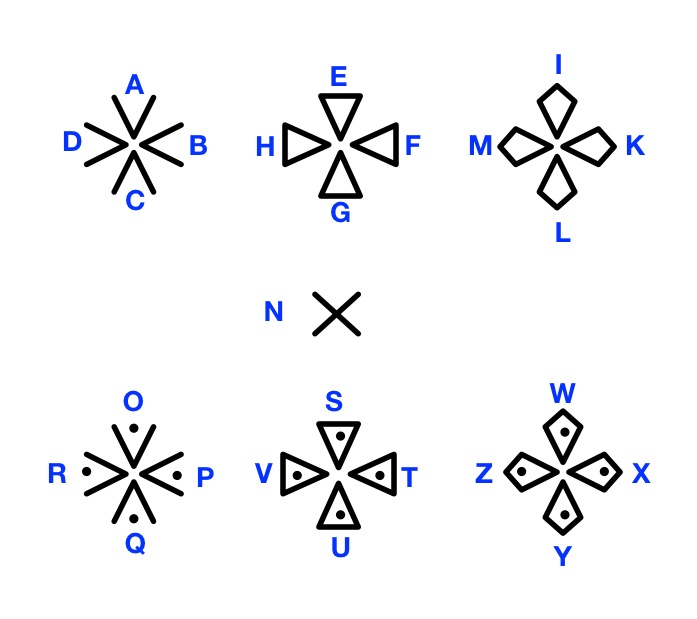
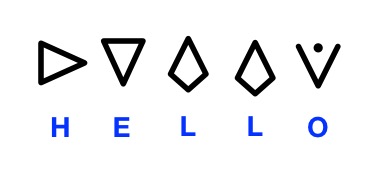
Can you crack the Templars’ cipher and decrypt the message below? One way might be using frequency analysis. The most common letters in English are likely (if not definitely) the most common in the message. E is most frequent in English, so which symbol might stand for E? Frequency analysis had been known for several hundred years before the Templars used ciphers (at least by the Arabs, though the Templars weren’t exactly their friends!), so it is actually possible even then that the Templars’ messages might be cracked, unknown to them. It was an Arabian scholar called Al Kindi, who actually invented frequency analysis (or at least was the earliest known person to write about it in his manuscript “On Deciphering Cryptographic Messages”.) Another way to crack the code might be to look for cribs – what words might be included in the message if it is a promissory note? Using both together may give you a good chance of decrypting the message. If you can’t crack their code (there is a big clue in this article), the key is given at the end if you scroll down. Use it to then decrypt the message.
All computer scientists should watch the staggeringly good film, Oppenheimer, by Christopher Nolan. It charts the life of J. Robert Oppenheimer, “father of the atom bomb”, and the team he put together at Los Alamos, as they designed and built the first weapons of mass destruction. The film is about science, politics and war, not computer science and all the science is quantum physics (portrayed incredibly well). Despite that, Christopher Nolan believes the film does have lessons for all scientists, and especially those in Silicon Valley.
Why? In an interview, he suggested that given the current state of Artificial Intelligence the world is at “an Oppenheimer moment”. Computer scientists, in the 2020s, just like physicists in the 1940s, are creating technology that could be used for great good but also cause great harm (including in both cases a possibility that we use it in a way that destroys civilisation). Should scientists and technologists stay outside the political realm and leave discussion of what to do with their technology to politicians, while the scientist do as they wish in the name of science? That leaves society playing a game of catch up. Or do scientists and technologists have more responsibility than that?
Artificial Intelligence isn’t so obviously capable of doing bad things as an atomic bomb was and still clearly is. There is also no clear imperative, such as Oppenheimer had, to get there before the fascist Nazi party, who were clearly evil and already using technology for evil, (now the main imperative seems to be just to get there before someone else makes all the money, not you). It is, therefore, far easier for those creating AI technology to ignore both the potential and the real effects of their inventions on society. However, it is now clear AI can and already is doing lots of bad as well as good. Many scientists understand this and are focussing their work on developing versions that are, for example, built in to be transparent and accountable, are not biased, racist, homophobic, … that do put children’s protection at the heart of what they do… Unfortunately, not all are though. And there is one big elephant in the room. AI can be, and is being, put in control of weapons in wars that are actively taking place right now. There is an arms race to get there before the other side do. From mass identification of targets in the middle East to AI controlled drone strikes in the Ukraine war, military AI is a reality and is in control of killing people with only minimal, if any, real human’s in the loop. Do we really want that? Do we want AIs in control of weapons of mass destruction. Or is that total madness that will lead only to our destruction.
Oppenheimer was a complex man, as the film showed. He believed in peace but, a brilliant theoretical physicist himself, he managed a group of the best scientists in the world in the creation of the greatest weapon of destruction ever built to that point, the first atom bomb. He believed it had to be used once so that everyone would understand that all out nuclear war would end civilisation (it was of course used against Japan not the already defeated Nazis, the original justification). However, he also spent the rest of his life working for peace, arguing that international agreements were vital to prevent such weapons ever being used again. In times of relative peace people forget about the power we have to destroy everyone. The worries only surface again when there is international tension and wars break out such as in the Middle East or Ukraine. We need to always remeber the possibility is there though lest we use them by mistake. Oppenheimer thought the bomb would actually end war, having come up with the idea of “mutually assured destruction” as a means for peace. The phrase aimed to remind people that these weapons could never be used. He worked tirelessly, arguing for international regulation and agreements to prevent their use.
Christopher Nolan was asked, if there was a special screening of the film in Silicon Valley, what message would he hope the computer scientists and technologists would take from it. His answer was that the should take home the message of the need for accountability. Scientists do have to be accountable for their work, especially when it is capable of having massively bad consequences for society. A key part of that is engaging with the public, industry and government; not with vested interests pushing for their own work to be allowed, but to make sure the public and policymakers do understand the science and technology so there can be fully informed debate. Both international law and international policy is now a long way off the pace of technological development. The willingness of countries to obey international law is also disintegrating and there is a new subtle difference to the 1940s: technology companies are now as rich and powerful as many countries so corporate accountability is now needed too, not just agreements between countries.
Oppenheimer was vilified over his politics after the war, and his name is now forever linked with weapons of mass destruction. He certainly didn’t get everything right: there have been plenty of wars since, so he didn’t manage to end all war as he had hoped, though so far no nuclear war. However, despite the vilification, he did spend his life making sure everyone understood the consequences of his work. Asked if he believed we had created the means to kill tens of millions of Americans (everyone) at a stroke, his answer was a clear “Yes”. He did ultimately make himself accountable for the things he had done. That is something every scientist should do too. The Doomsday Clock is closer to midnight than ever (89s to midnight – manmade global catastrophe). Let’s hope the Tech Bros and scientists of Silicon Valley are willingly to become accountable too, never mind countries. All scientists and technologists should watch Oppenheimer and reflect.
Image from a set of wartime photos of GC&CS at Bletchley Park, Public domain, via Wikimedia Commons
A group of enthusiasts at Bletchley Park, the top secret wartime codebreaking base, rebuilt a primitive computing device used in the Second World War to help the Allies listen in on U-boat conversations. It was called ‘the Bombe’. Professor Nigel Smart, now at KU Leuven and an expert on cryptography, tells us more.
So What’s all this fuss about building “A Bombe”? What’s a Bombe?
The Bombe didn’t help win the war destructively like its explosive name-sakes but using intelligence. It was designed to find the passwords or ‘keys’ into the secret codes of ‘Enigma’: the famous encryption machine used both by the German army in the field and to communicate to U-Boats in the Atlantic. It effectively allowed the English to listen in to the German’s secret communications.
A Bombe is an electro-mechanical special purpose computing device. ‘Electro-mechanical’ because it works using both mechanics and electricity. It works by passing electricity through a circuit. The precise circuit that is used is modified mechanically on each step of the machine by drums that rotate. It used a set of rotating drums to mirror the way the Enigma machine used a set of discs which rotated when each letter was encrypted. The Bombe is a ‘special purpose’ computing device rather than a ‘general purpose’ computer because it can’t be used to solve any other problem than the one it was designed for.
Why Bombe?
There are many explanations of why it’s called a ‘Bombe’. The most popular is that it is named after an earlier, but unrelated, machine built by the Polish to help break Enigma called the Bomba. The Bomba was also an electro-mechanical machine and was called that because as it ran it made a ticking sound, rather like a clock-based fuse on an exploding bomb.
What problem did it solve?
The Enigma machine used a different main key, or password, every day. It was then altered slightly for each message by a small indicator sent at the beginning of each message. The goal of the codebreakers at Bletchley Park each day was to find the German key for that day. Once this was found it was easy to then decrypt all the day’s messages. The Bombe’s task was to find this day key. It was introduced when the procedures used by the Germans to operate the Enigma changed. This had meant that the existing techniques used by the Allies to break the Enigma codes could no longer be used. They could no longer crack the German codes fast enough by humans alone.
So how did it help?
The basic idea was that many messages sent would consist of some short piece of predictable text such as “The weather today will be….” Then using this guess for the message that was being encrypted the cryptographers would take each encrypted message in turn and decide whether it was likely that it could have been an encryption of the guessed message. The fact that the German army was trained to say and write “Heil Hitler” at any opportunity was a great help too!
The words “Heil, Hitler” help the German’s lose the war
If they found one that was a possible match they would analyze the message in more detail to produce a “menu”. A menu was just what computer scientists today call a ‘graph’. It is a set of nodes and edges, where the nodes are letters of the alphabet and the edges link the letters together a bit like the way a London tube map links stations (the nodes) by tube lines (the edges). If the graph had suitable mathematical properties that they checked for, then the codebreakers knew that the Bombe might be able to find the day key from the graph.
The menu, or graph, was then sent over to one of the Bombe’s. They were operated by a team of women – the World’s first team of computer operators. The operator programmed the Bombe by using wires to connect letters together on the Bombe according to the edges of the menu. The Bombe was then set running. Every so often it would stop and the operator would write down the possible day key which it had just found. Finally another group checked this possible day key to see if the Bombe had produced the correct one. Sometimes it had, sometimes not.
So was the Bombe a computer?
By a computer today we usually mean something which can do many things. The reason the computer is so powerful is that we can purchase one piece of equipment and then use this to run many applications and solve many problems. It would be a big problem if we needed to buy one machine to write letters, one machine to run a spreadsheet, one machine to play “Grand Theft Auto” and one machine to play “Solitaire”. So, in this sense the Bombe was not a computer. It could only solve one problem: cracking the Enigma keys.
Whilst the operator programmed the Bombe using the menu, they were not changing the basic operation of the machine. The programming of the Bombe is more like the data entry we do on modern computers.
Alan Turing who helped design the Bombe along with Gordon Welchman, is often called the father of the computer, but that’s not for his work on the Bombe. It’s for two other reasons. Firstly before the war he had the idea of a theoretical machine which could be programmed to solve any problem, just like our modern computers. Then, after the war he used the experience of working at Bletchley to help build some of the worlds first computers in the UK.
But wasn’t the first computer built at Bletchley?
Yes, Bletchley park did build the first computer as we would call it. This was a machine called Colossus. Colossus was used to break a different German encryption machine called the Lorenz cipher. The Colossus was a true computer as it could be used to not only break the Lorenz cipher, but it could also be used to solve a host of other problems. It also worked using digital data, namely the set of ones and zeros which modern computers now operate on.
Annie Easley. NASA, Public domain, via Wikimedia Commons
Annie Easley was a pioneer both as a computer programmer but also as a champion of women and minorities into computer science. She went from being a human computer doing calculations for the rocket scientists (in the days before computers were machines), to becoming a programmer whose programs were integral to many NASA projects. Here work has helped us explore the planets and beyond, to put satellites into space and help humans leave the Earth. She also contributed to early battery technology as well as the alternative energy sources we now need to transition away from oil and gas. Throughout her career, despite being repeatedly discriminated against herself as an African-american woman, she encouraged, supported and mentored others like her.
Annie was a maths graduate so when she saw that computers were needed by NACA, the predecessor of NASA, she jumped at the chance. At the time a computer was a human who did calculations, as no machine at that point had been created to take over the job. She was one of only four African-american employees out of several thousand. Her job was to do the calculations researchers needed for their work. However, as digital computers started to be introduced – machines were now able to do large numbers of tedious calculations much more quickly than humans so took over the job…but now needed people who could program them for each task. To do so still needed mathematical ability to understand the task, as well as the ability to write code. She learnt both low level assembly language and the high level language, Fortran, invented for such scientific programming work and transitioned to being a programmer mathematician.
Much of her work involved or supported simulation, so writing programs that model aspects of the real world to test whether scientists predictions are correct, or to help make new predictions. Ultimately, this work would help provide the data to make choices of which technologies to use. Today computer simulation is a completely standard way of doing both engineering and science and has actually provided a completely new way to do science complementing theory and experiment. It allows us to probe everyday science questions but also big questions like exploring the origins of the universe or probing the long term consequences of our actions on the climate. Back then it was totally novel though, as computers were completely new. She was involved in simulation work that prefigured important work today around the environment, investigating systems to convert energy between different forms and so hybrid battery technology. It allows vehicles (whether a rocket, satellite, car or planetary rover) to switch between electric power and other sources of energy – an idea that has provided an important bridge from petrol to electric cars. She was also part of teams exploring alternative fuel sources like wind power and solar power (important of course now in space for satellites and planetary rovers, as well as a fossil fuel alternatives on Earth).
An Atlas rocket with centaur final stage. NASA, Public domain, via Wikimedia Commons
One of her major areas of work, that has had a lasting impact, was on the Centaur rocket. Rocket launches involve multiple fuel tanks to get the payload (eg a satellite) into space. The tanks of each stage are ejected when their fuel runs out with the next stage taking over. Centaur was the final upper stage which used the then novel fuel of liquid hydrogen and liquid oxygen to propel the payload in the final step into space. Centaur became a mainstay for satellite launches as well as for probes sent to visit other planets – like Voyager (which visited the outer planets and is now in interstellar space heading away from the solar system having visited ) and Cassini–Huygens (which sent back stunning images of Saturn’s rings). Newer versions of Centaur are still used today,
At the same time as doing all this work she was also heavily involved in NASAs public engagement with science programmes, visiting schools and giving talks about the work, inspiring girls and those from ethnic minorities that STEM careers were for them. She also worked as equal employment opportunity counselor. This involved her helping sort out discrimination complaints (whether over age or race or gender) in a positive and cooperative way.
Space travel has opened up not only a new ability to explore our solar system, but made lots of other technologies from SatNav to remote monitoring possible as well has helped in the development of other technology such as battery technology and alternative energy sources. We all owe a lot to the pioneers like Annie Easley, and none more so than the private companies now aiming to further commercialise space.
Robert Weitbrecht was born deaf. He went on to become an award winning electronics scientist who invented the acoustic coupler (or modem) and a teletypewriter (or teleprinter) system allowing the deaf to communicate via a normal phone call.
If you grew up in the UK in the 1970s with any interest in football, then you may think of teleprinters fondly. It was the way that you found out about the football results at the final whistle, watching for your team’s result on the final score TV programme. Reporters at football grounds across the country, typed in the results which then appeared to the nation one at a time as a teleprinter slowly typed results at the bottom of the screen.
Teleprinters were a natural, if gradual, development from the telegraph and Morse code. Over time a different simpler binary based code was developed. Then by attaching a keyboard and creating a device to convert key presses into the binary code to be sent down the wire you code type messages instead of tap out a code. Anyone could now do it, so typists replaced Morse code specialists. The teleprinter was born. In parallel, of course, the telephone was invented allowing people to talk to each other by converting the sound of someone speaking into an electrical signal that was then converted back into sound at the other end. Then you didn’t even need to type, never mind tap, to communicate over long distances. Telephone lines took over. However, typed messages still had their uses as the football results example showed.
Another advantage of the teletypewriter/teleprinter approach over the phone, was that it could be used by deaf people. However, teleprinters originally worked over separate networks, as the phone network was built to take analogue voice data and the companies controlling them across the world generally didn’t allow others to mess with their hardware. You couldn’t replace the phone handsets with your own device that just created electrical pulses to send directly over the phone line. Phone lines were for talking over via one of their phone company’s handsets. However, phone lines were universal so if you were deaf you really needed to be able to communicate over the phone not use some special network that no one else had. But how could that work, at a time when you couldn’t replace the phone handset with a different device?
Robert Weitbrecht solved the problem after being prompted to do so by deaf orthodontist, James Marsters. He created an acoustic coupler – a device that converted between sound and electrical signals – that could be used with a normal phone. It suppressed echoes, which improved the sound quality. Using old, discarded teletypewriters he created a usable system Slot the phone mouthpiece and ear piece into the device and the machine “talked” over the phone in an R2D2 like language of beeps to other machines like it. It turned the electrical signals from a teletypewriter into beeps that could be sent down a phone line via its mouthpiece. It also decoded beeps when received via the phone earpiece in the electrical form needed by the teleprinter. You typed at one end, and what you typed came out on the teleprinter at the other (and vice versa). Deaf and hard of hearing people could now communicate with each other over a normal phone line and normal phones! The idea of Telecommunications Device for the Deaf that worked with normal phones was born. However, they still were not strictly legal in the US so James Marsters and others lobbied Washington to allow such devices.
The idea (and legalisation) of acoustic couplers, however, then inspired others to develop similar modems for other purposes and in particular to allow computers to communicate via the telephone network using dial-up modems. You no longer needed special physical networks for computers to link to each other, they could just talk over the phone! Dial-up bulletin boards were an early application where you could dial up a computer and leave messages that others could dial up to read there via their computers…and from that idea ultimately emerged the idea of chat rooms, social networks and the myriad other ways we now do group communication by typing.
The first ever (long distance) phone call between two deaf people (Robert Weitbrecht and James Marsters) using a teletypewriter / teleprinter was:
“Are you printing now? Let’s quit for now and gloat over the success.”
What was the first technology for recording music: CDs? Records? 78s, The phonograph? No. Trained songbirds came before all of them.
Composer, musician, engineer and visiting fellow at Goldsmiths University, Sarah Angliss, usually has a robot on stage performing live with her. These robots are not slick high tech cyber-beings, but junk modelled automata. One, named Hugo, sports a spooky ventriloquist dolls head! Sarah builds and programs her robots, herself.
She is also a sound historian, and worked on a Radio 4 documentary, ‘The Bird Fancyer’s Delight‘, uncovering how birds have been used to provide music across the ages. During the 1700’s people trained songbirds to sing human invented tunes in their homes. You could buy special manuals showing how to train your pet bird. By playing young birds a tune over and over again, and in the absence of other birds to put them right, they would adopt that song as their own. Playing the recorder was one way to train them, but special instruments were also invented to do the job automatically.
With the invention of the phonograph, home songbird popularity plummeted but it didn’t completely die out. Blackbirds, thrushes, canaries, budgies, bullfinches and other songbirds have continued to be schooled to learn songs that they would never sing in the wild.
The Romans were great at counting and addition but they were absolutely pants at multiplication. It wasn’t because they were stupid. It was because they hadn’t invented a good way to represent numbers, and that meant they needed really convoluted algorithms.
The Roman system is based on an earlier really simple way of writing numbers. You just put a line for each thing you’ve counted. Its probably the way shepherds kept count of sheep, drawing a line for each sheep. Those lines turned into the Roman letter I. To add 1 to a number you just add another I. You count: I, II, III, and so on and it makes counting easy.
This system is called unary – whereas binary involves counting with two symbols, 1 and 0, in unary you only have one symbol to count with. Addition in unary is easy too at least for small numbers. Take the first number and add on the end all the Is for the second and you’ve got the answer number. This is exactly the way we all start doing addition on our fingers.To add 2+3, hold up 2 fingers (II) then hold up another three fingers (III) and you have the answer (IIIII).
This is fine for small numbers but it gets a bit tedious as the numbers increase (and you run out of fingers!) Comparing numbers is easy in principle – do you have the same number of Is, but hard in practice for large numbers. We can’t keep all those Is in our head so a large number is hard to think about. To get round this the Romans invented new letters to stand for groups of Is. This is what we do when we tally numbers making a crossbar for every fifth number we count. It helps us keep track of larger numbers. The Romans invented a whole bunch of symbols to help: so for example in the Roman numeral system, V stands for 5 (IIIII), X stands for 10, L for 50, C for 100, D for 500 and M for 1000. They had invented a new way to represent numbers.
This makes it much easier to write and compare larger numbers. Now when counting and you get up to 5 you just replace all those Is with a V and then carry on adding Is: VI, VII, VIII, VIIII. Then you get to VIIIII (10) so replace it all with an X, starting again adding a new lot of Is: XI, XII, XIII, XIIII, XV, and so on. Counting large numbers is now a bit more involved – the algorithm involves more than just adding an I on the end, but it is much more convenient. The addition algorithm has now become more complicated, though it is still fairly simple too. Take any two numbers to add like VII and VIII and string them together: VIIVIII. Now group together the same letters: VVIIIII. Anywhere you have enough to replace symbols with the next character do so. VV can be replaced by X and IIIII can be replaced by V to give XV in the above. Keep making replacements until you can make no more. Put the symbols in order from largest to smallest symbol and you have your answer.
Now the Romans were obviously a bit lazy as bored with writing even four Is in a row they sometimes introduced a new set of abbreviations, so that IIII became IV and VIIII became IX. Putting a smaller symbol (like I) before a larger one (like X) instead of after meant subtract it to get the number. so IX means “one less than 10” or 9. Counting just got a tiny bit more complicated to get the advantage of writing fewer symbols. Addition now needs a more convoluted algorithm though. There are several ways to do it. The easiest is actually just to change the numbers to add to the simpler form (so IV goes back to IIII). You them do the addition that way, and convert back at the end. Addition just got that little bit harder, and all because of a change in representation.
Worse, doing any more complicated maths is even harder still using the Roman number representation. See if you can work out how to multiply Roman numbers. The Roman number system doesn’t help at all. The only really easy way is to just repeatedly add ( so III x VI is VI + VI + VI). That just isn’t practical for large numbers. Try it on XXIII x LXV1. There are other possible ways including one that is actually based on the binary multiplication algorithms computers use – multiplying and dividing repeatedly by 2. See if you can work out how to do it. Whatever way you do it, its clear that the number system the Romans chose made maths hard for them to do!
A good representation makes maths easy. A bad one makes it much harder to do
Luckily, Indian and Arabian scholars understood that the representation they used mattered. They invented, and spread, the Hindu-Arabic numbers and decimal system we use today. What is special about it is that rather than introducing new symbols for bigger and bigger numbers, the position of a symbol is used instead. As we go from nine to ten we go back to the start of our symbols, from 9 back to 0, but stick a 1 in a new 10s column to count how many 10s we have. Counting is still pretty easy but suddenly not only is the algorithm for addition straightforward but we can come up with fairly simple algorithms for multiplication and division too. They are the algorithms you learn at school – though as with any algorithm making sure you follow the steps exactly and don’t miss steps is hard for a human (unlike for a computer). That is why we tend to find learning maths hard at first and it gets easier the more we practice.
In fact Romans needing to do serious maths probably used a variation of an abacus representing numbers with stones. They would do a calculation on the abacus and then convert the answer back into the Roman number system. And guess what. The Roman Abacus uses columns to represent larger numbers in a very similar way to the Hindu-Arabic system. The Romans understood that representation matters too.
Sometimes things are hard to do just because we make them hard! The secret of coming up with good algorithms is often to come up with a good representation first. In programming too, if you come up with a good way to represent data, a good data structure, you can often then make it much easier to write an efficient program.
Subscribe to be notified whenever we publish a new post to the CS4FN blog.
This blog is funded by EPSRC on research agreement EP/W033615/1.
A smartphone’s on-screen keyboard layout, called QWERTY after the first six letters on the top line. Image by CS4FN after smartphone QWERTY keyboards.
If you’ve ever sent a text on a phone or written an essay on a computer you’ve most likely come across the ‘QWERTY’ keyboard layout. It looks like this on a smartphone.
This layout has been around in one form or another since the 1870s and was first used in old mechanical typewriters where pressing a letter on the keyboard caused a hinged metal arm with that same letter embossed at the end to swing into place, thwacking a ribbon coated with ink, to make an impression on the paper. It was quite loud!
The QWERTY keyboard isn’t just used by English speakers but can easily be used by anyone whose language is based on the same A,B,C Latin alphabet (so French, Spanish, German etc). All the letters that an English-speaker needs are right there in front of them on the keyboard and with QWERTY… WYSIWYG (What You See Is What You Get). There’s a one-to-one mapping of key to letter: if you tap the A key you get a letter A appearing on screen, click the M key and an M appears. (To get a lowercase letter you just tap the key but to make it uppercase you need to tap two keys; the up arrow (‘shift’) key plus the letter).
A French or Spanish speaking person could also buy an adapted keyboard that includes letters like É and Ñ, or they can just use a combination of keys to make those letters appear on screen (see Key Combinations below). But what about writers of other languages which don’t use the Latin alphabet? The QWERTY keyboard, by itself, isn’t much use for them so it potentially excludes a huge number of people from using it.
In the English language the letter A never alters its shape depending on which letter goes before or comes after it. (There are 39 lower case letter ‘a’s and 3 upper case ‘A’s in this paragraph and, apart from the difference in case, they all look exactly the same.) That’s not the case for other languages such as Arabic or Hindi where letters can change shape depending on the adjacent letters. With some languages the letters might even change vertical position, instead of being all on the same line as in English.
Early attempts to make writing in other languages easier assumed that non-English alphabets could be adapted to fit into the dominant QWERTY keyboard, with letters that are used less frequently being ignored and other letters being simplified to suit. That isn’t very satisfactory and speakers of other languages were concerned that their own language might become simplified or standardised to fit in with Western technology, a form of ‘digital colonialism’.
But in the 1940s other solutions emerged. The design for one Chinese typewriter avoided QWERTY’s ‘one key equals one letter’ (which couldn’t work for languages like Chinese or Japanese which use thousands of characters – impossible to fit onto one keyboard, see picture at the end!).
Rather than using the keys to print one letter, the user typed a key to begin the process of finding a character. A range of options would be displayed and the user would select another key from among them, with the options narrowing until they arrived at the character they wanted. Luckily this early ‘retrieval system’ of typing actually only took a few keystrokes to bring up the right character, otherwise it would have taken ages.
This is a way of using a keyboard to type words rather than letters, saving time by only displaying possible options. It’s also an early example of ‘autocomplete’ now used on many devices to speed things up by displaying the most likely word for the user to tap, which saves them typing it.
For example in English the letter Q is generally* always followed by the letter U to produce words like QUAIL, QUICK or QUOTE. There are only a handful of letters that can follow QU – the letter Z wouldn’t be any use but most of the vowels would be. You might be shown A, E, I or O and if you selected A then you’ve further restricted what the word could be (QUACK, QUARTZ, QUARTET etc).
In fact one modern typing system, designed for typists with physical disabilities, also uses this concept of ‘retrieval’, relying on a combination of letter frequency (how often a letter is used in the English language) and probabilistic predictions (about how likely a particular letter is to come next in an English word). Dasher is a computer program that lets someone write text without using a keyboard, instead a mouse, joystick, touchscreen or a gaze-tracker (a device that tracks the person’s eye position) can be used.
Letters are presented on-screen in alphabetic order from top to bottom on the right hand side (lowercase first, then upper case) and punctuation marks. The user ‘drives’ through the word by first pushing the cursor towards the first letter, then the next possible set of letters appear to choose from, and so on until each word is completed. You can see it in action in this video on the Dasher Interface.
Key combinations
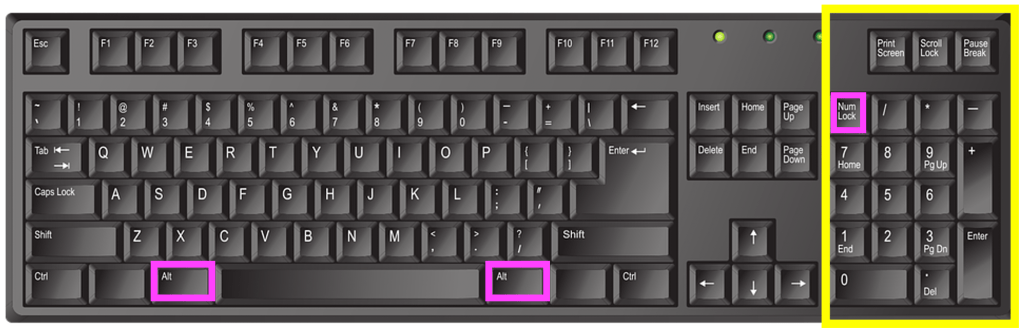
The use of software to expand the usefulness of QWERTY keyboards is now commonplace with programs pre-installed onto devices which run in the background. These IMEs or Input Method Editors can convert a set of keystrokes into a character that’s not available on the keyboard itself. For example, while I can type SHIFT+8 to display the asterisk (*) symbol that sits on the 8 key there’s no degree symbol (as in 30°C) on my keyboard. On a Windows computer I can create it using the numeric keypad on the right of some keyboards, holding down the ALT key while typing the sequence 0176. While I’m typing the numbers nothing appears but once I complete the sequence and release the ALT key the ° appears on the screen.
English language keyboard image by john forcier from Pixabay highlighted by CS4FN, showing the numeric keypad highlighted in yellow with the two Alt keys and the ‘num lock’ key highlighted in pink. Num lock (‘numeric lock’) needs to be switched on for the keypad to work, then use the Alt key plus a combination of letters on the numeric keypad to produce a range of additional ‘alt code‘ characters.
When Japanese speakers type they use the main ‘ABC’ letters on the keyboard, but the principle is the same – a combination of keys produces a sequence of letters that the IME converts to the correct character. Or perhaps they could use Google Japan’s April Fool solution from 2010, which surrounded the user in half a dozen massive keyboards with hundreds of keys a little like sitting on a massive drum kit!
*QWERTY is a ‘word’ which starts with a Q that’s not followed by a U of course…
The ‘retrieval system’ of typing mentioned above, which lets the user get to the word or characters more quickly, is similar to the general problem solving strategy called ‘Divide and Conquer’. You can read more about that and other search algorithms in our free booklet ‘Searching to Speak‘ (PDF) which explores how the design of an algorithm could allow someone with locked-in syndrome to communicate. Locked-in syndrome is a condition resulting from a stroke where a person is totally paralysed. They can see, hear and think but cannot speak. How could a person with Locked-in syndrome write a book? How might they do it if they knew some computational thinking?
EPSRC supports this blog through research grant EP/W033615/1.
The first computers transformed the way research is done. One of the very first computers, EDSAC (Electronic Delay Storage Automatic Calculator), contributed to the work of three Nobel prize winners: in Physics, Chemistry and Medicine. Astronomer, Joyce Wheeler was an early researcher to make use of the potential of computers to aid the study of other subjects in this way. She was a Cambridge PhD student in 1954 investigating the nuclear reactions that keep stars burning. This involved doing lots of calculations to work out the changing behaviour and composition of the star.
Joyce had seen EDSAC on a visit to the university before starting her PhD, and learnt to program it from its basic programming manual so that she could get it to do the calculations she needed. She would program by day and let EDSAC number crunch using her programs every Friday night, leaving her to work on the results in the morning, and then start the programming for the following week’s run. EDSAC not only allowed her to do calculations accurately that would otherwise have been impossible, it also meant she could run calculations over and over, tweaking what was done, refining the accuracy of the results, and checking the equations quickly with sample numbers. As a result EDSAC helped her to estimate the age of stars.






#/media/File:Surveyor_1_launch.jpg)






 cs4fn
cs4fn 