
What are birds actually saying?

Birds make so much noise, and it’s very complex. Is it just babble, or are they saying complicated things to each other? If so, could we work out what they are saying, what it means? Could we learn their language and speak to the birds?

We know that bird communication is not as complicated as the words and sentences in human speech. So far, no one has been able to find grammatical patterns like those we find in human language. There apparently aren’t rules for birds like the ones we have about verbs and nouns. Birds don’t have to learn grammar! Exactly how complex bird languages are is still hotly debated, though.

Sometimes they’re passing on information about predators, or food, or sometimes just advertising their own fitness – showing off to get a mate (a bit like karaoke nights). Scientists have proved that such specific kinds of information are in the sounds birds make by observing bird behaviour. By playing recordings of birds and seeing how other birds react, they can see what information was communicated by a particular sound. If you play a ‘predator near’ call, for example, then other birds flee, but they stay put if you play other calls. They get the message.

Birds are definitely passing on
specific information when they sing.

It turns out some birds have even learnt the languages of other animals and use it both to help those other animals and to support a life of crime. Many animals listen for the alarm calls of the animals around them, and so flee when others see a problem. Birds called Drongos, for example, act as lookouts for Meerkats, giving warning calls when they see Meerkat predators, allowing them to return to the safety of their burrows. However, the Drongos also sound false alarms every so often. They do it when they see a Meerkat with some juicy morsel. As the Meerkats run, the Drongo swoops in to steal the abandoned food.

Unfortunately for the Drongo, Meerkats are quite clever and get wise to the con. Eventually, they start to ignore the Drongo and only listen for their own Meerkat sentry’s call. The Drongo has another trick though. They are really good at mimicking sounds they hear, just like parrots. They have learnt to speak Meerkat just like the scientists do in experiments. So when the Meerkats stop reacting, the Drongos just switch tactics and start making perfect Meerkat language alarm calls instead. Once again the food is theirs.

Drongos give false alarms so they can steal food.

While most of us can’t reproduce bird sounds ourselves, and so talk directly to animals, we can certainly write programs to do it. In Star Wars, C3PO is a master of languages, speaking millions. Real robots of the near future will be able to mimic the sounds of whatever animals they wish and communicate with them in at least the simple ways that animals of different species listen and talk to each other. Perhaps something like this might be used to help protect endangered species from their predators, for example, watching for hawks and issuing timely warnings. We just have to hope they don’t turn to the Dark Side, like the Drongos, and use these skills to support a life of crime.

Dan Stowell and Paul Curzon, Queen Mary University of London

Watch …

Magazine

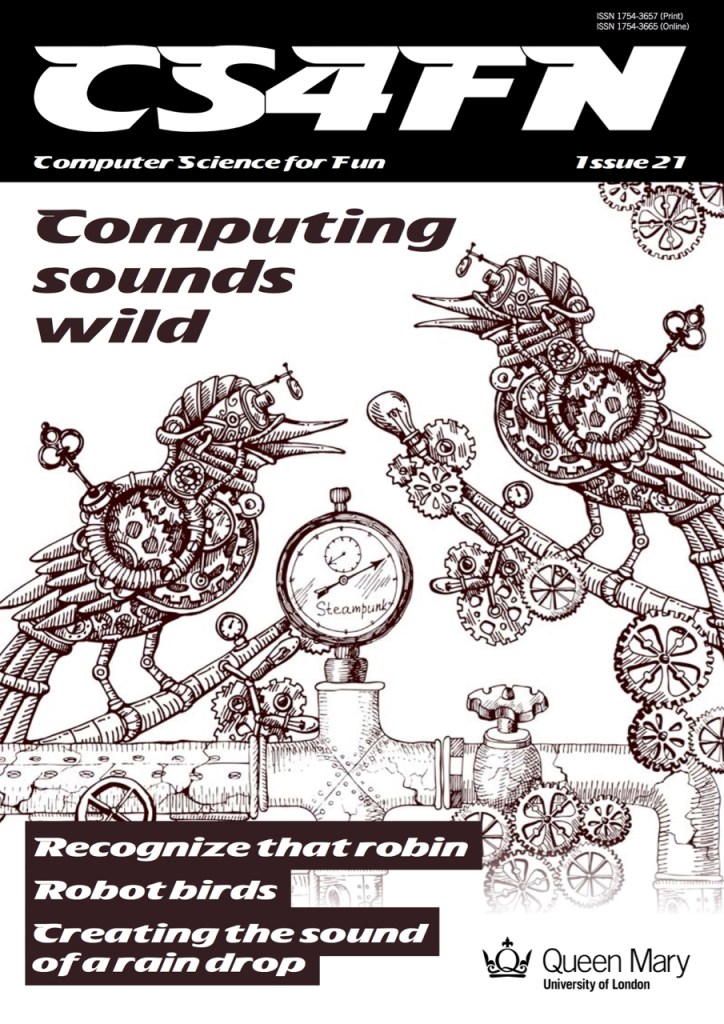
  • Issue 21: Computing Sounds Wild
    • Computing Sounds Wild explores the work of scientists and engineers who are using computers to understand, identify and recreate wild sounds, especially those of birds. We see how sophisticated algorithms that allow machines to learn, can help recognize birds even when they can’t be seen, so helping conservation efforts. We see how computer models help biologists understand animal behaviour, and we look at how electronic and computer generated sounds, having changed music, are now set to change the soundscapes of films. Making electronic sounds is also a great, fun way to become a computer scientist and learn to program.
The front cover of issue 21 of CS4FN called Computing Sounds Wild

Subscribe to be notified whenever we publish a new post to the CS4FN blog.


This blog is funded by EPSRC on research agreement EP/W033615/1.

QMUL CS4FN EPSRC logos

Ada Lovelace: Visionary

It is 1843, Queen Victoria is on the British throne. The industrial revolution has transformed the country. Steam, cogs and iron rule. The first computers won’t be successfully built for a hundred years. Through the noise and grime one woman sees the future. A digital future that is only just being realised.

Ada Lovelace is often said to be the first programmer. She wrote programs for a designed, but yet to be built, computer called the Analytical Engine. She was something much more important than a programmer, though. She was the first truly visionary person to see the real potential of computers. She saw they would one day be creative.

Charles Babbage had come up with the idea of the Analytical Engine – how to make a machine that could do calculations so we wouldn’t need to do it by hand. It would be another century before his ideas could be realised and the first computer was actually built. As he tried to get the money and build the computer, he needed someone to help write the programs to control it – the instructions that would tell it how to do calculations. That’s where Ada came in. They worked together to try and realise their joint dream, jointly working out how to program.

Ada also wrote “The Analytical Engine has no pretensions to originate anything.” So how does that fit with her belief that computers could be creative? Read on and see if you can unscramble the paradox.

Ada was a mathematician with a creative flair and while Charles had come up with the innovative idea of the Analytical Engine itself, he didn’t see beyond his original idea of the computer as a calculator, she saw that they could do much more than that.

The key innovation behind her idea was that the numbers could stand for more than just quantities in calculations. They could represent anything – music for example. Today when we talk of things being digital – digital music, digital cameras, digital television, all we really mean is that a song, a picture, a film can all be stored as long strings of numbers. All we need is to agree a code of what the numbers mean – a note, a colour, a line. Once that is decided we can write computer programs to manipulate them, to store them, to transmit them over networks. Out of that idea comes the whole of our digital world.

Ada saw even further though. She combined maths with a creative flair and so she realised that not only could they store and play music they could also potentially create it – they could be composers. She foresaw the whole idea of machines being creative. She wasn’t just the first programmer, she was the first truly creative programmer.

Paul Curzon, Queen Mary University of London

More on …

Magazines

Subscribe to be notified whenever we publish a new post to the CS4FN blog.


This blog is funded by EPSRC on research agreement EP/W033615/1.

QMUL CS4FN EPSRC logos


The red sock of doom – trying to catch mistakes before they happen

Washing machine mistake
Washing machine with red sock in white washing. Image by Dominic Furniss from Errordiary and Flikr, provided for this article CC BY-NC-SA 2.0

A red sock in with your white clothes wash – guess what happened next? What can you do to prevent it from happening again? Why should a computer scientist care? It turns out that red socks have something to teach us about medical gadgets.

How can we stop red socks from ever turning our clothes pink again? We need a strategy. Here are some possibilities.

  • Don’t wear red socks.
  • Take a ‘how to wash your clothes’ course.
  • Never make mistakes.
  • Get used to pink clothes.

Let’s look at them in turn – will they work?

Don’t wear red socks: That might help but it’s not much use if you like red socks or if you need them to match your outfit. And how would it help when you wear purple, blue or green socks? Perhaps your clothes will just turn green instead.

Take a ‘how to wash your clothes’ course: Training might help: you’d certainly learn that a red sock and white clothes shouldn’t be mixed, you probably did know that anyway, though. It won’t stop you making a similar mistake again.

Never make misteaks: Just never leave a red sock in your white wash. If only! Unfortunately everyone makes mistakes – that’s why we have erasers on pencils and a delete key on computers – this idea just won’t work.

Get used to pink clothes: Maybe, but it’s not ideal. It might not be so great turning up to school in a pink shirt if everyone else is wearing a white one.

What if the problem’s more serious?

We can probably live with pink clothes, but what happens if a similar mistake is made at a hospital? Not socks, but medicines. We know everyone makes mistakes so how do we stop those mistakes from harming patients? Special machines are used in hospitals to pump medicine directly into a patient’s arm, for example, and a nurse needs to tell it how much medicine to give – if the dose is wrong the patient won’t get better, and might even get worse.

What have we learned from our red sock strategies? We can’t stop giving patients medicine and we don’t want to get used to mistakes so our first and fourth strategies won’t work. We can give nurses more training but everyone makes mistakes even when trained, so the third suggestion isn’t good enough either and it doesn’t stop someone else making the same mistake.

We need to stop thinking of mistakes as a problem that people make and instead as a problem that systems thinking can solve. That way we can find solutions that work for everyone. One possibility is to check whether changes to the device might make mistakes less likely in the first place.

Errors? Or arrows?

Most medical machines are controlled with a panel with numbered keys (a number keypad) like on mobile phones, or up and down arrows (an arrow keypad) like you sometimes get on alarm clocks. CHI+MED researchers have been asking questions like: which way is best for entering numbers quickly, but also which is best for entering numbers accurately? They’ve been running experiments where people use different keypads, are timed and their mistakes are recorded. The researchers also track where people are looking while they use the keypads. Another approach has been to create mathematical descriptions of the different keypads and then mathematically explore how bad different errors might be.

It turns out that if you can see the numbers on a keypad in front of you it’s very easy to type them in quickly, though not always correctly! You need to check the display to see if you have actually put in the right ones. Worse, mistakes that are made are often massive – ten times too much or more. The arrow keypads are a little slower to use but because people are already looking at the display (to see what numbers are appearing) they can help nurses be more accurate, not only are fewer mistakes made but those that are made tend to be smaller.

Smart machines help users

A medical device that actively helps users avoid mistakes helps everyone using it (and the patients it’s being used on!). Changing the interface to reduce errors isn’t the only solution though. Modern machines have ‘intelligent drug libraries’ that contain information about the medicines and what sort of doses are likely and safe. Someone might still mistakenly tell the machine to give too high a dose but now it can catch the error and ask the nurse to double-check. That’s like having a washing machine that can spot a brightly coloured sock in a white wash and that refuses to switch on till it has been removed.

Building machines with a better ability to catch errors (remember, we all make mistakes) and helping users to recover from them easily is much more reliable than trying to get rid of all possible errors by training people. It’s not about avoiding red socks, or errors, but about putting better systems in place to make sure that we find them before we press that big ‘Start’ button.

More on …

Magazines …

You can find a copy of this article on pages 4 and 5 in issue 17 (Machines Making Medicine Safer) of CS4FN 17. This article was originally published on CHI+MED

Subscribe to be notified whenever we publish a new post to the CS4FN blog.


This blog is funded by EPSRC on research agreement EP/W033615/1.

QMUL CS4FN EPSRC logos

Die another Day? Or How Madonna crashed the Internet

A lone mike in front of stage lights
Image by Pexels from Pixabay

When pop star Madonna took to the stage at Brixton Academy in 2001 for a rare appearance she made Internet history and caused more that a little Internet misery. Her concert performance was webcast; that is it was broadcast real time over the Internet. A record-breaking audience of 9 million tuned in, and that’s where the trouble started…

The Internet’s early career

The Internet started its career as a way of sending text messages between military bases. What was important was that the message got through, even if parts of the network were damaged say, during times of war. The vision was to build a communications system that could not fail; even if individual computers did, the Internet would never crash. The text messages were split up into tiny packets of information and each of these was sent with an address and their position in the message over the wire. Going via a series of computer links it reached its destination a bit like someone sending a car home bit by bit through the post and then rebuilding it. Because it’s split up the different bits can go by different routes.

Express yourself (but be polite please)

To send all these bits of information a set of protocols (ways of communicating between the computers making up the Internet) were devised. When passing on a packet of information the sending machine first asks the receiving machine if it is both there and ready. If it replies yes then the packet is sent. Then, being a polite protocol, the sender asks the receiver if the packets all arrived safely. This way, with the right address, the packets can find the best way to go from A to B. If on the way some of the links in the chain are damaged and don’t reply, the messages can be sent by a different route. Similarly if some of the packets gets lost in transit between links and need to be resent, or packets are delayed in being sent because they have to go by a round about route, the protocol can work round it. It’s just a matter of time before all the packets arrive at the final destination and can be put back in order. With text the time taken to get there doesn’t really matter that much.

The Internet gets into the groove

The problem with live pop videos, like a Madonna concert, is that it’s no use if the last part of the song arrives first, or you have to wait half an hour for the middle chorus to turn up, or the last word in a sentence vanishes. It needs to all arrive in real time. After all, that is how it’s being sung. So to make web casting work there needs to be something different, a new way of sending the packets. It needs to be fast and it needs to deal with lots more packets as video images carry a gigantic amount of data. The solution is to add something new to the Internet, called an overlay network. This sits on top of the normal wiring but behaves very differently.

The Internet turns rock and roll rebel

So the new real time transmission protocol gets a bit rock and roll, and stops being quite so polite. It takes the packets and throws them quickly onto the Internet. If the receiver catches them, fine. If it doesn’t, then so what? The sender is too busy to check like in the old days. It has to keep up with the music! If the packets are kept small, an odd one lost won’t be missed. This overlay network called the Mbone, lets people tune into the transmissions like a TV station. All these packages are being thrown around and if you want to you can join in and pick them up.

Crazy for you

Like dozens of cars
all racing to get through
a tunnel there were traffic jams.
It was Internet gridlock.

The Madonna webcast was one of the first real tests of this new type of approach. She had millions of eager fans, but it was early days for the technology. Most people watching had slow dial-up modems rather than broadband. Also the number of computers making up the links in the Internet were small and of limited power. As more and more people tuned in to watch, more and more packets needed to be sent and more and more of the links started to clog up. Like dozens of cars all racing to get through a tunnel there were traffic jams. Packets that couldn’t get through tried to find other routes to their destination … which also ended up blocked. If they did finally arrive they couldn’t get through onto the viewers PC as the connection was slow, and if they did, very many were too late to be of any use. It was Internet gridlock.

Who’s that girl?

Viewers suffered as the pictures and sound cut in and out. Pictures froze then jumped. Packets arrived well after their use by date, meaning earlier images had been shown missing bits and looking fuzzy. You couldn’t even recognise Madonna on stage. Some researchers found that packets had, for example, passed over seven different networks to reach a PC in a hotel just four miles away. The packets had taken the scenic route round the world, and arrived too late for the party. It wasn’t only the Madonna fans who suffered. The broadcast made use of the underlying wiring of the Internet and it had filled up with millions of frantic Madonna packets. Anyone else trying to use the Internet at the time discovered that it had virtually ground to a halt and was useless. Madonna’s fans had effectively crashed the Internet!

Webcasts in Vogue

Today’s webcasts have moved on tremendously using the lessons learned from the early days of the Madonna Internet crash. Today video is very much a part of the Internet’s day-to-day duties: the speed of the computer links of the Internet and their processing power has increased massively; more homes have broadband so the packets can get to your PC faster; satellite uplinks now allow the network to identify where the traffic jams are and route the data up and over them; extra links are put into the Internet to switch on at busy times; there are now techniques to unnoticeably compress videos down to small numbers of packets, and intelligent algorithms have been developed to reroute data effectively round blocks. We can also now combine the information flowing to the viewers with information coming back from them so allowing interactive webcasts. With the advent of digital television this service is now in our homes and not just on our PC’s.

Living in a material world

It’s because of thousands of scientists working on new and improved technology and software that we can now watch as the housemate’s antics stream live from the Big Brother house, vote from our armchair for our favourite talent show contestant or ‘press red’ and listen to the director’s commentary as we watch our favourite TV show. Like water and electricity the Internet is now an accepted part of our lives. However, as we come up with even more popular TV shows and concerts, strive to improve the quality of sound and pictures, more people upgrade to broadband and more and more video information floods the Internet … will the Internet Die another Day?

Peter W. McOwan and Paul Curzon, Queen Mary University of London, 2006

More on …

Subscribe to be notified whenever we publish a new post to the CS4FN blog.


This blog is funded by EPSRC on research agreement EP/W033615/1.

QMUL CS4FN EPSRC logos

Back (page) to health

Woman wearing VR headset looking at the sky.
Image by Pexels from Pixabay

Improvements in technology and decision making are transforming the way we look after our health. Here are some more interesting ideas to keep people alive and well.

The future is in your poo

You’ve heard of telling a person’s future from reading their tea leaves. Scientists believe an effective way of seeing a town’s future may be in the poo. By looking for infection in the waste at sewerage works it’s possible to get fast and accurate local knowledge of where infection rates are high and where low to feed into decision making tools.

Health advice: Stay in the toilet, Stay safe. Help the NHS.

Virtually breaking quarantine

The game, World of Warcraft, a multi-user dungeon game, helped virologists understand how people might behave in pandemics. The game’s developers released a plague that could be passed between avatars. The game’s contaminated area was quarantined. Rather than dying out, the virus escaped – because people broke into the quarantined areas to gawk, then left taking the virus with them.

Health advice: Your avatar should obey quarantine rules too!

The missing bullet holes

To stay healthy in a war, avoid being hit by a bullet. In World War II, many aircraft returned badly damaged. Abraham Wald studied them to decide where better armour was needed. There were more bullet holes in the fuselage than the engines. Where would you add the armour? Abraham added it where there were no bullet holes. He reasoned that the lack of holes in places like engines on returning planes meant that being hit there brought the plane down. Being hit elsewhere did not kill the pilots as those planes made it home!

Health advice: Dodge bullets by making good decisions …

Cybersick of virtual reality

The AI can detect puke-inducing movement and automatically correct the image.

A problem with virtual reality is that wearing a headset can be so immersive that it makes some people actually sick. This happens if you move about when watching a 3D video that was shot from a single place. Artificial intelligence software has come to the rescue, detecting puke-inducing movement and automatically correcting the image.

Health advice: If no bucket, always keep an AI handy.

Shining light on cancers

Cancer treatments like chemotherapy and radiotherapy make patients ill. Some drugs make cancer sensitive to light, allowing tumours to be killed by painlessly shining light on them instead. Sadly, that’s not easy when cancers are inside the body. A new Japanese solution is an LED chip, based on the technology used by contactless payment cards to provide power from a distance. Surgeons place it under the skin and leave it there. They glue it in place using a sticky protein from the feet of mussels. It shines low-intensity green light on the cancer, shrinking it.

Health advice: Stick a chip to your tumour

Smart sometimes means no gadgets

Being smart about health doesn’t have to be high-tech or even involve drugs. Exercise, for example, can be as effective helping with depression as taking medicine. Being out in nature can help too, so sometimes it’s worth leaving the gadgets behind and just going for a walk to enjoy the beauty of nature.

Health advice: Walk weekly in the woods

Paul Curzon, Queen Mary University of London, Spring 2021

More on …


Related Magazine …

This post and issue 27 of the cs4fn magazine have been funded by EPSRC as part of the PAMBAYESIAN project on research agreement EP/P009964/1.

Subscribe to be notified whenever we publish a new post to the CS4FN blog.


This blog is funded by EPSRC on research agreement EP/W033615/1.

QMUL CS4FN EPSRC logos

Gadgets based on works of fiction

Why might a computer scientist need to write fiction? To make sure she creates an app that people actually need.

Writing fiction doesn’t sound like the sort of skill a computer scientist might need. However, it’s part of my job at the moment. Working with expert rheumatologists Amy MacBrayne and Fran Humby, I am helping a design team understand what life with rheumatoid arthritis is like, so they can design software that is actually needed and so will be used and useful.

A big problem with developing software is that programmers tend to design things for themselves. However, programmers are not like the users of their software. They have different backgrounds and needs and they have been trained to think differently. Worse, they know the system they are developing inside out, unlike its users. An important first step in a project is to do background research to understand your users. If designing an app for people with rheumatoid arthritis, you need to know a lot about the lives of such people. To design a successful product, you particularly need to understand their unfulfilled goals. What do they want to be able to do that is currently hard or impossible?

What do you do with the research? Alan Cooper’s idea of ‘Personas’ are a powerful next step – and this is where writing fiction comes in. Based on research, you write descriptions of lots of fictional characters (personas), each representing groups of people with similar goals. They have names, photos and realistic lives. You also write scenarios about their lives that help understand their goals. Next, you merge and narrow these personas down, dropping some, creating new ones, altering others. Your aim is to eventually end up with just one, called a primary persona. The idea is that if you design for the primary persona, you will create something that meets the goals of the groups represented by the other personas it replaced.

The primary persona (let’s call her Samira) is then used throughout the design process as the person being designed for. If wondering whether some new feature or way of doing things is a good idea, the designers would ask themselves, “Would Samira actually want this? Would she be able to use it?” If they can think of her as a real person, it is much easier to make decisions than if thinking of some non-existent abstract “user” who becomes whatever each team member wants them to be. It helps stop ‘feature bloat’ where designers add in every great idea for a new feature they have but end up with a product so complex no one can, or wants to, use it.

As part of the Queen Mary PAMBAYESIAN project we have been talking to rheumatoid arthritis patients and their doctors to understand their needs and goals. I’ve then created a cast of detailed personas to represent the results. These can act as an initial set of personas to help future designers designing apps to support those with the disease.

If you thought creative writing wasn’t important to a computer scientist, think again. A good persona needs to be as powerfully written and as believable as a character in a good novel. So, you should practice writing fiction as well as writing programs.

Read some of our personas about living with rheumatoid arthritis here.

Paul Curzon, Queen Mary University of London, Spring 2021

More on …


Related Magazine …

This post and issue 27 of the cs4fn magazine have been funded by EPSRC as part of the PAMBAYESIAN project on research agreement EP/P009964/1.

Subscribe to be notified whenever we publish a new post to the CS4FN blog.


This blog is funded by EPSRC on research agreement EP/W033615/1.

QMUL CS4FN EPSRC logos

How do you solve a problem like arthritis?

A Venn Diagram of personalisation, empowerment and participation
Composite Image by CS4FN using inset images from Pixabay
by SnapwireSnaps,  christophjkugler and  Susanne Nicolin

Some diseases can’t be cured. Doctors and nurses just try to control the disease to stop them ruining people’s lives. Perhaps smartphone apps can pull off the trick of giving patients better care while giving clinicians more time to spend with the patients who most need them? A Venn diagram is at the centre of the Queen Mary team’s prototype.

What is rheumatoid arthritis?

Normally your immune system does a good job of fighting infection and keeping you healthy. But, if you have an autoimmune disease, it can also attack your healthy cells, causing inflammation and damage. Rheumatoid arthritis is like this: a painful condition that mostly affects hands, knees and feet as the person’s immune system attacks their joints, making them swell painfully. It affects around 400,000 people in the UK and is more common in women than men.

People with the disease alternate between periods when it is under control and they have few symptoms, and with days or weeks of painful ‘flares’ where it is very, very bad. During these flares it especially affects a person’s ability to live a normal life. It can be hard to move around comfortably, do exercise – plus it interferes with their ability to work. It can also leave them totally reliant on family and friends just to do everyday things like dress or eat, never mind go out. This can lead to depression and puts a strain on friendships.

Treating the disease

Treatment, which can include tablets, injections, physiotherapy and sometimes surgery, slows the disease, keeping it under control for long periods. Sufferers are also given advice on lifestyle changes. This all reduces the risk of joint damage and helps people live their life more fully.

At appointments, doctors collect information to help them see how the disease is progressing. A Disease Activity Score (DAS) calculator lets them combine measurements for pain, how tender or swollen their patient’s joints are and how many joints are affected. Regular blood tests keep track of the amount of inflammation and how the body is reacting to drugs. This helps them decide if they need to adjust the medication.

If it is caught early, modern medicine reduces the worst effects of the disease, helped by keeping a close eye on the Disease Activity Score as treatments may need to be repeatedly adjusted to control flares. This requires regular hospital visits which uses up scarce healthcare resources and is very time-consuming for patients. It is hampered because hospital appointments may only happen twice a year due to the number of patients. Everyone wants to give more personalised care, but hospitals just can’t afford to provide it.

Supporting doctors

So, what do you do when there just aren’t enough doctors to see everyone as regularly as needed to maintain their patients’ wellbeing? One solution is to use remote monitoring with an app on a patient’s smartphone, so involving patients more directly in their own care. They can use such apps to regularly record their own disease activity measurements, sharing the information with their doctor to save visiting the hospital.

A smart app

This is an improvement, but the measurements still require expert monitoring and can take more of the doctor’s time. However, if smartphones can actually be made to be, well, smart, then they could help give advice between hospital visits and alert the hospital team, when needed, so they can step in. This might involve, for example, loading the app with background knowledge about rheumatoid arthritis, expert knowledge from lots of doctors, and creating an artificial intelligence to use this information effectively for each patient.

Hospital specialists and computer scientists at Queen Mary are developing such a prototype based on Bayesian networks as the artificial intelligence core. Bayesian networks are based on reasoning about the causes of things and how likely different things are to be the cause of something being observed. Building the prototype involves finding out if patients and clinicians find such tools useful and acceptable (some people might find clinic visits reassuring, while some may be keener to avoid taking the time off work, for example).

Smart and patient centred

This still focusses on a clinician’s view of treatment using drugs though. With a smartphone app we can perhaps do better and take the person’s life into account – but how? The first step is to understand patient goals. Patients would need to be willing to share lots of information about themselves so that the software can learn as much as possible about them. Eventually, this might be done using sensors that automatically detect information: how much pain they are in, how stiff their joints are, how much they move around, how long it takes them to get out of a chair, how much sleep they get, how often they meet others, if and when they take their medicine, and so on. Rather than just focussing on medical treatment it can then focus advice ‘holistically’ on the whole person.

The Queen Mary team’s approach is centred around three different things: helping people with physical independence so they can move around and look after themselves; empowering them to manage their condition and general well-being themselves; and participation in the sense of helping them socialise, keep friendships and maintain family bonds.

The Bayesian network processes the information about patients and computes their predicted levels of independence, empowerment and participation, working out how good or bad things are for them at the moment. This places them in one of seven positions in a Venn diagram of the three dimensions over which areas need most attention. It then gives appropriate advice, aiming to keep all three dimensions in balance, monitoring what happens, but also alerting the hospital when necessary.

So, for example, if the Bayesian network judges independence low, participation high and empowerment low, the patient is in the Venn diagram intersection of low empowerment and low independence. Advice in the following weeks, based on this area of the Venn diagram, would focus on things like coping with pain and stiffness, getting better sleep, as well as how to manage the disease in general.

By personalising advice and focusing on the whole person, it is hoped patients will get more appropriate care as soon as they need it, but doctors’ time will also be freed up to focus on the patients who most need their help.

Jo Brodie, Hamit Soyel and Paul Curzon, Queen Mary University of London, Spring 2021

More on …


Related Magazine …

This post and issue 27 of the cs4fn magazine have been funded by EPSRC as part of the PAMBAYESIAN project on research agreement EP/P009964/1

Subscribe to be notified whenever we publish a new post to the CS4FN blog.


This blog is funded by EPSRC on research agreement EP/W033615/1.

QMUL CS4FN EPSRC logos

Are you there yet?

Plenty of people love the Weasley family’s clock from the Harry Potter books and films. It shows where members of the family are at any given time. Instead of numbers giving the time, the clock face has locations where someone might be (home, school, shopping) and the many hands on the clock show the family members. The wizarding world uses magic to make their whereabouts clock work, but muggles (and squibs) can use mobile network data to build a simple version, and use Bayesian networks to improve it.

Your mobile phone is in contact with several cell towers in the mobile provider’s network. When you want to send a message, it goes first to the nearest cell tower before passing through the network, finally reaching your friend’s phone. As you move around, from home to school, for example, you will pass several towers. The closer you are to a tower the stronger the signal there, and the phone network uses this to estimate where you are, based on signal strength from several towers. This means that, as long as your phone is with you, it can act as a sensor for your location and track you, just like the Weasley’s whereabouts clock.

You could also have a similar system at home that monitors your location, so that it switches on the lights and heating as you get closer to home to welcome you back. On a typical day you might head home somewhere between 3 and 6pm (depending on after-school events) and as you leave school the connection to your phone from the tower nearest the school will weaken, but connections will strengthen with the other cell towers on your route home. But what if you appear to be heading home at 11 in the morning? Perhaps you are, or maybe actually the signal has just dropped from the tower nearest to the school so a tower nearer your home is now getting the strongest signal!

A system using Bayesian logic to determine ‘near home’ or ‘not near home’ can be trained to put things into context. Unless you are ill, it’s unlikely that you’d be heading home before the afternoon so you can use these predicted timings to give a likelihood score of an event (such as you heading home). A Bayesian network takes a piece of information (‘person might be nearby’) and considers this in the context of previous knowledge (‘and that’s expected at this time of day so probably true’ or ‘but is unlikely to be nearby now so more information is needed’). Unlike machine learning which just looks for any patterns in data, in a Bayesian networks approach the way one thing being considered does or does not cause other things is built in from the outset. Here it builds in the different possible causes of the signal dropping at a cell tower.

You could also set up a similar system in a home using wifi points to predict where you are and so what you are doing. Information like that could then feed data into a personalised artificial intelligence looking after you. Not all magic has to be run by magic!

Jo Brodie, Queen Mary University of London, Spring 2021

Inspired by the blog on Presence Detection Part 1: Home Assistant & Bayesian Probability and a previous cs4fn article on making a Whereabouts Clock.

More on …


Related Magazine …

This post and issue 27 of the cs4fn magazine have been funded by EPSRC as part of the PAMBAYESIAN project on research agreement EP/P009964/1.

Subscribe to be notified whenever we publish a new post to the CS4FN blog.


This blog is funded by EPSRC on research agreement EP/W033615/1.

QMUL CS4FN EPSRC logos

So, so tired…

Fatigue is a problem that people with a variety of long-term diseases can also suffer from.

This isn’t just normal tiredness, but something much, much worse: so bad that it is a struggle to do anything at all, destroying any chance of a normal life. Doctors can often do little to help beyond managing the underlying disease, then hope the fatigue sorts itself out. Sometimes fatigue can stay with the person long, long after. Maha Albarrak, for her PhD, is exploring how computer technology might help people cope. Her first step is to interview those suffering to find out what kind of help they really need. Then she will work closely with volunteers to come up with solutions that solve the problems that matter.

Paul Curzon, Queen Mary University of London, Spring 2021

More on …


Related Magazine …

This post and issue 27 of the cs4fn magazine have been funded by EPSRC as part of the PAMBAYESIAN project on research agreement EP/P009964/1.

Subscribe to be notified whenever we publish a new post to the CS4FN blog.


This blog is funded by EPSRC on research agreement EP/W033615/1.

QMUL CS4FN EPSRC logos