Happy World Emoji Day – 📅 17 July 2023 – how people use emoji to communicate and what it tells us about them 😀

“Emoji didn’t become so essential because they stand in for words – but because they finally made writing a lot more like talking.”

Gretchen McCulloch (see Further reading below)
Emoji samples © Emojipedia 2025.

The emoji for ‘calendar‘ shows the 17th July 📅 (click the ‘calendar’ link to find out why) and, since 2014, Emojipedia (an excellent resource for all things emoji, including their history) has celebrated World Emoji Day on that date.

Before we had emoji (the word emoji can be both singular as well as plural, but 'emojis' is fine too) people added text-based 'pictures' to their texts and emails to add flavour to their online conversations, such as 
:-) or :)  - for a smiling face 
:-( or :( - for a sad one.

These text-based pictures are known as ’emoticons’ (icons that add emotion) because it isn’t always possible to know just from the words alone what the writer means. They weren’t just used to clarify meaning though, people started to pepper their prose with other playful pictures, such as :p where the ‘p’ is someone blowing a raspberry / sticking their tongue out* and created other icons such as this rose to send to someone on Valentine’s Day @-‘-,->—-, or this polevaulting amoeba ./

Here are the newly released emoji for 2023.

People use emoji in very different ways depending on their age, gender, ethnicity, personal writing style. In our “The Emoji Crystal Ball” article we look at how people can tell a lot about us from the types of emoji we use and the way we use them.

The Emoji Crystal Ball

Fairground fortune tellers claim to be able to tell a lot about you by staring into a crystal ball. They could tell far more about you (that wasn’t made up) by staring at your public social media profile. Even your use of emojis alone gives away something of who you are. Walid Magdy’s research team … Continue reading

Unicode Poo

The Egyptians had a hieroglyph for it, so unicode has a number for it. There’s even more unicode poo in the emoji character set but the Egyptians got there 1000s of years earlier. Here is how the Ancient Egyptians wrote or carved poo … Continue reading

Further reading


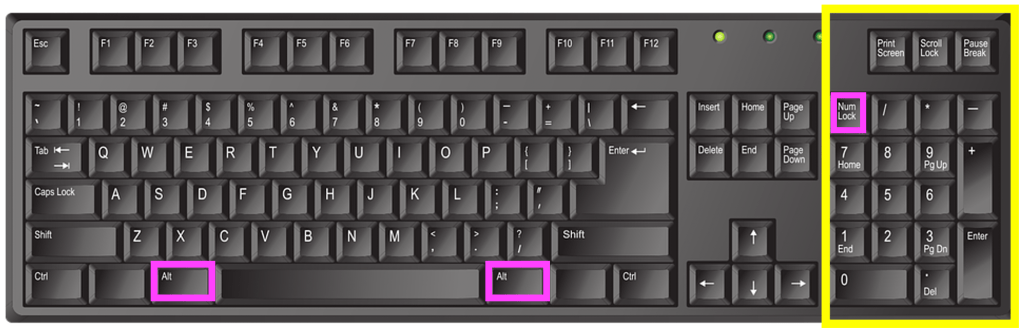
*For an even better raspberry-blowing emoticon try one of the letters (called ‘thorn’) from the Runic alphabet. If you have a Windows computer with a numeric keypad on the right hand side press the Num Lock key at the top to lock the number keypad (so that the keys are now numbers and not up and down arrows etc). Hold down the Alt key (there’s usually one on either side of the spacebar) and while holding it down type 0254 on the numeric keypad and let go. This should now appear wherever your cursor is: þ. Or for the lower case letter it’s Alt+0222 = Þ – for when you just want to blow a small raspberry :Þ

For Mac users press control+command+spacebar to bring up the Character Viewer and just type thorn in the search bar and lots will appear. Double-click to select the one you want, it will automatically paste into wherever your cursor is.


EPSRC supports this blog through research grant EP/W033615/1.

Operational Transformation

Algorithms for writing together

How do online word processing programs manage to allow two or more people to change the same document at the same time without getting in a complete muddle? One of the really key ideas that makes collaborative writing possible was developed by computer scientists, Clarence Ellis and Simon Gibbs. They called their idea ‘Operational transformation’.

Let’s look at a simple example to illustrate the problem. Suppose Alice and Bob share a document that starts:

"MEETING AT 10AM"

First of all one computer, called the ‘server’, holds the actual ‘master’ document. If the network goes down or computers crash then its that ‘master’ copy that is the real version everyone sees as the definitive version.

Both Alice and Bob’s computers can connect to that server and get copies to view on their own machines. They can both read the document without problem – they both see the same thing. But what happens if they both start to change it at once? That’s when things can get mixed up.

Let’s suppose Alice notices that the time in the document should be PM not AM. She puts her cursor at position 14 and replaces the letter there with P. As far as the copy she is looking at is concerned, that is where the faulty A is. Her computer sends a command to the server to change the master version accordingly, saying

CHANGE the character at POSITION 14 to P.

The new version at some point later will be sent to everyone viewing. However, suppose that at the same time as Alice was making her change, Bob notices that the meeting is at 1 not 10. He moves his cursor to position 13, so over the 0 in the version he is looking at, and deletes it. A command is sent to the server computer:

DELETE the character at POSITION 13.

Now if the server receives the instructions in that order then all is ok. The document ends up as both Bob and Alice intended. When they are sent the updated version it will have done both their changes correctly:

"MEETING AT 1PM"

However, as both Bob and Alice are editing at the same time, their commands could arrive at the server in either order. If the delete command arrives first then the document ends up in a muddle as first the 13th position is deleted giving.

"MEETING AT 1AM"

Then, when Alice’s command is processed the 14th character is changed to a P as it asks. Unfortunately, the 14th character is now the M because the deleted character has gone. We end up with

"MEETING AT 1AP"

Somehow the program has to avoid this happening. That is where the operational transformation algorithm comes in. It changes each instruction, as needed, to take other delete or insert instructions into account. Before the server follows them they are changed to ones so that they give the right result whatever order they came in.

So in the above example if the delete is done first, then any other instructions that arrive that apply to the same initial version of the document are changed to take account of the way the positions have changed due to the already applied deletion. We would get and so apply the new instructions:

STARTING FROM "MEETING AT 10AM"
DELETE the character at POSITION 13.
CHANGE the character at POSITION (14-1) to P.

Without Operational Transformation two people trying to write a document together would just be frustrating chaos. Online editing would have to be done the old way of taking it in turns, or one person making suggestions for the other to carry out. With the algorithm, thanks to Clarence Ellis and Simon Gibbs, people who are anywhere in the world can work on one document together. Group writing has changed forever.

Paul Curzon, Queen Mary University of London


This article was originally published on the CS4FN website.

More on …


EPSRC supports this blog through research grant EP/W033615/1.

The original version of this article was funded by the Institute of Coding.

Stretching your keyboard – getting more out of QWERTY

by Jo Brodie, Queen Mary University of London

A QWERTY keyboard after smartphone keyboards starting with keys q w e r t y on the top row
A smartphone’s on-screen keyboard layout, called QWERTY after the first six letters on the top line. Image by CS4FN after smartphone QWERTY keyboards.

If you’ve ever sent a text on a phone or written an essay on a computer you’ve most likely come across the ‘QWERTY’ keyboard layout. It looks like this on a smartphone.

This layout has been around in one form or another since the 1870s and was first used in old mechanical typewriters where pressing a letter on the keyboard caused a hinged metal arm with that same letter embossed at the end to swing into place, thwacking a ribbon coated with ink, to make an impression on the paper. It was quite loud!

The QWERTY keyboard isn’t just used by English speakers but can easily be used by anyone whose language is based on the same A,B,C Latin alphabet (so French, Spanish, German etc). All the letters that an English-speaker needs are right there in front of them on the keyboard and with QWERTY… WYSIWYG (What You See Is What You Get).  There’s a one-to-one mapping of key to letter: if you tap the A key you get a letter A appearing on screen, click the M key and an M appears. (To get a lowercase letter you just tap the key but to make it uppercase you need to tap two keys; the up arrow (‘shift’) key plus the letter).

A French or Spanish speaking person could also buy an adapted keyboard that includes letters like É and Ñ, or they can just use a combination of keys to make those letters appear on screen (see Key Combinations below). But what about writers of other languages which don’t use the Latin alphabet? The QWERTY keyboard, by itself, isn’t much use for them so it potentially excludes a huge number of people from using it.

In the English language the letter A never alters its shape depending on which letter goes before or comes after it. (There are 39 lower case letter ‘a’s and 3 upper case ‘A’s in this paragraph and, apart from the difference in case, they all look exactly the same.) That’s not the case for other languages such as Arabic or Hindi where letters can change shape depending on the adjacent letters. With some languages the letters might even change vertical position, instead of being all on the same line as in English.

Early attempts to make writing in other languages easier assumed that non-English alphabets could be adapted to fit into the dominant QWERTY keyboard, with letters that are used less frequently being ignored and other letters being simplified to suit. That isn’t very satisfactory and speakers of other languages were concerned that their own language might become simplified or standardised to fit in with Western technology, a form of ‘digital colonialism’.

But in the 1940s other solutions emerged. The design for one Chinese typewriter avoided QWERTY’s ‘one key equals one letter’ (which couldn’t work for languages like Chinese or Japanese which use thousands of characters – impossible to fit onto one keyboard, see picture at the end!).

Rather than using the keys to print one letter, the user typed a key to begin the process of finding a character. A range of options would be displayed and the user would select another key from among them, with the options narrowing until they arrived at the character they wanted. Luckily this early ‘retrieval system’ of typing actually only took a few keystrokes to bring up the right character, otherwise it would have taken ages.

This is a way of using a keyboard to type words rather than letters, saving time by only displaying possible options. It’s also an early example of ‘autocomplete’ now used on many devices to speed things up by displaying the most likely word for the user to tap, which saves them typing it.

For example in English the letter Q is generally* always followed by the letter U to produce words like QUAIL, QUICK or QUOTE. There are only a handful of letters that can follow QU – the letter Z wouldn’t be any use but most of the vowels would be. You might be shown A, E, I or O and if you selected A then you’ve further restricted what the word could be (QUACK, QUARTZ, QUARTET etc).

In fact one modern typing system, designed for typists with physical disabilities, also uses this concept of ‘retrieval’, relying on a combination of letter frequency (how often a letter is used in the English language) and probabilistic predictions (about how likely a particular letter is to come next in an English word). Dasher is a computer program that lets someone write text without using a keyboard, instead a mouse, joystick, touchscreen or a gaze-tracker (a device that tracks the person’s eye position) can be used.

Letters are presented on-screen in alphabetic order from top to bottom on the right hand side (lowercase first, then upper case) and punctuation marks. The user ‘drives’ through the word by first pushing the cursor towards the first letter, then the next possible set of letters appear to choose from, and so on until each word is completed. You can see it in action in this video on the Dasher Interface.

Key combinations

The use of software to expand the usefulness of QWERTY keyboards is now commonplace with programs pre-installed onto devices which run in the background. These IMEs or Input Method Editors can convert a set of keystrokes into a character that’s not available on the keyboard itself. For example, while I can type SHIFT+8 to display the asterisk (*) symbol that sits on the 8 key there’s no degree symbol (as in 30°C) on my keyboard. On a Windows computer I can create it using the numeric keypad on the right of some keyboards, holding down the ALT key while typing the sequence 0176. While I’m typing the numbers nothing appears but once I complete the sequence and release the ALT key the ° appears on the screen.

English language keyboard image by john forcier from Pixabay, showing the numeric keypad highlighted in yellow with the two Alt keys and the 'num lock' key highlighted in pink. Num lock ('numeric lock') needs to be switched on for the keypad to work, then use the Alt key plus a combination of letters on the numeric keypad to produce a range of additional 'alt code' characters.
English language keyboard image by john forcier from Pixabay highlighted by CS4FN, showing the numeric keypad highlighted in yellow with the two Alt keys and the ‘num lock’ key highlighted in pink. Num lock (‘numeric lock’) needs to be switched on for the keypad to work, then use the Alt key plus a combination of letters on the numeric keypad to produce a range of additional ‘alt code‘ characters.

When Japanese speakers type they use the main ‘ABC’ letters on the keyboard, but the principle is the same – a combination of keys produces a sequence of letters that the IME converts to the correct character. Or perhaps they could use Google Japan’s April Fool solution from 2010, which surrounded the user in half a dozen massive keyboards with hundreds of keys a little like sitting on a massive drum kit!

*QWERTY is a ‘word’ which starts with a Q that’s not followed by a U of course…

Watch …

More on …

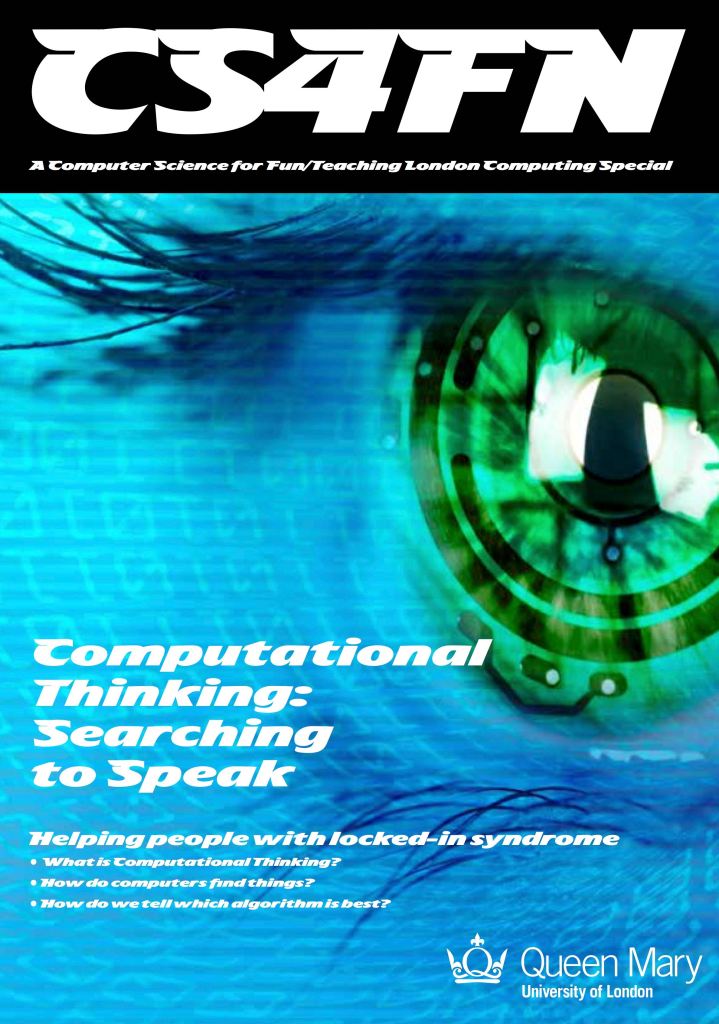
The ‘retrieval system’ of typing mentioned above, which lets the user get to the word or characters more quickly, is similar to the general problem solving strategy called ‘Divide and Conquer’. You can read more about that and other search algorithms in our free booklet ‘Searching to Speak‘ (PDF) which explores how the design of an algorithm could allow someone with locked-in syndrome to communicate. Locked-in syndrome is a condition resulting from a stroke where a person is totally paralysed. They can see, hear and think but cannot speak. How could a person with Locked-in syndrome write a book? How might they do it if they knew some computational thinking?


EPSRC supports this blog through research grant EP/W033615/1.

Celebrating Jean Bartik: 1940s programmer

Two of the ENIAC programmers, are preparing the computer for Demonstration Day in February 1946. “U.S. Army Photo” from the archives of the ARL Technical Library. Left: Betty Jennings (later Bartik), right: Frances Bilas (Spence) – Image via Wikipedia. Public Domain.

by Jo Brodie, Queen Mary University of London.

Jean Bartik (born Betty Jean Jennings) was one of six women who programmed “ENIAC” (the Electronic Numerical Integrator and Computer), one of the earliest electronic programmable computers. The work she and her colleagues did in the 1940s had a huge impact on computer science however their contribution went largely unrecognised for 40 years. 

Jean Bartik – born 27 December 1924; died on this day, 23 March 2011

Born in Missouri USA in December 1924 to a family of teachers in Betty (as she was then known) showed promise in Mathematics, graduating from her high school in the summer of 1941 aged 16 with the highest marks in maths ever seen at her school. She began her degree in Maths and English at her local teachers’ college (which is now Northwest Missouri State University) but everything changed dramatically a few months in when the US became involved in the Second World War. The men (teachers and students) were called up for war service leaving a dwindling department and her studies were paused, resuming only in 1943 when retired professors were brought in to teach; she graduated in January 1945, the only person in her year to graduate in Maths.

Although her family encouraged her to become a local maths teacher she decided to seek more distant adventures. The University of Pennsylvania in Philadelphia (~1,000 miles away) had put out a call for people with maths skills to help with the war effort, she applied and was accepted. Along with over 80 other women she was employed to calculate, using advanced maths including differential calculus equations, accurate trajectories of bullets and bombs (ballistics) for the military. She and her colleagues were ‘human computers’ (people who did calculations before the word meant what it does today) creating range tables, columns of information that told the US army where they should point their guns to be sure of hitting their targets. This was complex work that had to take account of weather conditions as well as more obvious things like distance and size of the gun barrel.

Even with 80-100 women working on every possible combination of gun size and angle it still took over a week to generate one data table so the US Army was obviously keen to speed things up as much as possible. They had previously given funding in 1943 to John Mauchly (a physicist) and John Presper Eckert (an electrical engineer) to build a programmable electronic calculator – ENIAC – which would automate the calculations and give them a huge speed advantage. By 1945 the enormous new machine, which took up a room (as computers tended to do in those days) consisted of several thousand vacuum tubes, weighed 30 tonnes and was held together with several million soldered joints. It would be programmed with punched cards with holes punched at different positions in each card allowing a current to pass (or not pass, if no hole present) through a particular set of cables connected through a plugboard (like old-fashioned telephone exchanges). 

From the now 100 women working as human computers in the department six were selected to become the machine’s operators – a role that was exceptional. There were no manuals available and ‘programming’, as we know it today, didn’t yet exist – it was much more physical. Not only did the ‘ENIAC six’ have to correctly wire each cable they had to fully understand the machine’s underlying blueprints and electronic circuits to make it work as expected. Repairs could involve crawling into the machine to fix a broken wire or vacuum tube. 

World War 2 actually ended in September 1945 before ENIAC was brought into full service, but being programmable (which meant rewiring the cables) it would soon be put to other uses. Jean really enjoyed her time working on ENIAC and said later that she’d “never since been in as exciting an environment. We knew we were pushing back frontiers” but she was working at a time when men’s jobs and achievements were given more credit than women’s.

In February 1946 ENIAC was unveiled to the press with its (male) inventors demonstrating its impressive calculating speeds and how much time could be saved compared with people performing the calculations with mechanical desk calculators. While Jean and some of the other women were in attendance (and appear in press photographs of the time) the women were not introduced, their work wasn’t celebrated, they were not always correctly identified in the photographs and were even not invited to the celebratory dinner after the event – as Jean said in a later interview (see the second video (YouTube) below) “We were sort of horrified!”.

In December 1946 she married William Bartik (an engineer) and over the next few years was instrumental in the programming and development of other early computers. She also taught others how to program them (an early computer science teacher!). She often worked with her husband too, following him to different cities for work. However her husband took on a new role in 1951 and the company’s policy was that wives were not allowed to work in the same place. Frustrated, Jean left computing for a while and also took a career break to raise her family. 

In the late 1960s she returned to the field of computer science and for several years she blended her background in Maths and English, writing technical reports on the newer ‘minicomputers’ (still quite large compared to modern computers but you could fit more of them in a room). However the company she worked for was sold off and she was made redundant in 1985 at the age of 60. She couldn’t find another job in the industry which she put down to age discrimination and she spent her remaining career working in real estate (selling property or land). She died, aged 86 on 23 March 2011. 

Jean’s contribution to computer science remained largely unknown to the wider world until 1986 when Kathy Kleinman (an author, law professor and programmer) decided to find out who the women in these photographs were and rediscovered the pioneering work of the ENIAC six.

The ENIAC six women were Kathleen McNulty Mauchly Antonelli, Jean Jennings Bartik, Frances (Betty) Snyder Holberton, Marlyn Wescoff Meltzer, Frances Bilas Spence, and Ruth Lichterman Teitelbaum.

Watch…

More on …


EPSRC supports this blog through research grant EP/W033615/1.
Inspiring Wendy Hall

This article is inspired by a keynote talk Wendy Hall gave at the ITiCSE conference in Madrid, 2008.

What inspires researchers to dedicate their lives to study one area? In the case of computer scientist Dame Wendy Hall it was a TV programme called Hyperland starring former Dr Who Tom Baker and writer Douglas Adams of Hitchhiker’s Guide to the Galaxy fame that inspired her to become one of the most influential researchers of her area.

A pioneer and visionary in the area of web science, many of Dame Wendy’s ideas have started to appear in the next generation web: the ‘great web that is yet to come’ (as Douglas Adams might put it), otherwise known as the semantic web. She has stacked up a whole bunch of accolades for her work. She is a Professor at the University of Southampton, a former President of the British Computer Society and now the first non-US President of the most influential body in computer science, the Association for Computing Machinery. She is also a Fellow of the Royal Academy of Engineering and this year she topped it all and gaining her most impressive sounding title for sure by being made a Dame Commander of the British Empire.

So how did that TV programme set her going?

Douglas Adams and Tom Baker acted out a vision of the future, a vision of how TV was going to change. At the time the web didn’t exist and TV was just something you sat in front of and passively watched. The future they imagined was interactive TV. TV that was personal. TV that did more than just entertain but served all your information needs.

In the programme Douglas Adams was watching TV, vegetating in front of it…and then Tom Baker appeared on Douglas’s screen. He started asking him questions…and then he stepped out of the TV screen. He introduced himself as a software agent, someone who had all the information ever put into digital format at his fingertips. More than that he was Douglas’s personal agent. He would use that information to answer any questions Douglas had. Not just to bring back documents (Google-style) that had something to do with the question and leave you to work out what to do with it all, but actually answer the question. He was an agent that was servant and friend, an agent whose character could even be changed to fit his master’s mood.

Wendy was inspired…so inspired that she decided she was going to make that improbable vision a reality. Reality hasn’t quite caught up yet, but she is getting there.

Most people who think about it at all believe that Tim Berners-Lee invented the idea of the web and of hypertext, the links that connect web pages together. He was the one that kick-started it into being a global reality, making it happen, but actually lots of people had been working in research labs round the world on the same ideas for years before, Wendy included, with her Microcosm hypermedia system. Tim’s version of hypermedia – interactive information – was a simple version, one simple enough to get the idea off the ground. Its time is coming to an end now though.

What is coming next? The semantic web: and it will be much more powerful. It is a version of the web much closer to that TV program, a version where the web’s data is not just linked to other data but where words, images, pictures, videos are all tagged with meaning: tags that the software agents of the future can use to understand.

The structure is now there for it to happen. What is needed is for people to start to use it, to write their web pages that way, to actually make it everyday reality. Then the web programmers will be able to start innovating with new ideas, new applications that use it, and the web scientists like Wendy will be able to study it: to work out what works for people, what doesn’t and why.

Then maybe it’s your turn to be inspired and drive the next leap forward.

Paul Curzon, Queen Mary University of London


Related Magazine …


EPSRC supports this blog through research grant EP/W033615/1.
Alan Turing’s life

by Jonathan Black, Paul Curzon and Peter W. McOwan, Queen Mary University of London

From the archive

Alan Turing Portrait
Image of Alan Turing: Elliott & Fry, Public domain, via Wikimedia Commons

Alan Turing was born in London on 23 June 1912. His parents were both from successful, well-to-do families, which in the early part of the 20th century in England meant that his childhood was pretty stuffy. He didn’t see his parents much, wasn’t encouraged to be creative, and certainly wasn’t encouraged in his interest in science. But even early in his life, science was what he loved to do. He kept up his interest while he was away at boarding school, even though his teachers thought it was beneath well-bred students. When he was 16 he met a boy called Christopher Morcom who was also very interested in science. Christopher became Alan’s best friend, and probably his first big crush. When Christopher died suddenly a couple of years later, Alan partly helped deal with his grief with science, by studying whether the mind was made of matter, and where – if anywhere – the mind went when someone died.

The Turing machine

After he finished school, Alan went to the University of Cambridge to study mathematics, which brought him closer to questions about logic and calculation (and mind). After he graduated he stayed at Cambridge as a fellow, and started working on a problem that had been giving mathematicians headaches: whether it was possible to determine in advance if a particular mathematical proposition was provable. Alan solved it (the answer was no), but it was the way he solved it that helped change the world. He imagined a machine that could move symbols around on a paper tape to calculate answers. It would be like a mind, said Alan, only mechanical. You could give it a set of instructions to follow, the machine would move the symbols around and you would have your answer. This imaginary machine came to be called a Turing machine, and it forms the basis of how modern computers work.

Code-breaking at Bletchley Park

By the time the Second World War came round, Alan was a successful mathematician who’d spent time working with the greatest minds in his field. The British government needed mathematicians to help them crack the German codes so they could read their secret communiqués. Alan had been helping them on and off already, but when war broke out he moved to the British code-breaking headquarters at Bletchley Park to work full-time. Based on work by Polish mathematicians, he helped crack one of the Germans’ most baffling codes, called the Enigma, by designing a machine (based on earlier version by the Poles again!) that could help break Enigma messages as long as you could guess a small bit of the text (see box). With the help of British intelligence that guesswork was possible, so Alan and his team began regularly deciphering messages from ships and U-boats. As the war went on the codes got harder, but Alan and his colleagues at Bletchley designed even more impressive machines. They brought in telephone engineers to help marry Alan’s ideas about logic and statistics with electronic circuitry. That combination was about to produce the modern world.

Building a brain

The problem was that the engineers and code-breakers were still having to make a new machine for every job they wanted it to do. But Alan still had his idea for the Turing machine, which could do any calculation as long as you gave it different instructions. By the end of the war Alan was ready to have a go at building a Turing machine in real life. If it all went to plan, it would be the first modern electronic computer, but Alan thought of it as “building a brain”. Others were interested in building a brain, though, and soon there were teams elsewhere in the UK and the USA in the race too. Eventually a group in Manchester made Alan’s ideas a reality.

Troubled times

Not long after, he went to work at Manchester himself. He started thinking about new and different questions, like whether machines could be intelligent, and how plants and animals get their shape. But before he had much of a chance to explore these interests, Alan was arrested. In the 1950s, gay sex was illegal in the UK, and the police had discovered Alan’s relationship with a man. Alan didn’t hide his sexuality from his friends, and at his trial Alan never denied that he had relationships with men. He simply said that he didn’t see what was wrong with it. He was convicted, and forced to take hormone injections for a year as a form of chemical castration.

Although he had had a very rough period in his life, he kept living as well as possible, becoming closer to his friends, going on holiday and continuing his work in biology and physics. Then, in June 1954, his cleaner found him dead in his bed, with a half-eaten, cyanide-laced apple beside him.

Alan’s suicide was a tragic, unjust end to a life that made so much of the future possible.

More on …

Related Magazines …

cs4fn issue 14 cover

This blog is funded through EPSRC grant EP/W033615/1.

Daphne Oram: the dawn of music humans can’t play

What links James Bond, a classic 1950s radio comedy series and a machine for creating music by drawing? … Electronic music pioneer: Daphne Oram.

Oram was one of the earliest musicians to experiment with electronic music, and was the first woman to create an electronic instrument. She realised that the advent of electronic music meant composers no longer had to worry about whether anyone could actual physically perform the music they composed. If you could write it down in a machine readable way then machines could play it electronically. That idea opened up whole new sounds and forms of music and is an idea that pop stars and music producers still make use of today.

She learnt to play music as a child and was good enough to be offered a place at the Royal College of Music, though turned it down. She also played with radio electronics with her brothers, creating radio gadgets and broadcasting music from one room to another. Combining music with electronics became her passion and she joined the BBC as a sound engineer. This was during World War 2 and her job included being the person ready during a live music broadcast to swap in a recording at just the right point if, for example, there was an air raid that meant the performance had to be abandoned. The show, after all, had to go on.

Composing electronic music

She went on to take this idea of combining an electronic recording with live performance further and composed a novel piece of music called Still Point that fully combined orchestral with electronic music in a completely novel way. The BBC turned down the idea of broadcasting it, however, so it was not played for 70 years until it was rediscovered after her death, ultimately being played at a BBC Prom.

Composers no longer had to worry
about whether anyone could actually
physically perform the music they composed

She started instead to compose electronic music and sounds for radio shows for the BBC which is where the comedy series link came in. She created sound effects for a sketch for the Goon Show (the show which made the names of comics including Spike Milligan and Peter Sellers). She constantly played with new techniques. Years later it became standard for pop musicians to mess with tapes of music to get interesting effects, speeding them up and down, rerecording fragments, creating loops, running tapes backwards, and so on. These kinds of effects were part of amazing sounds of the Beatles, for example. Oram was one of the first to experiment with these kinds of effects and use them in her compositions – long before pop star producers.

One of the most influential things she did was set up the BBC Radiophonic Workshop which went on to revolutionise the way sound effects and scores for films and shows were created. Oram though left the BBC shortly after it was founded, leaving the way open for other BBC pioneers like Delia Derbyshire. Oram felt she wasn’t getting credit for her work, and couldn’t push forward with some of her ideas. Instead Oram set herself up as an independent composer, creating effects for films and theatre. One of her contracts involved creating electronic music that was used on the soundtracks of the early Bond films starring Sean Connery – so Shirley Bassey is not the only woman to contribute to the Bond sound!

The Music Machine

While her film work brought in the money, she continued with her real passion which was to create a completely new and highly versatile way to create music…by drawing. She built a machine – the Oramics Machine – that read a composition drawn onto film reels. It fulfilled her idea of having a machine that could play anything she could compose (and fulfilled a thought she had as a child when she wondered how you could play the notes that fell between the keys on a piano!).

The 35mm film that was the basis of her system that dates all the way back to the 19th century when George Eastman, Thomas Edison and Kennedy Dixon pioneered the invention film based photography and then movies. It involved a light sensitive layer being painted on strips of film with holes down the side that allowed the film to be advanced. This gave Oram a recording media. She could etch or paint subtle shapes and patterns on to the film. In a movie light was shone through the film, projecting the pictures on the film on to the screen. Oram instead used light sensors to detect the patterns on the film and convert it to electronic signals. Electronic circuitry she designed (and was awarded patents for) controlled cathode ray tubes that showed the original drawn patterns but now as electrical signals. Ultimately these electrical signals drove speakers. Key to the flexibility of the system was that different aspects of the music were controlled by patterns on different films. One for example controlled the frequency of the sound, others the timbre or tone quality and others the volume. These different control signals for the music were then combined by Oram’s circuitry. The result of combining the fine control of the drawings with the multiple tapes meant she had created a music machine far more flexible in the sound it could produce than any traditional instrument or orchestra. Modern music production facilities use very similar approaches today though based on software systems rather than the 1960s technology available to Oram.

Ultimately, Daphne Oram was ahead of her time as a result of combining her two childhood fascinations of music and electronics in a way that had not been done before. She may not be as famous as the great record producers who followed her, but they owe a lot to her ideas and innovation.

Paul Curzon, Queen Mary University of London

More on …

Related Magazines …


EPSRC supports this blog through research grant EP/W033615/1. 

Gary Starkweather: the laser printer and colour management

Gary Starkweather, born 9 January 1938, invented and developed the first laser printer. In the late 1960s he was an engineer, with a background in optics, working in the US for the Xerox company (famous for their photocopiers) and came up with the idea of using a laser beam to transfer the image to the photocopier (so that it could make lots of copies), speeding up the process of printing documents. There is a video of Gary talking about the ‘Eureka moment’ of his invention here. Laser printers are now found in offices worldwide – you may even have one at home.

He also invented colour management which is a way of ensuring that a shade of blue colour on your computer’s or phone’s screen looks the same on a TV screen or when printed out. Different devices have different display colours so ‘red’ on one device might not be the same as ‘red’ on another. Colour management is something that happens in devices behind the scenes and which translates the colour instruction from one device to produce the closest match on another. There is an International Color Consortium (ICC) which helps different device manufacturers ensure that colour is “seamless between devices and documents”.

Starkweather received an Academy Award (an Oscar) for Technical Achievement in 1994, for the work he’d done in colour film scanning. That involves taking a strip of film and converting it digitally so it can be edited on a computer.

As a nice coincidence, on the same day as his birth, in 2007, the first Apple iPhone was announced (though not available until June that year)… and all iPhones use colour management!

– Jo Brodie, Queen Mary University of London

Subscribe to be notified whenever we publish a new post to the CS4FN blog.


This blog is funded by EPSRC on research agreement EP/W033615/1.

QMUL CS4FN EPSRC logos

Hidden Figures: NASA’s brilliant calculators

Full Moon with a blue filter
Full Moon image by PIRO from Pixabay

NASA Langley was the birthplace of the U.S. space program where astronauts like Neil Armstrong learned to land on the moon. Everyone knows the names of astronauts, but behind the scenes a group of African-American women were vital to the space program: Katherine Johnson, Mary Jackson and Dorothy Vaughan. Before electronic computers were invented ‘computers’ were just people who did calculations and that’s where they started out, as part of a segregated team of mathematicians. Dorothy Vaughan became the first African-American woman to supervise staff there and helped make the transition from human to electronic computers by teaching herself and her staff how to program in the early programming language, FORTRAN.

The women switched from being the computers to programming them. These hidden women helped put the first American, John Glenn, in orbit, and over many years worked on calculations like the trajectories of spacecraft and their launch windows (the small period of time when a rocket must be launched if it is to get to its target). These complex calculations had to be correct. If they got them wrong, the mistakes could ruin a mission, putting the lives of the astronauts at risk. Get them right, as they did, and the result was a giant leap for humankind.

See the film ‘Hidden Figures’ for more of their story.

– Paul Curzon, Queen Mary University of London

from the archive

More on …

Magazines …

Front cover of CS4FN issue 29 - Diversity in Computing

Subscribe to be notified whenever we publish a new post to the CS4FN blog.


This blog is funded by EPSRC on research agreement EP/W033615/1.

QMUL CS4FN EPSRC logos

Writing together: Clarence ‘Skip’ Ellis

Poster of Skip Ellis showing people working on a shared document
Poster by Richard Butterworth for CS4FN

Back in 1956, Clarence Ellis started his career at the very bottom of the computer industry. He was given a job, at the age of 15, as a “computer operator” … because he was the only applicant. He was also told that under no circumstances should he touch the computer! Its lucky for all of us he got the job, though! He went on to develop ideas that have made computers easier for everyone to use. Working at a computer was once a lonely endeavour: one person, on one computer, doing one job. Clarence Ellis changed that. He pioneered ways for people to use computers together effectively.

The graveyard shift

The company Clarence first worked for had a new computer. Just like all computers back then, it was the size of a room. He worked the graveyard shift and his duties were more those of a nightwatchman than a computer operator. It could have been a dead-end job, but it gave him lots of spare time and, more importantly, access to all the computer’s manuals … so he read them … over and over again. He didn’t need to touch the computer to learn how to use it!

Saving the day

His studying paid dividends. Only a few months after he started, the company had a potential disaster on its hands. They ran out of punch cards. Back then punch cards were used to store both data. They used patterns of holes and non-holes as a way to store numbers as binary in a away a computer could read them. Without punchcards the computer could not work!

It had to though, because the payroll program had to run before the night was out. If it didn’t then no-one would be paid that month. Because he had studied the manuals in detail, and more so than anyone else, Clarence was the only person who could work out how to reuse old punch cards. The problem was that the computer used a system called ‘parity checking’ to spot mistakes. In its simplest form parity checking of a punch card involves adding an extra binary digit (an extra hole or no-hole) on the end of each number. This is done in a way that ensures that the number of holes is even. If there is an even number of holes already, the extra digit is left as a non-hole. If, on the other hand there is an odd number of holes, a hole is punched as the extra digit. That extra binary digit isn’t part of the number. It’s just there so the computer can check if the number has been corrupted. If a hole was accidentally or otherwise turned into a non-hole (or vice versa), then this would show up. It would mean there was now an odd number of holes. Special circuitry in the computer would spot this and spit out the card, rejecting it. Clarence knew how to switch that circuitry off. That meant they could change the numbers on the cards by adding new holes without them being rejected.

After that success he was allowed to become a real operator and was relied on to troubleshoot whenever there were problems. His career was up and running.

Clicking icons

He later worked at Xerox Parc, a massively influential research centre. He was part of the team that invented graphical user interfaces (GUIs). With GUIs Xerox Parc completely transformed the way we used computers. Instead of typing obscure and hard to remember commands, they introduced the now standard ideas, of windows, icons, dragging and dropping, using a mouse, and more. Clarence, himself, has been credited with inventing the idea of clicking on an icon to run a program.

Writing Together

As if that wasn’t enough of an impact, he went on to help make groupware a reality: software that supports people working together. His focus was on software that let people write a document together. With Simon Gibbs he developed a crucial algorithm called Operational Transformation. It allows people to edit the same document at the same time without it becoming hopelessly muddled. This is actually very challenging. You have to ensure that two (or more) people can change the text at exactly the same time, and even at the same place, without each ending up with a different version of the document.

The actual document sits on a server computer. It must make sure that its copy is always the same as the ones everyone is individually editing. When people type changes into their local copy, the master is sent messages informing it of the actions they performed. The trouble is the order that those messages arrive can change what happens. Clarence’s operational transformation algorithm solved this by changing the commands from each person into ones that work consistently whatever order they are applied. It is the transformed operation that is the one that is applied to the master. That master version is the version everyone then sees as their local copy. Ultimately everyone sees the same version. This algorithm is at the core of programs like Google Docs that have ensured collaborative editing of documents is now commonplace.

Clarence Ellis started his career with a lonely job. By the end of his career he had helped ensure that writing on a computer at least no longer needs to be a lonely affair.

– Paul Curzon, Queen Mary University of London


This article was originally published on the CS4FN website. One of the aims of our Diversity in Computing posters (see below) is to help a classroom of young people see the range of computer scientists which includes people who look like them and people who don’t look like them. You can download our posters free from the link below.

More on …

Magazines …

Front cover of CS4FN issue 29 - Diversity in Computing

See more in ‘Celebrating Diversity in Computing

We have free posters to download and some information about the different people who’ve helped make modern computing what it is today.

Screenshot showing the vibrant blue posters on the left and the muted sepia-toned posters on the right

Or click here: Celebrating diversity in computing


Subscribe to be notified whenever we publish a new post to the CS4FN blog.


This blog is funded by EPSRC on research agreement EP/W033615/1.

QMUL CS4FN EPSRC logos

The original version of this article was funded by the Institute of Coding.