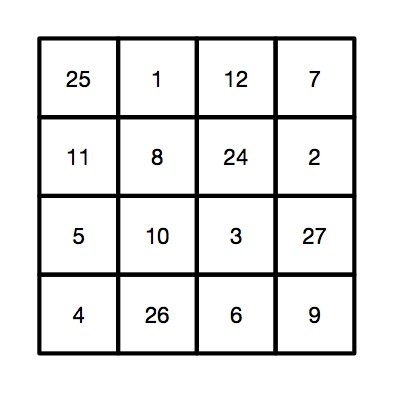
Victorian Computer Scientists, Ada Lovelace and Charles Babbage were interested in Magic Squares. We know this because a scrap of paper with mathematical doodles and scribbles on it in their handwriting has been discovered, and one of the doodles is a magic square like this one. In a magic square all the rows, columns and diagonals magically add to the same number. At some point, Ada and Charles were playing with magic squares together. Creating magic squares sounds hard, but perhaps not with a bit of algorithmic magic.
The magical effect
For this trick you ask a volunteer to pick a number. Instantly, on hearing it, you write out a personal four by four magic square for them based on that number. When finished the square contents adds to their chosen number in all the usual ways magic squares do. An impressive feat of superhuman mathematical skills that you can learn to do most instantly.
Making the magic
To perform this trick, first get your audience member to select a large two digit number. It helps if it is a reasonably large number, greater than 20, as you’re going to need to subtract 20 from it in a moment. Once you have the number you need to do a bit of mental arithmetic. You need an algorithm – a sequence of steps – to follow that given that number guarantees that you will get a correct magic square.
For our example, we will suppose the number you are given is 45, though it works with any number.
Let’s call the chosen number N (in our example: N is 45). You are going to calculate the following four numbers from it: N-21, N-20, N-19 and N-18, then put them in to a special, precomputed magic square pattern.
The magic algorithm
Sums like that aren’t too hard, but as you’ve got to do all this in your head, you need a special algorithm that makes it really easy. So here is an easy algorithm for working out those numbers.
Image by CS4FN.
Start by working out N – 20. Subtracting 20 is quite easy. For our example number of 45, that is 25. This is our ‘ROOT’ value that we will build the rest from.
N-19. Just add 1 to the root value (ROOT + 1). So 25 + 1 gives 26 for our example.
N-18. Add 2 to the root value (ROOT + 2). So 25 + 2 gives 27.
N-21. Subtract 1 from the root value (ROOT – 1). So 25 – 1 gives 24.
Having worked out the 4 numbers created form the original chosen number, N, you need to stick them in the right place in a blank magic square, along with some other numbers you need to remember. It is the pattern you use to build your magic square from. It looks like the one to the right. To make this step easy, write this pattern on the piece of paper you write the final square on. Write the numbers in light pencil, over-writing the pencil as you do the trick so no-one knows at the end what you were doing.
A square grid of numbers like this is an example of what computer scientists call a data structure: a way to store data elements that makes it easy to do something useful: in this case making your friends think you are a maths superhero.
When you perform this trick, fill in the numbers in the 4 by 4 grid in a random, haphazard way, making it look like you are doing lots of complicated calculations quickly in your head.
Finally, to prove to everyone it is a magic square with the right properties, go through each row, column and diagonal, adding them up and writing in the answers around the edge of the square, so that everyone can see it works.
The final magic square for chosen number 45
So, for our example, we would get the following square, where all the rows, columns and diagonals add to our audience selected number of 45.
Image by CS4FN.
Why does it work?
If you look at the preset numbers in each row, column and diagonal of the pattern, they have been carefully chosen in advance to add up to the number being subtracted from N on those lines. Try it! Along the top row 1 + 12 + 7 = 20. Down the right side 11 + 5 + 4 = 20.
Do it again?
Of course you shouldn’t do it twice with the same people as they might spot the pattern of all the common numbers…unless, now you know the secret, perhaps you can work out your own versions each with a slightly different root number, calculated first and so a different template written lightly on different pieces of paper.
Peter McOwan and Paul Curzon, Queen Mary University of London
A perceptron winter: Winter image by Image by Nicky ❤️🌿🐞🌿❤️ from Pixabay. Perceptron and all other image by CS4FN.
Back in the 1960s there was an AI winter…after lots of hype about how Artificial Intelligence tools would soon be changing the world, the hype fell short of the reality and the bubble burst, funding disappeared and progress stalled. One of the things that contributed was a simple theoretical result, the apparent shortcomings of a little device called a perceptron. It was the computational equivalent of an artificial brain cell and all the hype had been built on its shoulders. Now, variations of perceptrons are the foundation of neural networks and machine learning tools which are taking over the world…so what went wrong in the 1960s? A much misunderstood mathematical result about what a perceptron can and can’t do was part of the problem!
The idea of a perceptron dates back to the 1940s but Frank Rosenblatt, a researcher at Cornell Aeronautical Laboratory, first built one in 1958 and so popularised the idea. A perceptron can be thought of as a simple gadget, or as an algorithm for classifying things. The basic idea is it has lots of inputs of 0 or 1s and one output, also of 0 or 1 (so equivalent to taking true / false inputs and returning a true / false output). So for example, a perceptron working as a classifier of whether something was a mammal or not, might have inputs representing lots of features of an animal. These would be coded as 1 to mean that feature was true of the animal or 0 to mean false: INPUT: “A cow gives birth to live young” (true: 1), “A cow has feathers” (false: 0), “A cow has hair” (true: 1), “A cow lays eggs” (false: 0), “etc. OUTPUT: (true: 1) meaning a cow has been classified as a mammal.
A perceptron makes decisions by applying weightings to all the inputs that increase the importance of some, and lesson the importance of others. It then adds the results together also adding in a fixed value, bias. If the sum it calculates is greater then or equal to 0 then it outputs 1, otherwise it outputs 0. Each perceptron has different values for the bias and the weightings, depending on what it does. A simple perceptron is just computing the following bit of code for inputs in1, in2, in3 etc (where we use a full stop to mean multiply):
IF bias + w1.in1 + w2.in2 + w3.in3 ... >= 0
THEN OUTPUT O
ELSE OUTPUT 1
Because it uses binary (1s and 0s), this version is called a binary classifier. You can set a perceptron’s weights, essentially programming it to do a particular job, or you can let it learn the weightings (by applying learning algorithms to the weightings). In the latter case it learns for itself the right answers. Here, we are interested in the fundamental limits of what perceptrons could possibly learn to do, so do not need to focus on the learning side just on what a perceptron’s limits are. If we can’t program it to do something then it can’t learn to do it either!
Machines made of lots of perceptrons were created and experiments were done with them to show what AIs could do. For example, Rosenblatt built one called Tobermory with 12,000 weights designed to do speech recognition. However, you can also explore the limits of what can be done computationally through theory: using maths and logic, rather than just by invention and experiments, and that kind of theoretical computer science was what others did about perceptrons. A key question in theoretical computer science about computers is “What is computable?” Can your new invention compute anything a normal computer can? Alan Turing had previously proved an important result about the limits of what any computer could do, so what about an artificial intelligence made of perceptrons? Could it learn to do anything a computer could or was it less powerful than that?
As a perceptron is something that takes 1s and 0s and returns a 1 or 0, it is a way of implementing logic: AND gates, OR gates, NOT gates and so on. If it can be used to implement all the basic logical operators then a machine made of perceptrons can do anything a computer can do, as computers are built up out of basic logical operators. So that raises a simple question, can you actually implement all the actual logical operators with perceptrons set appropriately. If not then no perceptron machine will ever be as powerful as a computer made of logic gates! Two of the giants of the area Marvin Minsky and Seymour Papert investigated this. What they discovered contributed to the AI winter (but only because the result was misunderstood!)
Let us see what it involves. First, can we implement an AND gate with appropriate weightings and bias values with a perceptron? An AND gate has the following truth table, so that it only outputs 1 if both its inputs are 1:
Truth table for an AND gate
So to implement it with a perceptron, we need to come up with positive or negative number for, bias, and other numbers for w1 and w2, that weight the two inputs. The numbers chosen need to lead to it giving output 1 only when the two inputs (in1 and in2) are 1 and otherwise giving output, 0.
See if you can work out the answer before reading on.
A perceptron for an AND gate needs values set for bias, w1 and w2
It can be done by setting the value of b to -2 and making both weightings, w1 and w2, value 1. Then, because the two inputs, in1, and in2 can only be 1 or 0, it takes both inputs being 1 to overcome b’s value of -2 and so raise the sum up to 0:
So far so good. Now, see if you can work out weightings to make an OR gate and a NOT gate.
Truth table for an OR gateTruth table for a NOT gate
It is possible to implement both OR and NOT gate as a perceptron (see answers at the end).
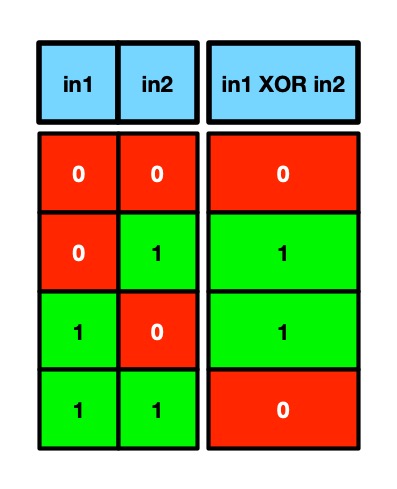
However, Minsky and Papert proved that it was impossible to create another kind of logical operator, an XOR gate, with any values of bias and weightings in a perceptron. This a logic gate that has output 1 if its inputs are different, and outputs 0 if its inputs are the same.
Truth table for an XOR gate
Can you prove it is impossible?
They had seemingly shown that a perceptron could not compute everything a computer could. Perceptrons were not as expressive so not as powerful (and never could be as powerful) as a computer. There were things they could never learn to do, as there were things as simple as an XOR gate that they could not represent. This led some to believe the result meant AIs based on perceptrons were a dead end. It was better to just work with traditional computers and traditional computing (which by this point were much faster anyway). Along with the way that the promises of AI had been over-hyped with exaggerated expectations and the applications that had emerged so far had been fairly insignificant, this seemingly damming theoretical blow on top of all that led to funding for AI research drying up.
However, as current machine learning tools show, it was never that bad. The theoretical result had been misunderstood, and research into neural networks based on perceptrons eventually took off again in the 1990s
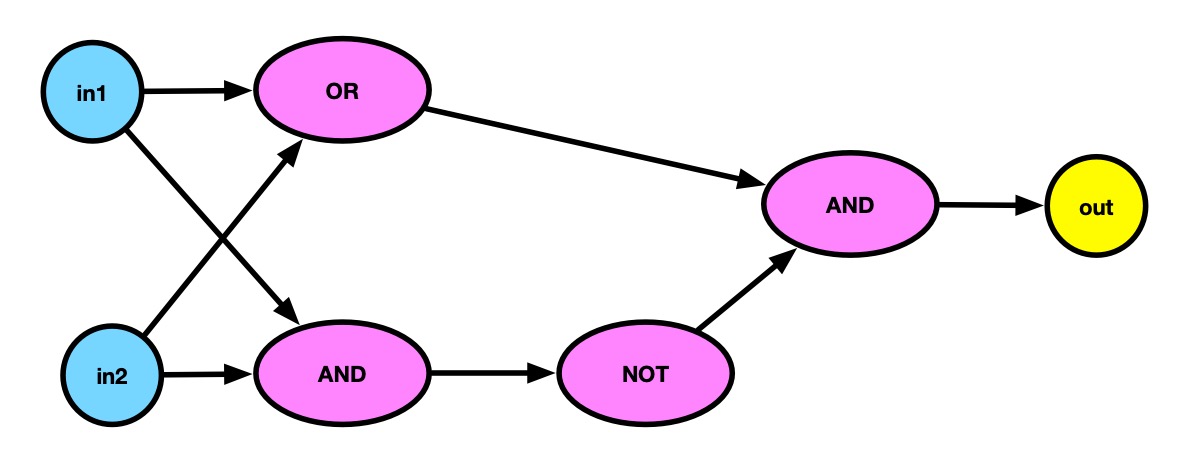
Minsky and Papert’s result is about what a single perceptron can do, not about what multiple ones can do together. More specifically, if you have perceptrons in a single layer, each with inputs just feeding its own outputs, the theoretical limitations apply. However, if you make multiple layers of perceptrons, with the outputs of one layer of perceptrons feeding into the next, the negative result no longer applies. After all, we can make AND, OR and NOT gates from perceptrons, and by wiring them together so the outputs of one are the inputs of the next one, then we can build an XOR gate just as we can with normal logic gates!
An XOR gate from layers of perceptrons set as AND, OR and NOT operators
We can therefore build an XOR gate from perceptrons. We just need multi-layer perceptrons, an idea that was actually known about in the 1960s including by Minsky and Papert. However, without funding, making further progress became difficult and the AI winter started where little research was done on any kind of Artificial Intelligence, and so little progress was made.
The theoretical result about the limits of what perceptrons could do was an important and profound one, but the limitations of the result needed to be understood too, and that means understanding the assumptions it is based on (it is not about multi-layer perceptrons. Now AI is back, though arguably being over-hyped again, so perhaps we should learn from the past!. Theoretical work on the limits of what neural networks can and can’t do is an active research area that is as vital as ever. Let’s just make sure we understand what results mean before we jump to any conclusions. Right now theoretical results about AI need more funding not a new winter!
– Paul Curzon, Queen Mary University of London
This article is based on a introductory segment of a research seminar on the expressive power of graph neural networks by Przemek Walega, Queen Mary University of London, October 2025.
The idea of an algorithm is core to computer science. So what is an algorithm? If you have ever used the instructions from some Lego set for building a Lego building, car or animal, then you have followed algorithms for fun yourself and you have been a computational agent.
An algorithm is just a special kind of set of instructions to be followed to achieve something. That something that is to be achieved could be anything (as long as someone is clever enough to come up with instructions to do it). It could be that the instructions tell you how to multiply two number, how to compute an answer to some calculation; how to best rank search results so the most useful are first; or how to make a machine learn from data so it can tell pictures of dogs from cats or recognise faces. The instructions could also be how to build a TIE fighter from a box of lego pieces, or how to build a duck out of 5 pieces of lego or, in fact, anything you might want to build from lego.
The first special thing about the instructions of an algorithm is that they guarantee the desired result is achieved (if they are followed exactly) … every time. If you follow the steps taught in school of how to multiply those numbers then you will get the answer right every time, whatever numbers you are asked to multiply. Similarly, if you follow the instructions that come with a lego box exactly and you will build exactly what is in the picture on the box. If you take it apart and build it again, it will come out the same the second time too.
For this to be possible and for instructions to be an algorithm, those instructions must be precise. There can be no doubt about what the next step is. In computer science, instructions are written in special languages like pseudocode or a programming language. Those languages are used because they are very precise (unlike English) with no doubt at all about what the instruction means to be done. Those nice people at Lego who write the booklets of instructions in each set, put a lot of effort into making sure their instructions are precise (and easy to follow). Algorithms do not have to be written in words. Lego use diagrams rather than words to be precise about each step. Their drawings are very clear so there is no room for doubt about what needs to be done next.
Computer scientists talk about “computational agents”. A computational agent is something that can follow an algorithm precisely. It does so without needing to understand or know what the instructions do. It just follows them blindly. Computers are the most obvious thing to act as a computational agent. It is what they are designed to do. In fact, it is all they can do. THey do not know what they are doing (they are just metal and silicon). They are machines that precisely follow instructions. But a human can act as a computational agent too, if they also follow instructions. If you build a lego set following the instructions exactly making no mistake then you are acting as a computational agent. If you miss a step or do steps in the wrong order of place a piece in the wrong place or (heaven forbid) do something creative and change the design as you go, then you are no longer being a computational agent. You are no longer following an algorithm. If you do act as a computational agent you will build whatever is on the box exactly, however big it is and even if you have no idea what you are building.
Acting as a computational agent can be a way to destress, a form of mindfulness where you switch off your mind. They can also be good to build up useful skills that matter as a programmer: like attention to detail, or if following a program helping you understand the semantics of programming languages so learn to program better. It is also a good debugging technique, and part of code audits where you step through a program to check it does do as intended (or find out where and why is doesn’t).
Algorithms are the core of everything computers do. They can do useful work or they can be just fun to follow. I know which kind I like playing with best.
Subscribe to be notified whenever we publish a new post to the CS4FN blog.
This page is funded by EPSRC on research agreement EP/W033615/1.
The Lego Computer Science series was originally funded by UKRI, through grant EP/K040251/2 held by Professor Ursula Martin, and formed part of a broader project on the development and impact of computing.
Do you know how to make a sandwich? More importantly do you know how to write down a set of precise, detailed instructions that could tell someone else how to make a sandwich? I’m sure you think you could, but after watching this video below you might feel less sure.
This video has been used in some classrooms as a fun way of talking about how precise and correct an algorithm needs to be in order to run a program correctly. Josh, the dad in the video, asks his children (Johnna and Evan) to write out some instructions to make a peanut butter and jelly (jam) sandwich. They all speak the same language (English) so the instructions don’t have to be converted into machine language for the computer (dad) to run the program and make the sandwich, but as you’ll soon see, it’s harder than his children think. They do get there in the end though… kind of.
See if you can write your own set of instructions and then get someone to follow them exactly.
Incidentally, the image used to illustrate this article has been “…assessed under the valued image criteria and is considered the most valued image on Commons within the scope: peanut butter and jelly sandwiches. You can see its nomination here.” Only the best peanut pics on this site! You can see all the images that didn’t win here.
Part of a series of ‘whimsical fun in computing’ to celebrate April Fool’s (all month long!).
Subscribe to be notified whenever we publish a new post to the CS4FN blog.
This page is funded by EPSRC on research agreement EP/W033615/1.
How data is represented is an important part of computer science. There are lots of ways numbers can be represented. Choosing a good representation can make things easier or harder to do.The Ancient Egyptians had a simple way using hieroglyphs (symbols). It is similar to Roman Numerals but simpler.
They represented numbers 1 to 9 with a hieroglyph with that number of straight lines. They arranged them into patterns (a bit like we do dots on a dice). The patterns make them easier to recognise. They used an upside down U shape for 10, two of these for 20, and so on. Their symbol for 10 also meant a “cattle hobble”. They then had a new symbols for each power of 10 up to a million. So 100 is the hieroglyph for a coil of rope.
Image by CS4FN
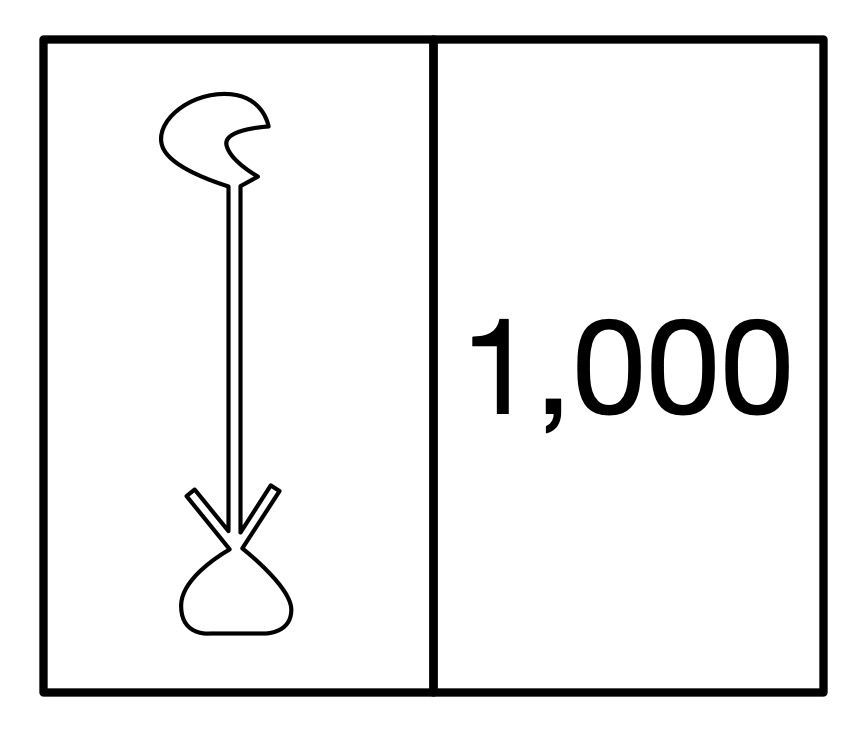
The hieroglyph for the number 1000 was a water lily.
Image by CS4FN
The hieroglyph for a million, which also rather sensible meant ‘many’, was just the hieroglyph of the god Hey who was the personification of eternity.
To make a number you just combined the hieroglyph for the ones, tens, hundreds and so on.
The Ancient Egyptian number system makes it very easy to write numbers and to add and subtract numbers. Big numbers are fairly compact, though take up more space than our decimals. It is easy to convert a tally representation into this system too. More complicated things like multiplication are harder to do. Computers use binary representation because they make all the main operations easy to do using logic. Ultimately it is all about algorithms. The Egyptians had easy to follow algorithms for addition and subtraction to go with their number representation. We have devised algorithms that allow computers to do all the calculations they do as quickly as possible using a binary representation
– Paul Curzon, Queen Mary University of London
To do…
Try doing some sums as an Ancient Egyptian would – without converting to our numbers. What is the algorithm for adding Egyptian numbers? Do multiplication using a repeated addition algorithm – to do 3 x 4 you 4 to zero 3 times.
When did women first contribute to the subject we now call Computer Science: developing useful algorithms, for example? Perhaps you would guess Ada Lovelace in the Victorian era so the mid 1800s? She corrected one of Charles Babbage’s algorithms for the computer he was trying to build. Think earlier. Two centuries or so earlier! Maria Cunitz improved an algorithm published by the astronomer Kepler and then applied it to create a work more accurate than his.
Very few women, until the 20th century were given the opportunities to take part in any kind of academic study. They did not get enough education, and even if they did were not generally welcome in the circles of mathematicians and natural philosophers. Maria, who was Polish from an educated family of doctors and scientists, was tutored and supported in becoming a polymath with an interest in lots of subjects from history to mathematics. Her husband was a doctor who also was interested in astronomy something that became a shared passion with him teaching her the extra maths she needed. They lived at the time of the 30 years war that was waged across most of Europe. It was a spat turned into a war about religion between catholic and protestant countries. In Poland, where they lived, it was not safe to be a protestant. The couple had a choice of convert or flee, so left their home taking sanctuary in a convent.
This actually gave Cunitz a chance to pursue an astronomical ambition based on the work of Johannes Kepler. Kepler was famous for his three Laws of Planetary Motion published in the early 1600s on how the planets orbit the sun. It was based on the new understanding from Copernicus that the planets rotated around the sun and so the Earth was not the centre of everything. Kepler’s work gave a new way to compute the positions of the planets,
Cunitz had a detailed understanding of Kepler’s work and of the mathematics behind it, She therefore spent her time in the convent computing tables that gave the positions of all the planets in the sky. This was based on a particular work of Kepler called the Rudolphine Tables. It was one of his great achievements stemming from his planetary laws. Such astronomical tables became vital for navigating ships at sea, as the planetary positions could be used to determine longitude. However, at the time, the main use was for astrology as casting someone’s horoscope required knowledge of the precise positions of the planets. In creating the tables, Cunitz was acting as an early human computer, following an algorithm to compute the table entries. It involved her doing a vast amount of detailed calculation.
Kepler himself spent years creating his version of the tables. When asked to hurry up and complete the work he said: “I beseech thee, my friends, do not sentence me entirely to the treadmill of mathematical computations…” He couldn’t face the role of being a human computer! And yet a whole series of women who came after him dedicated their lives to doing exactly that, each pushing forward astronomy as a result. Maria herself took on the specific task he had been reluctant to complete in working out tables of planetary positions.
Kepler had published his algorithm for computing the tables along with the tables. Following his algorithm though was time consuming and difficult, making errors likely. Maria realised it could be improved upon, making it simpler to do the calculations for the tables and making it more likely they were correct. In particular, Kepler was using logarithms for the calculations. but she realised that was not necessary. Sacrificing some accuracy in the results for the sake of the avoidance of larger errors, the version she followed was even simpler. By the use of algorithmic thinking she had avoided at least some of the chore that Kepler himself had dreaded. This is exactly the kind of thing good programmers do today, improving the algorithms behind their programs so the programs are more efficient. The result was that Maria produced a set of tables that was more accurate than Kepler’s, and in fact the most accurate set of planetary tables ever produced to that point in time. She published them privately as a book “Urania Propitia’ in 1650. Having a mastery of languages as well as maths and science, she, uniquely, wrote it in both German and Latin.
Women do not figure greatly in the early history of science and maths just because societal restrictions, prejudices and stereotypes meant few were given the chance. Those who were like Maria Cunitz, showed their contributions could be amazing. It just took the right education, opportunities, and a lot of dedication. That applies to modern computer science too, and as the modern computer scientist, Karen Spärck Jones, responsible for the algorithm behind search engines said: “Computing is too important to be left to men.”
Next time you are in a large crowd, look around you: all those people moving together, and mostly not bumping into each other. How does it happen? Flocks of birds and schools of fish are also examples of this ‘swarm intelligence’. Computer Scientists have been inspired by this behaviour to come up with new solutions to really difficult problems.
Swarming behaviour requires the individuals (birds, fish or people) to have a set of rules about how to interact with the individuals nearest to them. These so-called ‘local’ rules are all that’s needed to give rise to the overall or ‘global’ behaviour of the swarm. We adjust our individual behaviour according to our current state but also the current state of those around us. If I want to turn left then I do it slowly so that others in the crowd can be aware of it and also start to turn. I know what I am doing and I know what they are doing. This is how information makes its way from the edges of the crowd to the centre and vice versa.
A swarm is born
The way a crowd or swarm interacts can be explained with simple maths. This maths is a way of approximating the complex psychological behaviour of all the individuals on the basis of local and global rules. Back in 1995 James Kennedy, a research psychologist, and Computer Scientist Russ Eberhart, having been inspired by the study of bird flocking behaviour by biologist Frank Heppner, realised that this swarm intelligence could be used to solve difficult computer problems. The result was a technique called Particle Swarm Optimisation (PSO).
Travel broadens the mind
An optimisation problem is one where you have a range of options to choose from and you want to know the best solution. One of the classic problems is called ‘The travelling salesperson’ problem. You work for a company and have to deliver packages to say 12 towns. You look at the map. There are many different routes to take, but which is the one that will let you visit all 12 towns using the least petrol? Here the choices are the order in which you visit the towns, and the constraint is that you want to do the least driving. You could have a guess, select the towns in a random order and work out how far you’d have to travel to visit them in this order. You then try another route through all 12 and see if it takes less mileage, and so on. Phew! It could take a long time to work out all the possible routes for 12 towns to see which was best. Now imagine your company grows and you have to deliver to 120 towns or 1200 towns. You would spend all your time with the maps trying to come up with the cheapest solutions. There must be a better way? Well actually simple as this problem seems it’s an example of a set of computational problems known as NP-Complete problems and it’s not easy to solve! You need some guidance to help you through and that’s where swarm optimisation come in. It’s an example of a so-called metaheuristic algorithm: a sort of ‘general rule of thumb’ to help solve these types of problem. It won’t always work unless you have infinite time but it’s better than just trying random solutions. So how does swarm optimisation work here?
State space: the final frontier
First we need to turn the problem into something called a state space. You probably use state spaces all the time but just don’t know it. Think about yourself. What are the characteristic you would use to tell people about your current state: age, height, weight and so on. You can identify yourself by a list of say 3 numbers – one for age, one for height, one for weight. It’s not everything about you of course but it does define your state to some extent. Your numbers will be different to other people’s numbers, if you take all the numbers for your friends you would have a state space. It would be a 3-dimensional space with axes: age, height and weight, and each person would be a point in that space at some coordinate (X, Y, Z).
So state spaces are just a way of representing the possible variations in some problem. With the 12 towns problem, however, you couldn’t draw this space: it would be 12 dimensional! It would have one axis for each town, with the position on the axis an indication of where in the route it was. Every point in that space would be a different route through the 12 towns, so each point in the space would have coordinates (x1, x2, x3, … x11, x12). For each point there would also be a mileage associated with the route, and the task is to find the coordinate point (route) with the lowest mileage.
Where no particle has swarmed before
Enter swarm optimisation. We create a set of ‘particles’ that will be like birds or fish, and will fly and swarm through our state space. Each particle starts with a random starting location in the state space and calculates the mileages involved for the coordinates (route) they are at. The particles remember (store) this coordinate and also the value of the mileage at that position. Each particle therefore has it’s own known ‘local’ best value (where the lowest mileage was) but can compare this with other neighbouring particles to see if they have found any even better solutions. The particles then move onwards randomly in a direction that tends to move them towards their own local best and the best value found by their neighbours. The particles ‘fly’ around the state space in a swarm homing in on even better solutions until they all converge on the best they can find: the answer.
It may be that somewhere in a part of the space where no particle has been there is an even better solution, perhaps even the best solution possible. Our swarm will have missed it! That’s why this algorithm is a heuristic, a best guess to a tough problem. We can always add some more particles at the start to fill more of the state space and reduce the chance of missing a good solution, but we cant ever be 100% sure.
Swarm optimisation has been applied to a whole range of tough problems in computing, electronic engineering, medicinal chemistry and economics. All it needs is for you to create an appropriate state space for your problem and let the particles fly and swarm to a good solution.
It’s yet another example of clever computing based on behaviours found in the natural world. So next time you’re in a crowd, look around and appreciate all that collective interacting swarm intelligence…but make sure you remember to watch where you are stepping.
by Peter W. McOwan, Queen Mary University of London. From the archive.
What is an algorithm? It is just a set of instructions that if followed precisely and in the given order, guarantees some result. The concept is important to computer scientists because all computers can do is follow instructions, but they do so perfectly. Computers do not understand what they are doing so can’t do anything but follow their instructions. That means whatever happens the instructions must always work. We can see what we mean by an algorithm by comparing it to the idea of a self-working trick from conjuring.
If you follow the steps of a self-working trick you will have the magic effect even if you have no idea how it works. Below is a a demonstration of a self-working magic jigsaw trick (you can download it from here https://conjuringwithcomputation.wordpress.com/resources/ print it, cut out the pieces and do it yourself, following the instructions below).
Image by CS4FN
The step of the trick are.
1) Count the robots (ignore the green monsters and the robot dog)….There are 17.
2) Swap the top two pieces on the left with those on the right lining the jigsaw back up
3) Count the robots ….There are 16. One has disappeared.
Magically a robot has disappeared! Which one disappears and where did it go? Was it swallowed by a green monster, did it teleport away?
How did that happen anyway?
Image by CS4FN
By following the steps you can make the trick work…even if you haven’t worked out how it works, a robot still disappears. You do not need to understand, you just need to be able to follow instructions. It is a self-working trick. Follow the steps of the trick exactly and the robot disappears. It is just an algorithm. Self-working tricks are just algorithms for doing magic. When you follow the steps of the trick you are acting like a computer, blindly following the instructions in its program!
Using clever computer vision techniques it’s now possible for your ingredients to tell you how they should be cooked in a kitchen. The system uses cameras and projectors to first recognise the ingredients on the chopping board, for example the size, shape and species of fish you are using. Then the system projects a cutting line on the fish to show you how to prepare it, and a speech bubble telling you how long it should be cooked for and suggesting ways it can be served. In the future these cooking support systems could take some of the strain from mealtimes. At least it will help to make us all better cooks, and perhaps with an added pinch of artificial intelligence we can all become more like Jamie Oliver.
In the post below you can learn the recipe for Hummus and Tomato Pasta, and find out about program structure, commenting, variable storage and assignments. A bit of ‘back to school’ around the dinner table (or perhaps combine Computer Science classes with Food and Nutrition!).
It is Red nose day in the UK the day of raising money for the comic relief charity by buying and wearing red noses and generally doing silly things for money.
Red noses are not just for red nose day though and if you ‘ve been supporting it every year, you possibly now have a lot of red noses like we do. What can you do with lots of red noses? Well one possibility is to count in red nose binary as a family or group of friends. (Order your red noses (a family pack has 4 or a school pack 25) from comic relief or make a donation to the charity there.)
Image by CS4FN
Red nose binary
Let’s suppose you are a family of four. All stand in a line holding your red noses (you may want to set up a camera to film this). How many numbers can 4 red noses represent? See if you can work it out first. Then start counting:
No one wearing a red nose is 0,
the rightmost end person puts theirs on for 1,
they take it off and the next person puts theirs on for 2,
the first person puts theirs back on for 3,
the first two people take their noses off and the third person puts theirs on for 4
and so on…
The pattern we are following is the first (rightmost end) person changes their nose every time we count. The second person has the nose off for 2 then on for the next 2 counts. The third person changes theirs every fourth count (nose off for 4 then on for 4) and the last person changes theirs every eighth count (off for 8, on for 8). That gives a unique nose pattern every step of the way until eventually all the noses are off again and you have counted all the way from 0 to 15. This is exactly the pattern of binary that computers use (except they use 1s and 0s rather than wear red noses).
What is the biggest number you get to before you are back at 0? It is 15. Here is what the red nose binary pattern looks like.
Image by CS4FN
Try and count in red nose binary like this putting on and taking off red noses as fast as you can, following the pattern without making mistakes!
The numbers we have put at the top of each column are how much a red nose is worth in that column. You could write the number of the column on that person’s red nose to make this obvious. In our normal decimal way of counting, digits in each column are worth 10 times as much (1s 10s 100s, 1000s, etc) Here we are doing the same but with 2s (1s 2s 4s 8s etc). You can work out what a number represents just by adding that column number in if there is a red nose there. You ignore it if there is no red nose. So for example 13 is made up of an 8s red nose + a 4s red nose + a 1s red nose. 8 + 4 + 1 = 13.
Image by CS4FN
Add one more person (perhaps the dog if they are a friendly dog willing to put up with this sort of thing) with a red nose (now worth 16) to the line and how many more numbers does that now mean you can count up to? Its not just one more. You can now go through the whole original sequence twice once with the dog having no red nose, once with them having a red nose. So you can now count all the way from 0 to 31. Each time you add a new person (or pet*, though goldfish don’t tend to like it) with a red nose, you double the number you can count up to.
There is lots more you can do once you can count in red nose binary. Do red nose binary addition with three lines of friends with red noses, representing two numbers to add and compute the answer on the third line perhaps… for that you need to learn how to carry a red nose from one person to the next! Or play the game of Nim using red nose binary to work out your moves (it is the sneaky way mathematicians and computer scientists use to work out how to always win). You can even build a working computer (a Turing Machine) out of people wearing red noses…but perhaps we will save that for next year.
What else can you think of to do with red nose binary?
*Always make sure your pet (or other family member) has given written consent before you put a red nose on them for ethical counting.