DoodleDraw a snowflake

Following algorithms to draw nature can lead to natural looking pictures of all all sorts of things: from trees to snowflakes. It is one way computer generated imagery (CGI) scenery is created for films and games. You can write computer programs to do it if you have programming skill, but it can be just as fun (and more stress-relieving) to just doodle algorithmic pictures by hand – you act as what computer scientists call a ‘computational agent’ just following the algorithm. Here is an example Doodle Algorithm to draw a snowflake.

The DoodleDraw Algorithm

1. Draw a Black rectangle
2. Draw a SnowflakeHex in the middle of the black rectangle.
3. DoodleDraw a.Hexagon Snowflake

To Draw a SnowflakeHex:
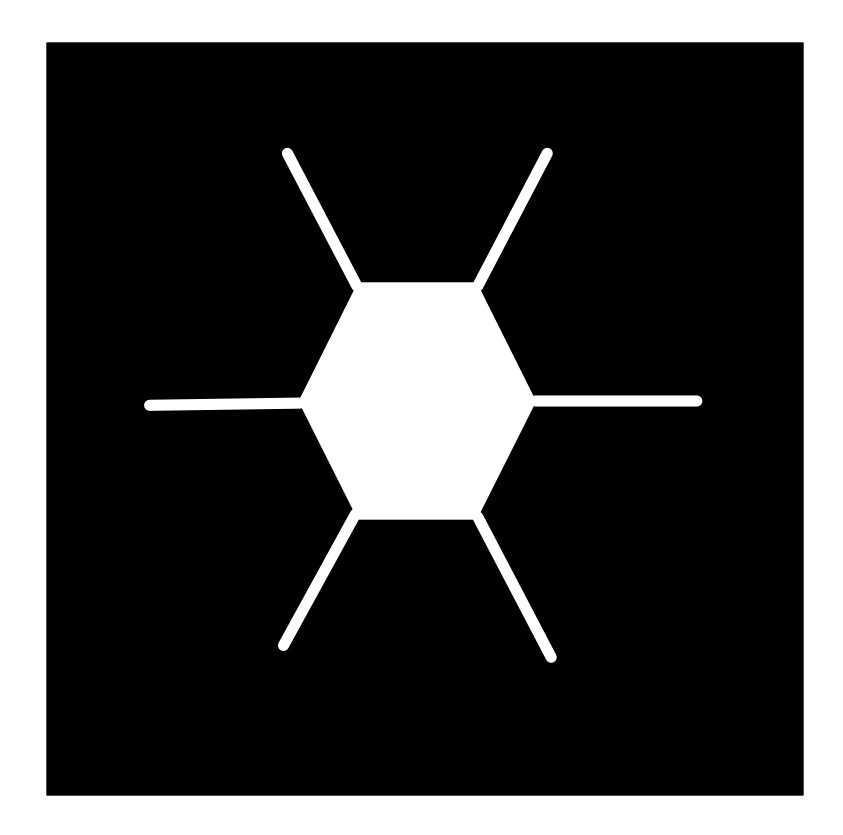
    1. Draw a white hexagon with white lines sticking out from each corner (as shown).

To DoodleDraw a Hexagon Snowflake:
    1. IF happy with the picture THEN STOP
        ELSE
            1. Pick an existing SnowflakeHex and pick a line on it.
            2. Draw a new smaller SnowflakeHex on that line.
            3. DoodleDraw a Hexagon Snowflake.
A hexagon with lines from each corner
Image by CS4FN

The doodle this led to for me is given below… does it look snowflake-ish? Now follow the algorithm and draw your own, just like snowflakes every drawing should be different even if following the same algorithm as we include random steps in the algorithm.

A snowflake drawn from hexagons with lines from each corner
Image by CS4FN


Different algorithms with different starting shapes give different looking trees, grasses, ferns, snowflakes, crystals,… Often nature is following a very similar recursive creation process, which is why the results can be realistic.

Try inventing your own doodle art algorithm and see how realistic the drawings you end up with are. First try using a slightly different starting picture to ours above (eg a hollow hexagon instead of a filled in one, or skip the lines, or have more lines, or have a different central image to the one that is then replicated…and see what you end up with. Find lots more ideas for doodle draw algorithms on our DoodleDraw page.

Next time you find yourself doodling in a meeting or lecture, invent your own doodle draw algorithm, draw an algorithmic doodle, develop your algorithmic thinking skills and at the same time explore algorithms for drawing nature.

More on …

Subscribe to be notified whenever we publish a new post to the CS4FN blog.


Hear and … their magic square

A magic three by three square with the numbers 2, 9 and 4 in the top row, 7, 5 and 3 in the middle row and 6, 1 and 8 in the bottom row. Each row, column and the two diagnonals add up to 15.
Image by CS4FN

Victorian Computer Scientists, Ada Lovelace and Charles Babbage were interested in Magic Squares. We know this because a scrap of paper with mathematical doodles and scribbles on it in their handwriting has been discovered, and one of the doodles is a magic square like this one. In a magic square all the rows, columns and diagonals magically add to the same number. At some point, Ada and Charles were playing with magic squares together. Creating magic squares sounds hard, but perhaps not with a bit of algorithmic magic.

The magical effect

For this trick you ask a volunteer to pick a number. Instantly, on hearing it, you write out a personal four by four magic square for them based on that number. When finished the square contents adds to their chosen number in all the usual ways magic squares do. An impressive feat of superhuman mathematical skills that you can learn to do most instantly.

Making the magic

To perform this trick, first get your audience member to select a large two digit number. It helps if it is a reasonably large number, greater than 20, as you’re going to need to subtract 20 from it in a moment. Once you have the number you need to do a bit of mental arithmetic. You need an algorithm – a sequence of steps – to follow that given that number guarantees that you will get a correct magic square.

For our example, we will suppose the number you are given is 45, though it works with any number.

Let’s call the chosen number N (in our example: N is 45). You are going to calculate the following four numbers from it: N-21, N-20, N-19 and N-18, then put them in to a special, precomputed magic square pattern.

The magic algorithm

Sums like that aren’t too hard, but as you’ve got to do all this in your head, you need a special algorithm that makes it really easy. So here is an easy algorithm for working out those numbers.

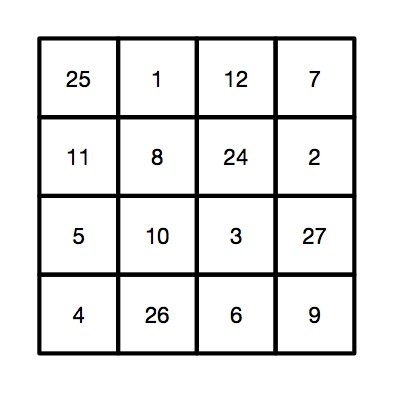
This four by four magic square contains the calculations needed to install the numbers in the correct positions so that the magic square will work with any large two digit number
Image by CS4FN.
  1. Start by working out N – 20. Subtracting 20 is quite easy. For our example number of 45, that is 25. This is our ‘ROOT’ value that we will build the rest from.
  2. N-19. Just add 1 to the root value (ROOT + 1). So 25 + 1 gives 26 for our example.
  3. N-18. Add 2 to the root value (ROOT + 2). So 25 + 2 gives 27.
  4. N-21. Subtract 1 from the root value (ROOT – 1). So 25 – 1 gives 24.
  5. Having worked out the 4 numbers created form the original chosen number, N, you need to stick them in the right place in a blank magic square, along with some other numbers you need to remember. It is the pattern you use to build your magic square from. It looks like the one to the right. To make this step easy, write this pattern on the piece of paper you write the final square on. Write the numbers in light pencil, over-writing the pencil as you do the trick so no-one knows at the end what you were doing.

A square grid of numbers like this is an example of what computer scientists call a data structure: a way to store data elements that makes it easy to do something useful: in this case making your friends think you are a maths superhero.

When you perform this trick, fill in the numbers in the 4 by 4 grid in a random, haphazard way, making it look like you are doing lots of complicated calculations quickly in your head.

Finally, to prove to everyone it is a magic square with the right properties, go through each row, column and diagonal, adding them up and writing in the answers around the edge of the square, so that everyone can see it works.

The final magic square for chosen number 45

So, for our example, we would get the following square, where all the rows, columns and diagonals add to our audience selected number of 45.

This four by four magic square is the result of taking the chosen number 45 and performing the sequence of calculations (the algorithm) using it as 'N'.
Image by CS4FN.

Why does it work?

If you look at the preset numbers in each row, column and diagonal of the pattern, they have been carefully chosen in advance to add up to the number being subtracted from N on those lines. Try it! Along the top row 1 + 12 + 7 = 20. Down the right side 11 + 5 + 4 = 20.

Do it again?

Of course you shouldn’t do it twice with the same people as they might spot the pattern of all the common numbers…unless, now you know the secret, perhaps you can work out your own versions each with a slightly different root number, calculated first and so a different template written lightly on different pieces of paper.

Peter McOwan and Paul Curzon, Queen Mary University of London

More on …


Debugging your sandwich maker

Do you know how to make a sandwich? More importantly do you know how to write down a set of precise, detailed instructions that could tell someone else how to make a sandwich? I’m sure you think you could, but after watching this video below you might feel less sure.

This video has been used in some classrooms as a fun way of talking about how precise and correct an algorithm needs to be in order to run a program correctly. Josh, the dad in the video, asks his children (Johnna and Evan) to write out some instructions to make a peanut butter and jelly (jam) sandwich. They all speak the same language (English) so the instructions don’t have to be converted into machine language for the computer (dad) to run the program and make the sandwich, but as you’ll soon see, it’s harder than his children think. They do get there in the end though… kind of.

See if you can write your own set of instructions and then get someone to follow them exactly.

Incidentally, the image used to illustrate this article has been “…assessed under the valued image criteria and is considered the most valued image on Commons within the scope: peanut butter and jelly sandwiches. You can see its nomination here.” Only the best peanut pics on this site! You can see all the images that didn’t win here.

Watch …


Part of a series of ‘whimsical fun in computing’ to celebrate April Fool’s (all month long!).

Find out about some of the rather surprising things computer scientists have got up to when they're in a playful mood.

Subscribe to be notified whenever we publish a new post to the CS4FN blog.

This page is funded by EPSRC on research agreement EP/W033615/1.

QMUL CS4FN EPSRC logos

Maria Cunitz: astronomer and algorithmic thinker

When did women first contribute to the subject we now call Computer Science: developing useful algorithms, for example? Perhaps you would guess Ada Lovelace in the Victorian era so the mid 1800s? She corrected one of Charles Babbage’s algorithms for the computer he was trying to build. Think earlier. Two centuries or so earlier! Maria Cunitz improved an algorithm published by the astronomer Kepler and then applied it to create a work more accurate than his.

A stary sky with the milky way
Image by Rene Tittmann from Pixabay

Very few women, until the 20th century were given the opportunities to take part in any kind of academic study. They did not get enough education, and even if they did were not generally welcome in the circles of mathematicians and natural philosophers. Maria, who was Polish from an educated family of doctors and scientists, was tutored and supported in becoming a polymath with an interest in lots of subjects from history to mathematics. Her husband was a doctor who also was interested in astronomy something that became a shared passion with him teaching her the extra maths she needed. They lived at the time of the 30 years war that was waged across most of Europe. It was a spat turned into a war about religion between catholic and protestant countries. In Poland, where they lived, it was not safe to be a protestant. The couple had a choice of convert or flee, so left their home taking sanctuary in a convent.

This actually gave Cunitz a chance to pursue an astronomical ambition based on the work of Johannes Kepler. Kepler was famous for his three Laws of Planetary Motion published in the early 1600s on how the planets orbit the sun. It was based on the new understanding from Copernicus that the planets rotated around the sun and so the Earth was not the centre of everything. Kepler’s work gave a new way to compute the positions of the planets,

Cunitz had a detailed understanding of Kepler’s work and of the mathematics behind it, She therefore spent her time in the convent computing tables that gave the positions of all the planets in the sky. This was based on a particular work of Kepler called the Rudolphine Tables. It was one of his great achievements stemming from his planetary laws. Such astronomical tables became vital for navigating ships at sea, as the planetary positions could be used to determine longitude. However, at the time, the main use was for astrology as casting someone’s horoscope required knowledge of the precise positions of the planets. In creating the tables, Cunitz was acting as an early human computer, following an algorithm to compute the table entries. It involved her doing a vast amount of detailed calculation.

Kepler himself spent years creating his version of the tables. When asked to hurry up and complete the work he said: “I beseech thee, my friends, do not sentence me entirely to the treadmill of mathematical computations…” He couldn’t face the role of being a human computer! And yet a whole series of women who came after him dedicated their lives to doing exactly that, each pushing forward astronomy as a result. Maria herself took on the specific task he had been reluctant to complete in working out tables of planetary positions.

Kepler had published his algorithm for computing the tables along with the tables. Following his algorithm though was time consuming and difficult, making errors likely. Maria realised it could be improved upon, making it simpler to do the calculations for the tables and making it more likely they were correct. In particular, Kepler was using logarithms for the calculations. but she realised that was not necessary. Sacrificing some accuracy in the results for the sake of the avoidance of larger errors, the version she followed was even simpler. By the use of algorithmic thinking she had avoided at least some of the chore that Kepler himself had dreaded. This is exactly the kind of thing good programmers do today, improving the algorithms behind their programs so the programs are more efficient. The result was that Maria produced a set of tables that was more accurate than Kepler’s, and in fact the most accurate set of planetary tables ever produced to that point in time. She published them privately as a book “Urania Propitia’ in 1650. Having a mastery of languages as well as maths and science, she, uniquely, wrote it in both German and Latin.

Women do not figure greatly in the early history of science and maths just because societal restrictions, prejudices and stereotypes meant few were given the chance. Those who were like Maria Cunitz, showed their contributions could be amazing. It just took the right education, opportunities, and a lot of dedication. That applies to modern computer science too, and as the modern computer scientist, Karen Spärck Jones, responsible for the algorithm behind search engines said: “Computing is too important to be left to men.”

– Paul Curzon, Queen Mary University of London

More on …

Magazines …

Front cover of CS4FN issue 29 - Diversity in Computing


Subscribe to be notified whenever we publish a new post to the CS4FN blog.


This page and talk are funded by EPSRC on research agreement EP/W033615/1.

Cooking up computer style

Using clever computer vision techniques it’s now possible for your ingredients to tell you how they should be cooked in a kitchen. The system uses cameras and projectors to first recognise the ingredients on the chopping board, for example the size, shape and species of fish you are using. Then the system projects a cutting line on the fish to show you how to prepare it, and a speech bubble telling you how long it should be cooked for and suggesting ways it can be served. In the future these cooking support systems could take some of the strain from mealtimes. At least it will help to make us all better cooks, and perhaps with an added pinch of artificial intelligence we can all become more like Jamie Oliver.

Jo Brodie, Queen Mary University of London

More on …

  • A recipe for programming
    • Learn the recipe for Hummus and Tomato Pasta, and find out about program structure, commenting, variable storage and assignments. A bit of ‘back to school’ around the dinner table (or perhaps combine Computer Science classes with Food and Nutrition!).

Subscribe to be notified whenever we publish a new post to the CS4FN blog.

This page is funded by EPSRC on research agreement EP/W033615/1.

QMUL CS4FN EPSRC logos

Coordinate conundrum puzzles and vector graphics

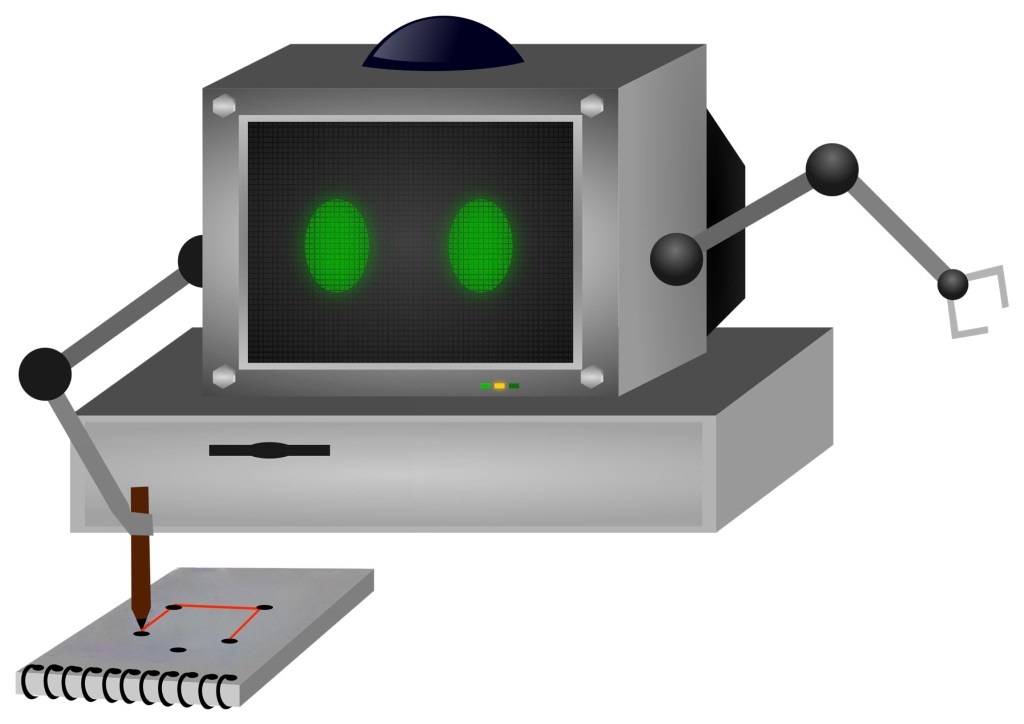
A computer with arms doing a coordinate conundrum on a pad of paper

Image by Samson Vlad from Pixabay modified by CS4FN

One way computers store images is as a set of points (as coordinates) that make up lines and shapes. This is the basis for the kind of computer graphics called Vector Graphics. You can explore the idea by doing coordinate conundrum puzzles. A coordinate conundrum is just a Vector Graphics Image to be drawn on paper.They are join-the-dot puzzles based on the idea. Can you recreate the original drawing?

Recreate a drawing from coordinates

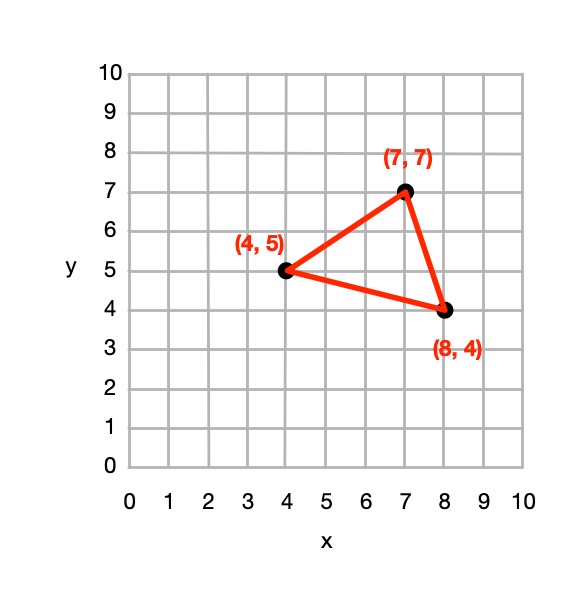
Points on a grid can be represented by pairs of numbers called coordinates. The first, x coordinate, says how far to go along horizontally. The second, y coordinate, says how far to go up, vertically. The numbers along the axes (along the bottom and up the side) of the grid give the distance in that direction. Draw the point at the place you end up at! So for example the coordinate (4,5) means go right from the origin 4 and up 5 and plot the point there.

Grid showing point (4,5) as 4 right and 5 up.
Image by CS4FN

You can join any two coordinates with lines. If a series of lines join back to the original one then it make a shape (a polygon), which can be coloured in. For example, if we plot the points (4,5), (7,7 and (8,4) drawing lines between them and back to (4,5) we make a triangle.

A triangle marked out in coordinates
Image by CS4FN

From 4 points we could define a square, rectangle or more general quadrilateral shape and so on.

So from a set of instructions telling you where to plot points, you can create a picture out of all the shapes and lines that make up the picture, giving colours for the lines or shapes.

This (and so these puzzles) is the basis of how programs in the language SVG (Scalable Vector Graphics) work to store a drawing as the instructions needed to recreate it. Drawing programs often store illustrations that the artists using them draw as an SVG program.

How to solve them

Each picture is made of shapes, each given by a colour and a list of the coordinates of its vertices (corners). For each shape: 

1. Plot the list of (x,y) coordinates on the grid as dots. 

2. Join the dots (which start and end at the same place) to make the shape. 

3. Colour the shape you have made with the colour at the start of the list. 

So, for example, if the first instruction starts: red (5,24) … that means plot the point 5 along and 24 up. It starts a new shape, coloured red, that ends at the same point.

If the series of points do not join back to the start then they represent coloured lines rather than a coloured shape,

Example: Semaphore flag

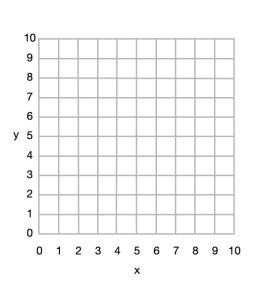
Blank 10x10 grid
Image by CS4FN

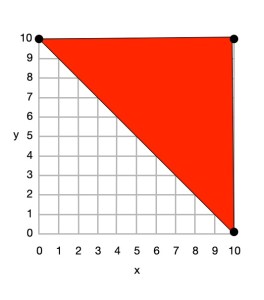
Here is a simple example to draw a red and yellow semaphore flag, given the shapes:

  • red (0,10) (10,10) (10,0) and back to (0,10)
  • yellow (0,10) (10,0) (0,0) and back to (0,10)

From this we can draw the picture.

Top right triangle now coloured red with (0,10), (10,10) and (10,0) plotted, joined by lines and the shape coloured.
Image by CS4FN

First we plot the points given for the red shape (a triangle), join the dots and colour it in.

  • red (0,10) (10,10) (10,0) and back to (0,10)
Bottom rightt triangle now coloured yellow with (0,10), (10,0) and (0,0) plotted, joined by lines and the shape coloured.
Image by CS4FN

Then we plot the points given for the yellow shape (another triangle), join the dots and colour it in.

  • yellow (0,10) (10,0) (0,0) and back to (0,10)

Do some puzzles yourself

Try the coordinate conundrum puzzles on our puzzle page either by printing off the puzzle sheet or drawing on squared paper. Then read on to find out a little more the advantages of vector graphics.

From straight lines to curves

In these puzzles we have only used straight lines between points, but we could also include commands to create circles and curved lines between points based on the mathematical equation for the curve. SVG, the vector graphic programming language, has instructions for a variety of more complex kinds of lines and shapes like that.

Advantages and disadvantages of Vector Graphics

Recording images in this way as points, lines and shapes has several advantages over storing images as pixels:

  • we generally need far less space to store the image as we do not need to store a colour for thousands or even millions of pixels;
  • the images are mathematically accurate – a line is represented as a perfect straight line not a pixelated (staircase-like) line;
  • the images are scalable, meaning you can increase the size of an image, zooming in just by multiplying all the numbers involved by a scale factor (which is just a number giving the magnification you want). The resulting image is still mathematically perfect with straight lines still straight lines, for example, just bigger. For example, suppose we want to make a semaphore flag twice the size of our original. We just multiply all points by 2, for example giving red (0,20) (20,20) (20,0) and back to (0,20); yellow (0,20) (20,0) (0,0) and back to (0,20) and it gives an identical picture, just bigger. (Try plotting it and see!)

Disadvantages are:

  • Vector graphics are not a good way to represent photographs – digital cameras record the light at lots of points corresponding to pixels so naturally are stored as pixels (numbers that give the colour in that small square of the image). Trying to convert a photo to a vector image would be hard (needing algorithms to recognise shapes, for example). It would be a less natural and less accurate way of doing so.
  • With computer memory cheap, the advantages of using less storage are less important than they once were.

SVG: a graphics programming language

The programming language SVG records drawings in this way as instructions to draw shapes and lines based on points. It has some difference to our instructions though. For example the y-axis coordinates start at the top and work down. The principles are the same though, it is only the detail that differs.

Paul Curzon, Queen Mary University of London

More on …

Magazines …


Subscribe to be notified whenever we publish a new post to the CS4FN blog.


This page is funded by EPSRC on research agreement EP/W033615/1.

QMUL CS4FN EPSRC logos

From Egyptian Survey puzzles to computational thinking

One way to use logical thinking is to deduce new facts but then turn them into IF-THEN rules. They tell us an action to do IF something is true. For example:  IF both cards are the same THEN shout SNAP! Once we have IF-THEN rules we can use them as the basis of a program. We can see how this works, and how it involves various computational thinking skills with a simple logical thinking puzzle.

An Egyptian Survey puzzle 

Image by CS4FN

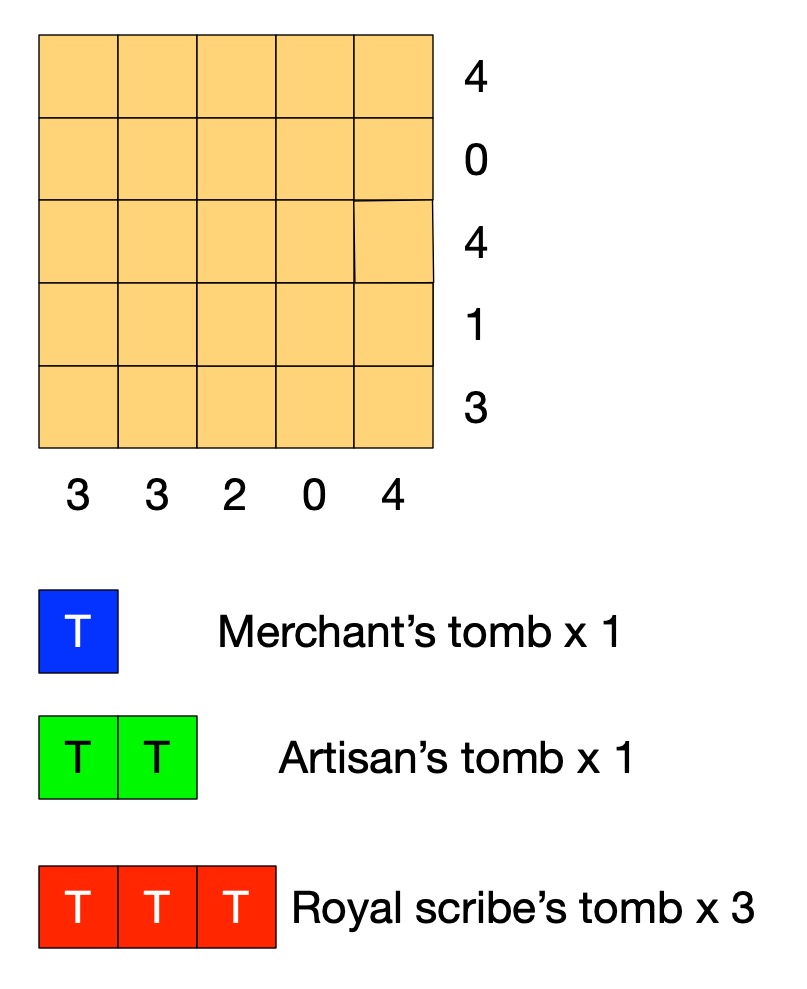
Old records show that this area of the desert contains the tombs of 3 scribes (a large tomb covering 3 squares), 1 artisan (medium, 2 squares) and 1 merchant (small, 1 square).

A survey has gathered information of where the tombs could be. Each number tells you how many squares are part of a tomb in that row or column. 

Tombs are not adjacent (horizontally, vertically or diagonally).

Can you work out where all the tombs are without further digging?

Solving Egyptian Survey puzzles

The instructions of the puzzle give us some simple facts such as that the number at the end of the row tells us the number of squares in that row holding tombs.  On its own that does not tell us how to solve the puzzle. However, thinking logically about it we can draw simple logical conclusions so deduce new facts. For example, it is fairly simple to deduce the fact:

the number for a row being 0 IMPLIES there are no tombs in that row.

If we know there are no tombs in a row then we can mark each square of the row as empty. If we use X to mean nothing is in that square, then we can turn that deduced fact into an action. It means that we can do the following when trying to solve the puzzle:

IF the number on a row is 0 
THEN put an X in all the squares of that row.

With that rule we can start to solve the puzzle just by following the rule. Find a row numbered 0 and put Xs there. We can create a similar rule for columns. Applying both these rules to our puzzle we get:

Image by CS4FN

Can you work out more rules before reading on?

Rules, rules, rules

What happens if the number of a row is more than 0? Knowing the number alone doesn’t help us much. We need to combine it with other information. The top row of the puzzle has the number 4, for example, but one of the squares already has a cross in it. That means the remaining 4 squares all must have tombs, which we will mark T. We can turn that into a rule:

IF the number for a row is 4 AND there are 4 empty squares in that row and an X
THEN put a T in all the empty squares of that row.

We can make similar rules for each number 1 to 4. We can then create similar rules for columns. Applying them once each to our puzzle gives us:

Image by CS4FN

We could also make a more general version of this rule 

IF the number for a row is <n> AND there are only <n> empty squares in that row 
THEN put a T in all the empty squares of that row.

This is what computer scientists call generalisation: a part of computational thinking. Instead of having lots of rules (or lines of code) for lots of similar situations, we create one simple but general one that covers all the cases. We can of course apply rules more than once, so as you probably noticed we can apply our row rule once more. In effect our rules live inside a loop and we keep trying them in sequence for as long as we find a rule that makes a difference.

Image by CS4FN

Now one of the rows has the number 1, but we have already marked a tomb in a square of that row. That gives us another rule.

IF the number for a row is 1 AND there is already 1 tomb marked in that row
THEN put an X in all the empty squares of that row.

This gives us:

Image by CS4FN

Similar rules apply for other numbers so we could also make a general version of this rule too.

IF the number for a row is <n> AND there are already <n> tombs marked in that row
THEN put an X in all the empty squares of that row.

Now, applying a column version of the last general rule and we can mark an X in the last square for column with 2 tomb squares.

Image by CS4FN

We need one last rule for this puzzle:

IF the number for a row is <n> AND the number of spaces + the number of 0s is <n>
THEN put a T in all the empty squares of that row.

This is actually an even more general version of our second rule (it is the case where the number of Ts is 0, so could replace that rule with this new one.

 Applying it finally solves the puzzle:

Image by CS4FN

If we put our rules together then they become the basis of an algorithm (so program) for solving the puzzles and in creating them from deduced facts we are doing algorithmic thinking. IF-THEN instructions along with sequencing and loops are the basis of all programs. Here we create a sequence of the rules to try in order and put them inside a loop so that we keep trying them until none apply or we have solved the puzzle. There is a style of programming where all a program is is a series of IF-THEN rules – with looping happening implicitly.

Algorithms are just rules to follow that guarantee a result (here solving the puzzle). It is only an algorithm if it guarantees to always work. To solve any (solvable) Egyptian Survey puzzle like this we would need yet more rules: we would need more more rules for it to be an algorithm for solving all puzzles. Making sure algorithms cover all possibilities is one of the harder parts of algorithmic thinking – bugs in programs are often there because the programmer didn’t manage to cover every possibility. In our case we could write a program based on our limited rules. We would just need to include an extra rule that quits (admitting defeat and saying that the program cannot solve the puzzle) if no rule applies.

Perhaps you can work out all the rules (so an algorithm) needed to solve any of these puzzles! All you need are the instructions for the game, some logical thinking to deduce new facts, some algorithmic thinking to turn them into rules, and an ability to generalise so you have a small number of rules … computational thinking skills in fact.

– Paul Curzon, Queen Mary University of London

More on …

Magazines …


Subscribe to be notified whenever we publish a new post to the CS4FN blog.


This page is funded by EPSRC on research agreement EP/W033615/1.

QMUL CS4FN EPSRC logos

Exploring mazes, inventing algorithms (part I) 

by Paul Curzon, Queen Mary University of London

A maze with mouse searching for cheese.
Image by CS4FN

Computer science research in part involves inventing new algorithms or improving new ones. But what does that mean. Let’s explore some mazes to explore algorithms.

What does computer science research involve? It is very varied: from interviewing people to find out what the real problems that need solving in their lives or jobs are; to running experiments to find out what works and what doesn’t; to writing programs to solve problems.

Improving algorithms

A core part of much research is coming up with new and better algorithms that solve particular problems. The kind of algorithm could be anything from a new more secure cryptographic protocol, or a better way to rank the results of a search engine, to a new more effective machine learning algorithm that is less likely to make things up, or perhaps can better explain how it came to its conclusions.

What does it mean to come up with a better algorithm though? Once a problem is solved, isn’t it solved? Let’s explore a simple problem to see. Let’s explore mazes. Solve the simple maze puzzle above before you go on. Find a route that gets the mouse to the cheese.

Wandering around mazes, finding algorithms

If you’ve ever been in a hedge maze in the garden of some stately home, or a corn field maze, the chances are you just dived in and wandered rather aimlessly. Perhaps you tried to remember which way you went at each junction, to avoid going down the same dead-ends more than once. How about solving the paper version of a maze puzzle like the one above? Now perhaps you looked ahead to spot dead-ends to avoid tracing wrong paths with your pencil.

Probably what you are doing is at least a little random. You could, in theory at least, end up going back over the same paths, never taking the right one and and never getting to the middle. Could we come up with an algorithm that guarantees to solve mazes? To be an algorithm it would need to guarantee you ended up finding a path to the centre of the maze if you followed the steps of the algorithm precisely. It should also work for any maze, or at least all mazes of a particular kind. Ideally, the algorithm gives you a path that can then be followed by anyone without them having to run the algorithm themselves. They can just follow the path generated by the algorithm for that maze.

Wall-following

In fact lots of maze algorithms have been invented. Perhaps the one most people have heard of, if they know of any maze algorithm, is called Wall-following. It is very simple to do, You just pick a wall at the entrance either to the left or right and then follow it, If in a garden maze, keep your hand on the hedge as you walk round. If doing a paper puzzle, draw the path sticking to the chosen wall. Try it on the following simple maze.

A simple maze with mouse and cheese.
Image by CS4FN

Simply connected

The wall-following algorithm will guarantee to get you to the centre of the maze, and back out again too, but only as long as the maze is what is called simply connected. That just means the maze is constructed from a single hedge (or one unbroken drawn line) not a series of unconnected hedges. If you look at both examples above you will see I created them by just drawing a single wiggly line.

If a maze is simply connected then it cannot have looping paths, so no going round in circles for ever. It will also only have one entrance/exit. That shows the first aspect of inventing algorithms that is important. They often only work for some situations, not all. You must be sure you know what situations they do and don’t work.

Often the earliest algorithms invented to solve a problem are like wall-following: they only work for simple situations. Other people then come along and find new algorithms that can cover more problems (here more mazes). Can you tweak the wall-following maze algorithm to work even if there are multiple exits from the maze, for example? As it stands our algorithm could just take you from the entrance straight out of another exit without exploring much of the maze at all! See the end for one simple way to tweak the algorithm. What if there are paths that take you round in circles? Can you come up with an algorithm to deal with that?

Some times the improvements invented just involve tweaking an existing algorithm as with dealing with multiple exits in a maze. Some times a whole new algorithm is needed.

Faster, higher, stronger?

Even for a simple constrained version of the problem, like simply connected mazes, people can invent better algorithms. What does better mean for a maze? Well one way you might have a better algorithm is if it is faster in coming up with a solution. Another is that the solution it comes up with is faster. For a maze that means a shorter (ideally the shortest) path to the centre. Wall following may get you in to the centre (and out again) but you probably will have discovered a very long path that takes you in and out of lots of dead-ends needlessly. You do find a path to the centre, but it may be a very long path. Can you come up with an algorithm that finds shorter paths?

We will explore an algorithm that does next.

More to come…

Some solutions

The result of wall following on our simple maze

A route for the mouse to follow that takes it to the cheese.
Image by CS4FN

One way to deal with multiple exits

To deal with a maze that has multiple exits, so multiple breaks in the outer wall, tweak the wall-following algorithm as follows. First mark the exit you use to enter the maze, so you know when you return to it. If you come to any other exit then pretend there is a gate there and keep following the wall as though it were unbroken and there were no exit.

More on …

Magazines …

Subscribe to be notified whenever we publish a new post to the CS4FN blog.


This page is funded by EPSRC on research agreement EP/W033615/1.

QMUL CS4FN EPSRC logos

How does Santa do it?

Fast yuletide algorithms to visit all those chimneys in time

by Paul Curzon, Queen Mary University of London

Lots of Santas in a line
Image by Thomas Ulrich from Pixabay 

How does Santa do it? How does he visit all those children, all those chimneys, in just one night? My theory is he combines a special Scandinavian super-power with some computational wizardry.

There are about 2 billion children in the world and Santa visits them all. Clearly he has magic (flying reindeer remember) to help him do it but what kind of magic (beyond the reindeer)? And is it all about magic? Some have suggested he stops time, or moves through other dimensions, others that he just travels at an amazingly fast speed (Speedy Gonzales or The Flash style). Perhaps though he uses computer science too (though by that I don’t mean computer technology, just the power of computation).

The problem can be thought of as a computational one. The task is to visit, let’s say a billion homes (assuming an average of 2 children per household), as fast as possible. The standard solution assumes Santa visits them one at a time in order. This is what is called a linear algorithm and linear algorithms are slow. If there are n pieces of data to process (here, chimneys to descend) then we write this as having efficiency O(n). This way of writing about efficiency is called Big-O notation. O(n) just means as n increases the amount of work increases proportionately. Double the number of children and you double the workload for Santa. Currently the population doubles every 60 or 70 years or so, so clearly Santa needs to think in this way or he will eventually fail keep up, whatever magic he uses.

Perhaps, Santa uses teams of Elves as in the film Arthur Christmas, so that at each location he can deliver say presents to 1000 homes at once (though then it is the 1000 Elf helpers doing the delivering not Santa which goes against all current wisdom that Santa does it himself). It would speed things up apparently enormously to 1000 times faster. However, in computational terms that barely makes a difference. It is still a linear order of efficiency: it is still O(n) as the work still goes up proportionately with n. Double the population and Santa is in trouble still as his one night workload doubles too. O(2n) and O(1000n) both simplify to mean exactly the same as O(n). Computationally it makes little difference, and if their algorithms are to solve big problems computer scientists have to think in terms of dealing with data doubling, doubling and doubling again, just like Santa has had to over the centuries.

Divide and Conquer problem solving

When a computer scientist has a problem like this to solve, one of the first tools to reach for is called Divide and Conquer problem solving. It is a way of inventing lightening fast algorithms, that barely increase in work needed as the size of the problem doubles. The secret is to find a way to convert the problem into one that is half the size of the original, but (and this is key) that is otherwise exactly the same problem. If it is the same problem (just smaller) then that means you can solve those resulting smaller problems in the same way. You keep splitting the problem until the problems are so small they are trivial. That turns out to be a massively fast way to get a job done. It does not have to be computers doing the divide and conquer: I’ve used the approach for sorting piles of hundreds and hundreds of exam scripts into sorted order quickly, for example.

My theory is that divide and conquer is what Santa does, though it requires a particular superhero power too to work in his context, but then he is magical, so why not. How do I think it works? I think Santa is capable of duplicating himself. There is a precedent for this in the superhero world. Norse god Loki is able to copy himself to get out of scrapes, and since Santa is from the same part of the world it seems likely he could have a similar power.

If he copied himself twice then one of him could do the Northern Hemisphere and the other the Southern hemisphere. The problem has been split into an identical problem (delivering presents to lots of children) but that is half the size for each Santa (each has only half the world so half as many children to cover). That would allow him to cover the world twice as fast. However that is really no different to getting a couple of Elves to do the work. It is still O(n) in terms of the efficiency the work is done. As the population doubles he quickly ends up back in the same situation as before: too much work for each Santa. Likewise if he made a fixed number of 1000 copies of himself it would be similar to having 1000 Elves doing the deliveries. The work still increases proportional to the number of deliveries. Double the population and you still double the time it takes.

Double Santa and double again (and keep doubling)

So Santa needs to do better than that if he is to keep up with the population explosion. But divide and conquer doesn’t say halve the problem once, it says solve the new problem in the same way. So each new Santa has to copy themselves too! As they are identical copies to the original surely they can do that as easily as the first one could. Those new Santas have to do the same, and so on. They all split again and again until each has a simple problem to solve that they can just do. That might be having a single village to cover, or perhaps a single house. At that point the copying can stop and the job of delivering presents actually done. Each drops down a chimney and leaves the presents. (Now you can see how he manages to eat all those mince pies too!)

An important thing to remember is that that is not the end of it. The world is now full of Santas. Before the night is over and the job done, each Santa has to merge back with the one they split from, recursively all the way back to the original Santa. Otherwise come Christmas Day we wouldn’t be able to move for Santas. Better leave 30 minutes for that at the end!

Does this make a big difference? Well, yes (as long as all the copying can be done quickly and there is an organised way to split up the world). It makes a massive difference. The key is in thinking about how often the Santas double in number, so how often the problem is halved in size.

We start with 1 Santa who duplicates to 2, but now both can duplicate to 4, then to 8, 16, and after only 5 splittings there are already 32 Santas, then 64, 128, 256, 512 Santas, and after only 10 splittings we have over a 1000 Santas (1024 to be precise). As we saw that isn’t enough so they keep splitting. Following the same pattern, after 20 splittings we have over a million Santas to do the job. After only 30 rounds of splittings we have a billion Santas, so each can deal with a single family: a trivial problem for each.

So if a Santa can duplicate himself (along with the sleigh and reindeer) in a minute or so (Loki does it in a fraction of a second so probably this is a massive over-estimate and Santa can too), we have enough Santas to do the job in about half an hour, leaving each plenty of time to do the delivery to their destination. The splitting can also be done on the way so each Santa travels only as far as needed. Importantly this splitting process is NOT linear. It is O(log2 n) rather than O(n) and log2 n is massively smaller than n for large n. It means if we double the population of households to visit due to population explosion, the number of rounds of splitting does not need to double, the Santas just have to do one more round of splitting to cover it. The calculation log2 n (the logarithm to base 2 of n) is just a mathematicians way of saying how many times you can halve the number n before you get to 1 (or equivalently how many times you double from 1 before you get up to n). 1024 can be halved 10 times so (log2 1024) is 10. A billion can be halved about 30 times so (log2 1 billion) is about 30. Instead of a billion pieces of work we do only 30 for the splitting. Double the chimneys to 2 billion and you need only one more for a total of 31 splittings.

In computer terms divide and conquer algorithms involve methods (ie functions / procedures) calling themselves multiple times. Each call of the method, works on eg half the problem. So a method to sort data might first divide the data in half. One half is passed to one new call (copy) of the same method to sort in the same way, the other half is passed to the other call (copy). They do the same calling more copies to work on half of their part of the data, until eventually each has only one piece of data to sort (which is trivial). Work then has to be done merging the sorted halves back into sorted wholes. A billion pieces of data are sorted in only 30 rounds of recursive splitting. Double to 2 billion pieces of data and you need just 1 more round of splitting to get the sorting done.

Living in a simulation

If this mechanism for Santa to do deliveries all still seems improbable then consider that for all we know the reality of our universe may actually be a simulation (Matrix-like) in some other-dimensional computer. If so we are each just software in that simulation, each of us a method executing to make decisions about what we do in our virtual world. If that is the nature of reality, then Santa is also just a (special yuletide) software routine, and his duplicating feat is just a method calling itself recursively (as with the sort algorithm). Then the whole Christmas delivery done this way is just a simple divide and conquer algorithm running in a computer…

Given the other ways suggested for Santa to do his Christmas miracle seem even more improbable, that suggests to me that the existence of Santa provides strong evidence that we are all just software in a simulation. Not that that would make our reality, or Christmas, any less special.


More on …


This blog is funded through EPSRC grant EP/W033615/1.