Solving Railway Timetabling Problems with Data Visualisation

by Daniel Gill, Queen Mary University of London

Steam train on a bridge, looking back down the side of the carriages
Image by Laurent from Pixabay

Train timetables are complex. When designing a timetable for railways you have to think about the physical capabilities of the actual train, what stops it needs to make, whether it is carrying passengers or freight, the number of platforms at a station, the gradient of the track, and the placement of passing loops on single-track sections, amongst many other things. Data visualisation can help with timetabling and make sure our railways continue to run on track!

Data visualisation is an important area in computer science. If you had a huge amount of complex data in a spreadsheet, your first thought wouldn’t be to sit down with a cup of tea and spend hours reading through it – instead you might graph it or create an infographic to get a better picture. Humans are very bad at understanding and processing raw data, so we speed up the process by converting it to something easier to understand.

Timetabling is like this – we need to consider the arrival and departure times from all stations for each train. You might have used a (perhaps now) old fashioned paper timetable, with each train as a column, and the times at each station along the rows, like the one below. This is great if you’re a passenger… you can see clearly when your train leaves, and when it gets to your desired destination. If you’re unlucky enough to miss a train, you can also easily scan along to find the next one.

A traditional timetable with stopping times of different trains in columns and rows for each station
Image by Daniel Gill for CS4FN

Unfortunately, this kind of presentation might be more challenging for timetable designers. In this timetable, there’s a mix of stopping and fast services. You can see which of them are fast based on the number of stations they skip (marked with a vertical line), but, because they travel at different speeds it’s difficult to imagine where they are on the railway line at any one time. 

One of the main challenges in railway timetabling, and perhaps the most obvious, is that trains can’t easily overtake slower ones in front of them. it’s this quirk that causes lots of problems. So, if you needed to insert another train into this timetable you would need to consider all the departure times of the trains around it, to make sure there is no conflicts – this is a lot of data to juggle.

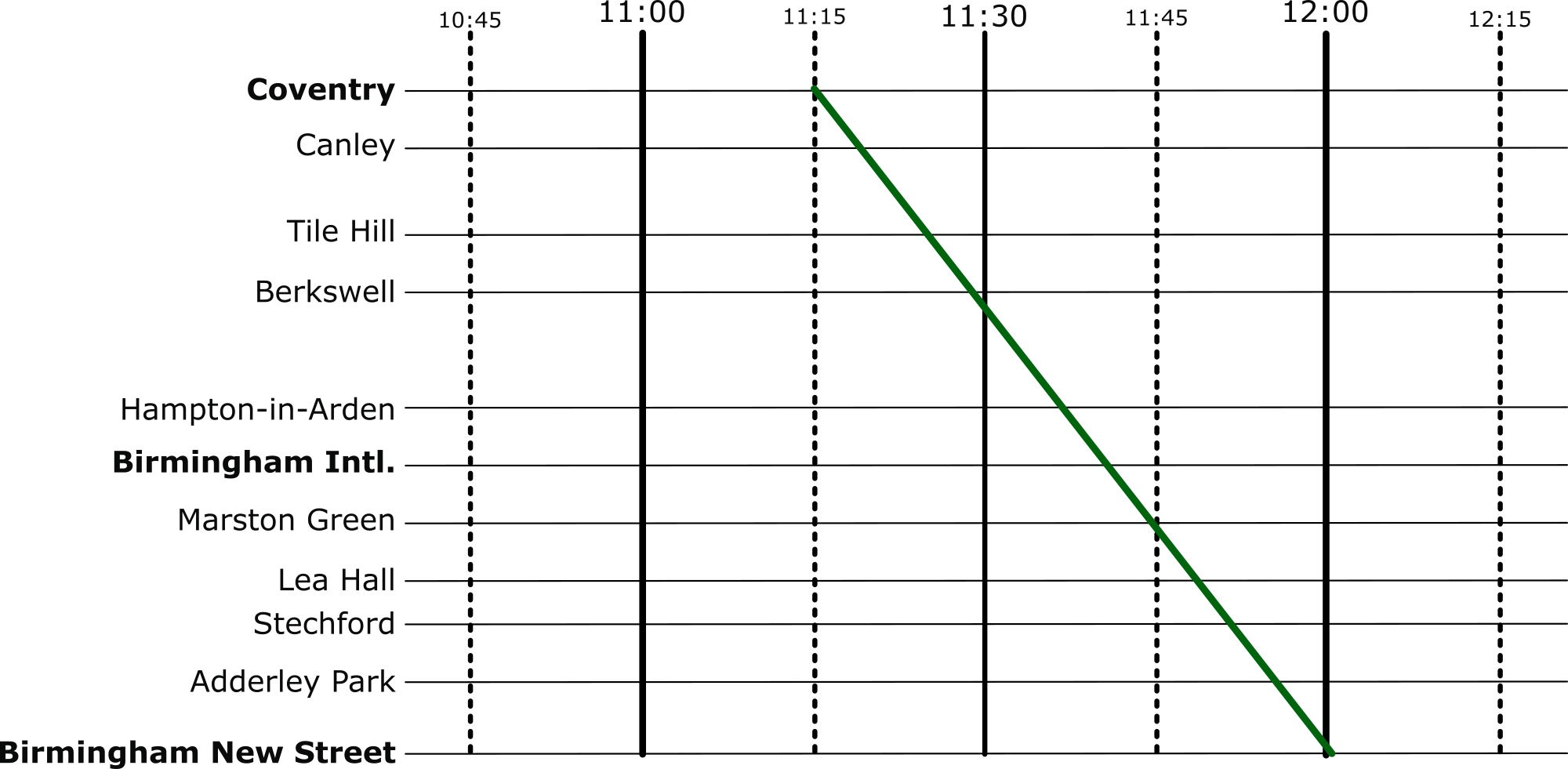
 But there’s an easier way to visualise these timetables: introducing Marey charts! They represent a railway on a graph, with stations listed vertically, time along the top, and each train represented by a single (bumpy) line. If we take our original timetable from above and convert it to a Marey chart, we get something that looks like this:

A Marey chart of the same timetable now with lines showing the path of the train through time (which is now the x-axis
Image by Daniel Gill for CS4FN


Though thought to have been invented by a lesser-known railway engineer called Charles Ibry, these charts were popularised by Étienne-Jules Marey, and (perhaps unfairly) take his name. 

How does it work?

There are a few things that you might notice immediately from this diagram. The stations along the side aren’t equally spaced, like you might expect from other types of graph, instead they are spaced relative to the distance between the stations on the actual railway. This means we can estimate when a fast train will pass each of the stations. This is an estimation, of course, because the train won’t be travelling at a constant speed throughout – but it’s better than our table from before which is no help at all!

Given this relative spacing, we can also estimate how fast a train is going. The steepness of the line, in this diagram, directly reflects the speed of the train*. Look at the dark blue and purple trains – they both leave Coventry really close together, but the purple train is a bit slower, so the gap widens near Birmingham International. We can also see that trains that do lots of stopping (when the line is horizontal) travel at a much slower average speed than the fast ones: though that shouldn’t be a surprise! 

*There’s a fun reason that this is the case. The gradient (the steepness of the line) is calculated as the change in y divided by the change in x. In this case, the change in the y dimension is the distance the train has travelled, and the change in x is the time it has taken. If you have studied physics, you might immediately recognise that distance divided by time is speed (or velocity). Therefore, the steepness in a Marey chart is proportional to the speed of the train. 

We can also see that the lines don’t intersect at all. This is good, because, quite famously, trains can’t really overtake. If there was an intersection it would mean that at some point, two trains would need to be at the same location at the same time. Unless you’ve invented some amazing quantum train (more about the weirdness of quantum technology in this CS4FN article), this isn’t possible!

Putting it to the Test

Put yourself in the shoes of a railway timetable designer! We have just heard that there is a freight train that needs to run through our little section of railway. The driver needs to head through sometime between 10:45 and 12:15 – how very convenient: we’ve already graphed that period of time.

The difficulty is, though, that their freight train is going to take a very slow 45 minutes to go through our section of railway – how are we going to make it fit? Let’s use the Marey chart to solve this problem visually. Firstly, we’ll put a line on that matches the requirements of the freight train:

A Marey chart showing the freight train as a single line passing through time and stations
Image by Daniel Gill for CS4FN

And then let’s re-enable all the other services.

With all the other trains included the new train crosses their paths - it would be stuck behind them. or vice versa
Image by Daniel Gill for CS4FN

Well, that’s not going to work. We can see from this, though, how slow this freight train actually is, especially compared to the express trains its overlaps with. So, to fix this, we can shift it over. We want to aim for a placement where there are no overlaps at all.

A Marey chart showing a position where the new train does not clash
Image by Daniel Gill for CS4FN

Perfect, now it’s not going to be able to make the journey without interfering with our other services at all.

Solving Problems

When we’re given a difficult problem, it’s often a good idea to find a way to visualise it (or as my A-Level physics teacher often reminded me: “draw a diagram!”). This kind of visualisation is used regularly in computer science. From students learning the craft, all the way to programmers and academics at the top of their field – they all use diagrams to help understand a problem.

More on …

Magazines …

Front cover of CS4FN issue 29 - Diversity in Computing

EPSRC supports this blog through research grant EP/W033615/1,

This quantum message will self-destruct in 10 seconds…

Mission Impossible always involved the team taking on apparently impossible missions, delivered by a message concluding with the famous line that “This message will self-destruct in 10 seconds”. It was always followed by the message physically destructing  in some dramatic way such as flames or smoke coming from the tape recorder. Now, it’s been shown that it is possible to actually do apparently impossible destruction of messages: to send holographic messages that the sender can just make disappear even after they have been sent. It relies on the apparently impossible, but real properties of quantum physics.

A hologram is a 3-dimensional image formed using laser light. It records light scattered from objects coming from lots of different directions. This differs from photography where the light recorded comes from one direction only. You can see examples on the back of bank cards (often a flying dove) where they are used as a hard-to-copy security device. 

Now researchers at the University of Exeter have shown it is possible to make quantum holograms that make use of quantum effects. They are made from entangled photons: pairs of light particles that have been linked together in a way that means that, after the entangling, what ever happens to one immediately affects the other too … however far apart they are. Entanglement is one of those weird properties of quantum physics, the physical properties of the very, very small. It means that subatomic particles, once entangled, can later instantly affect each other even when separated by large distances.

This effect has now been put to novel use by Jensen Li and team in their research at Exeter. They entangled streams of pairs of photons emitted from a crystal using lasers but then separated the pairs. One stream of photons from the pairs was used to create a holographic image on a special kind of material called a meta-material. Meta-materials are just materials engineered at very tiny scales so as to have properties not usually seen in nature. For example, they might be designed to carefully control light or radio waves by reflecting them very precisely in certain directions. One use of that might be so that the object bounces light round from behind it so appears invisible. Some butterfly wings and bird feathers (think peacocks and kingfishers) actually do a similar sort of thing with very precise microscopic scale surface structures that cause their startlingly bright, shimmering colours.

Exeter’s meta-material was flat but with a special surface designed to have tiny features that manipulate light in very precise ways that create a hologram based on the information encoded in the beam of laser light. In their first test that showed their quantum hologram system works, the hologram just showed the letters H,D,V, A. The light from this hologram continued on to a camera, so a picture of the hologram could be taken. So far so normal.

The cunning (and rather weird) thing though is due to what they did to the other stream of light. Each photon in this stream was entangled with a photon in the hologram light stream. Due to the quantum physics of entanglement, that meant that changes to these particles could affect those making the hologram. In particular, the Exeter team had this second stream pass through a polarising filter, essentially like the lens of polaroid sunglasses. Light vibrates in different directions. A sunglasses lens cuts out the light vibrating in a given direction. Now, the letter H in the message was created from light polarised horizontally unlike the other letters which were polarised vertically. This meant that when the second stream of light was passed through a polarising filter blocking out the horizontally polarised light, it also affected the photons entangled with the blocked photons. The other stream of light, that created the hologram, was affected even though it went nowhere near the polarising filter. The result was that the horizontally polarised H could be made to disappear from the message caught on camera. It really did self-destruct, just in a quantum way.

If scaled up such a system could be used to send messages that are still (instantly) controlled by the sender even after they have been sent, whether disappearing or being changed to say something else. The approach could also be incorporated into secure quantum computing communication systems, where the messages are also encrypted.

Fortunately, this blog is not a quantum blog, so will not self-destruct in 10 seconds … so please do share it with your friends!

Paul Curzon, Queen Mary University of London

More on …

Magazines …


Subscribe to be notified whenever we publish a new post to the CS4FN blog.


This blog is funded by EPSRC on research agreement EP/W033615/1.

QMUL CS4FN EPSRC logos

The Teleporting Robot

What is an algorithm? It is just a set of instructions that if followed precisely and in the given order, guarantees some result. The concept is important to computer scientists because all computers can do is follow instructions, but they do so perfectly. Computers do not understand what they are doing so can’t do anything but follow their instructions. That means whatever happens the instructions must always work. We can see what we mean by an algorithm by comparing it to the idea of a self-working trick from conjuring.

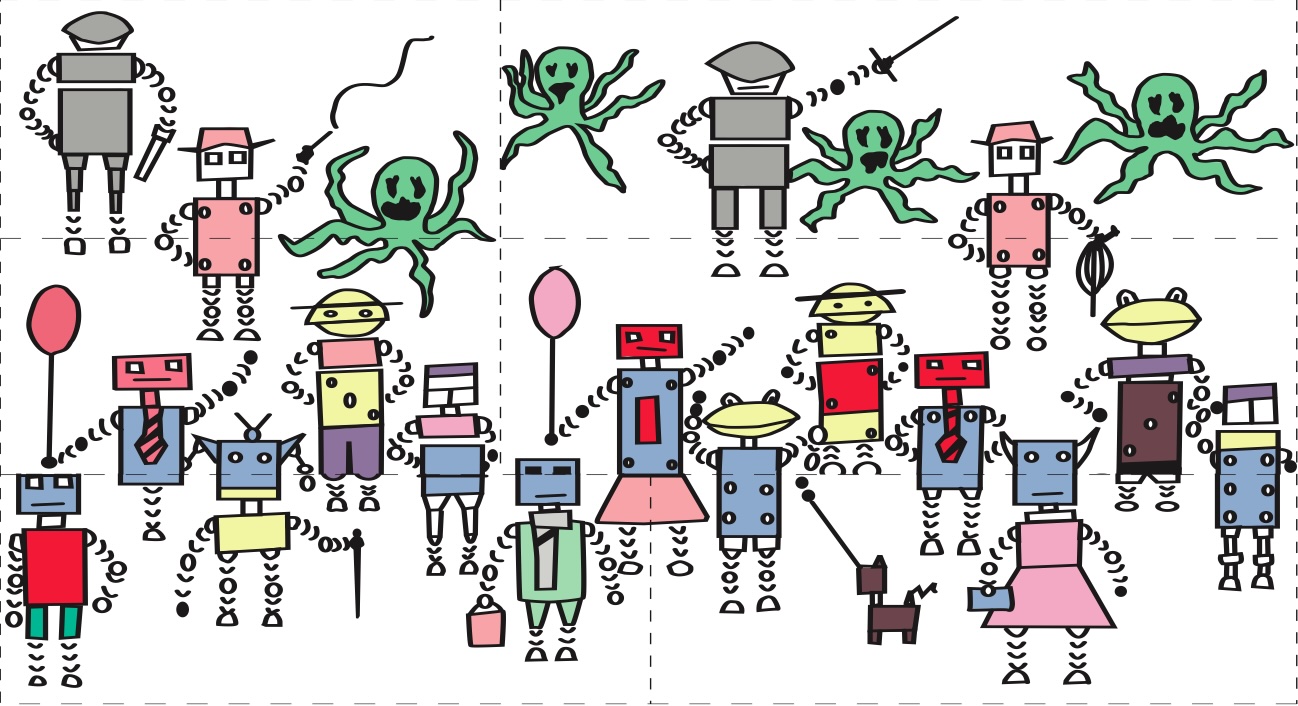
If you follow the steps of a self-working trick you will have the magic effect even if you have no idea how it works. Below is a a demonstration of a self-working magic jigsaw trick (you can download it from here https://conjuringwithcomputation.wordpress.com/resources/ print it, cut out the pieces and do it yourself, following the instructions below).

The teleporting robot jigsaw
Image by CS4FN

The step of the trick are.

  • 1) Count the robots (ignore the green monsters and the robot dog)….There are 17.
  • 2) Swap the top two pieces on the left with those on the right lining the jigsaw back up
  • 3) Count the robots ….There are 16. One has disappeared.

Magically a robot has disappeared! Which one disappears and where did it go? Was it swallowed by a green monster, did it teleport away?

How did that happen anyway?

The teleporting robot jigsaw trick in action: a robot appears and disappears.
Image by CS4FN

By following the steps you can make the trick work…even if you haven’t worked out how it works, a robot still disappears. You do not need to understand, you just need to be able to follow instructions. It is a self-working trick. Follow the steps of the trick exactly and the robot disappears. It is just an algorithm. Self-working tricks are just algorithms for doing magic. When you follow the steps of the trick you are acting like a computer, blindly following the instructions in its program!

Paul Curzon, Queen Mary University of London

Linked Book

Screenshot

Magazines …


Subscribe to be notified whenever we publish a new post to the CS4FN blog.


This blog is funded by EPSRC on research agreement EP/W033615/1.

QMUL CS4FN EPSRC logos

Ask About Asthma

An inhaler being pressed so the mist of drug can be seen emerging
Image of inhaler by Cnordic CNordic from Pixabay

Mid-September, as many young people are heading back to school after their summer holiday, is Asthma Week where NHS England suggests that teachers, employers and government workers #AskAboutAsthma. The goal is to raise awareness of the experiences of those with asthma, and to suggest techniques to put in place to help children and young people with asthma live their best lives.

One of the key bits of kit in the arsenal of people with asthma is an inhaler. When used, an inhaler can administer medication directly into the lungs and airways as the user breathes in. In the case of those with asthma, an inhaler can help to reduce inflammation in the airways which might prevent air from entering the lungs, especially during an asthma attack.

It’s only recently, however, that inhalers are getting the technology treatment. Smart inhalers can help to remind those with asthma to take their medication as prescribed (a common challenge for those with asthma) as well as tracking their use which can be shared with doctors, carers, or parents. Some smart inhalers can also identify if the correct inhaler technique is being used. Researchers have been able to achieve this by putting the audio of people using an inhaler through a neural network (a form of artificial intelligence), which can then classify between a good and bad technique.

As with any medical technology, these smart inhalers need to be tested with people with asthma to check that they are safe and healthy, and importantly to check that they are better than the existing solutions. One such study started in Leicester in July 2024, where smart inhalers (in this case, ones that clip onto existing inhalers) are being given to around 300 children in the city. The researchers will wait to see if these children have better outcomes than those who are using regular inhalers.

This sort of technology is a great example of what computer scientists call the “Internet of Things” (IoT). This refers to small computers which might be embedded within other devices which can interact over the internet… think smart lights in your home that connect to a home assistant, or fridges that can order food when you run out. 

A lot of medical devices are being integrated into the internet like this… a smart watch can track the wearer’s heart rate continuously and store it in a database for later, for example. Will this help us to live happier, healthier lives though? Or could we end up finding concerning patterns where there are none?

Daniel Gill, Queen Mary University of London

More on…

Linked Research Papers

Magazines …


Subscribe to be notified whenever we publish a new post to the CS4FN blog.


This blog is funded by EPSRC on research agreement EP/W033615/1.

QMUL CS4FN EPSRC logos

Working in Computer Science: An Autistic Perspective (Part 2)

by Daniel Gill, Queen Mary University of London

In Part 1, we spoke to Stephen Parry about his experiences of working in computer science as an autistic person. In this second part, we discuss with him his change from this stressful working environment to teaching A-Level computer science, and how rewarding he has found teaching as a career.

Following a tough experience at his last workplace, Stephen decided he needed a change. He used this as a prompt to start thinking about alternatives:

“[When] things aren’t working out, you need to take a step back and work out what the problem is before it becomes really serious. I still hadn’t had a diagnosis by that point, so things probably would have gone very differently if I had, but I took a step back after that job. I was fed up of being stressed, trying to help people [who] have already got far too much money make more money, and then being told that I was being paid too much. That was kind of my experience from my last employer. And so, I decided that I wanted to get stressed for something worthwhile instead: my mum had been a teacher, so I’d always had it in mind as a possibility.”

Stephen did, of course, have some reservations financially. 

“I’d always thought it was financially too much of a step down, which a lot of people in the computer science industry will find out. I did take pretty much a 50% pay cut to become a trainee teacher: in fact, worse than that. But it’s amazing when you want to do something, what differences that makes! And there’s plenty of people out there that will sacrifice a salary to start their own business, and all the power to them. But people don’t think [like this] when they’re thinking about becoming a teacher, for example, which I think is wrong. Yes, teachers should be better paid than they are, but they’re never going to be as well paid as programmers or team leaders or whatever in industry. You shouldn’t expect that to be the case, because we’re public servants at the end of the day, and we’re here for the job as much as we are for the money. We want our roof over our head, but we’re not looking to get mega rich. We’re there to make a difference.”

While considering this change of profession, Stephen reflected on his existing skills, and whether they fit the role of teaching. With support from his wife and a DWP (Department for Work and Pensions) work coach, he was reminded of his ability to “explain technical stuff to [people] in a language [they] could understand.”

Stephen had the opportunity to get his first experience of teaching as a classroom volunteer. Alongside a qualified teacher, he was able to lead a lesson – which he found particularly exciting:

“It was a bit like being on drugs. It was exhilarating. I sort of sat there thinking, you know, this is something I really want to do.”

It’s around this time that Stephen got his autism diagnosis. For autistic people who receive a diagnosis, there can be a lot of mixed emotions. For some, it can be a huge sense of relief – finally understanding who they are, and how that has affected their actions and behaviours throughout their life. And for others it can come as a shock [EXTERNAL]. For Stephen, this news meant reconsidering his choice of a career in teaching:

“I had to stop and think, because, when you get your diagnosis for the first time as an adult or as an older person anyway, it does make you stop and think about who you are. It does somewhat challenge your sense of self.”

“It kind of turns your world a bit on its head. So, it did knock me a fair bit. It did knock my sense of self. But then I began to sort of put pieces together and realise just what an impact it had on my working life up until that point. And then the question came across, can I still do the job? Am I going to be able to teach? Is it really an appropriate course of action to take? I didn’t get the answer straight away, but certainly over the months and the years, I came to the conclusion it was a bit like when I talk to students who say, ‘should I do computer science?’ And I say to them, ‘well, can you program?’ ‘Yes.’ ‘Yes, you do need to do computer science.’ It’s not just you can if you want to – it’s a ‘you should do CS.’ It’s the same thing if you’re on the spectrum, or you’re in another minority, a significant minority like that, where you’re able to engage with a teaching role: you should do.”

Stephen did go on to complete teacher training, and has now worked as an A-Level and GCSE teacher for 15 years. He still benefits from his time in work, however, as he is able to enlighten future computer science students about the workplace:

“Well, you know the experiences I’ve had as a person in industry, where else are the students going to be exposed to that second-hand? Hopefully they’ll be exposed to it first-hand, but, if I can give them a leg up, and an introduction to that, being forewarned and forearmed and all that, then that’s what should happen. 

“I do spend a chunk of my teaching explaining what it’s like working in industry: explaining the difficulties of dealing with management; (1) when you think you know better, you might not know better – you don’t know yet; (2) if you do, keep your mouth shut until the problem occurs, then offer a positive and constructive solution. Hopefully they won’t say ‘why didn’t you say something sooner?’ If they do, just say, ‘Well, I wasn’t sure it was my place to, I’m only new.’”

Teaching is famously a very rewarding career path, and this is no different for Stephen. In our discussion, he outlined a few things that he enjoyed about teaching:

“It’s [a] situation where what you do, lives on. If I drop dead tomorrow, all that stuff that I learned about; how different procedure calls work or whatever, could potentially just disappear into the ether. But because I’ve shared it with all my students, they will hopefully make use of it, and it will carry on. And it’s a way of having a legacy, which I think we all want, to a certain extent.”

“Young people nowadays, particularly those of us on the spectrum, but it applies to all, the world does everything possible at the moment to destroy most young people’s self-esteem. Really, really knock people flat. Society is set up that way. Our social media is set up that way. Our traditional media is set up that way. It’s all about making people feel pretty useless, pretty rubbish in the hope, in some cases, of selling them something that will make them feel better, which never does, or in other cases, just make someone else feel good by making someone else feel small. It’s kind of the more the darker side of humanity coming out that teaching is an opportunity to counter that. If you can make a young person feel good about themselves; if you can help them conquer something that they’re not able to do; if you could help them realise that it doesn’t matter if they can’t, they’re still just as important and wonderful and valuable as a human being.”

“The extracurricular activities that I do: ‘Exploring the Christian faith’ here at college. And part of that is helping people [to] find a spiritual worth they didn’t realise they had. So, you get that opportunity as a teacher, which a bus driver doesn’t get, for example. Bus drivers are very useful – they do a wonderful job. But once they’ve dropped you off, that’s the end of the job. Sometimes we’re a bit like bus drivers as teachers. You go out the door with your grades, and that’s fine, but then some people keep coming back. I haven’t spotted the existential elastic yet, but it’s there somewhere. I’m sure I didn’t attach it. But that is another one of the things that motivates me to be a teacher.”

Stephen Parry now teaches at a sixth-form college near Sheffield. The author would like to thank Stephen for taking time out of his busy schedule to take part in this interview.

More on …

Magazines …

Front cover of CS4FN issue 29 - Diversity in Computing

Subscribe to be notified whenever we publish a new post to the CS4FN blog.


This blog is funded by EPSRC on research agreement EP/W033615/1.

QMUL CS4FN EPSRC logos

Working in Computer Science: An Autistic Perspective (Part 1)

by Daniel Gill, Queen Mary University of London

Autism is a condition with many associated challenges, but for some people it presents some benefits. This distinction is greatly apparent in the workplace, where autistic people often find it difficult to get along with others (and their boss), and to complete the work that has been set for them. It’s not all negatives though: many autistic people find the work in which they thrive, and given the right circumstances and support, an autistic person is able to succeed in such an environment.

We often rightly hear about the greats in computer science; Ada Lovelace, Alan Turing, Lynn Conway (who sadly passed away earlier this month) – but let us not forget the incredible teams of computer scientists working around the clock; maintaining the Internet, building the software we use every day, and teaching the next generation. For this two-part article, I have spoken with Stephen Parry, an autistic computer scientist, who, after working in industry for 20 years, now teaches the subject in a sixth-form college in Sheffield. His autistic traits have caused him challenges throughout his career, but this is not a unique experience – many autistic computer scientists also face the same challenges.

Stephen’s experience with programming started at the age of 14, after being introduced to computers at a curriculum enrichment course. He decided against taking a then “really rubbish” O-Level (now GCSEs) Computer Science course, and the existence of the accompanying A-Level “just didn’t come up on my radar”. He was, however, able to take home the college’s sole RML 380Z for the summer, a powerful computer for the time, with which, he was able to continue to practice programming.

When it came time to go to university, he opted first to study chemistry, a subject he had been studying at A-Level. Though after a short amount of time he realised that he wasn’t as interested in chemistry as he first thought – so he decided to switch to computer science. In our discussions, he praised the computer science course at the University of Sheffield:

“[I] really enjoyed [the course] and got on well with it. So, I kind of drifted into it as far as doing it seriously is concerned. But it’s been a hobby of mine since I was 14 years old, and once I was on the degree, I mean, the degree at Sheffield was a bit like a sweetie shop. It really was absolutely brilliant. We did all kinds of weird and wonderful stuff, all of it [was] really interesting and engaging, and the kind of stuff that you wouldn’t get by either playing around on your own or going out into [the] workplace. As I’ve always said, that’s what a university should be. It should expose you to the kind of stuff that you can’t get anywhere else, the stuff that employers haven’t realised they need yet.”

Of autistic people who go to university, research shows they are much more likely the general population to pick STEM subjects [EXTERNAL]. For lots of autistic people, the clear logical and fundamental understanding behind scientific subjects is a great motivator. Stephen describes how this is something that appeals to him.

“[What] I enjoy about computer science is how it teaches you how the computer actually works at a fundamental level. So, you’re not just playing with a black box anymore – it’s something you understand. And especially for someone on the [autism] spectrum, that’s a really important aspect of anything you do. You want to understand how things work. If you’re working with something, and you don’t understand how it works, usually it’s not very satisfying and kind of frustrating. Whereas, if you understand the principles going on inside of it then, when you know you’ve got it, it kind of unlocks it for you.”

While autistic traits often result in challenges for autistic people, there are some which can present a benefit to someone in computer science. A previous CS4FN article described how positive traits like ‘attention to detail’ and ‘resilience and determination’ link well to programming. Stephen agrees that these traits can help him to solve problems:

“If I get focused on a problem, the hyper focus kicks in, and I will just keep plugging away until it’s done, fixed or otherwise overcome. I know it’s both a benefit and hazard – it’s a double edged sword, but at the same time, you know you have to have that attention to detail and that, to put it another way, sheer bloody mindedness to be determined that you’re going to make it work, or you’re going to understand how it works, and that does come definitely from the [autism] spectrum.”

Although he enjoyed the content greatly, Stephen had a rocky degree, both in and out of lectures. However, some unexpected benefits arose from being at university; he both found faith and met his future wife. These became essential pillars of support, as he prepared to enter the workforce. This he did, working both as a programmer and in a variety of IT admin and technical support roles. 

About 78% of autistic adults are currently out of work [EXTERNAL] (compared with 20% in the general population). This is, in part, reflective of the fact that some autistic people are unable to work because of their condition. But for many others, despite wanting to work, they cannot because they do not get the support they need (and are legally entitled to) within their workplace.

At this time, however, Stephen wasn’t aware of his condition, only receiving his diagnosis in his 40s. He described how this transition from university to work was very challenging.

“I moved into my first job, and I found it very, very difficult because I didn’t know that I’ve got this sort of difference – this different way my brain works that affects everything that you do. I didn’t know when I came across difficulties, it was difficult to understand why, at least to an extent, for me and for other people, it was deeply frustrating. I mean, speak to just about every manager I’ve ever had, and the same sort of pattern tends to come out. Most of them recognised that I was very difficult to manage because I found myself very difficult to manage. But time management is an issue with everything – trying to complete tasks to any kind of schedule, trying to plan anything. Oh, my days, when I hear the word SMART. [It’s an] acronym [meaning] specific, measurable, achievable, realistic and time specific. I hear that, and it just it makes me feel physically ill sometimes, because I cannot. I cannot SMART plan.”

However, during his time in work, he had some good luck. Despite the challenges associated with autism, some managers took advantage of the positive skills that he brings to the table:

“I found that a real challenge, interpersonally speaking, things like emotional regulation and stuff like that, which I struggle with, and I hate communicating on the phone and various other things, make me not the most promising employee. But the managers that I’ve had over the years that have valued me the most are the ones who recognised the other side of the coin, which is [that] over the years, I have absorbed so much knowledge about computer science and there are very [few] problems that you can come across that I don’t have some kind of insight into.”

This confidence in a range of areas in computer science is also a result of Stephen’s ability to link lots of areas and experiences together, a positive skill that some autistic people have:

“I found that with the mixture of different job roles I did, i.e. programming, support, network admin and database admin, my autism helped me form synergies between the different roles, allowing me to form links and crossover knowledge between the different areas. So, for example, as a support person with programming experience, I had insight into why the software I was helping the user with did not work as desired (e.g. the shortcuts or mistakes the programmer had likely made) and how maybe to persuade it to work. As a programmer with support experience, you had empathy with the user and what might give them a better UX, as well as how they might abuse the software. All this crossover, also set me up for being able to teach confidently on a huge range of aspects of CS.”

For autistic students who are planning on working in a computer science career, he has this to say:

“As an autistic person, and I would say this to anybody with [autism], you need to cultivate the part of you that really wants to get on well with people and wants to be able to care about people and understand people. Neurotypical people get that ability out of the box, and some of them take it for granted. I tend to find that the autistic people who actually find that they can understand people, that they work at it until they can, [are] often more conscientious as a result. And I think it’s important that if you’re an autistic person, to learn how to be positive about people and affirm people, and interact with them in positive ways, because it can make you a more caring and more valuable human being as a as a result.”

“Look for jobs where you can really be an asset, where your neurodiversity is the asset to what you’re trying to do, but at the same time, don’t be afraid to try to, and learn how to engage with people. Although it’s harder, it’s often more rewarding as a result.”

After working in industry for 20 years, the last half as which as a contractor, Stephen decided to take a considerable pay drop and become a computer science teacher. In the second part of this article, we will continue our conversation and find out what led him to choose a career change to teaching. 

More on …

Magazines …

Front cover of CS4FN issue 29 - Diversity in Computing

Subscribe to be notified whenever we publish a new post to the CS4FN blog.


This blog is funded by EPSRC on research agreement EP/W033615/1.

QMUL CS4FN EPSRC logos

Scilly cable antics

Sunset over the Scilly Isles with a sailing boat in the foreground
Image by Mike Palmer from Pixabay (CROPPED)

Undersea telecommunications cables let the world communicate and led to the world spanning Internet. It was all started by the Victorians. Continents were connected, but closer islands were too including the Scilly Isles.

Autumn 1869. There were great celebrations as the 31 mile long telecommunications cable was finally hauled up the shore and into the hut. The Scilly Isles now had a direct cable communication link to the mainland. But would it work? Several tests messages were sent and it was announced that all was fine. The journalists filed their story. The celebrations could begin.

Except it didn’t actually work! The cable wasn’t connected at all. The ship laying the cable had gone off course. Either that or someone’s maths had been shaky. The cable had actually run out 5 miles off the islands. Not wanting to spoil the party, the captain ordered the line to be cut. Then, unknown to the crowd watching, they just dragged the cut off end of the cable up the beach and pretended to do the tests. The Scilly Isles weren’t actually connected to Cornwall until the following year.

Paul Curzon, Queen Mary University of London (from the archive)

More on …


Magazines …


Subscribe to be notified whenever we publish a new post to the CS4FN blog.


This blog is funded by EPSRC on research agreement EP/W033615/1.

QMUL CS4FN EPSRC logos

Navajo Code Talkers

Three Navajo Code talkers in WWII
Navajo Code Talkers, Image from National Archives at College Park, Public domain, via Wikimedia Commons

Bletchley Park, the British code cracking centre helped win World War II, but it is not just breaking codes and ciphers that wins wars, creating unbreakable ones to keep your own secrets safe matters too. Bletchley Park wasn’t the first or only time a secret cryptography team helped win battles or even wars. In World War I secret messages had been successfully sent using Choctaw, the language of a tribe of Native Americans, including to help organise a surprise attack. It worked with their messages left un-cracked. This led to an even more successful code-creating team in World War II based on Navajo. The Navajo “Code Talkers” as they were called, could encode, transmit and decode messages in minutes when it would take hours using conventional codes and ciphers.

In World War II, the US forces used a range of Native American languages to communicate, but a code based on a native Indian language, Navajo, was especially successful. The use of a Navajo-based code was the idea of Philip Johnston after the attack on Pearl Harbour. His parents were missionaries so he had grown up on a Navajo reservation, speaking the language fluently despite how difficult it was. Aged only 9, he acted as an interpreter for a group who went to Washington to try to improve Indian rights.

He suggested using Navajo as a secret language and enlisted in the marines to help bring the idea to fruition. He thought it would work as a secret code because there was no written version of Navajo. It was a purely a spoken language. That meant he was one of very few people who were not Navajo who could speak it. It was also a complex language unlike any other language. The US marines agreed to trial the idea. 

To prove it would work, Johnston had Navajo transmit messages in the way they would need to on the battlefield. They could do it close to 100 times faster than it would take using standard cipher machines. That clinched it. 

Many Navajo had enlisted after Pearl Harbour and a platoon soley of Navajo were recruited to the project, including a 15 year old, William Dean Yazzie. However, they didn’t just speak in Navajo to transmit messages. The original 29 Navajo recruited worked out the details of the code they would use. Once deployed to the Pacific a group of them also met to further improve the code. None of it was written down apart from in training manuals that did not leave the training site, so there was no chance the code book could be captured in battle. All those involved memorised it and practiced sending messages quickly and accurately. Messages were also always spoken, eg over radio and never written down, making it harder for the code to be cracked based on analysing intercepted messages.

Commonly needed words, like ‘difficult’ or ‘final’ had direct Navajo code words (NA-NE-KLAH and TAH-AH-KWO-DIH). However for critical words (countries, kinds of planes, kinds of ships, etc) they first swapped English words for other English words using one code. They then translated those words into Navajo. That meant even a Navajo speaker outside their trained group wouldn’t immediately understand a message. The code, for example, used birds names in place of kinds of planes. So the English code word for a bomber plane was Buzzard. But then the Navajo for Buzzard was actually used: (JAY-SHO). 

Another part of the code was to use Navajo words for letters of the alphabet, so A is for ant translated to WOL-LA-CHE in Navajo. However, to make this more secure two other words stood for A too (apple: BE-LA-SANA and axe: TSE-NILL). Each letter had three alternatives like this and any of the three could be used.

Finally the way that it was used meant a message would always just be a series of unconnected words making no sense even to a Navajo speaker.

The code talkers played a key part in many battles including the iconic battle of Iwo Jima, capturing the heavily defended Japanese controlled island of that name. The US Major responsible for communications said of the battle, “Were it not for the Navajos, the Marines would never have taken Iwo Jima.”

Not only did it make communications much faster than they would have been, unlike other US codes and ciphers, the code talker’s code was never cracked … all thanks to the Navajo team who devised it.

– Paul Curzon, Queen Mary University of London

More on …


Magazines …

Front cover of CS4FN issue 29 - Diversity in Computing

Subscribe to be notified whenever we publish a new post to the CS4FN blog.


This blog is funded through EPSRC grant EP/W033615/1.

QMUL CS4FN EPSRC logos

Joyce Weisbecker: a teenager the first indie games developer?

CS4FN Banner

by Paul Curzon, Queen Mary University of London

Video games were once considered to be only of interest to boys, and the early games industry was dominated by men. Despite that, a teenage girl, Joyce Weisbecker, was one of the pioneers of commercial game development.

Originally, video games were seen as toys for boys. Gradually it was realised that there was a market for female game players too, if only suitably interesting games were developed, so the games companies eventually started to tailor games for them. That also meant, very late in the day, they started to employ women as games programmers. Now it is a totally normal thing to do. However, women were also there from the start, designing games. The first female commercial programmer (and possibly first independent developer) was Joyce Weisbecker. Working as an independent contractor she wrote her first games for sale in 1976 for the RCA Studio II games console that was released in January 1977.

RCA Studio II video games console
Image by WikimediaImages from Pixabay

Joyce was only a teenager when she started to learn to program computers and wrote her first games. She learnt on a computer that her engineer father designed and built at home called FRED (Flexible Recreational and Educational Device). He worked for RCA (originally the Radio Corporation of America), one of the major electronics, radio, TV and record companies of the 20th century. The company diversified their business into computers and Joyce’s father designed them for RCA (as well as at home for a hobby). He also invented a programming language called CHIP-8 that was used to program the RCA computers. This all meant Joyce was in a position to learn CHIP-8 and then to write programs for RCA computers including their new RCA Studio II games console before the machine was released, as a post-high school summer job.

The code for two games that she wrote in 1976, called Snake Race and Jackpot, were included in the manual for an RCA microcomputer called the COSMAC VIP, and she also wrote more programs for it the following year. These computers came in kit form for the buyer to build themselves. Her programs were example programs included for the owner to type in and then play once they had built the machine. Including them meant their new computer could do something immediately.

She also wrote the first game that she was paid for in that Summer of 1976. It was for the RCA Studio II games console, and it earned her $250 – well over $1000 in today’s money, so worth having for a teenager who would soon be going on to college. It was a quiz program, called TV School House I. It pitted two people against each other, answering questions on topics such as maths, history and geography, with two levels of difficulty. Questions were read from question booklets and whoever typed in the multiple choice answer number the fastest got the points for a question, with more points the faster they were. There is currently a craze for apps that augment physical games and this was a very early version of the genre.

Speedway screen from Wikimedia

She quickly followed it with racing and chase games, Speedway and Tag, though as screens were still very limited then, with only tiny screens, the graphics of all these games were very, very simple – eg racing rectangles around a blocky, rectangular racing track.

Unfortunately, the RCA games console itself was a commercial failure as it couldn’t compete with consoles like the Atari 2600, so RCA soon ended production. Joyce, meanwhile, retired from the games industry, still a teenager, ultimately becoming a radar signal processing engineer.

While games like Pong had come much earlier, the Atari 2600, which is credited with launching the first video game boom, was released in 1977, with Space Invaders, one of the most influential video games of all time, released in 1980. Joyce really was at the forefront of commercial games design. As a result her papers related to games programming, including letters and program listings, are now archived in the Strong National Museum of Play in New York.

More on …


Magazines …

Front cover of CS4FN issue 29 - Diversity in Computing

Subscribe to be notified whenever we publish a new post to the CS4FN blog.


This blog is funded through EPSRC grant EP/W033615/1.

Art Touch and Talk Tour Tech

A sculpture of a head and shouldrers, heavily textured with a network of lines and points
Image by NoName_13 from Pixabay

What could a blind or partially-sighted person get from a visit to an art gallery? Quite a lot if the art gallery puts their mind to it. Even more if they make use of technology. So much so, we may all want the enhanced experience.

The best art galleries provide special tours for blind and partially-sighted people. One kind involves a guide or curator explaining paintings and other works of art in depth. It is not exactly like a normal guided tour that might focus on the history or importance of a painting. The best will give both an overview of the history and importance whilst also giving a detailed description of the whole picture as well as the detail, emphasising how each part was painted. They might, for example, describe the brush strokes and technique as well as what is depicted. They help the viewer create a really detailed mental model of the painting.

One visually-impaired guide who now gives such tours at galleries such as Tate Britain, Lisa Squirrel, has argued that these tours give a much deeper and richer understanding of the art than a normal tour and certainly more than someone just looking at the pictures and reading the text as they wander around. Lisa studied Art History at university and before visiting a gallery herself reads lots and lots about the works and artists she will visit. She found that guided tours by sighted experts using guided hand movements in front of a painting helped her build really good internal models of the works in her mind. Combined with her extensive knowledge from reading, she wasn’t building just a picture of the image depicted but of the way it was painted too. She gained a deep understanding of the works she explored including what was special about them.

The other kind of tour art galleries provide is a touching tour. It involves blind and partially-sighted visitors being allowed to touch selected works of art as part of a guided tour where a curator also explains the art. Blind art lover, Georgina Kleege, has suggested that touch tours give a much richer experience than a normal tour, and should also be put on for all for this reason. It is again about more than just feeling the shape and so “working out its form that”seeing” what a sighted person would take in at a glance. It is about gaining a whole different sensory experience of the work: its texture, for example, not a lesser version just of what it looks like.

How might technology help? Well, the company, NeuroDigital Technologies, has developed a haptic glove system for the purpose. Haptic gloves are gloves that contain vibration pads that stimulate the skin of the person in different, very fine ways so as to fool the wearer’s brain into thinking it is touching things of different shapes and textures. Their system has over a thousand different vibration patterns to simulate different feelings of touching surfaces. They also contain sensors that determine the precise position of the gloves in space as the person moves their hands around.

The team behind the idea scanned several works of art using very accurate laser scanners that build up a 3D picture of the thing being scanned. From this they created a 3D model of the work. This then allowed a person wearing to feel as though they were touching the actual sculpture feeling all the detail. More than that the team could augment the experience to give enhanced feelings in places in shadow, for example, or to emphasise different parts of the work.

A similar system could be applied to historical artifacts too: allowing people to “feel” not just see the Rosetta Stone, for example. Perhaps it could also be applied to paintings to allow a person to feel the brush strokes in a way that could just not otherwise be done. This would give an enhanced version of the experience Lisa felt was so useful of having her hand guided in front of a painting and the brush strokes and areas being described. Different colours might also be coded with different vibration patterns in this way allowing a series of different enhanced touch tours of a painting, first exploring its colours, then its brush strokes, and so on.

What about talking tours? Can technology help there? AIs can already describe pictures, but early versions at least were trained on the descriptions people have given to images on the Internet: “a black cat sitting on top of the TV looking cute”, The Mona Lisa: a young woman staring at you”. That in itself wouldn’t cut it. Neither would training the AI on the normal brief descriptions on the gallery walls next to works of art. However, art books and websites are full of detail and more recent AIs can give very detailed descriptions of art works if asked. These descriptions include what the picture looks like overall, the components, colours, brushstrokes and composition, symbolism, historical context and more (at least for famous paintings). With specific training from curators and art historians the AIs will only get better. What is still missing for a blind person though from the kind of experience Lisa has when experiencing painting with a guide, is the link to the actual picture in space – having the guide move her hand in front of the painting as the parts are described. However, all that is needed to fill that gap is to combine a chat-based AI with a haptic glove system (and provide a way to link descriptions to spatial locations on the image). Then, the descriptions can be linked to positions of a hand moving in space in front of a virtual version of the picture. Combine that with the kind of system already invented to help blind people navigate, where vibrations on a walking stick indicate directions and times to turn, and the gloves can then not only give haptic sensations of the picture in front of the picture or sculpture, but also guide the person’s movement over it.

Whether you have such an experience in a gallery, in front of the work of art, or in your own front room, blind and partially sighted people could soon be getting much better experiences of art than sighted people. At which point, as Georgina Kleege, suggested for normal touch tours, everyone else will likely want the full “blind” experience too.

Paul Curzon, Queen Mary University of London

More on …


Magazines …

Front cover of CS4FN issue 29 - Diversity in Computing

Subscribe to be notified whenever we publish a new post to the CS4FN blog.


This blog is funded through EPSRC grant EP/W033615/1.