NASA’s interstellar probe Voyager 1 went silent until computer scientists transmitted a fix that had to travel 15 billion miles!

by Jo Brodie, Queen Mary University of London

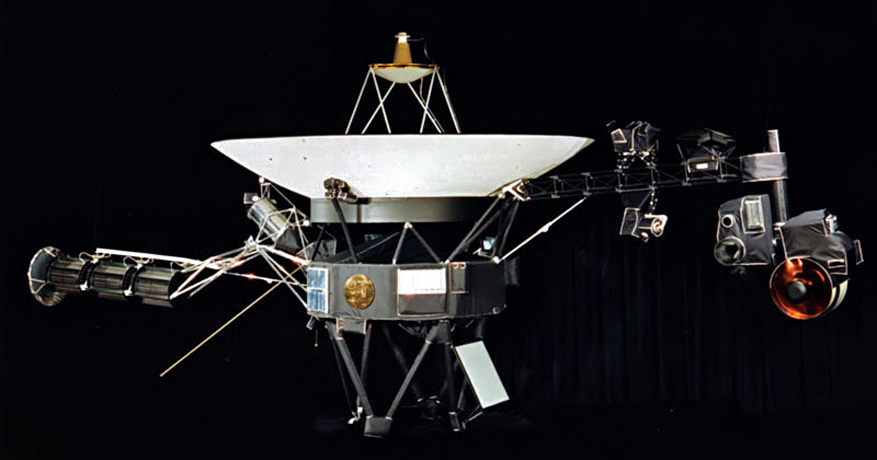
In 1977 NASA scientists at the Jet Propulsion Laboratory launched the interstellar probe Voyager 1 into space – and it just keeps going. It has now travelled 15 BILLION miles (24 billion kilometres), which is the furthest any human-made thing has ever travelled from Earth. It communicates with us here on Earth via radiowaves which can easily cross that massive distance between us. But even travelling at the speed* of light (all radiowaves travel at that speed) each radio transmission takes 22.5 hours, so if NASA scientists send a command they have to wait nearly two days for a response. (The Sun is ‘only’ 93 million miles away from Earth and its light takes about 8 minutes to reach us.)

FDS – The Flight Data System

The Voyager 1 probe has sensors to detect things like temperature or changes in magnetic fields, a camera to take pictures and a transmitter to send all this data back to the scientists on Earth. One of its three onboard computers (the Flight Data System, or FDS) takes that data, packages it up and transmits it as a stream of 1s and 0s to the waiting scientists back home who decode it. Voyager 1 is where it is because NASA wanted to send a probe out beyond the limits of our Solar System, into ‘interstellar space’ far away from the influence of our Sun to see what the environment is like there. It regularly sends back data updates which include information about its own health (how well its batteries are doing etc) along with the scientific data, packaged together into that radio transmission. NASA can also send up commands to its onboard computers too. Computers that were built in 1977!

The pale blue dot

‘The Pale Blue Dot’. In the thicker apricot-coloured band on the right you might be able to see
a tiny dot about halfway down. That’s the Earth! Full details of this famous 1990 photo here.

Although its camera is no longer working its most famous photograph is this one, the Pale Blue Dot, a snapshot of every single person alive on the 14th of February 1990. However as Voyager 1 was 6 billion miles from home by then when it looked back at the Earth to take that photograph you might have some difficulty in spotting anyone! But they’re somewhere in there, inside that single pixel (actually less than a pixel!) which is our home.

As Voyager 1 moved further and further away from our own planet, visiting Jupiter and Saturn before travelling to our outer Solar System and then beyond, the probe continued to send data and receive commands from Earth. 

The messages stopped making sense

All was going well, with the scientists and Voyager 1 ‘talking’ to one another, until November 2023 when the binary 1s and 0s it normally transmitted no longer had any meaningful pattern to them, it was gibberish. The scientists knew Voyager 1 was still ‘alive’ as it was able to send that signal but they didn’t know why its signal no longer made any sense. Given that the probe is nearly 50 years old and operating in a pretty harsh environment people wondered if that was the natural end of the project, but they were determined to try and re-establish normal contact with the probe if they could. 

Searching for a solution

They pored over almost-50 year old paper instruction manuals and blueprints to try and work out what was wrong and it seemed that the problem lay in the FDS. Any scientific data being collected was not being correctly stored in the ‘parcel’ that was transmitted back to Earth, and so was lost – Voyager 1 was sending empty boxes. At that distance it’s too far to send an engineer up to switch it off and on again so instead they sent a command to try and restart things. The next message from Voyager 1 was a different string of 1s and 0s. Not quite the normal data they were hoping for, but also not entirely gibberish. A NASA scientist decoded it and found that Voyager 1 had sent a readout of the FDS’ memory. That told them where the problem was and that a damaged chip meant that part of its memory couldn’t be properly accessed. They had to move the memory from the damaged chip.

That’s easier said than done. There’s not much available space as the computers can only store 68 kilobytes of data in total (absolutely tiny compared to today’s computers and devices). There wasn’t one single place where NASA scientists could move the memory as a single block, instead they had to break it up into pieces and store it in different places. In order to do that they had to rewrite some of the code so that each separated piece contained information about how to find the next piece. Imagine if a library didn’t keep a record of where each book was, it would make it very hard to find and read the sequel! 

Earlier this year NASA sent up a new command to Voyager 1, giving it instructions on how to move a portion of its memory from the damaged area to its new home(s) and waited to hear back. Two days later they got a response. It had worked! They were now receiving sensible data from the probe.  

Voyager team celebrates engineering data return, 20 April 2024 (NASA/JPL-Caltech). “Shown are Voyager team members Kareem Badaruddin, Joey Jefferson, Jeff Mellstrom, Nshan Kazaryan, Todd Barber, Dave Cummings, Jennifer Herman, Suzanne Dodd, Armen Arslanian, Lu Yang, Linda Spilker, Bruce Waggoner, Sun Matsumoto, and Jim Donaldson.”

For a while they it was just basic ‘engineering data’ (about the probe’s status) but they knew their method worked and didn’t harm the distant traveller. They also knew they’d need to do a bit more work to get Voyager 1 to move more memory around in order for the probe to start sending back useful scientific data, and…

Success!

… …in May, NASA announced that scientific data from two of Voyager 1’s instruments was finally being sent back to Earth and in June the probe was fully operational. You can follow Voyager 1’s updates on Twitter / X via @NASAVoyager.

Did you know?

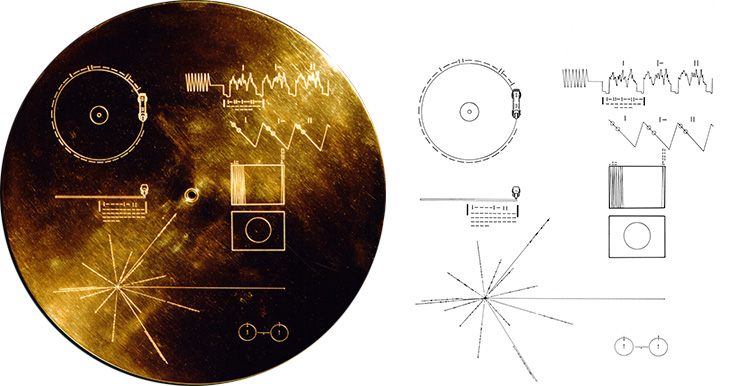
Both Voyager 1 and Voyager 2 carry with them a gold-plated record called ‘The Sounds of Earth‘ containing “sounds and images selected to portray the diversity of life and culture on Earth”. Hopefully any aliens encountering it will have a record player (but the Voyager craft do carry a spare needle!) Credit: NASA/JPL
References

Lots of articles helped in the writing of this one and you can download a PDF of them here. Featured image credit showing the Voyager spacecraft: NASA/JPL.

*radiowaves and light are part of the electromagnetic or ‘EM’ spectrum along with microwaves, gamma rays, X-rays, ultraviolet and infra red. All these waves travel at the same speed in a vacuum, the speed of light (300,000,000 metres per second, sometimes written as 3 x 10⁸ m/s or (m s-1)), but the waves differ by their frequency and wavelength.


Subscribe to be notified whenever we publish a new post to the CS4FN blog.


EPSRC supports this blog through research grant EP/W033615/1.

The invisible dice mystery – a magic trick underpinned by computing and maths

Red dice image by Deniz Avsar from Pixabay

The Ancient Egyptians, Romans and Greeks used dice with various shapes and markings; some even believed they could be used to predict the future. Using just a few invisible dice, which you can easily make at home, you can amaze your friends with a transparent feat of magical prediction.

The presentation

You can’t really predict the future with dice, but you can do some clever magic tricks with them. For this trick first you need some invisible dice, they are easy to make, it’s all in the imagination. You take your empty hand and state to your friend that it contains two invisible dice. Of course it doesn’t, but that’s where the performance come in. You set up the story of ancient ways to predict the future. You can have lots of fun as you hand the ‘dice’ over and get your friend to do some test rolls to check the dice aren’t loaded. On the test rolls ask them what numbers the dice are showing (remember a dice can only show numbers 1 through 6), this gets them used to things. Then on the final throw, tell them to decide what numbers are showing, but not to tell you! You are going to play a game where you use these numbers to create a large ‘mystical’ number.

To start, they choose one of the dice and move it closer to them, remembering the number on this die. You may want to have them whisper the numbers to another friend in case they forget, as that sort of ruins the trick ending!

Next you take two more ‘invisible dice’ from your pocket; these will be your dice. You roll them a bit, giving random answers and then finally say that they have come up as a 5 and a 5. Push one of the 5s next to the dice your friend selected, and tell them to secretly add these numbers together, i.e. their number plus 5. Then push your second 5 over and suggest, to make it even harder, to multiply their current number by 5+5 (i.e. 10 – that’s a nice easy multiplication to do) and remember that new number. Then finally turn attention to your friend’s remaining unused die, and get them to add that last number to give a grand total. Ask them now to tell you that grand total. Almost instantly you can predict exactly the unspoken numbers on each of their two invisible dice. If they ask how it you did it, say it was easy – they left the dice in plain sight on the table. You just needed to look at them.

The computing behind

This trick works by hiding some simple algebra in the presentation. You have no idea what two numbers your friend has chosen, but let’s call the number on the die they select A and the other number B. If we call the running total X then as the trick progresses the following happens: to begin with X=0, but then we add 5 to their secret number A, so X= A+5. We then get the volunteer to multiply this total by 5+5 (i.e. 10) so now X=10*(A+5). Then we finally add the second secret number B to give X=10(A+5)+B. If we expand this out, X= 10A+50+B. We know that A and B will be in the range 1-6 so this means that when your friend announces the grand total all you need to do is subtract 50 from that number. The number left (10*A+B) means that the value in the 10s column is the number A and the units column is B, and we can announce these out loud. For example if A=2 and B=4, we have the grand total as 10(2+5)+4 = 74, and 74 – 50= is 24, so A is 2, and B is 4.

In what are called procedural computer languages this idea of having a running total that changes as we go through well-defined steps in a computer program is a key element. The running total X is called a variable, to start in the trick, as in a program, we need to initialise this variable, that is we need to know what it is right at the start, in this case X=0. At each stage of the trick (program) we do something to change the ‘state’ of this variable X, ie there are rules to decide what it changes to and when, like adding 5 to the first secret number changes X from 0 to X=(A+5). A here isn’t a variable because your friend knows exactly what it is, A is 2 in the example above, and it won’t change at any time during the trick so it’s called a constant (even if we as the magician don’t know what that constant is). When the final value of the variable X is announced, we can use the algebra of the trick to recover the two constants A and B.

Other ways to do the trick

Of course there are other ways you could perform the trick using different ways to combine the numbers, as long as you end up with A being multiplied by 10 and B just being added. But you want to hide that fact as much as possible. For example you could use three ‘invisible dice’ yourself showing 5, 2 and 5 and go for 5*(A*2+5) + B if you feel confident your friend can quickly multiply by 5. Then you just need to subtract 25 from their grand total (10A+25+B), and you have their numbers. The secret here is to play with the presentation to get one that suits you and your audience, while not putting too much of a mental strain on you or your friend to have to do difficult maths in their head as they calculate the state changes of that ever-growing variable X.

Paul Curzon, Queen Mary University of London


More on …


Related Magazine …


Subscribe to be notified whenever we publish a new post to the CS4FN blog.


This blog is funded by EPSRC on research agreement EP/W033615/1.

QMUL CS4FN EPSRC logos

Can you trust a smile?

Yellow smiles image by Alexa from Pixabay

How can you tell if someone looks trustworthy? Could it have anything to do with their facial expression? Some new research suggests that people are less likely to trust someone if their smile looks fake. Of course, that seems like common sense – you’d never think to yourself ‘wow, what a phoney’ and then decide to trust someone anyway. But we’re talking about very subtle clues here. The kind of thing that might only produce a bit of a gut feeling, or you might never be conscious of at all.

To do this experiment, researchers at Cardiff University told volunteers to pick someone to play a trust game with. The scientists told the volunteers to make their choice based on a short video of each person smiling – but they didn’t know the scientists could control certain aspects of each smile, and could make some smiles look more genuine than others.

Continue reading “Can you trust a smile?”

Computers that read emotions

by Matthew Purver, Queen Mary University of London

One of the ways that computers could be more like humans – and maybe pass the Turing test – is by responding to emotion. But how could a computer learn to read human emotions out of words? Matthew Purver of Queen Mary University of London tells us how.

Have you ever thought about why you add emoticons to your text messages – symbols like 🙂 and :-@? Why do we do this with some messages but not with others? And why do we use different words, symbols and abbreviations in texts, Twitter messages, Facebook status updates and formal writing?

In face-to-face conversation, we get a lot of information from the way someone sounds, their facial expressions, and their gestures. In particular, this is the way we convey much of our emotional information – how happy or annoyed we’re feeling about what we’re saying. But when we’re sending a written message, these audio-visual cues are lost – so we have to think of other ways to convey the same information. The ways we choose to do this depend on the space we have available, and on what we think other people will understand. If we’re writing a book or an article, with lots of space and time available, we can use extra words to fully describe our point of view. But if we’re writing an SMS message when we’re short of time and the phone keypad takes time to use, or if we’re writing on Twitter and only have 140 characters of space, then we need to think of other conventions. Humans are very good at this – we can invent and understand new symbols, words or abbreviations quite easily. If you hadn’t seen the 😀 symbol before, you can probably guess what it means – especially if you know something about the person texting you, and what you’re talking about.

But computers are terrible at this. They’re generally bad at guessing new things, and they’re bad at understanding the way we naturally express ourselves. So if computers need to understand what people are writing to each other in short messages like on Twitter or Facebook, we have a problem. But this is something researchers would really like to do: for example, researchers in France, Germany and Ireland have all found that Twitter opinions can help predict election results, sometimes better than standard exit polls – and if we could accurately understand whether people are feeling happy or angry about a candidate when they tweet about them, we’d have a powerful tool for understanding popular opinion. Similarly we could automatically find out whether people liked a new product when it was launched; and some research even suggests you could even predict the stock market. But how do we teach computers to understand emotional content, and learn to adapt to the new ways we express it?

One answer might be in a class of techniques called semi-supervised learning. By taking some example messages in which the authors have made the emotional content very clear (using emoticons, or specific conventions like Twitter’s #fail or abbreviations like LOL), we can give ourselves a foundation to build on. A computer can learn the words and phrases that seem to be associated with these clear emotions, so it understands this limited set of messages. Then, by allowing it to find new data with the same words and phrases, it can learn new examples for itself. Eventually, it can learn new symbols or phrases if it sees them together with emotional patterns it already knows enough times to be confident, and then we’re on our way towards an emotionally aware computer. However, we’re still a fair way off getting it right all the time, every time.


Related Magazine …


EPSRC supports this blog through research grant EP/W033615/1.

Find your own time zone

The theme for British Science Week 2024 is Time so here we’re going back in time to our archives to bring you this article about… time. Below are the instructions to find out your own personal time zone but be careful if you’re sharing your results with others, remember that your longitude (if combined with your latitude) can give away your location.

Andy Broomfield has given us the secret to figuring out your own personal time zone based on your longitude! Now you can figure out your time zone right down to the second, just like his gadget did.

Step one: find your longitude

First you need find out the longitude of the place you’re at. Longitude is the measure of where you are on the globe in an east-west direction (the north-south measurement is called latitude).

The best resource to do this is Google Earth, which will give you a very accurate longitude reading in degrees, minutes and seconds. Just find your location in Google Earth, and when you hover your mouse over it, the latitude and longitude are in the bottom right corner of the window.

There are alternatives to Google Earth online, but they tend to only work for one country rather than the whole world. If you can’t use Google Earth, try an internet search for finding longitude in your country.

If you’ve got a GPS system (e.g. on your phone), you can get it to tell you your longitude as well.

Step two: find your time zone

We’ll be finding your time relative to Greenwich Mean Time (GMT or UTC), the base for timekeeping all over the world. If your Longitude is west of 0° you’ll be behind GMT, and if it’s east then you’ll be ahead of it.

Longitude is usually measured in degrees, minutes and seconds. Here’s how longitude converts into your personal time zone:
• 15 degrees of longitude = 1 hour difference; 1 degree longitude = 4 minutes difference.
• 15 minutes of longitude = 1 minute difference; 1 minute of longitude = 4 seconds difference.
• 15 seconds of longitude = 1 second difference, 1 second of longitude = 0.066(recurring) seconds difference.

The best way to find your personal time zone is to convert the whole thing into seconds of longitude, then into seconds of time. Do this by adding together:

(degrees x 3600) + (minutes x 60) + (seconds)

You’ll get a big number – that’s your seconds in longitude. Then if you divide that big number by 15, that’s how many seconds your personal time zone is different from GMT. Once you’ve got that, you can convert it back into hours, minutes and seconds.

An example

Let’s find the personal time zone for the President of the United States. The White House is at 77° 2′ 11.7″ West, so converting this all to seconds of longitude gives:

(degrees x 3600) + (minutes x 60) + (seconds)
= (77 x 3600) + (2 x 60) + (11.7)
= (277,200) + (120) + (11.7)
= 277,331.7

Now we find the time zone difference in seconds of time:

277,331.7 / 15 = 18,488.78 seconds

This means that the President is 18,488.78 seconds behind GMT. Next it’s the slightly fiddly business of expanding those seconds back into hours, minutes and seconds. Because time is based on units of 60 rather than 10, dividing hours and minutes into decimals doesn’t tell you much. You’ll have to use whole numbers and figure out the remainders. Here’s how.

If you divide 18,488.78 by 3600 (the number of seconds in an hour), you’ll find out how many hours can fit in all of those seconds. The answer is 5, with some left over. 5 hours is 18,000 seconds (because 5 x 3600 = 18,000), so now you’re left with 488.78 seconds to deal with. Divide 488.78 by the number of seconds in a minute (60), and you get 8, plus some left over. 8 x 60 is 480, so you’ve got 8.78 seconds still left.

That means that the president’s personal time zone at the White House is 5 hours, 8 minutes and 8.78 seconds behind GMT.

If you’re using decimal longitude

Longitude is usually measured in degrees, minutes and seconds, but sometimes, like if you use a GPS receiver, you might get a measurement that just lists your longitude in degrees with a decimal. For example, the CS4FN office is located at 0.042 degrees west.

Figuring out your time zone with a decimal is simpler than with degrees, minutes and seconds. It’s just one calculation! Just take your decimal longitude and divide it by 0.004167.

So the local time at the CS4FN office is:

(longitude) / 0.004167
= (0.042) / 0.004167
= 10.079 seconds behind GMT

The only problem with this simple calculation is that it’s not as accurate as the one above for degrees, minutes and seconds. Plus, if you get a large number of seconds you’ll still have to do the last step from the method above, where you convert seconds back into hours and minutes.

Now you’ve got your own personal time zone!

Paul Curzon, Queen Mary University of London


More on …


Subscribe to be notified whenever we publish a new post to the CS4FN blog.


This blog is funded by EPSRC on research agreement EP/W033615/1.

QMUL CS4FN EPSRC logos

The Social Machine of Maths

In school we learn about the maths that others have invented: results that great mathematicians like Euclid, Pythagoras, Newton or Leibniz worked out. We follow algorithms for getting results they devised. Ada Lovelace was actually taught by one of the great mathematicians, Augustus De Morgan, who invented important laws, ‘De Morgan’s laws’ that are a fundamental basis for the logical reasoning computer scientists now use. Real maths is about discovering new results of course not just using old ones, and the way that is done is changing.

We tend to think of maths as something done by individual geniuses: an isolated creative activity, to produce a proof that other mathematicians then check. Perhaps the greatest such feat of recent years was Andrew WIles’ proof of Fermat’s Last Theorem. It was a proof that had evaded the best mathematicians for hundreds of years. Wiles locked himself away for 7 years to finally come up with a proof. Mathematics is now at a remarkable turning point. Computer science is changing the way maths is done. New technology is radically extending the power and limits of individuals. “Crowdsourcing” pulls together diverse experts to solve problems; computers that manipulate symbols can tackle huge routine calculations; and computers, using programs designed to verify hardware, check proofs that are just too long and complicated for any human to understand. Yet these techniques are currently used in stand-alone fashion, lacking integration with each other or with human creativity or fallibility.

‘Social machines’ are a whole new paradigm for viewing a combination of people and computers as a single problem-solving entity. The idea was identified by Tim Berners-Lee, inventor of the world-wide web. A project led by Ursula Martin at the University of Oxford explored how to make this a reality, creating a mathematics social machine – a combination of people, computers, and archives to create and apply mathematics. The idea is to change the way people do mathematics, so transforming the reach, pace, and impact of mathematics research. The first step involves social science rather than maths or computing though – studying what working mathematicians really do when working on new maths, and how they work together when doing crowdsourced maths. Once that is understood it will then be possible to develop tools to help them work as part of such a social machine.

The world changing mathematics results of the future may be made by social machines rather than solo geniuses. Team work, with both humans and computers is the future.

– Ursula Martin, University of Oxford
and Paul Curzon, Queen Mary University of London


Related Magazine …


Related Magazine …

The history of computational devices: automata, core rope memory (used by NASA in the Moon landings), Charles Babbage’s Analytical Engine (never built) and Difference Engine made of cog wheels and levers, mercury delay lines, standardising the size of machine parts, Mary Coombs and the Lyons tea shop computer, computers made of marbles, i-Ching and binary, Ada Lovelace and music, a computer made of custard, a way of sorting wood samples with index cards and how to work out your own programming origin story.


Subscribe to be notified whenever we publish a new post to the CS4FN blog.


This blog is funded by EPSRC on research agreement EP/W033615/1.

QMUL CS4FN EPSRC logos

Software for Justice

A jury is given misleading information in court by an expert witness. An innocent person goes to prison as a result. This shouldn’t happen, but unfortunately it does and more often than you might hope. It’s not because the experts or lawyers are trying to mislead but because of some tricky mathematics. Fortunately, a team of computer scientists at Queen Mary, University of London are leading the way in fixing the problem.

The Queen Mary team, led by Professor Norman Fenton, is trying to ensure that forensic evidence involving probability and statistics can be presented without making errors, even when the evidence is incredibly complex. Their solution is based on specialist software they have developed.

Many cases in courts rely on evidence like DNA and fibre matching for proof. When police investigators find traces of this kind of evidence from the crime scene they try to link it to a suspect. But there is a lot of misunderstanding about what it means to find a match. Surprisingly, a DNA match between, say, a trace of blood found at the scene and blood taken from a suspect does not mean that the trace must have come from the suspect.

Forensic experts talk about a ‘random match probability’. It is just the probability that the suspect’s DNA matches the trace if it did not actually come from him or her. Even a one-in-a-billion random match probability does not prove it was the suspect’s trace. Worse, the random match probability an expert witness might give is often either wrong or misleading. This can be because it fails to take account of potential cross-contamination, which happens when samples of evidence accidentally get mixed together, or even when officers leave traces of their own DNA from handling the evidence. It can also be wrong due to mistakes in the way the evidence was collected or tested. Other problems arise if family members aren’t explicitly ruled out, as that makes the random match probability much higher. When the forensic match is from fibre or glass, the random match probabilities are even more uncertain.

The potential to get the probabilities wrong isn’t restricted to errors in the match statistics, either. Suppose the match probability is one in ten thousand. When the experts or lawyers present this evidence they often say things like: “The probability that the trace came from anybody other than the defendant is one in ten thousand.” That statement sounds OK but it isn’t true.

The problem is called the prosecutor fallacy. You can’t actually conclude anything about the probability that the trace belonged to the defendant unless you know something about the number of potential suspects. Suppose this is the only evidence against the defendant and that the crime happened on an island where the defendant was one of a million adults who could have committed the crime. Then the random match probability of one in ten thousand actually means that about one hundred of those million adults match the trace. So the probability of innocence is ninety-nine out of a hundred! That’s very different from the one in ten thousand probability implied by the statement given in court.

Norman Fenton’s work is based around a theorem, called Bayes’ theorem, which gives the correct way to calculate these kinds of probabilities. The theorem is over 250 years old but it is widely misunderstood and, in all but the simplest cases is very difficult to calculate properly. Most cases include many pieces of related evidence – including evidence about the accuracy of the testing processes. To keep everything straight, experts need to build a model called a Bayesian network. It’s like a graph that maps out different possibilities and the chances that they are true. You can imagine that in almost any court case, this gets complicated awfully quickly. It is only in the last 20 years that researchers have discovered ways to perform the calculations for Bayesian networks, and written software to help them. What Norman and his team have done is develop methods specifically for modelling legal evidence as Bayesian networks in ways that are understandable by lawyers and expert witnesses.

Norman and his colleague Martin Neil have provided expert evidence (for lawyers) using these methods in several high-profile cases. Their methods help lawyers to determine the true value of any piece of evidence – individually or in combination. They also help show how to present probabilistic arguments properly.

Unfortunately, although scientists accept that Bayes’ theorem is the only viable method for reasoning about probabilistic evidence, it’s not often used in court, and is even a little controversial. Norman is leading an international group to help bring Bayes’ theorem a little more love from lawyers, judges and forensic scientists. Although changes in legal practice happen very slowly (lawyers still wear powdered wigs, after all), hopefully in the future the difficult job of judging evidence will be made easier and fairer with the help of Bayes’ theorem.

If that happens, then thanks to some 250 year-old maths combined with some very modern computer science, fewer innocent people will end up in jail. Given the innocent person in the dock could one day be you, you will probably agree that’s a good thing.

Paul Curzon, Queen Mary University of London (originally published in 2011)

More on … justice

  • Edie Schlain Windsor and same sex marriage
    • Edie was a computer scientist whose marriage to another woman was deemed ineligible for certain rights provided (at that time) only in a marriage between a man and a woman. She fought for those rights and won.

Related Magazine …


Subscribe to be notified whenever we publish a new post to the CS4FN blog.


This blog is funded by EPSRC on research agreement EP/W033615/1.

QMUL CS4FN EPSRC logos

Designing robots that care

by Nicola Plant, Queen Mary University of London

Think of the perfect robot companion. A robot you can hang out with, chat to and who understands how you feel. Robots can already understand some of what we say and talk back. They can even respond to the emotions we express in the tone of our voice. But, what about body language? We also show how we feel by the way we stand, we describe things with our hands and we communicate with the expressions on our faces. Could a robot use body language to show that it understands how we feel? Could a robot show empathy?

If a robot companion did show this kind of empathetic body language we would likely feel that it understood us, and shared our feelings and experiences. For robots to be able to behave like this though, we first need to understand more about how humans use movement to show empathy with one another.

Think about how you react when a friend talks about their headache. You wouldn’t stay perfectly still. But what would you do? We’ve used motion capture to track people’s movements as they talk to each other. Motion capture is the technology used in films to make computer-animated creatures like Gollum in Lord of the Rings, or the Apes in the Planet of the Apes. Lots of cameras are used together to create a very precise computer model of the movements being recorded. Using motion capture, we’ve been able to see what people actually do when chatting about their experiences.

It turns out that we share our understanding of things like a headache by performing it together. We share the actions of the headache as if we have it ourselves. If I hit my head, wince and say ‘ouch’, you might wince and say ‘ouch’ too – you give a multimodal performance, with actions and words, to show me you understand how I feel.

So should we just program robots to copy us? It isn’t as simple as that. We don’t copy exactly. A perfect copy wouldn’t show understanding of how we feel. A robot doing that would seem like a parrot, repeating things without any understanding. For the robot to show that it understands how you feel it must perform a headache like it owns it – as though it were really theirs! That means behaving in a similar way to you; but adapted to the unique type of headache it has.

Designing the way robots should behave in social situations isn’t easy. If we work out exactly how humans interact with each other to share their experiences though, we can use that understanding to program robot companions. Then one day your robot friend will be able to hang out with you, chat and show they understand how you feel. Just like a real friend.

multimodal = two or more different ways of doing something. With communication that might be spoken words, facial expressions and hand gestures.


Related Magazine …


See also (previous post and related career options)

Click to read about the AMPER project

We have recently written about the AMPER project which uses a tablet-based AI tool / robot to support people with dementia and their carers. It prompts the person to discuss events from their younger life and adapts to their needs. We also linked this with information about the types of careers people working in this area might do – the examples given were for a project based in the Netherlands called ‘Dramaturgy for Devices’ – using lessons learned from the study of theatre and theatrical performances in designing social robots so that their behaviour feels more natural and friendly to the humans who’ll be using them.

Click to see one of the four jobs in this area with another three linked from it

See our collection of posts about Career paths in Computing.


EPSRC supports this blog through research grant EP/W033615/1.

AMPER: AI helping future you remember past you

by Jo Brodie, Queen Mary University of London

Have you ever heard a grown up say “I’d completely forgotten about that!” and then share a story from some long-forgotten memory? While most of us can remember all sorts of things from our own life history it sometimes takes a particular cue for us to suddenly recall something that we’d not thought about for years or even decades. 

As we go through life we add more and more memories to our own personal library, but those memories aren’t neatly organised like books on a shelf. For example, can you remember what you were doing on Thursday 20th September 2018 (or can you think of a way that would help you find out)? You’re more likely to be able to remember what you were doing on the last Tuesday in December 2018 (but only because it was Christmas Day!). You might not spontaneously recall a particular toy from your childhood but if someone were to put it in your hands the memories about how you played with it might come flooding back.

Accessing old memories

In Alzheimer’s Disease (a type of dementia) people find it harder to form new memories or retain more recent information which can make daily life difficult and bewildering and they may lose their self-confidence. Their older memories, the ones that were made when they were younger, are often less affected however. The memories are still there but might need drawing out with a prompt, to help bring them to the surface.

old newspaper
Perhaps a newspaper advert will jog your memory in years to come… Image by G.C. from Pixabay

An EPSRC-funded project at Heriot-Watt University in Scotland is developing a tablet-based ‘story facilitator’ agent (a software program designed to adapt its response to human interaction) which contains artificial intelligence to help people with Alzheimer’s disease and their carers. The device, called ‘AMPER’*, could improve wellbeing and a sense of self in people with dementia by helping them to uncover their ‘autobiographical memories’, about their own life and experiences – and also help their carers remember them ‘before the disease’.

Our ‘reminiscence bump’

We form some of our most important memories between our teenage years and early adulthood – we start to develop our own interests in music and the subjects that we like studying, we might experience first loves, perhaps going to university, starting a career and maybe a family. We also all live through a particular period of time where we’re each experiencing the same world events as others of the same age, and those experiences are fitted into our ‘memory banks’ too. If someone was born in the 1950s then their ‘reminiscence bump’ will be events from the 1970s and 1980s – those memories are usually more available and therefore people affected by Alzheimer’s disease would be able to access them until more advanced stages of the disease process. Big important things that, when we’re older, we’ll remember more easily if prompted.

In years to come you might remember fun nights out with friends.
Image by ericbarns from Pixabay

Talking and reminiscing about past life events can help people with dementia by reinforcing their self-identity, and increasing their ability to communicate – at a time when they might otherwise feel rather lost and distressed. 

AMPER will explore the potential for AI to help access an individual’s personal memories residing in the still viable regions of the brain by creating natural, relatable stories. These will be tailored to their unique life experiences, age, social context and changing needs to encourage reminiscing.”

Dr Mei Yii Lim, who came up with the idea for AMPER(3).

Saving your preferences

AMPER comes pre-loaded with publicly available information (such as photographs, news clippings or videos) about world events that would be familiar to an older person. It’s also given information about the person’s likes and interests. It offers examples of these as suggested discussion prompts and the person with Alzheimer’s disease can decide with their carer what they might want to explore and talk about. Here comes the clever bit – AMPER also contains an AI feature that lets it adapt to the person with dementia. If the person selects certain things to talk about instead of others then in future the AI can suggest more things that are related to their preferences over less preferred things. Each choice the person with dementia makes now reinforces what the AI will show them in future. That might include preferences for watching a video or looking at photos over reading something, and the AI can adjust to shorter attention spans if necessary. 

Reminiscence therapy is a way of coordinated storytelling with people who have dementia, in which you exercise their early memories which tend to be retained much longer than more recent ones, and produce an interesting interactive experience for them, often using supporting materials — so you might use photographs for instance

Prof Ruth Aylett, the AMPER project’s lead at Heriot-Watt University(4).

When we look at a photograph, for example, the memories it brings up haven’t been organised neatly in our brain like a database. Our memories form connections with all our other memories, more like the branches of a tree. We might remember the people that we’re with in the photo, then remember other fun events we had with them, perhaps places that we visited and the sights and smells we experienced there. AMPER’s AI can mimic the way our memories branch and show new information prompts based on the person’s previous interactions.

​​Although AMPER can help someone with dementia rediscover themselves and their memories it can also help carers in care homes (who didn’t know them when they were younger) learn more about the person they’re caring for.

*AMPER stands for ‘Agent-based Memory Prosthesis to Encourage Reminiscing’.


Suggested classroom activities – find some prompts!

  • What’s the first big news story you and your class remember hearing about? Do you think you will remember that in 60 years’ time?
  • What sort of information about world or local events might you gather to help prompt the memories for someone born in 1942, 1959, 1973 or 1997? (Remember that their reminiscence bump will peak in the 15 to 30 years after they were born – some of them may still be in the process of making their memories the first time!).

See also

If you live near Blackheath in South East London why not visit the Age Exchange and reminiscence centre which is an arts charity providing creative group activities for those living with dementia and their carers. It has a very nice cafe.

Related careers

The AMPER project is interdisciplinary, mixing robots and technology with psychology, healthcare and medical regulation.

We have information about four similar-ish job roles on our TechDevJobs blog that might be of interest. This was a group of job adverts for roles in the Netherlands related to the ‘Dramaturgy^ for Devices’ project. This is a project linking technology with the performing arts to adapt robots’ behaviour and improve their social interaction and communication skills.

Below is a list of four job adverts (which have now closed!) which include information about the job description, the types of people that the employers were looking for and the way in which they wanted them to apply. You can find our full list of jobs that involve computer science directly or indirectly here.

^Dramaturgy refers to the study of the theatre, plays and other artistic performances.

Dramaturgy for Devices – job descriptions

More on …

1. Agent-based Memory Prosthesis to Encourage Reminiscing (AMPER) Gateway to Research
2. The Digital Human: Reminiscence (13 November 2023) BBC Sounds – a radio programme that talks about the AMPER Project.
3. Storytelling AI set to improve wellbeing of people with dementia (14 March 2022) Heriot-Watt University news
4. AMPER project to improve life for people with dementia (14 January 2022) The Engineer


Subscribe to be notified whenever we publish a new post to the CS4FN blog.


This blog is funded by EPSRC on research agreement EP/W033615/1.

QMUL CS4FN EPSRC logos

Singing bird – a human choir, singing birdsong

Image by Dieter from Pixabay

“I’m in a choir”. “Really, what do you sing?” “I did a blackbird last week, but I think I’m going to be woodpecker today, I do like a robin though!”

This is no joke! Marcus Coates a British artist, got up very early, and working with a wildlife sound recordist, Geoff Sample, he used 14 microphones to record the dawn chorus over lots of chilly mornings. They slowed the sounds down and matched up each species of bird with different types of human voices. Next they created a film of 19 people making bird song, each person sang a different bird, in their own habitats, a car, a shed even a lady in the bath! The 19 tracks are played together to make the dawn chorus. See it on YouTube below.

Marcus didn’t stop there, he wrote a new bird song score. Yes, for people to sing a new top ten bird hit, but they have to do it very slowly. People sing ‘bird’ about 20 times slower than birds sing ‘bird’ ‘whooooooop’, ‘whooooooop’, ‘tweeeeet’. For a special performance, a choir learned the new song, a new dawn chorus, they sang the slowed down version live, which was recorded, speeded back up and played to the audience, I was there! It was amazing! A human performance, became a minute of tweeting joy. Close your eyes and ‘whoop’ you were in the woods, at the crack of dawn!

Computationally thinking a performance

Computational thinking is at the heart of the way computer scientists solve problems. Marcus Coates, doesn’t claim to be a computer scientist, he is an artist who looks for ways to see how people are like other animals. But we can get an idea of what computational thinking is all about by looking at how he created his sounds. Firstly, he and wildlife sound recordist, Geoff Sample, had to focus on the individual bird sounds in the original recordings, ignore detail they didn’t need, doing abstraction, listening for each bird, working out what aspects of bird sound was important. They looked for patterns isolating each voice, sometimes the bird’s performance was messy and they could not hear particular species clearly, so they were constantly checking for quality. For each bird, they listened and listened until they found just the right ‘slow it down’ speed. Different birds needed different speeds for people to be able to mimic and different kinds of human voices suited each bird type: attention to detail mattered enormously. They had to check the results carefully, evaluating, making sure each really did sound like the appropriate bird and all fitted together into the Dawn Chorus soundscape. They also had to create a bird language, another abstraction, a score as track notes, and that is just an algorithm for making sounds!

Fun to try

Use your computational thinking skills to create a notation for an animal’s voice, a pet perhaps? A dog, hamster or cat language, what different sounds do they make, and how can you note them down. What might the algorithm for that early morning “I want my breakfast” look like? Can you make those sounds and communicate with your pet? Or maybe stick to tweeting? (You can follow @cs4fn on Twitter too).

Enjoy the slowed-down performance of this pet starling which has added a variety of mimicked sounds to its song repertoire.

Jane Waite, Queen Mary University of London


Watch …


Related Magazine …


EPSRC supports this blog through research grant EP/W033615/1.