Much ado about nothing

by Paul Curzon, Queen Mary University of London

A blurred image of a hospital ward
Image by Tyli Jura from Pixabay

The nurse types in a dose of 100.1 mg [milligrams] of a powerful drug and presses start. It duly injects 1001 mg into the patient without telling the nurse that it didn’t do what it was told. You wouldn’t want to be that patient!

Designing a medical device is difficult. It’s not creating the physical machine that causes problems so much as writing the software that controls everything that that machine does. The software is complex and it has to be right. But what do we mean by “right”? The most obvious thing is that when a nurse sets it to do something, that is exactly what it does.

Getting it right is subtler than that though. It must also be easy to use and not mislead the nurse: the human-computer interface has to be right too. It is the software that allows you to interact with a gadget – what buttons you press to get things done and what feedback you are given. There are some basic principles to follow when designing interfaces. One is that the person using it should always be clearly told what it is doing.

Manufacturers need ways to check their devices meet these principles: to know that they got it right.

It’s not just the manufacturers, though. Regulators have the job of checking that machines that might harm people are ‘right’ before they allow them to be sold. That’s really difficult given the software could be millions of lines long. Worse they only have a short time to give an answer.

Million to one chances are guaranteed to happen.

Problems may only happen once in a million times a device is used. They are virtually impossible to find by having someone try possibilities to see what happens, the traditional way software is checked. Of course, if a million devices are bought, then a million to one chance will happen to someone, somewhere almost immediately!

Paolo Masci at Queen Mary University of London, has come up with a way to help and in doing so found a curious problem. He’s been working with the US regulator for medical devices – the FDA – and developed a way to use maths to find problems. It involves creating a mathematical description of what critical parts of the interface program do. Properties, like the user always knowing what is going on, can then be checked using maths. Paolo tried it out on the code for entering numbers of a real medical device and found some subtle problems. He showed that if you typed in certain numbers, the machine actually treated them as a number ten times bigger. Type in a dose of 100.1 and the machine really did set the dose to be 1001. It ignored the decimal point because on such a large dose it assumed small fractions are irrelevant. However another part of the code allows you to continue typing digits. Worse still the device ignores that decimal point silently. It doesn’t make any attempt to help a nurse notice the change. A busy nurse would need to be extremely vigilant to see the tiny decimal point was missing given the lack of warning.

A useful thing about Paolo’s approach is that it gives you the button presses that lead to the problem. With that you can check other devices very quickly. He found that medical devices from three other manufacturers had exactly the same problem. Different teams had all programmed in the same problem. None had thought that if their code ignored a decimal point, it ought to warn the nurse about it rather than create a number ten times bigger. It turns out that different programmers are likely to think the same way and so make the same mistakes (see ‘Double or Nothing‘).

Now the problem is known, nurses can be warned to be extra careful and the manufacturers can update the software. Better still they and the regulators now have an easy way to check their programmers haven’t made the same mistake in future devices. In future, whether vigilant or not, a nurse won’t be able to get it wrong.


Further reading

This article was first published on the CS4FN website (archived copy) and there is a copy on page 8 of issue 17 of the CS4FN magazine which you can download below.


Related Magazine …


Subscribe to be notified whenever we publish a new post to the CS4FN blog.


This page is funded by EPSRC on research agreement EP/W033615/1.

QMUL CS4FN EPSRC logos

Double or nothing: an extra copy of your software, just in case

by Paul Curzon, Queen Mary University of London

Ariane 5 on the launchpad
Ariane 5 on the launch pad. Photo Credit: (NASA/Chris Gunn) Public Domain via Wikimedia Commons.

If you spent billions of dollars on a gadget you’d probably like it to last more than a minute before it blows up. That’s what happened to a European Space Agency rocket. How do you make sure the worst doesn’t happen to you? How do you make machines reliable?

A powerful way to improve reliability is to use redundancy: double things up. A plane with four engines can keep flying if one fails. Worried about a flat tyre? You carry a spare in the boot. These situations are about making physical parts reliable. Most machines are a combination of hardware and software though. What about software redundancy?

You can have spare copies of software too. Rather than a single version of a program you can have several copies running on different machines. If one program goes wrong another can take over. It would be nice if it was that simple, but software is different to hardware. Two identical programs will fail in the same way at the same time: they are both following the same instructions so if one goes wrong the other will too. That was vividly shown by the maiden flight of the Ariane 5 rocket. Less than 40 seconds from launch things went wrong. The problem was to do with a big number that needed 64 bits of storage space to hold it. The program’s instructions moved it to a storage place with only 16 bits. With not enough space, the number was mangled to fit. That led to calculations by its guidance system going wrong. The rocket veered off course and exploded. The program was duplicated, but both versions were the same so both agreed on the same wrong answers. Seven billion dollars went up in smoke.

Can you get round this? One solution is to get different teams to write programs to do the same thing. The separate teams may make mistakes but surely they won’t all get the same thing wrong! Run them on different machines and let them vote on what to do. Then as long as more than half agree on the right answer the system as a whole will do the right thing. That’s the theory anyway. Unfortunately in practice it doesn’t always work. Nancy Leveson, an expert in software safety from MIT, ran an experiment where different programmers were given programs to write. She found they wrote code that gave the same wrong answers. Even if it had used independently written redundant code it’s still possible Ariane 5 would have exploded.

Redundancy is a big help but it can’t guarantee software works correctly. When designing systems to be highly reliable you have to assume things will still go wrong. You must still have ways to check for problems and to deal with them so that a mistake (whether by human or machine) won’t turn into a disaster.


Related Magazine …


Further reading


Subscribe to be notified whenever we publish a new post to the CS4FN blog.


This page is funded by EPSRC on research agreement EP/W033615/1.

QMUL CS4FN EPSRC logos

Software for Justice

by Paul Curzon, Queen Mary University of London (originally published in 2011)

A jury is given misleading information in court by an expert witness. An innocent person goes to prison as a result. This shouldn’t happen, but unfortunately it does and more often than you might hope. It’s not because the experts or lawyers are trying to mislead but because of some tricky mathematics. Fortunately, a team of computer scientists at Queen Mary, University of London are leading the way in fixing the problem.

The Queen Mary team, led by Professor Norman Fenton, is trying to ensure that forensic evidence involving probability and statistics can be presented without making errors, even when the evidence is incredibly complex. Their solution is based on specialist software they have developed.

Many cases in courts rely on evidence like DNA and fibre matching for proof. When police investigators find traces of this kind of evidence from the crime scene they try to link it to a suspect. But there is a lot of misunderstanding about what it means to find a match. Surprisingly, a DNA match between, say, a trace of blood found at the scene and blood taken from a suspect does not mean that the trace must have come from the suspect.

Forensic experts talk about a ‘random match probability’. It is just the probability that the suspect’s DNA matches the trace if it did not actually come from him or her. Even a one-in-a-billion random match probability does not prove it was the suspect’s trace. Worse, the random match probability an expert witness might give is often either wrong or misleading. This can be because it fails to take account of potential cross-contamination, which happens when samples of evidence accidentally get mixed together, or even when officers leave traces of their own DNA from handling the evidence. It can also be wrong due to mistakes in the way the evidence was collected or tested. Other problems arise if family members aren’t explicitly ruled out, as that makes the random match probability much higher. When the forensic match is from fibre or glass, the random match probabilities are even more uncertain.

The potential to get the probabilities wrong isn’t restricted to errors in the match statistics, either. Suppose the match probability is one in ten thousand. When the experts or lawyers present this evidence they often say things like: “The probability that the trace came from anybody other than the defendant is one in ten thousand.” That statement sounds OK but it isn’t true.

The problem is called the prosecutor fallacy. You can’t actually conclude anything about the probability that the trace belonged to the defendant unless you know something about the number of potential suspects. Suppose this is the only evidence against the defendant and that the crime happened on an island where the defendant was one of a million adults who could have committed the crime. Then the random match probability of one in ten thousand actually means that about one hundred of those million adults match the trace. So the probability of innocence is ninety-nine out of a hundred! That’s very different from the one in ten thousand probability implied by the statement given in court.

Norman Fenton’s work is based around a theorem, called Bayes’ theorem, which gives the correct way to calculate these kinds of probabilities. The theorem is over 250 years old but it is widely misunderstood and, in all but the simplest cases is very difficult to calculate properly. Most cases include many pieces of related evidence – including evidence about the accuracy of the testing processes. To keep everything straight, experts need to build a model called a Bayesian network. It’s like a graph that maps out different possibilities and the chances that they are true. You can imagine that in almost any court case, this gets complicated awfully quickly. It is only in the last 20 years that researchers have discovered ways to perform the calculations for Bayesian networks, and written software to help them. What Norman and his team have done is develop methods specifically for modelling legal evidence as Bayesian networks in ways that are understandable by lawyers and expert witnesses.

Norman and his colleague Martin Neil have provided expert evidence (for lawyers) using these methods in several high-profile cases. Their methods help lawyers to determine the true value of any piece of evidence – individually or in combination. They also help show how to present probabilistic arguments properly.

Unfortunately, although scientists accept that Bayes’ theorem is the only viable method for reasoning about probabilistic evidence, it’s not often used in court, and is even a little controversial. Norman is leading an international group to help bring Bayes’ theorem a little more love from lawyers, judges and forensic scientists. Although changes in legal practice happen very slowly (lawyers still wear powdered wigs, after all), hopefully in the future the difficult job of judging evidence will be made easier and fairer with the help of Bayes’ theorem.

If that happens, then thanks to some 250 year-old maths combined with some very modern computer science, fewer innocent people will end up in jail. Given the innocent person in the dock could one day be you, you will probably agree that’s a good thing.


This post was originally published in 2011 on our old CS4FN website and a copy can also be found on pages 18 and 19 in the Alan Turing issue of the CS4FN magazine, issue 14. You can download a free PDF copy of the magazine below along with our entire back issue of magazines and booklets at our downloads site.


Further reading in justice

Edie Schlain Windsor and same sex marriage – Edie was a computer scientist whose marriage to another woman was deemed ineligible for certain rights provided (at that time) only in a marriage between a man and a woman. She fought for those rights and won.


Related Magazine …


EPSRC supports this blog through research grant EP/W033615/1.

Stretching your keyboard – getting more out of QWERTY

by Jo Brodie, Queen Mary University of London

A QWERTY keyboard after smartphone keyboards starting with keys q w e r t y on the top row
A smartphone’s on-screen keyboard layout, called QWERTY after the first six letters on the top line. Image by CS4FN after smartphone QUERTY keyboards.

If you’ve ever sent a text on a phone or written an essay on a computer you’ve most likely come across the ‘QWERTY’ keyboard layout. It looks like this on a smartphone.

This layout has been around in one form or another since the 1870s and was first used in old mechanical typewriters where pressing a letter on the keyboard caused a hinged metal arm with that same letter embossed at the end to swing into place, thwacking a ribbon coated with ink, to make an impression on the paper. It was quite loud!

The QWERTY keyboard isn’t just used by English speakers but can easily be used by anyone whose language is based on the same A,B,C Latin alphabet (so French, Spanish, German etc). All the letters that an English-speaker needs are right there in front of them on the keyboard and with QWERTY… WYSIWYG (What You See Is What You Get).  There’s a one-to-one mapping of key to letter: if you tap the A key you get a letter A appearing on screen, click the M key and an M appears. (To get a lowercase letter you just tap the key but to make it uppercase you need to tap two keys; the up arrow (‘shift’) key plus the letter).

A French or Spanish speaking person could also buy an adapted keyboard that includes letters like É and Ñ, or they can just use a combination of keys to make those letters appear on screen (see Key Combinations below). But what about writers of other languages which don’t use the Latin alphabet? The QWERTY keyboard, by itself, isn’t much use for them so it potentially excludes a huge number of people from using it.

In the English language the letter A never alters its shape depending on which letter goes before or comes after it. (There are 39 lower case letter ‘a’s and 3 upper case ‘A’s in this paragraph and, apart from the difference in case, they all look exactly the same.) That’s not the case for other languages such as Arabic or Hindi where letters can change shape depending on the adjacent letters. With some languages the letters might even change vertical position, instead of being all on the same line as in English.

Early attempts to make writing in other languages easier assumed that non-English alphabets could be adapted to fit into the dominant QWERTY keyboard, with letters that are used less frequently being ignored and other letters being simplified to suit. That isn’t very satisfactory and speakers of other languages were concerned that their own language might become simplified or standardised to fit in with Western technology, a form of ‘digital colonialism’.

But in the 1940s other solutions emerged. The design for one Chinese typewriter avoided QWERTY’s ‘one key equals one letter’ (which couldn’t work for languages like Chinese or Japanese which use thousands of characters – impossible to fit onto one keyboard, see picture at the end!).

Rather than using the keys to print one letter, the user typed a key to begin the process of finding a character. A range of options would be displayed and the user would select another key from among them, with the options narrowing until they arrived at the character they wanted. Luckily this early ‘retrieval system’ of typing actually only took a few keystrokes to bring up the right character, otherwise it would have taken ages.

This is a way of using a keyboard to type words rather than letters, saving time by only displaying possible options. It’s also an early example of ‘autocomplete’ now used on many devices to speed things up by displaying the most likely word for the user to tap, which saves them typing it.

For example in English the letter Q is generally* always followed by the letter U to produce words like QUAIL, QUICK or QUOTE. There are only a handful of letters that can follow QU – the letter Z wouldn’t be any use but most of the vowels would be. You might be shown A, E, I or O and if you selected A then you’ve further restricted what the word could be (QUACK, QUARTZ, QUARTET etc).

In fact one modern typing system, designed for typists with physical disabilities, also uses this concept of ‘retrieval’, relying on a combination of letter frequency (how often a letter is used in the English language) and probabilistic predictions (about how likely a particular letter is to come next in an English word). Dasher is a computer program that lets someone write text without using a keyboard, instead a mouse, joystick, touchscreen or a gaze-tracker (a device that tracks the person’s eye position) can be used.

Letters are presented on-screen in alphabetic order from top to bottom on the right hand side (lowercase first, then upper case) and punctuation marks. The user ‘drives’ through the word by first pushing the cursor towards the first letter, then the next possible set of letters appear to choose from, and so on until each word is completed. You can see it in action in this video below.

The Dasher software interface

Key combinations

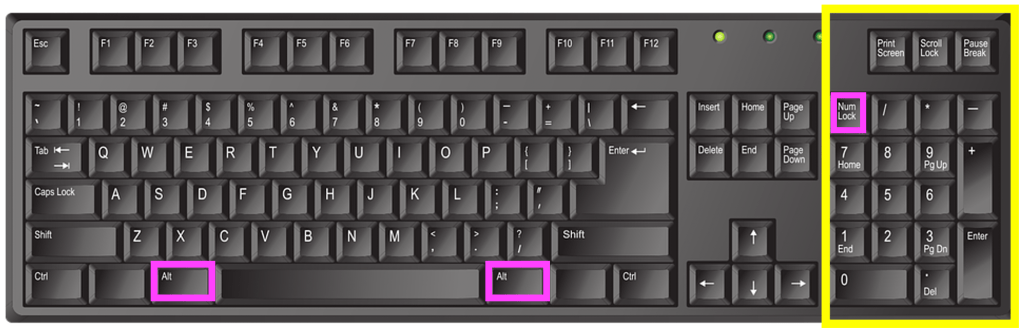
The use of software to expand the usefulness of QWERTY keyboards is now commonplace with programs pre-installed onto devices which run in the background. These IMEs or Input Method Editors can convert a set of keystrokes into a character that’s not available on the keyboard itself. For example, while I can type SHIFT+8 to display the asterisk (*) symbol that sits on the 8 key there’s no degree symbol (as in 30°C) on my keyboard. On a Windows computer I can create it using the numeric keypad on the right of some keyboards, holding down the ALT key while typing the sequence 0176. While I’m typing the numbers nothing appears but once I complete the sequence and release the ALT key the ° appears on the screen.

English language keyboard image by john forcier from Pixabay, showing the numeric keypad highlighted in yellow with the two Alt keys and the ‘num lock’ key highlighted in pink. Num lock (‘numeric lock’) needs to be switched on for the keypad to work, then use the Alt key plus a combination of letters on the numeric keypad to produce a range of additional ‘alt code‘ characters.

When Japanese speakers type they use the main ‘ABC’ letters on the keyboard, but the principle is the same – a combination of keys produces a sequence of letters that the IME converts to the correct character. Or perhaps they could use Google Japan’s April Fool solution from 2010, which surrounded the user in half a dozen massive keyboards with hundreds of keys a little like sitting on a massive drum kit!

*QWERTY is a ‘word’ which starts with a Q that’s not followed by a U of course…

References

Further reading

The ‘retrieval system’ of typing mentioned above, which lets the user get to the word or characters more quickly, is similar to the general problem solving strategy called ‘Divide and Conquer’. You can read more about that and other search algorithms in our free booklet ‘Searching to Speak‘ (PDF) which explores how the design of an algorithm could allow someone with locked-in syndrome to communicate. Locked-in syndrome is a condition resulting from a stroke where a person is totally paralysed. They can see, hear and think but cannot speak. How could a person with Locked-in syndrome write a book? How might they do it if they knew some computational thinking?


EPSRC supports this blog through research grant EP/W033615/1.