CS4FN Advent 2023 – Day 10: #AI – Holly, Ivy and Alexa – chatbots & the useful skill of file management. Plus win at noughts and crosses

Chatbots, knowing where your files are, and winning at noughts and crosses with artificial intelligence.

Welcome to Day 10 of our CS4FN Christmas Computing Advent Calendar. We are just under halfway through our 25 days of posts, one every day between now and Christmas. You can see all our previous posts in the panel with the Christmas tree at the end.

Today’s picture-theme is Holly (and ivy). Let’s see how I manage to link that to computer science 🙂

Sprig of holly. Image drawn and digitised by Jo Brodie.

1. Holly – or Alexa or Siri

In the comedy TV series* Red Dwarf the spaceship has ‘Holly’ an intelligent computer who talks to the crew and answers their questions. Star Trek also has ‘Computer’ who can have quite technical conversations and give reports on the health of the ship and crew.

People are now quite familiar with talking to computers, or at least giving them commands. You might have heard of Alexa (Amazon) or Siri (Apple / iPhone) and you might even have talked to one of these virtual assistants yourself.

When this article (below) was written people were much less familiar with them. How can they know all the answers to people’s questions and why do they seem to have an intelligence?

Read the article and then play a game (see 3. Today’s Puzzle) to see if you think a piece of paper can be intelligent.

Meet the Chatterbots – talking to computers thanks to artificial intelligence and virtual assistants

*also a book!

2. Are you a filing cabinet or a laundry basket?

People have different ways of saving information on their computers. Some university teachers found that when they asked their students to open a file from a particular directory their students were completely puzzled. It turned out that the (younger) students didn’t think about files and where to put them in the same way that their (older) teachers did, and the reason is partly the type of device teachers and students grew up with.

Older people grew up using computers where the best way to organise things was to save a file in a particular folder to make it easy to find it again. Sometimes there would be several folders. For example you might have a main folder for Homework, then a year folder for 2021, then folders inside for each month. In the December folder you’d put your december.doc file. The file has a file name (december.doc) and an ‘address’ (Homework/2021/December/). Pretty similar to the link to this blog post which also uses the / symbol to separate all the posts made in 2021, then December, then today.

Files and folders image by Ulrike Mai from Pixabay. Each brown folder contains files, and is itself contained in the drawer, and the drawer is contained in the cabinet.

To find your december.doc file again you’d just open each folder by following that path: first Homework, then 2021, then December – and there’s your file. It’s a bit like looking for a pair of socks in your house – first you need to open your front door and go into your home, then open your bedroom door, then open the sock drawer and there are your socks.

What your file and folder structure might look like. Image created by Jo Brodie for CS4FN.

Younger people have grown up with devices that make it easy to search for any file. It doesn’t really matter where the file is so people used to these devices have never really needed to think about a file’s location. People can search for the file by name, by some words that are in the file, or the date range for when it was created, even the type of file. So many options.

The first way, that the teachers were using, is like a filing cabinet in an office, with documents neatly packed away in folders within folders. The second way is a bit more like a laundry basket where your socks might be all over the house but you can easily find the pair you want by typing ‘blue socks’ into the search bar.

Which way do you use?

In most cases either is fine and you can just choose whichever way of searching or finding their files that works for you. If you’re learning programming though it can be really helpful to know a bit about file paths because the code you’re creating might need to know exactly where a file is, so that it can read from it. So now some university teachers on STEM (science, technology, engineering and maths) and computing courses are also teaching their students how to use the filing cabinet method. It could be useful for them in their future careers.

Want to find out more about files / file names / file paths and directory structures? Have a look at this great little tutorial https://superbasics.beholder.uk/file-system/

As the author says “Many consumer devices try to conceal the underlying file system from the user (for example, smart phones and some tablet computers). Graphical interfaces, applications, and even search have all made it possible for people to use these devices without being concerned with file systems. When you study Computer Science, you must look behind these interfaces.

You might be wondering what any of this has to do with ivy. Well, whenever I’ve seen a real folder structure on a Windows computer (you can see one here) I’ve often thought it looked a bit like ivy 😉

Creeping ivy at Blackheath station in London. Photographed by Jo Brodie for CS4FN.

Further reading

File not found: A generation that grew up with Google is forcing professors to rethink their lesson plans (22 September 2021) The Verge

3. Today’s puzzle

Print or write out the instructions on page 5 of the PDF and challenge someone to a game of noughts and crosses… (there’s a good chance the bit of paper will win).

The Intelligent Piece of Paper activity.

4. Yesterday’s puzzle

The trick is based on a very old puzzle at least one early version of which was by Sam Lloyd. See this selection of vanishing puzzles for some variations. A very simple version of it appears in the Moscow Puzzles (puzzle 305) by Boris A. Kordemsky where a line is made to disappear.

Images drawn by Jo Brodie for CS4FN.

In the picture above five medium-length lines become four longer lines. It looks like a line has disappeared but its length has just been spread among the other lines, lengthening them.

If you’d like to have a go at drawing your own disappearing puzzle have a look here.


Advert for our Advent calendar
Click the tree to visit our CS4FN Christmas Computing Advent Calendar

EPSRC supports this blog through research grant EP/W033615/1.

CS4FN Advent 2023 – Day 9: gingerbread man – computing and ‘food’ (cookies, spam!), and a puzzle

Computing- and food-themed post on cookies and spam + a puzzle.

Welcome to Day 9 of our CS4FN Christmas Computing Advent Calendar. Every day between now and Christmas we’ll publish a post about computer science with a puzzle to print and solve. You can see all our previous posts in the list at the end.

Today’s post is inspired by the picture on the advent calendar’s door – a gingerbread man, so we have a food-themed post. Well… food-ish.

Festive gingerbread man. Image drawn and digitised by Jo Brodie.

1. Cookies, but not the biscuit kind

Imagine you have a Christmas gift voucher and want to spend it in an online shop. You visit the website and see an item you’d like so you click ‘add to basket’ and then look for some other things you’d like to buy. You click on another item to find out more about it but suddenly your basket is empty! Fortunately this doesn’t usually happen thanks to cookies, which are tiny computer files that can make your website visit run smoothly.

Websites ask you if they can put these cookies on your computer. If you say ‘yes’ that lets them see that you are the same person as you add new things to your basket. It would be no use if you added your second item and the website decided that you were now a completely different person. Some cookies help the organisation know that you’re still you, even when you’re viewing lots of different pages on their website.

Cookie image by congerdesign from Pixabay

Other cookies mean that you don’t have to keep logging in every time you click on a new page within the website. It would be very annoying if you had to do that.

Some cookies are there to help the organisation itself. They let them see what people are clicking on when they’re on the organisation’s website, and what path they follow as they visit different pages. They can also tell what device someone is using (a phone or a computer) so they can make sure the information is set to be the right size on their screen.

If people are logged in then the website knows who they are. Because of this, organisations have to be very careful about how they use this information, to protect their visitors’ privacy. If they don’t take care then they are breaking the law and can be fined a lot of money.

Further reading

Cookies (no publication date given) – from the ICO – the Information Commissioner’s Office.

2. The recipe for spam

These days when people talk about “spam” they are talking about unwanted emails from strangers. The word spam comes from a tinned meat product which, because of a comedy sketch by Monty Python, now also means “email messages that no-one can avoid”.

by Paul Curzon, QMUL. This post was originally published on the CS4FN website.

Fighting spam

Shutting down spammers is tough for the authorities, so the internet’s arteries go on getting plugged up by spam. The best strategy against it so far seems to be filtering out junk emails from your inbox. Lots of early spam filtering relied on keeping lists of words that appear in spam and catching emails that contained them, but there were plenty of problems. For one thing, certain words that turn up in spam also appear sometimes in normal emails, so perfectly innocent messages sometimes ended up in the spam filter. What’s more, spammers have ways of eluding filters that simply check words against a list. Just me55 a-r-0-u-n-d w1th teh sp£lling.

Finally a simple but ingenious idea surfaced: instead of trying to keep a list of spammy words, why not try and teach computers to recognise spam for themselves? There’s a whole branch of maths about probability that researchers began to apply to spam, and a programmer called Paul Graham made the strategy famous in 2002 when he wrote an essay called A Plan for Spam.

Spammy maths

Paul Graham suggested that you could analyse the words you get in a sample of your email to see what the chances are that a particular word would appear in your real messages. You could do the same with a sample from your spam. Then you could look up any word in a new message and see whether it’s likely to be spam or your real email.

Of course, one word’s not enough to base your conclusion on, so Paul’s filter chose the fifteen most interesting words to look at. What that meant was that it grabbed the biggest clues to look at – words that, statistically, had the best chance of being in either spam or real mail, but not both. Then it used those clues to figure out the overall chance that an email is spam. It did this with an equation called Bayes’ theorem, which tells you how to figure out the chances of something being true given a set of facts. In this case Bayes’ theorem figures out the chances of a message being spam given the set of words in it.

What’s brilliant about the statistical approach is that not only does the computer learn as it goes on, meaning it keeps up with spammers’ tricks automatically, it can learn what words are normal for each person’s email, so scientists working on Viagra wouldn’t have to worry about all their emails going in the bin.

On guard online

Spam filters now work well enough that you can make your inbox pretty safe from the porky hordes of messages trying to invade. Wonderful news for the 99% of us who don’t have any use for dodgy meds, fake fashions and pyramid scams. As long as people keep buying into spam and the small group of overlords keeps turning computers into zombies, we’ll need to keep our defences up.

3. Today’s puzzle – the melting snowman

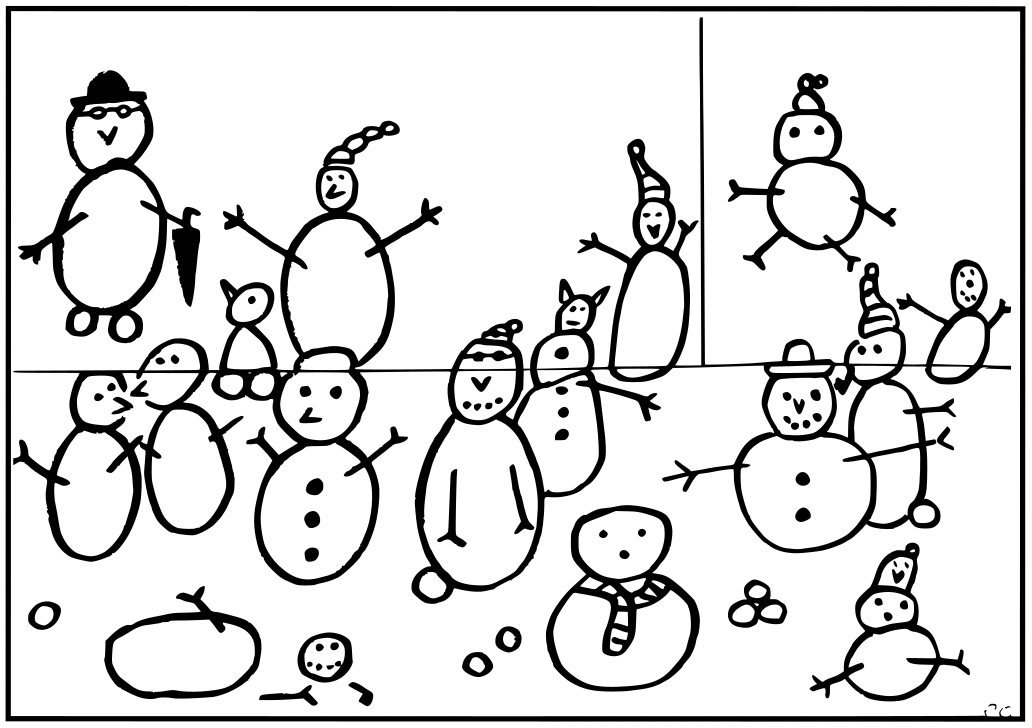
A picture showing several snowmen, drawn by Paul Curzon.

Instructions

One of the snowmen keeps disappearing! Is it melting or just flying
away, and which one is it?

Cut out the picture along the straight black lines, to give three
rectangular pieces. Then follow the simple algorithm and see the
snowman disappear before your eyes.

1. Put the three pieces together in the original positions to make the picture.
2. Count all the snowmen.
3. Swap the position of the top two pieces over so the top and bottom halves of the snowmen line up again
4. Count the snowmen again.

One snowman has disappeared!

Put the pieces back and you will find it reappears.

The explanation and answer will arrive in tomorrow’s (blog) post 🙂

4. Answer to yesterday’s puzzle

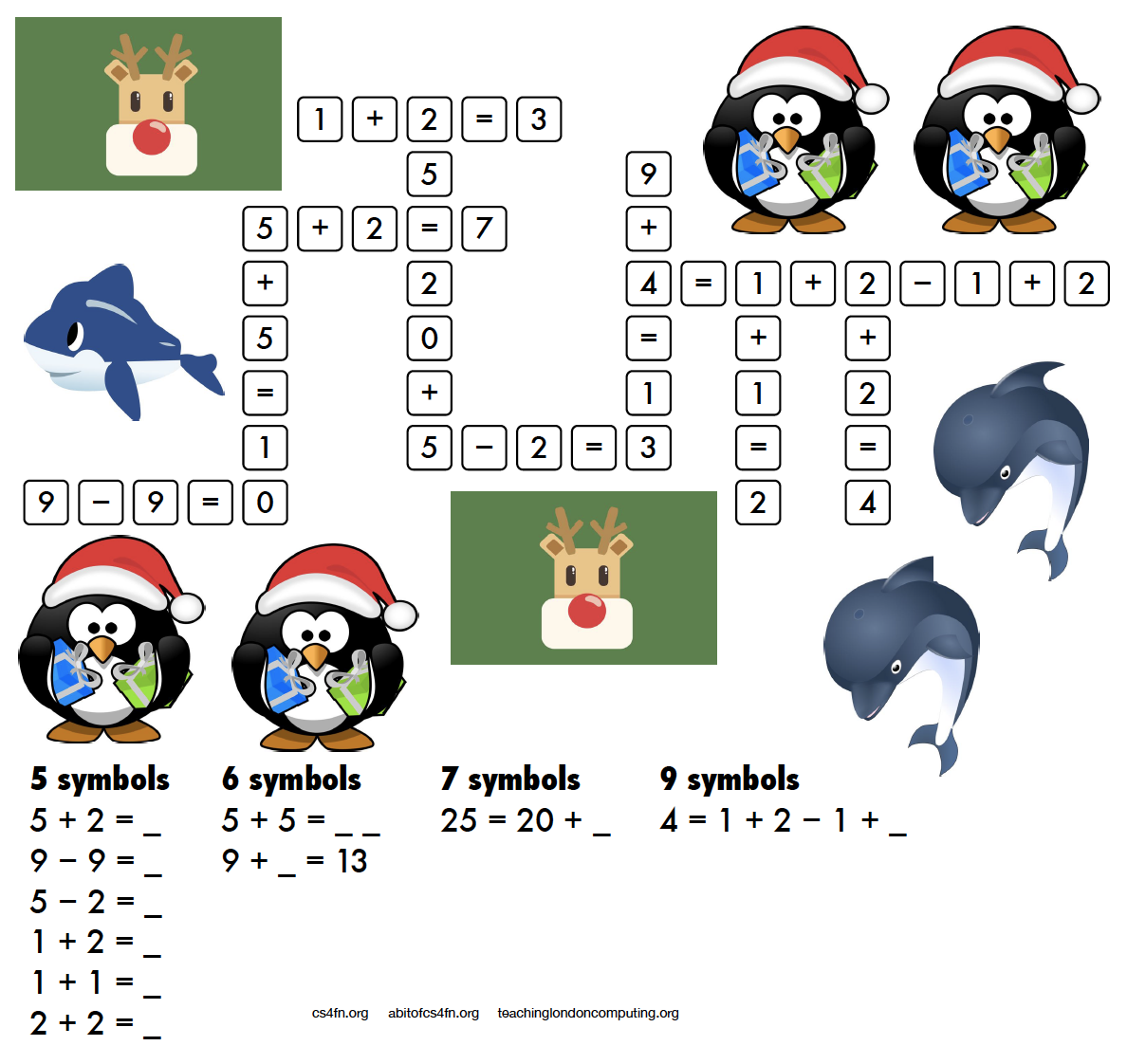
Here’s the answer to Daniel’s puzzle.


Advert for our Advent calendar
Click the tree to visit our CS4FN Christmas Computing Advent Calendar

EPSRC supports this blog through research grant EP/W033615/1.

CS4FN Advent 2023 – Day 8: gifts, and wrapping – Tim Berners-Lee, Right to Repair & another computing puzzle

Tim Berners-Lee, Right to Repair, and a maths puzzle.

Welcome to Day 8 of our CS4FN Christmas Computing Advent Calendar. It features a computing-themed post every day in December until Christmas Day. The blog posts in the Advent Calendar are inspired by the picture on the ‘door’ – and today’s post is inspired by a picture of a Christmas present.

Presents are something you give freely to someone, but they’re also something you hide behind wrapping paper. This post is about a gift and also about trying to uncover something that’s been hidden. Read on to find out about Tim Berners-Lee’s gift to the world, and about the Restart Project who are working to stop the manufacturers of electronic devices from hiding how people can fix them. At the bottom of the post you’ll find the answer to yesterday’s puzzle and a new puzzle for today, also all of the previous posts in this series. If you’re enjoying the posts, please share them with your friends 🙂

A present in blue wrapping paper with a large green bow. Image drawn and digitised by Jo Brodie.

1. “This is for everyone” – Tim Berner’s Lee

Audiences don’t usually cheer for computer scientists at major sporting events but there’s one computer scientist who was given a special welcome at the London Olympics Opening Ceremony in 2012.

Tim Berners-Lee invented the World Wide Web in 1989 by coming up with the way for web pages to be connected through links (everything that’s blue and clickable on this page is a link). That led to the creation of web browsers which let us read web pages and find our way around them by clicking on those links. If you’ve ever wondered what “www” means at the start of a link it’s just short for World Wide Web. Try saying “www” and then “World Wide Web” – which takes longer to say?

Tim Berners-Lee didn’t make lots of money from his invention. Instead he made the World Wide Web freely available for everyone to use so that they could access the information on the web. Unless someone has printed this onto paper, you’re reading this on a web browser on the World Wide Web, so three cheers Tim Berners-Lee.

In 2004 the Queen knighted him (he’s now Sir Tim Berners-Lee) and in 2017 he was given a special award, named after Alan Turing, for “inventing the World Wide Web and the first web browser.”

Below is the tweet he sent out during the Olympics opening ceremony.

Further reading

The Man Who Invented The Web (24 June 2001) Time
“I Was Devastated”: Tim Berners-Lee, the Man Who Created the World Wide Web, Has Some Regrets (1 July 2018) Vanity Fair

You might also like finding out about “open-source software” which is “computer software that is released under a license in which the copyright holder grants users the rights to use, study, change, and distribute the software and its source code to anyone and for any purpose.”

2. Do you have the right to repair your electronic devices?

A ‘black box’ is a phrase to describe something that has an input and an output but where ‘the bit in the middle’ is a complete mystery and hidden from view. An awful lot of modern devices are like this. In the past you might have been able to mend something technological (even if it was just changing the battery) but for devices like mobile phones it’s becoming almost impossible.

People need special tools just to open them as well as the skills to know how to open them without breaking some incredibly important tiny bit. Manufacturers aren’t always very keen for customers to fix things. The manufacturers can make more money from us if they have to sell us expensive parts and charge us for people to fix them. Some even put software in their devices that stops people from fixing them!

The cost of fixing devices can be very expensive and in some cases it can actually be cheaper to just buy a new device. Obviously it’s very wasteful too.

The Restart Project is full of volunteers who want to help everyone fix our electronic devices, and also fix our relationship with electronics (discouraging us from throwing away our old phone when a new one is on the market). The project began in London but they now run Repair Parties in several cities in the UK and around the world. At these parties people can bring their broken devices and rather than just ‘getting them fixed’ they can learn how to fix their devices themselves by learning and sharing new skills. This means they save money and save their devices from landfill.

Restart have also campaigned for people to have the Right to Repair their own devices. They want a change in manufacturing laws to make sure that devices are designed so that the people who buy and use them can easily repair them without having to spend too much money.

Further reading

The UK’s right to repair law already needs repairing (10 July 2021) Wired UK
The new law to tackle e-waste and planned obsolescence is here but it’s missing some key parts

3. Today’s puzzle

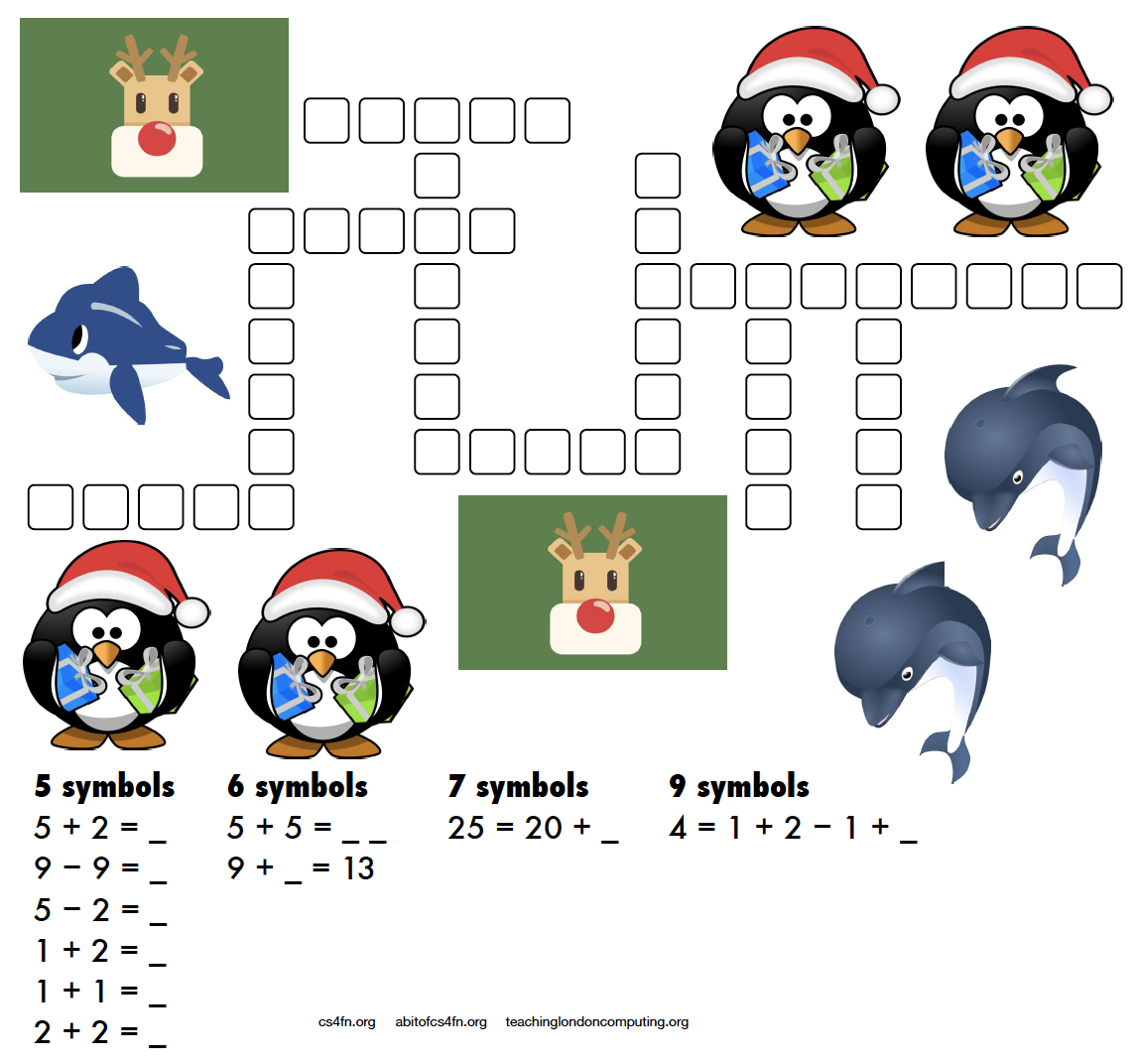
A more mathematical puzzle today. Rather than writing letters into the kriss-kross you need to write the equation and its answer.

For example 5 + 2 = as the clue gives you 5 + 2 = 7 as the answer which takes up 5 characters (note that the answer is not “seven” which also takes up 5 characters!). There are several places in the puzzle where a 5 character answer could go, but which one is the right one? Start with the clues that have only one space they can fit into (the ones with 7 symbols and 9 symbols) then see what can fit around them.

This puzzle was created by Daniel, who was aged 6 when he made this. For an explanation of the links to computer science and how these puzzles can be used in the classroom please see the Maths Kriss-Kross page on our site for teachers. Note that the page does include the answer sheet, but no cheating, we’ll post the answer tomorrow. Also, if you don’t have a printer you can use the editable PDF linked on that page.

4. Answer to yesterday’s puzzle

The creation of this post was funded by UKRI, through grant EP/K040251/2 held by Professor Ursula Martin, and forms part of a broader project on the development and impact of computing.


Advert for our Advent calendar
Click the tree to visit our CS4FN Christmas Computing Advent Calendar

EPSRC supports this blog through research grant EP/W033615/1.