Hear and … their magic square

A magic three by three square with the numbers 2, 9 and 4 in the top row, 7, 5 and 3 in the middle row and 6, 1 and 8 in the bottom row. Each row, column and the two diagnonals add up to 15.
Image by CS4FN

Victorian Computer Scientists, Ada Lovelace and Charles Babbage were interested in Magic Squares. We know this because a scrap of paper with mathematical doodles and scribbles on it in their handwriting has been discovered, and one of the doodles is a magic square like this one. In a magic square all the rows, columns and diagonals magically add to the same number. At some point, Ada and Charles were playing with magic squares together. Creating magic squares sounds hard, but perhaps not with a bit of algorithmic magic.

The magical effect

For this trick you ask a volunteer to pick a number. Instantly, on hearing it, you write out a personal four by four magic square for them based on that number. When finished the square contents adds to their chosen number in all the usual ways magic squares do. An impressive feat of superhuman mathematical skills that you can learn to do most instantly.

Making the magic

To perform this trick, first get your audience member to select a large two digit number. It helps if it is a reasonably large number, greater than 20, as you’re going to need to subtract 20 from it in a moment. Once you have the number you need to do a bit of mental arithmetic. You need an algorithm – a sequence of steps – to follow that given that number guarantees that you will get a correct magic square.

For our example, we will suppose the number you are given is 45, though it works with any number.

Let’s call the chosen number N (in our example: N is 45). You are going to calculate the following four numbers from it: N-21, N-20, N-19 and N-18, then put them in to a special, precomputed magic square pattern.

The magic algorithm

Sums like that aren’t too hard, but as you’ve got to do all this in your head, you need a special algorithm that makes it really easy. So here is an easy algorithm for working out those numbers.

This four by four magic square contains the calculations needed to install the numbers in the correct positions so that the magic square will work with any large two digit number
Image by CS4FN.
  1. Start by working out N – 20. Subtracting 20 is quite easy. For our example number of 45, that is 25. This is our ‘ROOT’ value that we will build the rest from.
  2. N-19. Just add 1 to the root value (ROOT + 1). So 25 + 1 gives 26 for our example.
  3. N-18. Add 2 to the root value (ROOT + 2). So 25 + 2 gives 27.
  4. N-21. Subtract 1 from the root value (ROOT – 1). So 25 – 1 gives 24.
  5. Having worked out the 4 numbers created form the original chosen number, N, you need to stick them in the right place in a blank magic square, along with some other numbers you need to remember. It is the pattern you use to build your magic square from. It looks like the one to the right. To make this step easy, write this pattern on the piece of paper you write the final square on. Write the numbers in light pencil, over-writing the pencil as you do the trick so no-one knows at the end what you were doing.

A square grid of numbers like this is an example of what computer scientists call a data structure: a way to store data elements that makes it easy to do something useful: in this case making your friends think you are a maths superhero.

When you perform this trick, fill in the numbers in the 4 by 4 grid in a random, haphazard way, making it look like you are doing lots of complicated calculations quickly in your head.

Finally, to prove to everyone it is a magic square with the right properties, go through each row, column and diagonal, adding them up and writing in the answers around the edge of the square, so that everyone can see it works.

The final magic square for chosen number 45

So, for our example, we would get the following square, where all the rows, columns and diagonals add to our audience selected number of 45.
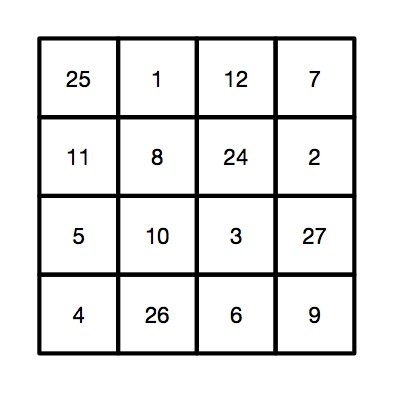
This four by four magic square is the result of taking the chosen number 45 and performing the sequence of calculations (the algorithm) using it as 'N'.
Image by CS4FN.

Why does it work?

If you look at the preset numbers in each row, column and diagonal of the pattern, they have been carefully chosen in advance to add up to the number being subtracted from N on those lines. Try it! Along the top row 1 + 12 + 7 = 20. Down the right side 11 + 5 + 4 = 20.

Do it again?

Of course you shouldn’t do it twice with the same people as they might spot the pattern of all the common numbers…unless, now you know the secret, perhaps you can work out your own versions each with a slightly different root number, calculated first and so a different template written lightly on different pieces of paper.

Peter McOwan and Paul Curzon, Queen Mary University of London

More on …


The invisible dice mystery – a magic trick underpinned by computing and maths

Red dice image by Deniz Avsar from Pixabay

The Ancient Egyptians, Romans and Greeks used dice with various shapes and markings; some even believed they could be used to predict the future. Using just a few invisible dice, which you can easily make at home, you can amaze your friends with a transparent feat of magical prediction.

The presentation

You can’t really predict the future with dice, but you can do some clever magic tricks with them. For this trick first you need some invisible dice, they are easy to make, it’s all in the imagination. You take your empty hand and state to your friend that it contains two invisible dice. Of course it doesn’t, but that’s where the performance come in. You set up the story of ancient ways to predict the future. You can have lots of fun as you hand the ‘dice’ over and get your friend to do some test rolls to check the dice aren’t loaded. On the test rolls ask them what numbers the dice are showing (remember a dice can only show numbers 1 through 6), this gets them used to things. Then on the final throw, tell them to decide what numbers are showing, but not to tell you! You are going to play a game where you use these numbers to create a large ‘mystical’ number.

To start, they choose one of the dice and move it closer to them, remembering the number on this die. You may want to have them whisper the numbers to another friend in case they forget, as that sort of ruins the trick ending!

Next you take two more ‘invisible dice’ from your pocket; these will be your dice. You roll them a bit, giving random answers and then finally say that they have come up as a 5 and a 5. Push one of the 5s next to the dice your friend selected, and tell them to secretly add these numbers together, i.e. their number plus 5. Then push your second 5 over and suggest, to make it even harder, to multiply their current number by 5+5 (i.e. 10 – that’s a nice easy multiplication to do) and remember that new number. Then finally turn attention to your friend’s remaining unused die, and get them to add that last number to give a grand total. Ask them now to tell you that grand total. Almost instantly you can predict exactly the unspoken numbers on each of their two invisible dice. If they ask how it you did it, say it was easy – they left the dice in plain sight on the table. You just needed to look at them.

The computing behind

This trick works by hiding some simple algebra in the presentation. You have no idea what two numbers your friend has chosen, but let’s call the number on the die they select A and the other number B. If we call the running total X then as the trick progresses the following happens: to begin with X=0, but then we add 5 to their secret number A, so X= A+5. We then get the volunteer to multiply this total by 5+5 (i.e. 10) so now X=10*(A+5). Then we finally add the second secret number B to give X=10(A+5)+B. If we expand this out, X= 10A+50+B. We know that A and B will be in the range 1-6 so this means that when your friend announces the grand total all you need to do is subtract 50 from that number. The number left (10*A+B) means that the value in the 10s column is the number A and the units column is B, and we can announce these out loud. For example if A=2 and B=4, we have the grand total as 10(2+5)+4 = 74, and 74 – 50= is 24, so A is 2, and B is 4.

In what are called procedural computer languages this idea of having a running total that changes as we go through well-defined steps in a computer program is a key element. The running total X is called a variable, to start in the trick, as in a program, we need to initialise this variable, that is we need to know what it is right at the start, in this case X=0. At each stage of the trick (program) we do something to change the ‘state’ of this variable X, ie there are rules to decide what it changes to and when, like adding 5 to the first secret number changes X from 0 to X=(A+5). A here isn’t a variable because your friend knows exactly what it is, A is 2 in the example above, and it won’t change at any time during the trick so it’s called a constant (even if we as the magician don’t know what that constant is). When the final value of the variable X is announced, we can use the algebra of the trick to recover the two constants A and B.

Other ways to do the trick

Of course there are other ways you could perform the trick using different ways to combine the numbers, as long as you end up with A being multiplied by 10 and B just being added. But you want to hide that fact as much as possible. For example you could use three ‘invisible dice’ yourself showing 5, 2 and 5 and go for 5*(A*2+5) + B if you feel confident your friend can quickly multiply by 5. Then you just need to subtract 25 from their grand total (10A+25+B), and you have their numbers. The secret here is to play with the presentation to get one that suits you and your audience, while not putting too much of a mental strain on you or your friend to have to do difficult maths in their head as they calculate the state changes of that ever-growing variable X.

Paul Curzon, Queen Mary University of London


More on …


Related Magazine …


Subscribe to be notified whenever we publish a new post to the CS4FN blog.


This blog is funded by EPSRC on research agreement EP/W033615/1.

QMUL CS4FN EPSRC logos

The Social Machine of Maths

In school we learn about the maths that others have invented: results that great mathematicians like Euclid, Pythagoras, Newton or Leibniz worked out. We follow algorithms for getting results they devised. Ada Lovelace was actually taught by one of the great mathematicians, Augustus De Morgan, who invented important laws, ‘De Morgan’s laws’ that are a fundamental basis for the logical reasoning computer scientists now use. Real maths is about discovering new results of course not just using old ones, and the way that is done is changing.

We tend to think of maths as something done by individual geniuses: an isolated creative activity, to produce a proof that other mathematicians then check. Perhaps the greatest such feat of recent years was Andrew WIles’ proof of Fermat’s Last Theorem. It was a proof that had evaded the best mathematicians for hundreds of years. Wiles locked himself away for 7 years to finally come up with a proof. Mathematics is now at a remarkable turning point. Computer science is changing the way maths is done. New technology is radically extending the power and limits of individuals. “Crowdsourcing” pulls together diverse experts to solve problems; computers that manipulate symbols can tackle huge routine calculations; and computers, using programs designed to verify hardware, check proofs that are just too long and complicated for any human to understand. Yet these techniques are currently used in stand-alone fashion, lacking integration with each other or with human creativity or fallibility.

‘Social machines’ are a whole new paradigm for viewing a combination of people and computers as a single problem-solving entity. The idea was identified by Tim Berners-Lee, inventor of the world-wide web. A project led by Ursula Martin at the University of Oxford explored how to make this a reality, creating a mathematics social machine – a combination of people, computers, and archives to create and apply mathematics. The idea is to change the way people do mathematics, so transforming the reach, pace, and impact of mathematics research. The first step involves social science rather than maths or computing though – studying what working mathematicians really do when working on new maths, and how they work together when doing crowdsourced maths. Once that is understood it will then be possible to develop tools to help them work as part of such a social machine.

The world changing mathematics results of the future may be made by social machines rather than solo geniuses. Team work, with both humans and computers is the future.

– Ursula Martin, University of Oxford
and Paul Curzon, Queen Mary University of London


Related Magazine …


Related Magazine …

The history of computational devices: automata, core rope memory (used by NASA in the Moon landings), Charles Babbage’s Analytical Engine (never built) and Difference Engine made of cog wheels and levers, mercury delay lines, standardising the size of machine parts, Mary Coombs and the Lyons tea shop computer, computers made of marbles, i-Ching and binary, Ada Lovelace and music, a computer made of custard, a way of sorting wood samples with index cards and how to work out your own programming origin story.


Subscribe to be notified whenever we publish a new post to the CS4FN blog.


This blog is funded by EPSRC on research agreement EP/W033615/1.

QMUL CS4FN EPSRC logos

CS4FN Advent 2023 – Day 11: the proof of the pudding… mathematical proof

A mathematical proof and a maths puzzle (but no hard sums, promise).

Thank you to everyone who’s been reading our Advent Calendar and said nice things about it and shared it with others. If you’re new to our pages you can see all our previous posts at the end.

We’re doing a post every day from the 1 – 25 December, loosely connected (if we can manage it!) to the theme suggested by the picture on the CS4FN Christmas Computing Advent Calendar.

Today’s picture on the Advent Calendar door is a Christmas pudding. Thanks to the phrase “the proof of the pudding is in the eating” (which I think means you have to eat all the chocolate puddings to know if they’re any good) I have chosen to match this picture with one of the CS4FN articles from the archives that is all about PROOF. Sadly we don’t seem to have any articles about pudding.

People sometimes pour brandy on Christmas puddings and set fire to it but this one has been iced instead and is not a fire hazard. Image drawn and digitised by Jo Brodie.

1. Proof without words

by Paul Curzon, QMUL. This article was originally published on the CS4FN website.

Graphic news images often help sway public opinion. Images of famine in Africa led to LiveAid, a massive relief effort in 1985. Images from war zones of civilians can be disturbing enough that war leaders lose or gain political support as a result (depending on who did the bad stuff). Images can have far more power than words to argue a case … to persuade.

Mathematical proofs are just arguments intended to persuade too. They aim to leave no element of doubt that some fact is true, not for emotional reasons but by logic. Mathematicians use mathematical notation – special symbols used in precise ways – to represent things in their proofs. That’s just a way of making sure the arguments are precise, with no room for doubt. Sometimes that can make them seem arcane and difficult to follow, though that’s only until you’ve learnt the mathematical language being used.

Mathematical proofs don’t have to use words and symbols though. In fact people have been presenting proofs as pictures at least since the Ancient Greeks, and just as with news images a diagrammatic proof can be much more persuasive. Sometimes just by looking at a diagram the truth of a fact can become obvious.

For example, here is a mathematical ‘fact’ we might want to prove:

“The square of any number is equal to the sum of consecutive odd numbers.”

That may sound a bit hairy. To get even hairier (if you aren’t a mathematician), we can write this precisely in mathematical notation as:

n2 = 1 + 3 + 5 + …+ (2n – 1)

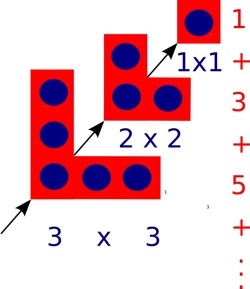
Don’t worry about the notation though. Just look at the picture below. It shows what we mean by the fact and should persuade you it’s true.

The square of a number can be drawn as a picture of dots in a square. In other words one way to work out 102, say, is to create a square of dots with sides of length 10 and then count the dots. That’s why it’s called ‘squaring’!

A graphical representation of squaring numbers. Image by Paul Curzon / CS4FN.

One way to draw the dots to make up a square is as follows. First draw one dot in the corner, then draw three dots in an L-shape round it, then draw 5 dots in an L-shape round that…and keep going. Add a new L-shape (including the first dot) 10 times, say, once for each dot along the side, and you get a square of size 10 with 100 dots altogether. Notice that at every step you still have a square, though. Also notice that each L-shape is 2 bigger than the one before. That’s because you can make it by adding one dot on the end of each arm of the last L-shape.

That means the number of dots in a square can be calculated by adding a sequence of odd numbers, one for each L-shape added: 1 + 3 + 5 + … As you add L-shapes you work up through squares of all sizes, so all squares can be made by adding odd numbers in this way.

We’ve just explained it in words, but actually it’s all in the picture, so it’s possible to see without needing the words at all.

At least it may be possible for a person to see perhaps, but what about a computer? Could a computer ‘see’ a proof from a diagram? Computers are now very good at helping humans do logical proof using mathematical notation – after all they work themselves by pushing ‘symbols’ about and following rules blindly, which is all logical proof is. Seeing a proof in a diagram is different altogether though…or is it?

Mateja Jamnik, of the University of Cambridge has been tackling this problem. In fact her system, DIAMOND, can already check diagrammatic proofs created by a person to see if they really do convince. With DIAMOND you could, for example, take a series of L shape pictures like ours above and build them up step-by-step giving squares of different sizes. The system can then pull out the structure of this step-by-step proof and from that automatically obtain the equation that it proves.

DIAMOND needs a person to develop a diagrammatic proof for it to check. In the future, if Mateja has her way, the computers will be devising new diagrammatic proofs themselves that then convince we humans.

2. Today’s puzzle – Logic and Proof FUNdamentals

(This text, by Paul Curzon, was originally published over several pages at the CS4FN website)

It is often said that being good at Maths is important for Computer Scientists. So what’s the link? Well a lot of the more obviously fun sides of maths are actually computer science too, like how to do puzzles such as Rubik’s Cubes, puzzles about weird and wonderful characters crossing rivers, how to win at strategy games, and doing Sudoku. The Maths you do in solving a Sudoku is the same kind of reasoning as that behind getting computer programs to work.

It is not so much the actual Maths you learn at school that is important. It is more that a similar way of thinking is important: logical reasoning. Doing Maths at school is one good way to start to learn how to think that way. So if you are good at Maths you will probably be good at Computer Science, though (using a bit of logical reasoning) that doesn’t mean the opposite follows of course.

Kakuro, Logic and Computer Science

To be a good computer scientist you have to enjoy problem solving. That is what it’s all about: working out the best way to do things. You also have to be able to think in a logical way: be a bit of a Vulcan. But what does that mean? It just means being able to think precisely, extracting all the knowledge possible from a situation just by pure reasoning. It’s about being able to say what is definitely the case given what is already known…and it’s fun to do. That’s why there is a Sudoku craze going on as I write. Sudoku are just pure logical thinking puzzles. Personally I like Kakuro better. They are similar to Sudoku, but with a crossword format.

What is a Kakuro?

A Kakuro is a crossword-like grid, but where each square has to be filled in with a digit from 1-9 not a letter. Each horizontal or vertical block of digits must add up to the number given to the left or above, respectively. All the digits in each such block must be different. That part is similar to Sudoku, though unlike Sudoku, numbers can be repeated on a line as long as they are in different blocks. Also, unlike Sudoku, you aren’t given any starting numbers, just a blank grid.

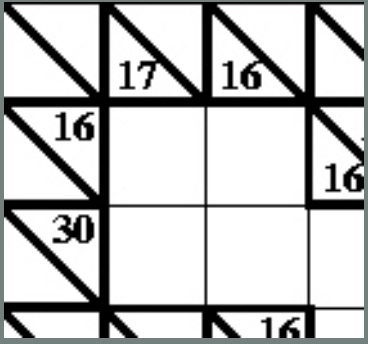
Where does logic come into it? Take the following fragment:

There is a horizontal block of two cells that must add up to 16. Ways that could be done using digits 1-9 are 9+7, 8+8 or 7+9. But it can’t be 8+8 as that needs two 8s in a block which is not allowed so we are left with just two possibilities: 9+7 or 7+9. Now look at the vertical blocks. One of them consists of two cells that add up to 17. That can only be 9+8 or 8+9. That doesn’t seem to have got us very far as we still don’t know any numbers for sure. But now think about the top corner. We know from across that it is definitely 9 or 7 and from down that it is definitely 9 or 8. That means it must be 9 as that is the only way to satisfy both restrictions.

Kakuro image above by Paul Curzon / CS4FN.

A Kakuro for you to try

Here is a full Kakuro to try. The answer will be in tomorrow’s post.

Being able to think logically is important because computer programming is about coming up with precise solutions that even a computer can follow. To do that you have to make sure all the possibilities have been covered. Reasoning very much like in a Kakuro is needed to convince yourself and others that a program does do what it is supposed to.

Kakuro puzzle image above by Paul Curzon / CS4FN.


Advert for our Advent calendar
Click the tree to visit our CS4FN Christmas Computing Advent Calendar

EPSRC supports this blog through research grant EP/W033615/1.

CS4FN Advent 2023 – Day 8: gifts, and wrapping – Tim Berners-Lee, Right to Repair & another computing puzzle

Tim Berners-Lee, Right to Repair, and a maths puzzle.

Welcome to Day 8 of our CS4FN Christmas Computing Advent Calendar. It features a computing-themed post every day in December until Christmas Day. The blog posts in the Advent Calendar are inspired by the picture on the ‘door’ – and today’s post is inspired by a picture of a Christmas present.

Presents are something you give freely to someone, but they’re also something you hide behind wrapping paper. This post is about a gift and also about trying to uncover something that’s been hidden. Read on to find out about Tim Berners-Lee’s gift to the world, and about the Restart Project who are working to stop the manufacturers of electronic devices from hiding how people can fix them. At the bottom of the post you’ll find the answer to yesterday’s puzzle and a new puzzle for today, also all of the previous posts in this series. If you’re enjoying the posts, please share them with your friends 🙂

A present in blue wrapping paper with a large green bow. Image drawn and digitised by Jo Brodie.

1. “This is for everyone” – Tim Berner’s Lee

Audiences don’t usually cheer for computer scientists at major sporting events but there’s one computer scientist who was given a special welcome at the London Olympics Opening Ceremony in 2012.

Tim Berners-Lee invented the World Wide Web in 1989 by coming up with the way for web pages to be connected through links (everything that’s blue and clickable on this page is a link). That led to the creation of web browsers which let us read web pages and find our way around them by clicking on those links. If you’ve ever wondered what “www” means at the start of a link it’s just short for World Wide Web. Try saying “www” and then “World Wide Web” – which takes longer to say?

Tim Berners-Lee didn’t make lots of money from his invention. Instead he made the World Wide Web freely available for everyone to use so that they could access the information on the web. Unless someone has printed this onto paper, you’re reading this on a web browser on the World Wide Web, so three cheers Tim Berners-Lee.

In 2004 the Queen knighted him (he’s now Sir Tim Berners-Lee) and in 2017 he was given a special award, named after Alan Turing, for “inventing the World Wide Web and the first web browser.”

Below is the tweet he sent out during the Olympics opening ceremony.

Further reading

The Man Who Invented The Web (24 June 2001) Time
“I Was Devastated”: Tim Berners-Lee, the Man Who Created the World Wide Web, Has Some Regrets (1 July 2018) Vanity Fair

You might also like finding out about “open-source software” which is “computer software that is released under a license in which the copyright holder grants users the rights to use, study, change, and distribute the software and its source code to anyone and for any purpose.”

2. Do you have the right to repair your electronic devices?

A ‘black box’ is a phrase to describe something that has an input and an output but where ‘the bit in the middle’ is a complete mystery and hidden from view. An awful lot of modern devices are like this. In the past you might have been able to mend something technological (even if it was just changing the battery) but for devices like mobile phones it’s becoming almost impossible.

People need special tools just to open them as well as the skills to know how to open them without breaking some incredibly important tiny bit. Manufacturers aren’t always very keen for customers to fix things. The manufacturers can make more money from us if they have to sell us expensive parts and charge us for people to fix them. Some even put software in their devices that stops people from fixing them!

The cost of fixing devices can be very expensive and in some cases it can actually be cheaper to just buy a new device. Obviously it’s very wasteful too.

The Restart Project is full of volunteers who want to help everyone fix our electronic devices, and also fix our relationship with electronics (discouraging us from throwing away our old phone when a new one is on the market). The project began in London but they now run Repair Parties in several cities in the UK and around the world. At these parties people can bring their broken devices and rather than just ‘getting them fixed’ they can learn how to fix their devices themselves by learning and sharing new skills. This means they save money and save their devices from landfill.

Restart have also campaigned for people to have the Right to Repair their own devices. They want a change in manufacturing laws to make sure that devices are designed so that the people who buy and use them can easily repair them without having to spend too much money.

Further reading

The UK’s right to repair law already needs repairing (10 July 2021) Wired UK
The new law to tackle e-waste and planned obsolescence is here but it’s missing some key parts

3. Today’s puzzle

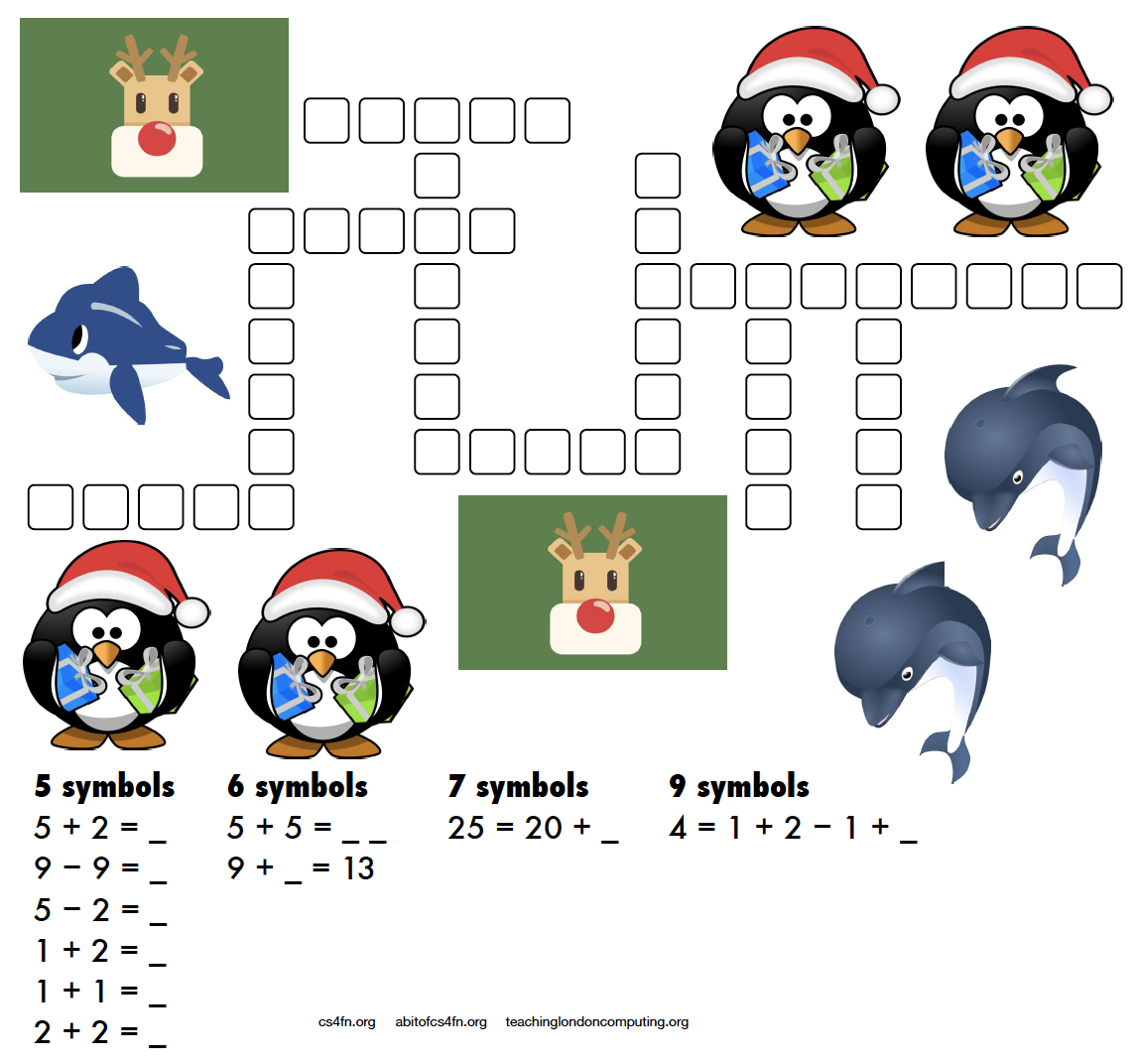
A more mathematical puzzle today. Rather than writing letters into the kriss-kross you need to write the equation and its answer.

For example 5 + 2 = as the clue gives you 5 + 2 = 7 as the answer which takes up 5 characters (note that the answer is not “seven” which also takes up 5 characters!). There are several places in the puzzle where a 5 character answer could go, but which one is the right one? Start with the clues that have only one space they can fit into (the ones with 7 symbols and 9 symbols) then see what can fit around them.

This puzzle was created by Daniel, who was aged 6 when he made this. For an explanation of the links to computer science and how these puzzles can be used in the classroom please see the Maths Kriss-Kross page on our site for teachers. Note that the page does include the answer sheet, but no cheating, we’ll post the answer tomorrow. Also, if you don’t have a printer you can use the editable PDF linked on that page.

4. Answer to yesterday’s puzzle

The creation of this post was funded by UKRI, through grant EP/K040251/2 held by Professor Ursula Martin, and forms part of a broader project on the development and impact of computing.


Advert for our Advent calendar
Click the tree to visit our CS4FN Christmas Computing Advent Calendar

EPSRC supports this blog through research grant EP/W033615/1.

Why the Romans were pants at maths

Paul Curzon, Queen Mary University of London

The Romans were great at counting and addition but they were absolutely pants at multiplication. It wasn’t because they were stupid. It was because they hadn’t invented a good way to represent numbers, and that meant they needed really convoluted algorithms.

The Roman system is based on an earlier really simple way of writing numbers. You just put a line for each thing you’ve counted. Its probably the way shepherds kept count of sheep, drawing a line for each sheep. Those lines turned into the Roman letter I. To add 1 to a number you just add another I. You count: I, II, III, and so on and it makes counting easy.

This system is called unary – whereas binary involves counting with two symbols, 1 and 0, in unary you only have one symbol to count with. Addition in unary is easy too at least for small numbers. Take the first number and add on the end all the Is for the second and you’ve got the answer number. This is exactly the way we all start doing addition on our fingers.To add 2+3, hold up 2 fingers (II) then hold up another three fingers (III) and you have the answer (IIIII).

This is fine for small numbers but it gets a bit tedious as the numbers increase (and you run out of fingers!) Comparing numbers is easy in principle – do you have the same number of Is, but hard in practice for large numbers. We can’t keep all those Is in our head so a large number is hard to think about. To get round this the Romans invented new letters to stand for groups of Is. This is what we do when we tally numbers making a crossbar for every fifth number we count. It helps us keep track of larger numbers. The Romans invented a whole bunch of symbols to help: so for example in the Roman numeral system, V stands for 5 (IIIII), X stands for 10, L for 50, C for 100, D for 500 and M for 1000. They had invented a new way to represent numbers.

This makes it much easier to write and compare larger numbers. Now when counting and you get up to 5 you just replace all those Is with a V and then carry on adding Is: VI, VII, VIII, VIIII. Then you get to VIIIII (10) so replace it all with an X, starting again adding a new lot of Is: XI, XII, XIII, XIIII, XV, and so on. Counting large numbers is now a bit more involved – the algorithm involves more than just adding an I on the end, but it is much more convenient. The addition algorithm has now become more complicated, though it is still fairly simple too. Take any two numbers to add like VII and VIII and string them together: VIIVIII. Now group together the same letters: VVIIIII. Anywhere you have enough to replace symbols with the next character do so. VV can be replaced by X and IIIII can be replaced by V to give XV in the above. Keep making replacements until you can make no more. Put the symbols in order from largest to smallest symbol and you have your answer.

Now the Romans were obviously a bit lazy as bored with writing even four Is in a row they sometimes introduced a new set of abbreviations, so that IIII became IV and VIIII became IX. Putting a smaller symbol (like I) before a larger one (like X) instead of after meant subtract it to get the number. so IX means “one less than 10” or 9. Counting just got a tiny bit more complicated to get the advantage of writing fewer symbols. Addition now needs a more convoluted algorithm though. There are several ways to do it. The easiest is actually just to change the numbers to add to the simpler form (so IV goes back to IIII). You them do the addition that way, and convert back at the end. Addition just got that little bit harder, and all because of a change in representation.

Worse, doing any more complicated maths is even harder still using the Roman number representation. See if you can work out how to multiply Roman numbers. The Roman number system doesn’t help at all. The only really easy way is to just repeatedly add ( so III x VI is VI + VI + VI). That just isn’t practical for large numbers. Try it on XXIII x LXV1. There are other possible ways including one that is actually based on the binary multiplication algorithms computers use – multiplying and dividing repeatedly by 2. See if you can work out how to do it. Whatever way you do it, its clear that the number system the Romans chose made maths hard for them to do!

A good representation makes maths easy. A bad one makes it much harder to do

Luckily, Indian and Arabian scholars understood that the representation they used mattered. They invented, and spread, the Hindu-Arabic numbers and decimal system we use today. What is special about it is that rather than introducing new symbols for bigger and bigger numbers, the position of a symbol is used instead. As we go from nine to ten we go back to the start of our symbols, from 9 back to 0, but stick a 1 in a new 10s column to count how many 10s we have. Counting is still pretty easy but suddenly not only is the algorithm for addition straightforward but we can come up with fairly simple algorithms for multiplication and division too. They are the algorithms you learn at school – though as with any algorithm making sure you follow the steps exactly and don’t miss steps is hard for a human (unlike for a computer). That is why we tend to find learning maths hard at first and it gets easier the more we practice.

An abacus
Image by Hans from Pixabay

In fact Romans needing to do serious maths probably used a variation of an abacus representing numbers with stones. They would do a calculation on the abacus and then convert the answer back into the Roman number system. And guess what. The Roman Abacus uses columns to represent larger numbers in a very similar way to the Hindu-Arabic system. The Romans understood that representation matters too.

Sometimes things are hard to do just because we make them hard! The secret of coming up with good algorithms is often to come up with a good representation first. In programming too, if you come up with a good way to represent data, a good data structure, you can often then make it much easier to write an efficient program.


Subscribe to be notified whenever we publish a new post to the CS4FN blog.


This blog is funded by EPSRC on research agreement EP/W033615/1.

QMUL CS4FN EPSRC logos