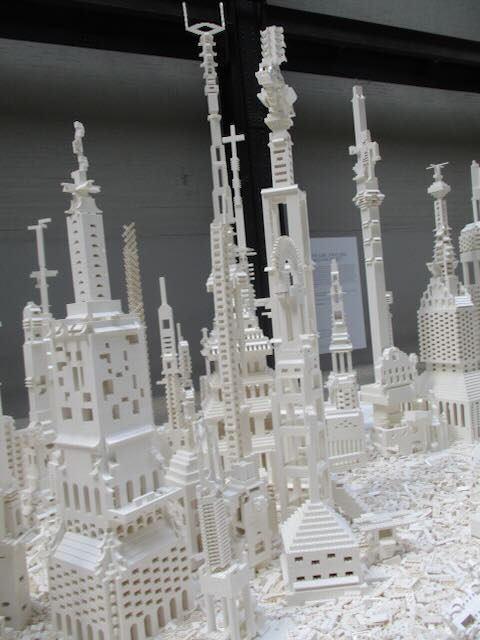
Image by Paul Curzon taken at Tate Modern London at Olafur Eliasson’s “The cubic structural evolution project” exhibition, 2019.
My absolute favourite example of interactive art is Olafur Eliasson‘s “The cubic structural evolution project” back in 2019 at Tate Modern. It was “just” two piles of standard white Lego bricks piled on two tables (but a tonne of Lego between the two …so a LOT of Lego). Anyone visiting the exhibit was invited to sit down and help create a city by building a building … and it was joyfully creative. Kids and adults mixed together building great architectural wonders, big and small, out of the bricks. Sometimes intentionally, but often accidentally, an existing building was demolished, but that was just an opportunity for new amazing buildings to emerge from the rubble. We visited twice that summer, and each time a totally different city was there that had emerged from this constant evolution of building. On each visit we built something new ourselves to add to the ever changing city.
The exhibit took Lego back to its roots – no instructions, no specific creation to reproduce, just the bare building blocks of creativity. You can still buy generic lego sets of course (if not with the same scope as a tonne of bricks). However, the high profile modern Lego sets are now used to build a specific thing designed by someone else, like a Star Wars Tie fighter, a Death Star, a Ferrari, a parrot or perhaps Notre Dame. This is one form of creativity – you are definitely creating something, and doing so gives you an amazing feeling of accomplishment and well-being. I strongly recommend it and of doing similar activities whether doing a tapestry, or building a jigsaw, or … It is good for your happiness and mental health more generally. But you are creating just by following instructions. In computer science terms, you are acting as a computational agent, following an algorithm that if followed precisely guarantees the same result every time (an exact copy of the lighthouse on the box perhaps…). A computer (with a suitably good robotic arm and vision system) could do it. That is the point of algorithms! They take no thought just an ability to follow instructions precisely: the thing computers are good at.
There is another sense we mean when we talk about creativity though and that was the original Lego idea. You have the bricks. You can build anything. It is down to you. Create something new! According to an exhibition on the history of play I went to early construction kits like the original Lego inspired a whole generation of architects to do completely new things with buildings (if you know your architecture think especially Frank Lloyd Wright whose mother bought him educational blocks called the Froebel Gifts, or perhaps Denys Lasdun – I lived in one of his “Lasdun building” block like buildings for a year in my younger days).
This kind of pure creativity is what being a programmer is about. Not just following instructions to create someone else’s creation, but creating your own totally novel, wondrous things from simple building blocks (and you don’t have to be part of the Lego design team to do it either). That is the lesson that collaboratively emerged in Olafur Eliasson’s exhibit over and over again. Just as the inventor of Lego, Ole Kirk Christiansen, in creating the toy went to yet another level of creativity in doing so, Olafur Eliasson did so to in creating the exhibition. They both created the opportunities for others to be creative.
Programming languages are very much like Lego in this sense. They just provide the building blocks to create any program you want. Learn how to use them and you you can do anything if you have the imagination as well as having built the skill. The different constructs are like different kinds of Lego bricks. Put them together in different ways and you create different things. You can stick with the basics and still build amazing creations even without learning about all the libraries methods that act like specialist bricks designed for specialist purposes. And of course the early Computer Scientists who invented the idea of programming languages were being creative in the way Ole Kirk Christiansen and Olafur Eliasson were, creating the possibility for others. Creating possibilities for you.
The Arts are about pure creativity but so is Computer Science…(and when they are brought together by creative people even more amazing things can be created (by everyone).
Programming languages have lots of control structures, like if-statements and while loops, case-statements and for loops, method call and return, … but a famous research result in theoretical computer science (now called the structured program theorem) says you can do everything that it is possible to do with only three. All those alternatives are just for convenience. All you need is one way each to do sequence; one way to do selection, and one way to do iteration. If you have those you can build the structure needed to do any computation. In particular, you do not need a goto statement! We can explore what that means by just thinking about instructions to build Lego.
What do we mean by a control structure? Just some mechanism to decide the order that instructions must be done for an algorithm to work. Part of what makes a set of instructions an algorithm is that the order of instructions are precisely specified. Follow the instructions in the right order and the algorithm is guaranteed to work.
Goto
First of all, Lego instructions are designed to be really clear and easy to follow. The nice folk at Lego want anyone to be able to follow them, even a small child and manage to accurately build exactly the model shown on the box.
What they do not make use of is a Goto instruction, an arbitrary jump to another place, where you are told, for example, to move to Page 14 for the next instruction. That kind of jump from place to place is reserved for Fighting Fantasy Adventure Books, where you choose the path through the story. They jump you about precisely because the aim is for you to be lost in the myriad of potential stories that are possible. You just don’t do that if you want instructions to be easy to follow.
The structured program theorem provided the ammunition for arguing that goto should not be used in programming and instead structured programming (hence the theorem’s name) should be used instead. All it actually does is show it is not needed though, not that its use is worse, though the argument was eventually won, with some exceptions. For programs to be human-readable and maintainable it is best that they use forms of structured programming, and avoid the spaghetti programming structures that goto leads to..
Sequencing
The main kind of control structure in a booklet of Lego instructions is instead sequencing. Instructions follow one after the other. This is indicated by the pages of the booklet. On each page though the instructions are split into boxes that are numbered. The boxes and numbers are the essential part of the control structure. You build the Lego model in the order of the numbered boxes. The numbering provides a sequencing control structure. Programming languages usually just use the order of instructions down a page to indicate sequencing, sometimes separated by punctuation (like a semi-colon), though early languages used this kind of numbering. The point is the same, however it is done, it is just a mechanism to make clear the order that the instructions are followed one after another, i.e., sequencing.
Parallelism and time-slicing
However, with lego there is another control structure within those boxes that is not quite sequencing. Each box normally has multiple pieces to place with the position of each shown. The lego algorithm isn’t specifying the order those pieces are placed (any order will do). This is a kind of non-deterministic sequencing control structure. It is similar to a parallelism control structure in programming languages, as if you like building your Lego model together with others, then a different person could choose each piece and all place the piece together (parallelism). Alternatively, they could place the pieces one after the other in some random order (time-slicing) and always end up with the same final result once the box is completed.
Is this necessary though? The structured program theorem says not, and in this case it is relatively easy to see that it isn’t. The people writing the instruction booklet could have decided an order themselves and enforced it. Which order they chose wouldn’t matter. Any Lego instruction booklet could be converted to one using only sequencing without parallelism or time-slicing.
Iteration
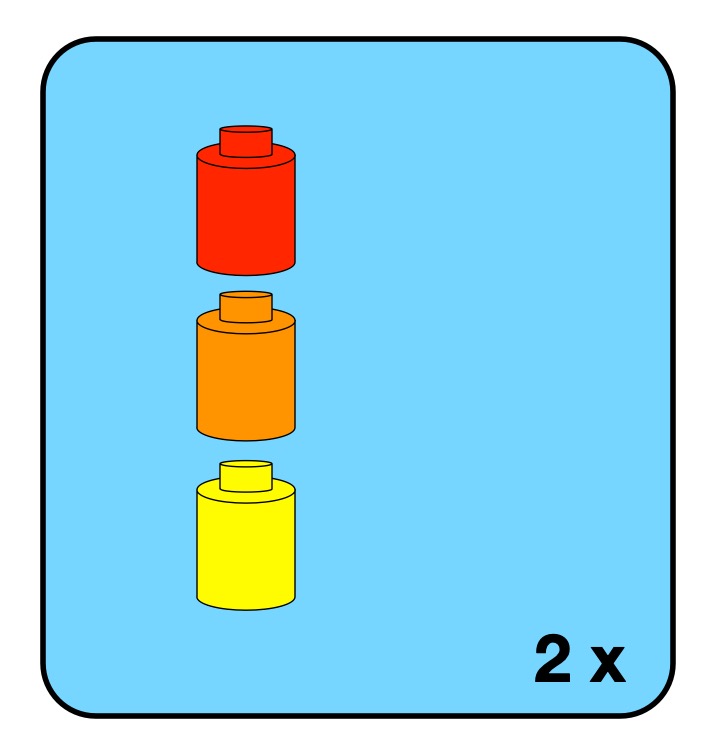
Image by CS4FN after Lego instruction iteration
Iteration is just a way to repeat instructions or sub-programs. Lego instructions have a simplified form of repetition which is the equivalent of a simple for loop in programming. It just says that a particular box of instructions should be followed a fixed number of times (like 3 x meaning make this lego sub-build three times). With only this way of doing iteration lego instructions are not a totally general form of computation. There are algorithms that can’t be specified in Lego instructions. To be good enough to play the full role in the theorem, the iteration control structure has to have the capability to be unbounded. The decision to continue or not is made at the end of each iteration, You follow the instructions once, then decide if they should be followed again (and keep doing that). Having such a control structure would mean that at the point when you started to build the lego construct to be repeated, you would not necessarily know how many times that Lego construct was to be built. It’s possible to imagine Lego builds like this. For example, you might be building a fairytale castle made of modular turreted towers, where you can keep deciding whether to build another tower after each new tower is completed. until the castle is big enough. That would be an unbounded loop. An issue with unbounded loops is they could never terminate…you could be eternally damned to build Lego towers to eternity!
Selection
The final kind of control structure needed is selection. Selection involves having a choice of what instruction or subprogram to do next. This allows an algorithm to do different things depending on data input or the results of computation. As most lego sets involve building one specific thing, there isn’t much use of selection in Lego booklets.
However, some lego sets do have a simple form of selection. There are “3 in 1” sets where you can, for example, choose to make one of three animals by choosing one of three instruction booklets to follow at the start.
To be fully computationally general there would need to be choice possible at any point, in the way repetition can appear at any point in the booklet. It would need to be possible for any instruction or block of instructions to be prefigured by a test of whether they should be followed or not, with that test and arbitrary true/false question.
Again, such a thing is conceivable if more complex Lego builds were wanted. Building a fairytale castle you might include options to choose to build different kinds of turret on top of the towers, or choose different colours of bricks to make rainbow towers, or… If this kind of totally general choice was provided then no other kind of selection control structure would be needed. Having such instructions would provide a level of creativity between those of fixed sets to build one thing and the origianl idea of Lego as just blocks you could build anything from (the sets would need more bricks though!)
Sequence, Selection and Iteration is enough (but only if powerful enough)
So Lego instruction booklets do include the three kinds of control structure needed of sequence, selection and iteration. However, the versions used are not actually general enough for the structured control theorem to apply. Lego instructions with the control structures discussed are not powerful enough to be computationally complete, and describe all possible algorithms. More general forms are needed than found in normal Lego instructions to do that. In particular, a more general version of iteration is needed, as well as a verion of selection that can be used anywhere, and that includes a general purpose test. All programming languages have some powerful version of all three control structures. If they did not they could not be used as general purpose languages. There would be algorithms that could not be implemented in the language.
Just like programming languages, Lego instructions also use an extra kind of control structures that is not actually needed, It is there just for convenience, just like programming languages have lots of extra control structures just for convenience too.
Sadly then, Lego instructions, as found in the normal instruction booklets are not as general as a programming language. They do still provide a similar amount of fun though. Now, I must get back to building Notre Dame.
The idea of an algorithm is core to computer science. So what is an algorithm? If you have ever used the instructions from some Lego set for building a Lego building, car or animal, then you have followed algorithms for fun yourself and you have been a computational agent.
An algorithm is just a special kind of set of instructions to be followed to achieve something. That something that is to be achieved could be anything (as long as someone is clever enough to come up with instructions to do it). It could be that the instructions tell you how to multiply two number, how to compute an answer to some calculation; how to best rank search results so the most useful are first; or how to make a machine learn from data so it can tell pictures of dogs from cats or recognise faces. The instructions could also be how to build a TIE fighter from a box of lego pieces, or how to build a duck out of 5 pieces of lego or, in fact, anything you might want to build from lego.
The first special thing about the instructions of an algorithm is that they guarantee the desired result is achieved (if they are followed exactly) … every time. If you follow the steps taught in school of how to multiply those numbers then you will get the answer right every time, whatever numbers you are asked to multiply. Similarly, if you follow the instructions that come with a lego box exactly and you will build exactly what is in the picture on the box. If you take it apart and build it again, it will come out the same the second time too.
For this to be possible and for instructions to be an algorithm, those instructions must be precise. There can be no doubt about what the next step is. In computer science, instructions are written in special languages like pseudocode or a programming language. Those languages are used because they are very precise (unlike English) with no doubt at all about what the instruction means to be done. Those nice people at Lego who write the booklets of instructions in each set, put a lot of effort into making sure their instructions are precise (and easy to follow). Algorithms do not have to be written in words. Lego use diagrams rather than words to be precise about each step. Their drawings are very clear so there is no room for doubt about what needs to be done next.
Computer scientists talk about “computational agents”. A computational agent is something that can follow an algorithm precisely. It does so without needing to understand or know what the instructions do. It just follows them blindly. Computers are the most obvious thing to act as a computational agent. It is what they are designed to do. In fact, it is all they can do. THey do not know what they are doing (they are just metal and silicon). They are machines that precisely follow instructions. But a human can act as a computational agent too, if they also follow instructions. If you build a lego set following the instructions exactly making no mistake then you are acting as a computational agent. If you miss a step or do steps in the wrong order of place a piece in the wrong place or (heaven forbid) do something creative and change the design as you go, then you are no longer being a computational agent. You are no longer following an algorithm. If you do act as a computational agent you will build whatever is on the box exactly, however big it is and even if you have no idea what you are building.
Acting as a computational agent can be a way to destress, a form of mindfulness where you switch off your mind. They can also be good to build up useful skills that matter as a programmer: like attention to detail, or if following a program helping you understand the semantics of programming languages so learn to program better. It is also a good debugging technique, and part of code audits where you step through a program to check it does do as intended (or find out where and why is doesn’t).
Algorithms are the core of everything computers do. They can do useful work or they can be just fun to follow. I know which kind I like playing with best.
Subscribe to be notified whenever we publish a new post to the CS4FN blog.
This blog is funded by EPSRC on research agreement EP/W033615/1.
The Lego Computer Science series was originally funded by UKRI, through grant EP/K040251/2 held by Professor Ursula Martin, and formed part of a broader project on the development and impact of computing.
Greg Michaelson is an Emeritus professor of computer science at Heriot-Watt University in Edinburgh. He is also a novelist and a short story writer. He wrote this story for CS4FN.
“Come on!” called Alice, taking the coat off the peg. “We’re going to be late!”
“Do I have to?” said Henry, emerging from the front room.
“Yes,” said Alice, handing him the coat. “Of course you have to go. Here. Put this on.”
“But we’re playing,” said Henry, wrestling with the sleeves.
“Too bad,” said Alice, straightening the jacket and zipping it up. “It’ll still be there when we get back.”
“Not if someone knocks it over,” said Henry, picking up a small model dinosaur from the hall table. “Like last time. Why can’t we have electric games like you did?”
“Electronic games,” said Alice, doing up her buttons. “Not electric. No one has them anymore. You know that.”
“Were they really digital?” asked Henry, fiddling with the dinosaur.
“Yes,” said Alice, putting on her hat. “Of course they were digital.”
“But the telephone’s all right,” said Henry.
“Yes,” said Alice, checking her makeup in the mirror. “It’s analogue.”
“And radio. And record players. And tape recorders. And television,” said Henry.
“They’re all analogue now,” said Alice, putting the compact back into her handbag. “Anything analogue’s fine. Just not digital. Stop wasting time! We’ll be late.”
“Why does it matter if we’re late?” asked Henry, walking the dinosaur up and down the hall table.
“They’ll notice,” said Alice. “We don’t want to get another warning. Put that away. Come on.”
“Why don’t the others have to go?” asked Henry, palming the dinosaur.
“They went last Sunday,” said Alice, opening the front door. “You said you didn’t want to go. We agreed I’d take you today instead.”
“Och, granny, it’s so boring…” said Henry.
They left the house and walked briskly to the end of the street. Then they crossed the deserted park, following the central path towards the squat neo-classical stone building on the far side.
“Get a move on!” said Alice, quickening the pace. “We really are going to be late.”
————————-
Henry really hadn’t paid enough attention at school. He knew that Turing Machines were named for Alan Turing, the first Martyr of the Digital Age. And he knew that a Turing Machine could work out sums, a bit like a school child doing arithmetic. Only instead of a pad of paper and a pencil, a Turing Machine used a tape of cells. And instead of rows of numbers and pluses and minuses on a page, a Turing Machine could only put one letter on each cell, though it could change a letter without having to actually rub it out. And instead of moving between different places on a piece of paper whenever it wanted to, and maybe doodling in between the sums, a Turing Machine could only move the tape left and right one cell at a time. But just like a school child getting another pad from the teacher when they ran out of paper, the Turing Machine could somehow add another empty cell whenever it got to the end of the tape.
————————-
When they reached the building, they mounted the stone staircase and entered the antechamber through the central pillars. Just inside the doorway, Alice gave their identity cards to the uniformed guard.
“I see you’re a regular,” she said approvingly to Alice, checking the ledger. “But you’re not,” sternly to Henry.
Henry stared at his shoes.
“Don’t leave it so long, next time,” said the guard, handing the cards back to Alice. “In you go. They’re about to start. Try not to make too much noise.”
Hand in hand, Alice and Henry walked down the broad corridor towards the central shrine. On either side, glass cases housed electronic equipment. Computers. Printers. Scanners. Mobile phones. Games consoles. Laptops. Flat screen displays.
The corridor walls were lined with black and white photographs. Each picture showed a scene of destitution from the Digital Age.
Shirt sleeved stock brokers slumped in front of screens of plunging share prices. Homeless home owners queued outside a state bank soup kitchen. Sunken eyed organic farmers huddled beside mounds of rotting vegetables. Bulldozers shovelled data farms into land fill. Lines of well armed police faced poorly armed protestors. Bodies in bags lay piled along the walls of the crematorium. Children scavenged for toner cartridges amongst shattered office blocks.
Alice looked straight ahead: the photographs bore terrible memories. Henry dawdled, gazing longingly into the display cases: Gameboy. Playstation. X Box…
“Come on!” said Alice, sotto voce, tugging Henry away from the displays.
At the end of the corridor, they let themselves into the shrine. The hall was full. The hall was quiet.
————————-
Henry was actually quite good at sums, and he knew he could do them because he had rules in his head for adding and subtracting, because he’d learnt his tables. The Turing Machine didn’t have a head at all, but it did have rules which told it what to do next. Groups of rules that did similar things were called states, so all the rules for adding were kept separately from all the rules for subtracting. Every step of a Turing machine sum involved finding a rule in the state it was working on to match the letter on the tape cell it was currently looking at. That rule would tell the Machine how to change the symbol on the tape, which way to move the tape, and maybe to change state to a different set of rules.
————————-
On the dais, lowered the Turing Machine, huge coils of tape links disappearing into the dark wells on either side, the vast frame of the state transition engine filling the rear wall. In front of the Turing Machine, the Minister of State stood at the podium.
“Come in! Come in!” he beamed at Alice and Henry. “There’s lots of space at the front. Don’t be shy.”
Red faced, Alice hurried Henry down the aisle. At the very front of the congregation, they sat down cross legged on the floor beneath the podium.
“My friends,” began the Minister of State. “Welcome. Welcome indeed! Today is a special day. Today, the Machine will change state. But first, let us be silent together. Please rise.”
The Minister of State bowed his head as the congregation shuffled to its feet.
———————–
According to Henry’s teacher, there was a different Turing Machine for every possible sum in the world. The hard bit was working out the rules. That was called programming, but, since the end of the Digital Age, programming was against the law. Unless you were a Minister of State.
————————
“Dear friends,” intoned the Minister of State, after a suitable pause. “We have lived through terrible times. Times when Turing’s vision of equality between human and machine intelligences was perverted by base greed. Times when humans sought to bend intelligent machines to their selfish wills for personal gain. Times when, instead of making useful things that would benefit everybody, humans invented and sold more and more rarefied abstractions from things: shares, bonds, equities, futures, derivatives, options…”
————————
The Turing Machine on the dais was made from wood and brass. It was extremely plain, though highly polished. The tape was like a giant bicycle chain, with holes in the centre of each link. The Machine could plug a peg into a hole to represent a one or pull a peg out to represent a zero. Henry knew that any information could be represented by zeros and ones, but it took an awful lot of them compared with letters.
————————-
“… Soon there were more abstractions than things, and all the wealth embodied in the few things that the people in poor countries still made was stolen away, to feed the abstractions made by the people in the rich countries. None of this would have been possible without computers…”
————————-
The state transition unit that held the rules was extremely complicated. Each rule was a pattern of pegs, laid out in rows on a great big board. A row of spring mounted wooden fingers moved up and down the pegs. When they felt the rule for the symbol on the tape cell link, they could trigger the movement of a peg in or out of the link, and then release the brakes to start up one revolution of the enormous cog wheels that would shift the tape one cell left or right.
————————-
“…With all the computers in the world linked together by the Internet, humans no longer had to think about how to manage things, about how best to use them for the greatest good. Instead, programs that nobody understood anymore made lightening decisions, moving abstractions from low profits to high profits, turning the low profits into losses on the way, never caring how many human lives were ruined…”
————————-
The Turing Machine was powered by a big brass and wooden handle connected to a gear train. The handle needed lots of turns to find and apply the next rule. At the end of the ceremony, the Minister of State would always invite a member of the congregation to come and help him turn the handle. Henry always hoped he’d be chosen.
——————————
“…Turing himself thought that computers would be a force for untold good; that, guided by reason, computers could accomplish anything humans could accomplish. But before his vision could be fully realised, he was persecuted and poisoned by a callous state interested only in secrets and profits. After his death, the computer he helped design was called the Pilot Ace; just as the pilot guides the ship, so the Pilot Ace might have been the best guide for a true Digital Age…”
——————————
Nobody was very sure where all the cells were stored when the Machine wasn’t inspecting them. Nobody was very sure how new cells were added to the ends of the tape. It all happened deep under the dais. Some people actually thought that the tape was infinite, but Henry knew that wasn’t possible as there wasn’t enough wood and brass to make it that long.
——————————
“…But almost sixty years after Turing’s needless death, his beloved universal machines had bankrupted the nations of the world one by one, reducing their peoples to a lowest common denominator of abject misery. Of course, the few people that benefited from the trade in abstractions tried to make sure that they weren’t affected but eventually even they succumbed…”
——————————
Nobody seemed to know what the Turing Machine on the dais was actually computing. Well, the Minister of State must have known. And Turing had never expected anyone to actually build a real Turing Machine with real moving parts. Turing’s machine was a thought experiment for exploring what could and couldn’t be done by following rules to process sequences of symbols.
——————————
“…For a while, everything stopped. There were power shortages. There were food shortages. There were medical shortages. People rioted. Cities burned. Panicking defence forces used lethal force to suppress the very people they were supposed to protect. And then, slowly, people remembered that it was possible to live without abstractions, by each making things that other people wanted, by making best use of available resources for the common good…”
——————————
The Turing Machine on the dais was itself a symbol of human folly, an object lesson in futility, a salutary reminder that embodying something in symbols didn’t make it real.
——————————
“…My friends, let us not forget the dreadful events we have witnessed. Let us not forget all the good people who have perished so needlessly. Let us not forget the abject folly of abstraction. Let the Turing Machine move one step closer along the path of its unknown computation. Let the Machine change its state, just as we have had to change ours. Please rise.”
The congregation got to their feet and looked expectantly at the Minister of State. The Minister of State slowly inspected the congregation. Finally, his eyes fixed on Henry, fidgeting directly in front of him.
“Young man,” he beamed at Henry. “Come. Join me at the handle. Together we shall show that Machine that we are all its masters.”
Henry looked round at his grandmother.
“Go on,” she mouthed. “Go on.”
Henry walked round to the right end of the dais. As he mounted the wooden stairs, he noticed a second staircase leading down behind the Machine into the bowels of the dais.
“Just here,” said the Minister of State, leading Henry round behind the handle, so they were both facing the congregation. “Take a good grip…”
Henry was still clasping the plastic dinosaur in his right hand. He put the dinosaur on the nearest link of the chain and placed both hands on the worn wooden shaft.
And turn it steadily…”
Henry leant into the handle, which, much to his surprise, moved freely, sweeping the wooden fingers across the pegs of rules on the state transition panel. As the fingers settled on a row of pegs, a brass prod descended from directly above the chain, forcing the wooden peg out of its retaining hole in the central link. Finally, the chain slowly began to shift from left to right, across the front of the Machine, towards Henry and the Minister of State. As the chain moved, the plastic dinosaur toppled over and tumbled down the tape well.
“Oh no!” cried Henry, letting go of the handle. Utterly nonplussed, the Minister of State stood and stared as Henry peered into the shaft, rushed to the back of the Machine and hurried down the stairs into the gloom.
A faint blue glow came from the far side of the space under the dais. Henry cautiously approached the glow, which seemed to come from a small rectangular source, partly obscured by someone in front of it.
“Please,” said Henry. “Have you seen my dinosaur?”
“Hang on!” said a female voice.
The woman stood up and lit a candle. Looking round, Henry could now see that the space was festooned with wires, leading into electric motors driving belts connected to the Turing Machine. The space was implausibly small. There was no room for a finite tape of any length at all, let alone an infinite one.
“Where are all the tape cells?” asked Henry, puzzled.
“We only need two spare ones,” said the woman. “When the tape moves, we stick a new cell on one end and take the cell off the other.”
“So what’s the blue light?” asked Henry.
“That’s a computer,” said the woman. “It keeps track of what’s on the tape and controls the Turing Machine.”
“A real digital computer!” said Henry in wonder. “Does it play games?”
“Oh yes!” said the woman, turning off the monitor as the Minister of State came down the stairs. “What do you think I was doing when you showed up? But don’t tell anyone. Now, let’s find that dinosaur.”
Our Turing Machine so far has an Infinite Tape, a Tape Head and a Controller. The Tape holds data values taken from a given set of 4×4 bricks. It starts in a specific initial pattern: the Initial Tape. There is also a controller. It holds different coloured 3×2 bricks representing an initial state, an end state, a current state and has a set of other possible states (so coloured bricks) to substitute for the current state.
Why do we need a program?
As the machine runs it changes from one state to another, and inputs from or outputs to the tape. How it does that is governed by its Program. What is the new state, the new value and how does the tape head move? The program gives the answers. The program is just a set of instructions the machine must blindly follow. Each instruction is a single rule to follow. Each program is a set of such rules. In our Turing Machines, these rules are not set out in an explicit sequence as happens in a procedural program, say. It uses a different paradigm for what a program is. Instead at any time only one of the set of rules should match the current situation and that is the one that is followed next.
Individual Instructions
A single rule contains five parts: a Current State to match against, a Current Value under the Tape Head to match against, a New State to replace the existing one, and a New Value to write to the tape. Finally, it holds a Direction to Move the Tape Head (left or right or stay in the same place). An example might be:
Current State: ORANGE
Current Value: RED
New State: GREEN
New Value: BLUE
Direction: RIGHT
But what does a rule like this actually do?
What does it mean?
You can think of each instruction as an IF-THEN rule. The above rule would mean:
IF
the machine is currently in state ORANGE AND
the Tape Head points to RED
THEN (take the following actions)
change the state to GREEN,
write the new value BLUE on the tape AND THEN
move the tape head RIGHT.
This is what a computer scientist would call the programming language Semantics. The semantics tell you what program instructions mean, so what they do.
Representing Instructions in Lego
We will use a series of 5 bricks in a particular order to represent the parts of the rule. For example, we will use a yellow 3×2 brick in the first position of a rule to represent the fact that the rule will only trigger if the current state is yellow. A blue 2×2 brick in the second position will mean the rule will also only trigger if the current value under the tape head is blue. We will use a grey brick to mean an empty tape value. The third and fourth position will represent the new state and new value if the rule does trigger. To represent the direction to move we will use a 1×2 Red brick to mean move Right, and a 1×2 yeLLow brick to mean move Left. We will use a black 1×2 brick to mean do not move the tape head (mirroring the way we are also using black to mean do nothing in the sense of the special end state). The above rule would therefore be represented in Lego as below.
A single instruction for a Lego Turing Machine. Image by CS4FN
Notice we are using the same colour to represent different things here. The representation is the colour combined with the size of brick and position in the rule. So a Red brick can mean a red state (a red 3×2 brick) or a red value (a red 2×2 brick) or move right (a red 1×2 brick).
Lego programs
That is what a rule, so single Turing Machine instruction, looks like. Programs are just a collection of such rules: so a series of lines of bricks.
Suppose we have a Turing machine with two states (Red and Orange) and two values on the tape (Blue or Empty), then a complete program would have 4 rules, one for each possible combination. We have given one example program below. If there were more states or more possible data values then the program would be correspondingly bigger to cover all the possibilities.
A 4 instruction Turing Machine Program for a Turing Machine with two states (Red, Orange) and two data values (Blue, Empty). Image by CS4FN
A Specific Turing Machine
Exactly what it does will depend on its input – the initial tape it is given to process, as well as the initial state and where the tape head initially points to. Perhaps you can work out what the above program does given a tape with an empty value followed by a series of three blue bricks (and then empty data values off to infinity (the blank value is the only value that is allowed to appear an infinite number of times on an initial tape) and the Head pointing to the rightmost blue brick value. The initial state is red. See the Lego version of this specific machine below.
A full Turing Machine ready to execute. Image by CS4FN
Note something we have glossed over. You also potentially need an infinite number of bricks of each value that is allowed on the tape. We have a small pile, but you may need that Lego factory we mentioned previously, so that as the Turing Machine runs you always have a piece to swap on to the machine tape when needed. Luckily, for this machine a small number of bricks should be enough (as long as you do not keep running it)!
What does this Turing Machine do? We will look at what it does and how to work it out in a future article. In the meantime try and work out what it does with this tape, but also what it does if the tape has more or less blue bricks in a row on it to start with (with everything else kept the same).
Note that, to keep programs smaller, you could have a convention that if no rule fits a situation then it means the program ends. Then you could have fewer rules in some programs. However, that would just be shorthand for there being extra rules with black new states, the tape being left alone, and the tape head moves right. In real programming, it is generally a good idea to ALWAYS be explicit about what you intend the program to do, as otherwise it is an easy way for bugs to creep in, for example, because you just forgot to say in some case.
Alan Turing invented Turing Machines before any computer existed. At the time a “computer” was a person who followed rules to do calculations (just like you were taught the rules to follow to do long multiplication at primary school, for example). His idea was therefore that a human would follow the rules in a Turing Machine program, checking the current state and value under the tape head, and changing the state, the value on the tape and the movement of the head. A person provides the power and equivalent of a robotic arm that follows the underlying Turing Machine algorithm: the Turing Machine algorithm that if followed causes each Turing Machine’s program to execute.
If a human animating the machine was good enough for Turing, it is good enough for us, so that is how our Lego Turing Machines will work. Your job will be to follow the rules and so operate the machine. Perhaps, that is exactly what you did to work out what the program above does!
Next we will look at how to work out what a Turing Machine does. Then it will be time to write, then run, some Turing Machine programs of your own…
EPSRC supports this blog through research grant EP/W033615/1, The Lego Computer Science post was originally funded by UKRI, through grant EP/K040251/2 held by Professor Ursula Martin, and forms part of a broader project on the development and impact of computing.
How does the machine decide where and when to move the Tape Head, though? It has a Controller. The key part of the controller is that it holds a Current State of the machine. Think of traffic lights for what we mean by the state of a machine. In the UK traditional traffic lights have a Red state, an Amber state, a Green state and a Red-Amber state. Each means a different thing (such as “Stop” and “Go”). The controller of the lights moves between these different internal states. With a traffic light, the current internal state is also shown to the world by the lights that light up! Machine states do not have to be visible to the outside world, however. In fact, they only are if the person who designs the interface makes them visible. For most machines, only some of their internal state is made visible. In our Turing Machine we will be able to see the states as they will be visible in the controller. However, the output of a Turing Machine is the state of the tape, so if we wanted the states to really be visible we would write a version on to the tape. You can then imagine the tape triggering external lights to come on or off, or change colour as a simple form of actual output. This is what Computer Scientists call memory-mapped peripherals – where to send data (output) to a peripheral device (a screen, a panel of lights, a printer, or whatever, you write to particular locations in memory, and that data is read from there by the peripheral device. That is going beyond the pure idea of a Turing Machine though, where the final state of the machine when it stops is its output.
Representing States
How do we represent states in Lego? Any finite set of things (symbols) could be used to represent the different states (including numbers or binary codes, for example). We will use different coloured 3×2 blocks. Each colour of block will stand for a different state that the machine is in. The controller will have a space that holds the brick representing the Current State. It will also have space for a set of places for the blocks representing the other allowable states of this Turing Machine. As the machine runs, the state will change as represented by swapping one of these state bricks for another.
Different Turing Machines can allow a different number of possible states the machine could be in, so this part of the controller might be bigger or smaller depending on the machine and what it needs to do its job. Again think of traffic lights, in some countries, and on pedestrian crossings there are only two states, a Red state (stop) and a Green state (go). Its controller only needs two states so we would only need two different coloured bricks.
A Turing Machine Controller with current state red, end state black and three other possible states (green, orange and blue). Image by CS4FN
Initial States
The current state will always start in some initial state when the machine first starts up. It is useful to record in the controller what state that is so that each time we restart the machine anew it can be reset. We will just put a block in the position next to the current state to indicate what the initial state should be. We won’t ever change it for a given machine.
End States
One of the states of a Turing Machine is always a special End State. We will always use a black brick to represent this. Whatever is used has to be specified at the outset, though. When not in use we will keep the end state brick next to the initial state brick. Once the machine finishes operations it will enter this End State, or put another way, if the black brick ever becomes the current state brick the machine will stop. From that point on the machine will do nothing. Some machines might never reach an end state, they just go on forever. Traffic lights just cycle round the states forever, for example, never reaching an end state. Other machines do end though. For example, a kettle controller stops the machine when the water has boiled. An addition Turing Machine might end when it has output the answer to an addition. To do another addition you would start it up again with new information on the tape indicating what it was to add.
We have now created the physical part of the Turing Machine. All we need now is a Program to tell it what to do! Programs come next in Part 3…
Subscribe to be notified whenever we publish a new post to the CS4FN blog.
This blog is funded by EPSRC on research agreement EP/W033615/1.
The Lego Computer Science posts were originally funded by UKRI, through grant EP/K040251/2 held by Professor Ursula Martin, and forms part of a broader project on the development and impact of computing.
It it possible to make a working computer out of lego and you do not even have to pay for an expensive robot Mindstorm kit…but only if you are willing to provide the power yourself.
A machine in theory
In fact, Alan Turing, grandfather of Computer Science worked out how to do it before the War and before any actual computer existed. His version also needed humans to power it. Now we call it a Turing Machine and it is a theoretical model of what is computable by any machine.
The Tape
To make a working Turing Machine you first need to build an infinitely long Tape that can hold Symbols, representing data values, along it at fixed intervals. That is easy (as long as you have a lego factory). You just need to create a long line of flat pieces, say 2 studs wide. Each 2×2 square on it is then a position on the Tape.
An infinite tape out of Lego (relies on having a Lego factory at the right-hand end churning out new tape if and when it is needed… Image by CS4FN
Be lazy
Of course you can’t actually make it infinitely long, but you can make it longer every time you need some more of it (so no problem if you do have a lego factory to churn out extra bricks as needed!) This approach to dealing with infinite data structures where you just make it bigger only when needed is now called lazy programming by computer scientists and is an elegant way that functional programs deal with input that needs to represent an infinite amount of input…It is also the way some games (like Minecraft) represent worlds or even universes. Rather than create the whole universe at the start, things over the horizon, so out of sight, are only generated if a player ever goes there – just-in-time world generation! Perhaps our universe is like that too, with new galaxies only fleshed out as we develop the telescopes to see them!
Fill it with data
The Tape has a set of Data Symbols that can appear on it that act as the DataValues of the machine. Traditional computers have symbols 0 and 1 underpinning them, so we could use those as our symbols, but in a Turing Machine we can have any set of symbols we like: ten digits, letters, Egyptian hieroglyphs, or in fact any set of symbols we want to make up. In a lego Turing Machine we can just use different coloured blocks as our symbols. If our tape is made of grey pieces then we could use red and blue for the symbols that can appear on it. Every position on the tape will then either hold a red block or a blue block. We could also allow EMPTY to be a symbol too in which case some 2×2 slots could be empty to mean that.
A tape containing data where the allowed symbols are EMPTY, RED and BLUE. Image by CS4FN
To start with
Any specific Turing Machine has an Initial Tape. This is the particular data that is on the tape at the start, before it is switched on. As the machine runs, the tape will change.
The tape with symbols on it takes the place of our computer’s memory. Just as a modern computer stores 1s and 0s in memory, our Lego Turing Machine stores its data as symbols on this tape.
The Head
A difference is that modern computers have “random access memory” – you can access any point in memory quickly. Our tape will be accessed by a Tape Head that points to a position on the tape and allows you to read or change the data only at the point it is at. Make a triangular tape head out of lego so that it is clear which point on the tape it is pointing at. We have a design choice here. Either the Tape moves or the Head moves. As the tape could be very long so hard to move we will move the Head along beside it, so create a track for the Head to move along parallel to the tape. It will be able to move 2 studs at a time in either direction so that each time it moves it is pointing to a new position on the tape.
An infinite tape with Head (yellow) pointing at position 4 on the tape. Image by CS4FN
We have memory
We now have the first element in place of a computer, then: Memory. The next step will be to provide a way to control the tape head and how data is written to and read from the tape and so computation actually happen. (For that you need a controller which we cover in Part 2…).
EPSRC supports this blog through research grant EP/W033615/1, The Lego Computer Science post was originally funded by UKRI, through grant EP/K040251/2 held by Professor Ursula Martin, and forms part of a broader project on the development and impact of computing.
The truth table for NOT P. A yellow brick represents P. Blue means True and Red means false. Read along the rows to get the meaning of NOT P when P is true or false. Image by CS4FN
We have seen how to represent truth tables in lego. Truth tables are a way of giving precise meaning to logical operations like AND, OR and NOT. They are also give a way to do logical reasoning following a simple algorithm.
That’s Not Not True
You may have been pulled up in English and told you just said the opposite of what you meant, after saying something like “There ain’t no way I’m doing that”. This is a “double negative” as the “n’t” in “ain’t” is really “not” so followed by “no way” you are actually saying “not not way” or overall: “I am doing that”. Perhaps the most famous double negative is in the Rolling Stones song “(I can’t get no) satisfaction”. English is very flexible though and double negatives like this don’t cancel out but just become a different way of saying the negative version. In logic two negations do cancel out, though. Let’s take a purer version to work with: the statement “I am not not happy”. What does this mean? In logic the basic proposition here is “I am not happy”. The logical statement is “NOT (NOT (I am happy))”.
We can prove what this means using truth tables. We can do more than just prove what this single statement means. We can prove what all double negatives mean, more generally. We do this by replacing the proposition “I am happy” with a variable P. It now becomes NOT (NOT P) or in our lego version where we use a yellow brick to mean a proposition, P:
Image by CS4FN
This is just syntax, just a sequence of symbols. It doesn’t give us any meaning on its own. We can build truth tables in Lego for that. We start from the variables that are at the inside of the logical expression which here is just the variable P. We list in a table column the possible values it can take (true or false).
Image by CS4FN
This shows P (yellow) can be either be TRUE (blue) or FALSE (red). Now we build up the logical expression of interest a column at a time. NOT is applied to P, so we add a new column for NOT P and use the truth table for the operator, NOT, to tell us what lego brick to put in each row based on the lego brick already there. The NOT truth table is at the top of the page. It says if you have a blue brick in a row, place a red brick there. If you have a red brick, put a blue brick there. This gives us a new filled out column for (NOT P) which is just a copy of the NOT truth table (but bare with us that was just a simple case). We get:
Image by CS4FN
Moving outwards in the expression NOT (NOT P)), we now look at the operator applied to (NOT P). It is NOT again. We add a new column to our truth table and again use the NOT truth table to work out the new values, but this time applied to the column before (the NOT P column). The NOT truth table says put a blue brick for a red brick, and a red brick for a blue brick in the column it is being applied to (the NOT P column). This gives:
Image by CS4FN
The result is a truth table with coloured bricks identical to that of the original column for P. Switching back from lego bricks to what the columns mean, we have shown that the NOT(NOT P) column is the same as the P column, or in other words that NOT(NOT P) EQUALS P (whatever value P has).
We can actually go a step further though, because equivalence is just a logical operation with its own truth table. It gives true if the two operands have the same value and false otherwise (or in lego terms if the bricks are the same colour the answer is a blue brick and if they are different colours the answer is a red brick. The truth table looks like this:
Image by CS4FN
We can use this truth table to calculate whether two lego truth table columns are equal or not just by looking up the combinations in this EQUALS truth table. Continuing our example we can carrying building our truth table about NOT(NOT P)). To make things clearer first add a column corresponding to P again. That means we will be applying the EQUALS operator to the last two columns. As before, for each row, look up the corresponding pattern for those last two columns in the EQUALS truth table to get the answer for that row. In the first row we have two blue bricks so that becomes a blue brick according tot he EQUALS truth table. In the next row we have two red bricks. That also becomes a blue brick. This gives:
Image by CS4FN
The thing to notice here is that all the entries in the final answer column are blue lego pieces. Switching back from the lego world to the logic world, what does this mean? Blue is true so all rows in the answer are true. That means whatever value of the proposition P the answer to NOT (NOT P) EQUALS P is true. We have proved a theorem that this is always true. We have shown by building with lego that a double negation cancels itself out.
Logical expressions like this that are always true (whatever the values of the variables) are called tautologies. We can tell something is a tautology, so we have proved a theorem, just by the simple manual check that its truth table values are true (or in lego all blue).
The important thing to realise about this is all the reasoning can be done without knowing what the symbols mean, and certainly not worrying about English words, once you have the truth tables. You do it mechanically. You do not need to think about what, for example, red and blue mean until the end. At that point you return to the logical world to see what you have found out. All blue means it is always true! You can also at that point substitute back in actual words of interest into the statements proved. P means “I am happy”. We started by asking what “I am not not happy” means. We converted this to “NOT (NOT (I am happy))”. By swapping in “I am happy” for P in our theorem gives us that NOT (NOT “I am happy”) EQUALS “I am happy”, or that “I am not not happy.” just means the same as “I am happy”
We have been reasoning about English statements, but this kind of reasoning is the basis of all logical reasoning and essentially the basis of formal verification where the meaning of programs and hardware is checked to see if it meets a specification. It tells you what a test in a program like “if (! temperature != 0) …) means so does for example, or what a circuit with two NOT gates does.
And lego logic has even given us a way to prove things just by building with lego.
Subscribe to be notified whenever we publish a new post to the CS4FN blog.
This blog is funded by EPSRC on research agreement EP/W033615/1.
The Lego Computer Science post was originally funded by UKRI, through grant EP/K040251/2 held by Professor Ursula Martin, and forms part of a broader project on the development and impact of computing.
Truth tables are a simple way of reason about logic that were popularised by the 20th century philosopher Ludwig Wittgenstein. They provide a very clear way to explain what logical operators like AND, OR and NOT mean (or in computational terms, what they do). They also give a simple way to do pure logical reasoning and so see if arguments follow logically. These logical operators crop up in logic circuits and in programs where decisions are being made so are vital to creating correct circuits and writing correct programs. Let’s see what a truth table is by making some from Lego.
Logic in Lego
First we need to represent the basic building blocks of logic in lego. We’ve seen in previous articles how to represent numbers, binary and even images in lego. We have seen that we do computation on symbols and we can use lego blocks as symbols. Logic can therefore be represented in lego symbols too.
We will look at a simple kind of logic called propositional logic (there isn’t actually just one kind of logic but lots of different kinds with different rules). Propositional logic is the simplest kind. It deals with propositions which are just statements that are either true or false (but we may not know which). For example, “Snoopy is a logician.” is a proposition. So are “The world is flat.”, “Water contains oxygen.” and “temperature > 0” as we might find in a program. For the purposes of logic itself, it doesn’t matter what the words actually mean or even what they are. We will therefore represent all propositions by square lego blocks of different colours.
Here we want the symbols to stand for logical things rather than numbers. There are lots of numerical values: things like 1, 5 and 77. There are only two logical values: TRUE and FALSE, often written just as T and F. We will use a blue lego block for the logical value TRUE, and a red block for the value FALSE. They are just symbols though so we could use any blocks and any colours, just as we could use other words for true and false as other languages do. We chose blue for true just because it rhymes so is easy to remember, and red more randomly because it is a common lego primary colour.
True and False lego. A square 2×2 blue block represents True. A square 2×2 red block is false.
What about representing the actual sentences stating purported facts like “Messi is the best footballer ever”, or in a program “n == 1”? Statements like this are called propositions. As far as reasoning logically goes the precise words or even language they are in do not matter. This is something Wittgensteinrealised. When doing reasoning these basic propositions can be replaced by variables like P and Q and the logic won’t change. Rather than use letters we will just use different coloured lego blocks to stand for different propositions, emphasising that the words or even variable names do not matter. So we will use a yellow block for a variable P and a green block for a variable Q. Each of which could stand for absolutely any English proposition we like at any time (though if we want it to stand for a particular proposition then we should define which one clearly).
Propositional variables P and Q are represented by yellow and green blocks
Logical Symbols
What we are really interested in is not just true and false values but the logical operations on propositions. The core of these we use in everyday English: AND, OR and NOT, more technically known as conjunction, disjunction and negation in logic. There are several variations of the symbols used to represent these symbols just as there are for true and false. We will use the versions in lego as below.
The logical operators AND, OR and NOT as lego symbols
These lego symbols will allow us to write out logical expressions about propositions: like “The cat is thirsty AND NOT the cat is hungry” which we might write in English as “The cat is thirsty and not hungry”. If we use a yellow block to mean “The cat is thirsty” and a green block to mean “The cat is hungry” then in lego logic we can write it as follows:
The cat is thirsty AND NOT the cat is hungry P AND (NOT Q)
Of course the yellow and green brick are variables so by changing the propositions they represent it can stand for other things. It can also represent: ” The moon is blue AND NOT The moon is made of cheese.” where the yellow brick represents “The moon is blue” and the green brick represents “The moon is made of cheese”.
Think up some statements that involve AND, OR and NOT and then build representations of then in lego logic like the above.
The meaning of logical connectives
The above gives us symbols for the logical connectives, but so far they have no meaning: it is just syntax. Perhaps you think you know what the words mean. We use words like and, or and not in language rather imprecisely at times based on dictionary-style definitions. They essentially mean the same in English as in logic, but we need to define what they mean precisely. We do not want two different people to have two slightly different understandings of what they mean. This is where truth tables come in. A truth table tells us exactly, and without doubt, what the symbols for the operators mean. The give what is called by computer scientists a formal semantics to the logical connectives.
Let’s look at NOT first. A truth table is just a table that includes as rows all the combinations of true and false values of the variables in a logical expression together with an answer for those values. For example a truth table for the operator NOT, so telling us in all situations what (NOT a) means, is:
P
NOT P
TRUE
FALSE
FALSE
TRUE
A truth table for the NOT operator. Reading along the rows, IF P is TRUE THEN (NOT P) is FALSE; IF P is FALSE THEN (NOT P) is TRUE.
We can build this truth table in lego using our lego representation:
NOT only applies to one proposition, the one it negates, (it is a unary logical connective). That means we only need two rows in the table to cover the different possible values those propositions could stand for. AND (and OR) combine to two propositions (it is a binary logical connective). To cover all the possible combinations of the values of those propositions we need a table with four rows as there are four possibilities.
P
Q
P AND Q
TRUE
TRUE
TRUE
TRUE
FALSE
FALSE
FALSE
TRUE
FALSE
FALSE
FALSE
FALSE
A truth table for the logical AND operator.
We can build this in Lego as:
Reading along the rows this says that if both P and Q are blue (true) then the answer for P AND Q is true. Otherwise the answer is false (red). T
The following is the lego truth table for the logical OR operator
The columns for the two variables yellow/green (P/Q) are the same, setting out all the possibilities. Now the answer is true (blue) if either operand is true (blue) and false (red) when both are false (red).
We have now created lego truth tables that give the meaning of each of these three logical connectives. They aren’t the only logical operators – in fact there are 8 possible binary ones. Have a go at building lego truth tables for other binary logical connectives such as exclusive-or which is true if exactly one of the operands is true, and equivalence which is true if both operands are the same truth value.
Truth tables give precise meanings to logical operators and so to logic. That is useful, but even more usefully, they give a way to reason logically in a clear, price way. By following a simple algorithm to build new truth tables from existing ones, we can prove general facts, that are ultimately about propositions, in lego… as we will see next.
Subscribe to be notified whenever we publish a new post to the CS4FN blog.
This blog is funded by EPSRC on research agreement EP/W033615/1.
The Lego Computer Science post was originally funded by UKRI, through grant EP/K040251/2 held by Professor Ursula Martin, and forms part of a broader project on the development and impact of computing.
Numbers represented with different sized common blocks Image by CS4FN
Continuing a series of blogs on what to do with all that lego scattered over the floor: learn some computer science…how do we represent numbers and how is it related to the representation Charles Babbage used in his design for a Victorian steam-powered computer?
We’ve seen there are lots of ways that human societies have represented numbers and that there are many ways we could represent numbers even just using lego. Computers store numbers using a different representation again called binary. Before we get to that though we need to understand how we represent bigger numbers ourselves and why it is so useful.
Numbers represented as colours. Image by CS4FN
Our number system was invented in India somewhere before the 4th century. It then spread, including to the west, via muslim scholars in Persia by the 9th century, so is called the Hindu-Arabic numeral system. Its most famous advocate was Muḥammad ibn Mūsā al-Khwārizmī. The word algorithm comes from the latin version of his name because of his book on algorithms for doing arithmetic with Hindu-arabic numbers.
The really clever thing about it is the core idea that a digit can have a different value depending on its position. In the number 555, for example, the digit 5 is representing the number five hundred, the number fifty and the number five. Those three numbers are added together to give the actual number being represented. Digit in the ‘ones’ column keep their value, those in the ‘tens’ column are ten times bigger, those in the ‘hundreds column a hundred times bigger than the digit, and so on. This was revolutionary differing from most previous systems where a different symbol was used for bigger number, and each symbol always meant the same thing. For example, in Roman numerals X is used to mean 10 and always means 10 wherever it occurs in a number. This kind of positional system wasn’t totally unique as the Babylonians had used a less sophisticated version and Archimedes also came up with a similar idea, those these systems didn’t get used elsewhere.
In the lego representations of numbers we have seen so far, to represent big numbers we would need ever more coloured blocks, or ever more different kinds of brick or ever bigger piles of bricks, to give a representation of those bigger numbers. It just doesn’t scale. However, this idea of position-valued numbers can be applied whatever the representation of digits used, not just with digits 0 to 9. So we can use the place number system to represent ever bigger numbers using our different versions of the way digits could be represented in lego. We only need symbols for the different digits, not for every number, of for every bigger numbers.
For example, if we have ten different colours of bricks to represent the 10 digits of our decimal system, we can build any number by just placing them in the right position, placing coloured bricks on a base piece.
The number 2301 represented in coloured blocks where black represents 0, red represents 1, blue represents 2 and where yellow represents 3 Image by CS4FN
Numbers could be variable sized or fixed size. If as above we have a base plate, and so storage space, for four digits then we can’t represent larger numbers than 9999. This is what happens with the way computers store numbers. A fixed amount of space is allocated for each number in the computer’s memory, and if a number needs more digits then we get an “overflow error” as it can’t be stored. Rockets worth millions of pounds have exploded on take-off in the past because a programmer made the mistake of trying to store numbers too big for the space allocated for them. If we want bigger numbers, we need a representation (and algorithms) that extend the size of the number if we run out of space. In lego that means our algorithm for dealing with numbers would have to include extending the grey base plate by adding a new piece when needed (and removing it when no longer needed). That then would allow us to add new digits.
Unlike when we write numbers, where we write just as many digits as we need, with fixed-sized numbers like this, we need to add zeros on the end to fill the space. There is no such thing as an empty piece of storage in a computer. Something is always there! So the number 123 is actually stored as 0123 in a fixed 4-digit representation like our lego one.
The number 321 represented in coloured blocks where space is allocated for 4 digits as 0321: black represents 0, red represents 1, blue represents 2 and where yellow represents 3 Image by CS4FN
Charles Babbage made use of this idea when inventing his Victorian machines for doing computation: had they been built would have been the first computers. Driven by steam power his difference engine and analytical engine were to have digits represented by wheels with the numbers 0-9 written round the edge, linked to the positions of cog-like teeth that turned them.
Wheels were to be stacked on top of each other to represent larger numbers in a vertical rather than horizontal position system. The equivalent lego version to Babbage’s would therefore not have blocks on a base plate but blocks stacked on top of each other.
The number 321 represented vertically in coloured blocks where space is allocated for 4 digits as 0321: black represents 0, red represents 1, blue represents 2 and where yellow represents 3 Image by CS4FN
Numbers stored as columns of wheels on the replica of Babbage’s Difference Engine at the Science Museum London. Image by Carsten Ullrich: CC-BY-SA-2.5. From wikimedia.
In Babbage’s machines different numbers were represented by their own column of wheels. He envisioned the analytical engine to have a room sized data store full of such columns of wheels.
So Babbage’s idea was just to use our decimal system with digits represented with wheels. Modern computers instead use binary … but that is for next time.
Part of a series featuring featuring pixel puzzles, compression algorithms, number representation, gray code, binary, logic and computation.
Subscribe to be notified whenever we publish a new post to the CS4FN blog.
This blog is funded by EPSRC on research agreement EP/W033615/1.
This post was funded by UKRI, through grant EP/K040251/2 held by Professor Ursula Martin, and forms part of a broader project on the development and impact of computing.









 cs4fn
cs4fn 