Find your own time zone – #BSW24

The theme for British Science Week 2024 is Time so here we’re going back in time to our archives to bring you this article about… time. Below are the instructions to find out your own personal time zone but be careful if you’re sharing your results with others, remember that your longitude (if combined with your latitude) can give away your location.

By Paul Curzon, Queen Mary University of London

Andy Broomfield has given us the secret to figuring out your own personal time zone based on your longitude! Now you can figure out your time zone right down to the second, just like his gadget did.

Step one: find your longitude

First you need find out the longitude of the place you’re at. Longitude is the measure of where you are on the globe in an east-west direction (the north-south measurement is called latitude).

The best resource to do this is Google Earth, which will give you a very accurate longitude reading in degrees, minutes and seconds. Just find your location in Google Earth, and when you hover your mouse over it, the latitude and longitude are in the bottom right corner of the window.

There are alternatives to Google Earth online, but they tend to only work for one country rather than the whole world. If you can’t use Google Earth, try an internet search for finding longitude in your country.

If you’ve got a GPS system (e.g. on your phone), you can get it to tell you your longitude as well.

Satellite image of the Earth at night
Satellite image of Earth by D Mz from Pixabay

Step two: find your time zone

We’ll be finding your time relative to Greenwich Mean Time (GMT or UTC), the base for timekeeping all over the world. If your Longitude is west of 0° you’ll be behind GMT, and if it’s east then you’ll be ahead of it.

Longitude is usually measured in degrees, minutes and seconds. Here’s how longitude converts into your personal time zone:
• 15 degrees of longitude = 1 hour difference; 1 degree longitude = 4 minutes difference.
• 15 minutes of longitude = 1 minute difference; 1 minute of longitude = 4 seconds difference.
• 15 seconds of longitude = 1 second difference, 1 second of longitude = 0.066(recurring) seconds difference.

The best way to find your personal time zone is to convert the whole thing into seconds of longitude, then into seconds of time. Do this by adding together:

(degrees x 3600) + (minutes x 60) + (seconds)

You’ll get a big number – that’s your seconds in longitude. Then if you divide that big number by 15, that’s how many seconds your personal time zone is different from GMT. Once you’ve got that, you can convert it back into hours, minutes and seconds.

An example

Let’s find the personal time zone for the President of the United States. The White House is at 77° 2′ 11.7″ West, so converting this all to seconds of longitude gives:

(degrees x 3600) + (minutes x 60) + (seconds)
= (77 x 3600) + (2 x 60) + (11.7)
= (277,200) + (120) + (11.7)
= 277,331.7

Now we find the time zone difference in seconds of time:

277,331.7 / 15 = 18,488.78 seconds

This means that the President is 18,488.78 seconds behind GMT. Next it’s the slightly fiddly business of expanding those seconds back into hours, minutes and seconds. Because time is based on units of 60 rather than 10, dividing hours and minutes into decimals doesn’t tell you much. You’ll have to use whole numbers and figure out the remainders. Here’s how.

If you divide 18,488.78 by 3600 (the number of seconds in an hour), you’ll find out how many hours can fit in all of those seconds. The answer is 5, with some left over. 5 hours is 18,000 seconds (because 5 x 3600 = 18,000), so now you’re left with 488.78 seconds to deal with. Divide 488.78 by the number of seconds in a minute (60), and you get 8, plus some left over. 8 x 60 is 480, so you’ve got 8.78 seconds still left.

That means that the president’s personal time zone at the White House is 5 hours, 8 minutes and 8.78 seconds behind GMT.

If you’re using decimal longitude

Longitude is usually measured in degrees, minutes and seconds, but sometimes, like if you use a GPS receiver, you might get a measurement that just lists your longitude in degrees with a decimal. For example, the CS4FN office is located at 0.042 degrees west.

Figuring out your time zone with a decimal is simpler than with degrees, minutes and seconds. It’s just one calculation! Just take your decimal longitude and divide it by 0.004167.

So the local time at the CS4FN office is:

(longitude) / 0.004167
= (0.042) / 0.004167
= 10.079 seconds behind GMT

The only problem with this simple calculation is that it’s not as accurate as the one above for degrees, minutes and seconds. Plus, if you get a large number of seconds you’ll still have to do the last step from the method above, where you convert seconds back into hours and minutes.

Now you’ve got your own personal time zone!


This article was first published on the original CS4FN website.


Click to visit our Time portal

Image by Pete Linforth from Pixabay

EPSRC supports this blog through research grant EP/W033615/1.

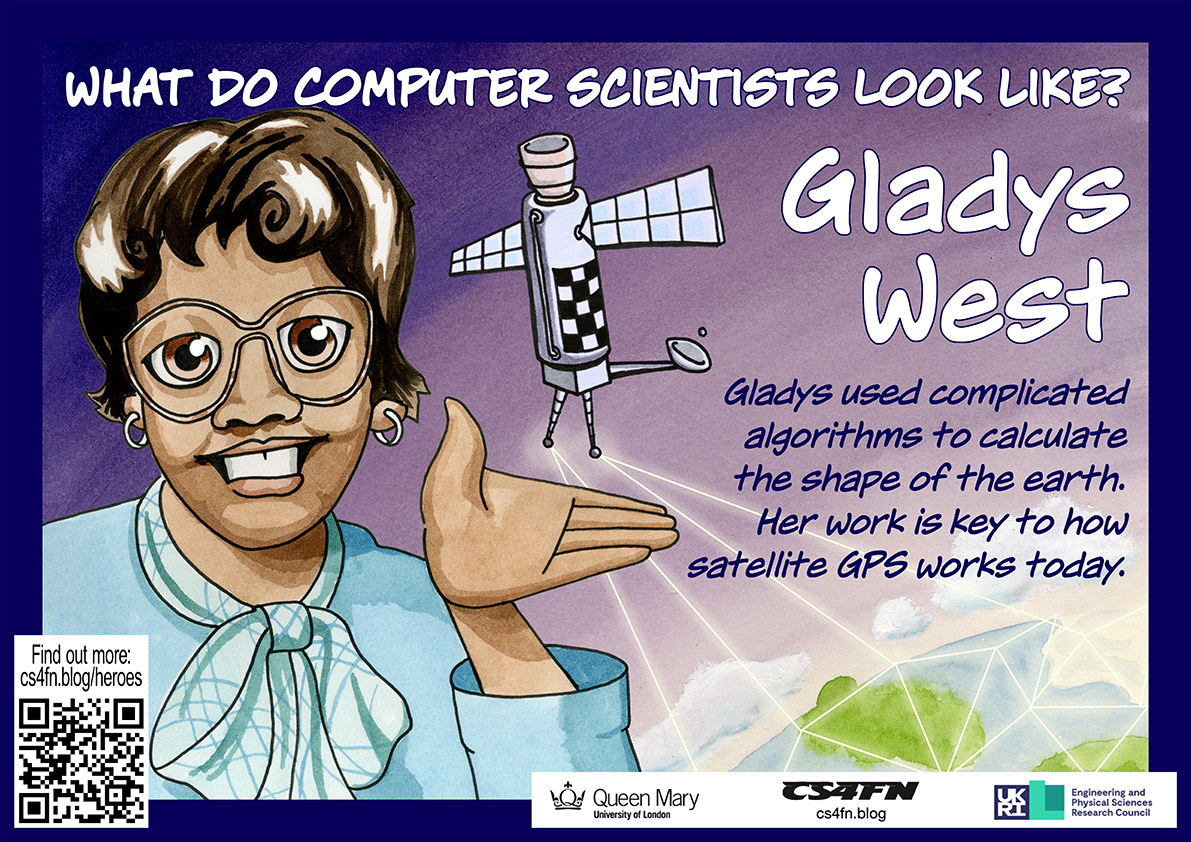
Gladys West: Where’s my satellite? Where’s my child?

Satellites are critical to much modern technology, and especially GPS. It allows our smartphones, laptops and cars to work out their exact position on the surface of the earth. This is central to all mobile technology, wearable or not, that relies on knowing where you are, from plotting a route your nearest Indian restaurant to telling you where a person you might want to meet is. Many, many people were involved in creating GPS, but it was only in Black History Month of 2017 when the critical part Gladys West played became widely known.

Work hard, go far

As a child Gladys worked with her family in the fields of their farm in rural Virginia. That wasn’t the life she wanted, so she worked hard through school, leaving as the top student. She won a scholarship to university, and then landed a job as a mathematician at a US navy base.

There she solved the maths problems behind the positioning of satellites. She worked closely with the programmers to write the code to do calculations based on her maths. Nine times out of ten the results that came back weren’t exactly right so much of her time was spent working out what was going wrong with the programs, as it was vital the results were very accurate.

Seasat and Geosat

Her work on the Seasat satellite won her a commendation. It was a revolutionary satellite designed to remotely monitor the oceans. It collected data about things like temperature, wind speed and wind direction at the sea’s surface, the heights of waves, as well as sensing data about sea ice. This kind of remote sensing has since had a massive impact on our understanding of climate change. Gladys specifically worked on the satellite’s altimeter. It was a radar-based sensor that allowed Seasat to measure its precise distance from the surface of the ocean below. She continued this work on later remote sensing satellites too, including Geosat, a later earth observation satellite.

Gladys West and Sam Smith look over data from the Global Positioning System,
which Gladys helped develop. Image: U.S. Navy, Public domain, via Wikimedia Commons US Navy, 1985,

GPS

Knowing the positions of satellites is the foundation for GPS. The way GPS works is that our mobile receivers pick up a timed signal from several different satellites. Calculating where we are can only be done if you first know very precisely where those satellites were when they sent the signal. That is what Gladys’ work provided.

GPS Watches

You can now buy, for example, buy GPS watches, allowing you to wear a watch that watches where you are. They can also be used by people with dementia, who have bad memory problems, allowing their carers to find them if they go out on their own but are then confused about where they are. They also allow parents to know where their kids are all the time. Do you think that’s a good use?

Since so much technology now relies on knowing exactly where we are, Gladys’ work has had a massive impact on all our lives.

– Paul Curzon, Queen Mary University of London

This article was originally published on the CS4FN website and a copy can also be found on page 14 of Issue 25 of CS4FN, “Technology worn out (and about)“, on wearable computing, which can be downloaded as a PDF, along with all our other free material, here: https://cs4fndownloads.wordpress.com/  

This article is also republished during Black History Month and is part of our Diversity in Computing series, celebrating the different people working in computer science (Gladys West’s page).


Subscribe to be notified whenever we publish a new post to the CS4FN blog.


This page is funded by EPSRC on research agreement EP/W033615/1.

QMUL CS4FN EPSRC logos

Love your data

A heart icon on a computer keyboard
Computer heart key image adapted from an image by congerdesign from Pixabay

How are you two doing together? You and your data, we mean. It’d be nice to have an update. Do you understand one another in that special OMG-we’ve-talked-all-night-and-now-the-sun’s-up kind of way? Is it more like you just kind of hang out together without really bothering to think about each other? Or maybe you’re just a bit baffled by the whole data scene. If your heart doesn’t beat with fervent love for the wild binary information all around you, that’s OK. In fact that’s pretty normal. It just so happens, though, that there’s a guy who wants to improve your data relationships. He’s called Andy Broomfield and he graduated as a designer from the Royal College of Art.

Andy’s worried that as we rely more and more on gadgets like mobiles and satnavs, a lot of us stop thinking about where the data comes from. “Increasingly we’re becoming dependent on the data,” says Andy. “We are just blindly fed it.” He tells the story of some councils that had to put up ‘Ignore Your Satnav’ signs after lorry drivers followed electronic directions down narrow lanes rather than believe their own eyes. He reckons that hapless users wouldn’t get quite so “data-lost” if we had a way to really connect with the pure information out there, being broadcast from satellites every second of the day. So he designed some gadgets of his own to help get our data relationships back on the rails.

Time to yourself

Large yellow road sign with black text saying Ignore Sat Nav next to an orange and white traffic cone on a foggy road at night well lit by street lighting
Ignore Sat Nav image by Dan Pope on Flickr, used under a CC BY-NC-SA 2.0 licence.

The first device lets you keep a personal time zone, and was inspired by a group of data-lovers who are sweet on measuring time. Time zones divide the globe into long tall ribbons based on longitude. Since GPS satellites can give each of us extremely accurate longitude readings all the time (the cs4fn offices are apparently at .042 degrees west), why not go even further and cut the ribbons up even more? That’s what Andy’s Longitude Time Piece does, to the point where you can uncover what Andy calls “your own local time zone”, right down to the second. Then you’d know that wherever you go, your timing would always be perfect.

Flooded with facts

Andy’s second invention is another GPS-flavoured one. Even though a lot of us can get lost really easily (even with maps and satellites to help), others love getting down and dirty with geographic data. This gadget’s good for both groups. People with a great sense of data direction can use the Geo Flood Browser to get info on the nearest river, wherever they are.

They can also share the love with others who get a bit data-lost, by leaving electronic tags around to let them know if the area gets flooded a lot. Then people nearby can use the tags using their own gadget to find out whether they ought to be stocking up on boats and snorkels before the next flood hits.

Spot a satellite

Finally Andy’s designed a gadget for your data relationships in space. Satellite spotters are kind of like backyard astronomers, except they love catching glimpses of the satellites that orbit the Earth. With Andy’s device anyone can tune into a satellite that’s above them and listen to it. You can either hear a voice tell you about the satellite, or you can actually listen into the bleeps of information coming from the satellite itself. That way, Andy says, you get “a connection to the pure data, the data that we’re dependent upon in the world.” It’s strange to think that this data is around us all the time – it’s just our phones and TVs that normally listen in, rather than us. If information is the lifeblood of our high-tech lives, the Satellite Scanner lets you listen to its heart.

Each of Andy’s devices uses information from the satellites whizzing, Cupid-like, around the Earth. The unusual thing is what they do with it – they’re not about being really useful so much as they are about actually experiencing the data that’s out there in the real world. That’s how he’s aiming to improve our data relationships. It’s like the way you can know someone for ages, but never see what they’re really about until you look from a different angle. Except this time it’s with satellites. Weird, eh? But good. A little like love.

Paul Curzon, Queen Mary University of London


Related Magazine …

This article was originally published on the CS4FN website and can also be found on pages (p4-5) of Issue 8 of the CS4FN magazine “Computer science in space” which you can download below, along with all of our other free material.


Subscribe to be notified whenever we publish a new post to the CS4FN blog.


This page is funded by EPSRC on research agreement EP/W033615/1.

QMUL CS4FN EPSRC logos