An Wang was one of the great pioneers of the early days of computing. Just as the invention of the transistor led to massive advances in circuit design and ultimately computer chips, Wang’s invention of magnetic core memory provided the parallel advance needed in memory technology.
Born in Shanghai, An went to university at Harvard in the US, studying for a PhD in electrical engineering. On completing his PhD he applied for a research job there and was set the task of designing a new, better form of memory to be used with computers. It was generally believed that the way forward was to use magnetism to store bits, but no one had worked out a way to do it. It was possible to store data by for example magnetising rings of metal. This could be done by running wires through the rings. Passing the current in one direction set a 1, and in the other a 0 based on the direction of the magnetic field created.
If all you needed was to write data it could be done. However, computers, needed to be able to repeatedly read memory too, accessing and using the data stored, possibly many times. And the trouble was, all the ways that had been thought up to use magnets were such that as soon as you tried to read the information stored in the memory, that data was destroyed in the process of reading it. You could only read stored data once and then it was gone!
An was stumped by the problem just like everyone else, then while walking and pondering the problem, he suddenly had a solution. Thinking laterally, he realised it did not matter if the data was destroyed at all. You had just read it so knew what it was when you destroyed it. You could therefore write it straight back again, immediately. No harm done!
Magnetic-core memory was born and dominated all computer memory for the next two decades, helping drive the computer revolution into the 1970s. An took out a patent for his idea. It was drafted to be very wide, covering any kind of magnetic memory. That meant even though others improved on his design, it meant he owned the idea of all magnetic based memory that followed as it all used his basic idea.
On leaving Harvard he set up his own computer company, Wang Laboratories. It was initially a struggle to make it a success. However, he sold the core-memory patent to IBM and used the money to give his company the boost that it needed to become a success. As a result he became a billionaire, the 5th richest person in the US at one point.
How data is represented is an important part of computer science. There are lots of ways numbers can be represented. Choosing a good representation can make things easier or harder to do.The Ancient Egyptians had a simple way using hieroglyphs (symbols). It is similar to Roman Numerals but simpler.
They represented numbers 1 to 9 with a hieroglyph with that number of straight lines. They arranged them into patterns (a bit like we do dots on a dice). The patterns make them easier to recognise. They used an upside down U shape for 10, two of these for 20, and so on. Their symbol for 10 also meant a “cattle hobble”. They then had a new symbols for each power of 10 up to a million. So 100 is the hieroglyph for a coil of rope.
Image by CS4FN
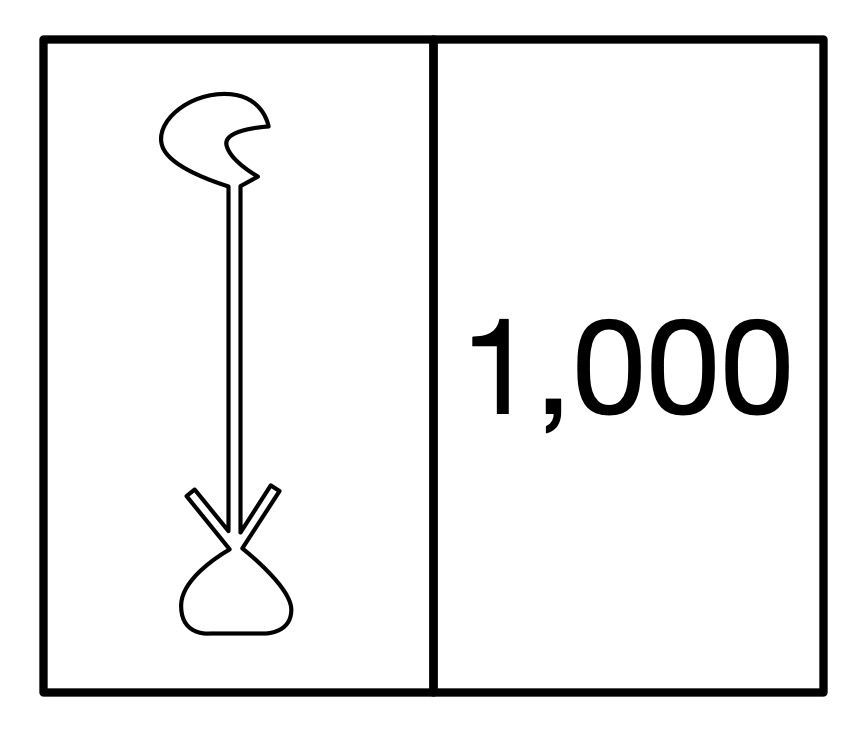
The hieroglyph for the number 1000 was a water lily.
The ancient Egyptian way to write 1000 was a hieroglyph of a waterlily. Image by CS4FN
The hieroglyph for a million, which also rather sensible meant ‘many’, was just the hieroglyph of the god Hey who was the personification of eternity.
To make a number you just combined the hieroglyph for the ones, tens, hundreds and so on.
The Ancient Egyptian number system makes it very easy to write numbers and to add and subtract numbers. Big numbers are fairly compact, though take up more space than our decimals. It is easy to convert a tally representation into this system too. More complicated things like multiplication are harder to do. Computers use binary representation because they make all the main operations easy to do using logic. Ultimately it is all about algorithms. The Egyptians had easy to follow algorithms for addition and subtraction to go with their number representation. We have devised algorithms that allow computers to do all the calculations they do as quickly as possible using a binary representation
Paul Curzon, Queen Mary University of London
To do…
Try doing some sums as an Ancient Egyptian would – without converting to our numbers. What is the algorithm for adding Egyptian numbers? Do multiplication using a repeated addition algorithm – to do 3 x 4 you 4 to zero 3 times.
Piet Mondrian is famous for his pioneering pure abstract paintings that consist of blocks of colour with thick black borders. This series of works is iconic now. You can buy designs based on them on socks, cards, bags, T-shorts, vases, and more, He also inspired one of the first creative art programs. Written by Hiroshi Kawano it created new abstract art after Mondrian.
Image by CS4FN after Mondrian inspired by Artificial Mondrian
Hiroshi Kawano was himself a pioneer of digital and algorithmic art. From 1964 he produced a series of works that were algorithmically created in that they followed instructions to produce the designs, but those designs were all different as they included random number generators – effectively turning art into a game of chance, throwing dice to see what to do next. Randomness can be brought in in this way to make decisions about the sizes, positions, shapes and colours in the images, for example.
His Artificial Mondrian series from the late 1960s were more sophisticated than this though. He first analysed Mondrian’s paintings determining how frequently each colour appeared in each position on the canvas. This gave him a statistical profile of real Mondrian works. His Artificial Mondrian program then generated new designs based on coloured rectangles but where the random number generator matched the statistical pattern of Mondrian’s creative decisions when choosing what block of colour to paint in an area. The dice were in effect loaded to match Mondrian’s choices. The resulting design was not a Mondrian, but had the same mathematical signature as one that Mondrian might paint. One example KD 29 is on display at the Tate modern this year (2025) until June 2025 as part of the Electric Dreams exhibition (you can also buy a print from the Tate Modern Shop).
Kawano’s program didn’t actually paint, it just created the designs and then Hiroshidid the actual painting following the program’s design. Colour computer printers were not available then but the program could print out the patterns of black rectangles that he then coloured in.
Whilst far simpler, his program’s approach prefigures the way modern generative AI programs that create images work. They are trained on vast numbers of images, from the web, for example. They then create a new image based on what is statistically likely to match the prompt given. Ask for a cat and you get an image that statistically matches existing images labelled as cats. Like his the generative AI programs are also combining algorithm, statistics from existing art, and randomness to create new images.
Is such algorithmic art really creative in the way an artist is creative though? It is quite easy (and fun) to create your own Mondrian inspired art, even without an AI. However, the real creativity of an artist is in coming up with such a new iconic and visually powerful art style in the first place, as Piet Mondrian did, not in just copying his style. The most famous artists are famous because they came up with a signature style. Only when the programs are doing that are they being as creative as the great human artists. Hiroshi Kawano’s art (as opposed to his program’s) perhaps does pass the test as he came up with a completely novel medium for creating art. That in itself was incredibly creative at the time.
Piet Mondrian was a pioneer of abstract art. He was a Dutch painter, famous for his minimalist abstract art. His series of grid-based paintings consisted of rectangles, some of solid primary colour, others white, separated by thick black lines. Experiment with Mondrian-inspired art like this one of mine, while also exploring different representations of images (as well as playing with maths). Mondrian‘s art is also a way to to learn to program in the image representation language SVG.
We will use this image to give you the idea, but you could use your own images using different image representations, then get others to treat them as puzzles to recreate the originals.
Vector Images
One way to represent an image in a computer is as a vector image. One way to think of what a vector representation is, is that the image is represented as a series of mathematically precise shapes. Another way to think of it is that the image is represented by a program that if followed recreates it. We will use a simple (invented) language for humans to follow to give the idea. In this language a program is a sequence of instructions to be followed in the order given. Each instruction gives a shape to draw. For example,
Rectangle(Red, 3, 6, 2, 4)
Image by CS4FN
means draw a red rectangle position 3 along and 6 down of size 2 by 4 cm.
Rectangle is the particular instruction giving the shape. The values in the brackets (Red, 3, 6, 2, 4) are arguments. They tell you the colour to fill the shape in, its position as two numbers and its size (two further numbers). The numbers refer to what is called a bounding box – an invisible box that surrounds the shape. You draw the biggest shape that fits in the box. All measurements are in cm. With rectangles the bounding box is exactly the rectangle.
In my language, the position numbers tell you where the top left corner of the bounding box is. The first number is the distance to go along the top of the page from the top left corner. The second number is the distance to go down from that point. The top left corner of the bounding box in the above instruction is 3cm along the page and 6cm down.
The final two numbers give the size of the bounding box. The first number is its width. The second number is its height. For a rectangle, if the two numbers are the same it means draw a square. If they are different it will be a rectangle (a squashed square!)
Here is a program representation of my Mondrian-inspired picture above (in my invented langigae).
Create your own copy of my picture by following these instructions on squared paper. Then create your own picture and write instructions of it for others to follow to recreate it exactly.
Mondrian in SVG
My pseudocode language above was for people to follow to create drawings on paper, but it is very close to a real industrial standard graphics drawing language called SVG. If you prefer to paint on a computer rather than paper, you can do it by writing SVG programs in a Text Editor and then viewing them in a web browser.
In SVG an instruction to draw a rectangle like my first black one in the full instructions above is just written
The instruction starts < and end />. “rect” says you want to draw a rectangle (other commands draw other shapes) and each of the arguments are given with a label saying what they mean, so x=”0″ means this rectangle has x coordinate at 0. A program to draw a Mondrian inspired picture is just a sequence of commands like this. However you need a command at the start to say this is an SVG program and give the size/position of the frame (or viewBox) the picture is in. My Mondrian-inspired picture is 16×16 so my picture has to start:
Cut and paste this program into a Text editor*. Save it with name mondrian.svg and then just open it in a browser. See below for more on text editors and browsers. The text editor sees the file as just text so shows you the program. A browser sees the file as a program which it executes so shows you the picture.
Now edit the program to explore, save it and open it again.
Try changing some of the colours and see what happens.
Change the coordinates
Once you have the idea create your own picture made of rectangles.
Shrinking and enlarging pictures
One of the advantages of vector graphics is that you can enlarge them (or shrink them) without losing any of the mathematical precision. Make your browser window bigger and your picture will get bigger but otherwise be the same. Doing a transformations like enlargement on the images is just a matter of multiplying all the numbers in the program by some scaling factor. You may have done transformations like this at School in Maths and wondered what the point was. No you know one massively important use. It is the basis of a really flexible way to create and store images. Of course images do not have to be flat, they can be 3-dimensional and the same maths allow you to manipulate 3D computer images ie CGI (computer generated imagery) in films and games.
On a Windows computer you can find notepad.exe using either the search option in the task bar (or Windows+R and start typing notepad…). On a Mac use Spotlight Search (Command+spacebar) to search for TextEdit. Save your file as an SVG using the .svg (not .txt) as the ending and then open it in a browser (on a Mac you can grab the title of the open file and drag and drop it into a web page where it will open as the drawn image).
When did women first contribute to the subject we now call Computer Science: developing useful algorithms, for example? Perhaps you would guess Ada Lovelace in the Victorian era so the mid 1800s? She corrected one of Charles Babbage’s algorithms for the computer he was trying to build. Think earlier. Two centuries or so earlier! Maria Cunitz improved an algorithm published by the astronomer Kepler and then applied it to create a work more accurate than his.
Very few women, until the 20th century were given the opportunities to take part in any kind of academic study. They did not get enough education, and even if they did were not generally welcome in the circles of mathematicians and natural philosophers. Maria, who was Polish from an educated family of doctors and scientists, was tutored and supported in becoming a polymath with an interest in lots of subjects from history to mathematics. Her husband was a doctor who also was interested in astronomy something that became a shared passion with him teaching her the extra maths she needed. They lived at the time of the 30 years war that was waged across most of Europe. It was a spat turned into a war about religion between catholic and protestant countries. In Poland, where they lived, it was not safe to be a protestant. The couple had a choice of convert or flee, so left their home taking sanctuary in a convent.
This actually gave Cunitz a chance to pursue an astronomical ambition based on the work of Johannes Kepler. Kepler was famous for his three Laws of Planetary Motion published in the early 1600s on how the planets orbit the sun. It was based on the new understanding from Copernicus that the planets rotated around the sun and so the Earth was not the centre of everything. Kepler’s work gave a new way to compute the positions of the planets,
Cunitz had a detailed understanding of Kepler’s work and of the mathematics behind it, She therefore spent her time in the convent computing tables that gave the positions of all the planets in the sky. This was based on a particular work of Kepler called the Rudolphine Tables. It was one of his great achievements stemming from his planetary laws. Such astronomical tables became vital for navigating ships at sea, as the planetary positions could be used to determine longitude. However, at the time, the main use was for astrology as casting someone’s horoscope required knowledge of the precise positions of the planets. In creating the tables, Cunitz was acting as an early human computer, following an algorithm to compute the table entries. It involved her doing a vast amount of detailed calculation.
Kepler himself spent years creating his version of the tables. When asked to hurry up and complete the work he said: “I beseech thee, my friends, do not sentence me entirely to the treadmill of mathematical computations…” He couldn’t face the role of being a human computer! And yet a whole series of women who came after him dedicated their lives to doing exactly that, each pushing forward astronomy as a result. Maria herself took on the specific task he had been reluctant to complete in working out tables of planetary positions.
Kepler had published his algorithm for computing the tables along with the tables. Following his algorithm though was time consuming and difficult, making errors likely. Maria realised it could be improved upon, making it simpler to do the calculations for the tables and making it more likely they were correct. In particular, Kepler was using logarithms for the calculations. but she realised that was not necessary. Sacrificing some accuracy in the results for the sake of the avoidance of larger errors, the version she followed was even simpler. By the use of algorithmic thinking she had avoided at least some of the chore that Kepler himself had dreaded. This is exactly the kind of thing good programmers do today, improving the algorithms behind their programs so the programs are more efficient. The result was that Maria produced a set of tables that was more accurate than Kepler’s, and in fact the most accurate set of planetary tables ever produced to that point in time. She published them privately as a book “Urania Propitia’ in 1650. Having a mastery of languages as well as maths and science, she, uniquely, wrote it in both German and Latin.
Women do not figure greatly in the early history of science and maths just because societal restrictions, prejudices and stereotypes meant few were given the chance. Those who were like Maria Cunitz, showed their contributions could be amazing. It just took the right education, opportunities, and a lot of dedication. That applies to modern computer science too, and as the modern computer scientist, Karen Spärck Jones, responsible for the algorithm behind search engines said: “Computing is too important to be left to men.”
Maria Kirch was a very early female human computer. Working in the late 1600s into the early 1700s, with her husband, she created astronomical tables that while mainly used for astrological purposes were also useful for navigation. They computed the future times of sunrises, the phases of the moon, the positions of planets, eclipses and the like for calendars. This was part of his job as astronomer for the Royal Academy of Sciences in Berlin. Along the way she became the first woman to discover a comet. When her husband died, she asked to take over his job – it was common for widows to take over a family business in this way. Having done the work with her husband she was of course eminently qualified. However, she was refused, despite having support from the great mathematician and scientist, Gottfried Leibnitz. A less qualified man was given the job instead. She did continue her work, however, doing astronomical observations and calculations almost to her death in 1720
20th century human computers (working for NASA, for example) moved on to become programmers once they were invented so capable of doing the actual calculations, However, no computers existed in the 1600s and 1700s. If they had perhaps Maria would have naturally become a programmer, too, coding the computations needed to take over her work. She certainly had the skills. Charles Babbage who also worked as a human computer a century or so later computing similar tables for shipping navigation, went on to try to create a mechanical computer to do the job for him. Mathematician Ada Lovelace, of course, then became interested in writing algorithms for it and is sometimes called “the first programmer”. In fact, Kirch’s supporter, Leibnitz, did actually design a computer. It worked using a Binary system of marble runs. However, it was really only a thought experiment and he did not, as far as we know, attempt to build it. He did create mechanical calculators including the first massed produced one. They would have helped take some of the tedium of this kind of calculation, but they were not programmable. If only he had built his computer maybe Maria Kirch would have become the first programmer…
Chatbots are now everywhere. You seemingly can’t touch a computer without one offering its opinion, or trying to help. This explosion is a result of the advent of what are called Large Language Models: sophisticated programs that in part copy the way human brains work. Chatbots have been around far longer than the current boom, though. The earliest successful one, called ELIZA, was, built in the 1960s by Joseph Weizenbaum, who with his Jewish family had fled Nazi Germany in the 1930s. Despite its simplicity ELIZA was very effective at fooling people into treating it as if it were a human.
Weizenbaum was interested in human-computer interaction, and whether it could be done in a more human-like way than just by typing rigid commands as was done at the time. In doing so he set the ball rolling for a whole new metaphor for interacting with computers, distinct from typing commands or pointing and clicking on a desktop. It raised the possibility that one day we could control computers by having conversations with them, a possibility that is now a reality.
His program, ELIZA, was named after the character in the play Pygmalion and musical My Fair Lady. That Eliza was a working class women who was taught to speak with a posh accent gradually improving her speech, and part of the idea of ELIZA was that it could gradually improve based on its interactions. At core though it was doing something very simple. It just looked for known words in the things the human typed and then output a sentence triggered by that keyword, such as a transformation of the original sentence. For example, if the person typed “I’m really unhappy”, it might respond “Why are you unhappy?”.
In this way it was just doing a more sophisticated version of the earliest “creative” writing program – Christopher Strachey’s Love Letter writing program. Strachey’s program wrote love letters by randomly picking keywords and putting them into a set of randomly chosen templates to construct a series of sentences.
The keywords that ELIZA looked for were built into its script written by the programmer and each allocated a score. It found all the keywords in the person’s sentence but used the one allocated the highest score. Words like “I” had a high score so were likely to be picked if present. A sentence starting “I am …” can be transformed into a response “Why are you …?” as in the example above. to make this seem realistic, the program needed to have a variety of different templates to provide enough variety of responses, though. To create the response, ELIZA broke down the sentence typed into component parts, picked out the useful parts of it and then built up a new response. In the above example, it would have pulled out the adjective, “happy” to use in its output with the template part “Why are you …”, for example.
If no keyword was found, so ELIZA had no rule to apply, it could fall back on a memory mechanism where it stored details of the past statements typed by the person. This allowed it to go back to an earlier thing the person had said and use that instead. It just moved on to the next highest scoring keyword from the previous sentence and built a response based on that.
ELIZA came with different “characters” that could be loaded in to it with different keywords and templates of how to respond. The reason ELIZA gained so much fame was due to its DOCTOR script. It was written to behave like a psychotherapist. In particular, it was based on the ideas of psychologist Carl Rogers who developed “person-centred therapy”, where a therapist, for example, echos back things that the person says, always asking open-ended questions (never yes/no ones) to get the patient talking. (Good job interviewers do a similar thing!) The advantage of it “pretending” to be a psychotherapist like this is that it did not need to be based on a knowledge bank of facts to seem realistic. Compare that with say a chatbot that aims to have conversations about Liverpool Football Club. To be engaging it would need to know a lot about the club (or if not appear evasive). If the person asked it “Who do you think the greatest Liverpool manager was?” then it would need to know the names of some former Liverpool managers! But then you might want to talk about strikers or specific games or … A chatbot aiming to have conversations about any topic the person comes up with convincingly needs facts about everything! That is what modern chatbots do have: provided by them sucking up and organising information from the web, for example. As a psychotherapist, DOCTOR never had to come up with answers, and echoing back the things the person said, or asking open-ended questions, was entirely natural in this context and even made ti seem as though it cared about what the people were saying.
Because Eliza did come across as being empathic in this way, the early people it was trialled on were very happy to talk to it in an uninhibited way. Weizenbaum’s secretary even asked him to leave while she chatted with it, as she was telling it things she would not have told him. That was despite the fact, or perhaps partly because, she knew she was talking to a machine. Others were convinced they were talking to a person just via a computer terminal. As a result it was suggested at the time that it might actually be used as a psychotherapist to help people with mental illness!
Weizenbaum was clear though that ELIZA was not an intelligent program, and it certainly didn’t care about anyone, even if it appeared to be. It certainly would not have passed the Turing Test, set previously by Alan Turing that if a computer was truly intelligent people talking to it would be indistinguishable from a person in its answers. Switch to any knowledge-based topic and the ELIZA DOCTOR script would flounder!
ELIZA was also the first in a less positive trend, to make chatbots female because this is seen as something that makes men more comfortable. Weizenbaum chose a female character specifically because he thought it would be more believable as a supportive, emotional female. The Greek myth Pygmalion from which the play’s name derives is about a male sculptor falling in love with a female sculpture he had carved, that then comes to life. Again this fits a trend of automaton and robots in films and reality being modelled after women simply to provide for the whims of men. Weizenbaum agreed he had made a mistake, saying that his decision to name ELIZA after a woman was wrong because it reinforces a stereotype of women. The fact that so many chatbots have then copied this mistake is unfortunate.
Because of his experiences with ELIZA he went on to become a critic of Artificial Intelligence (AI). Well before any program really could have been called intelligent (the time to do it!), he started to think about the ethics of AI use, as well as of the use of computers more generally (intelligent or not). He was particularly concerned about them taking over human tasks around decision making. He particularly worried that human values would be lost if decision making was turned into computation, beliefs perhaps partly shaped by his experiences escaping Germany where the act of genocide was turned into a brutally efficient bureaucratic machine, with human values completely lost. Ultimately, he argued that computers would be bad for society. They were created out of war and would be used by the military as a a tool for war. In this, given, for example, the way many AI programs have been shown to have built in biases, never mind the weaponisation of social media, spreading disinformation and intolerance in recent times, he was perhaps prescient.
by Paul Curzon, Queen Mary University of London
Fun to do
If you can program why not have a go at writing an ELIZA-like program yourself….or perhaps a program that runs a job interview for a particular job based on the person specification for it.
Back in its early days, after the war, women played a pivotal role in the computing industry, originally as skilled computer operators. Soon they started to be taken on as skilled computer programmers too. The myth that programming is boys thing came much later. Originally it was very much a job for women too. Dina St Johnston was one such early programmer. And she personally went on to kick-start the whole independent UK software industry!
On leaving school, interested in maths, science and machines, she went to work for a metallurgy research company, and in parallel gained a University of London external Maths degree, but eventually moved on to get a job ultimately as a programmer at an early computer manufacturer, Elliot Brothers in 1053. Early software she was involved in writing was very varied, but whatever the application she excelled. For example, she was responsible for writing an in-house payroll program, as well as code for a dedicated direction finding computer of the Royal Navy. The latter was a system that used the direction of radio signals picked up by receivers at different listening stations to work out where the source was (whether friend or foe). She also wrote software for the first computer to be used by a local government, Norwich City Council. She had the kind of attention to detail and logical thinking skills that meant she quickly became an incredibly good programmer, able to write correct code. Bugs for others to find in her code were rare. “Whereas the rest of us tested programs to find the faults, she tested them to demonstrate that they worked.”
Towards the end of the 1960s though she realised there was a big opportunity, a gap in the market, for someone with programming skills and a strong entrepreneurial spirit like her. All UK application software at the time was developed either by computer manufacturers like Elliot Brothers, by service companies selling time on their computers, by consultancy firms or in-house by people working directly for the companies who bought the computers. There was, she saw, potential to create a whole new industry: an applications software industry. What there was a need for, were independent software companies whose purpose was to write bespoke application programs that were just what a client company needed, for any who needed it, big or small. She therefore left Elliot Brothers and founded her own company (named after her maiden name), Vaughan Programming Services, to do just that.
Despite starting out working from her dining room table, it was a big success, working in a lot of different application areas over the subsequent decades, with clients including massive organisations such as the BBC, BAA, Unilever, GEC, the nuclear industry (she wrote software for what is now called Sellafield, then the first ever industrial nuclear power plant), the RAF and British Rail. Part of the reason she made it work was she was a programmer who was “happy to go round a steel works in a hard hat”, She made sure she understood her clients needs in a direct hands-on way.
Eventually, Dina’s company started to specialise in transport information systems and that is where it really made its name…with early work for example on the passenger display boards at London Bridge, but eventually to hundreds of stations, driven from a master timetable system. So next time you are in a train station or airport, looking at the departure board, think of Dina, as it was her company that wrote the code driving the forerunner of the display you are looking at.
More than that though, the whole idea of a separate software industry to create whatever programs were needed for whoever needed them, started with her. If you are a girl wondering about whether a software industry job is for you, as she showed, there is absolutely no reason why it should not be. Dina excelled, so can you.
Computer Scientists talk about “Syntactic Sugar” when talking about programming languages. But in what way might a program be made sweet? It is all about how necessary a feature of a language is, and the idea and phrase was invented by Computer Scientist and gay activist, Peter Landin. He realised it made it easier to define the meaning of languages in logic and made the definitions more elegant.
Peter Landin was involved in the development of several early and influential programming languages but also a pioneer of the use of logic to define exactly what each construct of a programming language did: the language’s “semantics”. He realised there was a fundamental difference between different parts of a language. Some were absolutely fundamental to the language. If you removed them then programs would have to be written in a different way, if at all, as a result. Remove the assignment construct that allows a program to change the value of variables, for example, and there are things your programs can no longer do, or at least it would need to do it in very different way. Remove the feature that allows someone to write i++ instead of i = i + 1, on the other hand, and nothing much changes about how you write code. They were just abbreviations for common uses of the more core things.
As another example, suppose you didn’t like using curly brackets to start and end blocks of code (perhaps having learnt to program using Pascal) then if programming in C or Java you could add a layer of syntactic sugar by replacing { by BEGIN and } by END. Your programs might look different and make you feel happier, but were not really any different.
Peter called these kinds of abbreviations “syntactic sugar”. They were superficial, just there to make the syntax (the way things were written at the level of spelling and punctuation) a little bit nicer for the programmers: sometimes more readable, sometimes just needing less typing.
It is now recognised, of course, that writing readable code is a critically important part of programming. Code has to be maintainable: easily understood and modified by others long after it was written. Well thought out syntactic sugar can help with this as well as making it easier to avoid mistakes when writing code in the first place. For example, syntactic sugar is used in many languages to give special syntax to core datatypes, where they are called sugared types. Common example include using quotes to represent a String value like “abc” or square brackets like [1,2,3] to stand for an array value, rather than writing out the underpinning function calls of the core language to construct a value.
People now sometimes deride the idea of syntactic sugar, but it had a clear use for Peter beyond just readability. He was interested in logically defining languages: saying in logic exactly what each construct meant. The syntactic sugar distinction made his life doing that easier. The fundamental things were the things that he had to define directly in logic. He had to work out exactly what the semantics of each was and how to say what they meant mathematically. Syntactic sugar could be defined just by adding rewrite rules that convert the syntactic sugar to the core syntax. i++, for example does not need to be defined logically, just converted to i = i + 1 to give its meaning. If assignment was defined in terms of logic then the abbreviation is ultimately too as a result.
Peter discussed this in relation to treating a kind of logic called the lambda calculus as the basis for a language. Lambda Calculus is a logic based on functions. Everything consists of lambda expressions, though he was looking at a version which included arithmetic too. For example, in this logic, the expression:
(λn.2+n)
defines a function that takes a value n and returns the value resulting from adding 2 to that value. Then the expression:
(λn.2+n) [5]
applies that function to the value 5, meaning 5 is substituted for the n that comes after the lambda, so it simplifies to 2+5 or further to 7. Lambda expressions, therefore, have a direct equivalence to function call in a programming language. The lambda calculus has a very simple and precise mathematical meaning too, in that any expression is just simplified by substituting values for variables as we did to get the answer 7 above. It could be used as a programming language in itself. Logicians (and theoretical computer scientists) are perfectly happy reading lambda calculus statements with λ’s, but Peter realised that as a programming language it would be unreadable to non-logicians. However with a simple change, adding syntactic sugaring, it could be made much more readable. This just involved replacing the Greek letter λ by the word “where” and altering the order and throwing in an = sign..
Now instead of writing
(λn.2+n) [5]
in his programming language you would write
2 + n where n = 5
Similarly,
(λn.3n+2) [a+1]
became
3n+2 where n = a + 1
This made the language much more readable but did not complicate the task of defining the semantics. It is still just directly equivalent to the lambda calculus so the lambda calculus can still be used to define its semantics in a simple way (just apply those transformations backwards). Overall this work showed that the group of languages called functional programming languages could be defined in terms of lambda calculus in a very elegant way.
Syntactic sugar is at one level a fairly trivial idea. However, in introducing it in the context of defining the semantics of languages it is very powerful. Take the idea to its extreme and you define a very small and elegant core to your language in logic. Then everything else is treated as syntactic sugar with minimal work to define it as rewrite rules. That makes a big difference in the ease of defining a programming language as well as encouraging simplicity in the design. It was just one of the ways that Peter Landin added elegance to Computer Science.
Designing software that is inclusive for global markets is easy. All you have to do is get an AI to translate everything in the interface into multiple languages…or perhaps to do it properly it is harder than that! Not everyone thinks like you do.
Suppose you are the successful designer of a satellite navigation system. You’ve made lots of money selling it in the UK and the US and are now ready to take on the world. You want to be inclusive. It should be natural and easy to use by all. You therefore aim to produce versions for every known language. It should be easy shouldn’t it. The basic system is fine. It can use satellite signals to work out where it is. You already have maps of everywhere based on Google Earth that you have been selling to the English Speakers. It can work out routes and gives perfectly good directions just as the user needs them – like “Turn Left 200 meters ahead”. It is already based on Unicode, the International standard for storing characters so can cope with characters from all languages. All you need to do now is get a team of translators to come up with the equivalent of the small number of phrases used by the device (which, of course will also involve switching units from eg meters to yards and the like, but that is easy for a computer) and add a language selection mechanism. You have thought of everything. Simple…
Not so simple, actually. You may need more than just translators, and you may need more than just to change the words. As linguists have discovered, for example, a third of known languages have no concept of left and right. Since language helps determine the way we think, that also suggests the people who speak those languages don’t use the concepts. “Turn right” is meaningless. It has no equivalent.
So how do such people give directions or otherwise describe positions. Well it turns out many use a method that for a long time some linguists suggested would never occur. Experiments have also shown that not only do they talk that way, but they also may think that way.
Take Tzeltal. It is spoken very widely in Mexico. A dialect of it that is spoken by about 15 000 people in the Indian community of Tenejapa has been studied closely by Stephen Levinson and Penelope Brown. It is a large area roughly covering one slope of a mountainous region. The language has no general notion of left or right. Unlike in European languages where we refer to directions based on the way we are facing (known as a relative frame of reference), in Tzeltal directions use what is known as an absolute frame of reference. It is as though they have a compass in their heads and do the equivalent of referring to North, South, East and West all the time. Rather than “The cup is to the left of the teapot”, they might say the equivalent of “The cup is North of the teapot”. How did this system arise? Well they don’t actually refer to North and South directly, but more like uphill and downhill, even when away from the mountain side: they subconsciously keep track of where uphill would be. So they are saying something more like “The cup is on the uphill side of the teapot”.
In Tenejapa they think diferently about direction too
Experiments have suggested they think differently too – Show Europeans a series of objects ordered so “pointing” to their left on a table, turn them through 180 degrees and ask them to order the same objects on the table in front of them, and they will generally put them “pointing” to their left. In experiments with native Tzeltal speakers and they tended to put them “pointing” to their right (Still pointing uphill or whatever). Similar things apply when they make gestures. Its not just the words they use that are different, it is the way they internally represent the world that differs.
So back to the drawing board with the navigation system. If you really want it to be completely natural for all, then for each language you need more than just translators. You need linguists who understand the way people think and speak about directions in each language. Then you will have to do more than just change the words the system outputs, but recode the navigation system to work the way they think. A natural system for the Tzeltal would need to keep track of the Tenejapan uphill and give directions relative to that.
It isn’t just directions of course, there are many ways that our language and cultures lead to us thinking and acting differently. Design metaphors are also used a lot in interactive systems but they only work if they fit their users’ culture. For example, things are often ordered left to right as that as the way we read…except who is we there? Not everyone reads left to right!
Writing software for International markets isn’t as easy as it seems. You have to have good knowledge not just of local languages but also differences in culture and deep differences in the way different people see the world… If you want to be an International success then you will be better at it if you work in a way that shows you understand and respect those from elsewhere.
by Paul Curzon, Queen Mary University of London, adapted from the archive















 cs4fn
cs4fn 
