Involving disabled people in the design of ICT tools and devices

by Jo Brodie, Queen Mary University of London

Image by Gerd Altmann from Pixabay (CROPPED)

The World Health Organisation currently estimates that around 1.3 billion people, or one in six people on Earth, “experience significant disability”. Designers who are creating devices and tools for people to use need to make sure that the products they develop can be used by as many people as possible, not just non-disabled people, to make sure that everyone can benefit from them.

Disabled people can face lots of barriers in the workplace including some that seem simple to address – problems using everyday ICT and other tech. While there are a lot of fantastic Assistive Technology (AT) products unfortunately not all are suitable and so are abandoned by disabled people as they don’t serve their needs.

One challenge is that some of the people who have been doing the designing might not have direct experience of disability themselves, so they are less able to think about their design from that perspective. Solutions to this can include making sure that disabled computer scientists and human-computer interaction researchers are part of the team of designers and creators in the first place, or by making it easier for other disabled people to be involved at an early stage of design. This means that their experience and ideas can contribute to making the end product more relevant and useful for them and others. Alongside this there is education and advocacy – helping more young computer scientists, technologists and human-computer interaction designers to start thinking early about how their future products can be more inclusive.

An EPSRC project “Inclusive Public Activities for information and Communication Technologies” has been looking at some practical ways to help. Run by Prof. Cathy Holloway and Dr. Maryam Bandukda and their wider team at UCL they have established a panel of disabled academics and professionals who can be ‘critical friends’ to researchers planning new projects. By co-creating a set of guidelines for researchers they are providing a useful resource but it also means that disabled voices are heard at an early stage of the design process so that projects start off in the right direction.

Prof. Holloway and Dr. Bandukda are based at the Global Disability Innovation Hub (GDI Hub) in the department of computer science at UCL. GDI Hub is a global leader in disability innovation and inclusion and has research reaching over 30 million people in 60 countries. The GDI Hub also educates people to increase awareness of disability, reduce stigma and lay the groundwork for more disability-aware designers to benefit people in the future with better products.

An activity that the UCL team ran in February 2024, for schools in East London, was a week-long inclusive ICT “Digital Skills and Technology Innovation” bootcamp. They invited students in Year 9 and above to learn about 3D printing, 3D modelling, laser cutting, AI and machine learning using Python, artificial reality and virtual reality experiences along with a chance to visit Google’s Accessible Discovery Centre and use their skills to “tackle real-world challenges”.

What are some examples of Assistive Technology?

Screen-reading software can help blind or visually impaired people by reading aloud the words on the page. This is something that can help sighted people too, your document can read itself to you while you do something else. The entire world of audio books exists for this reason! D/deaf people can take part more easily in Zoom conversations if text-to-caption software is available so they can read what’s being said. That can also help those whose hearing is fine but who speak a different language and might miss some words. Similarly you can dictate your clever ideas to your computer and device which will type it for you. This can be helpful for someone with limited use of their hands, or just someone who’d rather talk than type – this might also explain the popularity of devices and tools like Alexa or Siri.

Web designers want to (and may need to*) make their websites accessible to all their visitors. You can help too – a simple thing that you can do is to add ALT Text (alternative text) to images. If you ever share an image or gif to social media it’s really helpful to describe what’s in the image for screen readers so that people who can’t view it can still understand what you meant.

*Thanks to regulations that were adopted in 2018 the designers of public sector websites (e.g. government and local council websites where people pay their council tax or apply for benefits) must make sure that their pages meet certain accessibility standards because “​​people may not have a choice when using a public sector website or mobile app, so it’s important they work for everyone. The people who need them the most are often the people who find them hardest to use”.

More on …

Careers

Examples of computer science and disability-related jobs

Both of the jobs listed below are CLOSED and are just for your information only.

  • [CLOSED] Islington Council, Digital Accessibility Apprentice (f/t), £24k, clos 7 July
    • Are you interested in web design and do you want to help empower disabled people to become fully engaged within the community? This is a great opportunity to learn about the rapidly growing digital accessibility industry. Qualified and experienced digital accessibility specialists are sought after.
  • [CLOSED] Global Disability Innovation Hub, Communications and Engagement Officer, £32k, London / hybrid, closed 4 July 2024
    • This role is focused on maximising comms-based engagement across the GDI Hub’s portfolio, supporting GDI Hub’s growing outreach across project-based deliverables and organisational comms channels (e.g. social media, websites, content generation).


Subscribe to be notified whenever we publish a new post to the CS4FN blog.


This page is funded by EPSRC on research agreement EP/W033615/1.

QMUL CS4FN EPSRC logos

CS4FN Advent 2023 – Day 16: candy cane or walking aid: designing for everyone, human computer interaction

Welcome to Day 16 of the CS4FN Christmas Computing Advent Calendar in which we’re posting a blog post every day in December until (and including) Christmas Day.

In this series of posts we’re both celebrating the breadth of computing research but also the history of our own CS4FN project which has been inspiring young people about computing and supporting teachers in teaching the topic, in part by distributing free magazines to subscribing UK schools since 2005 (ask your teacher to subscribe for next year’s magazine).

Today’s advent calendar picture is of a candy cane which made me think both of walking aids and of support sticks that alert others that the person using it is blind or visually impaired.

Above: A white candy cane with green and red stripes. Image drawn and digitised by Jo Brodie.

We’ve worked with several people over the years to write about their research into making life easier for people with a variety of disabilities. Issue 19 of our magazine (“Touch it, feel it, hear it!”) focused on the DePiC project (‘Design Patterns for Inclusive Collaboration’) which included work on helping visually impaired sound engineers to use recording studio equipment, and you can read one of the articles (see ‘2. The Haptic Wave’) from that magazine below.

Another of our CS4FN magazines (issue 27, called “Smart Health: decisions, decisions, decisions“) was about Bayesian mathematics and its use in computing, but one of those uses might be an app with the potential to help people with arthritis get medical support when they most need it (rather than having to wait until their next appointment) – download the magazine by clicking on its title and scroll to page 16 & 17 (p9 of the 11 page PDF). Our writing also supports the (obvious) case, that disabled people must be involved at the design and decision-making stages.

1. Design for All (and by All!)

by Paul Curzon, QMUL.

Making things work for everyone

Designing for the disabled – that must be a niche market mustn’t it? Actually no. One in five people have a disability of some kind! More surprising still, the disabled have been the inspiration behind some of the biggest companies in the world. Some of the ideas out there might eventually give us all super powers.

Just because people have disabilities doesn’t mean they can’t be the designers, the innovators themselves of course. Some of the most innovative people out there were once labelled ‘disabled’. Just because you are different doesn’t mean you aren’t able!

Where do innovators get their ideas from? Often they come from people driven to support people currently disadvantaged in society. The resulting technologies then not only help those with disabilities but become the everyday objects we all rely on. A classic example is the idea of reducing the kerbs on pavements to make it possible for people in wheelchairs to get around. Turns out of course that they also help people with pushchairs, bikes, roller-blades and more. That’s not just a one-off example, some of the most famous inventors and biggest companies in the world have their roots in ‘design for all’.

Designing for more extreme situations pushes designers into thinking creatively, thinking out of the box. That’s when totally new solutions turn up. Designing for everyone is just a good idea!

2. Blind driver filches funky feely sound machine! The Haptic Wave

by Jane Waite, QMUL.

The blind musician Joey Stuckey in his recent music video commandeers then drives off in a car, and yes he is blind. How can a blind person drive a car, and what has that got to do with him trying to filch a sound machine? So maybe taking the car was just a stunt, but he really did try and run off with a novel sound machine!

As well as fronting his band Joey is an audio engineer. Unlike driving a car, which is all about seeing things around you – signs, cars pedestrians – being an audio engineer seems a natural job for someone who is blind. Its about recording, mixing and editing music, speech and sound effects. What matters most is that the person has a good ear. Having the right skills could easily lead to a job in the music industry, in TV and films, or even in the games industry. It’s also an important job. Getting the sound right is critical to the experience of a film or game. You don’t want to be struggling to hear mumbling actors, or the sound effects to drown out a key piece of information in a game.

Mixing desks

Once upon a time Audio engineers used massive physical mixing desks. That was largely ok for a blind person as they could remember the positions of the controls as well as feel the buttons. As the digital age has marched on, mixing desks have been replaced by Digital Audio Workstations. They are computer programs and the trouble is that despite being about sound, they are based on vision.

When we learn about sound we are shown pictures of wavy lines: sound waves. Later, we might use an oscilloscope or music editing software, and see how, if we make a louder sound, the curves get taller on the screen: the amplitude. We get to hear the sound and see the sound wave at the same time. That’s this multimodal idea again, two ways of sensing the same thing.

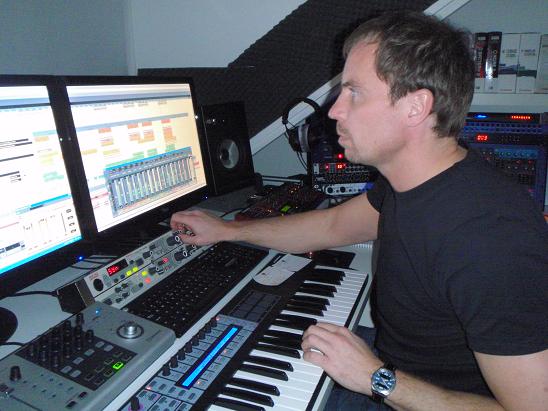
Peter Francken in his home studio. Image from Wikimedia Commons. Image licensed under the Creative Commons Attribution-Share Alike 3.0 Unported, 2.5 Generic, 2.0 Generic and 1.0 Generic license.

Mixing desks

Once upon a time Audio engineers used massive physical mixing desks. That was largely ok for a blind person as they could remember the positions of the controls as well as feel the buttons. As the digital age has marched on, mixing desks have been replaced by Digital Audio Workstations. They are computer programs and the trouble is that despite being about sound, they are based on vision.

When we learn about sound we are shown pictures of wavy lines: sound waves. Later, we might use an oscilloscope or music editing software, and see how, if we make a louder sound, the curves get taller on the screen: the amplitude. We get to hear the sound and see the sound wave at the same time. That’s this multimodal idea again, two ways of sensing the same thing.

But hang on, sound isn’t really a load of wavy lines curling out of our mouths, and shooting away from guitar strings. Sound is energy and atoms pushing up against each other. But we think of sound as a sound wave to help us understand it. That’s what a computer scientist calls abstraction: representing things in a simpler way. Sound waves are an abstraction, a simplified representation, of sound itself.

The representation of sound as sound waves, as a waveform, helps us work with sound, and with Digital Audio Workstations it is now essential for audio engineers. The engineer works with lines, colors, blinks and particularly sound waves on a screen as they listen to the sound. They can see the peaks and troughs of the waves, helping them find the quiet, loud and distinctive moments of a piece of music, at a glance, for example. That’s great as it makes the job much easier…but only if you are fully sighted. It makes things impossible for someone with a visual impairment. You can’t see the sound waves on the editing screen. Touching a screen tells you nothing. Even though it’s ultimately about sounds, doing your job has been made as hard as driving a car. This is rather sad given computers have the potential to make many kinds of work much more accessible to all.

Feel the sound

The DePIC research team, a group of people from Goldsmiths, Queen Mary University of London and Bath Universities with a mission to solve problems that involve the senses, decided to fix it. They’ve created the first ever plug-in software for professional Digital Audio Workstations that makes peak level meters completely accessible. It uses ‘sonification’: it turns those visual signals in to sound! decided to fix the problems. They brought together Computer Scientists, Design experts, and Cognitive Scientists and most importantly of all audio engineers who have visual impairments. Working together over two years in workshops sharing their experiences and ideas, developing, testing and improving prototypes to figure out how a visually impaired engineer might ‘see’ soundwaves. They created the HapticWave, a device that enables a user to feel rather than see a sound wave.

The HapticWave

The HapticWave combines novel hardware and software to provide a new interface to the traditional Digital Audio Workstation. The hardware includes a long wooden box with a plastic slider. As you move the slider right and left you move forward and backwards through the music. On the slider there is a small brass button, called a fader. Tiny embossed stripes on the side of the slider let you know where the fader is relative to the middle and ends of the slider. It moves up and down in sync with the height of the sound wave. So in a quiet moment the fader returns to the centre of the slider. When the music is loud, the fader zooms to the top of the handle. As you slide forwards and backwards through the music the little button shoots up and down, up and down tracing the waveform. You feel its volume changing. Music with heavy banging beats has your brass button zooming up and down, so mind your fingers!

So back to the title of the article! Joey trialled the HapticWave at a research workshop and rather wanted to take one home, he loved it so much he jokingly tried distracting the researchers to get one. But he didn’t get away with it – maybe his getaway car just wasn’t fast enough!


Find out more about disabled computer scientists, and how computer science and human interaction design can help people with disabilities.

3. An audio illusion, and an audiovisual one

This one-minute video illustrates an interesting audio illusion, demonstrating that our brains are ‘always using prior information to make sense of new information coming in’.

The McGurk Effect

You can read more about the McGurk effect on page 7 of issue 5 of the CS4FN magazine, called ‘The Perception Deception‘.


Advert for our Advent calendar
Click the tree to visit our CS4FN Christmas Computing Advent Calendar

EPSRC supports this blog through research grant EP/W033615/1.