CS4FN Advent 2023 – Day 4: Ice skate: detecting neutrinos at the South Pole, figure-skating motion capture, Frozen and a puzzle

This post is part of the CS4FN Christmas Computing Advent Calendar and we are publishing a small post every day, about computer science, until Christmas Day. This is the fourth post and the picture on today’s door was an ice skate, so today’s theme is Very Cold.
A bright red ice skate. Image drawn and digitised by Jo Brodie.

1. IceCube

The South Pole is home to the IceCube Neutrino Observatory. It’s made of thousands of light (optical) sensors which are stretch down deep into the ice, to almost 3,000 metres (3 kilometres) below the surface – this protects the sensors from background radiation so that they can focus on detecting neutrinos, which are teeny tiny particles.

Building the IceCube Observatory – photo from Wikipedia. Ice Cube drilling setup at drill camp, December 2009. This file is licensed under the Creative Commons Attribution-Share Alike 3.0 Unported license.

Neutrinos can be created by nuclear reactions (lots are produced by our Sun) and radioactive decay. They can whizz through matter harmlessly without notice (as the name suggests, they are pretty neutral), but if a neutrino happens to interact with a water molecule in the ice then they can produce a charged particle which can produce enough radiation of its own for its signal to be picked up by the sensors. The IceCube observatory has even detected neutrinos that may have arrived from outside of our solar system.

These light signals are converted to digital form and the data stored safely on a computer hard drive, then later collected by ship (!) and are taken away for further analysis. (Although there is satellite internet connection on Antarctica the broadband speeds are about 20 times slower than we’d have in our own homes!).

2. Computer science can help skaters leap to new heights

Researchers at the University of Delaware use motion capture to map a figure skater’s movements to a virtual version in a computer (remember the digital twins mentioned on Day Two of the advent calendar). When a skater is struggling with a particular jump the scientists can use mathematical models to run that jump as a computer simulation and see how fast the skater should be spinning, or the best position for their arms. They can then share that information with the skater to help them make the leap successfully (and land safely again afterwards!).

Video from the University of Delaware via their YouTube channel.

3. Frozen defrosted

by Peter McOwan, Queen Mary University of London

The hit musical movie Frozen is a mix of hit show tunes, 3D graphics effects, a moral message and loads of topics from computer science. The lead character Princess Elsa creates artificial life in the form of snowman, Olaf, the comedy sidekick, uses nanotechnology based ice dress making, employs 3D printing to build an ice palace by simply stamping her foot and singing and must be complimented for the outstanding mathematical feat of including the word ‘fractal’ in a hit song. In the USA the success of the movie has been used to get girls interested in coding by creating new ice skating routines for the film’s princesses, and devising their own frozen fractals…and let it go, let it go, … you all know the rest.

4. Today’s puzzle

This is a kriss-kross puzzle and you solve it by fitting the words into the grid. Answer tomorrow. You need to pay attention to the letter length as that tells you which word can fit where. There is only one four-letter, six-letter and eight-letter word so these can fit only in the grid where there are four, six or eight spaces, so put them in first. There are two three-letter words and two three-letter spaces – the words could be fitted into either space, but only one of them is correct (where the letters of other words will match up). Strategy! Logical thinking! (Also Maths [counting] and English [spelling]).


EPSRC supports this blog through research grant EP/W033615/1.

CS4FN Advent 2023 – Day 2: Pairs: mittens, gloves, pair programming, magic tricks

Welcome to the second ‘window’ of the CS4FN Christmas Computing Advent Calendar. The picture on the ‘box’ was a pair of mittens, so today’s focus is on pairs, and a little bit on gloves. Sadly no pear trees though.

A pair of cyan blue Christmas mittens with a black and white snowflake pattern on each. Image drawn and digitised by Jo Brodie.

1. i-pickpocket

In this article, by a pair (ho ho) of computer scientists (Jane Waite and Paul Curzon), you can find out how paired devices can be used to steal money from people, picking pockets at a distance.

A web card for the i-pickpocket article on the CS4FN website.
Click to read the article

2. Gestural gloves

Working with scientists musician Imogen Heap developed Mi.Mu gloves, a wearable musical instrument in glove form which lets the wearer map hand movements (gestures) to a particular musical effect (pairing a gesture to an action). The gloves contain sensors which can measure the speed and position of the hands and can send this information wirelessly to a controlling computer which can then trigger the sound effect that the musician previously mapped to that hand movement.

You can watch Imogen talk about and demo the gloves here and in the video below, which also looks at the ways in which the gloves might help disabled people to make music.

Further reading

The glove that controls your cords… (a CS4FN article by Jane Waite)

3. Pair programming

‘Pair programming’ involves having two people working together on one computer to write and edit code. One person is the ‘Driver’ who writes the code and explains what it’s going to do, the other person is the ‘Navigator’ who observes and makes suggestions and corrections. This is a way to bring two different perspectives on the same code, which is being edited, reviewed and debugged in real-time. Importantly, the two people in the mini-team switch roles regularly. Pair programming is widely used in industry and increasingly being used in the classroom – it can really help people who are learning about computers and how to program to talk through what they’re doing with someone else (you may have done this yourself in class). However, some people prefer to work by themselves and pair programming takes up two people’s time instead of one, but it can also produce better code with fewer bugs. It does need good communication between the two people working on the task though (and good communication is a very important skill in computer science!).

Here’s a short video from Code.org which shows how it’s done.

4. Digital Twins

A digital twin is a computer-based model that represents a real, physical thing (such as a jet engine or car component) and which behaves as closely as possible to the real thing. Taking information from the real-world version and applying it to the digital twin lets engineers and designers test things virtually, to see how the physical object would behave under different circumstances and to help spot (and fix) problems.

5. A magic trick: two cards make a pair

You will need

  • some playing cards
  • your hands (no mittens)
  • another pair of mitten-free hands to do the trick on

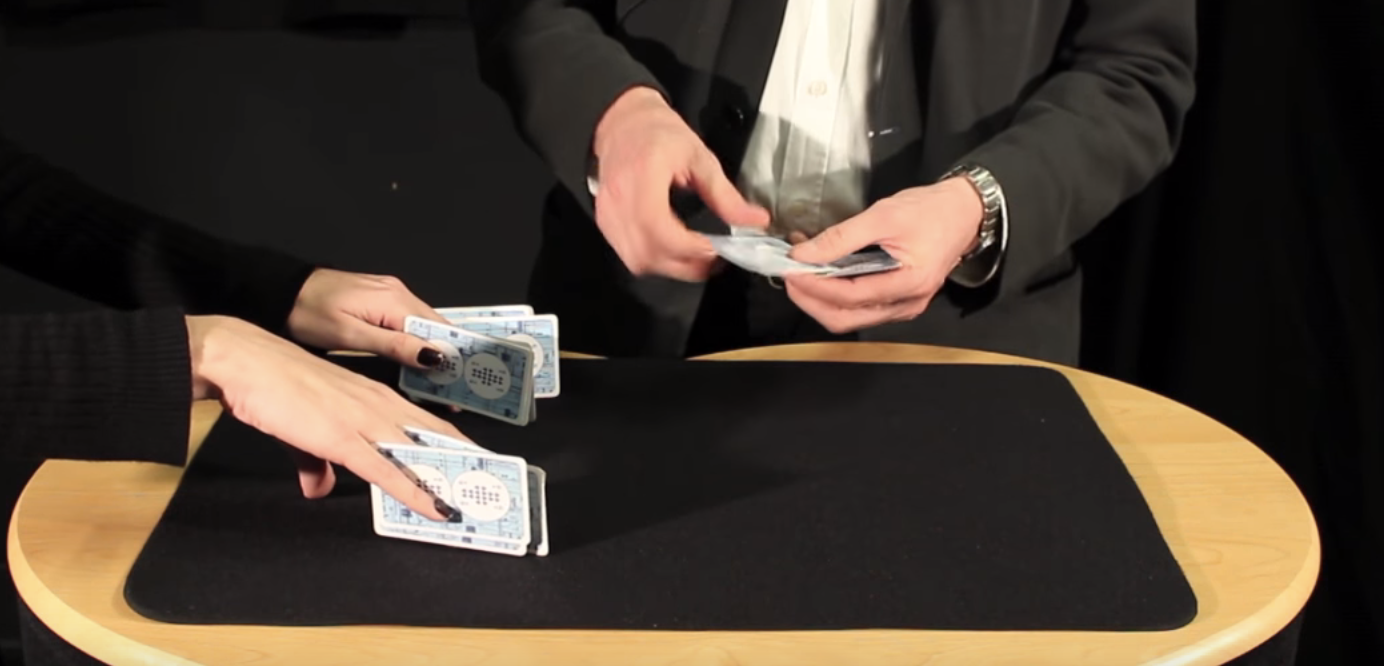
Find a pack of cards and take out 15 (doesn’t matter which ones, pick a card, any card, but 15 of them). Ask someone to put their hands on a table but with their fingers spread as if they’re playing a piano. You are going to do a magic trick that involves slotting pairs of cards between their fingers (10 fingers gives 8 spaces). As you do this you’ll ask them to say with you “two cards make a pair”. Take the first pair and slot them between the first space on their left hand (between their little finger and their ring finger) and both of you say “two cards make a pair”.

The magician puts pairs of cards between the assistant’s fingers. Image credit CS4FN / Teaching London Computing (from the Invisible Palming video linked below)

Repeat with another pair of cards between ring finger and middle finger (“two cards make a pair”) and twice again between middle and index, and between index and thumb – saying “two cards make a pair” each time you do. You’ve now got 8 cards in 4 pairs in their left hand.

Repeat the same process on their right hand saying “two cards make a pair” each time (but you only have 7 cards left so can only make 3 pairs). There’s one card left over which can go between their index finger and thumb.

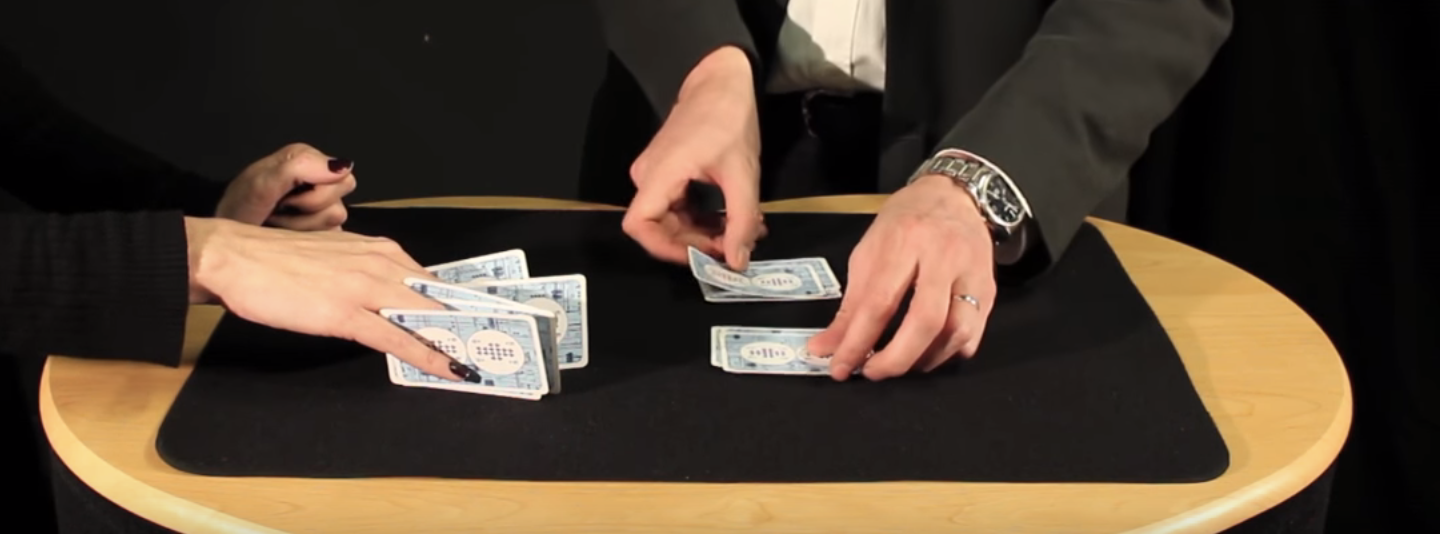
The magician removes the cards and puts them into two piles. Image credit CS4FN / Teaching London Computing (from the Invisible Palming video linked below)

Then you’ll take back each pair of cards and lay them on the table, separating them into two different piles – each time saying “two cards make a pair”. Again you’ll have one left over. Ask the person to choose which pile it goes on. You, the magician, are going to magically move the card from the pile they’ve chosen to the other pile, but you’re going to do it invisibly by hiding the card in your palm (‘palming’). To find out how to do the trick, and how this can be used to think about the ways in which “self-working” magic tricks are like algorithms have a look at the full instructions and video below.

6. Something to print and colour in

Did you work out yesterday’s colour-in puzzle from Elaine Huen? Here’s the answer.

Christmas colour-in puzzle

Today’s puzzle is in keeping with the post’s twins and pairs theme. It’s a symmetrical pixel puzzle so we’ve given you one half and you can use mirror symmetry to fill in the remaining side. This is an example of data compression – you only need half of the numbers to be able to complete all of it. Some squares have a number that tells you the colour to colour in that square. Look up the colours in the key. Other squares have no number. Work out what colour they are by symmetry.

So, for example the colour look up key tells you that 1 is Red and 2 is Orange, so if a row said 11111222 that means colour each of the five ‘1’ pixels in red and each of the three ‘2’ pixels orange. There are another 8 blank pixels to fill in at the end of the row and these need to mirror the first part of the row (22211111), so you’d need to colour the first three in orange and the remaining five in red. Click here to download the puzzle as a printable PDF. Solution tomorrow…


The creation of this post was funded by UKRI, through grant EP/K040251/2 held by Professor Ursula Martin, and forms part of a broader project on the development and impact of computing.


Advert for our Advent calendar
Click the tree to visit our CS4FN Christmas Computing Advent Calendar

EPSRC supports this blog through research grant EP/W033615/1.

CS4FN Advent 2023 – Day 1: Woolly jumpers, knitting and coding

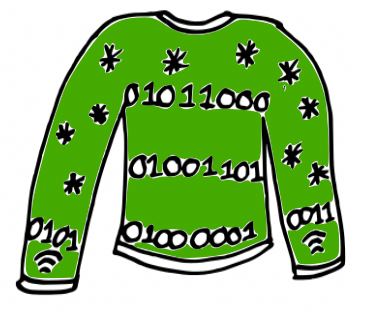
Welcome to the first ‘window’ of the CS4FN Christmas Computing Advent Calendar. The picture on the ‘box’ was a woolly jumper with a message in binary, three letters on the jumper itself and another letter split across the arms. Can you work out what it says? (Answer at the end).

Come back tomorrow for the next instalment in our Advent series.

Cartoon of a green woolly Christmas jumper with some knitted stars and a message “knitted” in binary (zeroes and ones). Also the symbol for wifi on the cuffs. Image drawn and digitised by Jo Brodie.

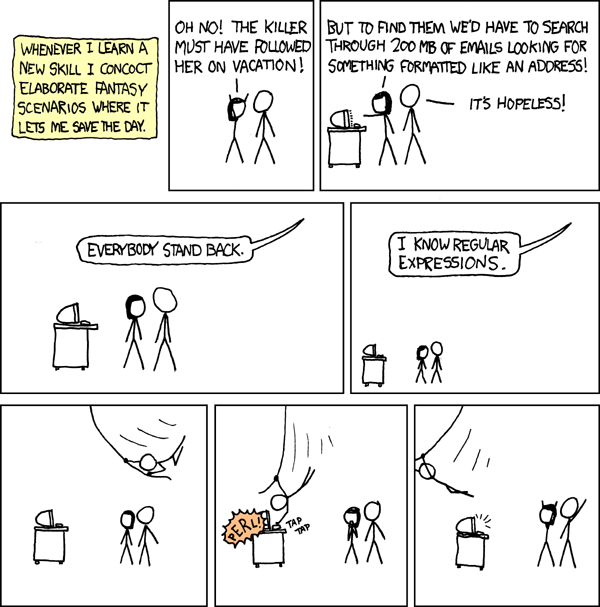
Wrap up warmly with our first festive CS4FN article, from Karen Shoop, which is all about the links between knitting patterns and computer code. Find out about regular expressions in her article: Knitters and Coders: separated at birth?

Click above to read Karen’s article

Image credit: Regular Expressions by xkcd

Further reading

Dickens Knitting in Code – this CS4FN article, by Paul Curzon, is about Charles Dickens’ book A Tale of Two Cities. One of the characters, Madame Defarge, takes coding to the next level by encoding hidden information into her knitting, something known as steganography (basically hiding information in plain sight). We have some more information on the history of steganography and how it is used in computing in this CS4FN article: Hiding in Elizabethan binary.

In Craft, Culture, and Code Shuchi Grover also considers the links between coding and knitting, writing that “few non-programming activities have such a close parallels to coding as knitting/crocheting” (see section 4 in particular, which talks about syntax, decomposition, subroutines, debugging and algorithms).

Something to print and colour in

This is a Christmas-themed thing you might enjoy eating, if you’ve any room left of course. Puzzle solution tomorrow. This was designed by Elaine Huen.

Solving the Christmas jumper code

The jumper’s binary reads

01011000

01001101

01000001

01010011

What four letters might be being spelled out here? Each binary number represents one letter and you can find out what each letter is by looking at this binary-to-letters translator. Have a go at working out the word using the translator (but the answer is at the end of this post).

Keep scrolling

Bit more

The Christmas jumper says… XMAS


Advert for our Advent calendar
Click the tree to visit our CS4FN Christmas Computing Advent Calendar

EPSRC supports this blog through research grant EP/W033615/1.
Blade: the emotional computer.

Zabir talking to Blade who is reacting
Image taken from video by Zabir for QMUL

Communicating with computers is clunky to say the least – we even have to go to IT classes to learn how to talk to them. It would be so much easier if they went to school to learn how to talk to us. If computers are to communicate more naturally with us we need to understand more about how humans interact with each other.

The most obvious ways that we communicate is through speech – we talk, we listen – but actually our communication is far more subtle than that. People pick up lots of information about our emotions and what we really mean from the expressions and the tone of our voice – not from what we actually say. Zabir, a student at Queen Mary was interested in this so decided to experiment with these ideas for his final year project. He used a kit called Lego Mindstorm that makes it really easy to build simple robots. The clever stuff comes in because, once built, Mindstorm creations can be programmed with behaviour. The result was Blade.

In the video above you can see Blade the robot respond. Video by Zabir for QMUL

Blade, named after the Wesley Snipes film, was a robotic face capable of expressing emotion and responding to the tone of the user’s voice. Shout at Blade and he would look sad. Talk softly and, even though he could not understand a word of what you said he would start to appear happy again. Why? Because your tone says what you really mean whatever the words – that’s why parents talk gobbledegook softly to babies to calm them.

Blade was programmed using a neural network, a computer science model of the way the brain works, so he had a brain similar to ours in some simple ways. Blade learnt how to express emotions very much like children learn – by tuning the connections (his neurons) based on his experience. Zabir spent a lot of time shouting and talking softly to Blade, teaching him what the tone of his voice meant and so how to react. Blade’s behaviour wasn’t directly programmed, it was the ability to learn that was programmed.

Eventually we had to take Blade apart which was surprisingly sad. He really did seem to be more than a bunch of lego bricks. Something about his very human like expressions pulled on our emotions: the same trick that cartoonists pull with the big eyes of characters they want us to love.

Zabir went on to work in the city for Merchant Bank, JP Morgan

– Paul Curzon, Queen Mary University of London


⬇️ This article has also been published in two CS4FN magazines – first published on p13 in Issue 4, Computer Science and BioLife, and then again on page 18 in Issue 26 (Peter McOwan: Serious Fun), our magazine celebrating the life and research of Peter McOwan (who co-founded CS4FN with Paul Curzon and researched facial recognition). There’s also a copy on the original CS4FN website. You can download free PDF copies of both magazines below, and any of our other magazines and booklets from our CS4FN Downloads site.

This video below Why faces are special from Queen Mary University of London asks the question “How does our brain recognise faces? Could robots do the same thing?”.

Peter McOwan’s research into face recognition informed the production of this short film. Designed to be accessible to a wide audience, the film was selected as one of the finalist 55 from 1450 films submitted to the festival CERN CineGlobe film festival 2012.

Related activities

We have some fun paper-based activities you can do at home or in the classroom.

  1. The Emotion Machine Activity
  2. Create-A-Face Activity
  3. Program A Pumpkin

See more details for each activity below.

1. The Emotion Machine Activity

From our Teaching London Computing website. Find out about programs and sequences and how how high-level language is translated into low-level machine instructions.

2. Create-A-Face Activity

Fom our Teaching London Computing website. Get people in your class (or at home if you have a big family) to make a giant robotic face that responds to commands.

3. Program A Pumpkin

Especially for Hallowe’en, a slightly spookier, pumpkin-ier version of The Emotion Machine above.


Related Magazine …


Related Magazine …


EPSRC supports this blog through research grant EP/W033615/1.

3D models in motion

by Paul Curzon, Queen Mary University of London
based on a 2016 talk by Lourdes Agapito

The cave paintings in Lascaux, France are early examples of human culture from 15,000 BC. There are images of running animals and even primitive stop motion sequences – a single animal painted over and over as it moves. Even then, humans were intrigued with the idea of capturing the world in motion! Computer scientist Lourdes Agapito is also captivated by moving images. She is investigating whether it’s possible to create algorithms that allow machines to make sense of the moving world around them just like we do. Over the last 10 years her team have shown, rather spectacularly, that the answer is yes.

People have been working on this problem for years, not least because the techniques are behind the amazing realism of CGI characters in blockbuster movies. When we see the world, somehow our brain turns all that information about colour and intensity of light hitting our eyes into a scene we make sense of – we can pick out different objects and tell which are in front and which behind, for example. In the 1950s psychophysics* researcher Gunnar Johansson showed how our brain does this. He dressed people in black with lightbulbs fastened around their bodies. He then filmed them walking, cycling, doing press-ups, climbing a ladder, all in the dark … with only the lightbulbs visible. He found that people watching the films could still tell exactly what they were seeing, despite the limited information. They could even tell apart two people dancing together, including who was in front and who behind. This showed that we can reconstruct 3D objects from even the most limited of 2D information when it involves motion. We can keep track of a knee, and see it as the same point as it moves around. It also shows that we use lots of ‘prior’ information – knowledge of how the world works – to fill in the gaps.

Shortcuts

Film-makers already create 3D versions of actors, but they use shortcuts. The first shortcut makes it easier to track specific points on an actor over time. You fix highly visible stickers (equivalent to Johansson’s light bulbs) all over the actor. These give the algorithms clear points to track. This is a bit of a pain for the actors, though. It also could never be used to make sense of random YouTube or CCTV footage, or whatever a robot is looking at.

The second shortcut is to surround the action with cameras so it’s seen from lots of angles. That makes it easier to track motion in 3D space, by linking up the points. Again this is fine for a movie set, but in other situations it’s impractical.

A third shortcut is to create a computer model of an object in advance. If you are going to be filming an elephant, then hand-create a 3D model of a generic elephant first, giving the algorithms something to match. Need to track a banana? Then create a model of a banana instead. This is fine when you have time to create models for anything you might want your computer to spot.

It is all possible for big budget film studios, if a bit inconvenient, but it’s totally impractical anywhere else.

No Shortcuts

Lourdes took on a bigger challenge than the film industry. She decided to do it without the shortcuts: to create moving 3D models from single cameras, applied to any traditional 2D footage, with no pre-placed stickers or fixed models created in advance.

When she started, a dozen or so years ago, making any progress looked incredibly difficult. Now she has largely solved the problem. Her team’s algorithms are even close to doing it all in real time, so making sense of the world as it happens, just like us. They are able to make really accurate models down to details like the subtle movements of their face as a person talks and changes expression.

There are several secrets to their success, but Johansson’s revelation that we rely on prior knowledge is key. One of the first breakthroughs was to come up with ways that individual points in the scene like the tip of a person’s nose could be tracked from one frame of video to the next. Doing this well relies on making good use of prior information about the world. For example, points on a surface are usually well-behaved in that they move together. That can be used to guess where a point might be in the next frame, given where others are.

The next challenge was to reconstruct all the pixels rather than just a few easy to identify points like the tip of a nose. This takes more processing power but can be done by lots of processors working on different parts of the problem. Key to this was to take account of the smoothness of objects. Essentially a virtual fine 3D mesh is stuck over the object – like a mask over a face – and the mesh is tracked. You can then even stick new stuff on top of the mesh so they move together – adding a moustache, or painting the face with a flag, for example, in a way that changes naturally in the video as the face moves.

Once this could all be done, if slowly, the challenge was to increase the speed and accuracy. Using the right prior information was again what mattered. For example, rather than assuming points have constant brightness, taking account of the fact that brightness changes, especially on flexible things like mouths, mattered. Other innovations were to split off the effect of colour from light and shade.

There is lots more to do, but already the moving 3D models created from YouTube videos are very realistic, and being processed almost as they happen. This opens up amazing opportunities for robots; augmented reality that mixes reality with the virtual world; games, telemedicine; security applications, and lots more. It’s all been done a little at a time, taking an impossible-seeming problem and instead of tackling it all at once, solving simpler versions. All the small improvements, combined with using the right information about how the world works, have built over the years into something really special.

*psychophysics is the “subfield of psychology devoted to the study of physical stimuli and their interaction with sensory systems.”


This article was first published on the original CS4FN website and a copy appears on pages 14 and 15 in “The women are (still) here”, the 23rd issue of the CS4FN magazine. You can download a free PDF copy by clicking on the magazine’s cover below, along with all of our free material.

Another article on 3D research is Making sense of squishiness – 3D modelling the natural world (21 November 2022).


Related Magazine …


EPSRC supports this blog through research grant EP/W033615/1.
Keeping secrets on the Internet – encryption keeps your data safe

How do modern codes keep your data safe online? Ben Stephenson of the University of Calgary explains

When Alan Turing was breaking codes, the world was a pretty dangerous place. Turing’s work helped uncover secrets about air raids, submarine locations and desert attacks. Daily life might be safer now, but there are still threats out there. You’ve probably heard about the dangers that lurk online – scams, identity theft, viruses and malware, among many others. Shady characters want to know your secrets, and we need ways of keeping them safe and secure to make the Internet work. How is it possible that a network with so many threats can also be used to securely communicate a credit card number, allowing you to buy everything from songs to holidays online?

The relay race on the Internet

When data travels over the Internet it is passed from computer to computer, much like a baton is passed from runner to runner in a relay race. In a relay race, you know who the other runners will be. The runners train together as a team, and they trust each other. On the Internet, you really don’t know much about the computers that will be handling your data. Some may be owned by companies that you trust, but others may be owned by companies you have never heard of. Would you trust your credit card number to a company that you didn’t even know existed?

The way we solve this problem is by using encryption to disguise the data with a code. Encrypting data makes it meaningless to others, so it is safe to transfer the data over the Internet. You can think of it as though each message is locked in a chest with a combination lock. If you don’t have the combination you can’t read the message. While any computer between us and the merchant can still view or copy what we send, they won’t be able to gain access to our credit card number because it is hidden by the encryption. But the company receiving the data still needs to decrypt it – open the lock. How can we give them a way to do it without risking the whole secret? If we have to send them the code a spy might intercept it and take a copy.

Keys that work one way only

The solution to our problem is to use a relatively new encryption technique known as public key cryptography. (It’s actually about 40 years old, but as the history of encryption goes back thousands of years, a technique that’s only as old as Victoria Beckham counts as new!) With this technique the code used to encrypt the message (lock the chest) is not able to decrypt it (unlock it). Similarly, the key used to decrypt the message is not able to encrypt it. This may sound a little bit odd. Most of the time when we think about locking a physical object like a door, we use the same key to lock it that we will use to unlock it later. Encryption techniques have also followed this pattern for centuries, with the same key used to encrypt and decrypt the data. However, we don’t always use the same key for encrypting (locking) and decrypting (unlocking) doors. Some doors can be locked by simply closing them, and then they are later unlocked with a key, access card, or numeric code. Trying to shut the door a second time won’t open it, and similarly, using the key or access code a second time won’t shut it. With our chest, the person we want to communicate with can send us a lock only they know the code for. We can encrypt by snapping the lock shut, but we don’t know the code to open it. Only the person who sent it can do that.

We can use a similar concept to secure electronic communications. Anyone that wants to communicate something securely creates two keys. The keys will be selected so that one can only be used for encryption (the lock), and the other can only be used for decryption (the code that opens it). The encryption key will be made publicly available – anyone that asks for it can have one of our locks. However, the decryption key will remain private, which means we don’t tell anyone the code to our lock. We will have our own public encryption key and private decryption key, and the merchant will have their own set of keys too. We use one of their locks, not ours, to send a message to them.

Turning a code into real stuff

So how do we use this technique to buy stuff? Let’s say you want to buy a book. You begin by requesting the merchant’s encryption key. The merchant is happy to give it to you since the encryption key isn’t a secret. Once you have it, you use it to encrypt your credit card number. Then you send the encrypted version of your credit card number to the merchant. Other computers listening in might know the merchant’s public encryption key, but this key won’t help them decrypt your credit card number. To do that they would need the private decryption key, which is only known to the merchant. Once your encrypted credit card number arrives at the merchant, they use the private key to decrypt it, and then charge you for the goods that you are purchasing. The merchant can then securely send a confirmation back to you by encrypting it with your public encryption key. A few days later your book turns up in the post.

This encryption technique is used many millions of times every day. You have probably used it yourself without knowing it – it is built into web browsers. You may not imagine that there are huts full of codebreakers out there, like Alan Turing seventy years ago, trying to crack the codes in your browser. But hackers do try to break in. Keeping your browsing secure is a constant battle, and vulnerabilities have to be patched up quickly once they’re discovered. You might not have to worry about air raids, but codes still play a big role behind the scenes in your daily life.

Ben Stephenson, University of Calgary

More on …


Related Magazine …


Subscribe to be notified whenever we publish a new post to the CS4FN blog.


This blog is funded by EPSRC on research agreement EP/W033615/1.

QMUL CS4FN EPSRC logos

Digital lollipop: no calories, just electronics!

Can a computer create a taste in your mouth? Imagine scrolling down a list of flavours and then savouring your sweet choice from a digital lollipop. Not keen on that flavour, just click and choose a different one, and another and another. No calories, just the taste.

Nimesha Ranasinghe, a researcher at the National University of Singapore is developing a Tongue Mounted Digital Taste Interface, or digital lollipop. It sends tiny electrical signals to the very tip of your tongue to stimulate your taste buds and create a virtual taste!

One of UNESCO’s 2014 ’10 best innovations in the world’, the prototype doesn’t quite look like a lollipop (yet). There are two parts to this sweet sensation, the wearable tongue interface and the control system. The bit you put in your mouth, the tongue interface, has two small silver electrodes. You touch them to the tip of your tongue to get the taste hit. The control system creates a tiny electrical current and a minuscule temperature change, creating a taste as it activates your taste buds.

The prototype lollipop can create sour, salty, bitter, sweet, minty, and spicy sensations but it’s not just a bit of food fun. What if you had to avoid sweet foods or had a limited sense of taste? Perhaps the lollipop can help people with food addictions, just like the e-cigarette has helped those trying to give up smoking?
Perhaps the lollipop can help people with food addictions

But eating is more than just a flavour on your tongue, it is a multi-modal experience, you see the red of a ripe strawberry, hear the crunch of a carrot, feel sticky salt on chippy fingers, smell the Sunday roast, anticipate that satisfied snooze afterwards. How might computers simulate all that? Does it start with a digital lollipop? We will have to wait and see, hear, taste, smell, touch and feel!

Taste over the Internet

The Singapore team are exploring how to send tastes over the Internet. They have suggested rules to send ‘taste’ messages between computers, called the Taste Over Internet Protocol, including a messaging format called TasteXML They’ve also outlined the design for a mobile phone with electrodes to deliver the flavour! Sweet or salt anyone?

Jane Waite, Queen Mary University of London

More on


Related Magazine …


EPSRC supports this blog through research grant EP/W033615/1.
Solving problems you care about

by Patricia Charlton and Stefan Poslad, Queen Mary University of London Queen Mary University of London

The best technology helps people solve real problems. To be a creative innovator you need not only to be able to create a solution that works but also to spot a need in the first place and be able to come up with creative solutions. Over the summer a group of sixth formers on internships at Queen Mary had a go at doing this. Ultimately their aim was to build something from a programmable gadget such as a BBC micro:bit or Raspberry Pi. They therefore had to learn about the different possible gadgets they could use, how to program them and how to control the on-board sensors available. They were then given the design challenge of creating a device to solve a community problem.

Hearing the bus is here

Tai Kirby wanted to help visually impaired people. He knew that it’s hard for someone with poor sight to tell when a bus is arriving. In busy cities like London this problem is even worse as buses for different destinations often arrive at once. His solution was a prototype that announces when a specific bus is arriving, letting the person know which was which. He wrote it in Python and it used a Raspberry pi linked to low energy Bluetooth devices.

The fun spell

Filsan Hassan decided to find a fun way to help young kids learn to spell. She created a gadget that associated different sounds with different letters of the alphabet, turning spelling words into a fun, musical experience. It needed two micro:bits and a screen communicating with each other using a radio link. One micro:bit controlled the screen while the other ran the main program that allowed children to choose a word, play a linked game and spell the word using a scrolling alphabet program she created. A big problem was how to make sure the combination of gadgets had a stable power supply. This needed a special circuit to get enough power to the screen without frying the micro:bit and sadly we lost some micro:bits along the way: all part of the fun!

Remote robot

Jesus Esquivel Roman developed a small remote-controlled robot using a buggy kit. There are lots of applications for this kind of thing, from games to mine-clearing robots. The big challenge he had to overcome was how to do the navigation using a compass sensor. The problem was that the batteries and motor interfered with the calibration of the compass. He also designed a mechanism that used the accelerometer of a second micro:bit allowing the vehicle to be controlled by tilting the remote control.

Memory for patterns

Finally, Venet Kukran was interested in helping people improve their memory and thinking skills. He invented a pattern memory game using a BBC micro:bit and implemented in micropython. The game generates patterns that the player has to match and then replicate to score points. The program generates new patterns each time so every game is different. The more you play the more complex the patterns you have to remember become.

As they found you have to be very creative to be an innovator, both to come up with real issues that need a solution, but also to overcome the problems you are bound to encounter in your solutions


Related Magazine …


EPSRC supports this blog through research grant EP/W033615/1.

How to get a head in robotics

[This article includes a free papercraft activity with a paper robot that expresses ’emotions’.]

If humans are ever to get to like and live with robots we need to understand each other. One of the ways that people let others know how they are feeling is through the expressions on their faces. A smile or a frown on someone’s face tells us something about how they are feeling and how they are likely to react. We can also tell something of a person’s emotions from their eyes and eyebrows. Some scientists think it might be possible for robots to express feelings this way too, but understanding how a robot can usefully express its ‘emotions’ (what its internal computer program is processing and planning to do next), is still in its infancy. A group of researchers in Poland, at Wroclaw University of Technology, have come up with a clever new design for a robot head that could help a computer show its feelings. It’s inspired by the Teenage Mutant Ninja Turtles cartoon and movie series.

The real Emys orbicularis (European pond turtle) Image by Luis Fernández García, CC BY-SA 3.0 from Wikimedia

The real Teenage Mutant Ninja Turtle

Their turtle-inspired robotic head called EMYS, which stands for EMotive headY System is cleverly also the name of a European pond turtle, Emys orbicularis. Taking his inspiration from cartoons, the project’s principal ‘head’ designer Jan Kedzierski created a mechanical marvel that can convey a whole range of different emotions by tilting a pair of movable discs, one of which contains highly flexible eyes and eyebrows.

Eye see

The CS4FN/LIREC emotional Robot face with three discs like EMYS
Image by CS4FN

The lower disc imitates the movements of the human lower jaw, while the upper disk can mimic raising the eyebrows and wrinkling the forehead. There are eyelids and eyebrows linked to each eye. Have a look at your face in the mirror, then try pulling some expressions like sadness and anger. In particular look at what these do to your eyes. In the robot, as in humans, the eyelids can move to cover the eye. This helps in the expression of emotions like sadness or anger, as your mirror experiment probably showed.

Pop eye

But then things get freaky and fun. Following the best traditions of cartoons, when EMYS is ‘surprised’ the robot’s eyes can shoot out to a distance of more than 10 centimetres! This well-known ‘eyes out on stalks’ cartoon technique, which deliberately over-exaggerates how people’s eyes widen and stare when they are startled, is something we instinctively understand even though our eyes don’t really do this. It makes use of the fact that cartoons take the real world to extremes, and audiences understand and are entertained by this sort of comical exaggeration. In fact it’s been shown that people are faster at recognising cartoons of people than recognising the un- exaggerated original.

High tech head builder

The mechanical internals of EMYS consist of lightweight aluminium, while the covering external elements, such as the eyes and discs, are made of lightweight plastic using 3D rapid prototyping technology. This technology allows a design on the computer to be ‘printed’ in plastic in three dimensions. The design in the computer is first converted into a stack of thin slices. Each slice of the design, from the bottom up, individually oozes out of a printer and on to the slice underneath, so layer-by-layer the design in the computer becomes a plastic reality, ready for use.

Facing the future

A ‘gesture generator’ computer program controls the way the head behaves. Expressions like ‘sad’ and ‘surprised’ are broken down into a series of simple commands to the high-speed motors, moving the various lightweight parts of the face. In this way EMYS can behave in an amazingly fluid way – its eyes can ‘blink’, its neck can turn to follow a person’s face or look around. EMYS can even shake or nod its head. EMYS is being used on the Polish group’s social robot FLASH (FLexible Autonomous Social Helper) and also with other robot bodies as part of the LIREC project (www.lirec.eu [archived]). This big project explores the question of how robot companions could interact with humans, and helps find ways for robots to usefully show their ‘emotions’.

Do try this at home

You can program a paper version of an EMYS-like robot. Download and follow the instructions on the Emotion Machine in the printable version below and build your own EMYS.

Print, cut out and make your own emotional robot. The strips of paper at the top (‘sliders’) containing the expressions and letters are slotted into the grooves on the robot’s face and happy or annoyed faces can created by moving the sliders.

By selecting a series of different commands in the Emotion Engine boxes, the expression on EMYS’s face will change. How many different expressions can you create? What are the instructions you need to send to the face for a particular expression? What emotion do you think that expression looks like – how would you name it? What would you expect the robot to be ‘feeling’ if it pulled that face?

Emotion Machine Sheet - a robot head with strips to thread foreyes, eyebrow and mouth
Click on the image to go to the download page. Activity sheet by CS4FN

Go further

Why not draw your own sliders, with different eye shapes, mouth shapes and so on. Explore and experiment! That’s what computer scientists do.

– Paul Curzon, Queen Mary University of London


More on …

Related Magazines

This article was originally published on CS4FN (Computer Science For Fun) and on page 7 of issue 13 of the CS4FN magazine. You can download a free PDF copy of that issue, as well as all of our other free magazines and booklets. The emotion machine appeared in this issue of CS4FN magazine (issue 13).

QMUL CS4FN EPSrC logos


The machines can translate now

(From the cs4fn archive)

“The Machines can translate now…
…I SAID ‘THE MACHINES CAN TRANSLATE NOW'”

The stereotype of the Englishman abroad when confronted by someone who doesn’t speak English is just to say it louder. That could soon be a thing of the past as portable devices start to gain speech recognition skills and as the machines get better at translating between languages.

Traditionally machine translation has involved professional human linguists manually writing lots of translation rules for the machines to follow. Recently there have been great advances in what is known as statistical machine translation where the machine learns the translations rules automatically. It does this using a parallel corpus*: just lots of pairs of sentences; one a sentence in the original language, the other its translation. Parallel corpora* are extracted from multi-lingual news sources like the BBC web site where professional human translators have done the translations.

Let’s look at an example translation of the accompanying original arabic:

Machine Translation: Baghdad 1-1 (AFP) – The official Iraqi news agency reported that the Chinese vice-president of the Revolutionary Command Council in Iraq, Izzat Ibrahim, met today in Baghdad, chairman of the Saudi Export Development Center, Abdel Rahman al-Zamil.

Human Translation: Baghdad 1-1 (AFP) – Iraq’s official news agency reported that the Deputy Chairman of the Iraqi Revolutionary Command Council, Izzet Ibrahim, today met with Abdul Rahman al-Zamil, Managing Director of the Saudi Center for Export Development.

This example shows a sentence from an Arabic newspaper then its translation by the Queen Mary University of London’s statistical machine translator, and finally a translation by a professional human translator. The statistical translation does allow a reader to get a rough understanding of the original Arabic sentence. There are several mistakes, though.

The Rosetta Stone
Rosetta Stone: with translation of the same text in three languages. Image © Hans Hillewaert CC BY-SA 4.0 from wikimedia.

Mistranslating the “Managing Director” of the export development center as its “chairman” is perhaps not too much of a problem. Mistranslating “Deputy Chairman” as the “Chinese vice-president” is very bad. That kind of mistranslation could easily lead to grave insults!

That reminds me of the point in ‘The Hitch-Hiker’s Guide to the Galaxy’ where Arthur Dent’s words “I seem to be having tremendous difficulty with my lifestyle,” slip down a wormhole in space-time to be overheard by the Vl’hurg commander across a conference table. Unfortunately this was understood in the Vl’hurg tongue as the most dreadful insult imaginable, resulting in them waging terrible war for centuries…

For now the human’s are still the best translators but the machines are learning from them fast!

– Paul Curzon, Queen Mary University of London

*corpus and corpora = singular and plural for the word used to describe a collection of written texts, literally a ‘body’ of text. A corpus might be all the works written by one author, corpora might be works of several authors.

More on …

QMUL CS4FN EPSrC logos