Artificial Intelligence software has shown that two different Manchester United gaffers got it right believing that kit and stadium seat colours matter if the team are going to win.
It is 1996. Sir Alex Ferguson’s Manchester United are doing the unthinkable. At half time they are losing 3-0 to lowly Southampton. Then the team return to the pitch for the second half and they’ve changed their kit. No longer are they wearing their normal grey away kit but are in blue and white, and their performance improves (if not enough to claw back such a big lead). The match becomes infamous for that kit change: the genius gaffer blaming the team’s poor performance on their kit seemed silly to most. Just play better football if you want to win!
Jump forward to 2021, and Manchester United Manager Ole Gunnar Solskjaer, who originally joined United as a player in that same year, 1996, tells a press conference that the club are changing the stadium seats to improve the team’s performance!
Is this all a repeat of previously successful mind games to deflect from poor performances? Or superstition, dressed up as canny management, perhaps. Actually, no. Both managers were following the science.
Ferguson wasn’t just following some gut instinct, he had been employing a vision scientist, Professor Gail Stephenson, who had been brought in to the club to help improve the players’ visual awareness, getting them to exercise the muscles in their eyes not just their legs! She had pointed out to Ferguson that the grey kit would make it harder for the players to pick each other out quickly. The Southampton match was presumably the final straw that gave him the excuse to follow her advice.
She was very definitely right, and modern vision Artificial Intelligence technology agrees with her! Colours do make it easier or harder to notice things and slows decision making in a way that matters on the pitch. 25 years ago the problem was grey kit merging into the grey background of the crowd. Now it is that red shirts merge into the background of an empty stadium of red seats.
It is all about how our brain processes the visual world and the saliency of objects. Saliency is just how much an object stands out and that depends on how our brain processes information. Objects are much easier to pick out if they have high contrast, for example, like a red shirt on a black background.
Peter McOwan and Hamit Soyel at Queen Mary combined vision research and computer science, creating an Artificial Intelligence (AI) that sees like humans in the sense that it predicts what will and won’t stand out to us, doing it in real time (see DragonflyAI: I see what you see). They used the program to analyse images from that infamous football match before and after the kit change and showed that the AI agreed with Gail Stephenson and Alex Ferguson. The players really were much easier for their team mates to see in the second half (see the DragonflyAI version of the scenes below).
Details matter and science can help teams that want to win in all sorts of ways. That includes computer scientists and Artificial Intelligence. So if you want an edge over the opposition, hire an AI to analyse the stadium scene at your next match. Changing the colour of the seats really could make a difference.
What use is a computer that sees like a human? Can’t computers do better than us? Well, such a computer can predict what we will and will not see, and there is BIG money to be gained doing that!
The Hong Kong Skyline. Image public domain from wikipedia
Peter McOwan’s team at Queen Mary spent 10 years doing exploratory research understanding the way our brains really see the world, exploring illusions, inventing games to test the ideas, and creating a computer model to test their understanding. Ultimately they created a program that sees like a human. But what practical use is a program that mirrors the oddities of the way we see the world? Surely a computer can do better than us: noticing all the things that we miss or misunderstand? Well, for starters the research opens up exciting possibilities for new applications, especially for marketeers.
The Hong Kong Skyline as seen by DragonflyAI (processed public domain image from wikipedia))
A fruitful avenue to emerge is ‘visual analytics’ software: applications that predict what humans will and will not notice. Our world is full of competing demands, overloading us with information. All around us things vie to catch our attention, whether a shop window display, a road sign warning of danger or an advertising poster.
Imagine, a shop has a big new promotion designed to entice people in, but no more people enter than normal. No-one notices the display. Their attention is elsewhere. Another company runs a web ad campaign, but it has no effect, as people’s eyes are pulled elsewhere on the screen. A third company pays to have its products appear in a blockbuster film. Again, a waste of money. In surveys afterwards no one knew the products had been there. A town council puts up a new warning sign at a dangerous bend in the road but the crashes continue. These are examples of situations where predicting where people look in advance allows you to get it right. In the past this was either done by long and expensive user testing, perhaps using software that tracks where people look, or by having teams of ‘experts’ discuss what they think will happen. What if a program made the predictions in a fraction of a second beforehand? What if you could tweak things repeatedly until your important messages could not be missed.
Queen Mary’s Hamit Soyel turned the research models into a program called DragonflyAI, which does exactly that. The program analyses all kinds of imagery in real-time and predicts the places where people’s attention will, and will not, be drawn. It works whether the content is moving or not, and whether it is in the real world, completely virtual, or both. This then gives marketeers the power to predict and so influence human attention to see the things they want. The software quickly caught the attention of big, global companies like NBC Universal, GSK and Jaywing who now use the technology.
Smart speakers like Alexa might know a joke or two, but machines aren’t very good at sounding funny yet. Comedians, on the other hand, are experts at sounding both funny and exciting, even when they’ve told the same joke hundreds of times. Maybe speech technology could learn a thing or two from comedians… that is what my research is about.
To test a joke, stand-up comedians tell it to lots of different audiences and see how they react. If no-one laughs, they might change the words of the joke or the way they tell it. If we can learn how they make their adjustments, maybe technology can borrow their tricks. How much do comedians change as they write a new show? Does a comedian say the same joke the same way at every performance? The first step is to find out.
The first step is to record lots of the same live show of a comedian and find the parts that match from one show to the next. It was much faster to write a program to find the same jokes in different shows than finding them all myself. My code goes through all the words and sounds a comedian said in one live show and looks for matching chunks in their other shows. Words need to be in the same exact order to be a match: “Why did the chicken cross the road” is very different to “Why did the road cross the chicken”! The process of looking through a sequence to find a match is called “subsequence matching,” because you’re looking through one sequence (the whole set of words and sounds in a show) for a smaller sequence (the “sub” in “subsequence”). If a subsequence (little sequence) is found in lots of shows, it means the comedian says that joke the same way at every show. Subsequence matching is a brand new way to study comedy and other types of speech that are repeated, like school lessons or a favourite campfire story.
By comparing how comedians told the same jokes in lots of different shows, I found patterns in the way they told them. Although comedy can sound very improvised, a big chunk of comedians’ speech (around 40%) was exactly the same in different shows. Sounds like “ummm” and “errr” might seem like mistakes but these hesitation sounds were part of some matches, so we know that they weren’t actually mistakes. Maybe “umm”s help comedians sound like they’re making up their jokes on the spot.
Varying how long pauses are could be an important part of making speech sound lively, too. A comedian told a joke more slowly and evenly when they were recorded on their own than when they had an audience. Comedians work very hard to prepare their jokes so they are funny to lots of different people. Computers might, therefore, be able to borrow the way comedians test their jokes and change them. For example, one comedian kept only five of their original jokes in their final show! New jokes were added little by little around the old jokes, rather than being added in big chunks.
If you want to run an experiment at home, try recording yourself telling the same joke to a few different people. How much practice did you need before you could say the joke all at once? What did you change, including little sounds like “umm”? What didn’t you change? How did the person you were telling the joke to, change how you told it?
There’s lots more to learn from comedians and actors, like whether they change their voice and movement to keep different people’s attention. This research is the first to use computers to study how performers repeat and adjust what they say, but hopefully just the beginning.
The 1983 hit song by the Police “Every breath you take” is up there in the top 100 pop songs ever. It seems a charming love song, and some couples even treat it as “their” song, playing it for the first dance at their wedding. Some of the lyrics “Every single day…I’ll be watching you”, if in a loving relationship, might be a good and positive thing. As the Police’s Sting has said though, the lyrics are about exactly the opposite.
It is being sung by a man obsessed with his former girlfriend. He is singing a threat. It is about sinister stalking and surveillance, about nasty use of power by a deranged man over a woman who once loved him.
Reclaim the Internet
Back in 1983 the web barely existed, but what the song describes is now happening every day, with online stalking, trolling and other abuse a big problem. What starts in the virtual world, we now see, spills over into the real world, too. This is one reason why we need to Reclaim the Internet and why online privacy is important. We must all call out online abuse. Prosecuters need to treat it seriously. Social media companies need to find ways to prevent abusive content being posted and remove it quickly. They need easier ways for us to protect our privacy and to know it is protected. They need to be up for the challenge.
Reclaim your privacy
The lyrics fit our lives in another way too, about another kind of relationship. When we click those unreadable consent forms for using a new app, we give permission for the technology companies that we love so much to watch over us. They follow the song as a matter of course (in a loving way they say). They are “watching you” as you keep your gadgets on you “every single day”; “every night you stay” online you are recorded along with anyone you are with online; they watch “every move you make” (physically with location aware devices and virtually, noting every click, every site visited, everything you are interested in they know from your searches); “every step you take” (recorded by your fitness tracker); and “every breath you take” (by your healthcare app); “every bond you break” is logged (as you unlike friends and as you leave websites never to go back); “every game you play” (of course), “every word you say” (everything you type is noted, but the likes of Alexa also record every sound too, shipping your words off to be processed by distant company servers). They really are watching you.
Let’s hope the companies really are loving and don’t turn out to have an ugly underside, changing personality and becoming abusive once they have us snared. Remember their actual aim is to make money for shareholders. They don’t actually love us back. We may fall out of love with them, but by then they will already know everything about us, and will still be watching every move we make. Perhaps you should not be giving up your privacy so freely.
You belong to me?
We probably can’t break our love affair, anyway. We’ve already sold them our souls (for nothing much at all). As the lyrics say: “You belong to me.”
In May 2017, British Airways IT system had a meltdown. Someone mistakenly disconnected the power for a short time. The fleet was grounded and tens of thousands of passengers were left stranded for days. One suggestion was it was due to “cost cutting”. Willie Walsh, the Head of BAs parent group came out fighting, defending the idea of doing things cheaply: “You talk about it as cost-cutting, I talk about it as efficiency … The idea that you would accept inefficiency – I just don’t get it.”
The fact that many business leaders don’t get it may be exactly the problem. Doing things more cheaply than the competition is an idea that is at the core of capitalism. It is often taken as a given. But, is it really always true?
The best and only the best
Computer Scientists actually use the word “efficiency” in a subtly different way. When they talk about a program or algorithm being efficient, they do not mean that it was cheap. They mean it did exactly the same job, but faster or with less memory. This is one of the really creative areas of computer science. Can you come up with an algorithm that does exactly the same thing but in fewer steps?
The business version of efficiency would be fine if it had the same underlying principle. Do it cheaper, yes, but only if it really does do exactly the same thing in all circumstances. To company bosses, however, the trade-off can be seen as cut costs at all costs. ‘Waste’ is anything you think no one will notice. You accept the 1 in a million chance of it not working at all – just as with the BA meltdown, taking the hit (or rather your passengers do) because you think you will make more money overall as a result.
Even with algorithms we do accept inefficiency though. Engineering is often about trade-offs. Sometimes, you will accept inefficiency in the use of memory because it gives a way to get a faster algorithm. Sometimes you accept a slower algorithm because it is just easier to be certain your code really does do the right thing. Sometimes slow is good enough. Sometimes it is the bigger picture that matters. The fastest algorithms for searching for information require sorted data. That is why a dictionary is in alphabetical order. Finding the word you want is quick – you don’t have to check every word in turn to find the one you want. However, if you were only ever going to look for a single thing in a data source, you wouldn’t sort it first. You would use an inefficient search algorithm, because overall that would be faster than sorting and then searching once. Efficiency can be subtle.
Inefficiently safe
There are actually even more powerful reasons for demanding inefficiency. In the area of safety-critical systems, computer scientists build in redundancy on purpose. When the consequences of the computer not working is that lives are lost, we definitely want inefficiency, as long as it is well-engineered inefficiency. Dependability and safety matter more.
An algorithm is a mathematical object. If it works, it always works. However, programs operate in the real world where things can go wrong. Hardware fails, clocks drift, criminals hack, technicians do silly things by accident (like unplug the power). Systems that matter have to be resilient. They have to cope with the unexpected, with the never before seen. One way that is achieved is by designing in inefficiency. For example, if your single computer goes down, you are stuffed. If instead two computers run the same program in parallel, then if one goes down the other can take over. Ahh, but how do you know which is wrong when they disagree? Be even more ‘inefficient’ and have three computers ‘wastefully’ doing the same thing. Then, if one goes rogue, the three vote on who is at fault … cut them out and carry on.
Computer Scientists have developed many ingenious ways to build in guarantees of safety even when the world around conspires against us. To a cost cutter these extras may seem like inefficiency but the inefficiency is there, apparently unused most of the time, waiting to step in and avert disaster, waiting to save lives. Personally, I would accept inefficiency. I hope, for the sake of saved lives, society would too.
To catch criminals, whether old-fashioned ones or cybercriminals, you need to understand the criminal mind. You need to understand how they think and how they work. Jeremiah Onaolapo, as a PhD student at UCL, has been creating cyber-honeypots and finding out how cybercriminals really operate.
Hackers share user ids and passwords they have stolen on both open and hidden websites. But what do the criminals who then access those accounts do once inside? If your webmail account has been compromised what will happen. Will you even know you’ve been hacked?
Looking after passwords is important. If someone hacks your account there is probably lots of information you wouldn’t want criminals to find: information they could use whether other passwords, bank or shopping site details, personal images, information, links to cloud sites with yet more information about you … By making use of the information they discover, they could cause havoc to your life. But what are cybercriminals most interested in? Do they use hacked accounts just to send spam of phish for more details? Do they search for bank details, launch attacks elsewhere, … or something completely different we aren’t aware of? How do you even start to study the behaviour of criminals without becoming one? Jeremiah knew how hard it is for researchers to study issues like this, so he created some tools to help that others can use too.
His system is based on the honeypot. Police and spies have used various forms of honeytraps, stings and baits successfully for a long time, and the idea is used in computing security too. The idea is that you set up a situation so attractive to people that they can’t resist falling in to your trap. Jeremiah’s involved a set of webmail accounts. His accounts aren’t just normal accounts though. They are all fake, and have software built in that secretly records the activities of anyone accessing the account. They save any emails drafted or sent, details of the messages read, the locations the hackers come in from, and so on. The accounts look real, however. They are full of real messages, sent and received, but with all personal details, such as names and passwords or bank account details, fictionalised. New emails sent from them aren’t actually delivered but just go in to a sinkhole server – where they are stored for further study. This means that no successful criminal activity can happen from the accounts. A lot can be learnt about any cybercriminals though!
Experiments
In an early experiment Jeremiah created 100 such accounts and then leaked their passwords and user ids in different ways: on hacker forums and web pages. Over 7 months hundreds of hackers fell into the trap, accessing the accounts from 29 countries. What emerged were four main kinds of behaviours, not necessarily distinct: the curious, the spammers the gold diggers and the hijackers. The curious seemed to just be intrigued to be in someone else’s account, but didn’t obviously do anything bad once there. Spammers just used the account to send vast amounts of spam email. Gold diggers went looking for more information like bank accounts or other account details. They were after personal information they could make money from, and also tried to use each account as a stepping stone to others. Finally hijackers took over accounts, changing the passwords so the owner couldn’t get in themselves.
The accounts were used for all sorts of purposes including attempts to use them to buy credit card details and in one extreme case to attempt to blackmail someone else.
Similar behaviours were seen in a second experiment where the account details were only released on hidden websites used by hackers to share account details. In only a month this set of accounts were accessed over a thousand times from more than 50 countries. As might be expected these people were more sophisticated in what they did. More were careful to ensure they cleared up any evidence they had been there (not realising everything was separately being recorded). They wanted to be able to keep using the accounts for as long as possible, so tried to make sure noone knew the account was compromised. They also seemed to be better at covering the tracks of where they actually were.
The Good Samaritan
Not everyone seemed to be there to do bad things though. One person stood out. They seemed to be entering the accounts to warn people – sending messages from inside the account to everyone in the contact list telling them that the account had been hacked. That would presumably also mean those contacted people would alert the real account owner. There are still good samaritans!
Take care
One thing this shows is how important it is to look after your account details: ensure no one knows or can guess them. Don’t enter details in a web page unless you are really sure you are in a secure place both physically and virtually and never tell them to anyone else. Also change your passwords regularly so if they are compromised without you realising, they quickly become useless.
Of course, if you are a cybercriminal, you had better beware as that tempting account might just be a honeypot and you might just be the rat in the maze.
Paul Curzon, Queen Mary University of London based on a talk by Jeremiah Onaolapo, UCL
Victorian engineer Charles Babbage designed, though never built the first mechanical computer. The first computers had actually existed for a long time before he had his idea, though. The British superiority at sea and ultimately the Empire was already dependent on them. They were used to calculate books of numbers that British sailors relied on to navigate the globe. The original meaning of the word computer was actually a person who did these calculations. The first computers were humans.
Babbage became interested in the idea of creating a mechanical computer in part because of computing work he did himself, calculating accurate versions of numbers needed for a special book: ‘The Nautical Almanac’. It was a book of astronomical tables, the result of an idea of Astronomer Royal, Nevil Maskelyne. It was the earliest way ships had to reliably work out their longitudinal (i.e., east-west) position at sea. Without them, to cross the Atlantic, you just set off and kept going until you hit land, just as Columbus did. The Nautical Almanac gave a way to work out how far west you were all the time.
Maskelyne’s idea was based on the fact that the angle from the moon’ to a person on the Earth and back to a star was the same at the same time wherever that person was looking from (as long as they could see both the star and moon at once). This angle was called the lunar distance.
The lunar distance could be used to work out where you were because as time passed its value changed but in a predictable way based on Newton’s Laws of motion applied to the planets. For a given place, Greenwich say, you could calculate what that lunar distance would be for different stars at any time in the future. This is essentially what the Almanac recorded.
Now the time changes as you move East or West: Dawn gradually arrives later the further west you go, for example, as the Earth rotates the sun comes into view at different times round the planet). That is why we have different time zones. The time in the USA is hours behind that in Britain which itself is behind that in China. Now suppose you know your local time, which you can check regularly from the position of the sun or moon, and you know the lunar distance. You can look up in the Almanac the time in Greenwich that the lunar distance occurs and that gives you the current time in Greenwich. The greater the difference that time is to your local time, the further West (or East) you are. It is because Greenwich was used as the fixed point for working the lunar distances out, that we now use Greenwich Mean Time as UK time. The time in Greenwich was the one that mattered!
This was all wonderful. Sailors just had to take astronomical readings, do some fairly simple calculations and a look up in the Almanac to work out where they were. However, there was a big snag. it relied on all those numbers in the tables having been accurately calculated in advance. That took some serious computing power. Maskelyne therefore employed teams of human ‘computers’ across the country, paying them to do the calculations for him. These men and women were the first industrial computers.
Before pocket calculators were invented in the 1970s the easiest way to do calculations whether big multiplication, division, powers or square roots was to use logarithms. The logarithm of a number is just the number of times you can divide it by 10 before you get to 1. Complicated calculations can be turned in to simple ones using logarithms. Therefore the equivalent of the pocket calculator was a book containing a table of logarithms. Log tables were the basis of all other calculations including maritime ones. Babbage himself became a human computer, doing calculations for the Nautical Almanac. He calculated the most accurate book of log tables then available for the British Admiralty.
The mechanical computer came about because Babbage was also interested in finding the most profitable ways to mechanise work in factories. He realised a machine could do more than weave cloth but might also do calculations. More to the point such a machine would be able to do them with a guaranteed accuracy, unlike people. He therefore spent his life designing and then trying to build such a machine. It was a revolutionary idea and while his design worked, the level of precision engineering needed was beyond what could be done. It was another hundred years before the first electronic computer was invented – again to replace human computers working in the national interest…but this time at Bletchley Park doing the calculations needed to crack the German military codes and so win the World War II.
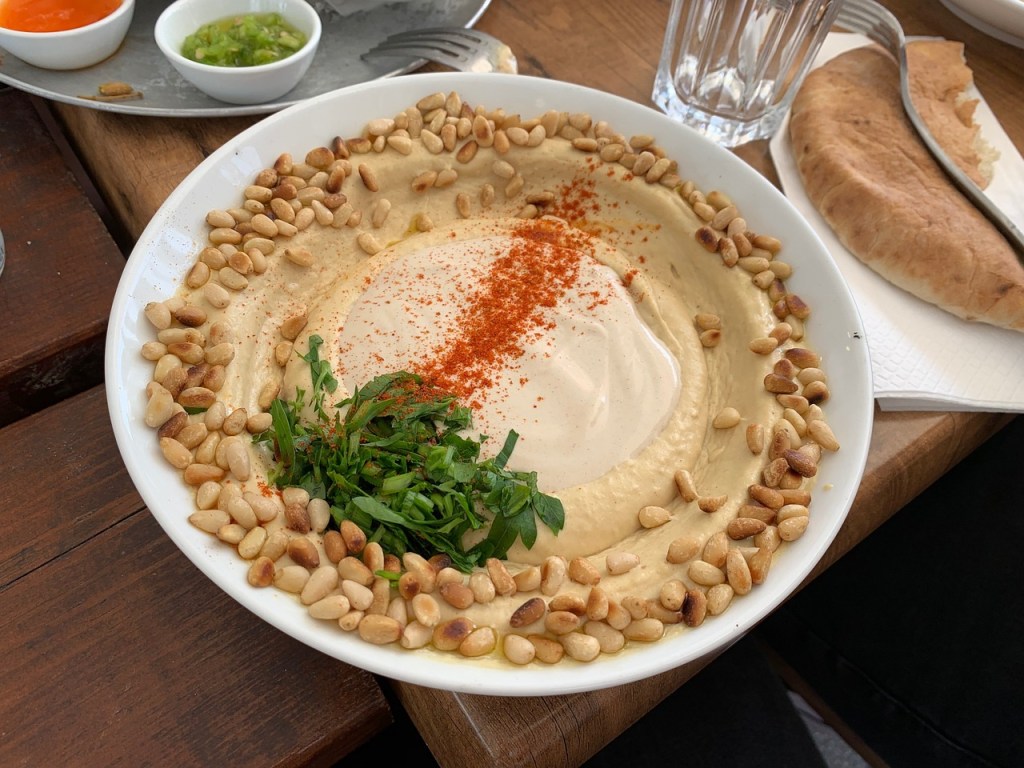
How is a computer program like a recipe? Let’s see, and as a bonus, here’s how to cook a quick pasta dish (for International Hummus Day).
Programmers are the master chefs of the computing world – except the recipes they invent don’t just give us a nice meal, they change the way we live.
Programs are very similar to recipes. They both give instructions that, if followed, achieve something. There is a difference between them, though, and it has to do with language. When chefs invent recipes they write them out in human languages like English. Programmers write programs in special languages. Why’s that? It’s all about being precise enough to be sure exactly the same thing happens every time. Recipes are often ambiguous which is why when I follow one it sometimes goes wrong. Programs tie down every last detail.
Let’s apply some ideas from programming languages to making meals. One of my favourite recipes is a hummus-based pasta dish (see box) so we’ll use that.
Hummus and Tomato Pasta Serves 2 This is a very quick 20-minute after work dish.
Olive oil 1 teaspoon of whole cumin seeds 1 large chopped onion 400g chopped plum tomatoes 200g hummus 150g pasta
1. Add the pasta to a large pan of boiling water. Simmer for 10 minutes. 2. Fry the cumin in the olive oil for a few minutes. Add the onions and fry gently. 3. Stir in the tomatoes and the hummus and leave to simmer for 5 minutes. 4. Drain the pasta and serve.
Structure it!
The first thing to notice about a recipe book is there is a clear structure. Each recipe is obviously separate from the others. Each has a title and a brief description of how it might be used. Each has an ingredients list and then a series of steps to follow. Programs follow a similar structure.
Cookery books use page layout to show their structure. Programmers use language: grammar, symbols and keywords. A keyword is a word that means something special. Once you have decided a word is a keyword you only ever use it for that purpose.
Let’s invent a keyword RECIPE to mean we’re starting a new recipe. The only time that word will appear in our recipes is to start a new recipe. What follows it will always be the name of the recipe. We will also need to know when the name ends. To make that clear we will use a special symbol made up of open and close brackets ().
We also want to be absolutely sure what is part of this recipe and what isn’t. We will use curly brackets: everything between the brackets is part of the named recipe.
RECIPE Hummus and Tomato Pasta ()
{
...
}
No comment?
Recipes usually include a brief description that isn’t part of the actual instructions. It is just there to help someone understand when you might use the recipe. Programs have descriptions like this too. Programmers call them ‘comments’. Remove the comments and the recipe will still work. We need a clear way to show when a comment starts and ends. We will start them with a special symbol ‘/*’ and end them with ‘*/’.
RECIPE Hummus and Tomato Pasta ()
{
/* Serves 2
This is a very quick 20-minute after work dish.
*/
...
}
Variable storage
What comes next in a recipe is usually a list of ingredients. The idea is to list everything you need so you can have it all ready before you start. I often have a problem following recipes, though, as they don’t list absolutely everything. Mid- recipe I might suddenly find I need a frying pan…when mine is crusted with burnt cheese sauce from last night! To avoid that, let’s list all the pans we need too. For our recipe we need a frying pan and a saucepan.
Something used to store things (like pans do) in a program is called a ‘variable’. Program variables hold things like numbers. The equivalent of the ingredients list ‘declares’ the variables. Declarations give each variable a unique name used to refer to it and also give each a ‘type’ – is it a saucepan or a frying pan we need? To be clear about when a declaration ends we add in some punctuation. Programming languages tend to use a semicolon for that – it’s a bit like a full stop in English.
Saucepan pan1;
Fryingpan pan2;
This says that in the rest of the recipe when we say pan1 (the variable name) we mean a particular pan: a saucepan (its type). When we say pan2 we mean a particular frying pan.
New assignment
Assignment does NOT move things around, it makes new copies
We will make a distinction between things to hold stuff, like pans (variables) and the actual ingredients that go in them: ‘values’. We will also follow the TV chefs and start by setting out all the ingredients in little dishes at the start so they are at hand – and make that part of the instructions.
We will need to declare a dish to hold each ingredient, giving its type and giving the dish a name. At the same time we will say what should be put in it before the recipe proper is started. We will use an ‘=’ symbol to mean put something in a variable (i.e., dish or pan). In programs, this action of putting something in a variable is called ‘assignment’. So, for example, we will declare that we need a dish to hold the hummus (called hummusDish). We assign 200g of hummus to it.
Dish hummusDish = 200g hummus;
We are now ready for the recipe proper. We can use assignment as a precise way of moving things from one place to another too. So if we say, for example:
pan2 = oilDish;
We mean empty the contents of the dish of oil into the frying pan. Programs are slightly different here, as when they do an assignment they don’t move things from one place to the other, they copy it. That would be like having a dish that automatically refilled itself whenever it was emptied.
Often we want to add to whatever is already in a pan. Programmers leave nothing to doubt and say explicitly that is what they mean:
pan2 = pan2 + onionDish;
This tells us to mix what is in the onion dish with what is in the frying pan, and then leave the result in the frying pan. We will use the + symbol to mean add together and stir.
Methods in my madness
So far all we’ve done is put ingredients in things and copied them around. To make a meal we need to do various basic cooking things like heat a pan or drain a pan. Rather than spell out every step of how you do that in every recipe, we will use a short hand. We create mini-recipes that say how to do it and just refer to them by name. They are often called ‘methods’ by programmers. Each is written out just like our recipe. In fact to a programmer our recipe is a method too. When we want to use it we just give its name followed by any extra information needed. For example to heat a pan, we need to know which pan, how high a heat and for how long. We write, for example:
Heat (pan1, medium, 12 minutes);
This format helps make sure we don’t miss something (like the time for example). We need similar methods for draining a pan and serving the meal. We won’t give the actual instructions here. In a full program they would be written down step-by- step too and not left to chance.
Time to do it right
We have come up with a language for recipes similar to the ones used for programming. We’ve used symbols, keywords and very precise punctuation – the language’s ‘syntax’ – to help us be precise. On its own that’s not enough – each part of the language has to have a very clear meaning too – the language’s ‘semantics’. Together they make sure in following a recipe we know exactly what each step involves. There is then less scope for a cook (or computer) to get it wrong. Computers, of course, have no intelligence of their own. All they can do is exactly follow the instructions someone wrote for them (a bit like me cooking).
Here’s what our complete recipe looks like as a program.
RECIPE Hummus and Tomato Pasta ()
{
  /* Serves 2

  This is a very quick after work dish.
  It only takes about 20 minutes from start to finish.

  Saucepan pan1;
  Fryingpan pan2;

  /* Ingredients */
  Dish oilDish = 1 tablespoon of olive oil;
  Dish cuminDish = 1 teaspoon of whole cumin seeds;
  Dish onionDish = 1 large onion, chopped;
  Dish tomatoDish = 400g chopped plum tomatoes;
  Dish hummusDish = 200g hummus;
  Dish pastaDish = 150g pasta;
  Kettle kettle = 500ml boiling water;

  /* Cook the pasta */
  pan1 = kettle + pastaDish;
  Heat (pan1, high, 2 minutes);
  Heat (pan1, medium, 10 minutes);

  /* Make the sauce */
  pan2 = oilDish + cuminDish;
  Heat (pan2, high, 2 minutes);
  pan2 = pan2 + onionDish;
  Heat (pan2, medium, 5 minutes);
  pan2 = pan2 + tomatoDish + hummusDish;
  Heat (pan2, low, 5 minutes);

  /* serve */
  Drain (pan1);
  Serve (pan1, pan2);
}
Florence Nightingale, the most famous female Victorian after Queen Victoria, is known for her commitment to nursing, especially in the Crimean War. She rebelled against convention to become a nurse at a time when nursing was seen as a lowly job, not suitable for ‘ladies’. She broke convention in another less well-known, but much more significant way too. She was a mathematician – the first woman to be elected a member of the Royal Statistical Society. She also pioneered the use of pictures to present the statistical data that she collected about causes of war deaths and issues of sanitation and health. What she did was an early version of the current Big Data revolution in computer science.
Soldiers were dying in vast numbers in the field hospital she worked in, not directly from their original wounds but from the poor conditions. But how do you persuade people of something that (at least then) is so unintuitive? Even she originally got the cause of the deaths wrong, thinking they were due to poor nutrition, rather than the hospital conditions as her statistics later showed. Politicians, the people with power to take action, were incapable of understanding statistical reports full of numbers then (and probably now). She needed a way to present the information so that the facts would jump out to anyone. Only then could she turn her numbers into life-saving action. Her solution was to use pictures, often presenting her statistics as books of pie charts and circular histograms.
Whilst she didn’t invent them, Florence Nightingale certainly was responsible for demonstrating how effective they could be in promoting change, and so subsequently popularising their use. She undoubtedly saved more lives with her statistics than from her solitary rounds at night by lamplight.
She had collected data on the reason each person died but to present the data in ways that were convincing she also had to act as a human computer doing computation on the basic data. For each month based on the raw data, she computed annual rate of mortality per 1,000. Then to present it in a circular histogram, where the area represents deaths she calculated the appropriate radius for each segment, allowing the charts to then be drawn.
Big Data is now a big thing. It is the idea that if you collect lots of data about something (which computers now make easy) then you (and computers themselves) can look for patterns and so gain knowledge and, for people, ultimately wisdom from it. Florence Nightingale certainly did that. Data visualisation is now an important area of computer science. As computers allow us to collect and store ever more data, it becomes harder and harder for people to make any sense of it all – to pick out the important nuggets of information that matter. Raw numbers are little use if you can’t actually turn them into knowledge, or better still wisdom. Machine Learning programs can number crunch the data and make decisions from it, but its hard to know where the decisions came from. That often matters if we are to be persuaded. For humans the right kind of picture for the right kind of data can do just that as Florence Nightingale showed.
‘The Lady of the Lamp’: more than a nurse, but also a remarkable statistician and pioneer of a field of computer science…a Lady who made a difference by rebelling with a cause.
These days art and high technology don’t mix much. Personal gadgets are one thing, jewellery quite another. That hasn’t always been the case though and hopefully it won’t be in the future. The tactful watch also shows how tech accessible to blind people can have other uses too.
In the 18th century there was a mobile revolution just like the current one. Back then the technology wasn’t the smart watch or MP3 player but the pocket watch. The 18th century watchmakers weren’t just innovators though they were also artists and craftsmen. The result was truly exquisite jewellery that was also highly functional.
One of the absolute masters was Abraham Louis Breguet. Born in Switzerland, he set up business in Paris and was to become one of the greatest innovators ever. His clients included the likes of Marie-Antoinette, King George IV of Britain, the Sultan of the Ottoman Empire and the Tsar Alexander I of Russia. Rather than build lots of identical watches he constantly tinkered with the designs. The result was that he is responsible for some of the most important innovations in clock technology. Many of his inventions were technical advances such as the first self-winding watch. He realised the importance of making his designs easy to use too though. A Breguet watch, made for the Queen of Naples, for example, was the first to be worn on the wrist!
In the 21st century we are just getting to grips with new ways of interacting with our personal gadgets. People have realised that basing mobile device designs on what works for a desktop PC is not so sensible. When on the move it’s not that convenient to have to look at a screen. Consequentially we are undergoing a revolution in multimodal computing. It involves finding ways of using our other senses not just sight to interact with computers. The way your phone vibrates in your pocket is one simple example – tactile computing, delivering information through your sense of touch.
Clever as we are Breguet was way ahead of us though. At the turn of the 18th century it was not considered polite to look at your watch in public. Breguet’s solution was the tact watch: a watch that allowed you to check the time without taking it out of your pocket. Tactile and tactful computing! His solution was of course (in all senses) incredibly elegant. It would also have been a great design for the blind and partially sighted – showing how designing for one use can have others too.
Round the edge were 12 evenly spaced diamond studs, with larger ones at the 3, 6, 9 and 12 positions. On the outside was an arrow. It did not move on its own like a normal clock hand, though. That wouldn’t really work inside a pocket without a glass case and then it couldn’t be touched. Hidden inside the case was an actual clock. When the owner wanted to tactfully check the time they would just spin the arrow until they felt resistance. That meant the arrow was now back in synchrony with the real hour hand. They could then count round the diamond studs to work out its position and so the time.
One of the most stunningly beautiful tact watches was made for Josephine Bonaparte, Empress of France in 1800. Two centuries later it sold at Chrysties for over $1.3 million.. The best we seem to be able to do in the 21st century is to just dip an iPod in gold and coat it with diamonds. The result: not 18th century elegance, just very expensive 21st century bling.
Artists and jewellers are starting to work with scientists and engineers again though so maybe our modern gadgets can follow the path of the watch and become elegant jewellery too.













 cs4fn
cs4fn 