In January 2025 computer scientist Simon Peyton Jones gave an inspiring lecture at Darwin College Cambridge on “Bits with Soul” about the joy, beauty, and creativity of computer science … from simple ideas of data representation comes all of virtual reality.
Our universe is built from elementary particles: quarks, electrons and the like. Out of quarks come protons and neutrons. Put those together with electrons in different ways to get different atoms. From atoms are built molecules, and from there on come ever more complexity including the amazing reality of planets and suns, humans, trees, mushrooms and more. From small things ever more complex things are built and ultimately all of creation.
The virtual world of our creation is made of bits combined using binary, but what are bits, and what is binary? Here is a puzzle that Simon Peyton Jones was set by his teacher as a child to solve, to help him think about it. Once you have worked it out then think about how things might be built from bits: numbers, letters, words, novels, sounds, music, images, videos, banking systems, game worlds … and now artificial intelligences?
A bank cashier has a difficult customer. They always arrive in a rush wanting some amount of money, always up to £1000 in whole pounds, but a different amount from day to day. They want it instantly and are always angry at the wait while it is counted out. The cashier hatches a plan. She will have ready each day a set of envelopes that will each contain a different amount of money. By giving the customer the right set of envelope(s) she will be able to hand over the amount asked for immediately. Her first thought had been to have one envelope with £1 in, one envelope with £2 in, one with £3 and so on up to an envelope with £1000 in. However, that takes 1000 envelopes. That’s no good. With a little thought though she realised she could do it with only 10 envelopes if she puts the right amount of money in each. How much does she put in each of the 10 envelopes that allows her to give the customer whatever amount they ask for just by handing over a set of those envelopes?
Queens is a fairly simple kind of logic puzzle found for example on LinkedIn as a way to draw you back to the site. Doing daily logic puzzles is good both for mental health and to build logical thinking skills. As with programming, solving logic puzzles is mostly about pattern matching (also a useful skill to practice daily) rather than logic per se. The logic mainly comes in working out the patterns.
Let’s explore this with Queens. The puzzle has simple rules. The board is divided into coloured territories and you must place a Queen in each territory. However, no two Queens can be in the same row or column. Also no two Queens can be adjacent, horizontally, vertically or diagonally.
If we were just to use pure logic on these puzzles we would perhaps return to the rules themselves constantly to try and deduce where Queens go. That is perhaps how novices try to solve puzzles (and possibly get frustrated and give up). Instead, those who are good at puzzles create higher level rules that are derived from the basic rules. Then they apply (ie pattern match against) the new rules whenever the situation applies. As an aside this is exactly how I worked when using machine-assisted proof to prove that programs and hardware correctly met their specification, doing research into better ways to ensure the critical devices we create are correct.
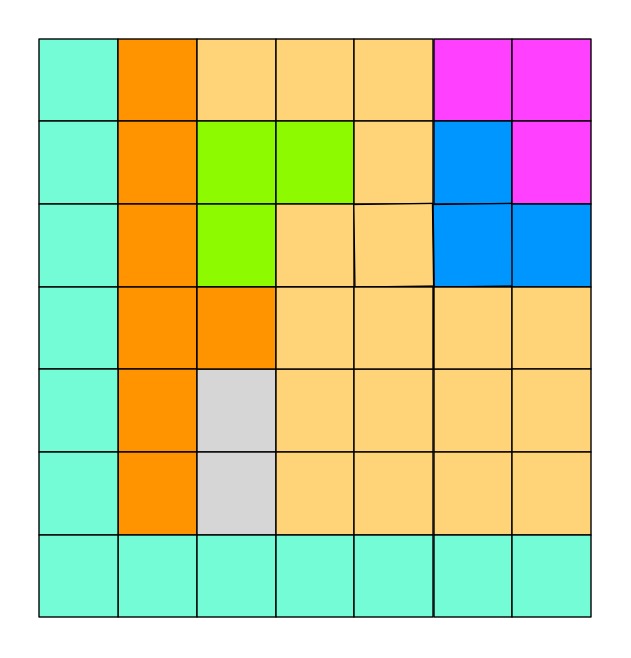
Let’s look at an example from Queens. Here is a puzzle to work on. Can you place the 8 Queens?
mage by Paul Curzon
mage by Paul Curzon
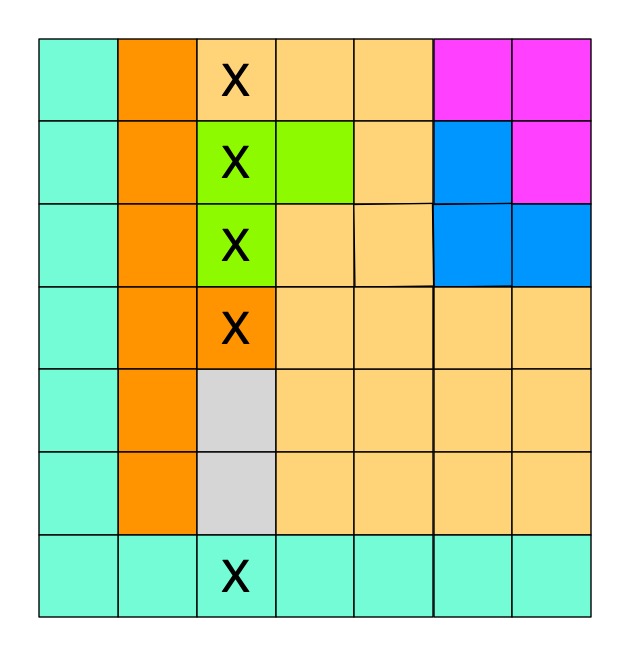
Where to start? Well notice the grey territory near the bottom. It is a territory that lives totally in one column. If we go to the rules of Queens we know that there must be a Queen in this territory. That means that Queen must be in that column. We also know that only one Queen can be in a column. That means none of the other territories in that column can possibly hold a Queen there. We can cross them all out as shown.
In effect we have created a new derived inference rule.
IF a territory only has squares available in one column

THEN cross out all squares of other territories in that column
By similar logic we can create a similar rule for rows.
Now we can just pattern match against the situation described in that rule. If ever you see a territory contained completely in a row or column, you can cross out everything else in that row/column.
In our case in doing that it creates new situations that match the rule. You may also be able to work out other rules. One obvious new rule is the following:
IF a territory only has one free space left and no Queens

THEN put a Queen in that free space
mage by Paul Curzon
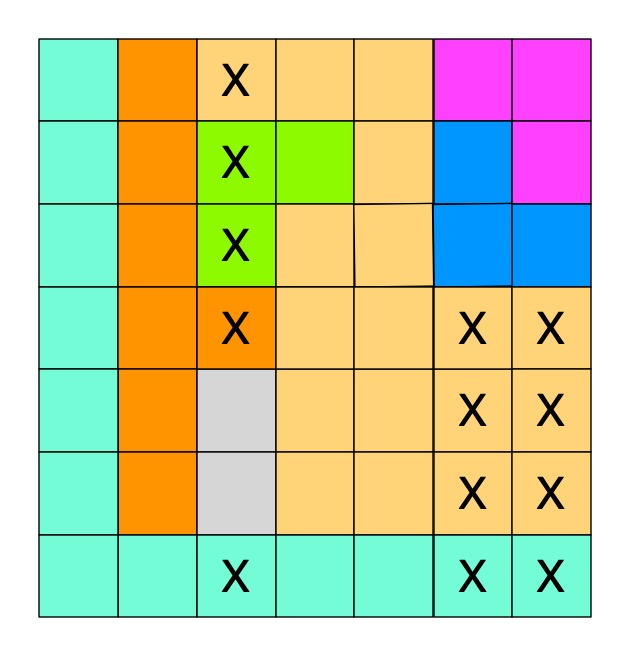
We can derive more complicated rules too. For example, we can generalise our first rule to two columns. Can you find a pair of territories that reside in the same two columns only? There is such a pair in the top right corner of our puzzle. If there is such a situation then as both must have a Queen, between them they must be the territories that provide the Queens for both those two columns. That means we can cross out all the squares from other territories in those two columns. We get the rule:
IF two territories only have squares available in two columns

THEN cross out all squares of other territories in both columns
Becoming good at Queens puzzles is all about creating more of these rules that quickly allow you to make progress in all situations. As you apply rules, new rules become applicable until the puzzle is solved.
Can you both apply these rules and if need be derive some more to pattern match your way to solving this puzzle?
It turns out that programming is a lot like this too. For a novice, writing code is a battle with the details of the semantics (the underlying logical meaning) of the language finding a construct that does what is needed. The more expert you become the more you see patterns where you have a rule you can apply to provide the code solution: IF I need to do this repeatedly counting from 1 to some number THEN I use a for loop like this… IF I have to process a 2 dimensional matrix of possibilities THEN I need a pair of nested for loops that traverse it by rows and columns… IF I need to do input validation THEN I need this particular structure involving a while loop… and so on.
Perhaps more surprisingly, research into expert behaviour suggests that is what all expert behaviour boils down to. Expert intuition is all about subconscious pattern matching for situations seen before turned into subconscious rules whether expert fire fighters or expert chess players. Now machine learning AIs are becoming experts at things we are good at. Not suprisingly, what machine learning algorithms are good at is spotting patterns to drive their behaviour.
One way computers store images is as a set of points (as coordinates) that make up lines and shapes. This is the basis for the kind of computer graphics called Vector Graphics. You can explore the idea by doing coordinate conundrum puzzles. A coordinate conundrum is just a Vector Graphics Image to be drawn on paper.They are join-the-dot puzzles based on the idea. Can you recreate the original drawing?
Recreate a drawing from coordinates
Points on a grid can be represented by pairs of numbers called coordinates. The first, x coordinate, says how far to go along horizontally. The second, y coordinate, says how far to go up, vertically. The numbers along the axes (along the bottom and up the side) of the grid give the distance in that direction. Draw the point at the place you end up at! So for example the coordinate (4,5) means go right from the origin 4 and up 5 and plot the point there.
Image by CS4FN
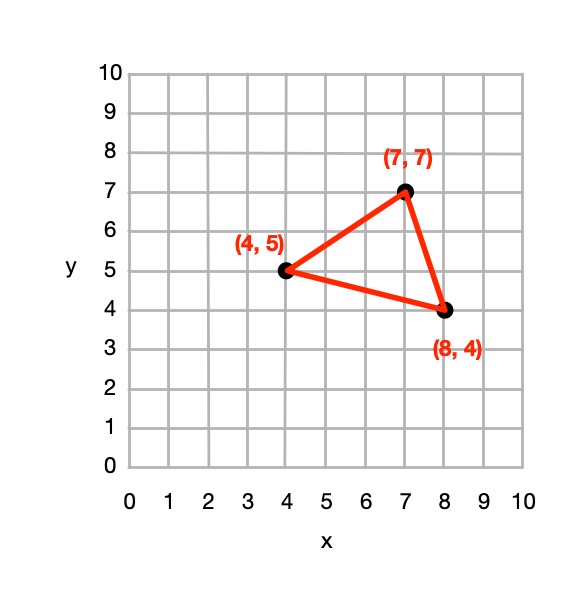
You can join any two coordinates with lines. If a series of lines join back to the original one then it make a shape (a polygon), which can be coloured in. For example, if we plot the points (4,5), (7,7 and (8,4) drawing lines between them and back to (4,5) we make a triangle.
Image by CS4FN
From 4 points we could define a square, rectangle or more general quadrilateral shape and so on.
So from a set of instructions telling you where to plot points, you can create a picture out of all the shapes and lines that make up the picture, giving colours for the lines or shapes.
This (and so these puzzles) is the basis of how programs in the language SVG (Scalable Vector Graphics) work to store a drawing as the instructions needed to recreate it. Drawing programs often store illustrations that the artists using them draw as an SVG program.
How to solve them
Each picture is made of shapes, each given by a colour and a list of the coordinates of its vertices (corners). For each shape:
1. Plot the list of (x,y) coordinates on the grid as dots.
2. Join the dots (which start and end at the same place) to make the shape.
3. Colour the shape you have made with the colour at the start of the list.
So, for example, if the first instruction starts: red (5,24) … that means plot the point 5 along and 24 up. It starts a new shape, coloured red, that ends at the same point.
If the series of points do not join back to the start then they represent coloured lines rather than a coloured shape,
Example: Semaphore flag
Image by CS4FN
Here is a simple example to draw a red and yellow semaphore flag, given the shapes:
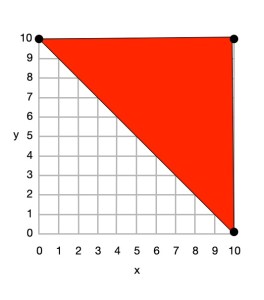
red (0,10) (10,10) (10,0) and back to (0,10)
yellow (0,10) (10,0) (0,0) and back to (0,10)
From this we can draw the picture.
Image by CS4FN
First we plot the points given for the red shape (a triangle), join the dots and colour it in.
red (0,10) (10,10) (10,0) and back to (0,10)
Image by CS4FN
Then we plot the points given for the yellow shape (another triangle), join the dots and colour it in.
yellow (0,10) (10,0) (0,0) and back to (0,10)
Do some puzzles yourself
Try the coordinate conundrum puzzles on our puzzle page either by printing off the puzzle sheet or drawing on squared paper. Then read on to find out a little more the advantages of vector graphics.
From straight lines to curves
In these puzzles we have only used straight lines between points, but we could also include commands to create circles and curved lines between points based on the mathematical equation for the curve. SVG, the vector graphic programming language, has instructions for a variety of more complex kinds of lines and shapes like that.
Advantages and disadvantages of Vector Graphics
Recording images in this way as points, lines and shapes has several advantages over storing images as pixels:
we generally need far less space to store the image as we do not need to store a colour for thousands or even millions of pixels;
the images are mathematically accurate – a line is represented as a perfect straight line not a pixelated (staircase-like) line;
the images are scalable, meaning you can increase the size of an image, zooming in just by multiplying all the numbers involved by a scale factor (which is just a number giving the magnification you want). The resulting image is still mathematically perfect with straight lines still straight lines, for example, just bigger. For example, suppose we want to make a semaphore flag twice the size of our original. We just multiply all points by 2, for example giving red (0,20) (20,20) (20,0) and back to (0,20); yellow (0,20) (20,0) (0,0) and back to (0,20) and it gives an identical picture, just bigger. (Try plotting it and see!)
Disadvantages are:
Vector graphics are not a good way to represent photographs – digital cameras record the light at lots of points corresponding to pixels so naturally are stored as pixels (numbers that give the colour in that small square of the image). Trying to convert a photo to a vector image would be hard (needing algorithms to recognise shapes, for example). It would be a less natural and less accurate way of doing so.
With computer memory cheap, the advantages of using less storage are less important than they once were.
SVG: a graphics programming language
The programming language SVG records drawings in this way as instructions to draw shapes and lines based on points. It has some difference to our instructions though. For example the y-axis coordinates start at the top and work down. The principles are the same though, it is only the detail that differs.
One way to use logical thinking is to deduce new facts but then turn them into IF-THEN rules. They tell us an action to do IF something is true. For example: IF both cards are the same THEN shout SNAP! Once we have IF-THEN rules we can use them as the basis of a program. We can see how this works, and how it involves various computational thinking skills with a simple logical thinking puzzle.
An Egyptian Survey puzzle
Image by CS4FN
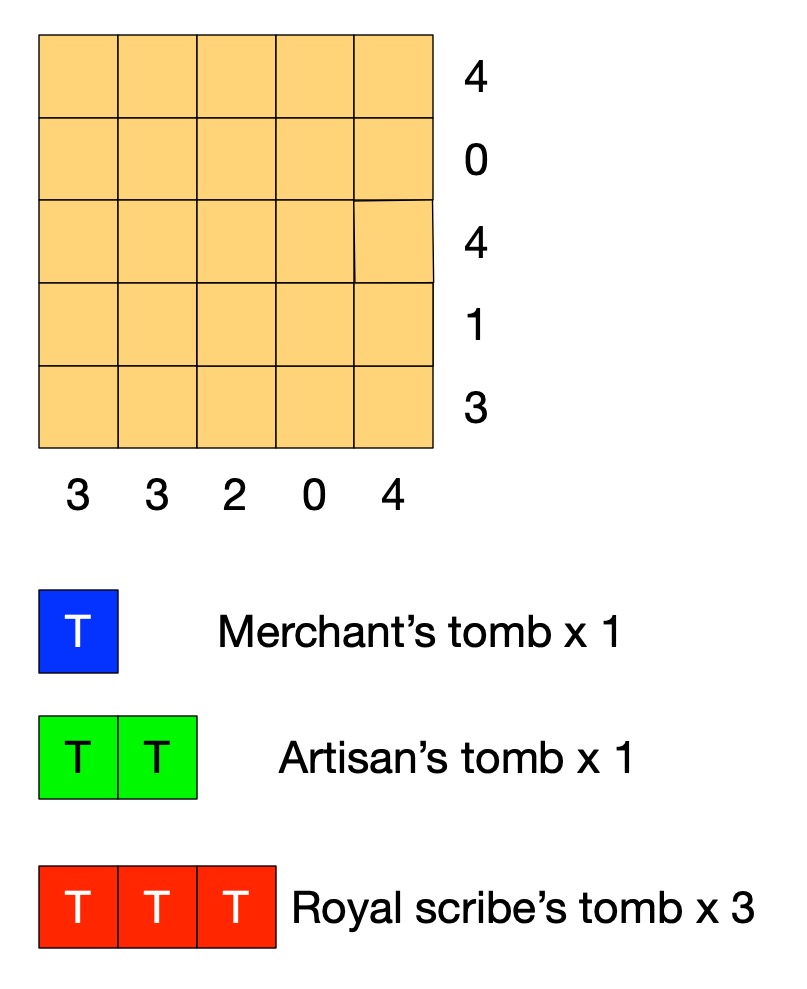
Old records show that this area of the desert contains the tombs of 3 scribes (a large tomb covering 3 squares), 1 artisan (medium, 2 squares) and 1 merchant (small, 1 square).
A survey has gathered information of where the tombs could be. Each number tells you how many squares are part of a tomb in that row or column.
Tombs are not adjacent (horizontally, vertically or diagonally).
Can you work out where all the tombs are without further digging?
Solving Egyptian Survey puzzles
The instructions of the puzzle give us some simple facts such as that the number at the end of the row tells us the number of squares in that row holding tombs. On its own that does not tell us how to solve the puzzle. However, thinking logically about it we can draw simple logical conclusions so deduce new facts. For example, it is fairly simple to deduce the fact:
the number for a row being 0 IMPLIES there are no tombs in that row.
If we know there are no tombs in a row then we can mark each square of the row as empty. If we use X to mean nothing is in that square, then we can turn that deduced fact into an action. It means that we can do the following when trying to solve the puzzle:
IF the number on a row is 0
THEN put an X in all the squares of that row.
With that rule we can start to solve the puzzle just by following the rule. Find a row numbered 0 and put Xs there. We can create a similar rule for columns. Applying both these rules to our puzzle we get:
Image by CS4FN
Can you work out more rules before reading on?
Rules, rules, rules
What happens if the number of a row is more than 0? Knowing the number alone doesn’t help us much. We need to combine it with other information. The top row of the puzzle has the number 4, for example, but one of the squares already has a cross in it. That means the remaining 4 squares all must have tombs, which we will mark T. We can turn that into a rule:
IF the number for a row is 4 AND there are 4 empty squares in that row and an X
THEN put a T in all the empty squares of that row.
We can make similar rules for each number 1 to 4. We can then create similar rules for columns. Applying them once each to our puzzle gives us:
Image by CS4FN
We could also make a more general version of this rule
IF the number for a row is <n> AND there are only <n> empty squares in that row
THEN put a T in all the empty squares of that row.
This is what computer scientists call generalisation: a part of computational thinking. Instead of having lots of rules (or lines of code) for lots of similar situations, we create one simple but general one that covers all the cases. We can of course apply rules more than once, so as you probably noticed we can apply our row rule once more. In effect our rules live inside a loop and we keep trying them in sequence for as long as we find a rule that makes a difference.
Image by CS4FN
Now one of the rows has the number 1, but we have already marked a tomb in a square of that row. That gives us another rule.
IF the number for a row is 1 AND there is already 1 tomb marked in that row
THEN put an X in all the empty squares of that row.
This gives us:
Image by CS4FN
Similar rules apply for other numbers so we could also make a general version of this rule too.
IF the number for a row is <n> AND there are already <n> tombs marked in that row
THEN put an X in all the empty squares of that row.
Now, applying a column version of the last general rule and we can mark an X in the last square for column with 2 tomb squares.
Image by CS4FN
We need one last rule for this puzzle:
IF the number for a row is <n> AND the number of spaces + the number of 0s is <n>
THEN put a T in all the empty squares of that row.
This is actually an even more general version of our second rule (it is the case where the number of Ts is 0, so could replace that rule with this new one.
Applying it finally solves the puzzle:
Image by CS4FN
If we put our rules together then they become the basis of an algorithm (so program) for solving the puzzles and in creating them from deduced facts we are doing algorithmic thinking. IF-THEN instructions along with sequencing and loops are the basis of all programs. Here we create a sequence of the rules to try in order and put them inside a loop so that we keep trying them until none apply or we have solved the puzzle. There is a style of programming where all a program is is a series of IF-THEN rules – with looping happening implicitly.
Algorithms are just rules to follow that guarantee a result (here solving the puzzle). It is only an algorithm if it guarantees to always work. To solve any (solvable) Egyptian Survey puzzle like this we would need yet more rules: we would need more more rules for it to be an algorithm for solving all puzzles. Making sure algorithms cover all possibilities is one of the harder parts of algorithmic thinking – bugs in programs are often there because the programmer didn’t manage to cover every possibility. In our case we could write a program based on our limited rules. We would just need to include an extra rule that quits (admitting defeat and saying that the program cannot solve the puzzle) if no rule applies.
Perhaps you can work out all the rules (so an algorithm) needed to solve any of these puzzles! All you need are the instructions for the game, some logical thinking to deduce new facts, some algorithmic thinking to turn them into rules, and an ability to generalise so you have a small number of rules … computational thinking skills in fact.








 cs4fn
cs4fn 