Imagine swallowing a slug (hint not only a yucky thought but also not a good idea as it could kill you)…now imagine swallowing a slug-bot … also yucky but in the future it might save your life.
When people accidentally swallow solid objects that won’t pass through their digestive system, or are toxic, it can be a big problem. Once an object passes beyond your stomach it becomes hard to get at.
That is where the slug shaped robot comes in (watch the video below). The idea of scientists at the Chinese University of Hong Kong is that a robot like a slug could crawl down your throat to retrieve whatever you had swallowed.
If you think of robots as solid, hard things then that would be the last thing you might want to swallow (aside from an actual slug), and certainly not to catch the previous solid thing you swallowed. You may be right. However, that is where the soft slug-shaped robot comes in.
It is easy to make or buy slime-like “silly” putty. Add iron filings to slime putty and you can make it stretch and sway and even move around with magnets yourself. You can buy such magnetic slime at science museums…it is fun to play with though you definitely shouldn’t swallow it.
The scientists have taken that general idea though and using special materials created a similar highly controllable bot that can be moved around using a magnet-based control system. It is made of a special material that is magnetic and slime-like but coated in silicon dioxide to stop it being poisonous.
They have shown that they can control it to squeeze through narrow gaps and encircle small objects, carrying them away with it…essentially what would be needed to recover objects that have been swallowed.
It needs a lot more work to make sure it is safe to really be swallowed. Also to be a real autonomous robot it would need to have sensors included somehow, and be connected to some sort of intelligent system to automatically control its behaviour. However, with more research that all may become possible.
So in the future if you don’t fancy swallowing a slug-bot, you’d better be far more careful about what else you swallow first. Of course, if it turns out slug like robots can break down, so get stuck themselves, you may then be in a position of needing to swallow a bird-bot to catch the slug-bot. How absurd …
Computer scientist Jason Cordes tells us what it was like to work for NASA on the International Space Station during the time of Space Shuttle launches. (From the archive)
Working for a space agency is brilliant. When I was younger, I often looked up at the stars and wondered what was out there. I visited Johnson Space Center in Houston, Texas and told myself that I wanted to work there someday. After completing my college degree in computer science, I had the great fortune to be asked to work at NASA’s Johnson Space Center as well as Kennedy Space Center.
Johnson Space Center is the home of the Mission Control Center (MCC). This is where NASA engineers direct in-orbit flights and track the position of the International Space Station (ISS) and the Space Shuttle when it is in orbit. Kennedy Space Center, situated at Cape Canaveral, Florida, is where the Space Shuttle and most other space-bound vehicles are launched. Once they achieve orbit, control is handed over to Johnson Space Center in Houston, which is why when you hear astronauts calling Earth, they talk to “Houston”.
Space City
Houston is a very busy city and you get that feeling when you are at Johnson. There are people everywhere and the Space Center looks like a small city unto itself. While I was there I worked on the computer control system for the International Space Station. The part I worked on was a series of laptop-based displays designed to give astronauts on the station a real-time view of the state of everything, from oxygen levels to the location of the robotic arm.
The interesting thing about developing this type of software is realising that the program is basically sending and receiving telemetry (essentially a long list of numbers) to the hardware, where the hardware is the space station itself. Once you think of it like that, the sheer simplicity of what is being done is really surprising. I certainly expected something more complex. All of the telemetry comes in over a wire and the software has to keep track of what telemetry belongs to what component since different components all broadcast over the same wire. Essentially the program routes the data based on what component it comes from and acts as an interpreter that takes the numbers that the space station is feeding and converting them into a graphical format that the astronauts can understand. The coolest part of working in Houston was interacting with astronauts and getting their feedback on how the software should work. It’s like working with celebrities.
Wild times
While at Kennedy Space Center, I was tasked with working on the Shuttle Launch Control System for the next generation of shuttles. The software is very similar to that used to control the ISS. The thing I remember most about working there was the environment.
Kennedy Space Center is about as opposite as you can get from the big city feeling at Johnson. It’s situated on what is essentially swampland on the eastern coast of Florida. The main gates to Johnson are right on major streets within Houston, but at Kennedy the gate is on a major highway, and even then, travel to the actual buildings of the Space Center is a leisurely 30 minute drive through orange groves and trees as well as bypassing causeways and creeks. Along the way you might spot an eagle’s nest in one of the trees, or a manatee poking its head from the waters. Kennedy is in the middle of a wildlife preserve with alligators, manatees, raccoons and every other kind of critter you can imagine. In fact, I was prevented from going home one evening by a gator that decided to warm itself up by my car.
The coolest thing about working at NASA, and specifically Kennedy Space Center, was being able to watch shuttle launches from less than 10 miles away. It’s an incredible experience. The thundering engines vibrate throughout your body like being next to the speakers at an entirely too loud rock concert. Night launches were the most amazing, with the fire from the engines lighting up the sky. It is very amazing to watch this machine and realise that you are the one who wrote the computer program that set it in motion. I’ve worked in a few development firms, but few of them gave me as much emotion when I saw it in action as this did.
A replica of Beagle 2 in the Science Museum with solar panels deployed. Image by user:geni from Wikimedia CC BY-SA 4.0
A reason the Apollo Moon landings were manned was in-part because the astronauts were there to deal with things if they went wrong: landing on a planet or moon’s surface is perfectly possible to do automatically as long as things go to plan. It is when something unexpected happens that is always going to be the tricky bit.
Beagle 2 is a good example. It was a British-built space probe that was sent to explore Mars in 2003. Named after biologist Charles Darwin’s famous ship, Beagle 2, sadly it never made it. It was due to land on Christmas Day that year, but something went wrong and it vanished without a trace. Beagle 2’s disappearance was perhaps the inspiration behind the Guinevere One space probe in the 2005 Doctor Who episode ‘The Christmas Invasion’, but Beagle 2 was unlikely to have been stolen by the Sycorax.
Had Beagle 2 made it, the first thing we would have heard was its radio call sign, which was some digital music specially composed by Britpop group, Blur. It wasn’t the only part of the ill-fated Beagle 2 mission that had an artistic twist. Famous British artist Damien Hirst (the man who had previously pickled halved calves in formaldehyde tanks), had designed one of his famous spot paintings – rows of differently coloured spots – that was to be used as an instrument calibration chart. It would have been the first art on Mars, but it, instead, appeared to have become the first art all over Mars! However, if you shoot for the stars you have to expect things to fail sometimes. You learn and try again.
There was a twist to the story too, as eleven years later in 2015, the Beagle 2 was spotted by NASA’s Mars Reconnaissance Orbiter. Using sophisticated image reconstruction programs working with a series of different images, a picture of it was created that allowed the scientists to work out some of what had happened. It had landed successfully on Mars, but apparently its solar panels had then failed to fully open. One appeared to be blocking its communications antenna meaning it had no way to talk to Earth, and no way to repair itself either. It may well have collected data, but just couldn’t tell us about it (or play us some Blur). The data it collected (if it did) may be there, though, waiting for the day when it can be passed back to Earth.
While it may not have succeeded in helping us find out more about Mars, Beagle 2 has presumably become the first Martian Art Gallery, though, displaying the one and only work of art on the planet: a spot picture by Damien Hirst.
Peter W McOwan and Paul Curzon, Queen Mary University of London
The Apollo lunar modules that landed on the moon were guided by a complex mixture of computer program control and human control. Neil Armstrong and the other astronauts essentially operated an semi-automatic autopilot, switching on and off pre-programmed routines. One of the many problems the astronauts had to deal with was that the engines had to be shut down before the craft actually landed. Too soon and they would land too heavily with a crunch, too late and they could kick up the surface and the dust might cause the lunar module to explode. But how to know when?
They had ground sensing radar but would it be accurate enough? They needed to know when they were only feet above the surface. The solution was a cunning contraption: essentially a sensor button on the end of a long stick. These sensors dangled below each foot of the lunar module (see image). When they touched the surface the button pressed in, a light came on in the control panel and the astronaut knew to switch the engines off. Essentially, this sensor is the same as an epee: a fencing sword. In a fencing match the sword registers a hit on the opponent when the button on its tip is pressed against their body. Via a wire running down the sword and out behind the fencer, that switches on a light on the score board telling the referee who made the hit. So the Lunar Module effectively had a fencing bout with the moon…and won.
Charles Babbage invented wonderful computing machines. But he was not very good at explaining things. That’s where Ada Lovelace came in. She is famous for writing a paper in 1843 explaining how Charles Babbage’s Analytical Engine worked – including a big table of formulas which is often described as “the first computer program”.
Charles Babbage invented his mechanical computers to save everyone from the hard work of doing big mathematical calculations by hand. He only managed to build a few tiny working models of his first machine, his difference engine. It was finally built to Babbage’s designs in the 1990s and you can see it in the London Science Museum. It has 8,000 mechanical parts, and is the size of small car, but when the operator turns the big handle on the side it works perfectly, and prints out correct answers.
Babbage invented, but never built, a more ambitious machine, his Analytical Engine. In modern language, this was a general purpose computer, so it could have calculated anything a modern computer can – just a lot more slowly. It was entirely mechanical, but it had all the elements we recognize today – like memory, CPU, and loops.
Lovelace’s paper explains all the geeky details of how numbers are moved from memory to the CPU and back, and the way the machine would be programmed using punched cards.
But she doesn’t stop there – in quaint Victorian language she tells us about the challenges familiar to every programmer today! She understands how complicated programming is:
“There are frequently several distinct sets of effects going on simultaneously; all in a manner independent of each other, and yet to a greater or less degree exercising a mutual influence.”
the difficulty of getting things right:
“To adjust each to every other, and indeed even to perceive and trace them out with perfect correctness and success, entails difficulties whose nature partakes to a certain extent of those involved in every question where conditions are very numerous and inter-complicated.”
and the challenge of making things go faster:
“One essential object is to choose that arrangement which shall tend to reduce to a minimum the time necessary for completing the calculation.”
She explains how computing is about patterns:
“it weaves algebraical patterns just as the Jacquard-loom weaves flowers and leaves”.
and inventing new ideas
“We might even invent laws … in an arbitrary manner, and set the engine to work upon them, and thus deduce numerical results which we might not otherwise have thought of obtaining”.
and being creative. If we knew the laws for composing music:
“the engine might compose elaborate and scientific pieces of music of any degree of complexity or extent.”
Alan Turing famously asked if a machine can think – Ada Lovelace got there first:
“The Analytical Engine has no pretensions whatever to originate anything. It can do whatever we know how to order it to perform.”
Wow, pretty amazing, for someone born 200 years ago.
Ursula Martin, University of Oxford(From the archive)
Charles Dickens is famous for his novels highlighting Victorian social injustice. Despite what people say, art and science really do mix, and Dickens certainly knew some computer science. In his classic novel about the French Revolution, A Tale of Two Cities, one of his characters relies on some computer science based knitting.
Dickens actually moved in the same social circles as Charles Babbage, the Victorian inventor of the first computer (which he designed but unfortunately never managed to build) and Ada Lovelace the mathematician who worked with him on those first computers. They went to the same dinner parties and Dickens will have seen Babbage demonstrate his prototype machines. An engineer in Dickens novel, Little Dorrit, is even believed to be partly based on Babbage. Dickens was probably the last non-family member to visit Ada before she died. She asked him to read to her, choosing a passage from his book Dombey and Son in which the son, Paul Dombey, dies. Like Ada, Paul Dombey had suffered from illness all his life.
So Charles Dickens had lots of opportunity to learn about algorithms! His novel ‘A Tale of Two Cities’ is all about the French Revolution, but lurking in the shadows is some computer science. One of the characters, a revolutionary called Madame Defarge takes the responsibility of keeping a register of all those people who are to be executed once the revolution comes to pass: the aristocrats and “enemies of the people”. Of course in the actual French Revolution lots of aristocrats were guillotined precisely for being enemies of the new state.
Now Madame Defarge could have just tried to memorize the names on her ‘register’ as she supposedly has a great memory, but the revolutionaries wanted a physical record. That raises the problem, though, of how to keep it secret, and that is where the computer science comes in. Madame Defarge knits all the time and so she decides to store the names in her knitting.
“Knitted, in her own stitches and her own symbols, it will always be as plain to her as the sun. Confide in Madame Defarge. It would be easier for the weakest poltroon that lives, to erase himself from existence, than to erase one letter of his name or crimes from the knitted register of Madame Defarge.”
Computer scientists call this Steganography: hiding information or messages in plain sight, so that no one suspects they are there at all. Modern forms of steganography include hiding messages in the digital representation of pictures and in the silences of a Skype conversation.
Madame Defarge didn’t of course just knit French words in the pattern like a victorian scarf version of a T-shirt message. It wouldn’t have been very secret if anyone looking at the resulting scarf could read the names. So how to do it? In fact, knitting has been used as a form of steganography for real. One way was for a person to take a ball of wool and mark messages down it in Morse Code dots and dashes. The wool was then knitted into a jumper or scarf. The message is hidden! To read it you unpick it all and read the morse code back off the wool.
The names were “Knitted, in her own stitches and her own symbols”
That wouldn’t have worked for Madame Defarge though. She wanted to add the names to the register in plain view of the person as they watched and without them knowing what she was doing. She therefore needed the knitting patterns themselves to hold the code. It was possible because she was both a fast knitter and sat knitting constantly so it raised no suspicion. The names were therefore, as Dickens writes “Knitted, in her own stitches and her own symbols”
She used a ‘cipher’ and that brings in another area of computer science: encryption. A cipher is just an algorithm – a set of rules to follow – that converts symbols in one alphabet (letters) into different symbols. In Madame Defarge’s case the new symbols were not written but knitted sequences of stitches. Only if you know the algorithm, and a secret ‘key’ that was used in the encryption, can you convert the knitted sequences back into the original message.
In fact both steganography and encryption date back thousands of years (computer science predates computers!), though Charles Dickens may have been the first to use knitting to do it in a novel. The Ancient Greeks used steganography. In the most famous case a message was written on a slave’s shaved head. They then let the hair grow back. The Romans knew about cryptographic algorithms too and one of the most famous ciphers is called the Caesar cipher as Julius Caesar used it when writing letters…even in Roman times people were worried about the spies reading their equivalent of emails.
Dickens didn’t actually describe the code that Madame Defarge was using so we can only guess…but why not see that as an opportunity and (if you can knit) why not invent a way yourself. If you can’t knit then learn to knit first and then invent one! Somehow you need a series of stitches to represent each letter of the alphabet. In doing so you are doing algorithmic thinking with knitting. You are knitting your way to being a computer scientist.
Paul Curzon, Queen Mary University of London (From the archive)
A naive way of using two different symbols (red and blue blocks) to represent numbers. Image by CS4FN
Continuing a series of blogs on what to do with all that lego scattered over the floor: learn some computer science…how might we represent numbers using only two symbols?
We build numbers out of 10 different symbols: our digits 0-9. Charles Babbage’s victorian computer design represented numbers using the same decimal system (see Part 4: Lego Computer Science: representing numbers using position). That was probably an obvious choice for Babbage, but as we have already seen, there are lots of different ways numbers could be represented.
Modern computers use a different representation. The reason is they are based on a technology of electrical signals that are either there or not, switches that are on or off. Those two choices are used as two symbols to represent data. It is as though all data will be built of two lego coloured blocks: red and blue, say.
How might that then be done? There are still lots of ways that could be chosen.
Count the red blocks
One really obvious way would be to just pick one of the two coloured bricks (say red) to mean 1 and then to represent a number like 2 say you would have 2 of that colour block, filling the other spaces allocated for the number with the other colour. So if you were representing numbers with storage space for three blocks, two of them would be red and one would be blue for the number 2. All would be red for the number 3.
This is actually just a variation of unary, that we have seen earlier, just with a fixed amount of storage. It isn’t a very good representation as you need lots of storage space to represent large numbers because it is not using all possible combinations of the two symbols. In particular, far more numbers can be represented with a better representation. In the above example, 3 places are available on the lego base to put the blocks we are using and we have been able to represent 4 different numbers (0 to 3). However, information theory tells us we should be able to store up to 8 different numbers in the space, given two symbols and using them the right way, with the right representation.
A random code for numbers
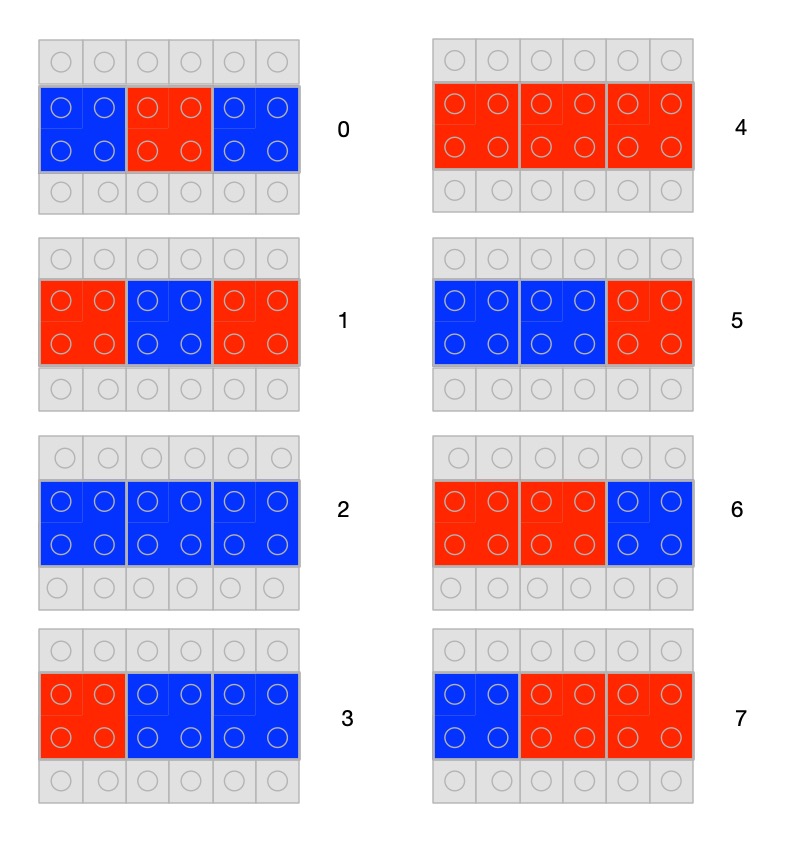
How do we use all 8 possibilities? Just allocate a different combination to each pattern with blocks either red or blue, and allocate a different number to each pattern. Here is one random way of doing it.
A code for numbers chosen at random Image byCS4FN
Having a random allocation of patterns to numbers isn’t a very good representation though as it doesn’t even let us count easily. There is no natural order. There is no simple way to know what comes next other than learning the sequence. It also doesn’t easily expand to larger numbers. A good representation is one that makes the operations we are trying to do easy. This doesn’t.
Gray Code
Before we get to the actual binary representation computers use, another representation of numbers has been used in the past that isn’t just random. Called Gray code it is a good example of choosing a representation to make a specific task easier. In particular, it is really good if you want to create an electronic gadget that counts through a sequence.
Also called a a reflected binary code, Gray code is a sequence where you change only one bit (so the colour of one lego block) at a time as you move to the next number.
If you are creating an electronic circuit to count, perhaps as an actual counter or just to step through different states of a device (eg cycling through different modes like stopwatch, countdown timer, normal watch), then numbers would essentially be represented by electronic switches being on or off. A difficulty with this is that it is highly unlikely that two switches would change at exactly the same time. If you have a representation like our random one above, or actual binary, to move between some numbers you have to change lots of digits.
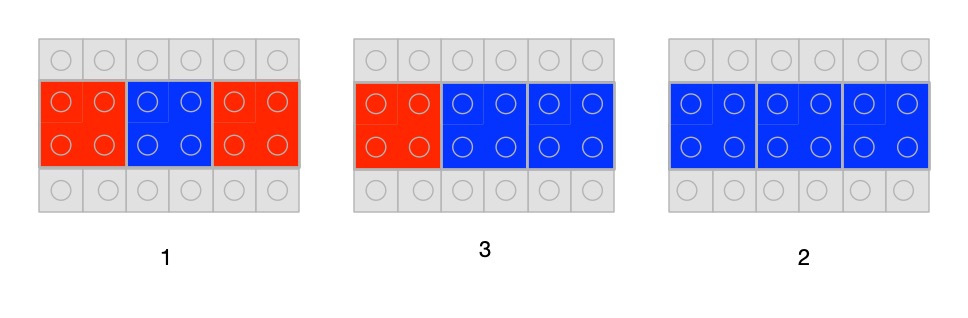
You can see the problem with lego. For example, to move from 0 to 1 in our sequence above you have to change all three lego blocks for new ones of the other colour. Similarly, to go from 1 to 2 you need to change two blocks. Now, if you swap one block from the number first and then the other, there is a point in time when you actually have a different (so wrong) number! To change the number 1 to 2, for example, we must swap the first and third bricks. Suppose we swap the first brick first and then the third brick. For a short time we are actually holding the number 3. Only when we change the last brick do we get to the real next number 2. We have actually counted 1, 3, 2, not 1, 2 as we wanted to. We have briefly been in the wrong state, which could trigger the electronics to do things associated with that state we do not want (like display the wrong number in a counter).
Mistaken counting using our random representation. To get from 1 to 2 we need to swap the first and third brick. If we change the first brick first, there is a brief time when our number has become three, before the third brick is changed. We have counted 1, 3, 2 by mistake. Image by CS4FN
Just as it is hard to swap several blocks at precisely the same time, electronic switches do not switch at exactly the same time, meaning that our gadget could end up doing the wrong thing, because it briefly jumps to the wrong state. This led to the idea of having a representation that used a sequence of numbers where only one bit of the number needs to be changed to get to the next number.
A Gray code in lego bricks. To move from one number in the sequence to the next, you only need to change one lego brick. Image by CS4FN
There are lots of ways to do this and the version above is the one introduced by physicist Frank Gray. Gray codes of this kind have been used in all sorts of situations: a Gray code sequence was used to represent characters in Émile Baudot’s telegraph communication system, for example. More recently they have been used to make it easier to correct errors in streams of data in digital TV.
Computers do not need to worry about this timing problem of when things change as they use clocks to determine when values are valid. Data is only read when the tick of the clock signal says it is safe too. This is slower, but gives time for all the digital switches to settle into their final state before the values are read, meaning faulty intermediate values are ignored. That means computers are free to use other representations of numbers and in particular use a binary system equivalent to our decimal system. That is important as while Gray code is good for counting, and stepping through states, amongst other things, it is not very convenient for doing more complicated arithmetic.
Part of a series featuring featuring pixel puzzles, compression algorithms, number representation, gray code, binary, logic and computation.
Subscribe to be notified whenever we publish a new post to the CS4FN blog.
This blog is funded by EPSRC on research agreement EP/W033615/1.

This post was funded by UKRI, through grant EP/K040251/2 held by Professor Ursula Martin, and forms part of a broader project on the development and impact of computing.
Numbers represented with different sized common blocks Image by CS4FN
Continuing a series of blogs on what to do with all that lego scattered over the floor: learn some computer science…how do we represent numbers and how is it related to the representation Charles Babbage used in his design for a Victorian steam-powered computer?
We’ve seen there are lots of ways that human societies have represented numbers and that there are many ways we could represent numbers even just using lego. Computers store numbers using a different representation again called binary. Before we get to that though we need to understand how we represent bigger numbers ourselves and why it is so useful.
Numbers represented as colours. Image by CS4FN
Our number system was invented in India somewhere before the 4th century. It then spread, including to the west, via muslim scholars in Persia by the 9th century, so is called the Hindu-Arabic numeral system. Its most famous advocate was Muḥammad ibn Mūsā al-Khwārizmī. The word algorithm comes from the latin version of his name because of his book on algorithms for doing arithmetic with Hindu-arabic numbers.
The really clever thing about it is the core idea that a digit can have a different value depending on its position. In the number 555, for example, the digit 5 is representing the number five hundred, the number fifty and the number five. Those three numbers are added together to give the actual number being represented. Digit in the ‘ones’ column keep their value, those in the ‘tens’ column are ten times bigger, those in the ‘hundreds column a hundred times bigger than the digit, and so on. This was revolutionary differing from most previous systems where a different symbol was used for bigger number, and each symbol always meant the same thing. For example, in Roman numerals X is used to mean 10 and always means 10 wherever it occurs in a number. This kind of positional system wasn’t totally unique as the Babylonians had used a less sophisticated version and Archimedes also came up with a similar idea, those these systems didn’t get used elsewhere.
In the lego representations of numbers we have seen so far, to represent big numbers we would need ever more coloured blocks, or ever more different kinds of brick or ever bigger piles of bricks, to give a representation of those bigger numbers. It just doesn’t scale. However, this idea of position-valued numbers can be applied whatever the representation of digits used, not just with digits 0 to 9. So we can use the place number system to represent ever bigger numbers using our different versions of the way digits could be represented in lego. We only need symbols for the different digits, not for every number, of for every bigger numbers.
For example, if we have ten different colours of bricks to represent the 10 digits of our decimal system, we can build any number by just placing them in the right position, placing coloured bricks on a base piece.
The number 2301 represented in coloured blocks where black represents 0, red represents 1, blue represents 2 and where yellow represents 3 Image by CS4FN
Numbers could be variable sized or fixed size. If as above we have a base plate, and so storage space, for four digits then we can’t represent larger numbers than 9999. This is what happens with the way computers store numbers. A fixed amount of space is allocated for each number in the computer’s memory, and if a number needs more digits then we get an “overflow error” as it can’t be stored. Rockets worth millions of pounds have exploded on take-off in the past because a programmer made the mistake of trying to store numbers too big for the space allocated for them. If we want bigger numbers, we need a representation (and algorithms) that extend the size of the number if we run out of space. In lego that means our algorithm for dealing with numbers would have to include extending the grey base plate by adding a new piece when needed (and removing it when no longer needed). That then would allow us to add new digits.
Unlike when we write numbers, where we write just as many digits as we need, with fixed-sized numbers like this, we need to add zeros on the end to fill the space. There is no such thing as an empty piece of storage in a computer. Something is always there! So the number 123 is actually stored as 0123 in a fixed 4-digit representation like our lego one.
The number 321 represented in coloured blocks where space is allocated for 4 digits as 0321: black represents 0, red represents 1, blue represents 2 and where yellow represents 3 Image by CS4FN
Charles Babbage made use of this idea when inventing his Victorian machines for doing computation: had they been built would have been the first computers. Driven by steam power his difference engine and analytical engine were to have digits represented by wheels with the numbers 0-9 written round the edge, linked to the positions of cog-like teeth that turned them.
Wheels were to be stacked on top of each other to represent larger numbers in a vertical rather than horizontal position system. The equivalent lego version to Babbage’s would therefore not have blocks on a base plate but blocks stacked on top of each other.
The number 321 represented vertically in coloured blocks where space is allocated for 4 digits as 0321: black represents 0, red represents 1, blue represents 2 and where yellow represents 3 Image by CS4FN
Numbers stored as columns of wheels on the replica of Babbage’s Difference Engine at the Science Museum London. Image by Carsten Ullrich: CC-BY-SA-2.5. From wikimedia.
In Babbage’s machines different numbers were represented by their own column of wheels. He envisioned the analytical engine to have a room sized data store full of such columns of wheels.
So Babbage’s idea was just to use our decimal system with digits represented with wheels. Modern computers instead use binary … but that is for next time.
Part of a series featuring featuring pixel puzzles, compression algorithms, number representation, gray code, binary, logic and computation.
Subscribe to be notified whenever we publish a new post to the CS4FN blog.
This blog is funded by EPSRC on research agreement EP/W033615/1.
This post was funded by UKRI, through grant EP/K040251/2 held by Professor Ursula Martin, and forms part of a broader project on the development and impact of computing.
Continuing a series of blogs on what to do with all that lego scattered over the floor: learn some computer science…what does number representation mean?
We’ve seen some different ways to represent images and how ultimately they can be represented as numbers but how about numbers themselves. We talk as though computers can store numbers as numbers but even they are represented in terms of simpler things in computers.
But first what do we mean by a number and a representation of a number? If I told you to make the numbers 0 to 9 in lego (go on have a go) you may well make something like this…
But those symbols 0, 1, 2, … are just that. They are symbols representing numbers not the numbers themselves. They are arbitrary choices. Different cultures past and present use different symbols to mean the same thing. For example, the ancient Egyptian way of writing the number 1000 was a hieroglyph of a water lily. (Perhaps you can make that in lego!)
The ancient Egyptian way to write 1000 was a hieroglyph of a waterlily. Image by CS4FN
What really are numbers? What is the symbol 2 standing for? It represents the abstract idea of twoness ie any collection, group or pile of two things: 2 pieces of lego, 2 ducks, 2 sprouts, … and what is twoness? … it is oneness with one more thing added to the pile. So if you want to get closer to the actual numbers then a closer representation using lego might be a single brick, two bricks, three bricks, … put together in any way you like.
Numbers represented by that number of lego bricks. Image by CS4FN
Another way would to use different sizes of bricks for them. Use a lego brick with a single stud for 1, a 2-stud brick for two and so on (combining bricks where you don’t have a single piece with the right number of studs). In these versions 0 is the absence of anything just like the real zero.
Lego bricks representing numbers based on the number of studs showing. Image by CS4FN
Once we do it in bricks it is just another representation though – a symbol of the actual thing. You can actually use any symbols as long as you decide the meaning in advance, there doesn’t actually have to be any element of twoness in the symbol for two. What other ways can you think of representing numbers 0 to 9 in lego? Make them…
A more abstract set of symbols would be to use different coloured bricks – red for 1, blue for 2 and so on. Now 0 can have a direct symbol like a black brick. Now as long as it is the right colour any brick would do. Any sized red brick can still mean 1 (if we want it to). Notice we are now doing the opposite of what we did with images. Instead of representing a colour with a number, we are representing a number with a colour.
Numbers represented as colours. Image by CS4FN
Here is a different representation. A one stud brick means 1, a 2-stud brick means 2, a square 4 stud brick means 3, a rectangular 6 stud brick means 4 and so on. As long as we agreed that is what they mean it is fine. Whatever representation we choose it is just a convention that we have to then be consistent about and agree with others.
Numbers represented by increasing sized blocks. Image by CS4FN
What has this to do with computing? Well if we are going to write algorithms to work with numbers, we need a way to store and so represent numbers. More fundamentally though, computation (and so at its core computer science) really is all about symbol manipulation. That is what computational devices (like computers) do. They just manipulate symbols using algorithms. We will see this more clearly when we get to creating a simple computer (a Turing Machine) out of lego (but that is for later).
We interpret the symbols in the inputs of computers and the symbols in the outputs with meanings and as a result they tell us things we wanted to know. So if we key the symbols 12+13= into a calculator or computer and it gives us back 25, what has happened is just that it has followed some rules (an algorithm for addition) that manipulated those input symbols and made it spew out the output symbols. It has no idea what they mean as it is just blindly following its rules about how to manipulate symbols. We also could have used absolutely any symbols for the numbers and operators as long as they were the ones the computer was programmed to manipulate. We are the ones that add the intelligence and give those symbols meanings of numbers and addition and the result of doing an addition.
This is why representations are important – we need to choose a representation for things that makes the symbol manipulation we intend to do easy. We already saw this with images. If we want to send a large image to someone else then a representation of images like run-length encoding that shrinks the amount of data is a good idea.
When designing computers we need to provide them with a representation of numbers so they can manipulate those numbers. We have seen that there are lots of representations we could choose for numbers and any in theory would do, but when we choose a representation of numbers for use to do computation, we want to pick one that makes the operations we are interested in doing easy. Charles Babbage for example chose to use cog-like wheels turned to particular positions to represent numbers as he had worked out how to create a mechanism to do calculation with them. But that is something for another time…
Part of a series featuring featuring pixel puzzles, compression algorithms, number representation, gray code, binary and computation.
Subscribe to be notified whenever we publish a new post to the CS4FN blog.
This blog is funded by EPSRC on research agreement EP/W033615/1.
This post was funded by UKRI, through grant EP/K040251/2 held by Professor Ursula Martin, and forms part of a broader project on the development and impact of computing.
A giraffe as a pixel image. Colour look-up table Black 0 Blue 1 Yellow 2 Green 3 Brown 4 Image by CS4FN
Continuing a series of blogs on what to do with all that lego scattered over the floor: learn some computer science…
We saw in the last post how images are stored as pixels – the equivalent of square or round lego blocks of different colours laid out in a grid like a mosaic. By giving each colour a number and drawing out a gird of numbers we give ourself a map to recreate the picture from. Turning that grid of numbers into a list (and knowing the size of the rectangle that is the image) we can store the image as a file of numbers, and send it to someone else to recreate.
Of course, we didn’t really need that grid of numbers at all as it is the list we really need. A different (possibly quicker) way to create the list of numbers is work through the picture a brick at a time, row by row and find a brick of the same colour. Then make a long line of those bricks matching the ones in the lego image, keeping them in the same order as in the image. That long line of bricks is a different representation of the image as a list instead of as a grid. As long as we keep the bricks in order we can regenerate the image. By writing down the number of the colour of each brick we can turn the list of bricks into another representation – the list of numbers. Again the original lego image can be recreated from the numbers.
The image as a list of bricks and numbers Colour look-up table: Black 0: Blue 1: Yellow 2: Green 3: Brown 4 Image by CS4FN
The trouble with this is for any decent size image it is a long list of numbers – made very obvious by the very long line of lego bricks now covering your living room floor. There is an easy thing to do to make them take less space. Often you will see that there is a run of the same coloured lego bricks in the line. So when putting them out, stack adjacent bricks of the same colour together in a pile, only starting a new pile if the bricks change colour. If eventually we get to more bricks of the original colour, they start their own new pile. This allows the line of bricks to take up far less space on the floor. (We have essentially compressed our image – made it take less storage space, at least here less floor space).
Image by CS4FN
Now when we create the list of numbers (so we can share the image, or pack all the lego away but still be able to recreate the image), we count how many bricks are in each pile. We can then write out a list to represent the numbers something like 7 blue, 1 green, … Of course we can replace the colours by numbers that represent them too using our key that gives a number to each colour (as above).
If we are using 1 to mean blue and the line of bricks starts with a pile of seven black bricks then write down a pair of numbers 7 1 to mean “a pile of seven blue bricks”. If this is followed by 1 green bricks with 3 being used for green then we next write down 1 3, to mean a pile of 1 green bricks and so on. As long as there are lots of runs of bricks (pixels) of the same colour then this will use far less numbers to store than the original:
7 1 1 3 6 1 2 3 1 1 1 2 3 1 2 3 2 2 3 1 2 3 …
We have compressed our image file and it will now be much quicker to send to a friend. The picture can still be rebuilt though as we have not lost any information at all in doing this (it is called a lossless data compression algorithm). The actual algorithm we have been following is called run-length encoding.
Of course, for some images, it may take more not less numbers if the picture changes colour nearly every brick (as in the middle of our giraffe picture). However, as long as there are large patches of similar colours then it will do better.
There are always tweaks you can do to algorithms that may improve the algorithm in some circumstances. For example in the above we jumped back to the start of the row when we got to the end. An alternative would be to snake down the image, working along the adjacent rows in opposite directions. That could improve run-length encoding for some images because patches of colour are likely the same as the row below, so this may allow us to continue some runs. Perhaps you can come up with other ways to make a better image compression algorithm
Run-length encoding is a very simple compression algorithm but it shows how the same information can be stored using a different representation in a way that takes up less space (so can be shared more quickly) – and that is what compression is all about. Other more complex compression algorithms use this algorithm as one element of the full algorithm.
Activities
Make this picture in lego (or colouring in on squared paper or in a spreadsheet if you don’t have the lego). Then convert it to a representation consisting of a line of piles of bricks and then create the compressed numbered list.
An image of a camel to compress: Colour look-up table: Black 0: Blue 1: Yellow 2: Green 3: Brown 4 Image by CS4FN
Make your own lego images, encode and compress them and send the list of numbers to a friend to recreate.
Subscribe to be notified whenever we publish a new post to the CS4FN blog.
This blog is funded by EPSRC on research agreement EP/W033615/1.
This post was funded by UKRI, through grant EP/K040251/2 held by Professor Ursula Martin, and forms part of a broader project on the development and impact of computing.