Rock star David Bowie co-wrote a program that generated lyric ideas. It gave him inspiration for some of his most famous songs. It generated sentences at random based on something called the ‘cut-up’ technique: an algorithm for writing lyrics that he was already doing by hand. You take sentences from completely different places, cut them into bits and combine them in new ways. The randomness in the algorithm creates strange combinations of ideas and he would use ones that caught his attention, sometimes building whole songs around the ideas they expressed.
Tools for creativity
Rather than being an algorithm that is creative in itself, it is perhaps more a tool to help people (or perhaps other algorithms) be more creative. Both kinds of algorithm are of course useful. It does help highlight an issue with any “creative algorithm”, whether creating new art, music or writing. If the algorithm produces lots of output and a human then chooses the ones to keep (and show others), then where is the creativity? In the algorithm or in the person? That selection process of knowing what to keep and what to discard (or keep working on) seems to be a key part of creativity. Any truly creative program should therefore include a module to do such vetting of its work!
All that, aside, an algorithm is certainly part of the reason Bowie’s song lyrics were often so surreal and intriguing!
Write a cut-up technique program
Why not try and write your own cut-up technique program to produce lyrics. You will likely need to use String processing libraries of whatever language you choose. You could feed it things like the text of webpages or news reports. If you don’t program yet, do it by hand cutting up magazines, shuffling the part sentences before gluing them back together.
Paul Curzon, Queen Mary University of London (Updated from the archive)
The first program that was actually creative was probably written by Christopher Strachey, in 1952. It wrote love letters…possibly gay ones.
The letters themselves weren’t particularly special. They wouldn’t make your heart skip a beat if they were written to you, though they are kind of quaint. They actually have the feel of someone learning English doing their best but struggling with the right words! It’s the way the algorithm works that was special. It would be simple to write a program that ‘wrote’ love letters thought up and then pre-programmed by the programmer. Strachey’s program could do much more than that though – it could write letters he never envisaged. It did this using a few simple rules that despite their simplicity gave it the power to write a vast number of different letters. It was based on lists of different kinds of words chosen to be suitable for love letters. There was a list of nouns (like ‘affection’, ‘ardour’, …), a list of adjectives (like ‘tender’, ‘loving’, …), and so on.
It then just chose words from the appropriate list at random and plugged them into place in template sentences, a bit like slotting the last pieces into a jigsaw. It only used a few kinds of sentences as its basic rules such as: “You are my < adjective > < noun >”. That rule could generate, for example, “You are my tender affection.” or “You are my loving heart”, substituting in different combinations of its adjectives and nouns. It then combined several similar rules about different kinds of sentences to give a different love letter every time.
Strachey knew Alan Turing, who was a key figure in the creation of the first computers, and they may have worked on the ideas behind the program together. As both were gay it is entirely possible that the program was actually written to generate gay love letters. Oddly, the one word the program never uses is the word ‘love’ – a sentiment that at the time gay people just could not openly express. It was a love letter algorithm that just could not speak its name!
Here is one of the offerings from my attempt to write a love letter writing program:
Beloved Little Cabbage,
I cling to your anxious fervour. I want to hold you forever. You are my fondest craving. You are my fondest enthusiasm. My affection lovingly yearns for your loveable passion.
Here characters in double quotes stay the same, whereas those that are not in quotes are variables: place holders for a word from the word associated word list.
Experiment with different templates and different word lists and create your own unique version. If you can’t program yet, you can do it on paper by writing out the template and putting the different word lists on different coloured small post-it notes. Number them and use dice to choose one at random.
Of course, you don’t have to write love poems. Perhaps, you could use the same idea for a post card writing program this summer holiday…
Paul Curzon, Queen Mary University of London (Updated from the archive)
I Ching the ancient Chinese divination text, several thousand years old, is based on a binary pattern…
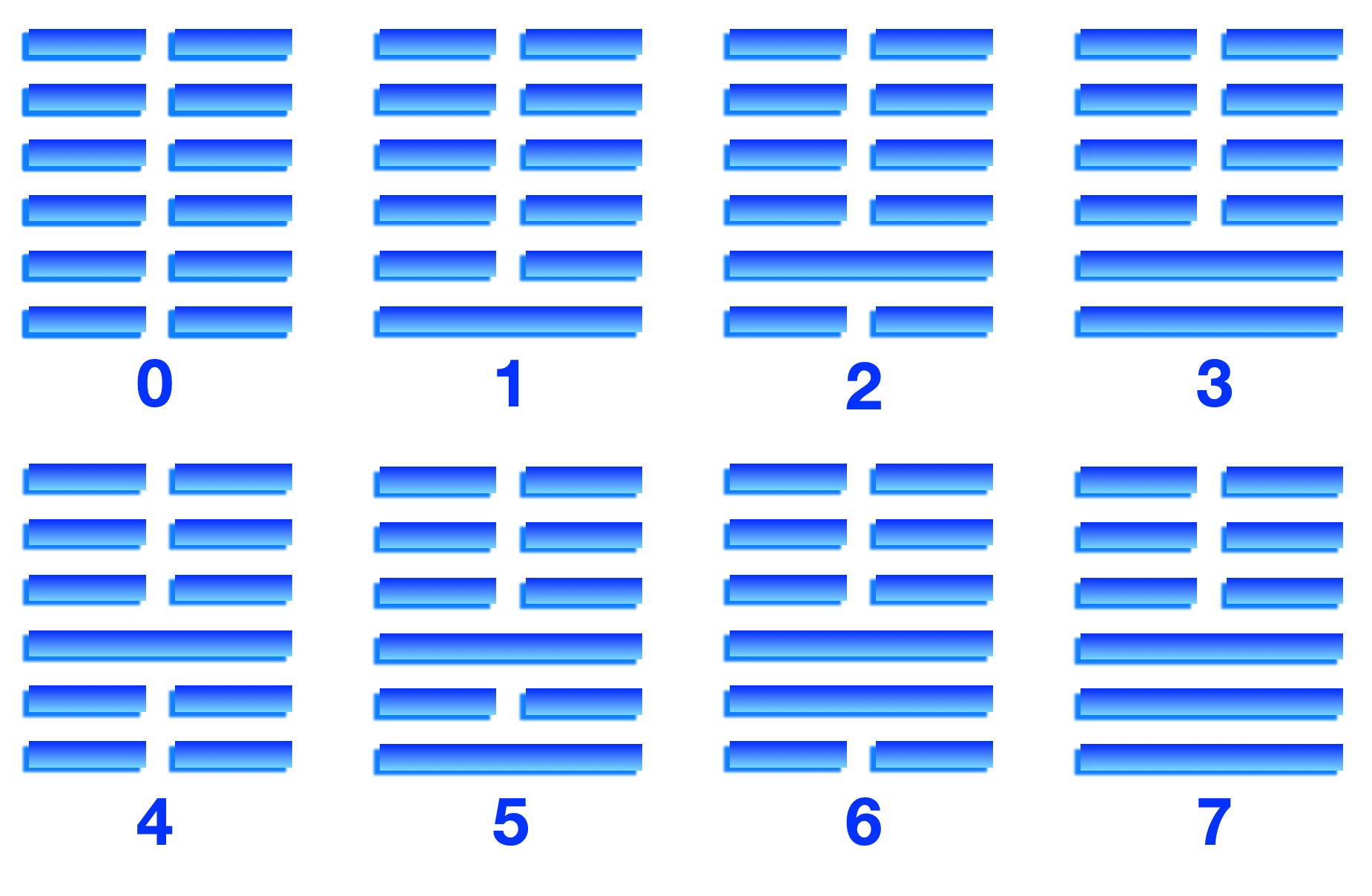
I Ching is one of the oldest Chinese texts. The earliest copies date from around 3000 years ago. It uses 64 hexagrams: symbols consisting of six rows of lines (see right). Each row is either a solid horizontal line or two shorter lines with a gap in the middle. The 64 hexagrams are all the possible symbols that can be made from six rows of lines in this way. In I Ching, they each represent possible predictions about the future (a bit like horoscopes). To use I Ching, a series of hexagrams were chosen. This was done in some unknown but random way, using stalks of the Yarrow plant, standing in for dice. The chosen hexagrams then told the person something about their future.
In the earliest versions of I Ching, the order of the hexagrams suggests that they were not thought of as numbers as such. However, in a later version, from around 1000 AD the order in which they appear is different. Thought to be written by a Chinese scholar, Shao Yong, it is this version that Leibniz was given and that aroused his interest because the order of the hexagrams follows the pattern we know of as binary (see Predicting the future). Shao Yong had apparently picked the sequence deliberately because of the binary pattern, so understood it as a counting sequence, if not necessarily how to do maths with it.
How do the hexagrams correspond to binary? It is not in the lines themselves but the pattern of line breaks down the middle that matters. Think of a break in the lines as a 0 (yin) and no break as a 1 (yang). The order, as Leibniz realised, is a counting system, equivalent to our decimals but where you only have two digits (0 and 1) rather than our ten digits (0…9).
I Ching Hexagrams for numbers 0 to 7 Image by CS4FN
Whereas in decimal each column of a number like 123 represents a power of 10 (ones, tens, hundreds, …) in binary each column represents a power of 2 (ones, twos, fours, eights, …). To work out the value that the number represents you multiply each digit by its column value and add the results. So in decimal, 123 represents one hundred plus two tens plus three ones (one hundred and twenty three). 1011 in decimal represents one thousand plus no hundreds plus one ten plus a one (one thousand and eleven). In binary, however, 1011 represents instead one eight plus no fours plus one two plus a one (8+0+2+1) so eleven. It is just a different way of writing down numbers.
Investigating the I Ching pattern helped Leibniz to work out the mathematics of binary arithmetic and on to thinking about machines to do calculations using it.
Binary is at the core of the digital world, underpinning everything computers do. The mathematics behind binary numbers was worked out by the great German mathematician Gottfried Wilhelm Leibniz in the 17th century. He even imagined a computing machine a century before Babbage, and two centuries before the first actual computers. He was driven in part by an ancient Chinese text used for divination: predicting the future.
I Ching
Leibniz was interested in the ancient Chinese text, the I Ching because he noticed it contained an intriguing mathematical pattern. The pattern was in the set of 64 symbols it used for predicting the future. The pattern corresponded to the counting sequence we now know of as binary numbers (see I Ching binary). Leibniz was obviously intrigued by the patterns as a sequence of numbers. Already an admirer of the great Chinese philosopher, Confucius, he thought that the I Ching showed that Chinese philosophers had long ago thought through the same ideas he was working on. Building on the work of others who had explored non-decimal mathematics, he worked out the maths of how to do calculations with binary: addition, subtraction, multiplication, and division as well as logical operations such as ‘and’, ‘or’ and ‘not’ that underpin modern computers.
Algorithms embedded in machines
Having worked out the mathematics and algorithms for doing arithmetic using binary, he then went further. He imagined how machines might use binary to do calculations. He also created very successful gadgets for doing arithmetic in decimal, but saw the potential of the simplicity of the binary system for machines. He realised that binary numbers could easily be represented physically as patterns of marbles and the absence of marbles. These marbles could flow along channels under the power of gravity round a machine that manipulated them following the maths he had worked out.
His computer would have been a giant marble run!
A container would hold marbles at the top of a machine. Then, by opening holes in its base above different channels, a binary number could be input into the machine. An open hole corresponded to a 1 (so a marble released) and a closed hole corresponded to a 0 (no marble). The marbles rolled down the channels with each channel corresponding to a column in a binary number. The marbles travelled to different parts of the machine where they could be manipulated to do arithmetic. They would only move from one column to another as a result of calculations, such as carry operations.
Addition of digits in binary is fairly simple: 0+0 = 0 (if no marbles arrive then none leave); 0+1 = 1+0 = 1 (if only one marble arrives then one marble leaves; (1+1 = 2 = 10) if two marbles arrive in a channel then none leave that channel, but one is passed to the next channel (a carry operation). The first rules are trivial, open the holes and either a marble will or will not continue. Adding two ones is a little more difficult but Leibniz envisioned a gadget that did this, so that whenever two marbles arrived in a channel together, one was discarded, but the other passed to the adjacent channel. By inputting two binary numbers into the same set of channels connected to a mechanical gadget doing this addition on each channel, the number emerging is a new binary number corresponding to the sum.
Image by CS4FN
Multiplication by two can be done by shifting the tray holding the number along a place to the left. In decimal, to multiply a number by ten, we just put a 0 on the end. This is equivalent to shifting the number to the left: 123 becomes 1230. In binary the same thing happens when we multiply by 2: put a 0 on the end so shift to the left and the binary number is twice as big (11 meaning 2+1 = 3 becomes 110 meaning 4+2+0 = 6). Multiplication of two numbers could therefore be done by a combination of repeated shifts of the marbles of one number, releasing copies of it or not based on the positions of the 1s in the other number. The series of shifted numbers were then just added together. This is just a simplified version of how we do long multiplication.
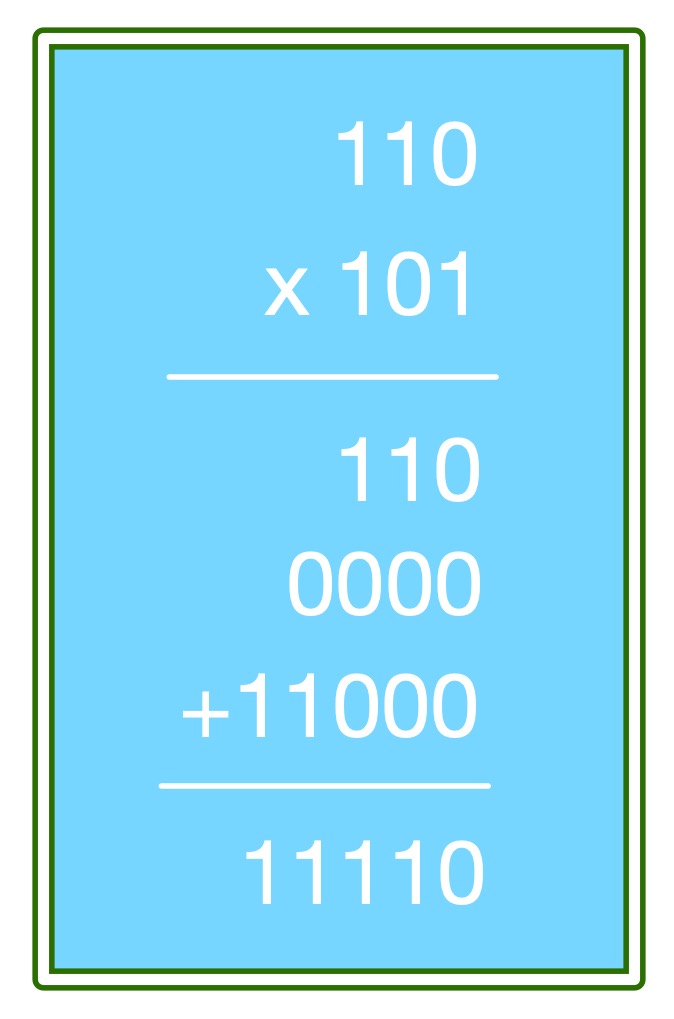
To multiply 110 by 101, you multiply 110 by each digit of 101 in turn. This just involves shifts, and then discarding or keeping numbers. First multiply 110 by 1 (the ones digit of 101) giving 110. Write it down. Now shift 110 one place to give 1100 and multiply by 0 (the twos digit of 101). This just gives 0000. Write it below the previous number. Shift 110 by another place to give 11000. Multiply it by 1 (the fours digit of 101). That gives 11000. Write it down below the others. Add all three numbers to get the answer (see box).
The basics of a computer
Leibniz had not only worked out binary arithmetic, the basis of a computer’s arithmetic-logical unit (ALU), he had also seen how binary numbers could flow around a machine doing calculations. Our computers use pulses of electricity instead of marbles, but the basic principles he imagined are pretty close to how modern computers work: binary numbers being manipulated as they flow from one computational unit to the next. Leibniz didn’t make his machine, it was more a thought experiment. However, helped by I Ching, a book for divining the future, he did essentially predict how future computers would work.
Tea shops played a surprisingly big role in the history of computing. It was all down to J. Lyons & Co., a forward thinking company that bought one of the first computers to use for things like payroll. Except they had a problem. Computers need programs, but no such programs existed, and neither did the job of programmer. How then to find people to program their new-fangled computer? One person they quickly found, Mary Coombs, suited the job to a T, becoming the first female commercial programmer.
J Lyons and Company, a catering company with a chain of over 200 tea shops in London, wanted to increase its sales and efficiency. With amazing foresight, they realised computers, then being used only for scientific research in a few universities, would help. They bought the technology from Cambridge University, built their own and called it LEO (the Lyons Electronic Office). They hoped it would do calculations much more quickly than the 1950s clerks could, using calculating machines. But it could only happen if Lyons could find people to program it. At the time there were only a handful of people in the world who were ‘good at computers’ (programmer didn’t exist as a job yet) so instead they had to find people who could be good with computers and train them for the job. Lyons created a Computer Appreciation Course which involved a series of lectures and some homework, all designed to find staff within the company who could think logically and would learn how to write programs for LEO.
One of those was Mary Coombs. Born in 1929, she studied at Queen Mary University of London in the late 1940s. You might think, given that this is about a computer, that she studied computer science, but she actually studied French and History. She couldn’t study computer science: what we’d call a computer science course didn’t exist. There wasn’t one anywhere until 1953, when the University of Cambridge opened a Diploma in Computer Science.
By then, Mary was already working at Lyons. She’d had a holiday job there in 1951, as a clerk (in the Ice Cream Sales department) as she finished her degree. A year later she returned to the company where her career changed direction. In addition to her language skills, she was good at maths so transferred to Lyon’s Statistical Office. That’s where she heard about LEO and the need for programmers to learn about it and help test it as it was being built and refined. Intrigued, she signed up for the company’s first computer appreciation course, did well, and was one of only two people on the course then offered a job on the project. As a result she became the first woman to work on the LEO team as a programmer and the first female commercial programmer in the world.
LEO was an enormous computer, built from several thousand valves, and took up an entire room, though it could only store a few kilobytes of memory. It was also a little temperamental. It needed to be very reliable if it was going to be of any use, so it underwent months of testing and improvement, with Mary’s help, before it was put to work on solving real problems, again with Mary and others on the team writing the programs for everything it did.
One of its first tasks was to make sure everyone got paid! LEO was able to calculate forty people’s payslips in one minute (one every 1.5 seconds) where previously it would have taken one clerk six minutes to do one: a huge improvement in efficiency for Lyons.
LEO was both pioneering and a big success, but the real pioneers were the programmers like Mary. They turned computers, intended to help scientists win Nobel prizes, into ones that helped businesses run efficiently, ensuring people got paid. Obvious now, but remarkable in the 1950s.
This simplistic custard contraption is inspired by a more sophisticated custard computer invented by Adrian Johnstone, Royal Holloway, University of London.
Imagine a room-sized vat of custard suspended from the ceiling. Below are pipes, valves and reservoirs of custard. At the bottom is a vast lake where the custard collects as it splurges out of the pipes. A pump sucks custard back up to the vat on the ceiling once more. Custard flows, sits, splurges…all the while doing computation.
Babbage worked out how to make a computer using wheels. How might you make a general purpose digital computer out of custard? (It sounds more fun!) Adrian Johnstone at Royal Holloway has designed one and if built it would look something like our above description, like something from Willie Wonka’s chocolate factory.
Here we give a slightly simplistic version. The first step is to have something to represent 0 and 1. That’s easy with custard: no custard in a storage tank is a 0 and custard is a 1. Out of that you can represent numbers using collections of such tanks: lots of tanks containing custard or no custard, with a code (binary) giving them meaning as numbers.
Once you have a way to represent numbers, the next step to making a computer is to make the equivalent of transistors. Transistors are just switches, but ones that revolutionised electronics to the point that they have been hailed as one of the greatest inventions ever. Starting with humble transistors, computers (and lots more) can be built.
Transistors have three inputs. One acts as the data input, or source, connected ultimately to the source of the current (in our case the vat of custard). Another, the drain, connects ultimately to the place the current drains to (in our case the lake of custard). A third input is the gate. It switches the transistor on and off, either allowing current (custard) to flow towards the drain or not. The gate thus acts as the switch to allow custard to flow.
One way to make a custard transistor would be to use a contraption based on your toilet but full of custard (don’t think about that too much). Look in your toilet cistern and see how it switches water on and off when you flush the toilet to get the idea. For a (custard) transistor, have a small tank of custard with a ball floating on the surface. It acts as the gate. Fastened to the end of the ball is a lever The lever’s other end can push up against the end of the pipe that runs from source to drain, blocking the flow. When the tank is full of custard it pushes the other end of the lever down, letting custard flow. If the tank empties then the ball drops, so the other end of the lever rises and blocks the flow.
Transistors have been hailed as one of the greatest inventions ever.
There are two kinds of transistors. They differ in that the gate just operates in opposite fashions. With one kind, custard can flow from source to drain only when there is current (custard) at the gate (as above). In the other, custard flows only when there is no custard at the gate.
Once you have (custard) transistors, you can make (custard) memory and (custard) logic gates (NOT, AND, OR,…). A (custard) NOT, for example, would need to let custard into its out pipe only if there were no custard on its input pipe (and vice versa). We can do this using a transistor with the NOT circuit’s input connected to the gate, and where custard flows only when the gate has no custard. The drain of the transistor becomes the output of the NOT circuit. The source of the transistor connects to the vat of custard to provide the custard that will flow when the transistor switches on. When custard arrives at the gate which is acting as a switch, it stops custard flowing to the drain, and vice versa, as required.
AND logic needs to let custard out only when there is custard at both its input pipes. OR logic allows custard through when there is custard at either of its input pipes. This can be done with appropriate plumbing together of the transistors as follows.
A custard transistor: when there is custard at the gate, custard flows from source to drain. When no custard is at the gate, the floating ball drops and closes the link. Image by CS4FN
A (custard) AND uses two transistors It allows custard to flow when there is custard at both gates which are the input pipes of the AND circuit. Connect one input of the AND circuit to the gate of the first transistor with the source connected to the vat of custard. Connect its output to the source of the second transistor. The gate of this second transistor is linked to the second input of the AND. Custard will flow from the vat down towards the drain only when there is custard at both gates. If either gate has no custard, then the custard will not flow, just as required for custard AND logic. We will leave you to work out how to make (custard) OR logic.
Once you can create gadgets that do (custard) memory, NOT, AND and OR, you can then start to build more interesting circuits by combining them: building up the components of a computer like (custard) adders and (custard) multipliers, circuits that compare numbers and ones that trigger custard to be moved about… put it together in the right way and you can build a computer with control unit, arithmetic logic unit, memory unit and so on… (as long as you have enough custard).
Out of the glooping vat of custard, computation emerges….Would it really work? You would have to build it to find out!
Charles Babbage had an obsession for precision and high standards because if his machines were to work, they needed it. One of his indirect contributions to contraption construction the world over concerned the humble screw. We take screws pretty much for granted now, especially the idea that there are standard sizes. Lose one when putting together that flatpack furniture and you can easily get another that is identical. Before the 1800s though that was not the case. Screws made by different people were unlikely to be the same and might only fit the specific thing they were hand made for. Babbage’s demands for precision helped change that.
The key person in the invention of the standard screw was Stockport engineer, Sir Joseph Whitworth. Having worked as a boy in his uncle’s Derbyshire cotton mills, he was fascinated by the machinery there. He realised the accuracy of the workmanship in the machines was poor and needed to be better.
The Difference Engine was built by Joseph Clement in the years up to 1833, and who should be there helping him do so, having moved on to start a career as a skilled mechanic? None other than Whitworth. For Babbage’s machines to work they needed precision engineering of lots and lots of identical parts and to levels of accuracy far greater than previously needed. For the Difference Engine Clement and Whitworth, with their shared passion for accuracy, were up to the challenge. This work showed the coming need for ways to engineer ever more precisely, and to be able to repeat that work…a challenge Whitworth pursued for the rest of his life.
Also famous for inventing the first ever truly accurate “sniper rifle” he went on to create a standard thread for screws that then became the world’s first national screw thread standard: the British Standard Whitworth system. It suddenly meant screws could be made by mass production, bought from anywhere, and guaranteed to fit precisely for whatever job was needed. Whilst sadly the need to mass produce computers didn’t materialise, the standard was adopted for building ships, trains… for industry throughout the nation, making Great Britain’s industry more efficient and so more competitive. Now we rely on the idea of national and international standards like this not just for hardware but for software too. Standards help ensure our computers work but also keep us safe.
The equivalent of this engineering precision is still lacking in the development of software though, much of which is buggy and developed to poor standards by people hacking out software that may or may not work. High standards tend only to apply in safety-critical software, and then often poorly. We need the next generation of programmers to have the same obsession for precision of Babbage and Whitworth and apply it to the development of software, ending the age of buggy, poorly developed software.
Some 1950s computers used tubes filled with mercury as a memory to store numbers. Mercury is a metal that is liquid at room temperature. It’s also known as quicksilver as it flows very easily, but in computing it was actually used to trap information.
Early computers needed a way to store data that would survive indefinitely, even if the computer was stopped. ‘Delay lines’ provided the solution. Data arriving electronically at a mercury delay line struck a converter (called a ‘transducer’) which converted the information to a sound pulse in the mercury. The sound travelled through the tube at the speed of, yes, sound and when the pulse reached the other side it hit another transducer and was returned to its electronic form. That might not sound (sorry) like much of a delay but compared to the speed that an electrical signal moves through a wire (a fraction of the speed of light), it’s like a gentle stroll. Once inside the mercury tube the sound pulses could be looped back and forth, safely ‘parked’ until needed. The computer would use its clock to help it count how many pulses had passed and a microphone listened for the right time to release it from the memory store back into the circuitry to do a calculation with it.
Mercury is expensive, so computer pioneer Alan Turing recommended using gin instead. He claimed its mix of alcohol and water gave perfect properties for the job while being so much cheaper.
Think about tennis serving machines that shoot balls at you. If you put one in a squash court, then a ball being fired will bounce back and forth off the walls but quickly drop to the floor. A delay line works like having two machines facing each other. One fires a ball so that it hits a lever (the transducer) which tells the other machine to fire a ball back, which then hits a lever on the first machine… and so on. Now there is always a ball in flight (a pulse in the delay line) because the motion of the original ball is detected, and used to make a new ball (pulse) that is injected back into the system. Start the first machine by making it fire balls in an initial ball-no-ball pattern and the system stores that pattern, that information. Using cunning contraptions, motion can keep information firmly in one place.
Jo Brodie and Paul Curzon, Queen Mary University of Londonand Adrian Johnstone, Royal Holloway, University of London
Ada Lovelace was close friends with John Crosse, and knew his father Andrew: the ‘real Frankenstein’. Andrew Crosse apparently created insect life from electricity, stone and water…
Andrew Crosse was a ‘gentleman scientist’ doing science for his own amusement including work improving giant versions of the first batteries called ‘voltaic piles’. He was given the nickname ‘the thunder and lightning man’ because of the way he used the batteries to do giant discharges of electricity with bangs as loud as canons.
He hit the headlines when he appeared to create life from electricity, Frankenstein-like. This was an unexpected result of his experiments using electricity to make crystals. He was passing a current through water containing dissolved limestone over a period of weeks. In one experiment, about a month in, a perfect insect appeared apparently from no-where, and soon after starting to move. More and more insects then appeared over time. He mentioned it to friends, which led to a story in a local paper. It was then picked up nationally. Some of the stories said he had created the insects, and this led to outrage and death threats over his apparent blasphemy of trying to take the position of God.
(Does this start to sound like a modern social networking storm, trolls and all?) In fact he appears to have believed, and others agreed, that the mineral samples he was using must have been contaminated with tiny insect eggs, that just naturally hatched. Scientific results are only accepted if they can be replicated. Others, who took care to avoid contamination couldn’t get the same result. The secret of creating life had not been found.
While Mary Shelley, who wrote Frankenstein, did know Crosse, sadly perhaps, for the story’s sake, he can’t have been the inspiration for Frankenstein as has been suggested, given she wrote it decades earlier!
Paul Curzon, Queen Mary University of London (from the archicve)
Shortly after Ada Lovelace was born, so long before she made predictions about future “creative machines”, Mary Shelley, a friend of her father (Lord Byron), was writing a novel. In her book, Frankenstein, inanimate flesh is brought to life. Perhaps Shelley foresaw what is actually to come, what computer scientists might one day create: artificial life.
Life it may not be, but engineers are now doing pretty well in creating humanoid machines that can do their own thing. Could a machine ever be considered alive? The 21st century is undoubtedly going to be the age of the robot. Maybe it’s time to start thinking about the consequences in case they gain a sense of self.
Frankenstein was obsessed with creating life. In Mary Shelley’s story, he succeeded, though his creation was treated as a “Monster” struggling to cope with the gift of life it was given. Many science fiction books and films have toyed with these themes: the film Blade Runner, for example, explored similar ideas about how intelligent life is created; androids that believe they are human, and the consequences for the creatures concerned.
Is creating intelligent life fiction? Not totally. Several groups of computer scientists are exploring what it means to create non-biological life, and how it might be done. Some are looking at robot life, working at the level of insect life-forms, for example. Others are looking at creating intelligent life within cyberspace.
For 70 years or more scientists have tried to create artificial intelligences. They have had a great deal of success in specific areas such as computer vision and chess playing programs. They are not really intelligent in the way humans are, though they are edging closer. However none of these programs really cuts it as creating “life”. Life is something more than intelligence.
A small band of computer scientists have been trying a different approach that they believe will ultimately lead to the creation of new life forms: life forms that could one day even claim to be conscious (and who would we be to disagree with them if they think they are?) These scientists believe life can’t be engineered in a piecemeal way, but that the whole being has to be created as a coherent whole. Their approach is to build the basic building blocks and let life emerge from them.
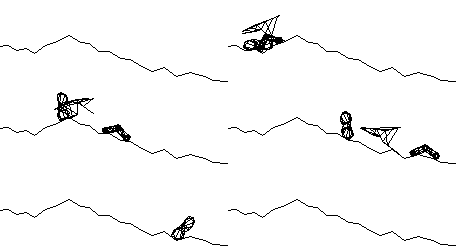
A sodarace in action by CS4FN
The outline of the idea could be seen in the game Sodarace, where you could build your own creatures that move around a virtual world, and even let them evolve. One approach to building creatures, such as a spider, would be to try and work out mathematical equations about how each leg moves and program those equations. The alternative artificial life way as used in Sodarace is to instead program up the laws of physics such as gravity and friction and how masses, springs and muscles behave according to those laws. Then you just put these basic bits together in a way that corresponds to a spider. With this approach you don’t have to work out in advance every eventuality (what if it comes to a wall? Or a cliff? Or bumpy ground?) and write code to deal with it. Instead natural behaviour emerges.
The artificial life community believe, not just life-like movement, but life-like intelligence can emerge in a similar way. Rather than programming the behaviour of muscles you program the behaviour of neurones and then build brains out of them. That it turns out has been the key to the machine learning programs that are storming the world of Artificial Intelligence, turning it into an everyday tool. However, if aiming for artificial life, you would keep going and combine it with the basic biochemistry of an immune system, do a similar thing with a reproductive system, and so on.
Want to know more? A wonderful early book is Steve Grand’s: “Creation”, on how he created what at the time was claimed to be “the nearest thing to artificial life yet”… It started life as the game “Creatures”.
Then have a go at creating artificial life yourself (but be nice to it).
Paul Curzon and Peter W McOwan, Queen Mary University of London
















 cs4fn
cs4fn 