Coordinate conundrum puzzles and vector graphics

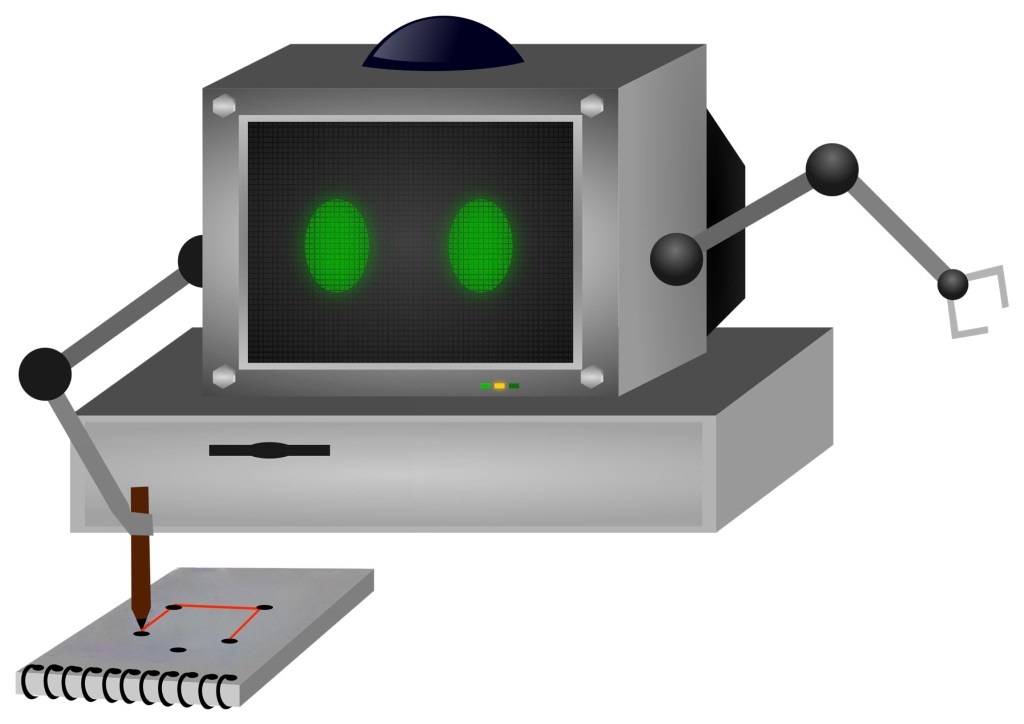
A computer with arms doing a coordinate conundrum on a pad of paper

Image by Samson Vlad from Pixabay modified by CS4FN

One way computers store images is as a set of points (as coordinates) that make up lines and shapes. This is the basis for the kind of computer graphics called Vector Graphics. You can explore the idea by doing coordinate conundrum puzzles. A coordinate conundrum is just a Vector Graphics Image to be drawn on paper.They are join-the-dot puzzles based on the idea. Can you recreate the original drawing?

Recreate a drawing from coordinates

Points on a grid can be represented by pairs of numbers called coordinates. The first, x coordinate, says how far to go along horizontally. The second, y coordinate, says how far to go up, vertically. The numbers along the axes (along the bottom and up the side) of the grid give the distance in that direction. Draw the point at the place you end up at! So for example the coordinate (4,5) means go right from the origin 4 and up 5 and plot the point there.

Grid showing point (4,5) as 4 right and 5 up.
Image by CS4FN

You can join any two coordinates with lines. If a series of lines join back to the original one then it make a shape (a polygon), which can be coloured in. For example, if we plot the points (4,5), (7,7 and (8,4) drawing lines between them and back to (4,5) we make a triangle.
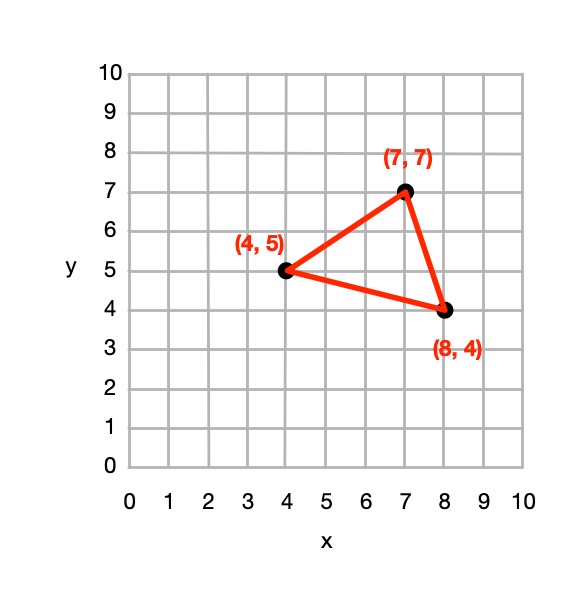
A triangle marked out in coordinates
Image by CS4FN

From 4 points we could define a square, rectangle or more general quadrilateral shape and so on.

So from a set of instructions telling you where to plot points, you can create a picture out of all the shapes and lines that make up the picture, giving colours for the lines or shapes.

This (and so these puzzles) is the basis of how programs in the language SVG (Scalable Vector Graphics) work to store a drawing as the instructions needed to recreate it. Drawing programs often store illustrations that the artists using them draw as an SVG program.

How to solve them

Each picture is made of shapes, each given by a colour and a list of the coordinates of its vertices (corners). For each shape: 

1. Plot the list of (x,y) coordinates on the grid as dots. 

2. Join the dots (which start and end at the same place) to make the shape. 

3. Colour the shape you have made with the colour at the start of the list. 

So, for example, if the first instruction starts: red (5,24) … that means plot the point 5 along and 24 up. It starts a new shape, coloured red, that ends at the same point.

If the series of points do not join back to the start then they represent coloured lines rather than a coloured shape,

Example: Semaphore flag
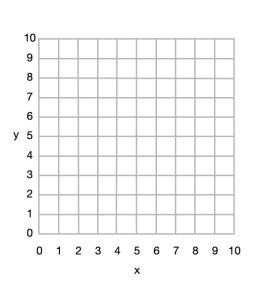
Blank 10x10 grid
Image by CS4FN

Here is a simple example to draw a red and yellow semaphore flag, given the shapes:

  • red (0,10) (10,10) (10,0) and back to (0,10)
  • yellow (0,10) (10,0) (0,0) and back to (0,10)

From this we can draw the picture.
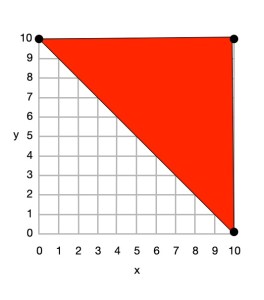
Top right triangle now coloured red with (0,10), (10,10) and (10,0) plotted, joined by lines and the shape coloured.
Image by CS4FN

First we plot the points given for the red shape (a triangle), join the dots and colour it in.

  • red (0,10) (10,10) (10,0) and back to (0,10)
Bottom rightt triangle now coloured yellow with (0,10), (10,0) and (0,0) plotted, joined by lines and the shape coloured.
Image by CS4FN

Then we plot the points given for the yellow shape (another triangle), join the dots and colour it in.

  • yellow (0,10) (10,0) (0,0) and back to (0,10)

Do some puzzles yourself

Try the coordinate conundrum puzzles on our puzzle page either by printing off the puzzle sheet or drawing on squared paper. Then read on to find out a little more the advantages of vector graphics.

From straight lines to curves

In these puzzles we have only used straight lines between points, but we could also include commands to create circles and curved lines between points based on the mathematical equation for the curve. SVG, the vector graphic programming language, has instructions for a variety of more complex kinds of lines and shapes like that.

Advantages and disadvantages of Vector Graphics

Recording images in this way as points, lines and shapes has several advantages over storing images as pixels:

  • we generally need far less space to store the image as we do not need to store a colour for thousands or even millions of pixels;
  • the images are mathematically accurate – a line is represented as a perfect straight line not a pixelated (staircase-like) line;
  • the images are scalable, meaning you can increase the size of an image, zooming in just by multiplying all the numbers involved by a scale factor (which is just a number giving the magnification you want). The resulting image is still mathematically perfect with straight lines still straight lines, for example, just bigger. For example, suppose we want to make a semaphore flag twice the size of our original. We just multiply all points by 2, for example giving red (0,20) (20,20) (20,0) and back to (0,20); yellow (0,20) (20,0) (0,0) and back to (0,20) and it gives an identical picture, just bigger. (Try plotting it and see!)

Disadvantages are:

  • Vector graphics are not a good way to represent photographs – digital cameras record the light at lots of points corresponding to pixels so naturally are stored as pixels (numbers that give the colour in that small square of the image). Trying to convert a photo to a vector image would be hard (needing algorithms to recognise shapes, for example). It would be a less natural and less accurate way of doing so.
  • With computer memory cheap, the advantages of using less storage are less important than they once were.

SVG: a graphics programming language

The programming language SVG records drawings in this way as instructions to draw shapes and lines based on points. It has some difference to our instructions though. For example the y-axis coordinates start at the top and work down. The principles are the same though, it is only the detail that differs.

Paul Curzon, Queen Mary University of London

More on …

Magazines …


Subscribe to be notified whenever we publish a new post to the CS4FN blog.


This page is funded by EPSRC on research agreement EP/W033615/1.

QMUL CS4FN EPSRC logos

Mary Ann Horton and the invention of email attachments

Mary Ann Horton was transitioning to female at the time that she made one of her biggest contributions to our lives with a simple computer science idea with a big impact: a program that allowed binary email attachments.

Now we take the idea of sending each other multimedia files – images, video, sound clips, programs, etc for granted, whether by email or social networks, Back in the 1970s, before even the web had been invented, people were able to communicate by email, but it was all text. Email programs worked on the basis that people were just sending words, or more specifically streams of characters, to each other. An email message was just a long sequence of characters sent over the Internet. Everything in computers is coded as binary: 1s and 0s, but text has a special representation. Each character has its own code of 1s and 0s, that can also be thought of as a binary number, but that can be displayed as the character by programs that process it. Today, computers use a universally accepted code called Unicode, but originally most adopted a standard code called ASCII. All these codes are just allocations of patterns of 1s and 0s to each character. In ASCII, ‘a’ is represented by 1100001 or the number 97, whereas A is 1000001 or number 65, for example. These are only 7 bits long and as computers store data in bytes of 8 bits at a time this means that not all patterns of binary (so representable numbers) correspond to one of the displayable characters that email messages were expected to contain by the programs that processed them.

That is fine if all you have done is used programs like text editors, that output characters so you are guaranteed to be sending printable characters. The problem was other kinds of data whether images or runnable programs, are not stored as sequences of characters. They are more general binary files, meaning the data is long sequences of byte-sized patterns of 1s and 0s and what those 1s and 0s meant depended on the kind of data and representation used. If email programs were given such data to send, pass on or receive, they would reject or more likely mangle it as not corresponding to characters they could display. The files didn’t even have to be non-character formats, as at the time some computer systems used a completely different code for characters. This meant text emails could also be mangled just because they passed through a computer using a different format of character.

Mary Ann realised that this was all too restrictive for what people would be needing computers to do. Email needed to be more flexible. However, she saw that there was a really easy solution. She wrote a program, called uuencode that could take any binary file and convert it to one that was slightly longer but contained only characters. A second program she wrote, called uudecode converted these files of characters back to the original binary file to be saved by the receiving email program exactly it was originally on the source program.

All the uuencode program did was take 3 bytes (24 bits) of the binary file at a time, split them into groups of 6 bits so effectively representing a number from 0 to 63, add 32 to this number so the numbers are now in the range 32 to 95 and those are the numbers so binary patterns of the printable characters that the email programs expected. Each three bytes were now 4 printable characters. These could be added to the text of an email, though with a special start and end sequence included to identify it as something to decode. uudecode just did this conversion backwards, turning each group of 4 characters back into the orginal three bytes of binary.

Email attachments had been born, and ever since communication programs, whether email, chat or social media, have allowed binary files, so multimedia, to be shared in similar ways. By seeing a coming problem, inventing a simple way to solve it and then writing the programs, Mary Ann Horton had made computers far more flexible and useful.

Paul Curzon, Queen Mary University of London

More on …

Related Magazines …

cs4fn issue 14 cover

Subscribe to be notified whenever we publish a new post to the CS4FN blog.


This page is funded by EPSRC on research agreement EP/W033615/1.

QMUL CS4FN EPSRC logos

From Egyptian Survey puzzles to computational thinking

One way to use logical thinking is to deduce new facts but then turn them into IF-THEN rules. They tell us an action to do IF something is true. For example:  IF both cards are the same THEN shout SNAP! Once we have IF-THEN rules we can use them as the basis of a program. We can see how this works, and how it involves various computational thinking skills with a simple logical thinking puzzle.

An Egyptian Survey puzzle 

Image by CS4FN

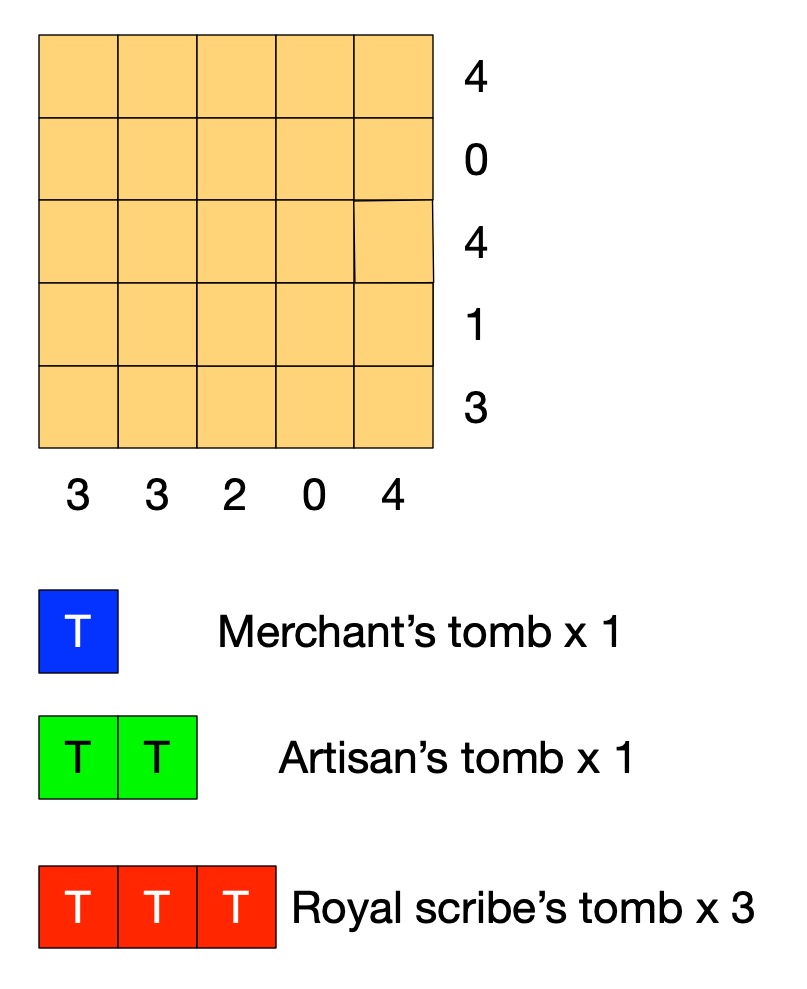
Old records show that this area of the desert contains the tombs of 3 scribes (a large tomb covering 3 squares), 1 artisan (medium, 2 squares) and 1 merchant (small, 1 square).

A survey has gathered information of where the tombs could be. Each number tells you how many squares are part of a tomb in that row or column. 

Tombs are not adjacent (horizontally, vertically or diagonally).

Can you work out where all the tombs are without further digging?

Solving Egyptian Survey puzzles

The instructions of the puzzle give us some simple facts such as that the number at the end of the row tells us the number of squares in that row holding tombs.  On its own that does not tell us how to solve the puzzle. However, thinking logically about it we can draw simple logical conclusions so deduce new facts. For example, it is fairly simple to deduce the fact:

the number for a row being 0 IMPLIES there are no tombs in that row.

If we know there are no tombs in a row then we can mark each square of the row as empty. If we use X to mean nothing is in that square, then we can turn that deduced fact into an action. It means that we can do the following when trying to solve the puzzle:

IF the number on a row is 0 
THEN put an X in all the squares of that row.

With that rule we can start to solve the puzzle just by following the rule. Find a row numbered 0 and put Xs there. We can create a similar rule for columns. Applying both these rules to our puzzle we get:

Image by CS4FN

Can you work out more rules before reading on?

Rules, rules, rules

What happens if the number of a row is more than 0? Knowing the number alone doesn’t help us much. We need to combine it with other information. The top row of the puzzle has the number 4, for example, but one of the squares already has a cross in it. That means the remaining 4 squares all must have tombs, which we will mark T. We can turn that into a rule:

IF the number for a row is 4 AND there are 4 empty squares in that row and an X
THEN put a T in all the empty squares of that row.

We can make similar rules for each number 1 to 4. We can then create similar rules for columns. Applying them once each to our puzzle gives us:

Image by CS4FN

We could also make a more general version of this rule 

IF the number for a row is <n> AND there are only <n> empty squares in that row 
THEN put a T in all the empty squares of that row.

This is what computer scientists call generalisation: a part of computational thinking. Instead of having lots of rules (or lines of code) for lots of similar situations, we create one simple but general one that covers all the cases. We can of course apply rules more than once, so as you probably noticed we can apply our row rule once more. In effect our rules live inside a loop and we keep trying them in sequence for as long as we find a rule that makes a difference.

Image by CS4FN

Now one of the rows has the number 1, but we have already marked a tomb in a square of that row. That gives us another rule.

IF the number for a row is 1 AND there is already 1 tomb marked in that row
THEN put an X in all the empty squares of that row.

This gives us:

Image by CS4FN

Similar rules apply for other numbers so we could also make a general version of this rule too.

IF the number for a row is <n> AND there are already <n> tombs marked in that row
THEN put an X in all the empty squares of that row.

Now, applying a column version of the last general rule and we can mark an X in the last square for column with 2 tomb squares.

Image by CS4FN

We need one last rule for this puzzle:

IF the number for a row is <n> AND the number of spaces + the number of 0s is <n>
THEN put a T in all the empty squares of that row.

This is actually an even more general version of our second rule (it is the case where the number of Ts is 0, so could replace that rule with this new one.

 Applying it finally solves the puzzle:

Image by CS4FN

If we put our rules together then they become the basis of an algorithm (so program) for solving the puzzles and in creating them from deduced facts we are doing algorithmic thinking. IF-THEN instructions along with sequencing and loops are the basis of all programs. Here we create a sequence of the rules to try in order and put them inside a loop so that we keep trying them until none apply or we have solved the puzzle. There is a style of programming where all a program is is a series of IF-THEN rules – with looping happening implicitly.

Algorithms are just rules to follow that guarantee a result (here solving the puzzle). It is only an algorithm if it guarantees to always work. To solve any (solvable) Egyptian Survey puzzle like this we would need yet more rules: we would need more more rules for it to be an algorithm for solving all puzzles. Making sure algorithms cover all possibilities is one of the harder parts of algorithmic thinking – bugs in programs are often there because the programmer didn’t manage to cover every possibility. In our case we could write a program based on our limited rules. We would just need to include an extra rule that quits (admitting defeat and saying that the program cannot solve the puzzle) if no rule applies.

Perhaps you can work out all the rules (so an algorithm) needed to solve any of these puzzles! All you need are the instructions for the game, some logical thinking to deduce new facts, some algorithmic thinking to turn them into rules, and an ability to generalise so you have a small number of rules … computational thinking skills in fact.

– Paul Curzon, Queen Mary University of London

More on …

Magazines …


Subscribe to be notified whenever we publish a new post to the CS4FN blog.


This page is funded by EPSRC on research agreement EP/W033615/1.
QMUL CS4FN EPSRC logos