CS4FN Advent 2023 – Day 8: gifts, and wrapping – Tim Berners-Lee, Right to Repair & another computing puzzle

Tim Berners-Lee, Right to Repair, and a maths puzzle.

Welcome to Day 8 of our CS4FN Christmas Computing Advent Calendar. It features a computing-themed post every day in December until Christmas Day. The blog posts in the Advent Calendar are inspired by the picture on the ‘door’ – and today’s post is inspired by a picture of a Christmas present.

Presents are something you give freely to someone, but they’re also something you hide behind wrapping paper. This post is about a gift and also about trying to uncover something that’s been hidden. Read on to find out about Tim Berners-Lee’s gift to the world, and about the Restart Project who are working to stop the manufacturers of electronic devices from hiding how people can fix them. At the bottom of the post you’ll find the answer to yesterday’s puzzle and a new puzzle for today, also all of the previous posts in this series. If you’re enjoying the posts, please share them with your friends 🙂

A present in blue wrapping paper with a large green bow. Image drawn and digitised by Jo Brodie.

1. “This is for everyone” – Tim Berner’s Lee

Audiences don’t usually cheer for computer scientists at major sporting events but there’s one computer scientist who was given a special welcome at the London Olympics Opening Ceremony in 2012.

Tim Berners-Lee invented the World Wide Web in 1989 by coming up with the way for web pages to be connected through links (everything that’s blue and clickable on this page is a link). That led to the creation of web browsers which let us read web pages and find our way around them by clicking on those links. If you’ve ever wondered what “www” means at the start of a link it’s just short for World Wide Web. Try saying “www” and then “World Wide Web” – which takes longer to say?

Tim Berners-Lee didn’t make lots of money from his invention. Instead he made the World Wide Web freely available for everyone to use so that they could access the information on the web. Unless someone has printed this onto paper, you’re reading this on a web browser on the World Wide Web, so three cheers Tim Berners-Lee.

In 2004 the Queen knighted him (he’s now Sir Tim Berners-Lee) and in 2017 he was given a special award, named after Alan Turing, for “inventing the World Wide Web and the first web browser.”

Below is the tweet he sent out during the Olympics opening ceremony.

Further reading

The Man Who Invented The Web (24 June 2001) Time
“I Was Devastated”: Tim Berners-Lee, the Man Who Created the World Wide Web, Has Some Regrets (1 July 2018) Vanity Fair

You might also like finding out about “open-source software” which is “computer software that is released under a license in which the copyright holder grants users the rights to use, study, change, and distribute the software and its source code to anyone and for any purpose.”

2. Do you have the right to repair your electronic devices?

A ‘black box’ is a phrase to describe something that has an input and an output but where ‘the bit in the middle’ is a complete mystery and hidden from view. An awful lot of modern devices are like this. In the past you might have been able to mend something technological (even if it was just changing the battery) but for devices like mobile phones it’s becoming almost impossible.

People need special tools just to open them as well as the skills to know how to open them without breaking some incredibly important tiny bit. Manufacturers aren’t always very keen for customers to fix things. The manufacturers can make more money from us if they have to sell us expensive parts and charge us for people to fix them. Some even put software in their devices that stops people from fixing them!

The cost of fixing devices can be very expensive and in some cases it can actually be cheaper to just buy a new device. Obviously it’s very wasteful too.

The Restart Project is full of volunteers who want to help everyone fix our electronic devices, and also fix our relationship with electronics (discouraging us from throwing away our old phone when a new one is on the market). The project began in London but they now run Repair Parties in several cities in the UK and around the world. At these parties people can bring their broken devices and rather than just ‘getting them fixed’ they can learn how to fix their devices themselves by learning and sharing new skills. This means they save money and save their devices from landfill.

Restart have also campaigned for people to have the Right to Repair their own devices. They want a change in manufacturing laws to make sure that devices are designed so that the people who buy and use them can easily repair them without having to spend too much money.

Further reading

The UK’s right to repair law already needs repairing (10 July 2021) Wired UK
The new law to tackle e-waste and planned obsolescence is here but it’s missing some key parts

3. Today’s puzzle

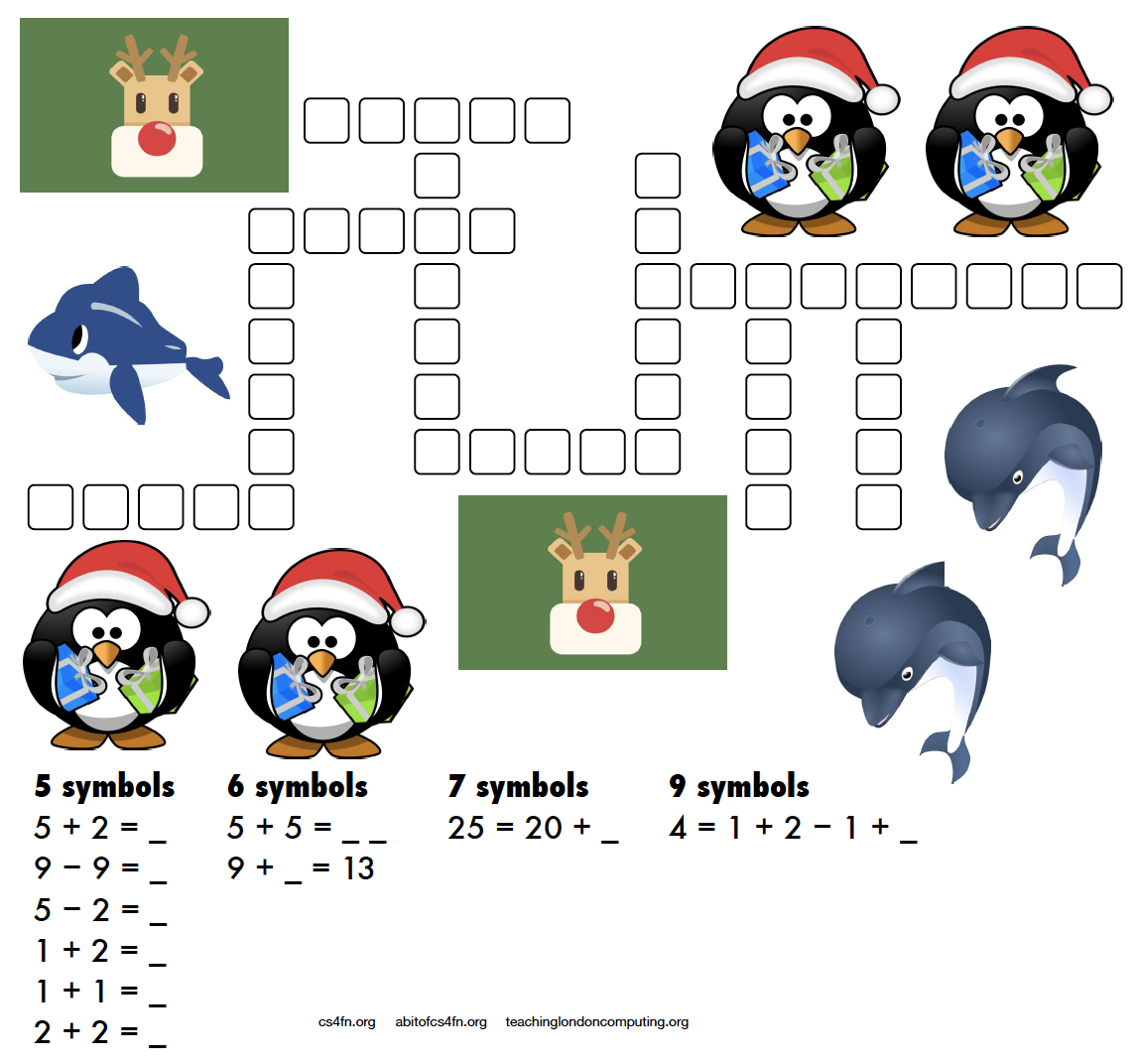
A more mathematical puzzle today. Rather than writing letters into the kriss-kross you need to write the equation and its answer.

For example 5 + 2 = as the clue gives you 5 + 2 = 7 as the answer which takes up 5 characters (note that the answer is not “seven” which also takes up 5 characters!). There are several places in the puzzle where a 5 character answer could go, but which one is the right one? Start with the clues that have only one space they can fit into (the ones with 7 symbols and 9 symbols) then see what can fit around them.

This puzzle was created by Daniel, who was aged 6 when he made this. For an explanation of the links to computer science and how these puzzles can be used in the classroom please see the Maths Kriss-Kross page on our site for teachers. Note that the page does include the answer sheet, but no cheating, we’ll post the answer tomorrow. Also, if you don’t have a printer you can use the editable PDF linked on that page.
4. Answer to yesterday’s puzzle

The creation of this post was funded by UKRI, through grant EP/K040251/2 held by Professor Ursula Martin, and forms part of a broader project on the development and impact of computing.


Advert for our Advent calendar
Click the tree to visit our CS4FN Christmas Computing Advent Calendar

EPSRC supports this blog through research grant EP/W033615/1.

CS4FN Advent 2023 – Day 7: Computing for the birds: dawn chorus, birds as data carriers and a Google April Fool (plus a puzzle!)

Welcome to Day 7 of our advent calendar. Yesterday’s post was about Printed Circuit Birds Boards, today’s theme is the Christmas robin redbreast which features on lots of Christmas cards and today is making a special appearance on our CS4FN Computing advent calendar.

A little robin redbreast. Image drawn and digitised by Jo Brodie.

In this longer post we’ll focus on the ways computer scientists are learning about our feathered friends and we’ll also make room for some of the bird-brained April Fools jokes in computing too.

We hope you enjoy it, and there’s also a puzzle at the end.

1. Computing Sounds Wild – bird is the word

Our free CS4FN magazine, Computing Sounds Wild (you can download a copy here), features the word ”bird” 60 times so it’s definitely very bird-themed.

An interest in nature and an interest in computers don’t obviously go well together. For a band of computer scientists interested in sound they very much do, though. In this issue we explore the work of scientists and engineers using computers to understand, identify and recreate wild sounds, especially those of birds. We see how sophisticated algorithms that allow machines to learn, can help recognize birds even when they can’t be seen, so helping conservation efforts. We see how computer models help biologists understand animal behaviour, and we look at how electronic and computer-generated sounds, having changed music, are now set to change the soundscapes of films. Making electronic sounds is also a great, fun way to become a computer scientist and learn to program.”

2. Singing bird – a human choir singing birdsong

by Jane Waite, QMUL
This article was originally published on the CS4FN website and can also be found on page 15 in the magazine linked above.

“I’m in a choir”. “Really, what do you sing?” “I did a blackbird last week, but I think I’m going to be woodpecker today, I do like a robin though!”

This is no joke! Marcus Coates a British artist, got up very early, and working with a wildlife sound recordist, Geoff Sample, he used 14 microphones to record the dawn chorus over lots of chilly mornings. They slowed the sounds down and matched up each species of bird with different types of human voices. Next they created a film of 19 people making bird song, each person sang a different bird, in their own habitats, a car, a shed even a lady in the bath! The 19 tracks are played together to make the dawn chorus. See it on YouTube below.

Marcus didn’t stop there, he wrote a new bird song score. Yes, for people to sing a new top ten bird hit, but they have to do it very slowly. People sing ‘bird’ about 20 times slower than birds sing ‘bird’ ‘whooooooop’, ‘whooooooop’, ‘tweeeeet’. For a special performance, a choir learned the new song, a new dawn chorus, they sang the slowed down version live, which was recorded, speeded back up and played to the audience, I was there! It was amazing! A human performance, became a minute of tweeting joy. Close your eyes and ‘whoop’ you were in the woods, at the crack of dawn!

Computationally thinking a performance

Computational thinking is at the heart of the way computer scientists solve problems. Marcus Coates, doesn’t claim to be a computer scientist, he is an artist who looks for ways to see how people are like other animals. But we can get an idea of what computational thinking is all about by looking at how he created his sounds. Firstly, he and wildlife sound recordist, Geoff Sample, had to focus on the individual bird sounds in the original recordings, ignore detail they didn’t need, doing abstraction, listening for each bird, working out what aspects of bird sound was important. They looked for patterns isolating each voice, sometimes the bird’s performance was messy and they could not hear particular species clearly, so they were constantly checking for quality. For each bird, they listened and listened until they found just the right ‘slow it down’ speed. Different birds needed different speeds for people to be able to mimic and different kinds of human voices suited each bird type: attention to detail mattered enormously. They had to check the results carefully, evaluating, making sure each really did sound like the appropriate bird and all fitted together into the Dawn Chorus soundscape. They also had to create a bird language, another abstraction, a score as track notes, and that is just an algorithm for making sounds!

3. Sophisticated songbird singing – how do they do it?

by Dan Stowell, QMUL
This article was originally published on the CS4FN website and can also be found on page 14 in the magazine linked above.

How do songbirds make such complex sounds? The answer is on a different branch of the tree of evolution…
We humans have a set of vocal folds (or vocal cords) in our throats, and they vibrate when we speak to make the pitched sound. Air from your lungs passes over them and they chop up the column of air letting more or less through and so making sound waves. This vocal ‘equipment’ is similar in mammals like monkeys and dogs, our evolutionary neighbours. But songbirds are not so similar to us. They make sounds too, but they evolved this skill separately, and so their ‘equipment’ is different: they actually have two sets of vocal folds, one for each lung.

Image by Dieter_G from Pixabay

Sometimes if you hear an impressive, complex sound from a bird, it’s because the bird is actually using the two sides of their voice-box together to make what seems like a single extra-long or extra-fancy sound. Songbirds also have very strong muscles in their throat that help them change the sound extremely quickly. Biologists believe that these skills evolved so that the birds could tell potential mates and rivals how healthy and skillful they were.

So if you ever wondered why you can’t quite sing like a blackbird, now you have a good excuse!

4. Data transmitted on the wing

Computers are great ways of moving data from one place to another and the internet can let you download or share a file very quickly. Before I had the internet at home if I wanted to work on a file on my home computer I had to save a copy from my work computer onto a memory stick and plug it in to my laptop at home. Once I ‘got connected’ at home I was then able to email myself with an attachment and use my home broadband to pick up file. Now I don’t even need to do that. I can save a file on my work computer, it synchronises with the ‘cloud’ and when I get home I can pick up where I left off. When I was using the memory stick my rate of data transfer was entirely down to the speed of road traffic as I sat on the bus on the way to work. Fairly slow, but the data definitely arrived in one piece.

In 1990 a joke memo was published for April Fool’s Day which suggested the use of homing pigeons as a form of internet, in which the birds might carry small packets of data. The memo, called ‘IP over Avian Carriers’ (that is, a bird-based internet), was written in a mock-serious tone (you can read it here) but although it was written for fun the idea has actually been used in real life too. Photographers in remote areas with minimal internet signal have used homing pigeons to send their pictures back.

The beautiful (and quite possibly wi-fi ready, with those antennas) Victoria Crowned Pigeon. Not a carrier pigeon admittedly, but much more photogenic.  Image by Foto-Rabe from Pixabay

A company in the US which offers adventure holidays including rafting used homing pigeons to return rolls of films (before digital film took over) back to the company’s base. The guides and their guests would take loads of photos while having fun rafting on the river and the birds would speed the photos back to the base, where they could be developed, so that when the adventurous guests arrived later their photos were ready for them.

Further reading

Pigeons keep quirky Poudre River rafting tradition afloat (17 July 2017) Coloradoan.

5. Serious fun with pigeons

On April Fool’s Day in 2002 Google ‘admitted’ to its users that the reason their web search results appeared so quickly and were so accurate was because, rather than using automated processes to grab the best result, Google was actually using a bank of pigeons to select the best results. Millions of pigeons viewing web pages and pecking picking the best one for you when you type in your search question. Pretty unlikely, right?

In a rather surprising non-April Fool twist some researchers decided to test out how well pigeons can distinguish different types of information in hospital photographs. They trained pigeons by getting them to view medical pictures of tissue samples taken from healthy people as well as pictures taken from people who were ill. The pigeons had to peck one of two coloured buttons and in doing so learned which pictures were of healthy tissue and which were diseased. If they pecked the correct button they got an extra food reward.

Pigeon, possibly pondering people’s photographs. Image by Davgood Kirshot from Pixabay

The researchers then tested the pigeons with a fresh set of pictures, to see if they could apply their learning to pictures they’d not seen before. Incredibly the pigeons were pretty good at separating the pictures into healthy and unhealthy, with an 80 per cent hit rate.

Further reading

Principle behind Google’s April Fools’ pigeon prank proves more than a joke (27 March 2019) The Conversation.

6. Today’s puzzle

You can download this as a PDF to PRINT or as an editable PDF that you can fill in on a COMPUTER.

You might wonder “What do these kriss-kross puzzles have to do with computing?” Well, you need to use a bit of logical thinking to fill one in and come up with a strategy. If there’s only one word of a particular length then it has to go in that space and can’t fit anywhere else. You’re then using pattern matching to decide which other words can fit in the spaces around it and which match the letters where they overlap. Younger children might just enjoy counting the letters and writing them out, or practising phonics or spelling.

We’ll post the answer tomorrow.

7. Answer to yesterday’s puzzle

Image by Paul Curzon / CS4FN.

The creation of this post was funded by UKRI, through grant EP/K040251/2 held by Professor Ursula Martin, and forms part of a broader project on the development and impact of computing.


Advert for our Advent calendar
Click the tree to visit our CS4FN Christmas Computing Advent Calendar

EPSRC supports this blog through research grant EP/W033615/1.

CS4FN Advent 2023 – Day 6: patterned bauble: tracing patterns in computing – printed circuit boards, spotting links and a puzzle for tourists

Welcome to Day 6 of the CS4FN Christmas Computing Advent Calendar – every day until Christmas we’ll post a little something about computer science. Some of it will even relate (…vaguely) to the picture on the advent calendar’s door.

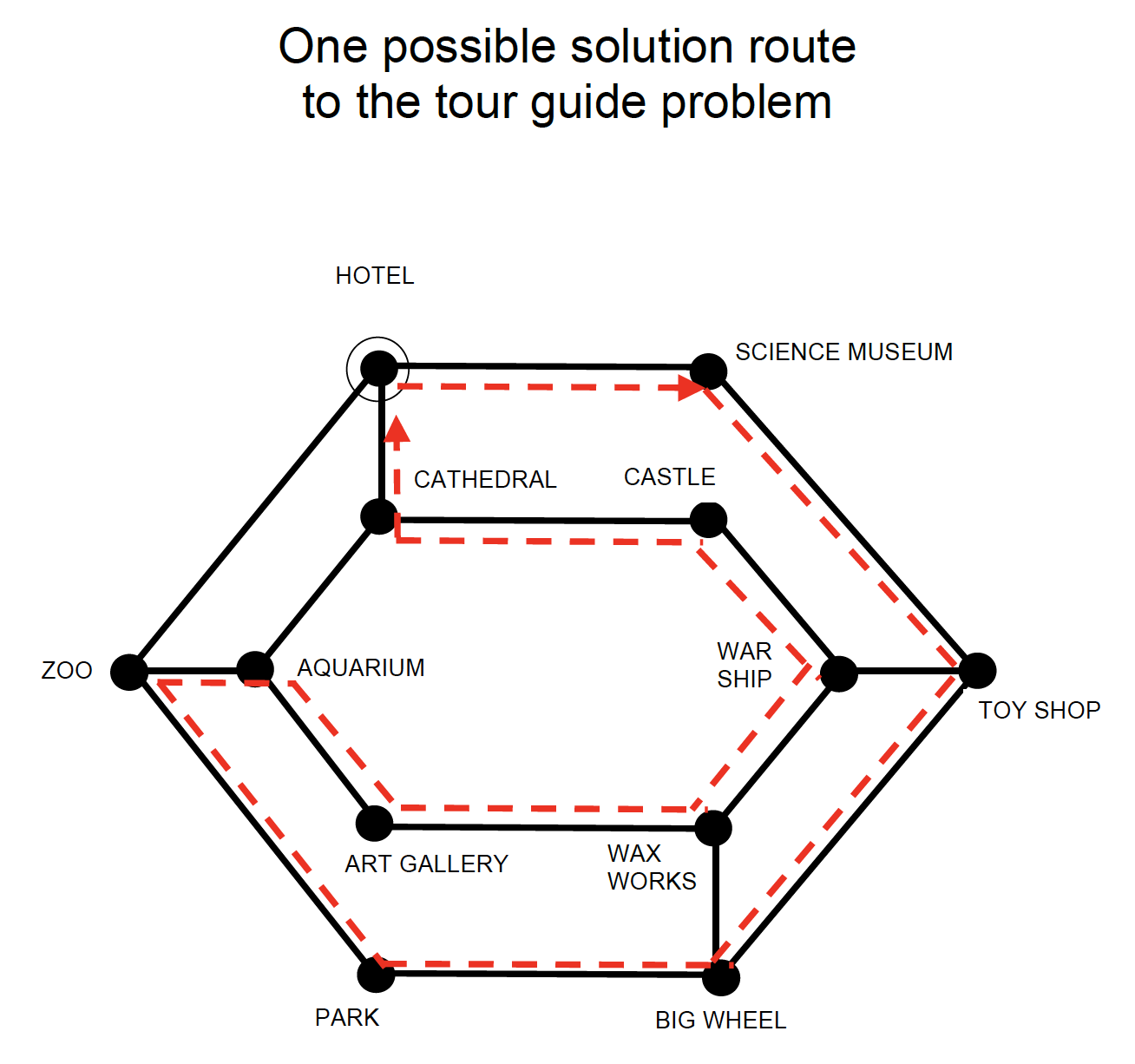
Today’s picture is of a festive bauble with a pattern engraved on it. That obviously made us think of printed circuit boards. Read on to see why.

A brightly coloured (pink!) Christmas bauble, ready to go on a tree. Image drawn and digitised by Jo Brodie.

Printed Circuit Boards

Yesterday we looked at computers made of water, in which the flow of water (and where it ends up) let people do some quite advanced calculations. Today it’s the electrons that are doing the flowing… through tiny little copper channels.

Continue reading “CS4FN Advent 2023 – Day 6: patterned bauble: tracing patterns in computing – printed circuit boards, spotting links and a puzzle for tourists”

CS4FN Advent 2023 – Day 5: snowman: analog hydraulic computers (aka water computers), digital compression, and a puzzle

This post is behind the 5th ‘door’ of the CS4FN Christmas Computing Advent Calendar – we’re publishing a computing-themed (and sometimes festive-themed) post every day until Christmas Day. Today’s picture is a snowman, and what’s a snowman made of but frozen water?

Image drawn and digitised by Jo Brodie.

1. You can make a computer out of water!

1n 1936 Vladimir Lukyanov got creative with some pipes and pumps built a computer, called a water (or hydraulic) integrator, which could store water temporarily in some bits and pump water to other bits. The movement of water and where it ended up used the ‘simplicity of programming’ to show him the answer – a physical representation of some Very Hard Sums (sums, equations and calculations that are easier now thanks to much faster computers).

A simple and effective way of using water to show a mathematical relationship popped up on QI and the video below demonstrates Pythagoras’ Theorem rather nicely.

Video from the BBC via their YouTube channel.

In 1939 Lukyanov published an article about his analog hydraulic computer for the (‘Otdeleniye Technicheskikh Nauk’ or ‘Отделение технических наук’ in Russian which means Section for Technical Scientific Works although these days we’d probably say Department of Engineering Sciences) and in 1955 this was translated by the Massachusetts Institute of Technology (MIT) for the US army’s “Arctic Construction and Frost Effects Laboratory”. You can see a copy of his translated ‘Hydraulic Apparatus for Engineering Computations‘ at the Internet Archive.

In a rather pleasing coincidence for this blog post (that you might think was by design rather than just good fortune) this device was actually put to work by the US Army to study the freezing and thawing not of snowmen but of soil (ie, the ground). It’s particularly useful if you’re building and maintaining a military airfield (or even just roads) to know how well the concrete runway will survive changes in weather (and how well your aircraft’s wheels will survive after meeting it).

For a modern take on the ‘hydrodynamic calculating machine’ aka water computer see this video from science communicator Steve Mould in which he creates a computer that can do some simple additions.

Video by Steve Mould via his YouTube channel.

2. The puzzle of digital compression

Our snowman’s been sitting around for a while and his ice has probably become a bit compacted, so he might be taking up less space (or he might have melted). Compression is a technique computer scientists use to make big data files smaller.

Big files take a long time to transfer from one place to another. The more data the longer it takes, and the more memory is needed to store the information. Compressing the files saves space. Data on computers is stored as long sequences of characters – ultimately as binary 1s and 0s. The idea with compression is that we use an algorithm to change the way the information is represented so that fewer characters are needed to store exactly the same information.

That involves using special codes. Each common word or phrase is replaced by a shorter sequence of symbols. A long file can be made much shorter if it has lots of similar sequences, just as the message below has been shortened. A second algorithm can then be used to get the original back. We’ve turned the idea into a puzzle that involves pattern matching patterns from the code book. Can you work out what the original message was? (Answer tomorrow, and another snowman-themed puzzle coming soon).

The code: NG1 AMH5 IBEC2 84F6JKO 7JDLC93 (clue: Spooky apparitions are about to appear on Christmas Eve).

The code book (match the letter or number to the word it codes for).

3. Answer to yesterday’s puzzle

The creation of this post was funded by UKRI, through grant EP/K040251/2 held by Professor Ursula Martin, and forms part of a broader project on the development and impact of computing.


Advert for our Advent calendar
Click the tree to visit our CS4FN Christmas Computing Advent Calendar

EPSRC supports this blog through research grant EP/W033615/1.
CS4FN Advent 2023 – Day 4: Ice skate: detecting neutrinos at the South Pole, figure-skating motion capture, Frozen and a puzzle

This post is part of the CS4FN Christmas Computing Advent Calendar and we are publishing a small post every day, about computer science, until Christmas Day. This is the fourth post and the picture on today’s door was an ice skate, so today’s theme is Very Cold.

A bright red ice skate. Image drawn and digitised by Jo Brodie.

1. IceCube

The South Pole is home to the IceCube Neutrino Observatory. It’s made of thousands of light (optical) sensors which are stretch down deep into the ice, to almost 3,000 metres (3 kilometres) below the surface – this protects the sensors from background radiation so that they can focus on detecting neutrinos, which are teeny tiny particles.

Building the IceCube Observatory – photo from Wikipedia. Ice Cube drilling setup at drill camp, December 2009. This file is licensed under the Creative Commons Attribution-Share Alike 3.0 Unported license.

Neutrinos can be created by nuclear reactions (lots are produced by our Sun) and radioactive decay. They can whizz through matter harmlessly without notice (as the name suggests, they are pretty neutral), but if a neutrino happens to interact with a water molecule in the ice then they can produce a charged particle which can produce enough radiation of its own for its signal to be picked up by the sensors. The IceCube observatory has even detected neutrinos that may have arrived from outside of our solar system.

These light signals are converted to digital form and the data stored safely on a computer hard drive, then later collected by ship (!) and are taken away for further analysis. (Although there is satellite internet connection on Antarctica the broadband speeds are about 20 times slower than we’d have in our own homes!).

2. Computer science can help skaters leap to new heights

Researchers at the University of Delaware use motion capture to map a figure skater’s movements to a virtual version in a computer (remember the digital twins mentioned on Day Two of the advent calendar). When a skater is struggling with a particular jump the scientists can use mathematical models to run that jump as a computer simulation and see how fast the skater should be spinning, or the best position for their arms. They can then share that information with the skater to help them make the leap successfully (and land safely again afterwards!).

Video from the University of Delaware via their YouTube channel.

3. Frozen defrosted

by Peter McOwan, Queen Mary University of London

The hit musical movie Frozen is a mix of hit show tunes, 3D graphics effects, a moral message and loads of topics from computer science. The lead character Princess Elsa creates artificial life in the form of snowman, Olaf, the comedy sidekick, uses nanotechnology based ice dress making, employs 3D printing to build an ice palace by simply stamping her foot and singing and must be complimented for the outstanding mathematical feat of including the word ‘fractal’ in a hit song. In the USA the success of the movie has been used to get girls interested in coding by creating new ice skating routines for the film’s princesses, and devising their own frozen fractals…and let it go, let it go, … you all know the rest.

4. Today’s puzzle

This is a kriss-kross puzzle and you solve it by fitting the words into the grid. Answer tomorrow. You need to pay attention to the letter length as that tells you which word can fit where. There is only one four-letter, six-letter and eight-letter word so these can fit only in the grid where there are four, six or eight spaces, so put them in first. There are two three-letter words and two three-letter spaces – the words could be fitted into either space, but only one of them is correct (where the letters of other words will match up). Strategy! Logical thinking! (Also Maths [counting] and English [spelling]).


EPSRC supports this blog through research grant EP/W033615/1.

CS4FN Advent 2023 – Day 3: snowflakes – make your own six-sided HexaHexaFlexagon with our templates

The picture for today’s door of the CS4FN Christmas Computing Advent Calendar is a snowflake and, inspired by its six-sides, this post is celebrating the similarly six-sided (and six-faced) HexaHexaFlexagon.

A snowflake in a blue circle. Image drawn and digitised by Jo Brodie.

A hexahexaflexagon is a strip of paper cleverly folded to hide and then reveal six hexagonal faces within it. You pinch and flex them to reveal another face, as shown in the video below. It’s effectively a Möbius strip.

Looping gif created by Jo Brodie.

The name references a hexagonal shape which is flexed to show a new face (‘flexagon’) and the hexa-hexa bit just means each face has six sides and there are six faces.

An unfolded hexahexaflexagon design. Image(s) by Jo Brodie.

Flexagons were discovered in the late 1930s by a British maths student (Arthur Stone) who’d arrived at Princeton University with a binder / folder from home and discovered that American paper was too large to fit in. He cut off the excess strips and ‘doodled’ with them by folding them into different shapes, then involving his classmates in developing them.

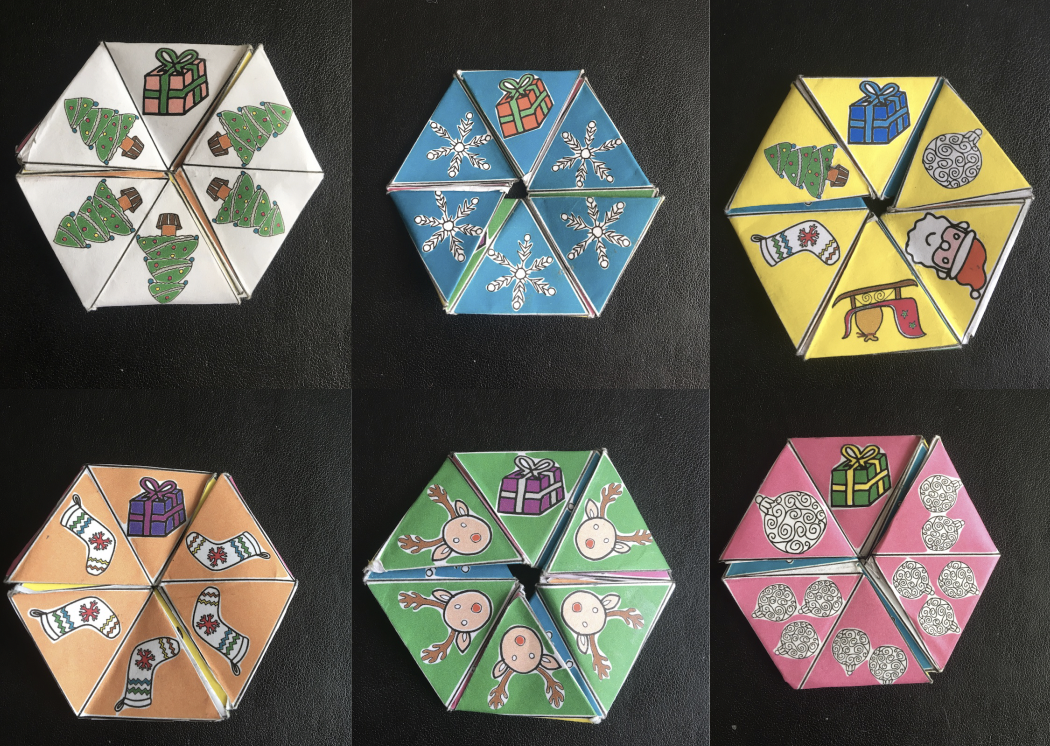
There are lots of ways to make them but we’ve created some templates to help. You can print our HexaHexaFlexagons or make and decorate your own from scratch. Ours depict Father Christmas looking for the six presents he’s lost among the different faces but there’s a blank template if you’d like to design your own.

Of course there’s some computer science and maths behind these too – we have a free PDF booklet which you can download, called Computational Thinking: HexaHexaFlexagon Automata.

Print or make your own HexaHexaFlexagon

Click here to download the patterns for printing. There are black and white ones for you to colour in yourself as well as an already-coloured one. There are also blank templates for you to make your own.

The six faces of our ready-to-print hexahexaflexagon. Image(s) by Jo Brodie.
Click to get our printable patterns.
More information about the free booklet all about HexaHexaFlexagons

Vi Hart has a series of short fun videos about hexaflexagons.

Answers to yesterday’s puzzle

Did you spot our snowman?

View the solution sheet here (PDF).


Advert for our Advent calendar
Click the tree to visit our CS4FN Christmas Computing Advent Calendar

EPSRC supports this blog through research grant EP/W033615/1.

CS4FN Advent 2023 – Day 2: Pairs: mittens, gloves, pair programming, magic tricks

Welcome to the second ‘window’ of the CS4FN Christmas Computing Advent Calendar. The picture on the ‘box’ was a pair of mittens, so today’s focus is on pairs, and a little bit on gloves. Sadly no pear trees though.

A pair of cyan blue Christmas mittens with a black and white snowflake pattern on each. Image drawn and digitised by Jo Brodie.

1. i-pickpocket

In this article, by a pair (ho ho) of computer scientists (Jane Waite and Paul Curzon), you can find out how paired devices can be used to steal money from people, picking pockets at a distance.

A web card for the i-pickpocket article on the CS4FN website.
Click to read the article

2. Gestural gloves

Working with scientists musician Imogen Heap developed Mi.Mu gloves, a wearable musical instrument in glove form which lets the wearer map hand movements (gestures) to a particular musical effect (pairing a gesture to an action). The gloves contain sensors which can measure the speed and position of the hands and can send this information wirelessly to a controlling computer which can then trigger the sound effect that the musician previously mapped to that hand movement.

You can watch Imogen talk about and demo the gloves here and in the video below, which also looks at the ways in which the gloves might help disabled people to make music.

Further reading

The glove that controls your cords… (a CS4FN article by Jane Waite)

3. Pair programming

‘Pair programming’ involves having two people working together on one computer to write and edit code. One person is the ‘Driver’ who writes the code and explains what it’s going to do, the other person is the ‘Navigator’ who observes and makes suggestions and corrections. This is a way to bring two different perspectives on the same code, which is being edited, reviewed and debugged in real-time. Importantly, the two people in the mini-team switch roles regularly. Pair programming is widely used in industry and increasingly being used in the classroom – it can really help people who are learning about computers and how to program to talk through what they’re doing with someone else (you may have done this yourself in class). However, some people prefer to work by themselves and pair programming takes up two people’s time instead of one, but it can also produce better code with fewer bugs. It does need good communication between the two people working on the task though (and good communication is a very important skill in computer science!).

Here’s a short video from Code.org which shows how it’s done.

4. Digital Twins

A digital twin is a computer-based model that represents a real, physical thing (such as a jet engine or car component) and which behaves as closely as possible to the real thing. Taking information from the real-world version and applying it to the digital twin lets engineers and designers test things virtually, to see how the physical object would behave under different circumstances and to help spot (and fix) problems.

5. A magic trick: two cards make a pair

You will need

  • some playing cards
  • your hands (no mittens)
  • another pair of mitten-free hands to do the trick on

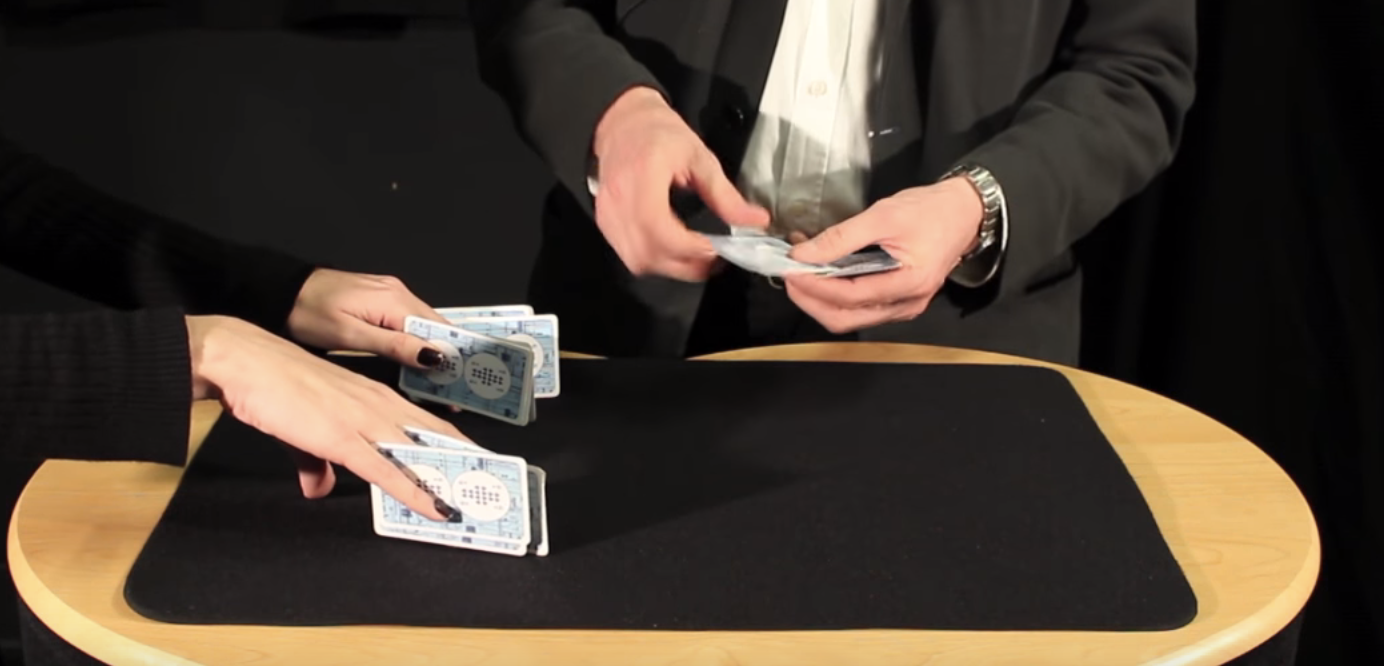
Find a pack of cards and take out 15 (doesn’t matter which ones, pick a card, any card, but 15 of them). Ask someone to put their hands on a table but with their fingers spread as if they’re playing a piano. You are going to do a magic trick that involves slotting pairs of cards between their fingers (10 fingers gives 8 spaces). As you do this you’ll ask them to say with you “two cards make a pair”. Take the first pair and slot them between the first space on their left hand (between their little finger and their ring finger) and both of you say “two cards make a pair”.

The magician puts pairs of cards between the assistant’s fingers. Image credit CS4FN / Teaching London Computing (from the Invisible Palming video linked below)

Repeat with another pair of cards between ring finger and middle finger (“two cards make a pair”) and twice again between middle and index, and between index and thumb – saying “two cards make a pair” each time you do. You’ve now got 8 cards in 4 pairs in their left hand.

Repeat the same process on their right hand saying “two cards make a pair” each time (but you only have 7 cards left so can only make 3 pairs). There’s one card left over which can go between their index finger and thumb.

The magician removes the cards and puts them into two piles. Image credit CS4FN / Teaching London Computing (from the Invisible Palming video linked below)

Then you’ll take back each pair of cards and lay them on the table, separating them into two different piles – each time saying “two cards make a pair”. Again you’ll have one left over. Ask the person to choose which pile it goes on. You, the magician, are going to magically move the card from the pile they’ve chosen to the other pile, but you’re going to do it invisibly by hiding the card in your palm (‘palming’). To find out how to do the trick, and how this can be used to think about the ways in which “self-working” magic tricks are like algorithms have a look at the full instructions and video below.

6. Something to print and colour in

Did you work out yesterday’s colour-in puzzle from Elaine Huen? Here’s the answer.

Christmas colour-in puzzle

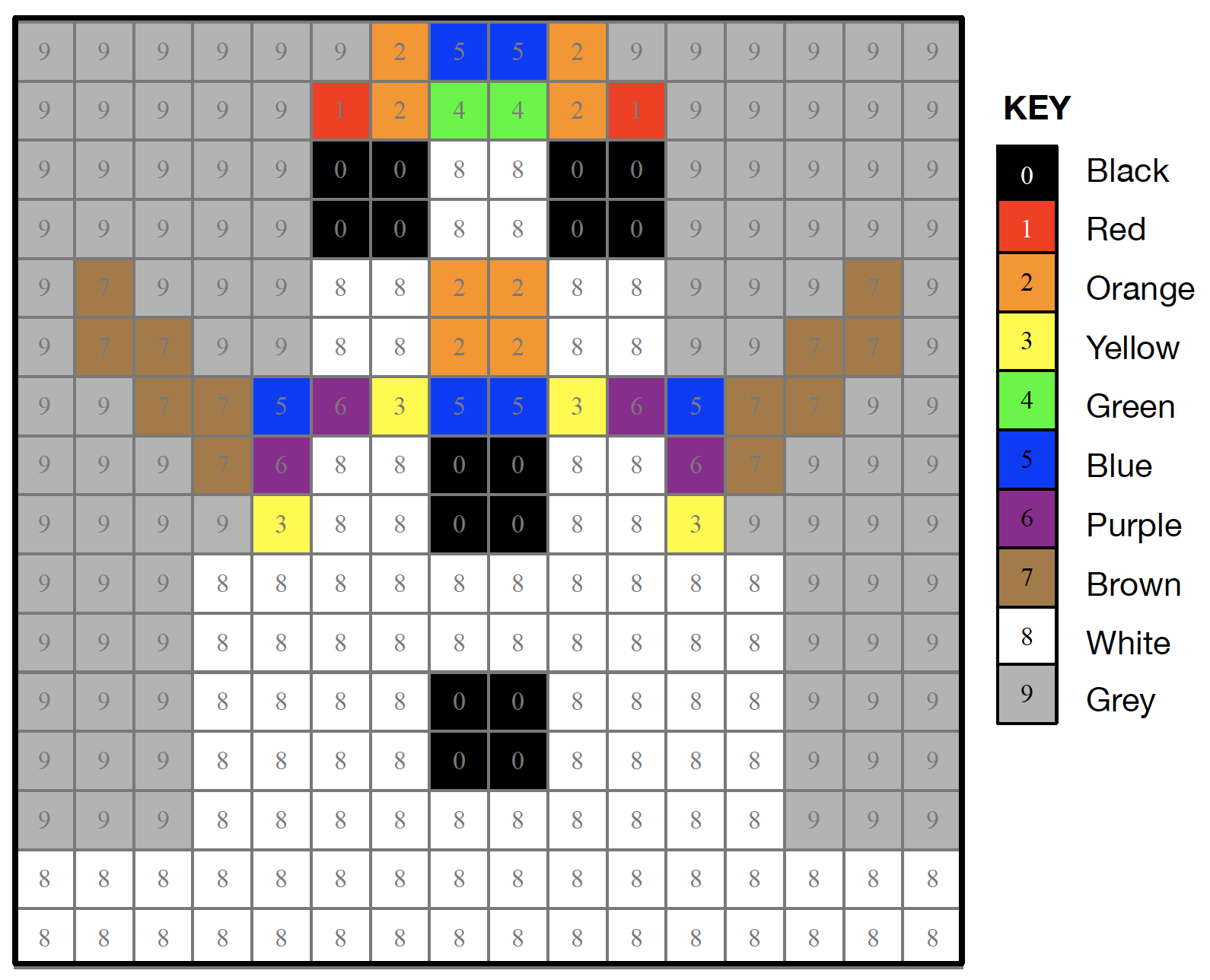
Today’s puzzle is in keeping with the post’s twins and pairs theme. It’s a symmetrical pixel puzzle so we’ve given you one half and you can use mirror symmetry to fill in the remaining side. This is an example of data compression – you only need half of the numbers to be able to complete all of it. Some squares have a number that tells you the colour to colour in that square. Look up the colours in the key. Other squares have no number. Work out what colour they are by symmetry.

So, for example the colour look up key tells you that 1 is Red and 2 is Orange, so if a row said 11111222 that means colour each of the five ‘1’ pixels in red and each of the three ‘2’ pixels orange. There are another 8 blank pixels to fill in at the end of the row and these need to mirror the first part of the row (22211111), so you’d need to colour the first three in orange and the remaining five in red. Click here to download the puzzle as a printable PDF. Solution tomorrow…


The creation of this post was funded by UKRI, through grant EP/K040251/2 held by Professor Ursula Martin, and forms part of a broader project on the development and impact of computing.


Advert for our Advent calendar
Click the tree to visit our CS4FN Christmas Computing Advent Calendar

EPSRC supports this blog through research grant EP/W033615/1.

CS4FN Advent 2023 – Day 1: Woolly jumpers, knitting and coding

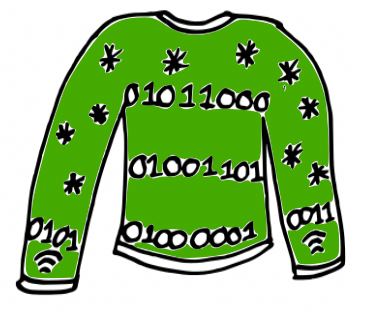
Welcome to the first ‘window’ of the CS4FN Christmas Computing Advent Calendar. The picture on the ‘box’ was a woolly jumper with a message in binary, three letters on the jumper itself and another letter split across the arms. Can you work out what it says? (Answer at the end).

Come back tomorrow for the next instalment in our Advent series.

Cartoon of a green woolly Christmas jumper with some knitted stars and a message “knitted” in binary (zeroes and ones). Also the symbol for wifi on the cuffs. Image drawn and digitised by Jo Brodie.

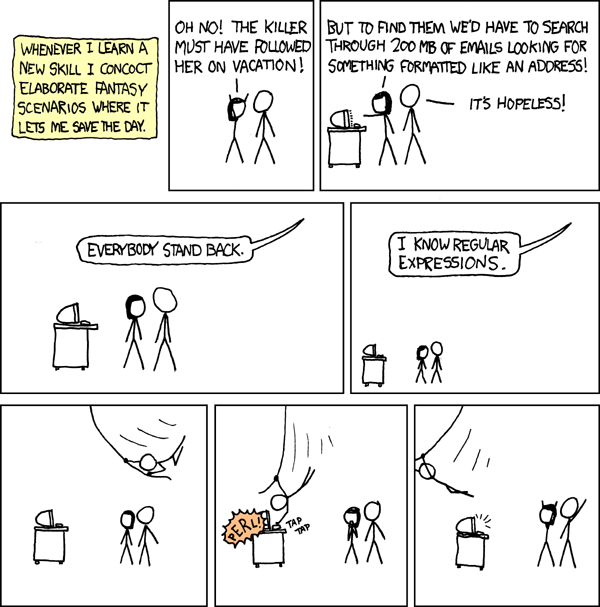
Wrap up warmly with our first festive CS4FN article, from Karen Shoop, which is all about the links between knitting patterns and computer code. Find out about regular expressions in her article: Knitters and Coders: separated at birth?

Click above to read Karen’s article

Image credit: Regular Expressions by xkcd

Further reading

Dickens Knitting in Code – this CS4FN article, by Paul Curzon, is about Charles Dickens’ book A Tale of Two Cities. One of the characters, Madame Defarge, takes coding to the next level by encoding hidden information into her knitting, something known as steganography (basically hiding information in plain sight). We have some more information on the history of steganography and how it is used in computing in this CS4FN article: Hiding in Elizabethan binary.

In Craft, Culture, and Code Shuchi Grover also considers the links between coding and knitting, writing that “few non-programming activities have such a close parallels to coding as knitting/crocheting” (see section 4 in particular, which talks about syntax, decomposition, subroutines, debugging and algorithms).

Something to print and colour in

This is a Christmas-themed thing you might enjoy eating, if you’ve any room left of course. Puzzle solution tomorrow. This was designed by Elaine Huen.

Solving the Christmas jumper code

The jumper’s binary reads

01011000

01001101

01000001

01010011

What four letters might be being spelled out here? Each binary number represents one letter and you can find out what each letter is by looking at this binary-to-letters translator. Have a go at working out the word using the translator (but the answer is at the end of this post).

Keep scrolling

Bit more

The Christmas jumper says… XMAS


Advert for our Advent calendar
Click the tree to visit our CS4FN Christmas Computing Advent Calendar

EPSRC supports this blog through research grant EP/W033615/1.