
Find all the words
Practice Algorithmic Thinking, Pattern Matching and Attention to Detail by finding the hidden words in an organised, algorithmic way.
Create your own word search puzzles to practice your spellings or just on a topic you enjoy.
Find Puzzles and solutions below
We have hidden words in the grid of words. Can you use algorithmic thinking to find all the words quickly without missing any? Can you come up with an algorithm (an organised way to search) that will guarantee you find all the words. Other computational thinking skills that you will need are attention to detail and pattern matching skills to solve these puzzles. Try the puzzle and write down the method you are using so that someone else could follow your instructions to also solve the word search in the same way.
Then read on to the end to find an organised way to search. Is it the way you came up with?
The puzzles with solutions
Egyptian God and Goddess Word Search
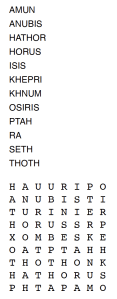
In this puzzle one of the puzzle words is not in the grid. Can you work out which one is missing?
Artist Word Search
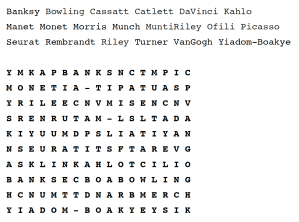
Find the names of all the artists. Then find some of their pictures on the web and choose your favourite by each. Who is your favourite artist?
Famous Computer Scientists Word Search

Find all the famous computer scientists in the grid, women and men. One extra name is in the grid but not in the list of names. Can you work out who it is?
What were each of these computer scientists most famous for?
Telecommunications Word Search
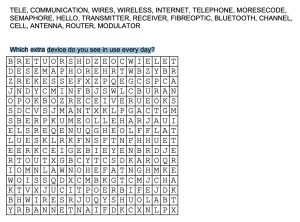
Find all the words related to telecommunications in the grid.
Which extra device do you see in use every day?
Computing Words Word Search

Find all the computing words in the grid. If you follow an algorithm of searching for the first letter, is it always the best thing to do?
Year 3/4 Words Word Search
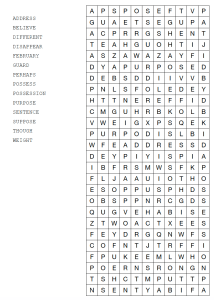
Find all the Year 4/ 5 spelling words in the grid.
If you have to practice spellings, why not create your own word search of the words for your friends. Leave it a few days then try and find the words yourself too.
Search Algorithms
You might be able to spot some words just using your pattern matching skills, running your eyes over the grid and spotting the words. Most people find it hard to find all words that way. To be sure of finding them all, you need what computer scientists call a search algorithm.
One way is to pick a word from the list of words (an organised way would be to pick them in turn from the list). Then taking its first letter, scan the grid from left to right, a row at a time looking for that letter.
When you find it, look in each of the 8 positions around the found letter and see if the letter there is the second letter of the word. If it IS NOT the correct second letter then carry on checking the other letters round it.
If an adjacent letter IS the correct letter then check each letter at a time in the same direction (horizontally, vertically or diagonally) as the second letter that was was found. If all letters along that line match then you have found the word. If you find a letter that doesn’t match then go back to checking the letters around the first one found.
When all the adjacent letters of the first letter have been checked and not found then go back to scanning the grid for another position in the grid where the first letter is found.
If you get to the end of the grid (and were very careful so didn’t make any mistake) then if you get to the end of the grid without finding the word, then it is not there. Of course, unlike computers, humans do make mistakes following instructions, so perhaps double check! Move on to the next word.
If you have found the word then mark where it is and move on to the next word and go back to the start of the grid.
Keep going until you have found all the words that are there.
It is quite hard to write out an algorithm like this precisely in English (did I definitely cover every possibility in the above?), and can be quite hard to follow to, which is why algorithms are normally written out in a programming language or as pseudocode or a flow chart. We can also make an algorithm easier to follow by breaking it up into parts corresponding tasks: here for example: find a first letter; find a second letter; check whole word.
Here are the instructions broken into the separate tasks and written out in a form of pseudocode:
TO SOLVE A WORDSEARCH (assuming all the words are there) :
      FOR each word in the list of words
             FIND that word IN THE GRID
             Mark the place it is found

TO FIND a given word IN THE GRID
     FOR each letter in the grid in turn
          IF the letter matches the first letter of the word
          THEN IF the word IS AT THAT POSITION
                     THEN the word is found. RETURN (FOUND).

TO CHECK IF a word IS AT A POSITION
     FOR each letter adjacent to that position (horizontally, vertically or diagonally)
          IF the letter matches the second letter of the word
          THEN IF REST OF THE WORD CONTINUES IN THAT DIRECTION
                         gives NOT FOUND
                     THEN the word is not there.
                      ELSE we have found it. RETURN (FOUND).
    IF we get to the end of the loop without finding it
    THEN the word is not at that position. RETURN (NOT FOUND).

TO CHECK IF THE REST OF a word CONTINUES IN THAT DIRECTION
     FOR each letter in the word from the third onwards
          IF the letter does NOT match the next letter in the grid in that direction
              OR there are no more letters in that direction
          THEN the word is not there. RETURN (NOT FOUND)
    IF we get to the end of the loop without deciding it is not there
    THEN the word has been found RETURN (FOUND)
One way is to pick a word from the list of words (an organised way would be to pick them in turn from the list). Then taking its first letter, scan the grid from left to right, a row at a time looking for that letter.
When you find it, look in each of the 8 positions around the found letter and see if the letter there is the second letter of the word. If it IS NOT the correct second letter then carry on checking the other letters round it.
If an adjacent letter IS the correct letter then check each letter at a time in the same direction (horizontally, vertically or diagonally) as the second letter that was was found. If all letters along that line match then you have found the word. If you find a letter that doesn’t match then go back to checking the letters around the first one found.
When all the adjacent letters of the first letter have been checked and not found then go back to scanning the grid for another position in the grid where the first letter is found.
If you get to the end of the grid (and were very careful so didn’t make any mistake) then if you get to the end of the grid without finding the word, then it is not there. Of course, unlike computers, humans do make mistakes following instructions, so perhaps double check! Move on to the next word.
If you have found the word then mark where it is and move on to the next word and go back to the start of the grid.
Keep going until you have found all the words that are there.
Try following the above instructions to find a word in a word search. Humans are not very good at following instructions even if they are well-written. Unless you are very good at concentrating you probably were distracted and stopped following the algorithm (e.g., because you saw another word). Algorithms are supposed to be followed exactly, though. If you did get distracted then you were no longer following the algorithm, and so more likely to make a mistake.
The search algorithm that involves searching each of a series of things in turn is called Linear Search. We use two versions of it in our algorithm – once scanning the whole grid, and once checking each adjacent letter for the second letter. We then use a word comparison algorithm checking each letter in turn against a candidate found.
Linear search guarantees to find the thing you are looking for (the “key”) if it is there, but you must check everything to be sure a word is not there.
Subscribe to be notified whenever we publish a new post to the CS4FN blog.
This blog is funded by EPSRC on grant EP/W033615/1.


 cs4fn
cs4fn 